C5 - Kitchen scales CASO - Free user manual and instructions
Find the device manual for free C5 CASO in PDF.



| Product type | Kitchen scale |
| Brand | CASO |
| Model | C5 |
| Platform material | Glass |
| Maximum capacity | 5000 g |
| Accuracy | 1 g (estimated) |
| Minimum weight | 20 g |
| Units of measurement | Grams (g) and ounces (oz) |
| Functions | Weighing, tare, unit change, auto-off |
| Display | LCD screen |
| Power supply | 2 AAA 1.5V batteries (not included) |
| Automatic shut-off | After 1 minute of inactivity |
| Error indicators | Overload (EEEE), unstable weight (Unst), tare out of range (OUT2) |
| Cleaning | Damp cloth and mild dish soap; do not immerse |
| Safety | Do not use if damaged; keep out of reach of children; do not throw away |
| Repairs | Only entrust to a service approved by the manufacturer |
| Warranty | 24 months from date of purchase |
| Operating environment | Indoor, domestic use |
Frequently Asked Questions - C5 CASO
User questions about C5 CASO
0 question about this device. Answer the ones you know or ask your own.
Ask a new question about this device
Download the instructions for your Kitchen scales in PDF format for free! Find your manual C5 - CASO and take your electronic device back in hand. On this page are published all the documents necessary for the use of your device. C5 by CASO.
USER MANUAL C5 CASO
natural_image
Digital kitchen digital scale with glass lid and digital display (no text or symbols visible)1 Allgemeines
text_image
Lo Replace the batteries in right polarity4.2 Batteriewechsel
text_image
MELLO 0 100%text_image
Diagram showing three steps of a digital kitchen appliance: heating, rotating, and stirring.natural_image
Line drawings of two kitchenware setups: a bowl on a digital scale and a bowl on a digital scale, both with a hand pointing to the side (no text or symbols present)Please read the information contained herein so that you can become familiar with your device quickly and take advantage of the full scope of its functions.
Your food processor will serve you for many years if you handle it and care for it properly.
We wish you a lot of pleasure in using it!
8.2 Information on this manual
These Operating Instructions are a component of the food processor (referred to hereafter as the Device) and provide you with important information for the initial commissioning, safety, intended use and care of the device.
The Operating Instructions must be available at all times at the device. This Operating Manual must be read and applied by every person who is instructed to work with the device:
- Commissioning, Operation, Troubleshooting and/or Cleaning
Keep the Operating Manual in a safe place and pass it on to the subsequent owner along with the device.
8.3 Warning notices
The following warning notices are used in the Operating Manual concerned here.
⚠GEFAHR
DANGER
A warning notice of this level of danger indicates a potentially dangerous situation.
If the dangerous situation is not avoided, this can lead to death or serious injuries.
▶ Observe the instructions in this warning notice in order to avoid the danger of death or serious personal injuries.
⚠️WARNUNG
WARNING
A warning notice of this level of danger indicates a possible dangerous situation.
If the dangerous situation is not avoided, this can lead to serious injuries.
▶ Observe the instructions in this warning notice in order to avoid the personal injuries.
▲VORSICHT
ATTENTION
A warning notice of this level of danger indicates a possible dangerous situation.
If the dangerous situation is not avoided, this can lead to slight or moderate injuries.
▶ Observe the instructions in this warning notice in order to avoid the personal injuries.
HINWEIS
PLEASE NOTE
A notice of this kind indicates additional information, which will simplify the handling of the machine.
8.4 Limitation of liability
All the technical information, data and notices with regard to the installation, operation and care are completely up-to-date at the time of printing and are compiled to the best of our knowledge and belief, taking our past experience and findings into consideration.
No claims can be derived from the information provided, the illustrations or descriptions in this manual.
The manufacturer does not assume any liability for damages arising as a result of the following:
• Non-observance of the manual
• Uses for non-intended purposes
- Improper repairs
- Technical alterations
- Use of unauthorized spare parts
All translations are carried out to the best of our knowledge. We do not assume any liability for translation errors, not even if the translation was carried out by us or on our instructions. The original German text remains solely binding.
8.5 Copyright protection
This document is copyright protected.
Braukmann GmbH reserves all the rights, including those for photomechanical reproduction, duplication and distribution using special processes (e.g. data processing, data carriers, data networks), even partially.
Subject to content and technical changes.
9 Safety
This chapter provides you with important safety notices when handling the device. The device corresponds with the required safety regulations. Improper use can result in personal or property damages.
9.1 Intended use
This device is only intended for use in households in enclosed spaces for weighing food. Uses for a different purpose or for a purpose which exceeds this description are considered incompatible with the intended or designated use.
⚠️WARNUNG Warning
Danger due to unintended use!
Dangers can emanate from the device if it is used for an unintended use and/or a different kind of use.
▶ Use the device exclusively for its intended use.
▶ Observe the procedural methods described in this Operating Manual.
Claims of all kinds due to damages resulting from unintended uses are excluded.
The User bears the sole risk.
9.2 General Safety information
HINWEIS
Please note
Please observe the following general safety notices with regard to the safe handling of the device.
▶ Examine the device for any visible external damages prior to using it. Never put a damaged device into operation.
▶ Persons, who are not able to operate the device because of any physical, mental or motor disabilities may only use the device under the supervision or under the instructions of a responsible person.
▶ Do not permit children to use the device, unless they are supervised.
▶ Only customer service departments authorized by the manufacturer may carry out repairs on the device during the guarantee period, as otherwise the guarantee entitlements will be null and void in the event of any subsequent damages.
▶ Defective components must always be replaced with original replacement parts. Only such parts will guarantee that the safety requirements are fulfilled.
▶ Do not drop it or jump on the scale, otherwise the scale is easy to damage.
10 Commissioning
This chapter provides you with important safety notices during the initial commissioning of the device. Observe the following notices to avoid dangers and damages:
10.1 Safety information
⚠️WARNUNG
Warning
Personal and property damages can occur during commissioning of the device!
Observe the following safety notices to avoid such dangers:
▶ Packaging materials may not be used for playing. There is a danger of suffocation.
10.2 Delivery scope and transport inspection
As a rule, the Designer multi grater is delivered with the following components:
- Designer glass scales C5
- Operating Instructions
HINWEIS Please note
▶ Examine the shipment for its completeness and for any visible damages.
▶ Immediately notify the carrier, the insurance and the supplier about any incomplete shipment or damages as a result of inadequate packaging or due to transportation.
10.3 Unpacking
- Remove the device out of the carton and remove the packaging material.
10.4 Disposal of the packaging
The packaging protects the device against damages during transit. The packaging materials are selected in accordance with environmentally compatible and recycling-related points of view and can therefore be recycled.
Returning the packaging back to the material loop saves raw materials and reduces the quantities of accumulated waste. Take any packaging materials that are no longer required to “Green Dot” recycling collection points for disposal.

HINWEIS Please note
▶ If possible, keep the original packaging for the device for the duration of the guarantee period of the device, in order that the device can be re-packaged properly in the event of a guarantee claim.
10.5 Setup
10.5.1 Setup location requirements:
In order to ensure the safe and trouble-free operation of the device, the setup location must fulfil the following prerequisites:
- The device must be set up on a firm, flat and horizontal surface with sufficient load-bearing capacity for the scale and the maximum weight of the food that should be weighed.
- Choose the setup location in such a way that children cannot reach the device.
- Do not set up the device in a hot, wet or extremely damp environment or near flammable material.
10.6 Rating plate
The rating plate with the performance data can be founded on the back of the device
11 Operation and Handing
This chapter provides you with important notices with regard to operating the device. Observe the following notices to avoid dangers and damages.
11.1 Power Supply
Open the battery cover and insert four new batteries (1.5 V, AAA). Use correct polarity

text_image
Lo Replace the batteries in right polarity11.2 Replacing the battery
When the LCD display indicates low battery, open the battery cover and replace the batteries with new ones.
HINWEIS
Please note
▶ Old and new batteries should not be mixed.
11.3 Operation
11.3.1 Weighing
Put the food on the scale surface.

text_image
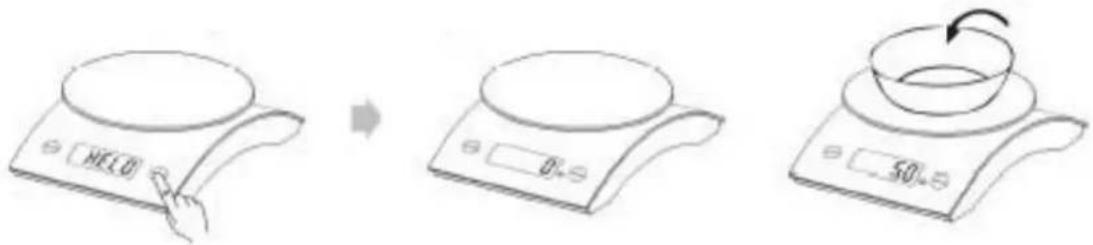
Illustration showing three steps of a cooking process: heating a kiln, adding temperature, and adding a fruit to a pan.Press the key "TARE", the scale displays zero shortly after "HELO" appeared in the display
Place the item to be weighed on the weighing surface and the corresponding weight is displayed.
11.3.2 Tarafunction
text_image
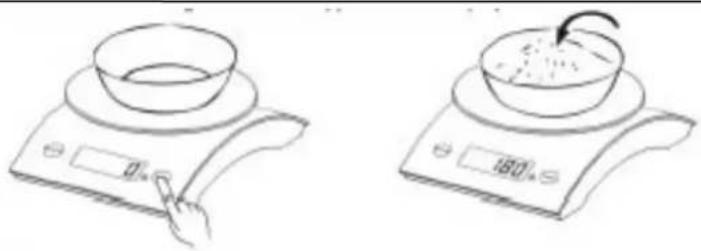
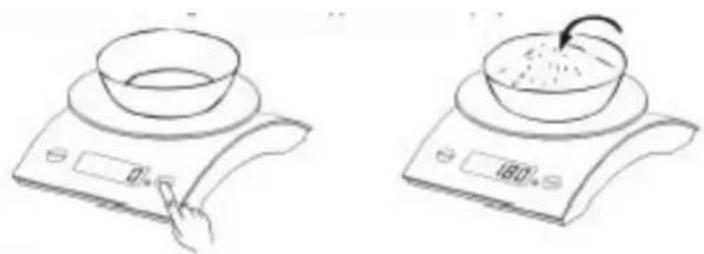
HELO 0 50Under the weight state, put the container on the scale surface, LCD will show the weight of container.
natural_image
Line drawings of a kitchen appliance on a digital scale, showing a bowl being placed on top and a side dish with a curved arrow (no text or symbols)Press the key of „TARE“, LCD shows zero and clears the weight of container. Then put the food into the container, the weight of food will appear on the display.
11.3.3 Turning off
Push the key "Tare" after weighing to turn off the device. After 1 min. Not in use, the device switches off by itself.
11.3.4 Unit Exchange
The system is under the state of weight, press „MODE“ to select between „g“ and „oz“.
11.3.5 Over Load Indicator
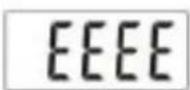
When the scale is overloaded, „EEEE“ will appear on the display. (min. weight 20g, Max. weight 5.000 g.)
When the scale is overloaded, in Tare-mode, "OUT2" will appear on the display. Please replace the container with a smaller one.
11.3.7 Unstable
weight indicator:
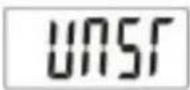
When the scale is in the unstable state, the LCD will indicate "Unst. Put the scale on a hard flat surface, it will work normally."
12 Troubleshooting
HINWEIS Please note
If the balance is not working, check the batteries on your performance, as well as for correct polarity. (Inserted the right way).
13 Cleaning and Maintenance
This chapter provides you with important notices with regard to cleaning and maintaining the device. Please observe the notices to prevent damages due to cleaning the device incorrectly and to ensure trouble-free operation.
13.1 Safety information
▲VORSICHT Attention
Please observe the following safety notices, before you commence with cleaning the device:
The device must be cleaned and food residues must be removed at regular intervals. If the scale is not maintained in a clean condition, this will have a detrimental effect on the service life of the device and can also result in a dangerous condition in the device as well as in the growth of fungus and bacteria.
▶ Never immerse the unit into water or the dishwasher.
▶ If dampness penetrates into the device, this can damage the electronic components.
▶ Do not use any aggressive or abrasive cleaning agents or solvents.
▶ Do not scrape off stubborn dirt with hard items.
13.2 Cleaning
◆ Housing and display
Wipe the housing and the display with a damp cloth or sponge and mild dish soap.
13.3 Disposal of the Old Device
Old electric and electronic devices frequently still contain valuable materials.
However, they also contain damaging substances, which were necessary for their functionality and safety.
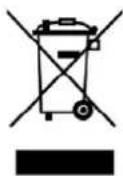
If these were put in the non-recyclable waste or were handled incorrectly, they could be detrimental to human health and the environment. Therefore, do not put your old device into the non-recyclable waste under any circumstances.
HINWEIS Please note
- Utilise the collection point, established in your town, to return and recycle old electric and electronic devices. If necessary, contact your town hall, local refuse collection service or your dealer for information.
▶ Ensure that your old device is stored safely away from children until it is taken away.
14 Guarantee
We provide a 24 month guarantee for this product, commencing from the date of sale, for faults which are attributable to production or material faults.
Your legal guarantee entitlements in accordance with § 439 ff. BGB-E remain unaffected by this.
The guarantee does not include damages, which were incurred as a result of improper handling or use, as well as malfunctions which only have a minor effect on the function or the value of the device. Consumables, transit damages, inasmuch as we are not responsible for these, as well as damages, which were incurred as a result of any repairs that were not performed by us, are also excluded from the guarantee entitlements.
This device is designed for use in domestic situations and has the appropriate performance levels.
Any use in commercial situations is only covered under the guarantee to the extent that it would be comparable with the stresses of being used in a domestic situation. It is not intended for any additional, commercial use.
In the event of justified complaints, we will repair the faulty device at our discretion or replace it with a trouble-free device.
Any pending faults must be reported within 14 days of delivery.
All further claims are excluded.
To enforce a guarantee claim, please contact us prior to returning the device (always provide us with proof of purchase).
15 Généralités
text_image
Lo Replace the batteries in right polaritytext_image
Illustration showing three steps of a cooking or heating device: heating, adding temperature, and holding a tray with food.natural_image
Line drawings of a kitchen appliance on a digital scale, showing a bowl being placed on top and a side view with a food item being placed (no text or symbols)text_image
Lo Replace the batteries in right polaritytext_image
HELLO 0 100%text_image
Diagram showing three steps of a cooking process: heating a pan, rotating a dish, and stirring a bowl.natural_image
Line drawings of two kitchen appliances: a bowl on a digital scale and a bowl with a curved arrow placed on its side (no text or symbols)text_image
Lo Replace the batteries in right polaritytext_image
Diagram showing three steps of a cooking or heating device: heating, adding temperature, and holding a fruit.text_image
Diagram showing three steps of a cooking or heating device: heating, rotating, and stirring.