Lumix HFSA14140E - Camera PANASONIC - Free user manual and instructions
Find the device manual for free Lumix HFSA14140E PANASONIC in PDF.



| Product Type | Interchangeable lens for digital camera |
| Brand | Panasonic |
| Model | Lumix G Vario 14-140 mm F3.5-5.6 II ASPH./POWER O.I.S. |
| Mount | Micro Four Thirds |
| Focal Length | 14 mm to 140 mm (35mm equivalent: 28 mm to 280 mm) |
| Maximum Aperture | F3.5 (wide-angle) to F5.6 (telephoto) |
| Minimum Aperture | F22 |
| Optical Construction | 14 elements in 12 groups (3 aspherical lenses, 2 ED lenses) |
| Angle of View | 75° (wide-angle) to 8.8° (telephoto) |
| Minimum Focusing Distance | 0.30 m (14-21 mm) / 0.50 m (22-140 mm) |
| Maximum Magnification | 0.25× (35mm equivalent: 0.5×) |
| Optical Stabilizer | Yes (POWER O.I.S.) |
| Filter Diameter | 58 mm |
| Maximum Diameter | 67 mm |
| Total Length | Approx. 75 mm |
| Weight | Approx. 265 g |
| Dust and Splash Resistance | Yes (with rubber seal) |
| Operating Temperature | 0 °C to 40 °C |
| Relative Humidity | 10 %RH to 80 %RH |
| Supplied Accessories | Lens case, lens hood, lens cap, rear lens cap |
| Maintenance and Cleaning | Wipe with a soft, dry cloth; do not use solvents |
| Recycling | Do not dispose of with household waste; drop off at a collection point |
Frequently Asked Questions - Lumix HFSA14140E PANASONIC
User questions about Lumix HFSA14140E PANASONIC
0 question about this device. Answer the ones you know or ask your own.
Ask a new question about this device
Download the instructions for your Camera in PDF format for free! Find your manual Lumix HFSA14140E - PANASONIC and take your electronic device back in hand. On this page are published all the documents necessary for the use of your device. Lumix HFSA14140E by PANASONIC.
USER MANUAL Lumix HFSA14140E PANASONIC
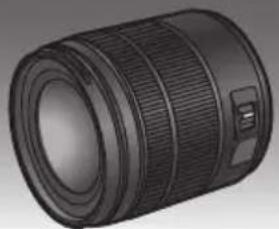
Operating Instructions
INTERCHANGEABLE LENS FOR DIGITAL CAMERA
Model No. H-FSA14140
Lumix
Please read these instructions carefully before using this product, and save this manual for future use.






DVQX1827ZA F0319AR0
Contents
Information for Your Safety. 2
Precautions 4
Supplied Accessories 5
Names and Functions of Components 5
Attaching/Detaching the Lens. 6
Cautions for Use. 9
Troubleshooting 9
Specifications. 10
Information for Your Safety
Keep the unit as far away as possible from electromagnetic equipment (such as microwave ovens, TVs, video games, radio transmitters, high-voltage lines etc.).
- Do not use the camera near cell phones because doing so may result in noise adversely affecting the pictures and sound.
- If the camera is adversely affected by electromagnetic equipment and stops functioning properly, turn the camera off and remove the battery and/or the connected AC adaptor. Then
reinsert the battery and/or reconnect the AC adaptor and turn the camera on.
The lens can be used with a digital camera compatible with the lens mount standard for the "Micro Four Thirds™ System".
- It cannot be mounted on the Four Thirds™ mount specification camera.
- The appearance and specifications of products described in this manual may differ from the actual products you have purchased due to later enhancements.
- Micro Four Thirds™ and Micro Four Thirds Logo marks are trademarks or registered trademarks of Olympus Corporation, in Japan, the United States, the European Union and other countries.
- Four Thirds™ and Four Thirds Logo marks are trademarks or registered trademarks of Olympus Corporation, in Japan, the United States, the European Union and other countries.
G MICRO SYSTEM is a lens exchange type digital camera system of LUMIX based on a Micro Four Thirds System standard. - Other names of systems and products mentioned in these instructions are usually the registered trademarks or trademarks of the manufacturers who developed the system or product concerned.
-If you see this symbol
ENGLISH
Disposal of Old Equipment
Only for European Union and countries with recycling systems

This symbol on the products, packaging, and/or accompanying documents means that used electrical and electronic products must not be mixed with general household waste.
For proper treatment, recovery and recycling of old products, please take them to applicable collection points in accordance with your national legislation.
By disposing of them correctly, you will help to save valuable resources and prevent any potential negative effects on human health and the environment.
For more information about collection and recycling, please contact your local authority.
Penalties may be applicable for incorrect disposal of this waste, in accordance with national legislation.
Precautions
Lens Care
- Do not press the lens with excessive force.
- When there is dirt (water, oil, and fingerprints, etc.) on the surface of the lens, the picture may be affected. Lightly wipe the surface of the lens with a soft, dry cloth before and after taking pictures.
- When the lens is not in use, be sure to attach the lens cap and lens rear cap to prevent dust and other particles from accumulating on or entering the lens.
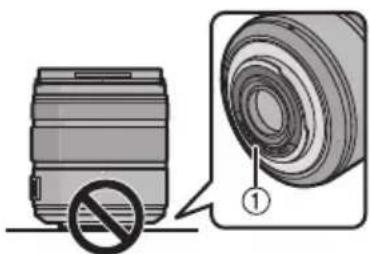
- To protect the lens contact points ① , do not place the lens with its mount surface facing down. In addition, do not allow the lens contact points to become dirty.
Dust and splash resistant
- The dust and splash resistant of the camera will not prevent the entry of dust or water droplets completely. Take the following precautions to provide satisfactory dust and splash resistant performance. If the lens is not
working properly, consult the dealer or your nearest Service Centre.
- Attach to a digital camera that is dust and splash resistant.
- When attaching or removing the lens, be careful so that foreign objects such as sand, dust, and water droplets do not adhere to or enter the lens mount rubber, contact points, digital camera and lens.
-
If the lens is exposed to water droplets or other liquids, wipe them off with a soft, dry cloth.
-
To improve the dust and splash resistant performance of the lens, a lens mount rubber is used in the mount.
-
The lens mount rubber will leave scuff marks on the digital camera mount, but this does not impact performance.
- For information on changing the lens mount rubber, contact your nearest Service Centre.
About Condensation (Fogging of the Lens)
- Condensation occurs when the ambient temperature or humidity changes. Please be careful, as it may cause lens stains, mould and malfunction.
- If condensation occurs, turn off the digital camera and leave it for approx. 2 hours. The fog will disappear naturally when the temperature of the digital camera becomes close to the ambient temperature.
Supplied Accessories
Product numbers correct as of March 2019. These may be subject to change.
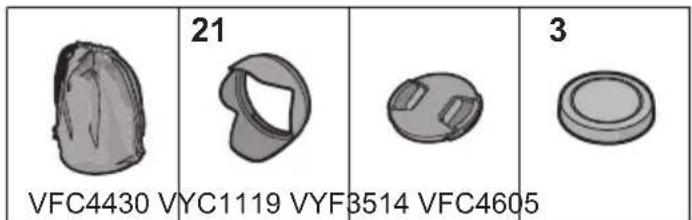
1 Lens Pouch
2 Lens Hood
3 Lens Cap
4 Lens Rear Cap (The lens rear cap and lens cap are attached to the interchangeable lens at the time of purchase.)
Names and Functions of Components
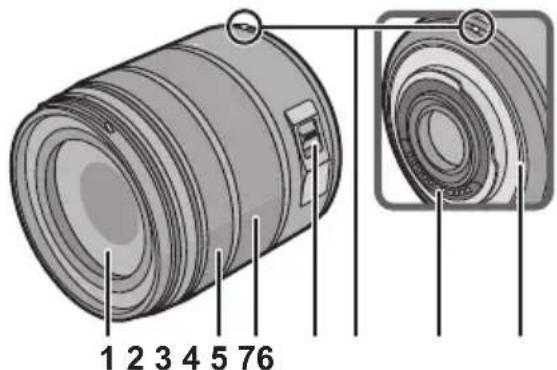
1 Lens surface
2 Focus ring Rotates the focus ring to focus when set to MF (manual focus).
3 Zoom ring Rotate the zoom ring when you wish to take large (tele) or wide (wide angle) pictures.
4 O.I.S. switch When the lens is attached to the camera, the image stabiliser function is set to activate if the O.I.S. switch is set to [ON].
5 (ENG) DVQX1827
- We recommend setting the O.I.S. switch to [OFF] when using a tripod.
5 Lens fitting mark
6 Contact points
7 Lens mount rubber

Note
- There may be differences in focus when you use zoom after focusing. Focus again.
-
If the sounds of AF (auto focus) operation and image stabiliser operation bother you during video recording, it is recommended to record as follows:
-
Set to MF (manual focus) to record.
- Set the O.I.S. switch to [OFF] and use a tripod to record.
Attaching/Detaching the Lens
Refer also to the camera's operating instructions for attaching and detaching the lens.
- Check that the camera is turned off.
- Remove the lens rear cap from the lens.
Attaching the Lens
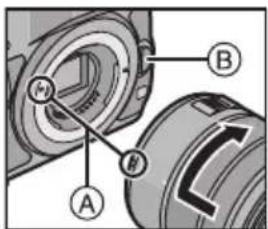
Align the lens fitting marks ④ on the camera body and the lens and then rotate the lens in the direction of the arrow until it clicks.
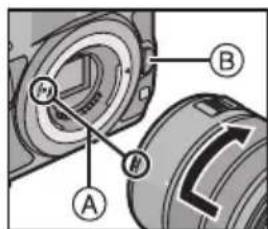
- Do not press the lens release button ⑧ when you attach a lens.
- Do not try to attach the lens when holding it at an angle to the camera body as the lens mount may get scratched.
- Check that the lens is attached correctly.
- Be sure to remove the lens cap when recording.
Detaching the Lens
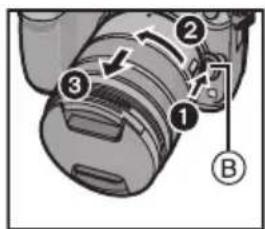
While pressing on the lens release button ⑧ rotate the lens toward the arrow until it stops and then remove.
-
Attach the lens rear cap so that the lens contact point does not get scratched.
-
Be sure to attach the body cap to the digital camera to prevent dirt and dust from getting inside the camera body.
Attaching the Lens Hood (Supplied Accessory)
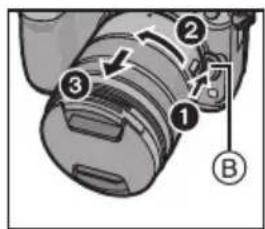
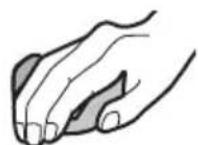
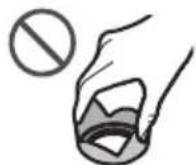
Hold the lens hood with your fingers placed as shown in the picture.
- Do not hold the lens hood in a way that twists or bends it.
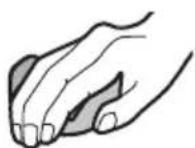
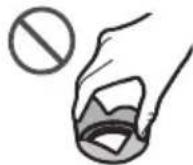
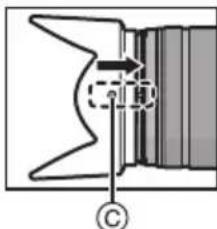
1 Align the fitting mark on the shorter petal of the lens hood with the mark on the tip of the lens.
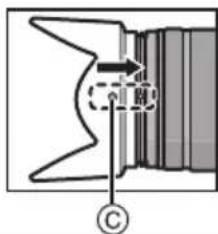
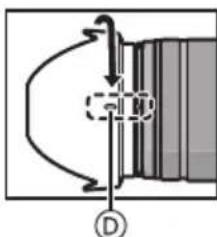
2 Rotate the lens hood in the direction of the arrow until it clicks and then align the stop mark ① on the longer petal of the lens hood with the mark on the tip of the lens.
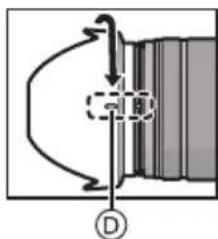
■ Temporarily Storing the Lens Hood
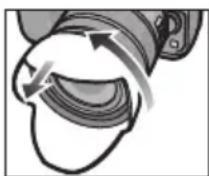
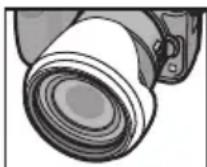
1 Turn the lens hood in the direction of the arrow to detach it.
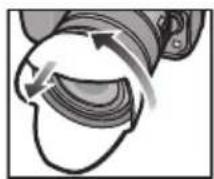
2 Reverse the lens hood and then attach it in the same way as shown previously.
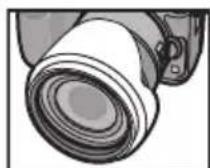

Note
- When taking pictures with the flash with the lens hood attached, the lower portion of the screen may turn dark and the control of the flash may be disabled because the photo flash may be obscured by the lens hood. We recommend detaching the lens hood.
- When using the AF assist lamp in the dark, detach the lens hood.
- To prevent dropping of the lens, you should never carry the lens by just holding the lens hood.
Notes on Filter Use
It is possible to attach the lens cap or the lens hood with the filter already attached.
- If you use two or more filters at the same time, part of a recorded image may darken.
- It is not possible to attach any items other than filters such as a conversion lens or adaptor to the front of the lens and use it in combination with this lens. Lens damage may result if such items are attached.
Cautions for Use
Take care not to drop or knock the lens. Also take care not to put a lot of pressure on the lens.
- Take care not to drop the bag that you inserted the lens in as it may strongly shock the lens. The camera may stop operating normally and pictures may no longer be recorded. Also, the lens may be damaged.
When using pesticides and other volatile substances around the camera make sure that they do not get onto the lens.
- If such substances get onto the lens they can damage the exterior case or cause the paint to peel.
Do not carry by the lens when the lens is attached to the digital camera.
Do not point the lens at the sun or other strong light sources.
- This could cause the lens to collect an excessive amount of light, resulting in fire and malfunction.
- Under no circumstances should the unit be stored in any of the following locations since doing so may cause problems in operation or malfunctioning.
- In direct sunlight or on a beach in summer
-
In locations with high temperatures and humidity levels or where the changes in temperature and humidity are acute
-In locations with high concentrations of sand, dust or dirt
-Where there is fire -
Near heaters, air conditioners or humidifiers
- Where water may make the unit wet
-Where there is vibration - Inside a vehicle
Refer also to the operating instructions of the digital camera.
- When the unit is not going to be used for a prolonged period, we recommend storing with a desiccant (silica gel). Failure to do so may result in performance failure caused by mould, etc. It is recommended that you check the unit's operation prior to use.
- Do not leave the lens in contact with rubber or plastic products for extended periods of time.
- Do not touch the lens contact point. Doing so can cause failure of the unit.
- Do not disassemble or alter the unit.
Do not use benzine, thinner, alcohol or other similar cleaning agents to clean the lens glass or exterior cabinet.
- Using solvents can damage the lens or cause the paint to peel.
- Wipe off any dust or fingerprints with a soft, dry cloth.
- Use a dry, dust-free cloth to remove dirt and dust on the lens mount rubber, zoom ring, or focus ring.
- Do not use a household detergent or a chemically treated cloth.
Troubleshooting
A rattling sound, etc. is heard when the digital camera is turned on or off or the lens is shaken.
- This is the sound of the lens moving and aperture operation. It is not a malfunction.
Specifications
Specifications are subject to change without notice.
INTERCHANGEABLE LENS FOR DIGITAL CAMERA
"LUMIX G VARIO 14- 140 mm/F3.5- 5.6 II ASPH./POWER O.I.S."
| Mount Micro Four Thirds mount | |
| Focal length f=14 mm to 140 mm | (35 mm film camera equivalent: 28 mm to 280 mm) |
| Lens construction | 14 elements in 12 groups (3 aspherical lenses, 2 ED lenses) |
| Aperture type 7 diaphragm blades/circular aperture diaphragm | |
| Maximum aperture F3.5 (Wide) to F5.6 (Tele) | |
| Minimum aperture value F22 | |
| Angle of view | 75° (Wide) to 8.8° (Tele) |
| In focus distance | 0.30 m to ∞ [from the focus distance reference line] (focal length 14 mm to 21 mm), 0.50 m to ∞ [from the focus distance reference line] (focal length 22 mm to 140 mm) |
| Maximum image magnification | 0.25× (35 mm film camera equivalent: 0.5×) |
| Optical image stabiliser Yes | |
| Filter diameter | 58 mm |
| Maximum diameter | Ø 67 mm |
| Overall length | Approx. 75 mm (from the tip of the lens to the base side of the lens mount) |
| Mass | Approx. 265 g |
| Dust and splash resistant | Yes |
| Recommended operating temperature | 0 °C to 40 °C |
| Permissible relative humidity | 10%RH to 80%RH |
10
DVQX1827 (ENG)
-
Subject to the conditions of this warranty Panasonic or its Authorised Service Centre will perform necessary service on the product, without charge for parts or labour, if in the opinion of Panasonic the product is found to have a manufacturing defect within one (1) year or (12 months) (the "warranty period") from the date of purchase appearing on your purchase receipt.
-
This warranty only applies to Panasonic products purchased in Australia and sold by Panasonic Australia, It's Authorised Distributors, or Dealers, and only where the products are used and serviced within Australia or its territories. Warranty cover only applies to the services that are carried out by a Panasonic Authorised Service Centre and only if valid proof of purchase is presented when the warranty service is requested.
-
This warranty only applies if the product has been installed and/or used in accordance with the manufacturer's recommendations (as noted in the operating instructions) under normal use and reasonable care (In the opinion of Panasonic). The warranty does not cover damage, malfunction or failure resulting from use of incorrect voltages, incorrect installation, accident, misuse, neglect, build-up of dirt or dust, abuse, maladjustment of customer controls, mains supply problems, thunderstorm activity, infestation by insects or vermin, tampering or repair by unauthorised persons (including unauthorised alterations), exposure to abnormally corrosive conditions, or any foreign object or matter having entered the product.
-
This warranty does not cover the following items unless the fault or defect existed at the time of purchase:
(a) Consumable parts (b) Consumable parts
(b) Cosmetic parts (c) Worn or damaged parts
(d) Information stored on Hard Disk Drives, Optical Disks, USB Device (e) DTV reception issues caused by TV Aerial / Cableing / Wall socket(s).
- Some products may be supplied with Ethernet connection hardware. The warranty is limited on such products and will not cover
(a) Internet and or DLNA connection / setup related problems
(b) Access fees and or charges incurred for internet connection (c) Incompatible software or software not specifically stipulated in the product operations manual: and
(d) Any indirect or consequential costs associated with the incorrect use or misuse of the hardware, its cost
the Internet or any other device.
- To claim warranty service, when required, you should:
Contact Panasonic's Customer Care Centre on 132 600 for Service Centre information. Confirm the opening and acceptance times with the Authorised Service centre that you choose.
Then send or take the product to a Panasonic Authorised Service
Any freight and insurance costs associated with the transport of the product to and/or from your nearest
Authorised Service Centre must be arranged and paid for by you.
The warranties hereby conferred do not extend to, and exclude, any costs associated with the installation, de
Installation of re-installation of a product, including costs related to thescreen (and any other ancillary activities), delivery handling, freighti
any part thereof or replacement of and do not extend to, and exclude, any damage or loss occurring by reason of
during, associated with, or related to such installation, de-installation, re-installation or transit.
Panasonic Authorised Service Centres are located in major metropolitan areas and most regional centres of Australia, New Zealand, and the world. They will be responsible for a number of functions, for example, authorising and supporting Service Centres locations and
product , please telephone our Customer Care Centre on 132600 or visit our website and use the Service Centre Locator .
In addition to your rights under this warranty, Panasonic products come with consumer guarantees that cannot be
excluded under the Australian Consumer Law. If there is a major failure to select to have a refund or to have the product replaced or if you wish you for the drop in value of the goods. You are also entitled to have the proof of acceptable quality and the failure does not amount to a major failure.
If the number of people is large, the number of people will be large.
If there is a major failure in regard to the product which cannot be remedied then you must notify us within a reasonable period by contacting the Panasonic Customer Care Centre. If the failure in the product is not a major failure then Panasonic
may choose to repair or replace the product and will do so in a reasonable period of time from receiving notice from you.
THIS WARRANTY CARD AND THE PURCHASE DOCKET (OR SIMILAR PROOF O
SHOULD BE RETAINED BY THE CUSTOMER AT ALL TIMES
are assistance regarding warranty conditions or any other enquiries, please visit the
Australia website www.panasonic.com.au or contact by phone on 132 600
please ensure you have your operating instruction: Panasonic Australia Pty. Limited
ACN001592187 ABN83001592187
s Road , Macquarie Parkwww.nanosopic.com.au
23-01-2018
PRO-031-F11 Issue: 5.0
Inhalt
4 Interruptor O.I.S.
4 NepekeIIOuHaTeJIb O.I.S.
Korda K foToKaMepe npnKepeH neBekTNB, yHKuia Cta6nna3aTopa n3o6paXeHn BKnHouaeTc npn ycTaHOBKe nepeKnHouaTeIa O.I.S. Ha [ON].
- Пи ИспОлььзOBаHHИ WtTaTNbpeKOMeHДуETcR yCTaHaBnBaTb NepeKlnOuYaTeNb O.I.S. B noLoXKeHne [OFF].
5 MoHTaXHaI NOBepxHocTb
6 Metka yctaHOBKn ObkeTnBa
7 Pe3nHOBoe yIIOHTHInbHoe KOJIbUO 06BeKTHBa

Ppimechane
- Ppi nCnoJb3OBAHn yHKuyn yBeNueHna nocne BblNOJIHeHn qOKycnPOBKn qOKyc MoKeT N3MeHHTbcr. BblONHIne TqOKycnPOBky NOBTOpHo.
-
Ecnn Bac 6ecnokoT 3ByKn pa60tbi AΦ (aBTOΦOKycnpOBKn) n Cta6nHn3atopa n3O6paXeHn BO BpeM BnDeocbEmKn, peKOMeHnyeTcR BbINOHNrTb 3aNcB CNeDyHOUM o6pa3OM:
-
YcTaHOBnTe 3aIaIcN PΦ (pyHyIO φokycnpOBky).
-ДясьемкуctahOBHTe nepeKJIIOUaTeNB O.I.S. B noJoxeHne [OFF] nncnoJb3yIte wTaTnB.
YctaHOBka/ChyTne obBeKTHBa
- HΦopMaζH O6 yCTaHOBKe n CHrTn ΜbEketna CB. TaKKe B INHCTpyKUnx NO 3KcNpyaTaN KamepbI.
- Y6eIntecb, yTO KaMepa BblkIIOueHa.
CHIMMTE3aHIOKpbIHKyOBeKTNaB.
YcTaHOBka 06BeKtNBa
COBmecnte
yCTaHOBOUHyO MetKy
06bekTnBa A Ha
KOpnyce fOToKamepbl C
MeTKoH Na 6bekTnBe N
3aTeM NOBepHNTe
06bekTnB B
HAnpaBneHnCtpeKnDoIeJyKa.
- He HaxkMaTe KHOJky OTKpbTnO6BeKtNbBa B npocceCe yCTaHOBKn 06BeKtNbA.
He nItaTecb yCTaHOBNTb oBeKtNB NOyYrnom K Kopnyc KaMepbl, NCKoJIbky 3TO MOKeT pINBecTN K NOBpeXdEHNO KpeJIeHnO obKeTNaBa. - y6eIntecb, yTO o6bektnb yCTaHOBJeH npabINbHO.
- OśbaTeJIbHO CHIMITE KpbIshky obBeKTnBa nepeJ 3aIIncbI.
ChrTne o6BeKtNaBa
YdepxnBaHaKaToi
KHOIky B
PpOBepHnTe
OBeKTHB Do ynpa B
HaPaBHeHH
CTpeKN, a NOTOM
CHMNTe.
-ПрикpenTe 3адню кршky obkeTиBa,чтоби n36жаТь цapанMH OHTaxHOn nobepxHocTN obeKTHBa.
- O6ra3aTeNbHO HaedeHbTe KpbIuKy Kopnyca Ha cnΦpOByU ΦOTOKaMepy, YTO6bl He DoNyCTnTb nonaHaHr rpa3n N PbJIN BHyTpB Kopnyca φOTOKaMepbl.
PnncoeDnHeHne 6JeHdbI o6bKeTnBa (PnHaJnxKHOCTB B KOMnNeKeTe)
Diepknte 6JeHdy
obBeKTnBa naJbUaMn,
pacnoJIOXnTe INx TaK, KaK
NOKa3aHO Ha pncyHke.
He depknte 6nEHy TaKMM o6pa3OM, npu KOTOpOM OHa CkpyuBaETcN nI INn3rN6aETc.
1 CoBmecTnTe MeTKy KpeJIeHnHa KOPOTKOM IeneCTKe 6JIeHbI OBeKTHBa C MeTKoH Ha KpaHO OBeKTHBa.
2 NOBepHnTe 6NeHdy
OBeKTHBa Do UeJyKa B
HaNpaBHeHn, yKa3aHHOM CTpeJIko, COBMeCTNB
METky OCTaHOBKn D Ha
dINHHOM JeNEcTKe
6JeHbI OBeKTHBa C
MeTKoHa KpaIO
OBeKTHBa.
BpeMeHHoe xpaHeHne 6JeHdbI
1 UTo6bI cHЯTb 6JIeHdY, NOBepHnTe ee B HAppaBHeHn CTpeJKN.
2 Pa3BepHnTe 6IeHdy o6paTHoN CTOpOH N 3aKpeHnTe, KaK yKa3aHO BblSe.

Ppimechne
- PnCbemKe C npKpeHnHoi 6neHdoi OBeKtNBa HcNoIb3OBAHN BCnbIuKN HIXHra Yactb 3KpaHa MoKet NToeMHeTb, a ynpabLeHne BCnbIuKO MoKet OTKJIIOHTbcr, NCKoJbKy 6NeHda MoKet 3aTeHrTb BCnbIuKy. PeKomeHdyeTcra ChrTb 6JeHdy ObekTNaB.
- Пи ИСПОЛБЗOBAHINВ TEМНОТ BCNOMORATeЛь"HОлamпь ABTomATnueCKOД ФOKUCPOBKNOTCOeDINHITe 6JIeHd OББeKTHBa.
- YTO6bI He IONYCTNTb NaeHnra OBeKtNbA,ero HN B KOem Cnyuae HeJIb3a NpeHocNTb, DepXacb TOJbKO 3a 6JIeHdy OBeKtNbA.
PpimMeaHnO6 nCnoJb3OBaHHn cnJIbTpOB
BmecTe c yctaHOBJIeHHbIM qINbTpOM MOxHO npIKpeNTb KpbIuKy oBeKTnBa nn6NeHdy obBeKtNa.
Bcnyae OndHOBpeMeHHoro NcNoIb3OBaHnA DByX nn6oJee qInbTpoB Yactb 3aNcaHHoro n3O6paKeHnMoKet 3aTeMHHTbcra.
Kpome qnIbTPOB, K nepeDHeJ yacTu o6BeKTuBa HeBO3MOxHNO npIKpeNtB KaKne-Jn6o npHaJIeXHOCTu, HApPIMep npoe6pa3ObaTeIbHbI O6BeKTuB IaIaNTep, INCIONb3OBaTB BMeCTe C o6BeKTuBOM.
PpKpeHne TAKx npHaJnEeKHOcTe moKeT npBecTN K NOBpeKDeHIO o6bekTnBa.
PpeodoctopoXHocTn npnncnoIb3OBAHm fotoKamepbl
CTapaTecb He poHraTb H He yIapraTb o6beKTHB. Takke cTapaTecb He noDBepratb o6beKTHB Upe3MepHomy daBneHIO.
CneIte 3a Tem, TTo6bI He ypoHntB CymKy, B KOtopyu Bbl NIOXnINo6BeKTNB, NCKOJIbKy 3TO MOKeT npNBecTN K NOBpeKDeHNIO O6BeKTNBa. KaMepa MoKeT NepeCTaTB HopMaJbHO pa60TaB, n DaJIbHeNJa 3aNNcB CHIMKOIB MOKeT OKa3aTbCn HeBO3MOxHOn. Kpome TORO, MOxHO NoBpeDHTb 6BeKTNB.
Pn nCnoJb3ObaHnn neCTnUIOB n dpyrnx neTyuNX BeueCTB B6IIN KamepbI y6eINTecb, qTO OHn He nonaAdOT Ha o6bekTNB.
- Пи пonaдан Иа obьektпв Тakne BeшecТВ MOrут NOBpeДИТь obьektИB ИЛпрИБeCTN K OТСЯнВанИО КpackИ.
He nepehocnte uqpoByo foToKamepy, depka 3a oBeKTNB, KOrda OH K He npKnpenJeH.
He HappaBnTe 06BeKTHBa Ha coJHcpe IIN dpyrne nCTOuHNKn CNJbHoro CBeta.
3TO MoKET npNBecTn K NOCTynJIeHIO Upe3MepHoro KOJNUcEcbTa CBeta N Bbl3BaTb BO3RopAHne HIN HENCnpaBHOCTb.
Kateropnueckn 3anpeaetcnoIb3oBaTbc8 FOToBcblkOuIN XpaHntb ee B CneDyUOnx
DVQX1827 (RUS)
ycnoBnax, TAK KAK 3TO MOKeT npNBecTN K C6oM B pa6ote nn HnnpaBnBHO pa6ote.
-IOB3DcETBnEM npMbIX COJIHeuHbIX JyueN Hn Ha IJIaXe JeTOM
-B MeCTHOCTx C BbICOKOu BJIaXHOCTbIO BO3dYxa N BBICOKIMN TemnepaTypamN, INIcpe3KIMN nepenadaMn TemnepaTypbN BJIaXHOCTN
-B MeCTHOCTX C BBICOKMNI KOHcHTpaunmNeCKa, NJIIN IIN rpr3N
- Ppi cpa6aTbIBAHIN BCnblkN
-Bo3ne o6orpeBaTeNei, KOHdNtioHepOB nIyBlaXnHTeNei
-ΓДe BO3MOXHO HAOMOKaHne yCTpoIcTBA
-Γde npncyTCTBye TBn6paunr
B aBTOMO6nJe
CM. TaKKe INHCTpyKcUN N O 3KcNpyaTcUN cΦpOBoN KaMepbl.
- Ecni KaMepa He 6yJeT nCNoJIb3OBAIb8cB TeueHne IInTeJIbHO BpEmHe, peKOMeHdyeTcXpaHHTbe ee BMeCTe C BNaIOnOrNtITeJIem (CnIIkaReIeM). HeBbINoJIHHe N daHHoI peKOMeHdaUcIM MoKeT npIBecTNI K HApUWeHIO TexHNueckNX XapaKTepNCtIK BBNuObpa3OBAHnI pIneCENI T.Д. IpeJxde Yem nCNoJIb3OBAIb, peKOMeHdyETcIPOBepaTb pa6OTocNOC6HOCTb yCTpoIcTBa IocNe TaKOrO IInTeJIbHO rXpaHeHnI.
He octabTnTe oBekTnB KOHTaKTe C pe3HOBbIM NJI IN PAnCTNKOBbIM PPOdyKTAMN Ha npOdoJXITeIbHbI nepNoD BpeMeHn.
He npikacaiTecb K 3neKtpnueckm KOHTaTam yctpoiCTBa. 3TO MOKeT Bbl3BaTb c60B erO pa6Ote.
3anpeaaetcpa3bnpaTbnnBHOCTb 3MeHnB aannapat.
He nCnoIb3yIte 6eH3nH, pactBOpHTeIb, cNnpt I npyrne noo6hIe moOuIe cpeIcTba dIpy OouCTKn annapata.
- Исторыпесу постордддддддддддддддддддддддддддддддддддддддддддддддддддддддддддддддддддддддддддддддддддддддддддддддддддд徴псьгггггггггггггггггггg
- Bbɪtpaɪte nbɪb n cJIeɒbɪ naɪbʊeB mʌrkoɪ cyxɔŋ TkaHbI0.
- YdaIaIYe rpa3b n nbIb c pe3HOBoro yNIOHTeJIbHOro KOJIbca OObEKTINBa, KOJIbca TpaHCpOKaTopa N KOJIbca φokycnpoBKN C NOMOu bIO cyXoI caIΦETKn dIy nbIIN.
3aPpeaaetcNcNOJb3OBaTbMOIOuNE CpeIcTBa Hnn XmMueckn 6pbOtaHHyTO KaHb.
YcTpaHeHne HEnCnpaBHOCTe
Pn BkIoueHnn NJI BbIKIOueHnn cIΦpOBoi fOTokamepbI IIN6o cotpcHnn OBeKtNbBa pa3daetc dpe6e3kaun 3Byk.
3bYK BbI3BaH NepemeueHHeM JINH3bl pa60To dnaaparmbl. 3TO He cBnTeJIbCTByeT O HncnpaBHocTN.
TexHnueckne xapaKTepeNCTnKn
Texnueckne xapaKtepncTNk MOyT 6bItb n3MeHehbl 6e3 yBeDomNeHna.
CMEHHbI OSeBekTNB IJIa UNΦPBOB ΦOTOKAMEPbI
"LUMIX G VARIO 14-140 MM/F3.5-5.6 II ASPH./POWER O.I.S."
Manufactured by: Panasonic Corporation
Kadoma, Osaka, Japan
Importer for Europe: Panasonic Marketing Europe GmbH
Panasonic Testing Centre
Winsbergring 15, 22525 Hamburg, Germany
Panasonic Corporation
Web Site: http://www.panasonic.com
© Panasonic Corporation 2019
- OPERATING INSTRUCTIONS
- INTERCHANGEABLE LENS FOR DIGITAL CAMERA
- MODEL NO. H-FSA14140
- CONTENTS
- INFORMATION FOR YOUR SAFETY
- DISPOSAL OF OLD EQUIPMENT
- ONLY FOR EUROPEAN UNION AND COUNTRIES WITH RECYCLING SYSTEMS
- PRECAUTIONS
- LENS CARE
- DUST AND SPLASH RESISTANT
- ABOUT CONDENSATION (FOGGING OF THE LENS)
- SUPPLIED ACCESSORIES
- NAMES AND FUNCTIONS OF COMPONENTS
- NOTE
- ATTACHING/DETACHING THE LENS
- ATTACHING THE LENS
- DETACHING THE LENS
- ATTACHING THE LENS HOOD (SUPPLIED ACCESSORY)
- TEMPORARILY STORING THE LENS HOOD
- NOTES ON FILTER USE
- CAUTIONS FOR USE
- TAKE CARE NOT TO DROP OR KNOCK THE LENS. ALSO TAKE CARE NOT TO PUT A LOT OF PRESSURE ON THE LENS
- WHEN USING PESTICIDES AND OTHER VOLATILE SUBSTANCES AROUND THE CAMERA MAKE SURE THAT THEY DO NOT GET ONTO THE LENS
- DO NOT CARRY BY THE LENS WHEN THE LENS IS ATTACHED TO THE DIGITAL CAMERA
- DO NOT POINT THE LENS AT THE SUN OR OTHER STRONG LIGHT SOURCES
- DO NOT USE BENZINE, THINNER, ALCOHOL OR OTHER SIMILAR CLEANING AGENTS TO CLEAN THE LENS GLASS OR EXTERIOR CABINET
- TROUBLESHOOTING
- A RATTLING SOUND, ETC. IS HEARD WHEN THE DIGITAL CAMERA IS TURNED ON OR OFF OR THE LENS IS SHAKEN
- SPECIFICATIONS
- INHALT
- PPIMECHANE
- YCTAHOBKA/CHYTNE OBBEKTHBA
- YCTAHOBKA 06BEKTNBA
- HANPABNEHNCTPEKNDOIEJYKA
- CHRTNE O6BEKTNABA
- PNNCOEDNHEHNE 6JEHDBI O6BKETNBA (PNHAJNXKHOCTB B KOMNNEKETE)
- BPEMEHHOE XPAHEHNE 6JEHDBI
- PPIMECHNE
- PPEODOCTOPOXHOCTN NPNNCNOIB3OBAHM FOTOKAMEPBL
- CTAPATECB HE POHRATB H HE YIAPRATB O6BEKTHB. TAKKE CTAPATECB HE NODBEPRATB O6BEKTHB UPE3MEPHOMY DABNEHIO
- PN NCNOJB3OBAHNN NECTNUIOB N DPYRNX NETYUNX BEUECTB B6IIN KAMEPBI Y6EINTECB, QTO OHN HE NONAADOT HA O6BEKTNB
- HE NEPEHOCNTE UQPOBYO FOTOKAMEPY, DEPKA 3A OBEKTNB, KORDA OH K HE NPKNPENJEH
- HE HAPPABNTE 06BEKTHBA HA COJHCPE IIN DPYRNE NCTOUHNKN CNJBHORO CBETA
- HE NCNOIB3YITE 6EH3NH, PACTBOPHTEIB, CNNPT I NPYRNE NOO6HIE MOOUIE CPEICTBA DIPY OOUCTKN ANNAPATA
- YCTPAHEHNE HENCNPABHOCTE
- PN BKIOUEHNN NJI BBIKIOUEHNN CIΦPOBOI FOTOKAMEPBI IIN6O COTPCHNN OBEKTNBBA PA3DAETC DPE6E3KAUN 3BYK
- TEXHNUECKNE XAPAKTEPENCTNKN
Brand : PANASONIC
Model : Lumix HFSA14140E
Category : Camera