TM Open Wheel AddOn - Controller THRUSTMASTER - Free user manual and instructions
Find the device manual for free TM Open Wheel AddOn THRUSTMASTER in PDF.



| Product Type | Racing simulation add-on steering wheel |
| Brand | Thrustmaster |
| Model | TM Open Wheel AddOn |
| Compatibility | Thrustmaster bases TX, T300, T500 (firmware update required) |
| Dimensions | Approximately 28 cm in diameter |
| Weight | Approximately 1 kg |
| Material | Plastic and leatherette, metal paddles |
| Main functions | Sequential paddles, multidirectional d-pad, buttons, Quick Release system |
| Lighting | No |
| Power | Powered by the base via connector |
| Connection | Mechanical and electrical via Quick Release |
| Package contents | Add-on steering wheel, user manual |
| Maintenance | Clean with a soft, dry cloth |
| Safety | Do not force the fixing screw; follow the mounting instructions |
| Warranty | 2 years in the EU, 1 year elsewhere (according to legislation) |
| Manufacturing | China |
| Manual | Available in several languages at support.thrustmaster.com |
| Spare parts | Not provided; repair by technical support only |
Frequently Asked Questions - TM Open Wheel AddOn THRUSTMASTER
User questions about TM Open Wheel AddOn THRUSTMASTER
0 question about this device. Answer the ones you know or ask your own.
Ask a new question about this device
Download the instructions for your Controller in PDF format for free! Find your manual TM Open Wheel AddOn - THRUSTMASTER and take your electronic device back in hand. On this page are published all the documents necessary for the use of your device. TM Open Wheel AddOn by THRUSTMASTER.
USER MANUAL TM Open Wheel AddOn THRUSTMASTER
Align the connector positions using the arrows:
Base connector: Arrow pointing upwards
Racing wheel connector: Arrow pointing upwards
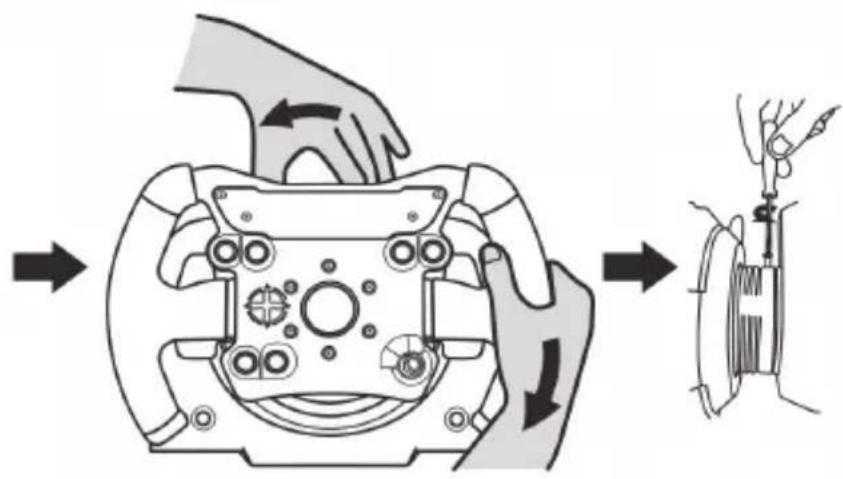
Once the connectors are correctly positioned, simply rotate the Thrustmaster Quick Release device's ring counterclockwise, while holding the racing wheel in position.
Then, tighten the ring as much as you can: to do so, hold the ring in position and rotate the racing wheel clockwise.
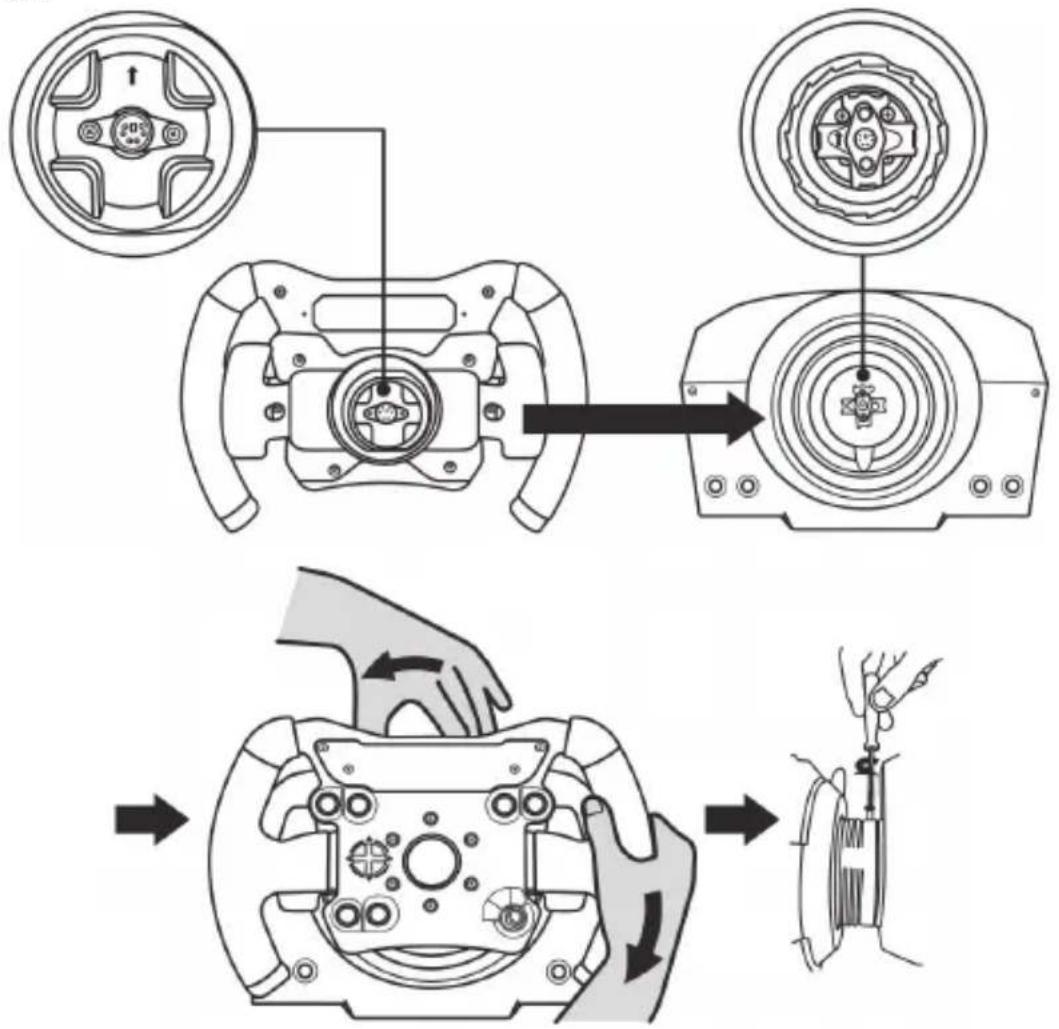
Once you have installed the wheel, rotate it 180^ (when facing the wheel, the TM logo should be upside down) to access the small attachment screw located on the ring of the Thrustmaster Quick Release device. Use a large Phillips screwdriver to tighten the small attachment screw (do not use excessive force), turning it clockwise.
Do not use excessive force when tightening the small attachment screw (using a Phillips screwdriver)! Stop turning the screw as soon as you feel some resistance.

IMPORTANT INFORMATION!

To ensure that your TM Open Wheel Add-On wheel functions correctly with your racing wheel's base (in particular with the TX, T300 and T500 bases), it is imperative that you update your base's firmware with the latest version available at https://support.thrustmaster.com (click on Racing Wheels / [your base's name] / Firmware, then follow the instructions and the download and installation procedure). If you don't update the firmware, the D-pad, the buttons and the paddle shifters of your wheel will not function correctly.
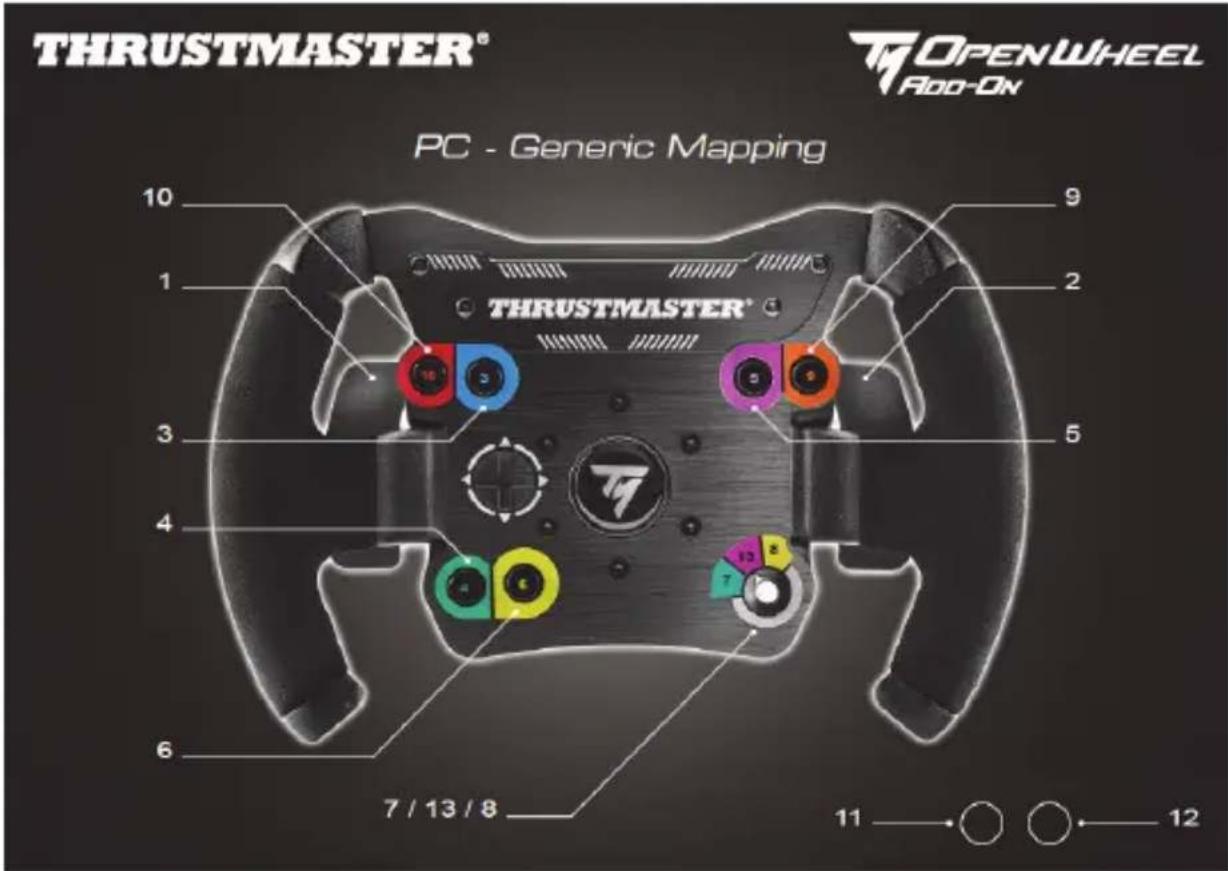
PC MAPPING
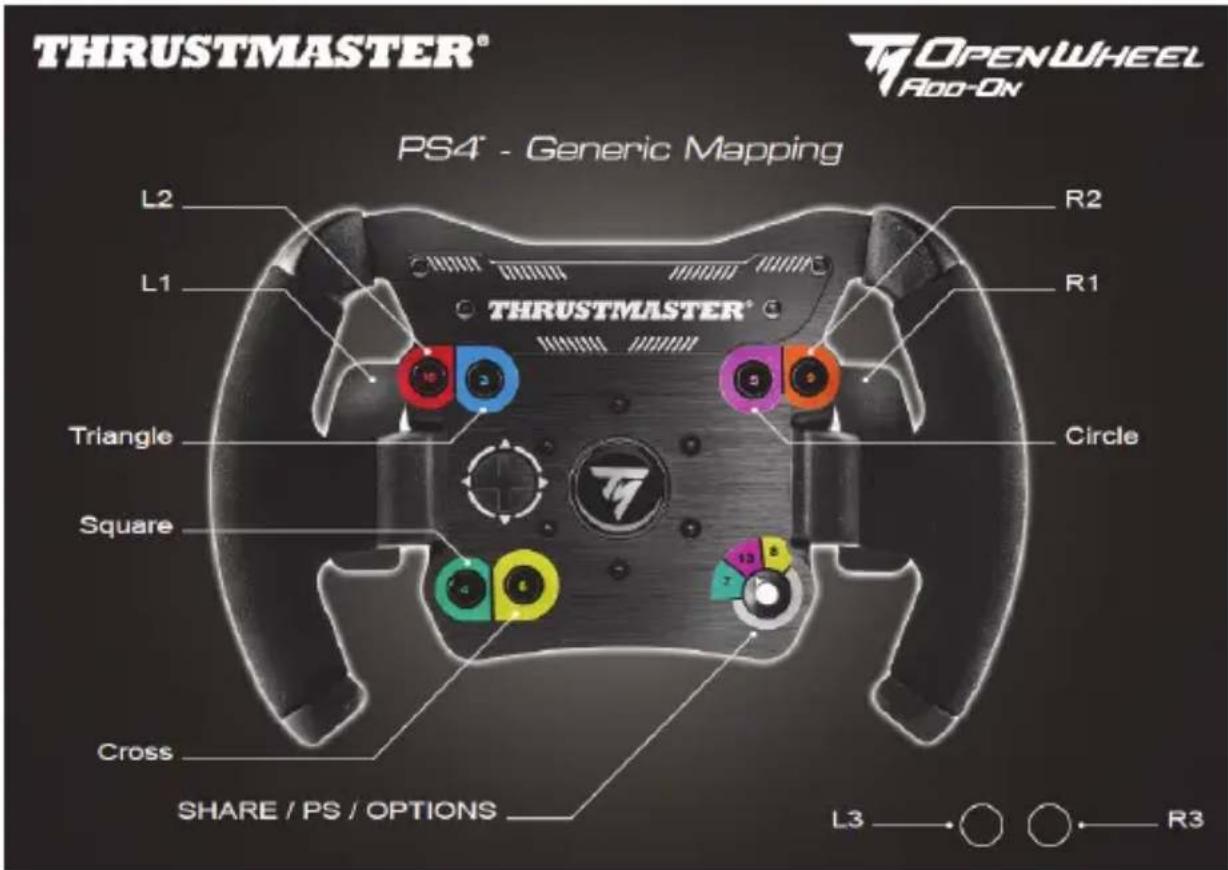
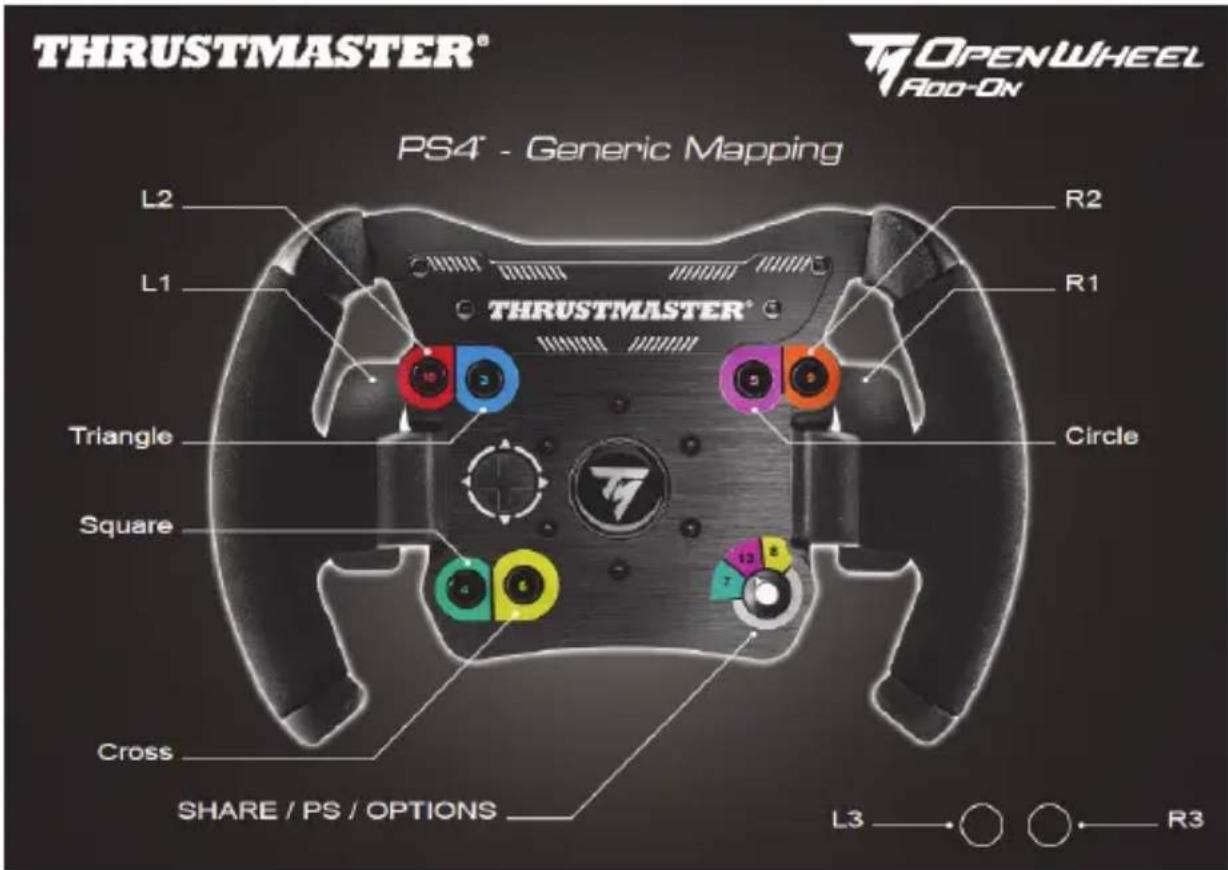
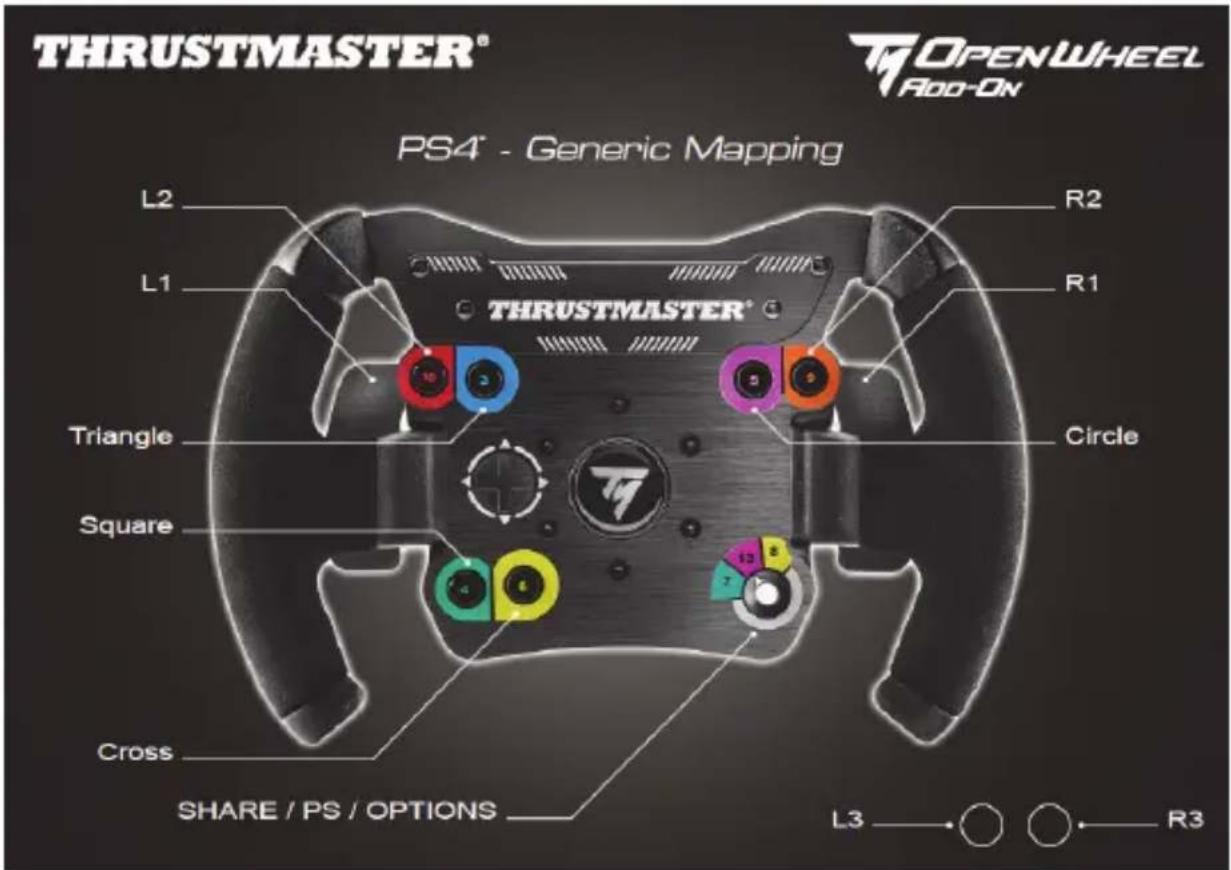
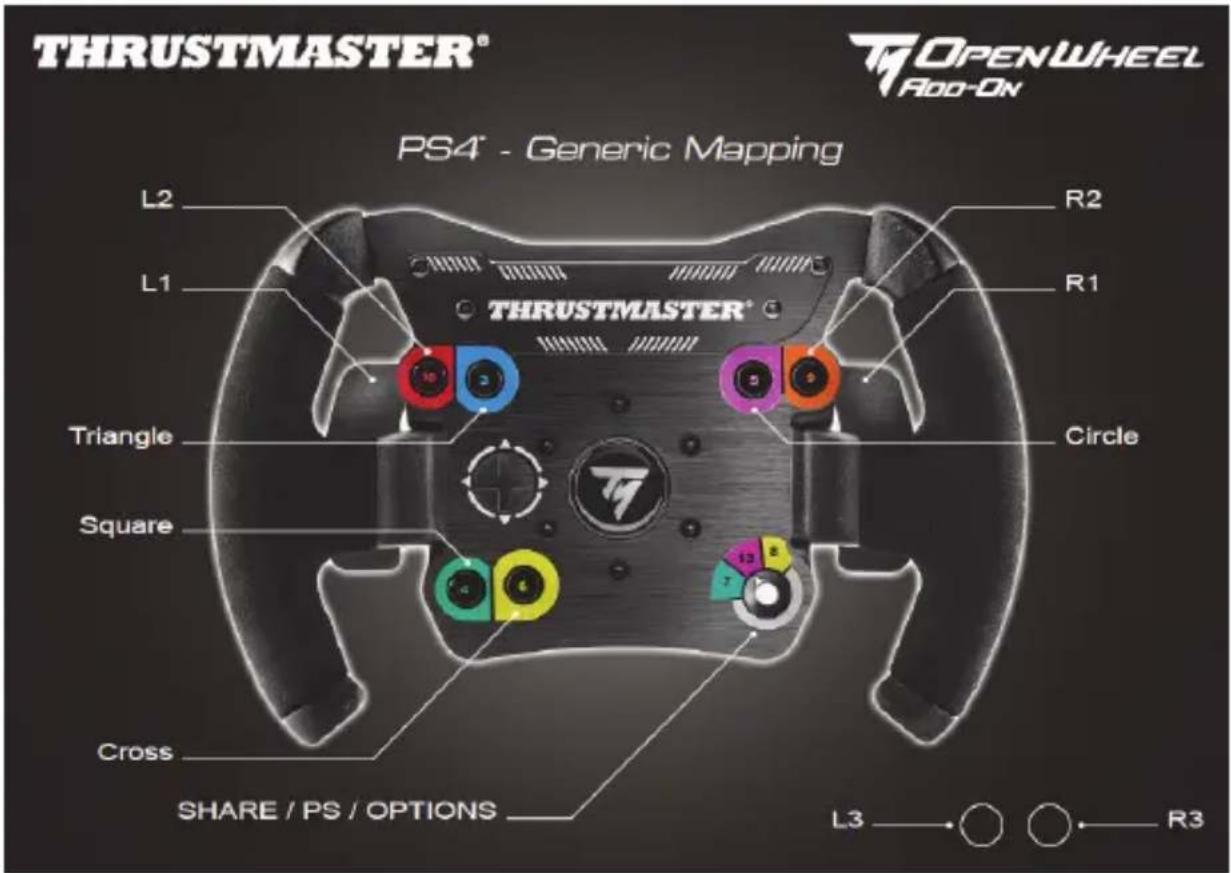
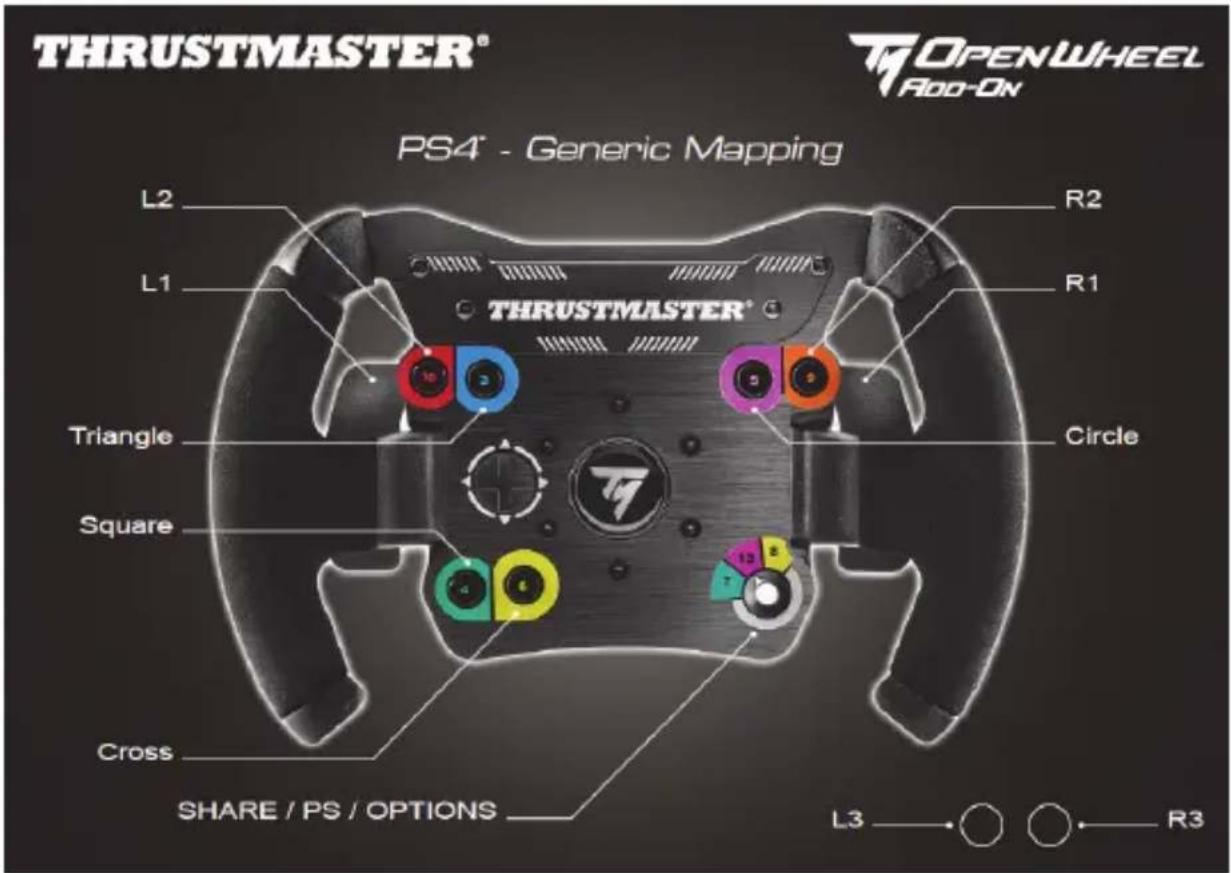
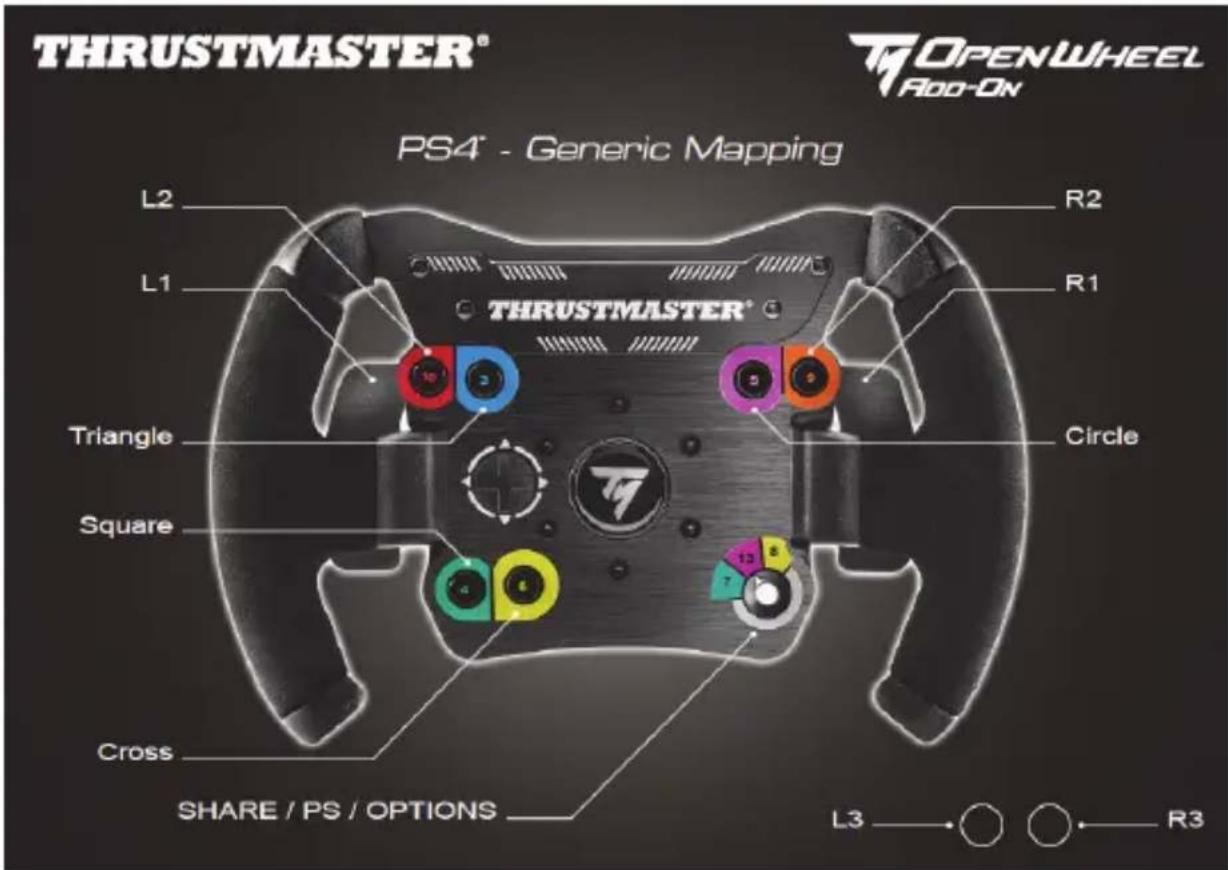
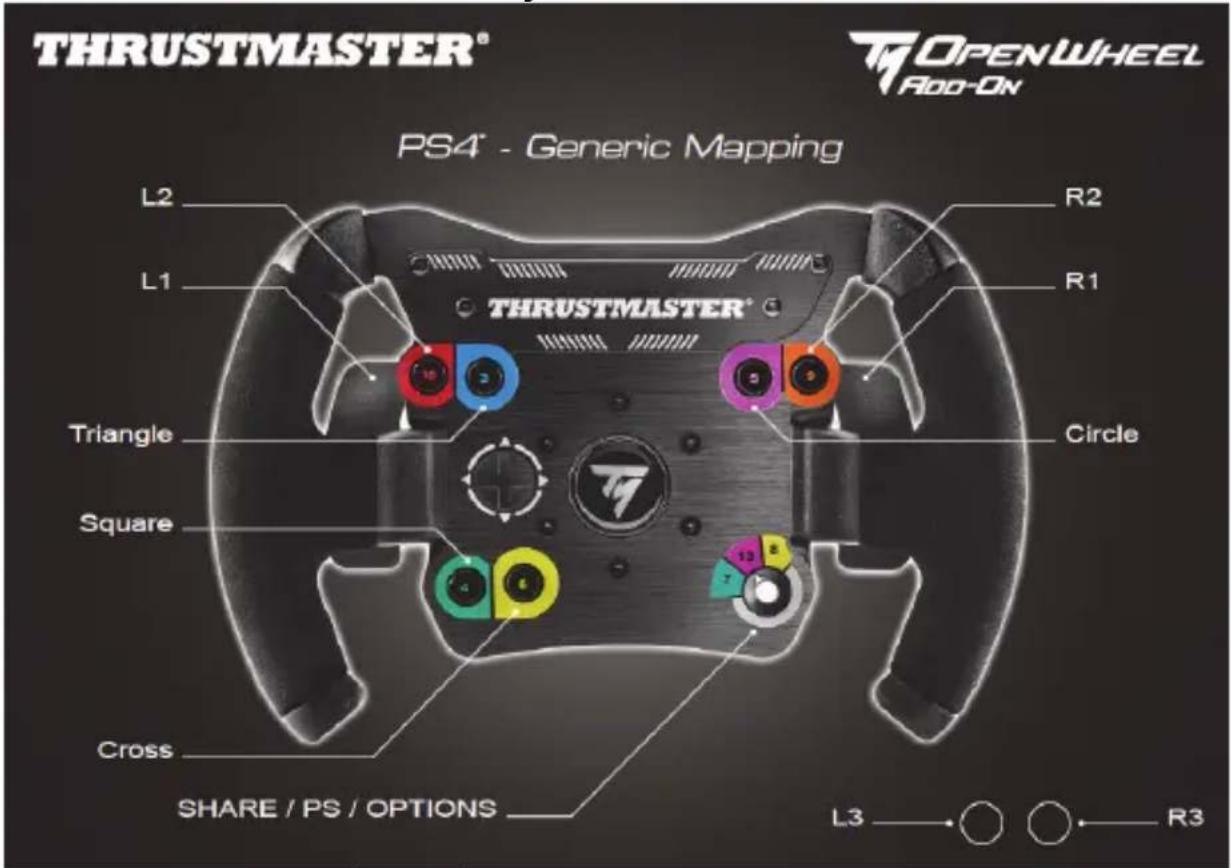
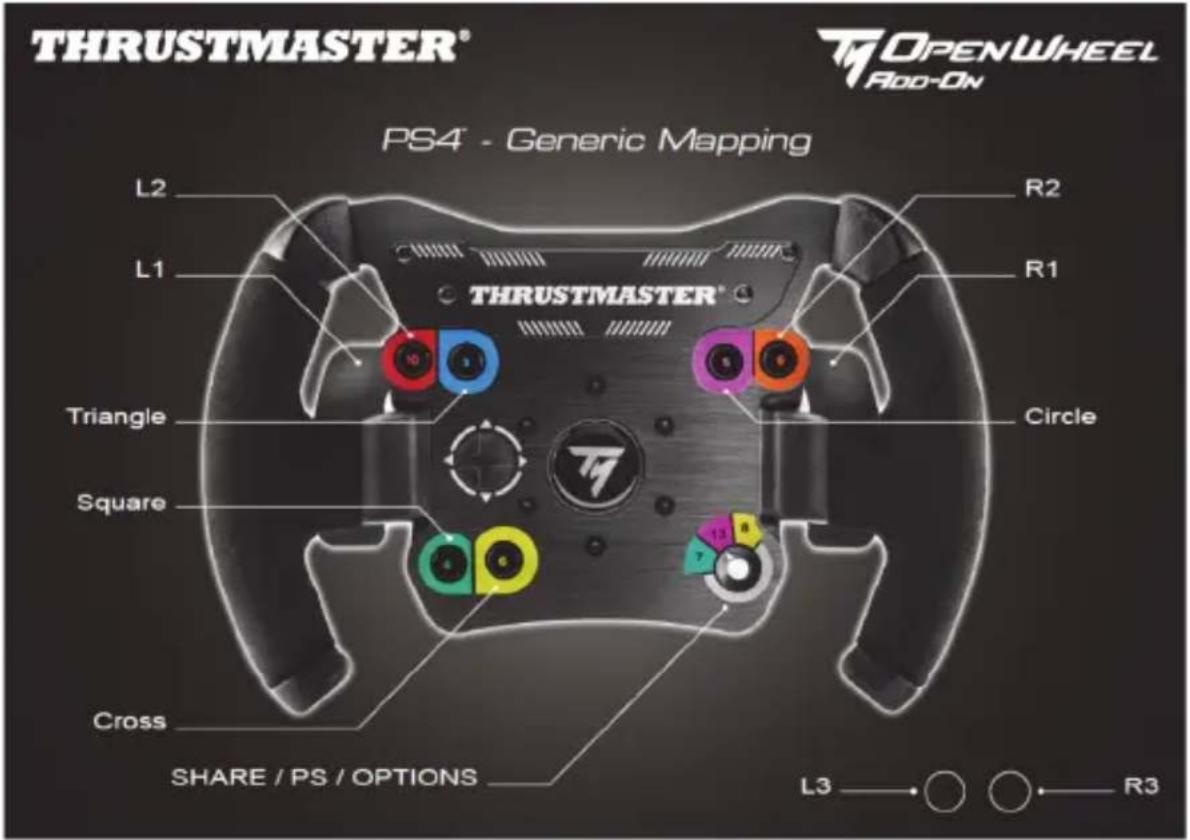
PLAYSTATION®4 MAPPING
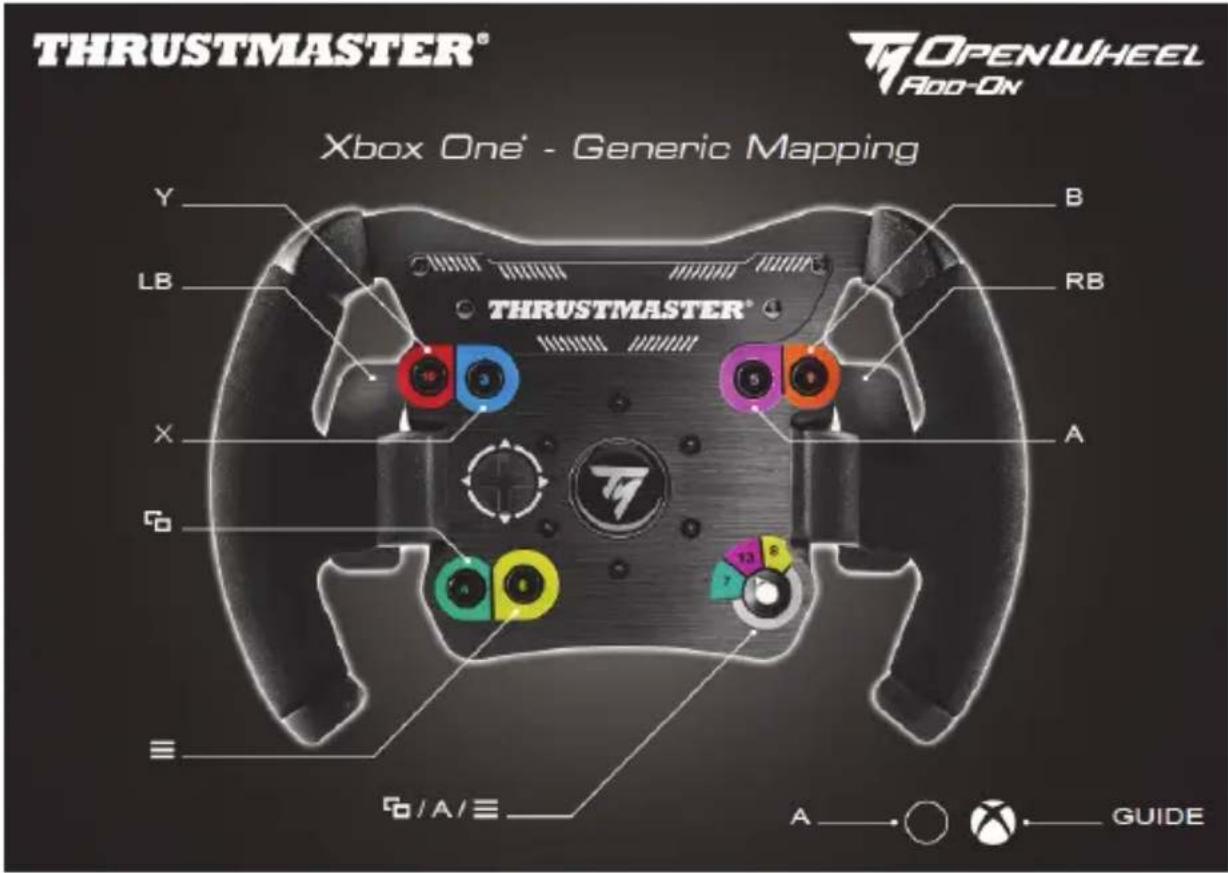
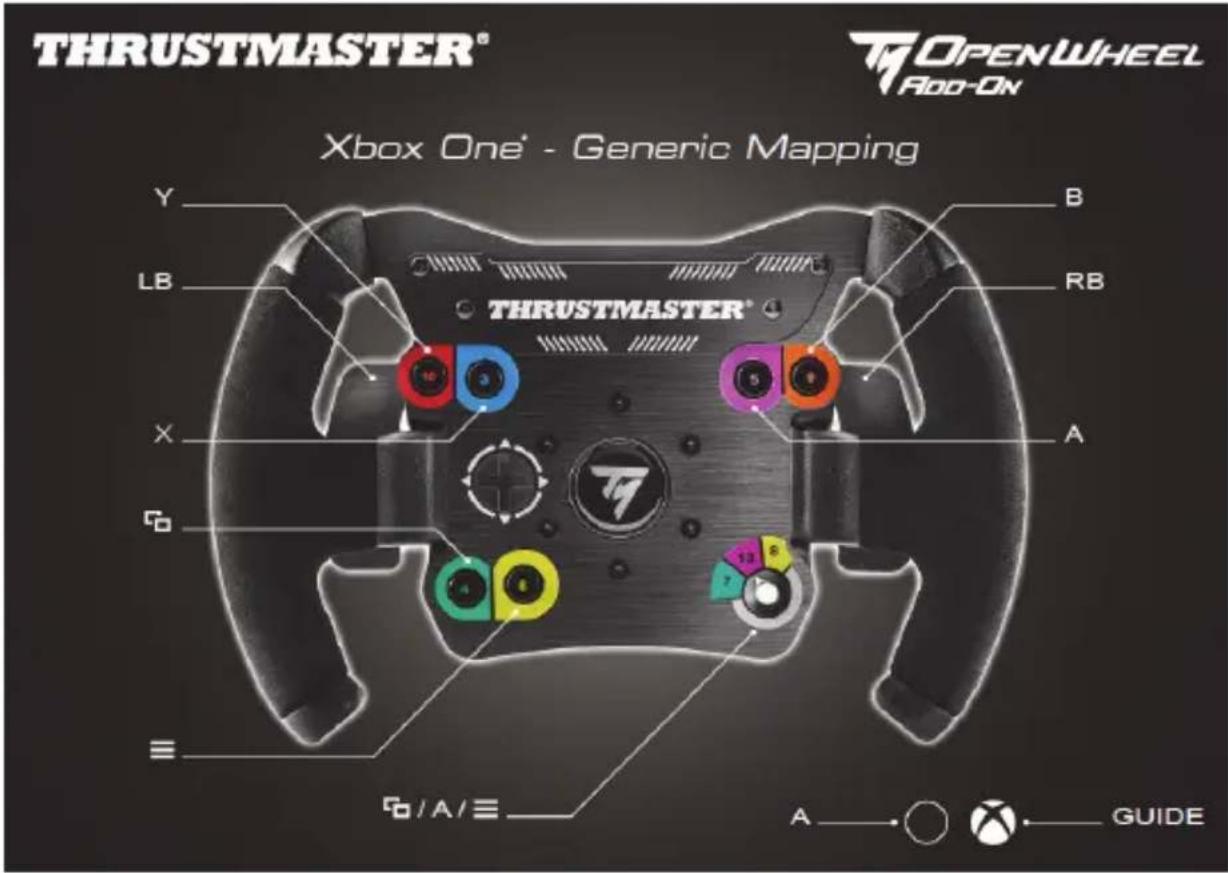
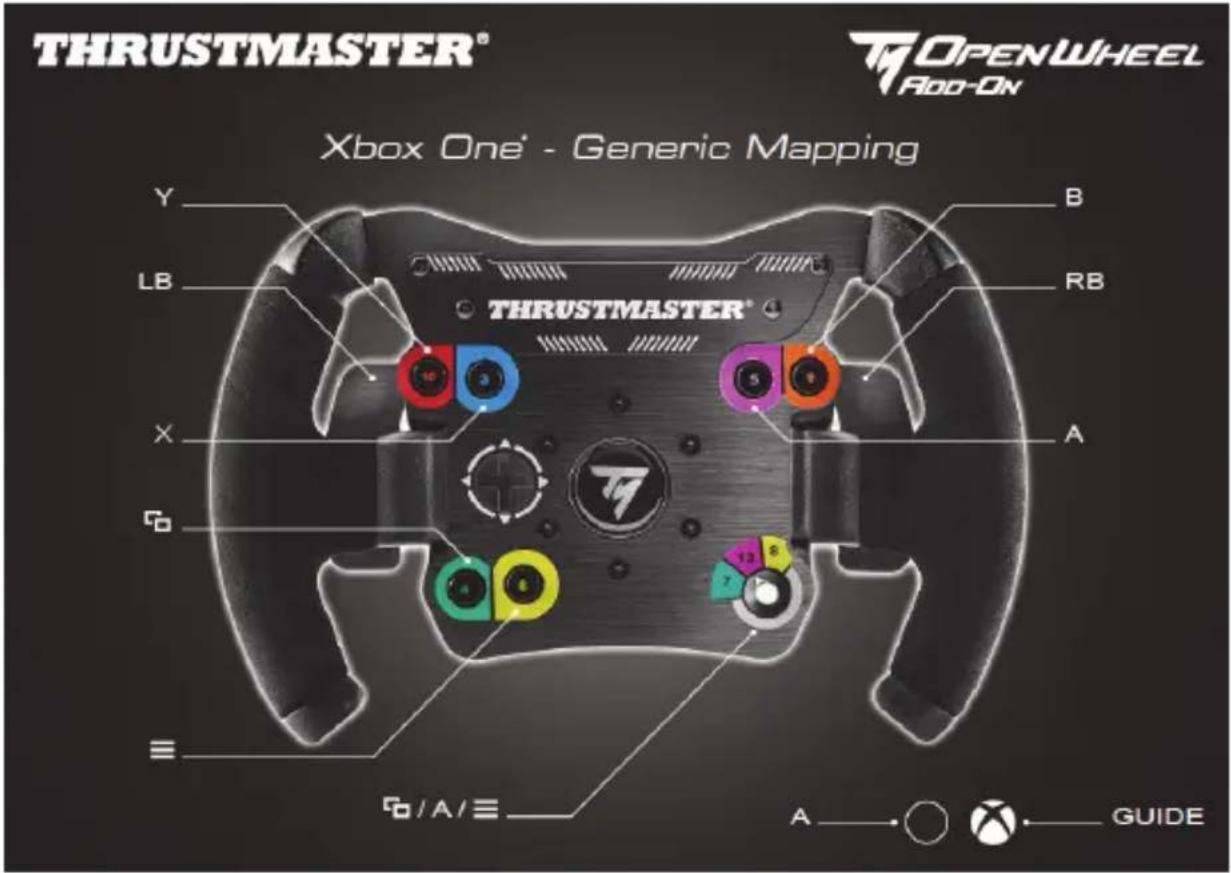
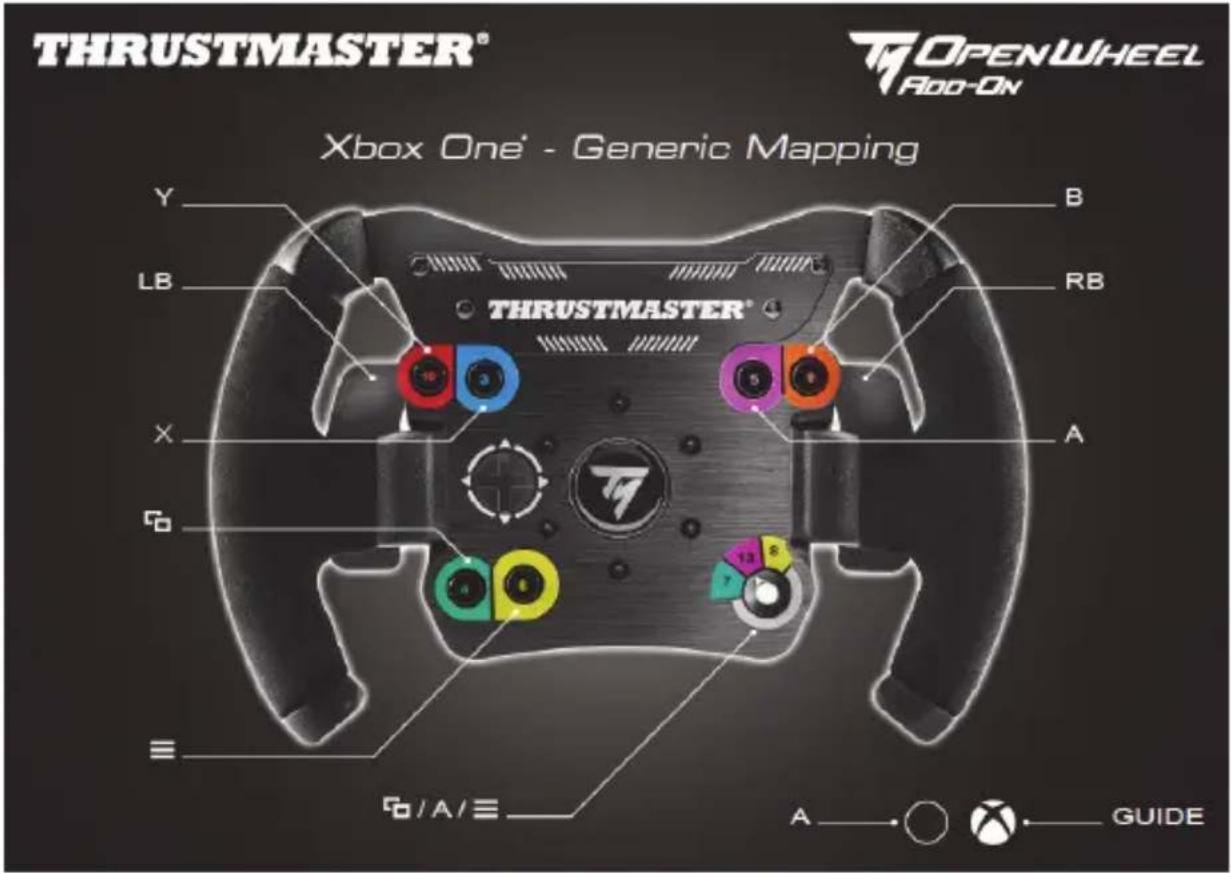
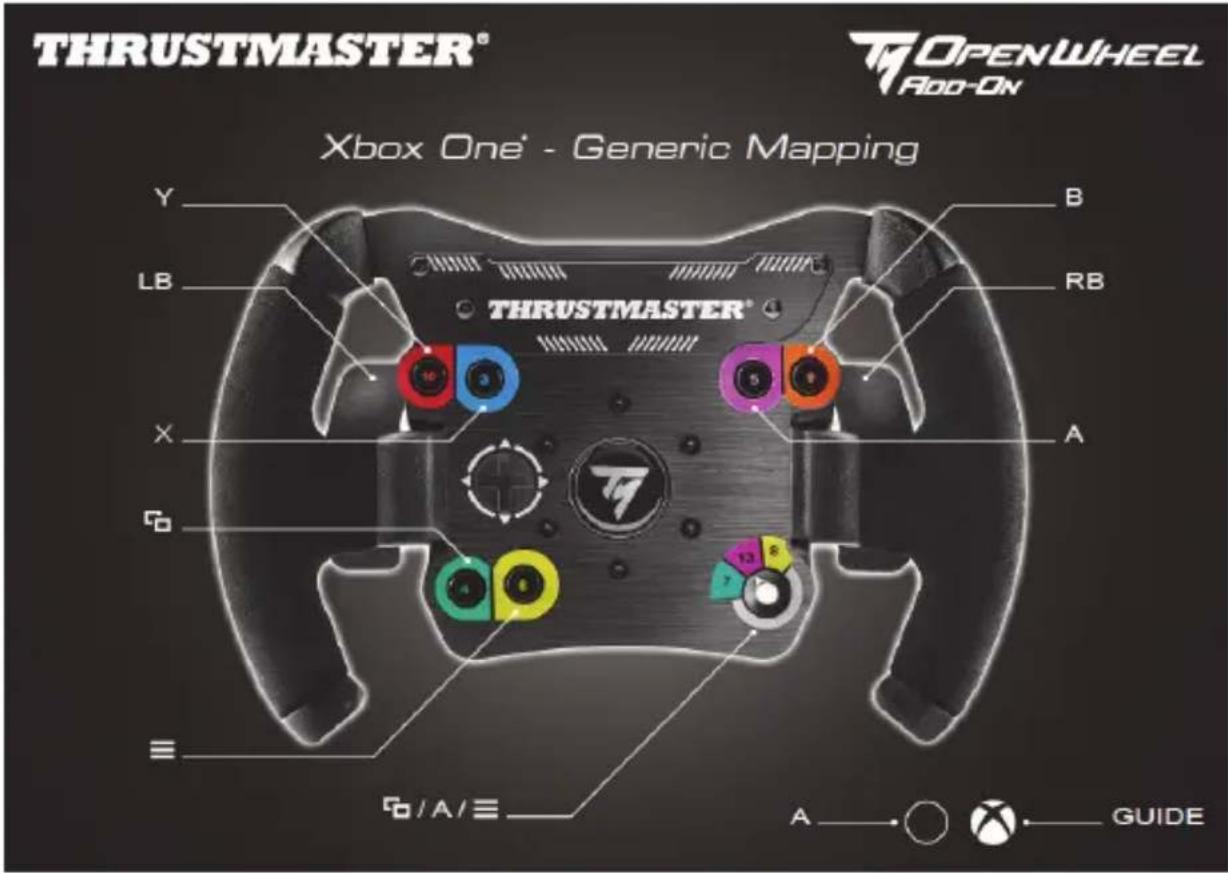
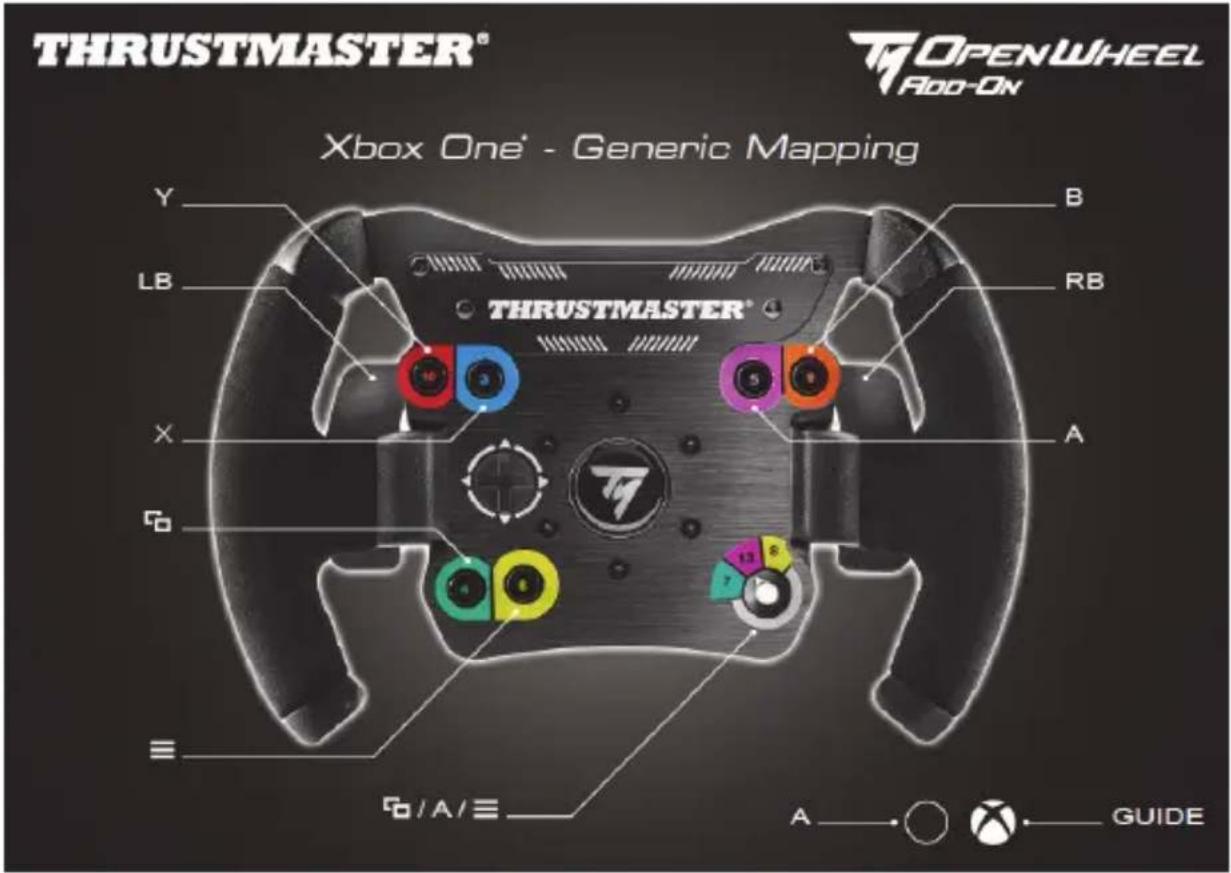
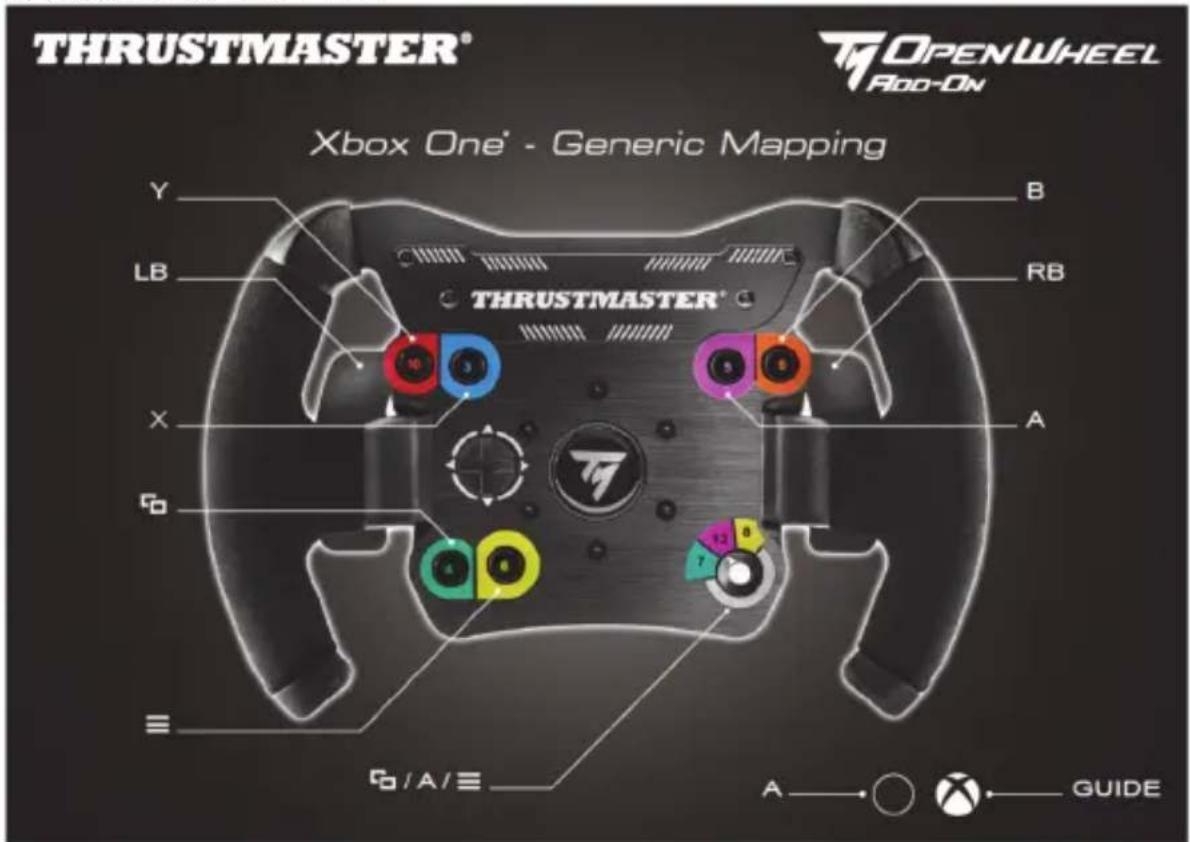
XBOX ONE® MAPPING
CONSUMER WARRANTY INFORMATION
Worldwide, Guillemot Corporation S.A., whose registered office is located at Place du Granier, B.P. 97143, 35571 Chantepie, France (hereinafter “Guillemot”) warrants to the consumer that this Thrustmaster product shall be free from defects in materials and workmanship, for a warranty period which corresponds to the time limit to bring an action for conformity with respect to this product. In the countries of the European Union, this corresponds to a period of two (2) years from delivery of the Thrustmaster product. In other countries, the warranty period corresponds to the time limit to bring an action for conformity with respect to the Thrustmaster product according to applicable laws of the country in which the consumer was domiciled on the date of purchase of the Thrustmaster product (if no such action exists in the corresponding country, then the warranty period shall be one (1) year from the original date of purchase of the Thrustmaster product).
Notwithstanding the above, rechargeable batteries are covered by a warranty period of six (6) months from the date of original purchase.
Should the product appear to be defective during the warranty period, immediately contact Technical Support, who will indicate the procedure to follow. If the defect is confirmed, the product must be returned to its place of purchase (or any other location indicated by Technical Support).
Within the context of this warranty, the consumer's defective product shall, at Technical Support's option, be either replaced or returned to working order. If, during the warranty period, the Thrustmaster product is subject to such reconditioning, any period of at least seven (7) days during which the product is out of use shall be added to the remaining warranty period (this period runs from the date of the consumer's request for intervention or from the date on which the product in question is made available for reconditioning, if the date on which the product is made available for reconditioning is subsequent to the date of the request for intervention). If permitted under applicable law, the full liability of Guillemot and its subsidiaries (including for consequential damages) is limited to the return to working order or the replacement of the Thrustmaster product. If permitted under applicable law, Guillemot disclaims all warranties of merchantability or fitness for a particular purpose.
This warranty shall not apply: (1) if the product has been modified, opened, altered, or has suffered damage as a result of inappropriate or abusive use, negligence, an accident, normal wear, or any other cause unrelated to a material or manufacturing defect (including, but not limited to, combining the Thrustmaster product with any unsuitable element, including in particular power supplies, rechargeable batteries, chargers, or any other elements not supplied by Guillemot for this product); (2) if the product has been used for any use other than home use, including for professional or commercial purposes (game rooms, training, competitions, for example); (3) in the event of failure to comply with the instructions provided by Technical Support; (4) to software, said software being subject to a specific warranty; (5) to consumables (elements to be replaced over the product's lifespan: disposable batteries, audio headset or headphone ear pads, for example); (6) to accessories (cables, cases, pouches, bags, wrist-straps, for example); (7) if the product was sold at public auction.
This warranty is nontransferable.
The consumer's legal rights with respect to laws applicable to the sale of consumer goods in his or her country are not affected by this warranty.
Additional warranty provisions
During the warranty period, Guillemot shall not provide, in principle, any spare parts, as Technical Support is the only party authorized to open and/or recondition any Thrustmaster product (with the exception of any reconditioning procedures which Technical Support may request that the consumer carry out, by way of written instructions – for example, due to the simplicity and the lack of confidentiality of the reconditioning process – and by providing the consumer with the required spare part(s), where applicable).
Given its innovation cycles and in order to protect its know-how and trade secrets, Guillemot shall not provide, in principle, any reconditioning notification or spare parts for any Thrustmaster product whose warranty period has expired.
In the United States of America and in Canada, this warranty is limited to the product's internal mechanism and external housing. In no event shall Guillemot or its affiliates be held liable to any third party for any consequential or incidental damages resulting from the breach of any express or implied warranties. Some States/Provinces do not allow limitation on how long an implied warranty lasts or exclusion or limitation of liability for consequential or incidental damages, so the above limitations or exclusions may not apply to you. This warranty gives you specific legal rights, and you may also have other rights which vary from State to State or Province to Province.
Liability
If permitted under applicable law, Guillemot Corporation S.A. (hereinafter “Guillemot”) and its subsidiaries disclaim all liability for any damages caused by one or more of the following: (1) the product has been modified, opened or altered; (2) failure to comply with assembly instructions; (3) inappropriate or abusive use, negligence, an accident (an impact, for example); (4) normal wear; (5) the use of the product for any use other than home use, including for professional or commercial purposes (game rooms, training, competitions, for example). If permitted under applicable law, Guillemot and its subsidiaries disclaim all liability for any damages unrelated to a material or manufacturing defect with respect to the product (including, but not limited to, any damages caused directly or indirectly by any software, or by combining the Thrustmaster product with any unsuitable element, including in particular power supplies, rechargeable batteries, chargers, or any other elements not supplied by Guillemot for this product).
DECLARATION OF CONFORMITY
CANADIAN COMPLIANCE NOTICE: this Class B digital apparatus meets all requirements of the Canadian Interference-Causing Equipment Regulations.
USA COMPLIANCE NOTICE: this equipment has been tested and found to comply with the limits for a Class B digital device, pursuant to Part 15 of the FCC rules. Operation is subject to the following two conditions:
(1) This device may not cause harmful interference, and
(2) This device must accept any interference received, including interference that may cause undesired operation.
These limits are designed to provide reasonable protection against harmful interference in a residential installation. This equipment generates, uses and can radiate radio frequency energy and, if not installed and used in accordance with the instructions, may cause harmful interference to radio communications. However, there is no guarantee that interference will not occur in a particular installation. If this equipment does cause harmful interference to radio or television reception, which can be determined by turning the equipment on and off, the user is encouraged to try to correct the interference by one or more of the following measures:
- Reorient or relocate the receiving antenna.
- Increase the separation between the equipment and receiver.
- Connect the equipment into an outlet on a circuit different from that to which the receiver is connected.
- Consult the dealer or an experienced radio/TV technician for help.
COPYRIGHT
© 2019 Guillemot Corporation S.A. All rights reserved. Thrustmaster® is a registered trademark of Guillemot Corporation S.A. PlayStation® is a registered trademark of Sony Interactive Entertainment Inc. Windows® is a registered trademark of Microsoft Corporation in the United States and/or other countries. All other trademarks and brand names are hereby acknowledged and are property of their respective owners. Illustrations not binding. Contents, designs and specifications are subject to change without notice and may vary from one country to another. Made in China.
ENVIRONMENTAL PROTECTION RECOMMENDATION
natural_image
Simple line drawing of a trash bin with cross lines and a black rectangle below (no text or symbols)In the European Union: At the end of its working life, this product should not be disposed of with standard household waste, but rather dropped off at a collection point for the disposal of Waste Electrical and Electronic Equipment (WEEE) for recycling.
This is confirmed by the symbol found on the product, user manual or packaging.
Depending on their characteristics, the materials may be recycled. Through recycling and other forms of processing Waste Electrical and Electronic Equipment, you can make a significant contribution towards helping to protect the environment.
Please contact your local authorities for information on the collection point nearest you.
For all other countries: Please adhere to local recycling laws for electrical and electronic equipment.
Retain this information. Colours and decorations may vary.
Plastic fasteners and adhesives should be removed from the product before it is used.
www.thrustmaster.com
*Applicable to EU and Turkey only

OPENWHEEL Add-On
POUR PLAYSTATION®4 - XBOX ONE® - PC
INSTALLATION DE LA ROUE SUR SA BASE
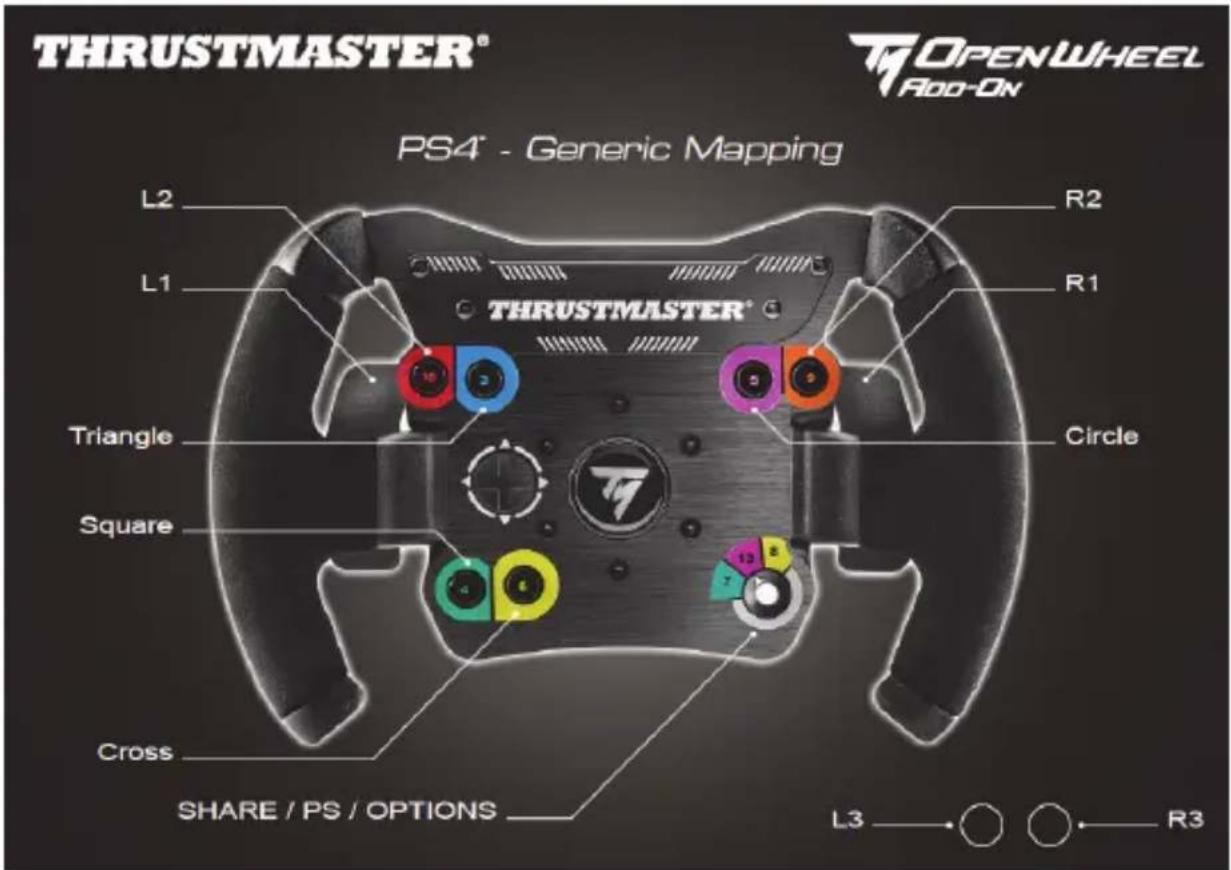
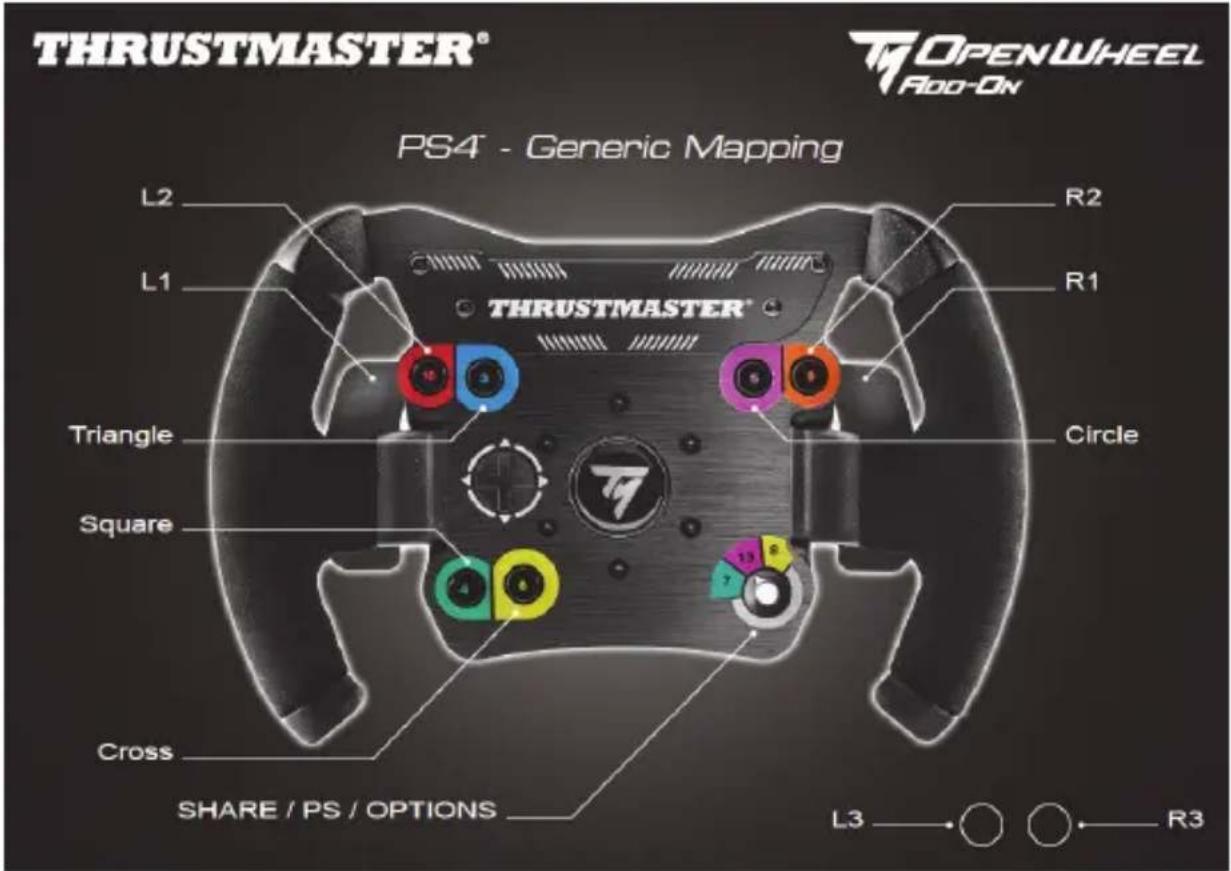
MAPPING PLAYSTATION®4
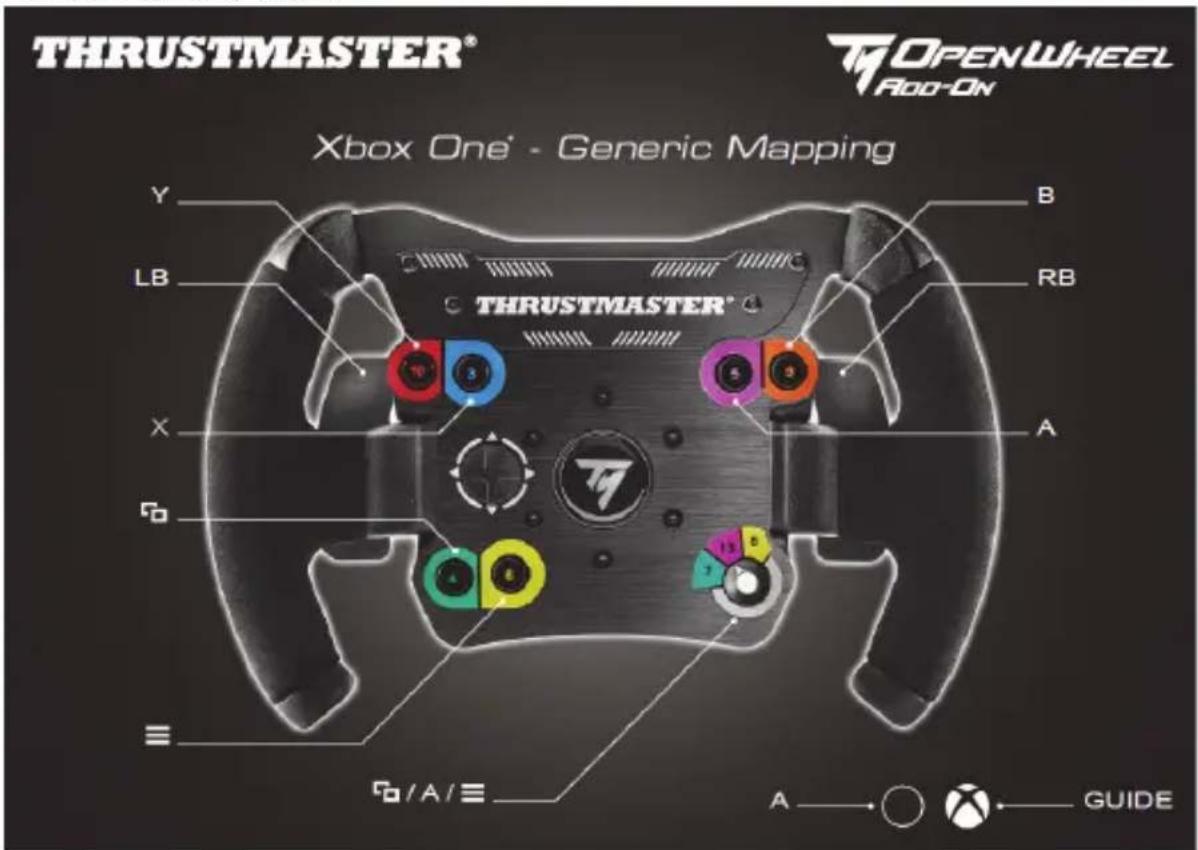
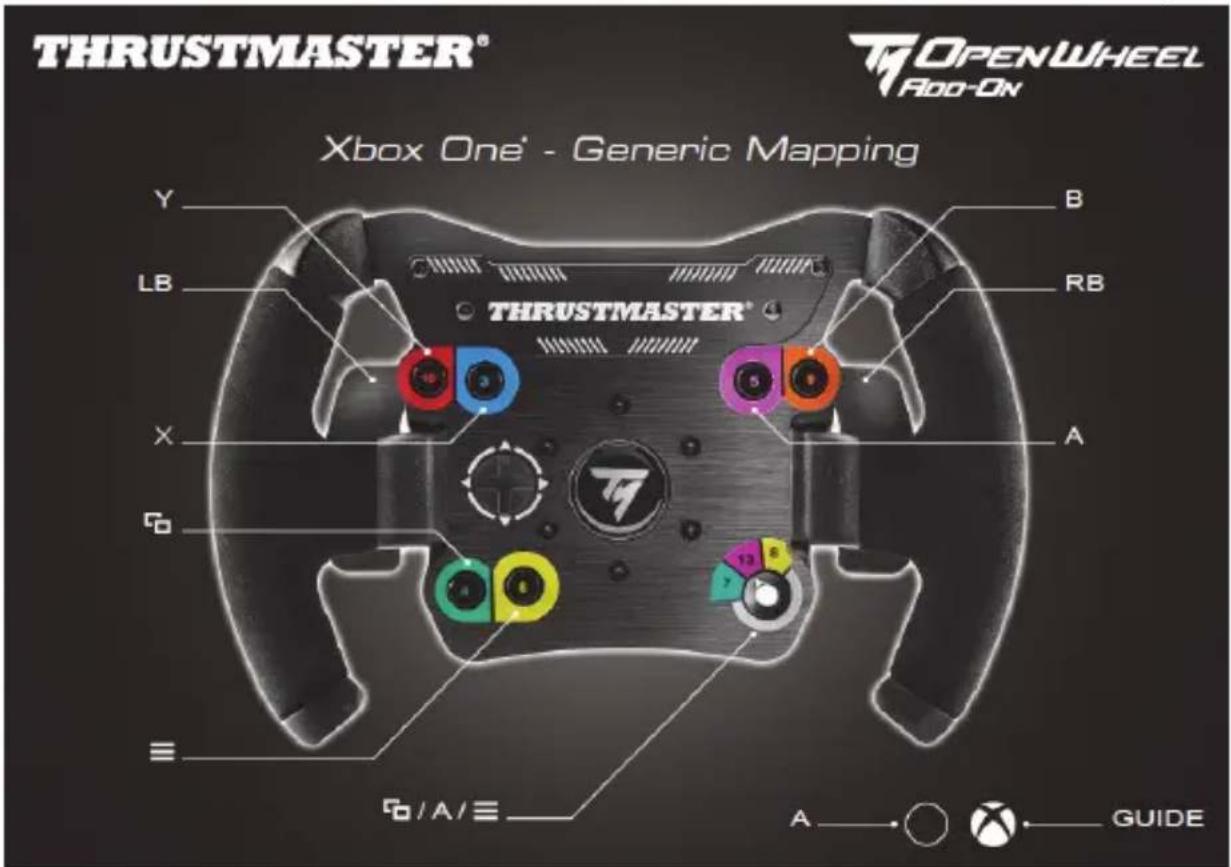
MAPPING XBOX ONE®
INFORMATIONS RELATIVES A LA GARANTIE AUX CONSOMMATEURS
natural_image
Symbol of a trash bin with no text or labels, featuring a crossed-out wheel and a black rectangle below (no readable text or symbols)www.thrustmaster.com
MAPPING FÜR UND PLAYSTATION®4
Kunden-Garantie-Information
natural_image
Simple line drawing of a trash bin with crosshair and a blank rectangular base (no text or symbols)www.thrustmaster.com
MAPPING VOOR PLAYSTATION®4
MAPPING VOOR XBOX ONE®
natural_image
Three black icons: a lowercase 'i' in a circle, an envelope, and a telephone handset (no text or symbols)COPYRIGHT
natural_image
Symbol of a trash bin crossed with a diagonal line and a black rectangle below (no text or labels)www.thrustmaster.com
MAPPATURA SU PLAYSTATION®4

MAPPATURA SU XBOX ONE®
COPYRIGHT
natural_image
Symbol of a trash bin crossed with no visible text or labelswww.thrustmaster.com
MAPEADO EN PLAYSTATION®4
natural_image
Symbol of a trash bin with crosshair and a warning symbol (no text or labels)www.thrustmaster.com
MAPEAR A PLAYSTATION®4
MAPEAR A XBOX ONE®
INFORMAÇÕES SOBRE A GARANTIA PARA O CONSUMIDOR
natural_image
Symbol of a trash bin with cross lines and a black rectangle below (no text or labels)www.thrustmaster.com
MAPEAMENTO PARA PLAYSTATION®4
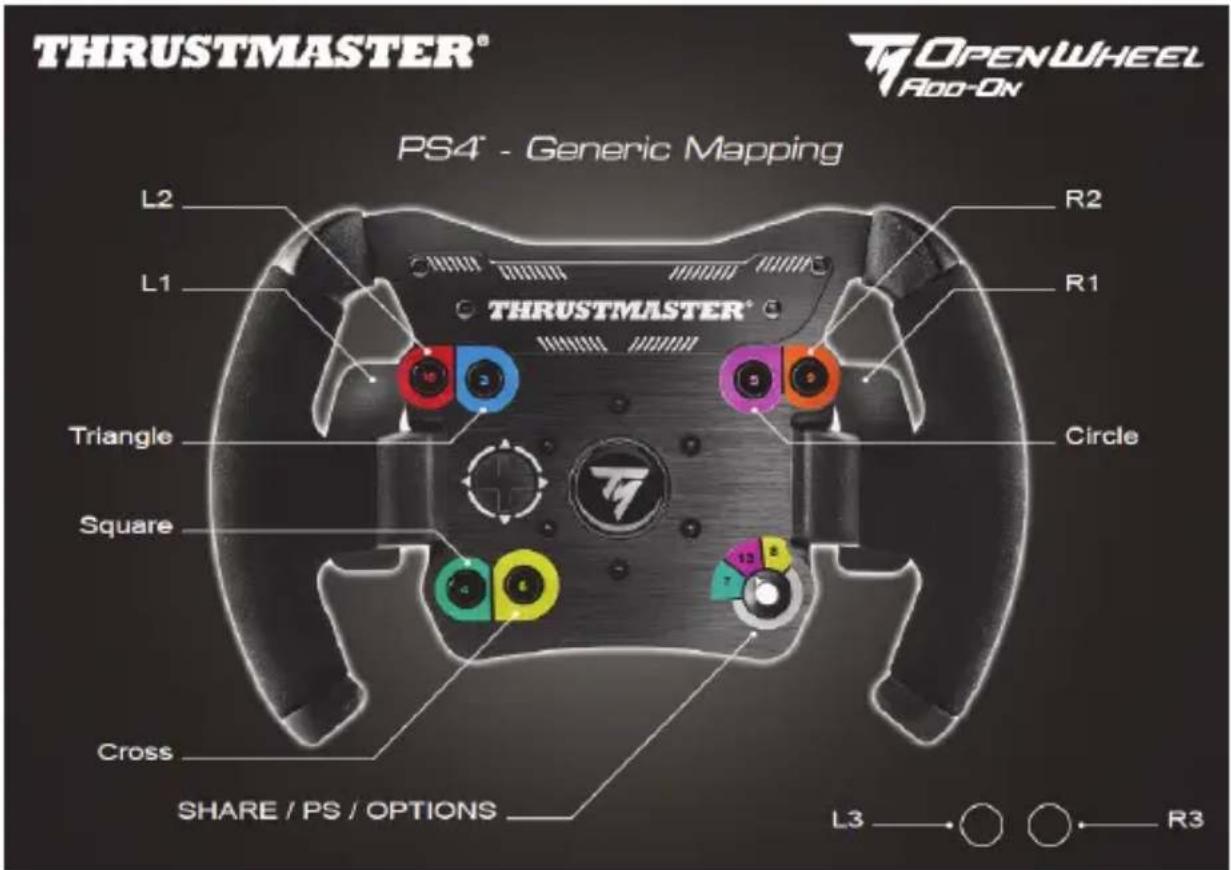
MAPEAMENTO PARA XBOX ONE®
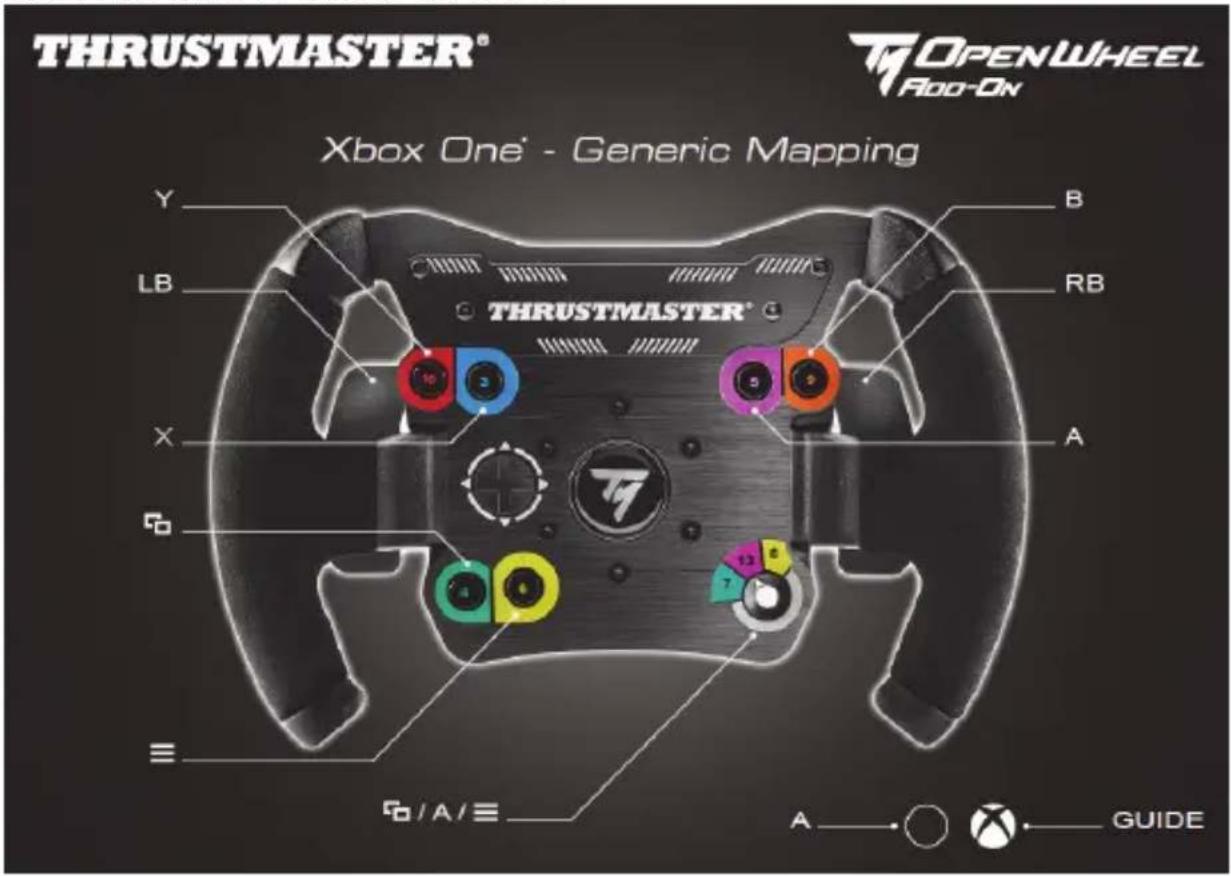
INFORMAÇÕES SOBRE A GARANTIA PARA O CONSUMIDOR
www.thrustmaster.com



OPENWHEEL Add-On
ДЛЯ PLAYSTATION®4 - XBOX ONE® - ПК
АВТОРСКИЕ ПРАВА
www.thrustmaster.com
EAC
OPENWHEEL Add-On
ΓΙΑ PLAYSTATION®3 - PLAYSTATION®4 - XBOX ONE® - PC
natural_image
Simple line drawing of a trash bin with cross lines and a blank rectangular base (no text or symbols)www.thrustmaster.com
PLAYSTATION®4 DÜĞME YERLEŞİMİ
TELİF HAKKI
www.thrustmaster.com
MAPOWANIE NA KONSOLACH PLAYSTATION®4
MAPOWANIE NA KONSOLI XBOX ONE®
INFORMACJE DOTYCZĄCE GWARANCJI DLA KLIENTA
natural_image
Symbol of a trash bin with crossed lines and a black rectangle below (no text or labels)www.thrustmaster.com
著作權
www.thrustmaster.com
Made in China.
紙: 外箱
CE FC
OPENWHEEL ADD-ON
PLAYSTATION®4 - XBOX ONE - PC
將賽車方向盤安裝至底座
依照箭頭方向對準接頭位置:
底座(1)接頭:箭頭方向往上
賽車方向盤(2)接頭:箭頭方向往上
XBOX ONE®示意图
版權所有
PLAYSTATION®4 매핑
XBOX ONE® MAPPING
COPYRIGHT
تخطيط XBOX ON
natural_image
Symbol of a trash bin with crossed lines and a black rectangle below, no text or labels present.www.thrustmaster.com