
SC 4 EasyFix Preium - Steam cleaner Kärcher - Free user manual and instructions
Find the device manual for free SC 4 EasyFix Preium Kärcher in PDF.
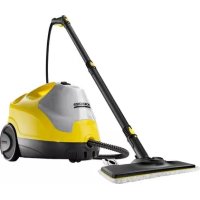


| Product Type | Steam Cleaner |
| Brand | Kärcher |
| Model | SC 4 EasyFix Premium |
| Electrical Supply | 220-240 V, 1~50-60 Hz |
| Heating Power | 2000 W |
| Max. Operating Pressure | 0.35 MPa |
| Heating Time | 4 minutes |
| Continuous Steam Output | 50 g/min |
| Max. Steam Output | 110 g/min |
| Water Tank Capacity | 0.8 L |
| Boiler Capacity | 0.5 L |
| Weight (without accessories) | 4.1 kg |
| Dimensions (L x W x H) | 350 x 280 x 270 mm |
| Protection Class | I (with earth plug) |
| Protection Rating | IPX4 |
| Steam Output Setting | 3 positions (max, reduced, child safety) |
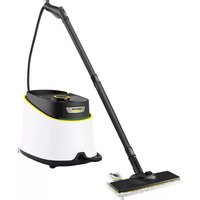
| Included Accessories | Steam pistol, jet nozzle, power injector, round brush (large), hand nozzle, terry cloth cover, microfiber cover, 2 extension tubes, floor nozzle, 2 microfiber mop covers, descaling rod |
| Maintenance | Rinse boiler every 10 fills; descaling according to water hardness; wash mop covers at 60 °C |
| Safety | Pressure regulator, boiler thermostat, safety thermostat, maintenance lock / pressure relief valve |
| Warranty | According to applicable conditions in the country (see manual) |
| Spare Parts | Use only Kärcher spare parts |
Frequently Asked Questions - SC 4 EasyFix Preium Kärcher
User questions about SC 4 EasyFix Preium Kärcher
0 question about this device. Answer the ones you know or ask your own.
Ask a new question about this device
Download the instructions for your Steam cleaner in PDF format for free! Find your manual SC 4 EasyFix Preium - Kärcher and take your electronic device back in hand. On this page are published all the documents necessary for the use of your device. SC 4 EasyFix Preium by Kärcher.
USER MANUAL SC 4 EasyFix Preium Kärcher
German 5
English 11
French 16
Italian 22
Dutch 28
Spanish 34
Portuguese 40
Danish 46
Norwegian 51
Swedish 56
Finnish 61
Greek 67
Turkish 73
Russian 79
Hungarian 85
Czech 90
Slovenian 96
Polish 101
Romanian 107
Slovak 113
Croatian 119
Serbian 125
Bulgarian 131
Estonian 137
Latvian 142
Lithuanian 148
Ukrainian 154
Kazakh 160
Arabic 172
Register and win! www.kaercher.com/register-and-win

EAC


59654170 06/16
| DE Kurzanleitung | SV Snabbguide | RO Instructiuni pe scurt |
| EN Quick reference | FI Pikaohje | SK Krátky návod |
| FR Instructions abrégées | EL Σύντομες οδηγίε | HR Krakte upute |
| IT In sintesi | TR Kısa Kullanım Talimati | SR Kratko uputstvo |
| NL Korte handleiding | RU Краткое руководство | BG Кратко упътване |
| ES Descripción breve | HU Rövid bevezetés | ET Lühijuhend |
| PT Instruções resumidas | CS Stručný návod | LV Îsa lietošanas instrukcija |
| DA Kort brugsanvisning | SL Kratko navodilo | LT Trumpa instrukcija |
| NO Kortveiledning | PL Skrócona instrukcja obsługi | UK Стислий посібник |
Contents
| General information. | EN 5 |
| Safety Devices | EN 5 |
| Description of the Appliance | EN 6 |
| Quick Reference | EN 6 |
| Operation. | EN 6 |
| How to Use the Accessories | EN 7 |
| Care and maintenance | EN 8 |
| Troubleshooting. | EN 9 |
| Technical specifications. | EN 9 |
| Special accessories. | EN 9 |
General information
Dear Customer,


Please read these original operating instructions and the enclosed safety instructions prior to the initial use of your device. Proceed accordingly. Keep both booklets for future reference or subsequent owners.
structions prior to the initial use of your device. Proceed accordingly. Keep both booklets for future reference or subsequent owners.
Use the steam cleaner only for private households. The appliance is intended to be used with steam and can be used with the appropriate accessories as described in these operating instructions. You will not need any detergent. Please adhere to the safety instructions.
Use the steam cleaner only for private households. The appliance is intended to be used with steam and can be used with the appropriate accessories as described in these operating instructions. You will not need any detergent. Please adhere to the safety instructions.
The packaging material can be recycled. Please do not place the packaging into the ordinary refuse for disposal, but arrange for the proper recycling.

The packaging material can be recycled. Please do not place the packaging into the ordinary refuse for disposal, but arrange for the proper recycling.
Old appliances contain valuable materials that can be recycled. Please arrange for the proper recycling of old appliances. Please dispose of your old appliances using appropriate collection systems.
Electrical and electronic devices often contain components which could potentially pose a danger to human health and the environment if handled or disposed of incorrectly. However, these components are necessary for the proper operation of the device. Devices marked with this symbol must not be disposed of with regular household rubbish.
You will find current information about the ingredients at:
You will find current information about the ingredients at:
www.kaercher.com/REACH
Symbols on the machine

Steam
CAUTION - Danger of scalding

CAUTION – Please read the operating instructions!
Scope of delivery
The scope of delivery of your appliance is illustrated on the packaging. Check the contents of the appliance for completeness when unpacking. In the event of missing accessories or any transport damage, please contact your dealer.
Spare parts
Use only original KÄRCHER spare parts. You will find a list of spare parts at the end of these operating instructions.
Warranty
The warranty terms published by the relevant sales company are applicable in each country. We will repair potential failures of your appliance within the warranty period free of charge, provided that such failure is caused by faulty material or defects in manufacturing. In the event of a warranty claim please contact your dealer or the nearest authorized Customer Service centre. Please submit the proof of purchase. (See address on the reverse)
Safety Devices
△CAUTION
Safety devices protect the user and must not be modified or bypassed.
Pressure controller
The pressure controller keeps the boiler pressure as constant as possible during operation. The heating is turned off if the maximum operating pressure of 4 bar is reached in the boiler, and is reactivated in case of a pressure drop in the boiler due to steam tapping.
Boiler thermostat
If, in case of a malfunction, there is no water in the boiler, the temperature in the boiler rises. The boiler thermostat turns off the heating. Once the boiler is filled, normal operation can continue.
Safety thermostat
The safety thermostat turns off the appliance if the boiler thermostat and the pressure controller fail and the appliance overheats in case of a malfunction. Please contact your local KÄRCHER customer service to arrange for the reset of the safety thermostat.
Maintenance lock
The maintenance lock acts as a pressure control valve at the same time. It seals the boiler against the steam pressure that builds up in the boiler.
If the pressure controller is defective and the steam pressure in the boiler rises, the pressure control valve opens, and steam is emitted through the maintenance lock to the outside.
Please contact your local KÄRCHER customer service before you put the appliance into operation again.
Description of the Appliance
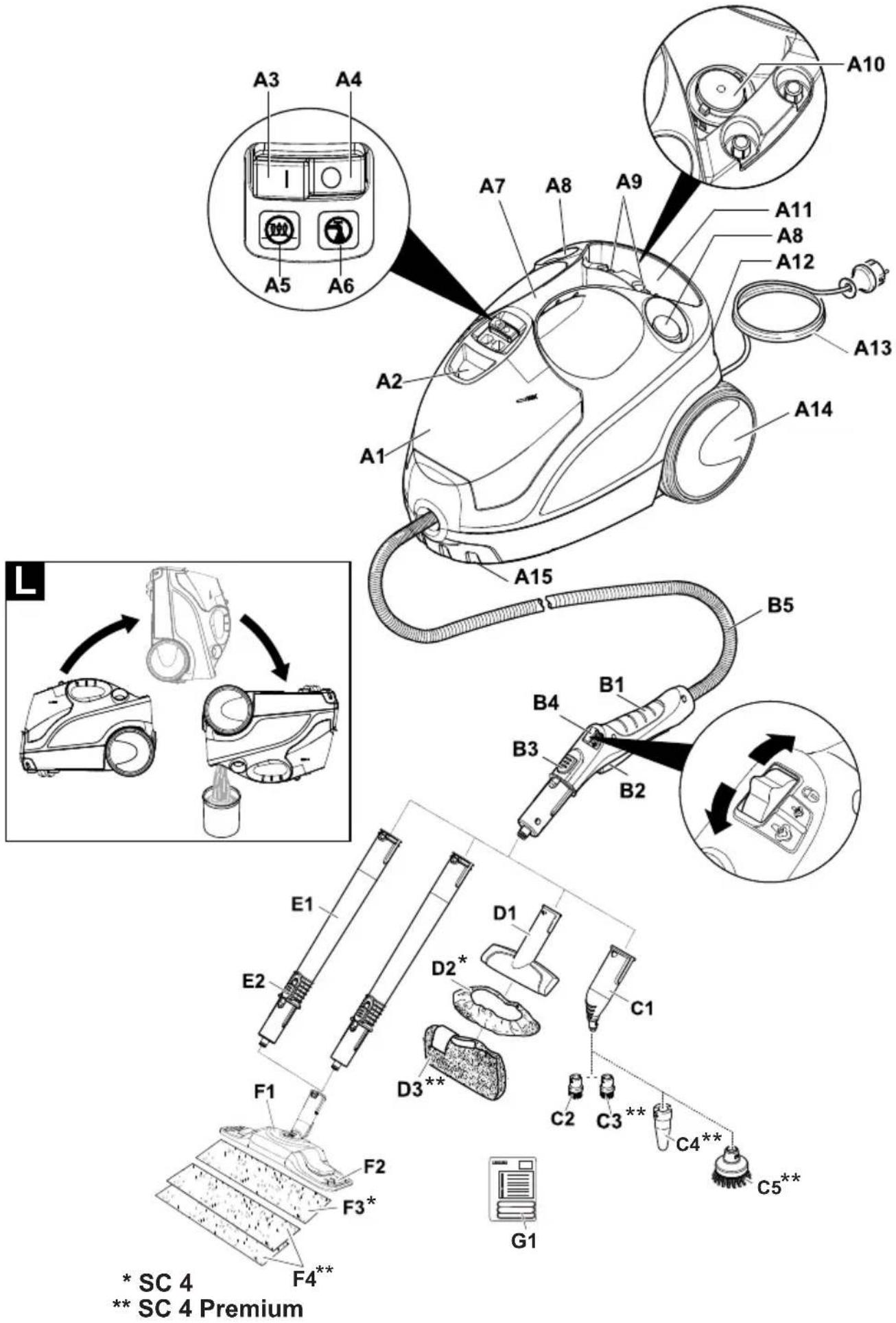
→ Illustrations on fold-out page 4!
A1 Water reservoir
A2 Fresh water reservoir filler neck
A3 Switch - ON
A4 Switch - OFF
A5 Indicator lamp - heating (GREEN)
A6 Indicator lamp "water shortage" (RED)
A7 Carrying handle
A8 Holder for accessories
A9 Holder for accessories
A10 Maintenance lock
A11 Storage for mains connection cable
A12 Storage holder for floor nozzle
A13 Mains cable with mains plug
A14 Running wheels (2 ea.)
A15 Steering roller
B1 Steam gun
B2 Steam lever
B3 Unlocking button
B4 Selector switch for the steam volume (with child protection)
B5 Steam hose
C1 Detail nozzle
C2 Round brush Black
C3 Round brush Red
C4 Power nozzle
C5 Round brush Large
D1 Hand nozzle
D2 Terry cloth cover
D3 Microfibre cloth cover
E1 Extension tubes (two tubes)
E2 Unlocking button
F1 Floor nozzle
F2 Side-flaps
F3 Microfibre floor cloth
F4 Microfibre floor cloth 2 pieces
G1 Decalcifying sticks
Quick Reference
→ Illustrations on Page 2
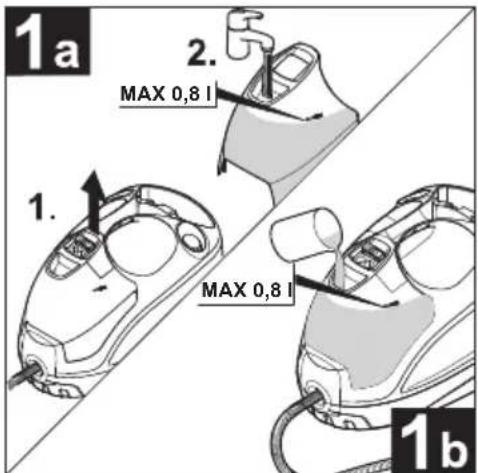
Illustration 1
→ Fill the water reservoir up to the "MAX" marking.
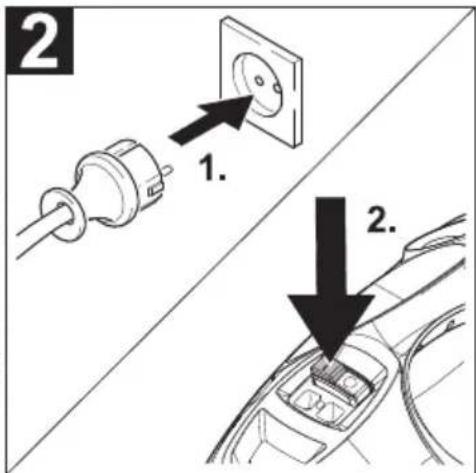
Illustration 2
→ Plug in the mains plug.
→ Turn on the appliance.
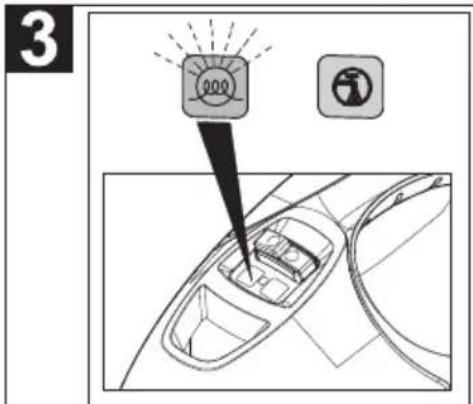
Illustration 3
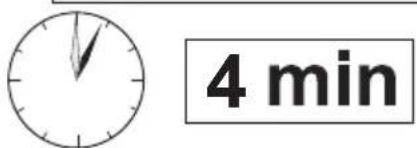
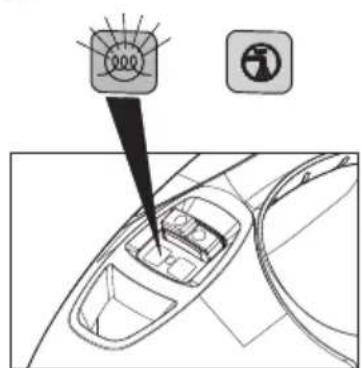
→ Indicator lamp "heating on" is blinking (green). Once the indicator lamp (heater) lights up permanently, the steam cleaner is ready to use.
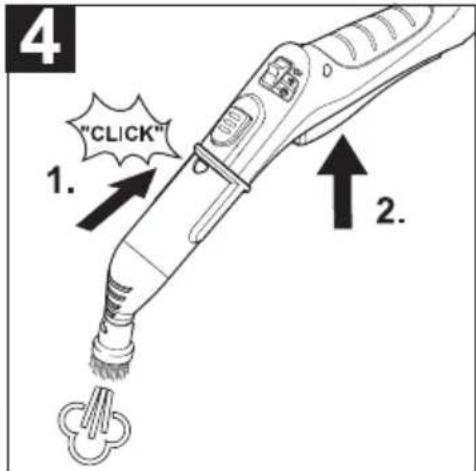
Illustration 4
→ Connect the accessories to the steam gun.
→ Operate steam lever.
Operation
→ Illustrations on fold-out page 3!

Attaching the Accessories
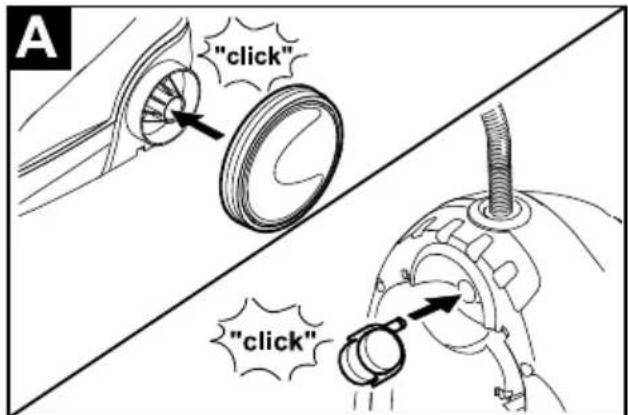
Illustration A
Insert the steering roller and running wheels, and lock them.
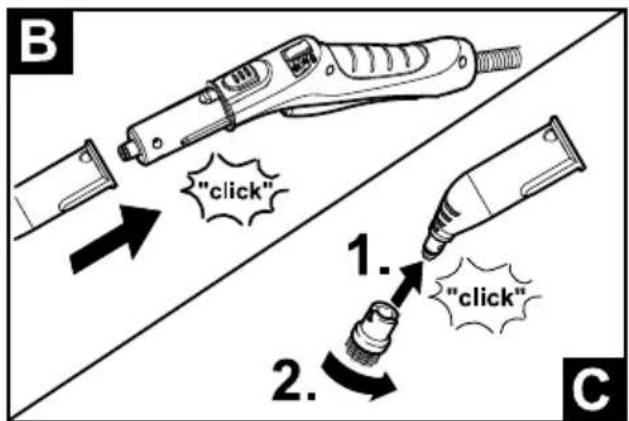
Illustration B
Illustration C
Connect the required accessories (see Chapter "How to use the accessories") to the steam gun. Insert the open end of the accessory onto the steam gun and push it until the unlocking button of the steam gun locks into place.
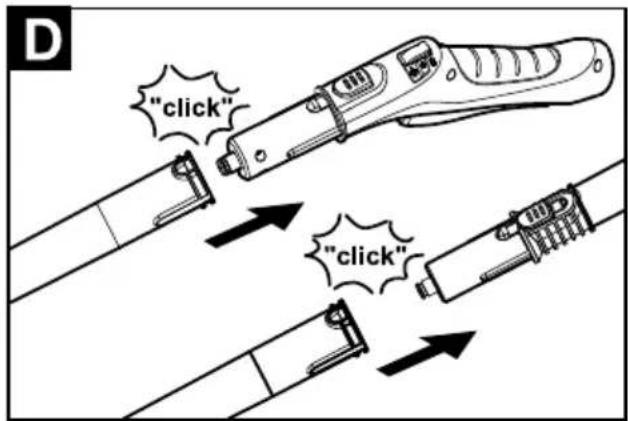
Illustration D
Use the extension tubes if necessary. To do so, connect one or both extension tubes to the steam gun. Insert the required accessories onto the free end of the extension tube.
Removing the Accessories
Move the selector switch for the steam volume back (steam lever locked).
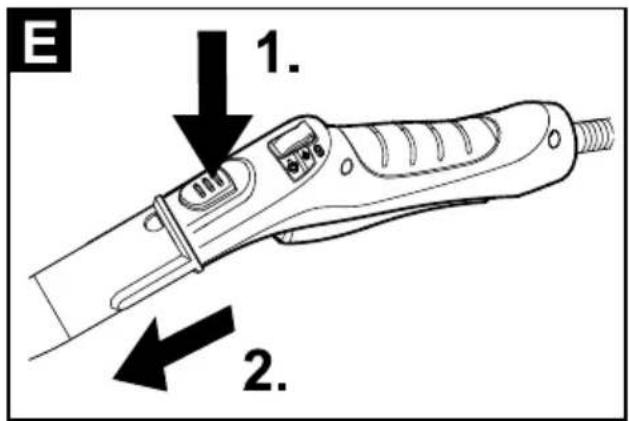
Illustration E
To detach the accessory parts, press the unlocking button and pull the items apart.
Filling the Water Reservoir
The water reservoir may be refilled at any time.
ATTENTION
Do not use condensation water from the drier! Do not fill with detergent or other additives (for example fragrances)!
Do not use pure distilled water! Max. 50% distilled water and 50% tap water.
Do not use collected rain water!
You can remove the water reservoir to fill it or you can fill it directly on the appliance.
Take off water reservoir
→ Pull the water reservoir straight up.
→ Fill the water reservoir up to the "MAX" marking while positioned vertically under the water tap.
→ Insert the water reservoir and press downwards until it arrests.
Directly on the appliance
→ Pour water from a container into the funnel inlet. Fill up to the "MAX" marking.
Turning on the Appliance
→ Place the unit securely on a firm surface.
→ Insert the mains plug into a socket.
→ Press the ON switch to turn on the appliance.
Note
If there is no or not enough water in the steam boiler, the water pump starts and supplies water from the reservoir into the steam boiler. The filling process may take several minutes.
→ Wait until the indicator lamp (heater) lights up permanently.
The steam cleaner is ready to use.
Refilling Water
In case of water shortage, the indicator lamp "water shortage" glows red in the water reservoir and a signal can be heard.
→ Fill the water reservoir up to the "MAX" marking.
Note
The water pump tries to fill the steam boiler in short intervals. If the filling process is successful, the red indicator lamp goes off.
Adjusting the Steam Quantity
Use the selector switch for the steam volume to regulate the discharged steam. The selector switch has three positions:
 | Maximum steam volume |
 | Reduced steam volume |
 | No steam - child protectionNote:In this lever position, the steam lever cannot be used. |
→ Set selector switch to the required steam volume. → While operating the steam switch, always direct the steam gun at a separate piece of cloth until the steam is emitted evenly.
Turning Off the Appliance
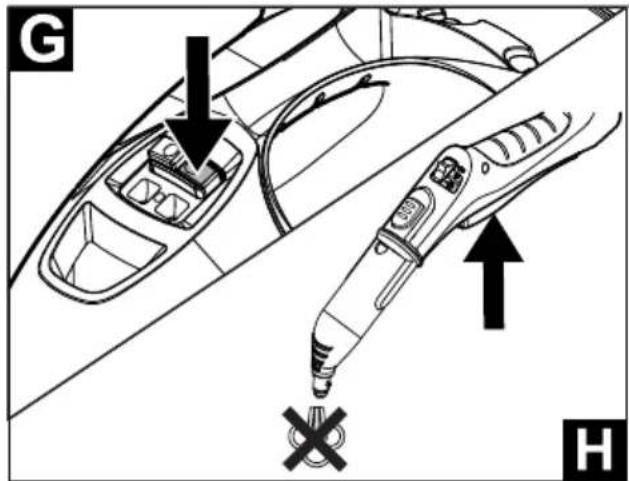
Illustration G
→ Press the OFF switch to turn off the appliance.
Illustration H
Push the steam switch until steam discharge stops. Now, the boiler of the appliance is unpressurized. Move the child protection unit toward the back (steam lever locked). Disconnect the mains plug from the socket. Empty the residual water from the water reservoir.
Storing the Appliance
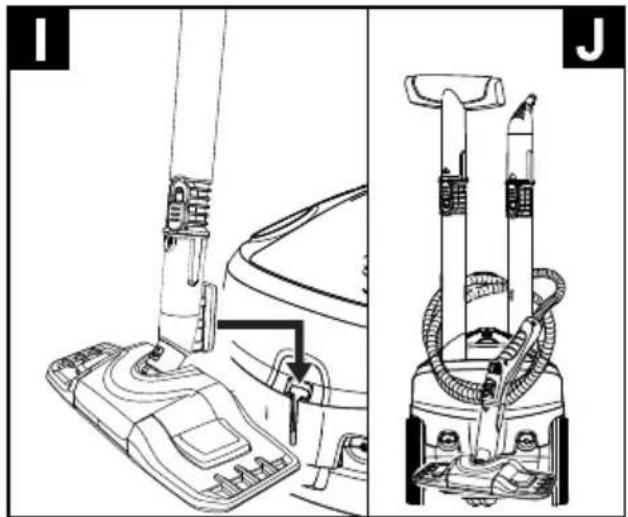
Illustration I
Illustration J
Put the extension pipes into the large accessory compartments. Insert the manual nozzle and detail nozzle onto each extension pipe. Attach the big round brush to the small detail nozzle. Put the small round brush and nozzles into the medium accessory compartment. Hook the floor nozzle into the parking position. Wrap the steam hose around the extension pipes and insert the steam pistol into the floor nozzle.
How to Use the Accessories
Important application instructions
Cleaning floor surfaces
It is recommended to sweep or vacuum the floor prior to using the steam cleaner. This way, the floor is already cleared of dirt/loose particles prior to the wet cleaning.
Refreshing textiles
Prior to treatment with the steam cleaner, always check the reaction of the textiles in an inconspicuous location: Steam at first, then let dry and then check for colour or shape changes.
Cleaning of Coated or Lacquered Surfaces
When cleaning painted or plastic-coated surfaces, as found on kitchen and living room furniture, doors, parquet; wax, furniture polish, plastic surfaces or paint can come loose or stains can be created. When cleaning these surfaces, briefly steam a cloth and wipe the surfaces with it.
ATTENTION
Never direct the steam jet at glued edges as the edge band may loosen. Do not use the steam cleaner on unsealed wooden or parquet floors.
Cleaning of Glass
In case of low outside temperatures, especially in the winter, warm up the window pane by slightly steaming the entire glass surface. This will prevent tensions on the surface which might lead to glass breakage. Then clean the window surface with the hand nozzle and attachment. Use a squeegee to remove the water or wipe the surfaces dry.
ATTENTION
Do not direct steam onto the sealed locations of the window frame to prevent damage.
Steam gun
You can use the steam gun without any additional accessories, e.g.:
- to remove light wrinkles from hanging clothes by steaming them at a distance of 10 to 20 cm.
- to remove dust from plants. Here, keep a distance of 20-40 cm.
- for moist dusting, by briefly steaming the cloth and wiping the furniture with it.
Detail nozzle
The closer this nozzle is to the contaminated area, the higher the cleaning effect, as the temperature and the steam are highest at the nozzle output. Especially suited for cleaning difficult access locations, joints, fittings, drains, sinks, toilets, blinds and heaters. Heavy lime scale can be drenched in vinegar prior to steam-cleaning. Let the vinegar penetrate for about 5 minutes.
Illustration B
→ Install detail nozzle on the steam gun.
Round brush (small)
The round brush can be installed onto the detail nozzle as an accessory. Attached brushes can therefore be used to remove heavy soiling.
ATTENTION
Not suitable for cleaning sensitive surfaces.
Illustration C
→ Attach the round brush to the detail nozzle.
Power nozzle
The power nozzle can be installed onto the detail nozzle as an accessory.
The power nozzle increases the emission speed of the steam. Therefore, it is well-suited for cleaning very tough dirt, blowing out corners, grooves, etc.
Illustration C
→ Attach the power nozzle to the detail nozzle according to the round brush.
Round brush (big)
The round brush can be installed onto the detail nozzle as an accessory. This round brush allows to clean large rounded surfaces (e.g. sink, shower tray, bathtub, kitchen sink).
ATTENTION
Not suitable for cleaning sensitive surfaces.
Illustration C
→ Attach the round brush to the detail nozzle.
Hand nozzle
Pull the cloth cover over the hand nozzle. Especially well-suited for small washable areas, shower stalls and mirrors.
Illustration B
→ Install hand nozzle on steam gun.
Floor nozzle
Suited for all washable walls and floor coverings, e.g. stone floors, tiles and PVC floors. Work slowly on very dirty surfaces to allow the steam to act on the dirt for a longer period of time.
Note
Detergent residue or care emulsions that are still present on the surface to be cleaned can lead to streaks during steam cleaning. However, these will disappear with repeated cleaning procedures.
Illustration D
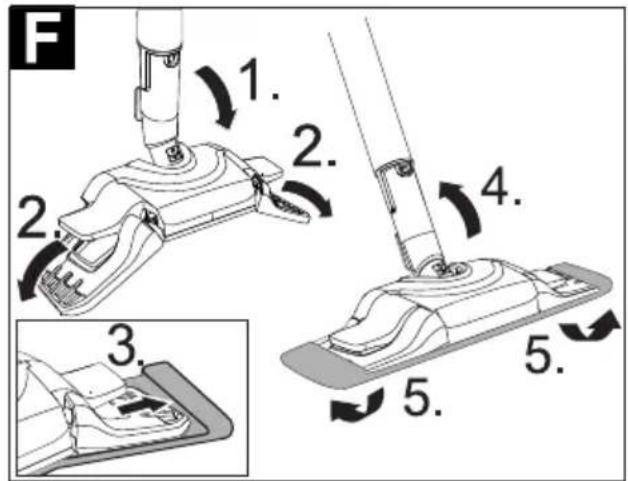
→ Connect the extension tubes with the steam gun. → Connect the floor nozzle to the extension tubes. Illustration F → Attach the floor cloth to the floor nozzle. - Tip extension tube far forward until it is perpendicular, thereby the side flaps of the floor nozzle fold up down. - Place the floor nozzle on top of the floor cloth, allow the side flaps to slide into the two tabs of the floor cloth. - Tip the extension tube back again, thereby the side flaps lock and the cloth firmly at the floor nozzle.
Parking the floor nozzle
Illustration I
→ During work breaks, hook the floor nozzle into the parking holder.
Care and maintenance
Rinsing the steam boiler
Rinse the steam cleaner boiler at the latest after 10 boiler fillings.
→ Disconnect the mains plug from the socket. → Allow the steam cleaner to cool down. → Empty the water reservoir. → Remove the accessories from the accessory compartments.
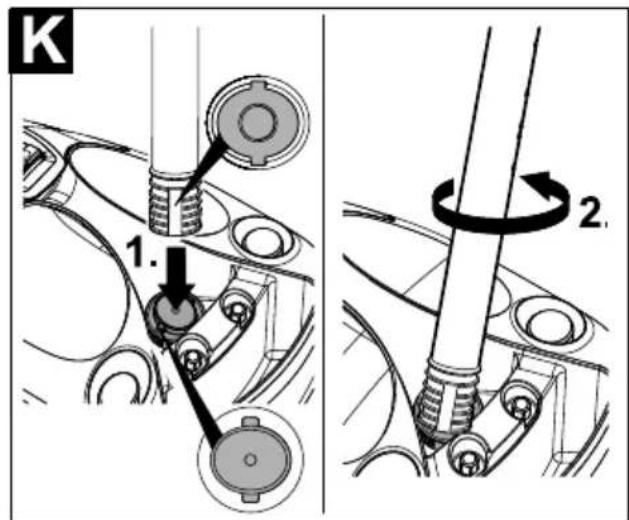
Illustration K
→ Open the maintenance lock. For this, place the open end of an extension pipe onto the maintenance lock, lock it into the guide and unscrew it. → Fill the boiler with water and swing it strongly. This dissolves lime scaling residing on the boiler bottom.
Illustration L
→ Completely empty the steam boiler to remove existing water.
Descaling the Steam Boiler
As limescale builds up on the boiler walls, we recommend to descale the boiler in the following intervals (RF = reservoir fillings):
| Degree of hardness ° dH mmol/l TF | |||||
| I soft | 0-7 | 0-1,3 | 100 | ||
| II medium | 7-14 | 1,3-2,5 | 90 | ||
| III | hard | 14-21 | 2,5-3,8 75 | ||
| IV very hard | >21 | >3,8 | 50 | ||
Note
The hardness of the tap water can be inquired at your water management office or the municipal utilities.
→ Disconnect the mains plug from the socket. → Allow the steam cleaner to cool down. → Empty the water reservoir. → Remove the accessories from the accessory compartments.
Illustration K
→ Open the maintenance lock. For this, place the open end of an extension pipe onto the maintenance lock, lock it into the guide and unscrew it.
Illustration L
→ Completely empty the steam boiler to remove existing water. → Use KÄRCHER descaler sticks for descaling. Please follow the dosing instructions on the packaging when preparing the descaler. → Pour the descaling solution into the boiler and allow it to react for approximately 8 hours. → Completely empty the descaling solution after 8 hours. A small amount of the solution will remain in the boiler. Therefore, you should rinse the boiler two to three times with cold water to remove any residues of the descaler.
Illustration L
→ Completely empty the steam boiler to remove existing water. → Allow the storage compartment for the mains cable to dry. → Screw the maintenance lock in using the extension pipe. → Fill the water reservoir → The steam cleaner is ready to use.
Care of the Accessories
Note
The floor cleaning cloth and the cloth cover have been pre-washed and can be used immediately for working with the steam cleaner.
→ You can wash dirty floorcloths and cloth covers in the washing machine at 60°C. Do not use a liquid softener as this would affect the ability of the cloths to pick up dirt. You may tumble dry the terry cloths. The microfiber cloths are not suitable for the tumble.
Troubleshooting
Often, failures have simple causes and you can do the troubleshooting yourself using the following overview. If you are in doubt or if the failure is not listed here please contact the authorized customer service.
Long heating-up time
Steam boiler is decalcified
→ Descale the steam boiler.
No steam
Indicator lamp - "water shortage" blinks red and signal sounds
No water in the water reservoir.
→ Fill the water reservoir up to the "MAX" marking.
Indicator lamp "water shortage" glows red
No water in the steam boiler. Overheating protection of the pump was triggered.
→ Turn off the appliance. → Fill the water reservoir → Turn on the appliance.
Water reservoir has not been inserted properly or is calcified.
→ Remove the water reservoir and rinse it. → Insert the water reservoir and press downwards until it arrests.
Steam lever cannot be pressed anymore
Steam switch is secured with the lock / child-proof lock.
→ Move the selector switch for the steam volume to the front.
High water output
Steam boiler is decalcified
→ Descale the steam boiler.
Technical specifications
Power connection
| Voltage 220-240 | V |
| 1~50-60 Hz | |
| Protection class IPX4 | |
| Protective class I | |
| Performance data | |
| Heating output 2000 W | |
| Operating pressure max. 0,35 MPa | |
| Heating time 4 Minutes | |
| Steam volume | |
| Continuous steaming | 50 g/min |
| Steam push max. | 110 g/min |
| Filling quantity | |
| Water reservoir 0,8 l | |
| Boiler capacity 0,5 l | |
| Dimensions | |
| Weight (without accessories) 4,1 kg | |
| Length 350 mm | |
| Width 280 mm | |
| Height 270 mm | |
Subject to technical modifications!
Special accessories
| Order number | |
| Microfibre cloth kit for floor nozzle Comfort Plus2 soft cloth kit made of high quality microfibre. | 2.863-020 |
| Microfibre cloth set, soft cover2 soft covers made of high quality microfibre. | 2.863-174 |
| Terry-cloth covers 6.370-9905 covers made of cotton | |
| Round brush kit4 round brushes for the detail nozzle | 2.863-058 |
| Round brush kit with brass bristlesRemoval of especially stubborn dirt ideal for insensitive surfaces. | 2.863-061 |
| Round brush with scraperRound brush with two rows of heat-resistant bristles and a scraper. Not suitable for sensitive surfaces. | 2.863-140 |
| Big round brushBecause of large cleaning surface it provides more application possibilities, especially for larger areas. | 2.863-022 |
| Power nozzle and extensionFor the cleaning of difficult to access areas (such as corners) with increased cleaning power. | 2.884-282 |
| Turbo steam brushFor cleaning tasks where you would usually have to scrub. | 2.863-159 |
| Textile care nozzleFor freshening up clothes and textiles. | 4.130-390 |
| Wallpaper removerTo remove wallpaper and glue residue. | 2.863-062 |
| Decalcifying sticks (9 pieces) | 6.295-206 |
Content
www.kaercher.com/REACH
www.kaercher.com/REACH
www.kaercher.com/REACH
www.kaercher.com/REACH
→ Completely empty the boiler of water.
www.kaercher.com/REACH
Symbols on the machine

Steam
WARNING – Risk of burns

NOTE – Read the operating instructions!
Scope of delivery
The scope of delivery for the device is shown on the packaging. Check that the contents of the package are complete when unpacking.
→ Set the steam quantity selector switch forward.
Large water outlet
Scale deposits in the steam boiler
→ Descale the steam boiler.
Technical data
Power connection
| Spenning 220-240 | V1~50-60 Hz |
| Beskyttelsesklasse IPX4 | |
| Beskyttelsesklasse I | |
| Effektspesifikasjoner | |
| Varmeeffekt 2000 W | |
| Maks. driftstrykk 0,35 MPa | |
| Oppvarmingstid 4 Minutter | |
| Dampvolum | |
| Permanent damping | 50 g/min |
| Damptrinn maks. | 110 g/min |
| Fyllingsmengde | |
| Vanntank 0,8 l | |
| Dampkjele 0,5 l | |
| Mål | |
| Vekt (uten tilbehør) 4,1 kg | |
| Lengde 350 mm | |
| Bredde 280 mm | |
| Høyde 270 mm | |
Subject to technical changes!
Accessories
www.kaercher.com/REACH
Symbols on the machine

Steam
www.kaercher.com/REACH
www.kaercher.com/REACH
Symbols on the device

Steam
www.kaercher.com/REACH
Symbols on the device

Steam
www.kaercher.com/REACH
Symbols on the device

Steam
www.kaercher.com/REACH
www.kaercher.com/REACH
Symbols on the device

Steam
www.kaercher.com/REACH
Symbols on the device

Steam
CAUTION - risk of burns

CAUTION – Read the operating instructions!
Scope of delivery
The scope of delivery of your device is shown on the packaging. When unpacking the machine, check that the contents are complete.
www.kaercher.com/REACH
Dear customer,


www.kaercher.com/REACH
Symbols on the device

Steam
www.kaercher.com/REACH
www.kaercher.com/REACH
Symbols on the device

Steam
www.kaercher.com/REACH
Symbols on the device

Steam
CAUTION - Risk of burns

CAUTION - read the operating instructions!
Scope of delivery
The contents of your device are shown on the packaging. Before removing the device from the packaging, check that the contents are complete.
If accessories are missing or have been damaged during transport, please inform your dealer.
Spare parts
Use only original spare parts from KÄRCHER. You will find an overview of spare parts at the end of these operating instructions.
Warranty
In each country, the warranty conditions issued by our responsible distribution organization apply. We will rectify any faults on the device free of charge during the warranty period, provided that the cause is a material or manufacturing defect. In the event of a warranty claim, please contact your dealer or the nearest authorized service center with your proof of purchase. (You will find the address on the back)
Safety elements
△CAUTION
Safety elements serve to protect the user and must not be modified or bypassed.
Pressure regulator
The pressure regulator maintains as constant a pressure as possible in the boiler during operation. Heating is switched off when the maximum working pressure in the boiler is reached and switched on again when the pressure in the boiler drops due to steam consumption.
Boiler thermostat
A5 Green heater indicator
A6 Red water shortage indicator
A7 Carrying handle
A8 Accessory holder
A9 Accessory holder
A10 Lock for maintenance work
www.kaercher.com/REACH
Symbols on the device

Steam
www.kaercher.com/REACH
Installing the accessory
Figure A
www.kaercher.com/REACH
Symbols on the device

Steam
www.kaercher.com/REACH
www.kaercher.com/REACH
Symbols on the device

Pair
www.kaercher.com/REACH
5.965-417.0 05.11.2015

http://www.kaercher.com/dealersearch
71364 Winnenden (Germany)
Tel.: +49 7195 14-0
Fax: +49 7195 14-2212
- CONTENTS
- GENERAL INFORMATION
- DEAR CUSTOMER
- USE THE STEAM CLEANER ONLY FOR PRIVATE HOUSEHOLDS. THE APPLIANCE IS INTENDED TO BE USED WITH STEAM AND CAN BE USED WITH THE APPROPRIATE ACCESSORIES AS DESCRIBED IN THESE OPERATING INSTRUCTIONS. YOU WILL NOT NEED ANY DETERGENT. PLEASE ADHERE TO THE SAFETY INSTRUCTIONS
- THE PACKAGING MATERIAL CAN BE RECYCLED. PLEASE DO NOT PLACE THE PACKAGING INTO THE ORDINARY REFUSE FOR DISPOSAL, BUT ARRANGE FOR THE PROPER RECYCLING
- YOU WILL FIND CURRENT INFORMATION ABOUT THE INGREDIENTS AT
- SYMBOLS ON THE MACHINE
- STEAM
- SCOPE OF DELIVERY
- SPARE PARTS
- WARRANTY
- SAFETY DEVICES
- △CAUTION
- PRESSURE CONTROLLER
- BOILER THERMOSTAT
- SAFETY THERMOSTAT
- MAINTENANCE LOCK
- DESCRIPTION OF THE APPLIANCE
- QUICK REFERENCE
- OPERATION
- ATTACHING THE ACCESSORIES
- REMOVING THE ACCESSORIES
- FILLING THE WATER RESERVOIR
- ATTENTION
- TAKE OFF WATER RESERVOIR
- DIRECTLY ON THE APPLIANCE
- TURNING ON THE APPLIANCE
- NOTE
- REFILLING WATER
- ADJUSTING THE STEAM QUANTITY
- TURNING OFF THE APPLIANCE
- ILLUSTRATION G
- ILLUSTRATION H
- STORING THE APPLIANCE
- ILLUSTRATION I
- ILLUSTRATION J
- HOW TO USE THE ACCESSORIES
- IMPORTANT APPLICATION INSTRUCTIONS
- CLEANING FLOOR SURFACES
- REFRESHING TEXTILES
- CLEANING OF COATED OR LACQUERED SURFACES
- CLEANING OF GLASS
- STEAM GUN
- DETAIL NOZZLE
- ILLUSTRATION B
- ROUND BRUSH (SMALL)
- ILLUSTRATION C
- POWER NOZZLE
- ROUND BRUSH (BIG)
- HAND NOZZLE
- FLOOR NOZZLE
- PARKING THE FLOOR NOZZLE
- CARE AND MAINTENANCE
- RINSING THE STEAM BOILER
- ILLUSTRATION K
- DESCALING THE STEAM BOILER
- CARE OF THE ACCESSORIES
- TROUBLESHOOTING
- LONG HEATING-UP TIME
- STEAM BOILER IS DECALCIFIED
- NO STEAM
- INDICATOR LAMP - "WATER SHORTAGE" BLINKS RED AND SIGNAL SOUNDS
- INDICATOR LAMP "WATER SHORTAGE" GLOWS RED
- STEAM LEVER CANNOT BE PRESSED ANYMORE
- HIGH WATER OUTPUT
- TECHNICAL SPECIFICATIONS
- CONTENT
- LARGE WATER OUTLET
- SCALE DEPOSITS IN THE STEAM BOILER
- TECHNICAL DATA
- ACCESSORIES
- SYMBOLS ON THE DEVICE
- SAFETY ELEMENTS
- PRESSURE REGULATOR
- INSTALLING THE ACCESSORY
- PAIR
Brand : Kärcher
Model : SC 4 EasyFix Preium
Category : Steam cleaner