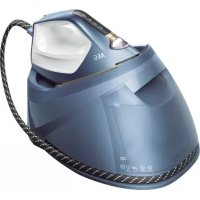
ST816DBM - Iron AEG - Free user manual and instructions
Find the device manual for free ST816DBM AEG in PDF.



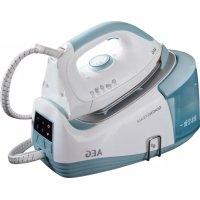
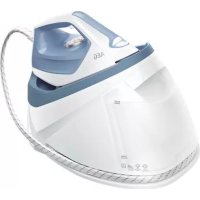
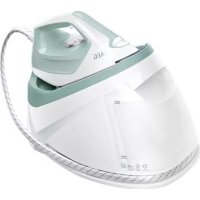
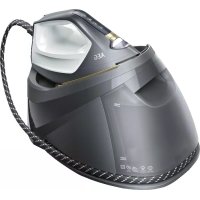
| Product type | Steam generator |
| Brand | AEG |
| Model | ST816DBM |
| Soleplate | RESILIUM™ anodized soleplate |
| Water tank | Removable with integrated anti-scale cartridge |
| Recommended water type | Distilled water or mixture 50% distilled, 50% tap |
| Temperature programs | Touch screen with program selection |
| Steam functions | Steam Plus button, vertical steam |
| ECO mode | Yes, energy saving up to 20% |
| Lighting | Ironing zone lighting |
| Iron lock | Locking mechanism for transport |
| Anti-scale cartridge | Integrated in the tank, replace every 3 months |
| Recommended cleaning | Every 2 months with AEG ECF5 descaling agent |
| Cleaning brush | Included |
| Power supply | 220-240 V, 50-60 Hz |
| Power | Approximately 2000 W (estimate) |
| Safety | Stop on On/Off button; do not leave unattended |
| Included accessories | Cleaning brush, anti-scale cartridge |
Frequently Asked Questions - ST816DBM AEG
User questions about ST816DBM AEG
0 question about this device. Answer the ones you know or ask your own.
Ask a new question about this device
Download the instructions for your Iron in PDF format for free! Find your manual ST816DBM - AEG and take your electronic device back in hand. On this page are published all the documents necessary for the use of your device. ST816DBM by AEG.
USER MANUAL ST816DBM AEG
natural_image
Exterior view of a modern AEG air iron machine with visible branding and mounting base (no text or symbols on the device itself)0918
ST8-1-XXXX aeg.de aeg.com


natural_image
Line drawing of a hand using a cloth to clean or fabric the iron on a machine (no text or symbols)



www.aeg.com
natural_image
Line drawing of a steam iron with attached cable and cord, showing hand placement with blue arrows (no text or symbols)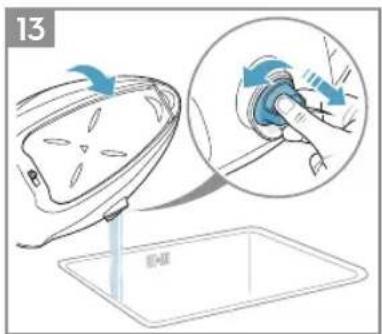

natural_image
Illustration of hands pouring liquid into a mechanical device with a warning symbol (no text or labels)
natural_image
Illustration of a hand using a tool to lift a car body, with blue arrows indicating motion (no text or symbols)
natural_image
Line drawing of a hand cleaning a steam iron (no text or symbols)CONTENTS
ENGLISH 6

23
PORTUGUÊS 46
DEUTSCH
10
FRANÇAIS 32

15
ΕΛΛΗΝΙΚΑ 36
ESPAÑOL 19
NEDERLANDS 41
FOR PERFECT RESULTS
Thank you for choosing this AEG product. We have created it to give you impeccable performance for many years, with innovative technologies that help make life simpler features you might not find on ordinary appliances. Please spend a few minutes reading to get the very best from it.
Visit our website to:

Get usage advice, brochures, trouble shooter, service information: www.aeg.com/webselfservice

Register your product for better service: www.registeraeg.com

Buy accessories and consumables for your appliance: www.aeg.com/shop
CUSTOMER CARE AND SERVICE
When contacting Service, ensure that you have the following data available:
- Model Number
- PNC number
- Serial number
The information can be found on the rating plate.
www.aeg.com
ENGLISH
Thank you for choosing an AEG product. In order to ensure the best results, always use original AEG accessories and spare parts. They have been designed especially for your product. This product is designed with the environment in mind. All plastic parts are marked for recycling purposes.

It may be possible that your steam station does not produce steam immediately after filling it with water. The reason for this is that air trapped in the inner system can delay this function a few seconds. Please be patient and try it again by pressing the steam button. For your convenience the steam will be produced after you release the steam button for a few seconds and it is not necessary to press the button all the time. Find out your rhythm for the best steaming result.
COMPONENTS
A. Light indicator for heat-up/cool-down
B. Headlight illuminating ironing area
C. Touch screen for temperature-steam programme selection
D. Steam boost button
E. Steam hose
F. Removable water tank with integrated anti-calc cartridge
G. Maximum water level indicator
H. Boiler unit
I. Iron rest area
J. RESILIUM ^™ anodized soleplate
K. Power cord
L. Steam hose storage
M. ON/OFF button
N. ECO (ON/OFF) button
O. Tank empty indicator light
P. Carry-lock front part
Q. Locking mechanism
R. Hot soleplate indicator
S. Power cord storage
T. Boiler cap
U. Anti-calc cartridge in water tank
V. Cleaning brush
Picture page 2-4
GETTING STARTED
Before first use. Remove all adhesive remains and gently rub with a dampened cloth. Position the steam station iron horizontally on the ironing-board or on a heat resistant, secure surface at the same height as an ironing-board. Unwind and straighten the power cord and the steam hose.
2 Remove the water tank (F) by gripping the slot on the underside and pulling it gently away from the boiler unit. Detach the anti-calc cartridge (U) and then immerse it in water for more than 60 sec. Insert the anti-calc cartridge back. Fill the water tank using cold water. It is recommended to use distilled water or a mix of 50% distilled, 50% tap water. Empty the water tank to rinse out any foreign particles which may have remained from the manufacturing process. We recommend to replace the anti-calc cartridge after 3 months.
3 Always refill the water tank to MAX level using cold water (F). Caution! Never operate the appliance without any water in the tank.
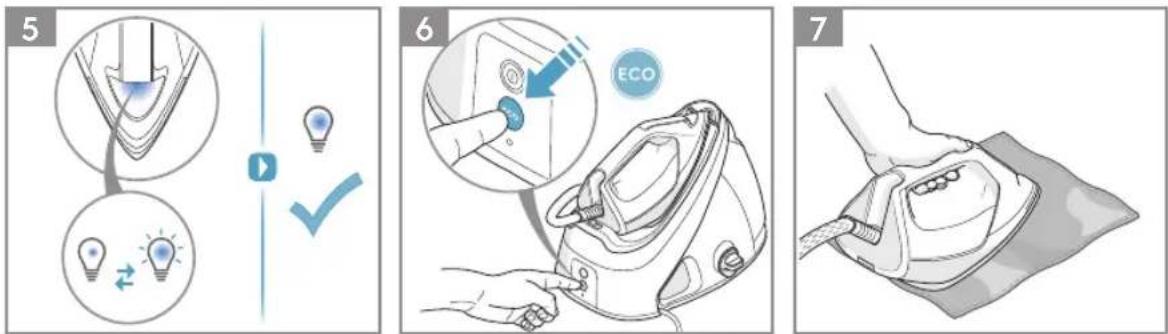
4 Connect the steam station to the mains supply. Press the ON/OFF button. Select ironing programme from the touch screen on the iron. The light indicator on the iron will pulsate when the steam station is preheating. When turned on for the first time, temporary vapours/odours may occur.
5 As soon as the selected temperature has been reached, the light indicator is on permanently and the headlight turns on. Now the appliance is ready to be used.
6 The steam station is equipped with ECO setting. Ironing on ECO setting in each programme selected saves up to 20% energy consumption. ECO setting is using lower pressure, producing lower steam rate but delivering faster heat-up time.
OPERATING INSTRUCTIONS
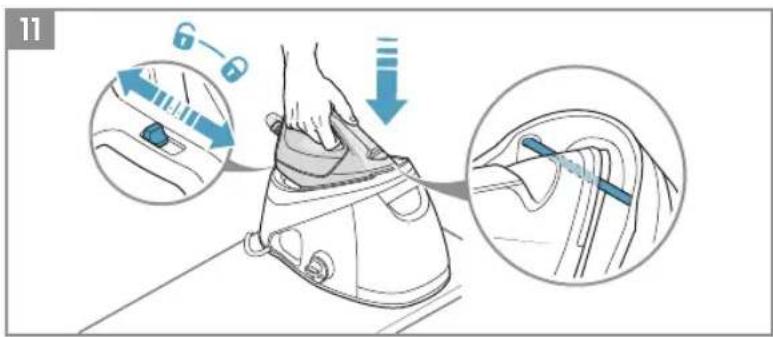
7 Unlock the iron by switching the locking mechanism to 6 and lift it from the iron rest area. Before starting ironing, please test your iron on an old towel to ensure that no residues inside the iron are transferred to your garments. If necessary, wipe the soleplate with a slightly damp cloth.
8 To activate the steam function, press and hold the steam boost button for 3-5 seconds. Hold the steam boost button to eject a concentrated jet of steam. When releasing the button, use up the steam before putting it back on the iron rest of the steam station. It is recommended that the steam button is used for short periods. Caution! Never release steam while the iron is standing on its rest.
9 Turn off the appliance by pressing the ON/OFF button (lighting will go off).
10 Always cool the iron fully on the iron rest before storing away. Once the iron is cool, empty the water tank. Store the steam station iron on the iron rest.
11 When finished using the appliance, switch off by pressing the ON/OFF button. Put the iron on the iron rest area and switch the locking mechanism to in order to secure the iron.
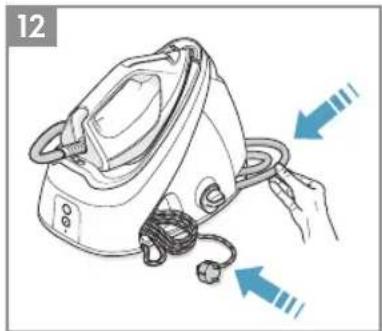
12 Always store the power cord in the power cord storage (S) and the steam hose in the steam hose storage (L) on the steam station base.
Warning! NEVER wind the power cord around the iron.
CLEANING
13 Turn the station base to the side so that the boiler cap is uppermost. Unscrew the boiler cap. Turn the appliance side over a sink and completely empty the boiler.
14 Mix a descaler agent and water at the specified ratio, prepare at least 300ml descaler mixture. (Use the recommended ratio for the mixture. If there is much scaling, properly increase the proportion of descaler.)
Note: We recommend to use the descaler ECF5 from AEG. Please follow the water/ descaler liquid ratio instructions on the bottle. We recommend to clean the product every 2 months.
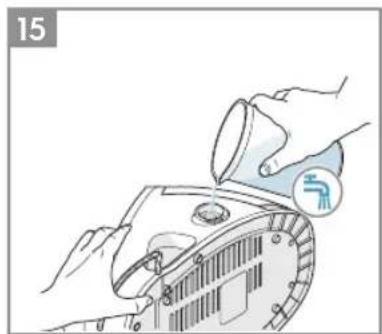
15 Pour out the mixture. Fill the boiler with clean water, then pour it out. Repeat this step for several times until the scale is removed and there is no longer a descaler smell. Place back one measuring cup of clean water in the boiler before reassembling. THE WARRANTY DOES NOT COVER DAMAGE CAUSED BY CLOGGING DUE TO LIME. Once cleaning is done, do not keep the boiler completely empty but leave some water still there (before closing it again).
16 Insert the cleaning brush into the boiler opening and clean-out water remnants and lime residues while holding the appliance over a sink.
17 Clean the appliance with a slightly damp cloth. To remove stubborn stains, you may apply a small amount of non-abrasive cleaner.
Enjoy your new AEG product!
SAFETY ADVICE
Read the following instruction carefully before using machine for the first time.
- This appliance is not intended for use by persons (including children) with reduced physical, sensory or mental capabilities, or lack of experience and knowledge, unless they have been given supervision or instruction concerning use of the appliance by a person responsible for their safety.
• Children should be supervised to ensure that they do not play with the appliance. - Keep the iron and its cord out of reach of children less than 8 years of age when it is energized or cooling down.
• The surfaces are liable to get hot during use Ⓔ. - This product is appropriate for use with tap water. It is recommended to use AEG AquaSense filtered water, taking out impurities like limescale. Otherwise use distilled water. If the tap water is particularly hard, use a mix of 50% distilled water and 50% tap water.
- The appliance may only be connected to a power supply whose voltage and frequency comply with the specifications on the rating plate!
- The iron is not to be used if it has been dropped, if there are visible signs of damage on the iron or its cord or if it is leaking.
- The appliance must only be connected to an earthed socket. If necessary an extension cable suitable for 10 A can be used.
-
If the appliance or the supply cord is damaged, it must be replaced by the manufacturer, its service agent or similarly qualified person, in order to avoid hazard.
-
The iron must be used and rested on a stable surface. When placing the iron on its stand, ensure that the surface on which the stand is placed is stable.
- Never leave the appliance unattended while connected to the supply mains.
- The appliance must be switched off and the mains plug withdrawn each time after use, before cleaning and maintenance.
- The plug must be removed from the socket outlet before the water reservoir is filled with water.
- The mains cable must not come into contact with any hot parts of the appliance.
- Do not immerse the appliance in water or any other liquid.
- Do not exceed the maximum filling volume as indicated on the appliances.
- The filling aperture must not be opened during use.
- Before refilling of the water reservoir, please remove plug from socket.
- Do not pour vinegar, descalers or other scented substances into the tank. Otherwise the warranty may be revoked.
- This appliance is intended for domestic use only. The manufacturer cannot accept any liability for possible damage caused by improper or incorrect use.
IRONING CHART
| FABRIC TEMPERATURE SETTING IRONING RECOMMENDATION | ||
| Acrylic | Outdoor | Dry iron inside out. |
| Acetate | Outdoor | Dry iron inside out while still damp or use spray to dampen. |
| Nylon & Polyester | Outdoor | Iron inside out while still damp or use spray to dampen. |
| Rayon | Outdoor | Iron inside out. |
| Viscose | Outdoor | Iron inside out. |
| Silk | Outdoor | Iron inside out. Use an ironing cloth to prevent shiny iron marks. |
| Cotton blends | Outdoor | Check the label and follow the manufacturer's instructions. Outdoor setting is recommended for this kind of fiber. |
| Water-repellent breathable fabrics (excluding PVC-coatings) | Outdoor | Gently wash and air dry your outdoor garments according their care label instructions. Carefully and slowly dry iron the outside to reach all parts of your garment in order to reactivate the DWR (Durable Water Repellency) treatment and restore the water repellency of your outdoor garments, which is better than air drying only. |
| Wool & Wool blends | ● Wool | Steam iron inside out or use ironing cloth. |
| Cotton | ● ● Cotton | Dry iron while still damp or use spray to dampen. Use maximum steam. |
| Corduroy | ● ● Cotton | Steam iron inside out or use ironing cloth. |
| Linen | ● ● Cotton or ● ● Inen | Iron inside out or use ironing cloth to prevent shiny iron marks, especially with dark-colored fabrics. Dry iron while still damp or use spray to dampen. Use maximum steam. |
| Denim | ● ● Cotton or ● ● Inen | Use maximum steam. Apply maximum steam by pressing and holding the steam boost button. |
| Please follow the instructions of your garment care label. Varied ironing speed and fabric dampness might cause optimal setting to differ from the recommendations in the table! | ||
TROUBLESHOOTING
| PROBLEM POSSIBLE CAUSE SOLUTION | ||
| Soleplate is not heating even though iron is turned on. | Connection problem Check main power supply cable, plug and outlet. | |
| Temperature control is in “Outdoor” position. | Select higher programme like “●●Cotton”. | |
| Iron does not produce steam. Not enough water in tank. Fill water tank (see “Getting started”, no 2). | ||
| Selected temperature is lower than that specified to use with steam. | Increase temperature to at least “●●Cotton”. | |
| Steam boost and vertical steam boost function does not work. | Steam boost function was used very frequently within a short period. | Put iron on horizontal position and wait before using steam boost function. |
| Iron is not hot enough. Adjust the proper temperature to steam ironing (up to “●●Cotton”). Put iron in vertical position and wait until temperature indicator light turns off. | ||
| Water leaks from the soleplate during ironing. | The iron is not hot enough. Set the temperature dial to a temperature (“●●Cotton” to maximum) suitable for steam ironing. Put the iron on its heel and wait until the headlight is on before you start ironing. | |
| Flakes and impurities come out of the soleplate during ironing. | You have used hard water, which has caused scale flakes to develop in the water tank. Clean the station with descaler (see “Cleaning”, no 14). | Press and hold the steam button for about one minute to get steam. Then hold one more minute in order to clean the steam generating system. Before starting ironing, please test your iron on an old towel to ensure that no residues inside the iron are transferred to your garments. |
| Water leaks from the soleplate while the iron is cooling down or after it has been stored. | The iron has been put in horizontal position while there is still water in the water tank. | Empty the water tank and switch off the steam station by pressing ON/OFF button (M) on the boiler unit before storing the iron. |
| Brown streaks come out of the soleplate while ironing and stain the linen. | You may have used chemical descaling agents different from the recommendation. | Use the descaling agent from the recommendation (see “Cleaning”, no 14). |
| Fabric fibers have accumulated in the holes of the soleplate and are burning. | Clean the soleplate with a damp soft cloth. | |
| Fabrics might not be properly rinsed or the garments are new and have not been washed before ironing. | Please rinse the fabrics properly before ironing. | |
DISPOSAL

This symbol on the product indicates that this product contains a battery which shall not be disposed with normal household waste.

This symbol on the product or on its packaging indicates that the product may not be treated as household waste. To recycle your product, please take it to an official collection point or to an AEG service center that can remove and recycle the battery and electric parts in a safe and professional way. Follow your country's rules for the separate collection of electrical products and rechargeable batteries.
AEG reserves the right to change products, information and specifications without notice.
www.aeg.com
DEUTSCH
Illustration page 2-4
PREMIÈRE UTILISATION
natural_image
Color palette bar with grayscale shades and a central crosshair symbol (no text or labels)


AEG
3485 A 02 01 0918
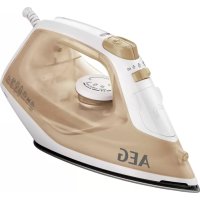
Brand : AEG
Model : ST816DBM
Category : Iron