
SRU4002X - Universal remote PHILIPS - Free user manual and instructions
Find the device manual for free SRU4002X PHILIPS in PDF.



| Product type | Universal remote control |
| Brand | PHILIPS |
| Model | SRU4002X |
| Power supply | 2 AAA batteries (1.5 V) |
| Infrared range | Approximately 10 meters |
| Dimensions (approx.) | 20 x 5 x 2 cm |
| Weight with batteries (approx.) | 100 g |
| Housing material | ABS plastic |
| Compatibility | TV and decoder boxes (cable, satellite, DTT) |
| Main functions | TV/STB control, learning programming, customizable favorite buttons, dual standby mode |
| TV control buttons | Standby, Mute, Volume +/-, Picture format, A/V, channel selection, cursors, OK, P+/P-, favorite buttons 1-4 |
| STB control buttons | Standby, channel selection, cursors, OK, EPG, favorite buttons 1-4, P+/P- |
| Favorite storage | Up to 4 favorite channels (up to 3 digits) or function combinations |
| Custom labeling | Interchangeable logos on favorite buttons |
| Dual standby mode | Simultaneously activates/deactivates TV and STB |
| Key learning | Copy functions from original remote via infrared |
| Restore default settings | Yes, by key combination |
| Care and cleaning | Soft dry cloth, avoid any liquid |
| Safety | Do not expose to moisture, use compliant batteries, respect polarity |
| Disposal | Do not dispose of with household waste, follow local WEEE regulations |
| Provided accessories | User manual, logo sheet for labeling |
Frequently Asked Questions - SRU4002X PHILIPS
User questions about SRU4002X PHILIPS
0 question about this device. Answer the ones you know or ask your own.
Ask a new question about this device
Download the instructions for your Universal remote in PDF format for free! Find your manual SRU4002X - PHILIPS and take your electronic device back in hand. On this page are published all the documents necessary for the use of your device. SRU4002X by PHILIPS.
USER MANUAL SRU4002X PHILIPS
Quick, Clean & Easy Setup
www.philips.com/welcome
4 ENGLISH
Contents
- Introduction 4
- Installing the remote control 4-6
Inserting the batteries 4
Testing the remote control. 4-5
Setting the remote control. 5-6
- Keys and functions 7
- Extra possibilities 8-10
Labelling favorite keys 8
Storing favorite keys. 8-9
Activating Dual Standby mode 9
Restoring the original functions of your remote control 10
- Troubleshooting 10
Information to the Consumer 111
1. Introduction
This user manual will help you to install the remote control so that you can operate your TV and/or set-top box (cable box, satellite receiver, Digital Video Broadcasting Terrestrial device or cable decoder).
Please read the instructions carefully.
2. Installing the remote control
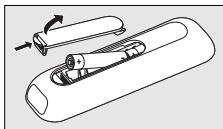
Inserting the batteries
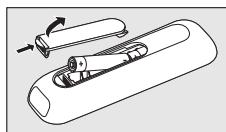
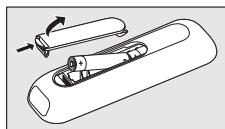
1 Press the cover inwards and lift it up.
2 Place two AAA type batteries into the battery compartment, as shown.
3 Replace the cover and click it firmly into place.
Testing the remote control
It is advisable to test whether your device (TV and/or STB) responds to the SRU 4002, because the SRU 4002 may use different signals for each brand and even for different models of the same brand.
The example below (TV) instructs you how to do this. You can repeat the same steps for your settop box (STB).
Note: After inserting the batteries, all keys will operate your TV. If you wish to test the remote control on your settop box, you first have to program the remote control for operating the settop box. The STB keys will then become available. For this, refer to 'Setting the remote control' hereafter.
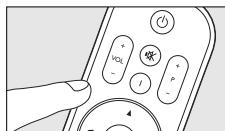
1 Switch your TV on manually or use the original remote control. Tune to channel 1.
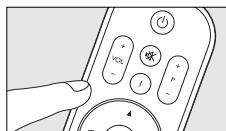
2 Check whether all the keys are working. For an overview of the keys and their functions refer to '3. Keys and functions'.
- If the TV responds as it should to all of the key commands the SRU 4002 is ready for use.
If the device (TV and / or STB) does not respond at all or not to all of the key commands, follow the instructions under 'Setting the remote control' or for online setup got to: www.philips.com/welcome
Setting the remote control
For TV this is only necessary if your TV does not respond to the SRU 4002. If that is the case, the SRU 4002 does not recognize the brand and / or model of your TV and you need to program the SRU 4002 to do so.
In order to be able to operate your settop box, you always have to program the SRU 4002 for STB. The example below (TV) instructs you how to do this. You can repeat the same steps for your settop box.
Note:
- When setting the remote control for operating your settop box, use the Digit 1 key instead of the Mute key.
1 Switch on the TV manually or use the original remote control. Tune in to channel 1.
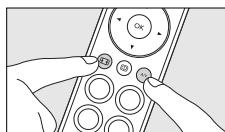
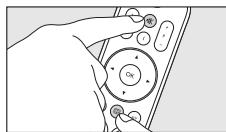
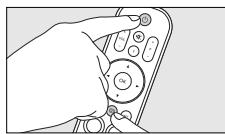
2 Keep keys (Mute) and (Guide) pressed simultaneously for 3 seconds until the LED flashes twice (red) and then remains lit.
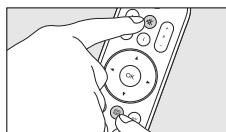
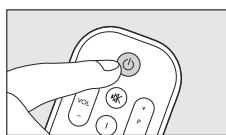
3 Point the SRU 4002 at the TV and and keep the (Standby) key pressed until the TV responds. This may take up to 2 minutes. Then immediately release the key.
The LED lights up red.
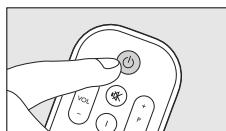
4 Point the SRU 4002 at the TV and check that it responds as it should.
-
If the TV responds to all of the key commands, the SRU 4002 is ready for use. To save your settings, follow the instructions in step 5.
-
If the TV does not respond at all, or not to all of the key commands, you can learn the SRU 4002 the original remote control functions key by key. For this, refer to 'Setting up the remote control by learning all key functions'.
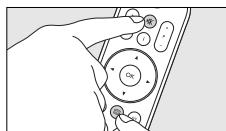
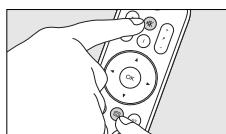
5 To save your settings, keep keys (Mute) and (Guide) pressed simultaneously for three seconds until the LED flashes twice (red) and then switches off.
6 ENGLISH
Setting up the remote control by learning all key functions
In case the previous method did not work, the three steps mentioned below will guarantee you to setup the remote control successfully. You can store a function under any of the available keys on the SRU 4002.
For learning key functions to the OK key, refer to 'Learning the OK key' hereafter.
1 Keep the OK key and the key you wish to learn pressed simultaneously for 3 seconds until the LED flashes twice (red) and then remains lit.
The remote control is now in learning mode.
2 Press the key you wish to copy on the original remote control once.
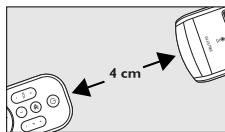
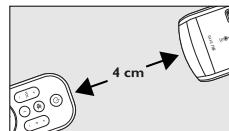
- Make sure both remote controls are properly aligned. Place both SRU 4002 and original remote control on a flat surface (e.g. a table) and aim them head-to-head with about 4cm in between.
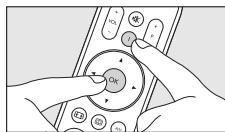

- The LED flashes twice (red), the key has learned the new function and the remote control exits learning mode. Please test whether the key has learned the function correctly.
3 Repeat above procedure for other keys you wish to learn a new function.
Learning the OK key
Under the OK key you can store a function from your original remote control (learn) or a 1 digit favorite channel number.
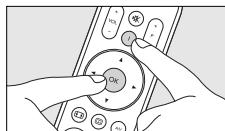
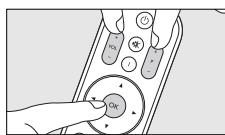
1 Keep keys OK, +VOL (Volume up) and + P (Channel up) pressed simultaneously for 3 seconds until the LED flashes twice (red) and then remains lit.
The remote control is now in learning mode.
2 Press the key you wish to copy on the original remote control.
- The LED flashes twice (red), the key has learned the new function / channel number and the remote control exits learning mode.
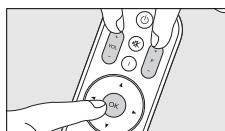
Notes:
If, during setup, no keys are pressed for more than 60 seconds, the LED flashes once for a longer period and the SRU 4002 will automatically exit setup mode and save the latest settings.
- When the SRU 4002 was successfully programmed for STB, the STB keys will become available. For an overview of the keys and their functions refer to '3. Keys and functions'.
Undo setup for STB
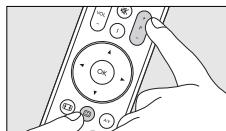
- Keep keys + P (Channel up) and [Guide] pressed simultaneously for 3 seconds until the LED flashes twice (red).
The remote control will now no longer operate your settop box.
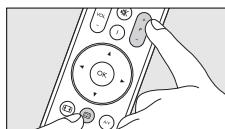
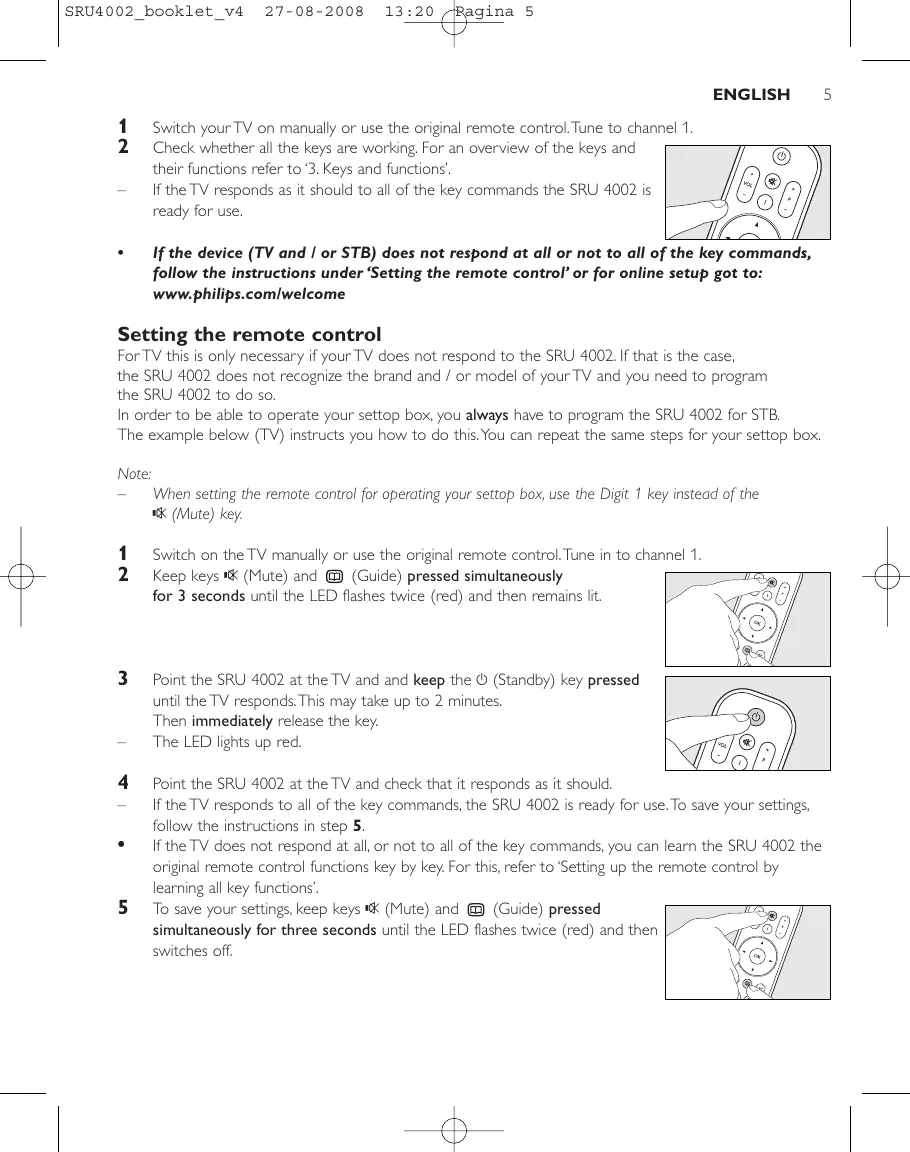
3. Keys and functions
The illustration on page 3 gives an overview of all keys and their functions.
There are separate keys for operating your TV and operating your settop box (STB).
The STB keys will only become available when the SRU 4002 is programmed to operate a settop box.
For this, refer to 'Setting the remote control'. When the remote control is not set up for operating a settop box, all keys will operate your TV.
TV keys, always available
① Ⓞ (Standby)……switches TV on / off.
LED………lights up green when a TV command is being sent.
② (Mute)....mutes the TV sound.
③ +VOL - .increases/decreasesTVvolume.
⑥ aspect ratio. Selects between regular (4:3) and wide screen (16:9) TV. A/V selects internal / external (Audio / Video) input (TV).
TV keys, available when the SRU 4002 is not programmed for STB
④ Digit 1.........selects TV channel 1.
⑤ Cursor keys.........navigate through the TV menu. OK..........confirms menu selection.
⑥ 国 .opensTVmenu.
巧 Favorites keys ....select TV channels 1,2,3,4; -select favorite TV channels (if stored under the keys).
+P - .selects next / previous TV channel.
STB keys, available when the SRU 4002 is programmed for STB
① Ⓞ (Standby)……switches STB on / off (when Dual Standby mode is activated).
LED………lights up green when an STB command is being sent.
④ Digit 1.........selects STB channel 1.
⑤ Cursor keys..........navigate through the STB / EPG (Electronic Program Guide) menu. OK..........confirms menu selection.
⑥ 0 opens Electronic Program Guide.
巧 Favorites keys ....select STB channels 1,2,3,4; -select favorite STB channels (if stored under the keys).
(8) +P selects next / previous STB channel.
Note: If, during operation, a key or key combination is pressed for more than 30 seconds or when two keys are pressed simultaneously, the remote control will stop transmitting.
4. Extra possibilities
With this remote control you are able to install 4 of your favorite channels under 4 special keys.
Labelling favorite keys
By labelling the Favorite keys you can always tell which favorite channel is stored under a key.
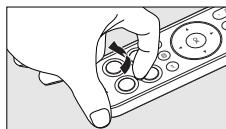
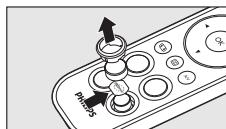
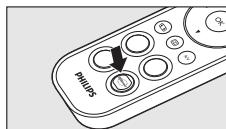
1 Lift up and remove the ring around the key, using your nail.
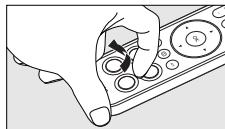
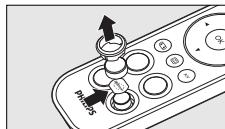
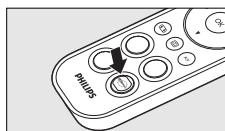
2 Take off the key cap.
3 Remove the paper sticker from the key surface and replace it with a logo from one of the logo sheets supplied.
4 Replace key cap and ring. Press gently until they click into position.
Storing favorite keys
Notes:
Make sure you have the original TV and / or STB remote control at hand.
Make sure both remote controls are properly aligned.
Place both SRU 4002 and original remote control on a flat surface (e.g. a table) and aim them head-to-head with about 4cm in between.
If no key is pressed for 60 seconds after entering learning mode, the LED flashes once for a longer period and the remote control exits learning mode.
If a key is pressed in time (within 60 seconds after the previous one) and the LED flashes once for a longer period, a channel or function is not stored. In this case, repeat the steps described and be sure the remote controls are properly aligned.
If this does not work, the remote control memory is full. In this case you have to restore the original functions of the remote control in order to create memory space. For this, refer to 'Restoring the original functions of your remote control'.
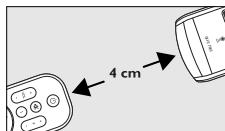
Storing favorite STB / TV channels
The Favorites keys are default set to select the first four channels on your STB / TV. If you wish, you can store other (favorite) STB / TV channels under these keys. Channel numbers containing up to 3 digits can be stored (e.g. 1, 56, 999). Channel numbers already stored under the keys will be deleted.
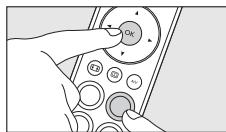
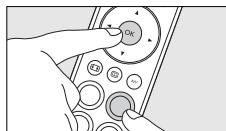
1 Keep the OK key and the desired Favorites key pressed simultaneously for 3 seconds until the LED flashes twice (red) and then remains lit.
The remote control is now in learning mode.
2 Enter the favorite channel number on the original remote control (e.g. 111). Be sure to enter each digit within 60 seconds after the previous one.
After each entered digit the LED flashes twice (red) and the remote control waits for 60 seconds for the next entry.
After the last digit is entered, the LED flashes twice (red) and the remote control exits learning mode. You can always exit learning mode by pressing the OK key.
The favorite channel is now stored under the Favorites key. Pressing the key will immediately select the favorite channel.
3 Repeat above procedure for other favorite channels you wish to store under Favorites keys.
Note: Instead of storing favorite channels under the Favorite keys, you can also learn these keys functions from your original remote control. Up to three key commands (functions) can be stored under each Favorites key. E.g. switch on TV, switch on STB and select wide screen TV. A combination of key commands and channel numbers is also possible. E.g. switch on TV, switch on STB and select channel 8. For this, follow above procedure and enter key commands instead of channel numbers.
Activating Dual Standby mode
By default, pressing the (Stayby) key will switch on your TV. If Dual Standby mode is activated, pressing this key will switch on your settop box as well.
- Keep keys (Standby) and (Guide) pressed simultaneously for 3 seconds.
- The LED flashes two times (red). Dual Standby mode is now activated and pressing the (Standby) key will switch on both TV and settop box.
- Keep keys (Standby) and (Guide) pressed simultaneously again for 3 seconds to deactivate Dual Standby mode.
The LED flashes two times (green). The (Standby) key will now only switch on your TV.
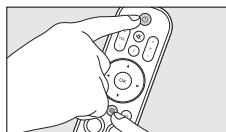
Note: If your TV does not switch on when you press the (Standby) key, you can switch it on by pressing the +P (Channel up) key.
10 ENGLISH
Restoring the original functions of your remote control
Follow the instructions below to revert the SRU 4002 back to the factory default settings:
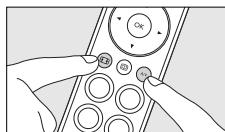
1 Keep keys (Aspect ratio) and A/V pressed simultaneously for 3 seconds until the LED flashes twice (red) and then switches off.
The SRU 4002 is now reverted back to the state it was when you first took it out of the packaging.
5. Troubleshooting
Problem
Solution
The device you want to operate does not respond when you press a key.
Replace the old batteries with two new AAA type batteries.
- Point the SRU 4002 at the device and make sure that there are no obstructions between the SRU 4002 and the device.
Make sure the function you wish to operate is available on the device.
The SRU 4002 does not respond properly to commands.
The SRU 4002 memory is full. Revert the SRU 4002 back to the factory default settings in order to create memory space. Refer to 'Restoring the original functions of your remote control'.
- The SRU 4002 stopped the learning / programming process after 60 seconds for no IR signals were received. Check if the original remote control is working properly.
Try setting the SRU 4002 again. If the SRU 4002 still does not respond, call our helpline.
The TV volume reacts too slow.
The SRU 4002 has not been set up yet. For this, follow the instructions under 'Setting the remote control'.
Table des matieres
Angre oppsett for STB
Hold knappene +P (Channel up) og (Guide) nede samtidig
IIInpopoeiyia tov katavaawtn. 114
I. Eioaywyyn
To napov exyepidio xpnang os bontheta va eykataotnote to nlexepiopntio etoi wote va nponeite va aleioupeite ntv tnleopaan n/kai to settop box (kouti ouvdeang kaawdiakns, dopupopipko dektn, ouokeun eniyiaq metadoonq ynpiaokou bivteo kai anokwikonointk kalwiakns tnleopaan).
Δiα β ασ e npooextuká tç oynieç.
2. Eykataotaon tou tnlexeiipiotnpiou
Tonoθεtnon twv μnatapiωv
PiEOTo kAulmu npO ta eoa kai avaonkwote to.
2 TonoTeTnOte duo unatapiies tunou AAA otn thkn unatapiw, onwc anikovizetai.
3 Enavatonoetnto kaiumuqk aopaaot to ot n eon tou (kik).
'Elexyxos tou tnlexeiipiotnpiou
UcTaHOBka 6aTapeek. 88
TecnpoBaHne npTa Ay 88-89
HacrpoKa npTa Dv 89-91
- Khonkn N yHKun 91-92
- OIOHOHHTeAbHbIe BO3MOXHOCTn 92-94
Apaikn dnn KhoNok '136paHoe' 92
CoxpaHHeIe 36paHHbIX KHOIOK. 93-94
AknBaunn ABOHOro peKIma. 94
BocCTaHOBaeHne IcxOaHOn φ YHKUHOHaIbHOCTn IyTa AY. 94
5. YcTpaHHeH HeNCpPaBHOCTeI 95
I. BBeAeHne
AaHHOe pyKOBoAcTBO NOMOKeB Bam HaCTpOnTb IyMb T AY IyIpaBAeHnI TeLEBmOpom IN TEeepncTbKoI (TeeepnEMHHKOM, CnyTHNKOBbIM pecmbopom, yctpoiCTbOM AINPiEma LcΦpOBOro TEeBnEHN DVB-T IN Ka6eBbHM DeKOePOM). BHMaTeBHO IpouHTaJIte INHCTpyKUIn.
2. YctaHOBka nyAbTa AY
YctaHOBka 6aTapeek
I IpnKMMTe Kpbilky N IOaHMMTe ee.
2 PomeCTIe BOTCEK DAA 6aTapeek DBe 6aTapeiKN TnA AAA, KaK Noka3aHo Ha pucyHke.
3 YctaHOBnTe KpbIbIKy Ha MeCTO N pINKMnTE Do IeAHa.
TectnpoBaHne npAbaTa AY
LcEcoo6pa3No npOBepnTb,peaHpyeT An yCTpoiCTBO (TeAEBN3Op mN TeAenpncTaBka) Ha SRU 4002, ta KaK SRU 5110 MoKe TNCIOAB3OBA Tb pa3ANHbIe CnHaIbI dA KaJdoM MapKn I daKe DAn pa3ANHbIX MoDeAe OADHO IN TOI JIe MapKn. PInmep Hnke (TB) noka3bIbaet, KaK 3TO cAeAaTb. 3TN JIe DeiCTBnA MoXHO NOBtOpNTb AIA TeAenPncTaBKn.
Плпмочи. Поссусимовки бамаразец BCE конь 6угимн hacmpoehы на уnpавлие мeалвзором.Ymoбы npomecmpoobamby nayb m Aу с meelenpncmabko, neobxogmo 3anporpaMMPOBAMby Nyblm Aу hy npavbaelne meelenpncmabko.KhONk 6уgym paobomam b pekenmeelenpncmabkn.В gaalbneHiem clegyime nHcmpykunm B pa3gele'HacmpoiKa nybma AY'.
BkIOHTe TeAEBN3OP BpyHnyIO IIN BOCTOAB3yTEcB CTApBIM NyBTOM ΔV .HaCtpoTecb Ha KaHaN 1
2 Поверьт, BCE An KhoIGNK pa6oTaIOT. O630p BCex KhoNOK n INxФyHKm CM.Bpa3dEe'3.KHOKNuФyHKmN'. Ean TeAeBn3Op peaHpyeT Ha HkaTne BCex KhoNOK, SRU 4002 roTOB K NCIOAb3OBAHnIO.
Ecan yctpojCTBO (Teaebn3Op HAN TeaenpncTabka) He pearpyet HAn pearnyet He Ha Bce KOMahgbi KHONOK, cagyeIte HcTpyKunm pa3geA'HaCtpoKa npAbaTa AY' HAn gAra HactpoiKn OHaan noceHTe Be6-cait: www.philips.com/welcome
HactpoKa npAbaTa AY
OHa Heo6xoAMMa ToIbKO B TOM ClyHae, ECn UcTpoiCTBO He peaIpyeT Ha pa6Ory NyIbTa SRU 4002. 3To O3Haayet, YTO NpIbT SRU 4002 He HAcTpoEH Ha pa6Ory C DaHHoN TopROB MoKo N/NN MoDeAIO yCTPOICTBa, IN NpIbT SRU 4002 Heo6xOAMMo HAcTPOITb. UTo6bl YnpaIBaT TeJePnCtABKO, Bcerda Heo6xOAMMo IporpaMMnPoBaT NpIbT SRU 4002 DAn TeJePnCtABKn. PIpMep HnKe (TB) NOKa3bIbae, KaK 3To CdeAaTb, 3Tu Nke DeJcTBm MOXHO NOBTopINb DA TReJePnCtABKn.
Приимейтон:
- Пин Наимроче nyabma Δу ha ynpaBæHne meænpncmAbkɔi, Incnoλb3yime KhoNky c uΦpOJ I Bmecmo KhoNkn (Mute).
Bo Bpemn HacmpoKg mmeBn3opa nHngkamop mraem / 3aropaemc 3eIhbl; Bo Bpemn HacmpoKg gmeenpcmabKn nHngkamop mraem / 3aropaemc KpaChbM.
BKAIOUHTeTeAEBN3OP BpyHNYIO HNN BOCIOAB3yTEcB CTApbIM NvIbTOM A.HaCTPOITcB Ha KaHaN 1.
2 HaKMnte u ydeepKmbaBte KhoNkn (Mute) n (Guide) B TeueHne
3-x cekyH, noka nHnKaTOp He MmHET DaBa pa3a (KpaChb) ⅢaTeM octaHETc rOpeTb.
3 HanpaBte SRU 4002 Ha TeAeBn3Op u yApEKnBaTe KHOIky (Standby) NOKa TeAeBn3Op He HauHET pearNPOBaTb Ha HauKATne KHOIKN. 3To MoKet 3aHrT b Do 2-X MNHyT. 3aTeM HEmEAdEHHO OTNCTNe KHOIky.
- INHdNkAtop 3aRopaetc KpaChbI.
4 HanpaBbTe SRU 4002 Ha TeAeBm3Op n y6eAInTeCb, yTO yCTPOINCTBO peaNpyET h A HAKATNE KHOIOK.
- EcHn TeAeBn3Op peaHpyeT Ha HaxaTne Bcex KHOJOK, SRU 4002 roTOB K NcIPOb3OBAHNIO. YTo6bl coXpaHnTB hAcTPOHKN, BbINOAHHTe INCTpyKUHN, OINCAHHBe B Wae 5.
Ecn TeAeBn3Op He OTBeaet Hn OTBeaet He Ha Bc KOMaHbI, Heo6xoJMo M3yUHTb NcXoHbIe yHKuN KaKdoi KhoNkN pybTa SRU 4002. Aia nOlyueHncoOTBeTCTByIOxN IHcTpkyuOn o6paNTtecb KnyHKTy'HaCtpoKa npbTa Dc nOMoBIO peKmna 3aONMnHaHnry fHKuN KHOJOK'.
5 YTO6bI coXpaHHTb HAcTpoKn, HAnMmTe OAnHOBpeMeHHo yAepKNaBte KHOKN (Mute) n (Guide) B TeueHne Tpex cekyHa, noka HAnKaTOp He MInrHET dBa pa3a (KpaChb), a 3aTeM IoracHET.
90 PyCCKH
HactpoiKa nyIbTa AY c nOmoIbIO peKHMa 3anOMHaHnA ΦyHKn KHONoK
B clyae, ecn ppebdyuyni cnocob He daa pe3yabTaTOB, BblnoHNte yka3aHHbIe HNKe CcEyUOme DeiCTBNI, KOtOpbIe NOMOryt Bam hAcTpoNTb nybT Y. MoKHO 3aIncaTb cyHKUIO Ha NIO6YIO DOCTyHIO KhoNk Ky npbTa SRU 4002. B daMbHeMiem CcEduTe INcTpykUIMBa P a3dAe 'Pi\rpaMMpOBAHne KhoNkn OK' dA NaCtpoKn KhoNkn OK.
YdepKINBATE KHOHNYOK INKHOKNKY, KOtOpYIO Heo6XoAMIO HaCTpONTb, HAnKaTbIMN OAOHBpeMeHNO B TeueHne Tpex CekyHn Ioka NHaIKaTOP He MInrHeT Dba pa3a (KpaCHb) n 3aTeM OCTaHETCR OpeTb.
Tepeb nyabT AY nepeweA B peKIM 3aIOMHaHna.
2 HaKMITE KHOIIky, yHKUIO KOtOpoi Heo6xoAMO CKONIPOBaTb, HcTApOM IyABTe AY.
- PpOBepbme npabnBnoCmb HanpaBaeHna 6o0nx nybmoB AY. Pomecmime nybm SRU 4002 n cmapbmy na noockyo nobepxHOcmb. (hanpimep, cmoA) n HanpaBbme nx gpyr Ha gpyra, paonaoKHB na paccmouHN npImepHo 4 cm.
- INHAnKATOp mInHET dBa pa3a (kpacHbI), npOn3oNdET 3aOnmHaHHe fHyHKUIN KHOJIKN, nIpybT dV bBydET n3 daHHOrO peKIMa. V6eAnTeCb, yTO 3aONMHaHHe fHyHKUIN BblIOAHEHO npabnAbHO.
3 IOBTOPHTO OINCAHHYIO BbIe IPOUeApy DAy APyHX KHOJOK, KOToPbE Heo6XoAMo HAcTpOnTb.
PporpamMnpoBaHne KhONKn OK
Ha KhoNky OK moXHO 3aIncatb yHKUIO co cTaporo nyIbTa AY nn I36paHHbI KaHa, HOpE KOTOPORO COCTOIT N3 | LnΦpbl.
YApexKnBaIe KhoNkOK, +VOL (Volume up) n + P (Channel up) HaxaTbIMN OAnOBpeMeHHo B TeueHne 3-x cekyHa NOKA INHAnKaTOp He MInrHeT DBA pa3a (KpaChbI) n 3aTeM octaHETcra RopeTb.
TepeB nyAbT AY nepeWeeB peKIM 3aONMHaHnA.
2 HaKMnTe KHOJIky, fYHKUIO KOtOpoi Heo6XOaMo cKOnIpuBaTb,Ha cTapOM nyABTe ΔV
IVHAnKaTOp MmHrTeA Db pa3a (KpaChB), npOn3OeT npOrpamMnPoBaHne HOBoI yHKUIN / 3aPiNCb HOMepa KaHaA, INyBbT ABy BMyEeN3peKIma 3aIOMNHAHIA.
PpIMeuaHna.
- Ecam Bo Bpemn Hn ngn n3 Knoon He 6bna 3agecmboBa h meeHne 60 ceknyng, nghkarnop mnrhem ognn pa3 B meueHne 6oae gannmehoro Bpemn nyabm SRU 4002 coxpanim hcmpoynn ABmomamneckn Bbygerm n3 pejima hacmpoyn.
Ecnnyb m SRU 4002 6bl yneuho zanporpammmopoban gna meenprncmabkn, khonkn 6yym pa6omamb b pekime meenpnncmabkn. O63op Bex CkONOK n ux kyckn cm. B pa3geAe '3.Khonkn n kyckn.
Otmeha hactpoyn ynpabaeHHraenpctabkoJ
- YApKnBaIe KhoNk+ P (Channel up) n [Guide] HAnKaTbIMN B TeueHne 3-x cekyHa Noka INaIKaTOP He MInHTe DBaJbI (KpaChbI).
Tepeb nyabT AY He HacTpoeHn Ha YnpaBAAHne TeAenpncTaBkoN.
3. Khonkn n ΦyHKuHn
Ha cTpaHnIe 3 Bb HauTe o63Op BCEx KHOJIOK INx yHKU.
OINCAHNE KHOIOK pINBOUNTCsO TAEbHO AAN ynpaBHeNr TeLEB3OpOM I AAN ynpaBHeNr TEePnCTabKO (STB).KHOKN 6yDyT pa6oTaB B peXmte TEePnCTabKN, TOAko ecAn SRU 4002 3anporpammmpoBaHn Ha ynpaBHeNr TEePnCTabKO. AAN IOyHeNr COOTBeCTBYOuNX INHCTpykUIn 6paTnTeCb K pa3DeY 'HaCtpoKa PbTa ΔY . ECn PbT ΔY He HacTpoEHa ynpaBHeNr TEePnCTabKO, BCE KHOKN 6yDyT HaCtpoEhbl Ha ynpaBHeNr TeLEB3OpOM.
Khonkn pekma TB, noctoHHb goctyn
① (Standby) .
HAnKaTOp. 3aRopaeTc3eAeHbIMCBETOMPnO TnpaBKeKOMaHbHaTeAEBN3Op.
② (Mute).......BbIKIOueHHe 3ByKa TeAeBn3Opa.
③ +VOL - .yBvAueHne/YMeHbIeHne rPOMKocTn TeAeBUN3opa.
⑥ 06
AV. .Bb6op BHytpenHeo/BHeuHero (ayno/BnOe) Bxoa(TB).
KhONKn pa6OtaIb T pexHMe TeaEBn3opa, eCan nyAbT SRU 4002 He 3anporpaMMnpOBaH Ha ynpabAeHne TeaenpHCTABKO
④ Khonka c nφpoI ...Bb6op KaHaAa (TB) Nq I.
⑤ Khonkn ynpaBHeHn Kypcopom...nepeMeueHn no MeHIO TB. OK... .noTBePckDeHne Bb6opa nyHKTa MeHIO.
⑥ 国 .0To6paXeHne MeHIO (TB).
⑦ Khonkn N36paHhoe. -Bb16op KaHaOB (TB)N21,2,3,4; -Bb16op N36paHHbIX KaHaOB (TB) (ecm OHn 6bln 3aIncAhl Ha 3TN KHOKN).
⑧ +P - .BbI6Op npEaBduJyIero mN cIeAkyoero KaHaHa (TB).
92 PyCCKN
KhONKn pa60taot B pexHme TeaenpncTabKn, cAn nyAbT SRU 4002 3anporpaMnpoBah Ha ynpabAeHne TeaenpncTabKoN
① (Standby)............BVKIOUeHne / BbIKIOUeHne TeAenpiCTaBKn (ecn aKTINpOBaH DBOHHOPEKIM).
HAnKaTOp. 3aRopaETc3eAeHbIMCBETOMPnOTnpaBKeKOMaHbTeAeepnCTaBke.
④ Khonka c uΦpoI ...BbI6Op KaHaIIa (TeAenpIcTaBka) N2 I.
⑤ KhoNk ynpabAeHnKypcopom.....nepeMeueHnE NO MeHIO TeApncTaBKn / EPG (AnektpoHbI rND TeApnpaMM).
OK. IOATBepKdEHHe BbIbopa NyHKTa MeHIO.
⑥ 0to6paKeHne ΘaektpoHHoro rna TeaeporpaMM.
⑦ KhoNku N36paHHoe. -Bb16opKaHaAOB(TeaepnCTabka)N2I,2,3,4; -Bb16opN36paHbIX KaHaAOB(TeaepnCTabka)(ecmOHNbbln 3aINCAHbHa3TNKHOKN).
⑧ +P - .BbIbOp IpeAbyUeero Nn CaeDyUoEero KaHaAa (TeAePnCTaBA).
PnmeHne: Ecn npBbnoAhenn onepaun KhONKa nn KombuHaun KhONOK ygeKnaIOMc Haxmbim 6oae 30 ckyng nn ean gbe KhONk 6ygym haxmbi ogHOBpeMeHHo,nyb m Ay npekapmm nepegay cnHaaa.
4. A0IIOAHHTeA6HbIe BO3MOXHOCTN
AaHbI PybT AYIO3BOAer 3a4b4N36paHHbIX KaHaHa Ha 4OTaeBbIe KHOIIK.
ApabIKN AAR KHOJOK 'N36paHHoe'
C NOMOJIIOI RApBIKOB DA KHOIOK '136paHHoe' BceIa MOXHO ONpeAeNTb, KaKoI NMeHHO I36paHHbI KaHaI 3aIncAH Ha KHONKY.
I Pn NOMOUI HOITI NOAHMMTE KOaLIO BOKpy KHOINK.
2 CHIMITE KOIaOH C KHONK.
3 YdaHNTe 6yMaJHKHyIO HAKeIky C KHOJIKN I N OMECTNTE Ha ee MeCTO AOTIN C OAHORO IN3 ANCTKOB C AOTOTINAMM, BXOJAUXB KOMIaEKT IOCTaBKN.
4 YcTaHOBnTe KOaNaOH K OaLbUO Ha MeCTo. OctopoXHo HaKMnTe Ha KOaNaOH C KOaLbUOM DO fMKcaluN.
CoxpaHeHne 36paHHbIX KHOJOK
Приимechаня.
- Y6egumecb, ymo cmapb nyabm Δ y gna meaebn30pa/meaenpncmaBkn haxogumcno nog pyko.
- Поверьме npabnBbHocmb HanpaBaeHna 60nx nybmoB ΔV -Помсиме nybM SRU 4002 n smapbmya m ΔV Ha naockyio nopeXhoCm. (hanpimep, cmoA) n HanpaBbme nx gpyr Ha gpyra, paonnoJxHB na paccmoHn npMepeHo 4 cm.
- Ecam noce Bxoga B pejim 3anomnHaHna Hn Ogha n3 Khonok He bila 3agecmboaba H meyehne 60 cekHy, nHgKamop mHem oyn pa3 B meyehne 6oAee gAmmeAbHoro BpeMeHN, nnybM dV Bbyigem n3 pejima 3anomnHaHna.
- Ecnn KhoNka 6bIa 3ageiCmbBaHbovBnBpeMa (He no3ghee 60 ckyh ng nocae haxamna npegbgyuee Khonkn), INghkamop MmHem oyn pa3 B meyehne 6oAee gAmteMbHoro BpEmen, KaHaan fHyKnun He 6yym 3ancaHb. B makom cyuae nobmOpime warn, onncAHnbie Bbiye, a makke npobepbme npabnAbHocmb HanpabAeHnro 6oOnx nyMob Ov. Ecn Hncre Ho ne pOn3OAn, naMmb nyMbma DY 3anoHena. B makom Cayae HeobxogmIO BocMaHOBNMb Ncxoghbe fHyKnun nyMbma DY gAA yBeAuHenn CBOBGHOro npocmpaHcMbA. AAn noLyehnra coombemcMbYIOux INcMpKUnn ObpaMImecb K pa3gey 'BocMaHOBHeNe IcxogHoJfHyKnUHOHaBocmNnyMbma DY'.
CoxpaHHe H36paHHbIX KaHaAOB TeaENpNCTABKN / TB
KhONK 'N36paHHoe' NO yMOaHAnIO hAcTpoEhbI Ha Bb6op nepBbIX YeTbIeX KaHaOB HA TeAeIpNCTabKe / TB. Pn Heo6xOaMnOCTn Bbl MoKeTe 3aIncatb Apyrme (u36paHnBle) KaHaBI TeAeIpNCTabKN / TB dAe 3TNX KhoNOK. MoKHO 3aIncatb Homepa KaHaOB, coCToIe m3 3-x UINP (HaIpIMep, I, 56, 999). Homepa KaHaOB, KOToBle yKe 6bIa 3aIncaHbI Ha 3TN KhoNk, 6dyT ydaIeHbI.
YdepKnBaIe KOnky OK n HxKyIO KOnky 'N36paHoe' HaxKaTbIMN OAnHOBpeMeHHO B TeueHne 3-x CeKYHa NOKa INAnKATOp He MHTET Dba paa (Kpachb) n 3aTeM OCTaHcTc RopeTb.
Tepeb nyabT dy nepeweB pexim 3anomHaHna.
2 BVeAnTe HOpE n36paHHoro KaHaHa Ha cTapOM nyIbTe (HaPnMpEe, I11). BBoAnTe kKaJkyUuOpy He No3AHee 60 cekyHa NocAe BBOa npdeBdyU
IocaleKaKdoBVeDeHHoHOnuHnAkaTOpMnHrTeBa pa3a (kpaChb),NpybT Ay 6yTeOHNAdTb BBOda CLeDyIOSeuE uHpbl B TeeHHe 60 cekyHa.
IocA BBOda nocAeHneUΦpbl, HAnKaTOp MInHET Da pa3a (KpaChb), INyBbT ABy BbIaTe N3 peKIMa 3aONMHaHN. Bbl MoKeTe BblTN i3 peKIMa 3aONMHaHN BIAObOMeHT, HApKaB KHOIIky OK.
- IV36paHbI KaHa 3aIImcHn Ha KHOJIy 'IV36paHHoe'.HaJAtne 3ToI KHOKN npBHeT K HeMeDAeHNOMy BbIbOpY IV36paHHoro KaHaJa.
3 IOBTOPHTe OINCAHNHY BbIe IpoUeDpy AAn DpyrNIX N36paHHbIX KaHaIOB, KOtOpBie Heo6xOaHMO 3aNNCaTb Ha KHOJIKN '136paHHoe'.
94 PyCCKH
Плримechа. Вмсго занин 36раньх калов Н кннИЗбранhoe', мкнн ЗanрогамповambуmДУ на Иснольвоги сункшд'mixх кнорok смаро.nуыma D.Ha kaxgyk Honky I36paHoe' мжho 3ancamb Makcymm mpr komahgby (fynkch). Hanpimep, BkIOUeHnTB, BKIOUeHnme meIenpncmabkn N bIbOp shpoKo3kpHnOro peKIMa npocmmpa. TAKKe BO3MOKHa KOMbHauZa KOMaHg n HomeBog KaHAlOB. Hanpimep, BkIOUeHnTe TB, BkIOUeHnme meIenpncmabKn N bIbOp kaHAA Na 8.DЯ Emoro BblOAnHime onncanHyIO BblWe npocgypu n BBegime KOMaHgbl Bmecmo HomeBog KaHAlOB.
AknBaunA BoHOro peKIma
IyoMOnaHnIO,HaKaTne KHOKnO (Standby) npBaeTe K BkIoUeHnIO TeAEBn3opA.EcAn aKTbNpuBaH DBOHn peKIM,HaKaTne 3ToN KHOKn TaKke npBaeTe K BkIoUeHnIO TeAEInpNCtABKN.
- YApKnBaIe KhoIKN (Standby) n (Guide) HauKaTbIMN oHOBpeMeHHo B TeueHne 3-x cekyHa.
VHANKaTOP MmRHeT DaBa pa3a (KpaChbI).AKTNIBPOBaH DABOHOH peJMM, HaxaTne KhoNkN (Standby) npBBeTe K BkIoUeHnIO TeLeBnOpa n TeJeNPcTaN. - Choba yadepkmbaTe KhoNk (Standby) n (Guide) HaaTbIMn OHOBpeMeHHo B TeueHne 3-x ckyHa AAn DeakTbBaun DBOHOro peKmA.
- INHIMKATOP MINGHTAba pa3a (3eAeHbIM). HaxKaTne KHOPIKn O (Standby) npINBeTe K BkIoUeHNIO TOIbKO TeAeBUN3Opa.
Плпмочи.Есгмеьзор He nepeклочаemс npн haKammHa Khonky (peжим okungаня), ergо можно nepeклочьnpn nomош Кнонкn +P(Channel up).
BocctaHOBaeHne HcXoADHOI cyHKUHOHaABHoCTn NybTa AY
A BOCCTaHOBaeHnBCEx 3aBOcKnHX HAcTpoek nyTa SRU 4002 BbIIOAnHInTe CLeyOuine DeiCtBnI.
YApexKnBaiTe KhoIKN (Aspect ratio) n A/V hKaTbIMn OAnOBpeMeHHo B TeueHne 3-x cekyHa NOKa INDAkAToP He MInrHeT DBaXdBi (KpaChbi), a 3aTEM BblIAIOUHTCtR.
Teineb Bce yCTaHOBaeHHbe IIO yMOaHaHIO Ha 3aBOe IN3rOToBnTeAe HAcTpoiKNyTa SRU 4002 BocCTaHOBaeHbl.
5. YcTpaHEnHe HEnCnPaBHOCTeI
- Προδλεma
-
PeWeHne
-
YctpoiCTBO He peaHnpyET Ha HauKaTne KhoNKn.
3aMeHime cmapbIe 6amapeiKgbyMaHOBbIMn 6amapeiKAMm mna AAA.
HanpaBbme SRU 4002 ha ycmpoicmbo, ycmpaHime BCE npenammbna Mexgy SRU 4002 n ycmpoicmbom. - Ybegumecb, ymo fynkui, komopo Bbl xomme ynpaBAmb, gocmynHa Ha 3mom ycmpoCmBe.
- SRU 4002 He peaɪnpyeT ολχнblm oba3m Ha haKaTne KHOPIOK.
- Pama SRU 4002 3anaHeHa. BocmaHOBme BCE ymaHOBaeHbIe no ymoaHIO 3abogckne hcmpoKn SRU 4002 gA yBeMaHeHc Cbo6ogHorO npocmpaHcMbBa B namm. CM. "BocmaHOBaeHne HcxogHoi fHKNUHaABHOCMn nyAbMa dy".
Ipoce3anomHHaHn / nporpammPobAHn SRU 4002 6b1 ocmanOBaen uepe3 60 cekyHg n3-3a omycmcbnVK-cnHaNo. Y6egimecb, ymo cmapb nybM Δ pa6omaem npabnHO. - Pnonpo6yime Hacmpoomb nyb m SRU 4002 eue pa3. Ecun nyb m SRU 4002 no-npekHemMy He peaumpyem, no3BOHMme B hauy cyk6by noggeKk.
TeAeBn3Op cAnlKOM MeAeHNO peaIpyeT Ha N3MeHeHne rPOMKOCTN.
Ipyb m SRU 4002 He hacmpoeH. Hm06bI hacmpoomb nybM, cagyime nHcmpkyniam, npBgehenbIM b pa3geae 'Hacmpoika nybMa gucmaHIOHOHorO ynpaBHeHHa.
CESKY
Obsah
- Uvod 96
- Instalace dalkoveho ovladani 96-98
EN Information to the consumer
Disposal of your old product
Your product is designed and manufactured with high quality materials and components, which can be recycled and reused.
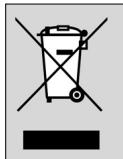
When this crossed-out wheeled bin symbol is attached to a product, it means the product is covered by the European Directive 2002/96/EC.
Please inform yourself about the local separate collection system for electrical and electronic products.
Please act according to your local rules and do not dispose of your old products with your normal household waste. The correct disposal of your old product will help prevent potential negative consequences for the environment and human health.
All rights reserved. Reproduction in whole or in part is prohibited without the prior written consent of the copyright owner. The information presented in this document does not form part of any quotation or contract, is believed to be accurate and reliable and may be changed without notice.
No liability will be accepted by the publisher for any consequence of its use. Publication there of does not convey nor imply any license under patent- or other industrial or intellectual property rights.
August 2008
www.philips.com
Printed in China
C E

N'MW/RM/3508
- 4 ENGLISH
- CONTENTS
- INTRODUCTION
- INSTALLING THE REMOTE CONTROL
- INSERTING THE BATTERIES
- TESTING THE REMOTE CONTROL
- SETTING THE REMOTE CONTROL
- NOTE
- 6 ENGLISH
- SETTING UP THE REMOTE CONTROL BY LEARNING ALL KEY FUNCTIONS
- LEARNING THE OK KEY
- NOTES
- UNDO SETUP FOR STB
- KEYS AND FUNCTIONS
- TV KEYS, ALWAYS AVAILABLE
- TV KEYS, AVAILABLE WHEN THE SRU 4002 IS NOT PROGRAMMED FOR STB
- STB KEYS, AVAILABLE WHEN THE SRU 4002 IS PROGRAMMED FOR STB
- EXTRA POSSIBILITIES
- LABELLING FAVORITE KEYS
- STORING FAVORITE KEYS
- STORING FAVORITE STB / TV CHANNELS
- ACTIVATING DUAL STANDBY MODE
- 10 ENGLISH
- RESTORING THE ORIGINAL FUNCTIONS OF YOUR REMOTE CONTROL
- TROUBLESHOOTING
- TABLE DES MATIERES
- ANGRE OPPSETT FOR STB
- EIOAYWYYN
- EYKATAOTAON TOU TNLEXEIIPIOTNPIOU
- TONOΘΕTNON TWV ΜNATAPIΩV
- ELEXYXOS TOU TNLEXEIIPIOTNPIOU
- BBEAEHNE
- YCTAHOBKA NYABTA AY
- YCTAHOBKA 6ATAPEEK
- TECTNPOBAHNE NPABATA AY
- HACTPOKA NPABATA AY
- ПРИИМЕЙТОН
- 90 PYCCKH
- HACTPOIKA NYIBTA AY C NOMOIBIO PEKHMA 3ANOMHAHNA ΦYHKN KHONOK
- PPORPAMMNPOBAHNE KHONKN OK
- PPIMEUAHNA
- OTMEHA HACTPOYN YNPABAEHHRAENPCTABKOJ
- KHONKN N ΦYHKUHN
- KHONKN PEKMA TB, NOCTOHHB GOCTYN
- KHONKN PA6OTAIB T PEXHME TEAEBN3OPA, ECAN NYABT SRU 4002 HE 3ANPORPAMMNPOBAH HA YNPABAEHNE TEAENPHCTABKO
- 92 PYCCKN
- A0IIOAHHTEA6HBIE BO3MOXHOCTN
- APABIKN AAR KHOJOK 'N36PAHHOE
- COXPAHEHNE 36PAHHBIX KHOJOK
- COXPAHHE H36PAHHBIX KAHAAOB TEAENPNCTABKN / TB
- 94 PYCCKH
- AKNBAUNA BOHORO PEKIMA
- BOCCTAHOBAEHNE HCXOADHOI CYHKUHOHAABHOCTN NYBTA AY
- YCTPAHENHE HENCNPABHOCTEI
- CESKY
- OBSAH
- EN INFORMATION TO THE CONSUMER
- DISPOSAL OF YOUR OLD PRODUCT
Brand : PHILIPS
Model : SRU4002X
Category : Universal remote