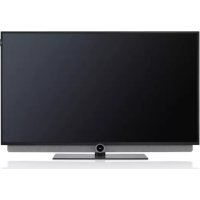
Bild 2.43 - Television LOEWE - Free user manual and instructions
Find the device manual for free Bild 2.43 LOEWE in PDF.

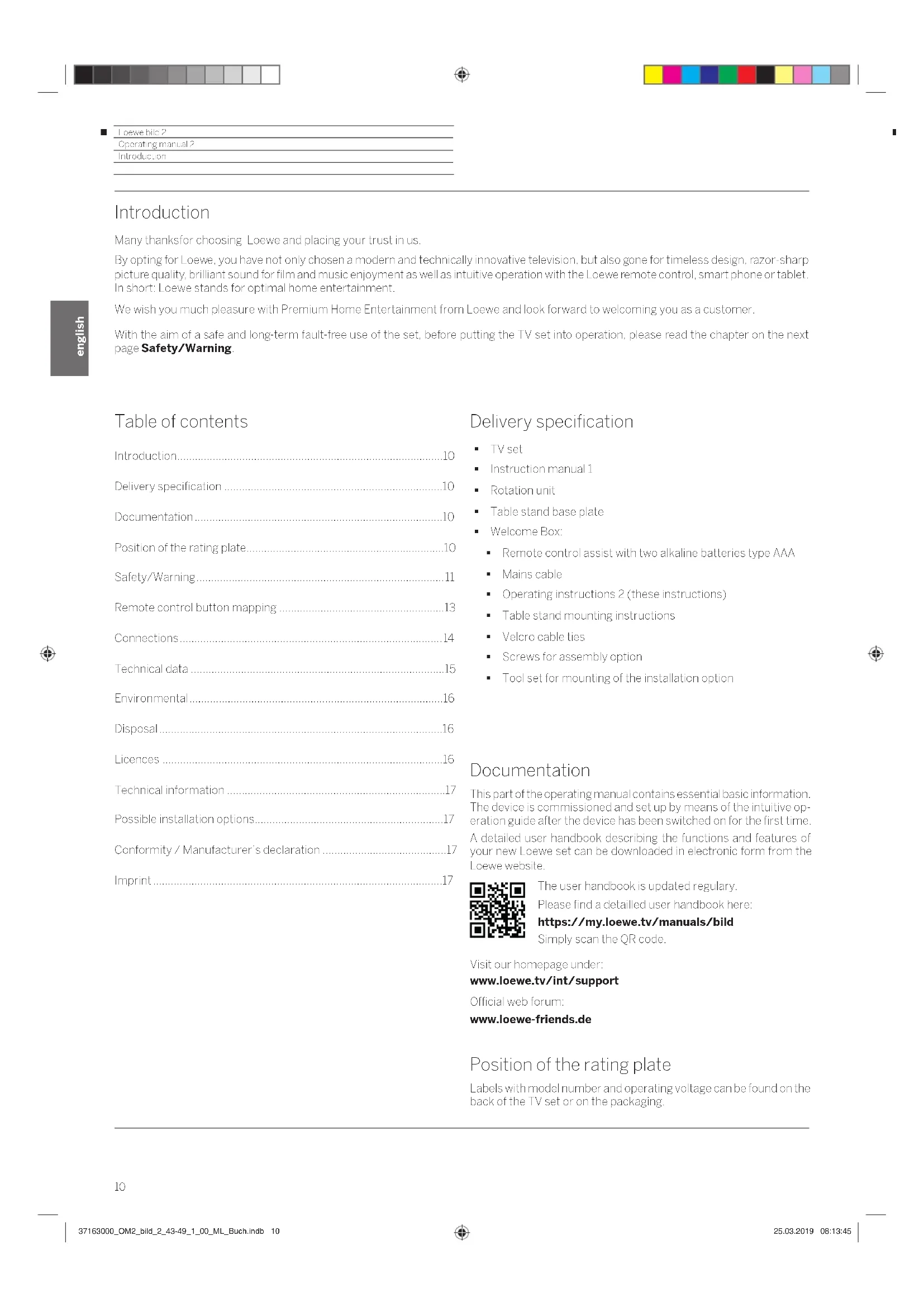


| Product type | Television |
| Brand | Loewe |
| Model | Bild 2.43 |
| Screen diagonal | 108 cm (43 inches) |
| Resolution | Ultra HD 3840 x 2160 pixels |
| Screen technology | LCD with LED backlight |
| Dimensions without stand (WxHxD) | 96,0 x 59,3 x 5,7 cm |
| Dimensions with stand (WxHxD) | 96,0 x 61,9 x 25,0 cm |
| Weight without stand | 11,7 kg |
| Weight with stand | 15,0 kg |
| Power supply | 220-240 V, 50/60 Hz |
| Maximum consumption (on mode) | 117 W |
| Standby consumption | 0,26 W |
| Audio power | 2 x 10 W (RMS) / 2 x 20 W (music) |
| Speaker system | 2-way stereo (Guided Wave) |
| Built-in tuner | DVB-T/T2, DVB-C, DVB-S/S2 |
| Connections | HDMI (ARC), USB 3.0, LAN, audio output 3,5 mm/mini-Toslink, CI slot, SAT antenna |
| WiFi | IEEE 802.11 a/b/g/n/ac |
| Bluetooth | Yes (A2DP, AVRCP, HID) |
| Supported video formats | AVI, WMV, MP4, MOV, MKV, FLV, MPEG, TS/PS, VOB (H.264/HEVC) |
| Supported audio formats | MP3, AAC, WMA, FLAC, WAV, Ogg Vorbis |
| Smart functions | EPG, HbbTV, teletext, PIP, USB recording, software update |
| Cleaning | Soft damp cloth, no harsh chemicals |
| Safety | Do not open the back panel, use only Loewe accessories |
| General information | Rating plate on the back, ambient temperature 5-35°C, humidity 20-80% |
Frequently Asked Questions - Bild 2.43 LOEWE
User questions about Bild 2.43 LOEWE
0 question about this device. Answer the ones you know or ask your own.
Ask a new question about this device
Download the instructions for your Television in PDF format for free! Find your manual Bild 2.43 - LOEWE and take your electronic device back in hand. On this page are published all the documents necessary for the use of your device. Bild 2.43 by LOEWE.
USER MANUAL Bild 2.43 LOEWE
RJ-45-Ethernet/Fast Ethernet
(6) ANT SAT -Satellitetenantenne (Sat-luner) DVB-S/S2
F-Buchse-75Ohm/13/18V/500mA
(7) ANT TV Antenne analog/Kabel analog / DVB-1/T12 / DVB-C
IEC-Buchse-75Ohm/5V/80mA
Doloy Audio and the double D symbol are trademarks of Dolby Laboratories. Manufactured under license from Dolby Laboratories. Confidential unpublished works.
Copyright © 2003-2015 Dolby Laboratories. All rights reserved.
Many thanks for choosing Loewe and placing your trust in us.
By opt for Loewe you have not only chosen a modern and Technically innovative telesion, but also gone for limeess design. razor-sharp picture quality, brilliant sound for film and music enjoyment as well as intuitive operation with the Loewe remote control. smart phone or tablet. In short: Loewe stands for optimal home entertainment.
We wish you much pleasure with Premium Home Entertainment from Loewe and look forward to welcoming you as a customer.
With the aim of a safe and long-term fault-free use of the set, before putting the TV set into operation, please read the chapter on the next page Safety/Warning.
Table of contents
Introduction. 10
Delivery specification 10
Documentation. 10
Position of the rating plate. 10
Safety/Warning 11
Remote control button mapping. 13
Connections. 14
Technical data. 15
Environmental. 16
Disposal 16
Licences 16
Technical information 17
Possible installation options. 17
Conformity / Manufacturer's declaration 17
Imprint 17
Delivery specification
TVset
Instruction manual
Rotation unit
Table stand base plate
Welcome Box:
Remote control assist with two alkaline batteries type AAA
Mains cable
- Operating instructions 2 (these instructions)
Table stand mounting instructions
Velcro cable lies
- Screws for assembly option
- Tool set for mounting of the installation option
Documentation
This part of the operating manual contains essential basic information. The device is commissioned and set up by means of the intuitive operation guide after the device has been switched on for the first time.
A detailed user handbook describing the functions and features of your new Loewe set can be downloaded in electronic form from the Loewe website.
The user handbook is updated regularly.
Please find a detailed user handbook here:
https://my.loewe.tv/manuals/bild
Simply scan the QR code.
Visit our homepage under:
www.loewe.tv/int/support
Official web forum:
www.loewe-friends.de
Position of the rating plate
Labels with model number and operating voltage can be found on the back of the TV set or on the packaging.
Locwobic2
Operating manual 2
Safety/Warring
Safety/Warning
For your safety, and to avoid unnecessary damage to your unit, please read and follow the safety instructions below.
Key

This symbol indicates risks caused by high voltages.

This symbol indicates dangers caused by the development of fire.

This symbol should alert the user to other, more specific risks.

This symbol indicates dangers caused by sharp edges.
Do not remove set rear panel
Warning: When opening or removing the rear panel, there is the danger of electric shock and the risk of serious injury from high voltages.
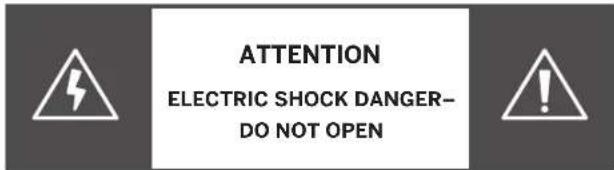
Never open the rear panel yourself. Leave repairs and servicing work on your TV set to qualified, authorised television technicians.
Please contact your dealer or our customer service.
Intended use and environmental conditions

This TV set is intended exclusively for the reception and playback of picture and sound signals.

The TV set is designed for dry rooms (living rooms and office spaces). It must not be used in rooms with a high level of humidity (e.g. bathroom, sauna) or outdoors.
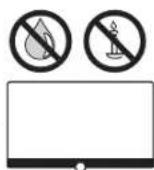
When using the set, make sure that it is protected from moisture (dripping and splashing water or condensation).
High humidity and dust concentrations lead to power leaks in the set. This can lead to danger of injury and damage to the set by electric tensions or a fire.
If you've brought the set from the cold into a warm environment, leave it off for around an hour due to the formation of condensation.
Do not place objects filled with liquid on the sel. Protect the sel from dripping and splashing water.
Candles and other open flames must be kept away from the set at all times, to prevent the spread of fire.
Transport
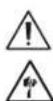
Improper handling during transportation can lead to damage to the display and risks of injury.
The screen consists of glass or plastic and can break if handled improperly.
Only transport the set in a vertical position.
No pressure should be applied to the glass or the plastic during transport.
The correct handling is shown in the operating manual 1.
Do not place it on the lower edge so as to reduce the danger of damage and contamination.
Mains cable/power supply
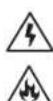
Incorrect voltages can damage the sel.
This set may only be connected to a mains power supply with the voltage and frequency indicated on the rating plate using the enclosed mains cable.
The mains power plug of the TV set must be easily accessible so that the set can be disconnected from the mains at any time.
When pulling the mains power plug out, do not pull the cable but the plug housing. The cables in the mains power plug could be damaged and cause a short circuit when plugged in again.
A mains power cable with a damaged insulation can lead to electric shock and presents a fire hazard. Never use a damaged mains cable.
Lay the mains cables so that they cannot be damaged. Do not tread on the mains cable.
The mains cable must not be kinked or laid over sharp edges.
If you use a portable multiple socket to connect the TV set, do not cascade several multiple sockets one behind the other.
Air circulation and high temperatures

Like any electronic device, your TV set requires air for cooling. If air circulation is impeded, it may result in a fire.
The ventilation slots on the rear panel of the set must therefore remain free. Please do not cover the set.
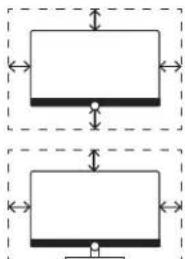
Wall mounting: Lagoon at least 10 cm of space all around the set at the side, above and below.
Table / stand foot: Leave at least 10 cm clear space around the set at the side and at the top.
Foreign bodies

Foreign bodies inside of the set can lead to short circuits and fires.
Danger of injury and damage exists
Therefore avoid metal parts, needles, paper clips, liquids, wax or similar passing through the ventilation slits of the rear panel into the interior of the set.
Should something get into the interior of the appliance, immediately pull out the mains power plug of the set and inform the customer service department for checking.
Locwbic2
Operating manual 2
Safety/Warring
Installation

Opting for an incorrect or wrongly mounted installation can lead to danger of accidents Rolling or falling sets can cause injuries or damage.
Loewe TV sets are specified for Loewe accessories. We strongly recommend the use of original Loewe installation options. Do not use any installation options that are not approved for your TV set!
Note the instructions regarding the mounting for the different possible installation options! A corresponding documentation is included with every Loewe product.
Check before the installation of the set, whether the final location with regard to the surface (pressure sensitivity) and stability (static) is designed for the load from the set! This applies in particular to high gloss lacquered surfaces and surfaces made of real wood, real wood veneer and plastic surfaces.
Only place the TV set on a levelled, stable, horizontal base with table or stand foot! The set should especially not protrude at the front when installing in or on furniture.
Not placing the television set on cloth or other materials that may be located between television set and supporting furniture. Educating children about dangers of climbing on furniture to reach the television set or its controls.
The usual usage position of the TV set should be followed. The TV set can only be operated horizontally upright A. The inclination can amount to a maximum of 10 degrees for wall mounting B. The TV set must never be operated in portrait orientation, C, horizontal D or overhead on the ceiling E.
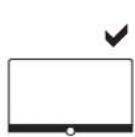
A
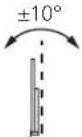
B
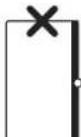
C
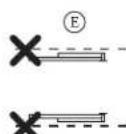
D
Position the sel so that it is not exposed to direct sunlight and additional heating from radiators!
Do not place the TV in a location where vibrations can arise! This can lead to damage.
In the case of installation options for third-party manufacturers with a motor drive, it is to be ensured that the adjustment of the TV set does not occur manually. It is generally not advisable to use the installation options of other manufacturers with locking devices in certain positions.
When using accessories from third-party manufacturers, it is to be ensured that the TV set is easily adjusted for the respective installation option.
When adjusting the TV set, ensure that the pressure applied to the set frame is not too great. Especially in large format displays, there is the danger of damaging the display.
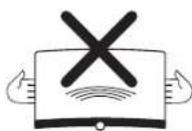
The mounting of a TV set on a Onaholder according to the VESA standard requires mandatory use of the VESA adapter bolts. Otherwise, damage to the TV may result.
The Vesa adapter bolts must be attached to the TV set with a torque of circa 4 Nm. You can obtain these from your Lockwe dealer (you can find further information found in the on-line user handbook).
Make sure that after unpacking and setting up the TV set the packaging material (TV box, Styrofoam shells and protective fleece) does not fall carelessly into the hands of children.
Please also note the disposal instructions for packaging and carton (see chapter Environment/Disposal/Licences).
Supervision

Do not unsupervised children handle the TV set nor let them play immediately around the TV set!
The set could be knocked over, moved or pulled down from the stand surface and injure people.
Do not leave the TV set when switched on unattended!
Volume

Loud music can lead to hearing damage. Avoid extreme sound volume, especially over extended periods of time and when using headphones!
Thunderstorms

During thunderstorms, pull out the mains power plug and all connected antenna cables from the TV set!
If you have connected a network cable to the LAN port, remove this as well.
Over-voltages due to lightning strike can damage the set both via the antenna system and via the mains power supply.
Even in the case of prolonged absence, the mains power plug and all connected antenna cables should be disconnected from the TV set.
Cleaning and care/chemicals

Before cleaning, switch the TV set off using the mains power switch!
Damages caused by chemicals can lead to adverse effects and development of fire. Never expose the set or accessories to aggressive (for example, corrosive) chemicals such as alkalis or acids!
Only clean the TV set, the front screen and the remote control with a damp, soft, clean and colour neutral cloth, without any aggressive or scouring cleaning agents!
The loudspeaker panel of your TV set is texLle-covered. Hoover the surface regularly with a soft brush attachment!
For contaminations or stains
Moisten a soft, colour neutral cloth with detergent solution or commercially available stain remove and rub the stain gently away! You can also treat the stain directly with a commercial dry stain remover spray (hoover up the dust).
Do not moisten the covering fabric directly with detergent solution or stain remover (risk of stain circle formation)! Do not use solvents to clean the fabric!
Note the usage instructions of the manufacturer when using stain remover!
When cleaning loudspeaker panels which have been exposed to nicotine, there is an increased risk of stain circle formation.
Locwobie 2
Operating manual 2
Remotc control
Remote control button mapping
Depending on the selected operating mode (TV/Video/Audio/Photo/Apps) and function (e.g. EPG, PIP, Telext, HboTV, etc.). The key assignment may differ from the assignment described here (see corresponding chapter of the on-line user handbook).
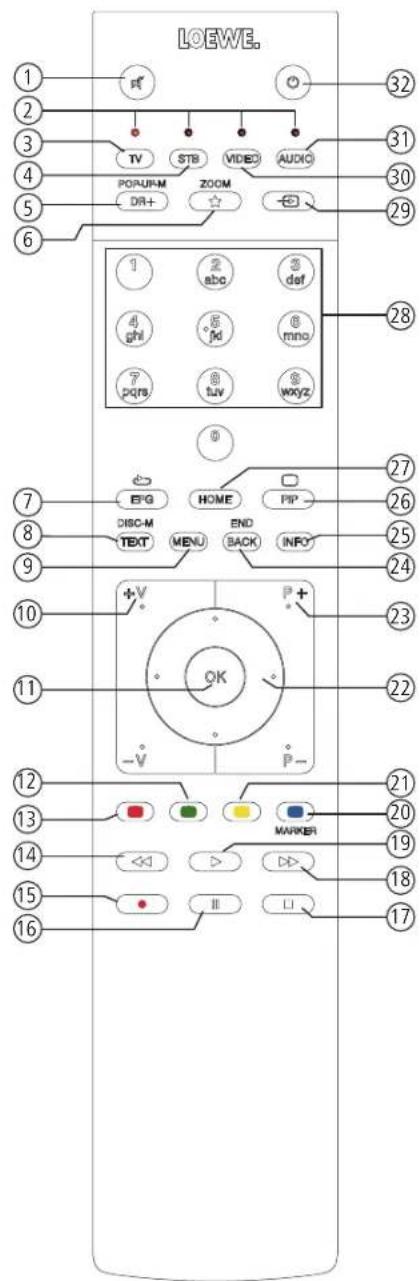
①Sound mute/an.
② LED display for currently operated device.
③ Call the TV mode.
4 Reassign remote control to SetTop-Box(presetting:Apple TV).
⑤ Pressing briefly Open the DR+ archive Pressing longer: Call Limer.
6 Pressing briefly Add current object to Home favourites. Pressing longer: Open App Gallery. (standard assignment)1
⑦ EPG(ElectronicProgrammeGuide)on/off.
⑧ Telelex/MediaTex2 on/off.
9 Pressing briefly Call menu options for the active operating mode. Pressing longer Call System settings.
10 V+/V- increase/reduce volume.
11 Pressing brieiy Call channel list. Pressing longall expanded channel list. In the menu: confirm/call up.
Green coloured key: screen on/off in Audio/Radio mode.
13 Red coloured key: call preferred value-added network service, if available2.
14 Pressing brieftly: skip backwards. Pressing longer: winding backwards.
15 Pressing brieely: direct recording (with determination of recording duration) Pressing longer: One Touch Recording
16 Pause/StarL/pause the Umshift television
17 Stop/End timeshift (return to live image)
18 Pressing briefly: skip forwards. Pressing longer: winding forwards.
19 Play/Start/continue timeshift television
Blue coloured key: call channel menu options (selection of language/sound, subtitles or channel/video track).
21 Pressing briefly: Yellow coloured key: call history. Pressing longer: Yellow coloured key: call last channel.
22 Navigation on the user interface, select objects. In the menu / lists: select/ sel.
23 + / next/previous channel.
24 Pressing brieftly step / level back. Pressing long close all displays.
Press briefly during an on-screen display: info display. Info text appropriate to the content that can assist you further, should you have any questions about your TV set. Press briefly, without on-screen display: access status display. With status display open and repeatedly pressing the key call the detailed information on the broadcast. Press longer: show Explanation of keys.
26 PiP (picture picture) on/off.
27 Call up the Home view.
28 Select channels with numeric buttons directly. In the menu enter numbers or letters
29 Call Sources.
40 Roassign remote control to video device (presenting:BluTech Vision 3D).
51 Call radio mode (standard assignment)
Switches the TV set on (mains switch must be turned on) or switches to standby mode. Press briefly while TV set is switched on; TV set and all CEO-enabled devices connected to the HDMI ports will be switched off to standby (System Standby).
Position and function of the connections
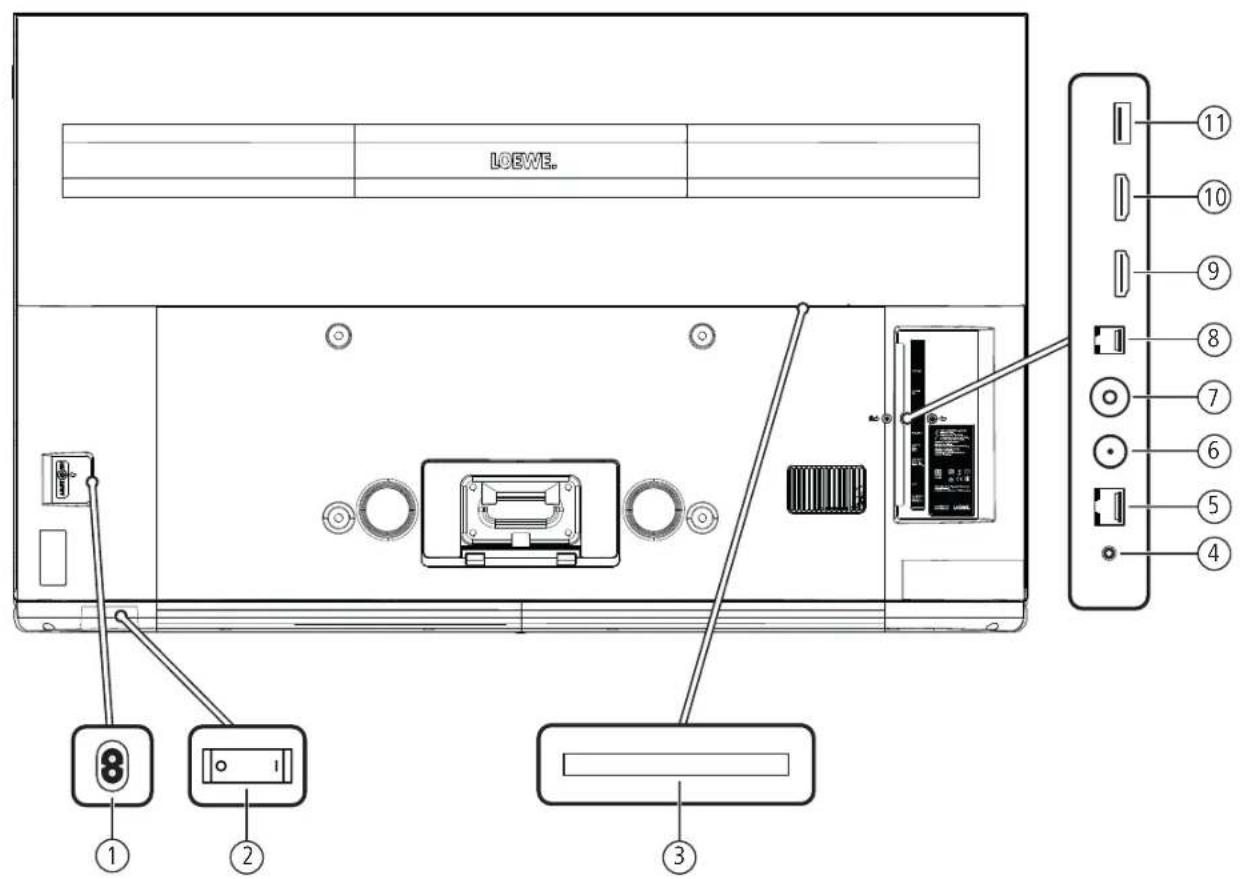
① AC IN Mains connection
Mains socket - 220-240 V - 50 / 60 Hz
② Mains switch
3 COMMON INTERFACE CI slot(standard V1.4)
4 AUDIO OUT - Audio output analogue/digital Jack 3,5 mm (analogue) L/R
Mini Icsink (digital)
⑤ LAN - Network connection
RJ-45-Ethernet/Fast Ethernet
(6) ANT SAT -Satellite antenna (Sat tuner) DVB-S/S2
F socket - 75Ohm/13/18V/500mA
(7) ANT TV Antenna/cable analogue/DVB-T/T2/DVB-C
IEC socket-75Ohm/5V/80mA
RS-232C Serial Interface(2) (RJ12)
HDMI 1 ARC-HDMI input13(with Audio Return Channel)
HDMI-Digital Video IN/Audio IN/OUT
10HDM2-HDMinput 2
HDM-Digital Video IN/Audio IN
1 USB3.0-USB connection
USB type A - USB 3.0 (max, 900mA)
Locwbic2
Operating manual 2
Technical data
Changes of technical data and design of the equipment reserved.
| Loewe device type: | bild 2.49 | bild 2.43 |
| Part number: | 58/42xxx 58/421xxx | |
| EU energy efficiency class: see enclosed energy label or under www.loewe.tv/int/support | ||
| Screen diagonal: | 126 cm/49 inch 108 cm/43 inch | |
| Power consumption On-Mode (max.) (Audio output 1/8 of the maximum value): | 152 W 117 W | |
| Power consumption On-Mode (home) Annual energy consumption: | see enclosed energy label or under www.loewe.tv/int/support | |
| Power consumption quick start mode: | 40.0 W 40.0 W | |
| Power consumption Standby Mode: | 0.27 W 0.26 W | |
| Power consumption when set is switched off: | 0 W 0 W | |
| Picture format/ Resolution: 16:9 / Ultra HD 3840 x 2160 px | ||
| Display technology: LCD with Edge-LCD-Backlight | ||
| Device dimensions without stand (W*4 x H x D): | 111.6 x 68.1 x 5.8 cm 96.0 x 59.3 x 5.7 cm | |
| Device dimensions with stand*2 (W*4 x H x D): | 111.6 x 70.8 x 25.0 cm 96.0 x 61.9 x 25.0 cm | |
| Weight without stand (approximate): | 16.3 kg 11.7 kg | |
| Weight with stand*2 (approximate): | 19.6 kg 15.0 kg | |
| Ambient temperature: 5°C - 35°C | ||
| Relative humidity (non-condensing): | 20 - 80% | |
| Air pressure: | 800 - 1114 hPa (0 - 2000 m above sea level) | |
| Chassis designation: | SL502 | SL502 |
| Power supply: | 220 V - 240 V/50 - 60 Hz | |
| Tuner: terr./cableSatellite: | VHF/Hyperband/UHF4 levels: 13/18V/22kHz / 16 levels: DISeqC 1.0 / single-cable system: EN 50494 | |
| Range: terr./cableSatellite: | Terr./cable: 45 MHz up to 860 MHzSatellite: 950 MHz up to 2150 MHz | |
| Channel storage locations incl. AV and radio: | 6000 | |
| TV standards: analogue: digital: | B/G, I L, D/K, M, NDVB T/T2, DVB-C, DVB-S/S2 (UHD via DVB to max. 60 Hz) | |
| Colour standards: | SECAM, PAL, NTSC, NTSC-V, PAL-V (60 Hz) | |
| Sound formats: analogue (FM): analogue (NICAM): digital (MPEG): | Mono. Stereo. Dual channelMono. Stereo. Dual channelMono. Stereo, Dual channel, PCM, Dolby Digital, Dolby Digital Plus, Dolby Digital Pulse, Dolby MSII | |
| Audio output power (sine / music): | 2 x 10W / 2 x 20W | |
| Acoustic speaker concept: 2 Way Stereo (Guided Wave) | ||
| Teltext: | TOP / FLOF / HiText (Level 2.5) | |
| Page memory: | 2000 | |
| LAN: Standards supported: | 10 Mbit/sec Ethernet (10Base-T) / 100 Mbit/sec Fast Ethernet (100Base-T) | |
| WLAN: Standards supported: Power/Frequency range Types of encoding that are supported: | IEEE 802.11a/b/g/n, 802.11acMaximum power <100 mW at 2400 2483.5 MHz and 5150-5725 MHzWEP 64 and 128 Bit (ASCII and HEX), WPA PSK, WPA2 ACS | |
| Bluetooth: Power/Frequency range Bluetooth protocols | Maximum power <10 mW at 2.4 GHzA2DP SRC, A2DP SNK, HID | |
| Home networking standard: | Universal Plug and Play Audio / Video (UPnP AV) | |
| File formats supported: Pictures: Audio: Video: | JPEG, JPEG progressive (max. resolution 3840x2160), PNGMP3, M4A (AAC LC), WMA (without lossless), FLAC, WAV (PCM), Ogg VorbisAVI (MPEG-1/2, XviD, Dolby Digital, MP3), WMV (WMV9, VC-1, WMA9, WMA Pro),MP4 (XviD, H.264/MPEG 4 AVC, AAC LC), MOV (H.264/MPEG 4 AVC, AAC LC), MKV (H.265/HEVC, H.264/MPEG 4 AVC, Dolby Digital), FLV (H.264/MPEG 4 AVC, H.263MP3, AAC LC), MPG (MPEG-1, MPEG Audio), TS/PS (MPEG-2, H.264/MPEG-4 AVC, MPEG2Audio, Dolby Digital),VOB (MPEG-2, MPEG2 Audio, Dolby Digital)H.264/MPEG 4 AVC upto Profil High (Level 4.2)H.264/H.265 compatible to HDR10/HLG | |
(1 The energy consumption per year is calculated on the basis of a daily four-hour operation
of the TV set on 3.50 days . The actual energy consumption will depend on the way theTV set used Co-Move (hp-hours) values less than 100 W units have decimal places ( O )
Supplied mounting option: Iace Stand.
For the playability of the individual formals no guarantee can be given.
(4) The width of the TV set can be increased by up to 4mm depending on the type of TV
set in the area of the side mounted Loewiccio.
Locwobic 2
Operating manual 2
Environmen/Disposai/Licences
Environmental
Power consumption
Your TV set is equipped with an eco standby power supply. In the standby mode, the power consumption drops to low power (see chapter Technical data). If you want to save even more energy then switch the device off with the mains switch. Please also note that the EPG data (Electronic Programme Guide) is lost under certain circumstances and possibly programmed timer recordings cannot be carried out by the TV set.
The TV set will be completely separated from mains only when you unplug the mains cable.
The power consumed by the TV set during operation depends on the energy efficiency preset in the initial installation or on the setting in the system sellings.
If you activate the automatic dimming, your TV picture will adapt to the ambient brightness. This reduces the power consumption of the TV set.
Automatic shutdown
If the TV is not operated for 4 hours (adjustment of volume, programme change, etc.) the TV will automatically switch to stand-by mode to save energy. A prompt to terminate this shutdown process appears one minute before expiry of the 4 hours.
By default, the automatic shut-off is active in the energy efficiency mode home Mode/personal mode, premium mode.
Automatic shutdown does not occur when using the radio without screen display (screen off).
Disposal
You have chosen a very high-value and durable product.
Packaging and cardboard
The disposal of the packaging will be gladly handled for you by your specialist dealer. If you dispose of the packaging yourself, dispose of the packaging in sorted waste disposal and according to the local disposal regulations. Place cardboard and paper in the waste paper, foils and polystyrene in the recyclable waste collection.
The set
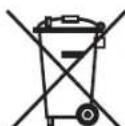
Your Loewe product is made with quality materials and components that are recyclable and reusable.
This symbol means that electrical and electronic equipment must be disposed of separately from household waste at the end of their service life.
You can return your old set for free at designated recycling centres, or at your dealer, if you buy a similar new device. Additional details about returns (even for non-EU countries) are also available from your local government. They make an important contribution to the protection of our environment.
The batteries
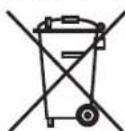
The original equipment batteries do not contain harmful substances such as cadmium, lead or mercury. Used batteries should not be disposed of in household waste. Disposse of used batteries free of charge in the collection containers set up at the dealer or at the public collection points.
Licences

Dolby Audio and the double D symbol are trademarks of Dolby Laboratories. Manufactured under license from Dolby Laboratories. Confidential unpublished works.
Copyright © 2003-2015 Dolby Laboratories. All rights reserved.
This set contains a software which is partly based on the work of the Independent JPEG Group.
This product includes software developed by the OpenSSL Project for use in the OpenSSL Toolkit (http://www.openssll.org/).
This software is provided by the OpenSSL project "as is" and any expressed or implied warranties, including, but not limited to, the implied warranties of merchantability and fitness for a particular purpose are disclaimed. In no event shall the OpenSSL project or its contributors be liable for any direct, indirect, incidental, special, exemplary, or consequential damages (including, but not limited to, procurement of substitute goods or services; loss of use, data, or profits; or business interruption) however caused and on any theory of liability, whether in contract, strict liability, or tort (including negligence or otherwise) arising in any way out of the use of this software, even if advised of the possibility of such damage. This product includes cryptographic software written by Eric Young (eay@cryptsoft.com).
This product includes software written by Tim Hudson (tjh@cryptsoft.com).
This product contains software which was developed by third parties and/or software which is subject to GNU General Public License (GPL) and/or GNU Lesser General Public License (LGPL). You can pass on and modify them in accordance with Version 2 of the GNU General Public License or optionally every later version which is published by the Free Software Foundation.
The publication of this programme by Loewe is carried out WITHOUT ANY GUARANTEE OR SUPPORT, particularly without an implicit guarantee concerning MARKET MATURITY or the USABILITY FOR A SPECIFIC PURPOSE. Details can be found in the GNU General Public License. You can obtain the software via the Loewe customer service department.
The GNU General Public License can be downloaded from: http://www.gnu.org/licenses/.
Locwble 2
Operating manual 2
Technical information/possible installation options
Conformity/Manufacturer's declaration /Imprint
Technical information
Notes on the LCD screen
The TV set with LCD screen you have purchased satisfies the most rigorous quality requirements and has been inspected with respect to pixel errors. Despite of thorough care when manufacturing the display, it cannot be 100% guaranteed that no subpixel defects will occur due to technical reasons.
Please understand that these types of effects, as long as they are within the limits specified in the standard, cannot be considered as a device defect in terms of the guarantee.
Avoid displaying still images for long periods of time. It is possible that a copy of the image may remain visible.
Behind the panel plate of the LCD TV set, soot and dust deposits may appear without a soot generating source being visibly present. Such soot and dust deposits are also referred to as "fogging" or "magic dust".
This phenomenon occurs sporadically, but in particular during the heating period and after renovations and in new buildings. As a cause for this, various factors are mentioned, see also reports on the Internet.
The cleaning or replacement of the panel is excluded from the warranty claims in such cases, because it is not a defect of the device, but an external influence.
Information about connected USB hard drives
Switching off the TV set with the mains switch during operation or an inadvertent disruption to the power supply (e.g., power failure) can cause damage to the hard disk file system and hence loss of the recorded broadcasts.
Never ever disconnect the USB storage device from the TV set during a copy process. Before switching off the set with the mains switch, we recommend you to switch it to standby mode.
If, contrary to expectation, you are still experiencing problems with the operation of the hard drive, you can first carry out a test. In addition, a formatting of the hard disk can be remedy. In the process, however all content on the hard disk is deleted. You can find the corresponding menu items under System settings Control more ... Hard disks
Loewe are not liable for the loss of data on the integrated hard disk of your TV set. To prevent data loss, we recommend you save important recordings onto an external storage device.
Software update
It is possible to update the software on your Loewe TV set.
In the software update (package update) all the software releases in the TV set are scanned and updated as required.
Current software versions can be downloaded from the Loewe Internet site (see below) and installed on your TV set using a USB stick.
If your TV set is connected to the Internet, the TV set can be updated directly via the Internet.
For more information on the software update, please refer to the user handbook which can be downloaded from the Loewe Internet site.
Possible installation options
You can use the following Loewe installation options listed for your TV sat.
Do not use any installation options that are not approved for your TV set.
TV set item number/name of the installation option:
bld 2.49---
TS Plate
72115W80 WM67
72660S00 FS Plate 32_49
bld 2.43
TS Plate
72115W81 WM67
72660S00 FS Plate 32_49
72435Q00 FS 32_43(formerly FS Connect 32_40)
71363B00 WMIsoflex 32-55
71389W00 WM Slim/Vesa Size 200
Conformity / Manufacturer's declaration

Loewe Technology hereby declares that this product meets the essential requirements and other relevant provisions of Directive 2014/53/EU and all applicable EU directives.
In the frequency range 5150 to 5350 MHz, this TV set is restricted to indoor use in the following countries: Belgium, Bulgaria, Denmark, Germany, Estonia, Finland, France, Greece, Ireland, Italy, Croatia, Latvia, Lithuania, Luxembourg, Malta, Netherlands, Austria, Poland, Portugal, Romania, Sweden, Slovakia, Slovenia, Spain, Czech Republic, Hungary, United Kingdom, Cyprus.
You can find the complete declaration of conformity in the product selection at:
www.loewe.tv/int/support
Imprint
The information in this document is subject to change without notice and does not constitute any obligation on the part of Loewe Technology GmbH.
All rights including translation, technical modifications and errors reserved.
3001
aannnne aen ane
eep
17
Locwble 2
Modc d'emploi 2
Prcambule
Préambule
Possibilities d installation 25
RJ-45-Ethernet/Fast Ethernet
Prise F-75 Ohm/13/18 V/500mA
(7) ANT TV Antenne / cable analogue / DVB-T/T2 / DVB-C
Prise IEC-75Ohm/5V/80mA
RS-232C-Interfacederie(RJ12)
Enviromment/Elimination/Licences
Environnement
Dolby Audio and the double-D symbol are trademarks of Dolby Laboratories. Manufactured under license from Dolby Laboratories, Confidential unpublished works.
Copyright © 2003 2015 Doloy Laboratories. All rights reserved.
Loewe Technology GmbH Printed in Germany
www.loewe.tv/it/support
RJ-45-Ethernet/Fast Ethernet
Presa F-75 Ohm/13/18 V/500mA
PresaleC-75Ohm/5V/80mA
RS-232C-porta seriale4-RJ12
Dolby Audio and the double-D symbol are trademarks of Dolby Laboratories. Manufactured under license from Dolby Laboratories. Confidential unpublished works.
Copyright © 2003-2015 Dolby Laboratories. All rights reserved.
Dolby Audio and the double-D symbol are trademarks of Dolby Laboratories. Manufactured under license from Dolby Laboratories. Confidential unpublished works.
Copyright © 2003-2015 Dolby Laboratories. All rights reserved.
RJ-45-Ethernet/Fast Ethernet
6 ANT SAT -Satelliptantenne (Sat-liner) DVB-S/S2
F-bus-75Ohm/13/18V/500mA
(7) ANT TV Antenne/kabel analog/DVB-1/12/DVB-C
IEC-bus-75Ohm/5V/80mA
RS-232C Seriele interface (RJ12)
HDMI 1 ARC-HDMI-tingang (mel Audio Return Channel)
HDMI-Digital Video IN/Audio IN/OUT
10HDMI2-HDMi-ingang2
HDM-Digital Video IN/Audio IN
1 USB3.0-USB-aansluting
USB Type A-USB 3.0 (max.900mA)
Locwble2
Gebruksaanwizing 2
Technische gegevens
Technische gegevens (bild 2.49/bild 2.43)
Dolby Audio and the double-D symbol are trademarks of Dolby Laboratories. Manufactured under license from Dolby Laboratories. Confidential unpublished works.
Copyright © 2003-2015 Dolby Laboratories. All rights reserved.
Printed in Germany Redactedatum 03/20-2.0 SB © Loewe Technology
GmbH, Kronach
RJ-45-Ethernet/Fast Ethernet
⑥ ANT SAT -Satellitanterne (Sat-luner) DVB-S/S2
F-bosning-75Ohm/13/18V/500mA
⑦ ANT TV Antenne analog/Kabel analog /DVB-1/T2/DVB-C
IEC-bosning-75Ohm/5V/80mA
RS-232C Serial interface (RJ12)
HDMI 1 ARC-HDMI-indgang 14 (med Audio Return Channel)
HDMI-Digital Video IN/Audio IN/OUT
10HDM2-HDM-mcgang2
HDM-Digital Video IN/Audio IN
USB3.0-USB-port
USB type A - USB 3.0 (max, 900mA)
Locwbic2
Driftswedding 2
Leckneke data
Tekniske data (bild 2.49/bild 2.43)
Milgct/Bortskate sc/Licensee
Miljoet
Energiforbrug
Dolby Audio and the double D symbol are trademarks of Dolby Laboratories. Manufactured under license from Dolby Laboratories. Confidential unpublished works.
Copyright © 2003-2015 Dolby Laboratories. All rights reserved.
Delleudstyr ornfaller software, somer delvist baseret paIndependent JPEG Goup arbejde.
Printed in Germany Rodigeringsdato
Industrestraße 11
03/20 2.0 SB@LbeweTnchology
D-96317 Kronach
GmbH, Kronach
www.lcewe.tv
www.loewe.tv/se/support
Den officiella Loewe forum:
www.loewe-friends.de
Typskyltens position
Dolby Audio and the double D symbol are trademarks of Dolby Laboratories. Manufactured under license from Dolby Laboratories, Confidential unpublished works.
Copyright © 2003-2015 Dolby Laboratories. All rights reserved.
Denna apparal finns programvara som delv s baseras pa arbelet fran IndependenLJPEG Group.
www.loewe.tv/se/support
Forlaget
Printed in Germany Recaktionsdatum 03/20 2.0 SB © Loewe Technology
D-96317 Kronach
GmbH, Kronach
www.icewe.tv
RJ-45-Ethernet/Fast Ethernet
⑥ ANT SAT - Satellittiantenni (Sat-viritin) DVB-S/S2
F-litanta-75Onm/13/18V/500mA
(7) ANT TV Antenni/kaapeli analoginen/DVB T/T2/DVB-C
IEC-liitanta-75Ohm/5V/80mA
RS-232C Sarjalitanta (RJ12)
HDMI 1ARC-HDMI-lulo1 (kanssa Audio Return Channel)
HDMI-Digital Video IN/Audio IN/OUT
HDM12-HDM1-tulo 2
HDM-Digital Video IN/Audio IN
USB3.0-USB-litanta
USBtyppiA-USB3.0(max,900mA)
AnaloginacigtaalnlahtosignaaiivatcsmanaikaiscaaytctavssAUDIO CUT-Hitannness
2 Acpteri saatavana liaivarusteera jai eennyyjata.
data, oen bil (across sets) - Signals via HDMI/AV (PC IN) kalta.
Locwbic2
Kayttoch 2
Iokn.sortie.dot
Dolby Audio and the double-D symbol are trademarks of Dolby Laboratories. Manufactured under license from Dolby Laboratories. Confidential unpublished works.
Copyright © 2003-2015 Dolby Laboratories. All rights reserved.
RJ-45-Ethernet/Fast Ethernet
⑥ ANT SAT -Satellittantenne (Sat-lurc) DVB-S/S2
F-kontakt = 75 Ohm/13/18 V/500mA
(7) ANT TV Antenne analog/Kabel analog / DVB-1/T12 / DVB-C
IEC-kontakt-75Ohm/5V/80mA
RS-232C Serielt grensesnitt (RJ12)
HDMI 1 ARC-HDMI-rrngang 1 (med Audio Return Channel)
HDMI-Digital Video IN/Audio IN/OUT
10HDM2-HDM-Imngang2
HDM-Digital Video IN/Audio IN
① USB 3.0 - USB tlikoping
USB Type A-USB 3.0 (max.900mA)
Locwbic2
Bruksanvisringen 2
tokniskedata
Tekniske data (bild 2.49/bild 2.43)
Milling/Kassering/Lisenson
Miljø
Energiforbruk
TV-en din har en sparsom strømiedning, I hvilemodus reduuseres strømforbruket til (se kapittelet Tekniske data). Hvis du vil spare mer strom, kan du slå av TV en med strømbryteren. Men var oppemerkomspar at hvis du slär av TV-en med strømbryteren, kan EPG-data (elektronisk programguide) gä tapf og vct. kan programmerte timerooptak på TV-en ijke giennomføres.
Komplett skillemellom TV-apparatet og strmnettet oponas kun nardu trekker ut strameddingen.
Dolby Audio and the double-D symbol are trademarks of Dolby Laboratories. Manufactured under license from Dolby Laboratories, Confidential unpublished works.
Copyright © 2003-2015 Dolby Laboratories. All rights reserved.
72435Q00 FS 32_43(formerly FS Connect 32-40)
71363B00 WMIsoflex 32-55
71389W00 WM Slim/Vesa Size 200
Konformitet/produusentenserklaering
Loewe Technology GmbH Printed in Germany
IndustriestraBe 11 Revisionsdato 03/20-2.0 SB
D-96317 Kronach Loewe Technology GmbH, Kronach
www.icewe.tv
No.8 Jinghu Road, Xinya St, Huadu Reg.
GZ,PRO
[el+86(0)20226/5/44
Fax-86-0020-22675744
E-Mail:service@locwe-chr.com
CY
Hadjkyriakos & Sors Ltd.
121 Prodrros Sir, P.O Box 21587
1511 Nicosia Cyprus
Tel+357 7777007
Fax-357-22663391
L-Mail: service@nadijkryiakos.com.cy
E
Golasa S.A.
Conde de Torroja, 25
28022 Madrid, España
E+31-91/482960
Fax+34-913291675
E-Mail: loeewe@maygap.com
F
Loewe France SAS
Rue du Dapol
13arcel/Europe.BP10010
67014 Strasbourg Cedex, France
Tel:133-3-28797250
Tax+33-388797259
E-Mail: Icewe.france@Icewe-fr.com
FIN
E-T Europarts
Locyefnland
Metsanneldonkula 12
C2130 Lspoc,Fin and
Tel+358947850900
www.eeleuroparts.fi
GB IRL
LoeweUKrrited
LK Business Centre
14 StrouRoad
Glasgow, G75 OYAKUK
e14(0)113/99666
E-Mail: enquiries@loewe.uk.com
GR RO AL
Issagokk Emboriki Eacos S.A.
321 Mcsogion Av.
15231 Chalandri-Ahrens, Hellas
Tel+30-2106721200
Fax+302106740204
F-Mail: chrisna_argyrepoulou@
iscn.bcl.gr
HR
Fug&Play Ltd.
Bednanska 8,1000C Zagreb
Hrvatska (Kroata)
Tel+38514929683
Fax+38514929682
E-Mail: info@poewe.hr
1
Loewe talana S.R.
Via Monle Baldo 147F
37069 Dosscbuono di Villafranca di
Verona
Te+39-045825611
Fax:039-0458251622
E-Mail: info@cewe.it
L
Fxt-electronics Ltd.
47 Kirbutz Galit-yot St.
TelAVV6655033
Israel
Te+972-3-6826500
Fax:972-3-6826400
E-Mail: info@exittrade.co.il
IND
Norplus Ultra Home Automation Pvt Ltd
First Floor, No. 615, Second Main Road
Indiranagar Slape, Indiranagar
Bangalore 560038
India
+918041114599
F-Mail.info@npusultra.in
IR
ParsRoyalaramesh
LOEWE
No.166 between Ansari & Sollani SL.
NelsonMancellaBlv.
POBox:1967735333
Tehran, Iran
Tel 982196861717
[cl+982126208375
E-Mail:info@tarameshgroup.com
JOR
1OFWF Gallery
AccalMalB1
ACCU-TECH Solutions Co.
1-Khanja Al-Asnja Stroed
Jabal Al Weibdeh
P.O.Box 9668
Amman 1191
Jordan
[0]+962-79-540-78/0
Fax+962-6465-0119
F-Mainfo@acculech-solutions.net
KSA
LOWL Show Room
Oilya Street.
Near Kingdom Center Riyadh
Saudi Arabia
P.O Box 92831, Riyadh 11653
Tel:966-11-4640927
+6x+966-11-16/0/59
L-Mai hagop@ss-SC.com
Mr. Hagop Julmekian
LV
Dorunlenor SIA
Brivibas qatve 332
Riga, LV-1006, Latvia
Tel+37167310567
E-Mai-Maksims@dom322lv
LT
A Cappella Ltd.
Ausrns Vard 5, Pasao sio
01129 Virius Lithuania
Tel+37052122296
Fax+370-52626681
F-Man info@acappella.com
N
EETEuropartsAS
Oat Helsetsvi 6 (Vexstssenteret)
0694 Oslo, Norway
Ta:147-22919500
E-Mail: salg@eeteurparts.no
P
GaplasasA
Parque Suezia
Avda. do Forte, 3
Eduicio Suclalpso 1-2.07
2790-073 CARNAXIDE,Portugal
1e+351 219427830
Ex+351-219400078
E-Mail: geralboww@mayro.pt
RI
v2 Indonesia
5th Int'l and tower
Jenscra Supirman 32
akarta 10220 INDONESIA
Ta-62-215785354
E-Mail: service@v2indonesa.com
RL
Control SA
Gemmaizch, Rneil
Building 328 1st Floor Beirut, Lebanon
9-9611446777/1587446
Fax:9611582446
L-Mail: info@icontrol-eb.com
ROK
COSLLCo..LID
COSTELBldg4F
13 Sagirmakgol-ro 90 becon-kl, Jungwor-gu
Sungham-si, Gyeorggi do
South Korea (P.O.Box 13207)
e+82317774540
Fax:+82-31-777-2033
L-Mail:costelcc@costel.com
RUS
Service Center Loewe
Aptekaraky per 4 pocijezd 5A
105005Moscow, Russia
e-7-4999101232(8xt.454)
Fax+7-4957307801
F-Mail service@locwe-cisru
S
FFF European A
Loewe Sweden
Box 4124
SE-3104, Nacka, Sverige
Te+46-850751000
L-Mail: Kundseryice@ecteurroparts.se
SGP
Atlas Care Centre
11 changisouth street 3
03-01 builders centre
Singapore 486122
Te-5567452028
Fax+65-6546/861
F-Mail service@alias-sv.com
SK
BIS audio.s.r.o.
Na Stepricl 9657/1,96001Zvolen
e-455400703
F-Mail: bsasdraio@bsasraio.sk
L-Mail: servis@bisaudio.sk
www.bsaudio.sk
T
FNKAYGROUP
SERVISPLUS MUSTERHZZMETLERI
Alemdag Cad, Site You No:18
Umrariye, Istanbul, TURKIYE
Te 4444784
E-Mail:info@servisplus.com.tr
ZA
Volco Enterprises Close Corporation
Unit8
Zon Mastiff (Road)
Longake Ext1, Lingbro Business Park
2165 Johannesburg
Te+27115081228
Fax:27116081740
E Mail: service@volco.co.za








LOEWE.


- Table of contents
- Delivery specification
- Documentation
- Position of the rating plate
- Safety/Warning
- Key
- Do not remove set rear panel
- Intended use and environmental conditions
- Transport
- Mains cable/power supply
- Air circulation and high temperatures
- Foreign bodies
- Installation
- Supervision
- Volume
- Thunderstorms
- Cleaning and care/chemicals
- Remote control button mapping
- Environmental
- Power consumption
- Automatic shutdown
- Disposal
- Packaging and cardboard
- The set
- The batteries
- Licences
- Technical information
- Notes on the LCD screen
- Information about connected USB hard drives
- Software update
- Possible installation options
- Conformity / Manufacturer's declaration
- Imprint
- Préambule
- Environnement
- Technische gegevens (bild 2.49/bild 2.43)
- Tekniske data (bild 2.49/bild 2.43)
- Miljoet
- Energiforbrug
- Typskyltens position
- Forlaget
- Miljø
- Energiforbruk
- Konformitet/produusentenserklaering
- CY
- E
- F
- FIN
- GB IRL
- GR RO AL
- HR
- 1
- L
- IND
- IR
- JOR
- KSA
- LV
- LT
- N
- P
- RI
- RL
- ROK
- RUS
- S
- SGP
- 03-01 builders centre
- SK
- T
- ZA
Brand : LOEWE
Model : Bild 2.43
Category : Television