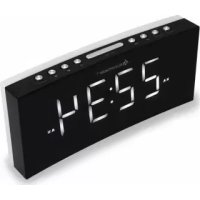
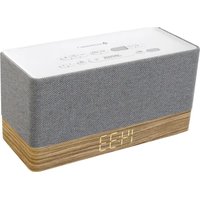
UR8800 - Alarm Clock Soundmaster - Free user manual and instructions
Find the device manual for free UR8800 Soundmaster in PDF.



User questions about UR8800 Soundmaster
0 question about this device. Answer the ones you know or ask your own.
Ask a new question about this device
Download the instructions for your Alarm Clock in PDF format for free! Find your manual UR8800 - Soundmaster and take your electronic device back in hand. On this page are published all the documents necessary for the use of your device. UR8800 by Soundmaster.
USER MANUAL UR8800 Soundmaster
DISPLAY INFORMATIONEN
Do not dispose of this product with the normal household waste at the end of its life cycle. Return it to a collection point for the recycling of electrical and electronic devices. This is indicated by the symbol on the product, user manual or packaging
The materials are reusable according to their markings. By reusing, recycling or other forms of utilization of old devices you make an important contribution to the protection of our environment.
Please contact your local authorities for details about collection points.
WARNING
Risk of electric shock Do not open!

Caution: To reduce the risk of electric shock, do not remove the cover (or back). There are no user serviceable parts inside. Refer servicing to qualified service personnel.

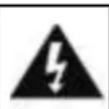
This symbol indicates the presence of dangerous voltage inside the enclosure, sufficient enough to cause electric shock.

This symbol indicates the presence of important operating and maintenance instructions for the device
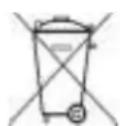
Used batteries are hazardous waste and NOT to be disposed of with the household waste! As a consumer you are legally obligated to return all batteries for environmentally responsible recycling - no matter whether or not the batteries contain harmful substances*)
Return batteries free of charge to public collection points in your community or shops selling batteries of the respective kind. Only return fully discharged batteries *) marked Cd = cadmium, Hg = mercury, Pb = lead
- Only use mercury and cadmium-free batteries.
- Used batteries are hazardous waste and NOT to be disposed of with the household waste!!!
- Keep batteries away from children. Children might swallow batteries.
- Contact a physician immediately if a battery was swallowed.
- Check your batteries regularly to avoid battery leakage.
- Batteries shall not be exposed to excessive heat such as sunshine, fire or the like.
- CAUTION: Danger of explosion if battery is incorrectly replaced
- Replace only with the same or equivalent type

WARNING
DO NOT INGEST BATTERY, CHEMICAL BURN HAZARD
This product contains a coin/button cell battery. If the coin/button cell battery is swallowed, it can cause severe internal burns in just 2 hours and can lead to death. Keep new and used batteries away from children. If the battery compartment does not close securely, stop using the product and keep it away from children. If you think batteries might have been swallowed or placed inside any part of the body, seek immediate medical attention.
Safety, Environmental and Setup Instructions
- Use the device in dry indoor environments only.
- Protect the device from humidity.
- This apparatus is for moderate climates areas use, not suitable for use in tropical climates countries.
- No objects filled with liquids, such as vases, shall be placed on the apparatus.
- The mains plug or an appliance coupler is used as the disconnect device, the disconnect devices shall remain readily operable.
- Connect this device to a properly installed and earthed wall outlet only. Make sure the mains voltage corresponds with the specifications on the rating plate.
- Make sure the mains cable stays dry during operation. Do not pinch or damage the mains cable in any way.
- A damaged mains cable or plug must immediately be replaced by an authorized service center.
- In case of lightning, immediately disconnect the device from the mains supply.
Children should be supervised by parents when using the device. - Clean the device with a dry cloth only.
- Do NOT use CLEANING AGENTS or ABRASIVE CLOTHS!
- Do not expose the device to direct sunlight or other heat sources.
- Install the device at a location with sufficient ventilation in order to prevent heat accumulation.
- Do not cover the ventilation openings!
- Install the device at a safe and vibration-free location.
- Install the device as far away as possible from computers and microwave units; otherwise radio reception may be disturbed.
- Do not open or repair the enclosure. It is not safe to do so and will void your warranty. Repairs only by authorized service/ customer center.
- No naked flame sources, such as lighted candles, should be placed on the unit.
- When you are necessary to ship the unit store it in its original package. Save the package for this purpose.
- In case of malfunction due to electrostatic discharge or fast transient (burst), remove and reconnect the power supply.
- If the unit is not using for a long period of time, disconnect it from the power supply by unplugging the power plug. This is to avoid the risk of fire.
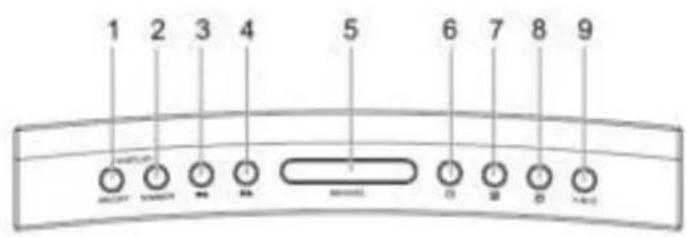
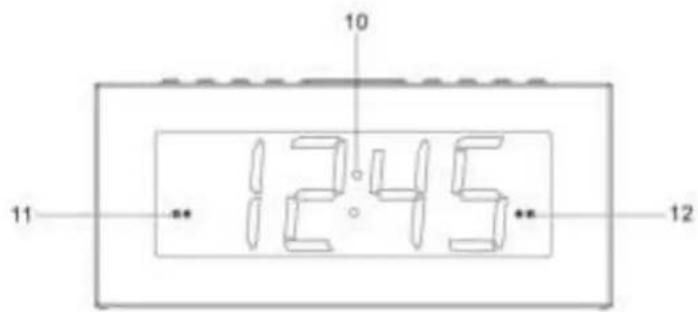
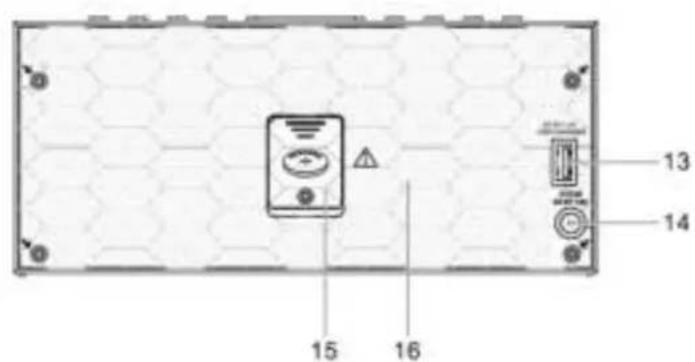
LOCATIONS OF CONTROLS
- DISPLAY ON/OFF button
- DISPLAY DIMMER button
- BACKWARD button
- FORWARD button
- SNOOZE button
- STOCK button
- ARM1button
- ARM2button
- Y-M-D button
- Display
- Alarm 1 indicator
- Alarm 2 indicator
- USB charging port
- DC IN jack
- Battery compartment
- Speaker
GETTING STARTED
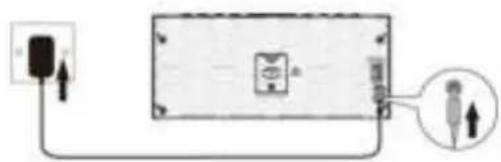
Connecting to power
- Connect the cord of the power adapter to the DC IN jack of the clock.
- Connect the plug of the power adapter to a wall socket. The clock is powered when you see the display is switched on.
BACKUP SYSTEM
- The clock is equipped with a backup system. It requires a 3 V lithium battery (type: CR2032). Insert the battery into the battery compartment and make sure the positive and negative (+ or -) sides of the battery are in contact with the corresponding terminals in the battery compartment.
- If a power cut occurs, the radio automatically switches to the battery power supply and keeps the clock and timer settings.
- When replacing the battery, do not disconnect the power adapter. Otherwise, all clock and alarm settings will be lost.
SETTING THE CLOCK
- In the clock is powered, press and hold the button to enter the clock setting mode.
- Press the button repeatedly to cycle through the setting options:
Year >> Month/Day >> Time
- Setting year: Press or button.
- Setting month/day: Press the button to set the month and button to set the day.
- Setting the time: Press the button to set the hour time and button to set the minute time.
- Press the button to confirm each setting option.
USING THE ALARMS
Setting alarms
The clock lets you have 2 alarm settings. To set the alarms:
- Press and hold or button to enter the alarm time setting mode.
- In the alarm setting mode, press the or button repeatedly to cycle through the setting options:
Alarm time >> Alarm frequency
Setting alarm time:
- Press button to set the hour time and button to set the minute time.
Setting alarm frequency:
Press or button to select an alarm frequency (d1-7 = Everyday d1-5 = Monday to Friday, d6-7 = Weekend only, d1-1 = on a selected day only*).
*Press or button when this option is selected. Then press the “or to select a specific day for the alarm activation (e.g. d1 = Monday, d2 = Tuesday...).
Once the alarm setting is done, the alarm will be automatically activated with the corresponding alarm indicator (1 or 2) switched on.
Turning the alarms on or off
When the clock time is displayed, press or button to enable or disable the respective alarm. The corresponding Alarm 1 or Alarm 2 indicator will switch on when the alarm is enabled.
Deactivating a sounding alarm
- Press button to switch off a sounding alarm.
- When the alarm sounds, the corresponding Alarm 1 or Alarm 2 indicator flashes on the display.
Snoopze
- To temporarily silence a sounding alarm, press the "SNOOZE" button. The alarm will sound again when the snooze period (9 minutes) is over.
- The corresponding Alarm 1 or Alarm 2 indicator flashes on the display during the snooze period.
- To cancel the snooze period and the alarm, press button.
DISPLAY INFORMATION
Press the "Y-M-D" button repeatedly to change showing the day of the week, year, date and time (d1 = Monday, d2 = Tuesday, d3 = Wednesday, d4 = Thursday, d5 = Friday, d6 = Saturday and d7 = Sunday).
DISPLAY BRIGHTNESS
Press the "DISPLAY ON/OFF" button to switch on or off the display. When the display is switched on, press the "DISPLAY DIMMER" button repeatedly to select a display brightness level (3 levels).
DISPLAY AUTO - ON/OFF
In clock mode, press and hold the DISPLAY ON/OFF button for 2 seconds. "ON" appears on the display. After 10 seconds, the display turns off.
Press any button to turn the display on for another 10 seconds.
To deactivate this function, press and hold DISPLAY ON/OFF button for 2 seconds. "OFF" appears on the display. Then the display switches back to the clock mode.
CHARGING EXTERNAL DEVICE
Connect an external device (e.g. smartphone, mp3 player) via a USB cable (not provided) to the USB jack on the back of the clock for charging. The clock cannot access the contents in the connected external device.
CARE AND MAINTENANCE
- Clean the clock with a soft damp cloth and let all parts dry completely after cleaning.
- Do not use any aggressive cleaners, brushes with nylon bristles, sharp or metallic cleaning utensils, knives, hard scrapers and the like. They could damage the surfaces of the clock.
- Do not immerse the clock in water and do not let water getting into the housing of the clock.
Storage
- Unplug the power adapter and clean the clock before storage.
- Always store the clock in a dry and clean place.
TECHNICAL SPECIFICATIONS
AC power adaptor:
Input: AC 100-240 V, 50/60Hz 0.35A - YeS12W-0500120VS
Output: DC 5 V 1.2A
USB charging jack DC 5V max charging current 1A
Features and specifications are subject to change without prior notice.
IMPORTER
WorleinGmbHTel.:+49910371670
Gewerbestasse 12 Fax.: +49 9103 71 67 12
D 90556 Cadolzburg
Email: service@woerlein.com
Germany
INFORMATIONS A L'ECRAN
INFORMACE NA DISPLEJI
Opakovanym stisknutim tlacitka „Y-M-D" zmenite zobrazovany den v tydnu**, rok, datum a cas (*d1 = pondelí, d2 = utery, d3 = streda, d4 = Čtvrtek, d5 = pátek, d6 = sobota a d7 = neděle).
JAS DISPLEJE
Stisknutim tlacitka „DISPLAY ON/OFF“ zapnete nebo vypnete displej. Po zapnuti displeje opakovanym stisknutim tlacitka „DISPLAY DIMMER" vyberte uroven jasu displeje (3 urovne).
DISPLEJ AUTO - ZAPNUTI / VYPNUTI




- DISPLAY INFORMATIONEN
- WARNING
- Risk of electric shock Do not open!
- DO NOT INGEST BATTERY, CHEMICAL BURN HAZARD
- LOCATIONS OF CONTROLS
- GETTING STARTED
- Connecting to power
- BACKUP SYSTEM
- SETTING THE CLOCK
- Year >> Month/Day >> Time
- USING THE ALARMS
- Setting alarms
- Alarm time >> Alarm frequency
- Setting alarm time:
- Setting alarm frequency:
- Turning the alarms on or off
- Deactivating a sounding alarm
- Snoopze
- DISPLAY INFORMATION
- DISPLAY BRIGHTNESS
- DISPLAY AUTO - ON/OFF
- CHARGING EXTERNAL DEVICE
- CARE AND MAINTENANCE
- Storage
- TECHNICAL SPECIFICATIONS
- IMPORTER
- INFORMATIONS A L'ECRAN
- INFORMACE NA DISPLEJI
- JAS DISPLEJE
- DISPLEJ AUTO - ZAPNUTI / VYPNUTI
Brand : Soundmaster
Model : UR8800
Category : Alarm Clock