KMPM5G - Earphones Krüger&Matz - Free user manual and instructions
Find the device manual for free KMPM5G Krüger&Matz in PDF.

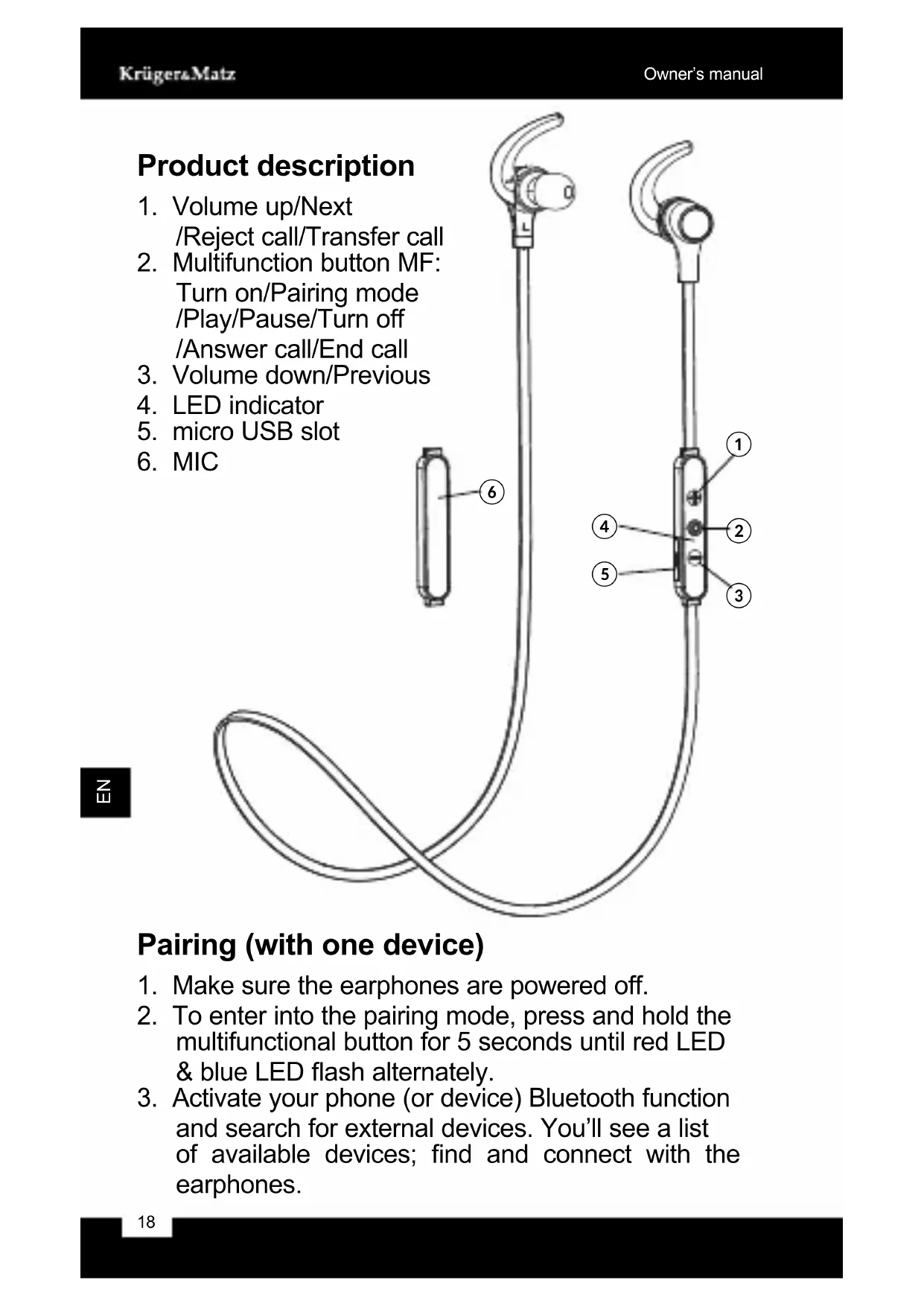


| Product type | Bluetooth headset with microphone |
| Bluetooth | Version 4.0, range up to 10 m |
| Supported Bluetooth profiles | A2DP 1.2, AVRCP 1.4, HSP 1.2, HFP 1.6, CVC 6.0 |
| Audio codecs | SBC, AAC, apt-X® |
| Noise reduction | Active (ANC) |
| Microphone | Built-in |
| Water resistance | IPX4 |
| Frequency response | 20 Hz - 20 kHz |
| Impedance | 16 Ω |
| Sound pressure level | 91 ± 3 dB |
| Talk time | Up to 7 hours |
| Music play time | Up to 8 hours |
| Standby time | Up to 240 hours |
| Power supply | Rechargeable battery, charging via micro USB |
| Additional features | Simultaneous connection to two devices, battery indicator (iOS) |
| Maintenance | Clean with a damp cloth, no chemicals |
| Safety | Set moderate volume, do not use while driving, avoid shocks and liquids |
| Repairability | Do not repair yourself, contact an authorized service center |
Frequently Asked Questions - KMPM5G Krüger&Matz
User questions about KMPM5G Krüger&Matz
0 question about this device. Answer the ones you know or ask your own.
Ask a new question about this device
Download the instructions for your Earphones in PDF format for free! Find your manual KMPM5G - Krüger&Matz and take your electronic device back in hand. On this page are published all the documents necessary for the use of your device. KMPM5G by Krüger&Matz.
USER MANUAL KMPM5G Krüger&Matz
Wireless earphones KMPM5
OWNER'S MANUAL
Bezpečnostní pokyny

Read the instruction manual carefully before first use and keep it for future reference.
- Minimize the volume on your audio device before connecting the earphones in order to avoid hearing damage from sudden exposure to excessive volume. Keep the volume at a reasonable level throughout entire time of using the earphones. To prevent damage to your hearing, do not raise the volume too high.
- Do not use the earphones in places where the inability to hear ambient sound presents a serious risk (such as at railroad crossings, train stations, construction sites or on roads where vehicles and bicycles are traveling). Never use the earphones while driving a car, riding a motorcycle or bicycle or operating any other vehicle, as it may cause potential risk to your safety.
- Stop using the earphones if you feel a tinnitus, hearing discomfort, irritation or have other adverse reactions.
- Do not subject the earphones to strong impact.
- Protect this product from moisture, humidity, water and any other liquid. Avoid using/storing it in extreme temperatures. Do not expose it to direct sunlight and sources of heat.
- Never use this device if it is damaged.
- Use only authorized accessories.
- Do not attempt to repair this device yourself. In case of damage, contact with an authorized service point for check-up/repair.
- Clean this device with soft, slightly damp cloth. Do not use any abrasives or chemical agents to clean this product.
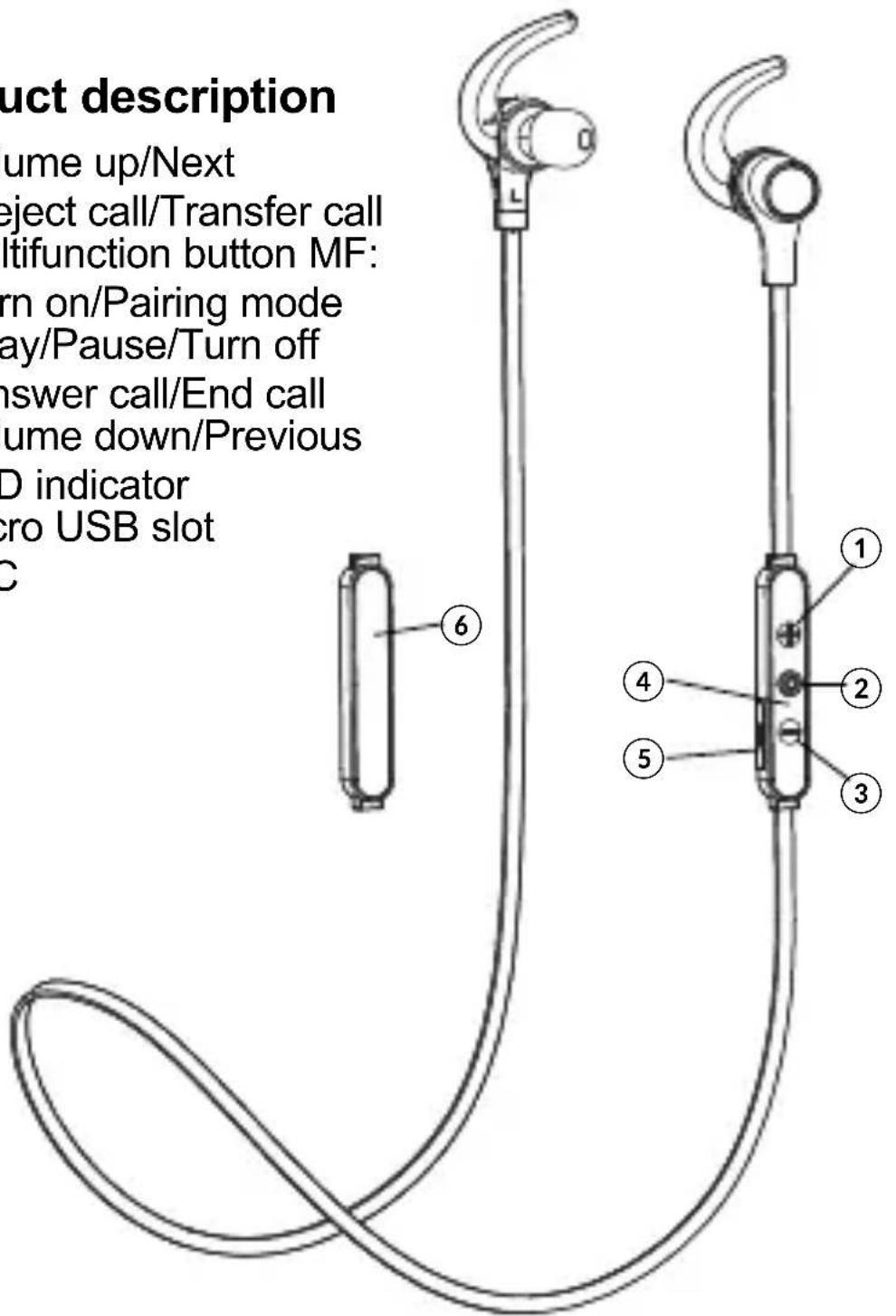
Product description
- Volume up/Next /Reject call/Transfer call
- Multifunction button MF: Turn on/Pairing mode /Play/Pause/Turn off /Answer call/End call
- Volume down/Previous
- LED indicator
- micro USB slot
- MIC
Pairing (with one device)
- Make sure the earphones are powered off.
- To enter into the pairing mode, press and hold the multifunctional button for 5 seconds until red LED & blue LED flash alternately.
-
Activate your phone (or device) Bluetooth function and search for external devices. You'll see a list of available devices; find and connect with the earphones.
-
Enter "0000" PIN if necessary.
Pairing (with two devices)
This earphones support 2 devices multi-connection. It can pair with two mobile phones simultaneously, and take the call from any of them.
- After completing pairing with the first phone, turn off the earphones.
- Then re-do the paring procedure with another phone.
- Once the pairing is finished, restart the earphones. The earphones will automatically connect to the phone (or device) that was connected before disconnecting.
- Short press the “volume +” and “volume -” keys simultaneously, it will enable the multipoint connect function. From the list of found devices on another mobile phone, select the earphone to connect it. Now, the earphones are connected with two devices simultaneously.
Operation
• Power on: press multifunction button for 2 seconds. Blue LED flashes 2 times. Earphone turn on.
- Power off: press multifunction button for 3 seconds. Red LED flashes 2 times, then the earphones turn off.
• Volume adjust: press ,Volume up' or , Volume down' buttons to change volume level.
- Play/Pause: press multifunction button to pause music playback. Press it again to resume playback.
- Previous: press and hold for 2 seconds, Volume down' button to go to previous track.
- Next: press and hold for 2 seconds, Volume up' to go to next track.
- Answer call: press multifunction button to answer the incoming call.
• End call: short press multifunction button.
- Reject call: press and hold the ,Volume up' button to reject a call.
- Transfer call: during a phone call, press and hold ,Volume up' button, call switches to mobile phone. Press and hold ,Volume up' button again, call switches back to earphone.
- Last number redial: in standby status, press earphone multifunction button twice to redial the last number. In case of multipoint connection with two phones, the redial will be performed from the phone connected first.
- Battery Capacity status: when earphone is connected to iOS devices, iOS devices shows the earphone battery power status in the upper right corner.
| Operation LED Status | |
| Power on Blue | LED flashes 2 times |
| Power off Red | LED flashes 2 times |
| Pairing Red LED & Blue LED flashes alternately | |
| Standby Blue | LED flashes 3 times every 5 seconds |
| Incoming call Blue LED blinks | |
| Low battery Red | LED flashes 2 times every 2 seconds |
| Charging Red | LED keep lighting during charging. Blue LED keep lighting charging finished |
Sound quality with apt-X® code
Featuring the apt-X code, the earsets can connect wirelessly to any apt-X® enabled devices, vastly improves the quality of Bluetooth streaming, delivering
CD-quality sound.
Charging
Connect the earphones to AC charger or a computer USB port. Red LED keeps lighting during charging. Once the charging is completed, the blue LED is on.
Note:
- use only original accessories to charge the earphone.
- charge the earphone if it has not been used for more than 12 months.
Specification
• Frequency Response: 20 Hz - 20 KHz
- Impedance: 16 Ω
- SPL (Sound pressure level): 91 ± 3 dB
- Bluetooth version: 4.0
- Bluetooth profiles: A2DP 1.2/AVRCP1.4/HSP1.2/HFP1.6/CVC6.0
• Supports SBC, AAC
- apt-X® audio technology
- Noise reduction function
• Wireless range: up to 10 m
- IPX4 water-proof
• Build in microphone
• Supports connection with 2 devices
- Earphone battery power status (iOS only)
- Talk time: up to 7 h
- Stand-by time: up to 240 h
- Playback time: up to 8 h
Specifications are subject to change without prior notice.
"The Lechpol company declares that product KMPM5 is consistent with the essential requirements and other relevant provisions of directive 1999/5/EC. The proper declaration for download from www.lechpol.eu"

English Correct Disposal of This Product (Waste Electrical & Electronic Equipment)
(Applicable in the European Union and other European countries with separate collection systems) This marking shown on the product or Its literature, indicates that It should not be disposed with other household wastes at the end of its working life. To prevent possible harm to the environment or human health from uncontrolled waste disposal, please separate this from other types of wastes and recycle it responsibly to promote the sustainable reuse of material resources. Household users should contact either the retailer where they purchased this product, or their local government office, for details of where and how they can take this item for environmentally safe recycling. Business users should contact their supplier and check the terms and conditions of the purchase contract This product should not be mixed with other commercial wastes for disposal.
Made in China for LECHPOL Zbigniew Leszek, Miętne, 1 Garwolińska Street, 08-400 Garwolin.

FR
www.krugermatz.com
Krügera-Matz is a registered trademark

Brand : Krüger&Matz
Model : KMPM5G
Category : Earphones