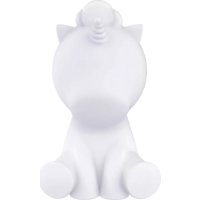
BTLS UNICORN XL - Loudspeaker BIGBEN INTERACTIVE - Free user manual and instructions
Find the device manual for free BTLS UNICORN XL BIGBEN INTERACTIVE in PDF.



| Brand | Bigben Interactive |
| Model | BTLS UNICORN XL |
| Product type | Bluetooth speaker with LED lighting |
| Power supply | 15V DC power adapter (included) |
| Charging time | 2-3 hours |
| Battery life | 6-8 hours (music and light) |
| Lighting | RGB LED with multiple modes (fixed, flash, scroll) |
| Bluetooth connectivity | Pairing name: Luminous, range 10 m, password 0000 |
| Audio inputs | Bluetooth, USB, AUX (3.5mm cable included) |
| Source priority | USB > AUX > Bluetooth (default Bluetooth) |
| Remote control | Included, CR2032 button cell battery (replaceable) |
| Box contents | Luminous speaker, DC adapter, AUX cable, remote control, manual |
| Maintenance | Clean with a soft dry cloth. Do not use chemical products. |
| Safety precautions | Do not open, do not expose to moisture, use the provided adapter, keep out of reach of children (batteries) |
| Repairability | Any repair must be carried out by qualified personnel. No user-serviceable parts. |
| Manufacturer | Bigben Interactive SA, France |
| Country of origin | China |
| Technical support | Crystal number 0969397959, email sav.audio@bigben.fr |
Frequently Asked Questions - BTLS UNICORN XL BIGBEN INTERACTIVE
User questions about BTLS UNICORN XL BIGBEN INTERACTIVE
0 question about this device. Answer the ones you know or ask your own.
Ask a new question about this device
Download the instructions for your Loudspeaker in PDF format for free! Find your manual BTLS UNICORN XL - BIGBEN INTERACTIVE and take your electronic device back in hand. On this page are published all the documents necessary for the use of your device. BTLS UNICORN XL by BIGBEN INTERACTIVE.
USER MANUAL BTLS UNICORN XL BIGBEN INTERACTIVE
REEMPLACEMENT DE LA PILE (DE LA
3 TELECOMMANDE) 4
Avertissement !
Remarques 5
1410 Waterloo, Belgium
Bigben Interactive NEDERLAND b.v.
Warnings and precautions 1
Important safety instructions
Contents 2
SPECIFICATION
OPERATION
CHARGING
Play music by BT
Play music by USB card
3
Play music by AUX IN cable
Priority of audio source: Bluetooth/USB/AUX
BATTERY REPLACEMENT (FOR REMOTE
CONTROL) 4
Warning!
Remarks 5
Warnings and precautions

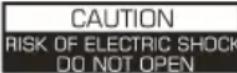

WARNING:SHOCK HAZARD -DO NOT OPEN
AVIS:RIQUDE DE CHOC ELECTRQUE-NE PAS DUVRIR

The lightning bolt with an arrowhead within a triangle indicates the presence of uninsulated dangerous voltage within the product enclosure that may be of sufficient magnitude to constitute a risk of electric shock to persons.

The exclamation point within a triangle indicates the presence of important operating and maintenance (servicing) instructions in the literature accompanying the unit.
Important safety instructions
- Read these instructions.
- Keep these instructions.
Heed all warnings. - Follow all instructions.
Refer all servicing to qualified service personnel. - Do not expose the unit to dripping or splashing and make sure that no objects filled with liquids, such as vases, are placed on it.
Class I appliances must be connected to the mains socket outlet with a protective-earth connection. - The mains plug connects the device and should remain operable during use.
- To disconnect the unit from the mains, the plug should be fully disconnected from the mains socket outlet. The mains plug should not be obstructed and should be easily accessible during use.
- When a power indicator light is on, it indicates the unit is connected to the mains supply. When the light is off, it indicates the unit is fully disconnected from the mains supply.
INFORMATION ABOUT BATTERIES (applicable only if batteries included)
- Polarity must be respected when inserting batteries.
- The batteries should be inserted in such a way as to avoid any short circuit.
- Do not mix used and new batteries.
- Do not mix alkaline, standard (carbon-zinc) and rechargeable (nickel-cadmium) batteries.
- Do not expose the battery to excessive heat such as sunshine or fire.
- Remove the batteries when they have not been used for a long time.
- If the liquid contained in the batteries comes in contact with eyes or skin, immediately and carefully wash the affected area with clear water and consult a doctor.
- The product/remote control may contain a coin/butto type battery.
WARNING
Do not ingest the battery. Chemical burn hazard. This product contains a coin/button cell battery. If the coin/button cell battery is swallowed, it can cause severe internal burns in just 2 hours and can lead to death. Keep new and used batteries away from children. If the battery compartment does not close securely, stop using the product and keep it away from children. If you think batteries might have been swallowed or placed inside any part of the body, seek immediate medical attention.
CAUTION
Danger of explosion if battery is incorrectly replaced.
Replace battery only with the same or equivalent type.
Contents
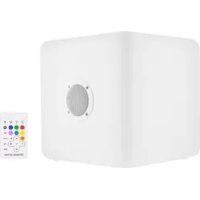
1 x Luminous speaker
1 x DC adaptor
1 x User manual
1 x Aux in 3.5mm cable
1 x Remote control
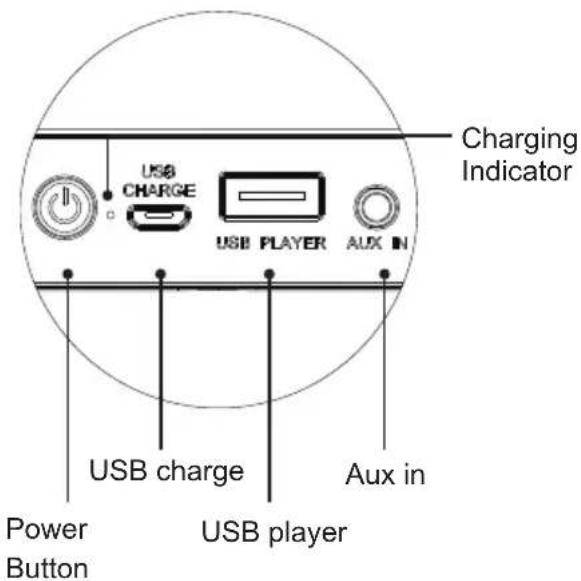
Product operation panel Remote Control
SPECIFICATION
Charging: 15V
Charging time: 2-3H
RGB LEDs
Working time: 6-8 hours for playing music and lighting
Bluetooth pairing name: Luminous
No need Password normally, But some mobile phone maybe need, the password is: 0000
Bluetooth range 10M. Receive range will be reduced as the battery voltage decrease.
OPERATION
Turn on/off the luminous speaker
- long press the power button at the speaker bottom for 2-3 seconds, the light and BT will be on automatically.
- long press the power button at the speaker bottom for 2-3 seconds again, the light and BT will be off automatically. Only after you press the button on the speaker, the speaker is truly been turn off.
CHARGING
- Connect speaker with the 15V DC adaptor.
- The Red LED indicator besides the power button will turn ON when charging, and turn OFF when fully charged.
- Unplug the USB charging cable after fully charged.
Play music by BT
- Turn on the speaker, Keep the speaker and device within 1 meter of each other.
- Start the Bluetooth function on your mobile device and select "Luminous" in the Bluetooth device list (depending on the Bluetooth version of your device you may have to enter pass code '0000').
Play music by USB player
- Turn on the speaker, insert the USB player into USB port, then can listen music from USB player.
Play music by AUX IN cable
- Turn on the speaker, you can connect music device to the luminous speaker via the AUX port using the cable included.
Priority of audio source: Bluetooth/USB/AUX
- Bluetooth is set as default, speaker will play music via Bluetooth after being switched on.
- As soon as you plug-in USB, the speaker will play music via USB. It will also play music via USB the next time when you switch on the unit if USB is plugged in.
- As soon as you plug-in AUX, the speaker will play music via AUX. It will also play music via AUX the next time when you switch on the unit if AUX is plugged in.
- If both USB and AUX are plugged-in, speaker will play via USB.
NOTE: Please first pull out the small plastic sheet from the battery cover before below operation.
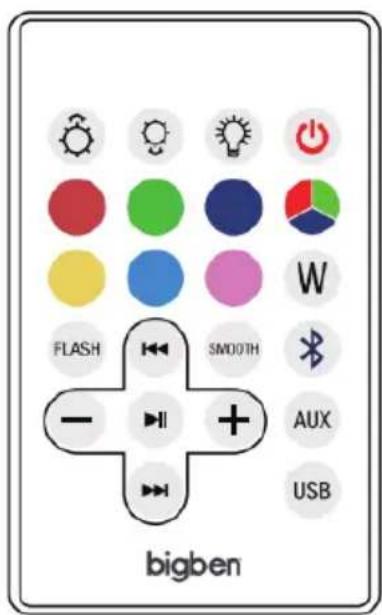
- Stand by button: After turn on the speaker (by pressing power button which located on back of the speaker), short press this button to turn off the light and Bluetooth, short press again to turn on the light and Bluetooth.
Long press this button to switch off the speaker, then you have to press power button which located on back of the speaker to turn on it again.
- Brightness intensity button: Change brightness intensity when the light is fixed on one single color.
- Light ON/OFF button: Press this button to power the light on and off. Power on is the first step for all functions on remote control. Once the color light is on, press ON/OFF button again is only to turn or off the lighting, This color light has memory storage function when electricity is not exhausted. The light could keep the same lighting working mode or color which you turned off last
time, for example, last time you turned off the light on "RED" mode, this time you press the ON/OFF button, the mode will still be on "RED" mode.
- Bluetooth function button: press this button to switch into bluetooth function
- AUX IN function button : press this button to switch into AUX IN function.
- USB USB player function button : press this button to switch into USB player function
- Color selection button: When the light is on, press this button to choose your favorite color as shows on the remote control (six colors).
- Color selection button: when the light is on, press this button to choose your favorite colors (Total 7 colors)
- Music flash button: the light will flash when music is playing
- Smooth button: 7 colors scrolling automatically.
- w White color button: press this button, speaker will display white color
- Previous button: when the Bluetooth or USB key is connected and music is on, press this button to select previous music.
- Next button: when the Bluetooth or USB key is connected and music is on, press this button to select next music.
-
- Pause and play: when the Bluetooth or USB key is connected and music is on, press this button to play or pause the music.
- Voice- and +: when the bluetooth or USB key is connected and and music is on, press the " - to reduce volume, press "+" to increase volume.
BATTERY REPLACEMENT (FOR REMOTE CONTROL)
- If remote control fails to activate the light, replace the battery.
- Move the slot besides the battery cover to right side, then battery cover will pop out, then take out the battery and replace a new one.
- Pay attention to the polarity of battery on the cover and cover direction when installing them back to the remote control.
Warning!
- Make sure that battery is inserted the right way and with the right polarity
- Remove exhausted battery from the product
- The supply terminals should not be short-circuited
- Dispose of battery safely
Remarks:
Don't discard the electrical and electronic appliances in the regular waste disposal.
a) Take them to a collection point.
b) Some components in these appliances may be hazardous to health and the environment.
- If there is an incoming call while "BTLS range" is connected to your cell phone for music playback, it will pause at once when you answer the call and resume after the call ended. (Sometimes it will pause after end the call, it depends on your cell phone.)
- The Bluetooth® word, mark and logo are registered trademarks owned by Bluetooth SIG, Inc. and any use of such marks by Bigben Interactive is under license. Other trademarks and trade names are those of their respective owners.
- "Hereby, BIGBEN interactive SA, declares that the radio equipment type [BTLSUNICORN XL, BTLS RABBIT XL] is in compliance with Directive 2014/53/EU."
- "Imported and Manufactured by BIGBEN INTERACTIVE SA, 396, Rue De La Voyette, CRT2-FRETIN, CS90414, 59814 LESQUIN Cedex, France"
To download the full statement, please visit our website: http://www/bigben-interactive.co.uk/support and the section "declaration of conformity".
Manufactured by BIGBEN INTERACTIVE SA
396, Rue de la Voyette
CRT2-FRETIN
CS 90414
59814 LESQUIN Cedex - France
www/bigben.eu
Made in China
bigben
Fabricant:BigbenInteractive FRANCE
396, Rue de la Voyette, C.R.T. 2 Fretin,
CS 90414 - 59814 LESQUIN Cedex, France
1410 Waterloo, Belgium
Bigben Interactive NEDERLAND b.v.
1410 Waterloo, Belgium
Bigben Interactive NEDERLAND b.v.
1410 Waterloo, Belgium
Bigben Interactive NEDERLAND b.v.
1410 Waterloo, Belgium
Bigben Interactive NEDERLAND b.v.
1410 Waterloo, Belgium
Bigben Interactive NEDERLAND b.v.
1410 Waterloo, Belgium
Bigben Interactive NEDERLAND b.v.



- WARNINGS AND PRECAUTIONS
- IMPORTANT SAFETY INSTRUCTIONS
- INFORMATION ABOUT BATTERIES (APPLICABLE ONLY IF BATTERIES INCLUDED)
- WARNING
- CAUTION
- CONTENTS
- SPECIFICATION
- OPERATION
- CHARGING
- PLAY MUSIC BY BT
- PLAY MUSIC BY USB PLAYER
- PLAY MUSIC BY AUX IN CABLE
- PRIORITY OF AUDIO SOURCE: BLUETOOTH/USB/AUX
- BATTERY REPLACEMENT (FOR REMOTE CONTROL)
- REMARKS
- BIGBEN
Brand : BIGBEN INTERACTIVE
Model : BTLS UNICORN XL
Category : Loudspeaker