
ESWD10 - Epilator PANASONIC - Free user manual and instructions
Find the device manual for free ESWD10 PANASONIC in PDF.
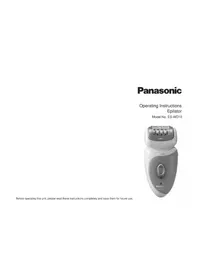


| Product type | Epilator |
| Brand | Panasonic |
| Model | ESWD10 |
| Power supply | Mains charger, automatic voltage (see rating plate) |
| Battery type | Built-in rechargeable Li-ion |
| Charging time | Approximately 1 hour |
| Battery life | Approximately 30 minutes (40 minutes with skin protective cap) |
| Noise level | 67 dB(A) (legs/arms head) |
| Epilation modes | Dry / Wet (with foam or soap) |
| Available heads | Legs/arms epilation head, Skin protective cap, Quick cap |
| Recommended hair length | 2 to 3 mm |
| Usage | Practical for dry use or in the shower/bath |
| Cleaning | Dry (brush) or with water and liquid soap |
| Maintenance | Clean the head and caps regularly after use |
| Usage precautions | Do not use on face, sensitive areas, skin lesions; consult a doctor if you have a skin condition |
| Operating temperature | 5 °C to 35 °C |
| Charging temperature | 15 °C to 35 °C |
| Spare parts | Epilation head, caps, cleaning brush (not sold separately according to manual) |
| Battery lifespan | Approximately 3 years (if charged once a week) |
| Warranty | Check Panasonic website or authorized service center |
Frequently Asked Questions - ESWD10 PANASONIC
User questions about ESWD10 PANASONIC
0 question about this device. Answer the ones you know or ask your own.
Ask a new question about this device
Download the instructions for your Epilator in PDF format for free! Find your manual ESWD10 - PANASONIC and take your electronic device back in hand. On this page are published all the documents necessary for the use of your device. ESWD10 by PANASONIC.
USER MANUAL ESWD10 PANASONIC
Operating Instructions Epilator Model No. ES-WD10
Before operating this unit, please read these instructions completely and save them for future use.
English 4 Dansk 59 Deutsch 10 Suomi 65 Francais 16 Polski 71 Italiano 23 Cesky 77 Espanol 29 Slovenica. 83 Nederlands 35 Romana 89 Portugues 41 Magyar 95 Norsk 47 Turkce 102 Svenska 53
1
2
Thank you for choosing a Panasonic WET/DRY epilator. With our WET/DRY technology, you can enjoy using your Panasonic epilator dry or in the shower or bath for gentle and easy epilation. Please read all instructions before use.
Parts identification
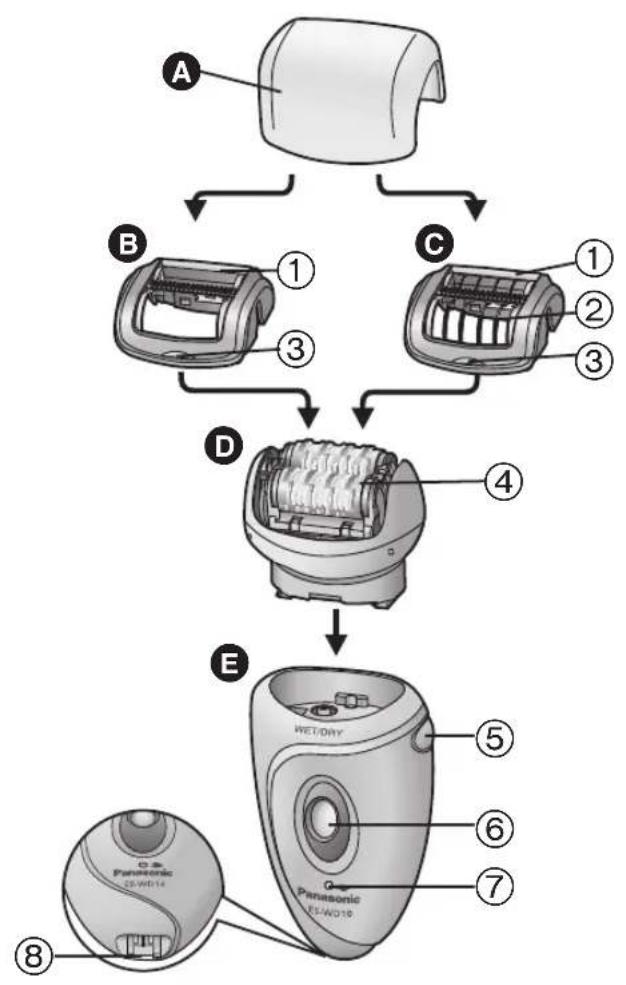
Protection cap B Fast cap Gentle cap (▶Page 5)
① Foam wiper ② Skin protector ③ Cap release rib
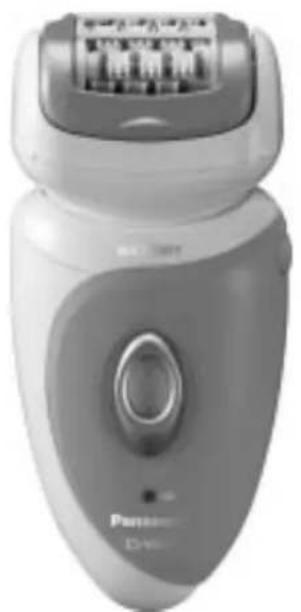
Epilation head for legs/arms
④ Epilation discs
Main body ⑤ Head release button ⑥ OFF/ON switch ⑦ Charging light ⑧ Socket
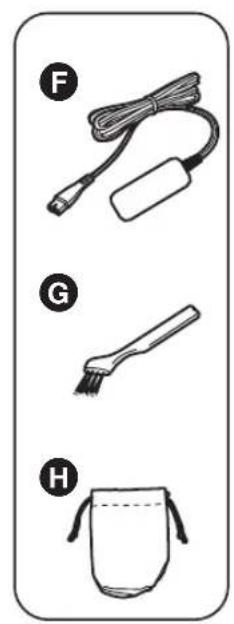
Accessories:
F Charger (RE7-46)
(Do not use chargers other than the one provided.)
Cleaning brush Pouch
Quick steps for epilating


Important
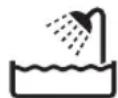
The appliance can be used for wet or dry epilation. The following is the symbol for a wet epilator. It means that the appliance can be used in a bath or shower.
Make sure skin is clean before and after use. - In the following cases, please consult your physician.
- Having eczema, rashes, sensitive skin, proneness to infections, varicose veins, diabetes, hemophilia, poor blood clotting or other skin conditions
The following might result in bacteria entering the skin and cause damage and inflammation. - Using just before swimming and sports activities - Sharing with other persons - Always attach an epilation head and its cap to the epilator when turning on. Failure to do so might cause finger injury, hair entanglement in the spinning gears or mechanical malfunction. The following might cause sensitive skin damage, injury, inflammation, pain, bleeding, and severe pain.
- Using the appliance if the epilation discs, the skin protector, the fast cap or the gentle cap have been damaged.
- Using on or near your face, genitals, warts, pimples, bruises, rashes, wounds or loose skin.
- Using around moles.
- Applying strong pressure to the skin, repeatedly moving over the same area or using a jabbing motion.
- Using before or during menstruation, pregnancy, about one month after giving birth, when ill and sunburned etc.
Charging the epilator - Never use the charger in a bathroom.
- Always ensure the appliance is used on an electric power source matched to its rated voltage.
- The charging light may not turn on after a few minutes in some cases. However, it will turn on eventually if you continue charging.
- The appliance can be left plugged in after it is fully charged without deteriorating the battery life.
- The life of the battery is 3 years if charged approximately once every week. The battery in this epilator is not intended to be replaced by consumers. Replace it at an authorized service center.
Using the epilator
- Never use the appliance if the cord or the charger is damaged, overly hot or if the plug fits loosely in a household outlet.
- Do not drop or hit the appliance as the skin protector, the fast cap, the gentle cap or the epilation discs can be damaged.
- This appliance is not intended for use by persons (including children) with reduced physical, sensory or mental capabilities, or lack of experience and knowledge, unless they have been given supervision or instruction concerning use of the appliance by a person responsible for their safety.
Children should be supervised to ensure that they do not play with the appliance.
- The recommended use temperature is 5 - 35°C. If you use the appliance in temperature outside of the recommended range, it may stop functioning or might reduce the operating time.
- Do not use the epilation head for legs/arms to epilate your underarms and bikini-line.
Cleaning the epilator
Regularly clean the cord connector to prevent dust. - Do not use nail polish remover, benzine, alcohol, etc. to clean the appliance. - Always unplug the charger from a household outlet and from the epilator before cleaning the appliance.
- Wipe the main body only with a dry cloth. The use of alcohol etc. might cause discoloration or deformation of the main body.
- Take care not to damage the skin protector, the fast cap and the gentle cap during cleaning.
Storing the epilator
- Do not bend, twist, pull, or modify the cord.
- Do not wrap the cord tightly around the appliance.
- Keep the appliance out of the reach of children or invalids.
- Keep the appliance away from sinks, bathrooms or other high-humidity areas where it could be exposed to water and moisture after use.
- Keep the appliance away from where it will be exposed to high temperatures or direct sunlight.
- When storing the epilator, always attach the protection cap for the epilation head.

Tips for best epilation results
Please refer to "Quick User Card" as well.
The hair removal is not permanent, so after the 2nd use we recommend that you epilate the arms and legs about once every two weeks.
The gentle cap has a skin protector for gentler epilation. So it can remove hairs by holding the skin down to reduce pain.
- Remove the fast cap [6].
- Attach the gentle cap [G].
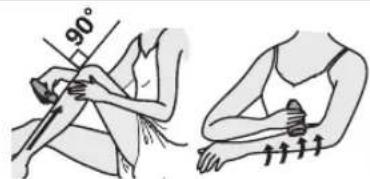
Apply the epilator at a 90° angle to your skin. Always make sure that the appliance is in contact with your skin and press gently while moving it slowly against the hair growth. - When using the appliance, pull your skin taut where the area is prone to sagging (on the inside of the knees and elbows). - Massaging with a body puff may help to prevent ingrown hairs. We recommend regular use of massage sponges or exfoliation to prevent ingrown hair. Reddening might appear after use. A cool towel will help if you feel pain or there is a rash. If your skin gets dry after epilation, we recommend applying a moisture lotion two days after epilation.
Before use
Charging the appliance
For best performance, fully charge the appliance before use.
Charging time: Approx. 1 hour
The epilator can be used for approximately 30 minutes (40
minutes when using the gentle cap) after 1 hour of charging.
(This will differ depending on the temperature.)
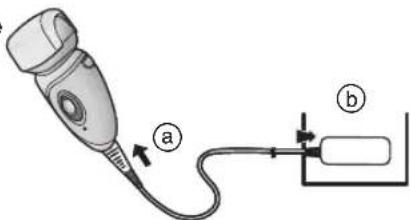
Plug the charger into the epilator (a) and a household outlet (b).
The recommended charge temperature is 15-35 °C.
Red light appears.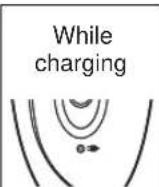
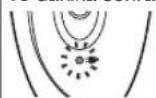
After charging is completed, blinks once every second.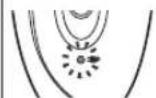
10 minutes after charging is completed, blinks once every 2 seconds. Abnormal charging: blinks twice every second.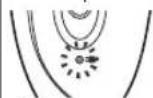
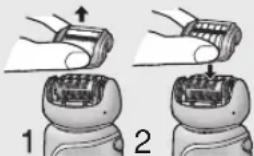
Changing the head
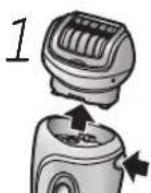
1. Remove the head while holding the head release button. 2. Push the head until it clicks.

Best length of hair for epilation
Trim your hair before epilating for the first time or if you have not epilated for a long time. Hair removal is easier and less painful when the hair is short.
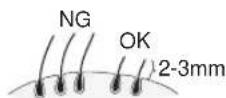
Cut your hair to between 2 mm and 3 mm long.
Epilating
Dry epilation
Before epilating, wipe away water or sweat on your skin.
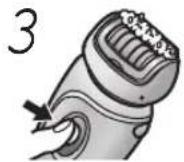
Press the OFF/ON switch to turn on the power.
Wet/foam epilation
WET epilation (epilating after wetting the skin and epilator and then applying foam) makes the skin softer so is gentler to your skin when epilating.
1 Wet your skin.
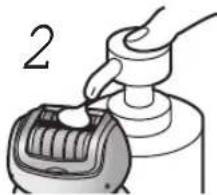
2 Wet the discs and place a small quantity of liquid body soap on the discs.
Always use body soap when you epilate in wet condition. - Rinse any body soap out of your hands.
3 Press the OFF/ON switch to turn on the power.
Foam is created. Foam makes the epilator slide better, so you can move it fast.
Upwards from the bottom of the leg. Inwards from the outside of the arm.
Cleaning
Always clean the fast cap, gentle cap and discs after use to keep them in a hygienic state.
Switch off and unplug the appliance before cleaning.
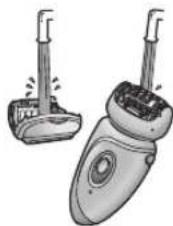
Dry cleaning
- Lift the fast/gentle cap upward while holding the cap release rib [BCC].
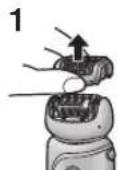
- Clean the epilation head [D] with the cleaning brush [G].
2
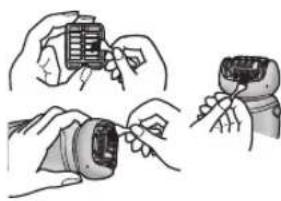
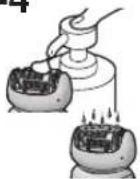
Wet cleaning
- Lift the fast/gentle cap upward while holding the cap release rib [E C 3].
- Apply liquid hand soap to the discs.
- Turn the switch on and then wet the discs to create foam.
- Wash the head with water to wash out hair.
- Do not use hot water.
- If soap is not completely washed away, then a white deposit can accumulate and prevent the discs from moving smoothly.
- Turn the switch off, wipe the appliance with a dry cloth and dry it well.
2-4
Removing the built-in rechargeable battery
Remove the built-in battery when disposing of the epilator. Perform steps ① to ⑦ to disassemble the epilator using a screwdriver.
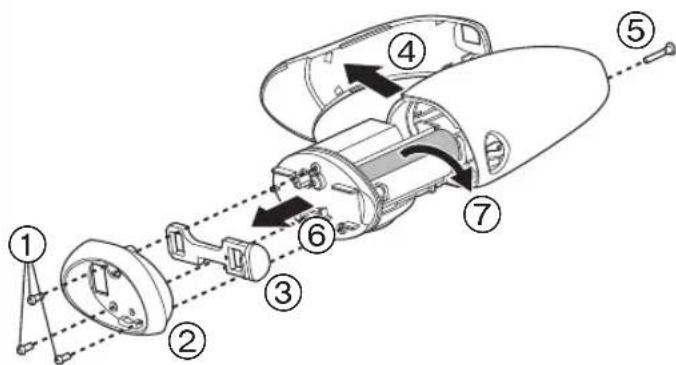
- Unplug the charger from the epilator before disassembling it.
- Press the OFF/ON switch to turn on the power and then keep the power on until the battery is completely discharged.
- Please take care not to short-circuit the battery.
For environmental protection and recycling of materials This epilator contains a Li-ion battery.
Please make sure that the battery is disposed of at an officially assigned location, if there is one in your country.
Guarantee
Please visit Panasonic web site http://panasonic.net or contact an authorized service center (you find its contact address in the pan european guarantee leaflet.) if you need information or if the epilator or the cord get damaged.
Specifications
Power supply: See the name plate on the product.
(Automatic voltage conversion)
You can see the voltage, manufacturer, country of origin, etc. by detaching the head attachment.
Charging time: Approx. 1 hour
This product is intended for household use only.
Airborne Acoustical Noise
Epilation head for legs/arms: 67 (dB(A) re 1pW)
Information for Users on Collection and Disposal of Old Equipment and used Batteries
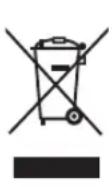
These symbols on the products, packaging, and/or accompanying documents mean that used electrical and electronic products and batteries should not be mixed with general household waste.
For proper treatment, recovery and recycling of old products and used batteries, please take them to applicable collection points, in accordance with your national legislation and the Directives 2002/96/EC and 2006/66/EC.
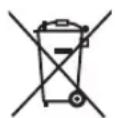
By disposing of these products and batteries correctly, you will help to save valuable resources and prevent any potential negative effects on human health and the environment which could otherwise arise from inappropriate waste handling.
For more information about collection and recycling of old products and batteries, please contact your local municipality, your waste disposal service or the point of sale where you purchased the items.
Penalties may be applicable for incorrect disposal of this waste, in accordance with national legislation.
For business users in the European Union
If you wish to discard electrical and electronic equipment, please contact your dealer or supplier for further information.
[Information on Disposal in other Countries outside the European Union]
These symbols are only valid in the European Union. If you wish to discard these items, please contact your local authorities or dealer and ask for the correct method of disposal.
Note for the battery symbol (bottom two symbol examples):
This symbol might be used in combination with a chemical symbol. In this case it complies with the requirement set by the Directive for the chemical involved.
Wax/foam epilation
Charging time = approximately 1 hour
Charging time: approximately 1 hour.
This product is intended for household use only.
It flashes every second and then turns off.
F. No.1 EN, GE, FR, IT, SP, DU, PT, NW, SW, DA, FI, PL, CZ, SK, RO, HU, TK Printed in China


- PARTS IDENTIFICATION
- QUICK STEPS FOR EPILATING
- IMPORTANT
- USING THE EPILATOR
- CLEANING THE EPILATOR
- STORING THE EPILATOR
- TIPS FOR BEST EPILATION RESULTS
- BEFORE USE
- CHARGING THE APPLIANCE
- CHANGING THE HEAD
- BEST LENGTH OF HAIR FOR EPILATION
- EPILATING
- DRY EPILATION
- PRESS THE OFF/ON SWITCH TO TURN ON THE POWER
- WET/FOAM EPILATION
- WET YOUR SKIN
- WET THE DISCS AND PLACE A SMALL QUANTITY OF LIQUID BODY SOAP ON THE DISCS
- CLEANING
- DRY CLEANING
- WET CLEANING
- REMOVING THE BUILT-IN RECHARGEABLE BATTERY
- GUARANTEE
- INFORMATION FOR USERS ON COLLECTION AND DISPOSAL OF OLD EQUIPMENT AND USED BATTERIES
- [INFORMATION ON DISPOSAL IN OTHER COUNTRIES OUTSIDE THE EUROPEAN UNION]
- WAX/FOAM EPILATION
Brand : PANASONIC
Model : ESWD10
Category : Epilator