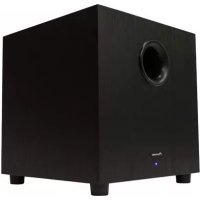
SW10 - Subwoofer PIONEER - Free user manual and instructions
Find the device manual for free SW10 PIONEER in PDF.


| Product Type | Subwoofer |
| Brand | Pioneer |
| Model | SW10 |
| Dimensions (W x H x D) | 365 mm x 390 mm x 365 mm |
| Weight | 13.5 kg |
| Frequency Response | 30 Hz - 150 Hz |
| Output Power (RMS) | 200 W (4 ohms, 1% THD) |
| Peak Power | 400 W |
| Speaker | 25.4 cm (10 in) |
| Power Requirements | 100-120 V / 220-240 V ~ 50/60 Hz, 2 A |
| Power Consumption (Standby) | 0.5 W |
| Controls | Power (ON/OFF/AUTO), Level, Low Pass (50-150 Hz), Phase (0°/180°) |
| Inputs | RCA Line Input (LFE/stereo/mono) |
| Status Indicator | Front LED: lit when operating, off in Auto mode with no signal |
| Maintenance | Clean with a soft, dry cloth. Do not use abrasive products. |
| Safety | Do not block ventilation openings. Unplug during storms or if not used for extended periods. |
| Repairability | No user-serviceable parts. Refer servicing to qualified personnel. |
| Warranty | 1 year parts and labor (USA and Canada) |
| Included Accessories | Power cord, user manual |
Frequently Asked Questions - SW10 PIONEER
User questions about SW10 PIONEER
0 question about this device. Answer the ones you know or ask your own.
Ask a new question about this device
Download the instructions for your Subwoofer in PDF format for free! Find your manual SW10 - PIONEER and take your electronic device back in hand. On this page are published all the documents necessary for the use of your device. SW10 by PIONEER.
USER MANUAL SW10 PIONEER
The lightning flash with arrowhead symbol, within an equilateral triangle, is intended to alert the user to the presence of uninsulated "dangerous voltage" within the product's enclosure that may be of sufficient magnitude to constitute a risk of electric shock to persons.
CAUTION
RISK OF ELECTRIC SHOCK DO NOT OPEN
CAUTION:
TO PREVENT THE RISK OF ELECTRIC SHOCK,DO NOT REMOVE COVER (OR BACK). NO USER-SERVICEABLE PARTS INSIDE.REFER SERVICING TO QUALIFIED SERVICE PERSONNEL.

The exclamation point within an equilateral triangle is intended to alert the user to the presence of important operating and maintenance (servicing) instructions in the literature accompanying the appliance.
IMPORTANT SAFETY INSTRUCTIONS
- Read these instructions.
- Keep these instructions.
- Heed all warnings.
- Follow all instructions.
- Do not use this apparatus near water.
- Clean only with dry cloth.
- Do not block any ventilation openings. Install in accordance with the manufacturer's instructions.
- Do not install near any heat sources such as radiators, heat registers, stoves, or other apparatus (including amplifiers) that produce heat.
- Do not defeat the safety purpose of the polarized or grounding-type plug. A polarized plug has two blades with one wider than the other. A grounding type plug has two blades and a third grounding prong. The wide blade or the third prong are provided for your safety. If the provided plug does not fit into your outlet, consult an electrician for replacement of the obsolete outlet.
-
Protect the power cord from being walked on or pinched particularly at plugs, convenience receptacles, and the point where they exit from the apparatus.
-
Only use attachments/accessories specified by the manufacturer.
- Use only with the cart, stand, tripod, bracket, or table specified by the manufacturer, or sold with the apparatus. When a cart is used, use caution when moving the cart/apparatus combination to avoid injury from tip-over.

- Unplug this apparatus during lightning storms or when unused for long periods of time.
- Refer all servicing to qualified service personnel. Servicing is required when the apparatus has been damaged in any way, such as power-supply cord or plug is damaged, liquid has been spilled or objects have fallen into the apparatus, the apparatus has been exposed to rain or moisture, does not operate normally, or has been dropped.
CAUTION
The POWER switch on this unit will not completely shut off all power from the AC outlet. Since the power cord serves as the main disconnect device for the unit, you will need to unplug it from the AC outlet to shut down all power. Therefore, make sure the unit has been installed so that the power cord can be easily unplugged from the AC outlet in case of an accident. To avoid fire hazard, the power cord should also be unplugged from the AC outlet when left unused for a long period of time (for example, when on vacation).
This product is for general household purposes. Any failure due to use for other than household purposes (such as long-term use for business purposes in a restaurant or use in a car or ship) and which requires repair will be charged for even during the warranty period.
WARNING: Handling the cord on this product or cords associated with accessories sold with the product may expose you to chemicals listed on proposition 65 known to the State of California and other governmental entities to cause cancer and birth defect or other reproductive harm.
OPERATING ENVIRONMENT
Operating environment temperature and humidity: +5^ to +45^ (+41^ to +95^) less than 85 % RH (cooling vents not blocked) Do not install this unit in a poorly ventilated area, or in locations exposed to high humidity or direct sunlight (or strong artificial light)
IMPORTANT NOTICE
The serial number for the equipment is located on the rear of the product. Please write this serial number on the warranty sheet and keep it in a secure area for future reference.
VENTILATION CAUTION
When installing this unit, make sure to leave space around the unit for ventilation to improve heat radiation (at least 25cm at top, 15cm at rear, and 10cm at each side).
WARNING
Slots and openings in the cabinet are provided for ventilation to ensure reliable operation of the product, and to protect it from overheating. To prevent fire hazard, the openings should never be blocked or covered with items (such as newspapers, table-cloths, curtains) or by operating the equipment on thick carpet or a bed.
WARNING
To prevent a fire hazard, do not place any naked flame sources (such as a lighted candle) on the equipment.
WARNING
This equipment is not waterproof. To prevent a fire or shock hazard, do not place any container filled with liquid near this equipment (such as a vase or flower pot) or expose it to dripping, splashing, rain or moisture.
POWER-CORD CAUTION
Handle the power cord by the plug. Do not pull out the plug by tugging the cord and never touch the power cord when your hands are wet as this could cause a short circuit or electric shock. Do not place the unit, a piece of furniture, etc., on the power cord, or pinch the cord. Never make a knot in the cord or tie it with other cords. The power cords should be routed such that they are not likely to be stepped on. A damaged power cord can cause a fire or give you an electrical shock. Check the power cord once in a while. When you find it damaged, ask your nearest PIONEER authorized service center or your dealer for a replacement.
WARNING
Before plugging in for the first time, read the following section carefully.
The voltage of the available power supply differs according to country or region. Be sure that the power supply voltage of the area where this unit will be used meets the required voltage (e.g., 110 V - 120 V) written on the rear panel.
www.pioneerelectronics.com
PLACEMENT AND FINE TUNING
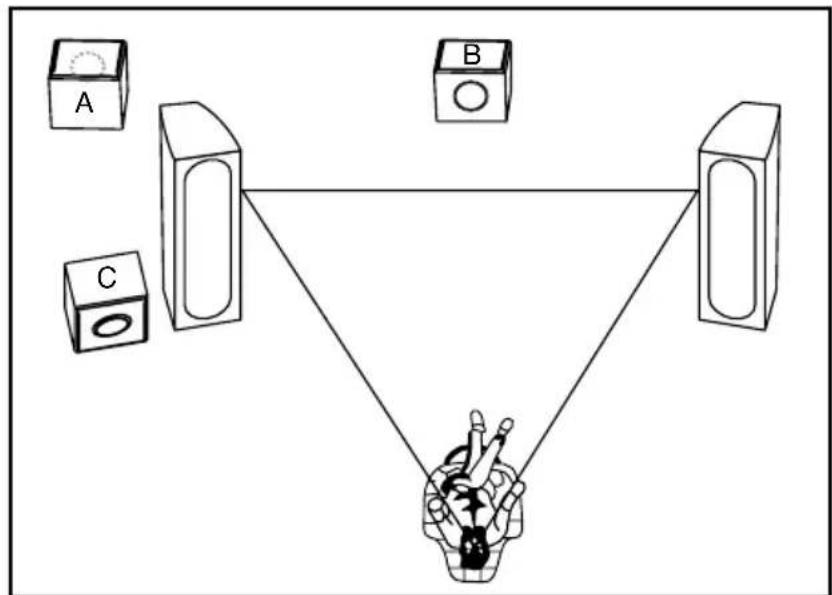
The placement of your new subwoofer is critical to its performance. The three most common locations include: A) in the corner of the room (which can result in a boomy or exaggerated low frequency response), B) placement along one wall but out of the corner (moderate bass performance with increased fidelity over corner placement), or C) alongside a front speaker (creating a better blend with the front speaker, but sacrificing overall volume). Experimentation with subwoofer placement is highly encouraged, as slight adjustments can create large benefits in sound reproduction. To further test subwoofer placement, install the subwoofer temporarily in your main listening position and while playing a familiar piece of music, walk around the listening room until you find the best sounding position. This is a possible location for the subwoofer to be placed.
INSTALLATION PRECAUTIONS
Do not install this subwoofer near a stove or other heating appliance, or put it in a place exposed to the sun. Such locations may cause the cabinet to change color and the subwoofer to break down.
Pioneer will not be responsible for any accidents or damage that may result from improper installation.
If the speaker system is installed too close to the screen of a television set, color distortion may occur.
CABINET MAINTENANCE
Great care and craftsmanship has gone into the construction and finish of the cabinet. Periodically use a soft, dry cloth to remove dust or fingerprints. Do not use paper towels or other abrasive materials as it may damage the finish.
NOTE: Please retain the carton and packing material for your Pioneer products, to protect them in the event of a move or if they need to be shipped to a service center. Product received damaged by a service center that has been shipped by the end user in other than the original packaging will be repaired, refurbished and properly packaged for return shipment, at the end user's expense.
www.pioneerelectronics.com
TERMINOLOGY AND CONTROLS
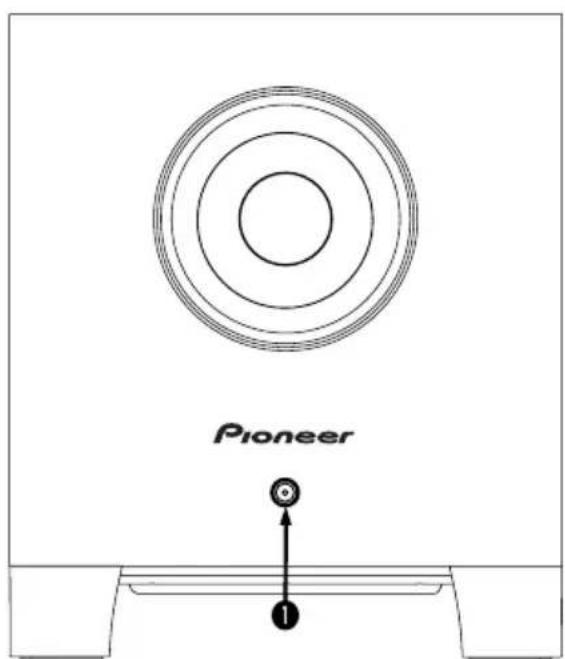
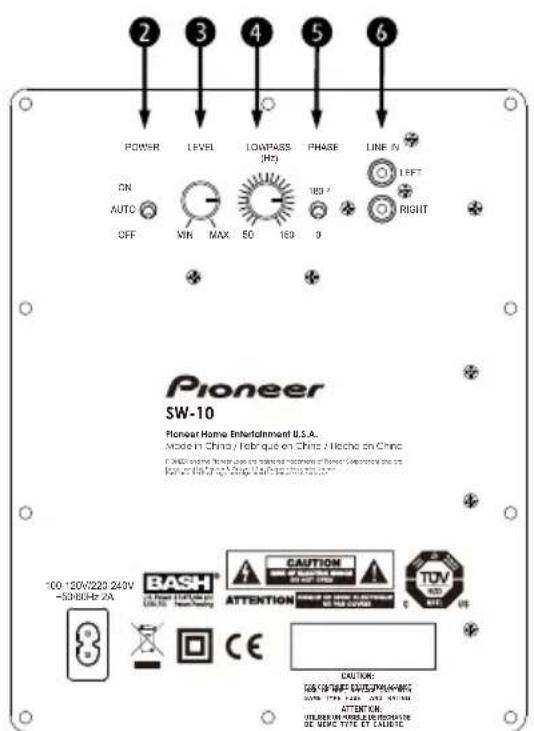
STATUS INDICATOR - The LED found on the front panel will illuminate when the subwoofer is functioning. If the unit is in Auto mode and is not receiving a signal, the light will remain off.
POWER - This switch can be set to either On, Off or Auto. If the switch is in the Off position, the subwoofer will remain off. If the switch is in the On position, it will remain on. If the switch is set to the AUTO position, when a signal is present the subwoofer will turn on and will automatically turn off several minutes after a signal is no longer present.
LEVEL - This knob can be adjusted to control the level of output from your subwoofer. The level chosen should allow the subwoofer to blend its output with that of the rest of your audio system.
4 LOW PASS - This control allows for the adjustment of the low-pass filter. Adjustments can infinitely be made from 50Hz to 150Hz . This will determine the highest frequency that the subwoofer will reproduce.
PHASE - This switch allows for the adjustment of the phase of the subwoofer, in relation to the speakers used in your system, 0 or 180 degrees.
LINE IN - These inputs are an RCA type LFE/stereo/mono input. If you are connecting your subwoofer to a pre-amp/processor with a LFE or Subwoofer pre-amp output, connect a single RCA cable to the Left input. If you are connecting your subwoofer to a stereo pre-amp or processor, such as in a stereo music system, use stereo RCA cables and connect to both the Left and Right inputs.
www.pioneerelectronics.com
CONNECTING YOUR SUBWOOFER
CAUTION: All power should be turned off to your system before any connections are made. Careful attention should be taken to ensure that all electronic components are not connected to an AC source. Not doing so could result in potential damage to the system.
METHOD 1
RCA - SUB IN FOR HOME THEATER OR LFE APPLICATIONS
- On the rear of the receiver/pre-amp there should be a single RCA type jack marked "Subwoofer/Pre-Amp Out". Connect a single RCA cable from that jack to the LINE IN (Left) on the rear of the subwoofer. A mono male to male RCA cable is needed.
- After connecting the single LINE IN (Left) connection, plug your subwoofer into an AC outlet. Do not use the AC outlet on the rear of your receiver. After plugging in the unit, switch the Main Power to On.
- See Final System Adjustments, below.
METHOD 2
RCA - LINE IN FOR STEREO APPLICATIONS
- On the rear of the receiver/pre-amp there should be stereo (Left and Right) RCA type jacks marked "Left and Right Pre-Amp Outputs". Connect a pair of RCA cables from those jacks to the LINE IN (Left) on the rear of the subwoofer. A standard stereo male to male RCA cable is needed.
- After connecting the stereo LINE IN (Left) connection, plug your subwoofer into an AC outlet. Do not use the AC outlet on the rear of your receiver. After plugging in the unit, switch the Main Power to On.
- See Final System Adjustments, below.
FINAL SYSTEM ADJUSTMENTS
- After having turned on the main power switch and having broken-in the speaker, select the correct position for the POWER, either On or Auto depending on your system. The Auto selection will leave the unit in a self-sensing mode, such that should the unit sense an audio signal it will turn itself on and then shut down after several minutes without signal, while in the On position the subwoofer always remains on. Should the system not be used for an extensive period of time, it is recommended that the subwoofer be unplugged from the AC.
- Adjust the ③ LEVEL of your subwoofer so that the volume of your subwoofer matches the overall system volume. This ensures a smooth transition between the low and high frequencies of your system.
- Adjust the LOW PASS on your subwoofer so that the frequency range of the subwoofer blends well with that of the front speakers. Setting the crossover too low will create a gap between the frequency response of the front speakers and that of the subwoofer, while setting the crossover frequency too high will create a doubling of certain frequencies, making the music sound boomy. When using small satellite speakers, the appropriate crossover frequency should be from 90Hz to 150Hz , for the bookshelf speakers 70Hz to 90Hz and for the large floor-standing speakers 40Hz to 70Hz .
- Adjust the PHASE so that the subwoofer integrates fully with the rest of your audio system. This control ensures that the subwoofer operates in phase with the rest of the system, an out of phase subwoofer will either sound like it is lacking in bass performance or that its timing is off. This setting will be determined by your listening position, the characteristics of your listening room and its interaction with your subwoofer. An out of phase speaker means that the speaker cone is moving inwards when it should be moving outwards, like the other speakers in your system, causing cancellations of certain frequencies. By adjusting the phase control, one can ensure that all speakers move in the proper direction, at the same time.
- Steps 2, 3 and 4 might require repeating in order to fine tune your system. Ensuring the proper blending between the speakers and the subwoofer is critical to the performance of your system, as a whole.
SPECIFICATIONS
| SW-10 | |
| Frequency Range | 30 Hz - 150 Hz |
| Dimensions with feet (WxHxD inch) | 14-3/10" x 15-3/10" x 14-3/10" |
| Weight | 29.8 lbs |
| Driver Size | 10" |
| Power | 200 W* (4 ohm THD 1%) |
| Maximum Power | 400 W (Peak) |
| Power Consumption | 0.5 Watt (Stand By Mode) |
| Power Requirement | 100-120v/220-240v ~50/60Hz 2A |
Complies with CCR 93120.2(a) Phase 2. CCR is the abbreviation of the California Code of Regulations.
Specifications and design subject to modification without notice.
Bash and the Bash logo are registered trademarks of Sonavox.
Pioneer and the Pioneer logo are registered trademarks of Pioneer Corporation and are used by Pioneer & Onkyo U.S.A. Corporation under license.
*200 W FTC Power Output
Pioneer
LIMITED WARRANTY
WARRANTY VALID ONLY IN COUNTRY OF PRODUCT PURCHASE
PIONEER HOME ENTERTAINMENT U.S.A.
Pioneer Audio and Video
WARRANTY
Ponee Hentment U.S.A. (PHEU), warrants that products distributed by PHEU in the U.S.A., and in Canada, that fail to function properly under normal use, due to a manufacturing defect, when installed and operated according to the owner's manual enclosed with the unit, will be repaired or replaced with a unit of comparable value, at the option of PHEU, without charge to you for parts or actual repair work. Parts supplied under this warranty may be new or rebuilt at the option of PHEU.
THIS LIMITED WARRANTY APPLIES TO THE ORIGINAL OWNER OF THIS PIONEER PRODUCT DURING THE WARRANTY PERIOD, PROVIDED THE PRODUCT WAS PURCHASED FROM AN AUTHORIZED PIONEER DISTRIBUTOR/DEALER IN THE U.S.A. OR CANADA. YOU WILL BE REQUIRED TO PROVIDE A SALES RECEIPT OR OTHER VALID PROOF OF PURCHASE SHOWING THE DATE OF ORIGINAL PURCHASE OR, IF RENTED, YOUR RENTAL CONTRACT SHOWING THE PLACE AND DATE OF FIRST RENTAL. IN THE EVENT SERVICE IS REQUIRED, THE PRODUCT MUST BE DELIVERED WITHIN THE WARRANTY PERIOD, TRANSPORTATION PREPAID, ONLY FROM WITHIN THE COUNTRY OF PURCHASE AS EXPLAINED IN THIS DOCUMENT. YOU WILL BE RESPONSIBLE FOR REMOVAL AND INSTALLATION OF THE PRODUCT. PHEU, WILL PAY TO RETURN THE REPAIRED OR REPLACEMENT PRODUCT TO YOU WITHIN THE COUNTRY OF PURCHASE.
PRODUCT WARRANTY PERIOD
Parts Labo
Home Audio and Video 1 Year 1Year
Microphones and Phono Cartridges 90 Days 90 Days
Shorter limited warranty periods apply to some models. Please refer to the limited warranty document enclosed with the product for a definitive statement of the warranty period. The warranty period for retail customers who rent the product commences upon the date product is first put into use (a) during the rental period or (b) retail sale, whichever occurs first.
WHAT IS NOT COVERED
IF THIS PRODUCT WAS PURCHASED FROM AN UNAUTHORIZED DISTRIBUTOR, THERE ARE NO WARRANTYES, EXPRESS OR IMPLIED, INCLUDING THE IMPLIED WARRANTY OF MERCHANTABILITY AND THE IMPLIED WARRANTY OF FITNESS FOR A PARTICULAR PURPOSE AND THIS PRODUCT IS SOLD STRICTLY AS IS AND WITH ALL FAULTS. PIONEER SHALL NOT BE LIABLE FOR ANY CONSEQUENTIAL AND/OR INCIDENTIAL DAMAGES. PIONEER DOES NOT WARRANTY ANY PRODUCT LISTED ABOVE WHEN IT IS USED IN A TRADE OR BUSINESS OR IN ANY INDUSTRIAL OR COMMERCIAL APPLICATION. THIS WARRANTY DOES NOT APPLY IF THE PRODUCT HAS BEEN SUBJECTED TO POWER IN EXCESS OF ITS PUBLISHED POWER RATING.
THIS WARRANTY DOES NOT COVER THE CABINET OR ANY APPEARANCE ITEM, USER ATTACHED ANTENNA, ANY DAMAGE TO RECORDS OR RECORDING TAPES OR DISCS, ANY DAMAGE TO THE PRODUCT RESULTING FROM ALTERATIONS, MODIFICATIONS NOT AUTHORIZED IN WRITING BY PIONEER, ACCIDENT, MISUSE OR ABUSE, DAMAGE DUE TO LIGHTNING OR TO POWER SURGES, SUBSEQUENT DAMAGE FROM LEAKING, DAMAGE FROM INOPERATIVE BATTERIES, OR THE USE OF BATTERIES NOT CONFORMING TO THOSE SPECIFIED IN THE OWNER'S MANUAL.
THIS WARRANTY DOES NOT COVER THE COST OF PARTS OR LABOR WHICH WOULD BE OTHERWISE PROVIDED WITHOUT CHARGE UNDER THIS WARRANTY OBTAINED FROM ANY SOURCE OTHER THAN A PIONEERAUTHORIZED SERVICE COMPANY OR OTHER DESIGNATED LOCATION. THIS WARRANTY DOES NOT COVER DEFECTS OR DAMAGE CAUSED BY THE USE OF UNAUTHORIZED PARTS OR LABOR OR FROM IMPROPER MAINTENANCE. ALTERED, DEFACED, OR REMOVED SERIAL NUMBERS Void THIS ENTIRE WARRANTY. NO OTHER WARRANTYES APPLY.
IN THE U.S.A. - PIONEER LIMITS ITS OBLIGATIONS UNDER ANY IMPLIED WARRANTY INCLUDING, BUT NOT LIMITED TO, THE IMPLIED WARRANTY OF MERCHANTABILITY AND FITNESS FOR A PARTICULAR PURPOSE, TO A PERIOD NOT TO EXCEED THE WARRANTY PERIOD. NO WARRANTY SHALL APPLY AFTER THE WARRANTY PERIOD. SOME STATES DO NOT ALLOW LIMITATIONS ON HOW LONG AN IMPLIED WARRANTY LASTS AND SOME STATES DO NOT ALLOW THE EXCLUSIONS OR LIMITATIONS OF INCIDENTAL OR CONSEQUENTIAL DAMAGES, SO THE ABOVE LIMITATIONS OR EXCLUSIONS MAY NOT APPLY TO YOU. THIS WARRANTY GIVES YOU SPECIFIC LEGAL RIGHTS AND YOU MAY HAVE OTHER RIGHTS WHICH MAY VARY FROM STATE TO STATE.
IN CANADA - EXCEPT AS EXPRESSLY PROVIDED HEREIN, THERE ARE NO REPRESENTATIONS, WARRANTYES, OBLIGATIONS OR CONDITIONS, IMPLIED, STATUTORY OR OTHERWISE, APPLICABLE TO THIS PRODUCT.
TO OBTAIN SERVICE
PHEU has appointed a number of Authorized Independent Service Companies throughout the U.S.A. and Canada should your product require service. To receive warranty service you need to present your sales receipt or, if rented, your rental contract showing place and date of original owner's transaction. If shipping the unit you will need to package it carefully and send it, transportation prepaid by a traceable, insured method, to an Authorized Independent Service Company. Package the product using adequate padding material to prevent damage in transit. Damages resulting from insufficient or improper packaging of the product will be the responsibility of the sender. The original container is ideal for this purpose. Include your name, address and telephone number where you can be reached during business hours.
IN THE U.S.A. and Canada
For hook-up and operation of your unit, and for Service Support or to obtain a referral to
an Authorized Independent Servicer, please call or write:
Pioneer Home Entertainment U.S.A., Customer Support
18 Park Way, Upper Saddle River, NJ 07458
1-844-679-5350 - pioneeradmin@pioneerhomeusa.com
RECORD THE PLACE AND DATE OF PURCHASE FOR FUTURE REFERENCE
Model No. Serial No. Purchase Date
Purchased From
KEEP THIS INFORMATION AND YOUR SALES RECEIPT IN A SAFE PLACE
Dear Customer,
The Safety of Your Ears is in Your Hands. Get the most out of your equipment by playing it at a safe level – a level that lets the sound come through clearly without annoying blaring or distortion and, most importantly, without affecting your sensitive hearing. Sound can be deceiving. Over time, your hearing “comfort level” adapts to higher volumes of sound, so what sounds “normal” can actually be loud and harmful to your hearing. Guard against this by setting your equipment at a safe level BEFORE your hearing adapts.
ESTABLISH A SAFE LEVEL:
- Set your volume control at a low setting.
- Slowly increase the sound until you can hear it comfortably and clearly, without distortion.
- Once you have established a comfortable sound level, set the dial and leave it there.
BE SURE TO OBSERVE THE FOLLOWING GUIDELINES:
- Do not turn up the volume so high that you can't hear what's around you.
- Use caution or temporarily discontinue use in potentially hazardous situations.
IMPORTANT

www.pioneerelectronics.com
TERMINOLOGIE ET COMMANDES
RCA - SUB IN POUR HOME THEATER OU LFE APPLICATIONS
GARANTIE VALIDSE SEULEMENT DANS LE PAYS OU LE PRODUIT A ETÉ ACHETE
PIONEER HOME ENTERTAINMENT U.S.A.
Pioneer Home Entertainment U.S.A., Customer Support
18 Park Way, Upper Saddle River, NJ 07458
1-844-679-5350 - pioneeradmin@pioneerhomeusa.com
ENREGISTREZ LE LIEU ET LA DATE D'ACHAT POUR RÉFERENCE ULTÉRIEURE
No. du modele:
No. deSerte:
Date d'achat :
Achete de:
PRENEZ SOIN DE GARDER CETTE INFORMATION ET VOTRE REÇU D'ACHAT DANS UN ENDROIT SÜR POUR RÉFERENCE FUTURE
01432016
Cher client, chere clientele,
IMPORTANT SAFETY INSTRUCTIONS
www.pioneerelectronics.com
www.pioneerelectronics.com
TERMINOLOGÍA Y CONTROLES
www.pioneerelectronics.com
CONEXION DE SU SUBWOOFER
www.pioneerelectronics.com
ESPECIFICACIONES
Pioneer Home Entertainment U.S.A., Customer Support
18 Park Way, Upper Saddle River, NJ 07458
1-844-679-5350 - pioneereradmin@pioneerhomeusa.com



- CAUTION
- RISK OF ELECTRIC SHOCK DO NOT OPEN
- CAUTION:
- IMPORTANT SAFETY INSTRUCTIONS
- OPERATING ENVIRONMENT
- IMPORTANT NOTICE
- VENTILATION CAUTION
- WARNING
- POWER-CORD CAUTION
- PLACEMENT AND FINE TUNING
- INSTALLATION PRECAUTIONS
- Pioneer will not be responsible for any accidents or damage that may result from improper installation.
- CABINET MAINTENANCE
- TERMINOLOGY AND CONTROLS
- CONNECTING YOUR SUBWOOFER
- METHOD 1
- METHOD 2
- FINAL SYSTEM ADJUSTMENTS
- Pioneer
- LIMITED WARRANTY
- WARRANTY VALID ONLY IN COUNTRY OF PRODUCT PURCHASE
- PIONEER HOME ENTERTAINMENT U.S.A.
- WARRANTY
- PRODUCT WARRANTY PERIOD
- WHAT IS NOT COVERED
- TO OBTAIN SERVICE
- IN THE U.S.A. and Canada
- Dear Customer,
- ESTABLISH A SAFE LEVEL:
- BE SURE TO OBSERVE THE FOLLOWING GUIDELINES:
- IMPORTANT
- TERMINOLOGIE ET COMMANDES
- GARANTIE VALIDSE SEULEMENT DANS LE PAYS OU LE PRODUIT A ETÉ ACHETE
- Cher client, chere clientele,
- TERMINOLOGÍA Y CONTROLES
- CONEXION DE SU SUBWOOFER
Brand : PIONEER
Model : SW10
Category : Subwoofer