
SW1EX - Subwoofer PIONEER - Free user manual and instructions
Find the device manual for free SW1EX PIONEER in PDF.


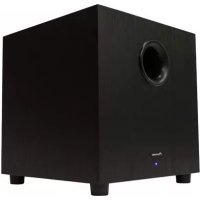
| Product type | Active subwoofer with passive radiator |
| Brand | Pioneer |
| Model | SW1EX |
| Dimensions (W × H × D) | 430 × 480 × 430 mm |
| Weight (without packaging) | 34.5 kg |
| Power supply | 120 V, 60 Hz |
| Power consumption | 56 W (90 VA) |
| Continuous output power (RMS) | 250 W / 4 Ω @ 100 Hz |
| Frequency response | 25 – 4,000 Hz (BYPASS setting) |
| Woofer | 30 cm (cone) with 30 cm passive radiator |
| Inputs | Line level (RCA): 160 mV / 50 kΩ; Speaker level: 1.6 V + 1.6 V / 15 kΩ |
| Line level output | 160 mV / 1 kΩ (RCA) |
| Crossover frequency | 50 – 150 Hz (continuous adjustment) + BYPASS |
| Phase | 0° / 180° (selector) |
| Bass mode | Music / Cinema (BASS MODE selector) |
| Built-in amplifier | Class D |
| Magnetic shielding | Yes |
| Studio reference | Certified AIR Studios Monitor Reference |
| Included accessories | Decoupling spikes (×4), bases (×4), RCA cable, power cord, ground cable, warranty card, owner's manual |
| Maintenance | Dry or slightly damp soft cloth (mild solution). Do not use thinner, benzene, insecticide, or wax. |
| Safety | Do not open (dangerous voltage). Do not expose to water or humidity. Disconnect before any manipulation. |
| Repairability | No user-serviceable parts. Refer servicing to qualified personnel. |
Frequently Asked Questions - SW1EX PIONEER
User questions about SW1EX PIONEER
0 question about this device. Answer the ones you know or ask your own.
Ask a new question about this device
Download the instructions for your Subwoofer in PDF format for free! Find your manual SW1EX - PIONEER and take your electronic device back in hand. On this page are published all the documents necessary for the use of your device. SW1EX by PIONEER.
USER MANUAL SW1EX PIONEER
POWERED SUBWOOFER CAISSON DE BASSES ACTIF S-W1EX
Register Your Product at:
www.pioneerelectronics.ca (Canada/ Canada)
Operating Instructions
Mode d'emploi

The lightning flash with arrowhead, within an equilateral triangle, is intended to alert the user to the presence of uninsulated "dangerous voltage" within the product's enclosure that may be of sufficient magnitude to constitute a risk of electric shock to persons.
CAUTION
RISK OF ELECTRIC SHOCK DO NOT OPEN
CAUTION:
TO PREVENT THE RISK OF ELECTRIC SHOCK,DO NOT REMOVE COVER (OR BACK).NO USER-SERVICEABLE PARTS INSIDE.REFER SERVICING TO QUALIFIED SERVICE PERSONNEL.

The exclamation point within an equilateral triangle is intended to alert the user to the presence of important operating and maintenance (servicing) instructions in the literature accompanying the appliance.
D1-4-2-3 En

WARNING - TO PREVENT FIRE OR SHOCK HAZARD,DO NOT EXPOSE THIS APPLIANCE TO RAIN OR MOISTURE.
D1-4-2-1 En
AVERTISSEMENT
PLEASE WRITE THIS SERIAL NUMBER ON YOUR ENCLOSED WARRANTY CARD AND KEEP IN A SECURE AREA. THIS IS FOR YOUR SECURITY. D1-4-2-6
D1-4-2-6-1_En
NOTE: This equipment has been tested and found to comply with the limits for a Class B digital device, pursuant to Part 15 of the FCC Rules. These limits are designed to provide reasonable protection against harmful interference in a residential installation. This equipment generates, uses, and can radiate radio frequency energy and, if not installed and used in accordance with the instructions, may cause harmful interference to radio communications. However, there is no guarantee that interference will not occur in a particular installation. If this equipment does cause harmful interference to radio or television reception, which can be determined by turning the equipment off and on, the user is encouraged to try to correct the interference by one or more of the following measures:
- Reorient or relocate the receiving antenna.
- Increase the separation between the equipment and receiver.
- Connect the equipment into an outlet on a circuit different from that to which the receiver is connected.
- Consult the dealer or an experienced radio/TV technician for help.
D8-10-1-2 En
Information to User
Alteration or modifications carried out without appropriate authorization may invalidate the user's right to operate the equipment. D8-10-2_EN
IMPORTANT SAFETY INSTRUCTIONS
READ INSTRUCTIONS All the safety and operating instructions should be read before the product is operated.
REtain Instructions The safety and operating instructions should be retained for future reference.
HEED Warnings All warnings on the product and in the operating instructions should be adhered to.
FOLLOW INSTRUCTIONS All operating and use instructions should be followed.
CLEANING The product should be cleaned only with a polishing cloth or a soft dry cloth. Never clean with furniture wax, benzine, insecticides or other volatile liquids since they may corrode the cabinet.
ATTACHMENTS Do not use attachments not recommended by the product manufacturer as they may cause hazards.
WATER AND MOISTURE - Do not use this product near water - for example, near a bathtub, wash bowl, kitchen sink, or laundry tub; in a wet basement: or near a swimming pool; and the like.
ACCESSORIES Do not place this product on an unstable cart, stand, tripod, bracket, or table. The product may fall, causing serious injury to a child or adult, and serious damage to the product. Use only with a cart, stand, tripod, bracket, or table recommended by the manufacturer, or sold with the product. Any mounting of the product should follow the manufacturer's instructions, and should use a mounting accessory recommended by the manufacturer.
CART A product and cart combination should be moved with care. Quick stops, excessive force, and uneven surfaces may cause the product and cart combination to overturn.

VENTILATION — Slots and openings in the cabinet are provided for ventilation and to ensure reliable operation of the product and to protect it from overheating, and these openings must not be blocked or covered. The openings should never be blocked by placing the product on a bed, sofa, rug, or other similar surface. This product should not be placed in a built-in installation such as a bookcase or rack unless proper ventilation is provided or the manufacturer's instructions have been adhered to.
POWER SOURCES This product should be operated only from the type of power source indicated on the marking label. If you are not sure of the type of power supply to your home, consult your product dealer or local power company.
LOCATION - The appliance should be installed in a stable location.
NONUSE PERIODS - The power cord of the appliance should be unplugged from the outlet when left un-used for a long period of time.
GROUNDING OR POLARIZATION
If this product is equipped with a polarized alternating current line plug (a plug having one blade wider than the other), it will fit into the outlet only one way. This is a safety feature. If you are unable to insert the plug fully into the outlet, try reversing the plug. If the plug should still fail to fit, contact your electrician to replace your obsolete outlet. Do not defeat the safety purpose of the polarized plug.
If this product is equipped with a three-wire grounding type plug, a plug having a third (grounding) pin, it will only fit into a grounding type power outlet. This is a safety feature. If you are unable to insert the plug into the outlet, contact your electrician to replace your obsolete outlet. Do not defeat the safety purpose of the grounding type plug.
POWER-CORD PROTECTION - Power-supply cords should be rouled so that they are not likely to be walked on or pinched by items placed upon or against them, paying particular attention to cords at plugs, convenience receptacles, and the point where they exit from the product.
OUTDOOR ANTENNA GROUNDING If an outside antenna or cable system is connected to the product, be sure the antenna or cable system is grounded so as to provide some protection against voltage surges and built-up static charges. Article 810 of the National Electrical Code, ANSI/NFPA 70, provides information with regard to proper grounding of the mast and supporting structure, grounding of the lead in wire to an antenna discharge unit, size of grounding conductors, location of antenna-discharge unit, connection to grounding electrodes, and requirements for the grounding electrode. See Figure A.
LIGHTNING For added protection for this product during a lightning storm, or when it is left unattended and unused for long periods of time, unplig it from the wall outlet and disconnect the antenna or cable system. This will prevent damage to the product due to lightning and power-line surges.
POWER LINES An outside antenna system should not be located in the vicinity of overhead power lines or other electric light or power circuits, or where it can fall into such power lines or circuits. When installing an outside antenna system, extreme care should be taken to keep from touching such power lines or circuits as contact with them might be fatal.
OVERLOADING Do not overload wall outlets, extension cords, or integral convenience receptacles as this can result in a risk of fire or electric shock.
OBJECT AND LIQUID ENTRY Never push objects of any kind into this product through openings as they may touch dangerous voltage points or short-out parts that could result in a fire or electric shock. Never spill liquid of any kind on the product.
SERVICING Do not attempt to service this product yourself as opening or removing covers may expose you to dangerous voltage or other hazards. Refer all servicing to qualified service personnel.
DAMAGE REQUIRING SERVICE Unplug this product from the wall outlet and refer servicing to qualified service personnel under the following conditions:
- When the power-supply cord or plug is damaged.
If liquid has been spilled, or objects have fallen into the product.
- If the product has been exposed to rain or water.
- If the product does not operate normally by following the operating instructions. Adjust only those controls that are covered by the operating instructions as an improper adjustment of other controls may result in damage and will often require extensive work by a qualified technician to restore the product to its normal operation.
If the product has been dropped or damaged in any way.
- When the product exhibits a distinct change in performance — this indicates a need for service.
REPLACEMENT PARTS - When replacement parts are required, be sure the service technician has used replacement parts specified by the manufacturer or have the same characteristics as the original part. Unauthorized substitutions may result in fire, electric shock, or other hazards.
SAFETY CHECK—Upon completion of any service or repairs to this product, ask the service technician to perform safety checks to determine that the product is in proper operating condition.
WALL OR CEILING MOUNTING - The product should not be mounted to a wall or ceiling.
HEAT The product should be situated away from heat sources such as radiators, heat registers, stoves, or other products (including amplifiers) that produce heat.
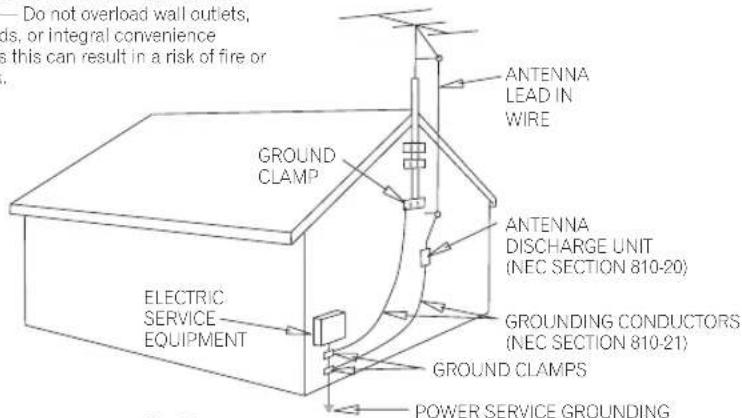
Fig. A
POWER SERVICE GROUNDING ELECTRODE SYSTEM (NEC ART 250, PART H) NEC-NATIONAL ELECTRICAL CODE
D1-4-2-2_En
WARNING: Handling the cord on this product or cords associated with accessories sold with the product will expose you to lead, a chemical known to the State of California and other governmental entities to cause cancer and birth defects or other reproductive harm.
Wash hands after handling D36-P4_EN
This product contains mercury. Disposal of this material may be regulated due to environmental considerations. For disposal or recycling information, please contact your local authorities or the Electronics Industries Alliance: www.eiae.org. K057_En
POWER-CORD CAUTION
Handle the power cord by the plug. Do not pull out the plug by tugging the cord and never touch the power cord when your hands are wet as this could cause a short circuit or electric shock. Do not place the unit, a piece of furniture, etc., on the power cord, or pinch the cord. Never make a knot in the cord or tie it with other cords. The power cords should be routed such that they are not likely to be stepped on. A damaged power cord can cause a fire or give you an electrical shock. Check the power cord once in a while. When you find it damaged, ask your nearest PIONEER authorized service center or your dealer for a replacement. S002 En
NOTE IMPORTANTE SUR LE CABLE D'ALIMENTATION
Selecting fine audio equipment such as the unit you've just purchased is only the start of your musical enjoyment. Now it's time to consider how you can maximize the fun and excitement your equipment offers. This manufacturer and the Electronic Industries Association's Consumer Electronics Group want you to get the most out of your equipment by playing it at a safe level. One that lets the sound come through loud and clear without annoying blaring or distortion-and, most importantly, without affecting your sensitive hearing.
Sound can be deceiving. Over time your hearing "comfort level" adapts to higher volumes of sound. So what sounds "normal" can actually be loud and harmful to your hearing. Guard against this by setting your equipment at a safe level BEFORE your hearing adapts.
To establish a safe level:
- Start your volume control at a low setting.
- Slowly increase the sound until you can hear it comfortably and clearly, and without distortion.
Once you have established a comfortable sound level:
- Set the dial and leave it there.
Taking a minute to do this now will help to prevent hearing damage or loss in the future. After all, we want you listening for a lifetime.
We Want You Listening For A Lifetime
Used wisely, your new sound equipment will provide a lifetime of fun and enjoyment. Since hearing damage from loud noise is often undetectable until it is too late, this manufacturer and the Electronic Industries Association's Consumer Electronics Group recommend you avoid prolonged exposure to excessive noise. This list of sound levels is included for your protection.
Decibel
Level Example
30 Quiet library, soft whispers
40 Living room, refrigerator, bedroom away from traffic
50 Light traffic, normal conversation, quiet office
60 Air conditioner at 20 feet, sewing machine
70 Vacuum cleaner, hair dryer, noisy restaurant
80 Average city traffic, garbage disposals, alarm clock at two feet.
THE FOLLOWING NOISES CAN BE DANGEROUS UNDER CONSTANT EXPOSURE
90 Subway.motorcycle,truck traffic,lawn mower
100 Garbage truck, chain saw, pneumatic drill
120 Rock band concert in front of speakers, thunderclap
140 Gunshot blast, jet plane
180 Rocket launching pad
Information courtesy of the Deafness Research Foundation.


5001 En
CONTENTS
ACCESSION ITEMS 5
FEATURES 5
IN COMBINATION WITH SPEAKERS 5
INSTALLATION 6
Speaker Installation 6
Installation Precautions 7
PANEL FACILITIES 7
FRONT PANEL 7
REAR PANEL 8
CONNECTIONS 8
LINE LEVEL CONNECTION (A)A. 8
SPEAKER LEVEL CONNECTION (B)B 9
CONNECTING THE SIGNAL
GROUND TERMINAL 10
OPERATION 10
TROUBLESHOOTING 11
SPECIFICATIONS 11
ACCESSORY ITEMS
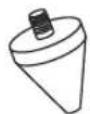
- Spikes x 4

- Bases x 4
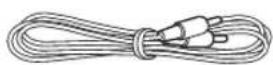
- RCA plug cord x 1
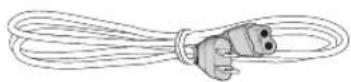
Power cable x 1

Ground cord x 1
Warranty card x 1
- Operating instructions x 1
FEATURES
250W (RMS) power with D class amplifier that serves audio and video software playback such as Dolby* Digital with a wide dynamic range.
Equipped with 30 cm driver
Turnover frequency can be continuous (50-150Hz, & Bypass).
■ Equipped with Bass Mode selector (Music/Cinema mode).
2 systems consisting of an input that connects to the amplifier's speaker terminals and an input that connects to the SUBWOOFER PRE-OUT terminal.
Fine-tuning the subwoofer with the help of world-class studio engineers. With the cooperation of AIR Studios, this subwoofer has been designated AIR Studios Monitor Reference:

- Maunfactured under license from Dolby Laboratories. "Dolby" and the double-D symbol are trademarks of Dolby Laboratories.
IN COMBINATION WITH SPEAKERS
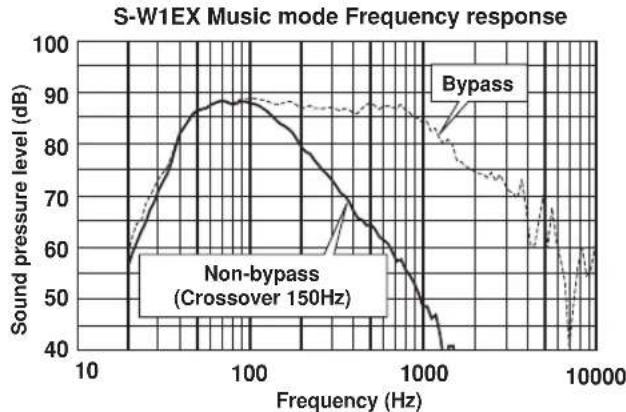
The frequency characteristics of the S-W1EX combined with small-size speakers are shown below. As shown in these figures, the low frequency range is improved.
These special characteristics are obtained in an echoless chamber. The effect of an additional S-W1EX in an ordinary listening room is better than the chart indicates when positioned adequately.
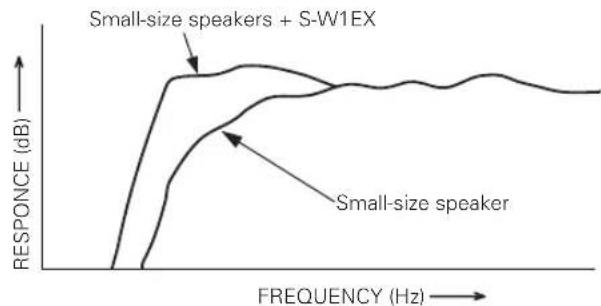
- With playback of Dolby* Digital, establishment of a special channel for the subwoofer is recommended; and with playback of LFE (Low Frequency Effect: sound effect like the rumbling of the earth, whose purpose is to intensify the force of the video), the S-W1EX is especially effective.
Dolby* Digital
Dolby Digital is the name of the Dolby Surround multichannel digital system that was developed from Dolby Surround, as a continuation of Dolby Pro Logic Surround.
Dolby Digital is also referred to as a 5.1 channel system. This is because it has 5 channels in the 20Hz - 20kHz frequency range (front left and right, center, and rear left and right) and an independent channel for the subwoofer. The subwoofer channel is also referred to as LFE (Low Frequency Effect).
The LFE channel is used according to individual tastes to enhance the bass effect.
INSTALLATION
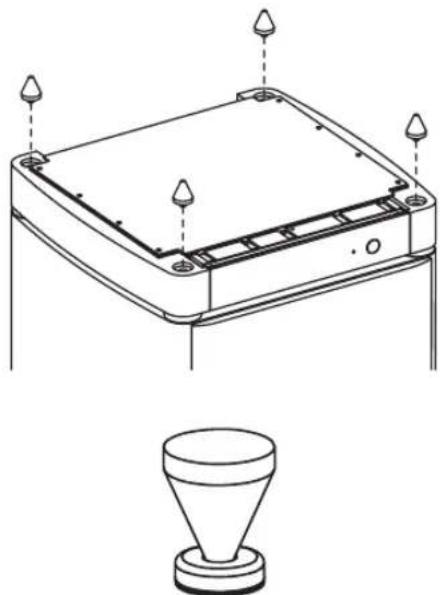
Before using this subwoofer, screw the 4 provided decoupling spikes. Make sure to use the spike bases provided (between the spikes and the floor) when placing the subwoofer.
Speaker Installation
- Subwoofer Installation Criteria (A A)
① Left speaker
② Right speaker
③ Recommended installation range for the subwoofer
④ Listening position
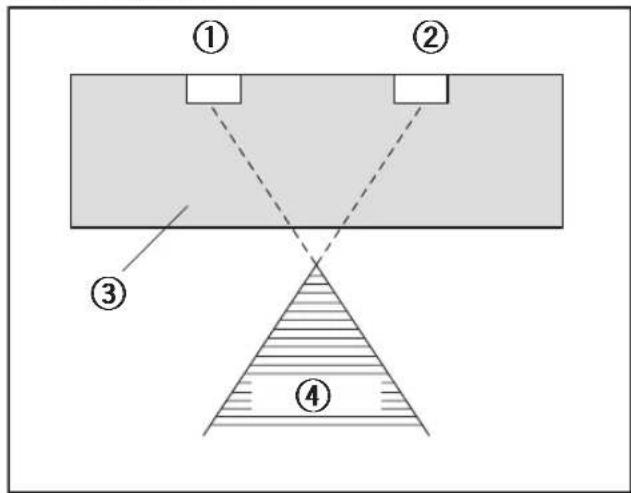
The subwoofer plays back the bass in monaural, making use of the fact that the human ear is not very sensitive to the direction of low-pitched sound. Because of this, the subwoofer can be installed almost anywhere. If it is installed too far away, however, the sound from the other speakers may become unnatural.
An example of speaker positioning (B)
① Front left speaker
② Center speaker
③ Front right speaker
④ Subwoofer
⑤ Listening area
⑥ Rear left speaker
⑦ Rear right speaker
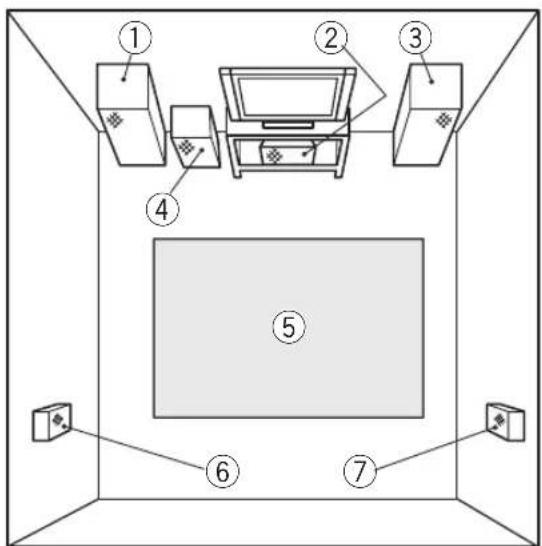
NOTE:
- To avoid interference with the picture on a nearby TV set, use magnetically shielded speaker systems. This is particularly important for the center speaker since it is usually located closest to the TV.
- Position the left and right channel speakers at equal distances from the TV set and approximately 1.8 meters from each other.
- Install the center speaker above or below the TV so that the sound of the center channel is localized at the TV screen.
- The rear (surround) speakers are most effective when installed in parallel locations directly to the side, or slightly behind, the listener, at a level about 1 meter above the listener's ears.
CAUTION:
When installing the center speaker on top of the TV, be sure to secure it with tape or some other suitable means.
Otherwise, the speaker may fall from the TV due to external shocks such as earthquakes, and it may lead to endangering those nearby or damaging the speaker.
Installation Precautions
- Install the unit in a well-ventilated location where it will not be exposed to high temperatures and high humidity.
- Do not place the unit near stoves or other heating equipment or at locations exposed to direct sunlight, as these can have an adverse effect on the cabinet and internal components. Also, do not install the unit where there is too much dust or high humidity, as these can cause malfunctioning or breakdowns. (Avoid cooking tables and other locations where the unit would be exposed to heat, steam and soot.)
- Do not place heavy objects such as a television or TV monitor on top of the unit.
- Keep the unit away from devices such as cassette decks which are sensitive to magnetic fields.
This speaker system is magnetically shielded. However, depending on the installation location, color distortion may occur if the speaker system is installed extremely close to the screen of a television set.
If this happens, turn off the power switch of the television set, and turn it on after 15 to 30 minutes. If the problem persists, place the speaker system away from the television set.
- Please install this unit away from the antenna cable of the tuner, as noise can be caused with installation close to the antenna cable. In such a case, use this unit at a position away from the antenna and the antenna cable, or when playback of extra bass is not required, switch off the power for this unit.
MAINTENANCE OF EXTERNAL SURFACES
- Use a polishing cloth or dry cloth to wipe off dust and dirt.
- When the surfaces are very dirty, wipe with a soft cloth dipped in some neutral cleanser diluted five or six times with water, and wrung out well, and then wipe again with a dry cloth. Do not use furniture wax or cleaners.
- Never use thinners, benzine, insecticide sprays and other chemicals on or near this unit, since these will corrode the surfaces.
PANEL FACILITIES
FRONT PANEL
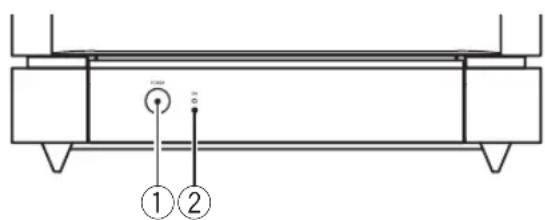
The condition of closed door
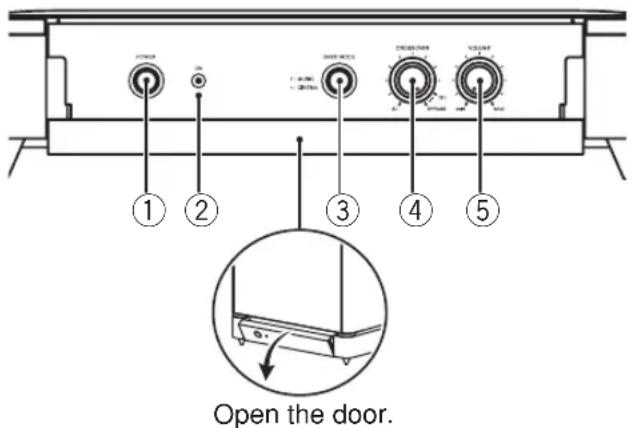
① Power switch (POWER)
When pressed, power is turned ON; when pressed again, power is turned OFF.
② Power Indicator (ON)
Illuminates when the power is on.
③ Bass mode switch (BASS MODE)
■ MUSIC: The characteristic frequencies become flat.
Recommended for music sources.
CINEMA: Low frequencies are emphasized. Recommended for sources that require strong bass.
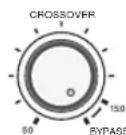
④ Crossover knob (CROSSOVER) & Bypass switch (BYPASS)
When using the subwoofer, set the upper frequency limit for the subwoofer (50-150Hz) so that it complements the output from your other speakers. When using the bass management features of an AV receiver, set to BYPASS in order to use the low-pass filter of the AV receiver for high quality sound.
- Setting Criteria
50Hz.....when the diameter of the left/right speakers is 20-cm or more.
100Hz.....when the diameter of the left/right speakers is 10 - 25-cm.
150Hz.....when the diameter of the left/right speakers is 12-cm or less. - When set to BYPASS, the audio signal is routed directly to the woofer unit, bypassing the amplifier's filter.
(5) Volume knob (VOLUME)
Sets the subwoofer volume.
- Turn the knob slowly from the MIN position.
- With this unit, the bass level can be independently set, so do not turn up the bass on the stereo or AV amplifier.
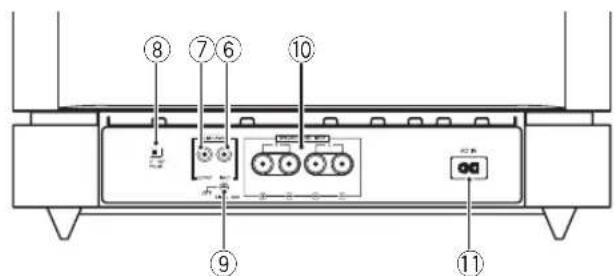
REAR PANEL
⑥ Line Level Input terminal (LINE LEVEL INPUT)
Connects to the stereo amplifier's SUBWOOFER PRE-OUT terminal, with the specially provided RCA plug cord.
⑦ Line Level Output terminal (LINE LEVEL OUTPUT)
Used for connecting other equipment through the amplifier. The signal output from this jack is not affected in any way by the settings of the various controls on the unit.
⑧ Phase switch (PHASE 0° 180°)
When set to 180^ the output phase becomes the reverse of the input signal, and when set to 0^ it is in the same phase as the input signal.
- Normally, the switch is set to 0^ .
But when the sound connection between the subwoofer and the left and right speakers sounds unnatural, try switching to 180^ - When using two or more subwoofoers together, make sure that the phase switch of all of them are set to the same position.
⑨ Earth terminal
See CONNECTING THE SIGNAL GROUND TERMINAL on page 10.
Speaker Level Input terminals (SPEAKER LEVEL INPUT)
Connect to the speakers output terminals on the stereo amplifier, using speaker cords (not supplied).
① Power supply cable connector
Connect the accessory power supply cable here.
CONNECTIONS
Before making or changing any connections, switch off the power and disconnect both this unit and the amplifier/receiver from the AC outlet.
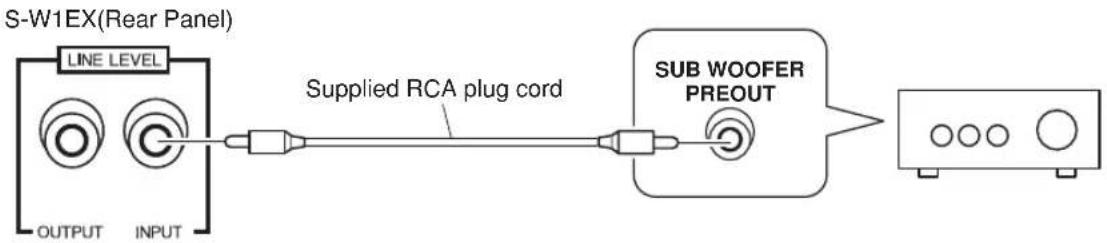
LINE LEVEL CONNECTION (A)
This connection is for a stereo amplifier or receiver equipped with a SUBWOOFER PRE-OUT terminal. If the stereo amplifier or receiver is not equipped with a SUBWOOFER PRE-OUT terminal, carry out a Speaker Level connection. Connect to the LINE LEVEL INPUT terminal on this unit, using the specially provided RCA plug cord.
NOTES:
- When connected to the PRE-OUT terminal for surround center channel on the stereo amplifier or receiver, the bass is heard only on the center channel, so it will be insufficient.
This is a connection to the speaker terminals on the stereo amplifier or receiver.
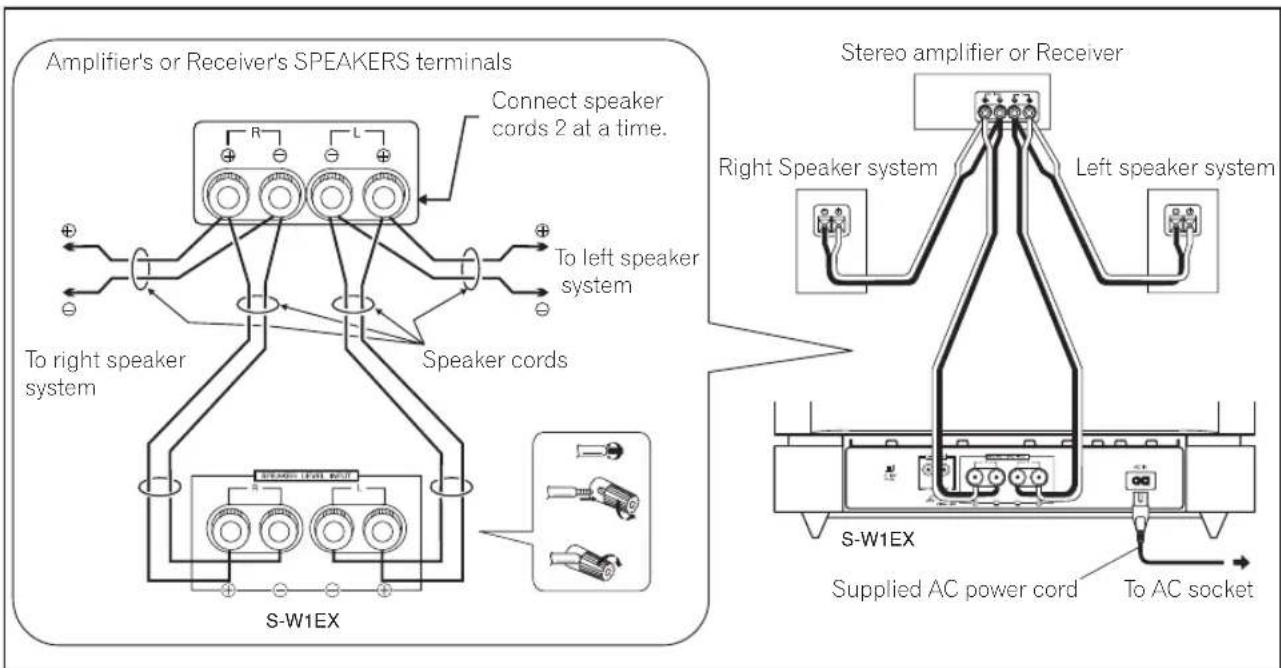
NOTES:
- When the power of the stereo amplifier is turned off before the power of this unit is switched off, a shock sound may be generated. In this case, lower the subwoofer volume or turn off the power of this unit. If the stereo amplifier has a switched outlet, connect the power cable of this unit to this outlet.
- When the subwoofer volume is set to an extremely high level, howling may be caused when the power of the stereo amplifier is turned off or when the speaker switch is turned on. To prevent this, lower the subwoofer volume or turn off the power of this unit before turning off the power of the stereo amplifier. Also, when using this unit at a high level, do not turn off the speaker switch of the stereo amplifier.
- Do not turn up the bass on the stereo amplifier or receiver. If the stereo amplifier or receiver has no output margin, sound distortion is apt to occur. Adjust the bass level with the unit's VOLUME knob.
- When the LINE LEVEL INPUT terminal is connected, the SPEAKER LEVEL INPUT terminals cannot be used.
Connect the unit to the stereo amplifier's or receiver's speaker terminals at the same time the left and right speakers are connected.
- Use two sets of speaker cords (not supplied) to connect the Right speaker system and the SPEAKER LEVEL INPUT R of the S-W1EX to the right speaker terminals of the stereo amplifier/ receiver. Do the same for Left speaker system.
Make sure L(+) L(-),R(+),R(-) are correctly aligned.
NOTE:
- If the stereo amplifier or receiver has 2 sets of speaker terminals (A, B) and these are connected to empty terminals on the unit and "A + B" is selected with the speaker switch, sound may not come out of the left/right speakers, depending on the stereo amplifier or receiver being used (a stereo amplifier or receiver is constructed so that, when "A + B" is selected with the speaker switch, A and B are in series connection).
CAUTION
These speaker terminals carry HAZARDOUS LIVE voltage. To prevent the risk of electric shock when connecting or disconnecting the speaker cables, disconnect the power cord before touching any uninsulated parts. D3-4-2-2
If you connect the line level input jack then do not connect the signal ground terminal.
- If you notice ground hum when the speakers are connected connect the supplied ground cord between the signal ground terminal and the receiver/amplifier. (See diagram below.)
- If there is no signal ground terminal on your receiver/amplifier, you can use one of the screws on the rear panel of the receiver/amplifier. (See diagram B below.)
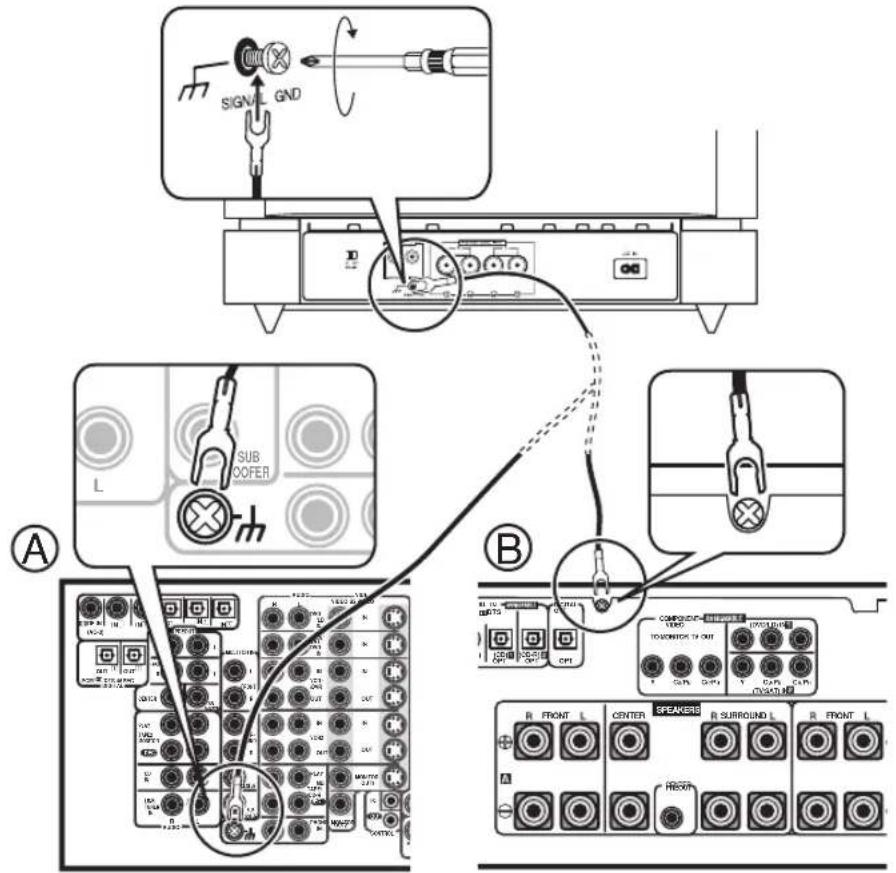
OPERATION
For details regarding operating part functions, refer to page 7.
-
Turn the POWER switch ON.
-
If the unit's power cord is connected to a switched AC outlet on the stereo amplifier or receiver and the switch is left ON, the unit can be turned ON/OFF together with the stereo amplifier or receiver.
-
If the unit cannot be connected to the stereo amplifier or receiver, turn the power to the stereo amplifier or receiver ON before turning the power to the unit ON. When turning the power OFF, turn the power to the unit OFF before turning the power to the stereo amplifier or receiver OFF.
-
Operate the stereo amplifier or receiver and adjust the volume of the other speakers.
-
Adjust the volume of the bass with the VOLUME knob 5
-
When necessary, operate the CROSSOVER knob ④ 4 and PHASE switch ⑧ and then adjust with the VOLUME knob ⑤ Set the BASS MODE switch 3 5 either MUSIC or CINEMA.
TROUBLESHOOTING
Incorrect operations are often mistaken for trouble and malfunctions. If you think that there is something wrong with this component, check the points below. Sometimes the trouble may lie in another component. Investigate the other components and electrical appliances being used. If the trouble cannot be rectified even after exercising the checks listed below, ask your nearest PIONEER authorized service center or your dealer to carry out repair work.
| SYMPTOM | CAUSE REMEDY | |
| ① No power is being supplied (Indicator does not light up when power switch is turned on.) | • Power supply plug is not correctly inserted. | • Insert plug securely. |
| ② No sound (Indicator is lit.) | • Connection of speaker or accessory RCA plug cord is wrong or disconnected. • VOLUME knob is set to MIN. | • Check again and connect correctly. • Turn clockwise slowly. |
| ③ Sound is weak. (VOLUME knob is turned up.) | • Polarity of the speaker cords (from the amplifier or receiver to this unit) is reversed. | • Confirm the polarity of the wires and connect them correctly. |
| ④ Sound is distorted. | • Level is too high. • Input level is too high. | • Turn the VOLUME knob counterclockwise to lower the level. • Turn the amplifier's output level (volume, bass control, bass boost) counter-clockwise to lower the level. |
| ⑤ Howling noise occurs. | • Power supply to amplifier or speaker switch is turned off. • Subwoofer level is set too high. | • Connect power supply to amplifier and turn speaker switch on. • Place the subwoofer a good distance from speakers. Turn the VOLUME knob counterclockwise to lower the volume. |
| ⑥ Much noise when listening to AM or FM broadcasts. | • The AM loop antenna or the FM indoor antenna is close to this unit. | • Increase the distance between the AM or FM antenna (for indoor use) and this unit. |
SPECIFICATIONS
Cabinet ......... Floor type with PASSIVE RADIATOR system (Magnetically shielded)
Cabinet material and surface finish. MDF (Medium Density Fiber Board) with realwood finish
Woofer 30 cm cone type
PASSIVE RADIATOR 30 cm cone type
Frequency response .25-4,000Hz(set to BYPASS)
Power Amplifier Continuous Power Output (RMS) 250 W/4 Ω (100 Hz)
Input (sensitivity at 100 Hz/impedance)
SPEAKER LEVEL. 1.6 V + 1.6 V/15 kΩ
both channels in-phase) LINE LEVEL (RCA jack).160 mV/50 kΩ
Output (Level at 100 Hz/impedance) LINE LEVEL (RCA jack).160 mV/1 k Ω
CROSSOVER Frequency
50-150 Hz (continuously variable)
Outline Dimension.430 W) x 480 H) x 430 D mm
Weight (without package) 34.5 kg
Power Requirements. 120 V, 60 Hz
Power Consumption. 56 W, 90VA
Accessories. Spikes x 4
Bases × 4
RCA plug cord x 1
Power cable x 1
Ground cord x 1
Warranty card x 1
Operating instructions x 1
NOTE:
Specifications and design subject to possible modification without notice, due to improvements.
Published by Pioneer Corporation. Copyright © 2005 Pioneer Corporation. All rights reserved.

is a trademark placed on a product with Pioneer's Phase Control Technology. The Technology enables high-grade 5.1ch with no delay in the bass area.
SOMMAIRE
ACCESSIONS FOURNIS 12
CHARACTERISTIQUES 12
UTILISATION COMBINÉE AVEC DES
ENCEINTES 12
INSTALLATION 13
Publication de Pioneer Corporation.
© 2005 Pioneer Corporation.
Should this product require service in the U.S.A. and you wish to locate the nearest Pioneer Authorized Independent Service Company, or if you wish to purchase replacement parts, operating instructions, service manuals, or accessories, please call the number shown below.
800-421-1404
Please do not ship your product to Pioneer without first calling the Customer Support Division at the above listed number for assistance.
Pioneer Electronics (USA) Inc.
Customer Support Division
PO. BOX 1760, Long Beach,
For warranty information please see the Limited Warranty sheet included with your product.
Should this product require service in Canada, please contact a Pioneer Canadian Authorized Dealer to locate the nearest Pioneer Authorized Service Company in Canada. Alternatively, please contact the Customer Satisfaction Department at the following address:
Pioneer Electronics of Canada, Inc.
Customer Satisfaction Department
300 Allstate Parkway, Markham, Ontario L3R OP2
1(877)283-5901
For warranty information please see the Limited Warranty sheet included with your product.
300, Allstate Parkway, Markham, Ontario L3R OP2
1(877)283-5901
Published by Pioneer Corporation.
Copyright © 2005 Pioneer Corporation.
All rights reserved.
PIONEER CORPORATION
4-1, Meguro 1-Chome, Meguro-ku, Tokyo 153-8654, Japan
PIONEER ELECTRONICS (USA) INC.
P.O. BOX 1540, Long Beach, California 90810-1540, U.S.A. TEL: (800) 421-1404
PIONEER ELECTRONICS OF CANADA, INC.
300 Allstate Parkway, Markham, Ontario L3R OP2, Canada TEL: 1-877-283-5901
PIONEER EUROPE NV
Haven 1087, Keetberlaan 1, B-9120 Melsele, Belgium TEL: 03/570.05.11
PIONEER ELECTRONICS ASIACENTRE PTE. LTD.
253 Alexandra Road, #04-01, Singapore 159936 TEL: 65-6472-7555
PIONEER ELECTRONICS AUSTRALIA PTY. LTD.
178-184 Boundary Road, Braeside, Victoria 3195, Australia, TEL: (03) 9586-6300
PIONEER ELECTRONICS DE MEXICO S.A. DE C.V.
Blvd.Manuel Avila Camacho 138 10 piso Col.Lomas de Chapultepec, Mexico,D.F. 11000 TEL: 55-9178-4270
K002_A_En


- POWERED SUBWOOFER CAISSON DE BASSES ACTIF S-W1EX
- CAUTION
- RISK OF ELECTRIC SHOCK DO NOT OPEN
- CAUTION:
- AVERTISSEMENT
- Information to User
- IMPORTANT SAFETY INSTRUCTIONS
- GROUNDING OR POLARIZATION
- POWER-CORD CAUTION
- NOTE IMPORTANTE SUR LE CABLE D'ALIMENTATION
- To establish a safe level:
- Once you have established a comfortable sound level:
- We Want You Listening For A Lifetime
- Decibel
- Level Example
- THE FOLLOWING NOISES CAN BE DANGEROUS UNDER CONSTANT EXPOSURE
- CONTENTS
- ACCESSORY ITEMS
- FEATURES
- IN COMBINATION WITH SPEAKERS
- Dolby* Digital
- INSTALLATION
- Speaker Installation
- NOTE:
- Installation Precautions
- MAINTENANCE OF EXTERNAL SURFACES
- PANEL FACILITIES
- FRONT PANEL
- Volume knob (VOLUME)
- ⑦ Line Level Output terminal (LINE LEVEL OUTPUT)
- ⑧ Phase switch (PHASE 0° 180°)
- ⑨ Earth terminal
- Speaker Level Input terminals (SPEAKER LEVEL INPUT)
- ① Power supply cable connector
- CONNECTIONS
- NOTES:
- OPERATION
- TROUBLESHOOTING
- SPECIFICATIONS
- SOMMAIRE
- PIONEER CORPORATION
- PIONEER ELECTRONICS OF CANADA, INC.
- PIONEER EUROPE NV
- PIONEER ELECTRONICS ASIACENTRE PTE. LTD.
- PIONEER ELECTRONICS AUSTRALIA PTY. LTD.
- PIONEER ELECTRONICS DE MEXICO S.A. DE C.V.
Brand : PIONEER
Model : SW1EX
Category : Subwoofer