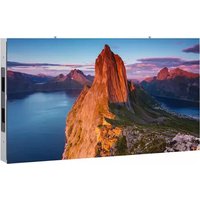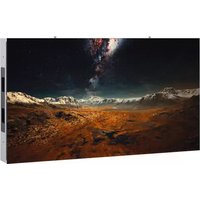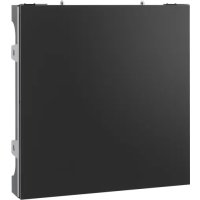
ZRDVP23EM - Monitor SONY - Free user manual and instructions
Find the device manual for free ZRDVP23EM SONY in PDF.



| Technical Specifications | SONY ZRDVP23EM monitor, Full HD resolution, 23-inch screen size, LED technology, 5 ms response time, 250 cd/mb2 brightness. |
|---|---|
| Usage | Ideal for office work, graphic design, and multimedia entertainment. |
| Maintenance and Repair | Clean the screen with a soft cloth, avoid harsh chemicals. In case of technical issues, contact SONY customer service. |
| Safety | Use the monitor on a stable surface, avoid exposure to moisture, comply with electrical standards. |
| General Information | 2-year warranty, compatibility with Windows and Mac operating systems, HDMI and VGA connectivity. |
Frequently Asked Questions - ZRDVP23EM SONY
User questions about ZRDVP23EM SONY
0 question about this device. Answer the ones you know or ask your own.
Ask a new question about this device
Download the instructions for your Monitor in PDF format for free! Find your manual ZRDVP23EM - SONY and take your electronic device back in hand. On this page are published all the documents necessary for the use of your device. ZRDVP23EM by SONY.
USER MANUAL ZRDVP23EM SONY
Operating Instructions ____ EN
Mode d'emploi FR
Tessera SX40 Processor, Tessera XD Data Distribution Unit
ZRD-VP15EM/VP23EM :
Megapixel
LED Processing Platform HELIOS, Network Switch MSM4214X/GSM4210P
text_image
Technical diagram of a mechanical device with numbered components for identification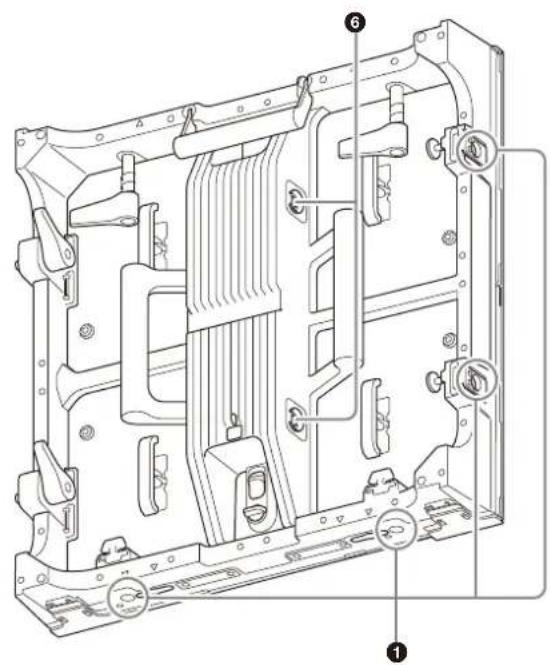
text_image
Technical diagram of a mechanical assembly with numbered components and labeled parts① キャビネットジョイント部
ディスプレイキャビネットを接続します。
text_image
Diagram showing two arrows pointing left, each with a hand placed on a surface, indicating a correct or incorrect operation.ディスプレイキャビネット
Before operating the unit, please read this manual thoroughly and retain it for future reference.
When using the product, do not use it for purposes other than those described in the instruction manual.
WARNING
To reduce the risk of fire or electric shock, do not expose this apparatus to rain or moisture. To avoid electrical shock, do not open the cabinet. Refer servicing to qualified personnel only.
WARNING
This apparatus must be earthed.
WARNING
When installing the unit, incorporate a readily accessible disconnect device in the fixed wiring. If a fault should occur during operation of the unit, operate the disconnect device to switch the power supply off.
CAUTION
For safety, do not connect the connector for peripheral device wiring that might have excessive voltage to the following port:
- Cabinet DATA connector
WARNING
-
Use the approved Power Cord (3-core mains lead) / Appliance Connector / Plug with earthing-contacts that conforms to the safety regulations of each country/region if applicable.
-
Use the Power Cord (3-core mains lead) / Appliance Connector / Plug conforming to the proper ratings (Voltage, Ampere).
If you have questions on the use of the above Power Cord / Appliance Connector / Plug, please consult a qualified service personnel.
IMPORTANT
The nameplate is located in the following location on the unit.
- Rear
For the customers in the U.S.A.
This equipment has been tested and found to comply with the limits for a Class A digital device, pursuant to part 15 of the FCC Rules. These limits are designed to provide reasonable protection against harmful interference when the equipment is operated in a commercial environment. This equipment generates, uses and can radiate radio frequency energy and, if not installed and used in accordance with the instruction manual, may cause harmful interference to radio communications. Operation of this equipment in a residential area is likely to cause harmful interference in which case the user will be required to correct the interference at his own expense.
You are cautioned that any changes or modifications not expressly approved in this manual could void your authority to operate this equipment.
All interface cables used to connect the equipment to peripherals must be shielded type to comply with EMC standard(s) and to prevent undesired operation due to radiated emissions. When cables are supplied, always use them for this purpose.
If you have any questions about this product, you may call:
Sony Customer Information Service Center 1-800-222-7669 or http://www.sony.com/
Supplier's Declaration of Conformity
Trade Name : SONY
Model : ZRD-VP15EB/ZRD-VP23EB
ZRD-VP15EM/ZRD-VP23EM
Responsible party : Sony Electronics Inc.
Address 16535 Via Esprillo, San
Diego, CA 92127 U.S.A.
Telephone Number : 858-942-2230
This device complies with part 15 of the FCC Rules. Operation is subject to the following two conditions: (1) This device may not cause harmful interference, and (2) this device must accept any interference received, including interference that may cause undesired operation.
For the customers in Canada
CAN ICES-3 (A)/NMB-3(A)
FOR CUSTOMERS IN CANADA (INCLUDING IN THE PROVINCE OF QUEBEC)
ALL INSTRUCTIONS AND STATEMENTS WHICH ARE NECESSARY FOR CANADIAN CUSTOMERS ARE PROVIDED IN ENGLISH AND FRENCH. OTHER INSTRUCTIONS AND STATEMENTS NOT PROVIDED IN ENGLISH AND FRENCH ARE NOT FOR CANADIAN CUSTOMERS (INCLUDING IN THE PROVINCE OF QUEBEC).
WARNING
Operation of this equipment in a residential environment could cause radio interference.
For the customers in Europe
This apparatus shall not be used in the residential area.

This symbol is intended to alert the user to the presence of important operating and maintenance (servicing) instructions in the literature accompanying the appliance.
This equipment is not suitable for use in locations where children are likely to be present.
For kundene i Norge
Dette utstyret kan kobles til et IT-strømfordelingssystem.
For the customers in the U.S.A.
SONY LIMITED WARRANTY - Please visit www.sony.com/psa/warrantyfor important information and complete terms and conditions of Sony's limited warranty applicable to this product.
For the customers in Canada
SONY LIMITED WARRANTY - Please visit www.sony.com/psa/warrantyfor important information and complete terms and conditions of Sony's limited warranty applicable to this product.
For the customers in Europe
Sony Europe B.V. - Standard Warranty and Exceptions on Standard Warranty. Please visit https://pro.sony/support-services/primesupport/support-professional-solutions-europe-standard-product-warranty for important information and complete terms and conditions.
For the customers in Korea
SONY LIMITED WARRANTY - Please visit https://pro.sony/ko_KR/support-services for important information and complete terms and conditions of Sony's limited warranty applicable to this product.
Table of Contents
Safety Information 17
WARNING 17
CAUTION 17
Please Read This First 18
Manual Structure 18
Condensation 18
Security 18
Burn-in 18
Defective pixels 18
Unit Protection Function 18
General Precautions 18
Precautions regarding the effect on medical devices 18
Precautions on visually induced motion sickness (VIMS) and postural instability 19
Overview ......20
System Configuration Diagram ...... 21
Parts Identification ......22
Error Codes ......23
Cleaning and Storage 23
Signal Formats 23
Specifications 24
Trademarks
Products or system names appearing in this document are trademarks or registered trademarks of their respective owners.
Further, the ^® or ^™ symbols are not used in the text.
- Reproduction or duplication, in whole or part, of the operation manual supplied with the system without the authorization of the right holder is prohibited under copyright law.
- Note that the specifications of the system are subject to change for improvement without prior notice.
Safety Information
WARNING
- For installation, be sure to consult your dealer or Sony sales contact.
When installing on a wall, ceiling, etc., read the Installation Manual and make sure that it is strong enough to withstand the weight of this product and the mounting bracket. If it is not strong enough, this product will fall and cause serious injury. Also, check that the installation is not loose once a year.
- Do not install this product in a place with excessive oily smoke, steam, moisture, or dust. Using this product in environments other than those specified in the Operating Instructions may cause a fire or electric shock.
- Do not install this product in the following places. This product may tip over or fall, resulting in injury.
- On an unsteady table
- A tilted location
- A location subject to vibration or impact Also, check the strength of the installation/mounting location thoroughly.
- Do not use any power cord that does not satisfy the power capacity or any connection cable other than the specified one. It may cause a fire or malfunction.
- When connecting the product to the AC power output terminal, be sure not to exceed the allowable value.
- Handle the AC power cord and outlet as follows in order to avoid any risk of fire, electric shock or damage and/or injuries:
- Do not modify the AC power cord.
- Do not put anything heavy on the AC power cord.
- Keep the AC power cord away from heat sources.
- Do not pull on the AC power cord itself when disconnecting the AC power cord.
- When rack-mounting, do not pinch the cord into the rails.
If the power cord is damaged, ask Sony service personnel to replace it.
- Do not use a damaged or poorly fitting AC power outlet. Insert the plug fully into the outlet. If it is loose, it may cause arcing and result in a fire.
- If a user disassembles, repairs, or alters the unit, it may cause a serious problem to the user's safety.
- If this product malfunctions or is damaged, consult with a qualified Sony personnel.
- Do not bump or apply impact to the screen. This product may tip over or fall, resulting in serious injury.
CAUTION
- Do not touch the sharp edges with your bare hands.
This product is sharp on the edges as well as on the corner of the panel surface. You may injure your hands if you touch them. This may also cause damage to this product.
- Use this product at the indicated power supply voltage. If this product is used at a power supply voltage different from that indicated on this product, it may cause a fire or electric shock.
- Do not install this product in a location with water. If water enters this product or this product gets wet, it may cause a fire or electric shock. Be careful especially when you use this product during rain or snow, on the beach or near water.
- Do not install this product in an enclosed environment.
When installed in an enclosed environment, heat may build up inside this product and may cause a fire or malfunction. For better ventilation, observe the following.
- Install this product at least 10 cm (4 inches) away from walls and floors.
- Do not squeeze this product into an enclosed, narrow space.
- Do not place this product on a long-pile rug (such as carpet, etc.).
- Do not wrap this product with cloth, etc.
- Do not lay this product on its side or turn it upside down.
For more information on installation, see the Installation Manual.
- ALWAYS route cords and cables connected to your product so they cannot be tripped over, pulled or grabbed.
- Should any liquid or solid object fall into the cabinet, unplug the unit and have it checked by qualified Sony personnel before operating it further.
- Do not touch the AC power cord and its plug with wet hands as it may cause electric shock.
- Do not let people to get on or place objects on the panel display surface. Doing so may cause damage to this product.
Please Read This First
ZRA-VP15EBSM/ZRA-VP23EBSM/ZRA-VP15EMSM/ZRA-VP23EMSM/ZRA-VP15EBSC/ZRA-VP23EBSC/ZRA-VP15EMSC/ZRA-VP23EMSC are the spare part kits of the Display Cabinet.
ZRA-1ESK is a setup kit for installing the display. For details regarding the acquisition of these kits, consult a Sony sales contact.
Manual Structure
This product includes the following manuals to be used according to the situation.
Installation Manual
This includes information on important safety precautions, parts identification, specifications, etc. Refer to this manual when changing equipment settings or performing readjustments after installation as well.
Operating Instructions (this document)
This includes information on important safety precautions, parts identification, specifications, etc. Refer to this manual when performing general operations.
Service Manual
This is intended for use by service personnel and includes information on diagnosing malfunctions and instructions on repair.
Condensation
If the unit is suddenly taken from a cold to a warm location, or if ambient temperature suddenly rises, moisture may form on the outer surface of the unit and/or inside of the unit. This is known as condensation. If condensation occurs, turn off the unit and wait until the condensation clears before operating the unit. Operating the unit while condensation is present may damage the unit.
Security
- SONY WILL NOT BE LIABLE FOR DAMAGES OF ANY KIND RESULTING FROM A FAILURE TO IMPLEMENT PROPER SECURITY MEASURES ON TRANSMISSION DEVICES, UNAVOIDABLE DATA LEAKS RESULTING FROM TRANSMISSION SPECIFICATIONS, OR SECURITY PROBLEMS OF ANY KIND.
- Depending on the operating environment, unauthorized third parties on the network may be able to access the unit. When connecting the
unit to the network, be sure to confirm that the network is protected securely.
Burn-in
Permanent burn-in may occur if a still image is displayed for a prolonged period of time. Playing a video with moving images may reduce the severity of burn-in once it occurs, but it will not remove the burn-in completely.
Defective pixels
Thus a very small proportion of pixels may be "stuck," either always off (black), always on (red, green, or blue), or flashing. In addition, such "stuck" pixels may appear spontaneously over a long period of use due to the physical characteristics of the organic light-emitting diodes. Such occurrences do not indicate a malfunction.
Unit Protection Function
When the unit reaches an abnormally high temperature depending on the installing environment, the function which turns off the video display to protect the unit may operate. For details regarding the installation environment which prevents abnormally high temperatures, consult a Sony service personnel.
General Precautions
- Avoid getting the product wet. In the event of accidental contact with liquids, do not turn on the power, and contact a service representative.
- If an error or malfunction occurs or if foreign matter enters the interior of the product, turn off the power and discontinue use, and contact a service representative.
- Do not subject the front panel of the Display Cabinets to damage or shocks.
- Request cleaning and maintenance periodically from a service representative.
Precautions regarding the effect on medical devices
The display cabinet uses strong magnets. There are areas where the magnetic flux density is likely to be 300 mT or more on the surface that is touched during installation or maintenance work.
This may seriously affect medical devices such as defibrillators, pacemakers, and programmable shunt valves for hydrocephalus treatment.
Keep users of these medical devices away from areas where installation and maintenance work is being performed or where display cabinets are stored.
There is also magnetic flux leakage from the viewing surface, which may affect users of these medical devices when they approach the display cabinet.
Take measures such as posting warning signs depending on the installation conditions. Be sure to inform the contractor who undertakes the installation or maintenance work about these effects.
Precautions on visually induced motion sickness (VIMS) and postural instability
Depending on the displayed content, display size, and viewing location (distance), a viewer may experience VIMS symptoms such as postural instability or nausea.
The symptoms of VIMS may be severer after some time rather than during or immediately after viewing. Take measures such as posting warning signs.
Furthermore, the movement in one direction in a wide part of the image may induce postural instability. Pay close attention to the displayed contents and installation location (direction) when installing the product in a position where it can be seen from stairs, escalators, landings, or other places that are considered dangerous when posture is unstable.
Notes
- Always verify that the unit is operating properly before use. SONY WILL NOT BE LIABLE FOR DAMAGES OF ANY KIND INCLUDING, BUT NOT LIMITED TO, COMPENSATION OR REIMBURSEMENT ON ACCOUNT OF THE LOSS OF PRESENT OR PROSPECTIVE PROFITS DUE TO FAILURE OF THIS UNIT, EITHER DURING THE WARRANTY PERIOD OR AFTER EXPIRATION OF THE WARRANTY, OR FOR ANY OTHER REASON WHATSOEVER.
- SONY WILL NOT BE LIABLE FOR CLAIMS OF ANY KIND MADE BY USERS OF THIS UNIT OR MADE BY THIRD PARTIES.
- SONY WILL NOT BE LIABLE FOR THE TERMINATION OR DISCONTINUATION OF ANY SERVICES RELATED TO THIS UNIT THAT MAY RESULT DUE TO CIRCUMSTANCES OF ANY KIND.
Overview
Connect cabinets to make a display cabinet screen according to the installation location and purpose, and video contents input in the Display Controller are output to the Display Cabinet by converting the signal.
Depending on the products, the Display Controller differs. Use the following products.
ZRD-VP15EB/VP23EB:
Brompton Technology
Tessera SX40 Processor, Tessera XD Data Distribution Unit
ZRD-VP15EM/VP23EM:
Megapixel
LED Processing Platform HELIOS, Network Switch MSM4214X/GSM4210P
Daisy-chain connections can be configured between Display Cabinets using a power cord (not supplied) and an ethernet cable (not supplied). For the controller's maximum controllable connection numbers, the controller's control method and the used ethernet cable's specification, refer to the operating instructions of the display controller system you will be using.
Caution
- Use the Display Controller with the calibration setting enabled.
When used with calibration disabled, image quality may be affected due to changes or unevenness in color.
- Connect only the DATA connector of the corresponding display controller system and cabinet to the unit's DATA connector.
System Configuration Diagram
Configuration example of the entire system
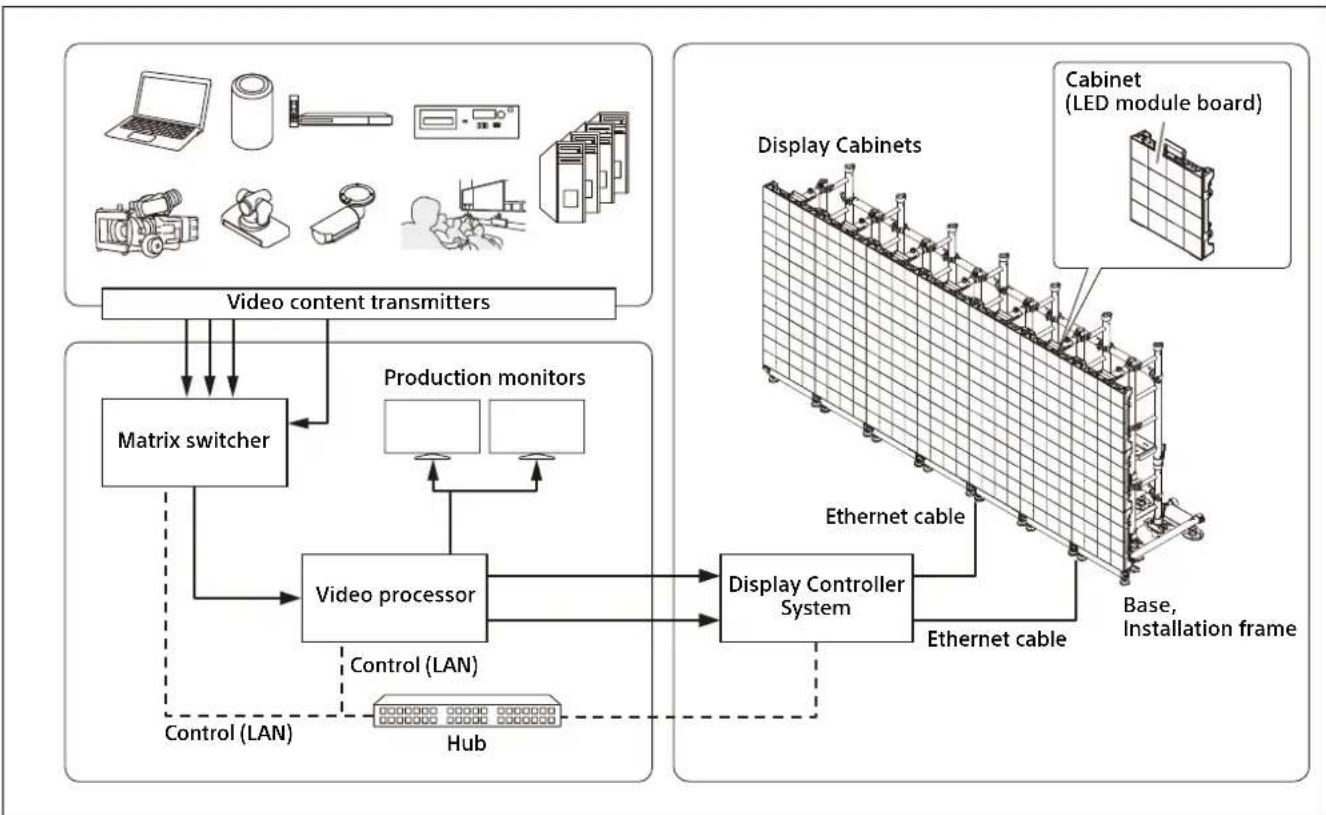
flowchart
graph TD
    A["Video content transmitters"] --> B["Matrix switcher"]
    B --> C["Video processor"]
    C --> D["Display Controller System"]
    D --> E["Cabinet (LED module board)"]
    D --> F["Ethernet cable"]
    F --> G["Base, Installation frame"]
    D --> H["Ethernet cable"]
    H --> I["Control (LAN)"]
    I --> J["Hub"]
    J --> C
    K["Production monitors"] --> B
    L["Control (LAN)"] --> C
Parts Identification
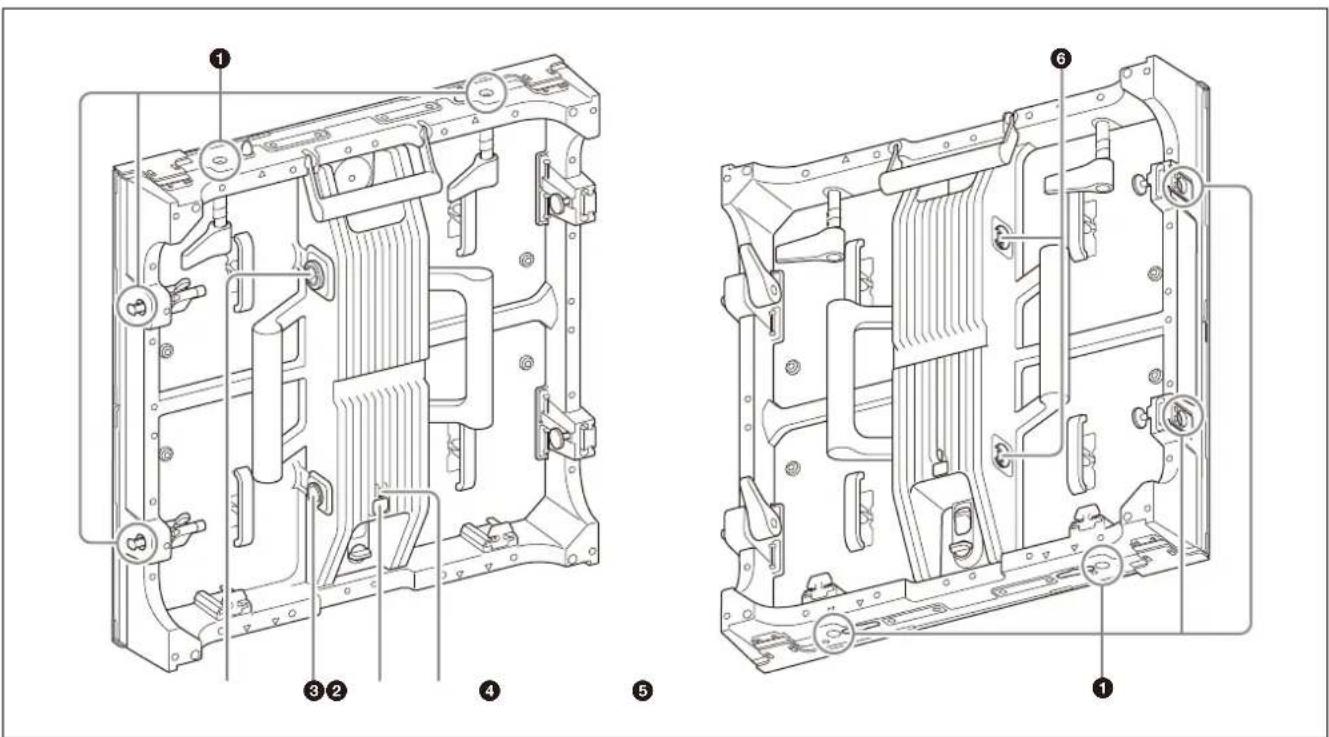
Left/Right
text_image
Technical diagram of a mechanical assembly with numbered components for identification① Cabinet joints
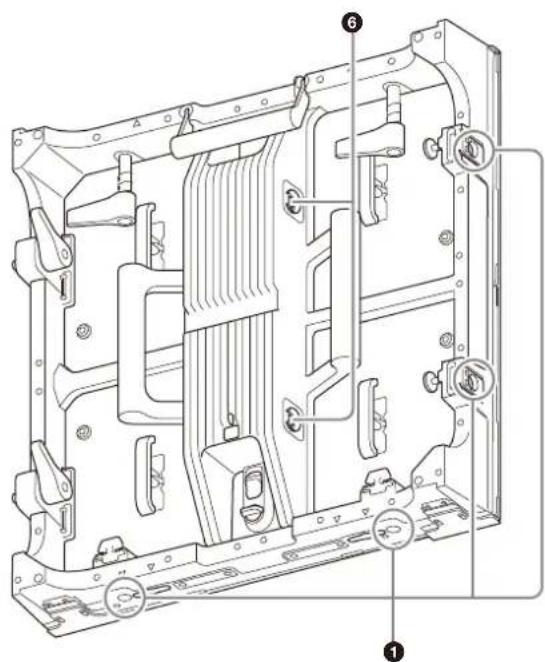
Connect to other Display Cabinets. There are two cabinet joints on the right side, left side, top and bottom.
② RVR OUT (AC power output) connector
Use a power cord for connecting between the cabinets*1 (not supplied) to connect this connector to the PWR IN (AC power input) connector on the succeeding Display Cabinet in the daisy-chain connection.
This connector is not used for the last Display Cabinet in the daisy-chain connection.
③ PWR IN (AC power input) connector
Use a power cord for connecting between the cabinets*1 (not supplied) to connect this connector to the PWR OUT (AC power output) connector on the preceding Display Cabinet in the daisy-chain connection.
For the first Display Cabinet in the daisy-chain connection, use a power cord for connecting between the power and the cabinet ^2 (not supplied) to connect this connector to the circuit breaker.
4 TET switch
By using the switch, the test pattern can be displayed without connecting the controller.
| Operation Description |
| Press and hold Normal mode: Goes into test pattern mode.Test pattern mode: Goes into normal mode. |
| Press Normal mode: No changesTest pattern mode: Changes the test pattern. |
5 STATUS indicator
Indicates the system status of the Display Cabinet.
| Status ZRD-VP15EB | ZRD-VP23EB | ZRD-VP15EM ZRD-VP23EM |
| The Display Cabinet is turned off | Off Off | |
| The system is in the startup state | Lit red | Lit white →Lit magenta →Lit yellow →Returns to lit white |
| Error status Blinking red Blinking red | ||
| Warning status Blinking yellow – | ||
| Normal status (Ethernet not connected) | Lit green Lit green | |
| Normal status (Ethernet connection OK, controller not connected, cabinet connection OK) | Blinking blue(1 blink at a time: 1 port connection,2 blinks at a time: 2 port connection) | Blinking blue(1 blink at a time: 1 port connection,2 blinks at a time: 2 port connection) |
| Normal status (Ethernet connection OK, controller connection OK) | Lit blue Lit blue | |
| Normal status (Test pattern mode) | Lit yellow Lit yellow | |
| Safe mode – Lit cyan | ||
6 DATA connector
Use an ethernet cable ^3 (not supplied) to connect this connector to the DATA connector on the succeeding Display Cabinet in the daisy-chain connection. For the first Display Cabinet in the daisy-chain connection, use an ethernet cable ^3 (not supplied) to connect this connector to the OUTPUT connector on the display controller system you are using.
*1 Use the power cord with NEUTRIK's inlet connector and outlet connector.
*2 Use the plug for AC power connection and the power cord with NEUTRIK's inlet connector.
*3 The cable with NEUTRIK connector can be used. However, the cable specification differs depending on the Display Controller you are using. Confirm the Display Controller's specification.
Error Codes
Check the specifications of the corresponding display controller system.
Cleaning and Storage
Caution
Do not wet the surface of the Display Cabinets.
Daily cleaning
To clean the surface of the Display Cabinet, moisten the recommended cloth ^1 with ethyl alcohol (near 100%) and wipe gently ^2 ^*3 .
*1 Recommended cloth: savina MX wiping cloth, KB Seiren Co.
*2 Wipe the cabinet horizontally by moving the cloth in one direction.
*3 If residue remains, wipe it off using the unused side of the cloth.
Wipe horizontally in one direction
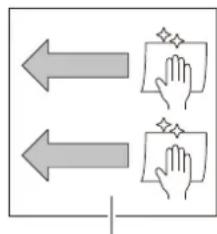
flowchart
graph TD
    A["Left Arrow"] --> B["Grid Icon"]
    C["Right Arrow"] --> D["Grid Icon"]
Display Cabinet
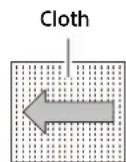
When you wipe with the cloth texture in a vertical direction, it is easier to wipe off stains.
Storage (for transportation)
- Make sure the Display Cabinets are completely dry before packing them.
- Store the Display Cabinets in dry, well-ventilated environments.
Signal Formats
The signal format conforms to the specifications of the corresponding controller.
Specifications
Resolution ZRD-VP15EB/ZRD-VP15EM:
H 320 dots × V 320 dots
ZRD-VP23EB/ZRD-VP23EM:
H 216 dots × V 216 dots
LED pixel pitch ZRD-VP15EB/ZRD-VP15EM:
1.5 mm ( ^1/_16 inches)
ZRD-VP23EB/ZRD-VP23EM:
2.3 mm ( ^3/_32 inches)
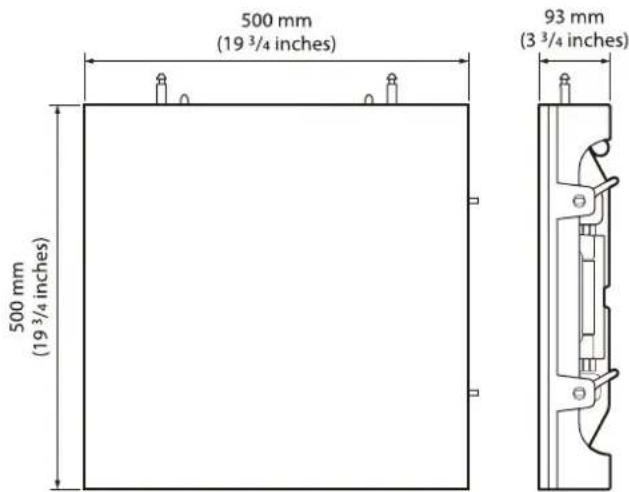
Dimensions 500 × 500 × 93 mm
(19^3/4× 19^3/4× 3^3/_4 inches) (W/
H/D)
text_image
500 mm (19 3/4 inches) 500 mm (19 3/4 inches) 93 mm (3 3/4 inches)Mass Approx. 10.1 kg (22 lb. 4.3 oz.)
Input/Output PWR IN (AC power input)
connector (1)
PWR OUT (AC power output)
connector (1)
DATA connector (2)
Power Input: AC 100 V to 240 V,
50/60 Hz, 11.9 A
Output: AC 100 V to 240 V,
50/60 Hz, 10.2 A
Operating conditions
Temperature 0 °C to 45 °C (32 °F to 113 °F)
Humidity 20% to 80% (no condensation)
Storage and transport conditions
Temperature -20 °C to +60 °C (-4 °F to +140 °F)
Humidity 20% to 80% (no condensation)
Accessories supplied
Operating Instructions (1)
Film spacer (16)
Design and specifications are subject to change without notice.
Français
Tessera SX40 Processor, Tessera XD Data Distribution Unit
ZRD-VP15EM/VP23EM :
Megapixel
LED Processing Platform HELIOS, Network Switch MSM4214X/GSM4210P
text_image
Technical diagram of a mechanical device with numbered components for identification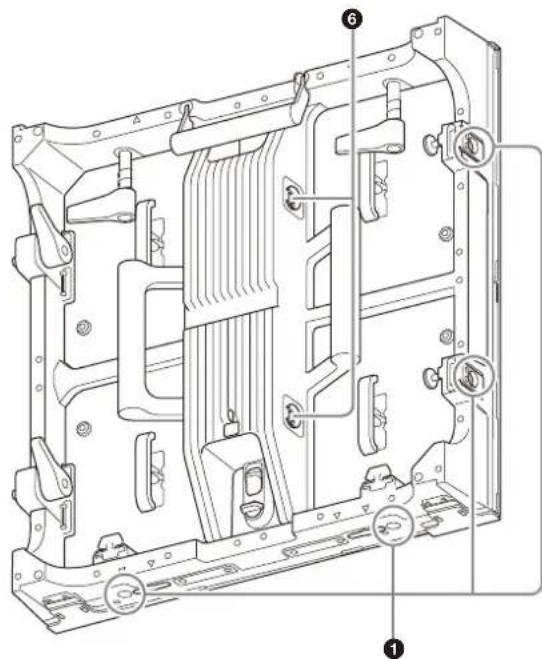
text_image
Technical diagram of a mechanical assembly with numbered components and labeled partsflowchart
graph TD
    A["Input Arrow 1"] --> B["Hand Icon 1"]
    C["Input Arrow 2"] --> D["Hand Icon 2"]
Panneau d'affichage
Tessera SX40 Processor, Tessera XD Data Distribution Unit
ZRD-VP15EM/VP23EM:
Megapixel
LED Processing Platform HELIOS, Network Switch MSM4214X/GSM4210P
text_image
Technical diagram of a mechanical device with numbered components for identification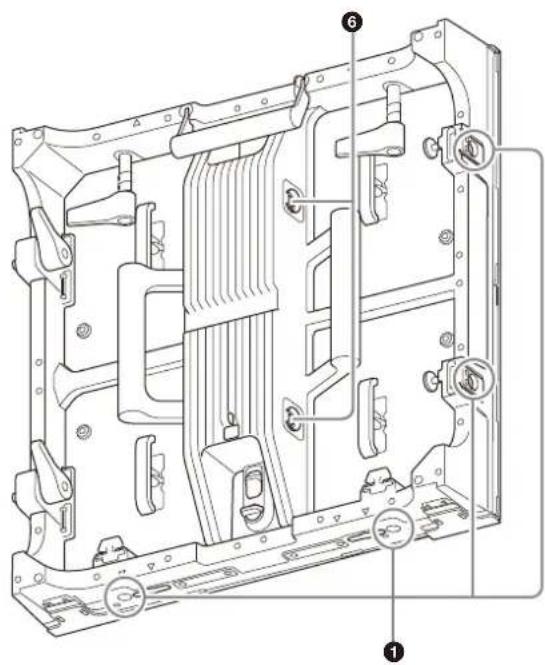
text_image
Technical diagram of a mechanical assembly with numbered components and labeled parts① Uniones de cajas
text_image
Display CabinetTessera SX40 Processor, Tessera XD Data Distribution Unit
ZRD-VP15EM/VP23EM:
Megapixel
LED Processing Platform HELIOS, Network Switch MSM4214X/GSM4210P
text_image
Technical diagram of a mechanical assembly with numbered components for identification① Montagestellen
Tessera SX40 Processor, Tessera XD Data Distribution Unit
ZRD-VP15EM/VP23EM:
Megapixel
LED Processing Platform HELIOS, Network Switch MSM4214X/GSM4210P
text_image
Technical diagram of a mechanical assembly with numbered parts for identificationflowchart
graph TD
    A["Left Arrow"] --> B["Grid Icon"]
    C["Right Arrow"] --> D["Grid Icon"]
Cabinet del display
Tessera SX40 Processor, Tessera XD Data Distribution Unit
ZRD-VP15EM/VP23EM:
Megapixel
LED Processing Platform HELIOS, Network Switch MSM4214X/GSM4210P
text_image
Technical diagram of a mechanical device with numbered components for identification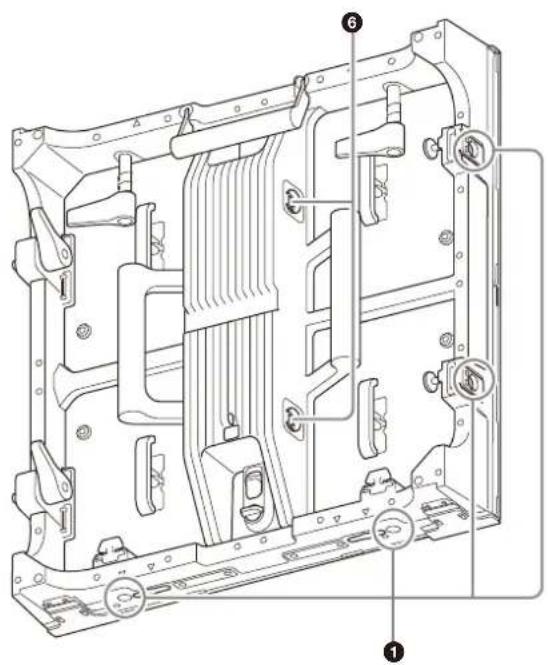
text_image
Technical diagram of a mechanical assembly with numbered components and labeled parts① 顯示櫃接頭
連接到其他顯示櫃。
右側、左側、頂部和底部各有兩個櫃接頭。
Tessera SX40 Processor, Tessera XD Data Distribution Unit
ZRD-VP15EM/VP23EM:
Megapixel
LED Processing Platform HELIOS, Network Switch MSM4214X/GSM4210P
text_image
Technical diagram of a mechanical device with numbered components for identification