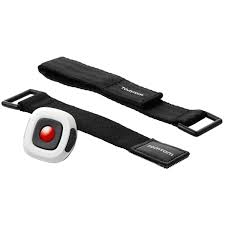
REMOTE CONTROL - Remote control TOMTOM - Free user manual and instructions
Find the device manual for free REMOTE CONTROL TOMTOM in PDF.

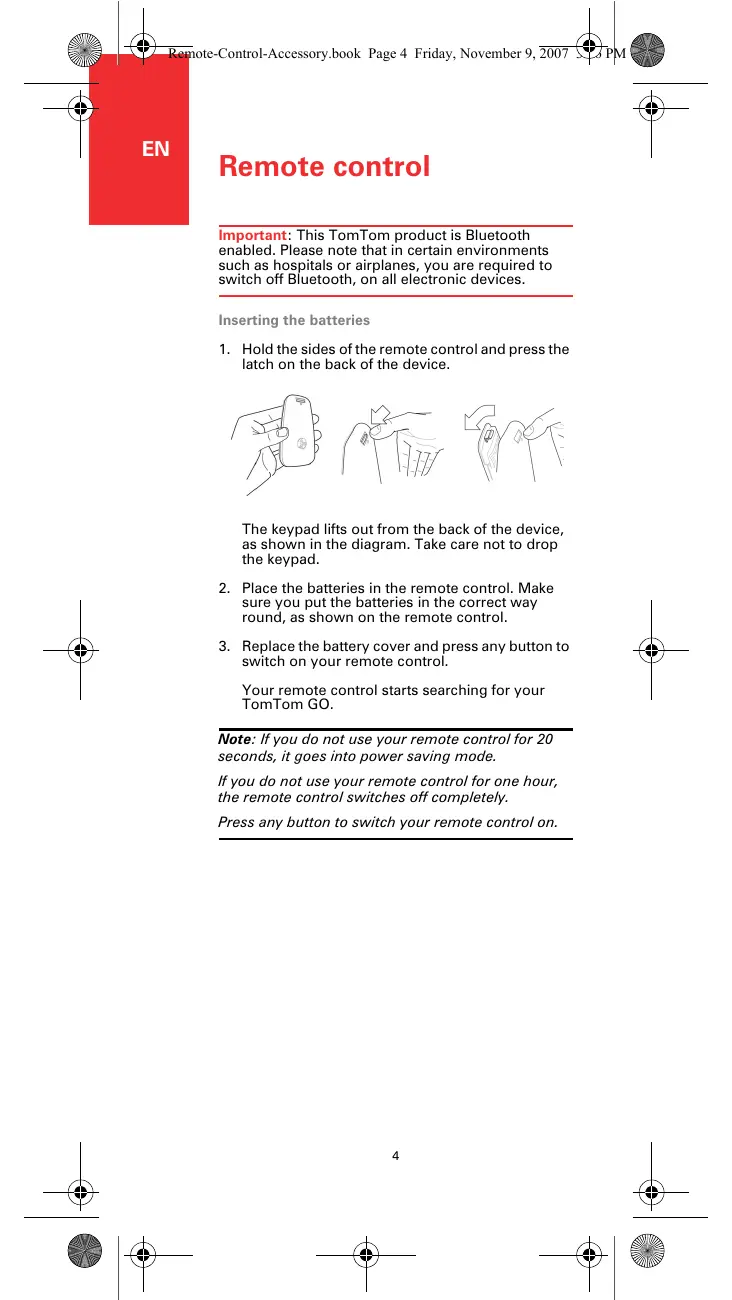


| Product type | Remote control |
| Brand | TomTom |
| Model | REMOTE CONTROL |
| Connectivity | Bluetooth |
| Power source | 2 AAA batteries (not included) |
| Standby time | Power saving mode after 20 seconds |
| Auto shut-off | After 1 hour of inactivity |
| Flashing blue light | Searching for connection |
| Steady blue light | Connection established |
| Red light | Low battery |
| Arrow buttons | Menu navigation |
| Up/down arrow buttons | Zoom in/out on the map |
| Left/right arrow buttons | Previous/next song |
| Select button | Opens main menu, selection |
| Function buttons | Left, middle, right |
| Middle button | Play/Pause music |
| Volume buttons | Increase/decrease |
| Warranty | 1 year |
| Standards | CE, WEEE |
| Maintenance | Clean with a dry cloth |
| Precautions | Disable Bluetooth in hospitals and on airplanes |
Frequently Asked Questions - REMOTE CONTROL TOMTOM
User questions about REMOTE CONTROL TOMTOM
0 question about this device. Answer the ones you know or ask your own.
Ask a new question about this device
Download the instructions for your Remote control in PDF format for free! Find your manual REMOTE CONTROL - TOMTOM and take your electronic device back in hand. On this page are published all the documents necessary for the use of your device. REMOTE CONTROL by TOMTOM.
USER MANUAL REMOTE CONTROL TOMTOM
TomTom Remote Control
EN English 4
DE Deutsch 8
FR Frangçais 12
NL Netherlands 16
IT Italiano 20
ES Espanol 24
DA Dansk 28
SV Svenska 32
Addendum 36
Remote control
Important: This TomTom product is Bluetooth enabled. Please note that in certain environments such as hospitals or airplanes, you are required to switch off Bluetooth, on all electronic devices.
Inserting the batteries
- Hold the sides of the remote control and press the latch on the back of the device.
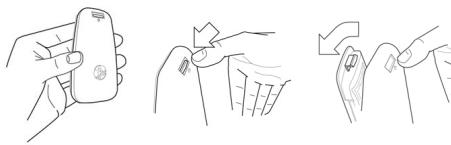
The keypad lifts out from the back of the device, as shown in the diagram. Take care not to drop the keypad.
- Place the batteries in the remote control. Make sure you put the batteries in the correct way round, as shown on the remote control.
- Replace the battery cover and press any button to switch on your remote control.
Your remote control starts searching for your TomTom GO.
Note: If you do not use your remote control for 20 seconds, it goes into power saving mode.
If you do not use your remote control for one hour, the remote control switches off completely.
Press any button to switch your remote control on.
Establishing a connection
Before your remote control can communicate with your TomTom GO, you need to establish a Bluetooth connection between your remote control and your GO. This Bluetooth process is also known as 'pairing'.
The first time you switch on your remote control, it tries to establish a connection with the nearest GO.
To establish a connection, do the following:
- Switch on your TomTom GO and tap Bluetooth preferences in the Preferences menu.

Bluetooth preferences
Note: This button may only be available if all menu options are shown. To show all menu options, tap Show ALL menu options in the Preferences Menu.
- Tap Enable Bluetooth.
- Press any button on your remote control to switch it on.
Your remote control communicates with your GO and you are asked if you want to accept the connection.
- Tap Yes to accept the connection.
The next time you use your remote control, it looks for your GO. If your GO is switched off or is not within range, the remote control searches for another GO.
Lights
| No light - your remote control is switched off or in power saving mode. |
| Flashing blue light - your remote control is searching for your GO. |
| Solid blue light - your remote control is connected to your GO. |
| Red light - battery power is low. Replace the batteries as soon as possible. |
Remote control
Buttons
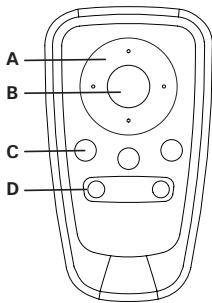
Arrow buttons:
- Move the cursor in menus.
- Up and down buttons: zoom in and out on the map.
- Left and right buttons: go to the previous and next song.
Select button:
- Opens the Main Menu.
- Selects a menu button.
- Selects an item in a list, such as a list of POIs.
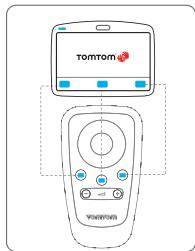
Soft buttons:
- Select the left, middle and right buttons in menus.
- The middle button plays and pauses tracks when playing music.
- Select the bottom left and right areas of the screen in the Driving View.
Volume controls:
- Turn the volume up and down.
Limited warranty
WARRANTOR
Non-U.S. and non-Canadian purchases: If you have made your purchase outside the United States and Canada, this Limited Warranty is granted by and this Limitation of Liability is stipulated for the Benefit of Tom'om International Inc., V., Rembrandtplein 35, 1017 CT Amsterdam (The Netherlands).
WHAT THIS WARRANTY COVERS
1) TomTom International B.V. ("TomTom") warrants to you that the Hardware will be free from defects in workmanship and materials under normal use ("Defects") for a period of one (1) year from the date that the Warranty Period is over. The Warranty Period will be replaced by the Warranty Period. The Warranty Period the Hardware will be repaired or replaced at TomTom's choice ("Limited Warranty") without charge to you for either parts or labour. This Limited Warranty covers the replacement of the Hardware only. If the Hardware is repaired after the Warranty Period has expired, the remaining Warranty Period for the repair will expire six (6) months after the date of repair.
WHAT THIS WARRANTY DOES NOT COVER
2) The Limited Warranty does not apply to normal wear and tear, does not apply when the Hardware is opened or repaired by someone not authorized to repair the Hardware. This is because of any Hardware or part thereof damaged by: misuse, moisture, liquids, proximity or exposure to heat and accident, abuse, non-compliance with the instructions supplied with the Hardware, neglect or misapplication. The Limited Warranty does not cover any software that may accompany or be installed on the Hardware. The Limited Warranty does not cover installation, removal or maintenance of the Hardware or any costs related herewith.
HOW TO MAKE A WARRANTY CLAIM
3) In order to make a claim of a Defect, you must contact TomTom by email during the Warranty Period via www.tomtom.com to explain the Defect and to obtain an RMA number (Return Materials Authorization) if necessary. You must return the Hardware during the Warranty Period, along with an explanation of the Defect, to the address provided to you by TomTom. If a defect arises and a valid claim under this Limited Warranty is received by TomTom after the first one hundred and eighty (180) days of warranty, you will be charged you for any reasonable shipping and handling costs made in connection with the repair or replacement of the Hardware. You must comply with any other return procedures stipulated by TomTom, if any.
YOUR LEGAL RIGHTS
4) Some countries may not allow the exclusion or limitation of damages, if any part of this Limited Warranty is held to be invalid or unenforceable, the remainder of the Limited Warranty shall nonetheless remain in full force until such provision is met.
5) This Limited Warranty is the only express warranty made to you and is provided in lieu of any other express warranties or similar obligations (if any) created by any advertising, documentation, packaging, or other means of any kind.
6) Except for the Limited Warranty and to the maximum extent permitted by applicable law, TomTom and its suppliers provide the Hardware "AS IS AND WITH ALL FAULTS", and hereby disclaim all other warranties and conditions, whether express, implied or statutory, including, but not limited to, any (if any) implied warranties, duties or conditions on factory or customer's responsibility for products or services, or liabilities or obligations of accuracy or completeness of responses, of results, of workmanlike effort, of lack of viruses, and of reasonable care and skill, all with regard to the Hardware, and the provision of or failure to provide support or other services, information, software, and related content through the Hardware. This is an express condition of the contract, and the use of a warranty or condition of quiet enjoyment, quiet possession, or noninfringement with regard to the Hardware. This exclusion does not apply to (i) any implied condition as to title and (ii) any implied warranty as to
7) This Limited Warranty does not affect any legal rights under applicable laws, regulations, or conditions of law (including the right to use and repair parts). 8) This Limited Warranty cannot be transferred to any other person.
LIMITATION OF LIABILITY
9) Neither TomTom nor its suppliers shall be liable to you or to any third party for any damages either direct, indirect, incidental, consequential or otherwise (including in each case, but not limited to, damages for the inability to use the equipment or access data, loss of data, loss of business, loss of profits, business interruption or the like) arising out of the use of or arising from the use of any equipment or data even if TomTom has been advised of the possibility of such damages.
10) Notwithstanding any damages that you might incur for any reason, whatsoever (including, without limitation, all damages referenced herein and all direct or general damages in contract or anything else), the entire liability of the parties shall be limited to the amount actually paid by you for the Hardware.
11). TomTom shall not be liable for (i) any fraud on the part of its employees and/or agents; or (ii) any fraudulent misrepresentation on the part of its employees.
12) Notwithstanding the above, neither party's liability for death or personal injury resulting from its own negligence shall be limited.
Fernbedienung
Note: Anything that is not a public service, such as the above, should be considered to be of interest.
Fjernbetjeningen beynder at soge after TomTom GO.
HVAD DAEKKER GARANTIEN?
1) TomTom International B.V. ("Tom om") guarantor, at各家 hardware er in for matieres, og fabrikationstel ved nomal anvendese (Defleker) i e 2005-03764980000000000000000000000000000000000000000000000
"Garantiperiode". I. Iabel etGarantiperioden vill de nenehware blve repareterel er udskifetfter TomToms valg "Begranset garanti", uden omkstinracter for dig tlleideere arerbeidskraft.Denne begransede gerante daekker kun udskifting of hardwaren.Hvis denne hawder. I. Iabel etGarantiperioden vill garantiperioden for denne reparation udlobe ses (6) maneder after dateon to den uflre terpacte. HVAD DFEKKER GARANTIEN IKKE?
This device complies with part 15 of the FCC Rules. Operation is subject to the following two conditions: (1) This device may not cause harmful interference, and (2) this device must accept any interference received, including interference that may cause undesired operation.
This device has been tested and found to comply with the limits for a Class B digital device, pursuant to Part 15 of the FCC Rules. These limits are designed to provide reasonable protection against harmful interference in a residential installation. This equipment generates, uses and can radiated radio frequency energy and, if not installed and used in accordance with the instructions, may cause harmful interference to radio communications. However, there is no guarantee that interference will not occur in a particular installation. If this equipment does cause harmful interference to radio or television reception, which can be determined by turning the equipment off and on, the user is encouraged to try to correct the interference by one or more of the following measures:
Reorient or relocate the receiving antenna.
- Increase the separation between the equipment and receiver.
- Connect the equipment into an outlet on a circuit different from that to which the receiver is connected.
- Consult the dealer or an experienced radio/TV technician for help.
Changes or modifications not expressly approved by the party responsible for compliance could void the user's authority to operate the equipment.
IC Regulations
Operation is subject to the following two conditions:
- This device may not cause harmful interference, and
- This device must accept any interference received, including interference that may cause undesired operation of the device.
FCC ID: HFS-ASTOM2
IC ID: 1787B-ASTOM2
Responsible party in North America
TomTom, Inc., 150 Baker Avenue Extension, Concord, MA 01742
Tel: (866 486-6866) option 1 (1-866-4-TomTom)
Exposure to Radio Frequency Radiation
To comply with RF exposure requirements please maintain a separation distance of at least 20~cm / 7 inches from any part of the product.
Emissions information for Canada
This Class B digital apparatus complies with Canadian ICES-003.
This equipment complies with the requirements for CE marking when used in a residential, commercial, vehicular or light industrial environment.
WEEE Directive

This symbol on the product or its packaging indicates that this product shall not be treated as household waste. In line with EU Directive 2002/96/EC for waste electrical and electronic equipment (WEEE), this
electrical product must not be disposed of as assorted municipal waste. Please dispose of this product by returning it to the point of sale or to your local municipal collection point for recycling.
Great care was taken in preparing this manual. Constant product development may mean that some information is not entirely up-to-date. The information in this document is subject to change without notice.
TomTom shall not be liable for technical or editorial errors or omissions contained herein; nor for incidental or consequential damages resulting from the performance or use of this material. This document contains information protected by copyright. No part of this document may be photocopied or reproduced in any form without prior written consent from TomTom International B.V.
Part numbers
TomTom Remote Control: 9M00.002
Copyright notices
© 2007 TomTom International B.V., The Netherlands.
Patents Pending. All rights reserved.
TomTom and the TomTom logo are registered trademarks of TomTom International B.V., The Netherlands. All other trademarks are the property of their respective owners.
Our end user license agreement and a limited warranty apply to this product; they are included in this package. You can also review both at www.TomTom.com/legal