Soundcore Life Tune Pro - Earphones Anker - Free user manual and instructions
Find the device manual for free Soundcore Life Tune Pro Anker in PDF.



| Product Type | True Wireless Earbuds |
| Brand | Anker |
| Model | Soundcore Life Tune Pro |
| Bluetooth Version | 5.0 |
| Supported Audio Codecs | SBC, AAC, aptX |
| Earbud Battery Life | 8 hours |
| Total Battery Life with Case | 32 hours |
| Charging Time | 1.5 hours |
| Battery Capacity (Earbuds) | 65 mAh each |
| Battery Capacity (Case) | 500 mAh |
| Charging Input | 5V, 500mA |
| Impedance | 8 Ω |
| Frequency Response | 20 Hz - 20 kHz |
| Speaker Type | Dynamic and Balanced Armature |
| Bluetooth Range | 10 meters |
| Main Features | Customization via SoundCore app, HearID, equalizer, firmware updates, touch controls |
| Included Accessories | USB-C cable, ear tips and ear wings of different sizes |
Frequently Asked Questions - Soundcore Life Tune Pro Anker
User questions about Soundcore Life Tune Pro Anker
0 question about this device. Answer the ones you know or ask your own.
Ask a new question about this device
Download the instructions for your Earphones in PDF format for free! Find your manual Soundcore Life Tune Pro - Anker and take your electronic device back in hand. On this page are published all the documents necessary for the use of your device. Soundcore Life Tune Pro by Anker.
USER MANUAL Soundcore Life Tune Pro Anker
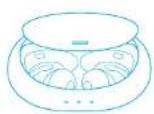
- Slide to open or close the charging case to activate the LED battery indicator.
Fully charge both the earbuds and the charging case before the first-time using.
To preserve battery lifespan, fully charge at least once every 45 days
To prevent damage, use the provided USB-C cable.
You can charge the charging case by using a certified wireless charger (not provided).
Fully dry off the earbuds and the USB port before charging.

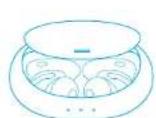
Powering On/Off
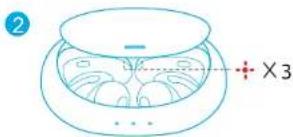
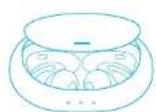
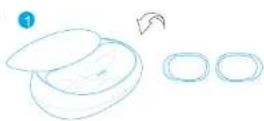
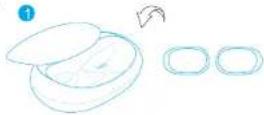
Slide to open the charging case, the earbuds will automatically power on.
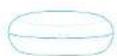
Place the earbuds back into the charging case and close the case, the earbuds will
automatically p
ON
OFF
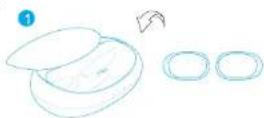
2
LED behavior (Earbuds)
ON Steadwhite for 1 second
OFF Steady red for 1 second

- To manually power on, press and hold the multi-function button on either one of earbuds for 1 second.
To manually power off, press and hold the multi-function button on either one of earbuds for 5 seconds.
Pairing
True Wireless Stereo Connection
Slide to open the charging case, the earbuds will automatically power on. The right earbud will automatically connect with the left earbud.
LED behavior (Earbuds)

Breathing white TWS connecting

Steady white for 1 second TWS connected

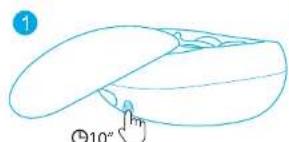
When powered off, press and hold the multi-function button on both earbuds for 10 seconds, the earbuds will enter TWS connecting mode.
- When powered on and connected, place either one of the earbuds into the charging case and close the case, you can keep using the other one.
- When powered on and connected, if either one of the earbuds is out of battery and powered off, you can keep using the other one.
- When you are on a call, place either one of the earbuds into the charging case, the microphone in the other earbud will be activated.
Bluetooth Pairing with your Device
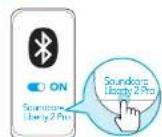
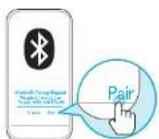
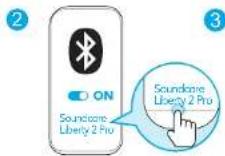
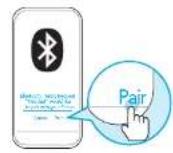
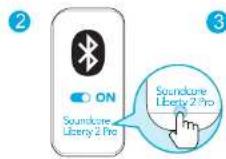
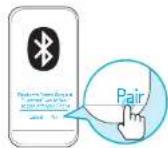
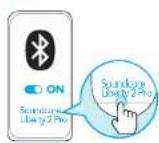
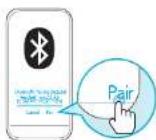
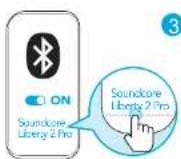
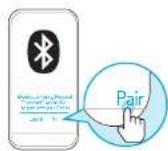
The earbuds will enter pairing mode when powered on. You are requested to confirm the connection when you see a pop-up.

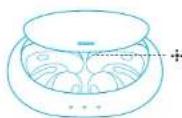

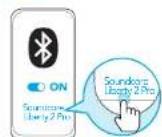

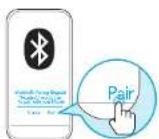
LED behavior (Earbuds)

Flashing white Bluetooth pairing

Steady white for 1 second Bluetooth connected

In the pairing process, some devices are incompatible with Qualcomm True Wireless Primary-Secondary dual pairing names, it may notice "connection unsuccessful" when you tap "Fair" or even no screen popped up. Don't worry and it will not influence the using
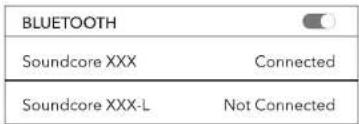
- Once successfully paired, the primary earbud connects with your device and transfers signal to the secondary earbud, the latter one will not connect with your device. As a result, in the Bluetooth pairing list on your device, it may indicate that only one side is connected while the other side is not.
| BLUETOOTH | |
| Soundcore XXX | Connected |
| Soundcore XXX-L | Not Connected |
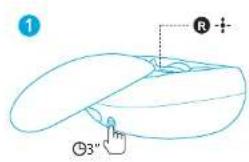
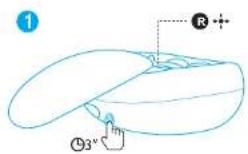
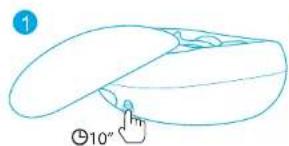
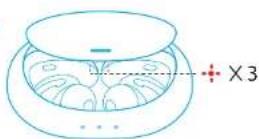
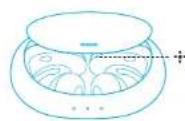
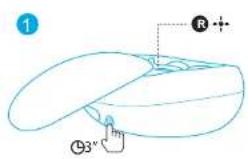
To pair with another Bluetooth device, place the earbuds back into the charging case and make sure they are being charged, keep the case cover open, then press and hold the button on the charging case for 3 seconds. The LED indicator on the right earbud will flash rapidly.
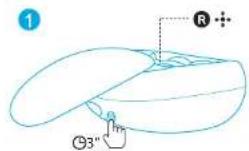
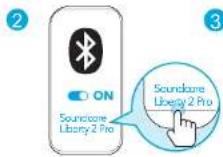
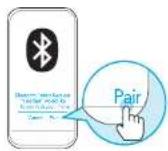

Each time you power on your Soundcore earphones, it will automatically connect to your last successfully connected device if available within the Bluetooth range.
- Mono mode: When Bluetooth connected, you can use either one of the earbuds only by putting the other one back into the charging case and closing the cover.
Wearing
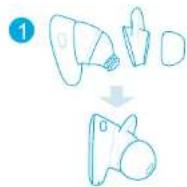
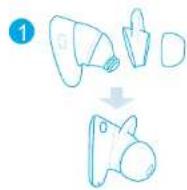
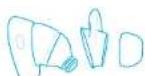
- Choose the ear tips and ear wings that fit your ears the best.
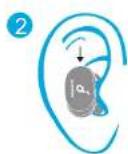
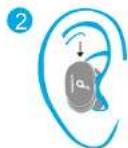
- Insert the earbuds into the inner canal of your ears.
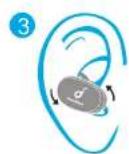
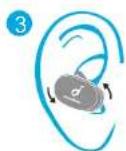
- Turn and find the most comfortable position.
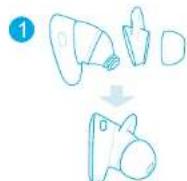
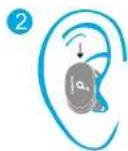
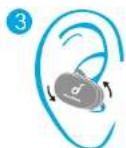
Controls
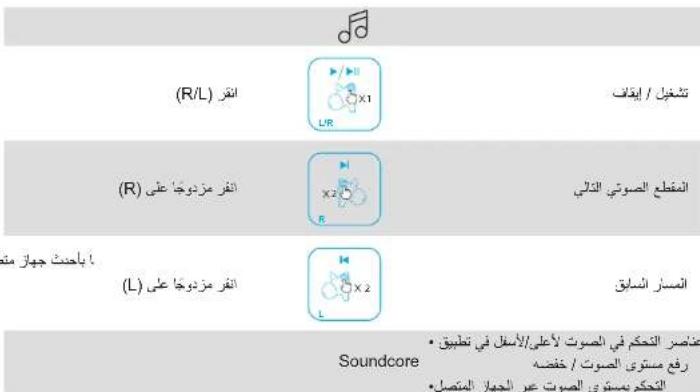
All of the controls in stereo mode can be customized in the Soundcore App.
| Play / Pause | Press (R/L) | |
| Next track | Press twice (R) | |
| Previous track | Press twice (L) | |
| Volume up / down | The volume up / down controls can be customized in Soundcore App Control volume via the connected device | |
| Answer / End a call | Press (R/L) |
| Reject a call | Press and hold for 1 second (R/L) |
| Activate Siri or other voice assistantant assistant software | Press and hold for 1 second (R/L) |
Soundcore App
Make sure the earbuds firmware is always up-to-date before using.
Download the Soundcore App for HearID, UI customization, EQ settings, and earbuds firmware update.
- HearID: HearID maps your personal hearing sensitivity at multiple frequencies and analyzes the results. It tailors the EQ settings and creates a personalized sound profile for you.
- UI customization: In stereo mode, all of the controls can be customized in the App. In mono mode, the controls are fixed.
- EQ settings: There're more than 20 EQ settings you can choose in the App to optimize your experience while enjoying different music genres.
- Earbuds firmware update: The earbuds firmware can be updated in the App. You will be informed once the new version of firmware is detected when you connect the earbuds with the App.
Soundcore

Google Play and the Google Play logo are trademarks of Google Inc.

Apple and the Appic logo are trademarks of Apple Inc.
Reset
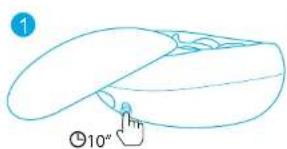
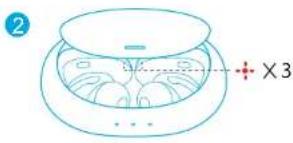
Reset the earbuds if the earbuds cannot connect with each other properly or cannot connect with your device properly.
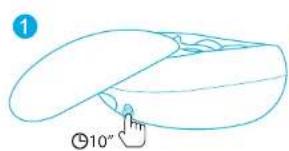
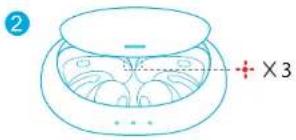
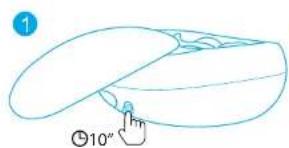
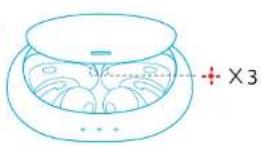
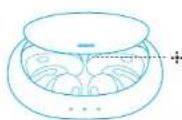
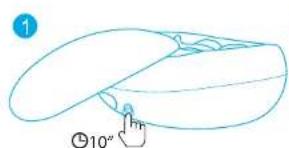
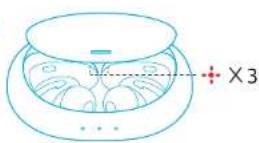
Place the earbuds into the charging case and make sure they are being charged. Keep the charging case open, then press and hold the button on the charging case for 10 seconds until the LED indicators on both earbuds flash red 3 times.
All the memory data will be cleared.
Specifications
Specifications are subject to change without notice.
| Input 5 V 500 mA | ... |
| Rated output power 5 mW @ 1% THD | |
| Battery capacity 65 mA x 2 (earbuds); 500 mA (charging case) | |
| Charging time 1.5 hours | |
| Playtime (varies by volume level and content) | 8 hours (Totally 32 hours with the charging case) |
| Driver Dynamic and Balanced Armature | |
| Frequency response 20 Hz - 20 kHz | |
| Impedance 8 Ω | |
| Bluetooth version | V 5.0 |
| Bluetooth frequency | 2402-2480 MHz |
| Audio codec format | SBC, AAC, aptX |
| Bluetooth range | 10 m / 33 ft |
Qualcomm® aptX™ Technical specifications
Compression ratio: 4:1
Word depth: Support 16bit and 24bit
Decoding delay: Sample rate 48kHz<2ms
Dynamic range: 16bit>92dB, 24bit>120dB
Data rates: 352kbps
Decode mode: Stereo
Qualcomm aptX is a product of Qualcomm Technologies, Inc. and/or its subsidiaries. Qualcomm is a trademark of Qualcomm Incorporated, registered in the United States and other countries. aptX is a trademark of Qualcomm Technologies International, Ltd., registered in the United States and other countries.
Nabijeni

- Potaženim otevifete nebo zavifete nabijecho pouzdro, abiye aktivovali kontrklu LED baterie.
- Prid prvnim pouzitim sluchatka i nabijeci pouzdro uplné dobjte.
Zivotnost bacterie ochrani tak, ze sluchatka nechate alespn jednou kazdych 45 dnu zcela nabit. - Použivejte dodávaný kabel USB-C, abyste zabránili poškození.
Nabijeci pouzdro muzete dobijet pomoci certifikovane bezdratove nabijecky (neni dovadavna). - Pred nabijenim sluchatka a port USB upine vysuste.

Zapnuti/Vypnuti
Oteviete nabijeci pouzdo a sluchatka se automaticky zapniou.
Google Play and the Google Play logo are trademarks of Google Inc.

Apple and the Appic logo are trademarks of Apple Inc.
Resetováni
Google Play and the Google Play logo are trademarks of Google Inc.

Apple and the Appic logo are trademarks of Apple Inc.
Nulstil
Apple and the Apple logo are trademarks of Apple Inc.
Zurücksetzen
Google Play and the Google Play logo are trademarks of Google Inc.
Apple and the Appic logs are trade marks of Apple Inc.
Enavapopá
Av to akoutika dev npopov v ouvseBouv ouot aite petoTuoc eite pe Tn cukkeun oac npoyapnta ony enavapopa Touc
Totafttataa ta aokauatika mae atn Bpkn oppnanck kai paaalire on opprntovau. Aepetrr n Een npopianc avogtn kai octpa niote npateraueva to kouni tnn Okien 10 deutpoerenna wouco of evoeikce LED ka orta ooo kaokuaia v avoaoooyocu 3 aoepc o kokko xpuwa.
→Oa diaypaov 6a ta 6eopeva anmun.

Ppoediaypapec
O npocaypoe evgctau va aakouwupic oxetik eioomion
| Eiiooboc 5V 500 mA | |
| Ovopoukni koyoc eKoboc 5 mW @ 1% THD | |
| Xwpovokotra piratapiac 65 mA x 2 (ora akouotka), 500 mA (otn Obrkn opodang) | |
| Δidoketa opodang, 1.5 μpec | |
| Xpovoc avorapayovc (PakikAeravGova μe tvé evaon tou kou kal to nepieşópevo) | 8 μpec (ovuoka 32 μpec μe tin Obrkn opodang) |
| Meyoc oboyoo | Δvopukni pcvda odhymanc kal pcvda odhymanc Balanced Armature |
| Anokpion ouvovetac 20 Hz - 20 kHz | |
| Eunében 8 Ω | |
| Eksoan Bluetooth 'Ekb. 5.0 | |
| Luyovotra Bluetooth 2.402 2.480 MHz | |
| Mioppotura Kučekonouni t'you SBC, AAC, aptx | |
| Euβελia Bluetooth | 10 μe/tpo / 33 nobia |
Google Fley and the Google Fley logo are.
Trademarks of Google Inc.

Apple and Uber Apple logo are trademarks of Apple Inc.
Restablecer
Google Play and the Google Play logo are trademarks of Google Inc.

Apple and the Appic logo are trademarks of Apple Inc.
Nollaaminen
Gouge Fly and the Gouge Fly logo are trademarks of Gogulc Inc.


Apple and the Apple logo are trademarks of Apple Inc.
Réinitialisation
AAN Branch 1 seconde wit
UIT Brand seconde rood

True Wireless Stereo-tilkobling
Øreproppene slas pa automatisk nar ladeenheten apnes.Den hayre oreproppen vil automatisk kobles sammen med den venstre oreproppen.
LED-oppforsel (orepropper)

Google Play and the Google Play logo are trademarks of Google Inc.

Apple and the Appic logo are trademarks of Apple Inc.
Tilbakesstill
Gouge Fly and the Gouge Fly logo are trademarks of Gogulc Inc.


Apple and the Apple logo are trademarks of Apple Inc.
Repor
BKJTOpT@enbCPTOMBTEeHye1c
BbKII. Topoi KpaHBM CBTOM BTEHE 1C

JINBKNKHNBAHHPHYHXANHOHTNHyEHPKAAETMEHCHOHSHYHOHNHO HAYHUNKOB8TOOHC1C
AaBbIKKNOH BYOHY KOHMMTE yIeepKBAe TE MHOQyHKMOHJIbHY KONHY Ka Oa-OM H
Copjcknne
PoioknoueHne True Wireless Stereo
OTkoIe 3apHnH cyTnHp, HayuHnHxA aTOMaTHeCKy BKNHOATCR PaBHH HAYuHk ATOMaTHaeeckn TNDKCHNTcK NEBOMy HAYuHNNK.
CoctoHHe CBToDnOHDoro HmKAtopa (HayuHKn)

PbIbCpIyEeBmBnHnHcTcNnKoVHeMe TWS

TOpA16eBIMCBETOMBTEeHHeIcNouKIOHMeTWSBILIOHHeHO

IaHauHnKkOgKIOKIOKIOKIOKIOKIOKIOKIOKIOKIOKIOKIOKIOKIOKIOKIOKIOKIOKIOKIOKIOKIOKIOKIOKIOKIOKIOKIOKIOKIOKIOKIOKIOKIOKIOKIOKIOKIOKIOKIOKIO
Korda HauhNHK BKNKCHN NOKJKNHNE, NOOKCTNE ODNH H3 HNX 3AapHHB dyTAPN 3A2KpOte EBO MyMOKETe PNOONADH KINONOBCTB BTOPD HauhNH.
KoHa DaHn-HuN HnOIOHn Hn OIOHn Hn HxPpAaIcN aOtKHeAIC, BbMOKeTe IpoOyOeHbMIOHbOBeHbIopOyHnHn.
B03BmBB3BaPMAeTHeOHN H3HAYHNNKOB B3apnHbdyIINM2KpOON HAoyrCM HAYHIMKO ByDcAkTNMBPOBAH.
Bluetooth-conpjaKeHne c BaWIM yCTPOICTBOM
HayHnKn HepeyB pexnn CoPpKeHH np BkOeHHn Pn nOBHeHH BcIbIaIOero KpaH 6ydt aonpuocno noTBCxDcHn noNKnIOHn.



CoctoHHe CBToDnOHDoro HnDnKaTopa (HayuHnKn)

Miraert Benm Bunonnerc conpaekie-He Bluetooth

Top26benbCBerom aTeueHne1c Blueoth nonkniohen

B xjne npieecca cnpkceHn nHeKc0p8hXyctpaCTBa, HecOBMeCTHmBx CBOHNHMCCOBHMONOHHTCBHMMNAMCMCOPKceHn ToxHONOMQualcomm True Wireless,MOOKNEOBTCOo6eHHe HE yanocbYCTAHOBHTNoaKIOHNePn pna HAKATIN COpKHeHn HnIADKMOKET He NAOITACNtBaaHJIKJ3A2H3To He Eytet PNOENTCTABOTbN CNOBbSABHIO.
- Nocne ycnHoro copnKHeHH OCH3HO HAYHNNK NOKnIOAeTCH K BAIHemy yCTPONCTBY INepeTaet CnHan Ha STOHN HAYHNNK, KOtPbH He ByNET NOKnIOHEn K BAIHemy yCTPONCTBY.B PCyBntate 1rTO, CNOCK copnKHeHH BluTooth HA BAIHm YCTPONCTBE MOKET OToBpAKaTB ToBko NOKnIOHMe HON CTPO-B, A He OBeHX.
| BLUETOOTH | |
| Soundcore XXX | Connected |
| Soundcore XXX-L | Not Connected |
DnCOPKHeH C npyTBMuBtoothyCPOTHoAM NmecHTMe HauHHNkObapHO B aepHHNpFyHnB yOxOyTeCB,TO OHN3aepKHeH, DEpKHeTc FyHnAP, OTKpBTM, 3aTEM HauHHNtE u dePckHsAe T KHOHTy HnHexHnEaBapHHOnFOyHnPA B TeueHne 3 cCebToHouHn HnHKAToHO HnPaOB MauHHNke HAHNETbCTPO MArTb.

PnKApDmKIOEHNHUYHNNuSoundOcBdyuyAOTAMHeckNIOKIIKOWbckNIOCHHEMy yCNEHNOHNOKIOENHOYUxPOCTyBBOIeDCINBLueCoH.
MoHofoHnckn poKm: KOra yCTaHOBnHO Bluccoth coCnHcHc, Bb MoKeTe nTnB3BaTaN 1060n HnyHHKOB, NONKvBpyrE 8apAHyFpAeR 2kPbB 20KOuKy
Howenme
- 田b6epnHacaknHaHayuHHKn3ayuHb, noXoQdaueBamnyue acero.
2BCTaBbTeHayuHmKnBvHooKaHaH.
3.10BOPHNTVX,HTO6N HAIHTN HAHONCEYJHOHCNOJOKCHNE
JementbI ynpabHeHn

Bce 3eMeHtu ynpaBneHH B cTepeofoHueckOM pexMME MOKHO HAcTpOHTB nPnIOKeHH
Soundcore
Apple and the Apple logo are trademarks of Apple Inc.
C6poc
BbnoHHTe c6poc HauHHKOB,ecnn HauHHKHe NoadKnUaKTc DOyr K Dpyr HNN K yCTOIOCTBy HApneKaIIM o6pa3OM.
NOMCHTH HAYINH N B 3APENH FyTNH N yEHNATCH, ITO OHNNONHOB TAPKHEH JPN OKKTHOM AAPAHNOH FyTANPE HAKMIE N yEPKBAIANTK KHNKY HApAONH FyTNPBC T CENHNE 10 c, ROKA CBCTOANHHC HnHkTAPOTH AOBON HAYUNHXK H E MHT-PTKACHM COTAM 3 pataj.
Bce coxpanenHbI daHBe dyT yaneHbI
TexHmuecknXapaKTepeNtukn
TeHHHeckn XapakepKmTKN MOnTy BbTu NmHeHb Ce3 npEeBpTbnHOyBdOMnHn
| Bxodno ToK 5 V 500 mA | |
| Homiahblan mOoiocb BxoxioToCmIIa 5 M7 @ KooΦuXeTTIeHn eHbx NckaeHn 1% | |
| Emkocb AkyuMylTopo 65 mA x 2 (HauuHnK); 500 mA (apua-by fuyuHp) | |
| Bpcma 3ap8kn 1.5 u | |
| Bpcma 3ocipnoBaBeHn (AbaNCHnOlyPouHn TPOMKn n BocippoVbCdoNtGn MaTePnHa) | 8 u (Bcero 32 u MeCTe C ZapHbM FuyuHpow) |
| Pamop DnHAMMa DNHAMnueckaa n cbalaHcnpobHnBn apMaTypa | |
| Chacton HaxapakreHnka 20 Tg - 20 kTu | |
| HmneDnC 8 Ω | |
| Bpcma Blucoth V 5.0 | |
| Cactora Bluetooth | 2402-2480 MTu |
| Coppmat ayuNcoKedca | SBC, AAC, aptX |
| Pdunyc deiCtbnn Bluetooth | 10 M |
Nabijanie

- Posunutim mozete otvorit alabo zatvorit nabijacia pzudo, a tym aktivovat LED kontrolku baterie.
Pred prvym pouzitim obe sluchladla nabijace puzdro plne nabite. - Ak chcete predlizif zivotnost baterie, nabite ju doplna minimalne raz za 45 dni/dni.
- Aby sa predišlo poškadeniu, použite dodaný kabel USB-C.
Nabijacie puzdo mozete nabit pomociu bezdrtovej nabija cky osvedcenim (nie je sucastou balenia).
Pred nabijanim uplne osuste sluchadla a USB port.

Zapnutie/vypnutie
Otvorte nabijace puzdro, sluchadla sa automaticky zapnu.
Umiestnite sluchadla spat do nabijaceho puzdra a zatvorte ho, sluchadla sa automaticky vypnu.
ON
OFF
2
Google Play and the Google Play logo are trademarks of Google Inc.

Apple and the Appic logo are trademarks of Apple Inc.
Resetovanie
Google Play and the Google Play logo are trademarks of Google Inc.

Apple and the Appic logo are trademarks of Apple Inc.
Ponastavi
Google Play and the Google Play logo are trademarks of Google Inc.

Apple and the Appic logo are trademarks of Apple Inc.
Aterställning
Hafif yanip sōnen Beyaz TWS baglartusi

Google Play and the Google Play logo are trademarks of Google Inc.

Apple and the Appi logo are trademarks of Apple Inc.
Sifirlama
Apple and the Apple logo are trademarks of Apple Inc.
新
IeHbDgA.
0100000000000000000000000000000000000000000000000000000000000000000000000
→云:

#
三
| 일본 5V 500 mA | — |
| 充电charge典型案例 5mW @ 1% THD | |
| BEFORE LING 65mA x2 (이어버드); 500mA(充电선 키우斯) | |
| 遥控screen 1.5 inch | |
| 내용품uan (물류수수과 사고목지에 기재 썸류원) | 8 inch (遥控선 키우斯 사고목 썸류원 32 inch) |
| dongaikeyan keyboard 키우기 키우기 키우기 키우기 키우기 키우기 키우기 키우기 키우기 키우기 키우기 키우기 키우기 키우기 키우기 키우기 키우기 키우기 키우기 키우기 키우기 키우기 키우기 키우기 키우锡 키우锡 키우锡 키우锡 키우锡 키우锡 키우锡 키우锡 키우锡 키우锡 키우锡 키우锡 키우锡 키우锡 키우锡 키우锡 키우锡 키우锡 키우硒 키우硒 키우硒 키우硒 키우硒 키우硒 키우硒 키우硒 키우硒 키우硒 키우硒 키우硒 키우硒 키우硒 키우硒 키우硒 키우硒 �otope硒 키우硒 키우硒 키우硒 키우硒 키우硒 키우硒 키우硒 키우硒 키우硒 키우硒 키우硒 키우硒 키우硒 키우硒 키우硒 키우硒 tapping tapping tapping tapping tapping tapping tapping tapping tapping tapping tapping tapping tapping tapping tapping tapping tapping tapping tapping tapping tapping tapping tapping tapping tapping tapping tapping tapping tapping tapping tapping tapping tapping tapping | |
| Bluetooth dongun | V 5.0 |
| Bluetooth 主 portssu | 2402-2480 MHz |
| USB dongun dongun dongun dongun dongun dongun dongun dongun dongun dongun dongun dongun dongun dongun dongun dongun dongun dongun dongun dongun dongun dongun dongun dongun dongun dongun dongun dongun dongun dongun dongun dongun dongun dongun dongun dongun dongun dongun dongun dongun dongun dongun dongun dongun dongun dongun dongun dongun dongun dongun dongun dongun dongun dongun dongun dongun dongun dongun dongun dongun dongun dongun dongun dongun dongun dongun dongun dongun dongun dongun dongun dongun dongun dongun dongun dongun dongun dongun dongun dongun dongun dongun dongun dongun dongun dongun dongun dongun dongun dongun dongun dongun dongun dongun dongun dongun dongun dongun dongun dongun dongun dongun dongun dongun dongun dongun dongun dongun dongun dongun dongun dongun dongun dongun dongun dongun dongun dongun dongun dongun dongun dongun dongun dongun dongUn dongUn dongUn dongUn dongUn dongUn dongUn dongUn dongUn dongUn dongUn dongUn dongUn dongUn dongUn dongUn dongUn dongUn dongUn dongUn dongUn dongUn dongUn dongUn dongUn dong Un dongUn dongUn dongUn dongUn dongUn dongUn dongUn dongUn dongUn dongUn dongUn dongUn dongUn dongUn dongUn dongUn dongUn dongUn dongUn dongUn dongUn dongUn dongUn dongUn dongU dongUn dongUn dongUn dongUn dongUn dongUn dongUn dongUn dongUn dongUn dongUn dongUn dongUn dongUn dongUn dongUn dongUn dongUn dongUn dongUn dongUn dongUn dongUn dongUn dong U dongUn dongUn dongUn dongUn dongUn dongUn dongUn dongUn dongUn dongUn dongUn dongUn dongUn dongUn dongUn dongUn dongUn dongUn dongUn dongUn dongUn dongUn dongUn dongUn dongun dongUn dongUn dongUn dongUn dongUn dongUn dongUn dongUn dongUn dongUn dongUn dongUn dongUn dongUn dongUn dongUn dongUn dongUn dongUn dongUn dongUn dongUn dongUn dongU dongU dongU dongU dongU dongU dongU dongU dongU dongU dongU dongU dongU dongU dongU dongU dongU dongU dongU dongU dongU dongU dongU dongU dongU dongUn dongUn dongUn dongUn dongUn dongUn dongUn dongUn dongUn dongUn dongUn dongUn dongUn dongUn dongUn dongUn dongUn dongUn dongUn dongUn dongUn dongUn dongUn dongU dong U dongU dongU dongU dongU dongU dongU dongU dongU dongU dongU dongU dongU dongU dongU dongU dongU dongU dongU dongU dongU dongU dongU dongU dongU dong U dongU dongU dongU dongU dongU dongU dongU dongU dongU dongU dongU dongU dongU dongU dongU dongU dongU dongU dongU dongU dongU dongU dong U dongU dong U dongU dongU dongU dongU dongU dongU dongU dongU dongU dongU dongU dongU dongU dongU dongU dongU dongU dongU dongU dongU dongU dongU dongUn dongUn dongU dongU dongU dongU dongU dongU dongU dongU dongU dongU dongU dongU dongU dongU dongU dongU dongU dongU dongU dongU dongU dongU dong U dongU dongUn dongUn dongUn dongUn dongUn dongUn dongUn dongUn dongUn dongUn dongUn dongUn dongUn dongUn dongUn dongUn dongUn dongUn dongUn dongUn dongUn dongUn dongUn dong Un dong U dong U dong U dong U dong U dong U dong U dong U dong U dong U dong U dong U dong U dong U dong U dong U dong U dong U dong U dong U dong U dong U dong U dong U dong U dongU dong U dong U dong U dong U dong U dong U dong U dong U dong U dong U dong U dong U dong U dong U dong U dong U dong U dong U dong U dong U dong U dong U dong U dong U dongUn dongUn dongUn dongUn dongUn dongUn dongUn dongUn dongUn dongUn dongUn dongUn dongUn dongUn dongUn dongUn dongUn dongUn dongUn dongUn dongUn dongUn dongUn dongU dong Un dong U dong U dong U dong U dong U dong U dong U dong U dong U dong U dong U dong U dong U dong U dong U dong U dong U dong U dong U dong U dong U dong U dong U dongU dongU dong U dong U dong U dong U dong U dong U dong U dong U dong U dong U dong U dong U dong U dong U dong U dong U dong U dong U dong U dong U dong U dong U dong U dongU dongUn dongUn dongUn dongUn dongUn dongUn dongUn dongUn dongUn dongUn dongUn dongUn dongUn dongUn dongUn dongUn dongUn dongUn dongUn dongUn dongUn dongUn dongU dongU dong U dong U dong U dong U dong U dong U dong U dong U dong U dong U dong U dong U dong U dong U dong U dong U dong U dong U dong U dong U dong U dong U dongU dong U dongU dong U dong U dong U dong U dong U dong U dong U dong U dong U dong U dong U dong U dong U dong U dong U dong U dong U dong U dong U dong U dong U dong U dongU dongU dongU dong U dong U dong U dong U dong U dong U dong U dong U dong U dong U dong U dong U dong U dong U dong U dong U dong U dong U dong U dong U dong U dong U dong/U dong U dong U dong U dong U dong U dong U dong U dong U dong U dong U dong U dong U dong U dong U dong U dong U dong U dong U dong U dong U dong U dong U dong U dong U dong/U dong U dongU dong U dong U dong U dong U dong U dong U dong U dong U dong U dong U dong U dong U dong U dong U dong U dong U dong U dong U dong U dong U dong U dong U dong/U dongU dong U dong U dong U dong U dong U dong U dong U dong U dong U dong U dong U dong U dong U dong U dong U dong U dong U dong U dong U dong U dong U dong U dong U dong/U dongU dongU dong U dong U dong U dong U dong U dong U dong U dong U dong U dong U dong U dong U dong U dong U dong U dong U dong U dong U dong U dong U dong U dong U dong UN dong U dong U dong U dong U dong U dong U dong U dong U dong U dong U dong U dong U dong U dong U dong U dong U dong U dong U dong U dong U dong U dong U dong U dong U dong U dongU dong U dong U dong U dong U dong U dong U dong U dong U dong U dong U dong U dong U dong U dong U dong U dong U dong U dong U dong U dong U dong U dong U dong U dong U dong/U dong U dong U dong U dong U dong U dong U dong U dong U dong U dong U dong U dong U dong U dong U dong U dong U dong U dong U dong U dong U dong U dong U dong U dong U dong UN Dong U Dong U Dong U Dong U Dong U Dong U Dong U Dong U Dong U Dong U Dong U Dong U Dong U Dong U Dong U Dong U Dong U Dong U Dong U Dong U Dong U Dong U Dong U Dong U Dong U DongU Dong U Dong U Dong U Dong U Dong U Dong U Dong U Dong U Dong U Dong U Dong U Dong U Dong U Dong U Dong U Dong U Dong U Dong U Dong U Dong U Dong U Dong U Dong U Dong U Dong/U Dong/U Dong/U Dong/U Dong/U Dong/U Dong/U Dong/U Dong/U Dong/U Dong/U Dong/U Dong/U Dong/U Dong/U Dong/U Dong/U Dong/U Dong/U Dong/U Dong/U Dong/U Dong/U Dong/U Dong/U Dong U Dong/U Dong/U Dong/U Dong/U Dong/U Dong/U Dong/U Dong/U Dong/U Dong/U Dong/U Dong/U Dong/U Dong/U Dong/U Dong/U Dong/U Dong/U Dong/U Dong/U Dong/U Dong/U Dong/U Dong U Dong U Dong U Dong U Dong U Dong U Dong U Dong U Dong U Dong U Dong U Dong U Dong U Dong U Dong U Dong U Dong U Dong U Dong U Dong U Dong U Dong U Dong U Dong U Dong UN Dong UN Dong UN Dong UN Dong UN Dong UN Dong UN Dong UN Dong UN Dong UN Dong UN Dong UN Dong UN Dong UN Dong UN Dong UN Dong UN Dong UN Dong UN Dong UN Dong UN Dong UN Dong UN Dong UN Dong UN DongUN Dong UN Dong UN Dong UN Dong UN Dong UN Dong UN Dong UN Dong UN Dong UN Dong UN Dong UN Dong UN Dong UN Dong UN Dong UN Dong UN Dong UN Dong UN Dong UN Dong UN Dong UN Dong UN Dong UN Dong UN Dong U Dong U Dong U Dong U Dong U Dong U Dong U Dong U Dong U Dong U Dong U Dong U Dong U Dong U Dong U Dong U Dong U Dong U Dong U Dong U Dong U Dong U Dong U Dong U dong U dong U dong U dong U dong U dong U dong U dong U dong U dong U dong U dong U dong U dong U dong U dong U dong U dong U dong U dong U dong U dong U dong U dong U dong U Dong U Dong U Dong U Dong U Dong U Dong U Dong U Dong U Dong U Dong U Dong U Dong U Dong U Dong U Dong U Dong U Dong U Dong U Dong U Dong U Dong U Dong U Dong U Dong U dongU dongU dongU dongU dongU dongU dongU dongU dongU dongU dongU dongU dongU dongU dongU dongU dongU dongU dongU dongU dongU dongU dongU dongU dongU dong U dongU dongU dongU dongU dongU dongU dongU dongU dongU dongU dongU dongU dongU dongU dongU dongU dongU dongU dongU dongU dongU dongU dongU dongU DongU DongU DongU DongU DongU DongU DongU DongU DongU DongU DongU DongU DongU DongU DongU DongU DongU DongU DongU DongU DongU DongU DongU DongU DongU dongU dongU dongU dongU dongU dongU dongU dongU dongU dongU dongU dongU dongU dongU dongU dongU dongU dongU dongU dongU dongU dongU dongU dongU Dong U DongU DongU DongU DongU DongU DongU DongU DongU DongU DongU DongU DongU DongU DongU DongU DongU DongU DongU DongU DongU DongU DongU DongU DongU Dong U DongU DongU DongU DongU DongU DongU DongU DongU DongU DongU DongU DongU DongU DongU DongU DongU DongU DongU DongU DongU DongU DongU DongU dongU dong U dongU dongU dongU dongU dongU dongU dongU dongU dongU dongU dongU dongU dongU dongU dongU dongU dongU dongU dongU dongU dongU dongU DongU DongU Dong U DongU DongU DongU DongU DongU DongU DongU DongU DongU DongU DongU DongU DongU DongU DongU DongU DongU DongU DongU DongU DongU dongU dongU dongU dong U dongU dongU dongU dongU DongU DongU DongU DongU DongU DongU DongU DongU DongU DongU DongU DongU DongU DongU DongU DongU DongU DongU DongU DongU DongU DongU DongU DongU DongU DongU | |
充电
三
Google Play and the Google Play logo are trademarks of Google Inc.
Apple and the Apple logo are trademarks of Apple Inc.
重設
Gouge Fly and the Gouge Fly logo are trademarks of Google Inc.


Apple and the Apple logo are trademarks of Apple Inc.
Reiniciar
True Wireless Stereo
y
| BLUETOOTH | |
| Soundcore XXX | Connected |
| Soundcore XXX-L | Not Connected |
a 1 a 1 1 1 1 1 1 1 1 1 1 1 1 1 1 1 1 1 1 1 1 1 1 1 1 1 1 1 1 1 1 1

i 1
Jn Jn Jn Jn Jn Jn Jn Jn Jn Jn Jn Jn Jn Jn Jn Jn Jn Jn Jn Jn Jn Jn Jn Jn Jn Jn Jn Jn Jn Jn Jn Jn Jn Jn Jn Jn Jn Jn Jn Jn Jn Jn Jn Jn Jn Jn Jn Jn Jn Jn Jn
jiesiiee
1
2
aJyI aabbl 3
soath yolis
Soundcore y

(R/L)

1
(R/L) 415 1 sdd y d

2.1.5

(R/L) 1

aasal saaahn y Siri
Soundcore
algal
Ee eee eee
HearID
a
y 1
gE 120eEQ
:jcllcllae
y 1
Soundcore
Google Play and the Google Play logo are trademarks of Google Inc.

Apple and the Apple logo are trademarks of Apple Inc.

S OBC = S COD + S_ BOC
J 1
y j 1
3 3 3 3 3 3 3 3 3 3 3 3 3 3 3 3 3 3 3 3 3 3 3 3 3 3 3 3 3 3 3 3 3 3 3
3.51000000000000

(nnn) nnn
三

y 100
.
45 1nnn nn nnnn nn nnnn nn nnnnnnnnnnnnnnnnnnnnnnnnnnnnnnnnnnnnnnnnnnnnnnnnnnnnnnnnnnnnnnnnnnnnnnnnnnnnn
T
-79100n USB-C 23.2.2.2.2.2.2.2.2.2.2.2.2.2.2.2.2.2.2.2.2.2.2.2.2.2.2.2.2.2.2.2.2.2.2.2.2.2.2.2.2.2.2.2.2.2.2.2.2.2.2.
TWS
-12000000000000000000000000000000000000000
nwnnnnnn

1207
ywnn nnynnn nnnnnnnnnnnnnnnnnnnnnnnnnnnnnnnnnnnnnnnnnnnnnnn
nynnnn nnnn nn nnnnnnnnnnnnnnnnnnn
ynnn by Bluetooth
yipn npnnynin nnnn nnnynnn nn nnnnnnnnnnnnnnnnnnnnnnnnnnnnnnnnnnnnnnnnnnnnnnnnnnnnnnnnnnnnnnnnnnnnnnnnnnnnnnn
1
2
3
(nnnn)nnnn

ON
OFF
2
()
| (1 n°) | ||
| 1 n° |
三
Qualcomm True Wireless xionn nnn nn nn nn nn nn nn
y 1000000000000000000000000000000000000000000000000000000000000000
n7 nnnn nn nnnn nnnn nnnn nnnn nnnn nnnn nnnn nnnn nnnn nnnn nnnn nnnn nnnn nnnn nnnn nnnn nnnn nnnn nnnn nnnn nnnn nnnn nnnn nnnn nnnn nnnn nnnn nnnn nnnn nnnn nnnn nnnn nnnn nnnn
nannnnn nnnn nnnnn nnnn nnnn nnnn nnnn
nnnn nnnn nn nnnn
77 77777777
7
True Wireless Stereo
n7nnn nnnnnnnnnnnnnnnnnnnnnnnnnnnnnnnnnnnnnnnnnnnnnnnnnnnnnnnnnnnnnnnnnnnnnnnnnnnnnnnnnnnnnnnnnnnnnnnnnnnnnnn
nnnnnnnnnnnnnnnnnnnnnnnnnnnnnnnnnnnnnnnnnnnnnnnnnnnnnnnnnnnnnnnnnnnnnnnnnnnnnnnnnnnnnnnnnnnnnnnnnnnnnnnnnnnnnnnnnnn


n nn nnnn nn nnnn nn nnnn nn nnnn nn nnnn nn nnnn nn nnnn nn nnnn nn nnnn nn nnnn nn nnnn nn nnnn nn nnnn nn nnnn nn nnnn nn nnnn nn nnnn nn nnnn nn nnnn nn nnnn nn nnnn nn nnnn nn nnnn nn nnnn nn nnnn nn nannn nn nnnn nn nnnn nn nnnn nn nnnn nn nnnn nn nnnn nn nnnn nn nnnn nn nnnn nn nnnn nn nnnn nn nnnn nn nnnn nn nnnn nn nnnn nn nnnn nn nnnn nn nnnn nn nnnn nn nnnn nn nnnn nn nnnn nn nnnn nn nnnn nn nennn nn nnnn nn nnnn nn nnnn nn nnnn nn nnnn nn nnnn nn
#
1

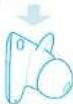

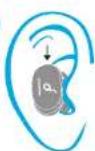

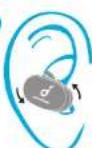
77nn 779
Soundcore nnnn nnne nnnn nee 100
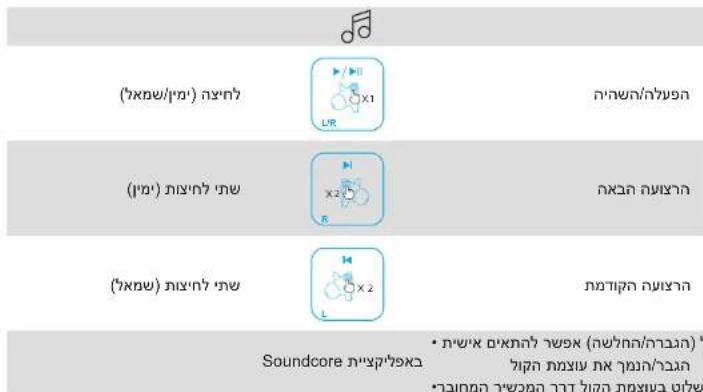

()n

nnn
()1nwnnnn

nne anr

1 nnnn nn (nnnn)

nnnno nnnn in Siri nnyn
Soundcore n'7p79x
Ciealgal
nnoynnnnne nnnnnn nn nnnnnnnnnnnnnnnnnnnnnnnnnnnnnnnnnnnnnnnnnnnnnnnnnnnnnnnnnnnnnnnnnnnnnnnnnnnnnnnnnnnnnnnnnnnnnnnnnnnnn
EQ nnnn nn nnnn HearID npbSoundcore bnn
nirnnae nneep
nnnnn nn nnnn nn nn nn nn Hearld nann :Hearld
n nn nnnn nn nnnn nn nnnn nnnn nn nnnn nn nnnn
.
yNnynnnn nnnn nn nnnn nn nnnn nn nnnn
47070000000079n,
y nwnn nynn nnnn EQ nnn 20-nyh jnnn :EQ nnn
1
nnn nnnn nn nnnn nn nnnn nn nnnn nn nnnn nn
nynnnnnnnnnnnnnnnnnnnnnnnnnnnnnnnnnnnnnnnnnnnnnnnnnnnnnnnnnnnnnnnnnnnnnnnnnnnnnnnnnnnnnnnnnnnnnnnnnnnnnnnnnnnnn
Soundcore


Google Play and the Google Play logo are trademarks of Google Inc.
Apple and the Appic logo are trademarks of Apple Inc.
OIDIN
nno nnnn nn nnnn nn no nnnn nn nnnn nn no nnnn nn no
y
.0003D
17nna nnnn