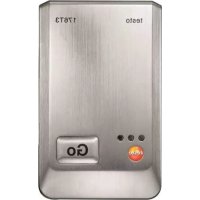
176T3 - Measuring equipment Testo - Free user manual and instructions
Find the device manual for free 176T3 Testo in PDF.



| Product type | Temperature data logger |
| Brand | Testo |
| Model | 176 T3 |
| Measured quantity | Temperature (°C / °F) |
| Sensor type | 4 external thermocouples (type T, K, J) |
| Measuring range | Type J: -100 to +750 °C, Type K: -195 to +1000 °C, Type T: -200 to +400 °C |
| Device accuracy | ±0.3 °C (-100 to +70 °C); ±0.5 % of reading (+70.1 to +1000 °C); ±1 digit |
| Resolution | 0.1 °C |
| Operating temperature | -20 to +70 °C |
| Storage temperature | -40 to +85 °C |
| Battery type | 1x Lithium (TL-5903) |
| Battery life | Up to 8 years (measurement interval 15 min, +25 °C) |
| Protection class | IP65 |
| Dimensions (L x W x D) | 103 x 63 x 33 mm |
| Weight | Approx. 430 g |
| Measurement interval | 1 s to 24 h (user-selectable) |
| Interface | Mini USB, SD card slot |
| Memory capacity | 2 million readings |
| Warranty | 24 months (terms at www.testo.com/warranty) |
| Included accessories | Installed battery, wall mount, padlock, instruction manual |
| Main functions | Recording and reading of temperature values, software programming, threshold alarms, LED and display (depending on model) |
| Maintenance and cleaning | Clean the housing with a damp cloth; do not use solvents |
| Safety | Do not measure on live parts; max. potential difference 50 V between inputs; use original spare parts |
| Spare parts and repairability | TL-5903 battery, USB cable, SD card, wall mount; repairs by Testo service |
Frequently Asked Questions - 176T3 Testo
User questions about 176T3 Testo
0 question about this device. Answer the ones you know or ask your own.
Ask a new question about this device
Download the instructions for your Measuring equipment in PDF format for free! Find your manual 176T3 - Testo and take your electronic device back in hand. On this page are published all the documents necessary for the use of your device. 176T3 by Testo.
USER MANUAL 176T3 Testo
1 Contents 31
2 Safety and the environment 32
2.1. About this document 32
2.2. Ensure safety 33
2.3. Protecting the environment 33
3 Specifications 34
3.1.Use 34
3.2. Technical data 35
4 First steps 43
4.1. Unlock the data logger 43
4.2. Connecting the data logger to PC. 43
5 Display and control elements 44
5.1. Display 44
5.2. LED 47
5.3. Key functions 48
6 Using the product 49
6.1. Connecting a sensor 49
6.2. Programming data logger 49
6.3. Menu overview 50
6.4. Mounting the wall bracket 53
6.5. Securing the data logger 53
6.6. Reading out data 53
7 Maintaining the product 55
7.1. Replacing the battery 55
7.2. Cleaning the instrument 56
8 Tips and assistance. 57
8.1. Questions and answers 57
8.2. Accessories and spare parts 58
2 Safety and the environment
2.1. About this document
Use
Please read this documentation through carefully and familiarize yourself with the product before putting it to use. Pay particular attention to the safety instructions and warning advice in order to prevent injuries and damage to the products.
Keep this document to hand so that you can refer to it when necessary.
Hand this documentation on to any subsequent users of the product.
Symbols and writing standards
| Representation | Explanation |
| Warning advice, risk level according to the signal word: Warning! Serious physical injury may occur. Caution! Slight physical injury or damage to the equipment may occur. > Implement the specified precautionary measures. | |
| i | Note: Basic or further information. |
| 1. ... | Action: more steps, the sequence must be followed. |
| 2. ... | |
| > Action: a step or an optional step. | |
| - Result of an | action. |
| Menu Elements | of the instrument, the instrument display or the program interface. |
| [OK] Control keys | s of the instrument or buttons of the program interface. |
| ... | ... Functions/ | paths within a menu. |
| “...” | Example entries |
2.2. Ensure safety
Only operate the product properly, for its intended purpose and within the parameters specified in the technical data. Do not use any force.
Never use the instrument to measure on or near live parts.
Before each measurement check that the connections are correctly closed with blanking plugs or that appropriate sensors have been correctly plugged in. The protection class in the technical data specified for the corresponding instrument may otherwise not be reached.
testo 176 T3 testo 176 T4: The maximum permissible difference in potential between the sensor inputs is 50V . Take this into account when using surface sensors with non-isolated thermocouple.
After the final measurement, allow probes and probe shafts to cool down sufficiently in order to avoid burns from the hot sensor tip or the probe shaft.
Temperatures given on probes/sensors relate only to the measuring range of the sensors. Do not expose handles and feed lines to any temperatures in excess of 70^ unless they are expressly permitted for higher temperatures.
Carry out only the maintenance and repair work on this instrument that is described in the documentation. Follow the prescribed steps exactly. Use only original spare parts from Testo.
2.3. Protecting the environment
Dispose of faulty rechargeable batteries/spent batteries in accordance with the valid legal specifications.
At the end of its useful life, send the product to the separate collection for electric and electronic devices (observe local regulations) or return the product to Testo for disposal.
3 Specifications
3.1. Use
The data loggers testo 176 serves the purpose of saving and reading out individual readings and measurement series.
Readings are measured and saved with testo 176 and transferred to the PC via USB-cable or SD-card, where they can be read out and evaluated with the help of the testo Comfort Software. With the software the data loggers can also be individually programmed.
Typical applications
testo 176 T1 is optimally suitable for temperature measurements under extreme conditions, like e.g. on ships or in power plants, because its metal housing provides excellent protection against mechanical influences.
Due to the possibility of connecting external, high-precision Pt100 sensors the testo 176 T2 is optimally suitable for temperature measurements, e.g. in food applications or in the laboratory.
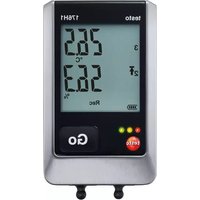
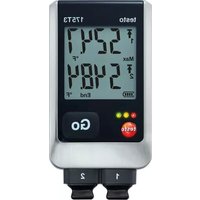
With its external sensor connections (thermocouples type T, type K and type J) and its robust metal housing the testo 176 T3 is able to perform parallel temperature measurements on up to four measuring locations under extreme conditions.
The external sensor connections (thermocouples type T, type K and type J) make the testo 176 T4 and excellent choice for different applications, such as e.g. simultaneous feed and return temperature measurement in underfloor heating at up to four measuring locations.
The testo 176 H1 is optimally suitable for parallel temperature and humidity monitoring, e.g. in warehouses.
With its external sensor connections and its robust metal housing the testo 176 H2 is able to execute temperature and humidity measurements in parallel mode under extreme conditions.
The testo 176 P1 is able to measure pressure, temperature and humidity at the same time and is thus optimally suitable for the documentation of ambient conditions, e.g. in laboratories.
3.2. Technical data
testo 176 T1 (0572 1761)
| Feature Values | |
| Measurement parameter | Temperature (°C/°F) |
| Sensor type Pt100 class A internal | |
| Measurement range | -35 to +70 °C |
| System accuracy ± 0.2 °C (-35 bis +70 °C) ± 1 digit | |
| Resolution | 0.01 °C |
| Operating temperature | -35 ... +70 °C |
| Storage temperature | -40 ... +85 °C |
| Battery type 1x lithium (TL-5903) | |
| Life 8 years (15 min) | measuring cycle, +25 °C) |
| Degree of protection | IP68 |
| Dimensions in mm (LxWxH) | 103 x 63 x 33 mm |
| Weight approx. 410 g | |
| Measuring cycle 1s | -24h (freely selectable) |
| Interface Mini-USB, | SD card slot |
| Memory capacity 2 million readings | |
| Warranty 24 months, warranty conditions: see website www.testo.com/warranty | |
| Standards 2004/108/EC, EN 12830 | |
testo 176 T2 (0572 1762)
| Feature Values | |
| Measurement parameter | Temperature (°C/°F) |
| Sensor type 2 x Pt100 class A external | |
| Measurement range | -50 to +400 °C |
| Instrument accuracy | ± 0.2 °C (-50 bis +200 °C) ± 1 digit ± 0.3 °C (+200.1 bis +400 °C) ± 1 digit |
| Resolution | 0.01 °C |
| Operating temperature | -35 ... +70 °C |
| Storage temperature | -40 ... +85 °C |
| Battery type 1x lithium | m (TL-5903) |
| Life 8 years (15 min) | measuring cycle, +25 °C) |
| Degree of protection | IP65 |
| Dimensions in mm (LxWxH) | 103 x 63 x 33 mm |
| Weight approx. 220 g | g |
| Measuring cycle 1s | - 24h (freely selectable) |
| Interface Mini-USB, | SD card slot |
| Memory capacity 2 million readings | |
| Warranty 24 months, terms of warranty: see website www.testo.com/warranty | |
| Standards 2004/108/EC, EN 12830 | |
testo 176 T3 (0572 1763)
| Feature Values | |
| Measurement parameter | Temperature (°C/°F) |
| Sensor type 4 thermocouples (type T, K, J) external | |
| Measurement range | -100 to +750 °C (type J) -195 to +1000 °C (type K) -200 to +400 °C (type T) |
| Instrument accuracy | ±1 % of the measurement value (-200 to -100.1 °C) ±1 digit ±0.3 °C (-100 bis +70 °C) ±1 digit ±0.5 % of the measurement value (+70.1 to +1000 °C) ±1 digit |
| Resolution | 0.1 °C |
| Operating temperature | -20 ... +70 °C |
| Storage temperature | -40 ... +85 °C |
| Battery type 1x lithium (TL-5903) | |
| Life 8 years (15 min) | measuring cycle, +25 °C) |
| Degree of protection | IP65 |
| Dimensions in mm (LxWxH) | 103 x 63 x 33 mm |
| Weight approx. 430 g | |
| Measuring cycle 1s | -24h (freely selectable) |
| Interface Mini-USB, | SD card slot |
| Memory capacity 2 | million readings |
| Warranty 24 months, terms of warranty: see website www.testo.com/warranty | |
| EC Directive 2004/1 | 08/EC |
testo 176 T4 (0572 1764)
| Feature Values | |
| Measurement parameter | Temperature (°C/°F) |
| Sensor type 4 thermocouples (type T, K, J) external | |
| Measurement range | -100 to +750 °C (type J) -195 to +1000 °C (type K) -200 to +400 °C (type T) |
| Instrument accuracy | ±1 % of the measurement value (-200 to -100.1 °C) ±1 digit ±0.3 °C (-100 bis +70 °C) ±1 digit ±0.5 % of the measurement value (+70.1 to +1000 °C) ±1 digit |
| Resolution | 0.1 °C |
| Operating temperature | -20 ... +70 °C |
| Storage temperature | -40 ... +85 °C |
| Battery type 1x lithium | TL-5903) |
| Life 8 years (15 min) | measuring cycle, +25 °C) |
| Degree of protection | IP65 |
| Dimensions in mm (LxWxH) | 103 x 63 x 33 mm |
| Weight approx. 230 g | |
| Measuring cycle 1s | -24h (freely selectable) |
| Interface Mini-USB, | SD card slot |
| Memory capacity 2 million readings | |
| Warranty 24 months, terms of warranty: see website www.testo.com/warranty | |
EC Directive 2004/108/EC
testo 176 H1 (0572 1765)
| Feature Values | |
| Measurement parameter | Temperature (°C/°F) and humidity (%rF, %RH, °Ctd, g/m3, WB) |
| Sensor type 2 capacitive humidity sensors external | |
| Measurement range | 0 to 100 %rF (non-dewing) -20 to +70 °C -40 to +70 °Ctd |
| Instrument accuracy | ±0.2 °C (-20 to +70°C) ± 1 digit ±0.4 °C (rem. measurement range) ± 1 digit The accuracy for humidity measurements results from the accuracy of the connected sensor. |
| Resolution 0.1 °C, 0.1 %rF | |
| Operating temperature | -20 ... +70 °C |
| Storage temperature | -40 ... +85 °C |
| Battery type 1x lithium | TL-5903) |
| Life 8 years (15 min) | measuring cycle, +25 °C) |
| Degree of protection | IP65 |
| Dimensions in mm (LxWxH) | 103 x 63 x 33 mm |
| Weight approx. 220 g | |
| Measuring cycle 1s | -24h (freely selectable) |
| Interface Mini-USB, | SD card slot |
| Memory capacity 2 million readings | |
| Warranty 24 months, terms of warranty: see website www.testo.com/warranty | |
| EC Directive 2004/108/EC | |
testo 176 H2 (0572 1766)
| Feature Values | |
| Measurement parameter | Temperature (°C/°F) and humidity (%rF, %RH, °Ctd, g/m3, WB) |
| Sensor type 2 NTC | temperature sensors external or 2 capacitive humidity sensors external |
| Measurement range | 0 to 100 %rF (non-dewing) -20 to +70°C -40 to +70°Ctd |
| Instrument accuracy | ±0.2°C (-20 bis +70°C) ± 1 digit ±0.4°C (remaining measurement range) ± 1 digit The accuracy for humidity measurements results from the accuracy of the connected sensor. |
| Resolution 0.1°C, 0.1%rF | |
| Operating temperature | -20 ... +70°C |
| Storage temperature | -40 ... +85°C |
| Battery type 1x lithium | m (TL-5903) |
| Service life 8 years | (15 min. measuring cycle, +25°C) |
| Degree of protection | IP65 |
| Dimensions in mm (L×W×H) | 103 x 63 x 33 mm |
| Weight approx. 430 g | |
| Measuring cycle 1s | -24h (freely selectable) |
| Interface Mini-USB, | SD card slot |
| Memory capacity 2 | million readings |
| Warranty 24 months, terms of warranty: see website www.testo.com/warranty | |
| EC Directive 2004/108/EC | |
testo 176 P1 (0572 1767)
| Feature Values | |
| Measurement parameter | Temperature (°C/°F), humidity (%rF, %RH, °Ctd, g/m3), barometric pressure (mbar, hPa, psi, inH2O) |
| Sensor type 2 capacitive humidity sensors external | |
| 1 absolute pressure sensor internal | |
| Measurement range | 600 mbar to 1100 mbar |
| -20 to +70 °C | |
| -40 to +70 °Ctd | |
| 0 to 100 %rF (non-dewing) | |
| Accuracy ± 0.2 °C | (-20 bis +70 °C) ± 1 digit |
| ± 0.4 °C (remaining measurement range) ± 1 digit | |
| ± 3 mbar (0 to 50 °C) ± 1 digit | |
| The accuracy for humidity measurements results from the accuracy of the connected sensor. | |
| Resolution 0.1 °C | 0.1 %rF / 0,1 mbar |
| Operating temperature | -20 ... +70 °C |
| Storage temperature | -40 ... +85 °C |
| Battery type 1x lithium (TL-5903) | |
| Service life 8 years | (15 min. measuring cycle, +25 °C) |
| Degree of protection | IP54 |
| Dimensions in mm (LxWxH) | 103 x 63 x 33 mm |
| Weight approx. 230 g | |
| Measuring cycle 1s – 24h (freely selectable) | |
| Interface Mini-USB, SD card slot | |
| Memory capacity 2 million readings | |
| Warranty 24 months, terms of warranty: see website www.testo.com/warranty | |
| EC Directive 2004/108/EC | |
Battery life
The programming windows of the software provide you with typical guide values for the expected lifetime of the battery. This lifetime is calculated on the basis of the following factors:
- Measuring cycle
Number of connected sensors
Since the battery life depends on quite a few other factors, the calculated data can only serve as guide values.
The following factors have a negative effect on the battery life:
- longer flashing of the LEDs
- frequent reading out (several times per day) via the SD-card
- extreme fluctuations in operating temperature
The following factors have a positive effect on the battery life:
- display switched off
The battery capacity reading in the display of the data logger is based on the calculated values. However, the data logger is switched off when a critical voltage level has been reached. It may therefore happen that:
- readings are still recorded, even though the battery capacity reading says "empty".
- the measurement program is stopped, even though the battery capacity reading just before indicated a still remaining battery capacity.
In case of an empty battery or a battery change saved readings will not be lost.
4 First steps
4.1. Unlock the data logger
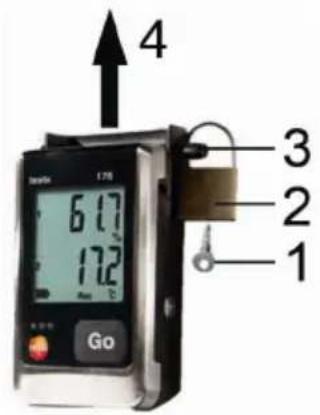
- Open the lock with the key (1).
- Remove the lock (2) from the locking pin.
- Pull the locking pin (3) out of the holes in the wall bracket.
- Slide the data logger out of the wall bracket (4).

The data logger is delivered with the battery (type TL-5903) inserted. The display of the data logger shows rSt.
4.2. Connecting the data logger to PC
For testo Comfort Software Basic 5:
The software is available in the Internet as a free download requiring registration: www.testo.com/download-center.

The instructions for the installation and operation of the software can be found in the testo Comfort Software Basic 5 instruction manual, which can be downloaded together with the software.

The software can be ordered on CD (article-no: 0572 0580), if the download from the Internet is not desired.
For testo Comfort Software Professional und testo Comfort Software CFR:
Insert the CD into the CD-ROM drive.
- Install the software testo Comfort Software.
- Connect the USB cable to a free USB port on the PC.
-
Loosen the screw on the right side of the data logger.
-
Open the cover.
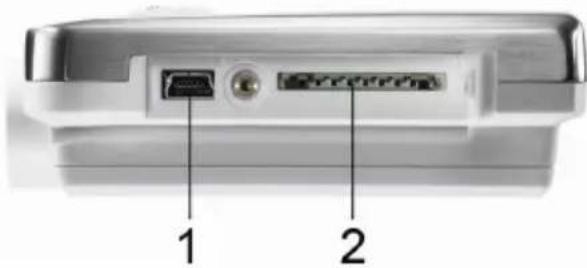
- Plug the USB cable into the Mini USB port (1).
- Configure the data logger, see separate operating instructions testo Comfort Software.
5 Display and control elements
5.1. Display
The data loggers testo 176 T1, testo 176 T3, testo 176 H2 have no display.
The display function can be switched on/off via the testo Comfort Software.
Depending on the operating status, various information may be shown in the display. A detailed representation of the information that can be called up can be found under Menu overview, page 50.
i For technical reasons the display speed of liquid crystal displays becomes slower at temperatures below 0^ (approx. 2 seconds at -10^ , approx. 6 seconds at -20^ ). This has no influence on the measuring accuracy.
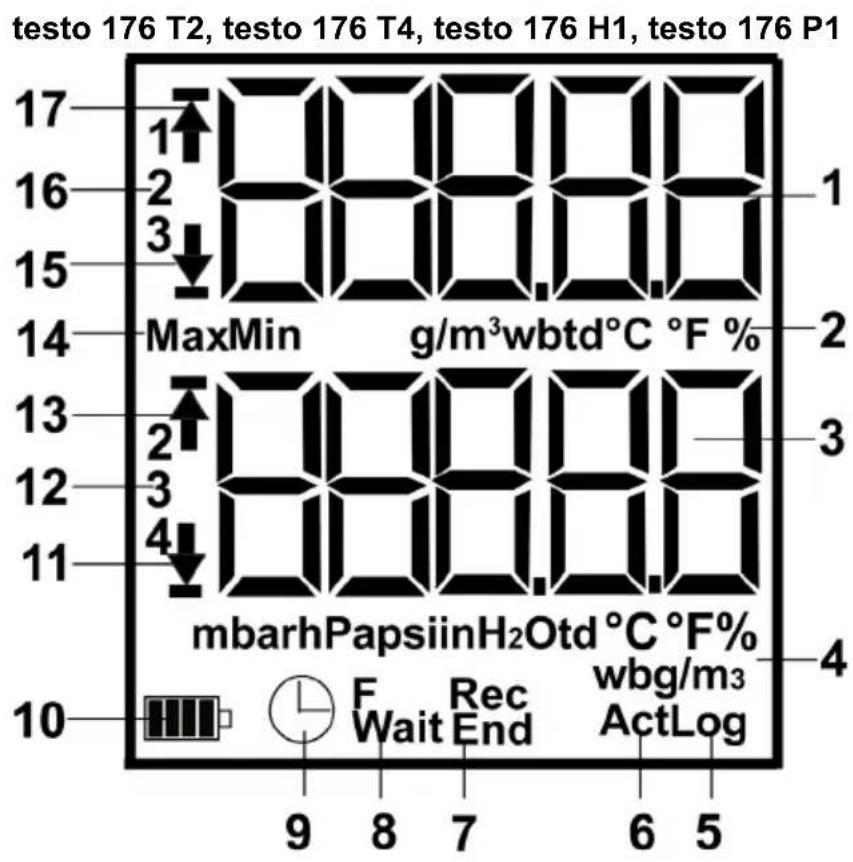
1 Measurement value channel 1, 2, 3 (depending on number of channels and view)
2 Units channel 1, 2, 3 (depending on number of channels and view)
3 Measurement value channel 2, 3, 4 (depending on number of channels and view)
4 Units channel 2, 3, 4 (depending on number of channels and view)
5 Number of saved measurement values with alarm value violation (Log)
6 Current intermediate measurement value, appears in the display, but is not saved (Act)
7 End of measuring program (End), measuring program is running (Rec)
8 Waiting for start of measuring program (Wait), start criterion Formula programmed (F)
9. Start criterion Date/ Time programmed
10 Battery capacity
| Icon Capacity | |
| >151 days | |
| <150 days | |
| <90 days | |
| <60 days | |
| <30 days >Read out data and change battery (see Replacing the battery, page 55). |
11 Lower alarm value displayed channel (2, 3, 4):
- Flashes: programmed alarm value is shown
- Lights: programmed alarm values were fallen short of
12 Channel number (2, 3, 4)
13 Upper alarm value displayed channel (2, 3, 4):
- Flashes: programmed alarm value is shown
- Lights: programmed alarm values were exceeded
14 Identification of measurement value:
Max: highest saved measurement value
Min: lowest saved measurement value
15 Lower alarm value displayed channel (1, 2, 3):
- Flashes: programmed alarm value is shown
- Lights: programmed alarm values were fallen short of
16 Channel number (1, 2, 3)
17 Upper alarm value displayed channel (1, 2, 3):
- Flashes: programmed alarm value is shown
- Lights: programmed alarm values were exceeded
5.2. LED
| Representation Explanation | |
| Red LED flashes once every 10 seconds | Remaining battery capacity has dropped below 30 days |
| Red LED flashes twice every 10 seconds | Remaining battery capacity has dropped below 10 days |
| Red LED flashes three times every 10 seconds | Battery is empty: |
| Red LED flashes three times when pressing the button | Limiting value exceeded/fallen short of. |
| Yellow LED flashes three times | Instrument changes from Wait-mode to Rec-mode. |
| Yellow LED flashes three times when pressing the button | Instrument is in Rec-mode. |
| Green and yellow LED flash three times when pressing the button. | Instrument is in End-mode. |
| Green LED flashes three times when pressing the button | Instrument is in Wait-mode. |
| Red, yellow and green LEDs flash one after the other | Battery was inserted, capacitor in charge state. |
5.3. Key functions
A detailed representation of the screen displays can be found under Menu overview, page 50.
Instrument in operating status Wait and start criterion Button start programmed.
Press [GO] for approx. 3 seconds to start the measurement program.
- The measurement program starts and Rec appears in the display.
Instrument is in operating status Wait:
Press [GO], to toggle between the displays of upper alarm value, lower alarm value, battery lifetime and last measurement value.
The displays appear in the specified sequence.
Instrument is in operating status Rec or End:
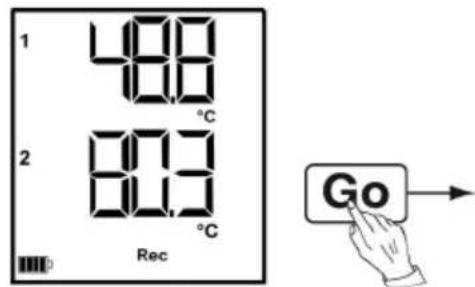
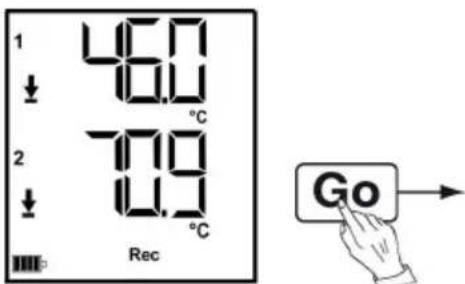
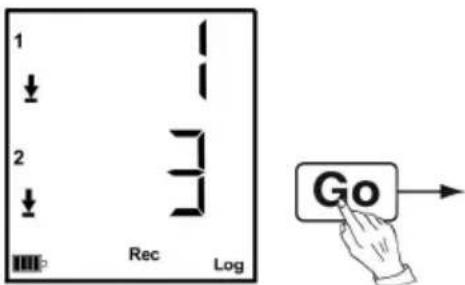
Press [GO], to toggle between the displays for highest saved measurement value, lowest saved measurement value, upper alarm value, lower alarm value, number of times the upper alarm value has been exceeded, number of times the lower alarm value has been fallen short of, battery lifetime and last measurement value.
The displays appear in the specified sequence.
Show current measurement value
The last 10 seconds [GO] has not be pressed.
Press [GO].
-
The current measurement value is determined and appears in the display.
-
The display shows Act.

If [GO] is pressed again within the next 10 seconds, the current measurement value for the next channel will be determined and displayed.
6 Using the product
6.1. Connecting a sensor
Observe the following points when connecting sensors to data logger and measuring points.
Ensure correct polarity of the plugs.
Press the plugs firmly into the ports to ensure leak tightness. However, do not apply force!
Make sure that the plugs are firmly connected to the data logger or that the connections are closed with blanking plugs.
Ensure correct positioning of the sensor to avoid disturbing influences affecting the measurement.
testo 176 T2, testo 176 T3, testo 176 T4, testo 176 H1, testo 176 H2, testo 176 P1: Make sure that you connect the configured (with the testo Comfort Software) sensors to the individual connections. The numbers of the connections are printed on the housing.
6.2. Programming data logger
In order to adapt the programming of your data logger to your individual requirements, you require the testo Comfort Software Basic 5 software. It is available in the Internet as a free download requiring registration www.testo.com, International, Service&Support | Download Center.

The instructions for the installation and operation of the software can be found in the testo Comfort Software Basic 5 instruction manual that is downloaded together with the software.
6.3. Menu overview

The menu overview shows exemplary display representations of the data logger testo 176 T2.
The data loggers testo 176 T1, testo 176 T3, testo 176 H2 have no display.
The display must be switched on to be able to show the corresponding indications. This takes place via the testo Comfort Software.
The indication in the display is updated according to the programmed measurement rate. Only readings from active channels are displayed.
The channels are also activated via the testo Comfort Software.
The symbols for upper or lower alarm value light up in operating states Rec and End, if the programmed alarm value has been exceeded or fallen short off.
After 10 seconds without operating a key the display will return to its initial state.
Wait-Mode (Wait): Start criterion is programmed, but not yet fulfilled.
① Last reading
Start criterion key Start criterion start/PCstart Date/Time
Start criterion Formula
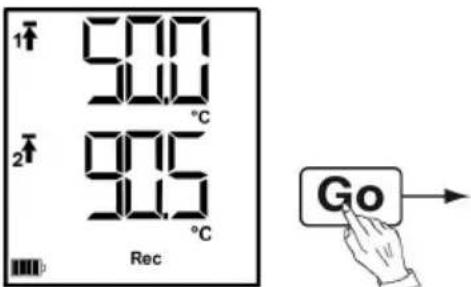
② Upper alarm value
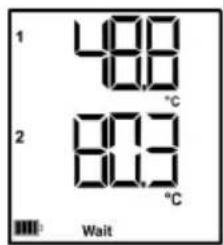
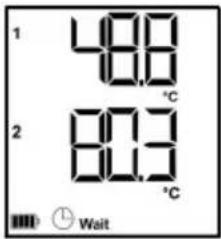
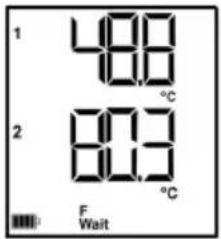
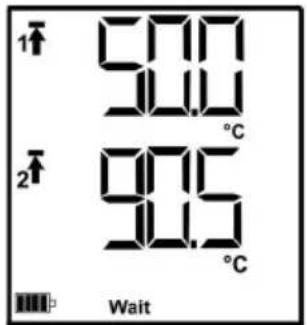
③ Lower alarm value
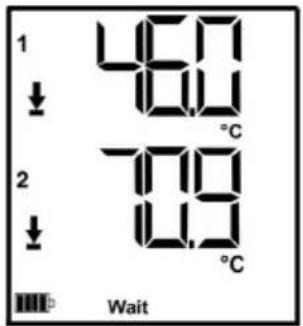
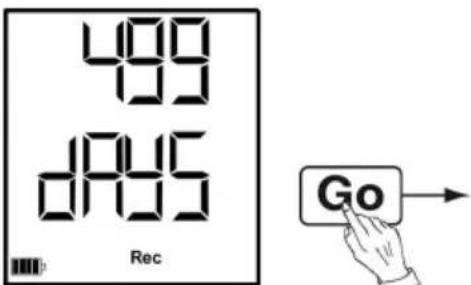
④ Battery capacity in days
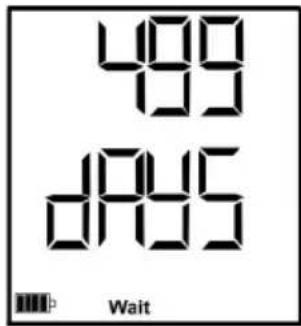
Last measurement value (see Fig. ① Wait mode)
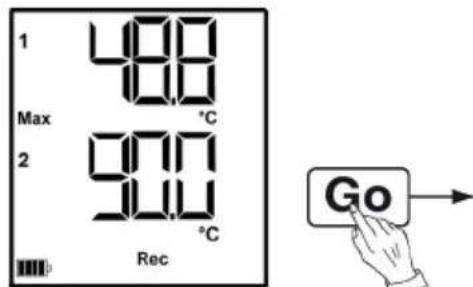
Rec-Mode (Rec): Start criterion was fulfilled, data logger saves readings
End-Mode (End): Measurement program finished (stop criterion reached – memory full or number of readings) depending on programming
① Last reading
③ Lowest reading
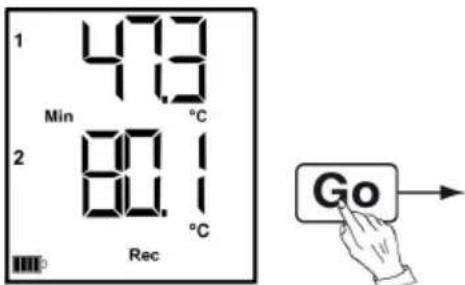
⑤ Lower alarm value
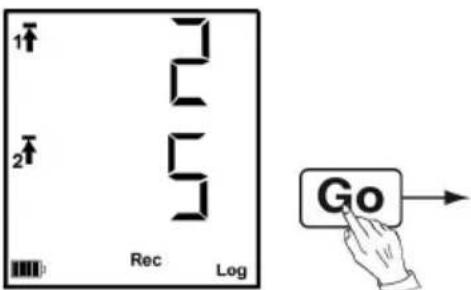
Number of times the lower alarm value has been fallen short of
Last measurement value (see Fig. ①)
② Highest reading
④ Upper alarm value
Number of times the upper alarm value has been exceeded
⑧ Battery capacity in days
6.4. Mounting the wall bracket
The scope of delivery does not include mounting materials (e.g. screws, wall plugs).
- The data logger has been removed from the wall bracket.
- Position the wall bracket at the desired place.
- Use a pen or something similar to mark the location for the fastening screws.
- Prepare the fastening location in accordance with the fastening material (e.g. drill hole, insert wall plugs).
- Fasten the wall bracket with suitable screws.
6.5. Securing the data logger
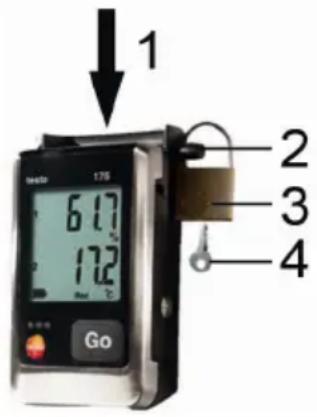
The wall bracket has been mounted.
1. Slide the data logger into the wall bracket (1).
2. Push the locking pin (2) through the holes in the wall bracket.
3. Fasten the lock (3) on the locking pin.
4. Pull off the key (4).
6.6. Reading out data
Via USB cable
- Connect the USB cable to a free USB port on the PC.
- Loosen the screw on the right side of the data logger.
- Open the cover.
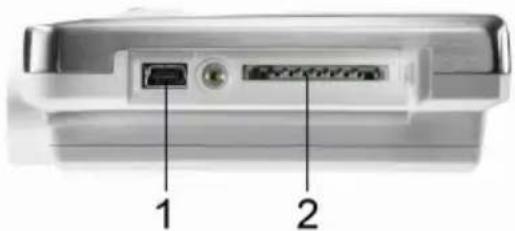
- Plug the USB cable into the Mini USB port (1).
- Reading out data logger and processing of read out data, see separate operating instructions testo Comfort Software.
Via SD card

If a data logger is to be read out in Rec-mode, the data logger can record measuring data with a maximum measuring cycle of 10 seconds during the read-out process.
Once the read-out process has finished, the data logger can again record measurement data with a measuring cycle of 1 second, depending on the programming.
- Loosen the screw on the right side of the data logger.
- Open the cover.
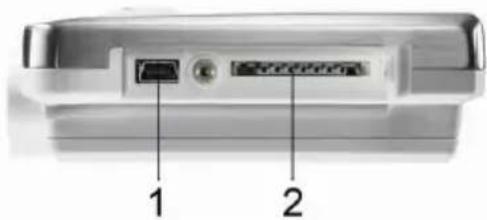
-
Push the SD card into the SD card slot (2).
-
Sd CArd appears in the display.
-
Hold [Go] depressed for longer than 2 seconds.
-
COPY appears in the display.
- The yellow LED lights during the copying process.
- The green LED flashes twice and after the copying process the display shows OUT.
- Remove the SD card.
- Insert the SD card into the SD card slot on the PC.
- Further processing of read out data, see separate operating instructions testo Comfort Software.
7 Maintaining the product
7.1. Replacing the battery
The battery change stops the currently running measuring program. However, stored measurement data are preserved.
-
Read out stored measurement data, see Reading out data, page 53.
If it is no longer possible to read out the saved measurement data because the battery capacity is too low:Change the battery and then read out the stored measurement data.
-
Place the data logger on its front.
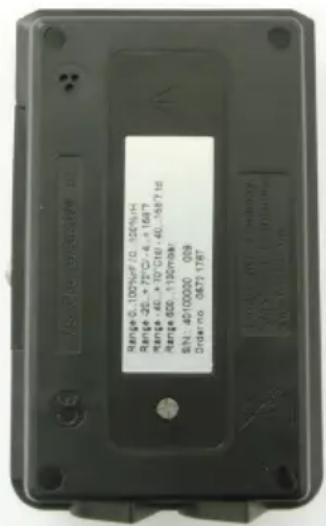
- Loosen the screws on the back of the data logger.
- Remove the battery compartment cover.
- Take the empty battery out of the battery compartment.
- Insert the new battery (type TL-5903). Observe the polarity!
i Only use new branded batteries. If a partially exhausted battery is inserted, the calculation of the battery capacity will not be performed correctly.
- Place the battery compartment cover on the battery compartment.
-
Tighten the screws.
-
The display shows rST.

The data logger needs to be reconfigured. For this purpose the software testo Comfort Software must be installed on the computer and a connection to the data logger must have been set up.
- Connect the data logger to the PC with a USB cable.
- Start testo Comfort Software and set up a connection to the data logger.
-
Reconfigure the data logger or load the old, saved configuration, see separate operating instructions testo Comfort Software.
-
The data logger is once again ready for use.
7.2. Cleaning the instrument
CAUTION
Damage to the sensor!
Ensure that no liquid enters the inside of the housing.
If the housing of the instrument is dirty, clean it with a damp cloth.
Do not use any aggressive cleaning agents or solvents! Weak household cleaning agents or soap suds can be used.
8 Tips and assistance
8.1. Questions and answers
| Question Possible causes / solution | |
| FULL appears in the display, the red LED flashes twice, out appears in the display. | Insufficient memory capacity on SD card to save the data. Remove the SD card, free up more memory space and copy data. |
| Err appears in the display, the red LED flashes twice, out appears in the display. | An error occurred while saving data to the SD card. Remove the SD card, free up more memory space and copy data. |
| nO dAtA appears in the display, the red LED flashes twice. | The logger has not yet recorded any data and is in Wait mode. Remove the SD card and wait until the logger is in Rec mode. |
| rST appears in the display. | The battery has been inserted. No data are recorded. Reprogram the data logger via the software. |
| H Cap appears in the display. | The battery has been inserted after the battery and the auxiliary battery had been fully discharged. The auxiliary battery must be charged. 1. Connect the data logger to the PC with a USB cable. 2. Charge the auxiliary battery approx. 5-10 minutes via the USB-cable. - The display shows rST. |
| - - - appears in the display. | Sensor of data logger defective or an incompatible sensor has been plugged in. > Contact your dealer or the Testo Customer Service. |
If you have any questions please contact your local dealer or the Testo Customer Service. You find contact data on the back of this document or in the Internet under www.testo.com/service-contact.
8.2. Accessories and spare parts
| Description Article no. | |
| Wall bracket (black) with lock 0554 1703 | |
| Mini USB cable to connect the data logger testo 176 to the PC | 0449 0047 |
| SD card to read out the data ligger 176 0554 | 8803 |
| Battery TL-5903 AA-battery 0515 1760 | |
| CD testo Comfort Software Basic 5 (if free-of-charge download from the website with obligation of registering is not wanted) | 0572 0580 |
| CD testo Comfort Software Professional 0554 | 1704 |
| CD testo Comfort Software CFR 0554 1705 | |
| ISO temperature calibration certificate, calibration points -18 °C, 0 °C, +40 °C; per channel/instrument | 0520 0153 |
| ISO moisture calibration certificate, calibration points 11,3 %rF; 50,0 %rF; 75,3 %rF at +25 °C/+77 °F; per channel/instrument | 0520 0076 |
| ISO calibration certificate absolute pressure, 5 calibration points over the measurement range | 0520 0025 |
For further accessories and spare parts, please refer to the product catalogues and brochures or look up under: www.testo.com