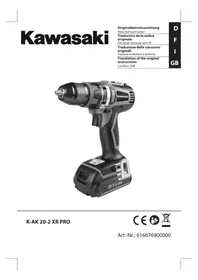
KAK 202 XR Pro - Screwdriver KAWASAKI - Free user manual and instructions
Find the device manual for free KAK 202 XR Pro KAWASAKI in PDF.

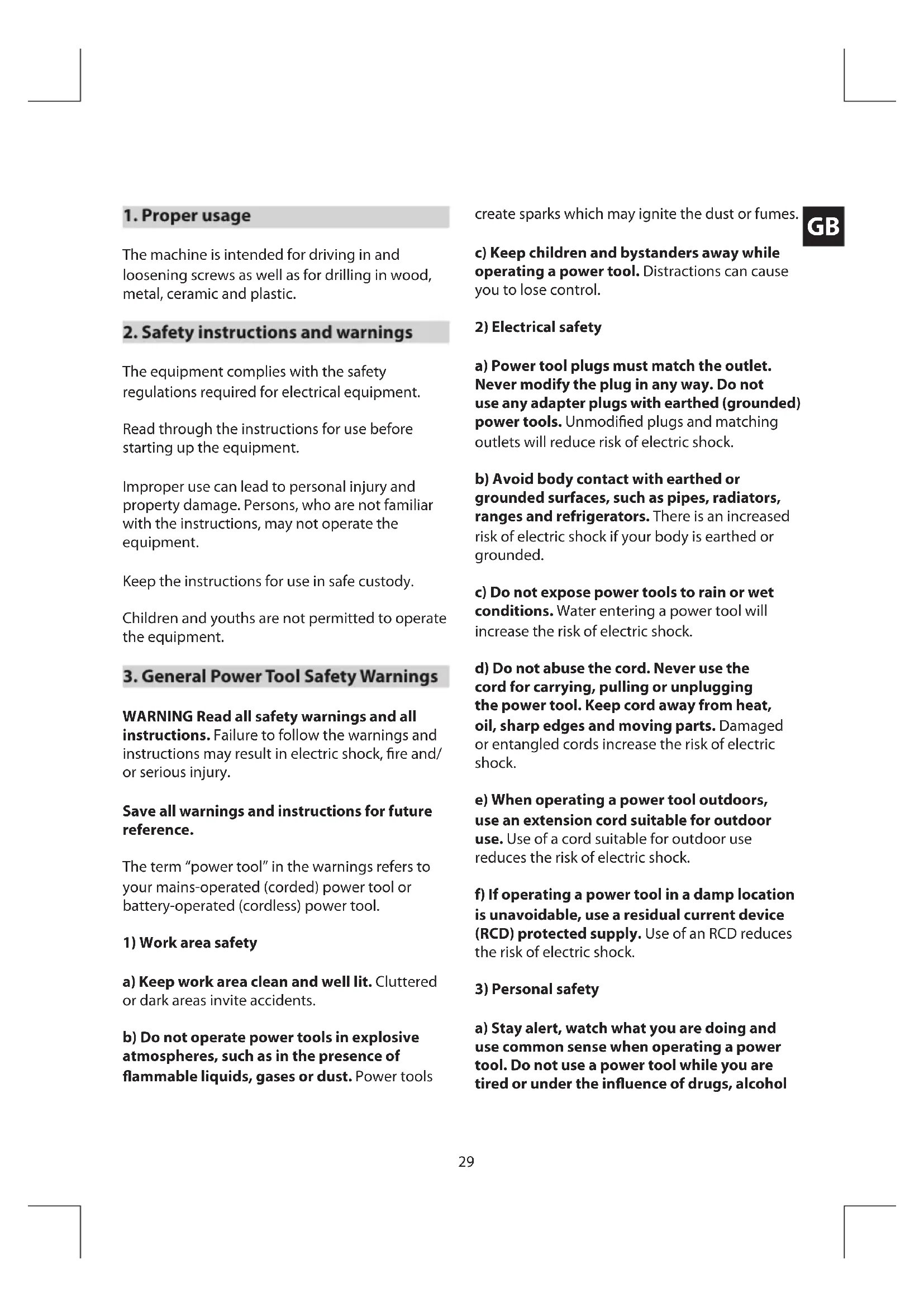


| Product type | Cordless drill/driver |
| Brand | Kawasaki |
| Model | KAK 202 XR Pro |
| Power supply | Li-ion battery 20 V, 2.0 Ah |
| Mains charger | 220-240 V AC, 50/60 Hz, 60 W |
| Charging time | Approx. 1 hour |
| No-load speed | 0-400 / 0-1400 rpm (two speeds) |
| Torque setting | 15+1 mechanical settings + drilling position |
| Chuck capacity | Max 13 mm |
| Direction of rotation | Reversible (right/left) |
| Lighting | Integrated LED lamp |
| Weight | 1.5 kg |
| Sound pressure level | 73.5 dB(A) |
| Sound power level | 84.5 dB(A) |
| Vibration emission (metal drilling) | 0.728 m/s² |
| Maintenance | Clean with a damp cloth and mild soap; avoid harsh products |
| Warranty | 24 months |
Frequently Asked Questions - KAK 202 XR Pro KAWASAKI
User questions about KAK 202 XR Pro KAWASAKI
0 question about this device. Answer the ones you know or ask your own.
Ask a new question about this device
Download the instructions for your Screwdriver in PDF format for free! Find your manual KAK 202 XR Pro - KAWASAKI and take your electronic device back in hand. On this page are published all the documents necessary for the use of your device. KAK 202 XR Pro by KAWASAKI.
USER MANUAL KAK 202 XR Pro KAWASAKI
Translation of the original instructions
Cordless Drill
D
F
1
GB
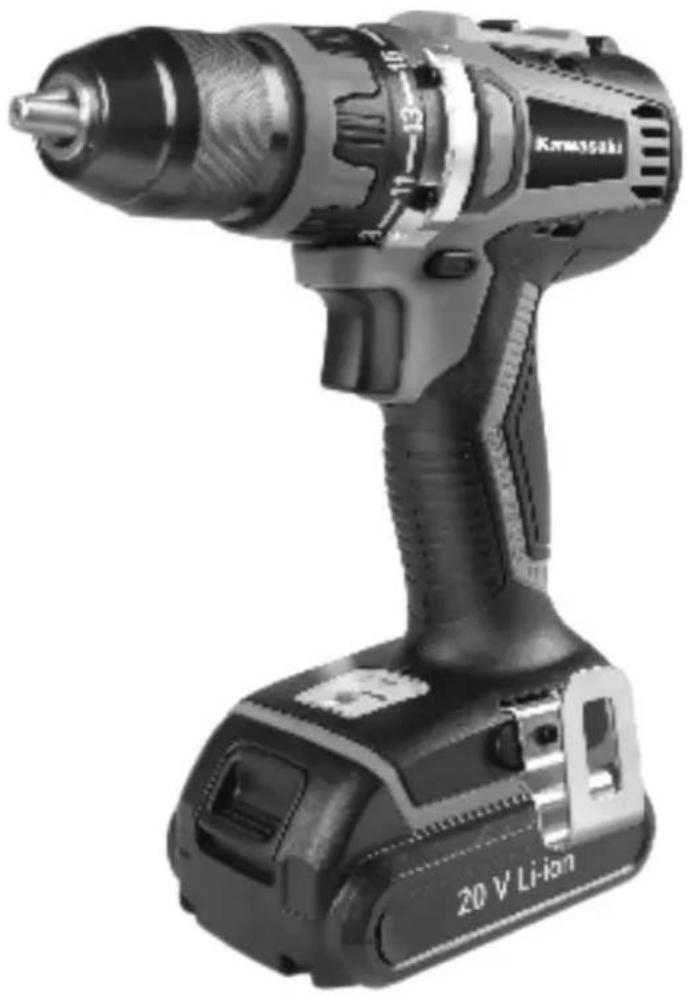
K-AK 20-2 XR PRO


Distributed under license by:
MATRIX GmbH · Postauer Straße 26 · D-84109 Wördt/Isar · www.matrix-direct.net Kawasaki is a registered trademark of Kawasaki Heavy Industries Ltd.
The machine is intended for driving in and loosening screws as well as for drilling in wood, metal, ceramic and plastic.
2. Safety instructions and warnings
The equipment complies with the safety regulations required for electrical equipment.
Read through the instructions for use before starting up the equipment.
Improper use can lead to personal injury and property damage. Persons, who are not familiar with the instructions, may not operate the equipment.
Keep the instructions for use in safe custody.
Children and youths are not permitted to operate the equipment.
3. General Power Tool SafetyWarnings
WARNING Read all safety warnings and all instructions. Failure to follow the warnings and instructions may result in electric shock, fire and/or serious injury.
Save all warnings and instructions for future reference.
The term "power tool" in the warnings refers to your mains-operated (corded) power tool or battery-operated (cordless) power tool.
1) Work area safety
a) Keep work area clean and well lit. Cluttered or dark areas invite accidents.
b) Do not operate power tools in explosive atmospheres, such as in the presence of flammable liquids, gases or dust. Power tools
create sparks which may ignite the dust or fumes.

c) Keep children and bystanders away while operating a power tool. Distractions can cause you to lose control.
2) Electrical safety
a) Power tool plugs must match the outlet. Never modify the plug in any way. Do not use any adapter plugs with earthed (grounded) power tools. Unmodified plugs and matching outlets will reduce risk of electric shock.
b) Avoid body contact with earthed or grounded surfaces, such as pipes, radiators, ranges and refrigerators. There is an increased risk of electric shock if your body is earthed or grounded.
c) Do not expose power tools to rain or wet conditions. Water entering a power tool will increase the risk of electric shock.
d) Do not abuse the cord. Never use the cord for carrying, pulling or unplugging the power tool. Keep cord away from heat, oil, sharp edges and moving parts. Damaged or entangled cords increase the risk of electric shock.
e) When operating a power tool outdoors, use an extension cord suitable for outdoor use. Use of a cord suitable for outdoor use reduces the risk of electric shock.
f) If operating a power tool in a damp location is unavoidable, use a residual current device (RCD) protected supply. Use of an RCD reduces the risk of electric shock.
3) Personal safety
a) Stay alert, watch what you are doing and use common sense when operating a power tool. Do not use a power tool while you are tired or under the influence of drugs, alcohol
GB
or medication. A moment of inattention while operating power tools may result in serious personal injury.
b) Use personal protective equipment. Always wear eye protection. Protective equipment such as dust mask, non-skid safety shoes, hard hat, or hearing protection used for appropriate conditions will reduce personal injuries.
c) Prevent unintentional starting. Ensure the switch is in the off-position before connecting to power source and/or battery pack, picking up or carrying the tool. Carrying power tools with your finger on the switch or energising power tools that have the switch on invites accidents.
d) Remove any adjusting key or wrench before turning the power tool on. A wrench or a key left attached to a rotating part of the power tool may result in personal injury.
e) Do not overreach. Keep proper footing and balance at all times. This enables better control of the power tool in unexpected situations.
f) Dress properly. Do not wear loose clothing or jewellery. Keep your hair, clothing and gloves away from moving parts. Loose clothes, jewellery or long hair can be caught in moving parts.
g) If devices are provided for the connection of dust extraction and collection facilities, ensure these are connected and properly used. Use of dust collection can reduce dust-related hazards.
4) Power tool use and care
a) Do not force the power tool. Use the correct power tool for your application. The correct power tool will do the job better and safer at the rate for which it was designed.
b) Do not use the power tool if the switch does not turn it on and off. Any power tool that cannot be controlled with the switch is dangerous and must be repaired.
c) Disconnect the plug from the power source and/or the battery pack from the power tool before making any adjustments, changing accessories, or storing power tools. Such preventive safety measures reduce the risk of starting the power tool accidentally.
d) Store idle power tools out of the reach of children and do not allow persons unfamiliar with the power tool or these instructions to operate the power tool. Power tools are dangerous in the hands of untrained users.
e) Maintain power tools. Check for misalignment or binding of moving parts, breakage of parts and any other condition that may affect the power tool's operation. If damaged, have the power tool repaired before use. Many accidents are caused by poorly maintained power tools.
f) Keep cutting tools sharp and clean. Properly maintained cutting tools with sharp cutting edges are less likely to bind and are easier to control.
g) Use the power tool, accessories and tool bits etc. in accordance with these instructions, taking into account the working conditions and the work to be performed. Use of the power tool for operations different from those intended could result in a hazardous situation.
5) Battery tool use and care
a) Recharge only with the charger specified by the manufacturer. A charger that is suitable for one type of battery pack may create a risk of fire when used with another battery pack.
b) Use power tools only with specifically designated battery packs. Use of any other battery packs may create a risk of injury and fire.
c) When battery pack is not in use, keep it away from other metal objects, like paper clips, coins, keys, nails, screws or other small metal objects, that can make a connection from one terminal to another. Shorting the battery terminals together may cause burns or a fire.
d) Under abusive conditions, liquid may be ejected from the battery; avoid contact. If contact accidentally occurs, flush with water. If liquid contacts eyes, additionally seek medical help. Liquid ejected from the battery may cause irritation or burns.
6) Service
a) Have your power tool serviced by a qualified repair person using only identical replacement parts. This will ensure that the safety of the power tool is maintained.
4. Special safety instructions
- Hold power tool by insulated gripping surfaces, when performing an operation where the cutting accessory or fastener may contact hidden wiring. Cutting accessory and fasteners contacting a "live" wire may make exposed metal parts of the power tool "live" and could give the operator an electric shock.
- Use appropriate detectors to determine if utility lines are hidden in the work area or call the local utility company for assistance. Contact with electric lines can lead to fire and electric shock. Damaging a gas line can lead to explosion. Penetrating a water line causes property damage or may cause an electric shock.
- Switch off the power tool immediately when the tool insert jams. Be prepared for high reaction torque that can cause kickback.
The tool insert jams when: the power tool is subject to overload or it becomes wedged in the workpiece.
- Hold the machine with a firm grip. High reaction torque can briefly occur while driving in and loosening screws.
- Secure the workpiece. A workpiece clamped with clamping devices or in a vice is held more secure than by hand.
- Keep your workplace clean. Blends of materials are particularly dangerous. Dust from light alloys can burn or explode.
- Always wait until the machine has come to a complete stop before placing it down. The tool insert can jam and lead to loss of control over the power tool.
- Do not open the battery. Danger of shortcircuiting. Protect the battery against heat, e.g., also against continuous sun irradiation and fire. There is danger of explosion.
- In case of damage and improper use of the battery, vapours may be emitted. Provide for fresh air and seek medical help in case of complaints. The vapours can irritate the respiratory system.
- When the battery is defective, liquid can escape and come into contact with adjacent components. Check any parts concerned. Clean such parts or replace them, if required.

5.Description of symbols
Pay attention to all the signs and symbols shown in these instructions and on your tool.
Make a note of these signs and symbols. If you interpret the signs and symbols correctly, your work with the machine will be safer and better.

Important.

Read the instructions for use before starting the machine.

Wear safety goggles.

Wear ear protection.

Wear good quality, strong gloves.

Always use breathing apparatus when machining materials which generate dust.

Battery Li-Ion

Avoid continuous sunlight

Keep away from fire

Do not throw it into water.

Battery pack is part of the recyclable resources

Batteries are not belong to litter bin. There is a legal obligation to return batteries for proper disposal.

End of life machines contain valuable materials and therefore they should not be placed in household waste. We would ask you to play your part in protecting resources and help protect the environment by returning this machine to a return point (if one is available) when it reaches the end of its life.
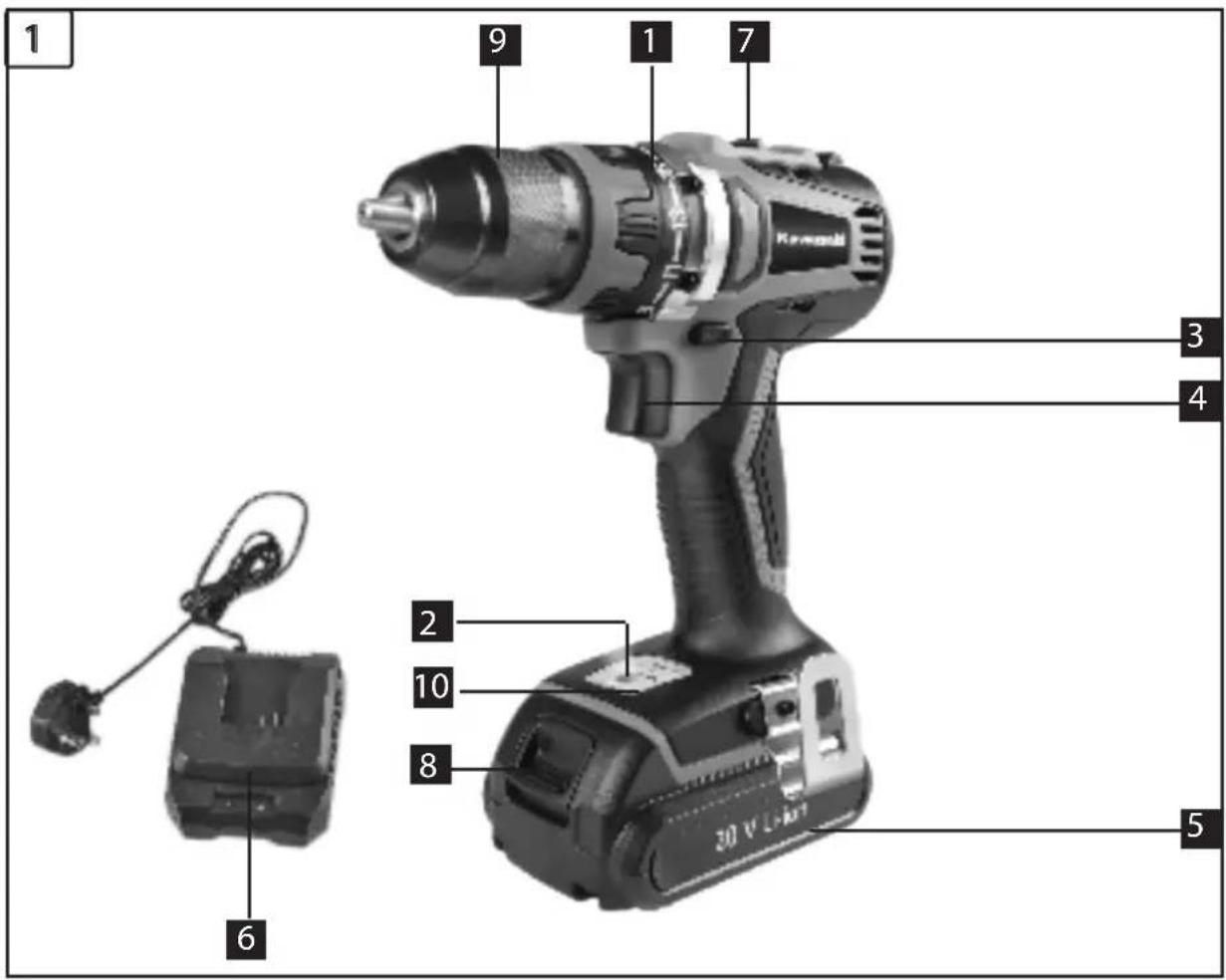
6. Layout
1.Torque selector
2. Battery capacity indicator
3. Changeover switch
4. ON/OFF switch
5. Li-Ion Battery pack
6. Battery charger
7. Selector switch for 1st/2nd gear
8. Pushlock button
9. Quick-change drill chuck
10. LED lamp
7. Before starting the equipment
Be sure to read the following information before you use your cordless screwdriver for the first time:
- Charge the battery pack with the charger supplied. An empty battery pack requires a charging period of approximately 1 hour.
- Only ever use sharp drill bits and screwdriver bits which are suitable for the purpose and in faultless condition.
- Always check for concealed electric cables and gas and water pipes when drilling and screwing in walls.
8. Operation
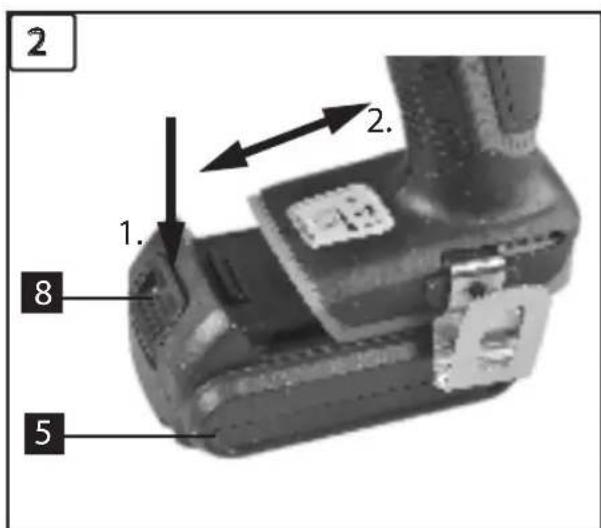
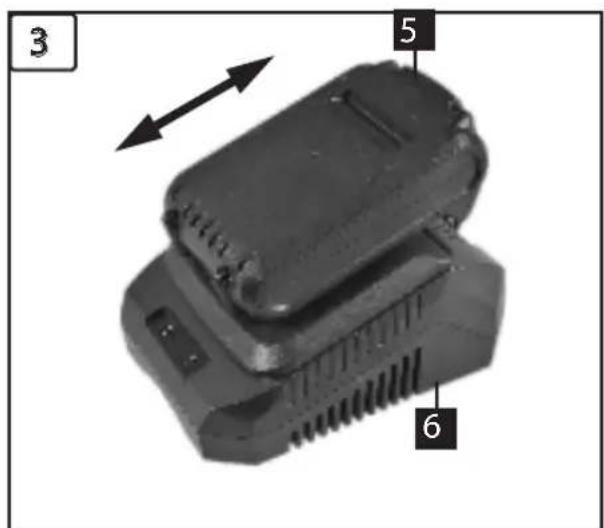
8.1 Charging the battery pack (Fig. 2/3)
- Remove the battery pack (5) from the handle, pressing the pushlock buttons (8) downwards to do so.
- Check that your mains voltage is the same as that marked on the rating plate of the battery charger. Plug the mains plug of the charger (6) into the mains socket outlet.
- Push the battery pack onto the battery charger. The flashing red LED will come on to indicate that the battery pack is being charged. When the charging process is finished, the red LED will be
permanently lit. The time it takes to fully recharge an empty battery is approximately 1 hour.
GB
- The temperature of the battery pack may rise slightly during the charging operation. This is normal. If the green LED extinguishes during charging, the temperature is either above or below the perfect charging temperature. In this case, pull the plug of the charger and charge the battery in an environment in which the temperature is either warmer or colder.
If the battery pack fails to become charged, please check
- whether there is voltage at the socket-outlet
- whether there is proper contact at the charging contacts on the charger.
If the battery still fails to become charged, please return
the charger
the battery pack
to our Customer Service Department.
To ensure that the battery pack provides long service you should take care to recharge it promptly.
You must recharge the battery pack when you notice that the power of the cordless screwdriver drops.
Never fully discharge the battery pack. This will cause the battery pack to develop a defect.
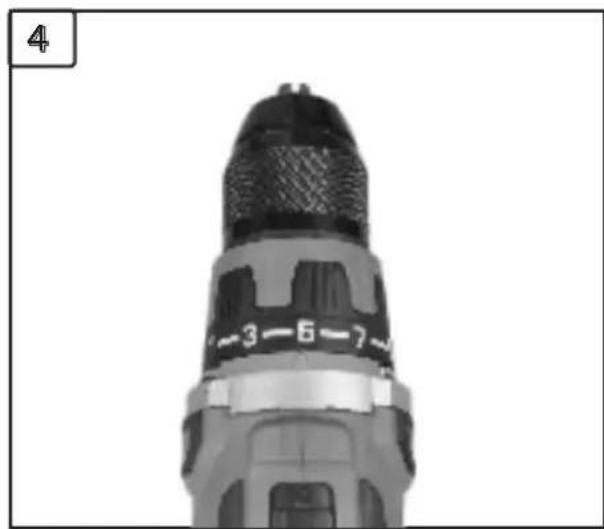
8.2 Torque setting (Fig. 4 / Item 1)
The cordless screwdriver is fitted with a mechanical torque selector.
The torque for a specific size of screw is selected with the set-collar (1). The correct torque depends on several factors:
- on the type and hardness of material in question
on the type and length screws used - on the requirements needing to be met by the screwed joint.
The clutch disengages with a grating sound to indicate when the set torque is reached.
GB Important! The tool must be at a standstill when you set the torque with the setting ring.
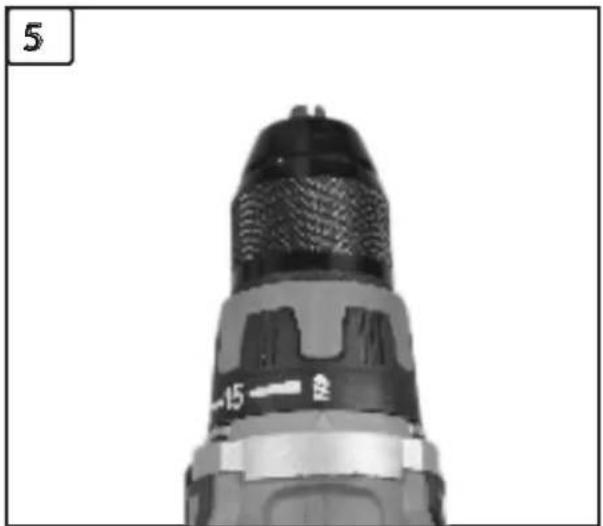
8.3 Drilling (Fig. 5 / Item 1)
For drilling purposes, move the set-collar to the last step "Drill". In this setting the slip clutch is inactive.
The maximum torque is available in drilling mode.
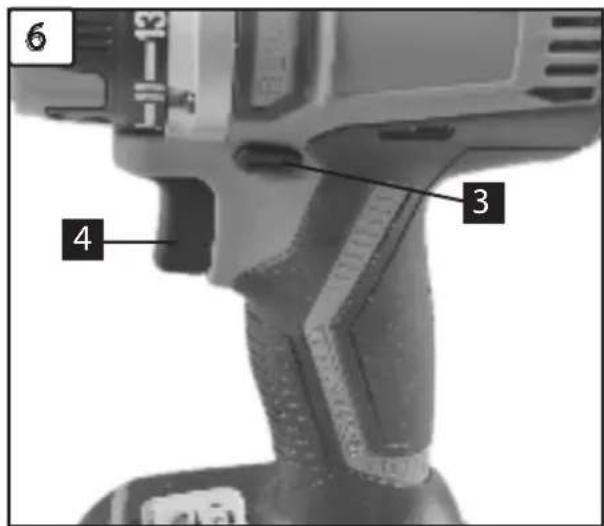
8.4 Forward/Reverse switch (Fig. 6 / Item 3)
With the slide switch above the On/Off switch you can select the direction of rotation of the battery-powered drill/screwdriver and secure it against being switched on accidentally. You can choose between clockwise and anticlockwise rotation. To avoid causing damage to the gearing it is advisable to change the direction of rotation only when the tool is at a standstill. The On/Off switch is blocked when the slide switch is in centre position.
8.5 On/Off switch (Fig. 6 / Item 4)
Infinitely variable speed control is possible with the On/Off switch. The further you press the switch, the higher the speed of the battery-powered drill/screwdriver.
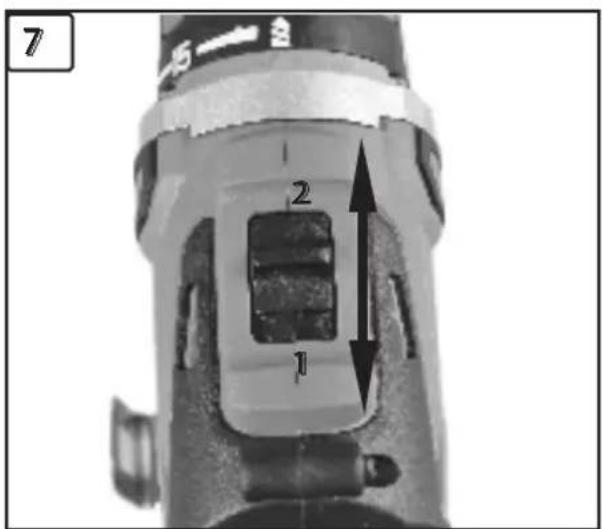
8.6 Changing over from 1st gear to 2nd gear (Fig. 7/ Item 7)
You can work at a higher or lower speed depending on the position of the selector switch. To avoid damaging the gear unit you should only change over gears when the tool has stopped.
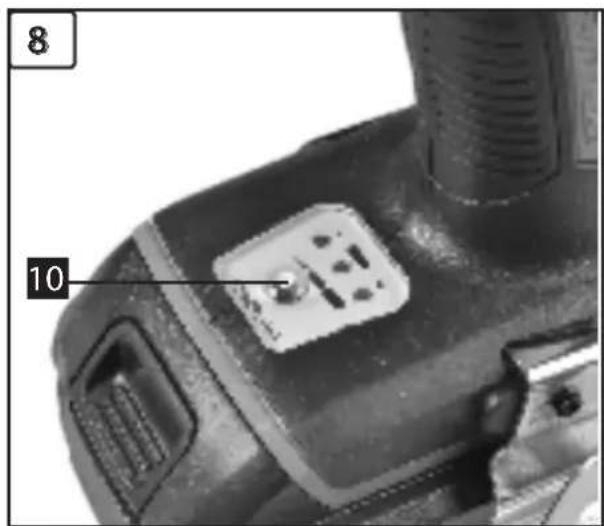
8.7 Battery capacity indicator (Fig. 8- Item 2)
The 3 color LEDs will indicate the status of battery capacity as soon as you press the ON/OFF switch (4).
All LEDs illuminate:
The battery is fully charged.
The yellow and red LED illuminate:
The battery has an adequate remaining charge.
RedLED:
The battery is empty, recharge the battery.
8.8 LED lamp (Fig. 8)
The LED lamp (10) can be used in poor lighting conditions to illuminate the area where you want to drill or screw. The LED lamp (10) will be lit automatically as soon as you press the ON/OFF switch (4).
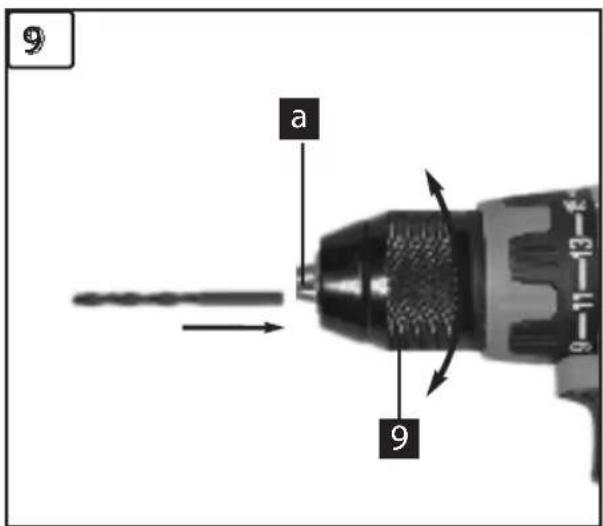
8.9 Changing the tool (Fig. 9)
Important. Set the changeover switch (3) to its centre position whenever you carry out any work (for example changing the tool, maintenance work, etc.) on the cordless screwdriver.
- The cordless screwdriver is fitted with a quickaction chuck (9) with an automatic spindle stop.
- Open the chuck (9). The chuck opening (a) must be large enough to hold the tool (drill bit or screwdriver bit).
- Select the suitable tool. Push the tool as far as possible into the chuck opening (a).
- Tighten the chuck (9) and then check that the tool is secure.
8.10 Screwdriving
We recommend using self-centering screws (e.g. Torx screws, recessed head screws) designed for reliable working. Be sure to use a bit that matches the screw in shape and size. Set the torque, as described elsewhere in these operating instructions, to suit the size of screw.
9. Technical data
Voltage supply: 20V = /2.0Ah Li-ion
No-load speed: 0-400/0-1400 rpm
Torque settings: 15+1
Forward and reverse rotation: yes
Chuck clamping width: max. 13 mm
Battery charging voltage: 21 V ---
Battery charging current: 2200 mA
Mains voltage for charger: 220-240V AC,50/60Hz, 60W
Charging time: 1 h
Weight: 1,5 kg
Sound and vibration
Sound and vibration values were measured in accordance with EN 60745.
LpA : sound pressure level 73,5 dB(A)
KDA : uncertainty 3 dB(A)
The impact of noise can cause damage to hearing. Total vibration values (vector sum of three directions) determined in accordance with EN 60745.
Drilling in metal
Vibration emission value ah,D = 0,728 m / s2
Kuncertainty = 1,5m / s2
NOTE: The indicated vibration value has been determined on the basis of a standardised test procedure and can be used for comparing different products. Moreover, this value can be used to estimate the load on the user caused by vibrations. The vibration value can be caused by the following factors which should be taken into consideration before or during each use of the tool:
- Correct use of the tool
- Impeccable condition of the tool
-Condition of the worked material - Are the handles and optional vibration handles, if available, correctly and tightly mounted to the tool body.
If your hands feel uncomfortable or the skin colour of your hands changes when using the tool, you must immediately interrupt your work. Take enough breaks. Failure to take enough breaks may result in the hand-arm vibration syndrome.
CAUTION!
Depending on the application of the product, the actual vibration values may deviate from the indicated values! Take measures to protect
yourself against vibrations! To this end, you must take the whole work flow into account, i.e. also the time when the tool is operated without load, or when the tool is switched off! Appropriate measures include the regular maintenance and care of the tool and tool inserts, keeping your hands warm, regular breaks as well as a reasonably planned work flow! If you use the tool frequently, you should contact your product retailer and purchase anti-vibration accessories (handles), if available. A certain noise exposure caused by this tool cannot be avoided. Any work involving loud noise must be accomplished at times allowed and intended for this purpose. If applicable, observe rest periods and restrict your working time to the essentials. The operator and persons in the vicinity must wear ear protection. Maintain the tool in accordance with the instructions in the manual.
10. Cleaning and maintenance
Always pull out the mains power plug before starting any cleaning work.
10.1 Cleaning
-
Keep all safety devices, air vents and the motor housing free of dirt and dust as far as possible. Wipe the equipment with a clean cloth or blow it with compressed air at low pressure.
-
We recommend that you clean the device immediately each time you have finished using it.
- Clean the equipment regularly with a moist cloth and some soft soap. Do not use cleaning agents or solvents; these could attack the plastic parts of the equipment. Ensure that no water can seep into the device.
10.2 Maintenance
There are no parts inside the equipment which require additional maintenance.

11. Repairs
Only use accessories and spare parts recommended by the manufacturer. If the equipment should fail some day in spite of our quality controls and your maintenance, only have it repaired by an authorized electrician.
12. Environmental
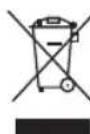
Processing of electric and electronic equipment at the end of their service life (applicable in member countries of the European Union and other European countries operating a selective waste on system).
This symbol, affixed to the product or its packaging, indicates that the product must not be processed with household waste. It must be brought to an electric and electronic waste collection point for recycling and disposal. By ensuring the appropriate disposal of this product you also help in preventing potentially negative consequences for the environment and human health. The recycling of materials helps preserve our natural resources. For further information regarding the recycling of this product, please contact your municipality local waste disposal center or the store where the product was purchased.

Battery removal: This symbol indicates that the batteries supplied with this product
Li-Ion must not be treated as general household waste. To remove them safety, you must bring them to your retailer or discard or them in special containers provided for the community. At the end of the device's life, remember to remove the batteries.
hereby declares the following conformity under the EU Directive and standards for the following article
Sous reserve de modifications.

GARANZIA
This appliance is a quality product. It was designed in compliance with current technical standards and made carefully using normal, good quality materials.
The warranty period is 24 months and commences on the date of purchase, which can be verified by the receipt, invoice or delivery note. During this warranty period all functional errors, which, despite the careful treatment described in our operating manual, are verifiably due to material aws, will be rectified by our after-sales service staff.
The warranty takes the form that defective parts will be repaired or replaced with perfect parts free of charge at our discretion. Replaced parts will become our property. Repair work or the replacement of individual parts will not extend the warranty period not will it result in a new warranty period being commenced for the appliance. No separate warranty period will commence for spare parts that may be ted. We cannot offer a warranty for damage and defects on appliances or their parts caused by the use of excessive force, improper treatment and servicing.
This also applies for failures to comply with the operating manual and the installation or spare and accessory parts that are not included in our range of
products. In the event of interference with of modifications to the appliance by unauthorised persons, the warranty will be rendered void. Damages that are attributable to improper handling, over loading, or natural wear and tear are excluded from the guarantee.
Damages caused by the manufacturer or by a material defect will be corrected at no charge by repair or by providing spare parts.
The prerequisite is that the equipment is handed over assembled, and complete with the proof of sale and guarantee.
For a guarantee claim, only use the original packaging.
That way, we can guarantee quick and smooth guarantee processing. Please send us the appliances post-paid or request a Freeway sticker. Unfortunately we will be unable to accept appliances that are not postpaid. The warranty does not cover parts that are subject to natural wear and tear. If you wish to make a warranty claim, report faults or order spare parts or accessories, please contact the after-sales centre below:
Subject to change without prior notice.




- SAFETY INSTRUCTIONS AND WARNINGS
- GENERAL POWER TOOL SAFETYWARNINGS
- SAVE ALL WARNINGS AND INSTRUCTIONS FOR FUTURE REFERENCE
- WORK AREA SAFETY
- ELECTRICAL SAFETY
- PERSONAL SAFETY
- GB
- SERVICE
- SPECIAL SAFETY INSTRUCTIONS
- 5.DESCRIPTION OF SYMBOLS
- IMPORTANT
- BATTERY LI-ION
- LAYOUT
- BEFORE STARTING THE EQUIPMENT
- OPERATION
- 8.1 CHARGING THE BATTERY PACK (FIG. 2/3)
- 8.2 TORQUE SETTING (FIG. 4 / ITEM 1)
- 8.3 DRILLING (FIG. 5 / ITEM 1)
- 8.4 FORWARD/REVERSE SWITCH (FIG. 6 / ITEM 3)
- 8.5 ON/OFF SWITCH (FIG. 6 / ITEM 4)
- 8.6 CHANGING OVER FROM 1ST GEAR TO 2ND GEAR (FIG. 7/ ITEM 7)
- 8.7 BATTERY CAPACITY INDICATOR (FIG. 8- ITEM 2)
- ALL LEDS ILLUMINATE
- THE YELLOW AND RED LED ILLUMINATE
- REDLED
- 8.8 LED LAMP (FIG. 8)
- 8.9 CHANGING THE TOOL (FIG. 9)
- 8.10 SCREWDRIVING
- TECHNICAL DATA
- SOUND AND VIBRATION
- DRILLING IN METAL
- CAUTION
- CLEANING AND MAINTENANCE
- 10.1 CLEANING
- 10.2 MAINTENANCE
- REPAIRS
- ENVIRONMENTAL
- GARANZIA
Brand : KAWASAKI
Model : KAK 202 XR Pro
Category : Screwdriver