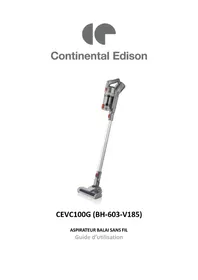
CEVC100G - Vacuum Cleaner CONTINENTAL EDISON - Free user manual and instructions
Find the device manual for free CEVC100G CONTINENTAL EDISON in PDF.


| Brand | Continental Edison |
| Model | CEVC100G (BH-603-V185) |
| Appliance type | Cordless stick vacuum cleaner |
| Power supply | Rechargeable lithium-ion battery 18.5 V / 2200 mAh |
| Battery life | Approx. 40 min (normal speed) / 20 min (turbo speed) |
| Charging time | 6 hours (first full charge) |
| Motor power | 150 W |
| Dustbin capacity | 0.5 L |
| Number of speeds | 2 (normal and turbo) |
| Filtration | EPA H11 filter + cylindrical steel pre-filter |
| Included accessories | Motorized brush with LED lighting, 2-in-1 crevice tool (brush nozzle), tube, wall charging mount, power adapter |
| Total weight | 2.3 kg |
| Removable battery | Yes, reference ATBS603-5S1P |
| Maintenance and cleaning | Empty the bin after each use; wash filters with lukewarm water (no detergent) and dry for 24 hours; clean the body with a soft dry cloth |
| Safety | Automatic shut-off in case of obstruction; do not immerse; keep out of reach of children under 8 years |
| Intended use | Domestic and similar (offices, hotels, etc.) |
| Warranty | See manual (exclusions: wear and tear, non-compliant use) |
Frequently Asked Questions - CEVC100G CONTINENTAL EDISON
User questions about CEVC100G CONTINENTAL EDISON
0 question about this device. Answer the ones you know or ask your own.
Ask a new question about this device
Download the instructions for your Vacuum Cleaner in PDF format for free! Find your manual CEVC100G - CONTINENTAL EDISON and take your electronic device back in hand. On this page are published all the documents necessary for the use of your device. CEVC100G by CONTINENTAL EDISON.
USER MANUAL CEVC100G CONTINENTAL EDISON
[Translated version]
Please read through this user manual thoroughly, its detailed instructions, warnings and safety precautions to ensure you get the most out of your product. Keep this manual for future reference.
SAFETY WARNING

Please read the instructions carefully before installing and using this appliance. In the case you resell this appliance, please make sure to provide this instruction booklet to your buyer.
- This appliance is intended to be used in household and similar applications, such as:
- staff kitchen areas in shops, offices and other working environments;
farm houses;
by clients in hotels, motels and other residential type of environments;
bed and breakfast type environments. - This appliance can be used by children aged 8 years and above and persons with reduced physical, sensory or mental capabilities or lack of experience and knowledge if they have been given supervision or instruction concerning use of the appliance in a safe way and understand the hazards involved.
- Keep the appliance and its power supply unit out of reach of children under 8 years old when it is connected to the main supply.
- Children shall not play with the appliance.
- Cleaning and user maintenance shall not be made by children without supervision.
-
The appliance must not be immersed. Never immerse its power cord and plug in water or any liquids. Never drip water on the control panel buttons.
-
The plug must be removed from the socket-outlet before cleaning or maintaining the appliance.
- If the detachable power supply unit is damaged, it must be replaced by the manufacturer, its service agent or similarly qualified persons in order to avoid a hazard.
- The appliance must be disconnected from the main supply when the battery is removed.
- The battery must be disposed safely.
- The appliance must be used only with the base and accessories supplied.
| DHPYGSDC2200500 | The appliance is only to be used with the power supply unit provided with the appliance. |
| DHPY | Detachable power supply unit. |
- The appliance must only be supplied at safety extra low voltage corresponding to the marking on the appliance.
- Regarding the information on operating the appliance, please refer to the following section of the booklet: « Set up and Use ».
- For cleaning and maintenance, please refer to the following section of the booklet: « Cleaning and maintenance ».
SAFETY INSTRUCTIONS FOR THE REMOVABLE RECHARGEABLE BATTERY
- The appliance is supplied with a non-repairable rechargeable 18.5 ~V = 2200 mAh lithium battery under reference ATBS603-5S1P.
- WARNING: For the purposes of recharging the battery, only use the detachable supply unit provided with this appliance (adapter under reference TYGSDC2200500). Non-rechargeable batteries should not be recharged.
- Please observe the markings on the battery as follows:
| Do not put this battery in fire. | |
| Remove the battery from the appliance when disposing of the appliance. The battery should not be thrown in the trash bin, but taken to an approved recycle center so that it can be recycled. | |
| WARNING! Never short-circuit the battery. Do not disassemble the battery. Do not reverse the polarity. Do not dispose the battery into fire. Use the authorize charger only. | |
| The appliance should only be used with the power supply unit provided. |
-
The appliance must be disconnected from the main supply before use or when the battery is removed, before disposal.
-
In the event of a defective battery, liquid may escape and spray onto adjacent objects. Check the affected parts. Clean them or replace them if necessary. In the event of accidental contact, rinse thoroughly with water. If the liquid gets into your eyes, seek medical advice immediately. Fluid escaping from a battery can irritate the skin or cause burns.
- Warning! The battery may present a risk of fire or chemical burns if misused. Never disassemble the battery, expose it to temperatures above the maximum limit of 50^ , and do not incinerate it. Using any other battery may present a risk of fire and explosion.
- Recharge the product only using the power supply unit provided. If you use an AC charger suitable for other types of battery, you may cause a fire.
SAFETY INSTRUCTIONS FOR THE AC ADAPTER
- The appliance is supplied with a main power supply adapter under reference TYGSDC2200500. This adapter must be used only to recharge the appliance or the removable rechargeable lithium 18.5V =2200 mAh battery under reference ATBS603-5S1P.
- Warning! Never attempt to replace the AC adapter with an ordinary AC power outlet.
- Only use your AC adapter to charge the battery supplied with the appliance. Charging other batteries could cause it to explode and cause injury and damage.
- Do not expose the AC adapter to water.
-
Do not open the AC adapter.
-
Do not probe the AC adapter
- The appliance must be disconnected from the AC adapter before use or when removing the battery.
- Please refer to the table below for details of the markings on the AC adaptor:
| This marking indicates that the external power supply has an electrical insulation of type class II. | |
| Ce marquage indique que l'alimentation externe est prévue pour un usage uniquement en interieur. | |
| This marking allows to identify the positive and negative connections (the polarity) of a D.C. power supply, or the positive and negative connections on a piece of equipment to which a D.C. power supply may be connected | |
| This symbol indicates direct current. | |
| This symbol indicates alternating current. |
SAFETY USE INSTRUCTIONS
- This appliance should not be used for any other purpose or for any other application, such as for nondomestic use or in a commercial environment. The manufacturer accepts no responsibility in case of any commercial use, inappropriate use or failure to comply
with the instructions, the manufacturer accepts no responsibility and the guarantee will not apply.
- After unpacking the appliance, make sure it is not damaged. The appliance must not be used if it has been dropped, if there is any visible damage, if it leaks or if it functions abnormally in any way. In case of doubt, do not use the appliance and contact your supplier or a qualified technician.
- Remove all packaging and do not leave the packaging material such as plastic bags, polystyrene and elastic bands within easy reach of children as they may cause serious injuries.
- Never use accessories or parts from another manufacturer. The use of this type of accessories or parts will void the warranty.
- Do not put your appliance and its power supply unit on or near a heat source, such as a hotplate, oven, heater, etc.
- Avant de brancher votre appareil, assurez-vous que la tension électrique de votre domicile corresponde à cette indiquée sur la plaque signalétique de l'ordinateil.
- Before plugging in your appliance, ensure that the electrical voltage in your home corresponds to that of the appliance's rating label.
- Connect your appliance to an earthed wall socket, correctly installed and connected to the electrical supply in accordance with applicable standards.
- Warning: potential injury from misuse.
-
To avoid any risk of electric shock, do not handle the appliance, battery and the power supply unit with wet hands and feet.
-
It is advised to regularly examine the power cable for any signs of deterioration.
-
Do not use the appliance:
If the plug or the power cord is damaged,
In case of malfunction,
If the appliance has been damaged in any way,
If the appliance or its power is immersed in water.
-
Warning! To avoid any risk of injury, do not bring your hands or any part of your body near the rotating parts of the appliance.
-
Warning! The motorized brush is equipped with a cylindrical roller that rotates constantly when the appliance is switched on. Do not vacuum a fixed place for an extended period as this may damage hard floors such as parquet.
- Warning! If the suction inlet has been obstructed or blocked, the motor protection sensor may activate. The appliance turns off. Switch off the vacuum cleaner, and remove any obstructions. Reassemble all the accessories, wait one minute before restarting the vacuum cleaner.
-
Warning! In order to preserve the longevity of the appliance and prevent damage to the motor, please follow the instructions for use below:
-
Only store and use the appliance indoors on dry surfaces.
- Do not drop the appliance and the power supply unit.
-
Never vacuum clean a wet or damp surface or one that may contain harmful liquid substances (chlorine, bleach, household chemicals, gasoline).
-
Never vacuum up pointed or sharp objects (nails, pins, screws) or incandescent or burning objects (ashes, matches, soot from stoves, embers).
- Do not use the appliance to vacuum very fine dust particles, such as toner dust, flour, plaster or concrete.
- Never block the suction inlets of the appliance.
- Do not expose the appliance to humidity and to temperatures below 0^ C and above 50^ C .
- Never vacuum without the dust container or without the filter.
- Do not use the appliance if the accessories provided are faulty. Make sure you replace them immediately.
- Do not use the appliance if the ON/OFF button does not work.
- Do not force the working capacity of the appliance. Do not overfill the dust container to avoid obstructing the airflow of the vacuum cleaner. For optimal use, empty the dust tank each time you use it.
-
Do not use sharp objects to remove obstructions from the filter, air vents and appliance accessories.
-
Take the appliance to the after sales services where it will be inspected and repaired. No repairs can be carried out by the end user.
For installation, handling, cleaning, and disposal of the appliance, refer to the following chapters of the User's Guide.
This instruction manual can be modified without prior notice.
Information on the marking of the
C
Firmity Compliance.
The marking indicates that this product meets the quality requirements set by the European Directives 2014/35/EU (Low voltage), 2014/30/EU (Electromagnetic Compatibility CEM), 2011/65/UE (restriction of the use of certain hazardous substances in electrical and electronic equipment RoHS).
CONTENTS
SAFETYWARNING 31
I.PRODUCT DESCRIPTION 41
II. TECHNICAL INFORMATION 42
A. Vacuum cleaner technical information 42
B. AC adapter technical information 43
III. SET UP AND USE 43
A. Avant la première utilisation 43
B. Wall mounting: installation of the charging base 44
C. Assembling and removing the battery 45
D. Charging the vacuum cleaner 46
E. Assembling and disassembling accessories from the appliance.... 47
F. Using the vacuum cleaner 49
IV. CLEANING AND MAINTENANCE 49
V.TROUBLESHOOTING 52
VI. WARRANTY 53
VII. ENVIRONMENT: RECYCLING 54
I. PRODUCT DESCRIPTION
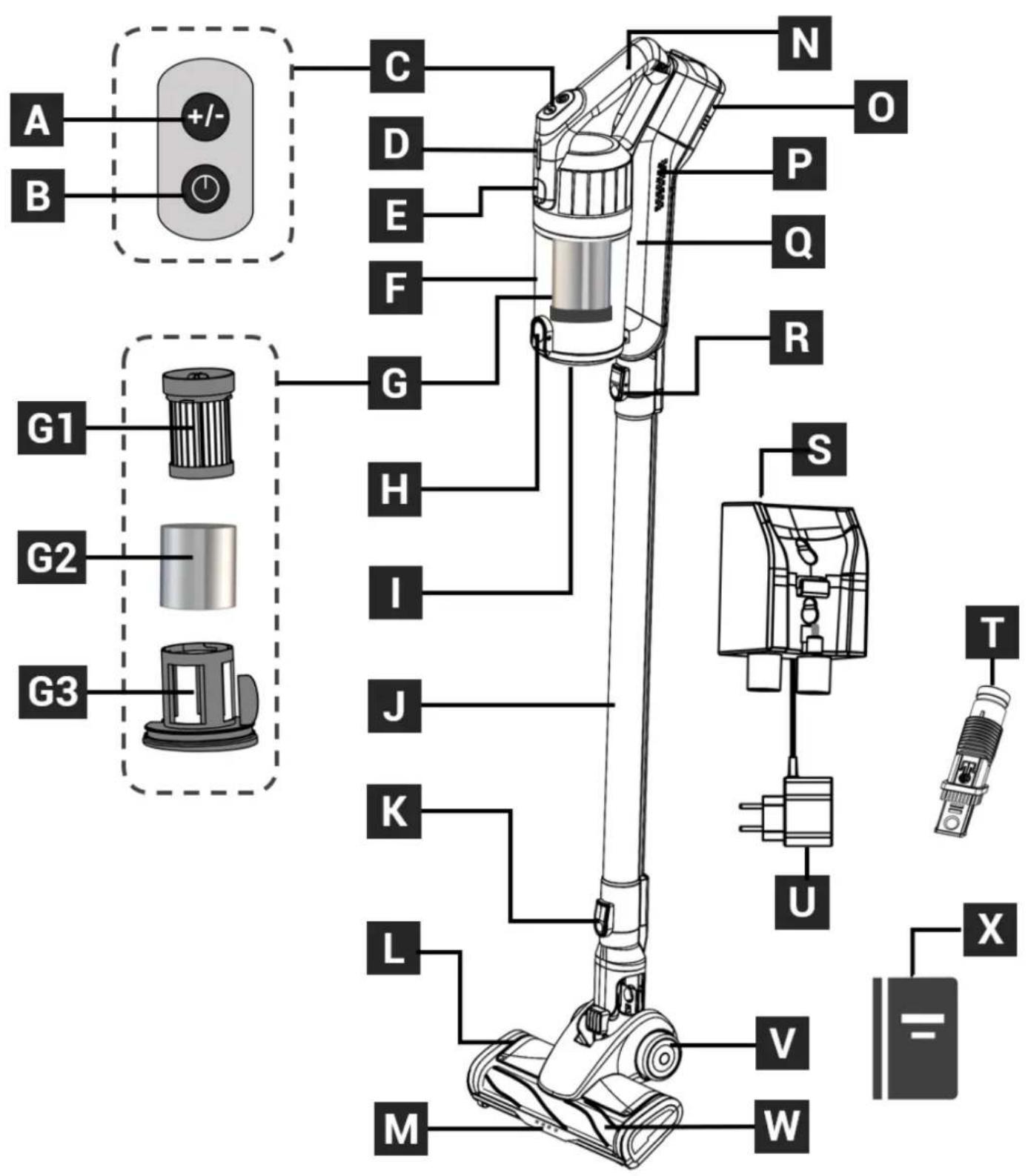
| A. | Button for speed selection |
| B. | ON/OFF button |
| C. | Control panel |
| D. | Light indicator |
| E. | Release button for dust tank |
| F. | Dust tank |
| G. | Filter unit: G1. EPA H11 filter G2. Cylindrical steel pre-filter G3. Filter holder |
| H. | Release button for dust tank lid |
| I. | Dust tank lid |
| J. | Tube |
| K. | Motorized brush release button |
| L. | Motorized brush with LED lighting |
| M. | LED lighting |
| N. | Vacuum cleaner handle |
| O. | Lithium-ion removable battery 18.5V =2200mAh |
| P. | Air outlet |
| Q. | Main body |
| R. | Tube or accessories release button |
| S. | Wall mounting charging and storage base |
| T. | 2-in-1 nozzle |
| U. | Built-in adapter in the wall mounting base |
| V. | Motorized brush wheels |
| W. | Rotative roller |
| X. | Instruction booklet |
II. TECHNICAL INFORMATION
A. Vacuum cleaner technical information
| SPECIFICATIONS | |
| Model | CEVC100G (BH-603-V185) |
| Brand | Continental Edison |
| Lithium battery | 18.5V =2200mAh |
| Input voltage of adapter | 100-240V~ 50/60Hz 0.4 A |
| Output voltage of adapter | 22.0 V =0.5 A 11.0 W |
| Motor power | 150 W |
| Dust tank max capacity | 0.5 L |
| Speed level | 2 |
| Product and accessories total weight | 2.3 kg |
B. AC adapter technical information
| INFORMATION PUBLISHED | VALEUR ET PRECISION | UNIT | |
| Manufacturer: Changzhou Taiyu Electric LTD. (Imported by: VIF - ZA du Moulin d'Ecalles - 76690 La Rue Saint-Pierre) | - | - | |
| Model identifier: TYGSDC2200500 | - | - | - |
| Input voltage | 230 | 115 | V~ |
| Input AC frequency | 50 | 60 | Hz |
| Output voltage | 22.0 | 22.0 | V --- |
| Output current | 0.5 | 0.5 | A |
| Output power | 11.0 | 11.0 | W |
| Average active efficiency | 85.2 | 84.6 | % |
| Efficiency at low load (10%) | 76.5 | 80.8 | % |
| No-Load power consumption | 0.05 | 0.03 | W |
III. SET UP AND USE
Unpacking the appliance and disposing of the packaging elements:
Remove all packing material from around the appliance, as well as protective material from inside the appliance compartments.
- The cardboard packaging and the sheets of paper are recyclable.
They must be thrown in the recycle bins provided for this purpose.
- Materials bearing the symbol are recyclables :
PE < = polyethylene; >PP < = polypropylene
This means that they can be recycled by depositing them in suitable collection containers.
- The other packaging elements (adhesive, fasteners, etc.) must be thrown away with household waste.
To know more: www.quefairedemesdechets.fr
Clean the body of the appliance and the accessories with a dry, soft cloth. Never immerse the body of the appliance and its charging base. Never put the body of the appliance in the dishwasher.
B. Wall mounting: installation of the charging base

Warning! Check the type of partition or wall on which you want to attach the charging base.
Please buy the screws adapted to your wall or partition (drywall, plaster, hollow brick, etc.).
Make sure that no installation, such as electrical wiring and piping, is present in the wall. It is your responsibility to ensure that the wall can safely support the full load of the appliance and its accessories.
If necessary, use qualified personnel for the wall installation.
Incorrect assembly can lead to personal injury and material damage.
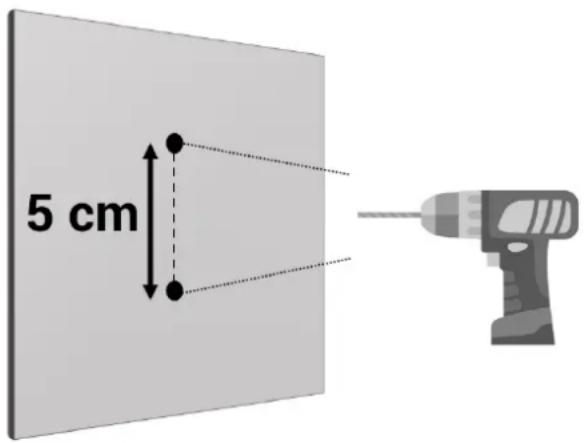
The vacuum cleaner is supplied without a hardware kit for wall-mounting the charging base. This installation requires 2 screws max diameter 3mm and the dowels suitable for the material of the wall or partition on which to install the plinth.
Proceed as shown as below:
1
2
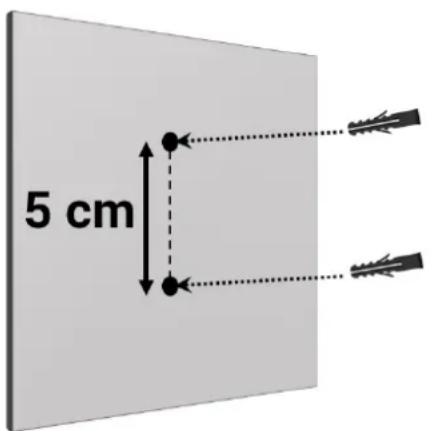
Place the charging base against the wall in the desired location and mark two points on the wall with a pencil, checking their alignment. The two holes should be 5cm apart. Drill the two holes using an electric drill (not supplied).
Insert the two dowels (not supplied) into the holes.
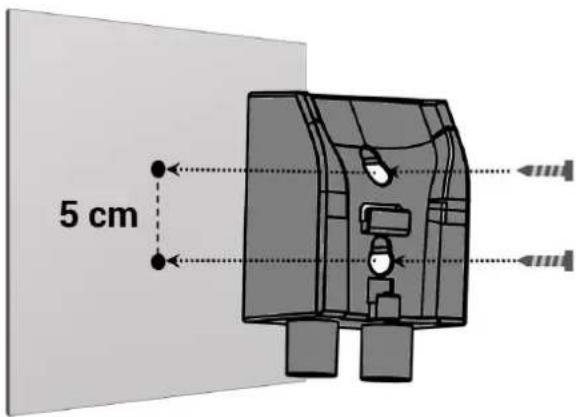
3
Place the charging base against the wall making sure that the AC adapter cable is placed in the slot on the base. Screw the two screws (not supplied) through the base. Make sure the base is securely attached to the wall.
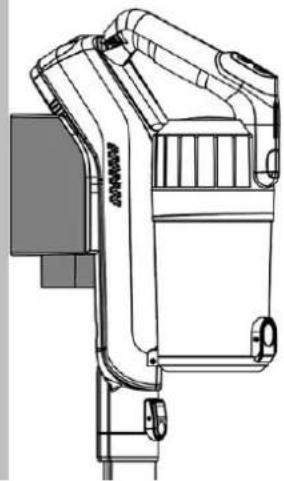
4
Slide the back of the appliance into the location of the wall charging base.
Make sure the adapter plug is fully seated in the vacuum cleaner charging port.
C. Assembling and removing the battery
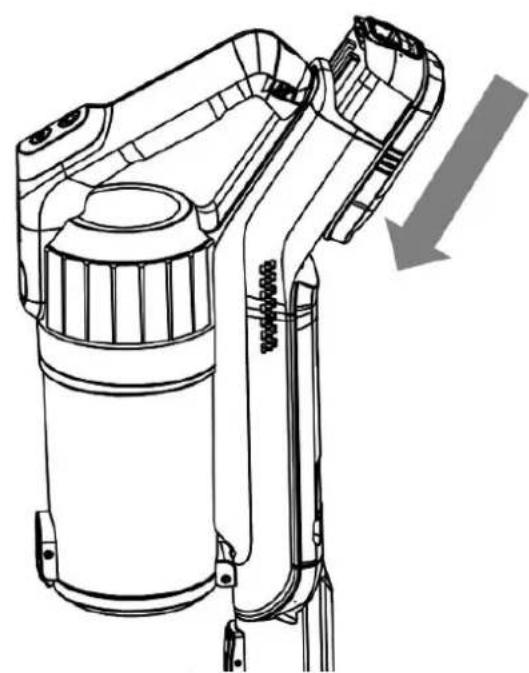
1
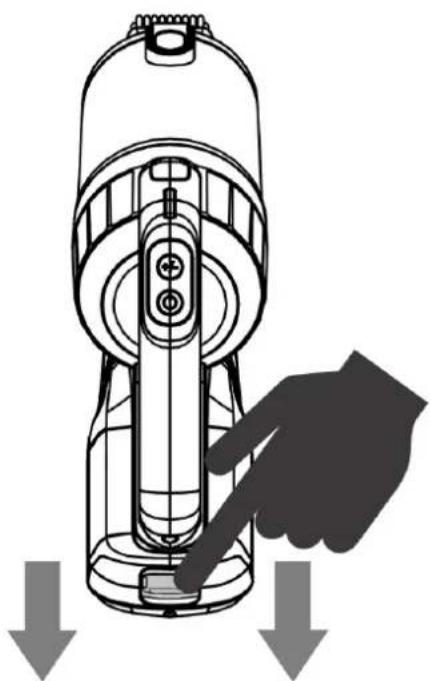
Your battery does not come fitted to the appliance. Remove the battery from its packaging and insert it into the slot on the back of the main body until it "clicks" into place.
2
To remove the battery from the main body, press and hold the battery release button (located on the battery) and simultaneously remove the battery by pulling it upwards.
D. Charging the vacuum cleaner
IMPORTANT: Before first use, please charge the battery completely. The duration of the first charging of the empty battery is 6 hours. If the battery is not fully charged before first use, its performance may be limited.
- Make sure the appliance is fully seated in the wall charging base and the adapter plug is fully seated in the product charging port. Check that the vacuum cleaner is off by pressing the ON/OFF switch.
- Connect the AC adapter to a wall outlet.
- The battery light indicator flashes while the appliance is charging. At the end of the charging cycle, the light indicator emits continuous light.
Notes:
- If the indicator light does not come on, lift the appliance and put it back in its slot, making sure that the adapter plug is properly inserted into the appliance's charging port.
- The battery can be recharged directly from the AC adapter without being attached to the main body. Simply insert the adapter plug into the battery charging port. The battery indicator light will flash red while charging. It lights up green when the battery is fully charged.
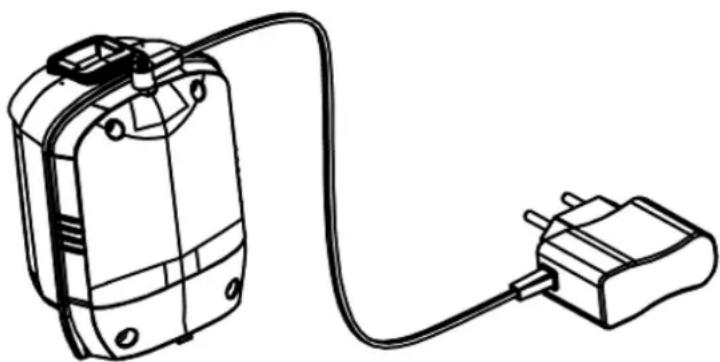
It is highly recommended to purchase a second AC adapter to charge directly on the battery, otherwise you must unscrew the supplied adapter from the wall mounting base.
E. Assembling and disassembling accessories from the appliance
1
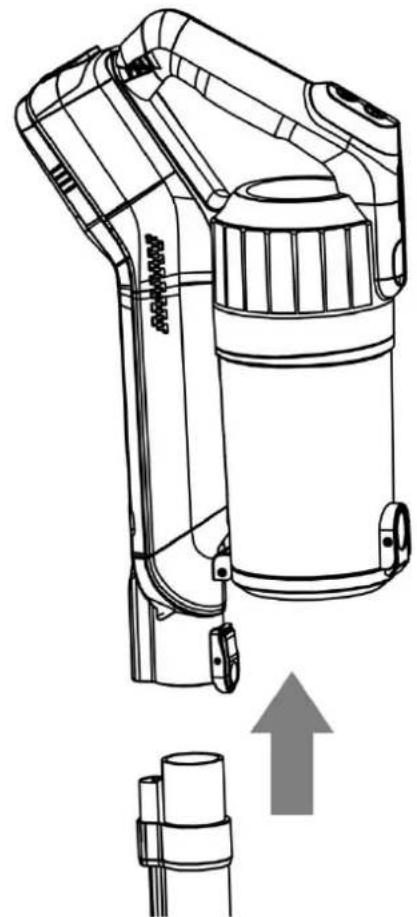
Assembling the tube to the main body.
2
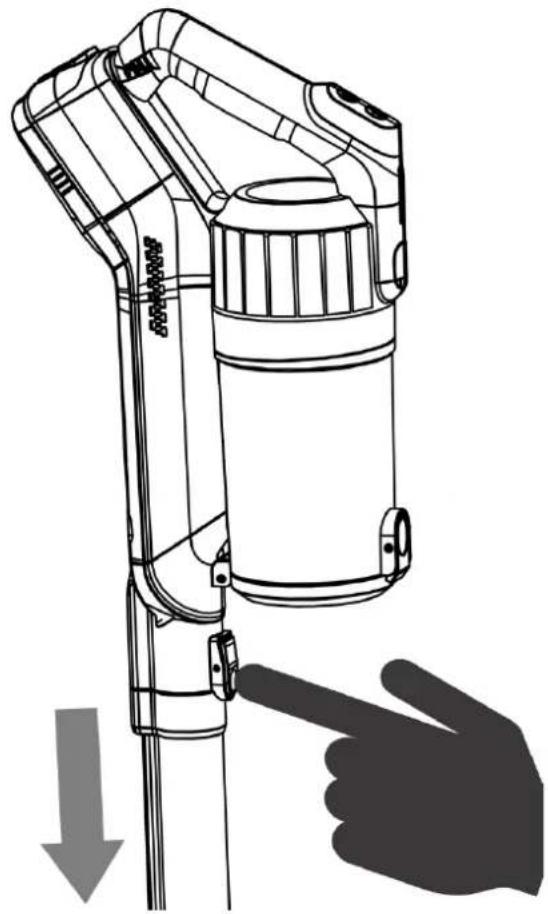
Removing the tube from the main body.
-
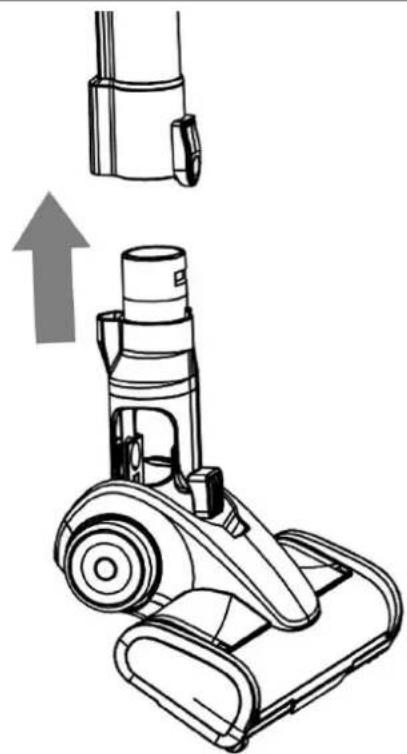
Assembling the motorized brush to the tube. -
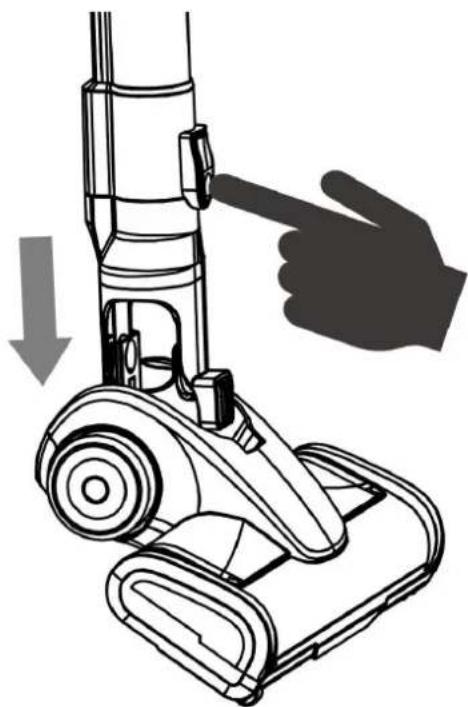
Removing the motorized brush from the tube.
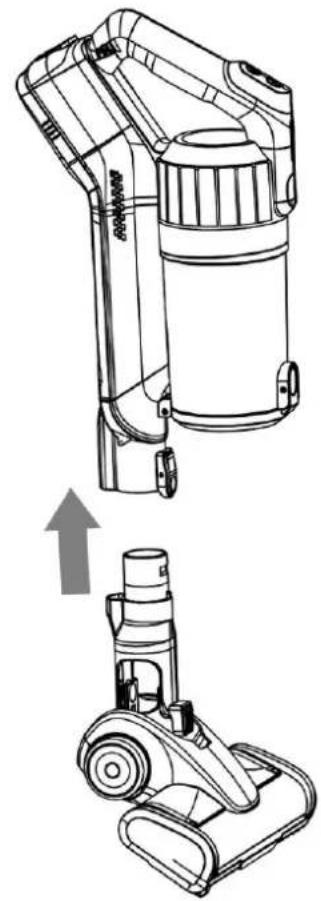
5
Assembling the motorized brush to the main body.
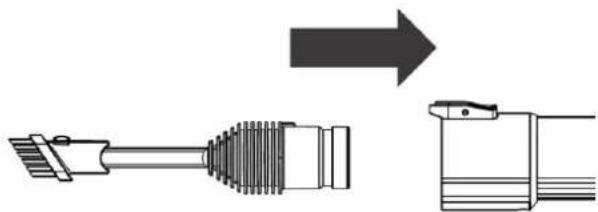
7.
Assembling the 2 in 1 nozzle to the tube.
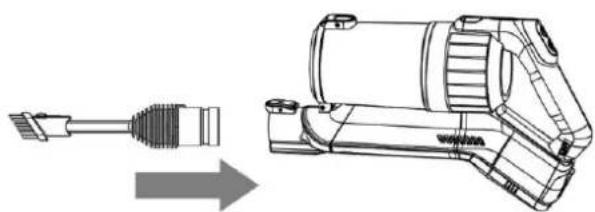
9.
Assembling the 2-in-1 nozzle to the main body.
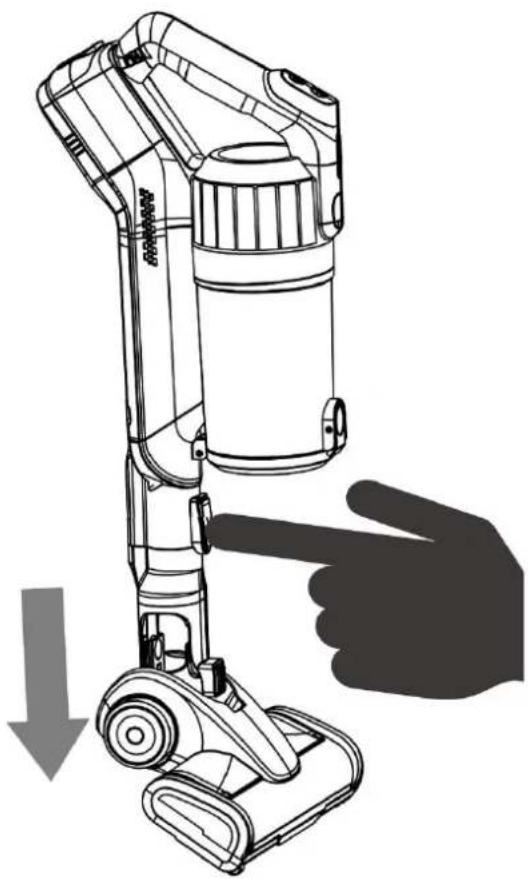
6
Removing the motorized brush from the main body.
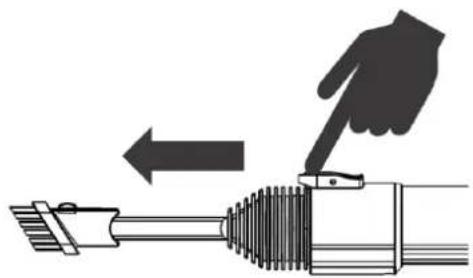
8.
Removing the 2-in-1 nozzle from the tube.
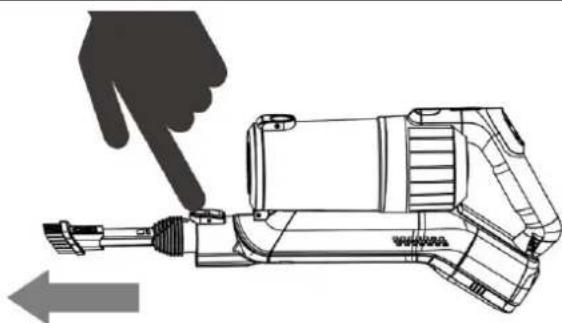
10
Removing the 2-in-1 nozzle from the main body.
Note:
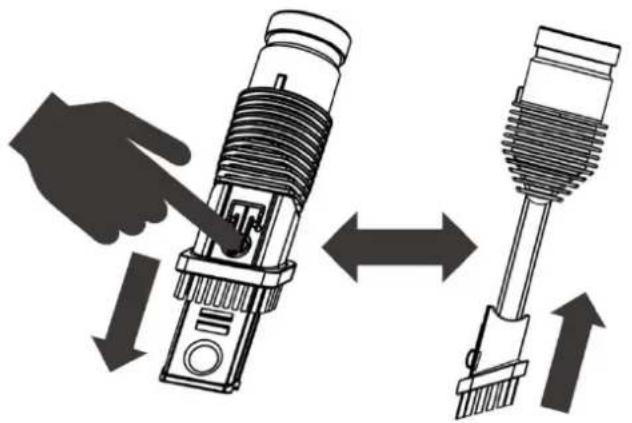
The 2-in-1 nozzle is equipped with a brush nozzle for vacuuming multiple surfaces (see drawing as follows for use in nozzle mode or brush mode).
F. Using the vacuum cleaner

Be careful not to fill the tank beyond the MAX marking indicated on the tank.
When vacuuming wet or perishable waste, be sure to empty, clean and dry the tank after use to avoid the formation of mould.
- Remove the appliance from its base.
- If necessary, select one of the supplied accessories and insert it into the suction head:
the motorized brush for any surfaces;
o the nozzle is recommended for vacuuming in corners and areas that are difficult to access.
- Press the ON/OFF button to switch on the vacuum cleaner.
- The vacuum speed is set by default on normal speed. To change the vacuuming speed, press the speed selector button. Each press of the button allows you to select one of the following two suction speeds: normal and turbo. The vacuum time in turbo speed is 20 minutes and on normal speed 40 minutes.
- When in use, the indicator light emits continuous light. When the battery level is low, the indicator light flashes. At the end of use, press the ON/OFF button to switch off the appliance and put it back on its charging base to charge the battery for future use.
IV. CLEANING AND MAINTENANCE

Always unplug the appliance before cleaning it.
The appliance, the charging base, the motorized brush, and the AC adapter must not be immersed in water. Never immerse those parts into water or other liquids. Do not use sharp, toxic, and aggressive products, such as methylated spirits, industrial strippers, or solvents to clean your appliance as they may damage it.
Always switch off the vacuum cleaner and unplug it from the charger before carrying out any maintenance or cleaning.
Emptying the dust tank:
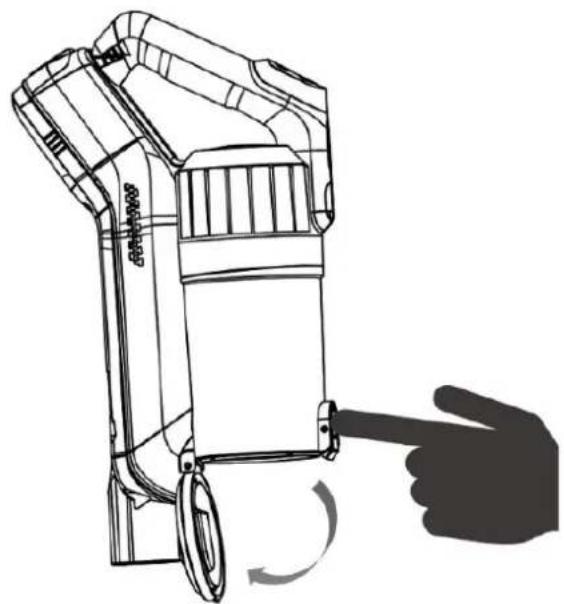
Remove the tube from the main body. Place the appliance over a dustbin and press the dust tank cover lid release button so that dust and dirt fall into the dustbin. Close the tank by pushing the cover lid up until you hear a popping sound.
Cleaning the dust tank:
Remove the dust tank from the main body by pressing the tank release button. Lift the filter unit from the tank and remove it.
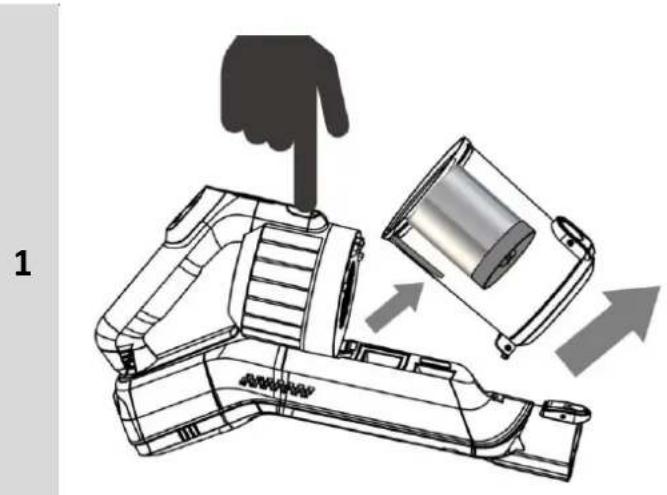
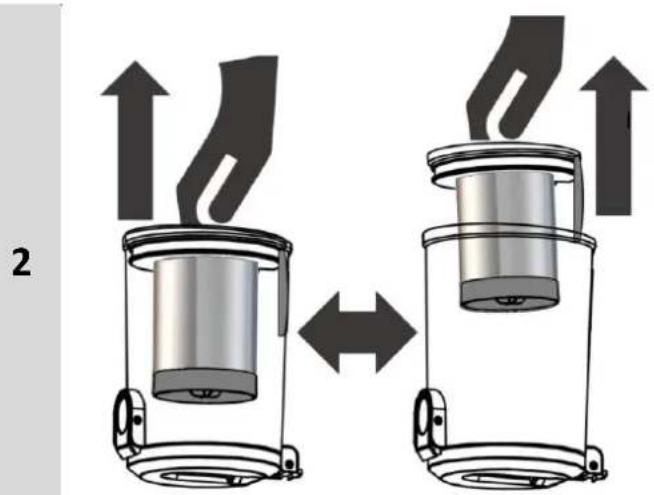
Wash the dust tank with a sponge soaked in dishwashing liquid.
Rinse it with warm water and dry it with a soft cloth.
Ensure the dust tank is completely dry before replacing it on the main body.
Place the filter unit back into the dust tank, make sure that the tab on the filter unit covers the rectangular hole in the tank.
Put the dust tank back on the main body and push it until you hear a popping sound.
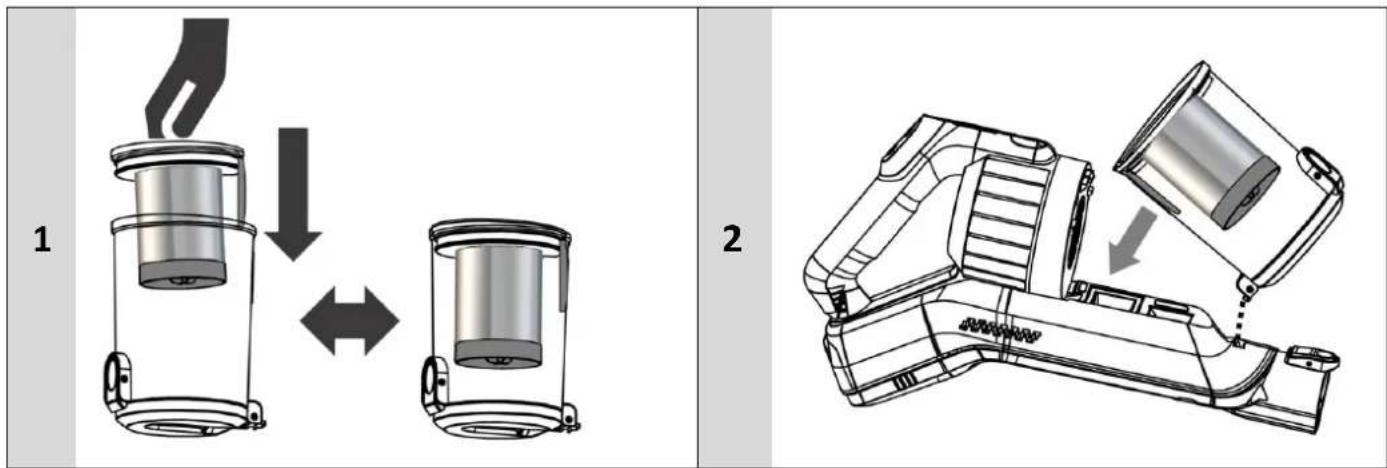
Cleaning the filter unit and its filters:
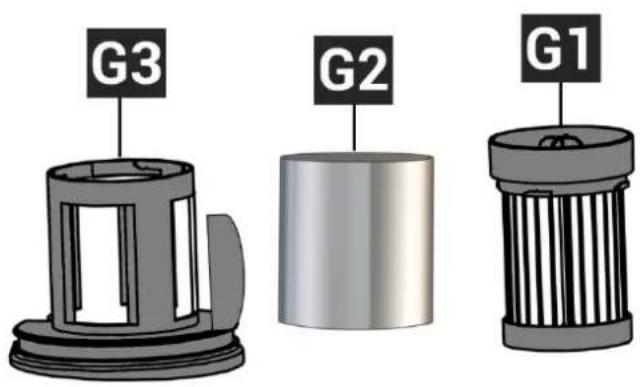
The filter unit consists of a plastic filter holder (G3), a cylindrical steel filter (G2) and an EPA H11 filter (G1). It is recommended to wash the filters once a month for optimal performance. Otherwise, if the filters are too clogged, the suction performance will decrease.
To disassemble the filter unit, proceed as shown in the drawing below:
- Turn the top of the H11 HEPA filter counterclockwise.
- Lift it from the filter holder.
- Lift the cylindrical steel pre-filter from the filter holder to remove it.
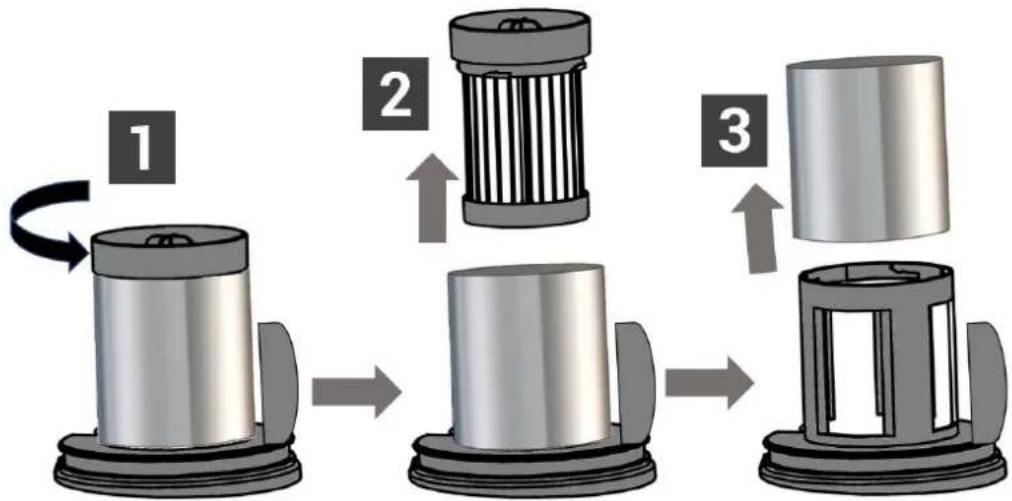
Dust the filters dry with a soft brush and rinse them with lukewarm water.
Dry the filters with a clean cloth and let them air dry for 24 hours.
To reassemble the filter unit, proceed as shown in the drawing below:
- Insert the cylindrical steel pre-filter onto the filter holder.
- Insert the EPA H11 filter into the filter holder.
- Turn the EPA H filter clockwise until it locks.
Insert the filter unit into the dust tank, making sure that the tab on the filter unit covers the rectangular hole of the dust tank.
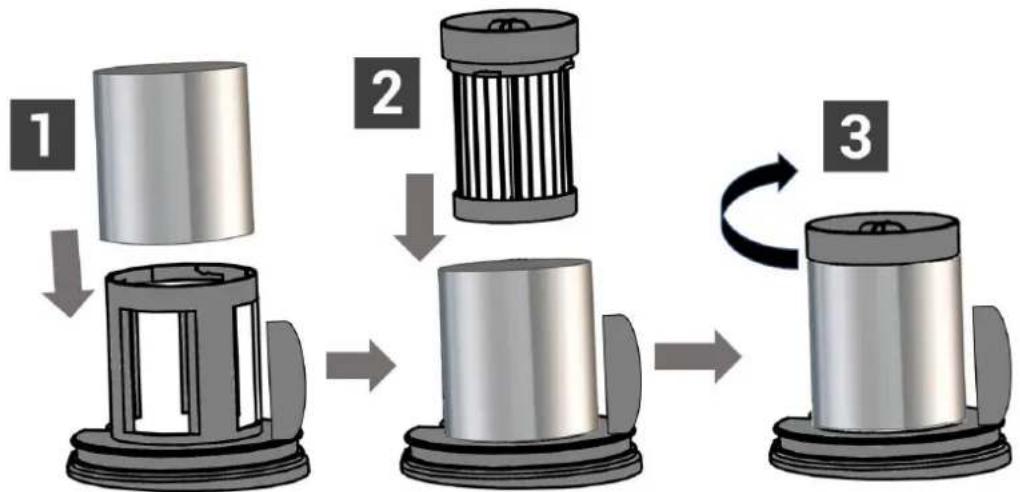
IMPORTANT: To avoid damages, rinse filters ONLY with water. DO NOT use soap. Allow filters to dry for at least 24 hours before placing them back in the vacuum cleaner to prevent water from being sucked into electrical components.
Do not use hot water or detergents to wash the filters. If the filters are damaged, replace them with new filters. Do not attempt to use the product without reassembling the filters.
Cleaning the main body and its accessories:
Use a soft cloth to clean the surfaces of the vacuum cleaner, tube, motorized brush and charging base.
Wash the 2-in-1 nozzle with a sponge soaked in dishwashing liquid and rinse with hot water. Then, dry it with a soft cloth.
Appliance storage:
The vacuum cleaner and accessories should always be stored on the charging base. When not in use for a long time, unplug the AC adapter from the power outlet.
V. TROUBLESHOOTING
| ISSUES | CAUSES | SOLUTIONS |
| THE APPLIANCE DOES NOT WORK. | The appliance is not charged. | Recharge the appliance. |
| ACCESSORIES MISSING. | Check the box. If an accessory is still missing, please contact after-sales service. | |
| THE VACUUM CLEANER IS NOT CHARGING. | 1. Adapter plug not inserted into the vacuum cleaner port. 2. The adapter is not plugged into the wall outlet. 3. The battery is defective. 4. The battery is at the end of its lifecycle. 5. Battery is too hot. | 1. Check that the adapter plug is inserted into the vacuum cleaner port. 2. Plug the adapter into the wall outlet. 3. Contact the after-sales services. 4. Dispose of the battery following the regulation and buy a new battery. 5. Wait for the appliance to cool down. |
| THE VACUUM CLEANER SUCTION IS WEAK OR NOT WORKING. | 1. Suction inlet blocked. 2. The dust tank is full. 4. Accessory incorrectly assembled. | 1. Check for obstructions and remove them. 2. Empty the dust tank. 3. Reassemble the accessory. |
VI. WARRANTY
WARRANTY EXCLUSIONS:
The warranty does not cover the wear parts of the product, nor the problems or damage resulting from:
- superficial deterioration due to normal wear of the product;
- defects or deterioration caused by the product coming into contact with liquids and corrosion caused by rust;
- any incident, misuse, misuse, alteration, disassembly or unauthorized repair;
- Any unsuitable maintenance, use not in accordance with product instructions or incorrect voltage connection;
- any use of accessories not supplied or not approved by the manufacturer.

The warranty will be void if the rating label and / or serial number of the product is removed.
VII. ENVIRONMENT: RECYCLING
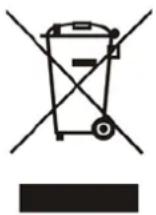
This appliance bears the selective sorting symbol for waste electrical and electronic equipment (WEEE).
This means that this product must be taken care of by a selective collection system in accordance with European Directive 2012/19/EU in order to either be dismantled or recycled, and thus reduce the impact on the environment.
For more information, you can contact your local (town hall) or regional administration. Electronic products that have not undergone selective sorting are potentially dangerous for the environment due to the presence of hazardous substances.
Under no circumstances should you throw this appliance on public roads.
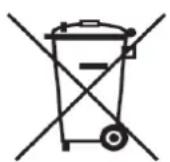
The appliance is supplied with an unrepairable removable lithium battery 22.2V = 2200mAh . Used batteries must be taken care of by a selective recycling system so that they can be recycled and thus reduce the impact on the environment.
LIFION When this appliance reaches the end of its lifecycle, you must disassemble the battery in order to deposit each element (battery and appliance) in an appropriate selective recycling system which will take care of their respective destruction and/or recycling. Under no circumstances should you throw the battery on the public highway.
- SAFETY WARNING
- SAFETY INSTRUCTIONS FOR THE REMOVABLE RECHARGEABLE BATTERY
- SAFETY INSTRUCTIONS FOR THE AC ADAPTER
- SAFETY USE INSTRUCTIONS
- CONTENTS
- SAFETYWARNING 31
- SET UP AND USE 43
- CLEANING AND MAINTENANCE 49
- PRODUCT DESCRIPTION
- TECHNICAL INFORMATION
- AC adapter technical information
- SET UP AND USE
- Wall mounting: installation of the charging base
- Assembling and removing the battery
- Charging the vacuum cleaner
- Notes:
- Assembling and disassembling accessories from the appliance
- Note:
- Using the vacuum cleaner
- CLEANING AND MAINTENANCE
- Emptying the dust tank:
- Cleaning the dust tank:
- Cleaning the filter unit and its filters:
- Cleaning the main body and its accessories:
- Appliance storage:
- TROUBLESHOOTING
- WARRANTY
- WARRANTY EXCLUSIONS:
- ENVIRONMENT: RECYCLING
Brand : CONTINENTAL EDISON
Model : CEVC100G
Category : Vacuum Cleaner