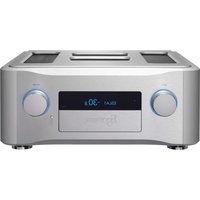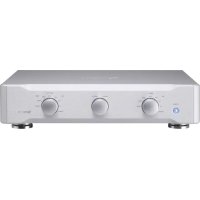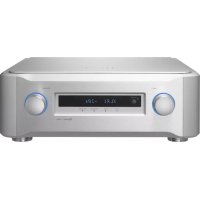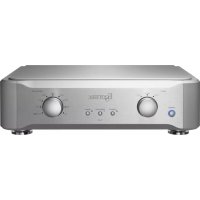
E02 - Receiver Esoteric - Free user manual and instructions
Find the device manual for free E02 Esoteric in PDF.



| Technical Features | Esoteric E02 receiver, compatible with various high-definition audio formats, supporting advanced audio codecs. |
|---|---|
| Connectivity | HDMI, USB, optical, coaxial, and analog inputs for versatile connectivity. |
| Usage | Ideal for audiophiles seeking optimal sound quality in a home cinema or audio system. |
| Maintenance | Regular cleaning of the surface and checking connections to ensure optimal operation. |
| Safety | Use only with appropriate power supply and avoid exposure to moisture. |
| General Information | High-end product, recommended for use with superior quality audio equipment. |
Frequently Asked Questions - E02 Esoteric
User questions about E02 Esoteric
0 question about this device. Answer the ones you know or ask your own.
Ask a new question about this device
Download the instructions for your Receiver in PDF format for free! Find your manual E02 - Esoteric and take your electronic device back in hand. On this page are published all the documents necessary for the use of your device. E02 by Esoteric.
USER MANUAL E02 Esoteric
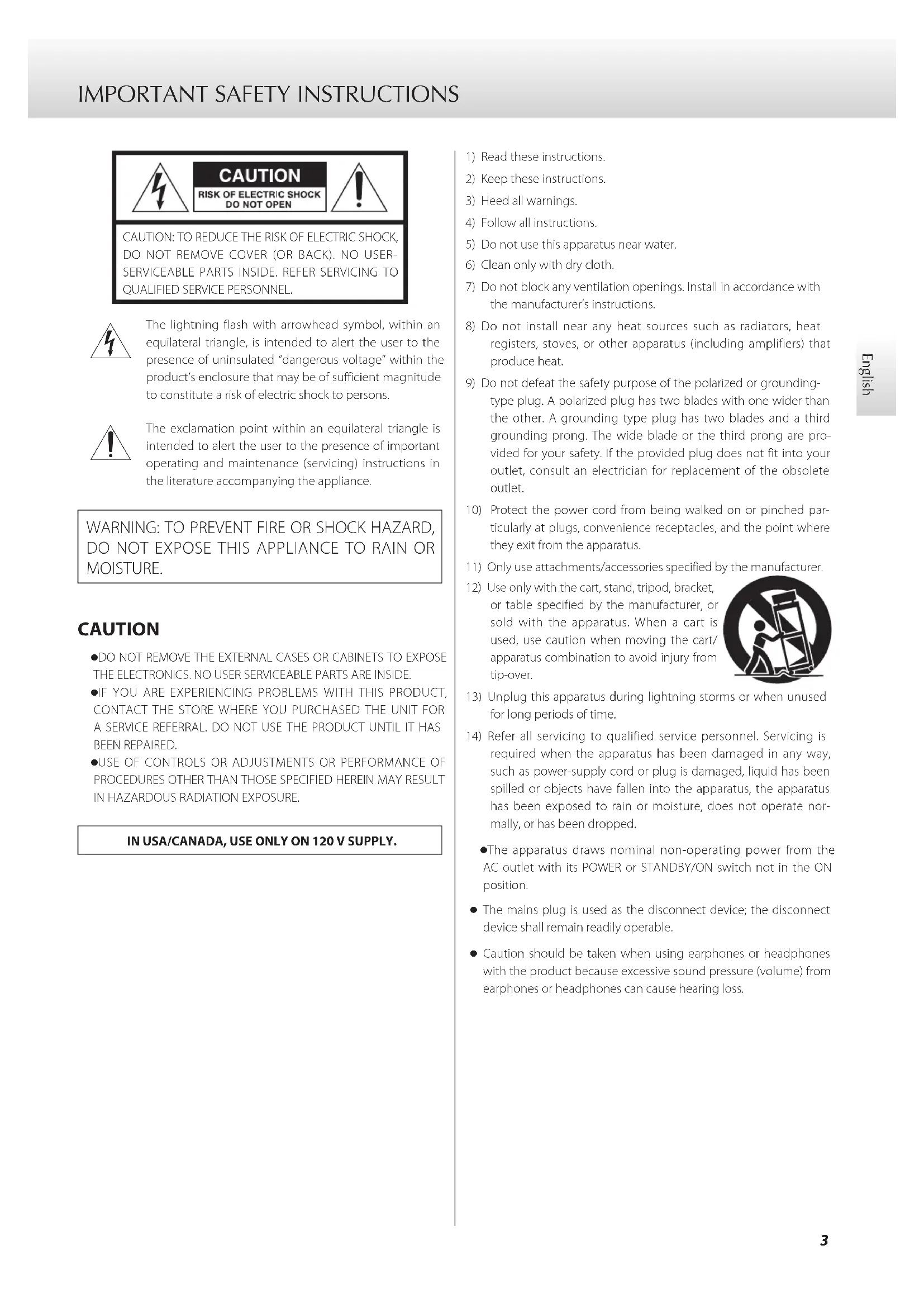
The lightning flash with arrowhead symbol, within an equilateral triangle, is intended to alert the user to the presence of uninsulated "dangerous voltage" within the product's enclosure that may be of sufficient magnitude to constitute a risk of electric shock to persons.

The exclamation point within an equilateral triangle is intended to alert the user to the presence of important operating and maintenance (servicing) instructions in the literature accompanying the appliance.
WARNING: TO PREVENT FIRE OR SHOCK HAZARD, DO NOT EXPOSE THIS APPLIANCE TO RAIN OR MOISTURE.
CAUTION
●DO NOT REMOVE THE EXTERNAL CASES OR CABINETS TO EXPOSE THE ELECTRONICS. NO USER SERVICEABLE PARTS ARE INSIDE.
- IF YOU ARE EXPERIENCING PROBLEMS WITH THIS PRODUCT, CONTACT THE STORE WHERE YOU PURCHASED THE UNIT FOR A SERVICE REFERRAL. DO NOT USE THE PRODUCT UNTIL IT HAS BEEN REPAIRED.
- USE OF CONTROLS OR ADJUSTMENTS OR PERFORMANCE OF PROCEDURES OTHER THAN THOSE SPECIFIED HEREIN MAY RESULT IN HAZARDOUS RADIATION EXPOSURE.
IN USA/CANADA, USE ONLY ON 120 V SUPPLY.
1) Read these instructions.
2) Keep these instructions.
3) Heed all warnings.
4) Follow all instructions.
5) Do not use this apparatus near water.
6) Clean only with dry cloth.
7) Do not block any ventilation openings. Install in accordance with the manufacturer's instructions.
8) Do not install near any heat sources such as radiators, heat registers, stoves, or other apparatus (including amplifiers) that produce heat.
9) Do not defeat the safety purpose of the polarized or grounding-type plug. A polarized plug has two blades with one wider than the other. A grounding type plug has two blades and a third grounding prong. The wide blade or the third prong are provided for your safety. If the provided plug does not fit into your outlet, consult an electrician for replacement of the obsolete outlet.
10) Protect the power cord from being walked on or pinched particularly at plugs, convenience receptacles, and the point where they exit from the apparatus.
11) Only use attachments/accessories specified by the manufacturer.
12) Use only with the cart, stand, tripod, bracket, or table specified by the manufacturer, or sold with the apparatus. When a cart is used, use caution when moving the cart/ apparatus combination to avoid injury from tip-over.
13) Unplug this apparatus during lightning storms or when unused for long periods of time.
14) Refer all servicing to qualified service personnel. Servicing is required when the apparatus has been damaged in any way, such as power-supply cord or plug is damaged, liquid has been spilled or objects have fallen into the apparatus, the apparatus has been exposed to rain or moisture, does not operate normally, or has been dropped.
●The apparatus draws nominal non-operating power from the AC outlet with its POWER or STANDBY/ON switch not in the ON position.
- The mains plug is used as the disconnect device; the disconnect device shall remain readily operable.
- Caution should be taken when using earphones or headphones with the product because excessive sound pressure (volume) from earphones or headphones can cause hearing loss.

WARNING
Products with Class I construction are equipped with a power supply cord that has a grounding plug. The cord of such a product must be plugged into an AC outlet that has a protective grounding connection.
CAUTION
- Do not expose this apparatus to drips or splashes.
- Do not place any objects filled with liquids, such as vases, on the apparatus.
- Do not install this apparatus in a confined space such as a book case or similar unit.
●The apparatus should be located close enough to the AC outlet so that you can easily reach the power cord plug at any time. - If the product uses batteries (including a battery pack or installed batteries), they should not be exposed to sunshine, fire or excessive heat.
- CAUTION for products that use replaceable lithium batteries: there is danger of explosion if a battery is replaced with an incorrect type of battery. Replace only with the same or equivalent type.
CAUTION
Changes or modifications not expressly approved by the party responsible for compliance could void the user's authority to operate the equipment.
Model for Europe

This product complies with the European Directives request, and the other Commission Regulations.
For European Customers
Disposal of electrical and electronic equipment and batteries and/or accumulators
a) All electrical/electronic equipment and waste batteries/accumulators should be disposed of separately from the municipal waste stream via collection facilities designated by the government or local authorities.
b) By disposing of electrical/electronic equipment and waste batteries/accumulators correctly, you will help save valuable resources and prevent any potential negative effects on human health and the environment.
c) Improper disposal of waste electrical/electronic equipment and batteries/accumulators can have serious effects on the environment and human health because of the presence of hazardous substances in the equipment.
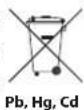
d) The Waste Electrical and Electronic Equipment (WEEE) symbols, which show wheeled bins that have been crossed out, indicate that electrical/electronic equipment and batteries/accumulators must be collected and disposed of separately from household waste.

If a battery or accumulator contains more than the specified values of lead (Pb), mercury (Hg), and/or cadmium (Cd) as defined in the Battery Directive (2006/66/EC), then the chemical symbols for those elements will be indicated beneath the WEEE symbol.
e) Return and collection systems are available to end users. For more detailed information about the disposal of old electrical/electronic equipment and waste batteries/accumulators, please contact your city office, waste disposal service or the shop where you purchased the equipment.
Contents
ATTENTION
This unit only outputs analog signals from the one selected type of connector.
Before using the unit, set the OUTPUT SELECTOR switch to the type of connectors to use for analog output.
For details about making this setting, see "Output selection (OUTPUT SELECTOR) switch" on page 9.
Thank you for purchasing this ESOTERIC product.
Read this manual carefully to get the best performance from this product. After reading it, keep it in a safe place with the warranty card for future reference.
IMPORTANT SAFETY INSTRUCTIONS 3
Before use....6
Making connections....8
Names and functions of parts....10
Using the easy demagnetization function....11
Automatic power saving function....11
Troubleshooting....12
Specifications....12
Dimensional drawings....13
XLR cable connection diagrams....14
What's in the box
Check to be sure the box includes all the supplied accessories shown below. Please contact the store where you purchased this unit if any of these accessories are missing or have been damaged during transportation.
Power cord × 1
Felt pads × 3
Owner's manual (this document) × 1
Warranty card × 1
Precautions for use
●Do not place anything on top of the unit.
- Do not install this unit in a location that could become hot. This includes places that are exposed to direct sunlight or near a radiator, heater, stove or other heating equipment. Moreover, do not place it on top of another amplifier or equipment that generates heat. Doing so could cause discoloration or deformation.
- Place the unit in a stable location.
- In order to enable good heat dissipation, leave at least 20 cm (8") between this unit and walls and other equipment when installing it. If you put it in a rack, take precautions to prevent overheating by leaving at least 5 cm (2") open above the top of the unit and at least 10 cm (4") open behind the unit. Failure to provide these gaps could cause heat to build up inside and result in fire.
- Do not move the unit during use.
- Be careful to avoid injury when moving the unit due to its weight. Have someone help you move it if necessary.
- The voltage supplied to the unit should match the voltage printed on the rear panel. If you are in any doubt regarding this matter, consult an electrician.
- Do not open the body of the unit as this might result in damage to the circuitry or cause electric shock. If a foreign object should get into the unit, contact your dealer.
- When removing the power plug from the wall outlet, always pull directly on the plug; never yank on the cord.
Maintenance
Use a soft dry cloth to wipe the surface of the unit clean.
For stubborn smudges, use a damp cloth that has been thoroughly wrung out to remove excess moisture.
For safety, disconnect the power plug from the outlet before cleaning.
●Never spray liquid directly on this unit.
- Do not wipe with chemical cleaning cloths, thinner or other chemical agents. Doing so could damage the surface.
- Avoid allowing rubber or plastic materials to touch the unit for long periods of time because they could damage the cabinet.
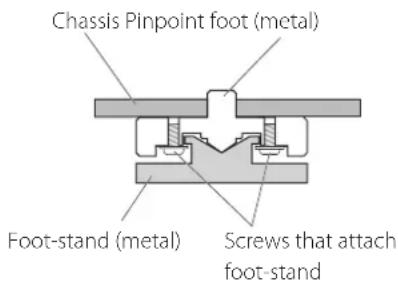
Note about pinpoint feet
High-precision metal pinpoint feet are attached firmly to the bottom plate of this unit.
The stands for these feet are loose, but when the unit is placed in position, it is supported by these pinpoint feet, which will effectively disperse vibrations.
text_image
Chassis Pinpoint foot (metal) Foot-stand (metal) Screws that attach foot-stand- Apply the included felt pads to the bottoms of the foot-stands to avoid scratching the surface where the unit is placed.
Precautions when making connections
● After completing all other connections, plug the power plug into a power outlet.
- Read the owner's manuals of all devices that will be connected, and follow their instructions.
flowchart
graph TD
    A["Record player"] --> B["Line OUT"]
    B --> C["Output Selector"]
    C --> D["RSCA"]
    D --> E["RSCA audio cables"]
    E --> F["Preamplifier"]
    F --> G["Audio inputs (LINE IN, etc.)"]
    H["Record player that supports balanced connections"] --> I["XLR audio cables"]
    I --> J["RCA audio cables"]
    J --> K["RSCA"]
    K --> L["RSCA"]
    L --> M["RSCA"]
    M --> N["RSCA"]
    N --> O["RSCA"]
    O --> P["RSCA"]
    P --> Q["RSCA"]
    Q --> R["RSCA"]
    R --> S["RSCA"]
    S --> T["RSCA"]
    T --> U["RSCA"]
    U --> V["RSCA"]
    V --> W["RSCA"]
    W --> X["RSCA"]
    X --> Y["RSCA"]
    Y --> Z["RSCA"]
    Z --> AA["RSCA"]
    AA --> AB["RSCA"]
    AB --> AC["RSCA"]
    AC --> AD["RSCA"]
    AD --> AE["RSCA"]
    AE --> AF["RSCA"]
    AF --> AG["RSCA"]
    AG --> AH["RSCA"]
    AH --> AI["RSCA"]
    AI --> AJ["RSCA"]
    AJ --> AK["RSCA"]
    AK --> AL["RSCA"]
    AL --> AM["RSCA"]
    AM --> AN["RSCA"]
    AN --> AO["RSCA"]
    AO --> AP["RSCA"]
    AP --> AQ["RSCA"]
    AQ --> AR["RSCA"]
    AR --> AS["RSCA"]
    AS --> AT["RSCA"]
    AT --> AU["RSCA"]
    AU --> AV["RSCA"]
    AV --> AW["RSCA"]
    AW --> AX["RSCA"]
    AX --> AY["RSCA"]
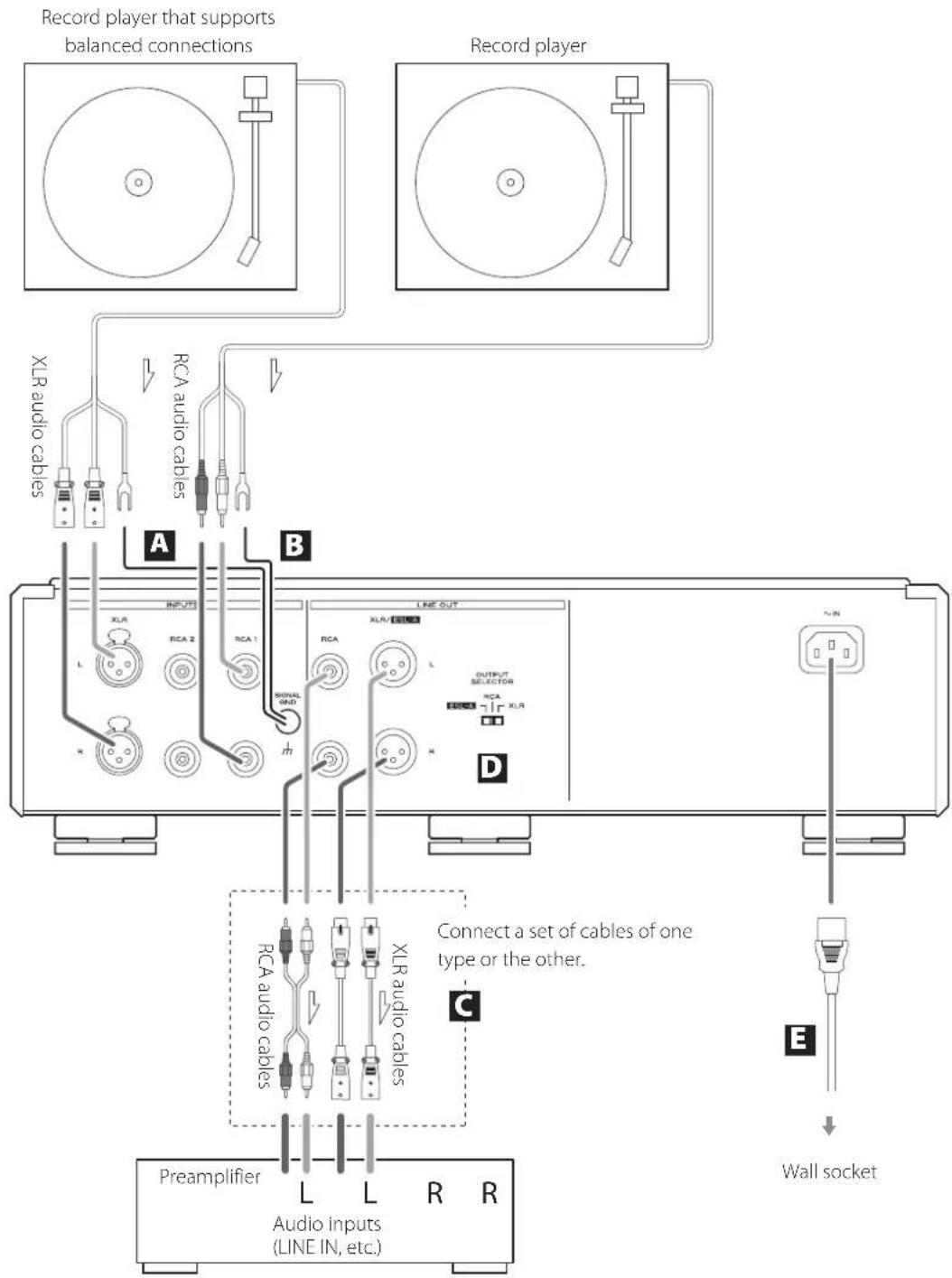
A Phono input connectors (INPUTS)
Connect the audio outputs of record players to these connectors.
●The XLR connectors are only for use with MC cartridges.
Use audio cables to connect the R and L connectors on the record players to the corresponding R and L connectors on this unit.
Use the following types of commercially-available cables for connections.
XLR: balanced XLR cables
RCA1, RCA2: RCA audio cables
B SIGNAL GND grounding terminal
Connect the grounding terminals on the audio output cables of the record players to this terminal.
Also making a grounding connection to the preamplifier might improve sound quality.
●This is not an electrical safety ground.
●Failure to connect the grounding terminal of a record player might cause hum (a low continuous noise).
C Line output connectors (LINE OUT)
These connectors output audio.
Connect these to the audio input connectors (e.g. LINE IN) on a preamplifier.
Use the following types of commercially-available cables for connections.
XLR, ESL-A: balanced XLR cables
RCA: RCA audio cables
- Do not connect the line output connectors on this unit to phono input connectors on an amplifier. Be sure to connect them to line input connectors.
D Output selection (OUTPUT SELECTOR) switch
Set which connectors output audio.
ATTENTION
This unit outputs audio from the selected analog outputs. Select the connectors connected to the preamp.
E Power inlet (\~IN)
Connect the included AC power cord to this socket. After completing all other connections, plug the power plug into a power outlet.
Use only a genuine ESOTERIC power cord. Use of other power cords could result in fire or electric shock.
! Disconnect the power plug from the outlet if you will not use the unit for a long time.
Connecting to a preamplifier using ESL-A
Use XLR audio cables to connect the line output (XLR/ESL-A) connectors on this unit to a Grandioso F1 or other amplifier that has ES-LINK Analog (ESL-A) connectors.
- Set the OUTPUT SELECTOR switch on the back of the unit to ESL-A.
- You can also connect to the Grandioso F1 using XLR or RCA connectors. Select the connection type that provides the audio quality you prefer.
ES-LINK Analog overview
Using a current transmission method that utilizes the high-performance of an HCLD buffer circuit, which boasts the ability to supply strong current at high speed, the effects of impedance on the signal path are suppressed and transmitting signals purely and powerfully is possible.
- Ordinary balanced cables (with XLR connectors) are used for connection. These connectors can only be used with compatible devices, however, because the transmission format is unique.
At ESOTERIC, we use ESOTERIC MEXCEL stressfree cables for reference.
For detailed information, access the following website,
http://www.esoteric.jp/products/esoteric/accessory/indexe.html
text_image
INPUT RCA 1 RCA 2 RLR POWER ESOTERIC IMPEDANCE 3000 9000 1000 140 10Hz 500 Ω 10Ω A785 A B C D E FA POWER button
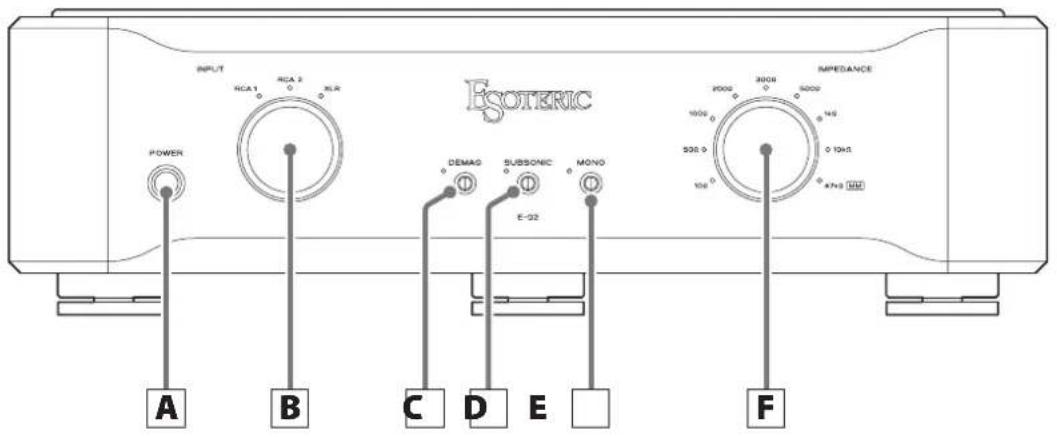
Press to turn the unit on and off.
When the unit is on, the ring around the button lights blue.
- When not using the unit, turn it off.
B INPUT knob
Turn this knob to select the active input. Select the input that is connected to the device you want to use.
●The indicator for the selected input source lights.
C Easy demagnetization (DEMAG) button
Use this to easily demagnetize MC cartridges, step-up transformers and other equipment connected to this unit (page 11).
●The indicator to the left of the button lights during demagnetization.
●The brightness of the indicator can be changed by pressing and holding this button for three seconds. The brightness can be set to one of two levels: bright or dim.
D SUBSONIC filter button
When on, a filter is applied with a cutoff of 17 Hz and a slope of -6 dB/oct.
When playing a warped record, turning this on can reduce unnecessary woofer movement.
●The indicator to the left of the button lights when this is on.
E MONO button
Turn this on when using a mono cartridge.
●The indicator to the left of the button lights when this is on.
F IMPEDANCE selection knob
Turn the IMPEDANCE selection knob to set the impedance load according to the cartridge connected to the selected input source.
When using an MC cartridge, select an impedance load between 10 Ω and 10 kΩ as you like. You can enjoy how the sound changes according to the impedance setting.
When using an MM cartridge, select 47 kΩ.
●The indicator for the selected impedance lights.
- When an MC cartridge setting between 10 and 10k is selected, the amplifier gain is increased 26 dB compared to when the 47k (MM) setting is selected.
- When an MC cartridge setting is selected, the sound quality will change according to the impedance setting.
●The 47kΩ (MM) setting is also recommended for some MC cartridges with high output.
- When using a step-up transformer with an MC cartridge, select 47 kΩ (MM).
Using the easy demagnetization function
Using the easy demagnetization function to demagnetize MC cartridges with iron cores and step-up transformers, for example, could improve the sound quality by making it clearer and giving it greater definition.
1 Use the INPUT knob to select the input source that has the cartridge connected you want to demagnetize.
2 Press the DEMAG button to turn on easy demagnetization.
The indicator to the left of the button lights when easy demagnetization is on.
This sets the load impedance to 0 Ω and shorts both ends of the cartridge.
3 Play a record.
The playback signal current goes through the cartridge and demagnetizes it.
●Demagnetization takes about 30 seconds. Keep the record playing for about 30 seconds.
●No playback sound is output when in DEMAG position.
4 Press the DEMAG button to turn off easy demagnetization.
Confirm that the indicator to the left of the button is no longer lit.
Automatic power saving function
The automatic power saving function is on by default when the unit is shipped new from the factory. When this function is on, the unit will automatically turn off if 30 minutes pass without sound input.
You can check the automatic power saving setting by looking at the input source indicators immediately after turning the unit on.
No indicators lit: Automatic power saving function on All indicators lit: Automatic power saving function off
To turn the automatic power saving function on or off, press and hold the MONO button while turning the unit on.
Troubleshooting
If you experience a problem with this unit, please take a moment to review the following information before requesting service. Moreover, the problem might be caused by something other than this unit. Please also check the operation of the connected units. If this product still does not operate correctly, contact the retailer where you purchased it.
The unit does not turn on.
→Check that the power cord is plugged into a working power outlet.
→Check that the power cord is properly connected to this unit.
No sound is output.
→Turn this unit on.
→Turn the INPUT knob to select an input.
→Confirm that the OUTPUT SELECTOR switch on the back of the unit is set to the connectors that connect to the preamp.
→ No playback sound will be output when the DEMAG button is on. Press the DEMAG button If the indicator to its left is lit.
Too much humming noise
→Check the cable connecting the grounding terminals on the record player and this unit.
Whether or not there is a grounded connection with the record player can affect the noise sound.
Too much white noise
→Check the audio cables connecting the record player.
→When using an MC cartridge, the load impedance setting can affect the noise sound.
Specifications
Inputs
XLR connectors....1 pair (L/R) (for MC)
RCA connectors....2 pairs (L/R) (for MC/MM)
Input impedance....MC: 10 Ω, 50 Ω, 100 Ω, 200 Ω,
300 Ω, 500 Ω, 1 kΩ, 10 kΩ
(switchable using selection knob)
MM: 47 kΩ
Outputs
XLR/ES-LINK Analog connectors (switchable) 1 pair (L/R)
RCA connectors.... 1 pair (L/R)
Output impedance ....XLR connectors: 20 Ω
RCA connectors: 23.5 Ω
Audio performance
RIAA deviation (10 Hz - 20 kHz) ±0.2 dB
Total harmonic distortion (1kHz, MM, at rated output).... 0.007%
Rated output level....RCA output connectors: 2 Vrms
XLR output connectors: 4 Vrms
Gain.... RCA output connectors: 40 dB for MM, 66 dB for MC
XLR output connectors: 46 dB for MM, 72 dB for MC
Input sensitivity (1 kHz, at rated output)....20 mV for MM,
1 mV for MC
Maximum input level (0.1% distortion).... 100 mV for MM,
4.8 mV for MC
S/N ratio (input short, at rated output, IHF-A).... 100 dB for MM,
80 dB for MC
Channel separation (10 kHz, MM, IHF-A)....-96 dB or higher
Subsonic filter 17 Hz, -6 dB/octave
General
Power supply
Model for Europe....AC 220-240 V, 50/60 Hz
Model for USA/Canada AC 120 V, 60 Hz
Model for Korea AC 220 V, 60 Hz
Power consumption.... 26 W
External dimensions (W × H × D, including protrusions)
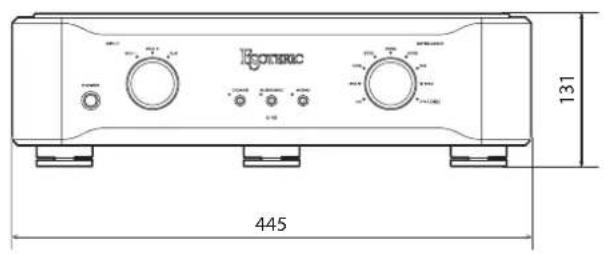
445×131×377 mm (17 5/8"×5 1/4"×14 7/8")
Weight 12.5 kg (27 5/8 lb)
Included accessories
Power cord × 1
Felt pads × 3
Owner's manual (this document) × 1
Warranty card × 1
- Specifications are appearance are subject to change without notice.
●Weight and dimensions are approximate. - Illustrations in this Owner's Manual might differ slightly from production models.
text_image
Hotrec 445 131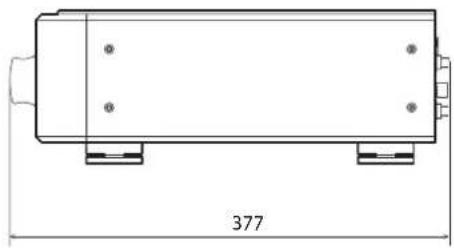
natural_image
Technical line drawing of a rectangular mechanical component with mounting holes and dimension label (377), no readable text or symbols beyond the dimension marker.
text_image
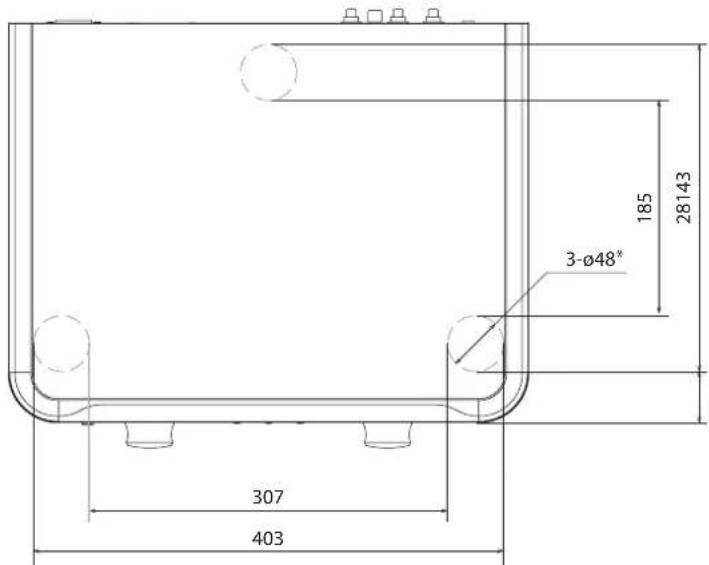
Technical diagram of a device control panel with labeled buttons and indicatorsFoot placement diagram
text_image
3-Ø48* 185 28143 307 403*48mm diameter feet × 3
Dimensions in millimeters (mm)
When using XLR cables with this unit, use one of the following types of connections.
Type 1
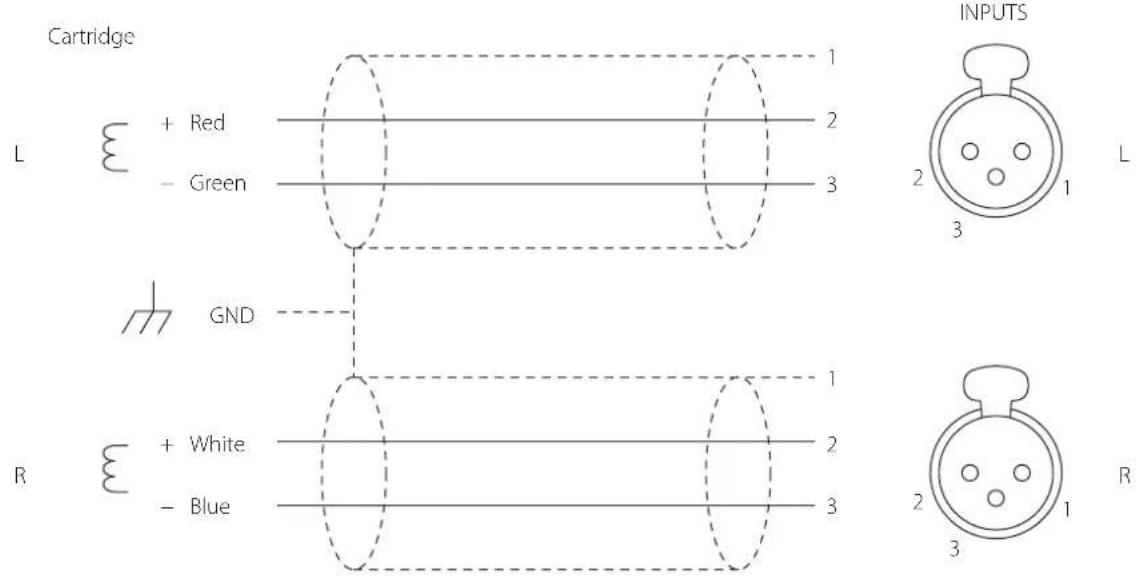
text_image
Cartridge L + Red - Green GND R + White - Blue 1 2 3 INPUTS 2 1 L 3 1 2 3 RType 2
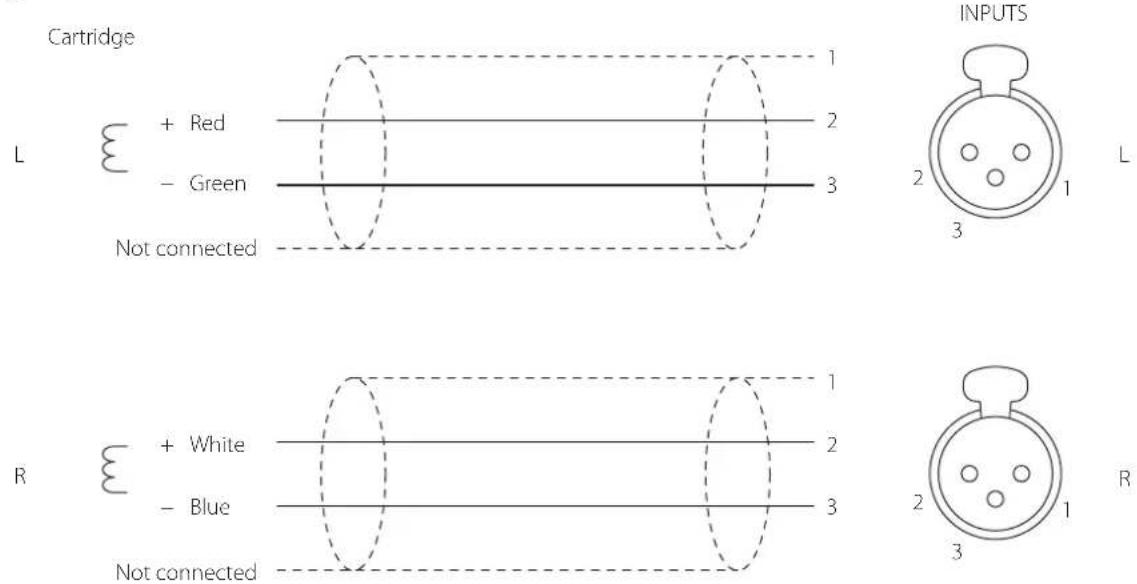
text_image
Cartridge L + Red - Green Not connected R + White - Blue Not connected 1 2 3 INPUTS 2 1 3 1 2 3 R
CAUTION
RISK OF ELECTRIC SHOCK DO NOT OPEN

ATTENTION : POUR RÉDUIRE LE RISQUE D'ÉLECTROCUTION, NE RETIREZ PAS LE CAPOT (OU L'ARRIÈRE). AUCUNE PIÈCE INTERNE N'EST RÉPARABLE PAR L'UTILISATEUR. CONFIEZ TOUTE RÉPARATION À UN SERVICE APRÈS-VENTE QUALIFIÉ.

Dimensions externes (L × H × P, saillies incluses). 445 × 131 × 377 mm
Poids 12,5 kg
Accessoires fournis
natural_image
Technical line drawing of a rectangular mechanical component with mounting holes and dimension label (377), no readable text or symbols beyond the dimension marker.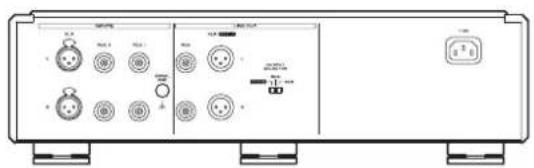
text_image
Technical diagram of a device control panel with labeled buttons and indicatorsnatural_image
Symbolic icon of a person pushing a large object through a circular frame (no text or symbols)AVISO
MEXCEL is a registered trademark of Mitsubishi Cable Industries, Ltd. in Japan and other countries.
ESOTERIC is a trademark of TEAC CORPORATION, registered in the U.S. and other countries.
XLR, ESL-A: cables XLR balanceados
RCA: cables de audio RCA
natural_image
Technical line drawing of a rectangular mechanical component with mounting holes and dimension label (377), no readable text or symbols beyond the dimension marker.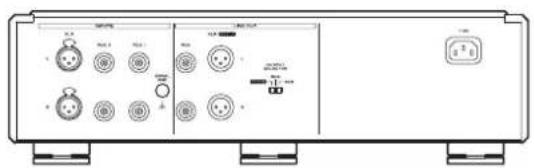
text_image
Technical diagram of a device control panel with labeled buttons and indicatorsThis product has a serial number located on the rear panel. Please write it here and retain this for your records.
Model name: E-02 Serial number