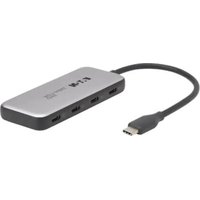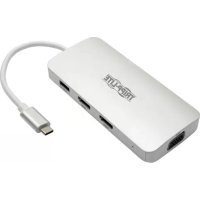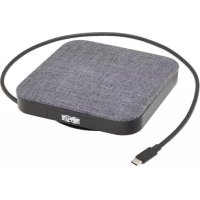
U442DOCK17GY - USB Hub Tripp Lite - Free user manual and instructions
Find the device manual for free U442DOCK17GY Tripp Lite in PDF.


| Technical Specifications | USB-C docking station with 17 ports, compatible with Windows and Mac devices. |
|---|---|
| Connectivity | USB 3.0, USB-C, HDMI, DisplayPort, Ethernet RJ45, 3.5 mm audio jack ports. |
| Video Resolution | Supports up to 4K at 60 Hz via DisplayPort and HDMI. |
| Power Supply | Powered via USB-C, with the ability to charge devices up to 60W. |
| Usage | Ideal for professionals and home users looking to expand their workspace. |
| Maintenance | No maintenance required, but it is recommended to keep the ports clean. |
| Security | Built-in protection against overloads and short circuits. |
| General Information | 3-year limited warranty, technical support available. |
Frequently Asked Questions - U442DOCK17GY Tripp Lite
User questions about U442DOCK17GY Tripp Lite
0 question about this device. Answer the ones you know or ask your own.
Ask a new question about this device
Download the instructions for your USB Hub in PDF format for free! Find your manual U442DOCK17GY - Tripp Lite and take your electronic device back in hand. On this page are published all the documents necessary for the use of your device. U442DOCK17GY by Tripp Lite.
USER MANUAL U442DOCK17GY Tripp Lite
USB-C Docking Station
4K HDMI, USB-A 3.2 Gen 1, 100W
PD Charging and 2.5" SSD/HDD Support
Model: U442-DOCK17-GY
USB Type-C and USB-C are trademarks of USB Implementers Forum.
Espanol 12 • Français 22 • Pycckn 32 • Deutsch 42
WARRANTY REGISTRATION
Register your product today and be automatically entered to win an ISOBAR® surge protector in our monthly drawing!
triplite.com/warranty


Manufacturing Excellence
1111 W. 35th Street, Chicago, IL 60609 USA · tripplite.com/support
Copyright © 2021 Tripp Lite. All rights reserved.
Product Features
- Expands your workstation with connection for an external HDMI monitor supporting resolutions up to 3840 x 2160 (4K x 2K) @ 30 Hz. 4:4:4 as specified by HDMI 2.0.
- USB-C port supports PD charging 3.0 with power input up to 20V 5A (100W), allowing you to charge your device when it is running low on battery.
- USB-C port also supports data transfer speeds up to 5 Gbps.
- Dual USB-A 3.2 Gen 1 ports support data transfer rates up to 5 Gbps, backward compatible with previous USB generations.
- USB-A ports provide 5V 1.5A (7.5W) of power for fast-charging mobile devices.
- Compatible with 2.5" SATA3 SSD/HDDs featuring ultra-high speeds up to 6 Gbps and UASP support.
Package Includes
U442-DOCK17-GY
- Owner's Manual
Optional Accessories
P569-Series High-Speed HDMI Cables
U420-Series USB 3.1 Gen 1 Type-C Cables
U428-Series USB 3.1 Gen 1 USB-C to USB-A Cables
- U322-Series USB 3.0 SuperSpeed USB-A to USB-B Cables
- M100-Series USB Sync/Charge USB-A to Lightning Cables
Product Overview
4
Product Overview
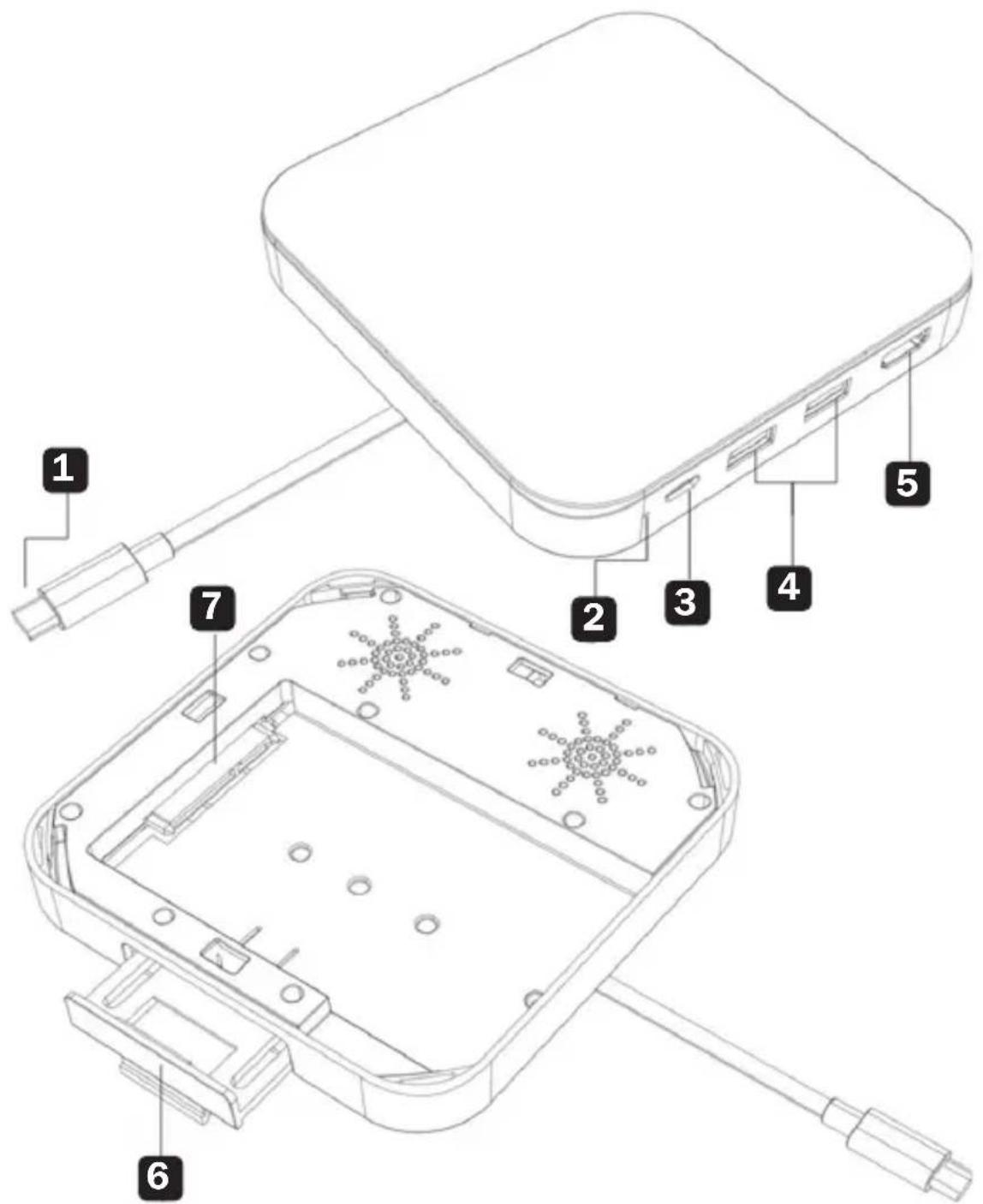
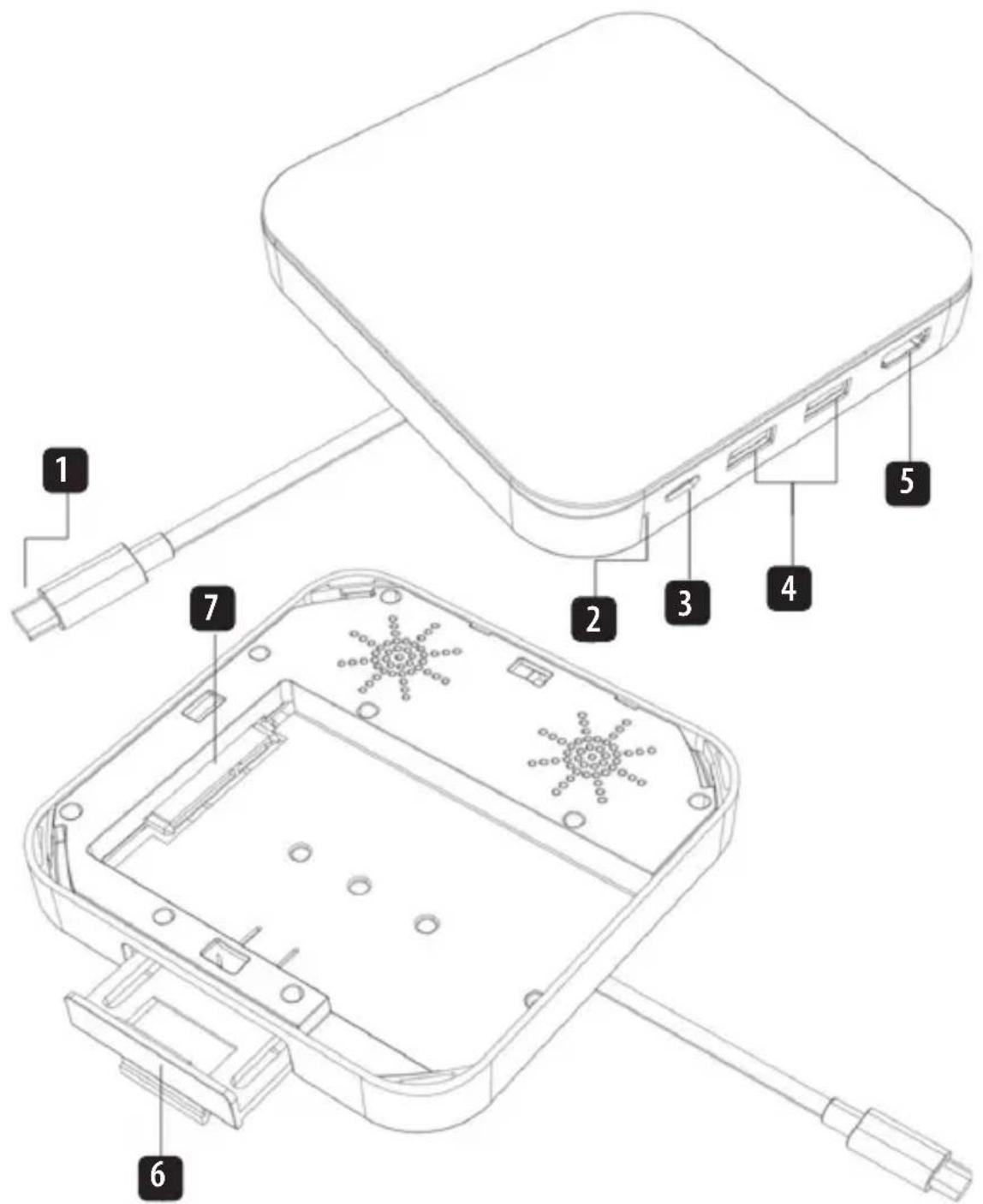
USB Type-C Host Connection (Male)
2 LED (White)
Always on when power is on.
- Flashes during read/write.
3 USB-C PD Charging/Data Port
Connect your laptop's power adapter/supply to charge the host or a USB peripheral device to transfer data. Supports both USB PD 3.0 Charging up to 100W (20V 5A) and 5 Gbps data transfer.
4 USB-A 3.2 Gen 1 Ports (x2)
Connect up to two USB peripherals, such as keyboard, mouse or flash drives. Supports 5 Gbps and fast-charging output up to 5V 1.5A.
5 HDMI Port
Connect an external monitor. Supports resolutions up to 3840 x 2160 @ 30 Hz, 4:4:4 as specified by HDMI 2.0.
6 Phone/Tablet Bracket
Supports your connected device.
7 SATA3 Connector
Supports the connection of a 2.5" SATA SSD/HDD.
Use Instructions
- Connect the built-in USB Type-C cable (male) to the target host.
- Connect an HDMI-compliant external monitor with a user-supplied HDMI cable, such as Tripp Lite's P569-Series.
Note: The USB-C source must support DisplayPort Alt Mode.
- Connect up to two USB peripheral devices.
Note: Host must support USB On-the-Go (OTG).
- Connect either your host's power supply or a USB-C peripheral device to the USB PD Charging/Data port.
- Connect a 2.5" SATA3 SSD/HDD referencing the instructions below.
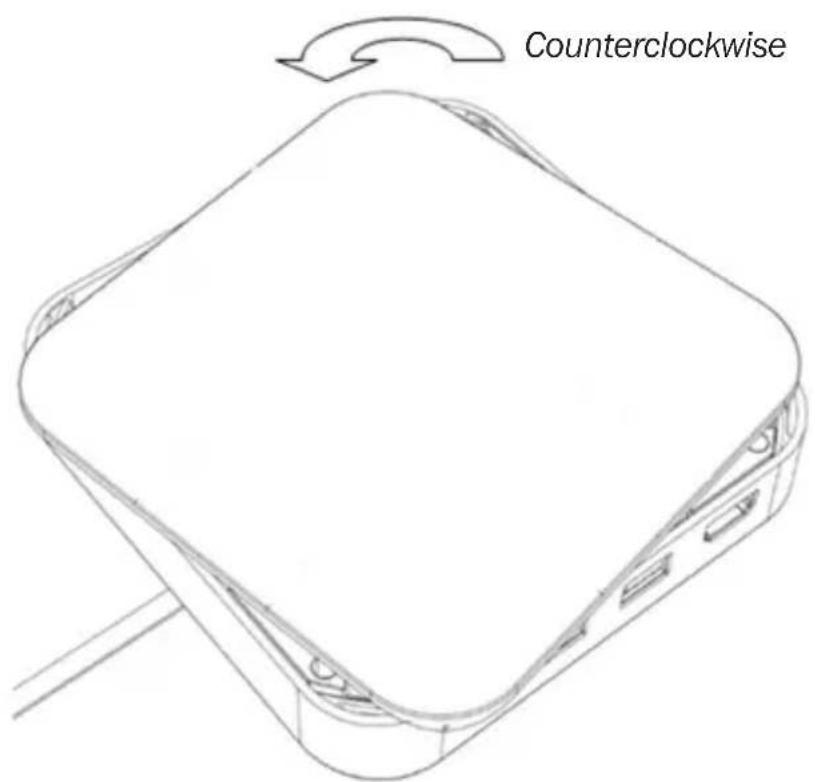
a. Open the top cover by holding the main body with one hand and the cover with the other and rotate counterclockwise.
6
Use Instructions
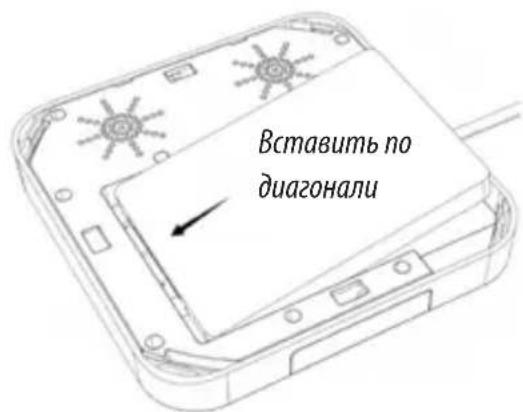
b. Install the SATA 2.5" hard drive by inserting the drive diagonally downward as shown.
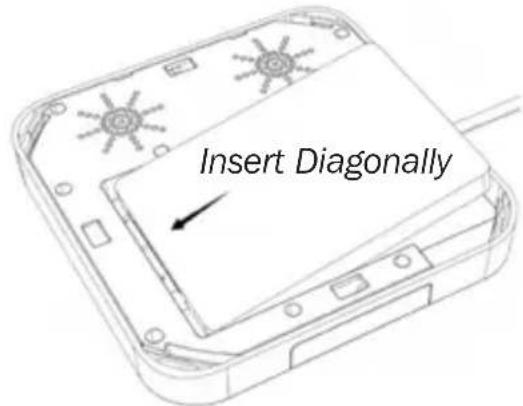
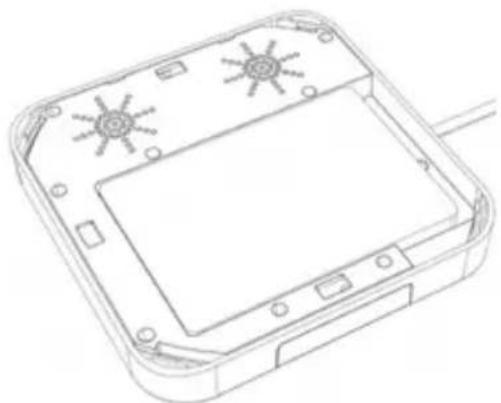
c. Replace the cover by aligning up the grooves and turning the cover clockwise.
Note: Read and Write Operation
Because memory works differently on each operating system, select the file system format as exFAT to increase compatibility.
- (Optional) In order to make the phone/tablet more stable, pull open the support bracket.
Specifications
Input Connector
| USB USB Type-C (Male) | |
| Output Connector(s) | |
| USB USB-A 3.2 Gen 1, x2 (Female),USB-C PD Charge/Data, x1 | |
| Video HDMI, x1 | |
| Serial SATA3, x1 | |
| Environmental | |
| Operating Temperature 41° to 95°F (5° to 35°C) | |
| Storage Temperature 14° to 122°F (-10° to 50°C) | |
| Relative Humidity 20 to 80% | RH, Non-Condensing |
| Mechanical | |
| Unit Dimensions 5.15 x 5.15 | x 1.19 in.(131 x 131 x 30 mm) |
| Unit Weight 0.44 lb. (0.2 kg) | |
| Specifications | |
| HDMI Specifications 2.0 | |
| HDCP Specifications 2.2/1.4 | |
| PD Charging Specification PD | 3.0 |
| PD Charging Output 100W (20V 5A) | |
| USB Specification USB 3.2 G | Gen 1 (5 Gbps) |
| SATA | 2.5" SSD/HDD (6 Gbps) |
Warranty & Product Registration
3-Year Limited Warranty
Tripp Lite warrants its products to be free from defects in materials and workmanship for a period of three (3) years from the date of initial purchase. Tripp Lite's obligation under this warranty is limited to repairing or replacing (at its sole option) any such defective products. To obtain service under this warranty, you must obtain a Returned Material Authorization (RMA) number from Tripp Lite or an authorized Tripp Lite service center. Products must be returned to Tripp Lite or an authorized Tripp Lite service center with transportation charges prepaid and must be accompanied by a brief description of the problem encountered and proof of date and place of purchase. This warranty does not apply to equipment that has been damaged by accident, negligence or misapplication or has been altered or modified in any way.
EXCEPT AS PROVIDED HEREIN, Tripp Lite MAKES NO WARRANTYES, EXPRESS OR IMPLIED, INCLUDING WARRANTYES OF MERCHANTABILITY AND FITNESS FOR A PARTICULAR PURPOSE. Some states do not permit limitation or exclusion of implied warranties; therefore, the aforesaid limitation(s) or exclusion(s) may not apply to the purchaser. EXCEPT AS PROVIDED ABOVE, IN NO EVENT WILL Tripp Lite BE LIABLE FOR DIRECT, INDIRECT, SPECIAL, INCIDENTAL OR CONSEQUENTIAL DAMAGES ARISING OUT OF THE USE OF THIS PRODUCT, EVEN IF ADVISED OF THE POSSIBILITY OF SUCH DAMAGE.
Specifically, Tripp Lite is not liable for any costs, such as lost profits or revenue, loss of equipment, loss of use of equipment, loss of software, loss of data, costs of substitutes, claims by third parties, or otherwise.
PRODUCT REGISTRATION
Visit tripplite.com/warranty today to register your new Tripp Lite product. You'll be automatically entered into a drawing for a chance to win a FREE Tripp Lite product!*
- No purchase necessary. Void where prohibited. Some restrictions apply. See website for details.
Warranty & Product Registration
FCC Notice, Class B
This device complies with part 15 of the FCC Rules. Operation is subject to the following two conditions: (1) This device may not cause harmful interference, and (2) this device must accept any interference received, including interference that may cause undesired operation.
Note: This equipment has been tested and found to comply with the limits for a Class B digital device, pursuant to part 15 of the FCC Rules. These limits are designed to provide reasonable protection against harmful interference in a residential installation. This equipment generates, uses and can radiate radio frequency energy and, if not installed and used in accordance with the instructions, may cause harmful interference to radio communications. However, there is no guarantee that interference will not occur in a particular installation. If this equipment does cause harmful interference to radio or television reception, which can be determined by turning the equipment off and on, the user is encouraged to try to correct the interference by one or more of the following measures:
- Reorient or relocate the receiving antenna.
- Increase the separation between the equipment and receiver.
- Connect the equipment into an outlet on a circuit different from that to which the receiver is connected.
- Consult the dealer or an experienced radio/TV technician for help.
Any changes or modifications to this equipment not expressly approved by Tripp Lite could void the user's authority to operate this equipment.
WEEE Compliance Information for Tripp Lite Customers and Recyclers (European Union)
Under the Waste Electrical and Electronic Equipment (WEEE) Directive and implementing regulations, when customers buy new electrical and electronic equipment from Tripp Lite they are entitled to:
- Send old equipment for recycling on a one-for-one, like-for-like basis (this varies depending on the country)
- Send the new equipment back for recycling when this ultimately becomes waste
Use of this equipment in life support applications where failure of this equipment can reasonably be expected to cause the failure of the life support equipment or to significantly affect its safety or effectiveness is not recommended.
Tripp Lite has a policy of continuous improvement. Specifications are subject to change without notice. Photos and illustrations may differ slightly from actual products.


Manufacturing Excellence.
1111 W. 35th Street, Chicago, IL 60609 USA · triplite.com/support
11
21-01-238 93-3DDD_RevA
1111 W. 35th Street, Chicago, IL 60609 EE UU • tripnite.com/support
1111 W. 35th Street, Chicago, IL 60609 EE UU • triplite.com/support
21-01-238 93-3DDD_RevA
PykoBODCTBO N0Ib30BaTeJia
ДOK-станения USB-C
cpoidepko4K HDMI, USB-A 3.2 Gen 1,
3apdkn PD Charging (100 Bt) n
XeCTKnx DnCKOB/TBepdoTeNbHbIX HaKoNTeNe 2,5"
Mодель: U442-DOCK17-GY
USB Type-C u USB-CЯблajomca mop2o6bIMu 3HaKaMu KomnaHuu USB Implementers Forum.
English 1 • Espanol 12 • Français 22 • Deutsch 42


PpOyHnHm HbCnHcHnKHeT8s.
1111 W. 35th Street, Chicago, IL 60609 USA - triplite.com/support
OxpanaTcA BTOpCKnM npaBOM © 2021 Tripp Lite. NepeneuTaKta Zanpeuaetca.
XapakTepnCTnKn n3dennr
- PetpaHcIpyET cIraHJI c pa6Oey cTaHcII c pa3bEmOM IJI IOKJIIOyeHnBHeIHero HDMI-MOHITopa, noIDepKJBBAIOJero pa3peSeHnJO 3840 x 2160 (4K x 2K) npu 30 Tc CUBeTOBOy cy6DnCKPeTn3aUne 4:4:4 corIacHO Tpe6OBAHm CTAnapTa HDMI 2.0.
- Iopr USB-C noDnepKnBaet 3apRky PD 3.0 c BxOndbIM nHTaHneM MoUHOCTbIO do 100 Bt (20 B, 5 A), no3BONJy 3apXkaTb yCTpoiCTBO npu ero pa6ote c Hn3Km UpOBHeM 3apJa 6atapen.
- IopT USB-C taKke noDaeKnBaet ckOpOCT npepaun daHbIx Do 5Γ6nt/c.
-Два пота USB-A 3.2 Gen 1 подержиBaIoT ckopoctи посяч Danньixdo5Γ6nt/cn obpaTHO COBMeCTIbIC INHTepfEicamu USBпрдшсгвуоипokoneн. - IopTbI USB-A o6ecneuBaIoT nItaHHe MoUHocTbIO 7,5 Bt (5 B / 1,5 A) dIy 6bICTpo3apAkn M6nBbIX yCTPOINTB.
CobmeCTMa cTBepDoTeNbHbIMn HocuTeJAMn/JeCTKUMn DnCKaMn 2,5" SATA3 noDaeppko CBepXbICOKnx ckopOtey do 6 6nt/c u UASP.
KoMnJIeKT noCTaBKn
U442-DOCK17-GY
PykoBoDCTBO nOJIb3OBaTeJr
OnuHaBbIe KOMnKeKtUoUne
- BbICOKoCKOpocThbIe HDMI-ka6eIi cepn P569
- Ka6eIi cepuU420cpa3bemamn USB 3.1 Gen 1 Type-C
- Ka6eIi cepnn U428 c pa3bemamn USB 3.1 Gen 1 (USB-C / USB-A)
Ka6eIi IJI pOdkJIIOUeHn yCTpoIcTB USB 3.0 SuperSpeed USB-A / USB-B
CnHxpoHn3aunOHo-3apArdhbe USB-ka6eIi cepuM100 cpa3bemAmu USB-A m Lightning
KpaTkoe onncanHe n3dennr
KpaTkoe onncanHe n3dennr
1 Bnytpncntemhbi pa3bem USB Type-C (wTekepbl)
2 CnД(6eJIbI)
- Toput noctoHHo npn HauuHn nHTaHna.
Muraet BO Bpemy tteHn/3aann.
3 IopT dIa 3apAKn USB-CPD/pepaH daHHbIX
6 KpoHsTeiH dIa TepeHa/IIaHseTa
PoeKnBaet noKIOueHoe yctpoCTBO.
7 Pa3beM SATA3
ПодерхиBaet поКлюсеные яecTKOrOДИСКА/TВЕрdoTeьнOrHЯКОпNTeя 2,5" SATA.
Hnctpykzna no npimehnIO
1.Подклочite BMOHTIpOBaHHbI Ka6eJIb USB Type-C (WTeKePbI) KHyXHOMy XOCT-yCTpOiCTBy.
2. Побъдуншт eHDMI-coBmbl BHeuHm MOHtOp uepe3 HDMl-ka6eIb, Hanpimep, Tripp Lite cepn P569.
Ppumueyane. Ycmpoicmgo-ucmoHc uHmepeuom USB-CdoJxHo noodepKubamb pexum DisplayPort Alt.
3.Поdkнioчnte do DByX nepupepnHbIX yCtpoiCTB C nHTeppeom USB
Ppumeyane. Xocm-ycmpoicm60 doJxho noodepkubamb uHmepeuc USB On-the-Go (OTG).
4. ПдклочITE nctouнк nitaHnCBOero xocT-ycTroBb nI npHepuHoe ycTroCTBO c HTepeFcom USB-C K npOpy USB PD Charging/Data.
5. Поdkлочи чекши дисс/k/Tбердотьнй hakонтел b 2,5" SATA3 cornacho npivbepeHHbIM HIXKe yka3aHnM.
a. OtkpoTe BepxHIO KpbIuKy, yIepXINBaOCHOBHO KOpNc OJHO pykoA KpbIuKy -dpyro, n NOBepHnte ee npOTNB YacOBoCTpeIKn.
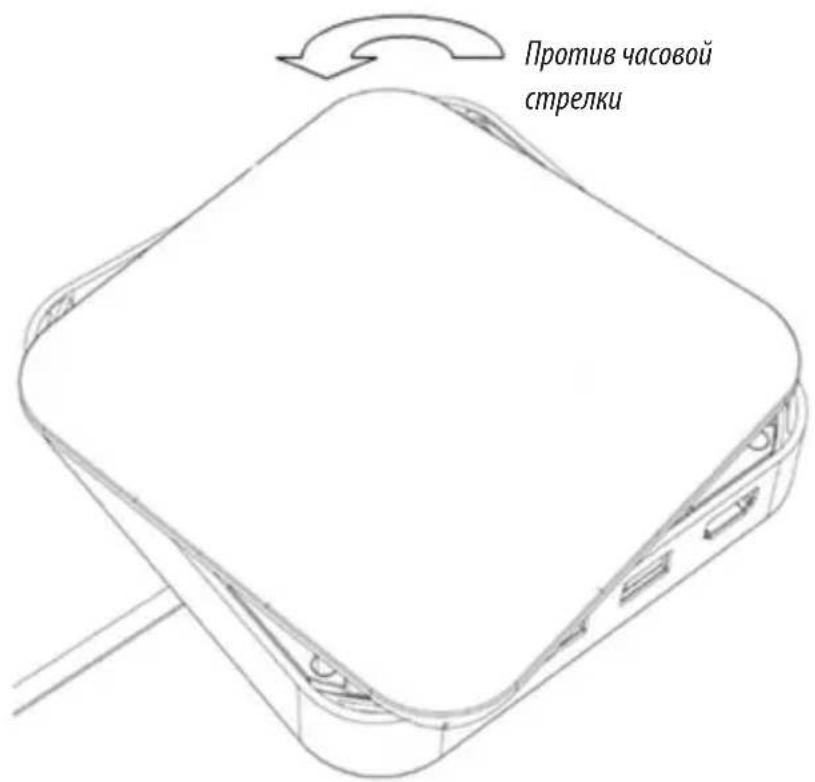
Hnctpykzna no npimehenIO
b. YctaHOBNTe JecTKn DnCK SATA 2,5", BCTaBnB ero nO dnaROHaHn Bn3, KaK NOKa3aHo Ha pncyHKe.
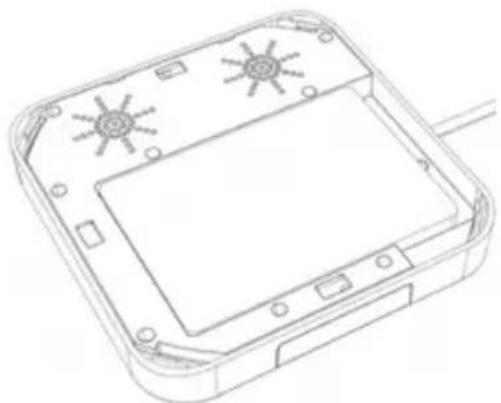
c. yctahOBITE KpbIuKy Ha MeCTO, coBMeCTNB Na3bI N NOBepHyB ee no YacOBoi CTpeJIke.
Ppumeyane.Paboma b pexkume ymeu u 3anucu
Iockonyammbapbomaem no-paHomy cKaKdoi onepaUohou cuMemou, bibepume fopmam paunoeou cuMemby exFAT dnyyueuHua coBmecmuocmu.
- (Heo63aTeNbHo)ДЯ NOBbIeHn yCTOuHBOcTn TenefoHa/IIaHWeTa NOTAHte onOpHbI KPOHHTeH Ha ce6y.
TexHnueckne xapakTepncTNKn
1111 W. 35th Street, Chicago, IL 60609 USA • triplite.com/support
Manufacturing Excellence
1111 W. 35th Street, Chicago, IL 60609 USA · tripplite.com/support
52
21-01-238 93-3DDD_RevA