AC5003 - Electronic module IFM - Free user manual and instructions
Find the device manual for free AC5003 IFM in PDF.


User questions about AC5003 IFM
0 question about this device. Answer the ones you know or ask your own.
Ask a new question about this device
Download the instructions for your Electronic module in PDF format for free! Find your manual AC5003 - IFM and take your electronic device back in hand. On this page are published all the documents necessary for the use of your device. AC5003 by IFM.
USER MANUAL AC5003 IFM
Installation instruction
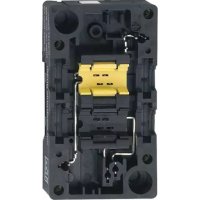
FC/FC-E lower parts
AC5000
AC5003
AC5010
AC5011
AC5014
AC5015
General installation instructions


Fig. 1: FC/FC-E lower parts and trapezoidal seals
1: Profile slot, yellow
3: Addressing socket
2: Profile slot yellow (FC lower parts) or black (FC-E lower parts)
4: Trapezoidal seals
▶ Disconnect power.
▶ For FC lower parts, insert the AS-i standard cable (yellow).
▶ For FC-E lower parts, also insert the AS-i flat cable (black, 24 V PELV) for the external voltage supply.
▶ Place the cables correctly in the profile slot.
▶ Close the unused cable duct with the trapezoidal seals supplied to ensure the protection rating IP 67.
▶ Position the corresponding upper part and tighten the screws (tightening torque: 0.8 Nm).
For the scope of validity cULus:
The device shall be supplied from an isolating transformer having a UL listed fuse rated either
- max 5 amps for voltages 0\~20 Vrms (0\~28.3 Vp) or
• 100/Vp for voltages of 20\~30 Vrms (28.3\~42.4 Vp).
Versions with addressing socket
Lower parts with addressing socket enable addressing of slaves in the classic design in the wired AS-i network.

Fig. 2: Adressing socket circuit diagram
1: Adressing socket (position on the device: General installation instructions → 2)
2: Flat cables
3: Lower part

The addressing cable must be ordered separately (art. no. E70213).

When the addressing plug is inserted, the communication between the AS-i slave and the AS-i master is interrupted. This may trigger a configuration error message on the AS-i master.
▶ Connect the mounted lower part to the addressing unit.
Brand : IFM
Model : AC5003
Category : Electronic module