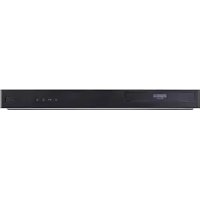
DR4810SVL - DVD combo LG - Free user manual and instructions
Find the device manual for free DR4810SVL LG in PDF.


| Feature | Details |
|---|---|
| Device type | DVD video combo |
| Supported formats | DVD, CD, VCD, MP3, JPEG |
| Connectivity | HDMI, Composite, S-Video, Analog audio |
| Additional features | DVD recording, media file playback |
| Power consumption | 50 W (in operation) |
| Dimensions | 430 x 300 x 50 mm |
| Weight | 2.5 kg |
| Maintenance | Regular lens cleaning, firmware update if available |
| Safety | Do not expose to moisture, use only with recommended accessories |
| General information | Check DVD regional compatibility, 2-year warranty |
Frequently Asked Questions - DR4810SVL LG
User questions about DR4810SVL LG
0 question about this device. Answer the ones you know or ask your own.
Ask a new question about this device
Download the instructions for your DVD combo in PDF format for free! Find your manual DR4810SVL - LG and take your electronic device back in hand. On this page are published all the documents necessary for the use of your device. DR4810SVL by LG.
USER MANUAL DR4810SVL LG
Before connecting, operating or adjusting this product, please read this instruction booklet carefully and completely.
Safety Precautions

CAUTION
RISK OF ELECTRIC SHOCK DO NOT OPEN

CAUTION: TO REDUCE THE RISK OF ELECTRIC SHOCK
DO NOT REMOVE COVER (OR BACK)
NO USER-SERVICEABLE PARTS INSIDE REFER SERVICING TO QUALIFIED SERVICE PERSONNEL.

This lightning flash with arrowhead symbol within an equilateral triangle is intended to alert the user to the presence of uninsulated dangerous voltage within the product's enclosure that may be of sufficient magnitude to constitute a risk of electric shock to persons.

The exclamation point within an equilateral triangle is intended to alert the user to the presence of important operating and maintenance (servicing) instructions in the literature accompanying the product.
WARNING: TO REDUCE THE RISK OF FIRE OR ELECTRIC SHOCK, DO NOT EXPOSE THIS PRODUCT TO RAIN OR MOISTURE.
WARNING: Do not install this equipment in a confined space such as a book case or similar unit.
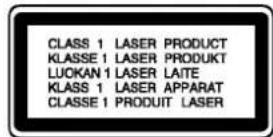
CAUTION:
This DVD Recorder employs a Laser System.
To ensure proper use of this product, please read this owner's manual carefully and retain for future reference should the unit require maintenance, contact an authorized service location (see service procedure).
Use of controls, adjustments, or the performance of procedures other than those specified herein may result in hazardous radiation exposure.
To prevent direct exposure to laser beam, do not try to open the enclosure. Visible laser radiation when open. DO NOT STARE INTO BEAM.
CAUTION: The apparatus should not be exposed to water (dripping or splashing) and no objects filled with liquids, such as vases, should be placed on the apparatus.

This product is manufactured to comply with the radio interference requirements of EEC DIRECTIVE 89/336/EEC, 93/68/EEC and 73/23/EEC.

NOTES ON COPYRIGHTS:
It is forbidden by law to copy, broadcast, show, broadcast via cable, play in public, or rent copyrighted material without permission.
This product features the copy protection function developed by Macrovision. Copy protection signals are recorded on some discs. When recording and playing the pictures of these discs on a VCR, picture noise will appear.
This product incorporates copyright protection technology that is protected by method claims of certain U.S. patents and other intellectual property rights owned by Macrovision Corporation and other rights owners. Use of this copyright protection technology must be authorized by Macrovision Corporation, and is intended for home and other limited viewing uses only unless otherwise authorized by Macrovision Corporation. Reverse engineering or disassembly is prohibited.
SERIAL NUMBER: The serial number is found on the back of this unit. This number is unique to this unit and not available to others. You should record requested information here and retain this guide as a permanent record of your purchase.
Model No.
Serial No.
Table of Contents
INTRODUCTION
Safety Precautions. 2
Table of Contents 3-4
DVD Recorder Overview. 5-8
Recordable Discs 5
Playable Discs 5
Disc-related terms 5
Types of video CDs 5
About DVD-R and DVD-RW disc. 6
What are recording modes? 6
Is editing a DVD like editing a video tape? .6
- About word 'Original' and 'Playlist'. 6
About DVD recording. 6-7
Disc types and recording formats, modes, and settings 6
Notes for recording. 7
- Recording TV audio channels. 7
- Restrictions on video recording. 7
What is CPRM? 7
Copyright. 7
Precautions 8
- Handling the unit 8
- Cleaning the unit 8
Remote Control Operation Range. 8
Remote Control Battery Installation 8
Notes on Discs. 8
Handling discs 8
- Storing discs 8
- Cleaning discs 8
About Symbols 8
About the symbol display 8
- About the disc symbols for instructions. 8
Front Panel. 9
Function Display Window 10
Remote Control Overview 11
Rear Panel 12
DVR HOOKUP
Connections 13-16
Connecting to the Aerial 13
Connections to Your TV 13
Connecting to a cable box or satellite receiver . .14
Connecting an external decoder box. 14
Connecting to an Amplifier 15
Accessory Audio/Video (A/V) Connections
to DVD Recorder 16
Connecting a Digital Camcorder 16
Before Operation. 17-29
Initial Settings. 17
General Operation 17
General 17-19
Auto Programming 17
Program Edit. 18-19
AutoClockSet. 20
- Manual Clock Set. 20
TV Aspect 20
Display Mode 21
AV1 Decoder 21
PBC 21
Factory Set 21
Language 21
Display Language 21
Disc Language 21
Audio 22
Dolby Digital. 22
DTS. 22
MPEG 22
Sampling Frequency 22
- DRC (Dynamic Range Control). 22
Vocal 22
Lock (Parental Control) 23-24
- Set Password 23
Rating 23
Country Code. 24
Recording 24-25
Record Mode Set. 24
Record Aspect 24
DV Rec Audio 25
Auto Chapter 25
Disc. 25-26
Disc Format 25
Disc Protect 25
-Finalize 26
Disc Label 26
General Explanation of On-Screen Display. 27-29
- Displaying Information While Watching TV . . 27
- Displaying Disc Information on-screen. 27-29
Table of Contents
PLAYBACK
Operation with DVD and Video CD. 30-33
Playing a DVD or Video CD 30
General Feature 30
- Moving to another TITLE 30
- Moving to another CHAPTER/TRACK 30
Search 30
Still Picture and Frame-by-Frame Playback. 30
- Slow Motion 31
- Random 31
Repeat 31
Repeat A-B 31
Time Search. 31
- Zoom 32
Marker Search 32
- Checking the contents of DVD Video discs: Menus 32
- Title Menu 32
Disc Menu 32
Camera Angle 32
- Changing the Audio Soundtrack 32
- Changing the Audio Channel 33
3D Surround 33
Subtitles. 33
-InstantSkip 33
Finding Locations on a Disc 33
Last Condition Memory. 33
- PIP (Picture in Picture) 33
Audio CD and MP3 Operation. 34-35
Playing an Audio CD or MP3 Disc. 34
Notes on MP3 Recordings 34
- Pause 35
- Moving to Another Track. 35
Repeat Track/All/Off 35
Random 35
3D Surround 35
Search 35
Repeat A-B 35
Programmed Playback with Audio CD and MP3 . 36
RECORDING
Basic Recording. 37
Basic Recording from a TV. 37
Instant Timer Recording 37
Playing your recordings on other DVD players 37
Finalizing a Disc. 37
Timer Recording 38
Clean-up Recording 38
Checking Timer Recording Details 39
Canceling a Timer Recording 39
Stopping a Timer Recording in Progress 39
Timer Recording Troubleshooting 39
Recording from External Input. 40-41
Recording from External Components. 40
Recording from a Digital Camcorder 40
What is DV? 41
DV-Related Messages 41
Troubleshooting 41
EDITING
VR Mode: Original and Playlist Editing . . . 42-48
Titles, Chapters and Parts. 42
Adding Chapter Markers 42
Changing Title or Chapter Thumbsnails 42
Using the Original (Title) menu 43
Using the Original (Chapter) menu 43
Using the Playlist (Title) menu. 44
Using the Playlist (Chapter) menu 44
Making a New Playlist. 45
Adding Additional Title/Chapters to the Playlist 45
Deleting an Original or Playlist Title/Chapter . 46
Deleting a Part 46
Undoing/Redoing the Last Edit 47
Naming a Title 47
Combining Two Chapters Into One 48
Moving a Playlist Chapter 48
Video Mode: Original Editing. 49
Using the Title List 49
Deleting a Title 49
If the disc has already been finalized 49
REFERENCE
Language Code List. 50
Country Code List 51
Controlling Your TV with the Supplied Remote . 52
Troubleshooting 53-54
Specifications 55
About the symbols for instructions
Indicates hazards likely to cause harm to the unit itself or other material damage.
N Indicates special operating features of this unit.
Indicates tips and hints for making the task easier.
DVD Recorder Overview
Recordable Discs

12cm/8cm, single-sided, single layer disc Approx. max. recording time (LQ mode): 240 minutes (4.7GB), 80 minutes (1.46GB)

12cm/8cm, single-sided, single layer disc Approx. max. recording time (LQ mode): 240 minutes (4.7GB), 80 minutes (1.46GB)

otes
- This recorder cannot record CD-R or CD-RW discs.
DVD-R/RW and CD-R/RW discs recorded using a personal computer or a DVD or CD recorder may not play if the disc is damaged or dirty, or if there is dirt of condensation on the recorder's lens. - If you record a disc using a personal computer, even if it is recorded in a compatible format, there are cases in which it may not play because of the settings of the application software used to create the disc. (Check with the software publisher for more detailed information.)
Playable Discs
| DVD VIDEO* | DVD (8 cm/12 cm disc) |
| COMPACT DISC DIGITAL VIDEO | Video CD (VCD) (8 cm / 12 cm disc) |
| COMPACT DISC DIGITAL AUDIO | Audio CD (8 cm/12 cm disc) |
In addition, this unit can play a CD-R or CD-RW that contains audio titles or MP3 files, DVD±R, DVD±RW, and SVCD.

otes
Depending on the conditions of the recording equipment or the CD-R/RW (or DVD±R/±RW) disc itself, some CD-R/RW (or DVD±R/±RW) discs cannot be played on the unit.
- Do not attach any seal or label to either side (the labeled side or the recorded side) of a disc.
- Do not use irregularly shaped CDs (e.g., heart-shaped or octagonal). Doing so may result in malfunctions.
Regional code of the DVD Recorder and DVDs
This DVD Recorder is designed and manufactured for playback of Region 2 encoded DVD software. The region code on the labels of some DVD discs indicates which type of DVD Recorder can play those discs. This unit can play only DVD discs labeled 2 or ALL. If you try to play any other discs, the message "Incorrect region code. Can't play back" will appear on the TV screen. Some DVD discs may not have a region code label even though their playback is prohibited by area limits.


Notes on DVDs and Video CDs
Some playback operations of DVDs and Video CDs may be intentionally fixed by software manufacturers. As this unit plays DVDs and Video CDs according to disc content designed by the software manufacturer, some playback features of the unit may not be available or other functions may be added. Refer also to the instructions supplied with the DVDs and Video CDs. Some DVDs made for business purposes may not be played on the unit.
Disc-related terms
Title (DVD only)
The main film content or accompanying feature content or music album.
Each title is assigned a title reference number enabling you to locate it easily.
Chapter (DVD only)
Sections of a picture or a musical piece that are smaller than titles. A title is composed of one or several chapters. Each chapter is assigned a chapter number to enable you to locate the chapter you want. Depending on the disc, chapters may not be labeled.
Track (Video CD and audio CD only)
Sections of a picture or a musical piece on a video CD or an audio CD. Each track is assigned a track number, enabling you to locate the track you want.
Scene
On a video CD with PBC (Playback control) functions, moving pictures and still pictures are divided into sections called "Scenes". Each scene available is displayed on the Scene menu and assigned a scene number, enabling you to locate the scene you want. A scene may be composed of one or several tracks.
Types of video CDs
There are two types of video CDs:
Video CDs equipped with PBC (Version 2.0)
PBC (Playback control) functions allow you to interact with the system via menus, search functions, or other typical computer-like operations. Moreover, high resolution still pictures can be played if they are included on the disc.
Video CDs not equipped with PBC (Version 1.1)
Operated in the same way as audio CDs, these discs allow playback of video pictures as well as sound, but they are not equipped with PBC.
DVD Recorder Overview
About DVD-R and DVD-RW disc
How are DVD-R and DVD-RW discs different?
The essential difference between DVD-R and DVD-RW is that DVD-R is a record- once medium, while DVD-RW is a re-recordable/erasable medium. You can re-record/ erase a DVD-RW disc approximately 1,000 times.
Can I play my recordable discs in a regular DVD player?
Generally, DVD-R discs and DVD-RW discs recorded in Video mode are playable in a regular DVD player, but they must be 'finalized' first. This process fixes the contents of the disc to make them readable to other DVD players as DVD-Video discs. DVD-RW discs recorded in VR (Video Recording) mode are playable in some players.

This indicates a product feature that is capable of playing DVD-RW discs recorded with Video Recording format.
What are 'recording modes'?
There are two recording modes available using this recorder: VR mode and Video mode. When recording to a DVD-R disc, recordings are always in Video mode. DVD-RW discs can be formatted for VR mode recording or Video mode recording.
VR mode recording
3 different picture quality/recording time settings available (HQ, SQ, LQ)
Not playable on regular DVD players
- Recordings can be extensively edited
Video mode recording
3 different picture quality/recording time settings available (HQ, SQ, LQ)
- Playable on regular DVD players (after finalizing)
- Limited editing features
Many functions of this recorder are dependent on the recording mode. One or more of the symbols
(Video, VR) appear by each function explained in this manual so that you can see at a glance whether it's relevant for the disc loaded.
You can find more information on disc formats and recording modes on next page.
Note
DVD-Video Format (Video mode) is a new format for recording on DVD-R/RW discs that was approved by the DVD Forum in 2000. You may therefore experience problems playing recordable DVD discs in some players. Symptoms include video artifacts, audio and/or video dropouts and playback suddenly stopping. Our company cannot take responsibility for problems playing discs recorded on this recorder in other players.
Is editing a DVD like editing a video tape?
No. When you edit a video tape you need one video deck to play the original tape and another to record the edits. With DVD, you edit by making a ' Playlist' of what to play and when to play it. On playback, the recorder plays the disc according to the Playlist.
About word 'Original' and ' Playlist'
Throughout this manual, you will often see the words Original and Playlist to refer to the actual content and the edited version.
- Original: content refers to what's actually recorded on the disc.
- Playlist: content refers to the edited version of the disc — how the Original content is to be played.
About DVD recording

otes
- This recorder cannot make recordings on CD-R or CD-RW discs.
- Our company takes no responsibility for recording failure due to power cuts, defective discs, or damage to the recorder.
- Fingersprints and small scratches on a disc can affect playback and/or recording performance. Please take proper care of your discs.
Disc types and recording formats, modes, and settings
This recorder can play three different kinds of DVD disc: pre-recorded DVD-Video discs, DVD-RW and DVD-R discs. The disc format for DVD-R discs is always "Video format" the same as pre-recorded DVD-Video discs. This means that once finalized, you can play a DVD-R in a regular DVD player.
By default, the DVD-RW disc format is Video Recording format, though you can change this to Video format, if required. (Reinitializing the disc will erase the contents of the disc.)
The recording mode is closely related to the disc format. If the disc format is Video Recording format, then the recording mode is VR mode; if the disc format is Video mode, then the recording mode is Video mode (except for DVD-Video, which is not recordable, and so does not have a recording mode).
Within the recording modes (which are fixed for the whole disc) are the record settings. These can be changed as required for each recording and determine the picture quality and how much space the recording will take up on the disc.
DVD Recorder Overview
Notes for recording
- The recording times shown are not exact because the recorder uses variable bit-rate video compression. This means that the exact recording time will depend on the material being recorded.
- When recording a TV broadcast, if the reception is poor or the picture contains interference, the recording times may be shorter.
If you record still pictures or audio only, the recording time may be longer. - The displayed times for recording and time remaining may not always add up to exactly the length of the disc.
The recording time available may decrease if you heavily edit a disc. - If using a DVD-RW disc, make sure you change the recording format (Video mode or VR mode) before you record anything on the disc. See page 25 (Disc Format) for how to do this.
- When using a DVD-R disc, you can keep recording until the disc is full, or until you finalize the disc. Before you start a recording session, check the amount of recording time left on the disc.
- When using a DVD-RW disc in Video mode, recording time available will only increase if you erase the last title recorded on the disc.
- The Erase Title option in the Original (Title) menu only hides the title, it does not actually erase the title from the disc and increase the recording time available (except for the last recorded title on a DVD-RW disc in Video mode).
Recording TV audio channels
This recorder can record either NICAM or regular audio. If the NICAM setting (page 19) is set to Auto, then if the broadcast is NICAM, you can record the NICAM audio. If the broadcast is non-NICAM, the regular audio is always recorded.
Restrictions on video recording
- You cannot record copy-protected video using this recorder. Copy-protected video includes DVD-Video discs and some satellite broadcasts. If copy-protected material is encountered during a recording, recording will pause or stop automatically and an error message will be displayed on-screen.
Video that is 'copy-once only' can only be recorded using a DVD-RW disc in VR mode with CPRM (see below). - NTSC format signals from the analog or the DV inputs is not recorded correctly with this recorder.
Video signals in SECAM format (from the built-in TVtuner or from the analog inputs) are recorded in PAL format.
What is 'CPRM'?
CPRM is a copy protection system (with scramble system) only allowing the recording of 'copy once' broadcast programs. CPRM stands for Content Protection for Recordable Media.
This recorder is CPRM compatible, which means that you can record copy-once broadcast programs, but you cannot then make a copy of those recordings. CPRM recordings can only be made on DVD-RW discs formatted in VR mode, and CPRM recordings can only be played on players that are specifically compatible with CPRM.
Copyright
- Recording equipment should be used only for lawful copying and you are advised to check carefully what is lawful copying in the country in which you are making a copy. Copying of copyright material such as films or music is unlawful unless permitted by a legal exception or consented to by the rights owner.
- This product incorporates copyright protection technology that is protected by method claims of certain U.S. patents and other intellectual property rights owned by Macrovision Corporation and other rights owners. Use of this copyright protection technology must be authorized by Macrovision Corporation, and is intended for home and other limited viewing uses only unless otherwise authorized by Macrovision corporation. Reverse engineering or disassembly is prohibited.
| Disc type | Disc format | Recording mode | Functions |
| DVD-Video | Video format | n/a | Playback only |
| DVD-RW | Video Recording format (default) | VR mode | Playback, recording, Original/ Playlist editing |
| Video format | Video mode | Playback, limited recording, limited editing | |
| DVD-R | Video format | Video mode | Playback, limited recording, limited editing |
DVD Recorder Overview (Continued)
Precautions
Handling the unit
When shipping the unit
The original shipping carton and packing materials come in handy. For maximum protection, re-pack the unit as it was originally packaged at the factory.
When setting up the unit
The picture and sound of a nearby TV, VCR, or radio may be distorted during playback. In this case, position the unit away from the TV, VCR, or radio, or turn off the unit after removing the disc.
To keep the surface clean
Do not use volatile liquids, such as insecticide spray, near the unit. Do not leave rubber or plastic products in contact with the unit for a long period of time. They will leave marks on the surface.
Cleaning the unit
To clean the cabinet
Use a soft, dry cloth. If the surfaces are extremely dirty, use a soft cloth lightly moistened with a mild detergent solution. Do not use strong solvents such as alcohol, benzine, or thinner, as these might damage the surface of the unit.
To obtain a clear picture
The DVD Recorder is a high-tech, precision device. If the optical pick-up lens and disc drive parts are dirty or worn, the picture quality will be poor.
Regular inspection and maintenance are recommended after every 1,000 hours of use. (This depends on the operating environment.)
For details, please contact your nearest dealer.
Remote Control Operation Range
Point the remote control at the remote sensor and press the buttons.
Remote Control Battery Installation
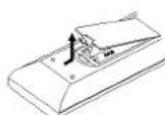
Detach the battery cover on the rear of the remote control, and insert two R03 (size AAA) batteries with and aligned correctly.
Caution
Do not mix old and new batteries. Never mix different types of batteries (standard, alkaline, etc.).
Notes on Discs
Handling discs
Do not touch the playback side of the disc. Hold the disc by the edges so that fingerprints will not get on the surface. Do not stick paper or tape on the disc.
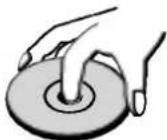

Storing discs
After playing, store the disc in its case.
Do not expose the disc to direct sunlight or sources of heat, or leave it in a parked car exposed to direct sunlight, as there may be a considerable temperature increase inside the car.
Cleaning discs
Fingerprints and dust on the disc can cause poor picture quality and sound distortion. Before playing, clean the disc with a clean cloth. Wipe the disc from the center outward.
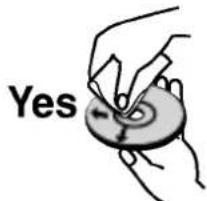
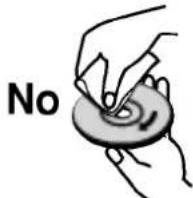
Do not use strong solvents such as alcohol, benzine, thinner, commercially available cleaners, or anti-static spray intended for older vinyl records.
About Symbols
About the symbol display
" ^ may appear on the TV screen during operation. This icon means the function explained in this owner's manual is not available on that specific disc.
About the disc symbols for instructions
A section whose title has one of the following symbols are applicable only to those discs represented by the symbol.
Video DVD-R/RW with Video recording mode
VR DVD-RW with VR recording mode
DVD DVD-Video disc
VCD Video CDs
CD Audio CDs
MP3 MP3 Discs
Front Panel
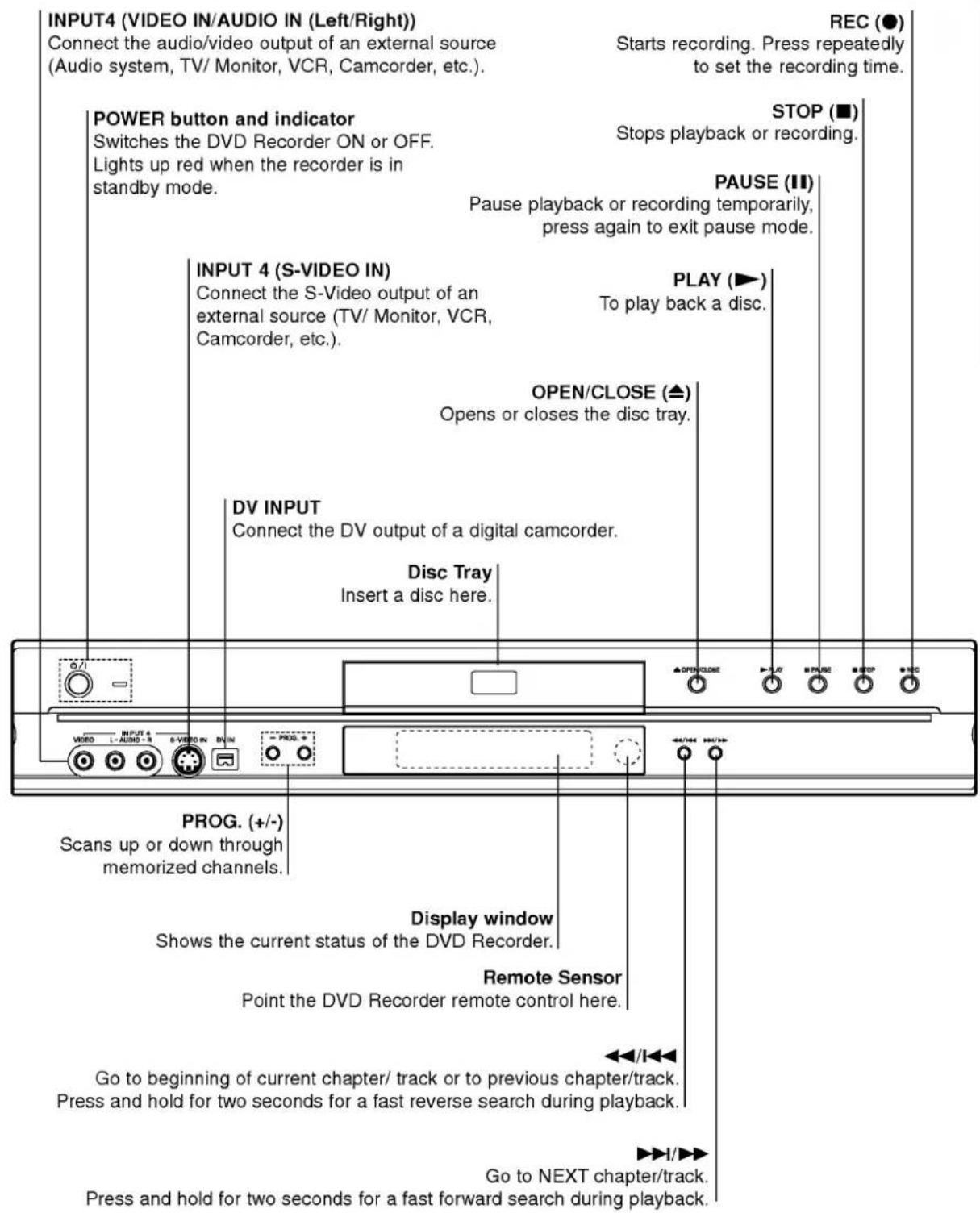
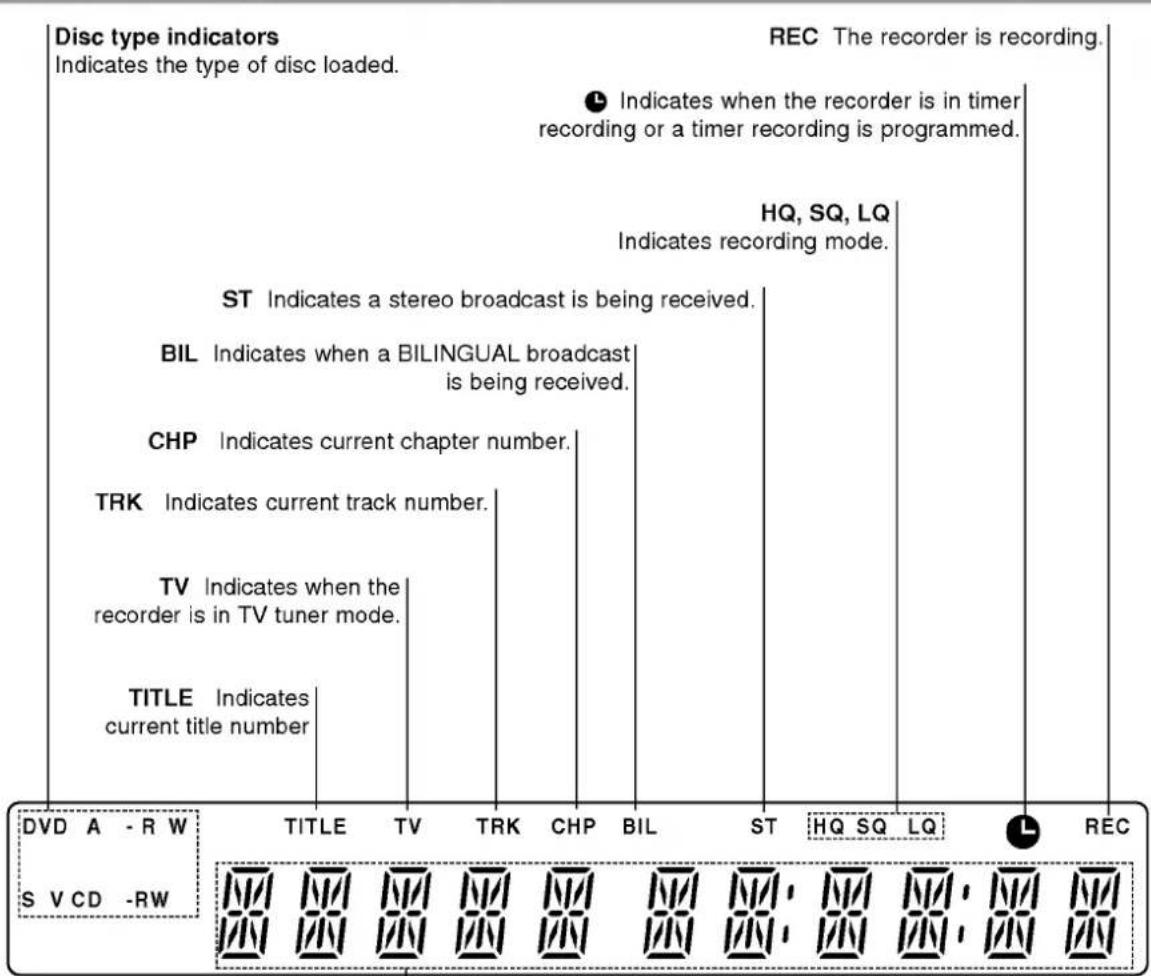
Function Display Window
Character indicators
Indicates clock, total playing time, elapsed time, title number,
chapter/track number, channel, etc.
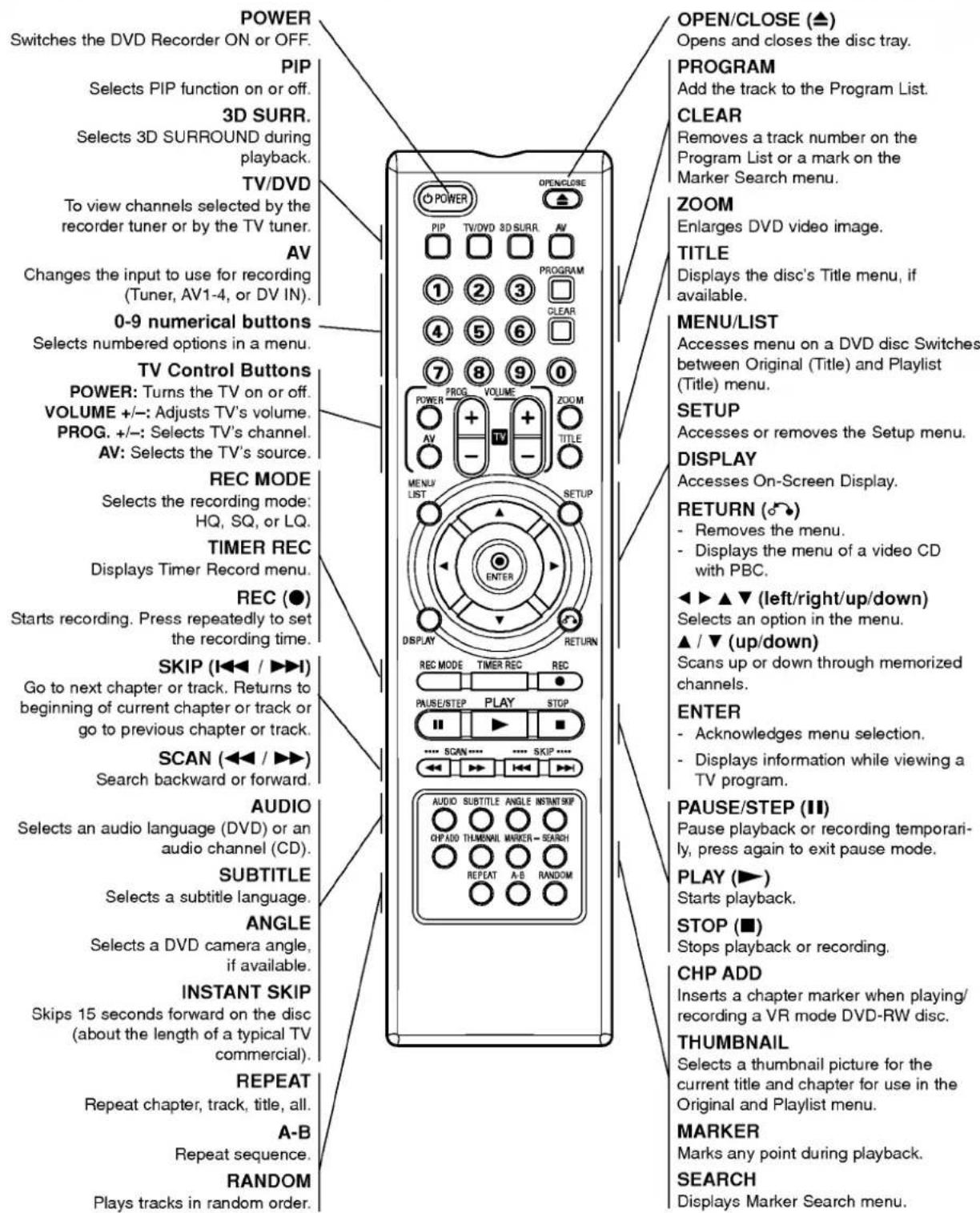
Remote Control Overview
Rear Panel
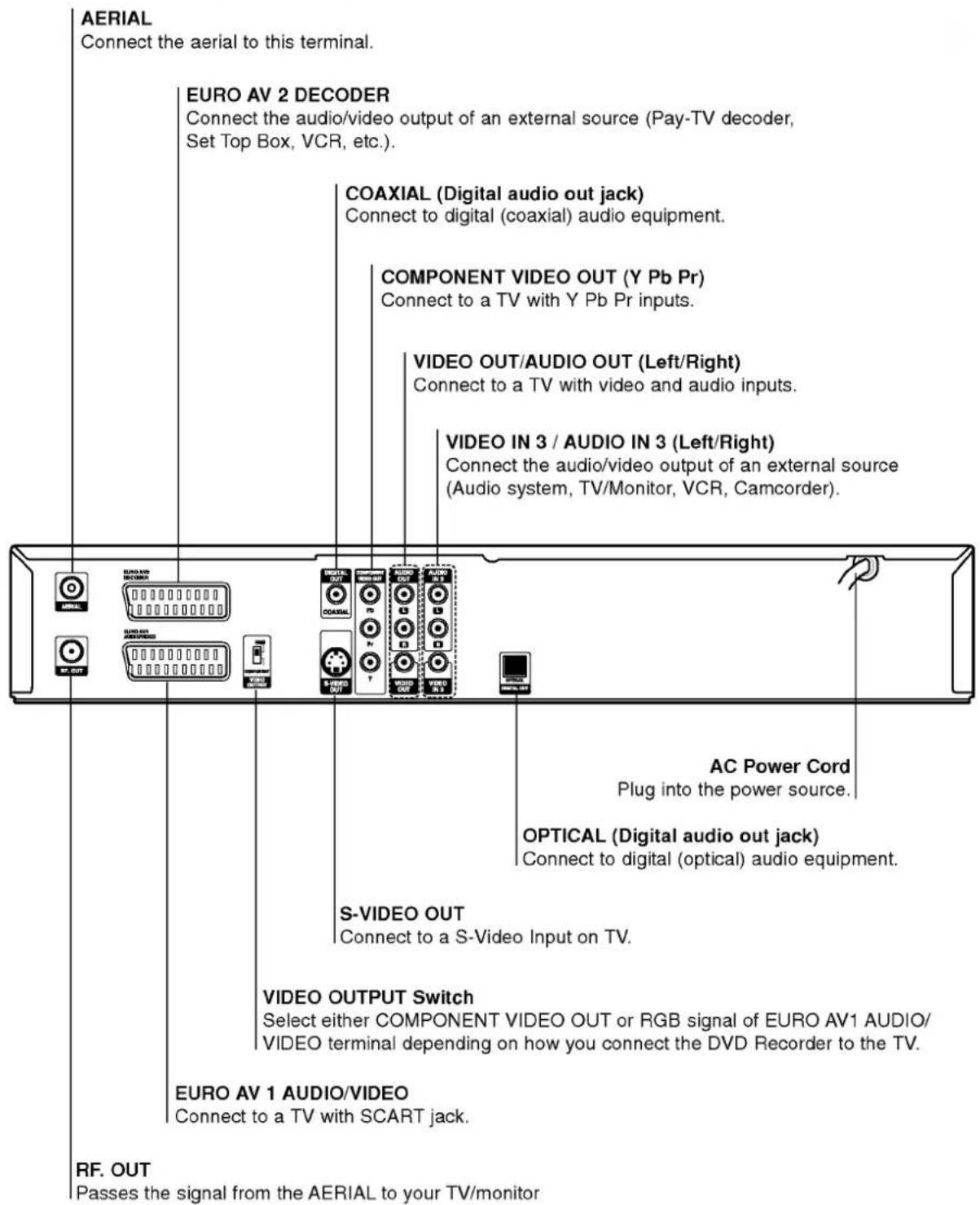

Do not touch the inner pins of the jacks on the rear panel. Electrostatic discharge may cause permanent damage to the unit.
Connections

ips
- Depending on your TV and other equipment you wish to connect, there are various ways you could connect the recorder. Use only one of the connections described below.
- Please refer to the manuals of your TV, VCR, Stereo System or other devices as necessary to make the best connections.

Caution
- Make sure the DVD Recorder is connected directly to the TV. Tune the TV to the correct video input channel.
- Do not connect the DVD Recorder's AUDIO OUT jack to the phono in jack (record deck) of your audio system.
- Do not connect your DVD Recorder via your VCR. The DVD image could be distorted by the copy protection system.
Connecting to the Aerial
Remove the aerial cable plug from your TV set and insert it into the aerial socket at the back of the DVD recorder. Plug one end of the aerial cable into the TV socket on the DVD recorder and the other end into the aerial input socket on your TV set.
RF coaxial connection
Connect the RF. OUT jack on the DVD Recorder to the aerial input jack on the TV using the 75-ohm Coaxial Cable supplied (R). The RF. OUT jack passes the signal through from the AERIAL jack.

Rear of DVD Recorder
Connections to Your TV
Make one of the following connections, depending on the capabilities of your existing equipment.
- When using the COMPONENT Video OUT jacks, set the VIDEO OUTPUT switch to COMPONENT. When using the SCART jack, set theVIDEO OUTPUT switch to RGB.
SCART connection
Connect the EURO AV1 AUDIO/VIDEO scart jack on the DVD Recorder to the corresponding in jacks on the TV using the scart cable (T).
Video connection
Connect the VIDEO OUT jack on the DVD Recorder to the video in jack on the TV using the video cable (V).
S-Video connection
Connect the S-VIDEO OUT jack on the DVD Recorder to the S-Video in jack on the TV using the S-Video cable (S).
Component Video connection
Connect the COMPONENT Video OUT jacks on the DVD Recorder to the corresponding input jacks on the TV using an Y Pb Pr cable (C).
Audio (Left/Right) Connection
Connect the left and right AUDIO OUT jacks of the DVD Recorder to the audio left and right IN jacks on the TV using the audio cables (A). Do not connect the DVD Recorder's AUDIO OUT jack to the phono in jack (record deck) of your audio system.
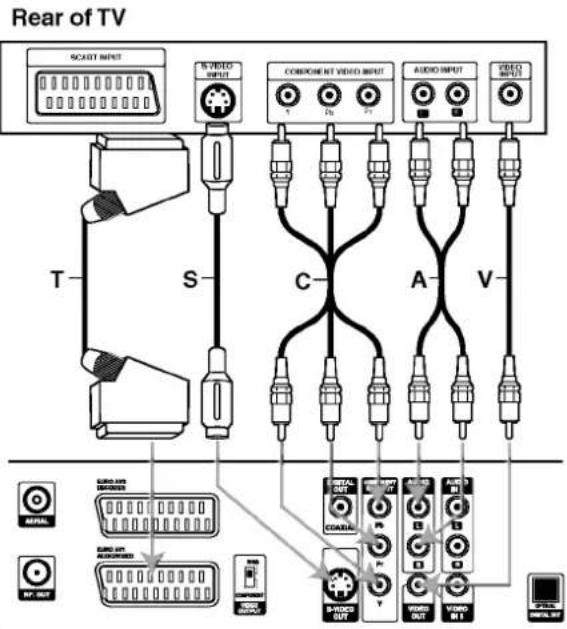
Rear of DVD Recorder
Connections (Continued)
Connecting to a cable box or satellite receiver
If you have a cable or satellite receiver with a built-in decoder, connect it to this recorder and your TV as shown on this page. If you are using a separate decoder box for your cable/satellite TV, set up following the instructions on the right.
Using the setup on this page you can:
- Record any channel by selecting it on the cable box/satellite tuner.
Connect RF cables as shown.
This enables you to watch and record TV channels.
2 Use the SCART cable to connect the EURO AV1/ AUDIO/VIDEO connector to a SCART AV connec on your TV.
This enables you to watch discs.
Use a SCART cable to connect the EURO AV2 DECODER connector to a SCART AV connector on your satellite/cable box.
This enables you to record scrambled TV channels.

This recorder has a 'loop through' function. This feature allows you to record a TV program from the built-in TV tuner in this recorder, while watching a satellite or cable channel (see page 37).

Caution:
Do not connect this recorder 'through' your VCR, satellite receiver or cable box. Always connect each component directly to your TV or AV receiver.
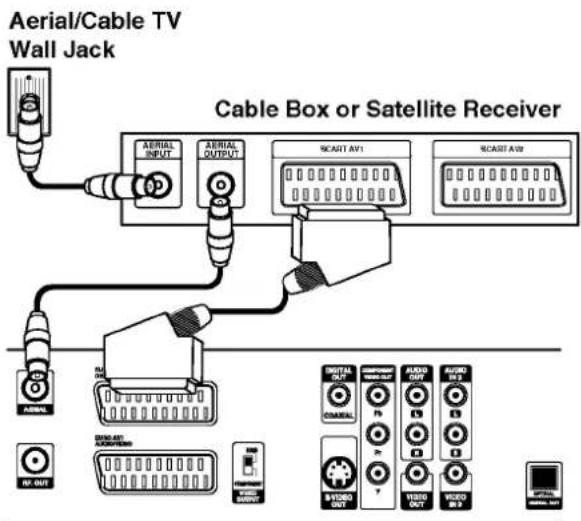
Rear of DVD Recorder
Connecting an external decoder box
If you have an external, dedicated decoder box for your satellite or cable TV system, use the setup described on this page.
1 Connect the cable from the aerial/cable TV outlet to the aerial input on your cable/satellite tuner.
Use a SCART cable to connect your decoder to your cable/satellite tuner. See the manual for your decoder box for more detailed instructions.
Use a SCART cable to connect the EURO AV2 DECODER connector to a SCART AV connector on your satellite/cable box.
Use the SCART cable to connect the EURO AV1 AUDIO/VIDEO connector to a SCART AV connector on your TV.
Caution:
- Do not connect your decoder box directly to this recorder.
- Information from the decoder (for example, relating to pay TV services), is only viewable when this recorder is off (in standby).
- For timer recording to work properly on this recorder, the satellite/cable box must also be switched on during recording.
It is not possible to watch one TV program and record another using this setup.
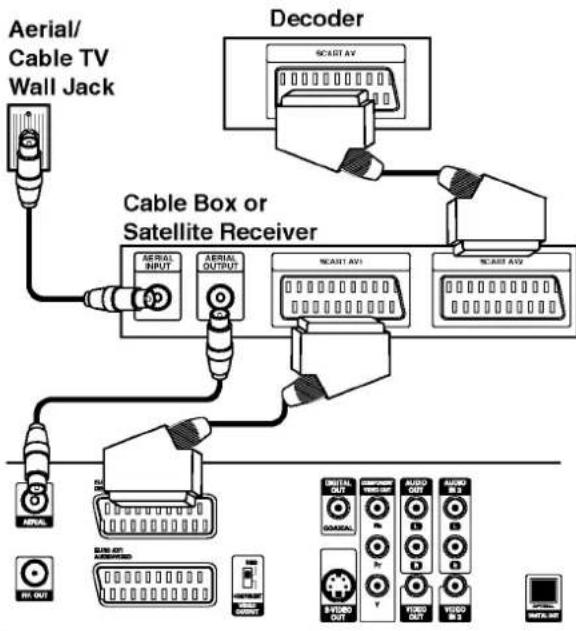
Rear of DVD Recorder
Connections (Continued)
Connecting to an Amplifier
Connecting to an amplifier equipped with two channel analog stereo or Dolby Pro Logic II/Pro Logic
Connect the Left and Right AUDIO OUT jacks on the DVD Recorder to the audio left and right in jacks on your amplifier, receiver, or stereo system, using the audio cables (A).
Connecting to an amplifier equipped with two channel digital stereo (PCM) or to an Audio/ Video receiver equipped with a multi-channel decoder (Dolby Digital™, MPEG 2, or DTS)
1 Connect one of the DVD Recorder's DIGITAL AUDIO OUT jacks (OPTICAL O or COAXIAL X) to the corresponding in jack on your amplifier. Use an optional digital (optical O or coaxial X) audio cable.
2 You will need to activate the recorder's digital output. (See "Audio" on page 22).
Digital Multi-channel sound
A digital multi-channel connection provides the best sound quality. For this you need a multi-channel Audio/Video receiver that supports one or more of the audio formats supported by your DVD Recorder (MPEG 2, Dolby Digital and DTS). Check the receiver manual and the logos on the front of the receiver.
Caution:
Due to the DTS Licensing agreement, the digital output will be in DTS digital out when DTS audio stream is selected.
Notes
If the audio format of the digital output does not match the capabilities of your receiver, the receiver will produce a strong, distorted sound or no sound at all.
- Six Channel Digital Surround Sound via digital connection can only be obtained if your receiver is equipped with a Digital Multi-channel decoder.
- To see the audio format of the current DVD in the on-screen display, press AUDIO.
- This recorder does not perform internal (2 channel) decoding of a DTS sound track. To enjoy DTS multi channel surround, you must connect this recorder to a DTS compatible receiver via one of this recorder's digital audio outputs.
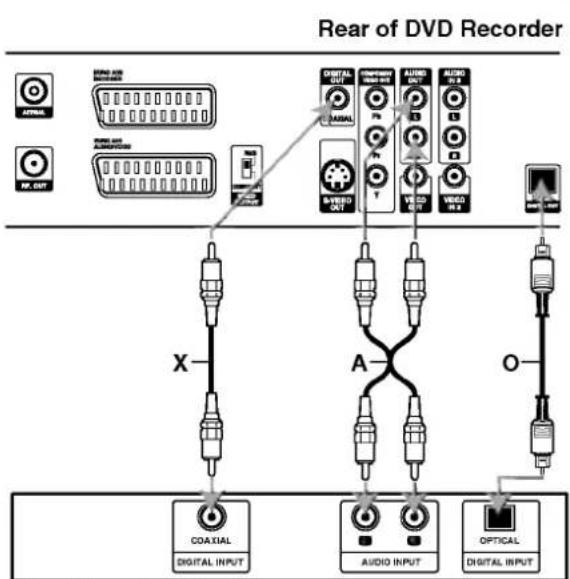
Amplifier (Receiver)
Connections (Continued)
Accessory Audio/Video (A/V) Connections to DVD Recorder
Connect the input jacks (AV3, AV4) on the DVD Recorder to the audio/video out jacks on your accessory component, using audio/video cables.

ote
If you use the S-VIDEO IN jack on the front panel, the VIDEO OUT jack on the front panel is not available.
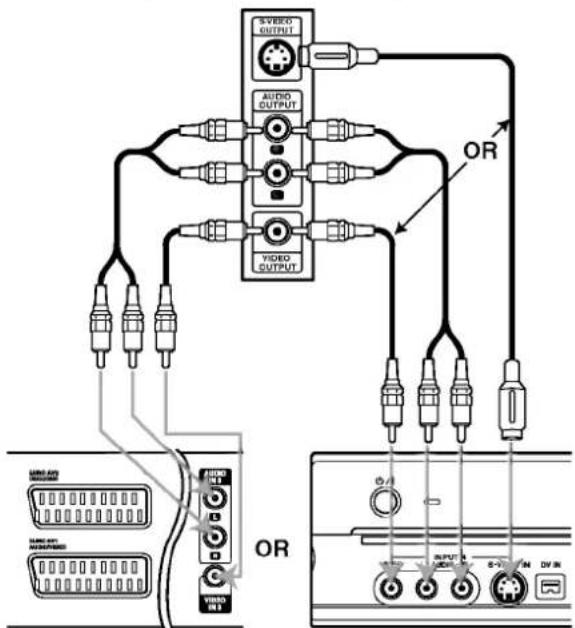
Jack panel of Accessory Component (VCR, Camcorder, etc.)
Rear of DVD Recorder
Front of DVD Recorder
Connecting a Digital Camcorder
Using the front panel DV IN jack, it is possible to connect a DV digital camcorder or video deck or DVD-R/RW recorder and digitally transfer DV tapes or DVD-R/RW discs to DVD-R/RW.
Use a DV cable (not supplied) to connect the DV in/out jack of your DV camcorder/video deck to the front panel DV IN jack of this recorder.

ote
This jack is for connection to DV equipment only. It is not compatible with digital satellite tuners or D-VHS video decks.
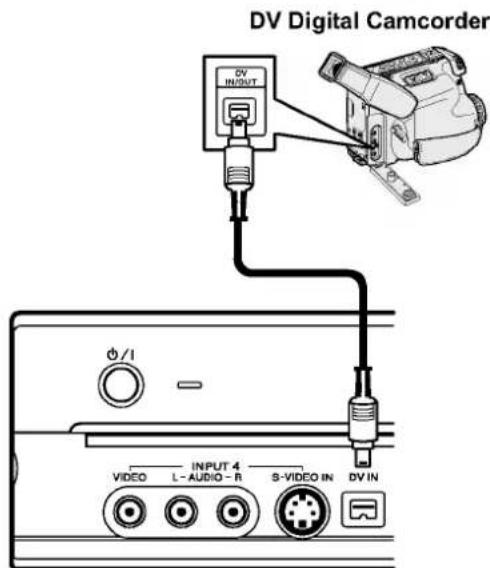
Front of DVD Recorder
Before Operation
Initial Settings
In this menu system, there are several ways to customize the settings provided. Most menus consist of three levels to set up the options, but some require greater depth for the variety of settings. If you press SETUP, only the first and second level of the menu system will appear on the TV screen. The third level can be displayed by pressing . For navigating the menu levels, you will see "▶" on the right side of the menu label to help you go to the next level.
To bring up and exit the Menu:
Press SETUP to bring up the menu. A second press of SETUP will take you back to initial screen.
To go to the next level:
Press on the remote control.
To go back to the previous level:
Press on the remote control.
General Operation
Press SETUP.
The Setup menu appears.
Use / to select the desired option.
3 While the desired item is selected, press to move to the second level.
Use / to select the second desired option.
Press to move to the third level.
Use / to select the desired setting then press ENTER to confirm your selection.
Some items require additional steps.
Press SETUP to exit the Setup menu.
General
Auto Programming
This DVD Recorder is equipped with a frequency synthesized tuner capable of receiving up to 88 TV channels.
Preparation:
- Connect the DVD Recorder to the desired type of aerial, as shown in Connecting to the Aerial on page 13.
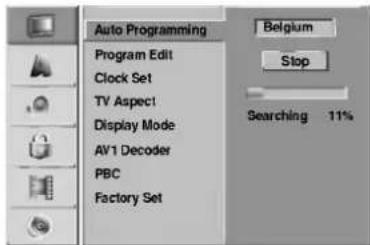
Press SETUP.
The Setup menu appears.
Use / to select the General option.
3 While the General option is selected, press to move to the second level.
Use / to select the Auto Programming option.
Press to move to the third level. Country option is highlighted.
Use / to select a country then press. "Start" icon is highlighted.
7 Press ENTER to begin the channel search. The tuner will automatically cycle through all available channels in the area and place them in the tuner's memory.
Before Operation (Continued)
Program Edit
You can edit a channel manually (add, delete, name, move, etc.).
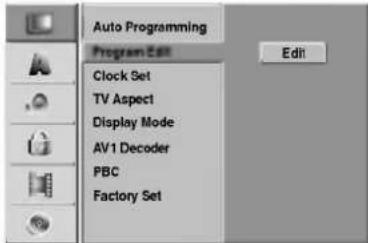
Press SETUP.
The Setup menu appears.
Use / to select the General option.
3 While the General option is selected, press to move to the second level.
Use / to select the Program Edit option then press to move to the third level.
"Edit" icon is highlighted.
Press ENTER.
Program List menu appears.
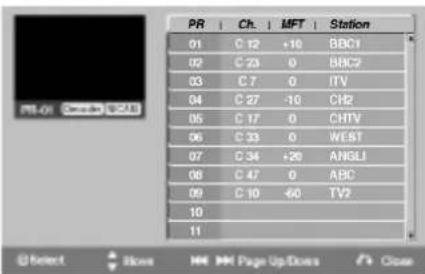
Use / to select a PR number then press ENTER.
Program List options appears on the left side of the menu display.
Use / to select an option then press ENTER to confirm.
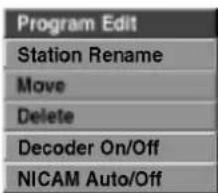
Program Edit: Edits the selected program.
Station Rename: Edits the station name.
Move:Moves the program's location on the program list.
Delete: deletes the program from program list.
Decoder On/Off: Set the decoder for the program to On or Off.
NICAM Auto/Off: Set the NICAM function to for the program Auto or Off.
Press RETURN (O) repeatedly to exit Program List menu.
Program Edit
You can perform a search to select and store TV channels manually.
- Use / to select a program on the Program List menu then press ENTER. Program List options appear on the left side of the Program List menu.
- Use / to select 'Program Edit' option from the options then press ENTER. Program Edit menu appears.
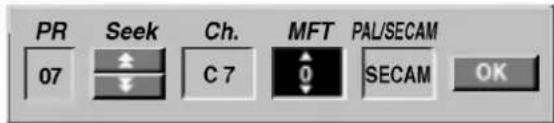
- See the descriptions on below to use Program Edit menu.
/ (left/right): Moves the cursor to the previous or next column.
/ (up/down): Changes the setting at the current cursor position.
PR: Indicates program number (display only)
Seek: Searches a station automatically. Use
/ to select Seek option then press /
Searching stops when the DVD recorder tunes in a station.
Ch.: Changes the channel number to edit. Use / to select Ch. option then press / .
MFT: Changes the frequency for fine tuning. Use / to select MFT option then press
PAL/SECAM: Changes TV signal system (PAL or SECAM). Use / to select PAL/SECAM option then press / .
- Choose OK then press ENTER to confirm the setting and returns to the Program List menu.
Before Operation (Continued)
Program Edit (Continued)
Station Rename
You can name stations independently. Names can be up to 5 characters long.
- Use / to select a program on the Program List menu then press ENTER. Program List options appear on the left side of the Program List menu.
- Use / to select Station Rename option from Program List options then press ENTER. Keyboard menu appears.
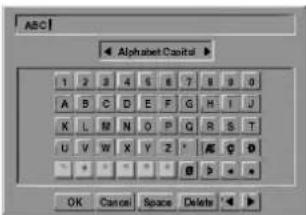
-
Enter a name for the station. Use ▲▼ ▲▶ to select a character then press ENTER to confirm your selection.
-
Alphabet Capital: Switches the keyboard upper case characters.
- Alphabet Small: Switches the keyboard to lower case characters.
- Symbols: Switches the keyboard to symbol characters.
OK: Select to finish - Cancel: Select to exit the menu.
- Space: Inserts a space at the cursor position.
- Delete: deletes the previous character at the cursor position.
- / : Moves cursor to left or right.

Remote control buttons for entering a name
(PLAY): Inserts a space at the cursor position.
II (PAUSE/STEP): deletes the after character at the cursor position.
STOP),CLEAR: deletes the previous character at the cursor position.
1/▶I:Moves cursor to left or right.
Numbers (0~9): Enters the character of corresponding location on the selected column.
MENU/LIST, DISPLAY: Switches the keyboard type (Alphabet Capital, Alphabet Small, Symbols)
- Choose OK icon then press ENTER to fix the name and returns to the Program List menu.
Sort TV channels manually
You can sort the program's position on the Program List menu.
- Use / to select a program on the Program List menu then press ENTER. Program List options appear on the left side of the Program List menu.
- Use / to select 'Move' option from Program List options then press ENTER.
- Use / to select a desired position then press ENTER to store.
Deleting a program
You can delete a program on the Program List menu.
- Use / to select a program on the Program List menu then press ENTER. Program List options appear on the left side of the Program List menu.
- Use / to select 'Delete' option from Program List options then press ENTER. The Program is deleted.
Setting the Decoder On/Off
- Use / to select the program you wish to link with the decoder function on the Program List menu then press ENTER. Program List options appear on the left side of the Program List menu.
- Use / to select 'Decoder On/Off' option from Program List options then press ENTER. If you select On, 'Decoder' appears on the menu screen.
Setting the NICAM Auto/Off
This DVD recorder can receive Hi-Fi sound transmissions in NICAM Stereo. However, if sound distortion occurs, due to poor reception, you can switch Off
- Use / to select a program on the Program List menu then press ENTER. Program List options appear on the left side of the Program List menu.
- Use / to select 'NICAM Auto/Off' option from Program List options then press ENTER. If you select Auto, 'NICAM' appears on the menu screen.
Before Operation (Continued)
AutoClock Set
When Channel auto search is completed the actual Time and Date are also set automatically. If the time in the DVD recorder display is not correct, the clock must be set manually.
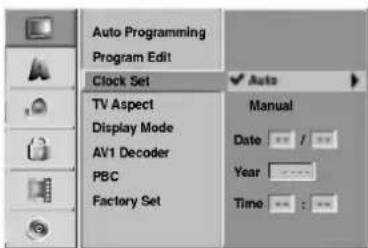
Press SETUP.
The Setup menu appears.
Use / to select the General menu.
3 While the General option is selected, press to move to the second level.
Use / to select the Clock Set option.
Press to move to the third level.
Use / to select the Auto option then press ENTER.
7 Press SETUP to exit the Setup menu.
Note
There are cases where the TV station does not send, or sends wrong date and/or time information and the DVD Recorder sets the incorrect time.
If this happens, we recommend that you set the clock manually.
Manual Clock Set
1 Follow steps 1-5 as shown above (Auto Clock Set).
Use / to select the Manual option then press ENTER.
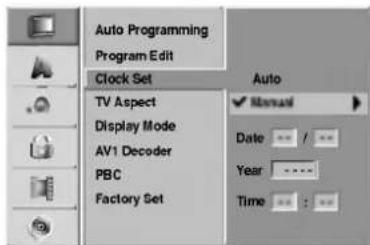
Enter the necessary information for date and time.
/ (left/right): Moves the cursor to the previous or next column.
/ (up/down): Changes the setting at the current cursor position.
Press ENTER to confirm your setting, then press SETUP to exit the Setup menu.
TV Aspect
You can choose:
-4:3: Select when a standard 4:3 TV is connected.
- 16:9: Select when a 16:9 wide TV is connected.
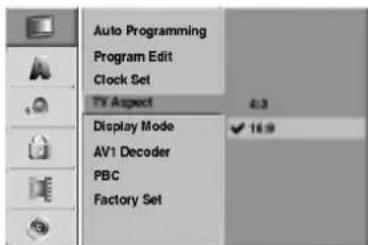
Before Operation (Continued)
Display Mode
Display Mode setting works only when the TV Aspect ratio is set to "4:3".
You can choose:
Letter Box: Displays a wide picture with bands on the upper and lower portions of the screen.
- Pan Scan: Automatically displays the wide picture on the entire screen and cuts off the portions that do not fit.
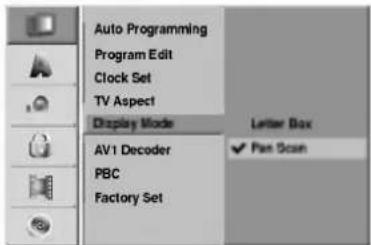
AV1 Decoder
We have already described, how to connect a decoder for pay-TV station on page 14. For viewing or recording of an encoded program from EURO AV1 AUDIOVIDEO connector, you do not have to control anything. You just select AV1 source by pressing AV button and wait shortly until the decoding will start.
Choose 'On' if your recorder is connected with a decoder, otherwise leave it set to 'OFF'.
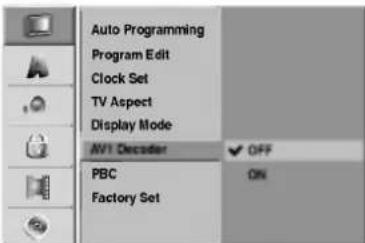
PBC
The PBC setting can be changed. Set Playback Control (PBC) to ON or OFF.
- ON: Video CDs with PBC are played according to the PBC.
OFF: Video CDs with PBC are played the same way as Audio CDs.
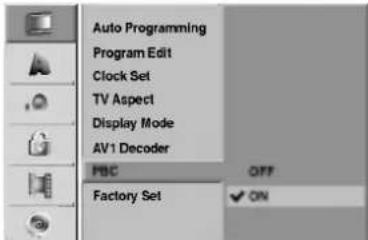
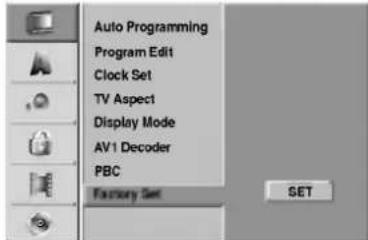
Factory Set
If you need to, you can reset the recorder to all its factory settings. Select 'SET' icon then press ENTER.

ote
Some options can not be reset. (Rating, Password, and Country Code)
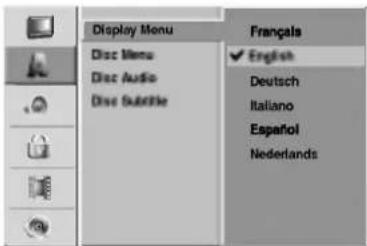
Language
Display Language
Select a language for the Setup menu and on-screen display.
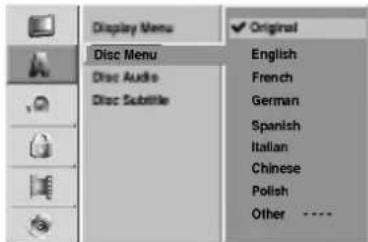
Disc Language
Select a language for the disc's Menu, Audio, and Subtitle.
-
Original: The original language set for the disc is selected.
-
Other: To select another language, select Other option then press ENTER. Use the numbered and ENTER buttons to key-in the corresponding 4-digit number according to the language code list on page 50. If you a mistake before pressing ENTER, press repeatedly to delete one by one and correct it.
Before Operation (Continued)
Audio
Each DVD disc has a variety of audio output options. Set the recorder's Audio Output according to the type of audio system you use.
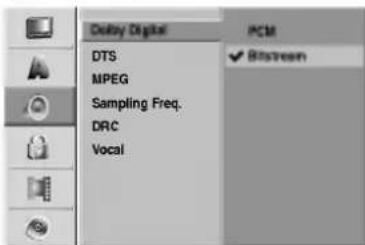
Dolby Digital
PCM: Select when connected to a 2-channel digital stereo amplifier. The DVD Recorder's digital audio outputs sounds in the PCM 2ch format when you play a DVD video disc recorded on the Dolby Digital recording system.
Bitstream: Select "Bitstream" if you connected the DVD Recorder's DIGITAL OUT jack to a Dolby Digital decoder (or an amplifier or other equipment with a Dolby Digital decoder).
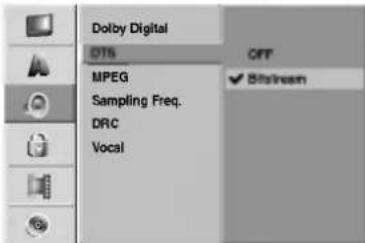
DTS
OFF: If you select "OFF", the DTS signal is not output through the DIGITAL OUT jack.
Bitstream: Select "Bitstream" if you connected the DVD Recorder's DIGITAL OUT jack to a DTS decoder (or an amplifier or other equipment with a DTS decoder).
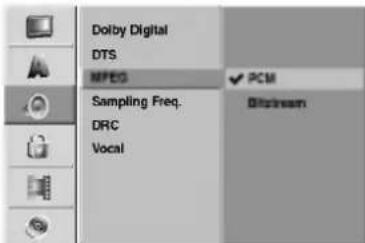
MPEG
PCM: Select when connected to a 2-channel digital stereo amplifier. The DVD Recorder's digital audio outputs sounds in the PCM 2ch format when you play a DVD video disc recorded on the MPEG2 recording system.
Bitstream: Select "Bitstream" if you connected the DVD Recorder's DIGITAL OUT jack to a MPEG decoder (or an amplifier or other equipment with a MPEG decoder).
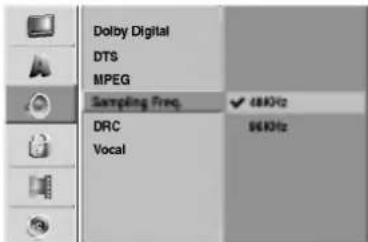
Sampling Frequency
If your receiver or amplifier is NOT capable of handling 96 kHz signals, select 48 kHz. When this choice is made, this unit will automatically convert any 96 kHz signals to 48 kHz so your system can decode them. If your receiver or amplifier is capable of handling 96 kHz signals, select 96 kHz. When this choice is made, this unit will pass each type of signal through without any further processing.
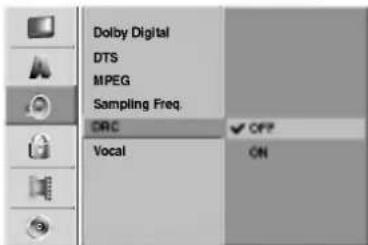
DRC (Dynamic Range Control)
With the DVD format, you can hear a program's soundtrack in the most accurate and realistic presentation possible, thanks to digital audio technology. However, you may wish to compress the dynamic range of the audio output (the difference between the loudest sounds and the quietest ones). Then, you may listen to a movie at a lower volume without losing clarity of sound. Set DRC to ON for this effect.
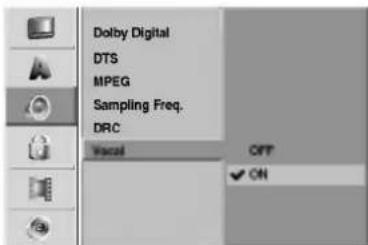
Vocal
Set Vocal to ON only when a multi-channel karaoke DVD is playing. The karaoke channels on the disc will mix into normal stereo sound.
Before Operation (Continued)
Lock (Parental Control)
Set Password
Changing the 4-digit code
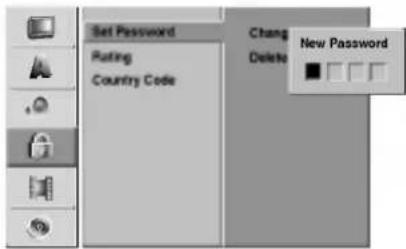
Press SETUP.
The Setup menu appears.
Use / to select the Lock option.
3 While the Lock option is selected, press to move to the second level.
Use / to select the Set Password option.
Press to move to the third level.
6 When you have not entered a password yet; Enter a 4-digit password using the numbered buttons to create a personal 4-digit security password, then press ENTER. Enter the 4-digit password again and press ENTER to verify.
When you have already entered a password;
Enter a 4-digit password using the numbered buttons to confirm the personal 4-digit security password, then press ENTER.

If you make a mistake before pressing ENTER, press repeatedly to delete password numbers one by one then correct it.
7 While "Change" is selected, press ENTER. If you select "Delete" then press ENTER. The password is deleted.
Enter a 4-digit password using the numbered buttons to create a personal 4-digit security password then press ENTER.
Enter the 4-digit password again and press ENTER to verify.

If you a mistake before pressing ENTER, press repeatedly to delete password numbers one by one then correct it.
If you forget your 4-digit code
If you forget your password, to clear the current password, follow the procedure below.
- Press SETUP to display the Setup menu.
- Use the Number buttons to enter the 6-digit number "210499".
- Select "Yes" then press ENTER. The 4-digit password is cleared. Enter a new code as shown left.
Rating
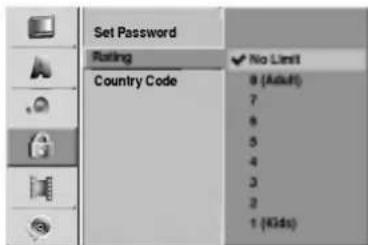
Movies on DVDs may contain scenes not suitable for children. Therefore, discs may contain Parental Control information that applies to the complete disc or to certain scenes on the disc. These scenes are rated from Level 1 to 8, and alternatively, more suitable scenes are available for selection on some discs. Ratings are country-dependent. The Parental Control feature allows you to prevent discs from being played by your children or to have certain discs played with alternative scenes.
1 Follow steps 1-3 as shown above to the left (Set Password).
Use / to select the Rating option.
Press to move to the third level.
4 Follow step 6 as shown above to the left (Set Password).
5 Select a rating from 1 to 8 using the / buttons. One (1) has the least playback restrictions. Eight (8) has the most playback restrictions.
No Limit: If you select No Limit, Parental Control is not active. The disc will play in full.
Level 1 to 8: Some discs contain scenes not suitable for children. If you set a rating for the recorder, all disc scenes with the same rating or lower will be played. Higher rated scenes will not be played unless an alternative scene is available on the disc. The alternative must have the same rating or a lower one. If no suitable alternative is found, playback will stop. You must enter the 4-digit password or change the rating level in order to play the disc.
Press ENTER to confirm your rating selection, then press SETUP to exit the menu.
Before Operation (Continued)
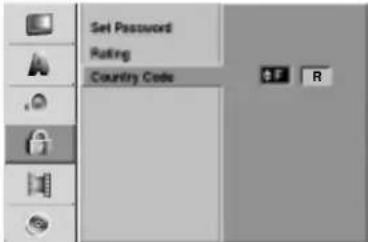
Country Code
Enter the code of a country/area whose standards were used to rate the DVD video disc, referring to the list (See "Country Code List", page 51.).
Press SETUP.
The Setup menu appears.
Use / to select the Lock option.
3 While the Lock option is selected, press to move to the second level.
Use / to select the Country Code option.
Press to move to the third level.
6 When you have not entered a password yet; Enter a 4-digit password using the numbered but tons to create a personal 4-digit security passwo then press ENTER. Enter the 4-digit password and press ENTER to verify.
When you have already entered a password; Enter a 4-digit password using the numbered buttons to confirm the personal 4-digit security password, then press ENTER.
ip
If you a mistake before pressing ENTER, press repeatedly to delete password numbers one by one then correct it.
7 Select the first character using the / buttons.
Shift the cursor using buttons and select the second character using / buttons.
Press ENTER to confirm your country code selection, then press SETUP to exit the menu.
Recording
Record Mode Set
You can set the picture quality for recording; HQ (High Quality), SQ (Standard Quality), LQ (Low Quality).
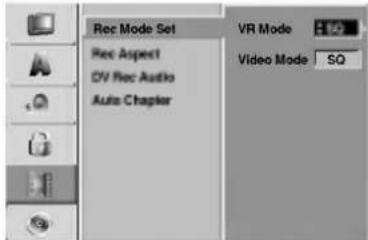
1 Press SETUP. The Setup menu appears.
Use / to select the Recording option.
3 While the Recording option is selected, press to move to the second level.
Use / to select the Rec Mode Set option.
Press to move to the third level. The VR Mode option is highlighted.
Use / to select a desired Record Mode for VR Mode (HQ, SQ, or LQ)
7 Press to move to Video Mode option then use / to select a desired Record Mode for Video Mode (HQ, SQ, or LQ).
Press ENTER to confirm your selection, then press SETUP to exit the menu.
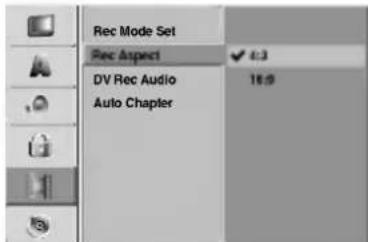
Record Aspect
When recording, you can set the recording aspect ratio to suit the material you're recording (16:9 widescreen, or 4:3 standard).
Before Operation (Continued)
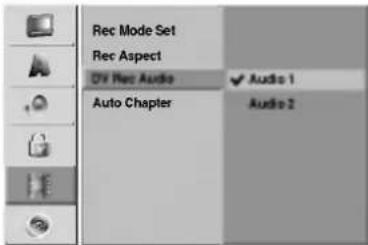
DV Rec Audio
You need to set this if you have a camcorder using 32kHz/12-bit sound connected to the front panel DV IN jack.
Some digital camcorders have two stereo tracks for audio. One is recorded at the time of shooting; the other is for overdubbing after shooting.
On the Audio 1 setting, the sound that was recorded while shooting is used.
On the Audio 2 setting, the overdubbed sound is used.
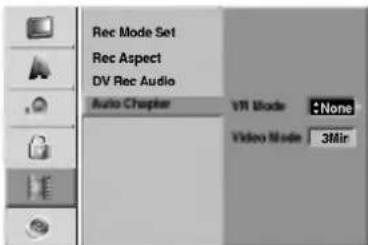
Auto Chapter
When recording, chapter markers are put in specified setting. You can change this interval to 3 minutes, 5 minutes or 10 minutes. If you select None, switch off automatic chapter marking altogether with the No Separation setting.
Disc
Disc Format
If you're recording on a DVD-R disc, the recording mode will always be Video mode.
If you are using a DVD-RW disc, by default it will be VR mode. You can change this to Video mode from the Setup menu.
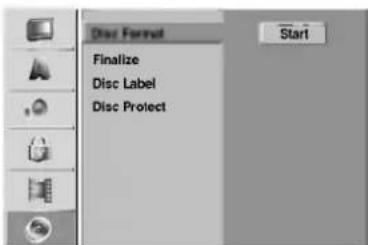
1 Press SETUP. The Setup menu appears.
Use / to select the Disc option.
While the Disc option is selected, press to move to the second level.
Use / to select the Disc Format option.
Press to move to the third level. Start icon is highlighted.
Press ENTER. Disc Format menu appears.
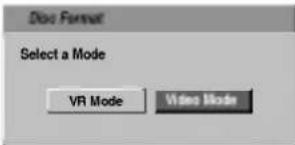
7 Use / to select a desired Disc Format Mode (VR Mode or Video Mode) then press ENTER. It takes a few moments to initialize the disc.
Caution
If you want to change the disc format, everything recorded on the disc will be erased.

Press SETUP to exit the menu.
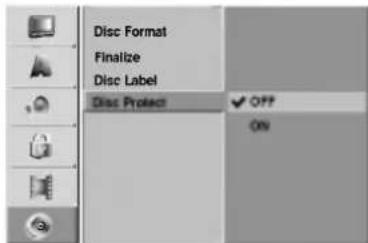
Disc Protect
When recording in VR mode, set to ON to prevent accidental recording, editing or deleting of the disc loaded. If you need to unlock the disc to make edits, select OFF.
Before Operation (Continued)
Finalize
Finalizing 'fixes' the recordings in place so that the disc can be played on a regular DVD player or computer equipped with a suitable DVD-ROM drive. Finalizing a Video mode disc creates a menu screen for navigating the disc. This is accessed by pressing MENU/LIST or TITLE.
Caution
Once you've finalized a disc recording, you can't edit or record anything else on that disc. You can record and edit on this recorder after unfinalizing.
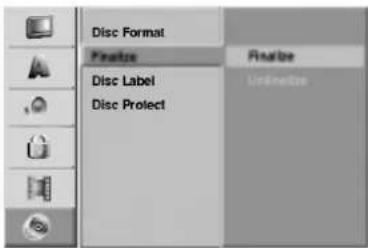
1 Follow steps 1-3 as shown on page 25 (Disc Format).
Use / to select the Finalize option.
Press to move to the third level. Finalize is highlighted.
Press ENTER. Finalize menu appears.
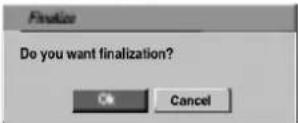
5 Select Ok then press ENTER. The recorder starts finalizing the disc.
Note
How long finalization takes depends on the type of disc, how much is recorded on the disc, and the number of titles on the disc. A disc recorded can take up to 3-4 minutes to finalize.
Tip
If you load a DVD-RW that has already been finalized on a different DVD Recorder, you can 'uninitialize' it by choosing Uninitialize from the Finalize menu. After doing this, you can edit and re-record onto the disc.
Disc Label
Use this to enter a name for the disc. This name appears when you load the disc and when you display disc information on-screen.
The disc name can be up to 32 characters long.
- For discs formatted on a different DVD Recorder, you will see only a limited character set.
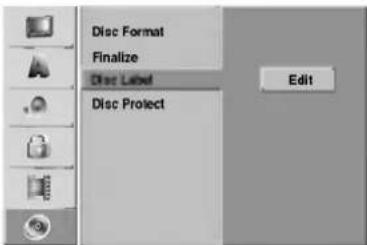
1 Follow steps 1-3 as shown Disc Format on page 25.
Use / to select the Disc Label option.
Press to move to the third level. Edit icon is highlighted.
4 Press ENTER. Keyboard menu appears.
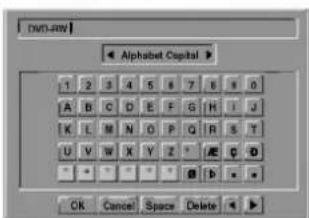
Enter a name for the disc. Use ▲▼ ▲▶ to select a character then press ENTER to confirm your selection. Refer step 2 as shown on page 19 (Station Rename).
Choose OK then press ENTER to fix the name and return to the Setup menu.
Press SETUP to exit the menu.
Before Operation
General Explanation of On-Screen Display
This manual gives basic instructions for operating the DVD Recorder. Some DVDs require specific operation or allow only limited operation during playback. When this occurs, the symbol appears on the TV screen, indicating that the operation is not permitted by the DVD Recorder or is not available on the disc.
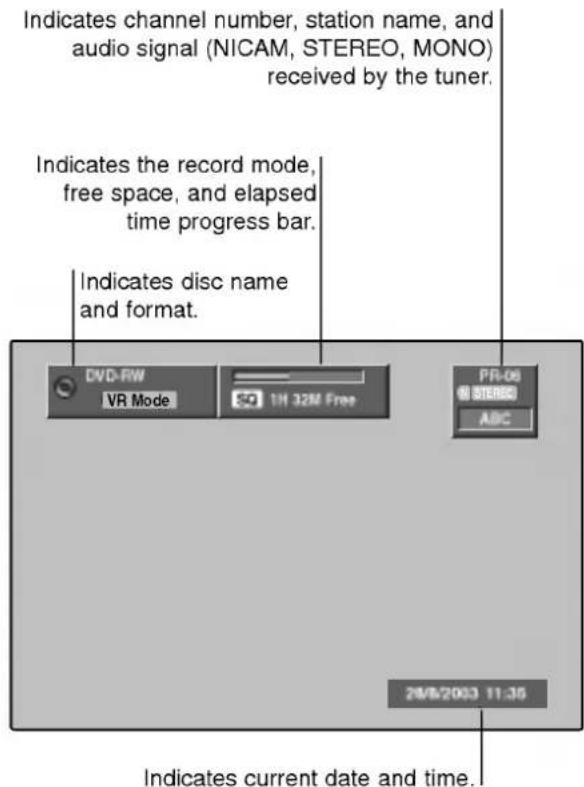
Displaying Information While Watching TV
During viewing the TV, press ENTER or DISPLAY to display/remove the information displayed on-screen.
e.g., when DVD-RW in VR mode is inserted.
Displaying Disc Information on-screen
You can display various information about the disc loaded on-screen.
Press DISPLAY repeatedly to display/change the information displayed on-screen.
To remove the on-screen display, press DISPLAY repeatedly until it disappears. See the descriptions on next pages for detailed explanation during playing a disc.
Temporary Feedback Field Icons
Resume play from this point Action prohibited or not available
Notes
- Some discs may not provide all of the features on the on-screen display example shown on next pages.
- If no button is pressed for 20 seconds, the on-screen display disappears.
Before Operation
Displaying Disc Information on-screen (Continued)
DVD

VCD
| Menu Options | Function (Use ▲/ ▼ to select desired option) | Selection Method | |
| Title Number | 14 | Shows the current title number and total number of titles, and skips to the desired title number. | ▲ / ▲, or Numbers, ENTER |
| Chapter Number | 426 | Shows the current chapter number and total number of chapters, and skips to the desired chapter number. | ▲ / ▲, or Numbers, ENTER |
| Time search | $10:30 | Shows the elapsed playing time, and searches the point by the elapsed time directly. | ▲ / ▲, Numbers, ENTER |
| Audio language and Digital Audio Output mode | 1. ENG D 5.1CH | Shows the current audio soundtrack language, encoding method, and channel number, and changes the setting. | ▲ / ▲ |
| Subtitle language | OFF | Shows the current subtitles language, and changes the setting. | ▲ / ▲ |
| Angle | 13 | Shows the current angle number and total number of angles, and changes the angle number. | ▲ / ▲ |
| Sound | 30 SUN | Shows the current sound mode, and changes the setting. | ▲ / ▲ |
Shows the current track number and total number of tracks, or shows PBC On mode.
Shows the elapsed playing time and total time.

Shows the Current mode.
| Menu Options | Function (Use ▲/▼ to select desired option) | Selection Method | |
| Track Number | 14 | Shows the current track number and total number of tracks or PBC On mode, and skip to the desired track number. | ▲ / ▲, or Numbers, ENTER |
| Time | 10:30 | Shows the elapsed playing time (Display only). | - |
| Audio Channel | STEREO | Shows the audio channel, and changes the audio channel. | ▲ / ▲ |
| Sound | 3D SUNL | Shows the current sound mode, and changes the setting. | ▲ / ▲ |
Before Operation
Displaying Disc Information on-screen (Continued)

| Menu Options | Function (Use ▲/ ▼ to select desired option) | Selection Method | |
| Title Number | 18 | Shows the current title number and total number of titles, and skips to the desired title number. | / ▲, or Numbers, ENTER |
| Chapter Number | 429 | Shows the current chapter number and total number of chapters, and skips to the desired chapter number. | / ▲, or Numbers, ENTER |
| Time search | 0:10:30 | Shows the elapsed playing time, and searches the point by the elapsed time directly. | / ▲, Numbers, ENTER |
| Digital Audio Output mode | DIOON | Shows the current audio encoding method, and channel number, and changes the setting. | / ▲ |
| Subtitle language | OFF | Shows the current subtitles language, and changes the setting. | / ▲ |
| Sound | 30 SUI | Shows the current sound mode, and changes the setting. | / ▲ |

| Menu Options | Function (Use ▲ / ▼ to select desired option) | Selection Method | |
| Title Number | 19 | Shows the current title number and total number of titles, and skips to the desired title number. | / ▲, or Numbers, ENTER |
| Chapter Number | 428 | Shows the current chapter number and total number of chapters, and skips to the desired chapter number. | / ▲, or Numbers, ENTER |
| Time search | 6:10:30 | Shows the elapsed playing time, and searches the point by the elapsed time directly. | / ▲, Numbers, ENTER |
| Digital Audio Output mode | 1. D 2CH | Shows the current audio encoding method, and channel number, and changes the setting. | / ▲ |
| Subtitle language | OFF | Shows the current subtitles language, and changes the setting. | / ▲ |
| Angle | 1/1 | Shows the current angle number and total number of angles, and changes the angle number. | / ▲ |
| Sound | 3D SUR | Shows the current sound mode, and changes the setting. | / ▲ |
Operation with DVD and Video CD
Playing a DVD or Video CD
Playback Setup
- Turn the TV on and select the video input source connected to the DVD Recorder.
- Audio system: Turn the audio system on and select the input source connected to the DVD Recorder.
1 Press OPEN/CLOSE (△) to open the disc tray.
2 Load your chosen disc in the tray, with the playback side down.
Press OPEN/CLOSE (▲) to close the tray.
READING appears on the display window, and playback starts automatically. If playback does not start, press PLAY (▶).
In some cases, the disc menu might appear instead.
Tip
If a menu screen is displayed
The menu screen may be displayed first after loading a DVD or Video CD which contains a menu.
DVD
Use the buttons to select the title/chapter you want to view, then press ENTER to start playback. Press TITLE or MENU/LIST to return to the menu screen.
VCD
- Use the number buttons to select the track you want to view.
Press RETURN (to return to the menu screen).
- Menu setting and the exact operating procedures for using the menu may differ depending on the disc. Follow the instructions on the each menu screen.
You may also set PBC to OFF under Setup menu. See page 21.
Notes
- If Parental Control is set and the disc is not within the Rating settings (not authorized), the 4-digit code must be entered and/or the disc must be authorized (see "Rating", on page 23).
DVDs may have a Region Code. Your recorder will not play discs that have a region code different from your recorder. The region code for this recorder is 2 (two).
General Features
Note
Unless stated otherwise, all operations described use the remote control. Some features may also be available on the Setup menu.
30
Moving to another TITLE
DVD
Video
VR


When a disc has more than one title, you can move to another title as follows:
- Press DISPLAY then use / to select the title icon. Then, press the appropriate numbered button (0-9) or / to select a title number.
Moving to another CHAPTER/TRACK
DVD
Video
VR
VCD
图·
(2)
(1)
(1)
When a title on a disc has more than one chapter/track, you can move to another chapter/track as follows:
- Press SKIP (I or >I) briefly during playback to select the next chapter/track or to return to the beginning of the current chapter/track.
- Press SKIP (▶) twice briefly to step back to the previous chapter/track.
To go directly to any chapter/track during playback, press DISPLAY. Then, use / to select chapter icon (or for a Video CD, select track icon). Then, enter the chapter/track number using the numbered buttons (0-9) or press / .
Search
D
Vide
VR
VCD
1 Press SCAN (or) during playback. The recorder will now go into SEARCH mode.
2 Press SCAN (or) to select the required speed: (Reverse play), (X2, X4, X8, X16, X100 (backward) or X2, X4, X8, X16, X100 (forward).
With a Video CD, the Search speed changes: X2, X4, X8 (backward) or X2, X4, X8 (forward).
3 To exit SEARCH mode, press PLAY (▶).
Still Picture and Frame-by-Frame Playback
DVD
Video
VR
VCD
1 Press PAUSE/STEP (II) during playback. The recorder will now go into PAUSE mode.
2 You can advance or back up the picture frame-by-frame by pressing / repeatedly during PAUSE mode.
3 To exit PAUSE mode, press PLAY (▶).
Note
The picture frame-by-frame in reverse is not available for Video CD.
Tip
You can advance the picture frame-by-frame by pressing PAUSE/STEP (I) repeatedly on the remote control.
Operation with DVD and Video CD (Continued)
General Features (Continued)
Slow Motion
DVD
Video
VR
VCD
1 Press PAUSE/STEP (II) during playback. The recorder will now go into PAUSE mode.
2 Press SCAN (or) during PAUSE mode. The DVD Recorder will enter SLOW mode.
3 Use the SCAN (or) to select the required speed: 1/16, 1/8, 1/4, or 1/2 (backward), or 1/16, 1/8, 1/4, or 1/2 (forward). With a Video CD, the Slow speed changes: 1/8, 1/4 or 1/2 (forward).
4 To exit Slow Motion mode, press PLAY (▶).
N
ote
Slow motion playback in reverse is not possible with Video CDs.
Random Karaoke DVD VCD
1 Press RANDOM during playback. The unit automatically begins Random Playback and "RANDOM" appears on the TV screen.
2 To return to normal playback, press RANDOM until "NORMAL" appears on the TV screen.
T
By pressing SKIP during Random playback, the unit selects another title (track) and resumes Random playback.
N
This function only works with DVD Karaoke discs or video CDs without PBC.
- On a Video CD with PBC, you must set PBC to OFF in the Setup menu to use the Random function. See page 21.
Repeat D
D 1
VR
VCD
DVD Discs - Repeat Chapter/Title/All/Off
Press REPEAT to select a desired repeat mode.
Chapter: repeats the current chapter.
Title: repeats the current title
All: repeats the all titles on the disc. (VR mode DVD-RW disc only)
OFF: does not play repeatedly.
Video CDs - Repeat Track/All/Off
Press REPEAT to select a desired repeat mode.
- Track: repeats the current track.
All: repeats the all tracks on the disc.
OFF: does not play repeatedly.
N
ote
On a Video CD with PBC, you must set PBC to OFF in the Setup menu to use the Repeat function. See page 21.
Repeat A-B
DVD
Video
VR
VCD
To repeat a sequence in a title:
1 Press A-B at your chosen starting point. Repeat icon and 'A-' appears on the TV screen.
2 Press A-B again at your chosen end point. Repeat icon and 'A-B' appears on the TV screen, and the repeat sequence begins.
3 To cancel the sequence, press A-B repeatedly to select OFF.
Time Search
1 + u7 = 70%
10:30
DVD
Video
VR
The Time Search function allows you to start playing at any chosen time on the disc.
1 Press DISPLAY twice during playback. The on-screen display appears on the TV screen. The Time Search box shows the elapsed playing time of the current disc.
2 Within 20 seconds, use / to select the Time Search icon in the on-screen display. The "0:00:00" appears in the Time Search box.
3 Within 20 seconds, use the number buttons to enter the required start time. Enter hours, minutes, and seconds from left to right in the box. You can not enter an invalid time. If you enter the wrong numbers, press / to move the under bar () to the wrong number. Then enter the correct numbers.
4 Within 20 seconds, press ENTER to confirm the start time.
Playback starts from the selected time on the disc.
Operation with DVD and Video CD (Continued)
General Features (continued)
Zoom
DVD
Video
VR
VCD
The Zoom function allows you to enlarge the video image and to move through the enlarged image.
1 Press ZOOM during playback or still playback to activate the Zoom function. Each press of the ZOOM button changes the TV screen in the sequence shown below. x1 size x2 size x4 size normal size
2 Use the buttons to move through the zoomed picture.
3 To resume normal playback, press CLEAR or press ZOOM repeatedly until the normal picture appears.
N
ote
The zoom function may not work for some DVDs.
Marker Search
DVD
Video
VR

You can start playback from a memorized point. Up to six points can be memorized. To enter a mark, follow these steps.
1 During disc playback, press MARKER when playback reaches the spot that you want to memorize. The Marker icon will appear on the TV screen briefly.
2 Repeat step 1 to enter up to six Marker points on a disc.
To Recall a Marked Scene
1 During disc playback, press SEARCH. The Marker Search menu will appear on the TV screen.
2 Use the buttons to select a Marked scene that you want to recall.
3 Press ENTER. Playback will start from the Marked scene.
4 To remove the Marker Search menu, press RETURN (O).
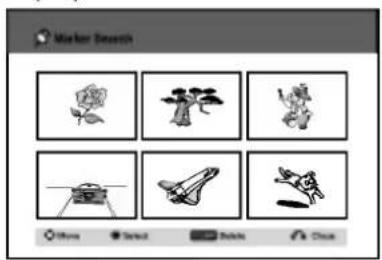
To clear a Marked Scene
1 Press SEARCH during playback or in stop mode. The Marker Search menu will appear on the TV screen.
2 Use to select the Marked scene that you want to erase.
3 Press CLEAR.
"Delete selected marker? Proceed?" message appears.
4 Use / to select "Yes" then press ENTER.
5 Repeat steps 2-4 to erase additional Marked scene.
6 To remove the Marker Search menu, press RETURN (O).
Checking the Contents of DVD Video Discs: Menus
DVDs may contain menus that allow you to access special features. To open the disc menu, press MENU/LIST. Then, press the appropriate number button to select an option. Or, use the buttons to highlight your selection, then press ENTER.
Title Menu
DVD
1 Press TITLE
If the current title has a menu, the menu will appear on the TV screen. Otherwise, the disc menu may appear.
2 The menu may contain camera angles, spoken language and subtitle options, and chapters for the title.
Disc Menu
DVD
1 Press MENU/LIST.
The disc menu is displayed.
2 To remove the disc menu, press MENU/LIST again.
Camera Angle
DVD
If the disc contains scenes recorded at different camera angles, you can change to a different camera angle during playback.
- Press ANGLE then press / repeatedly during playback to select a desired angle. The number of the current angle appears on the TV screen.


The ANGLE indicator will blink on the TV screen at scenes recorded at different angles to indicate that angle switching is possible.
Changing the Audio Soundtrack
DVD
Press AUDIO then press / repeatedly during playback to hear a different audio language or audio soundtrack if available.

ote
Some discs feature both Dolby Digital and DTS soundtracks. There is no analog audio output when DTS is selected. To listen to the DTS soundtrack, connect this recorder to a DTS decoder via one of the digital outputs. See page 15 for connection details.
Operation with DVD and Video CD (Continued)
Changing the Audio Channel
YCD
VR

STEREO
With a Video CD, press AUDIO then press / repeatedly during playback to hear a different audio channel (STEREO, LEFT or RIGHT). With DVD-RW discs recorded in VR mode that have both a main and a Bilingual audio channel, you can switch between Main (L), Bilingual (R), or a mix of both (Main + Bilingual) by pressing AUDIO.
3D Surround
DVD
Video
VR
VCD

30 Sun
This unit can produce a 3D Surround effect, which simulates multi-channel audio playback from two conventional stereo speakers, instead of the five or more speakers normally required to listen to multi-channel audio from a home theater system.
1 Press 3D SURR. then press / repeatedly during playback to select "3D SUR."
2 To turn off the 3D Surround effect, select "NORMAL".
Subtitles
DVD
Video
VR

CIF
Press SUBTITLE then press / repeatedly during playback to see the different subtitle languages.
Instant Skip
DVD
Video
VR
Each press INSTANT SKIP skips forward 15 seconds.

ote
If appears, the feature is not available on the disc.
Finding Locations on a Disc
VCD
You can directly access any point on a video CD using this function. Use this function only while a video CD is playing. Playback jumps to the point specified.
1 Press SEARCH during playback.
The progress bar appears on the TV screen.

2 Use / to find a start position for playback.
3 Press ENTER to confirm the selected position. Playback starts from the selected position.

ote
This function works only when no marker is memorized.
Last Condition Memory
DVD
Video
VR
This recorder memorizes the user settings for the last disc that you have viewed. Settings remain in memory even if you remove the disc from the recorder or switch off the recorder. If you load a disc that had its settings memorized, the latest stop position is automatically recalled.

otes
- Settings are stored in memory for use any time.
- This recorder does not memorize settings of a disc if you switch off the recorder before commencing to play it.
PIP (Picture in Picture)
DVD
Video
VR
VCD
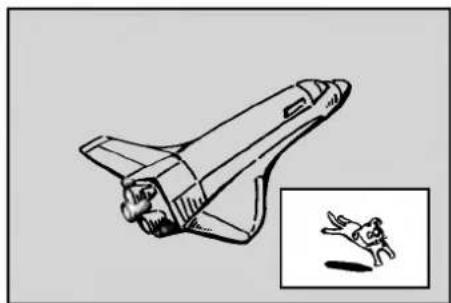
This function enables you to view the stored stations in sub picture during playback.
On and off
Press PIP to switch on the sub picture, press this button again to switch it off.
Input mode selection for sub picture
Press AV to select the input mode for the sub picture. Each time this button is pressed, each input mode for the sub picture is displayed as shown below.
Tuner AV1 AV2 AV3 AV4
Program selection for sub picture
Use / to change the program when sub picture's input is set to tuner. The selected program number is displayed on the TV screen. You can view the selected program by pressing STOP (■).
Sub picture position change
Press repeatedly until desired position is achieved. The sub picture moves clockwise or counterclockwise.
Zoom Sub picture
Press ZOOM repeatedly to enlarge the sub picture, the magnification level increases up to three steps.
Audio CD and MP3 Operation
Playing an Audio CD or MP3 Disc
CD MP3
The DVD Recorder can play audio CDs. Also, the DVD Recorder can play MP3 formatted recordings on CD-ROM, CD-R or CD-RW disc.
Before playing MP3 recordings, read the notes on MP3 Recordings on the right side of this page.
Insert a disc and close the tray.
AUDIO CD or MP3 CD menu appears on the TV screen.
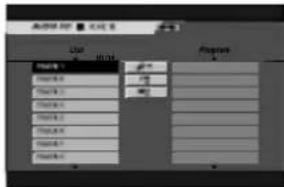
AUDIO CD Menu
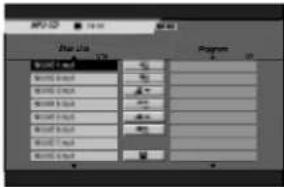
MP3 CD Menu
Use / to select a track then press PLAY (▶) or ENTER.
Playback starts.
During playback, the current track's elapsed playing time will appear on the display window and menu. Playback will stop at the end of the disc.

- You can view TV channel or video input source by pressing AV. If you want to return to the MP3 or AUDIO CD menu, press MENU/LIST.
- On the MP3 CD menu, press SCAN (or▶) to move to the previous or next page.
- On the MP3 CD menu, you can display the folder list on the disc. Use to select the "窗口" icon on the MP3 CD menu then press ENTER. Also, you can display only tracks in the folder. Use to select a folder then press ENTER.
- On the MP3 CD menu, press DISPLAY to view the information of the selected MP3 file.
- On the MP3 CD menu, select "看" then press ENTER to display all MP3 files on the disc.
- On the mixed CD with audio title and MP3 file, you can switch AUDIO CD menu and MP3 CD menu by pressing TITLE button repeatedly.
3 To stop playback at any other time, press STOP (■).
Notes on MP3 Recordings
About MP3
- An MP3 file is audio data compressed by using the MPEG1 audio layer-3 file-coding scheme. We call files that have the ".mp3" file extension "MP3 files".
The recorder can not read an MP3 file that has a file extension other than“.mp3”.
MP3 Disc compatibility with this recorder is limited as follows:
- CD-R physical format should be "ISO 9660" and "JOLIET".
- If you record MP3 files using the software which cannot create a FILE SYSTEM, for example "Direct-CD" etc., it is impossible to playback MP3 files. We recommend that you use "Easy-CD Creator", which creates an ISO9660 or JOLIET file system.
- Total number of files and folders on the disc should be less than 999.
This DVD Recorder requires discs/recordings to meet certain technical standards in order to achieve optimal playback quality. Pre-recorded DVDs are automatically set to these standards. There are many different types of recordable disc formats (including CD-R containing MP3 files) that require certain pre-existing conditions (see above) to insure compatible playback.
Customers should also note that permission is required in order to download MP3 files and music from the Internet. Our company has no right to grant such permission. Permission should always be sought from the copyright owner.
Audio CD and MP3 Operation (Continued)
Pause CD MP3
1 Press PAUSE/STEP (II) during playback.
2 To return to playback, press PLAY (▶) or press PAUSE/STEP (■) again.
Moving to Another Track CD MP3
- Press SKIP or briefly during playback to go to the next track or to return to the beginning of the current track.
- Press SKIP twice briefly to step back to the previous track.
- On an Audio CD, to go directly to any track, enter the track number using the numbered buttons (0-9) during playback.
Repeat Track/All/Off CD MP3
Press REPEAT to select a desired repeat mode.
- TRK (Track): repeats the current track.
- ALL: repeats the all tracks on the disc.
OFF: does not play repeatedly.
Random CD MP3
1 Press RANDOM during playback or in stop mode. The unit automatically begins Random Playback and "RAND." appears on the menu screen.
2 To return to normal playback, press RANDOM repeatedly until "RAND." disappears from the menu screen.

By pressing SKIP during Random playback, the unit selects another track and resumes Random playback.
3D Surround CD MP3
This unit can produce a 3D Surround effect, which simulates multi-channel audio playback from two conventional stereo speakers, instead of the five or more speakers normally required to listen to multichannel audio from a home theater system.
1 Press 3D SURR. during playback to select "3D SUR."
2 To turn off the 3D Surround effect, press 3D SURR. until "3D SUR." disappears from the menu screen.
Search CD
1 Press SCAN (or) during playback. The recorder will now go into SEARCH mode.
2 Press SCAN (or) to select the required speed: X2, X4, X8 (backward) or X2, X4, X8 (forward). Search speed and direction are indicated on the menu screen.
3 To exit SEARCH mode, press PLAY (▶).
Repeat A-B CD
To repeat a sequence in a track:
1 Press A-B at your chosen start point. Repeat icon and 'A' appears on the menu screen.
2 Press A-B again at your chosen end point. The Repeat icon and 'A - B' appears on the menu screen, and the repeat sequence begins.
3 To exit the sequence and return to normal play, press A-B again. The Repeat icon disappears from the menu screen.
Programmed Playback with Audio CD and MP3
The Program function enables you to store your favorite tracks from any disc in the recorder memory.
Program can contain 30 tracks (Audio CD) or 256 tracks (MP3).
1 Insert an Audio CD or MP3 disc. Audio CD or MP3 CD menu will appear.
Use / to select a track on the List.
Use to highlight the - icon then press ENTER. Or, press PROGRAM. The selected track is added to the Program list.
Repeat steps 2-3 to place additional tracks on the Program list.

On an MP3 CD menu, you can add all tracks on the List to the Program list. Select icon then press ENTER.
Use ▲▼ ▲▶ to move to the Program list.
Use / to select the track you want to start playing.

On the MP3 CD menu, press SCAN (or ) to move to the previous or next page.
7 Press PLAY (▶) or ENTER to start.
Playback begins in the order in which you programmed the tracks.
Playback stops after playing the last programmed track on the program list.
To resume normal playback from programmed playback, select a track on the List then press ENTER.
Repeat Programmed Tracks
Press REPEAT to select a desired repeat mode.
- TRK (Track): repeats the current track.
- All: repeats the all tracks on the Program list.
OFF: does not play repeatedly.
Erasing a Track from the Program List
1 Select the track that you wish to erase from the Program list.
2 Use to select the "p" icon then press ENTER. Or, press CLEAR. The selected track is deleted on the program list.
3 Repeat steps 1-2 to delete additional tracks on the Program list.
Erasing the Complete Program List
Use ▲▼ ▲▶ to select the “#” icon then press ENTER.
All tracks on the Program list are deleted.
Save Your Program List

This recorder memorizes the user program list for the disc that you have programmed. Program list remains in memory even if you remove the disc from the recorder or switch the recorder off. If you load a disc that has its program list memorized, the program list is automatically recalled.
- Use ▲▼ ▲▶ to select the '■' icon on the MP3 CD menu then press ENTER.
Basic Recording
Basic Recording from a TV
Follow the instructions below to record a TV program.
Recording starts immediately and continues until the disc is full or you stop the recording.
Switch on the recorder and load a recordable disc.
Also make sure that the TV input is set to this recorder. If you load a completely blank disc, the recorder takes a short while to initialize the disc.
2 Set a recording mode as necessary by pressing REC MODE repeatedly. (HQ, SQ, LQ)
HQ; High Quality, SQ; Standard Quality, LQ; Low Quality
Use / buttons to select the TV channel to record.
Changing TV Audio Channel
Stereo Left Mono Right Mono Mono Bilingual Stereo
The current audio channel is displayed on-screen.
If the sound is of poor quality when set to Stereo, you can often improve it by changing to Mono.
- If the broadcast is bilingual and with DVD-RW discs in VR mode, you can select the language by pressing AUDIO:
Left Mono (Main language), Right Mono (Bilingual language), Stereo or Bilingual (Main + Bilingual).
- This recorder can record either NICAM or regular audio. If the NICAM setting (page 19) is set to Auto, then if the broadcast is NICAM, the audio automatically changes to NICAM and you can record the NICAM audio. If the broadcast is non-NICAM, the regular audio is always recorded.
If NICAM sound distortion occurs, due to poor reception, you can switch off NICAM setting of the program.
Press REC (●) once.
Recording will start. (The REC indicator lights in the display window.)
- Recording continues until you press STOP (■) or the disc is full.
To record for a fixed length of time, see Instant Timer Recording on right.
5 Press STOP (■) to stop recording.
To Pause the Recording
1 Press PAUSE/STEP (I) to pause the disc during recording.
2 When you want to continue recording, press PAUSE/STEP (I).
To record one TV program while watching another
1 Press TV/DVD to select the TV mode during recording. The TV indicator appears.
2 Using the TV, select the channel to be viewed.
Instant Timer Recording
Instant Timer Recording allows you to make a recording easily of a preset length without using the program timer.
1 Follow steps 1-4 as shown left (Basic Recording from a TV).
2 Press REC () repeatedly to select the recording time length.
Recording starts after the first press. Each subsequent press increases the recording time by 10 minutes within free space (maximum 120 minutes). The recording time is displayed on the TV screen. At the end of the recording, the DVD Recorder will stop recording and shut off.

Continue
65Min Free
Instant Timer Record Menu
Checking the Recording Time
Press REC () once to check the recording time. The recalled setting will automatically return to the TV screen for a moment.
Also, remaining time of recording is shown in the display window.
To Extend the Recording Time
The recording time can be extended anytime by pressing REC (●).
Each subsequent press increases the recording time by 10 minutes within free space (maximum 120 minutes).
Caution
If the recorder is unplugged (or there is a power failure) while the recorder is recording, the recording will be lost.
Playing Your Recordings on Other DVD Players
Most regular DVD players can play finalized discs recorded in Video mode. A small number of players can also play DVD-RW discs recorded in VR mode, finalized or not. Check the manual that came with the other player to check what kinds of discs it will play.
Finalizing a Disc
Finalizing 'fixes' the recordings in place so that the disc can be played on a regular DVD player or computer equipped with a suitable DVD-ROM drive.
Finalizing a Video mode disc creates a menu screen for navigating the disc. This is accessed by pressing MENU/LIST or TITLE.
To finalize a disc, refer to "Finalize" on page 26.
Timer Recording
This DVD Recorder can be programmed to record up to 7 programs within a period of 1 month. For unattended recording, the timer needs to know the channels to be recorded, the starting time and length.
Press TIMER REC.
The Timer Record menu will appear.
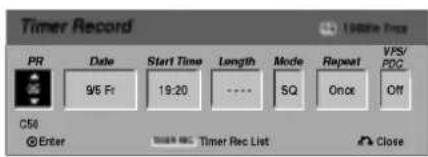
- PR - Choose a memorized program number, or one of the external inputs from which to record.
- Date - Choose a date up to 1 month in advance.
- Start Time - Set the recording start time.
Length - Set the recording length.
Mode - Choose a record mode (HQ, SQ, LQ, or AT).
AT (Auto) mode determines how much disc time is available and switches record mode, if necessary, to complete recording the program.
- Repeat - Choose a desired repeat (Once, Daily (Monday - Friday), or Weekly).
VPS/PDC - The VPS/PDC system automatically adjusts the recording time so that even if a program is not running to schedule, you won't miss it. For VPS/PDC to work properly, you must input the correct announced time and date of the program you want to record.
Note that VPS/PDC may not work with every station.
Notes
- Stations that use VPS/PDC typically include VPS/PDC information in the teletext TV guide pages. Please refer to these pages when setting a timer recording.
- This recorder takes approximately 20 seconds to switch on and start recording. This means that when using VPS/PDC, there may be instances where the beginning of the program is not recorded.
2 Enter the necessary information for your timer recording(s).
- / (left/right) - move the cursor left/right
- / (up/down) - change the setting at the current cursor position
- Press RETURN (♂) to exit the Timer Record menu.
- Press ENTER after filling in all the program information.
Press TIMER REC to display Timer Record List.
Press ENTER, the program will be memorized by the DVD Recorder.
To check the programming, the Timer Record List will appear.
Check field's "Rec. OK" on the Timer Record List indicates that the timer recording is programmed correctly and recordable disc inserted.
Press RETURN (to exit the Program List.
Make sure that you load a recordable disc and press POWER to switch your unit to Standby.
Notes
The timer indicator lights in the display window when the recorder is in standby with the timer active.
- The recorder will record the audio according to the current TV tuner setting (Stereo, Left Mono, Right Mono, Mono, or Bilingual).
Use the AUDIO button to set the audio as you want before switching the recorder into standby.
- You must press POWER to stop the timer recording.
Clean-up Recording
You can simply clean-up (erase) all contents on the DVD-RW disc then start recording from the first section of the disc. The disc format is not changed.
- Switch on the recorder and load a recordable disc.
- Press and hold REC (●) button for more than 3 seconds.
"Delete all titles and record?" message will appear.
- Use / to select "Yes" then press ENTER. Recording will start. (The REC indicator lights in the display window.)
Timer Recording (Continued)
Checking Timer Recording Details
Programming can be checked whenever the DVD Recorder is turned on. Press TIMER REC twice.
- Use / to select a timer recording.
- Press ENTER to edit the selected program. Timer Record menu appears.
- Press CLEAR to delete the selected program from the Timer Record List.
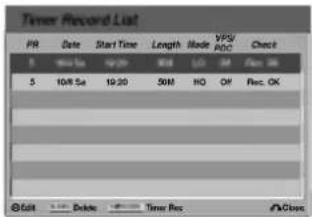
Canceling a Timer Recording
You can clear a timer setting anytime before the recording actually starts.
- Use / to select a program you want to erase on the Timer Recorder List. If you want to erase the program, press CLEAR.
Stopping a Timer Recording in Progress
After a timer recording has started, you can still cancel the program.
Press POWER.
Timer Recording Troubleshooting
Even though the timer is set, the recorder will not record when:
There is no disc loaded.
- A non-recordable disc is loaded.
- Disc Protect is set to ON in the Setup menu (see page 25).
Power is turned on.
There are already 99 titles recorded on the disc.
You cannot enter a timer program when:
- A recording is already underway.
The time you're trying to set has already passed. - There are already 7 timer programs set.
If two or more timer programs overlap:
The earlier program takes priority.
- When the earlier program finishes, the later program starts.
- If two programs are set to start at exactly the same time, the program entered first takes priority.
If the disc is damaged, the recording may not complete successfully. In this case even though the Check field shows "Rec. OK", it may not be.
Recording from an External Input
Recording from External Components
You can record from an external component, such as a camcorder or VCR, connected to any of the recorder's external inputs.
1 Make sure that the component you want to record from is connected properly to the DVD Recorder. See page 16.
Press AV repeatedly to select the external input to record from.
- Tuner: Built-in tuner
AV1: EURO AV1 AUDIO VIDEO mounted on back panel
AV2: EURO A/V2 DECODER mounted on back panel
AV3: AUDIO AV IN 3 /VIDEO IN 3 mounted on back panel
AV4: INPUT 4 (VIDEO, AUDIO (L/R), S-VIDEO IN) mounted on front panel
DV: DV IN mounted on front panel
3 Load a recordable disc.
4 Select the recording mode as necessary by pressing REC MODE repeatedly. (HQ, SQ, LQ)
HQ; High Quality, SQ; Standard Quality, LQ; Low Quality
Press REC (●) once.
Recording will start. (The REC indicator lights in the display window.)
- Recording continues until you press STOP (■) or the disc is full.
To record for a fixed length of time, see Instant Timer Recording on page 37.
6 Press STOP (■) to stop recording.
Note
If your source is copy-protected using CopyGuard, you will not be able to record it using this recorder. See Copyright on page 7 for more details.
Recording from a Digital Camcorder
You can record from a digital camcorder connected to the DV IN jack on the front panel of this recorder. Using the recorder's remote, you can control both the camcorder and this recorder.
Before recording, make sure that the audio input for the DV IN jack is set up (see page 25).
Tips
The source signal must be DVC-SD format.
Some camcorders cannot be controlled using this recorder's remote.
- If you connect a second DVD Recorder using a DV cable, you cannot control the second DVD from this one.
- You can't control this unit remotely from a component connected to the DV IN jack.
- You can't record date and time information from a DV cassette.
1 Make sure your digital camcorder is connected to the front panel DV IN jack. See page 16.
2 Check that the DV audio input is as you require. You can choose between Audio 1 (original audio) and Audio 2 (overdubbed audio).
- DV Input is set from the DV Rec Audio in sub-menu of the Setup menu. See DV Rec Audio on page 25 for more information.
Press AV repeatedly to select the DV input.
DV appears in the display window and on the TV screen.
Find the place on the camcorder tape that you want to the recording to start from.
For best results, pause playback at the point from which you want to record.
Depending on your camcorder, you can use this recorder's remote to control the camcorder using the STOP, PLAY and PAUSE functions.
Press REC (●) once to start recording.
- Recording is automatically stopped if the recorder detects no signal.
- You can pause or stop the recording by pressing PAUSE/STEP (■) or STOP (■). You cannot control the camcorder from this remote control during recording.
- In Video mode, the final frame of the recording may remain displayed on screen for a while after recording stops.
- For timer recording to work properly on this recorder, the digital camcorder must also be switched on and in operating.
Recording from an External Input (Continued)
What is DV?
Using DV, also known as i.LINK, you can connect a DV-equipped camcorder to this recorder using a single DV cable for input and output of audio, video, data and control signals.
The i.LINK interface is also known as IEEE 1394-1995. "i.LINK" and the "i.LINK" logo are trademarks.
- This recorder is only compatible with DV-format (DVC-SD) camcorders. Digital satellite tuners and Digital VHS video recorders are not compatible.
- You cannot connect more than one DV camcorder at a time to this recorder.
- You cannot control this recorder from external equipment connected via the DV IN jack (including two DVD recorders).
- It may not always be possible to control the connected camcorder via the DV IN jack.
- Digital camcorders can usually record audio as stereo 16-bit/48kHz, or twin stereo tracks of 12-bit/32kHz. This recorder can only record one stereo audio track. Set DV Rec Audio to Audio 1 or Audio 2 as required (see page 25).
Audio input to the DV IN jack should be 32 or 48kHz (not 44.1kHz). - Picture disturbance on the recording may occur if the source component pauses playback or plays an unrecorded section of tape, or if the power fails in the source component, or the DV cable becomes disconnected.
- Although DV Rec Audio is set to Audio 2 and Audio 2 signal is not present, DV Rec Audio will be reset to Audio 1 automatically.
DV-Related Messages
You may see the following messages appear on your TV screen when using the DV IN jack.
Not connected to camcorder
The camcorder is not connected properly, or the cam-corder is switched off.
Too many devices connected
The DV jack on this recorder supports connection to just one camcorder.
Check the tape
There is no cassette loaded into the connected equipment.
Uncontrollable device
This recorder cannot control the camcorder.
Updating Information
Camcorder is updating information for DV.
Camera mode
Camcorder is set to camera mode.
Troubleshooting
If you can't get a picture and/or audio through the DV IN jack, check the bullet points:
- Make sure the DV cable is properly connected.
- Try switching off the connected equipment then switch back on.
Try switching the audio input.

Depending on the connected camcorder, you may not be able to control it using the remote control supplied with this recorder.
VR Mode: Original and Playlist Editing
Edits you make to the Original content changes the actual content of the disc. For example, if you delete a title or chapter from the Original content (Title or Chapter), that title or chapter is deleted from the disc, freeing up extra recording time.
When you edit the Playlist, on the other hand, you are not changing the content of the disc. For example, when you delete a title from the Playlist, you are just telling the recorder not to play that title; nothing is actually deleted from the disc.
Titles, Chapters and Parts VR
Titles in the disc's original content contain one or more chapters. When you insert a title into the Playlist, all the chapters within that title also appear. In other words, chapters in the Playlist behave exactly as chapters on a DVD-Video disc do. Parts are sections of Original or Playlist titles. From the Original and Playlist menu you can add or delete parts. Adding a chapter or title to the Playlist creates a new title made up of a section (ie., chapter) of an Original title. Deleting a part removes part of a title from the Original or Playlist menu.
Caution
- When editing using the Delete, Add and Move functions, the start and end frames may not be exactly as set in the start and end point display.
- During Playlist playback, you may notice a momentary pause between edits. This is not a malfunction.
Adding Chapter Markers VR
You can put a chapter marker anywhere in a Playlist or Original title during recording or playback.
Once the chapter is marked, you can use the Chapter Search feature, as well as delete, combine and move chapters in the Original (Chapter) or Playlist (Chapter) menu.
You can insert up to 999 chapter markers in both the Original and Playlist contents.
Note
Chapter markers are inserted at regular intervals automatically. You can change this interval from the Initial Setup menu (see Auto Chapter on page 25).
1 Play the title (Original or Playlist).
2 At the point you want to start a new chapter, press CHP ADD.
A chapter marker icon appears on the TV screen.
- You can also put chapter markers in during recording.
Changing Title or Chapter Thumbs nails

Each title and chapter displayed in the Original or
Display menu is represented by a thumbnail picture taken from the start of that title or chapter. If you prefer, select a different still picture from within a title.
1 Play the title (Original or Playlist).
Press THUMBMAIL to make the currently displayed picture the one that appears in the Original or Playlist menu.
The still picture that you choose appears in both the Original or Playlist menu.
ip
You can also change the thumbnail picture of the title on the Original (Chapter) or Playlist (Chapter) menu. Select a chapter on the Original (Chapter) or Playlist (Chapter) menu then press THUMBNAIL. The thumbnail picture of the title that includes the chapter is changed.
VR Mode: Original and Playlist Editing (Continued)
Using the Original (Title) menu VR
The Original (Title) is where you build and edit your Playlist, and where you can delete titles and make other changes to the Original content of the disc. You can also play individual titles directly from the Original (Title) menu.
The recorder must be stopped in order to edit using the Original (Title).
Press MENU/LIST repeatedly to display the Original (Title) menu.
- Use the / buttons to display the previous/next page if there are more than 6 titles.
To exit the Original (Title) menu, press RETURN (O).
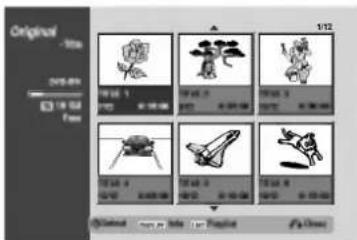
2 To view Original (Title) options, select the title you want then press ENTER.
Original (Title) options appear on the left side of the Original (Title) display.
Use / to select an option then press ENTER to confirm.
| Play |
| Chapter |
| Title Name |
| Edit > |
| Playlist > |
Play: Start playback the selected title.
Chapter: Moves Original (Chapter) menu of the title. (refer to right on this page)
Title Name:Edits the title name.(page 47)
Edit: Selects Edit options.
- Delete: Deletes the title. (page 46)
- Delete Parts: Deletes a part of the Title. (page 46)
- Undo: Undoes the last edit. (page 47)
Redo: Redoes the undo action. (page 47)
[ \text{Playlist: Adds the title to the Playlist. (page 45)} ]
| Delete |
| Delete Part |
| Undo |
| Redo |
Press RETURN (o) repeatedly to exit Original (Title) menu.


Press DISPLAY to display more detailed title information for selected title.
Using the Original (Chapter) menu VR
1 Press MENU/LIST repeatedly to display Original (Title) menu.
Use to choose the title you want to view Original (Chapter) menu then press ENTER.
Original (Title) options appear on the left side of the Original (Title) menu.
Use / to select 'Chapter' from Original (Title) options then press ENTER.
Original (Chapter) menu appears on the TV screen.
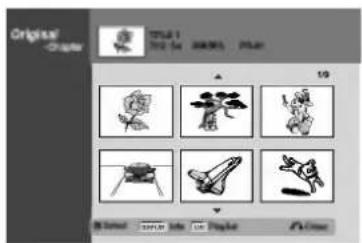
To view Original (Chapter) options, select the chapter you want then press ENTER.
Original (Chapter) options appear on the left side of the Original (Chapter) menu.
Use / to select an option then press ENTER to confirm.
| Play | |
| Title | |
| Combine | |
| Edit | > |
| Playlist | > |
Play: Starts playback of the selected chapter.
Title: Moves to Original (Title) menu of the chapter. (refer to left on this page)
Combine: Combines two chapters into one. (page 48)
Edit: Selects Edit options.
- Delete: Deletes the chapter.
(page 46) - Undo: Undoes the last edit. (page 47)
Redo: Redoes the undo action. (page 47)
[ \text{ Playlist: Adds the chapter to the Playlist. (page 45)} ]
Press RETURN () repeatedly to exit Original (Chapter) menu.
VR Mode: Original and Playlist Editing (Continued)
Using the Playlist (Title) Menu VR
1 Press MENU/LIST repeatedly to display the Playlist (Title) menu.
- Use the / buttons to display the previous/next page if there are more than 6 titles.
To exit the Playlist (Title), press RETURN (S).
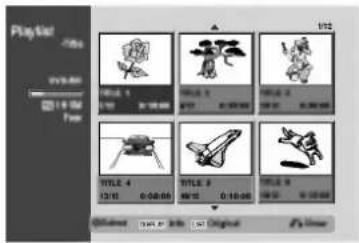
2 To view Playlist (Title) options, select the title you want then press ENTER.
- Playlist (Title) options appears on the left side of the Playlist (Title) menu.
Use / to select an option then press ENTER to confirm.
Play
Chapter
Title Name
Delete
Delete Part
Play: Start playback the selected title.
Chapter: Moves Playlist (Chapter) menu of the title. (refer to right on this page)
Title Name:Edits the title name.(page 47)
Delete: deletes the title from the Playlist (Title) menu. (page 46)
Delete Part: deletes a part of the Title. (page 46)
Press RETURN (O) repeatedly to exit Playlist (Title) menu.

Press DISPLAY to display more detailed title information for selected title.
Using the Playlist (Chapter) Menu VR
1 Press MENU/LIST repeatedly to display the Playlist (Title) menu.
Use to choose the title you want to view Playlist (Chapter) menu then press ENTER. Playlist (Title) options appears on the left side of the Original (Title) menu.
Use / to select 'Chapter' from Playlist (Title) options then press ENTER.
Listing (Chapter) menu appears on the TV screen.
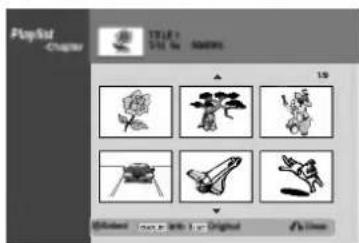
To view Playlist (Chapter) options, select the chapter you want then press ENTER.
- Playlist (Chapter) options appear on the left side of the Playlist (Chapter) menu.
Use / to select an option then press ENTER to confirm.
Play
Title
Combine
Move
Delete
Play: Starts playback of the selected chapter.
Title: Moves to Playlist (Title) menu of the chapter. (refer to left on this page)
Combine: Combines two chapters into one. (page 48)
Move:Moves a chapter of Playlist (Chapter) to a position on the Playlist (Chapter) menu. (page 48)
Delete: deletes the chapter from the Playlist (Chapter) menu. (page 46)
Press RETURN ( ) repeatedly to exit Playlist (Chapter) menu.
VR Mode: Original and Playlist Editing (Continued)
Making a New Playlist VR
Use this function to add an Original title or chapter to the Playlist. When you do this, the whole title is put into the Playlist (you can delete bits you don't need later — see Deleting an Original or Playlist title/chapter on page 46).
The title appears in the Playlist complete with the chapter markers that appear in the Original. However, if you add more chapter markers to the Original later, these are not automatically copied over into the Playlist title.
You can add up to 999 chapters to one disc. If you only want to add a chapter of a title, use the Adding a title/chapter to the Playlist on this page.
1 Press MENU/LIST repeatedly to display Original (Title) menu.
If you want to display the Original (Chapter) menu, refer to "Using the Original (Chapter) menu" on page 43.
2 Choose a title or chapter on the Original menu to put into the Playlist, then press ENTER.
Original (Title or Chapter) options appear on the left side of the Original menu.
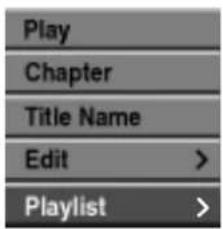
Original (Title)
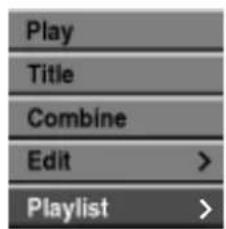
Original (Chapter)
Use / to select ' Playlist' from Original options then press ENTER.
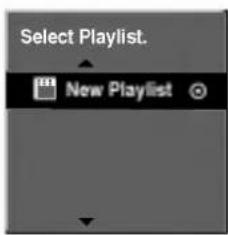
4 Select 'New Playlist' then press ENTER. The new title appears in the updated Playlist. All chapters of the title are added to the Playlist.
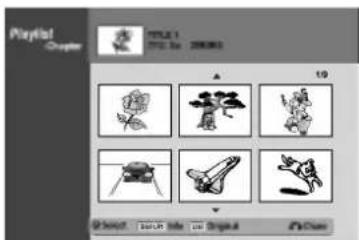
Adding Additional Title/Chapters to the
[ \text{Playlist} ]
You can add an Original title or chapter to add to a Playlist title even if it is already registered.
1 Press MENU/LIST repeatedly to display Original (Title) menu.
If you want to show the Original (Chapter) menu, refer to "Using the Original (Chapter)" on page 43.
2 Choose an Original title or chapter to put into the Playlist, then press ENTER.
Original menu options appears on the left side of the screen.
![LG DR4810SVL - [ \text{Playlist} ] - 1](/content/2026/03/441650/images/8c767996668fc0f5795285e07d18b2e254c2287bcb50ec10ba547d8c3d49bece.jpg)
Original (Title)
![LG DR4810SVL - [ \text{Playlist} ] - 2](/content/2026/03/441650/images/211b9187d2bc34f95e3f521f08c5abbc3430df4b94becd639b87235a54779c66.jpg)
Original (Chapter)
Use / to select ' Playlist' from Original menu options then press ENTER.
![LG DR4810SVL - [ \text{Playlist} ] - 3](/content/2026/03/441650/images/729a1f9e63a0a47b711bb8f00f44252b0e3c2fd318ebffa4571bf7fafaa8b79a.jpg)
Choose a Playlist (Title) that is already registered to insert a title or chapter, then press ENTER.
The title or chapter appears in the updated Playlist menu.
5 Repeat steps 1-4 to add additional title or chapter on the Playlist.
Press RETURN (o) to exit, or MENU/LIST to go back to the Original (Title) menu.
VR Mode: Original and Playlist Editing (Continued)
Deleting an Original or Playlist
Title/Chapter VR
When you erase a title or chapter from the Playlist menu, you only remove it from the Playlist; the title/chapter remains in the Original menu.
If you choose to delete a title or chapter from the Original (title/chapter) menu, the title or chapter is actually deleted from the disc and the remaining time available for recording increases. Titles/chapters deleted from the Original are also removed from the Playlist.

ote
It may not be possible to delete chapters that are less than 5 seconds long.

Press MENU/LIST repeatedly to display Original (Title) or Playlist (Title) menu.
If you want to display the Original (Chapter) or Playlist (Chapter) menu, refer to "Using Original (Chapter) menu" or "Using Playlist (Chapter) menu" on pages 43-44.

Use ▲▼ ▲▶ to choose a chapter or title you want to delete then press ENTER.
Options appears on the left side of the screen.

Select 'Delete' option on the options on the menu.
e.g., If you select "Delete" on Original (Title) menu.
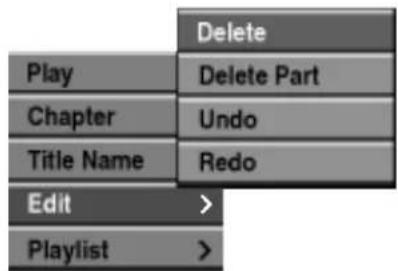

Press ENTER to confirm.
The confirm message for deleting will appear.

Use /> to select Yes then press ENTER. The selected chapter or title is deleted.
After pressing ENTER, the new, updated menu is displayed.

Repeat steps 2 - 5 to continue to delete from the menu.

Press RETURN (S) repeatedly to exit the menu.
Deleting a Part
VR
You can delete a part which you do not want in the title.

Press MENU/LIST repeatedly to display Original (Title) or Playlist (Title) menu.

Use to choose a title you want to delete then press ENTER.
The options appear on the left side of the menu.

Select 'Delete Part' from the options on the menu.
e.g., If you select "Delete Part" on Original (Title) menu.
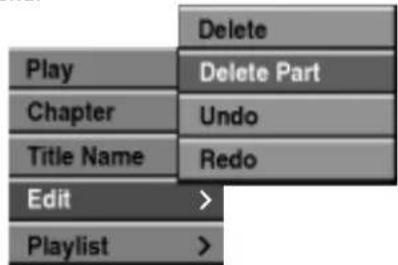

Press ENTER.
Title Edit (Delete Part) menu appears on the TV screen.
Start'icon is highlighted.
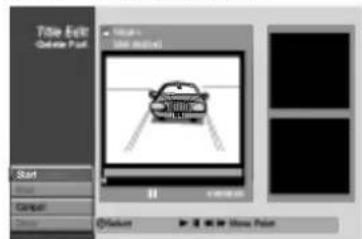

Starts playback and use pause step, search and slow-motion to find the starting point.

Press ENTER at the starting point of the section you want to delete.
'End' icon is highlighted.
The part is indicated on the Progress Bar.

Use pause step, search and slow-motion to find the ending point.

Press ENTER at the ending point of the section you want to delete.
You can cancel the selected point, use / to select 'Cancel' icon then press ENTER.

If you finish to edit, select Done' icon then press ENTER.
The confirm message for deleting will appear.

Use / to select 'Yes' then press ENTER.
The selected part is deleted from the title and Original (Title) or Playlist (Title) menu appears.
VR Mode: Original and Playlist Editing (Continued)
Undoing/Redoing the Last Edit VR
If you make a mistake while editing, you can undo it. There are three levels of undo (in other words, you can undo the last three edits you made).
1 Select 'Undo' from the Original (Title) or Original (Chapter) menu then press ENTER. It doesn't matter whether you are currently in the Original (Title) or Original (Chapter) menu; the last edit is undone.
e.g., If you select "Undo" on Original (Title) menu.
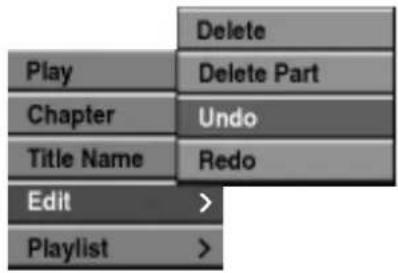
Naming a Title VR
You can name Original and Playlist titles independently. Names can be up to 32 characters long.
1 Press MENU/LIST repeatedly to display Original (Title) or Playlist (Title) menu.
Use to choose the title you want to name then press ENTER. Options appear on the left side of the menu.
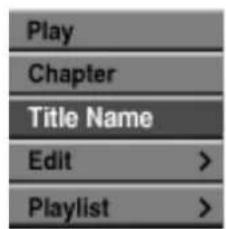
Original (Title)
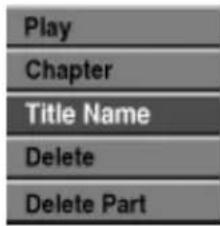
[ \text{ Playlist }(\text{ Title }) ]
Use / to select 'Title Name' option then press ENTER. Keyboard menu appears.
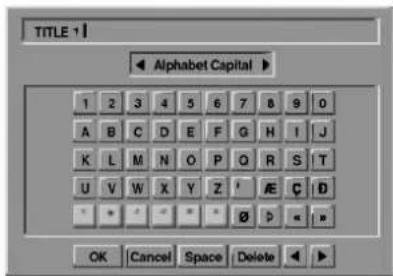
Notes
- You can't undo a recording.
- You can't undo anything after ejecting the disc from the recorder or switching the recorder into standby.
- You can still undo edits after exiting the menu screen.
ip
You can redo the last undo action using 'Redo' option. Select 'Redo' from the Original (Title) or Original (Chapter) menu options then press ENTER.
Enter a name for the title. Use ▲▼ ▲▶ to select a character then press ENTER to confirm your selection. Refer step 2 as shown on page 19 (Station Rename).
5 Choose OK then press ENTER to fix the name and return to the previous menu screen.
Press RETURN (o) repeatedly to exit the menu.
Notes
- Names can be up to 32 characters long.
- For discs formatted on a different DVD Recorder, you will see only a limited character set.
VR Mode: Original and Playlist Editing (Continued)
Combining Two Chapters Into One
VR
Use this function to combine two adjacent Playlist or Original chapters into one.

ote
This function is not available if there is only one chapter within the title.

Press MENU/LIST repeatedly to display Original (Title) or Playlist (Title) menu.
If you want to display the Original (Chapter) or Playlist (Chapter) menu, refer to "Using the Original (Chapter)" and "Using the Playlist (Chapter)" on page 43-44.

First, select the second chapter of the two chapters you want to combine then press ENTER on the Original (Chapter) or playlist (Chapter) menu.
[ \text{Playlist (Chapter) or Original (Chapter) options} ] appears on the left side of the screen.

Use / to select 'Combine'.
The combine indicator appears between the two chapters you want to combine.
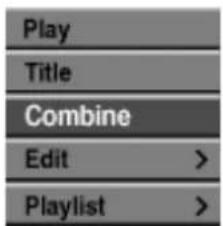
Original (Chapter)
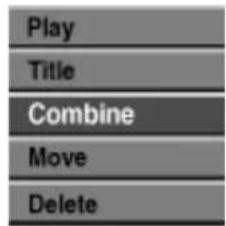
[ \text{Playlist (Chapter)} ]

Press ENTER to confirm.
After pressing ENTER, the updated menu is displayed.
Moving a Playlist Chapter VR
Use this function to re-arrange the playing order of Playlist chapters on the Playlist (Title) menu.

Press MENU/LIST repeatedly to display Playlist (Title) menu.
To display the Playlist (Chapter) menu, refer to "Using the Playlist (Chapter)" on page 44.

its function is not available if there is only one chapter.
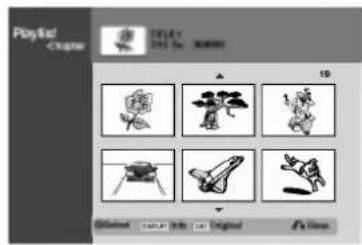

Select a chapter from the Playlist (Chapter) menu.

Press ENTER.
Playlist (Chapter) options appear on the left side of the menu.

Use / to select 'Move' from Playlist options then press ENTER.
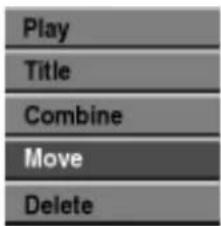

Use to choose the place you want to move the chapter to then press ENTER.
After pressing ENTER, updated menu is displayed.
Video Mode: Original Editing
Using the Title List Video
From the Title List display you can play, name and delete titles.
Once a Video mode disc is finalized, the Title List screen changes its appearance and all you can do is select titles to play.
Press MENU/LIST to display the Title List.
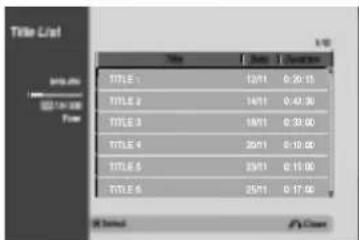
Use / to choose a title then press ENTER. Title List options appear on the left side of the Title List display.
Use / to select an option then press ENTER to confirm.
Play
Title Name
Delete
Play: Start playback the selected title.
Title Name:Edits the title name.(page 47)
Delete: deletes the title from the Title List.
Press RETURN (o) repeatedly to exit Title List.
Deleting a Title
Video
Before a disc is finalized, you can delete titles recorded on the disc.
Caution
- If you delete a title from a DVD-R disc, the title will disappear from the Title List, but the available recording time will not increase.
- When deleting a title from a DVD-RW disc, the remaining time available for recording will only increase if it is the last title on the disc.
Press MENU/LIST to display Title List.
Use to choose a title you want to delete then press ENTER.
Title List options appears on the left side of the Title List menu.
Use / to select 'Delete' then press ENTER to confirm.
After pressing ENTER, the new, updated title list is displayed.
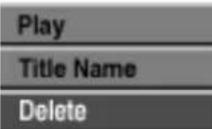
Repeat steps 2-3 to delete additional titles from the Title List.
Press RETURN (o) repeatedly to remove the Title List display.
If the disc has already been finalized
You should see a screen like the one below.
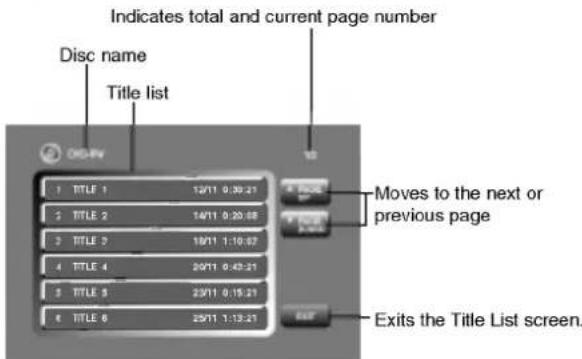
- Also you can exit the Title List display using TITLE or MENU/LIST.
Language Code List
Enter the appropriate code number for the initial settings "Disc Audio", "Disc Subtitle" and/or "Disc Menu" (See page 21).
| Code | Language | Code | Language | Code | Language | Code | Language |
| 6566 | Abkhazian | 7074 | Fiji | 7678 | Lingala | 8373 | Singhalese |
| 6565 | Afar | 7073 | Finnish | 7684 | Lithuanian | 8375 | Slovak |
| 6570 | Afrikaans | 7082 | French | 7775 | Macedonian | 8376 | Slovenian |
| 8381 | Albanian | 7089 | Frisian | 7771 | Malagasy | 8379 | Somali |
| 6577 | Amharic | 7176 | Galician | 7783 | Malay | 6983 | Spanish |
| 6582 | Arabic | 7565 | Georgian | 7776 | Malayalam | 8385 | Sudanese |
| 7289 | Armenian | 6869 | German | 7784 | Maltese | 8387 | Swahili |
| 6583 | Assamese | 6976 | Greek | 7773 | Maori | 8386 | Swedish |
| 6588 | Aymara | 7576 | Greenlandic | 7782 | Marathi | 8476 | Tagalog |
| 6590 | Azerbaijani | 7178 | Guarani | 7779 | Moldavian | 8471 | Tajik |
| 6665 | Bashkir | 7185 | Gujarati | 7778 | Mongolian | 8465 | Tamil |
| 6985 | Basque | 7265 | Hausa | 7865 | Nauru | 8484 | Tatar |
| 6678 | Bengali; Bangla | 7387 | Hebrew | 7869 | Nepali | 8469 | Telugu |
| 6890 | Bhutani | 7273 | Hindi | 7879 | Norwegian | 8472 | Thai |
| 6672 | Bihari | 7285 | Hungarian | 7982 | Oriya | 6679 | Tibetan |
| 6682 | Breton | 7383 | Icelandic | 8065 | Panjabi | 8473 | Tigrinya |
| 6671 | Bulgarian | 7378 | Indonesian | 8083 | Pashto, Pushto | 8479 | Tonga |
| 7789 | Burmese | 7365 | Interlingua | 7065 | Persian | 8482 | Turkish |
| 6669 | Byelorussian | 7165 | Irish | 8076 | Polish | 8475 | Turkmen |
| 7577 | Cambodian | 7384 | Italian | 8084 | Portuguese | 8487 | Twi |
| 6765 | Catalan | 7465 | Japanese | 8185 | Quechua | 8575 | Ukrainian |
| 9072 | Chinese | 7487 | Javanese | 8277 | Rhaeto-Romance | 8582 | Urdu |
| 6779 | Corsican | 7578 | Kannada | 8279 | Romanian | 8590 | Uzbek |
| 7282 | Croatian | 7583 | Kashmiri | 8285 | Russian | 8673 | Vietnamese |
| 6783 | Czech | 7575 | Kazakh | 8377 | Samoan | 8679 | Volapuk |
| 6865 | Danish | 7589 | Kirghiz | 8365 | Sanskrit | 6789 | Welsh |
| 7876 | Dutch | 7579 | Korean | 7168 | Scotts Gaelic | 8779 | Wolof |
| 6978 | English | 7585 | Kurdish | 8382 | Serbian | 8872 | Xhosa |
| 6979 | Esperanto | 7679 | Laothian | 8372 | Serbo-Croatian | 7473 | Yiddish |
| 6984 | Estonian | 7665 | Latin | 8378 | Shona | 8979 | Yoruba |
| 7079 | Faeroese | 7686 | Latvian, Lettish | 8368 | Sindhi | 9085 | Zulu |
Country Code List
Enter the appropriate code number for the initial setting "Country Code" (See page 24).
Code Country
AD Andorra
AE United Arab Emirates
AF Afghanistan
AG Antigua and Barbuda
AI Anguilla
AL Albania
AM Armenia
AN Netherlands Antilles
AO Angola
AQ Antarctica
AR Argentina
AS American Samoa
AT Austria
AU Australia
AW Aruba
AZ Azerbaidjan
BA Bosnia-Herzegovina
BB Barbados
BD Bangladesh
BE Belgium
BF Burkina Faso
BG Bulgaria
BH Bahrain
BI Burundi
BJ Benin
BM Bermuda
BN Brunei Darussalam
BO Bolivia
BR Brazil
BS Bahamas
BT Bhutan
BV Bouvet Island
BW Botswana
BY Belarus
BZ Belize
CA Canada
CC Cocos (Keeling) Islands
CF Central African Republic
CG Congo
CH Switzerland
Cl Ivory Coast
CK Cook Islands
CL Chile
CM Cameroon
CN China
CO Colombia
CR Costa Rica
CS Former Czechoslovakia
CU Cuba
CV Cape Verde
CX Christmas Island
CY Cyprus
CZ Czech Republic
DE Germany
DJ Djibouti
DK Denmark
DM Dominica
DO Dominican Republic
DZ Algeria
EC Ecuador
EE Estonia
EG Egypt
EH Western Sahara
Code Country
ER Entrea
ES Spain
ET Ethiopia
FI Finland
FJ Fij
FK Falkland Islands
FM Microne
FO Faroe Islands
FR France
FX France (European)
Territory)
GA Gabon
GB Great Britain
GD Grenada
GE Georgia
GF French Guyana
GH Ghana
GI Gibraltar
GL Greenland
GM Gambia
GN Guinea
GP Guadeloupe (French)
GQ Equatorial Guinea
GR Greece
GS S. Georgia & S. Sandwich Isls.
GT Guatemala
GU Guam ()
GW Guinea Bissau
GY Guyana
HK Hong Kong
HM Heard and McDonald Islands
HN Honduras
HR Croatia
HT Haiti
HU Hungary
ID Indonesia
IE Ireland
IL Israel
IN India
IO British Indian Ocean Territory
IQ Iraq
IR Iran
IS Iceland
IT Italy
JM Jamaica
JO Jordan
JP Japan
KE Kenya
KG Kyrgyzstan
KH Cambodia6
KI Kiribati
KM Comoros
KN Saint Kitts & Nevis Anguilla
KP North Korea
KR South Korea
KW Kuwait
KY Cayman Islands
KZ Kazakhstan
LA Laos
LB Lebanon
Code Country
LC Saint Lucia
LI Liechtenstein
LK Sri Lanka
LR Liberia
LS Lesotho
LT Lithuania
LU Luxembourg
LV Latvia
LYLibya
MA Morocco
MC Monaco
MD Moldavia
MG Madagascar
MH Marshall Islands
MK Macedonia
ML Mali
MM Myanmar
MN Mongolia
MO Macau
MP Northern Mariana Islands
MQ Martinique (French)
MR Mauritania
MS Montserrat
MT Malta
MU Mauritius
MV Maldives
MW Malawi
MX Mexico
MY Malaysia
MZ Mozambique
AN Namibia
NC New Caledonia (French)
NE Niger
NF Norfolk Island
NG Nigeria
NI Nicaragua
NL Nether
NO Norway
NP Nepal
NR Nauru
NU Niue
NZ New Zealand
OM Oman
PA Panama
PE Peru
PF Polynesia (French)
PG Papua New Guinea
PH Philippines
PK Pakistan
PL Poland
PM Saint Pierre and Miquelon
PN Pitcairn Island
PR Puerto Rico
PT Portugal
PW Palau
PY Paraguay
QA Qatar
RE Reunion (French)
RO Romania
RU Russian Federation
RW Rwanda
SA Saudi Arabia
SB Solomon Islands
Code Country
SC Seychelles
SD Sudan
SE Sweden
SG Singapore
SH Saint Helena
SI Slovenia
SJ Svalbard and Jan Mayen Islands
SK Slovak Republic
SL Sierra Leone
SM San Marino
SN Senegal
SO Somalia
SR Suriname
ST Saint Tome and Principe
SU Former USSR
SV EI Salvador
SY Syria
SZ Swaziland
TC Turks and Caicos Islands
TD Chad
TF French Southern Territories
TG Togo
TH Thailand
TJ Tadjikistan
TK Tokelau
TM Turkmenistan
TN Tunisia
TO Tonga
TP East Timor
TR Turkey
TT Trinidad and Tobago
TV Tuvalu
TW Taiwan
TZ Tanzania
UA Ukraine
UG Uganda
UK United Kingdom
UM USA Minor Outlying Islands
US United States
UY Uruguay
UZ Uzbekistan
VA Vatican City State
VC Saint Vincent &
Grenadines
VE Venezuela
VG Virgin Islands (British)
VI Virgin Islands (USA)
VN Vietnam
VU Vanuatu
WF Wallis and Futuna Islands
WS Samoa
YE Yemen
YT Mayotte
YU Yugoslavia
ZA South Africa
ZM Zambia
ZR Zaire
ZW Zimbabwe
Controlling Your TV with the Supplied Remote
You can control the sound level, input source, and power switch of your LG TV with the supplied remote.
You can control your TV using the buttons below.
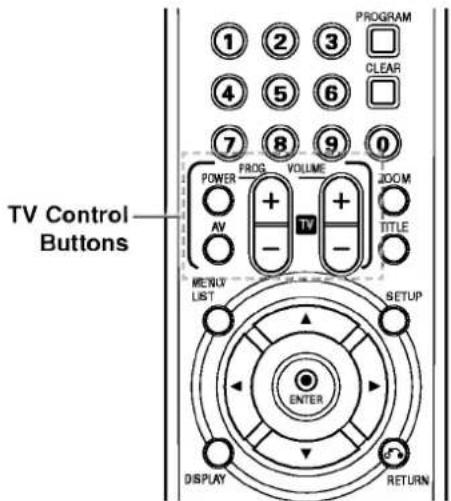
| By pressing | You can |
| POWER | Turn the TV on or off. |
| PROG. +/- | Scans up or down through memorized channels. |
| VOLUME +/- | Adjust the volume of the TV. |
| AV | Switch the TV's input source between the TV and other input sources. |

otes
Depending on the unit being connected, you may not be able to control your TV using some of the buttons.
Controlling other TVs with the remote
You can control the sound level, input source, and power switch of non-LG TVs as well. If your TV is listed in the table below, set the appropriate manufacturer code.
- While holding down TV POWER button, press the number buttons to select the manufacturer code for your TV (see the table below).
- Release TV POWER button.
Code numbers of controllable TVs
If more than one code number is listed, try entering them one at a time until you find the one that works with your TV.
| Manufacturer | Code Number |
| LG / GoldStar | 1 (Default), 2 |
| Zenith | 1, 3, 4 |
| Samsung | 6, 7 |
| Sony | 8, 9 |
| Hitachi | 4 |

otes
- Depending on your TV, some or all buttons may not function on the TV, even after entering the correct manufacturer code.
- If you enter a new code number, the code number previously entered will be erased.
- When you replace the batteries of the remote, the code number you have set may be reset to the default setting. Set the appropriate code number again.
Troubleshooting
Check the following guide for the possible cause of a problem before contacting service.
| Symptom | Cause | Solution |
| No power. | ·The power cord is disconnected. | ·Plug the power cord into the wall outlet securely. |
| No picture. | ·TV/DVD mode for the recorder is set to TV. | ·Press TV/DVD on the remote control repeatedly to choose DVD mode. TV indicator disappears in the display window. |
| ·The TV is not set to receive DVD Recorder signal output. | ·Select the appropriate video input mode on the TV so the picture from the DVD Recorder appears on the TV screen. | |
| ·The video cable is not connected securely. | ·Connect the video cable securely. | |
| ·The connected TV power is turned off. | ·Turn on the TV. | |
| No sound. | ·The equipment connected with the audio cable is not set to receive DVD Recorder signal output. | ·Select the correct input mode on the audio receiver so you can listen to the sound from the DVD Recorder. |
| ·The audio cables are not connected securely. | ·Connect the audio cable securely. | |
| ·The power of the equipment connected with the audio cable is turned off. | ·Turn on the equipment connected with the audio cable. | |
| ·The audio connecting cord is damaged. | ·Replace it with new one. | |
| The playback picture is poor. | ·The disc is dirty. | ·Clean the disc. |
| The DVD Recorder does not start playback. | ·No disc is inserted. | ·Insert a disc. (Check that the disc indicator in the display window is lit.) |
| ·An unplayable disc is inserted. | ·Insert a playable disc. (Check the disc type, color system, and regional code.) | |
| ·The disc is placed upside down. | ·Place the disc with the playback side down. | |
| ·The disc is not placed within the guide. | ·Place the disc on the disc tray correctly inside the guide. | |
| ·The disc is dirty. | ·Clean the disc. | |
| ·The Rating level is set. | ·Cancel the Rating function or change the rating level. | |
| The picture from the external input is distorted | ·The video signal from the external component is copy-protected. | ·You cannot connect via this recorder. Connect the component directly to your TV. |
| Some channels are skipped over when using▲/▼. | ·Those channels are not stored in the recorder. | ·Restore channels. See "Program Edit" on page 18-19. |
| The picture or sound of broadcasting channel is weak or missing. | ·Aerial or cables are loose. | ·Tighten connections or replace cable. |
| Camcorder image is not shown. | ·Camcorder is off. | ·Turn camcorder on and operate properly. |
| Camcorder image via A/V input or DV IN to DVD Recorder is not shown on TV screen. | ·DVD Recorder INPUT SELECT is incorrect. | ·Use AV to select input channel (AV1, AV2, DV, etc.) |
Troubleshooting (Continued)
| Symptom | Cause | Solution |
| Can't play a disc recorded using this recorder on another player. | ·The disc was recorded in Video mode. | ·Finalize the disc. (page 26) |
| ·Some players will not play even a final-ized disc recorded in Video mode. | ·No solution. | |
| ·The disc was recorded in VR mode, | ·The other player must be RW compatible in order to play it. | |
| ·Discs recorded with copy-once material cannot be played on other players. | ·No solution. | |
| Cannot record or did not record successfully. | ·The remaining blank space on the disc is insufficient. | ·Use another disc. |
| ·The source you are trying to record is copy protected. | ·You cannot record the source. | |
| ·When setting the recording channel, the channel is tuned on the TV's own tuner. | ·Select the channel on the recorder's built-in TV tuner. | |
| ·When recording to a Video mode disc, programs that are copy-once protected cannot be recorded. | ·Use a VR mode formatted disc for copy-once material. | |
| Timer recording is not possible. | ·Clock in DVD Recorder is not set to correct time. | ·Set clock to correct time. See "Auto Clock Set" or "Manual Clock Set" on page 20. |
| ·Timer has been programmed incorrectly. | ·Reprogram Timer. See "Timer Recording" on page 38. | |
| ·Timer record indicator light does not appear after programming timer. | ·Reprogram Timer. | |
| Stereo Audio Record and/or Playback is not present. | ·TV is not Stereo-compatible. | ·No solution. |
| ·Broadcast program is not in stereo format. | ·No solution. | |
| ·DVD Recorder A/V Out jacks are not connected to TV A/V In jacks. | ·Make A/V connections. Stereo is available only via A/V output from DVD Recorder. | |
| ·DVD Recorder Audio/Video Out is not selected for viewing at the TV. | ·Select AUX or A/V source as TV input. | |
| ·DVD Recorder's TV audio channel is set to mono. | ·Set TV audio channel mode to Stereo. See "Changing TV audio channel" on page 37. | |
| The remote control does not work properly. | ·The remote control is not pointed at the remote sensor of the DVD Recorder. | ·Point the remote control at the remote sensor of the DVD Recorder. |
| ·The remote control is too far from the DVD Recorder. | ·Operate the remote control within 7 m. | |
| ·There is an obstacle in the path of the remote control and the DVD Recorder. | ·Remove the obstacle. | |
| ·The batteries in the remote control are exhausted. | ·Replace the batteries with new ones. |
Moisture Condensation
| Moisture condensation can occur: | In locations where moisture condensation may occur: |
| ·When the DVD Recorder is moved from a cold place to a warm place. | ·Keep the DVD Recorder plugged into an AC power outlet with POWER On. This will help prevent condensation. |
| ·Under extremely humid conditions. | ·When condensation has occurred, wait a few hours for the DVD Recorder to dry before using it. |
Specifications
General
| Power requirements | AC 110-240V, 50/60 Hz |
| Power consumption | 30W |
| Dimensions (approx.) | 430 X 76 X 383 mm (w x h x d) |
| Mass (approx.) | 5.5 kg |
| Operating temperature | 5°C to 35°C |
| Operating humidity | 5 % to 90 % |
| Television system | PAL/SECAM colour system |
| Recording format | PAL |
| Recording format | DVD VideoRecording, DVD-VIDEO |
| Recordable discs | DVD-ReRecordable, DVD-Recordable |
| Recordable time | Approx. 1 hour (HQ mode), 2 hours (SQ mode), 4 hours (LQ mode) |
| Video recording format | |
| Sampling frequency | 27MHz |
| Compression format | MPEG 2 |
| Audio recording format | |
| Sampling frequency | 48kHz |
| Compression format | Dolby Digital |
| Playback | |
| Frequency response | DVD (PCM 48 kHz): 8 Hz to 22 kHz, CD: 8 Hz to 20 kHz |
| Signal-to-noise ratio | DVD (PCM 96 kHz): 8 Hz to 44 kHz |
| Harmonic distortion | More than 100 dB (AUDIO OUT connector) |
| Dynamic range | Less than 0.008% (AUDIO OUT connector) |
| More than 95 dB (AUDIO OUT connector) | |
| Inputs | |
| AERIAL IN | Aerial input, 75 ohms |
| VIDEO IN | 1.0 Vp-p 75 ohms, sync negative, RCA jack x 2 / SCART x 2 |
| AUDIO IN | 0 dBm more than 47 kohms, RCA jack (L, R) x 2 / SCART x 2 |
| DV IN | 4 pin (i.LINK/IEEE 1394 standard) |
| Outputs | |
| VIDEO OUT | 1 Vp-p 75 Ω, sync negative, RCA jack x 1 / SCART |
| S-VIDEO OUT | (Y) 1.0 V (p-p), 75 Ω, negative sync, Mini DIN 4-pin x 1 |
| (C) 0.3 V (p-p) 75 Ω | |
| COMPONENT VIDEO OUT | (Y) 1.0 V (p-p), 75 Ω, negative sync, RCA jack x 1 |
| (Pb)/(Pr) 0.7 V (p-p), 75 Ω, RCA jack x 2 | |
| Audio output (digital audio) | 0.5 V (p-p), 75 Ω, RCA jack x 1 |
| Audio output (optical audio) | 3 V (p-p), 75 Ω, Optical connector x 1 |
| Audio output (analog audio) | 2.0 Vrms (1 KHz, 0 dB), 600 Ω, RCA jack (L, R) x 1 / SCART |
| Accessory: | |
| Scart cable | .1 |
| Audio cable (L, R) | .1 |
| Blank DVD-R disc | .2 |
| Batteries | .2 |
- Design and specifications are subject to change without notice.
- Manufactured under license from Dolby Laboratories. "Dolby", "Pro Logic" and the double-D symbol are trademarks of Dolby Laboratories.
- DTS and DTS Digital Out are registered trademarks of Digital Theater Systems, Inc.
DVD-RECORDER
Gebrauchsanleitung
MODELL:DR4810S
DVD
RW COMPATIBLE


DO DOLBY DIGITAL

3D Surround Sound
DVD Recorder - Uberblick
Beschreibbare Discs

DVD Recorder - Uberblick
DVD Recorder - Uberblick
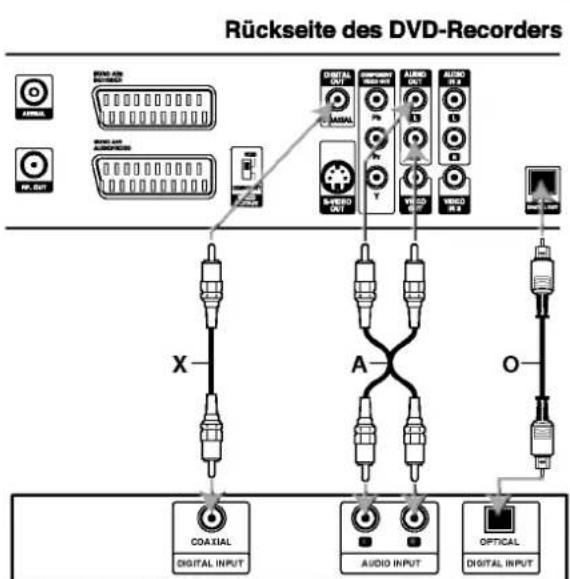
Versteller (Receiver)
Sampling Freq. (Abtastfrequenz)
Press STOP (■) to stop recording.
HQ; High Quality, SQ; Standard Quality, LQ: Low Quality
MQ Martinique (French)
MR Mauretanien
MS Montserrat
MT Malta
MU Mauritius
MV Malediven
MW Malawi
MX Mexiko
MY Malaysia
MZ Mosambik
NA Namibia
RF connexion coaxial
Edition Programme (Suite)
| Supprimer |
| Delete Part |
| Undo |
| Redo |
FX France (Metropole)
GA Gabon
GB Grande Bretagne
GD Grenade
GE Géorgie
GF Guyane Francaise
GH Ghana
GI Gibraltar
GL Groenland
GM Gambie
GN Guinée
GP Guadeloupe (Francaise)
GQ Guinée Equatorial
GR Grce
GS S. Georgie & S. Sandwich Isls.
GT Guatemala
GU Guam (USA)
GW Guinée Bissau
GY Guyane
HK Hong Kong
HM Iles Heard et McDonald
HN Honduras
HR Croatia
HT Haiti
HU Hongrie
ID Indonésie
IE Irlande
IL Israel
IN Inde
MP Northern Mariana Islands
MQ Martinique (Francaise)
MR Mauritanie
MS Montserrat
MT Malte
MU Maurice
MV Maldives
MW Malawi
MX Mexique
MY Malaisie
MZ Mozambique
NA Namibia
Displaying Disc Information on-screen (Continued)
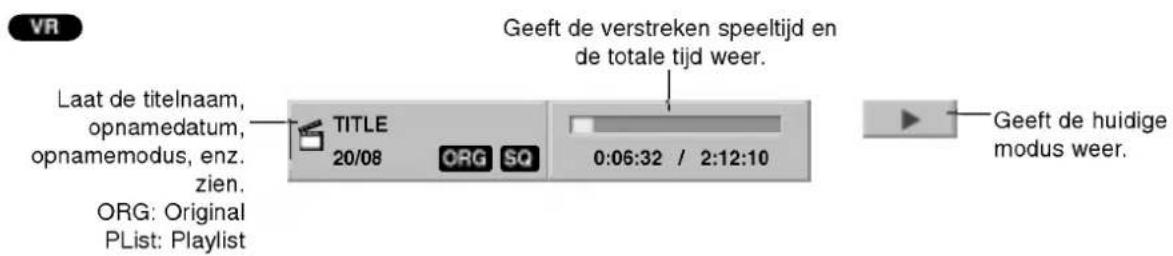
De camcorder is in cameramodus.