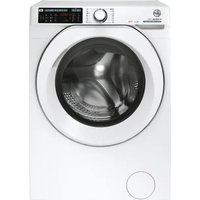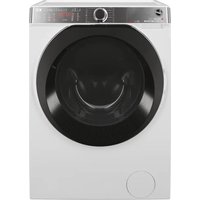
HWASH 700 AWMFD 410AMR1S - Washing machine HOOVER - Free user manual and instructions
Find the device manual for free HWASH 700 AWMFD 410AMR1S HOOVER in PDF.


| Brand | Hoover |
| Model | HWASH 700 AWMFD 410AMR1S |
| Product type | Washing machine |
| Connection technology | Wi-Fi 2.4 GHz, Hoover Wizard app |
| Voice control | Direct Voice ("HEY WASH") - 6 languages |
| Automatic dosing | CARE DOSE for liquid detergent and fabric softener |
| Wash programs | 16 programs including cotton, synthetic, wool, delicate, quick, hygiene, silk, jeans, baby |
| Wash options | Prewash, hygiene, aquaplus, day & night, extra rinse, soil levels, active steam, keep fresh, easy ironing |
| Maximum temperature | 90°C |
| Spin speed | Variable (see rating plate) |
| Inlet hose protection | Aquastop and Aquaprotect |
| Child safety | Screen and button lock |
| Delayed start | Up to 24 hours |
| Required water pressure | 0.05 - 0.8 MPa |
| Regular maintenance | Cleaning the pump filter (5-6 times/year), cleaning the detergent drawer |
| Spare parts | Filter, inlet hose, door gasket (original parts recommended) |
| Warranty | According to supplied certificate (keep it) |
Frequently Asked Questions - HWASH 700 AWMFD 410AMR1S HOOVER
User questions about HWASH 700 AWMFD 410AMR1S HOOVER
0 question about this device. Answer the ones you know or ask your own.
Ask a new question about this device
Download the instructions for your Washing machine in PDF format for free! Find your manual HWASH 700 AWMFD 410AMR1S - HOOVER and take your electronic device back in hand. On this page are published all the documents necessary for the use of your device. HWASH 700 AWMFD 410AMR1S by HOOVER.
USER MANUAL HWASH 700 AWMFD 410AMR1S HOOVER
natural_image
Exterior view of a black HONVER washing machine with digital display (no visible text or symbols on the device itself)text_image
Diagram showing a hand holding a water dispenser with control buttons, illustrating the step of cleaning or installation.
text_image
④ 1 *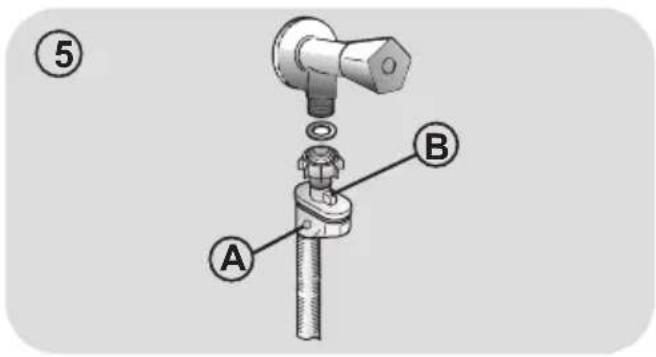
text_image
⑤ A B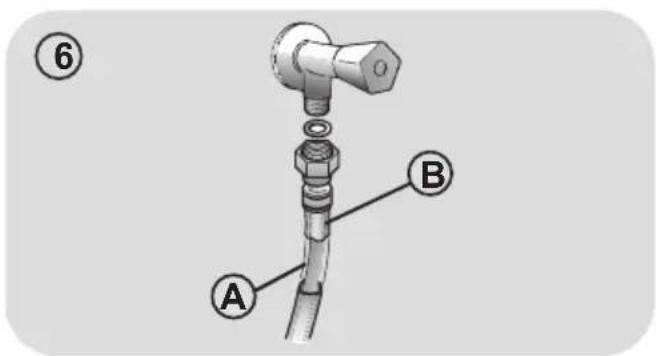
text_image
⑥ A BPosizionamento
text_image
Diagram showing two labeled components (1 and 2) with arrows indicating direction of movement or assembly.natural_image
Diagram of a foot pressing down on a mechanical device with clamps (no text or symbols)
natural_image
Illustration of hands holding a device with arrows indicating motion or operation (no text or symbols)text_image
Diagram illustrating a mechanical switch mechanism with labeled steps A and B, showing hand positioning and rotation directions.text_image
Diagram illustrating two steps of a device operation: step 1 shows a mechanical component being inserted, while step 2 shows a hand holding a tool with directional arrows.
6. PANNELLO COMANDI

text_image
1 Hoover- ON/OFF
SCHERMATA PRINCIPALE
text_image
1 7 6 4 5 2 3 FAVOURITE 4 5 TOTAL CARE LAST USED- "HEY WASH. ALZA/ABBASSA IL VOLUME"
- "HEY WASH. METTI IL VOLUME AL MASSIMO/MINIMO"
- "HEY WASH. METTI IN MUTO"
METTERE LA MACCHINA IN PAUSA
text_image
COTTON 40' 20 60 START 1 L S D H- LIVELLO DI SPORCO
text_image
Diagram showing a hand holding a water pump switch next to a valve, with step number 3 and dashed outline indicating the process.
text_image
④ 1 *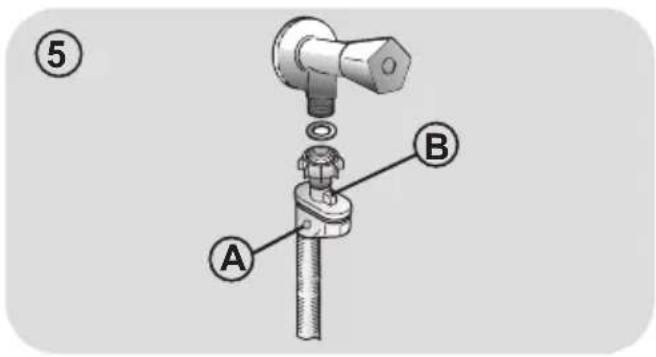
text_image
⑤ A B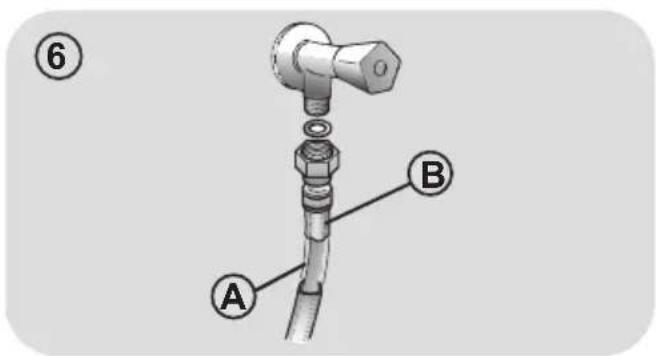
text_image
⑥ A Btext_image
Diagram showing a mechanical or electronic component with labeled parts and directional arrows indicating movement or force.natural_image
Line drawing of a hand holding a small object above a mechanical device (no text or symbols)
natural_image
Illustration of hands holding a device with arrows indicating motion (no text or symbols)text_image
Diagram illustrating mechanical assembly steps with labeled diagrams A and B showing hand positioning and rotation instructions.text_image
Diagram illustrating two steps of a device's internal mechanism, showing tool application and assembly with numbered parts.
6. BEDIENFELD

text_image
1 Hoover1. AN/AUS
START-BILDSCHIRM
text_image
1 7 6 0000 5 2 3 FAVOURITE 3 4 LAST USED 5>text_image
TEMPERATURE 40° 1 OK 2Thank you for choosing this product.
We are proud to offer the ideal product for you and the best complete range of home appliances for your daily routine.
Carefully read this manual for correct and safe appliance use and for helpful tips or efficient maintenance.

Only use the washing machine after carefully reading these instructions. We recommend you always keep this manual on hand and in good condition for any future owners.
Please check that the appliance is delivered with this instruction manual, warranty certificate, service centre address and energy efficiency label. Also check that plugs, drain hose support hook and liquid detergent or bleach tray (only on some models) are included. We recommend yo keep all these components.
FOR U.K. ONLY
On receipt of your appliance please check it carefully for damage. Any damage found must be reported to the delivery driver immediately. Alternatively damage found must be reported to the retailer within 2 days of receipt.
Each product is identified by a unique 16 character code, also called the "serial number", printed on the sticker. This can be found inside the door opening. This code is a unique code for your product that you will need to register the product warranty, or you need to contact the Customer Service Centre.
Environmental conditions
This appliance is marked according to the European directive 2012/19/EU on Waste Electrical and Electronic Equipment (WEEE).
WEEE contains both polluting substances (which can cause negative consequences for the environment) and basic components (which can be re-used). It is important to have WEEE subjected to specific treatments, in order to remove and dispose properly all pollutants, and recover and recycle all materials. Individuals can play an important role in ensuring that WEEE does not become an environmental issue; it is essential to follow some basic rules:
● WEEE should not be treated as household waste;
● WEEE should be handed over to the relevant collection points managed by the municipality or by registered companies. In many countries, for large WEEE, home collection could be present.
In many countries, when you buy a new appliance, the old one may be returned to the retailer who has to collect it free of charge on a one-to-one basis, as long as the equipment is of equivalent type and has the same functions at the supplied equipment.
Contents
- GENERAL SAFETY RULES
- INSTALLATION
- PRACTICAL HINTS
- CLEANING AND MAINTENANCE
- PORTHOLE EMERGENCY OPENING
- COMMAND PANEL
- FIRST MACHINE START-UP
- VARIOUS SETTINGS
- DAILY USE
10.TROUBLESHOOTING AND WARRANTY
1. GENERAL SAFETY RULES
- This appliance is intended to be used in household and similar applications such as:
- Staff kitchen areas in shops, offices and other working environments; - Farm houses;
- By clients in hotels, motels and other residential type environments;
- Bed and breakfast type environments. A different use of this appliance from household environment or from typical housekeeping functions, as commercial use by expert or trained users, is excluded even in the above applications. If the appliance is used in a manner inconsistent with this it may reduce the life of the appliance and may void the manufacturer's warranty. Any damage to the appliance or other damage or loss arising through use that is not consistent with domestic or household use (even if located in a domestic or household environment) shall not be accepted by the manufacturer to the fullest extent permitted by law.
● This appliance can be used by children aged from 8 years and above and persons with reduced physical, sensory or mental capabilities or lack of experience and knowledge if they have been given supervision or instruction concerning use of the appliance
in a safe way and understand the hazards involved.
Children shall not play with the appliance. Cleaning and user maintenance shall not be made by children without supervision.
- Children should be supervised to ensure that they do not play with the appliance.
● Children of less than 3 years should be kept away unless continuously supervised.
- If the supply cord is damaged, it must be replaced by a special cord or assembly available from the manufacturer or its service agent.
- Only use the hose-sets supplied with the appliance for the water supply connection (do not reuse old hose-sets).
● Water pressure must be between 0.05 MPa and 0.8 MPa.
- Make sure carpets or rugs do not obstruct the base or any of the ventilation openings.
- After installation, the appliance must be positioned so that the plug is accessible.
- The maximum load capacity of dry clothes depends on the model used (see control panel).
- To consult the product technical specification please refer to the manufacturer website.
Electrical connections and safety instructions
- The technical details (supply voltage and power input) are indicated on the product rating plate
- Make sure that the electrical system is earthed, complies with all applicable law and that the (electricity) socket is compatible with the plug of the appliance. Otherwise, seek qualified professional assistance.
- The use of converters, multiple sockets or extension cords is strongly advised against
- Before cleaning or maintaining the washing machine, unplug the appliance and turn off the water tap.
- Do not pull on the power cord or appliance to unplug the machine.
- Make sure there is no water in the drum before opening the door.

WARNING:
water may reach very high temperatures during the wash cycle.
- Do not expose the washing machine to rain, direct sunlight or other weather elements. Protect from possible freezing.
- When moving, do not lift the washing machine by the knobs or detergent drawer; during transport, never rest the door on the trolley. We recommend two people lift the washing machine.
- In the event of fault and/or malfunction, turn off the washing machine, close the water tap and do not tamper with the appliance.
Immediately contact the Customer Service Centre and only use original spare parts. Failure to observe these instruction may jeopardise appliance safety.
2. INSTALLATION
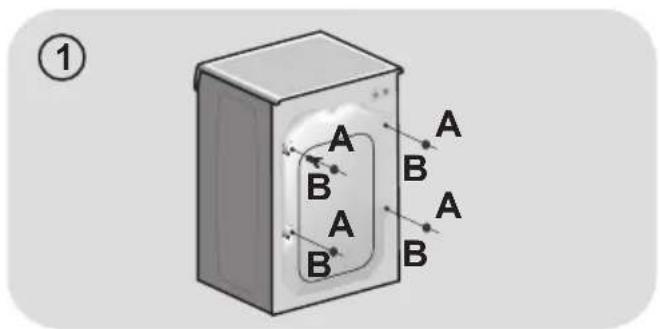
- Remove the 2 or 4 transportation screws (A) on the back and remove the 2 or 4 flat washers, rubber bungs and plastic spacer tubes (B) as illustrated in figure 1.
- If the washing machine is built-in, unscrew the 3 or 4 transportation screws (A) and remove the 3 or 4 flat washers, rubber bungs and plastic spacer tubes (B).
- During the removal of the screw occasionally spacer tubes fall inside the product, these can be remove by tilting the product forward and recovering them from the floor or inside the base of the machine.
- Cover the open transportation screw holes with the 2 or 4 plastic caps included in the instruction bag.

WARNING:
keep packaging materials away from children.
- Place the corrugated plastic sheet, found on top of the appliance during the unpacking process, into the base of the appliance as shown in figure 2 (according to the model, consider version A, B or C).
In some models this operation will not be necessary, because the corrugated plastic sheet will be already placed on the bottom of the appliance.
Hydraulic connections
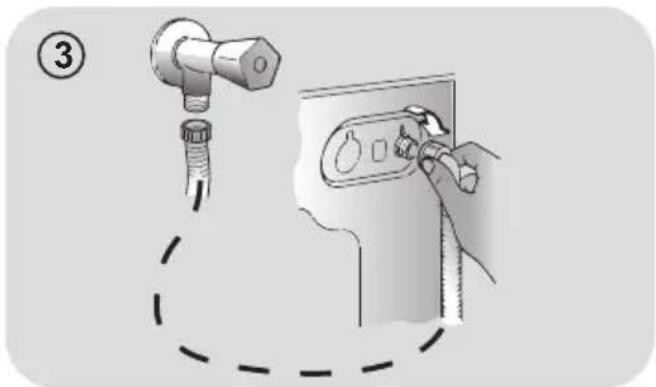
- Connect the water hose to the water supply tap (fig. 3) only using the hose supplied with the appliance (do not reuse old hose-sets).
● SOME MODELS may include one or more of the following features:
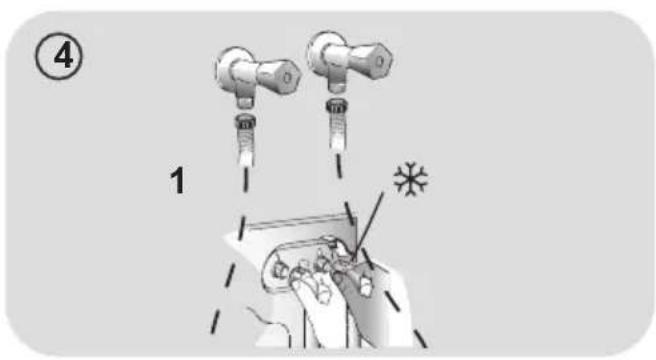
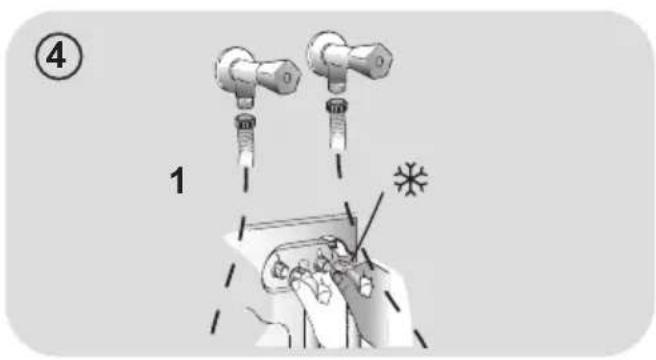
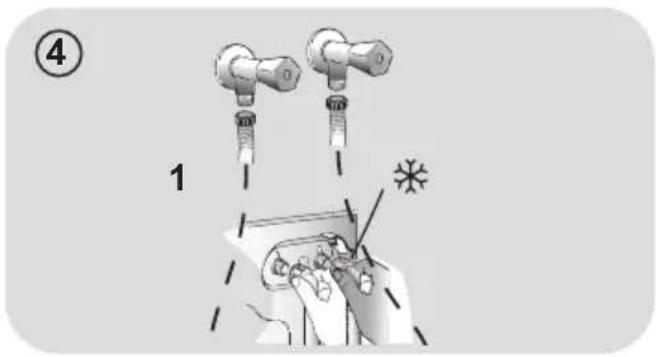
● HOT&COLD (fig. 4):
water mains connection settings with hot and cold water for higher energy savings. Connect the grey tube to the cold wat tap ✱ and the red one to the hot water tap. The machine can be connected to the cold water tap only: in this case, some programs may start a few minutes later.
● AQUASTOP (fig. 5):
a device located on the supply tube stops water flow if the tube deteriorate in this case, a red mark will appear in the window "A" and the tube must be replaced. To unscrew the nut, press the one-way lock device "B".
● AQUAPROTECT – SUPPLY TUBE WITH GUARD (fig. 6):
Should water leak from the primary internal tube "A", the transparent containment sheath "B" will contain water to permit the washing cycle to complete. At the end of the cycle, contact the Customer Service Centre to replace the supply tube.
text_image
Diagram showing a hand holding a water pump switch next to a valve, with step number 3 and dashed outline indicating the process.
text_image
④ 1 *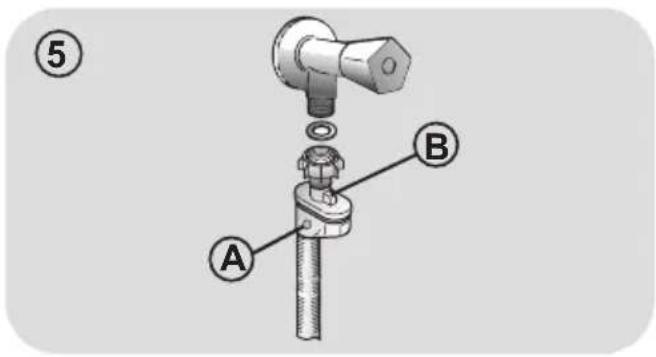
text_image
⑤ A B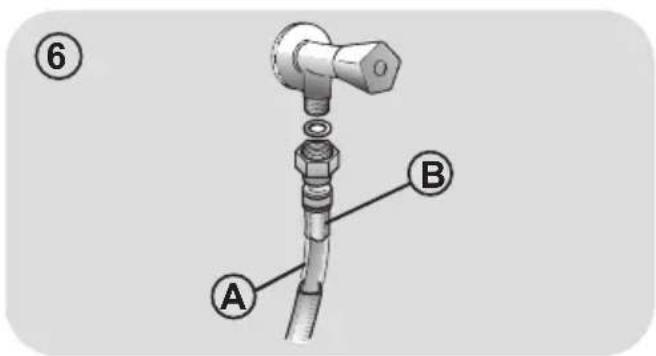
text_image
⑥ A BSetting
- The washing machine should be installed in its final position such that the water fill hose is not kinked or trapped. The corrugated drain hose should be inserted into suitable drain pipe of between 50 cm and 85 cm height above the floor using the curved drain hose support. If an under sink connection is used the drain hose must be routed above the sink overfill opening to prevent back siphoning. Care must be taken to avoid kinking or trapping the drain hose (fig. 7).
● Level the appliance using the feet as illustrated in figure 8:
a. turn the nut clockwise to release the screw;
b. rotate the foot to raise or lower it until it touches to the floor;
c. lock the foot, screwing in the nut, until it tightens against to the bottom of the washing machine.
- Plug in the appliance.

WARNING:
contact the Customer Service Centre should the power cord need replacement.
Installation faults are not covered by the manufacturers warranty.
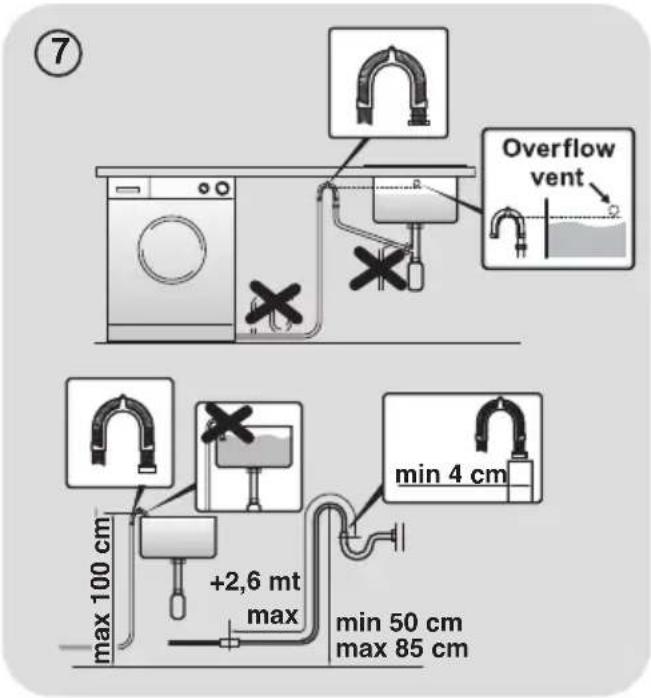
text_image
⑦ Overflow vent max 100 cm +2,6 mt max min 4 cm min 50 cm max 85 cm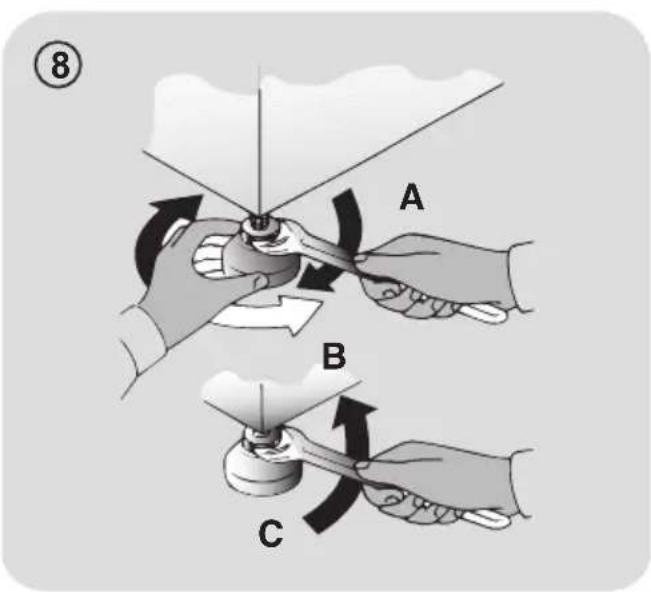
text_image
⑧ A B C3. PRACTICAL HINTS
Load tips
When sorting laundry, make sure:
- have eliminated metallic objects such as hair clips, pins, coins, from laundry;
- to have buttoned pillow cases, closed zips, tied loose belts and long robe ribbons;
- to have removed rollers, hooks or clips from curtains;
- to have carefully read clothing washing labels;
- to have removed any persistent stains using specific detergents.
- When washing rugs, bedcovers or other heavy clothing, we recommend you avoid the spinning cycle.
● To wash wool, make sure the item can be machine washed. Check the fabric label. - Leave the appliance's door slightly open between washes, to prevent possible bad smells developing inside the machine.
Useful advice for saving
Tips on how to save money and not damage the environment when using your appliance.
- Load the machine to the highest capacity shown in the programme table for each programme - this will allow you to SAVE energy and water.
- Noise and residual laundry moisture are affected by spin speed: a faster spin is associated with greater noise and lower residual moisture in the laundry.
● The most efficient programmes in terms of combined use of water and energy are usually the longer-lasting ones with lower temperature.
Maximise the load size
- Achieve the best use of energy, water, detergent and time by using the recommended maximum load size. Save up to 50% energy by washing a full load instead of 2 half loads.
Do you need to pre-wash?
- For heavily soiled laundry only! SAVE detergent, time, water and between 5 to 15% energy consumption by NOT selecting Prewash for slight to normally soiled laundry.
Is a hot wash required?
- Pretreat stains with stain remover or soak dried in stains in water before washing to reduce the necessity of a hot wash programme. Save energy by using a low temperature wash programme.
Before using a drying programme (WASHER-DRYERS)
- SAVE energy and time by selecting a high spin speed to reduce the water content in laundry before using a drying programme.
Dosing the detergent
Below is a short guide with tips and advice on the use of detergent.
- Only use detergents suitable for machine washing.
- Select your detergent according to the type of fabric (cotton, delicates, synthetics, wool, silk, etc.), the colour, the type and level of soiling and the programmed washing temperature.
- To use the right amount of detergent, softener or any other additives, carefully follow the manufacturer's instructions every time: correctly using the appliance with the right dose allows you to avoid waste and to reduce the environmental impact.
When washing heavily soiled whites we recommend using cotton programs of 60^ C or above and a normal washing powder (heavy duty) that contains bleaching agents that at medium/high temperatures provide excellent results.
For washes between 40°C and 60°C the type of detergent used needs to be appropriate for the type of fabric and level of soiling. Normal powders are suitable for “white” or colour fast fabrics with high soiling, while liquid detergents or “colour protecting” powders are suitable for coloured fabrics with light levels of soiling.
For washing at temperatures below 40^ C we recommend the use of liquid detergents or detergents specifically labeled as suitable for low temperature washing.
For washing wool or silk, only use detergents specifically formulated for these fabrics.
● Too much detergent leads to excessive foam, which prevents the cycle being carried out correctly. It could also affect the quality of the washing and rinsing.
The use of ecological detergents without phosphates may cause the following effects:
- cloudier rinse drain water: This effect is tied to the suspended zeolites which do not have negative effects on rinse efficiency.
- white powder (zeolites) on laundry at the end of the wash: this is normal, the powder is not absorbed by fabric and does not change its colour.
To remove the zeolites, select a rinse programme. In the future consider using slightly less detergent.
- foam in the water at last rinse: this does not necessary indicate poor rinsing.
Consider using less detergent in future washes.
- abundant foam: This is often due to the anionic surfactants found in the detergents which are hard to eliminate from laundry. In this case, do not re-rinse to eliminate these effects: it will not help at all.
We suggest conducting a maintenance wash using a proprietary cleaner.
If the problem persists or if you suspect a malfunction, immediately contact an Authorised Customer Service Centre.
4. CLEANING AND MAINTENANCE
Looking after your appliance correctly can extend its lifespan.
Cleaning the appliance's exterior
- Disconnect the machine from the power supply.
- Clean the appliance's external cabinet, using a damp cloth and AVOIDING ABRASIVES, ALCOHOL AND/OR DILUENTS.
Drawer cleaning
- It is advisable to regularly clean the detergent drawer to avoid the accumulation of detergent and additive residues.
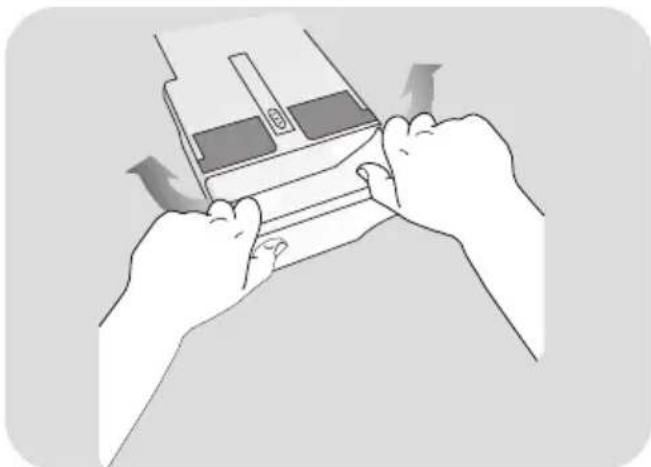
- Remove the drawer gently but firmly.
- Clean the drawer under running water and put it back into its compartment.
FOR MODELS WITH AUTOMATIC LIQUID DETERGENT AND SOFTENER DOSING SYSTEM:
Before proceeding with cleaning, all the compartments must be empty.
- Pull out the drawer completely by pressing the release button, paying attention to the leakage of detergent residues.
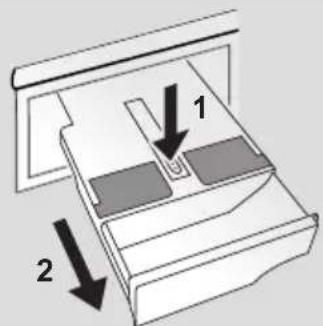
text_image
Diagram showing two labeled components (1 and 2) with arrows indicating direction of movement or assembly.● Fill the drawer with hot water.
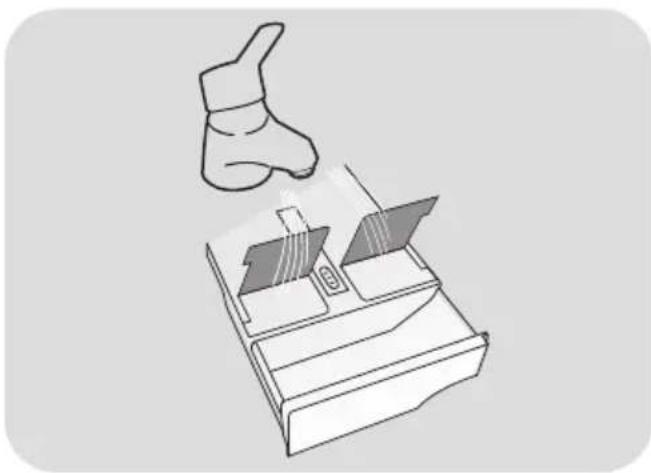
natural_image
Illustration of a hand gesture above a device with a battery and switch (no text or symbols)
● Shake the drawer in order to let the water flow in all the compartments.
natural_image
Illustration of hands holding a device with arrows indicating motion or movement (no text or symbols)● Empty the drawer from excess water and reinsert it completely.
! WARNING:
DO NOT use acid products (for example vinegar) or aggressive detergents to clean the drawer, in order to avoid damaging the seals and/or internal parts of the appliance.
Cleaning the pump filter
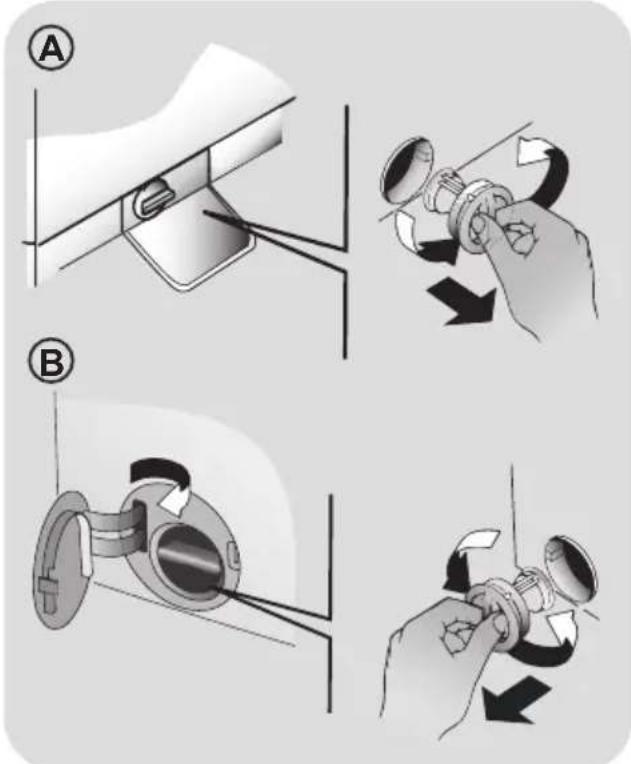
● The appliance has a special filter that traps larger residues that could block the draining system, such as buttons or coins (depending on the model, consider version A or B).
We recommend checking and cleaning the filter 5 or 6 times a year.
- Disconnect the machine from the power supply.
● Ensure all the water has been emptied from the drum. - Before unscrewing the filter, we recommend you place an absorbent cloth under it to keep the floor dry. A small amount of water will come out of the filter as you remove it - this is normal.
● Turn the filter counter-clockwise to the limit stop. - Remove and clean the filter; when finished, replace it turning it clockwise. The filter handle will be locked when it is not possible to turn any further and the handle is horizontal. Smearing a small amount of liquid soap on the filter seal will help refitting.
- Repeat the previous steps in reverse order to reassemble all parts.
text_image
Diagram illustrating mechanical assembly steps with labeled parts A and B, showing hand manipulation and rotation directions.Suggestions for moves or prolonged disuse
- If the appliance is kept in a non-heated room for long periods of time, all water residues must be completely removed from the pipes.
- Disconnect the machine from the power supply socket.
- Detach the tube from the drainage system and clip on the rear of the machine and lower it, fully draining water into a bowl.
- Secure the drain tube with the drainage system and clip on the rear of the machine when finished.
- Keep the door glass and gasket clean.
FOR MODELS WITH AUTOMATIC LIQUID DETERGENT AND SOFTENER DOSING SYSTEM:
should you need to tilt or move the machine, remove the detergent drawer before proceeding, keeping it horizontal so as to avoid any leakage.
5. PORTHOLE EMERGENCY OPENING
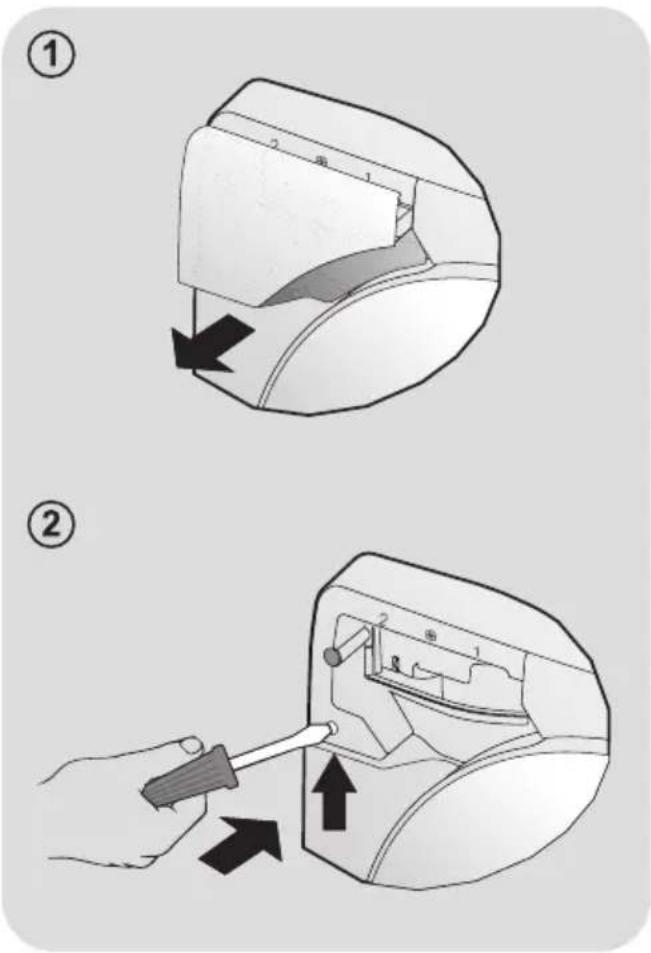
Should the porthole be locked due to power Shortage (if the plug is removed before the end of the cycle, re-plug it and turn off the machine by pressing ON/OFF button to open the door) or as a result of a fault, can be opened according to the following emergency unlocking procedure:
- Disconnect the machine from the power socket.
- Ensure that the water level is below the porthole before opening it, to prevent any flooding. Otherwise, drain excess water through the drain tube and collect it in a bucket.
- Take out the detergent compartment (fig. 1).
- Insert a screw driver or a similar tool for about two centimeters of depth (in order to fit it into the inner hook, but not fully down). Lever up and simultaneously open the porthole as shown in figure 2.
text_image
Diagram illustrating two steps of a device operation: step 1 shows a mechanical component being inserted, while step 2 shows a hand holding a tool with directional arrows.
6. COMMAND PANEL

text_image
1 Hoover1. ON/OFF
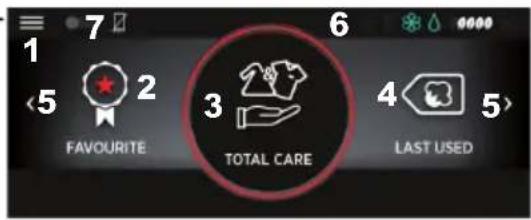
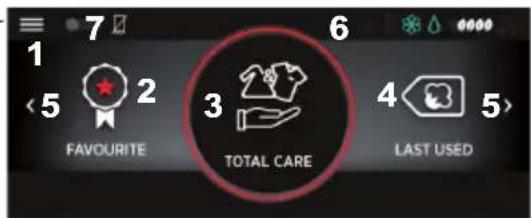
HOME SCREEN
text_image
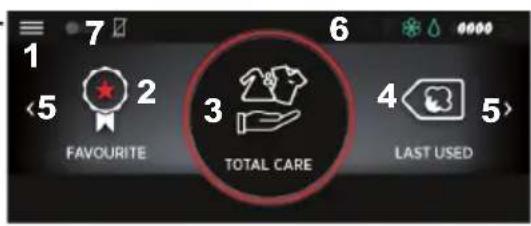
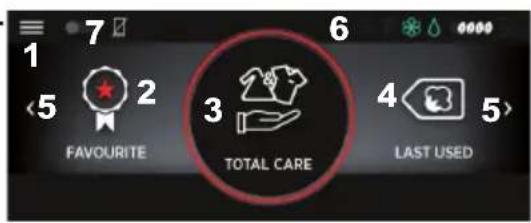
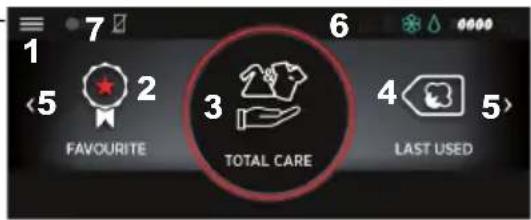
1 7 6 0000 5 2 3 FAVOURITE 3 4 LAST USED 5>- SETTINGS Menu
- List of favourite programmes
- Main programme area
- Other programmes/last programme area
- Arrow for moving screen
- Status bar
- Activation/deactivation of REMOTE CONTROL (Wi-Fi)
SETTINGS SCREENS
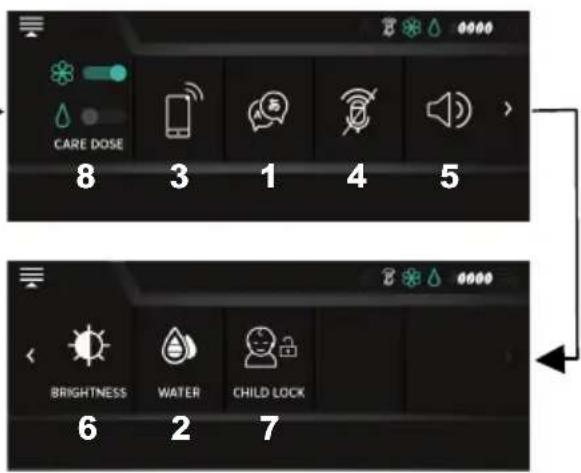
text_image
CARE DOSE 8 3 1 4 5 BRIGHTNESS WATER CHILD LOCK 6 2 7- Choose language
- Set water hardness
- Wi-Fi settings
- Direct Voice/Microphone activation/deactivation
- Volume adjustment
- Screen brightness adjustment
- CHILD LOCK (command lock)
- CARE DOSE setting
SCREENS WITH SETTINGS, PROGRAMMES AND OPTIONS
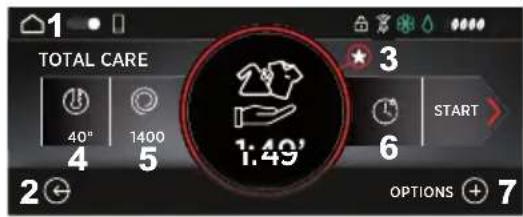
text_image
TOTAL CARE 40" 1400 1:49' 3 START 6 2 + OPTIONS + 7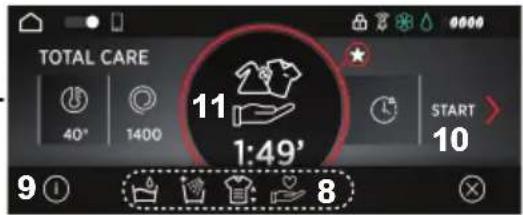
text_image
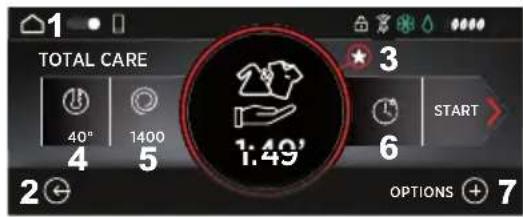
TOTAL CARE 40° 1400 11 1:49' START 10 9 1 8- HOME (back to home screen)
- BACK (back to previous screen)
- Saving/showing favourite programme
- Setting the temperature
- Setting the spin speed
- Setting the delay start
- Options menu
- Available options
- Option information
- Start programme
- Selected programme*
* Keep it pressed to view information on the programme.
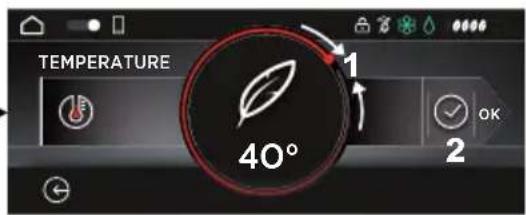
text_image
TEMPERATURE 1 40° 2- Movable ring dial for option adjustment
- Confirm setting
©
7. FIRST MACHINE START-UP
Set language
● After connecting the appliance to the network and turning it on by pressing ON/OFF, select the desired language by scrolling through the available ones.
- Confirm using the icon.
Changing language
You can change the language at any time by selecting the icon in the SETTINGS menu in the home screen.
Setting the level of WATER HARDNESS
This appliance, through the CARE DOSE system, can automatically adjust the detergent dose according to the selected cycle (cottons, delicates, etc.), to the weight of the laundry and to water hardness.
The water hardness factory setting i MEDIUM LEVEL because this satisfies the requirements of the majority of users.
Water hardness
= SOFT (0-12 °fH o 0-7 °dH)
= MEDIUM (13-30 °fH o 8-17 °dH)
= HIGH (≥ 30 °fH o ≥ 17 °dH)
- If you want to change the standard water hardness setting (and consequently the amount of detergent dispensed), swipe the ring dial to select the level you want. The higher the water hardness, the more detergent will be dispensed.
- Confirm using the √ icon.
Check the LEVEL of water hardness of the place you live in through your water provider before using the CARE DOSE function.
8. VARIOUS SETTINGS

SETTINGS Menu
A number of settings can be entered through this menu on the home screen.

REMOTE CONTROL (Wi-Fi)
This appliance is equipped with Wi-Fi technology, so it can to be controlled remotely via an App.
- Pairing the machine with the App
- Download the Hoover Wizard App onto your device.
The Hoover Wizard App is available both for Android and for iOS tablets and smartphones.
To discover all the details of the Wi-Fi features, explore the App menus by switching on the DEMO mode.
The frequency of your home Wi-Fi network must be in the 2.4 GHz band. The machine cannot be configured in the home network is set on the 5 GHz band.
- Open the App, create a user profile (or login if you already have one) and pair the appliance by either following the instructions that appear on the device's display screen or using the procedure described in the "Quick Guide" that comes with the appliance.
- Enabling REMOTE CONTROL
● Make sure that the router is on and connected to the Internet.
- Load the laundry, close the door, add the detergent if necessary.
The REMOTE CONTROL function can be activated only if the door is closed.
- Switch the device on by pressing ON/OFF.
- Enable the REMOTE CONTROL function by tapping on its switch icon:
- Z = Remote control disabled.
= Remote control enabled.
● A message warning that the door is locked will appear on the display screen.
- Confirm using the √ icon.
Even if REMOTE CONTROL is active you can still use the device through the display.
- Open the Hoover Wizard App and start the cycle.
- At the end of the cycle, switch off the machine by pressing ON/OFF (or disabling REMOTE CONTROL) to unlock the door.
- Disabling REMOTE CONTROL
● To exit the REMOTE CONTROL mode during a cycle, tap on the switch icon on the display screen.
For safety reasons, in some phases of the wash cycle, the door can only be opened if the level of the water is below the door's lower rim and the temperature is below 45°C. If these conditions are met, wait for the DOOR LOCK icon to switch off before opening the door.
- With the door closed, by tapping on the REMOTE CONTROL switch icon, you can go back to controlling the appliance through the app as well.


lect Voice (voice control)
This new function allows you to interact with the appliance via voice interaction.
PRELIMINARY SETTINGS
● Before using this function, you must enter the language and water hardness in the display screen and register the appliance with the Hoover Wizard App.
This function is available in the following languages: Italian, English, French, Spanish, German and Russian.
To use Direct Voice, the appliance MUST be always connected to your Wi-Fi network.
Listed below are the minimum requirements for the Direct Voice system to work correctly:
Bandwidth
- Upload: Min 512 kbps
• Download: Min 512 kbps
Band frequency
• 2.4 GHz IEEE 802.11 g/n
- For Direct Voice to work in optimal conditions, always remember to speak towards the microphone, at a distance no greater than 2 metres. The room must be as quiet as possible.
DAILY USE
● To interact with the appliance, start the conversation with "HEY WASH", wait for the machine to beep and for the image of the microphone to appear on the display screen, then proceed with the request. E.g.: "HEY WASH. START COTTON CYCLE"
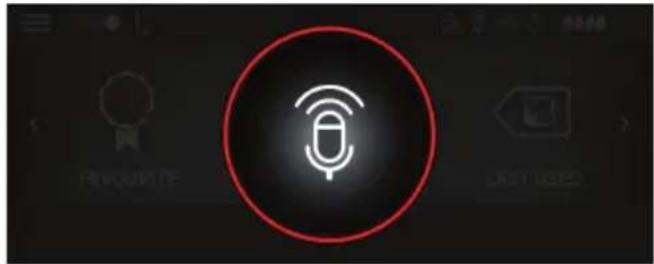
text_image
FAVQUIPITE LAST LIGEDWHAT YOU CAN ASK
1) Start and manage programmes
2) Learn about the best cycle to use
3) Receive updates on the cycle status
4) Ask for advice and suggestions
5) Receive assistance
6) Ask for advice on maintenance
7) Adjust the volume
8) Set the CARE DOSEfunction
9) Activate the CHILD LOCK
To start or stop a cycle using Direc Voice, you must enable the appliance's REMOTE CONTROL function.
● To interrupt or reset the conversation, say "HEY WASH, THANKS!" at any time or
select on the display.
- For more information and explanations, please check the quick guide at: go.candy-group.com/hm-700.
MICROPHONE ACTIVATION/DEACTIVATION
To activate or deactivate the microphone, access the settings menu and tap on the specific icon.
 | Microphone enabled |
 | Microphone disabled |

Volume adjustment
- You can adjust the volume using voice interaction or through the settings menu in the display screen, by tapping on the specific icon.
 | Maximum volume |
 | Medium volume |
 | Minimum volume |
 | Mute |
 | Automatic volume |
● Below are the specific voice commands to adjust the volume:
- "HEY WASH. TURN UP/TURN DOWN VOLUME"
- "HEY WASH. SET THE VOLUME TO MAXIMUM/MINIMUM"
- "HEY WASH. MUTE VOLUME"
- If the volume is set automatically, the system will manage intensity so it is best suited for the appliance's activity.

Screen brightness adjustment
- To adjust the display screen's brightness, select the specific icon and tap on the displayed bar.
- Confirm using the icon.

CHILD LOCK
- To avoid undesired or accidental changes (e.g. caused by children playing), you can lock all the elements on the display screen, with the exception of the SETTINGS menu and the ON/OFF button. The microphone will also be disabled, to avoid possible undesired voice interactions.
● To activate or deactivate the lock, select the specific icon.

RE DOSE
(automatic dose dispensing)
SOME MODELS have an automatic dosing system, which dispenses a precise dose of detergent and softener for up to 20 washes*, ensuring your laundry is perfectly cleaned. In this way, water and energy waste is reduced by accurately using the amount of detergent and softener that is right for the kind of fabric, the weight of the laundry and the water hardness.
* Estimate based on a medium laundry load and low hardness water.

WARNING:
the automatic dosing system can only be used with LIQUID softeners and detergents.
IT IS FORBIDDEN to use powder detergents or other additives.
Before using concentrated softeners dilute them according to the manufacturer's instructions on the package.
- CARE DOSE setting
To activate/deactivate the automatic dispensing of detergent and/or softener, tap on the specific switches:

= automatic dosing inactive

= automatic detergent dosing active

= automatic softener dosing active

= automatic detergent and softener dosing active
- Detergent/softener drawer
The drawer is divided into 3 compartments, as shown in the figure:
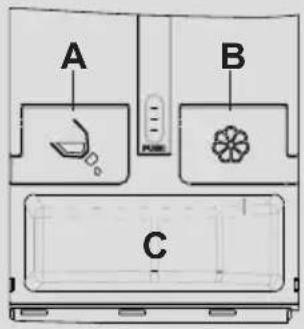
text_image
A B CA = for LIQUID laundry detergent
B = for softener
C = NO AUTOMATIC DOSING: for powder detergent or liquid detergent with the specific tray provided.

WARNING:
it is necessary to clean the drawer every time it is filled or the type of detergent and softener is changed.
The drawer MUST REMAIN CLOSED during the entire wash cycle, otherwise the dosing may not work properly or water may leak.
If the detergent and/or softener have reached the minimum level in the tank, the corresponding icons will flash. It will however still be possible to complete a number of washing cycles.
9. DAILY USE
This device can automatically adjust the level of water to the amount and type of laundry. With this system, energy consumption is reduced and washing times are considerably shortened.

WARNING:
touching the display in the first few seconds after you have plugged in the appliance could interrupt its self-calibration procedure, thus jeopardising the appliance's proper functioning. In this case, take out the plug and repeat the operation.
Quick guide
Please read the wash cycle table and carry out all steps in the order set out in the instructions.
- Switch the device on by pressing ON/OFF.
- Swipe left or right on the screen or press the arrows on the screen to display the available programmes.
- Select the required programme by pressing on the corresponding icon.
- You can change the programme settings (e.g. temperature and spin speed) by selecting the specific icon and swiping along the ring dial.
- Select the options you want among the
available ones after selecting the icon. - Press START to start the programme.
- Switch off the device at the end of the cycle by pressing ON/OFF for at least 3 seconds.

Should there be a power cut when the device is running, a special memory feature saves the settings and, when power returns, the appliance resumes the cycle from where it left off.
Technical data
Water pressure:
min 0.05 Mpa / max 0.8 Mpa
(0.05 MPa dispenses approximately 1 litre of water in 10 seconds)
Power input / Power current fuse amp / Supply voltage: See rating plate.
Start programme
Close the door BEFORE pressing START.
● To start the cycle with the selected settings, press START. When the cycle has started, the time remaining until the end of the cycle will be displayed.
- If you want to modify the selected programme, select the options you require, change the default settings and then press START to begin the cycle.
Only options compatible with the programme you have chosen can be selected.
● After switching on the appliance, wait a few seconds for the programme to start running.
PROGRAMME DURATION
- When selecting a programme, the duration of the cycle will be automatically shown; this time may vary depending on the options you select.
● After starting the programme, the display will keep you constantly updated on the time remaining until the end of the wash cycle.
● The appliance calculates the time remaining based on a standard load, but during the cycle the machine may change it depending on the volume and composition of the load.
PROGRAMME END
● After the display shows the cycle has ended and the DOOR LOCK light has switched off, you can open the door.
If the REMOTE CONTROL function is active, the door will remain locked (and the light on) until it is deactivated.
PAUSING THE MACHINE
- Press PAUSE to stop the ongoing cycle for a short time.
For safety reasons, in some phases of the wash cycle, the door can only be opened if the level of the water is below the door's lower rim and the temperature is below 45°C. If these conditions are met, wait for the DOOR LOCK icon to switch off before opening the door.
- Press the START button again to resume the programme from where it left off.
CANCELLING A PRESET CYCLE
- To cancel the programme, press the STOP button.
- Wait for the DOOR LOCK light to turn off before opening the door.

FAVOURITES menu
If you frequently use a programme you have customised to suit your needs, the appliance can memorise the settings by saving it among your favourites, so you can quickly retrieve it. You can save up to 6 programmes.
- SAVING
- Select a programme, change the temperature, spin speed and, if required, choose other options, then press
● After you have memorised it, it will be saved among your FAVOURITES in the home page.
● Every memorised programme will be saved in chronological order and identified by a number from 1 to 6 (from the oldest to the most recent).
- DELETING
- To delete one of your favourite programmes, keep its icon pressed for approximately 3 seconds and then press
Last programme used
The home display screen will always show the last programme you used, with the various chosen options, so you can select it quickly.

Setting the temperature
- By selecting the specific icon and swiping along the ring dial, you can change the temperature of the wash cycles.
To avoid damage to fabrics, it is no possible to increase the temperature above the highest temperature established for each programme.
- If you want a cold wash, all the lights must be off.

Setting the spin speed
- By selecting the specific icon and swiping along the ring dial, you can reduce the permitted spin speed in the selected programme, until there is no spin at all.
- Unless otherwise stated on the item's label, you can spin the item at the highest speed in the programme.
To avoid damage to fabrics, it is no possible to increase the spin speed above the highest speed established for each programme.
- The spin speed can be changed at any time, even without putting the machine in PAUSE mode.

DELAY START
● The start of the wash cycle can be delayed by up to 24 hours.
● Proceed as follows to set a delayed start:
- Select the programme you have chosen, changing the default settings if you need to and choosing the options you wish.
- Select the delay start icon.
-
Set the desired delay by swiping along the ring dial.
-
Confirm using the icon.
- Press the START button to begin the countdown; the programme will start automatically at the end of the countdown.
- You can cancel the delay start by pressing STOP. In this case, you will have to select the delay start icon again to modify or remove the delay.
- Confirm using the icon.
OPTIONS
One or more options can be chosen among the available ones for each programme:
- Select the 📊 icon.
- Pressing the displayed icons will show drop-down menus containing the available options.
- Select the icon of the drop-down menu specific for the chosen option (the icon will turn red).
Options that are incompatible with the selected programme will appear grey (off).

- Exit the main options menu by selecting the ☐.
To display the descriptions regarding each option's function, select the i icon.
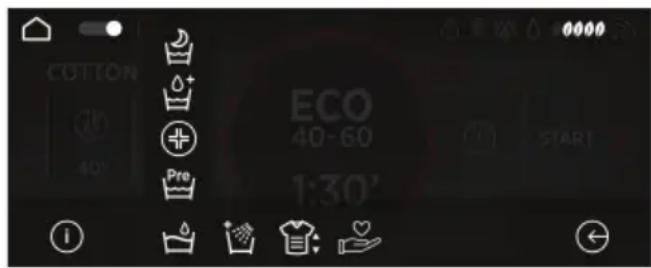
text_image
COTTON 40' Pre ECO 40-60 1:30' START- PRE-WASH
● This option allows you to have a pre-wash, which is very useful for heavily soiled laundry (can only be used in some programmes).
If the automatic detergent dispensing function is disabled, you must put powder detergent directly into the laundry drum for the pre-wash. In this case, it is recommended you use only 20% of the quantity advised on the detergent's packet.
- HYGIENE
It can be activated only when the wash temperature is at least 60^ C. Using this option, laundry can be sterilised by keeping the temperature constant throughout the wash cycle.
- AQUAPLUS
- With this option (available only for some programmes), the machine uses a greater amount of water which, jointly with the new combined action of spin cycles while loading and draining water, delivers perfectly cleaned and rinsed items. The detergent dissolves fully and effective cleaning action is guaranteed.
- NIGHT & DAY
- This option limits the speed of intermediate spins to 400 rpm (where set), increases the level of water during rinses and leaves items immersed in water at the end of last rinse, so the fabric fibres stretch out completely.
● During the drum water retention phase, the machine is in pause mode. - Press START to end the cycle with the spin (which can be reduced or removed with the specific button) and drain phase.
- An electronic control enables the appliance to drain water silently during the intermediate phases, which makes this option very useful for night washes.
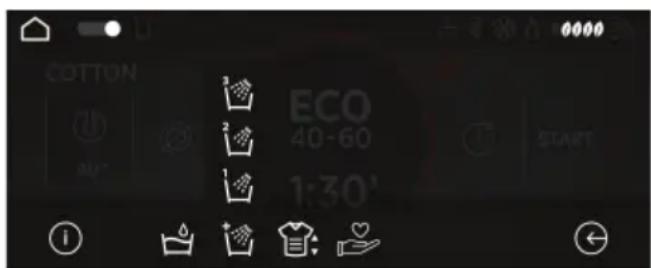
text_image
COTTON ECO 40-60 1:30' START- EXTRA RINSE
● This button allows to add some rinses at the end of the wash phase. The maximum number of washes depends on the chosen programme.
- This function has been specifically studied for people with delicate and sensitive skins, who can have allergic reactions or irritation when exposed to even tiny amounts of detergent residues.
- This function is also recommended for children's clothes and delicates in general, or when washing terrycloth, as the fibres of this fabric have a greater tendency to retain detergent.
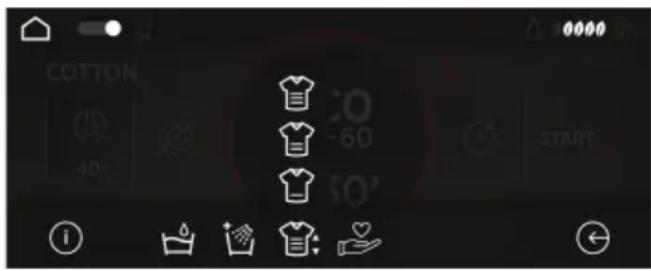
text_image
COTTON 40 30 -60 50' START ① ② ③ ④ ⑤ ⑥ ⑦ ⑧ ⑨ ⑩ ⑪ ⑫ ⑬ ⑭ ⑮ ⑯ ⑰ ⑱ ⑲ ⑳ ㉑ ㉒ ㉓ ㉔ ㉕ ㉖ ㉗ ㉘ ㉙ ㉚ ㉛ ㉜ ㉝ ㉞ ㉟ ㉳ ㉟ ㉟ ㉟- STAIN LEVELS
- When selecting a programme, the default stain levels for the programme will be automatically selected.
- This option allows you to choose one of 3 levels of wash intensity, depending on how soiled your laundry is, by modifying the duration of the selected programme (option available for only some programmes).
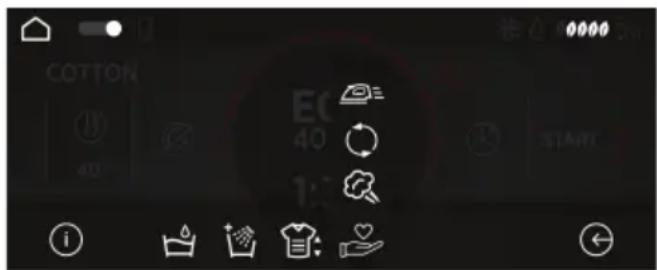
text_image
COTTON EC 40 START i i i- ACTIVE STEAM
- With this option, a specific steam treatment can be added at the end of some wash cycles.
● The active steam function acts on wet items, softening creases and making them easier to iron out. - Fibres are regenerated and refreshed while bad odours are removed from the items.
- A dedicated steam treatment has been studied for each programme, to ensure the highest washing efficiency according to the items' fabrics and colours.
movements, avoiding bad smells and reducing creases. To deactivate this function, switch off the appliance.
- EASY IRON
- KEEP FRESH
This function allows you to minimize With this function, at the end of the wash creases as much as possible, eliminating cycle, the machine will keep your laundry the intermediate spins or reducing the fresh thanks to special, delicate drum intensity of the last one.

Table of programmes
| PROGRAMME |  (see control panel) (see control panel) | 1) (MAX.) (MAX.) | 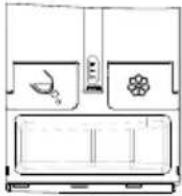 | |||||||||
| 7kg | 8kg | 9kg | 10kg | 11kg | 12kg | 13kg | 14kg |  |  | |||
 | WHITES | 7 | 8 | 9 | 10 | 11 | 12 | 13 | 14 | 90° | ● | ● |
 | ECO 40-60 | 7 | 8 | 9 | 10 | 11 | 12 | 13 | 14 | 60° | ● | ● |
 | SYNTHETIC AND COLOURED | 3,5 | 4 | 4,5 | 5 | 5,5 | 6 | 6,5 | 7 | 60° | ● | ● |
 | WOOL | 1 | 2 | 2 | 2 | 2 | 2,5 | 2,5 | 2,5 | 40° | ● | ● |
 | DELICATES | 2,5 | 2,5 | 2,5 | 2,5 | 2,5 | 3 | 3 | 3,5 | 40° | ● | ● |
 | 20°C | 7 | 8 | 9 | 10 | 11 | 12 | 13 | 14 | 20° | ● | ● |
| [3T8S] | RINSE | - | - | - | - | - | - | - | - | - | ● | |
 | DRAIN & SPIN | - | - | - | - | - | - | - | - | - | ||
 | TOTAL CARE | 3,5 | 4 | 4,5 | 5 | 5,5 | 6 | 6,5 | 7 | 30° | ● | ● |
| [54WS] | RAPID 14' | 1 | 1,5 | 1,5 | 1,5 | 1,5 | 2 | 2 | 2 | 30° | ● | ● |
| 2,5 | 2,5 | 2,5 | 2,5 | 2,5 | 3 | 3 | 3 | 30° | ● | ● | ||
| 3,5 | 3,5 | 3,5 | 3,5 | 3,5 | 4 | 4 | 4 | 40° | ● | ● | ||
| ALL IN ONE 59' | 7 | 8 | 9 | 10 | 11 | 12 | 13 | 14 | 40° | ● | ● | |
 | ALL HYGIENE | 4,5 | 5,5 | 6 | 6,5 | 7 | 8 | 8 | 8,5 | 60° | ● | ● |
 | SILK | 1 | 2 | 2 | 2 | 2 | 2,5 | 2,5 | 2,5 | 30° | ● | ● |
 | SHIRTS | 3,5 | 4 | 4,5 | 5 | 5,5 | 6 | 6,5 | 7 | 30° | ● | ● |
 | JEANS | 3 | 3 | 3 | 3 | 3 | 3 | 3 | 3 | 40° | ● | ● |
 | BABY 60°C | 4,5 | 5,5 | 6 | 6,5 | 7 | 8 | 8 | 8,5 | 60° | ● | ● |
Please read these notes:
* Maximum load capacity of dry clothes, according to the model used (see control panel).
1) When a programme is selected, the display screen shows the recommended temperature, which can be changed (if allowed) but it can never exceed the highest possible temperature.
** STANDARD COTTON PROGRAMMES ACCORDING TO (EU) No 1015/2010 and No 1061/2010.
COTTON PROGRAMME WITH A TEMPERATURE OF 60°C.
COTTON PROGRAMME WITH A TEMPERATURE OF 40°C.
These programmes are suitable to clean normally soiled cotton laundry and they are the most efficient programmes in terms of combined energy and water consumptions for washing cotton laundry.
These programmes have been developed to be compliant with the temperature on the wash label on the garments and the actual water temperature may slightly differ from the declared temperature of the cycle.

Description of programmes
To clean different types of fabrics and various levels of dirt, the washing machine has specific programs to meet every need of washing (see table of programmes).
Choose programme in accordance with the laundry instructions appearing on labels, especially the maximum recommended temperature.
WHITES
Made to have a perfect washing. The final spin at maximum speed gives more efficient removal.
ECO 40-60
The ECO 40-60 programme is able to clean normally soiled cotton laundry declared to be washable at 40^ C or 60^ C, together in the same cycle. This programme is used to assess the compliance with the EU Ecodesign legislation (environmentally friendly products design).
SYNTHETIC AND COLOURED
This programme allows you to wash different type's fabrics and different colours all together. The rotation movement of the drum and the water levels are optimized both during the washing the rinsing phase. The accurate spin action, ensures a reduced formation of creases in the fabrics. Thanks to ACTIVE CARE technology, a complete washing cycle optimization is possible.

WARNING:
IMPORTANT WASH PERFORMANCE ADVICE.
● New, coloured garments should be washed separately for at least 5 or 6 washes.
● Certain large dark items such as jeans and towels should always be washed separately.
● Never mix NON COLOURFAST fabrics.
WOOL
This program performs a wash cycle dedicated to the wool fabrics that can be washed in a washing machine, or the articles to be washed by hand.
If the detergent loaded in the automatic dosing system is not specific for WOOL, it is recommended, for optimal performance and garment protection, to disable the automatic dosing and load a dose of specific detergent directly into the tray.
DELICATE
This program has reduced periods of drum rotation during the cycle and is particular suitable or washing delicate fabrics.
The wash cycle and rinses are carried out with a high level of water to ensure the best performance.
20°C
This innovative programme, allows you to wash different fabrics and colours together, such as cottons, synthetics and mixed fabrics at only 20^ C and provides an excellent cleaning performance. Consumption on this program is about 40% of a conventional 40^ C cottons wash.
RINSE
This program performs 3 rinses with an intermediate spin. It is used for rinsing any type of fabric, for example after a wash carried out by hand.
DRAIN & SPIN
This programme will make the machine drain the water directly and carry out a high speed spin.
If you want to reduce the spin speed, ju touch or swipe along the ring dial.
If you remove the spin, only draining the water will be possible.
TOTAL CARE
This new program allows to wash together garments made of different colors and fabrics, keeping the original aspect and consistence of clothes. The new ACTIVE CARE technology, through a perfect mix of water and detergent, guarantees the maximum care of your clothes, at a 30° temperature with a perfect washing performance.
RAPID 14/30/44 MIN/ALL IN ONE 59 MIN.
After selecting the specific icon, touch the ring dial to choose one of the 4 available quick programmes.
- RAPID 14/30/44 MIN
Washing cycle suggested for low loads and slightly dirty. With this program it is recommended to reduce the quantity of detergent normally used, in order to avoid unnecessary waste.
- ALL IN ONE 59 MIN.
This program allows you to wash mixed fabrics such as cottons, synthetics and mixed fabrics in only 59 minutes, using the full load of the washing machine, at 40°C (or less) temperature. This program is particularly suited to slightly dirty fabrics.
ALL HYGIENE
This program ensures deep cleaning by optimizing the cycle in terms of temperature and rinses, eliminating allergens and detergent residues. Ideal for sensitive skin. Designed for cotton garments, it provides a 60^ C temperature and is recommended for a reduced load.
SILK
This programme allows a delicate washing cycle for garments specified as "Hand Wash only" and laundry items made from Silk or specified as "Wash as Silk" on the fabric label.
SHIRTS
The washing cycle is optimized to reduce the creation of creases, keeping an excellent washing performance. It is also possible to further reduce the spin speed, to ensure an easier ironing.
JEANS
This program has been designed to have the highest quality cleaning of fabrics such as denim: ideal for removing dirt without affecting the elasticity of the fibers.
BABY 60°C
This program allows you to wash all bak clothes getting a perfect clean and sanitizing effect, setting the temperature at 60^ C minimum. To optimize the result of the sanitizing effect we recommend the use of powder detergent.
10. TROUBLESHOOTING AND WARRANTY
If you believe the washing machine is not working correctly, consult the quick guide provided below which includes some practical tips on how to fix the most common problems.
ERROR CODE FORMAT
- Models with a display: the error is shown by a number preceded by the letter "E" (example: E2 = Error 2).
- Models without display: an error is shown by a sequence of flashes of every LED. The error code is shown by the number of flashes followed by a pause of 5 seconds (example: two flashes – pause 5 seconds – two flashes – repeating = Error 2).
| Error shown | Possible causes and practical solutions |
| E2 (with display)2 flashes of the LEDs (without display) | The machine cannot load water. |
| Make sure the water supply tap is open. | |
| Make sure the water supply hose isn't bent, kinked or trapped. | |
| Make sure the drain pipe is at the proper height (see installation section). | |
| Close the water supply tap, unscrew the filler hose from the back of the washing machine and make sure the “anti-sand” filter is clean and not blocked. | |
| Check that the filter is not clogged or that there are no foreign bodies inside the filter compartment that can obstruct the proper flow of water. | |
| E3 (with display)3 flashes of the LEDs (without display) | The washing machine does not drain water. |
| Check that the filter is not clogged or that there are no foreign bodies inside the filter compartment that can obstruct the proper flow of water. | |
| Make sure the drain hose isn't bent, kinked or trapped. | |
| Make sure the home drainage system is not blocked and is allowing water to flow through without obstruction. Try to drain the water in the sink. | |
| E4 (with display)4 flashes of the LEDs (without display) | There is too much foam and/or water. |
| Ensure the correct amount of detergent is being used and the detergent is designed for use in a washing machine. | |
| E7 (with display)7 flashes of the LEDs (without display) | Door problem. |
| Make sure the door is correctly closed.Make sure the clothes inside the drum are not preventing the door from closing fully. | |
| If the door is locked, turn off and unplug the washing machine from the electrical supply socket, wait 2-3 minutes and reopen the door. | |
| Any other code | Turn off and unplug the washing machine, wait a minute. Turn on the machine and restart a program. If the error occurs again contact an Authorised Customer Service Centre directly. |
OTHER ANOMALIES
| Problem | Possible causes and practical solutions |
| The washing machine does not work / start | Make sure the product is plugged into a working supply socket. |
| Make sure power is on. | |
| Make sure the wall socket is working, testing it with another appliance such as a lamp. | |
| The door may not be correctly closed: open and close it again. | |
| Check whether the required program was correctly selected and the start button pressed. | |
| Make sure the washing machine is not in pause or time delay mode. | |
| Water leaked on the floor near the washing machine | This may be due to a leak from the seal between the tap, supply hose and fill valve; in this case, replace it and tighten the hose connections correctly. |
| Make sure the front filter is correctly closed. | |
| The washing machine does not spin | The machine is fitted with a detection system that protects the load and product from damage if the load is not balanced before spinning. This may result in:- · The machine attempts to balance the load, increasing the time of spin. · Reduction of the speed of spin to decrease vibrations and noise. · The spin cycle aborting to protect the machine and load. If this is experienced remove the load de-tangle it, reload it and restart the spin program. |
| This could be due to the fact that water has not been completely drained: wait a few minutes. If the problem persists, see Error 3 section. | |
| Some models include a "no spin" function: make sure it is not selected. | |
| Check which options are selected and their effect on the spin cycle. | |
| Excessive detergent can impede the spin cycle, ensure the correct amount of detergent is being used. | |
| Strong vibrations / noises are heard during the spin cycle | The washing machine may not be fully levelled: if necessary, adjust the feet as indicated in the specific section. |
| Make sure transport screws, rubber bungs and spacer tubes were removed. | |
| Make sure there are no foreign objects inside the drum (coins, hinges, buttons, etc...). |
The standard manufacturer warranty covers faults caused by electrical or mechanical faults in the product due to an act or omission of the manufacturer. If a fault is found to be caused by factors outside the product supplied, miss-use or as a result of the instructions on use not being followed, a charge may be applied.
The use of ecological detergents without phosphates may cause the following effects:
- cloudier rinse drain water: This effect is tied to the suspended zeolites which do not have negative effects on rinse efficiency.
- white powder (zeolites) on laundry a the end of the wash: this is normal, the powder is not absorbed by fabric and does not change its colour.
To remove the zeolites, select a rinse programme. In the future consider us in slightly less detergent.
- foam in the water at last rinse: this does not necessary indicate poor rinsing. Consider using less detergent in future washes.
- abundant foam: This is often due to the anionic surfactants found in the detergents which are hard to eliminate from laundry.
In this case, do not re-rinse to eliminate these effects: it will not help at all.
We suggest conducting a maintenance wash using a proprietary cleaner.
If the problem persists or if you suspect a malfunction, immediately contact an Authorised Customer Service Centre.
It is always recommended to use original spare parts, that are available at our Authorised Customer Service Centres.
Warranty
The product is guaranteed under the terms and conditions stated on the certificate included with the product. The certificate has to be stored so as to be shown to the Authorized Customer Service Centre in case of need. You can also check the warranty conditions on our web site. To obtain assistance, please fill in the form on-line or contact us at the number indicated on the support page of our web site.
By placing the mark on this product, we are confirming compliance to all relevant European safety, health and environmental requirements which are applicable in legislation for this product.
The manufacturer declines all responsibility for any printing errors in the booklet included with this product. Moreover, it also reserves the right to make any changes deemed useful to i products without changing their essential characteristics.
text_image
Diagram showing a hand holding a water pump switch next to a valve, with step number 3 and dashed outline indicating the process.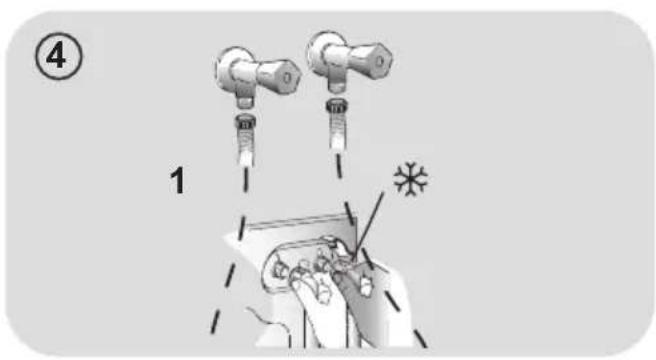
text_image
④ 1 *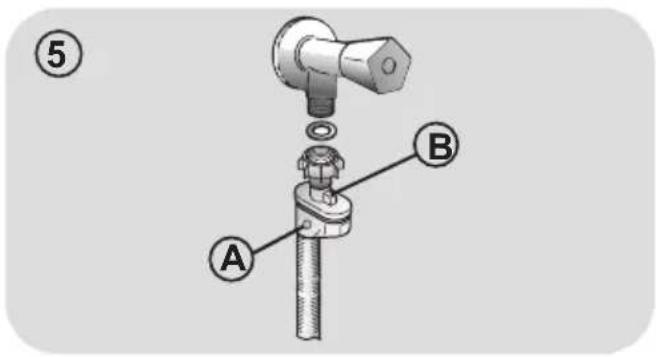
text_image
⑤ A B
text_image
⑥ A BInstalación
text_image
Diagram showing a mechanical or electronic component with labeled parts and directional arrows indicating movement or force.natural_image
Illustration of a hand pressing down on a mechanical device with a foot (no text or symbols)natural_image
Illustration of hands holding a device with arrows indicating motion (no text or symbols)text_image
Diagram illustrating a mechanical device operation with labeled steps A and B showing hand changes and rotation directions.text_image
Diagram illustrating two steps of a device operation: step 1 shows a mechanical component being inserted, while step 2 shows a tool interacting with a device.
6. PANEL DE CONTROL

text_image
1 Hoover1. ON/OFF
PÁGINA PRINCIPAL
text_image
1 7 6 5 2 3 FAVOURITE 4 LAST USED 5 TOTAL CAREtext_image
Diagram showing a hand holding a water pump switch next to a valve, with step number 3 and dashed outline indicating the process.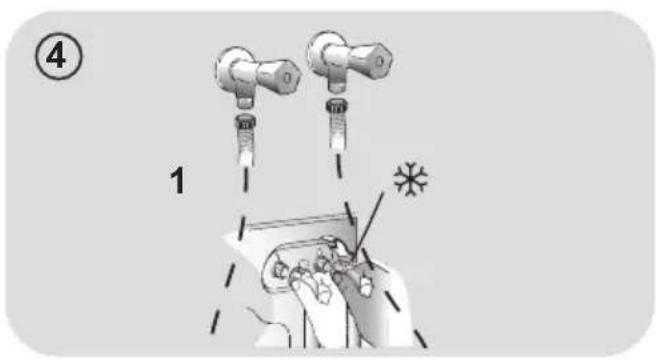
text_image
④ 1 *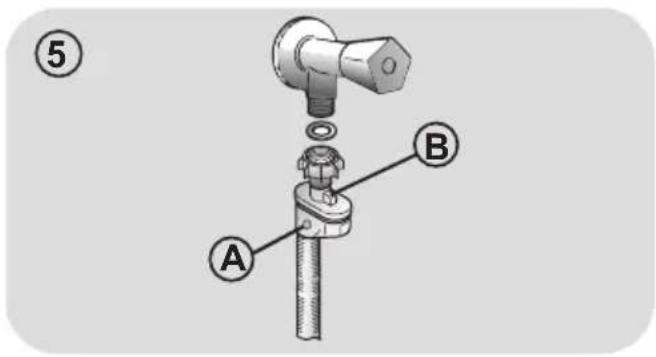
text_image
⑤ A B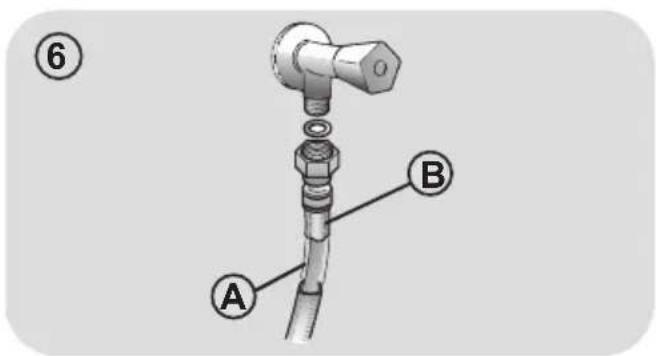
text_image
⑥ A BPositionnement
text_image
Diagram showing two labeled components (1 and 2) with arrows indicating direction of movement or assembly.natural_image
Diagram of a foot pressing down on a mechanical device with a base and clamped components (no text or symbols)
natural_image
Illustration of two hands inserting a device into a slot (no text or symbols visible)text_image
Diagram illustrating mechanical assembly steps with labeled parts A and B, showing hand positions and rotation arrows.text_image
Diagram illustrating two steps of a device's internal mechanism, showing hand positioning and tool application.
6. PANNEAU DE COMMANDE

text_image
1 Hoover1. MARCHE/ARRÊT
ÉCRAN D'ACCUEIL
text_image
1 FAVOURITE 2 3 TOTAL CARE 4 LAST USED 5 6 7 8 9 0000ÉCRANS AVEC CONFIGURATIONS, PROGRAMMES ET OPTIONS
text_image
TOTAL CARE 40° 1400 1:49' 3 START 6 2 + OPTIONS + 7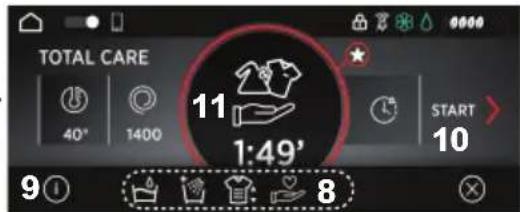
text_image
TOTAL CARE 40° 1400 11 1:49' START 10 9①②③④⑤⑥⑦⑧⑨⑩⑪⑫⑬⑭⑮⑯⑰⑱⑲⑳⑴⑵⑶⑷⑸⑨⑪⑫⑬⑭⑮⑯⑰⑱⑲⑳⑺⑳⑳⑰⑱⑲⑳⑺⑳⑳⑭⑮⑯⑰⑱⑲⑳⑴⑵⑶⑷⑧⑨⑩⑪⑫⑬⑭⑮⑯⑰⑱⑲⑳⑴⑵⑶⑷⑧⑨⑩⑪⑫⑬⑭⑮⑯⑰⑱⑲⑳⑴⑤⑥⑦⑧ 88. DIVERSES CONFIGURATIONS

Menu CONFIGURATIONS
- "HEY WASH. VOLUME MUET"