EasyManual
SP 6000 - Heating Orbegozo - Free user manual and instructions
Find the device manual for free SP 6000 Orbegozo in PDF.



| Technical Features | Electric heating, 2000 W power, adjustable thermostat, 3 heat levels. |
|---|---|
| Dimensions | Compact dimensions for easy storage. |
| Usage | Ideal for supplementary heating in small and medium rooms. |
| Maintenance | Regular cleaning of the grille to ensure good air circulation. |
| Safety | Overheat protection, automatic shut-off in case of tipping. |
| General Information | Modern design, lightweight and portable, easy to carry from one room to another. |
Frequently Asked Questions - SP 6000 Orbegozo
User questions about SP 6000 Orbegozo
0 question about this device. Answer the ones you know or ask your own.
Ask a new question about this device
Download the instructions for your Heating in PDF format for free! Find your manual SP 6000 - Orbegozo and take your electronic device back in hand. On this page are published all the documents necessary for the use of your device. SP 6000 by Orbegozo.
USER MANUAL SP 6000 Orbegozo
- This appliance can be used by children aged from 8 years and above and persons with reduced physical, sensory or mental capabilities or lack of experience and knowledge if they have been given supervision or instruction concerning use of the appliance in a safe way and understand the hazards involved. Children must never play with the appliance. Cleaning and user maintenance must never be carried out by children without supervision.
- Children should be supervised to ensure that they do not play with the appliance.
- WARNING: In order to ensure your children's safety, please keep all packaging (plastic bags, boxes, polystyrene etc.) out of their reach.
- If the supply cord is damaged it must be repaired by the Authorized Service Agent.
- Never pull on the cord when unplugging.
- Do not use the unit with a damaged cord or plug, or if it is not working properly.
- Do not handle the appliance with wet hands.
- Never immerse the appliance in water or any other liquid.
9.Make sure the appliance has been unplugged before cleaning. - This appliance must be installed following the national
regulations for electrical installations.
- This appliance is for household use only.
- In case that you need a copy of the instruction manual, you can ask for it writing an email to sonifer@sonifer.es.
-
WARNING: In case of misuse, there is a risk of possible injury.
-
WARNING: In order to avoid overheating, do not cover the heater
- Children of less than 3 years should be kept away unless continuously supervised.
- Children aged from 3 years and less than 8 years shall only switch on/off the appliance provided that it has been placed or installed in its intended normal operating position and they have been given supervision or instruction concerning use of the appliance in a safe way and understand the hazards involved. Children aged from 3 years and less than 8 years shall not plug in, regulate and clean the appliance or perform user maintenance.
- CAUTION: Some parts of this product can become very hot and cause burns. Particular attention has to be given where children and vulnerable people are present.
-
The device should not be placed immediately below a socket base.
-
Do not place a heater in use near curtains, furniture, wood paneling or combustible material which can deteriorate with heat.
- WARNING: This heater isn't equipped with a temperature control room. Do not use this heater in small rooms that are occupied by people who cannot leave the room by themselves, unless you provide surveillance.
- The appliance must be installed so that the switches, thermostat and power cable cannot be touched directly or indirectly by a person in the bath or shower.
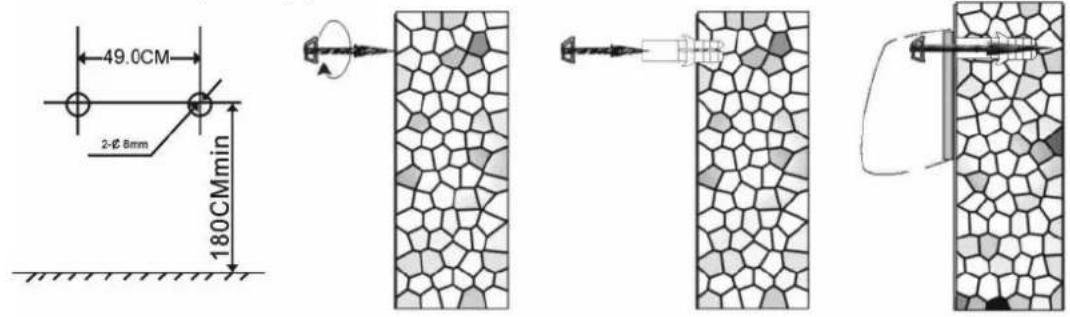
- The heating appliance must be installed at least 1.8 ~m above the ground.
- The air outlet must be hanged downward on the wall and horizontal. Do not install the appliance differently or diagonally.
- Do not use this heater with a programmer, timer or any other device that switches the heater on automatically, since a fire risk exists if the heater is covered or positioned incorrectly.
- Keep the appliance at least 1 meter away from flammable materials, such as furniture, curtains, bed clothing, clothes or paper.
- Do not use the heater in areas where petrol, paint or other flammable substances are used or stored.
TECHNICAL DATA
| Type | Specification | Voltage | Frequency | Power |
| SP 6000 | Remote Control | 220-240V | 50 Hz | 1000W/2000W |
INSTALLATION ON THE WALL
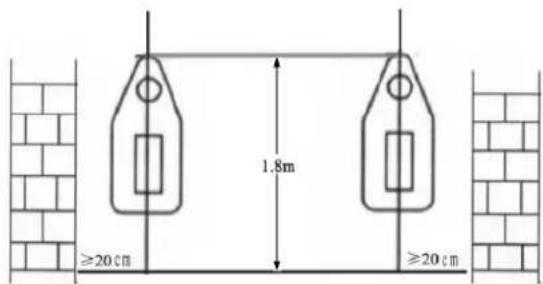
Drill two holes in wall and have a distance of 1.8m from the ground. The diameter of the hole just contained the inflated plastic pipe. Introduce inflated plastic pipe into the holes and screw supplied screws letting them stick out a little. Hang the appliance on the screws.
FUNCTION OPERATION (CONTROL PANEL AND REMOTE CONTROL)
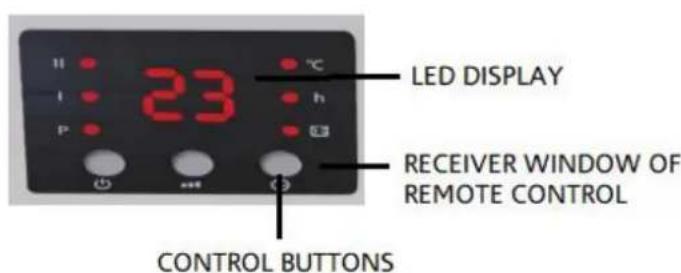
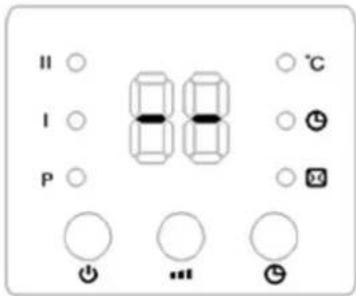
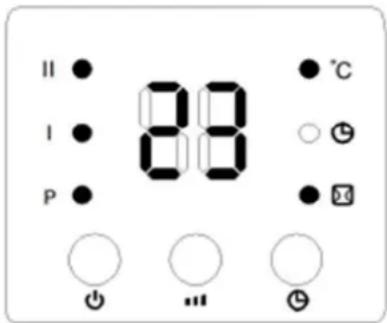
CONTROL PANEL
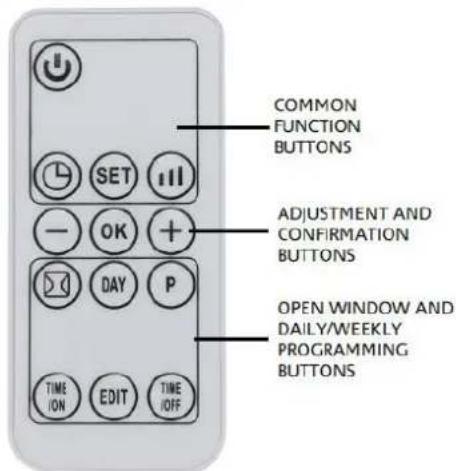
REMOTE CONTROL
Control panel operation
- Plug in and switch on by pressing the red switch 0 / 1 , enter into standby mode and display shows "S".
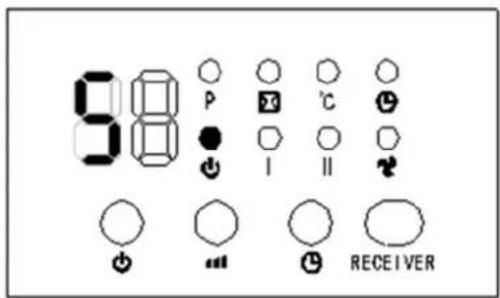
- Press button, enter into fan mode and display shows " - -".
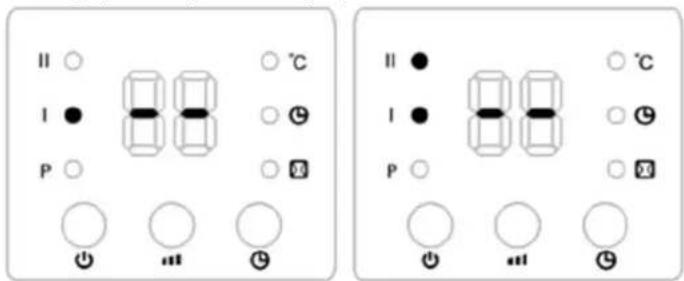
- Press button once, the product Works with low heating (1000W) and display shows - - / I . Press again, changes to high heating (2000W) and display shows - - / I / I .
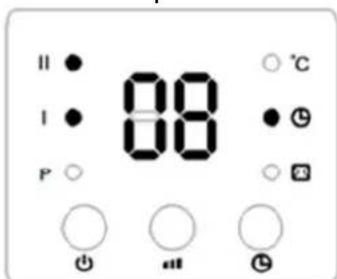
- Press button to set timer (1-12 hours). Pressing the button one time increases one hour for timer. After setting time, the display will show current setting time for 5 seconds, then resume to previous display, meanwhile the light of will on. Below photo is an example of setting 8h:
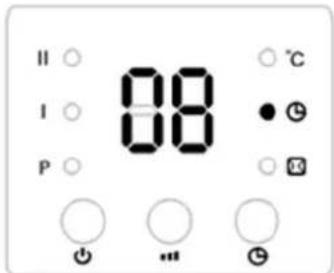
- "Turn on" timer: in standby mode, press timer button, you can set the appointment turn-on time in 1-12 hours. After complete setting, the display shows the appointment turn on time and also the light is on. The display automatically decreases 1 hour for each hour passed. When the appointment power-on time arrived, the product will automatically turns on. The default setting temperature is 23^ during appointment turn-on. Below pictures is an example to set appointment turn on time to 8 hours:
Note: If not setting the temperature and weekly program, the product will automatically turn-off after 12 hours of continuous work and enter into standby.
Function operation (ONLY by remote control)
Note: During use of remote control ensure it aim to receiver on appliance to work correctly.
- Set current TIME/DAY (can set both under standby mode & working status): Press SET button for one time, the display shows the hour, press “+/-” to set current hour (24 hours); press SET again, display shows minutes, press “+/-” to set current minute (00-59 minutes), then press SET for third time, the display shows the day “d7”, press “+/-” to set current day (Monday-Sunday: d1-d7). The press OK to confirm the setting, display will show previous settings. For example: setting to Wednesday, 9:30 under 25^ under heating II, please refer to the following photos:
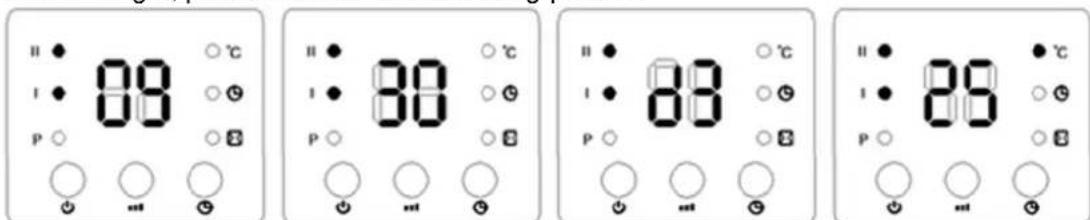
Note: about setting HOUR/DAY, it keeps while the appliance is working or in standby. If you switch off or unplug this configuration will erase and you have to set it again.
- Set temperature. During working status, press “ / ”, display shows “23” as default. Press “ / ” to set desired temperature (temperature range 10 - 49^ ), press to confirm the setting. For example: the room temperature is 15^ , when set temperature to 25^ , the display shows as below:
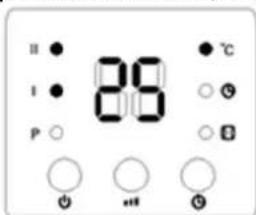
Note: When setting temperature, appliance will use SMART working way:
- If room temperature is 2^ or lower than set temperature, the heater will work in max power heating.
- If room temperature is less than 2^ of set temperature without reach it, heater will work in min power heating.
- If room temperature is the same as set temperature, heater will work in fan mode for 30 seconds to cool down the appliance and protect its components, after that it will enter in standby mode.
- After this situation if room temperature is lower than 2^ C of set temperature, heater will turn on again and work as same way.
If you want to cancel the setting temperature, press button to choose the heating I or II, the product will work without setting temperature. While the display will go off and will show “- - ”
Set weekly program (ONLY by remote control)
After complete setting of current TIME/DAY, below is the steps to set weekly program:
a. Press , the product enter into working status.
b. Press , the display shows "P", it enter into weekly program setting.
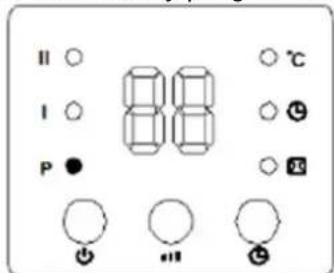
c. Press , display will show d1~d7, set day which you want to program (Monday-Sunday: d1~d7). Example for Monday below.
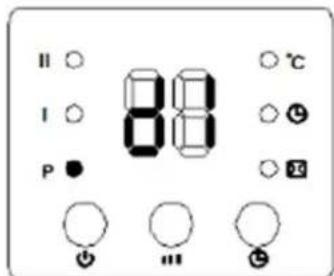
Note: It is necessary to distinguish between day of the week (d1-d7) and period of operation in each day (P1~P6).
d. Press , display will show P1~P6 (in each day, you can set max. 6 periods of time). For example: First period of time P1.
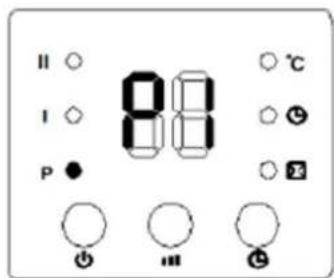
e. Press (TIME /on), display will show "00" by default. Press (TIME /on) continuously for select time of switch on. Example of TIME ON 7:00 am (range setting hours: 0-24h).
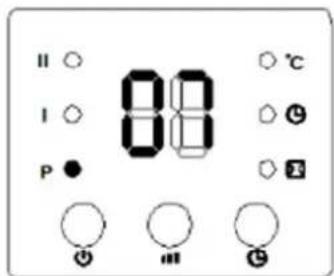
F. Press display will show before selected time of switch on. Press continuously to set the switch off time. Such as set the shutdown time at 13:00:
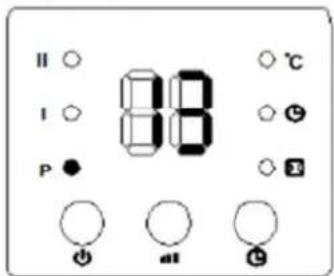
G. Press "O/ O" to set the target temperature (temperature range 10-49°C).
H.By last press to confirm the configuration. Repeat step b-g to set more days.
i. To cancel the weekly program, press , "P" light in display will light off. The weekly program will be off. The heater will work in previous mode.
- After weekly program is set, press (DAY) / (EDIT) / (TIME) / (MIN) to check the program of each day and each period..
- Press “ / ” to check the desired temperature in each program.
- The switch on periods goes 0-24 hours, you can set the minutes.
- TIME OFF cannot be less than TIME ON.
- When TIME ON is the same as TIME OFF, heater will be into standby mode.
Set open window detection (only by remote control).
a. Press heater will enter into working status. Heating for a moment until stable.
b. Press by remote control, it will light the logo in display. Display will show "23" as default temperature. Press 1 to set target temperature. During open window detection mode, if room temperature drops 5 - 10^ for 10 minutes, the heater will stop working and enter into standby mode for 30 minutes. If you want to turn it on again press
To disconnect open window detection mode press again and symbol will turn off in display. Example of display with follow situation: room temperature lower than 23^ , selected temperature 23^ , open window detection mode turn on.
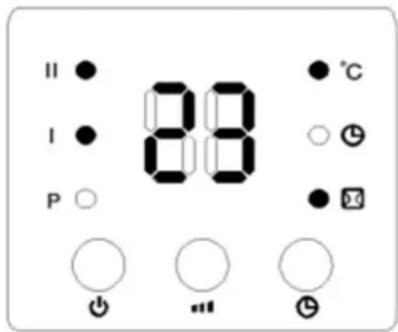
c. Open window detection mode and weekly program can work at the same time. Heater will work depending the program and set temperature and if room temperature drops 5 - 10^ for 10 minutes the heater will stop working and enter into standby mode.
CLEANING AND MAINTENANCE
Unplug from the outlet before cleaning. Allow to cool before cleaning the appliance. To clean the surface use the soft wet cloth (or cloth with some scour). Make sure that do not pour water on to the appliance. Do not use any organic solvents such as gasoline or toluene.
If you do not use the appliance for a long time, wipe off the surface and store the appliance in the original packing box at a well-ventilated place. Avoid dampness and impacts.
| Item Symbol | Value | Unit | Item Unit | |||
| Heat output | Type of heat input, for electric storage local space heaters only (select one) | |||||
| Nominal heat output | Pnom | 2.0 KW | manual heat charge control, with integrated thermostat | [no] | ||
| Minimum heat output (indicative) | Pmin | 0 | KW | manual heat charge control with room and/or outdoor temperature feedback | [no] | |
| Maximum continuous heat output | Pmax.c | 2.0 KW | electronic heat charge control with room and/or outdoor temperature feedback | [no] | ||
| Auxiliary electricity consumption | fan assisted heat output | [no] | ||||
| At nominal heat output | elmax | 0 KW | Type of heat output/room temperature control (select one) | |||
| At minimum heat output | elmin 0 KW | single stage heat output and no room temperature control | [no] | |||
| In standby mode | elsb 0.000 W | Two or more manual stages, no room temperature control | [no] | |||
| with mechanic thermostat room temperature control | [no] | |||||
| with electronic room temperature control | [no] | |||||
| electronic room temperature control plus day timer | [no] | |||||
| electronic room temperature control plus week timer | [yes] | |||||
| Other control options (multiple selections possible) | ||||||
| room temperature control, with presence detection | [no] | |||||
| room temperature control, with open window detection | [yes] | |||||
| with distance control option | [no] | |||||
| with adaptive start control | [no] | |||||
| with working time limitation | [yes] | |||||
| with black bulb sensor | [no] | |||||
| Contact details info | SONIFER SA. Avenida de Santiago 86, 30007, Murcia. Spain. | |||||
Disposal of old electrical appliances.
The European directive 2002/96/EC on Waste Electrical and Electronic Equipment (WEEE), requires that old household electrical appliances must not be disposed of in the normal unsorted municipal waste stream. Old appliances must be collected separately in order to optimize the
recovery and recycling of the materials they contain, and reduce the impact on human health and the environment.
The crossed out "wheeled bin" symbol on the product reminds you of your obligation, that when you dispose of the appliance, it must be separately collected.
Consumers should contact their local authority or retailer for information concerning the correct disposal of their old appliance.
DECLARATION OF CONFORMITY: This device complies with the requirements of the Low Voltage Directive 2014/35/EU and the requirements of the EMC directive 2014/30/EU.