
ACM730TD - Coffee machine BESTRON - Free user manual and instructions
Find the device manual for free ACM730TD BESTRON in PDF.


| Product type | Drip coffee maker |
| Brand | Bestron |
| Model | ACM730TD |
| Power supply | 230 V ~ 50 Hz |
| Power | 900 W (estimate) |
| Capacity | 10 cups (max) |
| Filter type | Permanent filter (reusable) |
| Carafe | Double-walled thermal carafe with overpressure protection |
| Anti-drip system | Yes (allows serving a cup during brewing) |
| Automatic shut-off | Yes, at end of cycle |
| Indicator light | Power button with indicator light |
| Water level | Water level indicator on reservoir |
| Descaling | Recommended regularly (depending on water hardness) |
| Materials | Plastic, glass (carafe), stainless steel (possible) |
| Safety | Overpressure protection of carafe, short power cord (estimate) |
| Cleaning | Removable parts washable in hot water, do not immerse body |
| Warranty | 60 months (according to conditions) |
| Use | Household use only |
Frequently Asked Questions - ACM730TD BESTRON
User questions about ACM730TD BESTRON
0 question about this device. Answer the ones you know or ask your own.
Ask a new question about this device
Download the instructions for your Coffee machine in PDF format for free! Find your manual ACM730TD - BESTRON and take your electronic device back in hand. On this page are published all the documents necessary for the use of your device. ACM730TD by BESTRON.
USER MANUAL ACM730TD BESTRON
- Directive Basse tension
2014/35/EU
- Directive RoHS
2011/65/EU
R. Neyman
Contrôle qualité
WAT U MOET WETEN OVER DIT APPARAAT
Congratulations with the purchase of this Bestron product. These instructions tell you how the product works and how to use it. Read the instructions carefully before you start using the appliance. Only use the appliance in the manner described in the instructions. Keep these instructions in a safe place for future reference.
Defects:
If the appliance is defective, do not try to repair it yourself. Always have a qualified mechanic carry out any repairs.
Children:
- This appliance may be used by children over the age of 8 years old and persons with reduced physical, sensory or mental capabilities or lack of experience and know-how, but only if supervised or if they have been instructed on how to use the appliance safely and are aware of its potential dangers.
- Children are not allowed to clean and maintain the appliance, except if they are over the age of 8 years old and supervised.
- Keep the appliance and the cable out of reach of children under the age of 8 years old.
- Keep an eye on children to ensure that they do not play with the appliance.
WHAT YOU SHOULD KNOW ABOUT ELECTRICAL APPLIANCES
- Check that the mains voltage corresponds with that shown on the rating plate of an electrical appliance before you use it.
- Check that the socket to which you connect the electrical appliance is earthed.
- Always install electrical appliances on a stable and level surface where it cannot fall over.
- Certain parts of an electrical appliance may become warm or sometimes hot. Do not touch them as you may burn yourself.
- Make sure your hands are dry when you touch an electrical appliance, a cord or a plug.
- Electrical appliances must be able to lose their heat to avoid fire hazards. Therefore, make sure that the appliance has sufficient clearance around it and that it does not come into contact with flammable materials. Electrical appliances must never be covered.
-
Make sure that electrical appliances, cords or plugs do not come into contact with water.
-
Never immerse electrical appliances, cords or plugs in water or any other liquid.
- Do not touch electrical appliances if they have fallen in the water. Immediately pull the plug out of the socket. Stop using the appliance
- Make sure that electrical appliances, cords and plugs do not come into contact with heat sources, such as a hot hob or open fire.
- Never let cords hang over the edge of the sink, a worktop or a table.
- Always remove plug from the socket when you are not using the electrical appliance.
- Remove the plug from the socket by pulling the plug itself and not the cord
- Regularly check if the cord of the electrical appliance is not damaged. Do not use the electrical appliance if the cord shows signs of damage. If the cord is damaged, it should be replaced by the manufacturer, a technical service provider or a person with an equivalent qualification, to avoid any danger.
- The appliance may not be switched on with the aid of an external time switch, or by a separate system with remote control.
WHAT YOU SHOULD KNOW ABOUT THIS APPLIANCE
- Be careful when using the appliance outdoors.
- Never use the appliance in damp or wet locations.
Thoroughly clean the appliance after use (see Cleaning and Maintenance). - Be careful not to burn yourself on the steam which escapes from the coffee filter.
ENVIRONMENT
- Dispose of packaging material such as plastic and cardboard boxes in the designated containers.
Do not dispose of this product as normal domestic waste at the end of its life, but hand it in at a collection point for the reuse of electric and electronic equipment. Look for the symbol on the product, the user instructions or the packaging showing the type of waste.
-
The materials can be used as indicated. By helping us reuse and process the materials or otherwise recycle the old equipment, you will be making an important contribution towards the protection of the environment.
-
Your municipality can tell you where to find the designated waste collection point in your neighbourhood.
CE DECLARATION OF CONFORMITY
This product conforms to the requirements of the following European Directives on safety:
EMC Directive
Low Voltage Directive
- RoHS Directive
2014/30/EU
2014/35/EU
2011/65/EU

R. Neyman
Quality control
OPERATION - General
The appliance is intended only for domestic use, not for professional use.
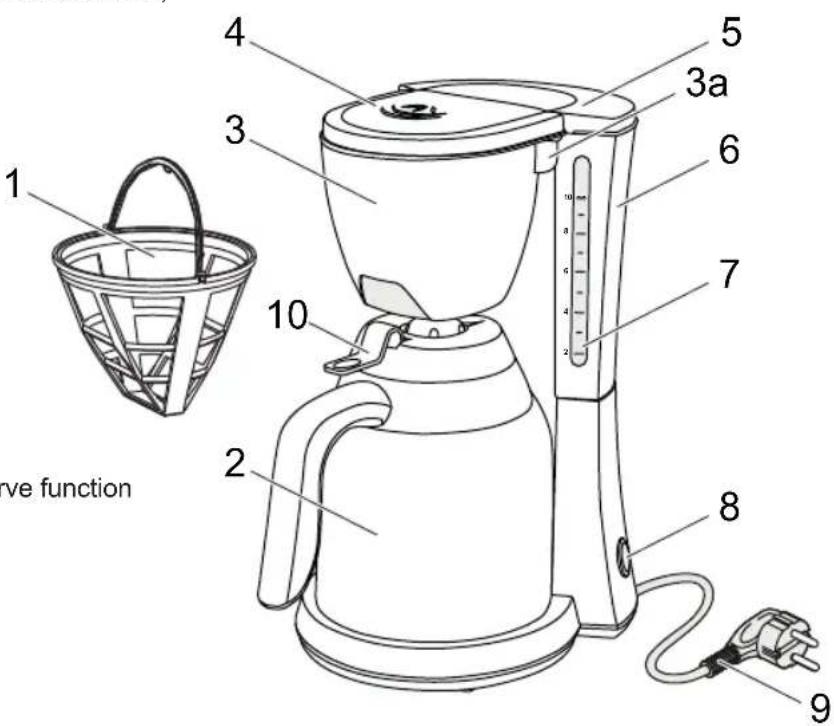
Overview
- Permanent filter
- Thermal carafe (2x)
- Filter holder with pause-and-serve function
3a. Filter holder handle - Filter vents
- Water reservoir lid
- Water reservoir
- Water-level indicator
- Start button with control light
- Power chord and plug
- Release button
OPERATION - Before first use
Clean the appliance a couple of times by filling it with water only. Please observe the following instructions. Dispose of the water after use.
OPERATION - Making coffee
- Place the appliance on a flat and steady surface. Remove the thermal carafe (2) from the platform (10).
- Open the lid (5) of the water reservoir (6). Pour sufficient water into the reservoir (not less than 2 cups and not more than 10 cups, as shown on the water-level indicator (7)).
- Open the filter holder (3) by pulling the handle towards you. Use the permanent filter (1) or put a paper filter (1× 4) in the filter holder. Fill the paper filter with the required amount of ground coffee (the customary quantity is 1 level scoop for each cup). Close the filter holder by pushing the handle back until it clicks into place.
- Place a thermal carafe on the platform.
- Connect the plug (9) to the wall socket. Switch on the appliance by pushing the start button (8). The control light will now illuminate and the coffee will be prepared.
- The pause-and-serve function enables you to pour a cup of coffee before the coffee maker has finished. Replace the carafe quickly, to prevent the filter from overflowing.
- The coffee machine automatically stops when the brewing is done. If you wish to halt the brewing prematurely, you can push the start button again. The control light will extinguish.
- Remove the plug from the wall socket.
WARNING:
- Allow the appliance to cool down before using it to brew additional coffee!
OPERATION - Overpressure protection
The thermal carafe is equipped with an overpressure protection, which makes sure that the pressure inside the carafe can not rise too high. The process of pouring coffee should therefore be done as follows:
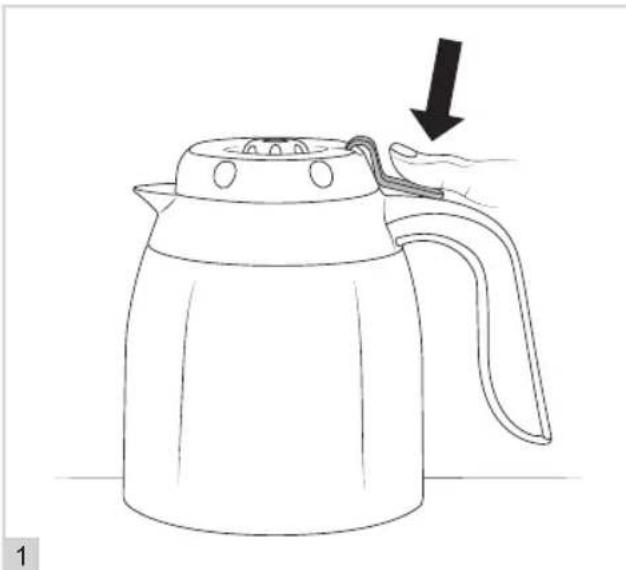
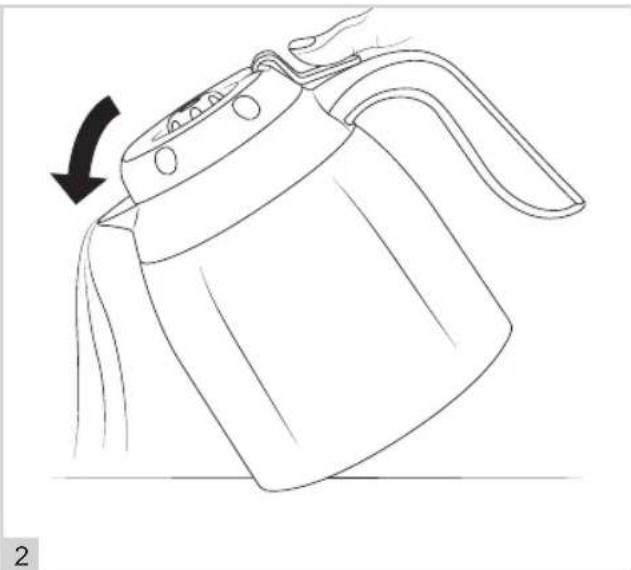
- First press the thermal carafe's release button (11).
- Only then tilt the thermal carafe to pour the coffee.
WARNING:
- If the above sequence is not followed, the thermal carafe can start to leak.
CLEANING AND MAINTENANCE
- Switch off the appliance, take the plug out of the socket, and allow the coffee maker to cool.
- Open the filter holder. Dispose of the paper filter or remove the permanent filter from the casing, clean it in warm water and dry it thoroughly.
- Remove the filter holder from the appliance by lifting it from the hinge and clean it in hot washing-up water. Rinse with clean water and dry thoroughly. Place the filter holder back on the appliance, insert the permanent filter and close the filter holder.
- Clean the thermal carafes in hot washing-up water.
- Clean the outside of the appliance with a damp cloth. Make sure no moisture gets into the appliance.
WARNING:
- Never immerse the appliance, plug or power cord in water. Never put the appliance in a dishwasher. Only the loose parts may be immersed in water.
- Never use corrosive or scouring cleaning agents or sharp objects (such as knives or hard brushes) to clean the appliance.
CLEANING AND MAINTENANCE - Descaling
Limescale can reduce the efficiency of your coffee maker. Limescale is common in areas with hard water. We advise the use of a suitable descending agent to remove any scale. Always follow the instructions for the descending agent. The amount of scale will be reduced when you use a water softener.
WARRANTY CONDITIONS
Bestron offers a 60-month warranty on this equipment against defects resulting from manufacturing and/or material errors, subject to the following conditions.
- No labour or material costs will be charged during this warranty period.
- Any repairs carried out under the warranty will not extend the warranty period.
- Faulty parts, or in the event of exchange, the faulty equipment itself, will automatically become the property of Bestron.
- The warranty is valid for the first buyer only and is non-transferable.
- The warranty is not valid for damage caused by:
Accidents
- Improper use
- Wear and tear
Neglect
- Faulty installation
- Connection to a different mains voltage than indicated on the type plate
- Unauthorised changes
- Repairs carried out by unqualified third parties
- Use in violation with the applicable statutory, technical or safety standards
-
Careless transport without suitable packaging or other protection
-
Warranty cannot be claimed:
-
For damage during transport
-
If the serial number of the appliance is removed or changed
-
Items excluded from warranty are:
Cords
Lamps
Glass parts
- The warranty does not entitle the purchaser to compensation for any damage other than replacement or repair of the faulty parts. Bestron cannot in any event be held liable for any indirect or consequential losses caused by or in relation to the equipment it has provided.
- Claims under a warranty may only be submitted to your (online) retailer or directly to the Bestron Service Department. Never send items without being asked to. We may refuse the parcel and you will be liable for the costs. Contact us first and we tell you how the appliance should be packaged and sent. Each claim under a warranty must be accompanied by the relevant receipt.
SERVICE
If an unexpected problem occurs, please contact the BESTRON service department: www.bestron.com/service
COMPLIMENT!
NEED HELP?chat WITH US! WHATSAPPCUSTOMER SERVICE

BESTRON.COM/WHATSAPP

- WAT U MOET WETEN OVER DIT APPARAAT
- Defects:
- Children:
- WHAT YOU SHOULD KNOW ABOUT ELECTRICAL APPLIANCES
- WHAT YOU SHOULD KNOW ABOUT THIS APPLIANCE
- ENVIRONMENT
- CE DECLARATION OF CONFORMITY
- OPERATION - General
- Overview
- OPERATION - Before first use
- OPERATION - Making coffee
- WARNING:
- OPERATION - Overpressure protection
- CLEANING AND MAINTENANCE
- CLEANING AND MAINTENANCE - Descaling
- WARRANTY CONDITIONS
- SERVICE
- COMPLIMENT!
Brand : BESTRON
Model : ACM730TD
Category : Coffee machine