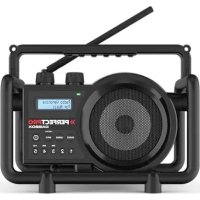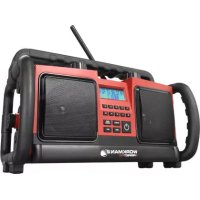
Workman 2 - Radio PerfectPro - Free user manual and instructions
Find the device manual for free Workman 2 PerfectPro in PDF.



| Product type | Construction radio |
| Brand | PerfectPro |
| Model | Workman 2 |
| Mains power supply | AC 230 V, 50/60 Hz |
| Main batteries | 6 D size batteries (LR20/UM-1) 1.5 V |
| Memory backup batteries | 2 AA batteries (LR6/UM-3) 1.5 V |
| FM frequency range | 88 - 108 MHz |
| Loudspeakers | 2 × 100 mm, 8 Ω |
| Nominal output power | 2 × 10 W |
| Auxiliary input | 3.5 mm stereo jack |
| Protection | IPX4 (water splashes) |
| Main functions | FM RDS reception, 10 presets, automatic wake/sleep, bass and treble adjustment, loudness, backlit LCD display, anti-theft system (PIN code) |
| Standby consumption | < 0.5 W |
| Warranty | 2 years |
| Cleaning | Dry cloth only |
| Safety | Do not open the case, follow the instructions in the manual |
Frequently Asked Questions - Workman 2 PerfectPro
User questions about Workman 2 PerfectPro
0 question about this device. Answer the ones you know or ask your own.
Ask a new question about this device
Download the instructions for your Radio in PDF format for free! Find your manual Workman 2 - PerfectPro and take your electronic device back in hand. On this page are published all the documents necessary for the use of your device. Workman 2 by PerfectPro.
USER MANUAL Workman 2 PerfectPro
IMPORTANT SAFETY INSTRUCTIONS
- Read these instructions.
- Keep these instructions.
- Heed all warnings.
- Follow all instructions.
- Clean only with dry cloth.
- Do not block any ventilation openings. Install in accordance with the instructions.
- Do not install near any heat sources such as radiators, heat registers, sloves or other apparatus (including amplifiers) that produce heat.
- Do not defect the safety purpose of the polarized or grounding - type plug. A polarized plug has two blades with one wider than the other. A grounding type plug has two blades and a third grounding prong. The wide blade or the third prong is provided for your safety. If the provided plug does not fit into your outlet, consult an electrician for replacement of the obsolete outlet.
- Protect the power cord from being walked on or pinched particularly at plug, convenience receptacles, and the point where they exit from the apparatus.
- Only use attachments/accessories specified by the manufacturer.
- Use only with the cart, stand, tripod, bracket, or table specified by the manufacturer, or sold with the apparatus. When a cart is used, use caution when moving the cart/ apparatus combination to avoid injury from tip-over.
- Unplug this apparatus during lightning storms or when unused for long periods of time.
- Refer all servicing to qualified service personnel. Servicing is required if the apparatus has been damaged in any, such as power-supply cord or plug is damaged, liquid has been spilled or objects have fallen into the apparatus, the apparatus has been exposed to rain or moisture, does not operate normally, or has been dropped.
- To reduce the risk of fire or electric shock, do not expose this appliance to rain or moisture.
- Do not remove the cover; there are no user-serviceable parts inside.
- No naked flame sources shall be placed on the apparatus.
- For outdoors use, to avoid electric shock, use battery only during a raining day or the weather is wet. To prevent electric shock, if the radio has been exposed to rain or water, the power supply cord and plug must be completely dried before plugging into the mains socket outlet.
- The power plug should be close to the apparatus, and easy to be approached that during emergency, to disconnect the power from the apparatus, just unplug the power plug from the AC power slot.
- The marking information is located at the bottom of the apparatus.
- This apparatus is provided with protection against splashing water (IPX4).
- In case of malfunction due to electrostatic discharge or fast transient (burst), remove and reconnect the power supply.
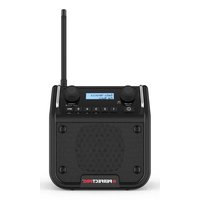
Front View
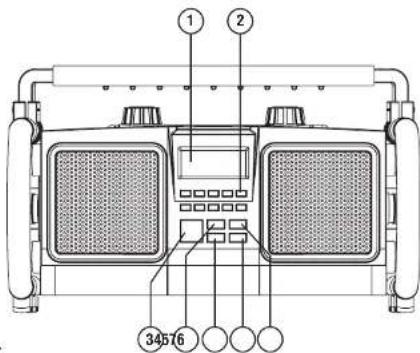
- LCD display
- Preset buttons
- Power On/Off (Standby)
- Audio source button
- Menu button
- Info button
- Mono/Stereo button
Top View
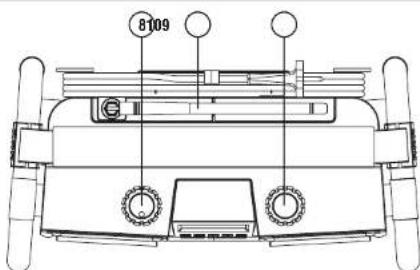
- Volume / Tone Control knob
- Flexible FM antenna
- Tuning control / Seek station
Back View
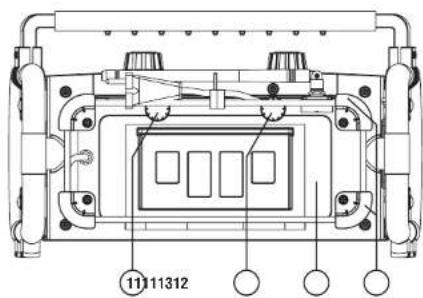
- Battery cover fixtures
- Battery compartment
- Power cord storage
Side View
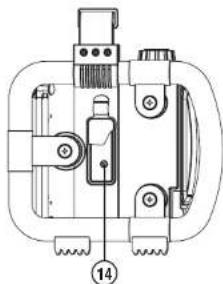
- Aux-in socket and rubber cover
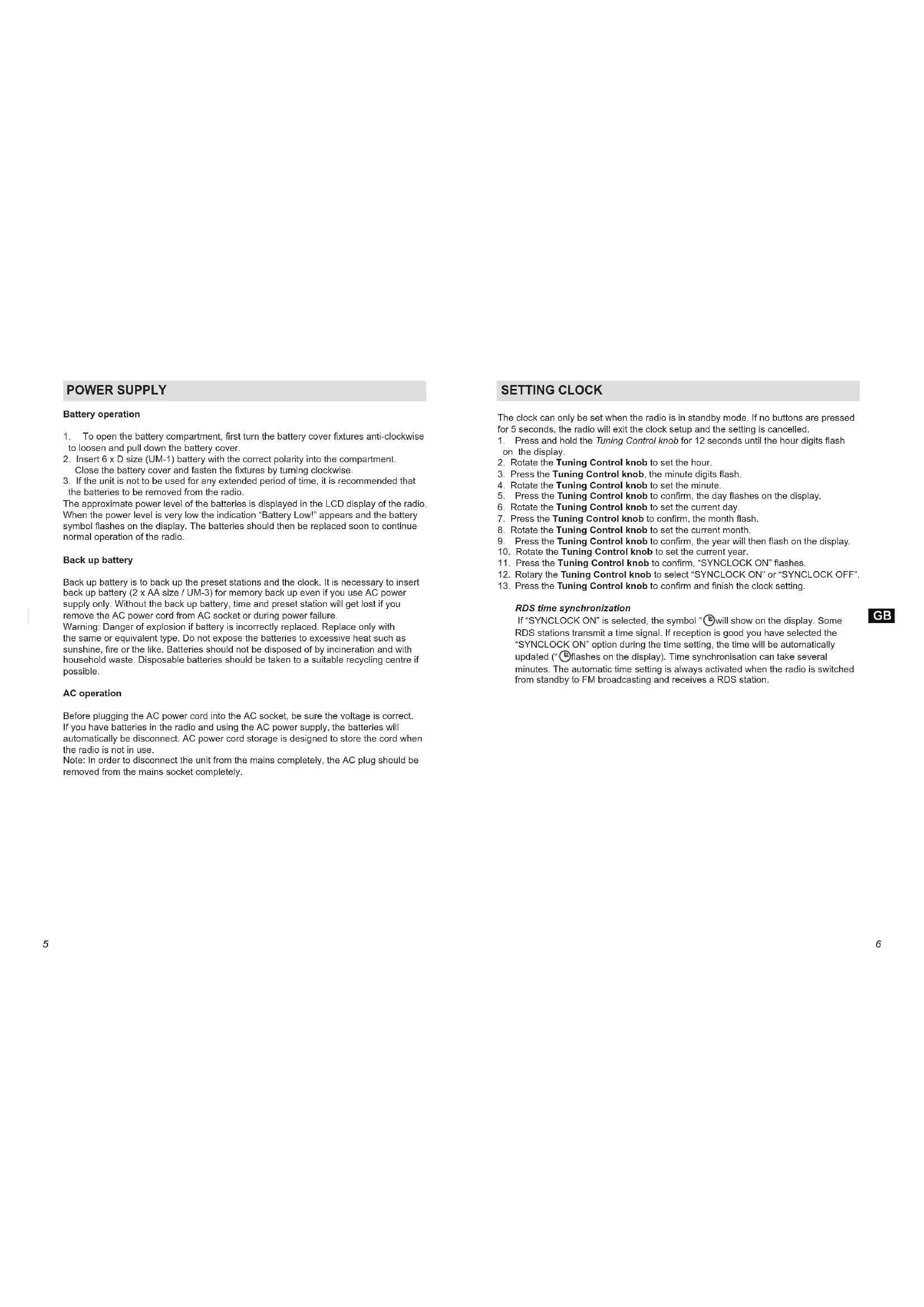
POWER SUPPLY
Battery operation
- To open the battery compartment, first turn the battery cover fixtures anti-clockwise to loosen and pull down the battery cover.
- Insert 6 × D size (UM-1) battery with the correct polarity into the compartment. Close the battery cover and fasten the fixtures by turning clockwise.
- If the unit is not to be used for any extended period of time, it is recommended that the batteries to be removed from the radio.
The approximate power level of the batteries is displayed in the LCD display of the radio. When the power level is very low the indication "Battery Low!" appears and the battery symbol flashes on the display. The batteries should then be replaced soon to continue normal operation of the radio.
Back up battery
Back up battery is to back up the preset stations and the clock. It is necessary to insert back up battery (2 x AA size / UM-3) for memory back up even if you use AC power supply only. Without the back up battery, time and preset station will get lost if you remove the AC power cord from AC socket or during power failure.
Warning: Danger of explosion if battery is incorrectly replaced. Replace only with the same or equivalent type. Do not expose the batteries to excessive heat such as sunshine, fire or the like. Batteries should not be disposed of by incineration and with household waste. Disposable batteries should be taken to a suitable recycling centre if possible.
AC operation
Before plugging the AC power cord into the AC socket, be sure the voltage is correct. If you have batteries in the radio and using the AC power supply, the batteries will automatically be disconnect. AC power cord storage is designed to store the cord when the radio is not in use.
Note: In order to disconnect the unit from the mains completely, the AC plug should be removed from the mains socket completely.
SETTING CLOCK
The clock can only be set when the radio is in standby mode. If no buttons are pressed for 5 seconds, the radio will exit the clock setup and the setting is cancelled.
-
Press and hold the Tuning Control knob for 12 seconds until the hour digits flash on the display.
-
Rotate the Tuning Control knob to set the hour.
- Press the Tuning Control knob, the minute digits flash.
- Rotate the Tuning Control knob to set the minute.
- Press the Tuning Control knob to confirm, the day flashes on the display.
- Rotate the Tuning Control knob to set the current day.
- Press the Tuning Control knob to confirm, the month flash.
- Rotate the Tuning Control knob to set the current month
- Press the Tuning Control knob to confirm, the year will then flash on the display.
- Rotate the Tuning Control knob to set the current year.
- Press the Tuning Control knob to confirm, "SYNCLOCK ON" flashes.
- Rotary the Tuning Control knob to select "SYNCLOCK ON" or "SYNCLOCK OFF".
- Press the Tuning Control knob to confirm and finish the clock setting.
RDS time synchronization
If "SYNCLOCK ON" is selected, the symbol "B" will show on the display. Some RDS stations transmit a time signal. If reception is good you have selected the "SYNCLOCK ON" option during the time setting, the time will be automatically updated ("C" flashes on the display). Time synchronisation can take several minutes. The automatic time setting is always activated when the radio is switched from standby to FM broadcasting and receives a RDS station.
OPERATING THE RADIO-FM
USING THE RADIO FOR THE FIRST TIME
- Place the radio on a flat surface.
- Carefully extend the antenna located on the top of the radio. Adjust the antenna so it is vertically extending above the radio.
- Plug the AC power cord into the AC socket. The radio will start up. Then the radio will automatically perform an auto scan the FM band.
- When the scan is completed, the 10 strongest FM stations will be stored as presets. The radio will switch to standby.
Manual Tuning
- Press the Power On/Off button to turn on the radio.
- Select the FM waveband by pressing the Source button.
- Rotate the Tuning Control knob too reach the required FM station. The radio will change the frequency in steps of 50kHz .
- Rotate the Volume Control knob to get the required sound level.
- Rotate the rubber antenna to get the best reception.
- To turn off the radio, press the Power On/Off button.
Seek Station
- Press the Power On/Off button to turn on the radio.
- Select the FM waveband by pressing the Source button.
- Press the Tuning Control knob to start the seek function.
- The radio will seek and stop automatically when it finds a station of sufficient signal strength.
- To find other stations, press the Tuning Control knob again.
- To seek station in an opposite direction, rotate the Tuning Control knob clockwise (to scan from low frequency to high frequency) or rotate anti-clockwise (to scan from high frequency to low frequency), and press the Tuning Control knob.
- When the waveband end is reached, the radio will recommence tuning from the opposite waveband end.
Memory Preset Stations
There are 10 memory preset in this radio.
- Press the Power On/Off button to turn on the radio.
- Select the FM waveband by pressing the Source button.
- Tune to the required station
- Press and hold the required Preset button until the radio beeps and shows for example "saved".
- Repeat step 3 and 4 for the remaining presets.
- Stations stored in the preset memories can be over-written by following the above procedure.
Recall Stations from Preset Memories
- Press the Power On/Off button to turn on the radio.
- Select the FM waveband by pressing the Source button.
- Briefly press the required Preset button, the display will show the preset number and station frequency.
FM stereo / mono
- If a station being received is weak, some hiss may be audible. To reduce the hiss, press the Mono/Stereo button to switch to mono mode, the display will show "Mono".
- To return to stereo mode, press the Mono/Stereo button and the display shows "Stereo", the radio will switch to stereo mode if the reception is good.
- "MN" and "ST" will show on the top line of the LCD display to indicate the mono or stereo reception.
RDS station service
RDS (Radio Data System) is an information system which inaudible digital information is transmitted in addition to the normal FM radio programme. When the radio is receiving a RDS station and the reception strength is sufficient, the station name will appear in the display. It may take some time before the RDS information is available.
Calling up RDS information
When you are listening to a FM station with RDS system, repeatedly press the Info button to cycle through the information. This will only function if the reception level is sufficient and clear.
a. Program service (PS) Displays the name of the radio station being listened to.
b. Program type (PTY) Displays the type of station being listened to, e.g. Pop, Classic, News, etc.
c. Radio text (RT) Displays the message about the station being listened to as ticker text.
d. Date and Time Displays the current time and date.
e. Signal strength level (SGLV) Displays the station signal strength level being received.
A 3.5mm stereo Aux In socket is provided on the side behind the rubber cover, for connecting an external audio device such as MP3 player or CD player (not included).
- Connect a stereo or mono audio source to the Aux In socket
- Press the Source button to select AUX input. Display will show "AUX IN".
- Play the external player.
- Adjust the volume of both the radio and the player for comfortable listening. Notes: Never use the Aux-In socket in rainy or moist conditions to prevent moist from entering the radio. Keep the rubber cover well closed under these conditions.
The Auto-Power management function will be activated in AUX IN mode. If there is no signal from the Aux-In socket for a period of over 15 minutes, the radio will automatically switch to standby mode. Pressing the On/Off button will wake up the unit.
- Also when the incoming signal from the external device is too low and cannot be detected for a period of over 15 minutes by the Auto-Power management, the radio will switch to standby mode.
To prevent this raise the output level of the external device enough to be detected.
LOUDNESS
The Loudness function enables to get compensation on lower and higher frequency. The effect will be more audible when the radio is on a lower volume level (Dynamic Loudness).
- Press the On/Off button to turn on the radio.
- Press the Menu button, the display shows "System".
- Rotate the Tuning knob until the display shows "Loudness".
- Press the Tuning knob; the display shows "Loudness On".
- Rotate the Tuning knob to select between "Loudness On" or "Loudness Off".
- Press the Tuning knob to confirm the setting and return to normal display.
TONE (BASS/TREBLE SETTINGS)
The Tone function enables the user to adjust the lower and higher sound frequencies.
- Press the On/Off button to turn on the radio.
- Press the Volume knob, the display shows "BASS 0".
- Rotate the Volume knob to set the desire Bass level.
- Press the Volume knob to confirm, the display shows "TREBLE 0".
- Rotate the Volume knob to set the desire Treble level
- Press the Volume knob to confirm and return to normal display.
LANGUAGES
The menu of the radio can be configured to various languages.
- Press the On/Off button to turn on the radio.
- Press the Menu button, the display shows "System".
- Rotate the Tuning knob until the display shows "Language".
- Press the Tuning knob to enter the language adjustment menu.
- Rotate the Tuning knob until the desired language appears on the display (default is English).
- Press the Tuning knob to confirm your choice. The display menu will change to the chosen language.
BACKLIGHT
When the radio is in operation or in standby, pressing any button will illuminate the LCD display for approx. 10 seconds.
ATP PASSCODE
This radio is equipped with an Anti-Theft-Protection system (ATP system). When the ATP system is enabled, a passcode is required for turning on the radio.
- Press the On/Off button to turn on the radio.
- Press the Menu button.
- The display shows "System".
- Rotate the Tuning knob until the display shows "Passcode". Press the Tuning knob. "Enable" or "Disable" will be displayed, to enable ATP, turn and press Tuning knob to select "Enable".
- "Change Passcode" will be displayed, enter a 4-digits numeric passcode by pressing the preset buttons (1-10)
- "Confirm Passcode" will be displayed. Enter a second time the same passcode to re confirm.
- To disable/passcode, select "Disable" as previously showed. And re-enter the previous passcode to disable the lock.
When ATP is enabled, and if wrong passcode is entered for three times, a timer will be activated. The next attempt will be possible only after the timer has elapsed. The timer period will be increased with further wrong passcodes.
WARNING: If you choose to activate the passcode, please note your passcode somewhere safe as a memory back-up in case you should forget it. This as there is no way to reset the radio should the passcode be forgotten!
WARRANTY
This radio has a 2 year limited warranty.
WARNING! Warranty becomes void once the radio cabinet has been opened or any modifications to the radio have been made!
The terms of the warranty of this radio do not cover the following:
- Damage caused by misuse, abuse, neglect, alterations, accidents or unauthorised repair.
- Normal wear and tear.
INFORMATION
Technical data

This device is noise-suppressed according to the applicable EU directives.
This product fulfills the European directives 2006/95/EC, 2005/32/EC and 2004/108/EC.
This device conforms to the safety regulation DIN EN 60065 (VDE 0860) and therefore the international safety regulation IEC 60065.
Never open the device casing. The manufacturer will not accept any liability for damage resulting from improper handling.
The type plate is located on the bottom of the device.
Environmental note
This product has been made from high-quality parts and materials, which can be reused and recycled.
Therefore, do not throw the product away with normal household waste at the end of its life. Take it to a collection point for recycling electrical and electronic device. This is indicated by this symbol on the product, in the operating manual and on the packaging.
Please find out about collection points operated by your local authority. Help protect the environmental by recycling used products.
Power supply
Mains operation:
AC 230V\~,50/60Hz
Battery operation:
6 x 1,5V (Alkaline Type IEC LR20 / UM-1 / D-size)
Batteries for Back up:
2x1,5V (Alkaline Type LR6/UM-3/AA-size)
Power consumption (mains supply)
Operation: < 33W
Standby: < 0.5 W
Frequency coverage
FM 87,5-108,0 MHz
Speaker
Size 2x0100mm
Impedance 8 ohms
Output Power
Nominal 2 x 10W
Aux in socket
03,5mm
CONTENU
CONSIGNES DE SECURITE IMPORTANTES p.2
COMMANDES p.3
ALIMENTATION ELECTRIQUE p.5
REGLAGE DE L'Horloge p.6
FAIRE FONCTIONNER LA RADIO - FM .p.7
FAIRE FONCTIONNER LA RADIO-ENTREE AUXILIAIRE .p.9