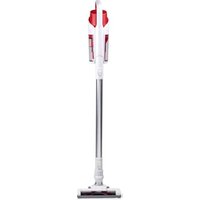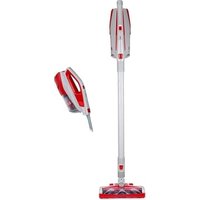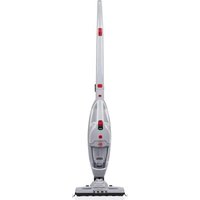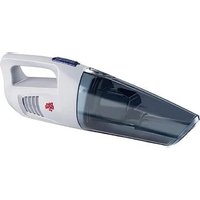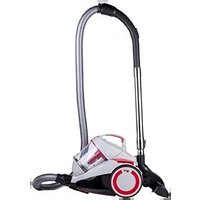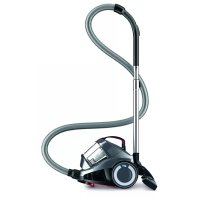
Rebel 24 HF - Vacuum Cleaner DIRT DEVIL - Free user manual and instructions
Find the device manual for free Rebel 24 HF DIRT DEVIL in PDF.


| Technical Features | Bagless vacuum cleaner, suction power of 600 W, 1.5 L tank capacity. |
|---|---|
| Filtration Type | Cyclonic filtration with HEPA filter. |
| Included Accessories | Main brush, hard floor brush, narrow nozzle. |
| Usage | Suitable for hard surfaces and carpets, ideal for small spaces. |
| Weight | 3.5 kg. |
| Dimensions | Compact dimensions for easy storage. |
| Maintenance | Empty the tank after each use, clean the filter regularly. |
| Safety | Do not use on wet surfaces, unplug the device before cleaning. |
| General Information | 2-year warranty, after-sales service available. |
Frequently Asked Questions - Rebel 24 HF DIRT DEVIL
User questions about Rebel 24 HF DIRT DEVIL
0 question about this device. Answer the ones you know or ask your own.
Ask a new question about this device
Download the instructions for your Vacuum Cleaner in PDF format for free! Find your manual Rebel 24 HF - DIRT DEVIL and take your electronic device back in hand. On this page are published all the documents necessary for the use of your device. Rebel 24 HF by DIRT DEVIL.
USER MANUAL Rebel 24 HF DIRT DEVIL
natural_image
Line drawing of a vacuum cleaner device with handle and ventilation slots (no text or symbols)GB Operating Manual Bagless cylinder vacuum cleaner
natural_image
Illustration of a robotic arm with a hand holding a tool, no text or symbols present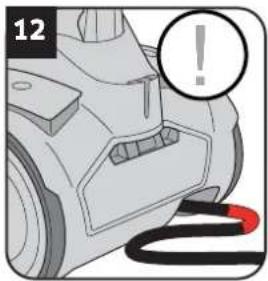
natural_image
Illustration of a car's front bumper with a warning symbol (no text or labels)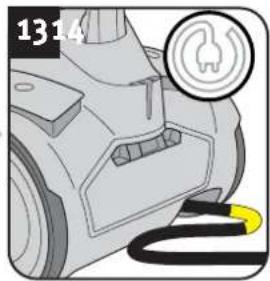
natural_image
Close-up of a vehicle's electrical plug with a fuse icon (no text or symbols)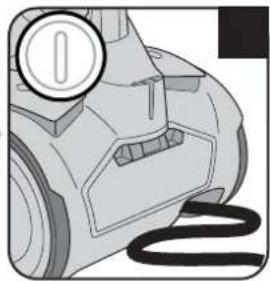
natural_image
Illustration of a vacuum cleaner's head and side panel, showing no text or symbols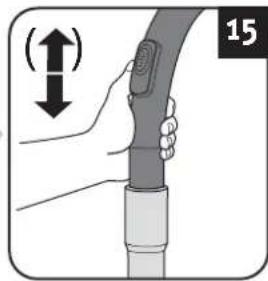
natural_image
Illustration of a hand holding a cable with a device, showing a vertical shift indicator (no text or symbols present)! WARNING:
natural_image
Illustration of a car with a red starburst effect on the side panel (no text or symbols)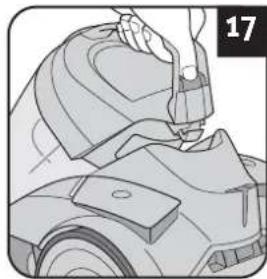
natural_image
Illustration of a hand using a tool to clean or repair a vehicle component (no text or symbols visible)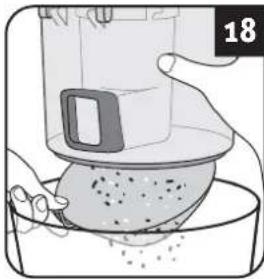
natural_image
Illustration of a hand pouring liquid into a container with a lid, no text or symbols present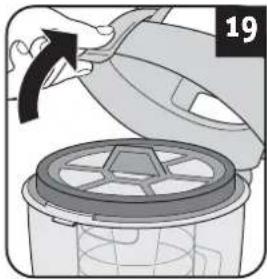
natural_image
Illustration of a hand pouring liquid into a container with a black arrow indicating direction (no text or symbols)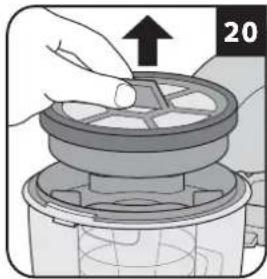
natural_image
Illustration of a hand using a mechanical device to press or install a component, with no visible text or symbols.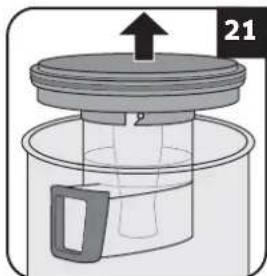
natural_image
Diagram of a mechanical device with a lid and handle, showing internal components (no text or symbols)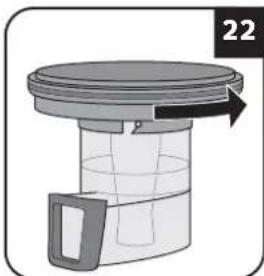
natural_image
Diagram of a mechanical component with a lid and arrow indicating direction (no text or symbols)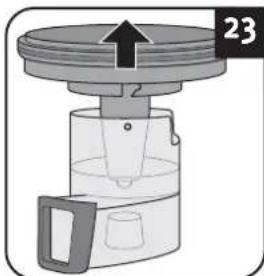
natural_image
Diagram of a mechanical device with a lid and handle, showing internal components and an upward arrow (no text or symbols)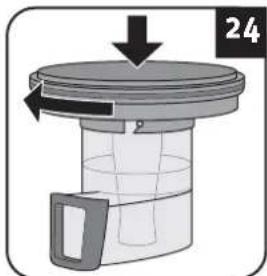
natural_image
Diagram of a mechanical device with a lid and arrow indicating direction (no text or symbols)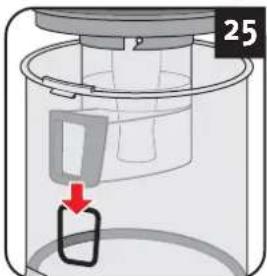
text_image
25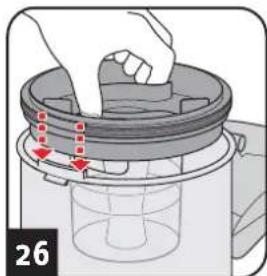
natural_image
Illustration of a hand placing a lid onto a bucket with arrows indicating motion (no text or symbols)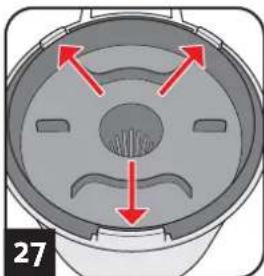
natural_image
Cross-sectional diagram of a mechanical component with red arrows indicating directional flow (no text or symbols)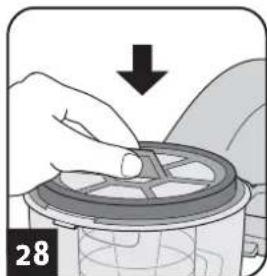
natural_image
Illustration of hands using a mechanical component to adjust a circular component, with a downward arrow indicating motion (no text or symbols)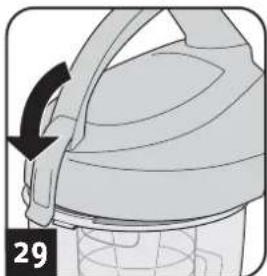
natural_image
Diagram of a helmet with a black arrow indicating rotation, no text or symbols present
text_image
click! 30HINWEIS:
natural_image
Hand inserting a component into a device (no visible text or symbols)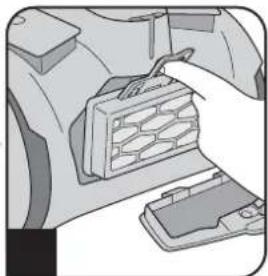
natural_image
Illustration of a hand inserting a component into a car's engine compartment (no text or symbols visible)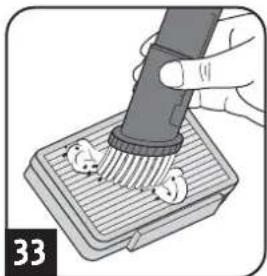
natural_image
Illustration of a hand using a pipette to clean or brush the pad (no text or symbols visible)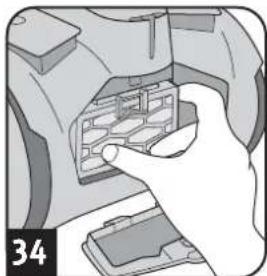
natural_image
Hand inserting a small electronic device into a case (no visible text or symbols)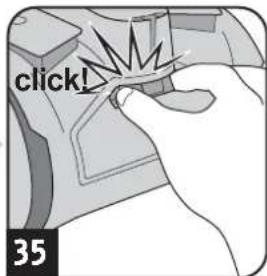
text_image
click! 35ACHTUNG:
natural_image
Illustration of hands using a tool to adjust or install a device (no text or symbols visible)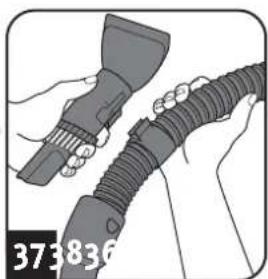
natural_image
Illustration of hands holding a tool and connecting a flexible hose (no text or symbols visible)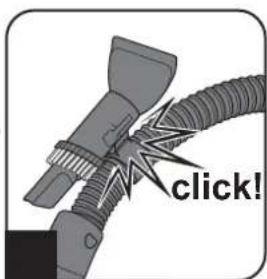
text_image
click!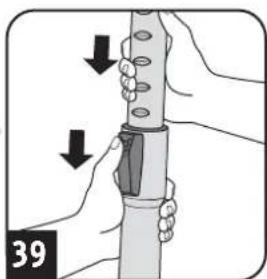
natural_image
Illustration of hands holding a cylindrical object with arrows indicating movement or force direction (no text or symbols)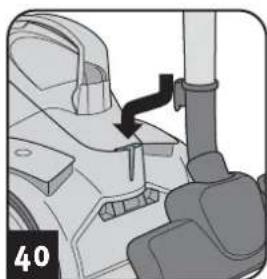
natural_image
Mechanical assembly diagram showing a lever mechanism with a black arrow indicating motion (no text or symbols present)! WARNING:
1.1 About the operating manual
Read the operating manual completely before working with the appliance. Keep the operating manual in a safe place. Include the operating manual if you pass the appliance on to a third party. Failure to comply with this operating manual can lead to serious injuries or damage to the appliance. We take no responsibility for damage due to failure to comply with this operating manual. Always comply with the notices marked as follows to avoid accidents and damage to the appliance.
WARNING:
Warns of health hazards and identifies possible risks of injury.
CAUTION:
Indicates possible dangers to the appliance or other objects.
NOTE:
Highlights tips and information for you.
1.2 Concerning certain groups of persons
These appliances can be used by children of 8 years and upwards and persons with impaired physical, sensory or mental abilities, or insufficient experience or knowledge, providing they are supervised or have been instructed in the proper use of the appliance and understand the risks involved.
Children must not play with the appliance. Children must not perform cleaning or user maintenance tasks without supervision. Children under the age of eight should be kept away from the appliance and the connection cable whilst it is switched on or cooling down.
- Packing material must not be used for playing. There is danger of suffocation.
1.3 Information on power supply
The appliance is operated with electrical power, which means there is always a risk of electric shock. Therefore, please comply with the following:
- Never immerse the appliance in water or other liquids; keep it away from rain and moisture. Never touch the plug with wet hands. Do not operate the appliance outdoors or in rooms with a high level of humidity.
Take care that the power cord is not kinked, pinched, or rolled over and ensure it does not come into contact with heat sources. Also take care that it does not become a stumbling hazard.
Before connecting to the power supply, make sure that the voltage stated on the type plate matches the voltage of your plug socket.
■ Always check the power cord for possible damage before using the appliance.
■ Never carry the appliance by its power cord. It could be damaged.
Before you clean or maintain the appliance, switch off the appliance and pull the mains plug from the socket. Always pull directly on the plug when you disconnect the appliance from the mains. Do not pull on the power cord as this could damage it.
If possible, do not use extension cords. If you must use an extension cord, use only safety-certified, water-protected single extension cords (no multi-socket distributors) designed for the power consumption of the appliance.
1.4 Information on proper use
The cylinder vacuum cleaner is intended for home use only.
It is not suitable for commercial use.
Use the cylinder vacuum cleaner only for cleaning dry, normally soiled floors and carpet floorings. Depending on which nozzle you have attached (▷chapter 2.1, „Assemble appliance and adjust nozzles to surface“), you can also use the appliance to vacuum furniture or non-sensitive upholstery.
Any other use is considered improper use and is prohibited.
Also prohibited:
Vacuuming of:
- Persons, animals, plants, especially hair, fingers and other parts of the body as well as pieces of clothing worn on the body. These might be drawn in. This could result in injuries.
- Water and other fluids, especially damp carpet cleaners. Moisture inside the appliance can cause a short-circuit.
- Toner (for laser printers, copying machines, etc.). There is danger of fire or explosion.
- Hot ashes, burning cigarettes or matches. There is a danger of fire.
- Pointed objects, such as glass shards, nails, etc. They can damage the appliance.
- Rubble, plaster, cement, fine drilling-dust, make-up, etc. These might damage the appliance.
■ To use the appliance near explosive or highly-flammable substances. There is a risk of fire or explosion.
■Use of the appliance outdoors. Rain and dirt may damage the appliance.
■ Sticking objects into the appliance's openings. It could overheat.
■To modify or repair the appliance yourself.
1.5 About the optionally included turbo brush
The bristles of the optionally included turbo brush rotate very rapidly. There is a danger of injury.
- Do not use the turbo brush on persons, animals or plants. Keep body parts away from the rotating brush roller.
- Switch off the vacuum cleaner before cleaning or detaching the turbo brush.
- Never run over cables. Otherwise, the insulation could get damaged.
The turbo brush is not suitable to clean sensitive surfaces. This may cause damage. Comply with the care and cleaning instructions provided by the manufacturer.
1.6 If the appliance is defective
Never use a defective appliance or operate an appliance with a defective power cord. If the power cord of this appliance is damaged, it must be replaced by the manufacturers, their authorised service representative or a similarly qualified person to avoid danger. Hand over a defective appliance to a specialist dealer or send it to the Dirt Devil customer service department for repairs (▷Page 46, 'International Service').

2.1 Assemble appliance and adjust nozzles to surface
WARNING:
Danger of injury! Only attach the appliance parts when the appliance is not connected to the power supply. Otherwise the machine might start up and parts of your body, hair or pieces of clothing might be sucked in.
CAUTION:
Before assembling, make sure that the fitted nozzle suits the surface to be cleaned. Do not clean e.g. any floors or objects with a brush with rotating bristles that you would not clean without a second thought with a conventional brush. Also observe the flooring manufacturer's recommendations.
NOTE:
You might have to twist the parts when connecting them so they are securely in place. Ensure that installed parts are secure by trying to pull them apart.
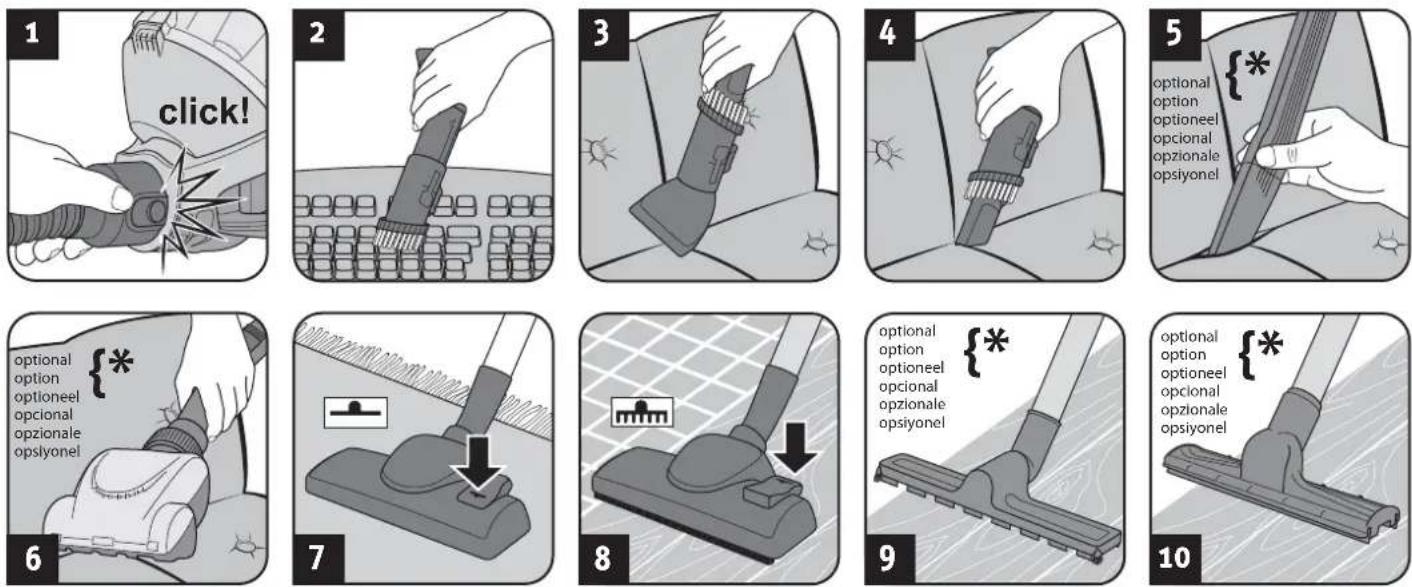
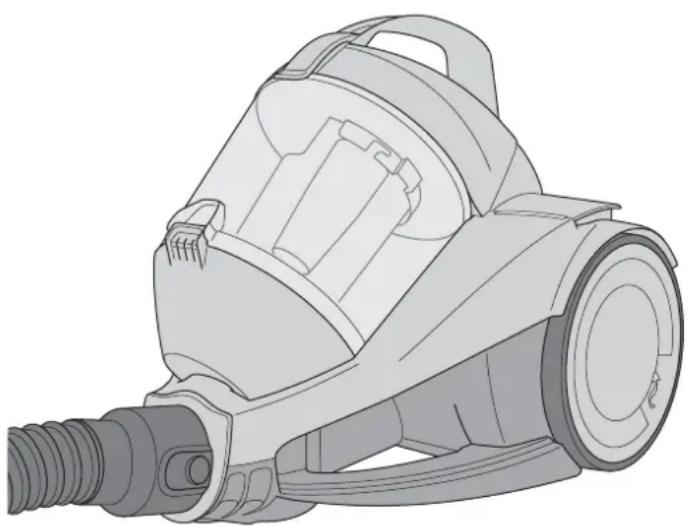
- Connect suction hose and appliance (Fig. 1).
-
Insert the accessory included in the scope of delivery onto the handle (Fig. 2 - 10) depending on what type of surface you want to vacuum:
-
Furniture brush (Fig. 2) for objects with a sensitive surface
- Upholstery nozzle (Fig. 3) for upholstery, mattresses, and the like
- Crevice nozzle (Fig. 4) or optional long flexible crevice nozzle (Fig. 5) for crevices in upholstery
- Optional mini turbo brush (Fig. 6) for non-sensitive upholstery, runner, mats, and the like
- Floor nozzle with switch position as in Fig. 7 for carpets
- Floor nozzle with switch position as in Fig. 8 for hard floors
- Optional parquet brush (Fig. 9) for sensitive hard floors
-
Optional hard floor nozzle (Fig. 10) for hard floors with crevices
-
Ensure that the bypass vent is closed (Fig. 15).
-
If you use the telescopic tube, adjust its length.
2.2 Vacuum cleaning
natural_image
Illustration of a robotic arm with a hand holding a tool, no text or symbols present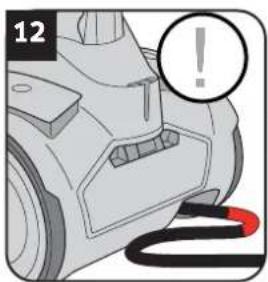
natural_image
Close-up of a car's front bumper with a warning symbol (no text or labels)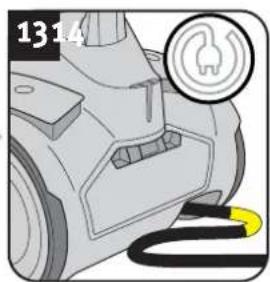
natural_image
Close-up of a car's electrical plug with a fuse icon and cable (no text or symbols)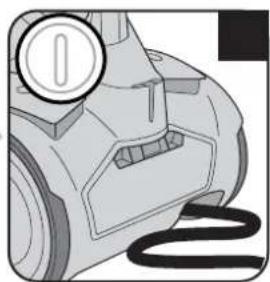
natural_image
Illustration of a vacuum cleaner with a circular badge and coiled cable (no text or symbols)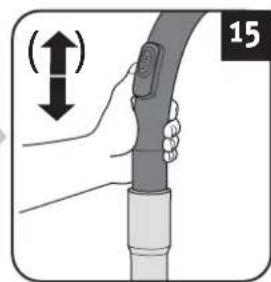
natural_image
Illustration of a hand holding a cable with a device, showing a vertical motion indicator (no text or symbols)WARNING:
Danger of injury! Check appliance and power cord before each use. A damaged appliance must never be used.
CAUTION:
Only use the appliance with all filters undamaged, dry and correctly fitted. Make sure that no objects obstruct the telescopic tube, the suction hose or other openings.
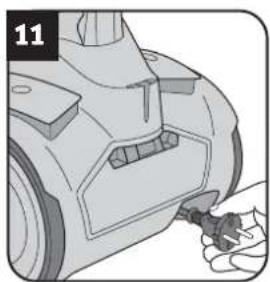
- Pull the cable out of the appliance (Fig. 11) and plug into a socket.
WARNING:
Danger of electric shock! If the red marking shows (Fig. 12) retract the cord by pressing the retraction button ( ) to pull in the cord up to the yellow mark (Fig. 13) again.
- Switch on the appliance using the on/off switch ( ) (Fig. 14).
NOTE:
The auxiliary air regulator (Fig. 15) must be completely closed for vacuum cleaning. With the auxiliary air regulator you can quickly reduce the suction power, to release objects (such as curtains) that have been sucked in. If the hard floor nozzle (Fig. 10) has become stuck to the floor, you can reduce the suction power just as easily using the bypass vent (Fig. 15).
- Vacuum clean.
WARNING:
Danger of injury! Especially when vacuum-cleaning stairs make sure that you always stand on a higher level than the appliance.
3.1 Emptying the dust container and cleaning the motor protection filters

NOTE:
The dust container has to be emptied and cleaned regularly. Otherwise emptying it will get harder and harder or smells and bacteria might develop, depending on what you have vacuumed up.
Therefore, it is best to empty the dust container after each vacuuming session.
■ Empty and clean the dust container at the latest when the cleaning/emptying display lights up (Fig. 16).
Also empty and clean the dust container every 3 months at the latest before storing for a long time or before sending the appliance.

CAUTION:
Switch off the appliance before removing the dust container. This will prevent dust from damaging the appliance.
- Switch off the appliance ( ).
- Pull the plug out of the plug socket.
- Remove the dust container (Fig. 17).
- Empty the dust container (Fig. 18).
NOTE:
You can dispose of the dust container with your regular domestic trash as long as it contains no waste materials prohibited in domestic trash.
- Take this opportunity to also check the filter elements (dual motor protection filter and filter unit) in the dust container (Fig. 19 - 23).
- If the filter elements (dual motor protection filter and filter unit) are dirty, clean them under cold or lukewarm running water until all dirt has gone.
CAUTION:
The filter elements are washable, but may not be cleaned in dishwashers or washing machines.
Also, do not use cleaning agents or brushes with hard bristles to clean the filter elements.
Leave the filter elements to dry after cleaning them with water (approx. 24 hours at room temperature).
■ Only put them back into the appliance when they are completely dry.
- Replace damaged or deformed filters immediately ▷Chapter 3.4, 'Spare parts and accessories').
- Leave the filter elements to dry after cleaning them with water (approx. 24 hours at room temperature).
- Put the filter elements back in (Fig. 24 - 29).
NOTE:
The filter elements are constructed so that they will only go all the way down if in the right position.
Nevertheless, it is helpful if you align the filter unit with respect to the vacuum cleaner as shown in Fig. 25 before insertion.
■ Then lower the filter unit completely into the vacuum cleaner until the three noses of the vacuum cleaner engage with the respective recesses of the filter unit (Fig. 26 – 27).
Do not use force upon insertion. If the dust container lid (Fig. 29) will not shut properly, then you have to take the parts out again and put them back in.
CAUTION:
Never operate the appliance without the filters in place. Never operate the appliance with damaged filters.
- Replace the dust container (Fig. 30).
You should feel and hear it clicking into place.
3.2 Cleaning / changing the exhaust filter
natural_image
Hand inserting a component into a device (no visible text or symbols)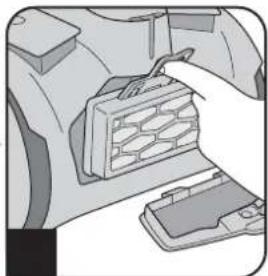
natural_image
Illustration of a hand inserting a component into a device (no text or symbols visible)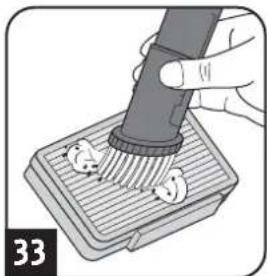
natural_image
Illustration of a hand using a pipette to clean or store items on a base (no text or symbols visible)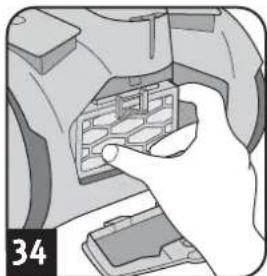
natural_image
Hand inserting a device into a device housing (no text or symbols visible)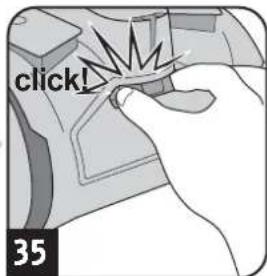
text_image
click! 35CAUTION:
Clean the filter each time you clean the dust filter. Replace the filter if it is damaged or deformed (see ▷Chapter 3.4, 'Spare parts and accessories' for ordering information).
CAUTION:
The exhaust filter cannot be washed.
NOTE:
The exhaust filter cover can be locked more easily if you hold the unlocking mechanism (Fig. 35) and only release it once the exhaust filter cover is in its limit position.
- Switch off the appliance ( ).
- Pull the plug out of the plug socket.
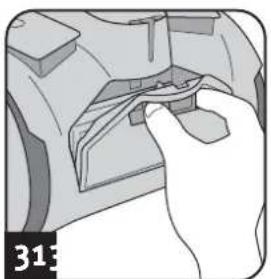
- Unlock the exhaust filter cover as shown (Fig. 31).
- Remove the exhaust filter using the tab provided (Fig. 32).
- Tap the dirt out of the exhaust filter over a dustbin.
- Finally, remove the dirt from the exhaust filter with a soft brush, e.g. the furniture brush supplied with the appliance (Fig. 33).
- Press the exhaust filter back into its console until the tab audibly engages (Fig. 34).
- Attach the exhaust filter cover at the bottom first.
- Lock the exhaust filter cover (Fig. 35).
3.3 Storage
natural_image
Illustration of hands using a handheld device to adjust a tool (no text or symbols visible)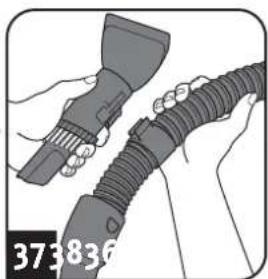
natural_image
Illustration of hands holding a tool next to a coiled cable or hose (no text or symbols visible)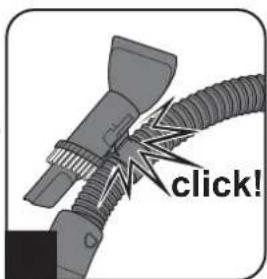
text_image
click!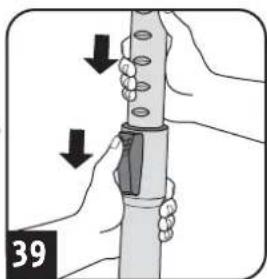
natural_image
Illustration of hands holding a cylindrical object with arrows indicating movement or force direction (no text or symbols)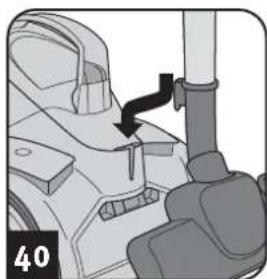
natural_image
Mechanical assembly diagram showing a lever mechanism with a black arrow indicating motion (no text or symbols present)WARNING:
Danger of injury!
After vacuuming switch the appliance off ( ) and wind up the power cord ( ). Hold the plug in your hand while winding up so that the cable does not thrash about and injure you.
WARNING:
Danger of injury!
Keep the appliance out of the reach of children.
CAUTION:
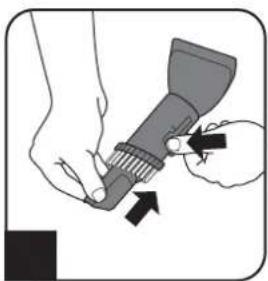
Never store the appliance next to heat sources (e.g. stoves or radiators). Avoid direct sunlight. Store the appliance and accessories in a cool, dry place where it does not take up too much space (Figures 36 – 40).
CAUTION:
If you intend to store the appliance for a long time, empty and clean the dust container and its filter elements ▷Chapter 3.1, 'Emptying the dust container and cleaning the motor protection filters'.
3.4 Spare parts and accessories
The following accessories and spare parts can be reordered: Accessory parts and spare parts can be reordered through
Item number Description
2224001 Filter set consisting of:
1 dual motor protection filter (Fig. 20) +
1 exhaust filter (Fig. 33)
2200004 Filter unit (Fig. 23) consisting of:
1 filter screen +
1 filter cup
M203-5 1 parquet brush
M219 1 mini-turbo brush "Fellino"
M221 1 midi-turbo brush
M232 1 long, flexible crevice nozzle
M236-1 1 hard floor nozzle
▷Page 46, 'International Service'
CAUTION:
Only use original spare parts from the scope of delivery or those that you have purchased by reordering.
4.1 Before you send in the appliance

WARNING:
Danger of injury! Never use a defective appliance! Always switch off the appliance and disconnect it from the mains before starting troubleshooting.
Before contacting us or even sending the appliance to us, use the table to check whether you can correct the problem yourself.
Problem Possible cause / solution
| The cleaning results are unsatisfactory in spite of the appliance working correctly. | The bypass vent (Fig. 15) is open. Close the bypass vent (Fig. 15). |
| The attached nozzle is unsuitable. Change the nozzle, ▷Chapter 2.1, ‘Assemble appliance and adjust nozzles to surface’. | |
| The collar brush of the floor nozzle is not in a position appropriate to the type of floor (Figures 7 – 8). Adjust the position of the collar brush to the type of floor using the floor nozzle switch (Figures 7 – 8). | |
| The dust container is full. Empty and clean the dust container ▷Chapter 3.1, ‘Emptying the dust container and cleaning the motor protection filters’. | |
| The filters are dirty. Clean the filters, ▷Chapter 3.1, ‘Emptying the dust container and cleaning the motor protection filters’ that is ▷Chapter 3.2, ‘Cleaning / changing the exhaust filter’. | |
| Nozzle, telescopic tube or suction hose is blocked. Remove the obstruction. If necessary, use a long wooden stick (e.g. a broomstick) to do this. |
Problem Possible cause / solution
| Cleaning / emptying display lights up (Fig. 16). | The dust container is full.Empty and clean the dust container ▷Chapter 3.1, ‘Emptying the dust container and cleaning the motor protection filters’. |
| The filters are dirty.Clean the filters, ▷Chapter 3.1, ‘Emptying the dust container and cleaning the motor protection filters’ or ▷Chapter 3.2, ‘Cleaning / changing the exhaust filter’. | |
| Nozzle, telescopic tube or suction hose is blocked.Remove the obstruction. If necessary, use a long wooden stick (e.g. a broomstick) to do this. | |
| The vacuum cleaner stops suddenly. | The overheating protection has tripped (possibly due to blocked suction channels, filters, or similar).1. Switch the appliance off and pull the plug out of the socket.2. Remove the cause of overheating (e.g. by disassembling telescopic tube and suction hose and removing the obstacle and/or cleaning filters).3. Wait approx. 45 minutes until the appliance has cooled off.4. After the appliance has cooled off, you may switch it on again. |
NOTE:
If you cannot solve the problem following these instructions, contact our customer services (▷Page 46, 'International Service').
4.2 Warranty
The statutory warranty regulations in accordance with the EU Directive 1999/44/EC apply.
In non-EU countries the minimum requirements of the warranty in the respective country apply.
4.3 Disposal
Dispose of the appliance in compliance with the environmental protection laws of your country. Electrical waste may not be disposed of together with domestic waste. Use local old-appliance collection points instead.
The filters are made from environment-friendly materials. You can dispose of these — as opposed to the appliance — in your domestic waste unless you have cleaned up substances that are prohibited from disposal in this way.
4.4 Technical data
Type of appliance : bagless cylinder vacuum cleaner
Model name : Rebel24
Power cord length : approx. 6 m
Weight : approx. 4.5 kg



Technical and design specifications may be changed in the course of continuous product improvement.
© Royal Appliance International GmbH
natural_image
Line drawing of a vacuum cleaner with attached hose and bulb (no text or symbols)1.1 Mode d'emploi
natural_image
Mechanical component with a hand holding a tool, no visible text or symbols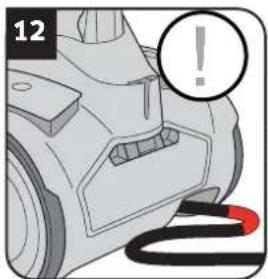
natural_image
Close-up of a car's front bumper with a warning symbol and black cable (no text or labels)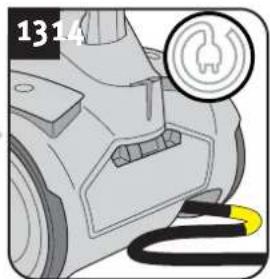
natural_image
Close-up of a car's electrical plug with a fuse icon and cable (no text or symbols)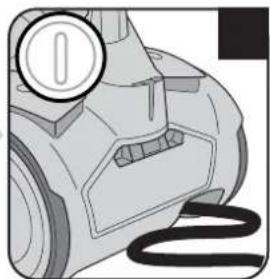
natural_image
Illustration of a mechanical device with a circular badge and a wavy line, no visible text or symbols.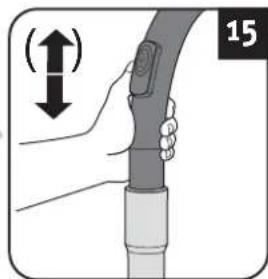
natural_image
Illustration of a hand holding a cable with a device, showing a vertical motion indicator (no text or symbols)AVERTISSEMENT:
natural_image
Hand inserting a small object into a device component (no text or symbols visible)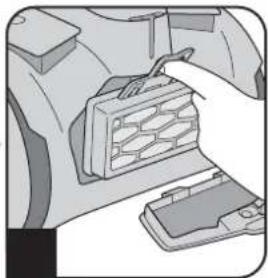
natural_image
Illustration of a hand inserting a component into a vehicle chassis (no text or symbols visible)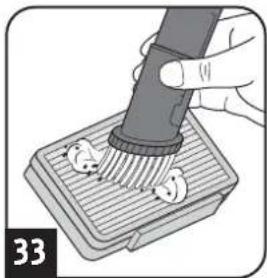
natural_image
Illustration of a hand using a pipette to apply liquid onto a surface with circular features (no text or symbols)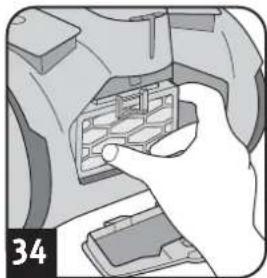
natural_image
Hand inserting a component into a device (no visible text or symbols)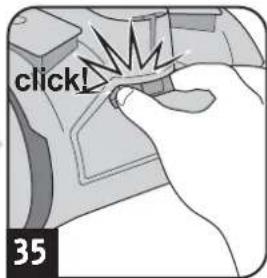
text_image
click! 35ATTENTION:
natural_image
Illustration of hands using a flashlight to adjust a component (no text or symbols present)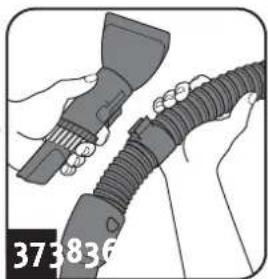
natural_image
Illustration of hands holding a tool and connecting a flexible hose (no text or symbols visible)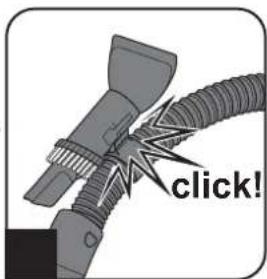
text_image
click!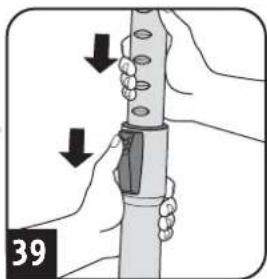
natural_image
Illustration of hands holding a mechanical device with arrows indicating motion (no text or symbols)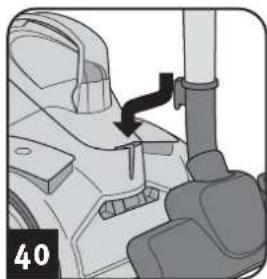
natural_image
Mechanical component diagram showing a lever mechanism with a black arrow indicating motion (no text or symbols)AVERTISSEMENT:
natural_image
Line drawing of a vacuum cleaner with attached hose and handle (no text or symbols)DE
Royal Appliance International GmbH
Abt. Kundenservice
Jagenbergstraße 19
41468 Neuss
DEUTSCHLAND

de@dirtdevil-service.eu
www.dirtdevil.de

0049 (0) 180 - 501 50 50*

0049 (0) 2131 - 60906095
AT

at@dirtdevil-service.eu

0043 - 720 - 88 49 54**
BG

bg@dirtdevil-service.eu

00359 - 2 - 49 25 116**
ES

es@dirtdevil-service.eu

0034 - 91 - 19 82 787**
GR

gr@dirtdevil-service.eu

0030 - 2 - 11 19 81 203**
IT

it@dirtdevil-service.eu

0039 - 06 - 94 80 16 18**
NL

nl@dirtdevil-service.eu

0031 - 20 - 80 85 408**
PT

pt@dirtdevil-service.eu

00351 - 21 - 11 41 327**
BE

be@dirtdevil-service.eu

0032 - 2 - 80 85 065**
CH

ch@dirtdevil-service.eu

00359 - 2 - 49 25 116**
FR

fr@dirtdevil-service.eu

0033 - 9 - 75 18 30 17**
HU

hu@dirtdevil-service.eu

0036 - 1 - 84 80 686**
LU

lu@dirtdevil-service.eu

00352 - 2 - 08 80 506**
PL

pl@dirtdevil-service.eu

0048 - 22 - 39 70 223**
DE
natural_image
Line drawing of a vacuum cleaner (no text or symbols on the device itself)Fehlerbeschreibung • Description of the malfunction • Description du problème • Omschrijving van de fout • Descripción del fallo • Descrizione del difetto • Hata tanımı:
Royal Appliance International GmbH
Jagenbergstraße 19
41468 Neuss
Germany
de@dirtdevil-service.eu
www.dirtdevil.de
+49 (0) 1805 - 501 50 50*
+49 (0) 2131 - 60 90 60 95
DE
* € 0.14 per minute from German landlines, maximum German mobile phone tariff € 0.42 per minute.
The cost of calls from abroad—outside Germany—depend upon the current prices of the respective foreign telephone company.