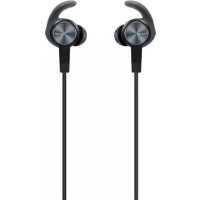
AM 61 Sport - Earplug HONOR - Free user manual and instructions
Find the device manual for free AM 61 Sport HONOR in PDF.



| Technical specifications | Type : Wireless earplugs |
|---|---|
| Connectivity | Bluetooth 5.0 |
| Battery life | Up to 12 hours with charging case |
| Weight | About 5 g per earbud |
| Usage | Ideal for sports and outdoor activities |
| Maintenance | Clean regularly with a soft cloth |
| Safety | Do not expose to extreme temperatures |
| General information | Water and sweat resistance (IPX4) |
Frequently Asked Questions - AM 61 Sport HONOR
User questions about AM 61 Sport HONOR
0 question about this device. Answer the ones you know or ask your own.
Ask a new question about this device
Download the instructions for your Earplug in PDF format for free! Find your manual AM 61 Sport - HONOR and take your electronic device back in hand. On this page are published all the documents necessary for the use of your device. AM 61 Sport by HONOR.
USER MANUAL AM 61 Sport HONOR
HUAWEI Sport Bluetooth Headphones User Guide
contents
English 1
French (Canada) 13
Warranty Card. 26
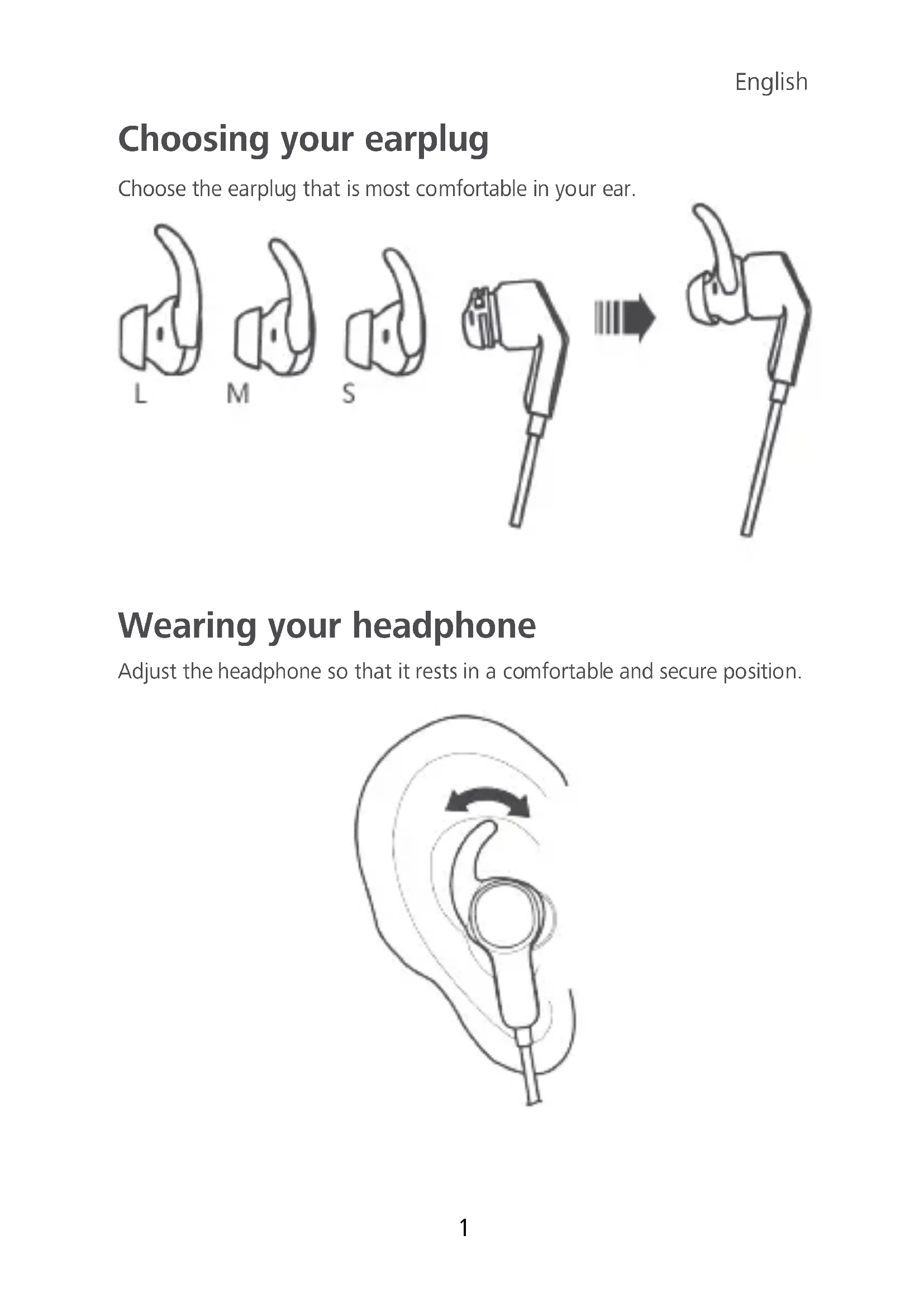
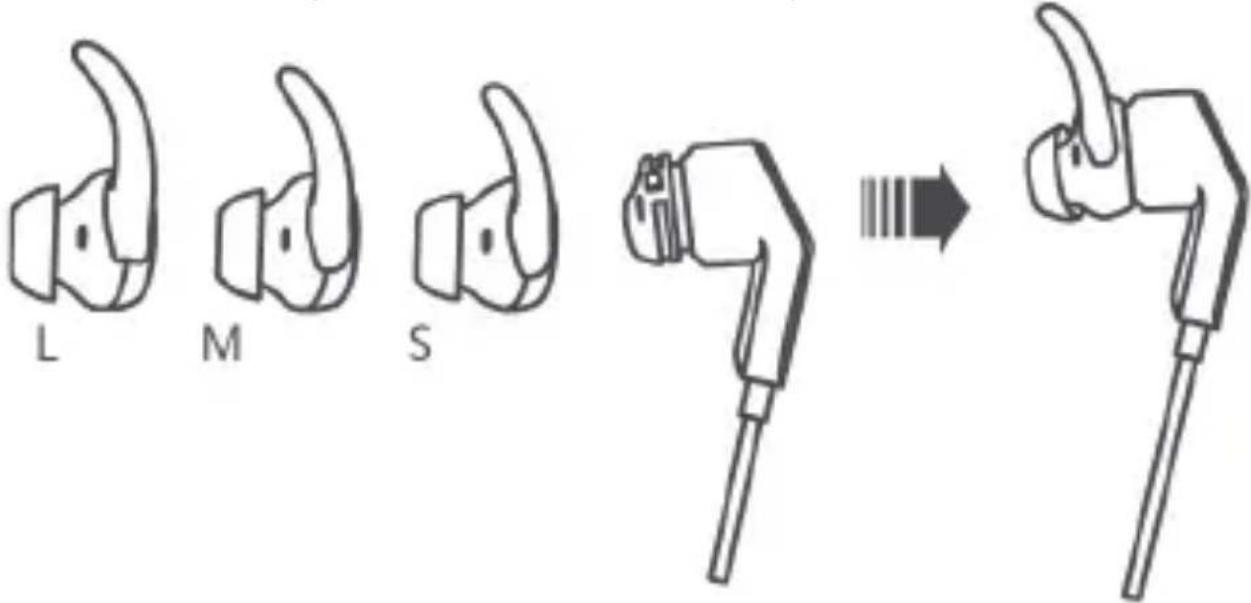
Choosing your earplug
Choose the earplug that is most comfortable in your ear.
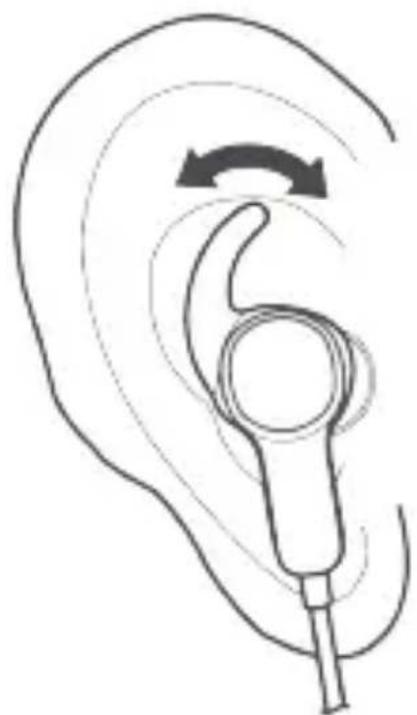
Wearing your headphone
Adjust the headphone so that it rests in a comfortable and secure position.
English
Power
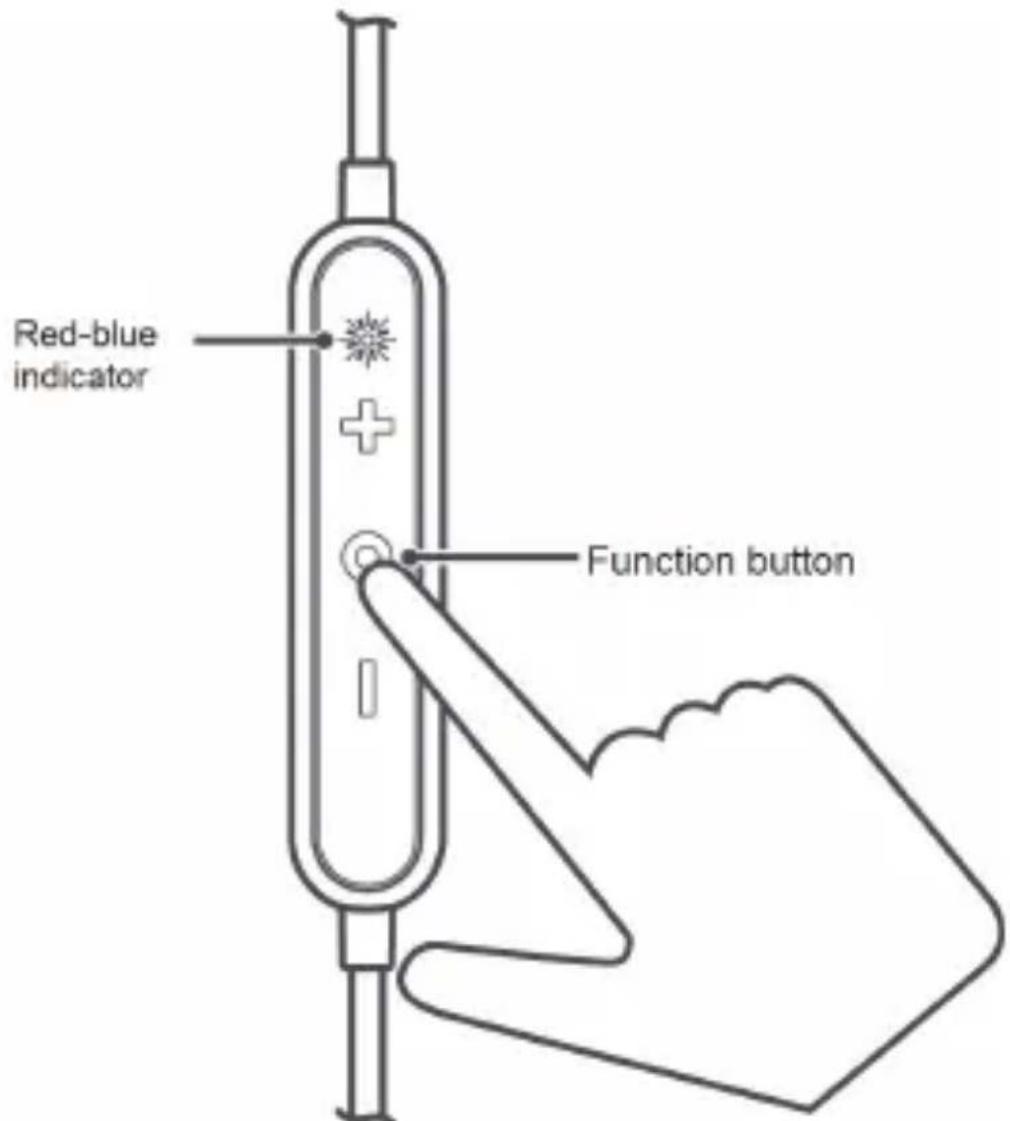
To power on the headphone, press and hold the function button for 2 to 4 seconds.
To power off the headphone, press and hold the function button for over 4 seconds.
Pairing
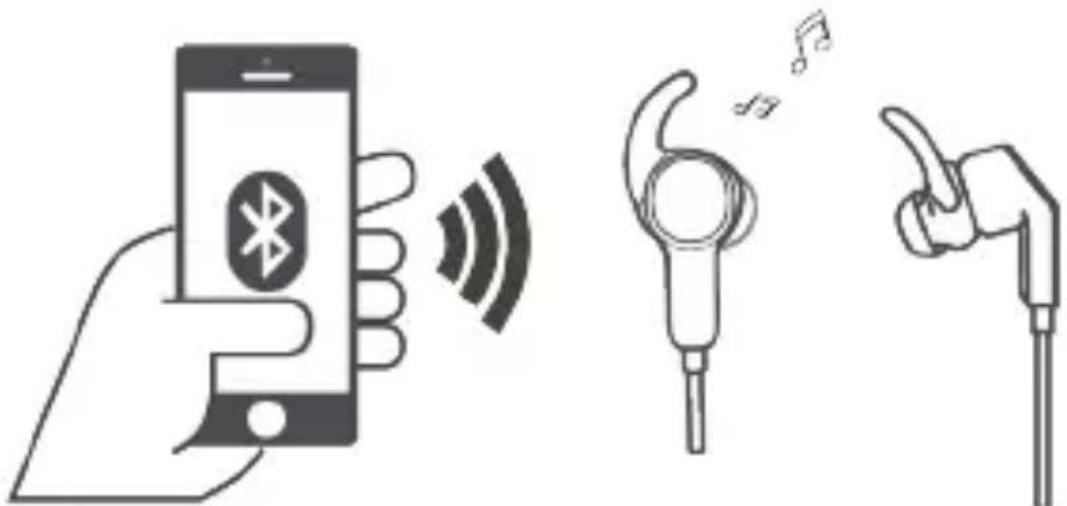
Pairing with your phone for the first time
- Power on your headphone. It auto-enters Bluetooth pairing mode, where the indicator blinks red and blue, and plays a voice alert.
- Enable Bluetooth on your phone and pair with the headphone.
Automatic reconnection after power-on
Power on the headphone. The headphone will automatically connect to the recently-connected phone.
Re-pairing
- Press and hold the function button for over 5 seconds to power on your headphone and enter Bluetooth pairing mode. You will hear a voice message instructing you to wait for the Bluetooth connection. The red-blue indicator will blink.
- Enable Bluetooth on your phone and pair with the headphone.
The headphone will power off after 3 minutes if it is not connected to any phones in pairing mode.
Paring with two phones simultaneously
- Pair your headphone with the first phone.
- Power off your headphone.
- Press and hold the function button for over 5 seconds to power on your headphone and enter Bluetooth pairing mode. Pair your headphone with the second phone.
- Open the list of available Bluetooth devices in your first phone, and pair your phone with your headphones.

When your headphone is paired with two phones simultaneously only one phone can play music at a time. If you want to play music in your second phone, pause the music playback in your first phone.
English
Reconnection after long-distance disconnection
After the headphone disconnects from your paired phones:
- If you return to Bluetooth range within 10 minutes, the connection will automatically resume.
- If you return to Bluetooth range within 30 minutes, the connection can be manually reconnected by pressing the function button.
- If you do not return to Bluetooth range within 30 minutes, the headphone will automatically power off.

Some phones cannot reconnect to the headphone automatically due to differences in Bluetooth technologies. Such concerns are not likely to be a quality issue with your headphone.
Handling calls
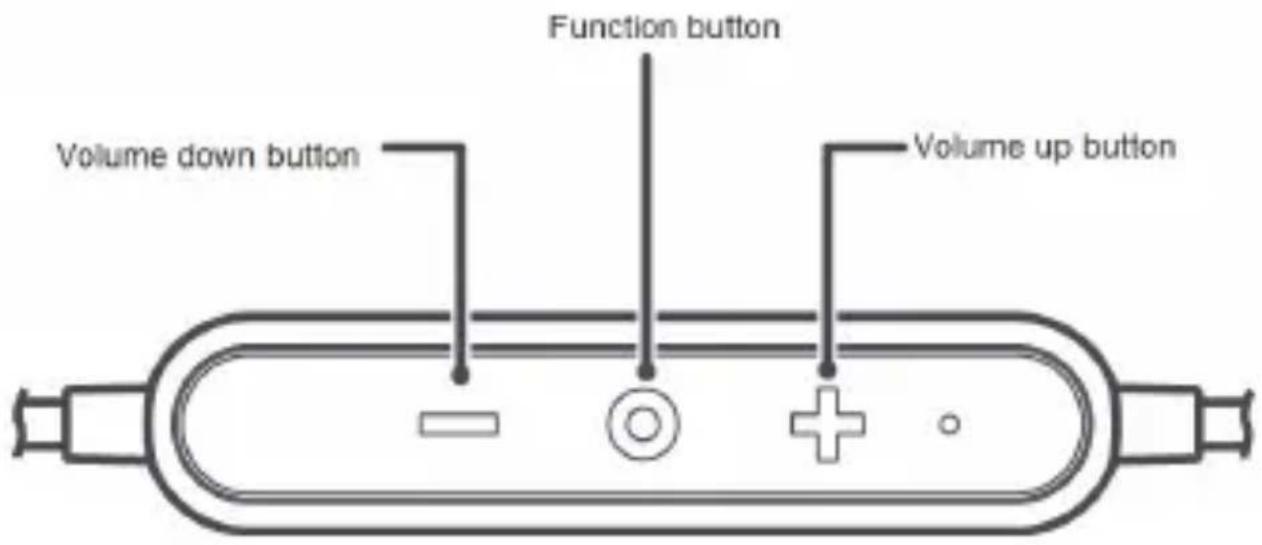
For an incoming call:
- To answer the call, press the function button.
- To reject the call, press and hold the function button for 2 to 4 seconds.
During call:
To end the call, press the function button.
- To switch between the phone and the headphone, press and hold the function button for 2 to 4 seconds.
- To mute or unmute a call, simultaneously press the volume up and volume down buttons.
When there is a new incoming call during a call:
- To end the current call and answer the new call, press the function button.
- To hold the current call and answer the new call, double-press the function button.
- To reject the new call, press and hold the function button for 2 to 4 seconds.
To cancel a call, press the function button.
To call back the last outgoing call, double-press the function button.
Music playback
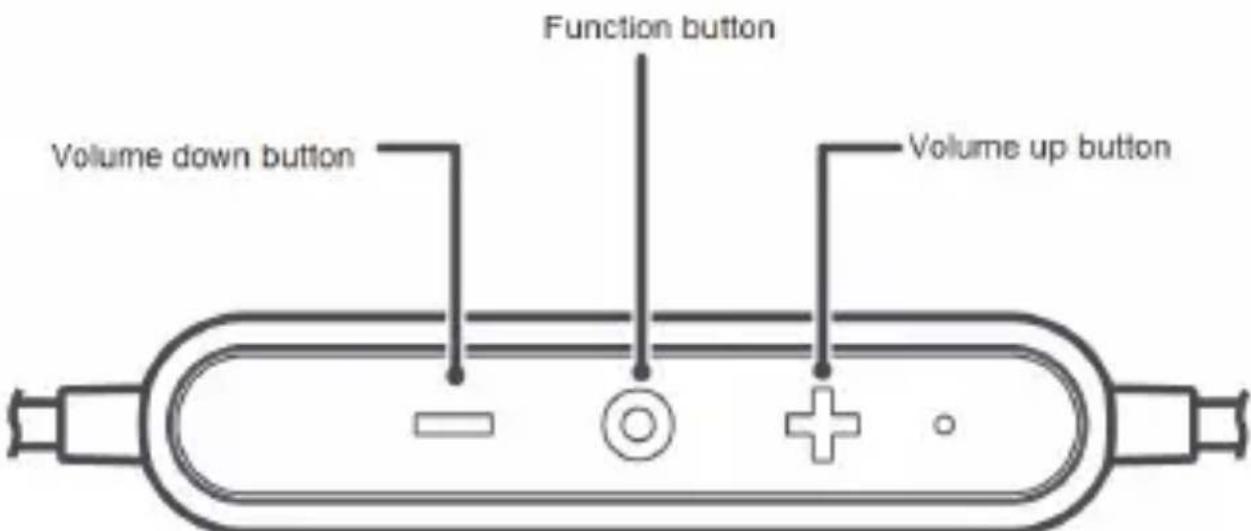
To resume playback, press the function button.
During playback:
- To pause playback, press the function button.
To increase volume, press the volume up button.
To decrease volume, press the volume down button. - To advance to the next audio track within a playlist, double-press the function button.
- To return to a previous track within a playlist, triple-press the function button.
- When you receive an incoming call during music playback, the music pauses automatically. To answer the call, press the function button. To end the call and resume playback, press the function button again.
To help ensure music playback quality and connectivity, keep the headache close to your phone with as few obstacles as possible.
English
Magnetic Hall effect features
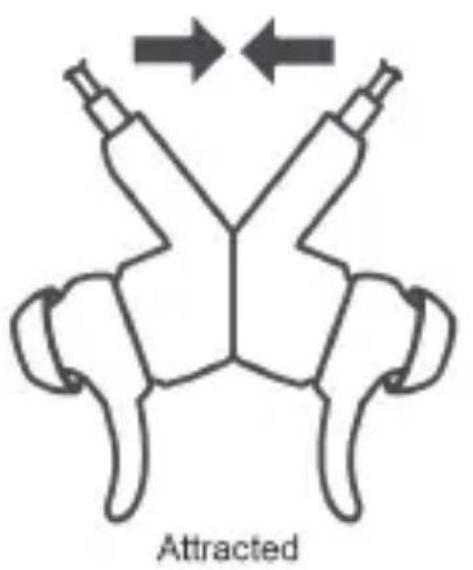
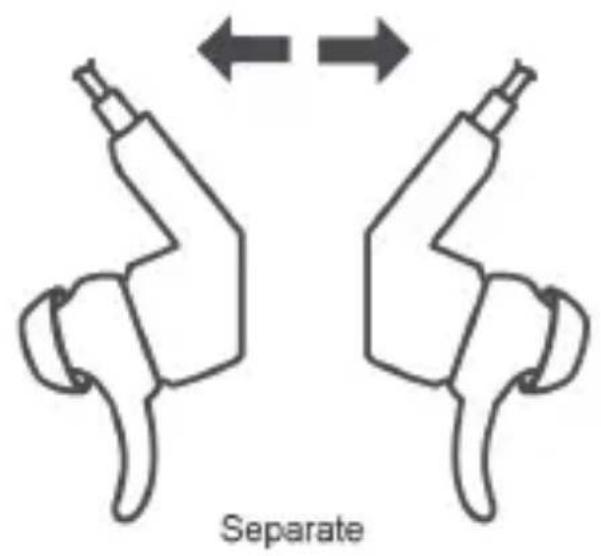
The backs of your headphone earpieces attract each other. Placing them in this configuration allows the following functionality:
Answer an incoming call by separating the earpieces
End a call by attracting the earpieces.
- Pause music playback by attracting the earpieces.
- Resume playback after a call by attracting the earpieces.

Some third-party players may not support this feature.
- Some third-party players may start playback from the beginning of the current music after attracting the earpieces.
Charging
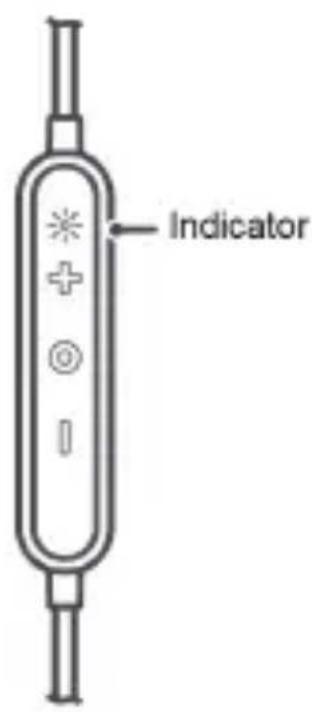
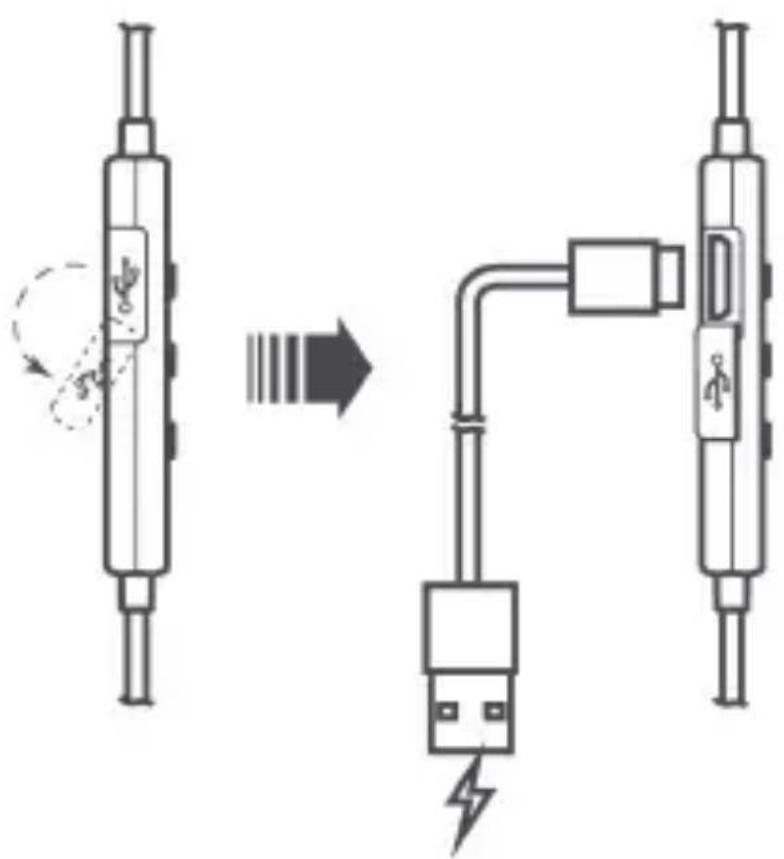
During charging, the indicator is steady red.
- When the headphone is fully charged, the indicator is steady blue.

If the headphone powers off due to insufficient battery level, charge the headphone within 30 days. Otherwise, charging failure may occur.
English
Safety information
Before you use the device, read the following precautions carefully to ensure optimal performance and to avoid danger or violation of laws and regulations.
- Avoid dusty, damp, or dirty environments as well as strong magnetic fields. Using the device in such environments may result in circuit malfunctions.
- Adjust the headphone volume to a proper range, as listening at high volume for a long time may result in permanent hearing impairment.
- High volume during driving may cause distraction and car accidents.
- Do not wrap or seal the headphone, or place other materials on the headphone. Do not use the headphone in a closed environment.
- Keep your headphone away from fire or other heat sources, such as electric heaters, microwave ovens, stoves, or water heaters. Avoid using such devices to dry the headphone.
- Protect your headphone and accessories from collision to avoid battery explosion or device damage.
- Use a clean, soft, and dry cloth to clean the headphone. Power off the headphone before cleaning and maintenance.
- Ideal operating temperatures range from 5^ to 35^ ( 40^ to 90^ ).
- Ideal storage temperatures range from 5^ to 35^ ( 40^ to 90^ ).
- Extreme heat or cold may damage the headphone. When the temperature is lower than 5^ ( 40^ ), the battery performance will be affected.
- Keep the headphone and accessories in a cool, well-ventilated area away from direct sunlight.
- Children should be supervised when using the headphone and its accessories. The headphone and its accessories may contain small components that may be damaged or present a choking hazard to children. Please place them out of the reach of children.
- Do not attempt to replace the battery. This device is equipped with a built-in rechargeable battery that cannot be removed.
- Do not dismantle the device or accessories. Such action voids the warranty and releases the manufacturer from damage liability.
English
In case of device malfunction, please contact an authorized service center.
- Do not dispose of the headphone and its accessories in normal household refuge. Dispose of or recycle your headphone and its accessories according to local laws.
- Do not use your device where prohibited. Follow rules and regulations set forth by hospitals and health care facilities.
It is recommended that you keep a minimum distance of 15cm between a device and a pacemaker or artificial cochlea to prevent potential interference. - Do not use unauthorized or incompatible power supplies, chargers, or batteries to avoid hazards such as fire and explosion.
Disposal and recycling information
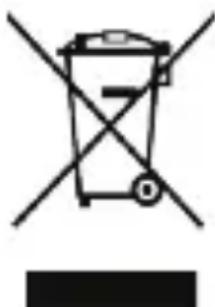
The crossed-out wheeled-bin symbol on your product, battery, literature or packaging reminds you that all electronic products and batteries must be taken to separate waste collection points at the end of their working lives; they must not be disposed of in the normal waste stream with household garbage. It is the
responsibility of the user to dispose of the equipment using a designated collection point or service for separate recycling of waste electrical and electronic equipment (WEEE) and batteries according to local laws. Proper collection and recycling of your equipment helps ensure electrical and electronic equipment (EEE) waste is recycled in a manner that conserves valuable materials and protects human health and the environment, improper handling, accidental breakage, damage, and/or improper recycling at the end of its life may be harmful for health and environment. For more information about where and how to drop off your EEE waste, please contact your local authorities, retailer or household waste disposal service or visit the website
http://consumer.huawei.com/en/.
Reduction of hazardous substances
This device and any electrical accessories are compliant with local applicable rules on the restriction of the use of certain hazardous
English
substances in electrical and electronic equipment, such as EU REACH, RoHS and Batteries (where included) regulations, etc. For declarations of conformity about REACH and RoHS, please visit our web site http://consumer.huawei.com/certification.
EU regulatory conformance
Hereby, Huawei Technologies Co., Ltd. declares that this device is in compliance with the essential requirements and other relevant provisions of Directive 2014/53/EU.
The most recent, effective version of the DoC (declaration of conformity) can be viewed at http://consumer.huawei.com/certification.
This device may be operated in all member states of the EU.
Observe national and local regulations where the device is used.
This device may be restricted for use, depending on the local network.
Frequency bands and power
(a) Frequency bands in which the radio equipment operates: Some bands may not be available in all countries or all areas. Please contact the local carrier for more details.
(b) Maximum radio-frequency power transmitted in the frequency bands in which the radio equipment operates: The maximum power for all bands is less than the highest limit value specified in the related Harmonized Standard.
The frequency bands and transmitting power (radiated and/or conducted) nominal limits applicable to this radio equipment are as follows. Bluetooth: 20 dBm.
Accessories and Software Information
It is recommended that the following accessories should be used:
Batteries: 1. VDL (VDL1254) 2. VARTA (CP1254 A3)
The product software version is AM60_EN_1.1.0. Software updates will be released by the manufacturer to fix bugs or enhance functions after the product has been released. All software versions released by the manufacturer have been verified and are still compliant with the related rules.
All RF parameters (for example, frequency range and output power) are not accessible to the user, and cannot be changed by the user.
For the most recent information about accessories and software, please see the DoC (Declaration of Confirmation) at
http://consumer.huawei.com/certification.
Protecting your hearing when using a headphone
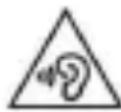
To prevent possible hearing damage, do not listen at high levels for long periods.
-
Using a headphone at high volumes may damage your hearing. To reduce this risk, lower the headphone volume to a safe and comfortable level.
-
Exposure to high volumes while driving may cause distraction and increase your risk of an accident.
FCC statement
This equipment has been tested and found to comply with the limits for a Class B digital device, pursuant to Part 15 of the FCC Rules. These limits are designed to provide
reasonable protection against harmful interference in a residential installation. This equipment generates, uses and can radiate radio frequency energy and, if not installed and used in accordance with the instructions, may cause harmful interference
to radio communications. However, there is no guarantee that interference will not occur in a particular installation. If this equipment does cause harmful interference to radio or television reception, which can be determined by turning the equipment
off and on, the user is encouraged to try to correct the interference by one or more of the following measures:
--Reorient or relocate the receiving antenna.
--Increase the separation between the equipment and receiver.
--Connect
the equipment into an outlet on a circuit different from that to which the receiver is connected.
English
--Consult the dealer or an experienced radio/TV technician for help.
This device complies with Part 15 of the FCC Rules. Operation is subject to the following two conditions: (1) this device may not cause harmful interference, and (2) this device must accept any interference received, including interference that may cause undesired operation.
Caution: Any changes or modifications to this device not expressly approved by Huawei Technologies Co., Ltd. for compliance could void the user's authority to operate the equipment.
IC statement:
This device complies with CAN ICES-3 (B)/NMB-3(B).
This device complies with Industry Canada licence-exempt RSS standard(s). Operation is subject to the following two conditions: (1) this device may not cause interference, and (2) this device must accept any interference, including interference that may cause undesired operation of the device.
Legal statement
Copyright © Huawei Technologies Co., Ltd. 2017. All rights reserved. This document is for reference only. Nothing in this guide constitutes a warranty of any kind, express or implied.
Privacy protection
To understand how we protect your personal information, please visit http://consumer.huawei.com/privacy-policy and read our privacy policy.
All pictures and illustrations in this guide, including but not limited to the phone color, size, and display content, are for your reference only. The actual product may vary. Nothing in this guide constitutes a warranty of any kind, express or implied.
Huawei Device USA Recycling Program
Huawei will work with you to create a greener world.
Together we will make it possible!
Cell phones, tablets, and batteries that are not responsibly discarded or improperly disposed of may cause serious environmental problems and could jeopardize one's health and safety. To properly dispose of used mobile devices, tablets and mobile device batteries, promote resource recycling, and protect the environment, Huawei Device USA will recycle consumers' used mobile devices, used tablets and mobile device batteries free of charge. All mobile/cellular phone models, tablets, and mobile device batteries regardless of the manufacturer will be accepted. Huawei Device USA will responsibly recycle all returned mobile devices, tablets, and mobile device batteries.
Terms and Conditions for Huawei Device USA Recycling
Program
BY PARTICIPATING IN THIS PROGRAM, YOU ARE INDICATING THAT YOU HAVE READ AND AGREE TO BE BOUND BY THESE TERMS AND CONDITIONS.
Here is what you need to do to participate:
- Discontinue your carrier service for the mobile device or have it transferred to another mobile device and pay any outstanding amounts to the carrier.
- Completely discharge your mobile device battery or your tablet battery.
- Transfer or back up the data on your mobile device or tablet, and then delete the data on the mobile device or tablet and any other storage devices in the mobile device or tablet. If you need assistance in deleting the information on your device, please call 1.888.548.2934.
- Remove any removable products that you do not want to return, such as accessories, earplugs and chargers.
- Call the Technical Support Center at 1.888.548.2934 and let the agent know that you wish to return and recycle your mobile device/battery or
tablet. If you would like us to provide appropriate packaging for mailing, please let the agent know this as well.
- After gathering pertinent information on you and your device/battery or tablet, a prepaid self addressed shipping label, and if requested, appropriate packaging for mailing, will be sent to you. A valid email address will be required.
- If you choose to provide your own packaging, please place you mobile device or tablet, battery and/or accessory in a secured mailing package.
- Affix your pre-paid shipping label from Huawei Device USA to your package and mail your mobile device or tablet and/or battery to us.
NOTICE REGARDING CUSTOMER DATA: You are responsible for all personal and/or confidential data that may be stored on your mobile device or tablet. Huawei Device USA has no responsibility or liability for the loss of personal and/or confidential data or returned removable products. If you need assistance in deleting the information on your mobile device or tablet, please call 1.888.548.2934.
LIMITATION OF LIABILITY
HUAWEI DEVICE USA DOES NOT ACCEPT LIABILITY FOR ANY LOSSES RESULTING FROM YOUR PARTICIPATION IN THIS PROGRAM, INCLUDING BUT NOT LIMITED TO LOST PROFITS, LOSS OF BUSINESS OR OTHER CONSEQUENTIAL, SPECIAL, INDIRECT, OR PUNITIVE DAMAGES, EVEN IF ADVISED OF THE POSSIBILITY OF SUCH DAMAGES, OR FOR ANY CLAIM BY ANY THIRD PARTY UNLESS SUCH DAMAGES ARE RESERVED BY A SPECIFIC FEDERAL, STATE OR LOCAL LAW.
Huawei Device USA is not responsible for any consequences related to your failure to delete personal information.
- By returning your mobile device, mobile battery or tablet to Huawei Device USA, you relinquish ownership rights to the mobile device, battery or tablet.
Huawei Device USA has no obligation to return the mobile device, tablet, or any accessory to you.
- You will not be provided replacement equipment nor will you receive any service credit for any returned mobile device, tablet or battery.
Huawei Device USA's Recycling Program is only valid in the
Warranty Card
continental United States.
WARRANTY
HUAWEI DEVICE USA MAKES NO WARRANTY WITH RESPECT TO THIS RECYCLING SERVICE AND DISCLAIMS ALL WARRANTYES, WHETHER EXPRESS OR IMPLIED, INCLUDING BUT NOT LIMITED TO, ANY IMPLIED WARRANTYES OR MERCHANTABILITY AND FITNESS FOR A PARTICULAR PURPOSE. YOU MAY HAVE OTHER RIGHTS WHICH VARY FROM STATE TO STATE. SOME STATES DO NOT ALLOW LIMITATIONS ON WARRANTYES, SO THE LIMITATIONS IN THIS PARAGRAPH MAY NOT APPLY TO YOU.
Huawei Device USA Inc. Limited Warranty
Huawei Device USA Inc. ("Huawei") represents and warrants to the original purchaser ("Purchaser" or "you") that Huawei's devices ("Product") are free from material defects, including improper or inferior workmanship, materials, and design, during the designated warranty period, and subject to the following terms and conditions, when used normally and in accordance with all operating instructions:
- Warranty Period: Coverage under this warranty is limited to the following time periods:
a) Phone and Tablet: a period of 12 months from the date of purchase.
b) Watch and Wearable: a period of 12 months from the date of purchase.
c) Charger/Cradle: a period of 12 months from the date of purchase.
d) Other accessories (if included in the box set): a period of 3 months from the date of purchase.
-
This limited warranty only applies to products manufactured by or for Huawei and that can be identified by the "Huawei" trademark, trade name, or logo affixed to them. The limited warranty does not apply to any non-Huawei products or software.
-
The limited warranty extends only to Purchasers who purchased the Product in the United States of America and is not assignable or transferable to any subsequent
purchaser/customer.
- During the limited warranty period, Huawei will repair or replace at Huawei's sole option, any parts of the Product that are defective or malfunctioning during normal usage. Huawei reserves the right to use new or refurbished replacement parts in repair of the Product.
- This limited warranty covers only the costs of parts and labor. Other related costs such as shipping and delivery costs may be borne by Purchaser at Huawei's option.
-
At Huawei's request, Purchaser must provide proof of the date of the original purchase of the Product by a dated bill of sale or dated itemized receipt.
-
This limited warranty does not cover damage resulting from:
a) Abuse, accident, misuse, improper storage, exposure to liquid, moisture, or dampness;
b) External causes such as from a collision, fire, flooding, sand, dirt, windstorm, lightning, or earthquake;
c) Exposure to extreme weather conditions, Acts of God, theft, blown fuse, or improper use of any electrical source;
d) Computer or internet viruses, bugs, worms, Trojan Horses, cancel-bots;
e) Normal wear and tear of the Product;
f) Usage of Product other than in its normal and customary manner;
g) Improper testing, operation, maintenance, installation, or any alteration or modification of Product;
h) Consumable parts, such as batteries, unless damage has occurred due to a defect in Huawei materials and workmanship;
i) Service performed by anyone who is not a Huawei representative or an authorized Huawei service provider;
j) Other acts which are not the fault of Huawei, including damage caused by shipping;
k) Cosmetic damage, including but not limited to dents or scratches in decorative, structural, or non-operative parts resulting from normal Purchaser use;
l) Spillage of food or liquid, corrosion, rust or incorrect voltage; and m) The defective function of the cellular system or inadequate signal
Warranty Card
reception by the external antenna, or viruses or other software problems introduced into the Product.
- Huawei does not warrant that the operation of this Product will be uninterrupted or error-free.
- This limited warranty will also be null and void in any of the following events:
a) The serial number or warranty seal on the Product has been altered, defaced or removed;
b) Any term contained in this limited warranty has been altered or modified in any way without prior written consent of Huawei;
c) Huawei has not been notified by Purchaser of the alleged defect or malfunction of the Product during the applicable warranty period.
- If the Product is returned to Huawei after the expiration of the warranty period, Huawei's normal service policies shall apply and Purchaser will be charged accordingly.
a) Huawei assumes no obligation or liability beyond that which is expressly provided for in this limited warranty.
b) All warranty information, pricing, product features and specifications are subject to change.
- This limited warranty provides Purchaser's sole and exclusive remedy to be provided by Huawei. The agents, employees, distributors, and dealers of Huawei Products are not authorized to make modifications to this limited warranty or make additional warranties binding on Huawei.
LIMITATION OF LIABILITY
- HUAWEI'S LIMITATION OF LIABILITY UNDER THIS LIMITED WARRANTY SHALL BE THE ACTUAL CASH VALUE OF THE PRODUCT AT THE TIME PURCHASER RETURNS THE PRODUCT FOR REPAIR, AS DETERMINED BY THE PRICE PAID BY THE PURCHASER FOR THE PRODUCT LESS A REASONABLE AMOUNT OF USAGE OR WEAR AND TEAR. HUAWEI SHALL NOT BE LIABLE FOR ANY OTHER LOSSES OR DAMAGES SUCH AS SPECIAL, INCIDENTAL, CONSEQUENTIAL, OR PUNITIVE DAMAGES (INCLUDING BUT NOT LIMITED TO LOSS OF ANTICIPATED BENEFITS OR PROFITS, LOSS OF SAVINGS OR
REVENUE, LOSS OF DATA, LOSS OF USE OF THE PRODUCT OR ANY ASSOCIATED EQUIPMENT, COST OF CAPITAL, COST OF ANY SUBSTITUTE PRODUCT OR FACILITIES, DOWNTIME, ANY COSTS OF RECOVERING, REPROGRAMMING, OR REPRODUCING ANY PROGRAM OR DATA, ANY FAILURE TO MAINTAIN THE CONFIDENTIALITY OF DATA STORED ON THE PRODUCT, THE CLAIMS OF ANY THIRD PARTIES, INCLUDING SUBSEQUENT PURCHASERS, AND DAMAGE TO PROPERTY, RESULTING FROM THE PURCHASE OR USE OF THE PRODUCT OR ARISING FROM BREACH OF THIS LIMITED WARRANTY, BREACH OF CONTRACT, NEGLIGENCE, STRICT LIABILITY, OR ANY OTHER LEGAL OR EQUITABLE THEORY, EVEN IF HUAWEI KNEW OF THE LIKELIHOOD OF SUCH DAMAGES. HUAWEI SHALL NOT BE LIABLE FOR DELAY IN-renderING SERVICE UNDER THE LIMITED WARRANTY OR LOSS OF USE DURING THE PERIOD THAT THE PRODUCT IS BEING REPAIRED. SOME STATES DO NOT ALLOW THE EXCLUSION OR LIMITATION OF INCIDENTAL OR CONSEQUENTIAL DAMAGES, SO THE ABOVE LIMITATION MAY NOT APPLY TO YOU.
LIMITATION OF WARRANTY DURATION
- TO THE EXTENT PERMITTED BY LAW, HUAWEI LIMITS THE DURATION OF ALL IMPLIED WARRANTYES TO THE APPLICABLE PRODUCT WARRANTY PERIOD STATED ABOVE, INCLUDING BUT NOT LIMITED TO THE IMPLIED WARRANTY OF MERCHANTABILITY OR FITNESS FOR A PARTICULAR PURPOSE AND WARRANTY AGAINST HIDDEN OR LATENT DEFECTS. SOME STATES DO NOT ALLOW LIMITATIONS ON HOW LONG AN IMPLIED WARRANTY LASTS, SO THE ABOVE LIMITATION MAY NOT APPLY TO YOU.
- TO THE EXTENT PERMITTED BY LAW, THIS LIMITED WARRANTY AND REMEDIES SET FORTH ARE EXCLUSIVE AND IN LIEU OF ALL OTHER WARRANTYES, REMEDIES AND CONDITIONS, WHETHER ORAL, WRITTEN, STATUTORY, EXPRESS OR IMPLIED. This limited warranty allocates risk of Product failure between Purchaser and Huawei, and Huawei's Product pricing reflects this allocation of risk and the limitations
Warranty Card
of liability contained in this limited warranty.
- This warranty gives you specific legal rights, and you may also have other rights which vary from State to State.
Contact Huawei
To make a claim under this warranty, contact Huawei at:
WEBSITE: HTTP://CONSUMER.HUAWEI.COM/US
EMAIL: SUPPORTUSA@HUAWEI.COM
CALL CENTER: 888.5HUAWEI / 888.548.2934
- This contact information may change without notice. Please contact your authorized Huawei retailer for updated contact information.
1.888.548.2934 (888.5HUWEI).
1.888.548.2934 (888.5HUWEI).
Please visit http://consumer.huawei.com/us/support/index.htm for recent updated hotline and email address in your country or region.