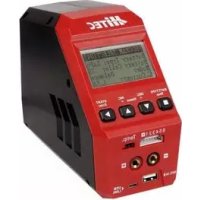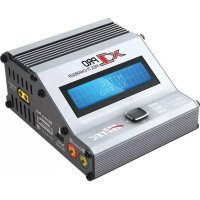
X1 Pro - Model making Hitec - Free user manual and instructions
Find the device manual for free X1 Pro Hitec in PDF.


Frequently Asked Questions - X1 Pro Hitec
User questions about X1 Pro Hitec
0 question about this device. Answer the ones you know or ask your own.
Ask a new question about this device
Download the instructions for your Model making in PDF format for free! Find your manual X1 Pro - Hitec and take your electronic device back in hand. On this page are published all the documents necessary for the use of your device. X1 Pro by Hitec.
USER MANUAL X1 Pro Hitec
L3s1.2A 12.69V CHG022:4300682
NIMH CYCLE DCHG>CHG 1
10. Charge Master (Software)
(BATT MEMORY 1) LiPo 7.4V(2S)
Key Beep 0 Buzzer ON
Input Power Low Cut-off 10.0V
CONNECT ERROR CHECK MAIN PORT
CELL ERROR LOW VOLTAGE
CELL NUMBER INCORRECT
We are excited that you have selected the HiTEC X1 Pro battery balance charger and discharger. Capable of charging all battery types including Lithium, NiCd/NiMH and Lead-Acid chemistries with a tremendous 230-watt charge amperage rate, this professional charger is innovatively designed and engineered, providing safe and reliable performance. Take charge of your hobby with HiTEC!
Please read this entire operating manual before using the X1 Pro Charger. If you are unsure of its proper operation after reading the manual, please seek advice from an experienced hobbyist or someone familiar with proper battery charging procedures.
Failure to follow these warnings can be considered negligence by the operator and may negate any claims for damages incurred.
Multiplex Modellsport GmbH & Co.KG will not be held responsible for any damages or injuries that may occur by persons who fail to follow these warnings or who fail to properly follow the instructions in this manual.
- Never leave your charger unattended while in operation.
- Never charge on or around combustible materials.
- Never charge a damaged battery pack.
- Low cost, no-name battery packs pose the most danger. We recommend you only use battery packs that are sold and warranted by a reputable company.
It is highly recommended that you utilize a safety device such as a steel case or lipo sackTM while charging lithium chemistry batteries.
It is highly recommended that you keep an operable "class a" fire extinguisher in the charging area.

The charging and discharging of rc hobby batteries can be dangerous. Failure to follow these explicit warnings can result in property damage and/or loss of life.
1.1.Warnings and Safety Information

Warning
Be sure to read this section for your own safety.

Caution
Be sure to read this section to prevent accidents and damage to your charger.

Tip
This section will help you maximize the performance of your charger.

Note
This section will provide more detailed explanations.
These warnings and safety notes are of the utmost importance. You must follow these instructions for maximum safety. Failure to do so can damage the charger and the battery; and in the worst cases, may cause a fire.

Never leave the charger unattended when it is connected to its power source. If any malfunction is found, terminate the process immediately and refer to the operation manual.
The allowable DC input voltage is 11-18 V DC.
- Keep the charger away from dust, damp, rain, heat, direct sunlight and excessive vibration.
- If the charger is dropped or suffers any type of impact, it should be inspected by an authorized service station before using it again.
- This charger and the battery should be put on a heat-resistant, non-flammable and non-conductive surface.
- Never place a charger on a car seat, carpet or similar surface. Keep all flammable volatile materials away from the operating area.
- Make sure you know the specific cations of the battery to be charged or discharged to ensure it meets the requirements of this charger. If the program is set up incorrectly, the battery and charger can be damaged.
- Fire or explosion can occur due to overcharging.
- To avoid a short circuit between the charge lead, always connect the charge cable to the charger first, then connect the battery. Reverse the sequence when disconnecting.
Never attempt to charge or discharge the following types of batteries:
- A battery fitted with an integral charge circuit or a protection circuit
-
A battery pack which consists of different types of cells (including different manufacturer's cells)
-
A battery that is already fully charged or just slightly discharged
- Any non-rechargeable batteries (these pose an explosion hazard)
A faulty or damaged battery - Batteries installed in a device or which are electrically linked to other components
- Batteries that are not expressly stated by the manufacturer to be suitable for the currents the charger delivers during the charge process
Please bear in mind the following points before you commence charging:
- Did you select the appropriate program suitable for the type of battery you are charging?
- Did you set up the adequate current for charging or discharging?
- Have you checked the battery voltage? Lithium battery packs can be wired in parallel and in series, i.e. a 2-cell pack can be 3.7V (in parallel) or 7.4V (in series).
- Have you checked that all connections are fi rm and secure?
- Make sure there are no intermittent contacts at any point in the circuit.
1.1.Warnings and Safety Information
Standard Battery Parameters
| LiPo Lilon LiFe NiCd NiMH Pb | ||||||
| Nominal Voltage: 3.7 V/cell 3.6 V/cell 3.3 V/cell 1.2 V/cell 1.2 V/cell 2.0 V/cell | ||||||
| Max. Charge Voltage: 4.2 V/cell 4.1 V/cell 3.6 V/cell 1.5 V/cell 1.5 V/cell 2.46 V/cell | ||||||
| Storage Voltage: 3.8 V/cell 3.7 V/cell 3.3 V/cell n/a n/a n/a | ||||||
| Min. Discharge Voltage: | ≥ 3.3 V/cell | ≥ 2.5 V/cell | ≥ 2.0 V/cell | ≥ 1.0 V/cell | ≥ 0.85 V/cell | ≥ 1.75 V/cell |

When adjusting your X1 Pro charging parameters, be sure you select the proper battery type and cell voltage for the type of cell you are charging. Charging batteries with the wrong settings may cause the cells to burst, catch fire or explode.
Charging
Before charging your batteries, it is critical that you determine the maximum allowable charge rate for your batteries. The X1 Pro is capable of charging at high rates that may not be suitable or safe for your particular batteries. For example, Lithium cells are typically safe to charge at 1C, or the total mAh÷ 1000 . A 1200mAh battery would have a 1C charge rate of 1.2 amps. A 4200mAh battery would have a 1C charge rate of 4.2 amps. Some manufacturers are offering Lithium cells that can be charged at greater than 1C but this should ALWAYS be verified before charging a Lithium battery at rates higher than 1C. Voltage is just as critical as the charging amperage rate and this is determined by the number of cells in series, or "S". For example, a 3S LiPo is rated at 11.1 volts ("S" multiplied by a single LiPo cell with a nominal voltage of 3.7 volts DC. 3 cells x 3.7 volts each equals 11.1 volts DC).
Connect the battery's main leads to the charger output: red is positive and black is negative. Keep in mind that the
Discharging
The X1 Pro discharging functions are for two specific purposes:
- Refreshing the capacity of a Nickel-based battery that has lost capacity over time (NiMH or NiCd).
- Reducing the voltage of a Lithium battery for safe storage.

Lithium chemistry battery packs should only be discharged to their minimum safe voltage, no lower. Deep discharging a Lithium cell will dopermanent damage.Refer to the Standard Battery Parameters table on page 26 of this manual for Minimum Discharge Voltages.
gauge or thickness of your charging leads from the X1 Pro to your battery must be of an acceptable current rating to handle the applied charge current. For maximum safety and charging effectiveness, always match or exceed the main battery lead rating when assembling or selecting your charging leads. If you charge a battery at a high current rate (amperage) with a charging lead not rated for the chosen amperage, the wire could get hot, catch fire, short out and/or potentially destroy your battery and the charger. When in doubt, always use a higher gauge wire (lower AWG number). It is common to see charging leads constructed of 14AWG, 16AWG or 18AWG wire.
Always refer to recommendations from your battery manufacturer for your specific battery type and size before initiating a charge or discharge process.
Do not attempt to disassemble or modify Lithium or Lead-Acid battery packs.
LiPo Charge/Discharge Cycling
Lithium batteries are known to reach full capacity after a break-in period of about 10 charge/discharge cycles. We do not recommend you use the X1 Pro charger to do this, normal use and recharging will achieve the same results. If you wish to perform a Lithium break-in on the bench with the X1 Pro, discharging to minimum acceptable voltages and performing a balance charge at 1C maximum rate is recommended. If you choose to break in your Lithium batteries under normal use, charging at only 1C for the first ten cycles will help ensure full performance and service life from your Lithium cells.
1.2. Guarantee and limitation of liability
MULTIPLEX Modellsport GmbH & Co.KG does not assume any liability for loss, damage or costs which arise through the improper use and operation of our products, or which are connected with such operation in any way. As far as is legally permissible, the obligation of MULTIPLEX Modellsport GmbH & Co.KG to provide compensation for damages, on whatever legal basis, is limited to the invoice amount of the quantity of MULTIPLEX Modellsport GmbH & Co.KG goods that were directly affected by whatever incident gave rise to the damage.
This does not apply if MULTIPLEX Modellsport GmbH & Co.KG is obliged to accept unlimited liability in accordance with mandatory law for deliberate or gross negligence.
Our products are covered by the currently valid statutory guarantee regulations. If you wish to make a claim under guarantee, please contact the model shop where you purchased the product.
The guarantee does not cover malfunctions caused by the following:
- Improper Operation
- Maintenance that was performed incorrectly, late or not at all, or performed by a non-authorized body
- Incorrect connections
- Use of non-original MULTIPLEX accessories
- Modifi cations / repairs that were not carried out by MULTIPLEX or a MULTIPLEX Service Centre
- Accidental or deliberate damage
- Faults due to normal wear and tear
Operation outside the technical specific cations or in connection with components from other manufacturers.
MULTIPLEX Modellsport GmbH & Co.KG
Multiplex/HiTEC Service:
+49 (0) 7252 - 5809333
1.3. CE Conformity Declaration
This device has been assessed and approved in accordance with European harmonised directives. This means that you possess a product whose design and construction fulf i l the protective aims of the European Community designed to ensure the safe operation of equipment.
The detailed CE conformity declaration can be downloaded in the form of a PDF file from the Internet under wwwultiplex-rc.de. It is located in the DOWNLOADS area.
1.4. Disposal Notes
Electrical equipment marked with the cancelled waste bin symbol must not be discarded in the standard household waste; instead it should be taken to a suitable specialist disposal system.
In the countries of the EU (European Union) electrical equipment must not be discarded via the normal domestic refuse system (WEEE - Waste of Electrical and Electronic Equipment, Directive 2002/96/EG). You can take unwanted equipment to your nearest local authority waste collection point or recycling centre. There the equipment will be disposed of correctly and at no cost to you.
By returning your unwanted equipment you can make an important contribution to the protection of the environment!
2. Package Contents
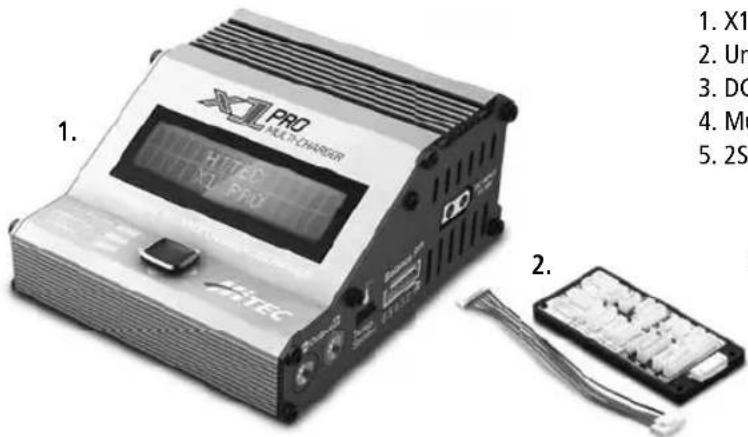
- X1 Pro Charger
- Universal Balancer Board
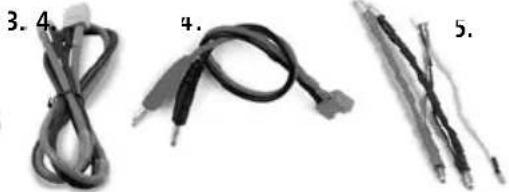
- DC Input Power Cable with XT 60 Plug
- Multiplex Charging Cable
5.2S LiPo Hardcase Charging Lead
2.1. Specifications
| Input Voltage Range: 11~18 Volts DC | |
| Charge Circuit Power: 180 Watts | |
| Disharge Circuit Power: 30 Watts | |
| Charge Current Range: 0.1-16.0 Amps | |
| Discharge Current Range: 0.1-8.0 Amps | |
| LiPo, LiFe & Lilon Balancing Current Drain: 200 mA per Cell | |
| LiPo, LiFe & Lilon Cell Count: 1-6 Cells | |
| Maximum NiCd/NiMh Cell Count: 1-15 Cells | |
| Lead Acid (Pb) Cells/Voltage: 2-20 Volts | |
| Dimensions: 3.6" x 4.4" x 2.0" | |
| Net Weight: | 14.3 Ounces |
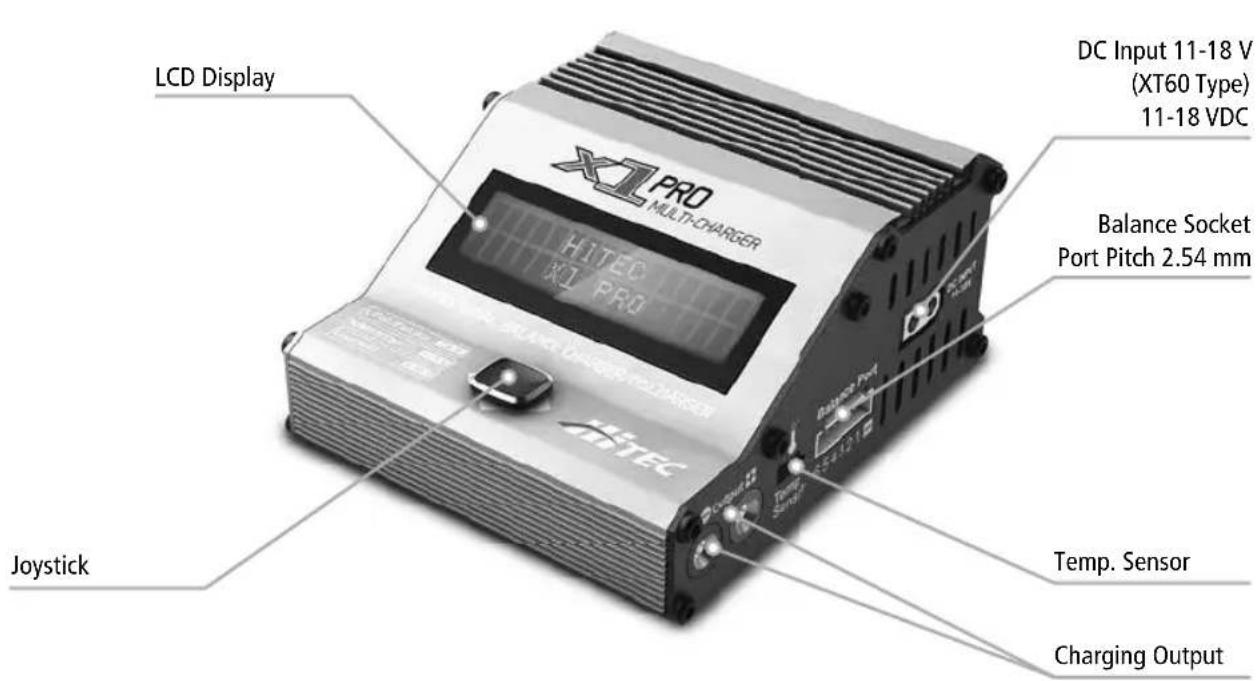
2.2. Charger Layout
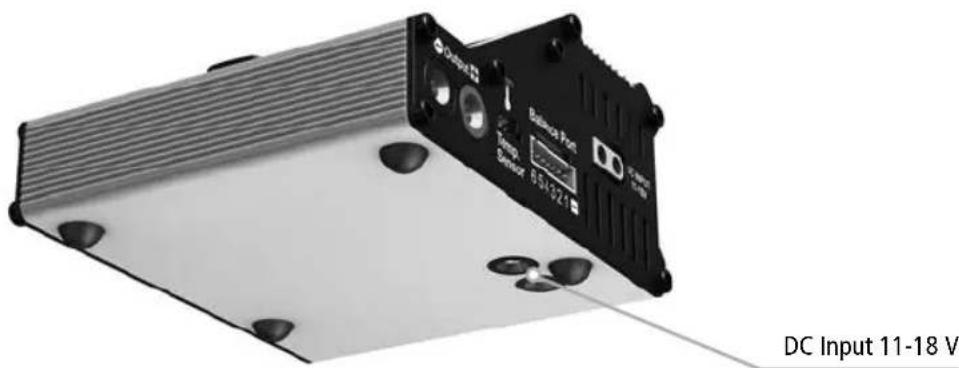
2.2. Charger Layout

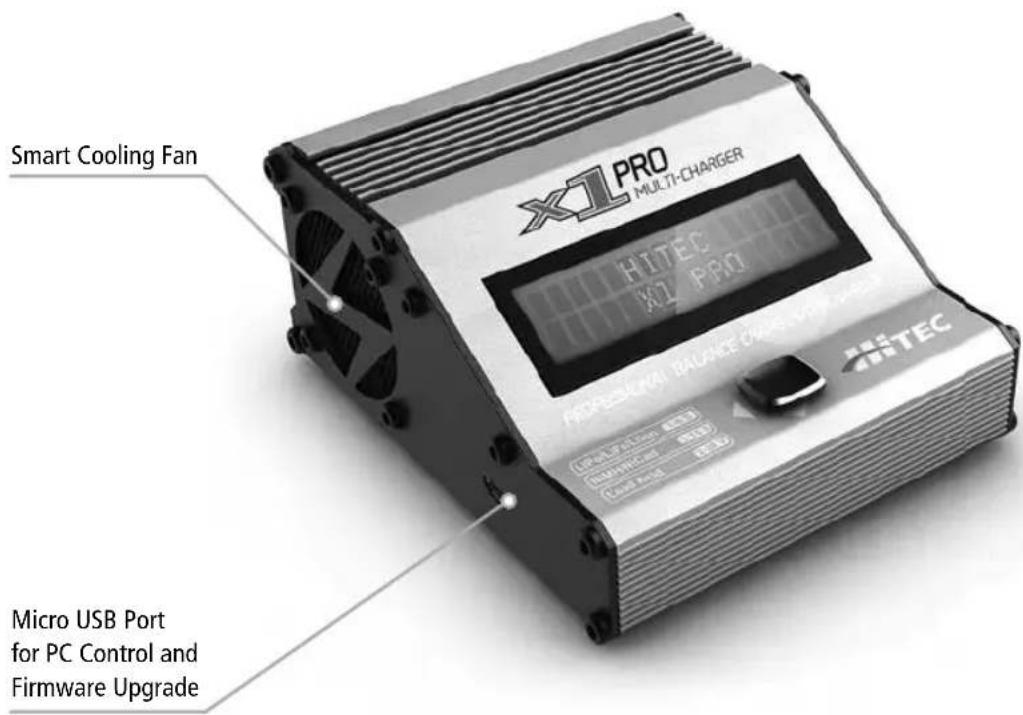
3. Special Features
Compact and Unique Design
The X1 Pro is a super-compact, portable charging system with a unique design that incorporates a joystick input device for very simple operation.
Two DC inputs
There are two DC inputs, one is located on the right side of the charger and the other is located in the bottom for docking into the ePowerBox 17A (230 W 13.8 V Switch DC Power Supply-Part No. 44216).
Optimized Operating Software
The X1 Pro "AUTO" feature sets the charge and discharge current for you automatically, preventing overcharging which can damage your battery. In the event of an error, the X1 Pro instantly disconnects the circuit and sounds an alarm. This feature can be set by the user and controlled through the two-way link for maximum safety.
Internal Independent Lithium Battery Balancer
The X1 Pro features a built-in cell voltage balancer so you don't need to fuss with external balancers while charging.
Balancing Individual Cells During Discharging
The X1 Pro also monitors and balances each cell in the pack individually while discharging. If the voltage of any single cell is abnormal, the X1 Pro will display an error message and the process will end automatically.
Adaptable to various types of lithium batteries
The X1 Pro will charge and discharge a variety of Lithium batteries, such as Li-ion, LiPo and the new LiFe series of batteries.
Fast and Storage Mode of Lithium Batteries
The X1 Pro features two styles of charging. "Fast" charge reduces the charge duration while "Store" controls the final voltage of your battery, to optimize your packs for long term storage and maximum lifespan.
Cyclic Charging/Discharging
A battery can be cycled 1 to 5 times consecutively. This process is good for refreshing and balancing your battery.
Battery Memory
For your convenience, the X1 Pro will store the data pertaining to a specific charge program for up to 10 batteries. Being able to save and load these settings for a specific battery saves the user lots of time.
LiPo Battery Meter
The user can check a battery's total voltage, the highest voltage, the lowest voltage and each cell's voltage.
Re-Peak Mode of NiMH/NiCd Battery
In Re-Peak Charge mode, the charger can peak charge the battery 1-3 times consecutively. This is good for making certain the battery is fully charged, and for checking how well the battery receives fast charges.
Delta-Peak Sensitivity for NiMH/NiCd
This automatic charge termination program is based on the principle of delta-peak voltage detection. When the battery's voltage exceeds the threshold, the charging process will be terminated automatically.
Automatic Charging Current Limit
The charging current can be set by the user when charging NiCd or NiMH batteries. The 'AUTO' charging mode, however, is recommended when charging NiMH batteries with low impedance and capacity.
Capacity Limit
The charging capacity is always calculated as the charging current multiplied by time. The charging process will terminate automatically if the charging capacity exceeds the limit set by the user.
Temperature Threshold
The battery's internal chemical reaction will cause the temperature of the battery to rise. The charging process will terminate automatically if the charger's temperature exceeds the limit set by the user.
Processing Time Limit
Protect your battery by setting a maximum time limit for charging and discharging.
PC Control Software "Charge Master"
The free "HiTEC Charge Master" software gives you unparalleled ability to operate the charger through the computer. You can monitor pack voltage, cell voltage and other data during charging and view charge data in real-time graphs. You can also initiate processes, control charging and update firmware from the "HiTEC Charge Master" software.
When your charger is connected to a computer, the "Charger Master" takes over the control of your charger. You can control and operate the charger via the "Charger Master" only.
4. Power Supply Connections

To avoid short circuits, always connect the charge leads to the charger first, and then to the battery. Reverse the sequence when disconnecting. Never let the ends of the positive and negative wires touch.
This charger is powered by an 11-18 V DC power source. There are two pair of dc input sockets; one is used for the connection of a DC power cord (XT60 type connector) and is located on the right side of the charger. The other is used for docking into the epowerbox 17A power supply and is located on the bottom of the charger. This socket accepts banana plug type connectors.
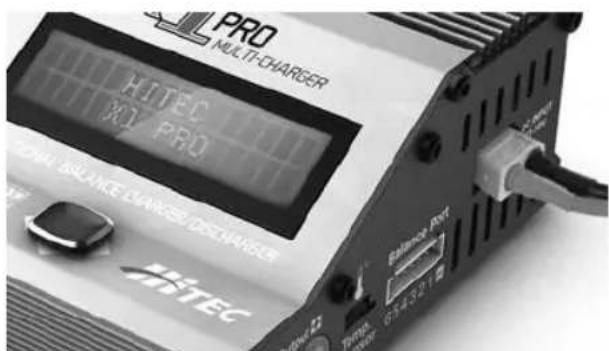
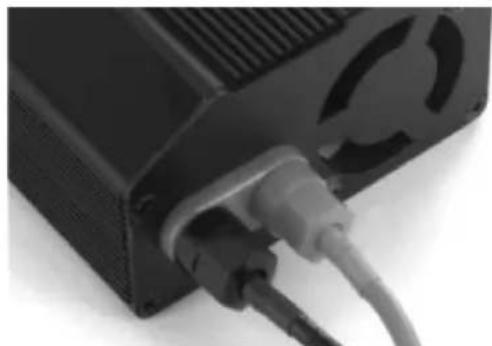
XT60 Connector plugged directly to charger. Bullet connectors plugged directly to power supply.
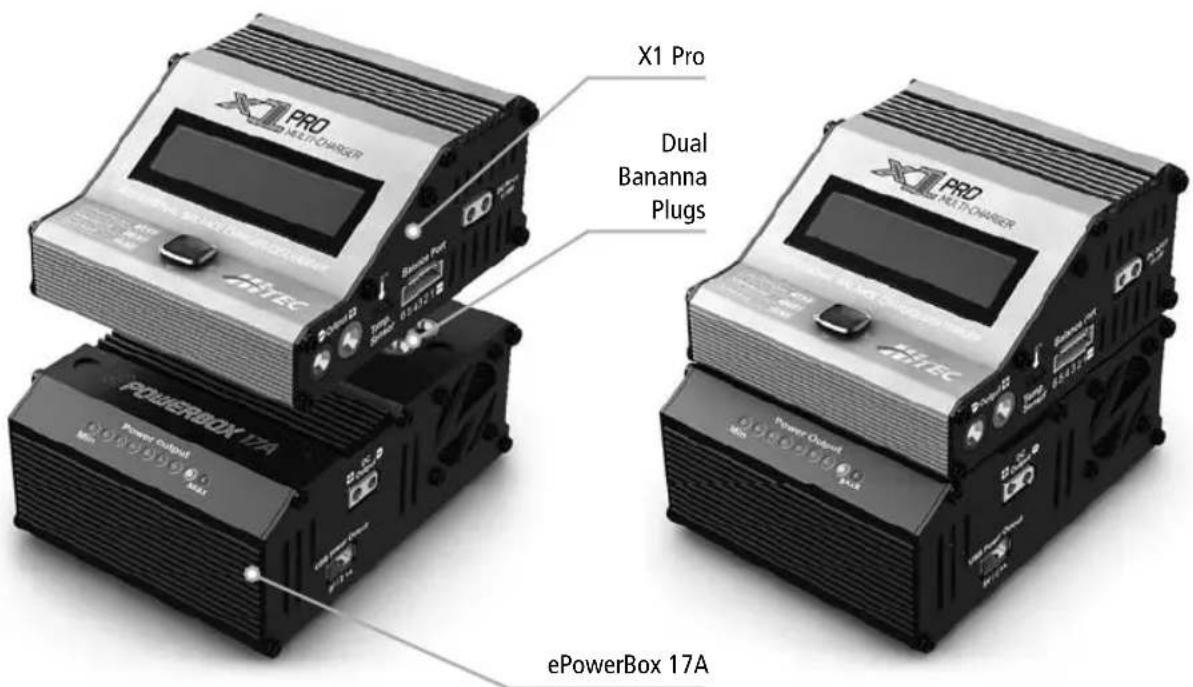
To utilize the charger's absolute maximum power capabilities, the DC power source must be capable of delivering at least 17 amps while maintaining 12 V DC.
5. Battery Connections
To utilize the charger's absolute maximum charging capabilities, the DC power source must be capable of delivering at least 17 amps while maintaining 12VDC
Connecting the battery
Before connecting a battery it is absolutely essential to check one last time that you have set the parameters correctly. If the settings are incorrect, the battery may be damaged, and could even burst into fl ames or explode. To avoid short circuits between the banana plugs, always connect the charge leads to the charger fi rst, and only then to the battery. Reverse the sequence when disconnecting the pack.
Balance socket
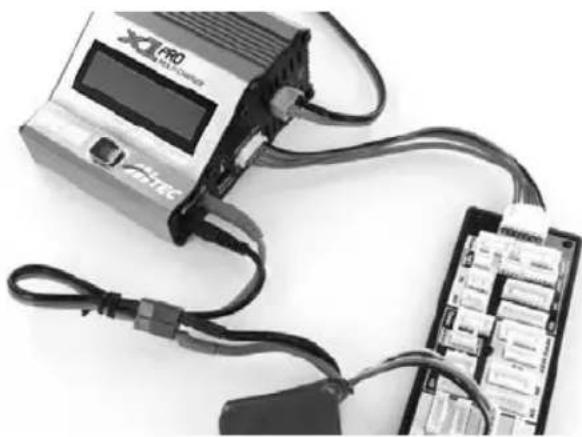
The balance wire attached to the battery must be connected to the charger with the black wire aligned with the negative symbol (-) . Take care to always maintain correct polarity!
This image shows the correct way to connect your battery to the X1 Pro while charging with the use of a balance adaptor. This is the recommended method for charging and discharging.
6. Operating the X1 Pro Charger
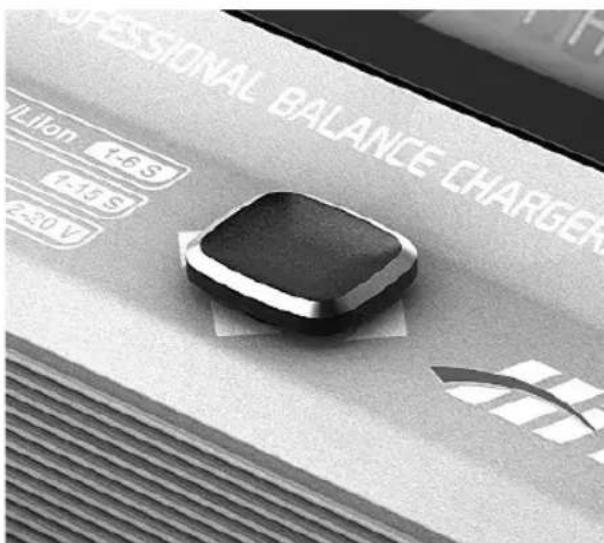
The joystick feature makes operating the X1 Pro very easy. Simply toggle the joystick up, down, right or left to scroll through the various programs and change program settings. Detailed descriptions of how to locate and edit each program feature is given in the following sections.

Toggle the joystick up or down to scroll through the various programs/modes or to increase/decrease program settings.

Toggle the joystick to the right to select/set a parameter or to start the charging process.

Toggle the joystick to the left to return to the previous screen or to stop the charging process.
7. Lithium - Chemistry Batteries
This program is only suitable for charging/discharging lithium (LiPo/Lilon/LiFe) batteries.
Professional Balance Charger, Discharger
7.1. Lithium - Charge Modes
The X1 Pro offers the following lithium charge modes: Charge, Balance Charge, Fast Charge, Storage and Discharge.

Before selecting a charge mode, it is critical that you select the correct type of lithium battery to be charged. Failure to do so can result in damage to the battery and possible explosion.
Selecting a Battery Type
LIPO BALANCE When you power on the X1 Pro 8.1A 22.2U(6S) you will automatically be taken to the "LiPo BALANCE" screen. If this is not the battery type you wish to use, toggle left
PROGRAM SELECT Lipo BATT
once to enter the "PRO-GRAM SELECT" screen. Toggle
up or down until you see the battery type you wish to charge.
LiPo BALANCE 8.1A 22.2V(ES)
Now, toggle right once to enter the "LiPo" Program. The
default charge mode will be "BALANCE".
7.2. Lithium - Charge Mode

Before you begin charging your battery, make sure you have read and understand all of the warnings and safety information.

In the charge mode, lithium batteries can be charged without the use of a balance adaptor. A balance adapter can be used, but it is not required. Balance charge mode is recommended for any battery with a balance lead.
See page 31 for the appropriate charging connections setup for this operation.
LIPO CHARGE 8.1A 22.2V(6S)
First, select the correct battery type by following the instructions on
page 33. Once you have set the correct battery type, toggle up or down until you see the "LiPo CHARGE" screen.

7.2. Lithium - Charge Mode
LiPo CHARGE 0.8R 22.2V(6S)
Toggle right once and the amp rate value will begin flashing.
Toggle up or down to adjust the value to the desired rate. Follow the instructions provided with your battery when setting the amp rate.
LiPo CHARGE 0.8A 11.1V(3S)
Toggle right again and the cell count value will begin
fl ashingToggle up or down to adjust the cell count. This will automatically change the voltage value to the correct setting for the selected cell count. The cell count should exactly match the battery label.
Toggle and hold the joystick to the right for three seconds and you will see "BATTERY CHECK WAIT..." followed by the "CONFIRM/CANCEL" screen.
R:3SER S:3SER CONFIRM(ENTER)
This screen displays the number of cells you set up as "R" and fed by the processor as "S". If, you may toggle right once to long. If the cell count does not return to the previous screen number of cells of the battery pack.
the number of cells detected by the processor as "S". If both numbers are identical, you may toggle right once to confirm and begin charging. If the cell count does not match, toggle left once to return to the previous screen and carefully check the number of cells of the battery pack before proceeding.
L3s 1.2A 12.69V CHG022:4300682
Once charging has commenced, the charger will display the following type/cell count, charging current, time and charged capacity.

During charging, the battery should be placed inside a fi reproof/retardant bag and on a fi re proof surface, away from other combustible objects.
4.03 4.05V 4.03V 0.00 0.00 V 0.00V
If you are using a balance adaptor, during charging you may toggle
up once to view the voltage of each individual cell.
Once the battery is fully charged the screen will read "END:FINISH" and the charger will emit a chiming sound. Toggle left once to stop charging. You may toggle left at any time during the charging process to stop charging.
7.3. Lithium - Balance Charge Mode
This function is for balancing the voltage of individual lithium-polymer battery cells while charging. In order to use the Balance Mode, the battery must have a balance lead. Charging in this mode is different from the normal mode because the built-in processor monitors the voltage of each individual cell and controls the input current fed into each cell in order to equalize the voltage.
Use of a balance adaptor with any battery that has a balance lead will improve the performance and lifespan of the battery.

Before you begin charging your battery, make sure you have read and understand all of the warnings and safety information.
See page 31 for the appropriate charging connections setup for this operation.
LiPo BALANCE 8.1A 22.2U(ES)
First, select the correct battery type by following the instructions
on page 31. Once you have set the correct battery type, toggle up or down until you see the "LiPo BALANCE" screen.
LIPO BALANCE 0.8R 22.2V(6S)
Toggle right once and the amp rate value will begin flashing.
Toggle up or down to adjust the value to the desired rate. Follow the instructions provided with your battery when setting the amp rate.
LiPo BALANCE 0.8A 11.1V(3S)
Toggle right again and cell count value will begin flashing.
Toggle up or down to adjust the cell count. This will automatically change the voltage value to the correct setting for the selected cell count. The cell count should exactly match the battery label.
Toggle and hold the joystick to the right for three seconds and you will see "BATTERY CHECK WAIT..." followed by the "CONFIRM/CANCEL" screen.
R:3SER S:3SER CONFIRM(ENTER)
This screen displays the number of cells you set up as “R” and
the number of cells detected by the processor as "S". If both numbers are identical, you may toggle right once to confirm and begin charging. If the cell count does not match, toggle left once to return to the previous screen and carefully check the number of cells of the battery pack before proceeding.
LI3s 1.2A 12.69V BAL 022:43 00682
Once charging has commenced, the charger will display the following type/cell count, charging charging time and charged capacity

During charging, the battery should be placed inside a fi reproof/retardant bag and on a fi re proof surface, away from other combustible objects.
4.094.03V 4.09V 0.000.00V 0.00V
During charging you may toggle up once to view the voltage of
each individual cell.
Once the battery is fully charged the screen will read "END:FINISH") and the charger will emit a chiming sound. Toggle left once to stop charging. You may toggle left at any time during the charging process to stop charging.
7.4. Lithium - Fast Charge Mode

Before you begin charging your battery, make sure you have read and understand all of the warnings and safety information.

In the fast Charge Mode, lithium batteries can be charged without the use of a balance adaptor. A balance adapter can be used, but it is not required. Balance charge mode is recommended for any battery with a balance lead.
See page 31 for the appropriate charging connections setup for this operation.
LIPO FAST CHG 8.1F 22.2V(6S)
First, select the correct battery type by following the instructions
on page 33. Once you have set the correct battery type, toggle up or down until you see the "LiPo FAST CHG" screen.
LiPo FAST CHG 0.8R 22.2V(6S)
Toggle right once and the amp rate value will begin flashing.
Toggle up or down to adjust the value to the desired rate. Follow the instructions provided with your battery when setting the amp rate.
LiPo FAST CHG 0BA 11.1V(3S)
Toggle right again and the cell count value will begin fl ashing.
Toggle up or down to adjust the cell count. This will automatically change the voltage value to the correct setting for the selected cell count. The cell count should exactly match the battery label.
Toggle and hold the joystick to the right for three seconds and you will see "BATTERY CHECK WAIT..." followed by the "CONFIRM/CANCEL" screen.
R:3SER S:3SER CONFIRM(ENTER)
This screen displays the number of cells you set up as "R" and
the number of cells detected by the processor as "S".
If both numbers are identical, you may toggle right once to confirm and begin charging. If the cell count does not match, toggle left once to return to the previous screen and carefully check the number of cells of the battery pack before proceeding.
Li3s 1.2A 12.69V FAS 022:43 00682
following real-time information: battery type/cell count, charging current, battery voltage, charging time and charged capacity.

During charging, the battery should be placed inside a fi reproof/retardant bag and on a fi re proof surface, away from other combustible objects.
4.09 4.09V 4.09U 0.00 0.00V 0.00V
up once to view the voltage of each individual cell.
Once the battery is fully charged the screen will read "END:FINISH" and the charger will emit a chiming sound. Toggle left once to stop charging. You may toggle left at any time during the charging process to stop charging.
7.5. Lithium - Storage Mode
This function is for charging/discharging batteries that will not be used immediately. The program is designed for charging/ discharging batteries up-to or down-to safe storage levels.
The program will automatically begin to discharge if the current state of the battery exceeds the voltage level for storage.

Before you begin charging your battery, make sure you have read and understand all of the warnings and safety information.

In the Storage Mode, lithium batteries can be charged without the use of a balance adaptor. A balance adapter can be used, but it is not required. balance charge mode is recommended for any battery with a balance lead.
See page 31 for the appropriate charging connections setup for this operation.
LiPo STORAGE 8.1A 22.2V(5S)
First, select the correct battery type by following the instructions
on page 33. Once you have set the correct battery type, toggle up or down until you see the "LiPo storage" screen.
LIPoSTORAGE 0.8A22.2V(6S)
Toggle right once and the amp rate value will begin flashing.
Toggle up or down to adjust the value to the desired rate. Follow the instructions provided with your battery when setting the amp rate.
LiPo STORAGE 0.8A 11.1V(3S)
Toggle right again and the cell count value will begin flashing.
Toggle up or down to adjust the cell count. This will automatically change the voltage value to the correct setting for the selected cell count. The cell count should exactly match the battery label.
Toggle and hold the joystick to the right for three seconds and you will see "BATTERY CHECK WAIT... " followed by the "CONFIRM/CANCEL" screen.
R:3SER S:3SER CONFIRM(ENTER)
This screen displays the number of cells you set up as "R" and
the number of cells detected by the processor as "S". If both numbers are identical, you may toggle right once to confirm and begin charging. If the cell count does not match, toggle left once to return to the previous screen and carefully check the number of cells of the battery pack before proceeding.
L3s 1.2A 12.69V STO 022:43 00682
Once charging has commenced, the charger will display the
following real-time information: battery type/cell count, charging current, battery voltage, charging time and charged capacity.

During charging, the battery should be placed inside a fi reproof/retardant bag and on a fi re proof surface, away from other combustible objects.
4.09 4.09V 4.08V 0.00 0.00V 0.00V
During charging you may toggle up once to view the voltage of
each individual cell.
Once the battery charge has reached storage level the screen will read "STORAGE FINISHED" and the charger will emit a chiming sound. Toggle left once to stop charging. You may toggle left at any time during the charging process to stop charging.
7.6. Lithium - Discharge Mode
If you plan to discharge your battery to reach safe storage levels we strongly recommend that you use Storage Mode. In very few instances should discharging become necessary with LiPo batteries. One such instance may include preparing a battery for disposal, in which case the battery should not be completely discharged.

Discharging lithium chemistry batteries can cause permanent damage to the battery and it is not recommended for anything other than the disposal of the battery. If you choose to discharge your lithium batteries, make sure to pay close attention to the minimum voltage setting. If you want to store your battery for a long period of time you should utilize the storage mode charge program as this is the safest method of storing your lithium chemistry batteries.
Be sure to follow the discharging instructions provided by the battery manufacturer. Over-discharging a battery can severely damage the battery and may cause a fire or explosion.

In Discharge Mode, lithium batteries can be discharged with or without the use of a balance adaptor. The use of a balance adaptor is recommended for discharging any battery that has a balance lead.

Before you begin discharging your battery, make sure you have read and understand all of the warnings and safety information.
See page 31 for the appropriate charging connections setup for this operation.
Lipo DISCHARGE 8.1A 22.2V(6S)
First, select the correct battery type by following the instructions
on page 33. Once you have set the correct battery type, toggle up or down until you see the "LIPO DISCHARGE" screen.
LIPO DISCHARGE 0.8R 22.2V(6S)
Toggle right once and the amp rate value will begin fl ashing.
Toggle up or down adjust the value to the desired rate. Follow the instructions provided with your battery when setting the amp rate.
LiPo DISCHARGE 0.8R 11.1V(3S)
Toggle right again and the cell count value will begin flashing.
Toggle up or down to adjust the cell count. This will automatically change the voltage value to the correct setting for the selected cell count. The cell count should exactly match the battery label.
Toggle and hold the joystick to the right for three seconds and you will see "BATTERY CHECK WAIT... followed by the "CONFIRM/CANCEL" screen.
R:3SER S:3SER CONFIRM(ENTER)
This screen displays the number of cells you set up as "R" and
the number of cells detected by the processor as "S". If both numbers are identical, you may toggle right once to confirm and begin discharging. If the cell count does not match, toggle left once to return to the previous screen and carefully check the number of cells of the battery pack before proceeding.
L3s 1.2A 12.69V DSC022:4300682
Once discharging has commenced, the charger will display the following
real-time information: battery type/cell count, discharging current, battery voltage, discharging time and discharged capacity.

During Discharging, the battery should be placed inside a fi reproof/retardant bag and on a fi re proof surface, away from other combustible objects.
4.09 4.09V 4.03V 0.00 0.00V 0.00V
During discharging you may toggle up once to view the voltage of
each individual cell. Once the battery is discharged the screen will read "DISCHARGE FINISHED") and the charger will emit a chiming sound. Toggle left once to stop discharging. You may toggle left at any time during the discharging process to stop discharging.
8. NiCd/NiMH
This program is only suitable for charging/discharging NiCd/NiMH batteries.
8.1. NiCd/NiMH - Charge Modes
The X1Pro offers the following NiCd/NiMH charge modes: Charge, Auto Charge, Discharge, Re-Peak and Cycle.

Before selecting a charge mode, it is critical that you select the correct type of lithium battery to be charged. Failure to do so can result in damage to the battery and possible explosion.
Selecting a Battery Type
PROGRAM SELECT When you power on the X1 Pro NIMH BATT you will automatically be taken to the "LIPO BALANCE" screen. Toggle left once to enter the "PROGRAM SELECT" screen. Toggle up or down until you see the battery type you wish to charge. Now, toggle right once to enter the "NIMH" or "NiCd" Program. The default charge mode will be "CHARGE".
8.2. NiCd/NiMH - Charge Mode

Before you begin charging your battery, make sure you have read and understand all of the warnings and safety information.
NIMH CHARGE CURRENT 1.6A
Toggle right once and the amp rate value will begin flashing.
Toggle up or down to adjust the value to the desired rate. Follow the instructions provided with your battery when setting the amp rate. Toggle and hold the joystick to the right for three seconds to begin charging.
NIMH1.6A5.96V Once charging has commenced, the CHG003:43 00090 charger will display the following real-time information: battery type, charging current, battery voltage, charging time and charged capacity.
Once the battery is fully charged the screen will read "END:FINISHED" and the charger will emit a chiming sound. Toggle left once to stop charging. You may toggle left at any time during the charging process to stop charging.
8.3. NiCd/NiMH - Auto Charge Mode
In this program the charger detects the condition of the battery connected to the output and automatically charges the battery. In this mode, you should set up the upper limit of the charge current to avoid damage by feeding excessive current. Some batteries of low resistance and capacity can lead to higher current in the Auto Charge mode.

Before you begin charging your battery, make sure you have read and understand all of the warnings and safety information.
Select the correct battery type by following the instructions on page 38. Once you have set the correct battery type, toggle up or down until you see the "NIH Auto CHARGE" screen.
TIMH Auto CHARGE CURRENT 5.0A
Toggle right once and the amp rate value will begin flashing.
Toggle up or down to adjust the value to the desired rate. Follow the instructions provided with your battery when setting the amp rate. Toggle and hold the joystick to the right for three seconds to begin charging.
8.3. NiCd/NiMH - Auto Charge Mode
NIMH 1.6R 5.96V AUT 003:43 00090
Once charging has commenced, the charger will display the following
real-time information: battery type, charging current, battery voltage, charging time and charged capacity.
Once the battery is fully charged the screen will read "END:FINISHED" and the charger will emit a chiming sound. Toggle left once to stop charging. You may toggle left any time during the charging process to stop charging.
8.4. NiCd/NiMH - Discharge Mode

Before you begin discharging your battery, make sure you have read and understand all of the warnings and safety information.
Select the correct battery type by following the instruction on page 38. Once you have set the correct battery type, toggle up or down until you see the "NIH DISCHARGE" screen.
Toggle right once and the amp rate value will begin flashing. Toggle up or down to adjust the value to the desired rate. Follow the instructions provided with your battery when setting the amp rate.
NIMH DISCHARGE 0.1A CUT:1.0V
Toggle right once again and the final voltage value will begin
flashing.
Toggle up or down to adjust the value to the desired rate. The discharge current ranges from 0.1 to 8.0 A and the final voltage ranges from 0.1 to 25.2 V.
Toggle and hold the joystick to the right for three seconds to begin discharging.
NIMH 1.0R S.96U DSC 001:43 00030
Once discharging has commenced, the charger will display the
following real-time information: battery type, discharging current, battery voltage, discharging time and discharged capacity.
Once discharging is complete the screen will read "DISCHARGE FINISHED") and the charger will emit a chiming sound. Toggle left once to stop discharging. You may toggle left at any time during the discharging process to stop discharging.
8.5. NiCd/NiMH - Re-Peak Mode
In Re-Peak Charge mode, the charger can automatically peak charge the battery 1-3 times consecutively. This is good for confirming that the battery is fully charged, and for checking how well the battery receives fast charges. A five minute cool-off delay occurs after each re-peak charge.

Before you begin discharging your battery, make sure you have read and understand all of the warnings and safety information.
NimH RE-PEAH
Select the correct battery type by following the instructions on
page 38. Once you have set the correct battery type, toggle up or down until you see the "NIH RE-PEAH" screen.
Toggle right once and the # of re-peak cycles will begin flashing. Toggle up or down to change the number
of re-peak cycles you want the X1 Pro to execute. The X1 Pro can re-peak charge the battery a maximum of 3 times consecutively.
The X1 Pro will use the amperage value entered in Charge Mode for this operation. Toggle and hold the joystick to the right for three seconds to begin charging.
NIMH 1.6A S.98V RPC 002:5100090
Once charging has commenced, the charger will display the
following real-time information: battery type, charging current, battery voltage, charging time and charged capacity.
Once charging is complete the screen will read "END:FINISHED" and the charger will emit a chiming sound. Toggle left once to stop charging. You may toggle left at any time during the charging process to stop charging.
8.6. NiCd/NiMH - Cycle Mode
The X1 Pro makes cycling of NiCd/NiMH batteries easy. The process of discharging and recharging (cycling) can be achieved automatically with one simple step and will improve the performance of NiCd/NiMH batteries. We strongly recommend cycling any battery that has been discharged and stored for a preiod of time. This will increase battery life and improve performance.

Before you begin cycling your battery, make sure you have read and understand all of the warnings and safety information.
Select the correct battery type by following the instructions on page 38. Once you have set the correct battery type, toggle up or down until you see the "DimHCycle" screen.
NIMH CYCLE DCHG>CHG 1
The Cycle Mode gives you two cycling options: "DCHG>CHG"
or "CHG>DCHG". The "DCHG>CHG" option will first discharged the battery and then charge the battery. The "CHG>DCHG" option will first charge the battery and then discharge the battery. If this screen does not currently show the cycling option you desire, toggle right once and this setting will begin flashing. Toggle up or down to change this setting.
TIMH CYCLE DCH6>CH6 1
Toggling right once will cause the # of cycles option to begin
flashing. Toggle up or down to change this to the number of cycles you want the X1 Pro to execute. The X1 Pro can cycle the battery a maximum of 5 times consecutively. Toggle and hold the joystick to the right for three seconds to begin cycling.
NIMH0.1A5.21V D.C015:4200026
Once cycling has commenced, the charger will display the
following real-time information: battery type, charging/ discharging current, battery voltage, charging time and charged capacity. You will also see "D>C" or "C>D". This will indicate which cycling order you have choen. Either "D" or "C" will be flashing. This flashing indicates which part of the cycle is currently being executed.
DCHG11314mAh CHG11430mAh
Once the cycling process is complete, the X1 Pro will display
the charge/discharge capacity for each cycle. By toggling up or down, you can scroll through this data for each cycle.
9. Pb (LeaAcid)
This program is only suitable for charging Pb (lead-acid) batteries with nominal voltages of 2 to 20V . A Pb (lead-acid) battery is signifi cantly different from NiCd/NiMH batteries. Pb batteries can only deliver current lower in comparison to their capacity.
The same restriction applies to the charging process. Consequently, the optimum charge current can only be 1/10 of the capacity. A Pb battery cannot be used for fast charging. Please follow the instructions provided by the battery manufacturer.
9.1.Pb - Charge Modes
The X1 Pro offers the following NiCd/NiMH charge modes: Charge and Discharge.

Before selecting a charge mode, it is critical that you select the correct type of battery to be charged. Failure to do so can result in damage to the battery.
Selecting the Battery Type
PROGRAM SELECT NIMH BATT
When you power on the X1 Pro you will automatically be taken
to the "LiPo Balance" screen. Toggle left once to enter the "PROGRAM SELECT" screen. Toggle up or down until you see the battery type you wish to charge. Now, toggle right once to enter the "Pb" program. The default charge mode will be "CHARGE".
9.2.Pb - Charge Mode

Before you begin charging your battery, make sure you have read and understand all of the warnings and safety information.
Pb CHARGE 0.1A 2.0V(1P)
"CHARGE", toggle up or down to select the "CHARGE" mode.
Pb CHARGE 0.7A 2.0V(1P)
Toggle up or down to adjust the value to the desired rate. Follow the instructions provided with your battery when setting the amp rate. The amp rate should be set to 1/10 of capacity.
Pb CHARGE 0.7A 12.0V(6P)
Toggle right once and the voltage rate value will begin
flashing. Toggle up or down to set the voltage and number of cells.
Toggle and hold the joystick to the right for three seconds to begin charging.
Pb-6 0.4A 14.70V CHG003:1000029
Once charging has commenced, the charger will display the following
real-time information: battery type, charging current, battery voltage, charging time and charged capacity. When charging is complete the X1 Pro will chime.
9.3.Pb - Discharge Mode

Before you begin discharging your battery, make sure you have read and understand all of the warnings and safety information.
Pb DISCHARGE 0.1A 2.0U(1P)
"DISCHARGE", toggle up or down to select the "DISCHARGE" mode.
Pb DISCHARGE 0.7A 2.0V(1P)
Toggle up or down adjust the value to the desired rate. Follow the instructions provided with your battery when setting the amp rate. The amp rate should be set to 1/10 of capacity.
Pb DISCHARGE 0.7A 12.0V(6P)
Toggle right once and the voltage rate value will begin
flashing. Toggle up or down number of cells.
to set the voltage and
Toggle and hold the joystick to the right for three seconds to begin discharging.
Pb-6 0.4A 14.70V DSC 003:10 00029
Once discharging has commenced, the charger will display the
following real-time information: battery type, charging current, battery voltage, charging time and charged capacity.
When charging is complete the X1 Pro will chime.
10. Charge Master Software
The free "HiTEC Charge Master" software gives you unparalleled ability to operate the charger through the computer. You can monitor pack voltage, cell voltage and other data during charging and discharging.
HiTEC Charge Master also allows you to graph process data in real-time and you can control charging and update the X1 Pro's firmware all from the software interface.
In order to connect the X1 Pro to the computer and use the software, you will need a USB-A to USB Mini-B cable that is not included in this package.
You can download your copy of the HiTEC Charge Master software from wwwultiplex-rc.de. Refer to the help file in the HiTEC Charge Master software for more assistance in using this software program.
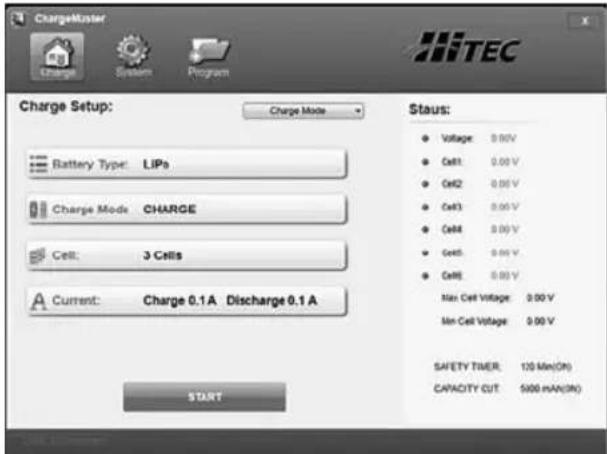
Charge Setup Screen
Allows you choose battery type and charge mode execute the process.
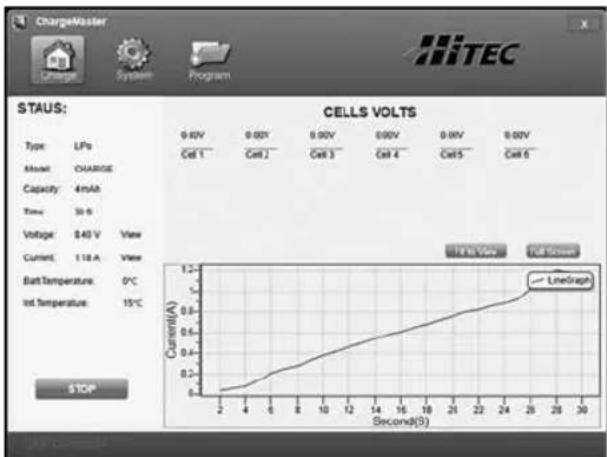
Charge Status Screen
Monitors real time information about your battery and the charging process.
11. Lithium Battery Meter
The X1 Pro allows you to check a battery's total voltage, the highest voltage, the lowest voltage and each cell's voltage.
Connect the battery in the same manner as you would for charging.
PROGRAM SELECT LI BATT METER
When you power on the X1 Pro you will be at the "PROGRAM
SELECT"screen.Toggle up until you see "LI BATT METER".
Toggle right once and the screen will display the voltage
of each cell.
MAIN12.52V H4.190V L4.160V
Toggle up or down once and the screen will display the stage and the lowest voltage.
12. Battery Memory
The X1 Pro can store up to 10 different battery profi les. This allows you to easily recall stored profi les without having to go through the setup process each time you charge a battery.
When you power on the X1 Pro, toggle down repeatedly until you see "BATT MEMORY". Toggle right once to enter the "BATT MEMORY" program.
(BATT MEMORY 1) ENTER SET->
When you enter the "BATT MEMORY" program the
battery profi le number will be fl ashing. Toggle up or down to select the battery profi le (1-10) you wish to create/edit.
BATT TYPE LiPo
Toggle right once to enter the "BATT TYPE" screen. Toggle
right once and the battery type will begin fl ashing. Toggle up or down to select the battery type. Toggle right once to enter the battery type.
BATT VOLTS 7.4V (2S)
Toggle up once to enter the "BATT VOLTS" screen.
Toggle right once and the voltage value will begin fl ashing. Toggle up or down to change the voltage value. The cell count will change automatically to correspond to the voltage selected. Toggle right once to set the voltage.
CHARGE CURRENT 4.9A
Toggle up once to enter the "CHARGE CURRENT"
screen. Toggle right once and the amperage value will begin flashing. Toggle up or down to change the amperage value. Toggle right once to set the amperage.
DSCH CURRENT 2.2A
Toggle up once to enter the "DSCH CURRENT" screen.
Toggle right once and the amperage value will begin flashing. Toggle up or down to change the amperage value. Toggle right once to set the amperage.
DSCH VOLTAGE 3.0V/CELL
Toggle up once to enter the "DSCH VOLTAGE" screen.
Toggle right once and the voltage value will begin fl ashing. Toggle up or down to change the voltage value. Toggle right once to set the voltage.
TVC-YOUR RISK!
Toggle up once to enter the "TUC-YOUR RISH!" screen.
Toggle right once and the voltage value will begin flashing. Toggle up or down to change the voltage value. Toggle right once to set the voltage.
TEMPERATURE CUT-OFF SOC
Toggle up once to enter the "TEMPERATURE CUT-OFF"
screen. Toggle right once and the temperature value will begin flashing. Toggle up or down to change the temperature value. Toggle right once to set the temperature. The temperature can be set between 20^ and 80^ .
SAVE PROGRAM ENTER
Toggle up once to enter the "SAVE PROGRAM" screen.
Toggle right once to save all of the settings previously entered.
(BATT MEMORY 1) LiPo 7.4V (2S)
Once the profi le has been saved the "BATT MEMORY" screen
will appear. The second line on this screen will automatically scroll through the various parameter that have been set for this battery profil e.
To load a preset battery profile enter the "BATT MEMORY" screen and toggle up or down to find the profi le number you wish to use. Toggle and hold the joystick to the right for three seconds and the profi le will be loaded.
13. System Set Up
When the X1 Pro is powered on for the first time all system settings will be set to default. Each parameter can be adjusted by the user, allowing for greater control of the charge process for the specific battery being charged. When you power on the X1 Pro you will be at the "PROGRAM SELECT" screen. Toggle up until you see "SYSTEM SET->".
Rest Time
During the charge discharge or discharge charge cycle, batteries increase in temperature. The Rest Time program allows the user to specify the time delay between cycles, allowing time for the battery to cool.
Rest Time Toggle right once and you will CHG>DCHG 8Min see the "REST TIME" screen.
Toggle right once and the timer value will begin flashing. Toggle up or down to adjust the timer value. The timer can be set to 0 to 60 minutes. Toggle right once to set the Rest Time.
Safety Timer
When the charge process starts, the integrated safety timer starts to run simultaneously. If an error occurs or the termination circuit cannot detect whether the battery is fully charged or not, the X1 Pro is programmed to prevent overcharging and will terminate the charging process.
Safety Timer Calculation
When charging NiCd or NiMH batteries, divide the capacity by the current, then divide the result by 11.9. Set this number of minutes as the setting for the safety timer setting. If the charger stops at this time threshold, about 140% of the capacity will have been fed into the battery.
SAFETY TIMER ON 120Min Toggle up until you see the "SAFETY TIMER" screen.
Toggle right once and "ON" or "OFF" will begin flashing. Toggle up or down once to change this setting. Toggle right once and the timer value will begin flashing. Toggle up or down to adjust the timer value. Toggle right once to set the Safety Timer.
Capacity Cut-Off
This program provides a maximum capacity protection function. If the delta-peak voltage can not be detected or the Safety Timer times out, the charge process will stop automatically when the battery reaches the user-set maximum charge capacity in order to prevent accidental overcharging.
Capacity Cut-Off Toggle up once and you will ON 5000mAh see the "CAPACITY CUT
OFF" screen. Toggle right once and "ON" or "OFF" will begin fl ashing. Toggle up or down once to change this setting. Toggle right once and the amperage value will begin fl ashing. Toggle up or down to adjust the amperage value. Toggle right once to set the the Capacity Cut-Off.
Key Beep & Buzzer
A beep sounds to confirm the user's operation every time a button is pressed. The buzzer or melody sounds at various times during an operation to confirm a different mode change.
Key Beep 0
Buzzer ON
Toggle up once and you will see the "HEY BEEP BUZZER"
screen. Toggle right once and (Key Beep) "ON" or "OFF" will begin fl ashing. Toggle up or down once to change this setting. Toggle right once and (Buzzer) "ON" or "OFF" will begin fl ashing. Toggle up or down once to change this setting. Toggle right once to set the Key Beep and Buzzer settings.
Input Power Low Cut-Off
This function monitors the voltage of the input source used to power the charger. If the voltage drops below the user setting, the program will end forcibly to protect the input source.
Input Power Law
Cut-off 10.0V
Toggle up once and you will
see the "INPUT POWER
LOW CUT-OFF" screen. Toggle right once and the voltage value will begin fl ashing. Toggle up or down to adjust the voltage value. Toggle right once to set the Input Power Low Cut-Off.
External and Internal Temperature
Ext.Temp OC
Int.Temp 20C
Toggle up once and you will
see the "EXT. TEMP AND
INT. TEMP" screen. This screen shows the external temperature of the battery and the internal temperature of the charger. The battery temperature reading requires a temperature sensor that is sold separately.
Load Factory Set
LOAD FACTORY SET
This screen shows the external
ENTER
temperature of the battery and
the internal temperature of the charger.
13. System Set Up
The battery temperature reading requires a temperature sensor that is sold seperately.
Toggle and hold the joystick to the right for three seconds to load the factory settings.
Version
VERSION
1.00
This screen shows the version number.
14.Warnings and Error Messages
REVERSE POLARITY
The battery/charger connections (red/black) are reversed.
CONNECTION BREAK
The battery connection has been disconnected.
CONNECT ERROR CHECK MAIN PORT
The battery connection is wrong.
BALANCE CONNECT ERROR
The balance connection is wrong.
DC IN TOO LOW
The input voltage is less than 11V.
DC IN TOO HIGH
The input voltage is higher than 18V.
CELL ERROR LOW VOLTAGE
The voltage of one cell in the battery pack is too low.
CELL ERROR HIGH VOLTAGE
The voltage of one cell in the battery pack is too high.
CELL ERROR VOLTAGE INVALID
The voltage of one cell in the battery pack is invalid.
CELL NUMBER INCORRECT
The cell count is wrong.
INT. TEMP. TOO HIGH
The internal temperature of the charger is too high.
EXT. TEMP. TOO HIGH
The external temperature of the charger is too high.
OVER CHARGE CAPACITY LIMIT
The battery capacity is higher than the maximum set by the user.
OVER TIME LIMIT
The charging time is higher than the maximum set by the user.
BATTERY WAS FULL
In balance mode, the battery voltage is higher than the maximum set by the user.