
29PT5458 - TV PHILIPS - Free user manual and instructions
Find the device manual for free 29PT5458 PHILIPS in PDF.


| Product type | CRT television |
| Brand | Philips |
| Model | 29PT5458 |
| Screen diagonal | 29 inches (73 cm) |
| Screen format | 4:3 (with 16:9, zoom, etc. modes) |
| Dimensions (W x H x D) | Approximately 72 x 56 x 55 cm |
| Weight | Approximately 30 kg |
| Power supply | 220-240 V, 50 Hz |
| Standby consumption | Less than 3 W |
| Main features | Teletext, surround sound, automatic storage, program sorting, multiple screen formats |
| Connectivity | Scart socket (EXT1/EXT2 depending on version), front AV inputs, headphone socket (depending on version), audio L/R outputs |
| Remote control | Yes, with VCR functions (RC5 standard) |
| Batteries | 2 x R6 (AA) |
| Maintenance and cleaning | Do not expose to heat or water, clean with a soft cloth |
| Safety | Do not repair yourself, place on a stable surface, at least 5 cm clearance |
| Recycling | Batteries mercury and cadmium free, device recyclable through specialized channel |
Frequently Asked Questions - 29PT5458 PHILIPS
User questions about 29PT5458 PHILIPS
0 question about this device. Answer the ones you know or ask your own.
Ask a new question about this device
Download the instructions for your TV in PDF format for free! Find your manual 29PT5458 - PHILIPS and take your electronic device back in hand. On this page are published all the documents necessary for the use of your device. 29PT5458 by PHILIPS.
USER MANUAL 29PT5458 PHILIPS
Installing your television set

0
Insert the aerial plug into the socket at the rear of the set.
2
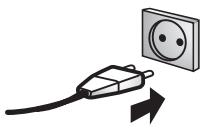
Insert the mains plug into a wall socket (220-240V / 50 Hz).
3
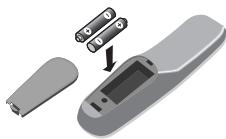
Insert the two R6-type batteries (supplied) making sure that they are the right way round.
4
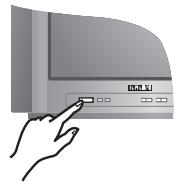
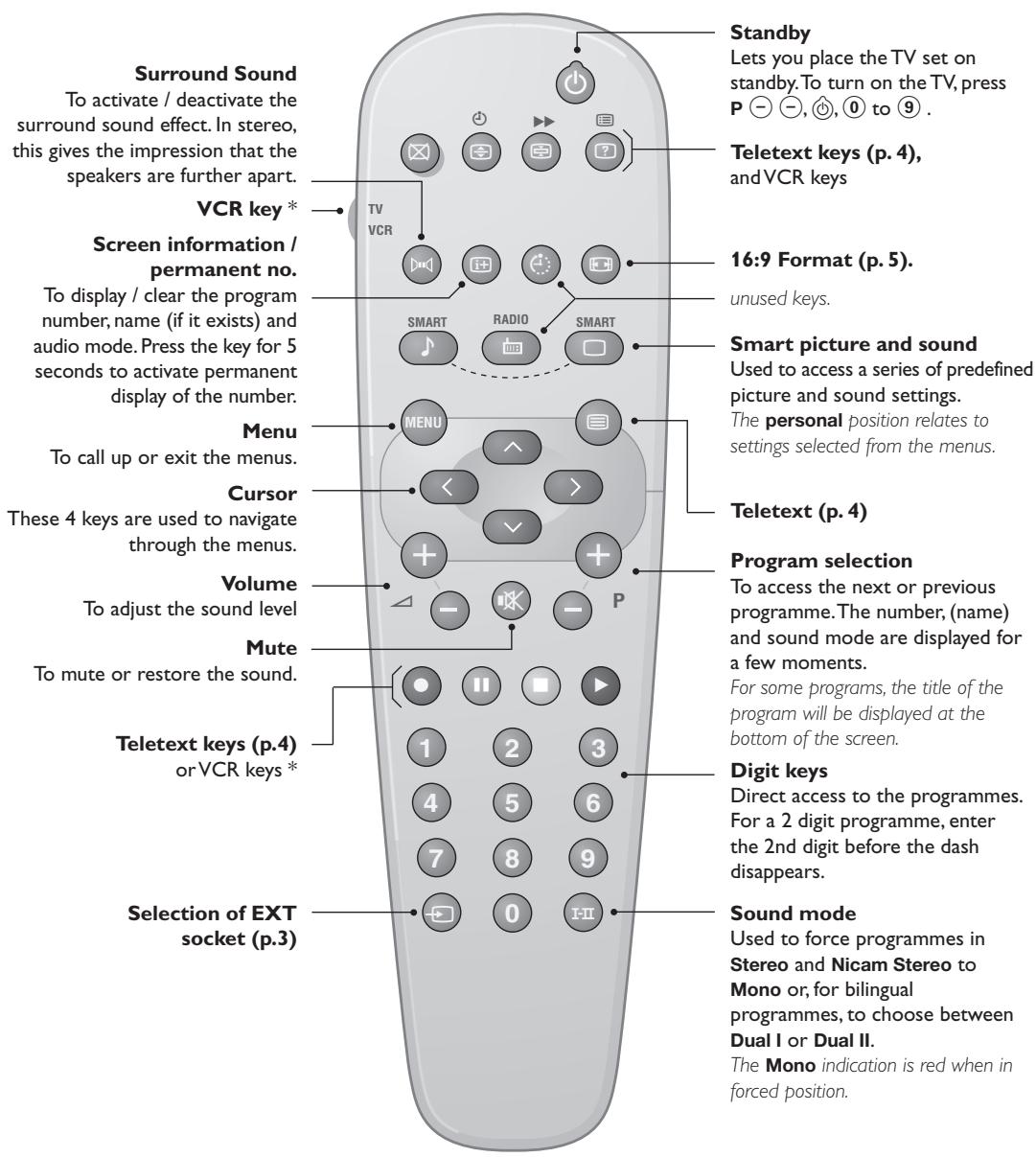
To switch on the set, press the on/off key. If the television remains in standby mode, press P on the remote control.
Quick installation
When you turn on the TV set for the first time, a menu is displayed on screen. This menu prompts you to select the country:
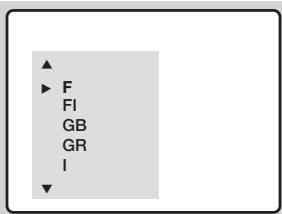
If the menu is not displayed, press and hold down the and + keys on the TV set for 5 seconds to display the menu.
Use the < > keys on the remote control to select your country and validate with .

If your country does not appear in the list, select choice "...
The search starts automatically. All the available TV programmes will be stored. This operation takes a few minutes. The display shows the progress of the search and the number of programs found. At the end of the search, the menu disappears.
To exit or interrupt the search, press (MEN).
If no programme is found, see Tips chapter at the end of the instruction for use.
The programmes found are arranged by number 99, 98, 97, ...etc. You may now renumber these programmes as you wish. See Program sort below.
Program sort
Press key (MENU). The Main menu is displayed on the screen.
2 With the key, select Manual Store and press .
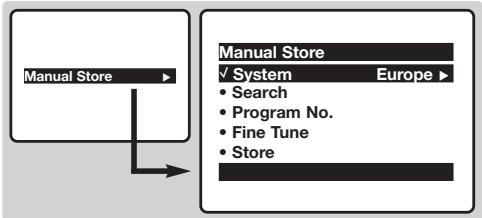
Use the ①⑨ or -P^+ keys to select the program you wish to renumber.
4 Then use the × key to select Program No and enter the new number with the keys.
With the key, select Store and press
6 Repeat steps 3 to 5 for each program you wish to renumber.
7 To quit the menus, press +
Manual store
This menu is used to store the programmes one at a time.
1 Press the (Menu) key.
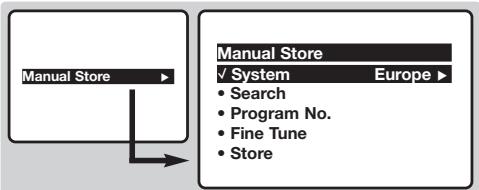
2 With the key, select Manual Store and press . Use the , keys to select a setting and the keys to adjust.:
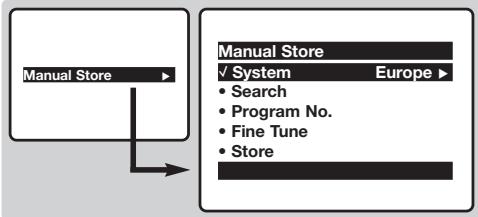
System: select Europe (automatic detection*) or West Europe (BG standard), East Europe (DK
standard), UK (I standard) or France (LL' standard). * Except for France (LL' standard), you must select choice France.
4 Search: press > . The search starts. Once a programme is found, the scanning stops. Go to the next step. If you know the frequency of the required programme, this can be entered directly using the 0 to 9 keys. If no programme is found, see Tips chapter at the end of the instruction for use.
Program No.: enter the required number with the or 0 to 9 keys.
6 Fine Tune: if the reception is not satisfactory, adjust using the ×× keys.
Store: press > . The program is stored.
8 Repeat steps 4 to 7 for each programme to store.
9 To quit the menus, press 10 .
Other settings in the menu
1 Press the (Menu) key.
Use the keys to select a setting and the keys to adjust.:
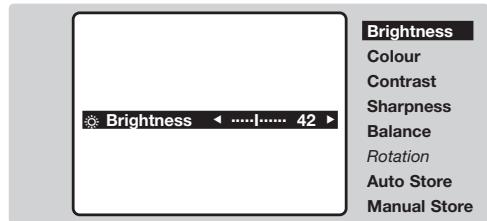
- Brightness: this changes picture brilliance.
Colour: this changes the intensity of the colour.
- Contrast: this changes the difference between the light and dark tones.
- Sharpness: this changes the picture definition.
Balance : this balances the sound on the left and right speakers.
- Rotation (if available): adjusts the angle of the picture.
- Auto Store: to start automatic search for all programmes available in your region. Then, you need to use the Manual Store menu to renumber the programmes (see p.1). To quit or interrupt the search, press (MEN).
3 To quit the menus, press 14 .
Other functions
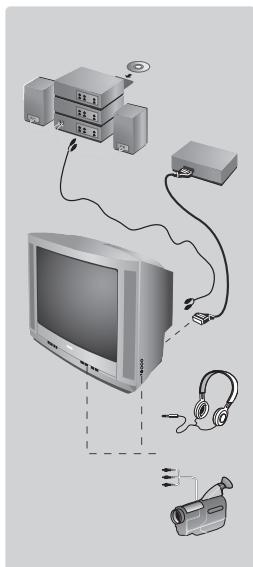
Connecting peripheral equipment
Use the euroconnector socket located at the back of the set or the front AV connections (when available). Certain versions are equipped with 2 euroconnectors EXT1 and EXT2. To select connected equipment, press several times the key.
Most equipment (decoder, VCR) carries out the switching itself.
Headphones socket (only available on certain versions)
When headphones are connected, the sound on the TV set will be cut.
The keys are used to adjust the volume level.
The headphone impedance must be between 32 and 600 Ohms.
Amplifier (only available on certain versions)
To connect to a hi-fi system, use an audio connection cable and connect the "L" and "R" outputs on the TV set to the "AUDIO IN" "L" and "R" input on your hi-fi amplifier.
The keys on the TV set
The TV set has 4 keys: VOLUME - + (- +) and PROGRAM - + (-P +) . To access or exit the menus, press simultaneously the - and + keys. Then use the -P + and - + keys to select and adjust.
Teletext
Teletext is an information system broadcast by certain channels which can be consulted like a newspaper. It also offers access to subtitles for viewers with hearing problems or who are not familiar with the transmission language (cable networks, satellite channels, etc.).
| Press: | You will obtain: This is used to call teletext, change to transparent mode and then exit. The summary appears with a list of items that can be accessed. Each item has a corresponding 3 digit page number. If the channel selected does not broadcast teletext, the indication 100 will be displayed and the screen will remain blank (in this case, exit teletext and select another channel). | |
| Teletext call | ||
| Selecting a page | Enter the number of the page required using the ① to ⑨ or - P + keys, -√. Example: page 120, enter ① ② ⑩. The number is displayed top left, the counter turns and then the page is displayed. Repeat this operation to view another page. If the counter continues to search, this means that the page is not transmitted. Select another number. | |
| Direct access to the items | Coloured areas are displayed at the bottom of the screen. The 4 coloured keys are used to access the items or corresponding pages. | |
| Contents | This returns you to the contents page (usually page 100). | |
| Temporary stop | This is used to temporarily disable or activate the teletext display. | |
| Enlarge a page | This allows you to display the top or bottom part of the page and then return to normal size. | |
| Stop sub-page acquisition | Certain pages contain sub-pages which are automatically displayed successively. This key is used to stop or resume sub-page acquisition. The indication ∥ appears top left. | |
| Hidden information | To display or hide the concealed information (games solutions). | |
| Favourite pages | For teletext programs 0 to 40, you can store 4 favourite pages which can then be accessed directly using the coloured keys (red, green, yellow, blue). 1 Press the (MEN) key to change to favourite pages mode. 2 Display the teletext page that you want to store. 3 Press the coloured key of your choice for 3 seconds. The page is now stored. 4 Repeat the operation with the other coloured keys. 5 You can now consult teletext and your favourite pages will appear in colour at the bottom of the screen. To retrieve the standard items, press (MEN). To clear everything, press (M) for 5 seconds. | |
| Double page teletext (only available on certain versions) | To activate or deactivate the double page teletext display mode. The active page is displayed on the left and the following page is displayed on the right. Press (M) if you want to hold a page (i.e. the contents page). The active page is then displayed on the right. To return to normal mode, press (M) | |
16:9 Formats
If your television is equipped with a 4:3 screen.
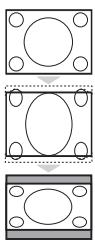
Press the key (or ) to select the different modes:
4:3
The picture is reproduced in 4:3 format.
Expand 4:3
The picture is enlarged vertically. This mode is used to cancell the black bands when watching a programme in letterbox format.
Compress 16:9
The picture is compressed vertically into 16:9 format.
If your television is equipped with a 16:9 screen.
Press the key (or ) to select the different modes:
This TV set is also equipped with automatic switching which will select the correct-screen format, provided the specific signals are transmitted with the programmes.
4:3
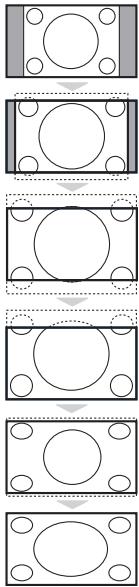
The picture is reproduced in 4:3 format and a black band is displayed on either side of the picture. The picture may be progressively enlarged using the keys.
Zoom 14:9
The picture is enlarged to 14:9 format, a thin black band remains on both sides of the picture. The keys allow you to compress and move the image vertically to view the top or bottom of the picture (subtitles).
Zoom 16:9
The picture is enlarged to 16:9 format. This mode is recommended when displaying pictures which have black bands at the top and bottom (letterbox format).
Use the keys if you wish to compress and move the image vertically to view the top or bottom of the picture.
Subtitle Zoom
This mode is used to display 4:3 pictures using the full surface of the screen leaving the sub-titles visible. Use the keys to increase or decrease the compression at the bottom of the screen.
Super Wide
This mode is used to display 4:3 pictures using the full surface of the screen by enlarging the sides of the picture. The keys allow you to scroll the image up or down the screen.
Widescreen
This mode restores the correct proportions of pictures transmitted in 16:9 using full screen display.
Tips
Positioning the television set
Place your TV on a solid, stable surface, leaving a space of at least 5 cm around the appliance. To avoid accidents, do not put anything on the set such as a cloth or cover, a container full of liquid (vase) or a heat source (lamp). The set must not be exposed to water.
Poor reception
The proximity of mountains or high buildings may be responsible for ghost pictures, echoing or shadows. In this case, modify the orientation of the aerial.
No picture or no sound
Have you connected the aerial socket properly? Have you chosen the right system? (p. 3).
Teletext
Are certain characters not displayed correctly? Press and hold down the and ^+ keys on the TV set for 5 seconds to display the Country menu. Then use the
keys to select your country and validate with MEN).
Standby
If the set receives no signal for 15 mins, it automatically goes into standby mode. To save power, your set is fitted with components that give it a very low power consumption when in standby mode (less than 3W ).
Still no results?
If your TV set breaks down, never attempt to repair it yourself: contact your dealer's after-sales service.
Recycling directive
The batteries supplied with this appliance do not contain mercury or nickel cadmium. The materials used in your set are either reusable or can be recycled. To minimise environmental waste, specialist companies collect used appliances and dismantle them after retrieving any materials that can be used again (ask your dealer for further details).
3Ta KHONKa He NcNoJIb3yETCA.
IpeynctahOBKn 1306paXeHnY n 3Byka
06cneueHbAeT DOCTyI K HECKOJIbKIM
PpeBaNTeJIbHbIM HACTPOIKaM
N3O6paJKeHn I 3YbKOBO
COpOBQdHeN.I YHKT MEHO
PepcoHan. COOTBETCTByET HAcTPOVKaM, KOtOpBe BVInONHeHbIC NOMOJIbMO HeMIO.
BbIOB TeIeTeKcTa (Ctp. 4)
Bb6op kaHaoB
Cnyknt nIpepexoJa K npdebluyseMy Inn CneJyUOeMy KaHany.
Pn3TOM Ha 3KpaHe Ha HeCKoJIbKO MrHOBeHn IOBJIaTeC INIiKALuN HOMepa (IMeHn) KaHaJ N Pekmua. IJIa HeKOTOpBIX KAHANOB HABaHne IpePaHn IOBJIaTeC B HxKHe yActn 3KaPaHa.
UnpobBie KhoNKn
O6ecneuBaIOT npMoN IOCTyI K KaHaIaM.ДЯ КаHAna C By3NaUHbIM HOMEpOM Heo6xOIMO DoabnBbTOpYU ΣФу DO TOTO, KAKIcHcEHTePrtA.
PexIM 3ByKOBOCOPBOKDeHnA
Ic3B0AeT yCnInTb 3Byk
CTpeofoHnueckux npeaDySTEREOn
NICAM MONOBpexKMe Mono,nni
PbO3B0AeR TbB6paT bpeKIM DUAL I nnI
DUAL II.Ppn BbIoBe pMONoBpeKIMe
STEREO INnKaTop bytet CnHIM.
* KhoNka BndeomarHHTOPOHa
IynbT DnCTaHIOHO HOrO ynpabHeHnA 3OBnREt ynpabTb t cOBHBm fHyHKUHM BnDEOMarHnTOphiHa. YpeKINBA R HnKATOM NIOXeHm KNOkY VCR, KOtOPaPacNIOXeHa HA 60KOBoI CTOpOE PnblTa DnCTAHUMHO rynpABHeHn, HAKMTE OHOBpEMHo HOnOHy n3 KNOkO, yKa3aHHbIX HnHex, dIe BKNIOueHn FyHKUm BnDEOMarHnTOphiHa: (1) (2) (3) (4) (5) (6)
PyuHoe coXpaHeHne KaHaJIOB B nAmATn
3TO MEHIO N03BOJNHT BBOJNTB NAMRTB TENEIN3Opa KaKdbI KAHAN IO OTDeJIbHOCTN.
1 Haxmnte KhoNkY (MEN).
2 C NOMOUIKHOJIKN BbIbepNTe NYHKT MEHUManualStore (pyuHoecoxpaHeHne)NHaXKMITEKHOJIKy.ИcNoJIb3yIte KHOJKN DnBbIbOpa nC> DnA yCTaHOBKn:
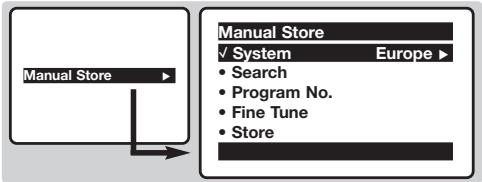
System (CnCTema): BblbepuTe Europe (abTomatueckoe oHapyKeHne*) nIin West Europe (ctaHdpT BG), East Europe (DK),UK (I) nIin France (LL').
- Kpome Φρaṇιν (ctaɪndapr LL'), rège Heoobxɔɪmò Bbɪpaṭb Ónpɪnɪ France.
4 Search (nonck): NaKMITE KONky. HauHaeTcN nonCK TeLEBUNOHbIX cTAHcI. Nocne obHapyKeHnCTaHcIIN (kaHana) nonCK npEkpaaTeC. IpeEiNTe K cNeDyUoEmy wary. EcIn Bam n3BeCTHa qactota HJxKHO RAM KaHana, BBeiNTe ee HENOCpeDCTBeHNO C NOMOsbIO KHNOPK 0 - 9.EcIn He bJeT hAJeH NOKAKO IN3OBpaKeHn, Obpatntecb K rIabe "COBeTb", KOToPAHxoDITCB B KOHcE daHHOpyKOBODCTBa.
5 Program No. (HOMep KaHaJa): BBeIInTe HOMep, KOTOpBbY Bbl XOTITE pINCBOUTb KaHaNy, C NOMOJIbIO KHONOK ① ② INJN ③ -⑨.
6 Fine Tune: ecJIN KaueCTBO pIeMa HeYIOBNETBOPNTeJIbHO, HAcTPOIte eRO C NOMOuH KHOIOK
7 Store (coxpaHeneHne): HaxMnTe KHOIpKy . KaHAn COxpaHaETcB namrTn TelenBuN3opa.
10 NobToPnte 7aHn C 4 no 7 cTOnbKo pa3, cKoJIbKO KaHaIOB Bbl XOTnte COxpaHNTb B nAMTHeTeJEBn3Opa.
9ДЯ BbIXOda n3 MeHIO HAXMITE KHNkY
Ipouhe peryunipOBKn, BbIOJIHReMbIe C NOMOUsbIO MeHIO
1 Haxmnte KhoNkY (MEN).
1 NcnoIb3yIte KHOIIKNI (\widehat{\mathbb{O}}\widehat{\mathbb{O}}) dJIa Bbl6opa n (\boxed { \begin{array}{rl} \end{array} }\boxed { \begin{array}{rl} \end{array} }\boxed { \begin{array}{rl} \end{array} }\boxed { \begin{array}{rl} \end{array} }\boxed { \begin{array}{rl} \end{array} }\boxed { \begin{array}{rl} \end{array} }\boxed { \begin{array}{rl} \end{array} }\boxed { \begin{array}{rl} 10000000000000000000000000000000000000000000000000000000000000000000000000000000000000000000000000000
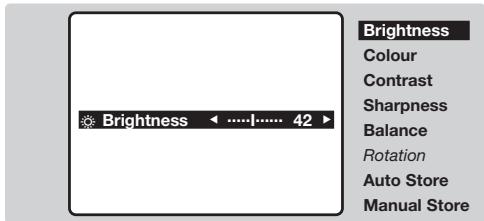
- Brightness: peRyInpOBkA npKocTn n3O6paXeHn.
Colour:perynipOBKa hacbIeHHoCTn CBeta.
- Contrast: peRyIIMPOBka KOHTpaCTHOtN 1306paXeHnA.
Sharpness:perynipOBka qetKoCTn 306paXeHna.
Balance: INCINb3yETcI INI peRynIOBKN 6baHcA rPOMKoCTN 3ByKa MExkD npaBIM IN JEBbIM DnHAMIKAMN.
Rotation: (ecn UMeTc) : I03BONETbIIOHATb peYunipOBky yrna HAKNoHa N3O6paKeHr.
- Auto Store: ПОЗВОЛЯТ БИПОЛНИТ b abTOMaTNUeCKOe COXpaHEnHe N B pAmrTn TELeBn3Opa BCex ПинимаembIX TelenBn3IOHnHbIX KaHaNoB. ПocNe 3TOrO Heo6xOДIMO BИПОЛHnTb ПpoUeDpyC OCPtIPOBKn KaHaNoB (CM. CTP. 1).
3ДЯВьIOda n3 MeHIO HαKMITE KHOKNIky
PpOuHeФyHKcHn
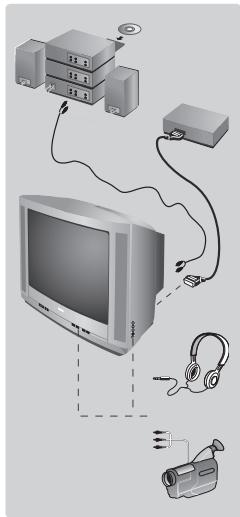
IopknioueHne BHeuHne annpaTpybI
IcnoIb3yIte pa3bem InI NOKJIIOUeHINI DOONHIteBHOI aNnapaTpybl, paCNOJIOKeHHbI Ha 3aIHeN CTOpOHe TELEBn3Opa, INI rHEzda AV, paCNOJIOKeHHbe NapeIeHne IaHEnI TELEBn3Opa (ecNI OH eCTb). B HEKOTOpbIX MOeJIAX IMeETcBA Dba pa3bEma IINI NOKJIIOUeHINI K TELEBn3Opy IOnONIHtBbHO AnnapaTpyb (EXT1 n EXT2). Bb6op NOKIIIOUeHNOI aNnpaPATA OCyUeCTBnIeTcR C NOMoUsbIO NocLeDobAteBbHbX HaxatNI KHNIK. BOLbIshnCTBO ANnpaTbOB CAMOCTOATEBHO BbIOnlHrIOT KOMMYTAuIO (BInDeOMaHHTofoH,...).
IHe3IO IJI NIOKIIIOUeHn HAYUHKnOB (IMeETCH He BO BCEX MOJeJx) PIn IOKIIIOUeHn HAYUHKnOB DINHAMIK B TEeBn3OpE ABOTMaTHueCKN OTKIIIOuAeTcR. PeryUNIPOBKa rPOMKOCTN 3ByKa BBINOJIHReTc C NOMOUsbIO KHOJOK 一 + .IIOHoe COpOTUBNeHne HAYUHKnOB DOJXHO HAXODITbC R B ppeJenax ot 32 do 600 Om. YcINITeB (ToJIbKO Ha HEKOTOpBX MoJeJx) :ДЯ NOkIIOUeHn CnCTeM HiFi, INcNoJIb3ObAtb CoeINHTeBHy Ishyp ayDnO n CoeINHTb pa3beMbI "L" n "R" TeeBn3Opa co BxOdAmn "AUDIO IN" "L" n "R" ycINITeJr.
Khoŋn Ka TeleBn3ope
Ha TeIeBn3ope ImeMeTc4 KhoNk: VOLUME-+(- +) IN PROGRAMM-+(-P+)ДЯ OCyUeCTBJIeHЯ DoCTyIa K MeHIO HaKMITE OJHOBPeMeHHO KhoNky -I.3aTeM BbIOnHInTe peYrIpOBky C NOMOJIbKO KhoNOK-P+I-+
TeIeTeKCT
TeIeTeKCT npedctabniet coboi cnctemy pacnpoctpaehn HhOpmaun, nepedaBaemno HeKOtOpbIM KaHanaM, KOtopyIO MOxHO uHTaTB KAKra3ety. B 3TOI CNCTeME npedycmOTpeHa TaKKe cyHKUry Cy6TITPOB IINJIOEIN MHeIOxN DeOeKtBu CnyxA INI He 3HaIOxN Ra3bika, Ha KOtOPOM BeDeTcHpepaq (KaBeJIbHble CETN, KaHaNbl CNCTeMb CIyTHIKOBORO TeJIeBEuHaHn I T..).
| Haxmnte: | Для поочену: |
| Вълочене teleneteksta | Зта Фунckши пгедназанец Ддь Вьзова телетекста, Вхда в реким наложеня телетекст/ибображени,а затем вьхда在其 рекима телетекста.В оглалени,КOTOPOE Вьвогится на Зкраз, пекшсяны вдд дд рсителя рубши.Кадяд рьорika oboэнчеса 3-энчьнIM HomepOM CTРANUы. Есни вьраньkanал He nepeDAET teletekct,Ha зкразнЕ поВITС чсно 100 и канал octaNETCпугтBM(B 3Tom citye Bvyditeи n3 рекима телетекста и ВьберITE дугош канал). |
| Bьбор stpanuць teleneteksta | Вь徳пг Trpebyembl homopr CTPANUы cnomoшь khoNOK ①-(9 ил - P +, )√.Нарчимр: Ддг CTPANUы 120 habeprte ① ② ③:HOMER NOBITCBA B LEVOM BERVHE YIpy OskPAnA,CHETYK CTPANUc HauHET ПОСК,И CTPANUca OTOBAS MTCAHа Зкраз. Повторпг оретаюдд Вьзова дуг罗 CTPANUы. Есни счет职 CTPANU c prodolkaet ВьнOLHЯТБ поСК,ЗТ OzhaueT,ФТВьбрANHЯ CTPANUca He nepeDAETCBA. DpyROR HOMER CTPANUы. |
| Празмо doctунк pyobrikanam | В НИЖЧЕЧАСТУЗКРANAотСОКРASHENBE 30HB. ДocStTyK COOTBETCTBYUQUIM puybriKAM ИИ CTPANUcM OCUSECTBILNETCЯ рп ПOMOUs 4 ZBETBx KHOJOK. |
| Ornablenie | Позвоггет Верн'tьсВ В ORnablenie (obchyho,ЗTO CTPANUca 100). |
| Временhoe otknIOUeHne | Служitt Ддг Временогу ВьнIOUeHи И OTKIOUeHIN BvIBODa TELETEKCTA Na 3KpaH. |
| YbeInuHHe STPANUы | Служitt Ддг ВьIBODa Na 3KpaH ВрEMHу INИнЖЧЕЧИ ИЗБРAKESHIN, a 3ATM BoZBpATA K HopMaJIbHOMy I3OBPAJeHNO. |
| OstahOBk npoKpyuHbAHn noDCTPANU | Некторbie CTPANUы ИМЕЛТСВОДТСТРANUы,КOTOPBE NaChHAIOT ABTOMATINUECKI CMEHЯТ Дуг Дуг.ЗТа KMONKA NOZBOLHЯET OCTAHOBt ИИ NBO3O6HOBHTI pOKpyuHbAHne IOdCTPANU.При ЗТOMВ ВьрХЧЕЛЕВОДЧАТNIOBITCS INDINAÇAЯ [E] |
| Скртыаг inhФорmaць | Служitt Ддг ТOTO,ЧТБы SCртыг Информuaць ПОВИлась ИИ NUCHEla C 3KpaHа (peseHINДдг INRP). |
| ПразночтAE Mble CTpanuь | Ддя КанALOB,праздаюцх telETekt (0-40),ИМeETCRA BO3MOXHOCCTb BVECTN B PAMTb 4 PrEDNoUTaEMbIX BamIM CTPANUы,К KOTOPbIM MOJHO bYdET obpaUaTbCЯ HeNOCpeDCTBENHO C POMUbIO ZBETbIX Klavni (KpachOH,ЗeJIeHOM,ЖELTOI,СИнEH). |
| 1 Haxatb Na KNHONKу [MEN] dIЯп rePEXODA b PexKIM PrednoHTaEMbIX CTPANU. | |
| 2 BByBeCTN Na 3KpAH CTPANUz TeteTektCTa, KOTOPUb YIжELaTe BVECTN B PAMTb. | |
| 3 3ATM,нakMITEи у德жIMBaIte B TeUeHIN 3 CekHyd ZBETHyIO KlavniUy,COOTBETCTBIVUOly BAIeMBy Bb6Opy. CTPANUca BVEDEHa B PAMTb. | |
| 4 ПовТОпITE onepaUIOДдд OCTaJIbHbIX ZBETbIX KHOJOK. | |
| 5 C 3TOGO MOMENTA,ΚΑΚΤΟΚΟΥ BИБОТСТС K TeteTektCY,ВашIN празночтамь CBIO TONEITCS B TZeBET B HIXKHeч actIN ЗрANA.Ддг TOTO,ЧТБы CTePESMbT BICIO BVEDEHHyIO INHΦOPMAUIO,нakMITE Na KNHONKу [E] undexKINBAITE ee B TeUeHIN 5 CekHyd. |

Двйнагстраица TeJTeKCTa
(IMEETCTOJIbKO B HEKOTOPBIXMODEJAX)
ДлгakTNbaци/дзэкTNBaципгсдтавлени.TелтЕКТСАНДВОИHON CTpaHINUE.AkTNBHAнCTpaHINUcaпгсдтавлениССЕВа,ССЕДУПОДА -СРпава.HaЖмITEHaKlnabNHy()ecnВыхOTITEЗФИКСИРОВАТБakkyIOLBOcTpaHINU(HaPIMeP,OrnabIneH).ПяразвЯстранuca STAHOBNTCg AKTNBHOД.ДлгВОЗВРATAВHOPMAbHьPexIMHЯЖМTEHЯ!I-Ⅱ.
Функция 16/9
EcnTeneBn3Op IMeet 3KpaH c COOTHOWeHMeC TOpOH 4:3.

HaKaTb Ha KlaBnSi (H) (IIN OO) Ia Bb6op a3NHybIX peKIMOB:
4:3
Selecionar a opcao France.
\*Piaktpo ayvntookomns
To nλεiπρio oag eitpêie va xeiipoteite iKupiec aeIooupyies mG oukeuig maayntookomng. Kpatnote natnevo To nλiktpo VCR tou βpioketai oTO TAU TO nλeepiπpoiou kai OTN ouveia triote eva aT OIAIKTPa yia va exete npaaon otis aeIooupyie tsoukeuig maayntookotmng: P - + - - - - - - - - - - - - - - - - - - - - - - - - - - - - - - - - - - - - - - - - - - - - - - - - - - - - - - - - - - - - - - - - - - - - - - - - - - - - - - - - - - - - - - - - - - - - - - - - - -
AtoeKeuon mE To xepi
AutoToeouEITIPTPENEITNVPPOOHTIKEVOC PPOYPaUAtosnTIVAnOpVnMoEvOnTOUGeva
1PiEoTeToPiAnKtpo (MENU).
2 ME TO k p o ,ETIIeYETe Manual Store (XeipokivnT Anothekeuon) KAI TATNOTE TO XpnoiouIOJTE TA k p a YIA VA ETIIAEETE KAI G YIA VA KAVETE T N P0UHIOI.
Information for users in the UK (not applicable outside the UK)
Positioning the TV
For the best results, choose a position where light does not fall directly on the screen, and at some distance away from radiators or other sources of heat. Leave a space of at least 5cm all around the TV for ventilation, making sure that curtains, cupboards etc. cannot obstruct the air flow through the ventilation apertures. The TV is intended for use in a domestic environment only and should never be operated or stored in excessively hot or humid atmospheres.
General Points
Please take note of the section entitled 'Tips' at the end of this booklet.
Interference
The Department of Trade and Industry operates a Radio Interference Investigation Service to help TV licence holders improve reception of BBC and IBA programmes where they are being spoilt by interference.
If your dealer cannot help, ask at a main Post Office for the booklet "How to Improve Television and Radio Reception".
Mains connection
Before connecting the TV to the mains, check that the mains supply voltage corresponds to the voltage printed on the type plate on the rear panel of the TV. If the mains voltage is different, consult your dealer.
Important
This apparatus is fitted with an approved moulded 13 Amp plug. To change a fuse in this type of plug proceed as follows:
- Remove fuse cover and fuse.
- Fit new fuse which should be a BS1362 5A, A.S.T.A. or BSI approved type.
- Refit the fuse cover.
In order to maintain conformity to the EMC directive, the mains plug on this product must not be removed.
Connecting the aerial
The aerial should be connected to the socket marked at the back of the set. An inferior aerial is likely to result in a poor, perhaps unstable picture with ghost images and lack of contrast. Make-shift loft or set-top aerials are often inadequate. Your dealer will know from experience the most suitable type for your locality.
Should you wish to use the set in conjunction with other equipment, which connects to the aerial socket such as TV games, or a video camera it is recommended that these be connected via a combiner unit to avoid repeated connection and disconnection of the aerial plug.
Fitting the stand (if provided)
Use only the stand provided with the set, making sure that the fixings are properly tightened. A diagram showing how to assemble the stand is packed with the stand. Never use a make-shift stand, or legs fixed with woodscrews.