MT691 - Cordless drill Maktec - Free user manual and instructions
Find the device manual for free MT691 Maktec in PDF.


| Product type | Cordless electric drill |
| Model | MT691 |
| Brand | Maktec |
| Rated voltage | 18 V DC |
| Battery type | L1851 / L1853 (Li-ion) |
| Net weight (with battery, according to EPTA-01/2003) | 1.5 kg |
| Total length | 173 mm |
| No-load speed | 0 – 2,400 min⁻¹ |
| Impacts per minute | 0 – 3,000 min⁻¹ |
| Screwing capacity (machine screw) | 4 mm – 8 mm |
| Screwing capacity (standard bolt) | 5 mm – 14 mm |
| Screwing capacity (high-strength bolt) | 5 mm – 12 mm |
| Sound pressure level (LpA) | 93 dB(A) |
| Sound power level (LWA) | 104 dB(A) |
| Acoustic uncertainty (K) | 3 dB(A) |
| Vibration emission (impact tightening) | 8.0 m/s² |
| Vibration uncertainty (K) | 1.5 m/s² |
| Main functions | Screwing, percussion drilling, reversible rotation, variable speed, spindle lock |
| Safety | Battery protection device (overload, temperature, undervoltage), reverse switch with neutral position, insulated grips |
| Maintenance and cleaning | Do not use solvents; clean with a dry cloth; repairs exclusively by a Makita authorized service center |
| Spare parts and repairability | Makita spare parts available; repairs by authorized service center |
| General information | Intended for screwing in wood, metal, and plastic; supplied with removable hook |
Frequently Asked Questions - MT691 Maktec
User questions about MT691 Maktec
0 question about this device. Answer the ones you know or ask your own.
Ask a new question about this device
Download the instructions for your Cordless drill in PDF format for free! Find your manual MT691 - Maktec and take your electronic device back in hand. On this page are published all the documents necessary for the use of your device. MT691 by Maktec.
USER MANUAL MT691 Maktec
GB Cordless Impact Driver Instruction Manual
natural_image
Line drawing of a handheld electric drill press tool with no visible text or symbols
text_image
Technical diagram of a mechanical device with labeled parts 1, 2, and 3, showing internal components and directional arrows.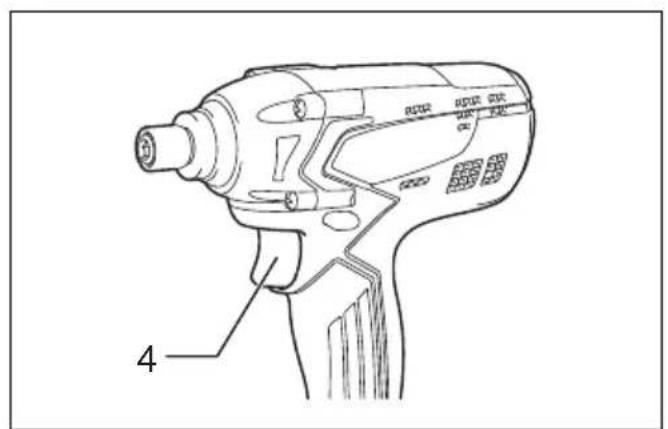
text_image
4 R120 R120 R120 R120 R120 R120012993 012994
1
text_image
A B 5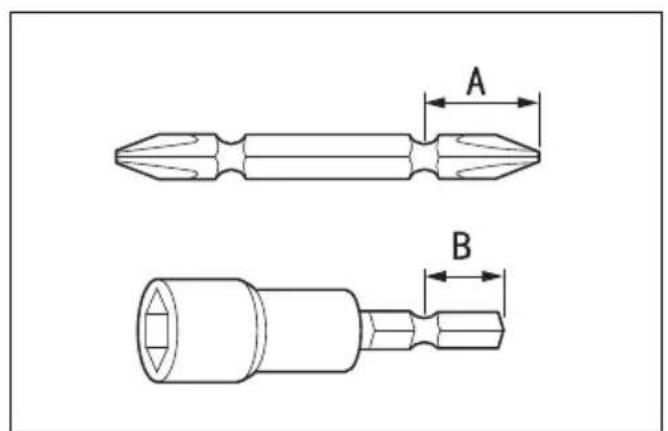
text_image
A B012995 004521 4
3
text_image
6 7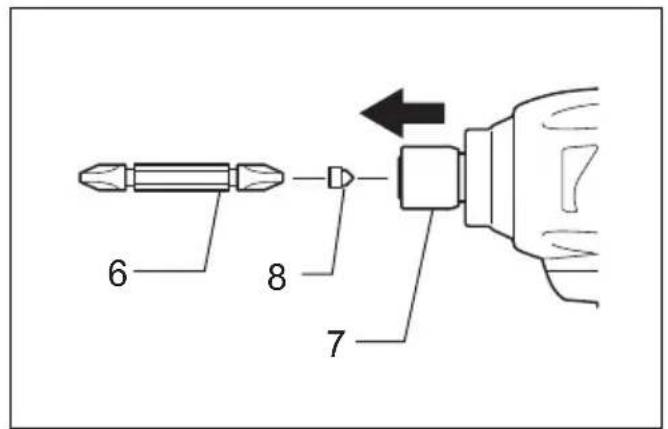
text_image
6 8 7012996
5
text_image
9 10 116
natural_image
Line drawing of a hand holding a screwdriver with a tool, against a vertical line (no text or symbols)012997
7
8
012999012998
text_image
129
013030
line
| Sample | 16 (S) | N·m (kgf.cm) | |--------|--------|--------------| | M14 | 0.0 | 816 | | M14 | 1.0 | 612 | | M14 | 2.0 | 408 | | M14 | 3.0 | 204 | | M12 | 0.0 | 816 | | M12 | 1.0 | 612 | | M12 | 2.0 | 408 | | M12 | 3.0 | 204 | | M10 | 0.0 | 816 | | M10 | 1.0 | 612 | | M10 | 2.0 | 408 | | M10 | 3.0 | 204 | | M8 | 0.0 | 816 | | M8 | 1.0 | 612 | | M8 | 2.0 | 408 | | M8 | 3.0 | 204 |10 11
013029
line
| Sample | 16 (S) | N·m (kgf.cm) | |--------|--------|--------------| | M8 | 0.0 | 20 | | M8 | 0.5 | 30 | | M8 | 1.0 | 40 | | M8 | 1.5 | 50 | | M8 | 2.0 | 60 | | M8 | 2.5 | 70 | | M8 | 3.0 | 80 | | M10 | 0.0 | 20 | | M10 | 0.5 | 30 | | M10 | 1.0 | 40 | | M10 | 1.5 | 50 | | M10 | 2.0 | 60 | | M10 | 2.5 | 70 | | M10 | 3.0 | 80 | | M12 | 0.0 | 20 | | M12 | 0.5 | 30 | | M12 | 1.0 | 40 | | M12 | 1.5 | 50 | | M12 | 2.0 | 60 | | M12 | 2.5 | 70 | | M12 | 3.0 | 80 | | M12 (M12) | 3.0 | 1020 |013031
Explanation of general view
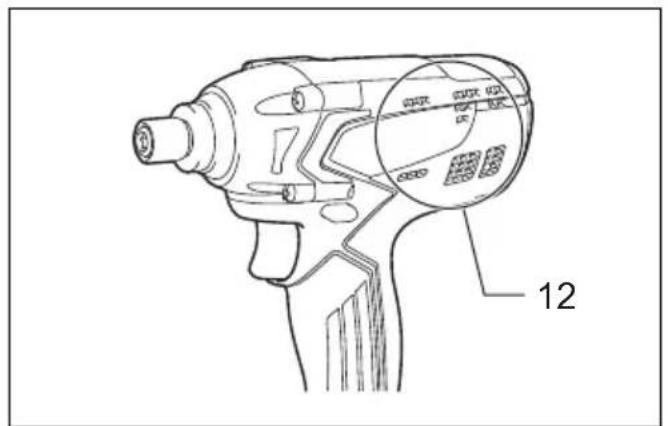
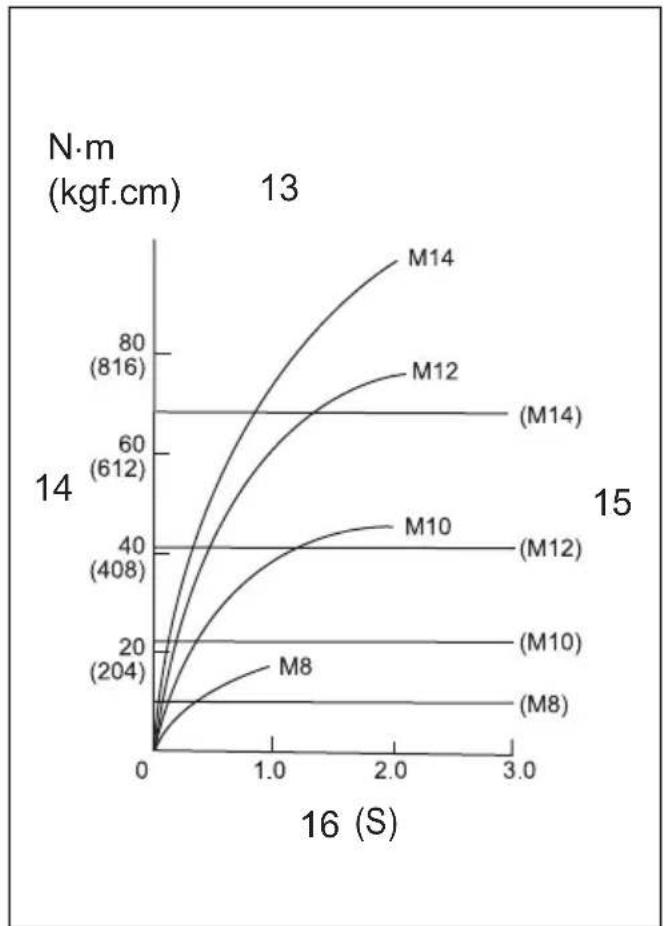
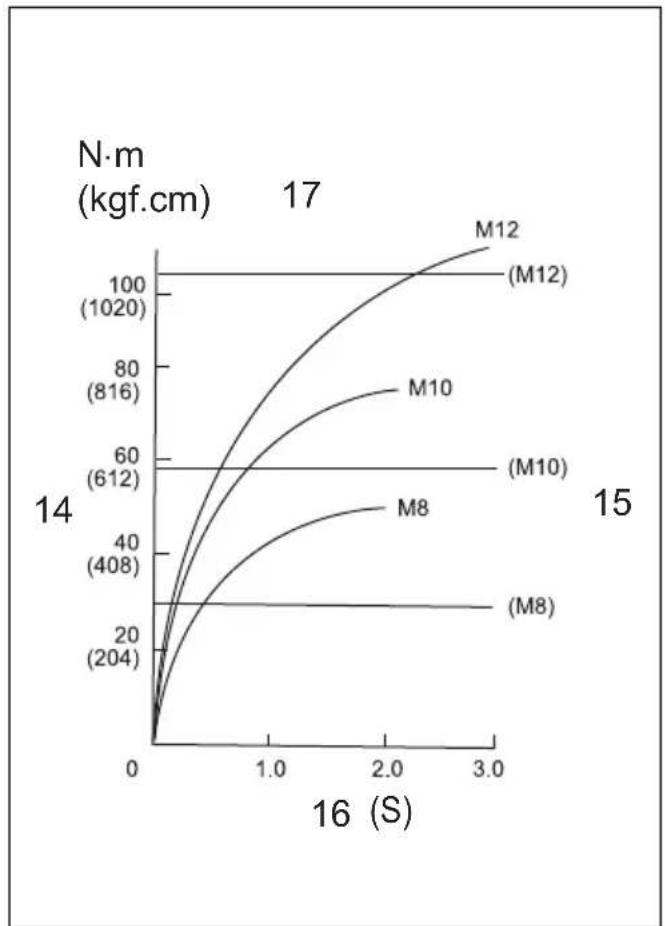
| 1 Red indicator | 7 Sleeve | 13 Standard bolt |
| 2 B u t t o n | 8 Bit-piece | 14 Fastening torque |
| 3 Battery cartridge | 9 G r o o v e | 15 Proper fastening torque |
| 4 Switch trigger | 10 Hook | 16 Fastening time |
| 5 Reversing switch lever | 11 Screw | 17 High tensile bolt |
| 6 Bit | 12 Vent |
SPECIFICATIONS
| Model MT690 MT691 | |||
| Capacities | Machine screw 4 mm – 8 mm | ||
| Standard bolt 5 mm – 14 mm | |||
| High tensile bolt 5 mm – 12 mm | |||
| No load speed (min ^-1 ) | 0 – 2,400 | ||
| Impacts per minute | 0 – 3,000 | ||
| Overall length | 173 mm | ||
| Battery cartridge | L1451/L1453 | L1851/L1853 | |
| Net weight | 1.4 kg | 1.5 kg | |
| Rated voltage | D.C. 14.4 V | D.C. 18 V | |
- Due to our continuing program of research and development, the specifications herein are subject to change without notice.
- Specifications and battery cartridge may differ from country to country.
- Weight, with battery cartridge, according to EPTA-Procedure 01/2003
ENE033-1
Intended use
The tool is intended for screw driving in wood, metal and plastic.
GEA010-1
General Power Tool Safety Warnings
⚠ WARNING Read all safety warnings and all instructions. Failure to follow the warnings and instructions may result in electric shock, fire and/or serious injury.
Save all warnings and instructions for future reference.
GEB054-1
CORDLESS IMPACT DRIVER SAFETY WARNINGS
- Hold power tool by insulated gripping surfaces, when performing an operation where the fastener may contact hidden wiring. Fasteners contacting a "live" wire may make exposed metal parts of the power tool "live" and could give the operator an electric shock.
- Always be sure you have a firm footing. Be sure no one is below when using the tool in high locations.
- Hold the tool firmly.
4. Wear ear protectors.
SAVE THESE INSTRUCTIONS.
WARNING:
DO NOT let comfort or familiarity with product (gained from repeated use) replace strict adherence to safety rules for the subject product.
MISUSE or failure to follow the safety rules stated in this instruction manual may cause serious personal injury.
ENC009-1
IMPORTANT SAFETY INSTRUCTIONS
FOR BATTERY CARTRIDGE
- Before using battery cartridge, read all instructions and cautionary markings on (1) battery charger, (2) battery, and (3) product using battery.
- Do not disassemble battery cartridge.
- If operating time has become excessively shorter, stop operating immediately. It may result in a risk of overheating, possible burns and even an explosion.
- If electrolyte gets into your eyes, rinse them out with clear water and seek medical attention right away. It may result in loss of your eyesight.
- Do not short the battery cartridge:
(1) Do not touch the terminals with any conductive material.
(2) Avoid storing battery cartridge in a container with other metal objects such as nails, coins, etc.
(3) Do not expose battery cartridge to water or rain.
A battery short can cause a large current flow, overheating, possible burns and even a breakdown.
- Do not store the tool and battery cartridge in locations where the temperature may reach or exceed 50°C (122°F).
- Do not incinerate the battery cartridge even if it is severely damaged or is completely worn out. The battery cartridge can explode in a fire.
- Be careful not to drop or strike battery.
- Do not use a damaged battery.
SAVE THESE INSTRUCTIONS.
Tips for maintaining maximum battery life
- Charge the battery cartridge before completely discharged.
Always stop tool operation and charge the battery cartridge when you notice less tool power.
- Never recharge a fully charged battery cartridge. Overcharging shortens the battery service life.
- Charge the battery cartridge with room temperature at 10^ C – 40^ C ( 50^ F – 104^ F). Let a hot battery cartridge cool down before charging it.
FUNCTIONAL DESCRIPTION
CAUTION:
- Always be sure that the tool is switched off and the battery cartridge is removed before adjusting or checking function on the tool.
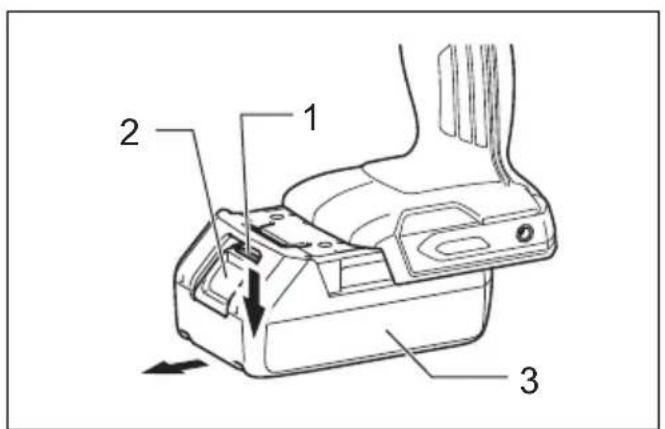
Installing or removing battery cartridge (Fig. 1)
CAUTION:
- Always switch off the tool before installing or removing of the battery cartridge.
- Hold the tool and the battery cartridge firmly when installing or removing battery cartridge. Failure to hold the tool and the battery cartridge firmly may cause them to slip off your hands and result in damage to the tool and battery cartridge and a personal injury.
To remove the battery cartridge, slide it from the tool while sliding the button on the front of the cartridge.
To install the battery cartridge, align the tongue on the battery cartridge with the groove in the housing and slip it into place. Insert it all the way until it locks in place with a little click. If you can see the red indicator on the upper side of the button, it is not locked completely.
CAUTION:
- Always install the battery cartridge fully until the red indicator cannot be seen. If not, it may accidentally fall out of the tool, causing injury to you or someone around you.
- Do not install the battery cartridge forcibly. If the cartridge does not slide in easily, it is not being inserted correctly.
Battery protection system
The tool is equipped with a battery protection system. This system automatically cuts off power to the motor to extend battery life.
The tool will automatically stop during operation if the tool and/or battery are placed under one of the following conditions:
- Overloaded:
The tool is operated in a manner that causes it to draw an abnormally high current.
In this situation, release the switch trigger on the tool and stop the application that caused the tool to become overloaded. Then pull the switch trigger again to restart.
If the tool does not start, the battery is overheated. In this situation, let the battery cool before pulling the switch trigger again.
- Low battery voltage:
The remaining battery capacity is too low and the tool will not operate. If you pull the switch trigger, the motor runs again but stops soon. In this situation, remove and recharge the battery.
Switch action (Fig. 2)
CAUTION:
- Before inserting the battery cartridge into the tool, always check to see that the switch trigger actuates properly and returns to the "OFF" position when released.
To start the tool, simply pull the switch trigger. Tool speed is increased by increasing pressure on the switch trigger. Release the switch trigger to stop.
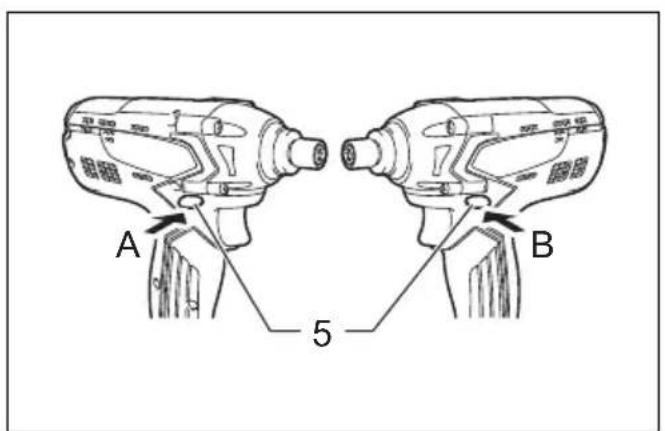
Reversing switch action (Fig. 3)
This tool has a reversing switch to change the direction of rotation. Depress the reversing switch lever from the A side for clockwise rotation or from the B side for counterclockwise rotation.
When the reversing switch lever is in the neutral position, the switch trigger cannot be pulled.
CAUTION:
- Always check the direction of rotation before operation.
- Use the reversing switch only after the tool comes to a complete stop. Changing the direction of rotation before the tool stops may damage the tool.
- When not operating the tool, always set the reversing switch lever to the neutral position.
ASSEMBLY
CAUTION:
- Always be sure that the tool is switched off and the battery cartridge is removed before carrying out any work on the tool.
Installing or removing driver bit or socket bit (Fig. 4)
Use only bits that has inserting portion shown in the figure.
For tool with shallow bit hole
| A=12 mmB=9 mm | Use only these type of bit. Follow the procedure (1).(Note) Bit-piece is not necessary. |
006348
For tool with deep bit hole
| A=17 mmB=14 mm | To install these types of bits, follow the procedure (1). |
| A=12 mmB=9 mm | To install these types of bits, follow the procedure (2).(Note) Bit-piece is necessary for installing the bit. |
011405
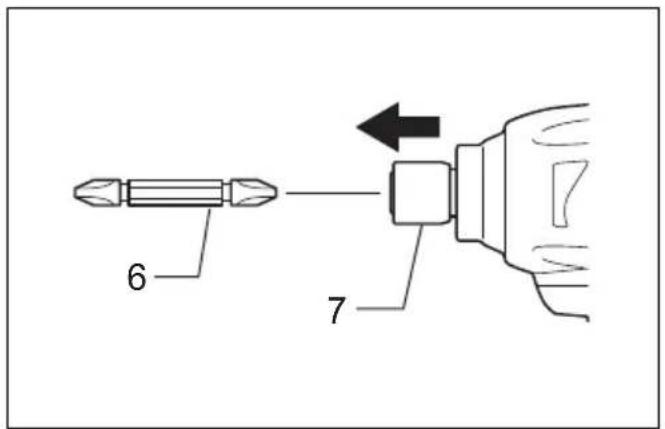
Procedure (1)
To install the bit, pull the sleeve in the direction of the arrow and insert the bit into the sleeve as far as it will go. Then release the sleeve to secure the bit. (Fig. 5)
Procedure (2)
In addition to the procedure (1) above, insert the bit-piece into the sleeve with its pointed end facing in. To remove the bit, pull the sleeve in the direction of the arrow and pull the bit out. (Fig. 6)
NOTE:
- If the bit is not inserted deep enough into the sleeve, the sleeve will not return to its original position and the bit will not be secured. In this case, try re-inserting the bit according to the instructions above.
- After inserting the bit, make sure that it is firmly secured. If it comes out, do not use it.
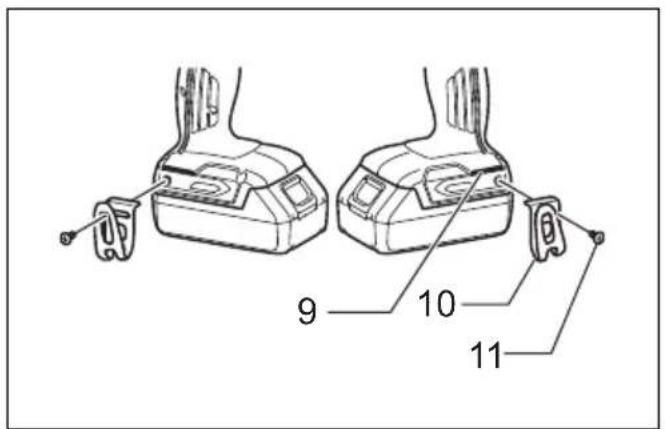
Hook (optional accessory) (Fig. 7)
The hook is convenient for temporarily hanging the tool. This can be installed on either side of the tool.
To install the hook, insert it into a groove in the tool housing on either side and then secure it with a screw. To remove, loosen the screw and then take it out.
OPERATION

CAUTION:
- Do not cover vents, or it may cause overheating and damage to the tool. (Fig. 8 & 9)
The proper fastening torque may differ depending upon the kind or size of the screw/bolt, the material of the workpiece to be fastened, etc. The relation between fastening torque and fastening time is shown in the figures.
(Fig. 10 & 11)
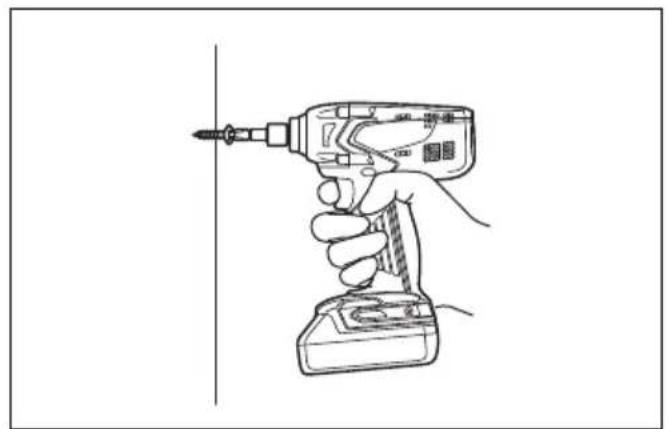
Hold the tool firmly and place the point of the driver bit in the screw head. Apply forward pressure to the tool to the extent that the bit will not slip off the screw and turn the tool on to start operation.
NOTE:
- Use the proper bit for the head of the screw/bolt that you wish to use.
- When fastening M8 or smaller screw, carefully adjust pressure on the switch trigger so that the screw is not damaged.
- Hold the tool pointed straight at the screw.
- If the impact force is too strong you tighten the screw for a time longer than shown in the figures, the screw or the point of the driver bit may be overstressed, stripped, damaged, etc. Before starting your job, always perform a test operation to determine the proper fastening time for your screw.
The fastening torque is affected by a wide variety of factors including the following. After fastening, always check the torque with a torque wrench.
- When the battery cartridge is discharged almost completely, voltage will drop and the fastening torque will be reduced.
- Driver bit or socket bit
Failure to use the correct size driver bit or socket bit will cause a reduction in the fastening torque. - Bolt
- Even though the torque coefficient and the class of bolt are the same, the proper fastening torque will differ according to the diameter of bolt.
- Even though the diameters of bolts are the same, the proper fastening torque will differ according to the torque coefficient, the class of bolt and the bolt length.
- The manner of holding the tool or the material of driving position to be fastened will affect the torque.
- Operating the tool at low speed will cause a reduction in the fastening torque.
MAINTENANCE

CAUTION:
- Always be sure that the tool is switched off and the battery cartridge is removed before attempting to perform inspection or maintenance except for the following troubleshooting related to the light.
- Never use gasoline, benzine, thinner, alcohol or the like. Discoloration, deformation or cracks may result.
To maintain product SAFETY and RELIABILITY, repairs, any other maintenance or adjustment should be performed by Makita Authorized Service Centers, always using Makita replacement parts.
Noise
The typical A-weighted noise level determined according to EN60745:
Model MT690
Sound pressure level (L _pA ): 93 dB (A)
Sound power level ( L_WA ): 104 dB (A)
Uncertainty (K): 3 dB (A)
Model MT691
Sound pressure level (L _nA ): 93 dB (A)
Sound power level ( L_WA ): 104 dB (A)
Uncertainty (K): 3 dB (A)
Wear ear protection
ENG900-1
Vibration
The vibration total value (tri-axial vector sum) determined according to EN60745:
Model MT690
Work mode: impact tightening of fasteners of the maximum capacity of the tool
Vibration emission ( a_h ): 9.0 m/s ^2
Uncertainty (K): 1.5 m/s ^4
Model MT691
Work mode: impact tightening of fasteners of the maximum capacity of the tool
Vibration emission ( a_h ): 8.0 m/s ^2
Uncertainty (K): 1.5 m/s ^4
ENG901-1
- The declared vibration emission value has been measured in accordance with the standard test method and may be used for comparing one tool with another.
- The declared vibration emission value may also be used in a preliminary assessment of exposure.

WARNING:
- The vibration emission during actual use of the power tool can differ from the declared emission value depending on the ways in which the tool is used.
- Be sure to identify safety measures to protect the operator that are based on an estimation of exposure in the actual conditions of use (taking account of all parts of the operating cycle such as the times when the tool is switched off and when it is running idle in addition to the trigger time).
For European countries only
EC Declaration of Conformity
We Makita Corporation as the responsible manufacturer declare that the following Makita machine(s):
Designation of Machine:
Cordless Impact Driver
Model No./Type: MT690, MT691
are of series production and
Conforms to the following European Directives: 2006/42/EC
And are manufactured in accordance with the following standards or standardised documents: EN60745
The technical documentation is kept by:
Makita International Europe Ltd.
Technical Department,
Michigan Drive, Tongwell,
Milton Keynes, Bucks MK15 8JD, England
14.12.2011
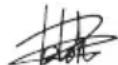
Tomoyasu Kato
Director
Makita Corporation
3-11-8, Sumiyoshi-cho,
Anjo, Aichi, 446-8502, JAPAN
Descriptif
Michigan Drive, Tongwell,
Milton Keynes, Bucks MK15 8JD, Angleterre
14.12.2011
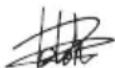
Tomoyasu Kato
Directeur
Makita Corporation
3-11-8, Sumiyoshi-cho,
Anjo, Aichi, 446-8502, JAPAN
Übersicht
Vibrationsemission ( a_h ): 8,0 m/s ^2
Michigan Drive, Tongwell,
Milton Keynes, Bucks MK15 8JD, England
14.12.2011
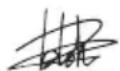
Tomoyasu Kato
Direktor
Makita Corporation
3-11-8, Sumiyoshi-cho,
Anjo, Aichi, 446-8502, JAPAN
Visione generale
Michigan Drive, Tongwell,
Milton Keynes, Bucks MK15 8JD, Inghilterra
14.12.2011
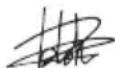
Tomoyasu Kato
Amministratore
Makita Corporation
3-11-8, Sumiyoshi-cho,
Anjo, Aichi, 446-8502, JAPAN
Michigan Drive, Tongwell,
Milton Keynes, Bucks MK15 8JD, Engeland
14.12.2011
Tomoyasu Kato
Directeur
Makita Corporation
3-11-8, Sumiyoshi-cho,
Anjo, Aichi, 446-8502, JAPAN
Michigan Drive, Tongwell,
Milton Keynes, Bucks MK15 8JD, Inglaterra
14.12.2011
Tomoyasu Kato
Director
Makita Corporation
3-11-8, Sumiyoshi-cho,
Anjo, Aichi, 446-8502, JAPAN
Explicação geral
Michigan Drive, Tongwell,
Milton Keynes, Bucks MK15 8JD, Inglaterra
14.12.2011
Tomoyasu Kato
Director
Makita Corporation
3-11-8, Sumiyoshi-cho,
Anjo, Aichi, 446-8502, JAPAN
Michigan Drive, Tongwell,
Milton Keynes, Bucks MK15 8JD, England
14.12.2011
Tomoyasu Kato
Direktør
Makita Corporation
3-11-8, Sumiyoshi-cho,
Anjo, Aichi, 446-8502, JAPAN
Model No./Tipi: MT690, MT691
Michigan Drive, Tongwell,
Milton Keynes, Bucks MK15 8JD, England
14.12.2011
Tomoyasu Kato
Müdür
Makita Corporation
3-11-8, Sumiyoshi-cho,
Anjo, Aichi, 446-8502, JAPAN
Makita Corporation
Anjo, Aichi, Japan