XPR207 - Cd player/recorder AIWA - Free user manual and instructions
Find the device manual for free XPR207 AIWA in PDF.



Frequently Asked Questions - XPR207 AIWA
User questions about XPR207 AIWA
0 question about this device. Answer the ones you know or ask your own.
Ask a new question about this device
Download the instructions for your Cd player/recorder in PDF format for free! Find your manual XPR207 - AIWA and take your electronic device back in hand. On this page are published all the documents necessary for the use of your device. XPR207 by AIWA.
USER MANUAL XPR207 AIWA
Printed in Hong Kong
text_image
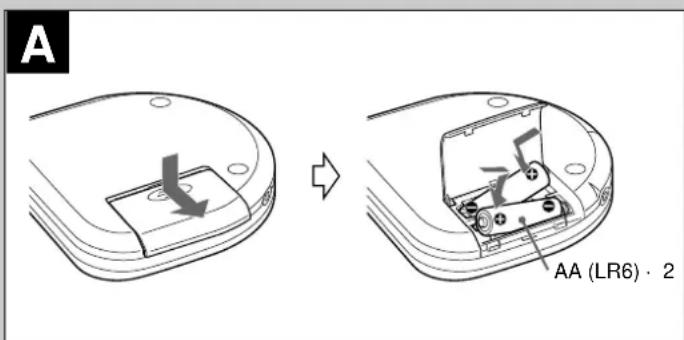
A AA (LR6) · 2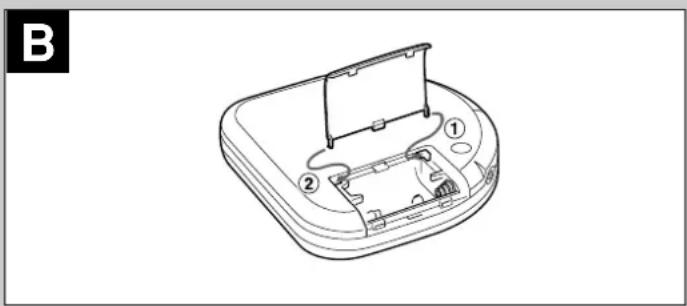
natural_image
Line drawing of a device casing with internal components and a stand (no text or symbols)OWNER'S RECORD
For your convenience, record the model number and the serial number (you will find it on the bottom of your set) in the space provided below. Please refer to them when you contact your Aiwa dealer in case of difficulty.
Model No.
Serial No.
NOTE
FOR USE IN THE U.S.A.
This equipment has been tested and found to comply with the limits for a Class B digital device, pursuant to Part 15 of the FCC Rules. These limits are designed to provide reasonable protection against harmful interference in a residential installation.
This equipment generates, uses, and can radiate radio frequency energy and, if not installed and used in accordance with the instructions, may cause harmful interference to radio communications. However, there is no guarantee that interference will not occur in a particular installation. If this equipment does cause harmful interference to radio or television reception, which can be determined by turning the equipment off and on, the user is encouraged to try to correct the interference by one or more of the following measures:
– Reorient or relocate the receiving antenna.
– Increase the separation between the equipment and receiver.
- Connect the equipment into an outlet on circuit different from that to which the receiver is connected.
- Consult the dealer or an experienced radio/TV technician for help.
CAUTION
Modifications or adjustments to this product, which are not expressly approved by the manufacturer, may void the user's right or authority to operate this product.
Highlighted letters in the text of this manual correspond to the illustrations.
PRECAUTIONS
To maintain good performance
- Do not use the unit in places which are extremely hot, cold, dusty or humid. In particular, do not use or keep the unit in following places.
• in a high humidity area such as a bathroom
- near a heater
- in an area exposed to direct sunlight (e.g., inside a parked car, where it can become extremely hot)
- near sources of strong magnetism, such as televisions, speakers, or magnets
- where there is a lot of movement or vibration, such as on a car dashboard or an unstable shelf
For safety
- Do not attempt to disassemble the unit. Laser rays from the optical pickup are dangerous to the eyes.
- Make sure that pins or other foreign object do not get inside the player.
• Take care not to drop the unit or subject it to strong shocks. - To keep dust from the pickup lens, keep the disc compartment lid closed after use. Never touch the lens.
- If you hear no sound when playing a disc, DO NOT turn the volume up high because music could suddenly start at high volume. Turn the volume control to the lowest level before starting playback and slowly turn it up to the desired level.
Note on listening with the headphones
- Listen at moderate volumes to avoid hearing damage.
- Do not wear the headphones while driving or cycling. It may create a traffic hazard.
- You should use extreme caution or temporarily discontinue use in potentially hazardous situations, such as walking, jogging, etc.
- Wear them properly; L is left, R is right.
Note on condensation
If the unit is suddenly moved from a cold place to a warm one, it may result in condensation on the pickup lens and malfunction or playback difficulties.
Should this occur, leave the unit for a few hours, then try to playback again.
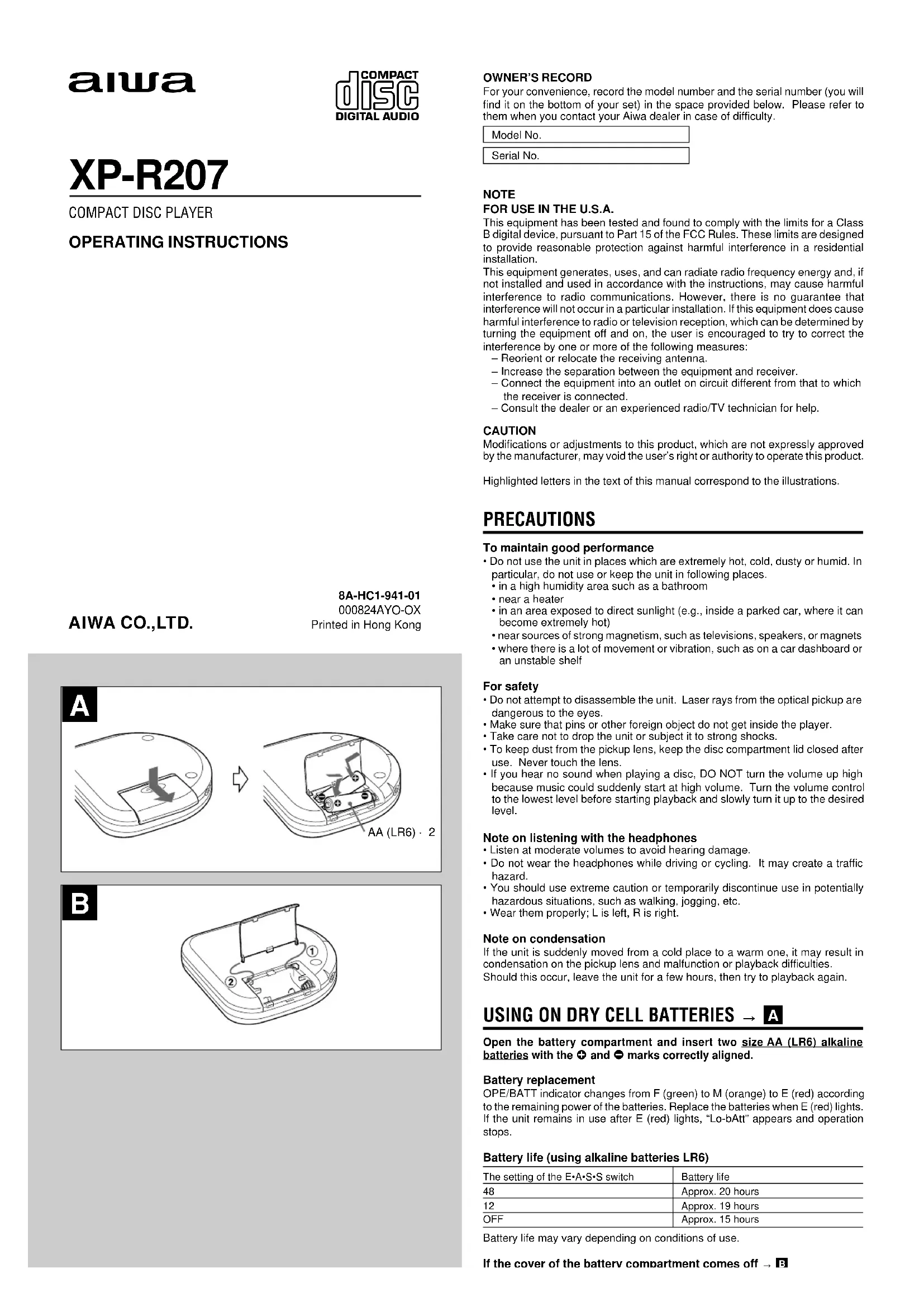
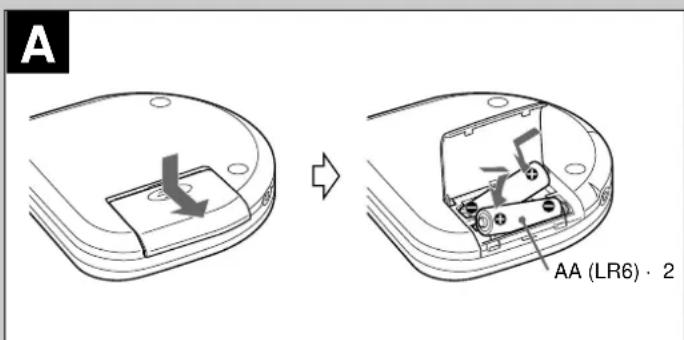
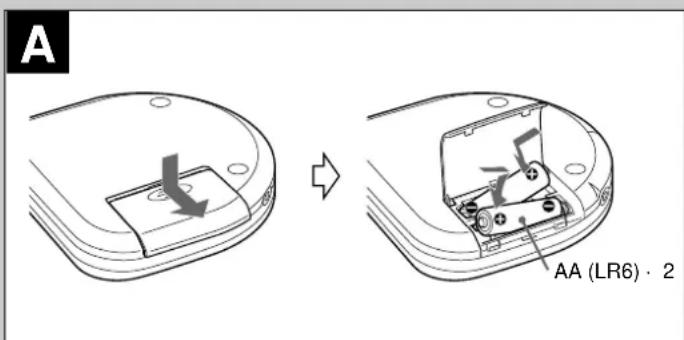
USING ON DRY CELL BATTERIES → A
Open the battery compartment and insert two size AA (LR6) alkaline batteries with the + and - marks correctly aligned.
Battery replacement
OPE/BATT indicator changes from F (green) to M (orange) to E (red) according to the remaining power of the batteries. Replace the batteries when E (red) lights. If the unit remains in use after E (red) lights, "Lo-bAtt" appears and operation stops.
Battery life (using alkaline batteries LR6)
| The setting of the E•A•S•S switch | Battery life |
| 48 | Approx. 20 hours |
| 12 | Approx. 19 hours |
| OFF | Approx. 15 hours |
Battery life may vary depending on conditions of use.
natural_image
Technical line drawing of a device casing with labeled components (no text or symbols)nazaro.
- You should use extreme caution or temporarily discontinue use in potentially hazardous situations, such as walking, jogging, etc.
- Wear them properly; L is left, R is right.
Note on condensation
If the unit is suddenly moved from a cold place to a warm one, it may result in condensation on the pickup lens and malfunction or playback difficulties. Should this occur, leave the unit for a few hours, then try to playback again.
USING ON DRY CELL BATTERIES → A
Open the battery compartment and insert two size AA (LR6) alkaline batteries with the + and - marks correctly aligned.
Battery replacement
OPE/BATT indicator changes from F (green) to M (orange) to E (red) according to the remaining power of the batteries. Replace the batteries when E (red) lights. If the unit remains in use after E (red) lights, "Lo-bAtt" appears and operation stops.
Battery life (using alkaline batteries LR6)
| The setting of the E•A•S•S switch Battery life | |
| 48 Approx. 20 hours | |
| 12 Approx. 19 hours | |
| OFF Approx. 15 hours | |
Battery life may vary depending on conditions of use.
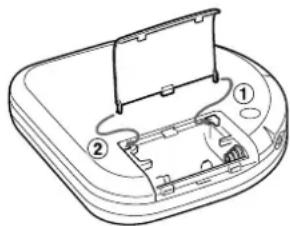
If the cover of the battery compartment comes off → B
Note on dry cell batteries
- Make sure that the + and - marks are correctly aligned.
- Do not mix the different types of batteries, or an old battery with a new one.
- To prevent the risk of electrolyte leakage or explosions, never recharge the batteries, apply heat to them, or take them apart.
- When not using the batteries, remove them to prevent needless battery wear.
- If liquid leaks from the batteries, wipe thoroughly to remove.

text_image
C 1 2 DC 5~6 V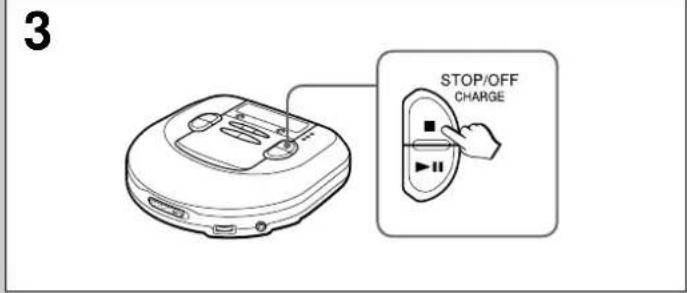
text_image
3 STOP/OFF CHARGE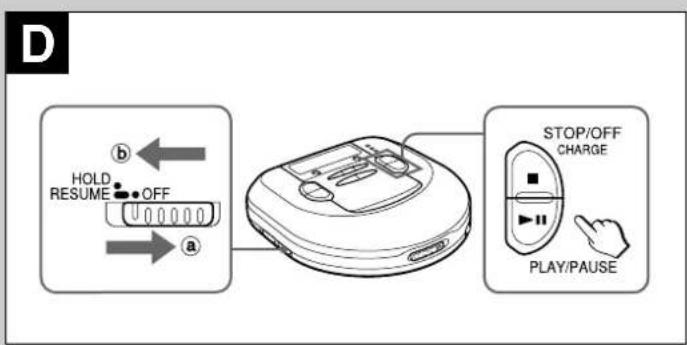
flowchart
graph LR
    A["Device"] -->|HOLD RESUME OFF| B["Control Button"]
    B --> C["STOP/OFF CHARGE"]
    C --> D["PLAY/PAUSE"]
text_image
E DSL PLAY MODE PLAY/PAUSE VOL 2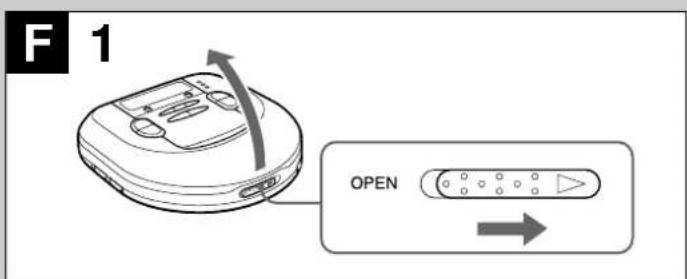
text_image
F 1 OPEN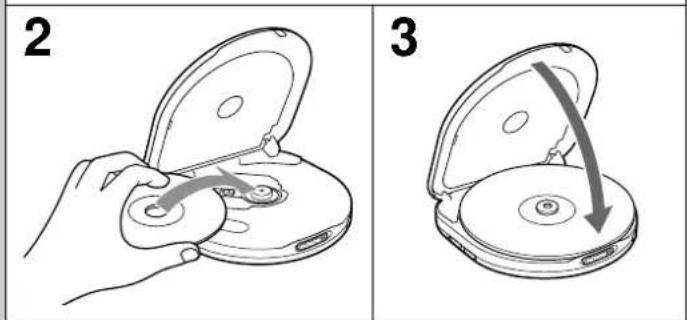
text_image
2 3
natural_image
Simple line drawing of a curved object with a small mark, no text or symbols presentUSING ON RECHARGEABLE BATTERIES → C
- Be sure to use size AA Ni-Cd 1.2 V 700 mAh rechargeable batteries, which are commercially available.
- Be sure to read the instructions of the purchased rechargeable batteries before use.
- When using on rechargeable batteries for the first time, charge them until the battery indicator goes out.
- Before charging the batteries, close the disc compartment. You cannot charge the batteries while it is opened.
1 Insert the rechargeable batteries with the ⊕ and ● marks correctly aligned.
2 Connect the AC adaptor.
①to DC 5 \~ 6 V jack
② to a wall outlet
3 Keep ■ STOP/OFF/CHARGE pressed for about 1 second to start charging. "C-On" appears, and OPE/BATT indicator blinks.
When charging is completed, "C-OFF" flashes a few times, and OPE/BATT indicator goes out.
After charging, disconnect the AC adaptor.
Time to recharge the batteries
Recharge the batteries when E (red) lights. If the unit remains in use after E (red) lights, "Lo-bAtt" appears and the current operation stops.
To stop charging
Press ■ STOP/OFF/CHARGE during charging.
ATTENTION:
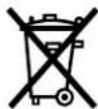
The product you have purchased can be powered by nickel cadmium batteries which is recyclable. At the end of their useful life, under various state and local laws, it is illegal to dispose of these batteries into your municipal waste stream.
Please call 1-800-289-2492 for information on how to recycle these batteries.

Ni-Cd
Cd
USING ON AC HOUSE CURRENT
Connect the supplied AC adaptor in the same way as when recharging the batteries.
During operation on AC house current, all of OPE/BATT indicators light.
BEFORE PLAYBACK
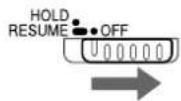
HOLD switch → D
Release the HOLD switch before playback. → ⓐ
When not using the unit, set the HOLD switch to the HOLD position. → ⓑ Accidentally pressed button will not function.
If buttons are pressed when the HOLD switch is set to the HOLD position, "HOLD" flashes in the display.
Turning on and off → D
Turning the power on
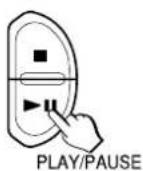
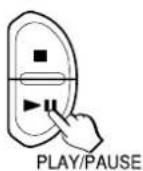
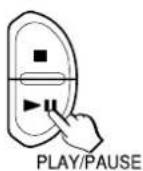
Press ▶ II PLAY/PAUSE. Power is turned on and playback starts.
Note
"Err" appears on the display when you play a disc placed upside-down or a defective disc.
Turning the power off
If no new operations are done within 30 seconds from the end of last operation, the power is turned off automatically. (Auto power off function)
- You can turn off the power by pressing ■ STOP/OFF/CHARGE before it is automatically turned off.
Standby mode → D
When an operation finishes, the unit goes into standby mode until the auto power off function automatically turns off the power.
To enter standby mode, press ▶IPLAY/PAUSE to start playback, then press ■STOP/OFF/CHARGE.
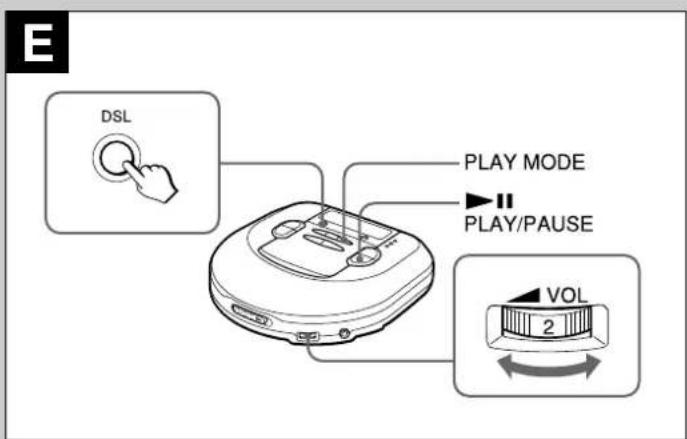
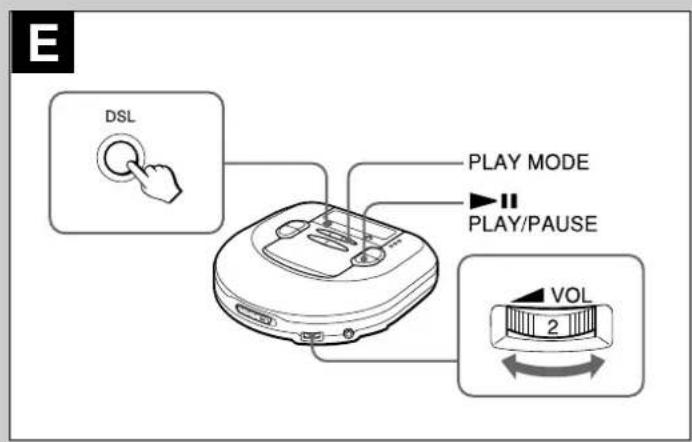
Adjusting the sound → E
Volume
Turn the VOL control to adjust the volume.
DSL
Press DSL repeatedly for more powerful sound and deeper bass.
DSL: Deep bass is emphasized.
DSL: Deep bass is strongly emphasized.
DSL : Normal sound
Signal sound function
You can check the operation by beep sound when you press an operation button. The signal sound function is not activated when you purchase this unit.
To use the signal sound function, press ▶ IIPLAY/PAUSE while pressing PLAY MODE while in stop mode. The beep sound is heard when you press a button.
To cancel the been sound, repeat this procedure.
text_image
F 1 OPEN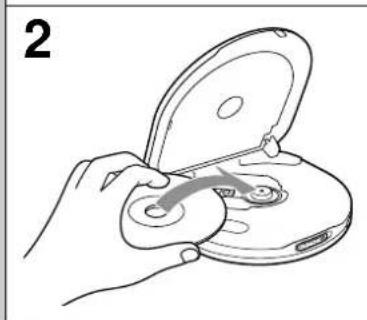
natural_image
Line drawing of a hand holding an open disc with a curved arrow indicating motion (no text or symbols)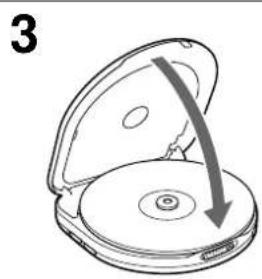
natural_image
Diagram of a CD or DVD disc with an open lid and arrow indicating rotation (no text or symbols)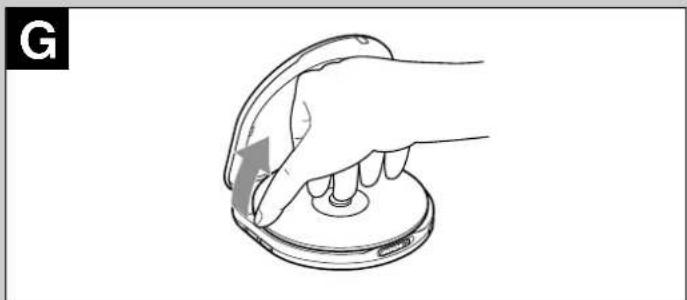
natural_image
Line drawing of a hand pressing down on a circular device component (no text or symbols)defective disc.
Turning the power off
If no new operations are done within 30 seconds from the end of last operation, the power is turned off automatically. (Auto power off function)
- You can turn off the power by pressing ■ STOP/OFF/CHARGE before it is automatically turned off.
Standby mode → D
When an operation finishes, the unit goes into standby mode until the auto power off function automatically turns off the power.
To enter standby mode, press ▶■PLAY/PAUSE to start playback, then press ■STOP/OFF/CHARGE.
Adjusting the sound → E
Volume
Turn the VOL control to adjust the volume.
DSL
Press DSL repeatedly for more powerful sound and deeper bass.
DSL: Deep bass is emphasized.
DSL: Deep bass is strongly emphasized.
DSL : Normal sound
Signal sound function
You can check the operation by beep sound when you press an operation button. The signal sound function is not activated when you purchase this unit.
To use the signal sound function, press ▶IPLAY/PAUSE while pressing PLAY MODE while in stop mode. The beep sound is heard when you press a button. To cancel the beep sound, repeat this procedure.
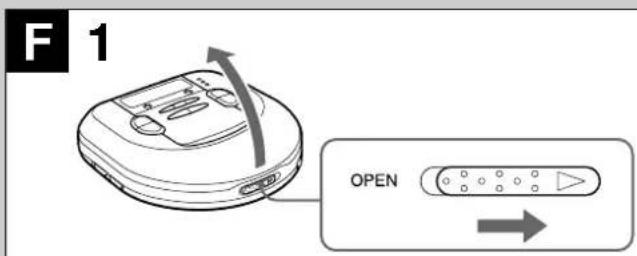
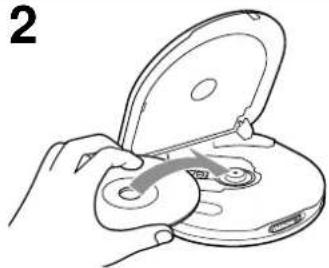
Inserting a disc → F
1 Slide the OPEN switch to open the disc compartment.
2 Place a disc in the center with the label side facing up.
3 Close the disc compartment.
To remove the disc → G
Pick up the disc, holding its edge, while pressing the pivot gently.
Note
- The unit may not play a CD-R/RW disc that is recorded on personal computers or some kinds of CD-R/RW recorders because of differences in recording platforms.
- Do not attach any seal or label to either side (the recordable side or the labeled side) of a CD-R/RW disc. It may cause malfunction.
H
text_image
STOP/OFF/ CHARGE 1 2 3 PHONES/ LINE OUT1
natural_image
Line drawing of a hand holding an open device with a handle, showing internal components (no text or symbols)3
1
text_image
ENTER/DISP EASS PRGM RNOM RESUME DSL 48 3 0:24 EASS PRGM RNOM RESUME DSL 48 3 -4:53 EASS PRGM RNOM RESUME DSL 48 5-21:37J

flowchart
graph TD
    A["E-A-S-S 48"] -->|12 OFF| B["Device with LCD screen"]
    B --> C["↓"]
    C --> D["EA-SS 48"]
    D --> E["↓"]
    E --> F["EA-SS 12"]
K
text_image
HOLD RESUME OFF PLAY MODEPLAYBACK → H
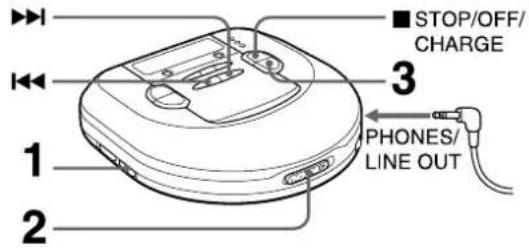
Connect the supplied headphones to the PHONES/LINE OUT jack.
1 Release HOLD.
2 Place a disc.
3 Press ▶ IIPLAY/PAUSE.
Playback starts from the first track.
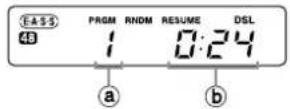
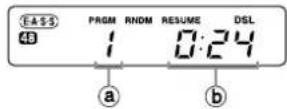
④track number
⑥ elapsed playing time
Basic operation
| To stop | Press ■STOP/OFF/CHARGE. |
| To pause | Press ▶▶▶PLAY/PAUSE.To resume, press it again. |
| To search for the beginning of a track | Press ◀◀◀ or ▶▶◀. |
| To locate a desired passage | Keep ◀◀◀ or ▶▶◀ pressed.Release the button at the start of desired passage. |
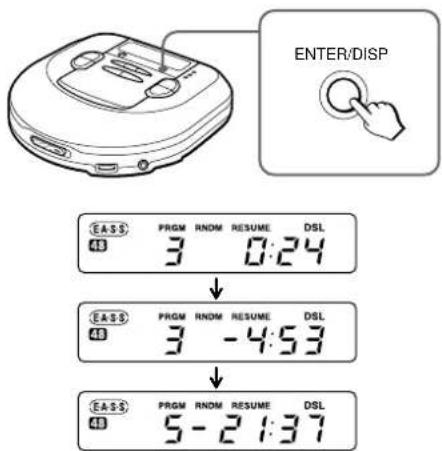
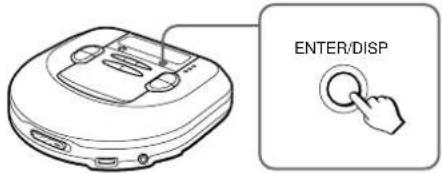
Display during playback → 1
Press ENTER/DISP during playback to change the display as follows.
①Track display and elapsed playing time (normal display)

②Track display and remaining playing time of the track in play

③Remaining number of tracks and remaining playing time
The time is not displayed in following cases.
- When trying to program tracks beyond No.32.
- When the total remaining time of the programmed tracks is over 100 minutes.
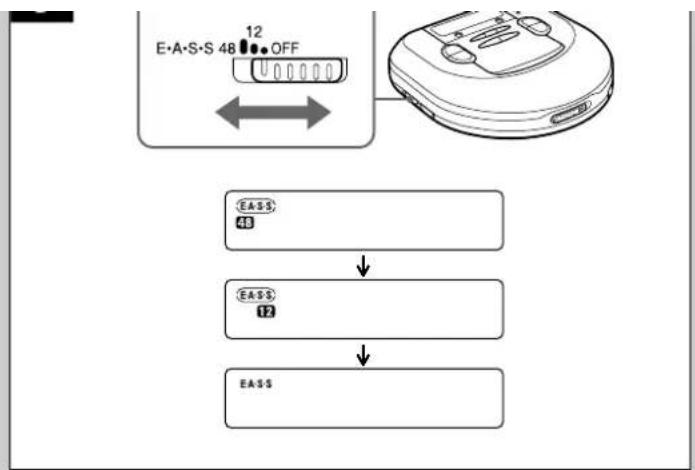
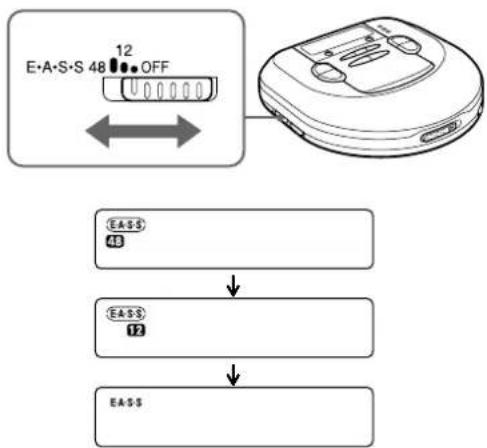
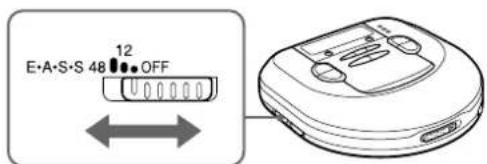
E•A•S•S PLUS (Electronic Anti-Shock System) → J
The E·A·S·S PLUS function reduces skipping or muting of the sound when the unit is subjected to shocks.
The player keeps about 48 seconds or 12 seconds of playback sound in its memory.
To keep 48 seconds in the memory, set the E•A•S•S switch to 48.
To keep 12 seconds in the memory, set the E·A·S·S switch to 12.
To cancel the E·A·S·S PLUS function, set the E·A·S·S switch to OFF.
Note
- Before jogging with this unit, allow sufficient time for the memory buffer to fill up completely (ideally 40 to 48 seconds).
Continuous shock or vibration may cause the sound to be interrupted even if the E·A·S·S PLUS function is activated. This is normal and not a malfunction. Should you experience an interruption in sound, stabilize the unit for a few seconds, then resume your activity.
- When the E·A·S·S switch is slid during playback, the unit will pause for about 2 seconds.
- When you set the E·A·S·S switch to the 12 or OFF position, the quality of the sound will be better than the case that you set it to the 48 position.
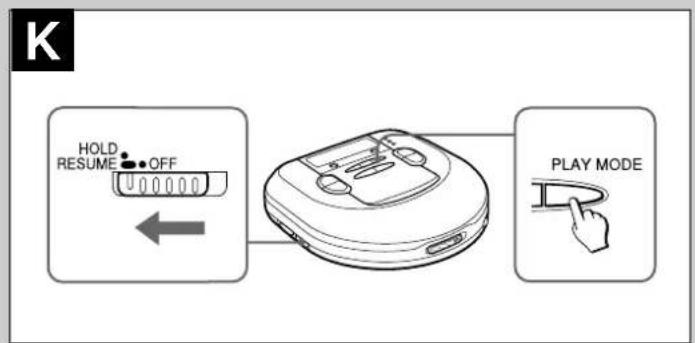
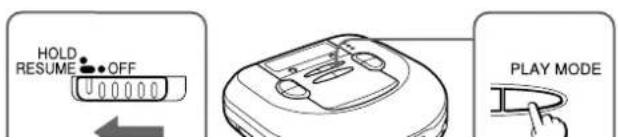
Resume function → K
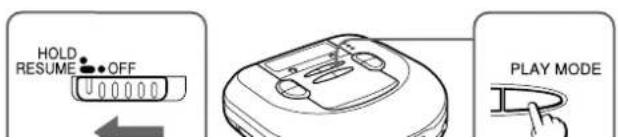
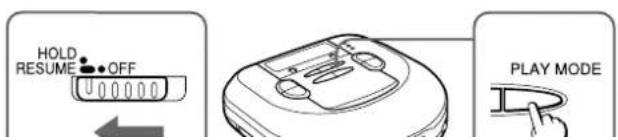
Set the HOLD switch to RESUME.
RESUME appears, and you can start playback from the point where you stopped playback by pressing ■ STOP/OFF/CHARGE.
When the resume function is on, all-track repeat is selected automatically.
To cancel resume play, set the HOLD switch to OFF.
Note
- Resume play may start at a point about 30 seconds behind or ahead the stopped point. Resume play may not operate if you stopped at the last 30 seconds of the final track.
- Resume play will be canceled if you open the disc compartment. If the unit is turned off, resume play will not be canceled. In this case, be sure to set the HOLD switch to OFF before changing discs.
Random play → K
Press PLAY MODE while in standby mode to display RNDM
Tracks on the disc are played in random order.
To cancel random play, press PLAY MODE while in standby mode.
RNDM display changes to RNDM
Note
- You cannot back to previous track by pressing ◀◀ during random play.
- You cannot select one-track repeat during random play.
Repeat play → K
Press PLAY MODE during playback to select repeat play as follows.
C1 : one-track repeat

: all-track repeat

no repeat play (normal play)
PROGRAM PLAY

flowchart
graph TD
    A["E-A-S 48"] -->|12 OFF| B["Device with EASS"]
    B --> C["EASS 43"]
    C --> D["EASS 12"]
    D --> E["EASS"]
text_image
K HOLD RESUME OFF PLAY MODE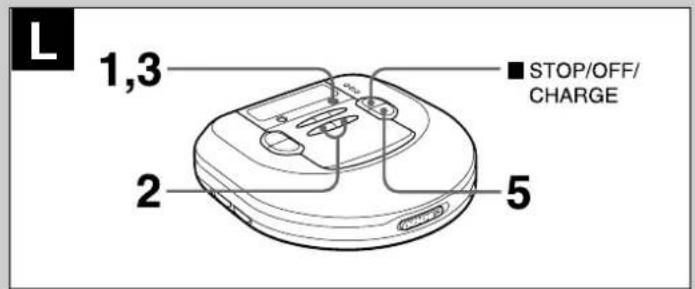
text_image
L 1,3 ■ STOP/OFF/ CHARGE 2 5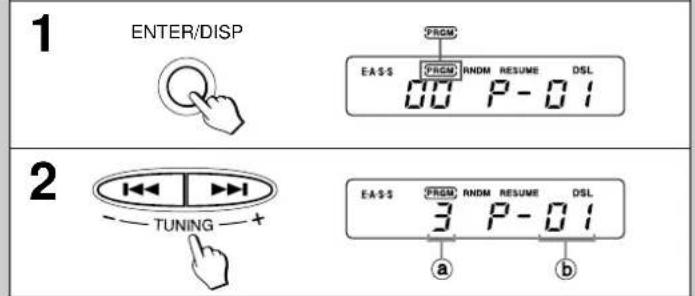
text_image
1 ENTER/DISP EASS RNDM RESUME DSL 00 P-01 2 TUNING EASS RNDM RESUME DSL 3 P-01 a b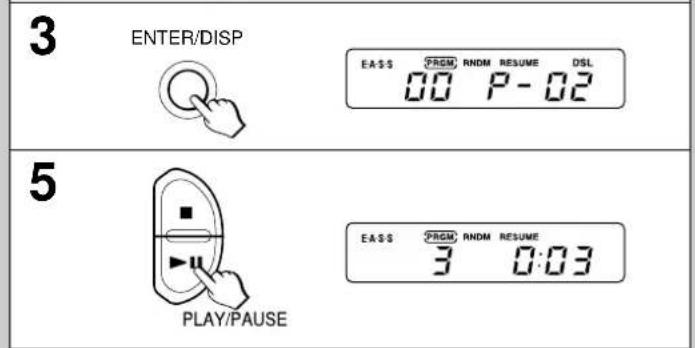
text_image
3 ENTER/DISP EASS FROM RNDM RESUME DSL 00 P-02 5 PLAY/PAUSE EASS FROM RNDM RESUME 3 0:03Note
- Resume play may start at a point about 30 seconds behind or ahead the stopped point. Resume play may not operate if you stopped at the last 30 seconds of the final track.
- Resume play will be canceled if you open the disc compartment. If the unit is turned off, resume play will not be canceled. In this case, be sure to set the HOLD switch to OFF before changing discs.
Random play → K
Press PLAY MODE while in standby mode to display RNDM
Tracks on the disc are played in random order.
To cancel random play, press PLAY MODE while in standby mode.
RNDM display changes to RNDM
Note
- You cannot back to previous track by pressing ◀◀ during random play.
- You cannot select one-track repeat during random play.
Repeat play → K
Press PLAY MODE during playback to select repeat play as follows.
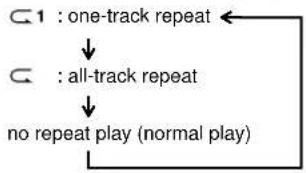
flowchart
graph TD
    A["1 : one-track repeat"] --> B["all-track repeat"]
    B --> C["no repeat play (normal play)"]
PROGRAM PLAY → L
Up to 24 tracks can be chosen for program play.
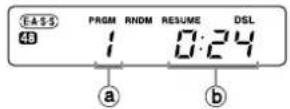
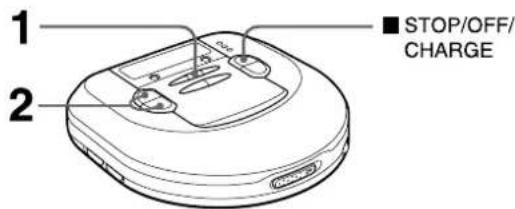
1 Press ENTER/DISP while in standby mode to display .PRGM
2 Select the desired track by pressing ◀◀◀ and ▶▶▶I.
(a)track number
bprogram number
3 Press ENTER/DISP within 8 seconds.
If it is not pressed within 8 seconds, the track number changes to 00. Repeat the procedure from step 2 again.
4 Repeat steps 2 and 3 to program more tracks.
5 Press ▶IPLAY/PAUSE to start program play.
To stop program play
Press ■ STOP/OFF/CHARGE.
To add tracks to the program
Repeat steps 2 and 3 before you proceed to step 5. You can add tracks to the end of the program.
To erase the program
Press ■ STOP/OFF/CHARGE while in standby mode.
To check the programmed tracks
Press ENTER/DISP repeatedly before you proceed to step 5.
The number of each programmed track will be displayed in order of playback.
Note
- The program is also erased when the disc compartment is opened or the auto power off function turns the power off.
- When 24 tracks are programmed, "P-FULL" appears, and no more tracks may be added.
- You cannot back to the previous track by holding ◀◀◀ pressed during program play.
- Repeat play and random play can be performed during program play.
text_image
M 1 MONO/ST ■ STOP/OFF/ CHARGE 2 1 BAND TUNER ST FM DSL PRESET 87.50MHz 2 TUNING ST FM DSL PRESET 90.50MHz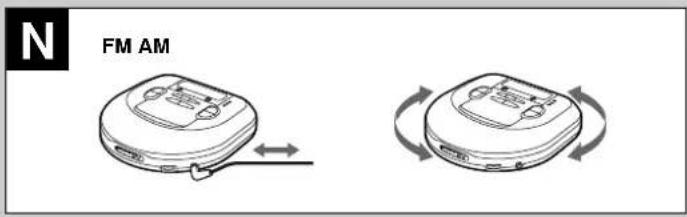
text_image
N FM AM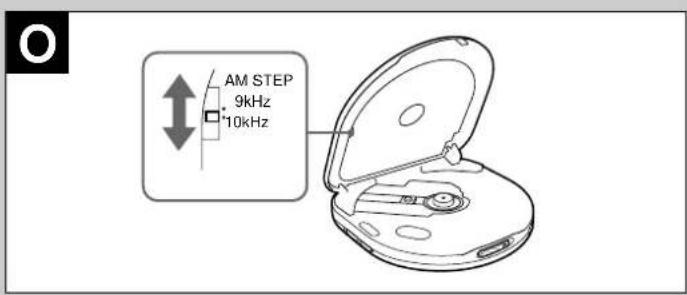
text_image
AM STEP 9kHz 10kHz
text_image
P 1 2 3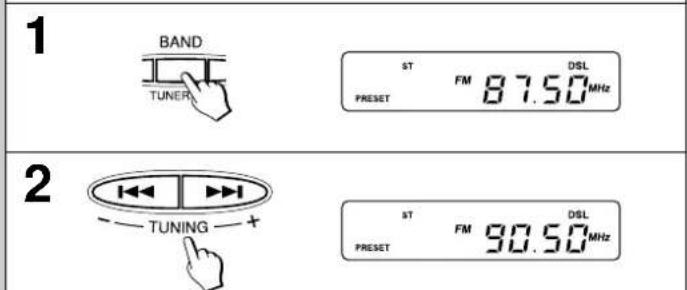
text_image
1 BAND TUNER ST FM DSL PRESET 87.50 MHz 2 TUNING ST FM DSL PRESET 90.50 MHz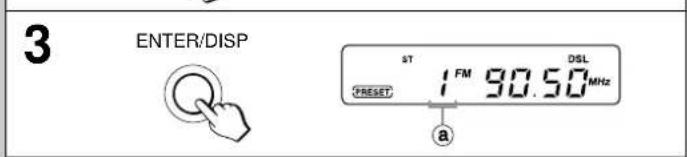
text_image
3 ENTER/DISP sT 1 FM 90.50 MHz RESET DSL a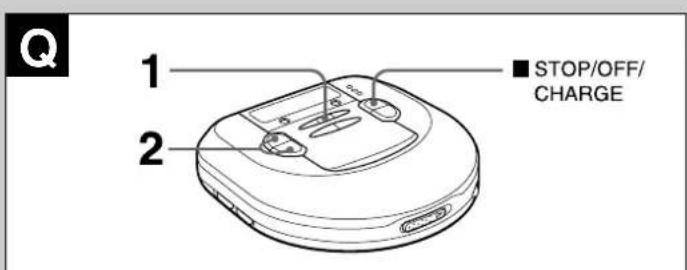
text_image
1 2 ■ STOP/OFF/ CHARGERADIO RECEPTION
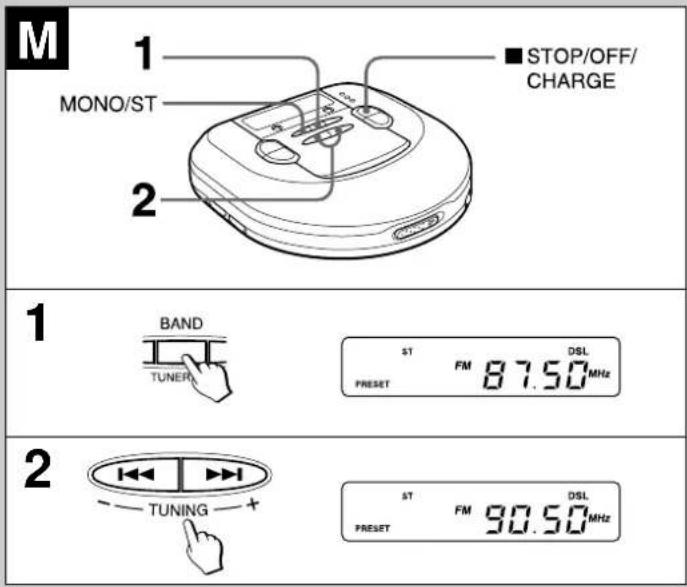
Tuning in to a station → M
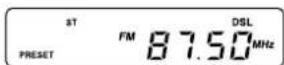
1 Press TUNER ON/BAND repeatedly to select AM or FM.
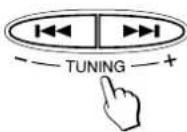
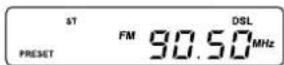
2 Press TUNING + (▶▶▶) or − (▶◀◀) to tune in to a station.
After listening, press ■ STOP/OFF/CHARGE to turn off the radio.
For quick tuning
Keep either TUNING + (▶▶▶) or − (▶◀◀) pressed for about 1 second. When a station is tuned in to, the frequency stops automatically. However, it does not stop if the broadcast signal is weak.
For better reception → N
FM: The headphone cord functions as the FM antenna. Keep it extended.
AM: Turn the unit to find the position which gives the best reception.
To listen to an FM stereo broadcasting
When a tuned in station is in stereo, ST changes to ST
When the FM stereo signal is weak and distorted, press MONO/ST. ST goes out and the sound will be heard in monaural but distortion will be reduced.
Note
- Do not open the disc compartment during radio reception. The buttons will be deactivated.
- The power is turned off automatically if no operation is made after 180 minutes from the last operation during radio reception.
AM steps →
Radio broadcasts have different frequency ranges and changes in different steps in different countries.
This unit is factory-set to 10 kHz steps on AM. When using the unit where the AM step changes to 9 kHz, set the AM STEP switch on the inner side of the disc compartment to 9 kHz.
- When the AM step is changed, stations that you preset are erased.
Presetting stations → P
You can preset up to total of 30 stations on AM and FM.
1 Press TUNER ON/BAND repeatedly to select AM or FM.
2 Press TUNING + (▶▶▶) or − (▶◀◀) to tune in to a station.
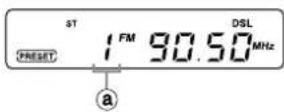
3 Press ENTER/DISP to preset the station.
aPreset number
To preset more stations, repeat steps 2 and 3.
Listening to preset stations → Q
1 Press TUNER ON/BAND repeatedly to select AM or FM.
2 Press PRESET CALL ▲/▼ repeatedly to select the preset number.
After listening, press ■ STOP/OFF/CHARGE to turn off the radio.
Changing the presetting
1 Press PRESET CALL ▲/▼ repeatedly to select the preset number you wish to change.
2 Keep ENTER/DISP pressed for 1 or more seconds until the preset number and the frequency flash.
3 While the preset number is flashing, press TUNING + (▶▶▶) or − (▶◀◀) to tune in to a station.
4 Press ENTER/DISP to preset the station on the selected preset number.
If the flashing stops, repeat the procedure from step 2.
Erasing the presettings one by one
Press ■ STOP/OFF/CHARGE after step 2 in "Changing the presetting" above. Each preset station is erased. All the settings move up by one and the preset numbers are refreshed.
Erasing all of the presetting
Keep ENTER/DISP pressed, then press TUNER ON/BAND when the frequency and preset number starts flashing.
CONNECTING TO AN EXTERNAL UNIT → R
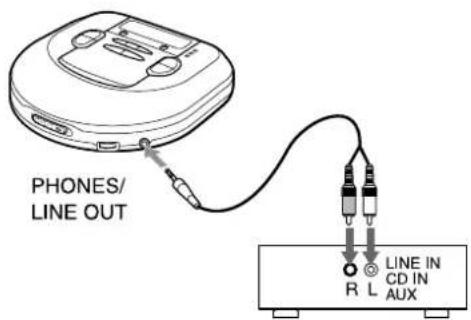
Use a commercially available connection cord which has a 3.5 stereo miniplug at one end and two phono plugs at the other end.
Connect the stereo mini-plug to the PHONES/LINE OUT jack of the unit and connect the phono plugs to the analog input terminals of the external unit.
Note
- Turn off the power of both units before connection.
- DO NOT connect to the PHONO inputs of an amplifier (with a built-in phonoequalizer-amplifier).
- Adjust the volume and DSL on this unit.
MAINTENANCE
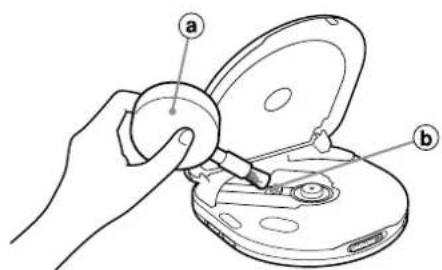
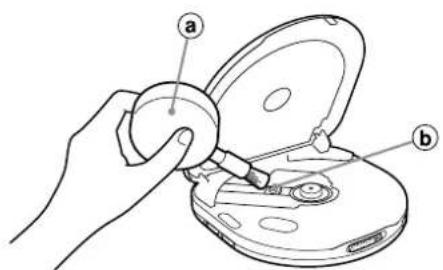
To clean the lens → S
If the lens becomes dirty, the player will skip or not play. If this occurs, clean the lens in the following manner.
To remove dust or dry particles, first use a camera lens blower/brush ⓐ to blow a few times to loosen particles, then gently brush the lens ⓑ clean. Finish by blowing the lens again.
To remove fingerprints use a cotton swab dipped in long cleaning solution Wino
1
2
3
ENTER/DISP

Q
text_image
1 2 ■ STOP/OFF/ CHARGER
text_image
PHONES/ LINE OUT R L LINE IN CD IN AUXS
text_image
Diagram showing a hand using a tool to adjust or install a CD or DVD disc, labeled with parts a and b.T
natural_image
Illustration of hands performing a circular task with a tool, no text or symbols presentEach preset station is erased. All the settings move up by one and the preset numbers are refreshed.
Erasing all of the presetting
Keep ENTER/DISP pressed, then press TUNER ON/BAND when the frequency and preset number starts flashing.
CONNECTING TO AN EXTERNAL UNIT → R
Use a commercially available connection cord which has a 3.5 ø stereo mini-plug at one end and two phono plugs at the other end.
Connect the stereo mini-plug to the PHONES/LINE OUT jack of the unit and connect the phono plugs to the analog input terminals of the external unit.
Note
- Turn off the power of both units before connection.
- DO NOT connect to the PHONO inputs of an amplifier (with a built-in phonoequalizer-amplifier).
- Adjust the volume and DSL on this unit.
MAINTENANCE
To clean the lens → S
If the lens becomes dirty, the player will skip or not play. If this occurs, clean the lens in the following manner.
To remove dust or dry particles, first use a camera lens blower/brush ⓐ to blow a few times to loosen particles, then gently brush the lens ⓑ clean. Finish by blowing the lens again.
To remove fingerprints, use a cotton swab dipped in lens cleaning solution. Wipe gently from the center to the edge. Lens cleaning solution is commercially available.
Note
Take care not to get too much solution on the swab, which could flow into the unit and cause damage.
Pressing too strongly with the swab could scratch or break the lens.
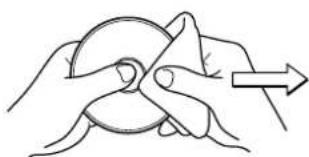
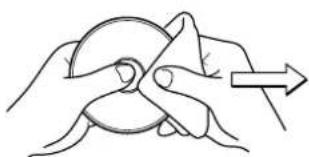
To clean the discs → T
Before playing, wipe the disc from the center outward with a cleaning cloth. After playing, store the disc in its case.
SPECIFICATIONS
Tracking system 3-beam laser
Laser pickup Semiconductor laser
D/A conversion 4-times oversampling digital filter + 1-bit DAC
Frequency response 20 - 20,000 Hz (47 k ohms)
Output PHONES/LINE OUT jack (stereo mini-jack)
Frequency range AM: 530/531 kHz - 1,710/1,602 kHz
(10 kHz/9 kHz steps)
FM: 87.5 - 108 MHz
Maximum output 12 mW + 12 mW (16 ohms at 1 kHz)
500 mV (47 k ohms at 1 kHz)
Power supply DC 3 V using two size AA (LR6) alkaline
batteries
DC 2.4 V using two commercially available
(Ni-Cd 1.2 V 700 mAh) rechargeable batteries
AC house current using the supplied AC adaptor
Maximum outside dimensions
128 (W) · 31.2 (H) · 129.5 (D) mm (excluding
projecting parts and controls)
Weight Approx. 225 g (7.9 oz.) excluding batteries
Accessories AC adaptor AC-D603 (1)
Stereo headphones (1)
AC adaptor AC-D603U Rated input: AC 120 V, 60 Hz
The specifications and external appearance of this unit are subject to change without notice.
XP-R207
COMPACT DISC PLAYER
REPRODUCTOR DE DISCOS COMPACTOS
Printed in Hong Kong
text_image
A AA (LR6) · 2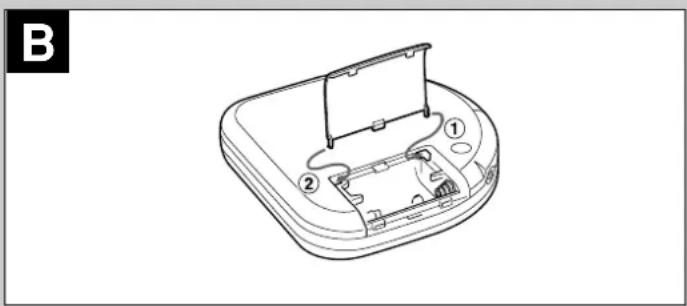
natural_image
Line drawing of a device casing with internal components and a stand (no text or symbols)natural_image
Technical line drawing of a device casing with internal components (no text or symbols)Interruptor HOLD → D
natural_image
Line drawing of a hand holding an open CD or DVD disc with a handle, no text or symbols present3
1

text_image
ENTER/DISP EASS PRGM RNOM RESUME DSL 48 3 0:24 EASS PRGM RNOM RESUME DSL 48 3 -4:53 EASS PRGM RNOM RESUME DSL 48 5-21:37J
flowchart
graph TD
    A["E-A-S-S 48"] -->|12 OFF| B["Device Icon"]
    B --> C["↓"]
    C --> D["EA-S$"]
    D --> E["↓"]
K
text_image
HOLD RESUME OFF PLAY MODEREPRODUCCION → H
text_image
3 ENTER/DISP EA-SS FROM RNDM RESUME DSL 00 P-02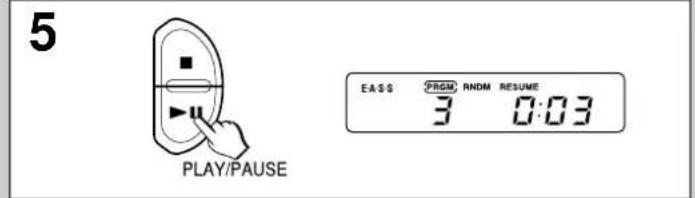
text_image
5 PLAY/PAUSE EASS FROM RNDM RESUME 3 0:03text_image
AM STEP 9kHz 10kHz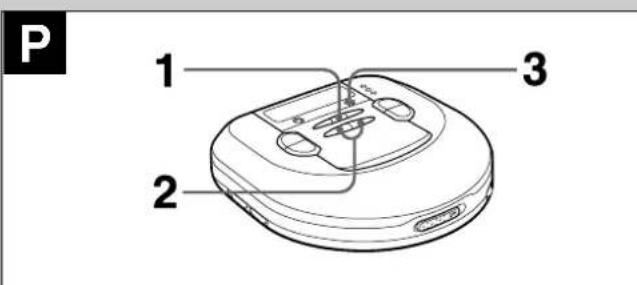
text_image
P 1 2 3
text_image
1 BAND TUNER ST FM DSL PRESET 87.50MHz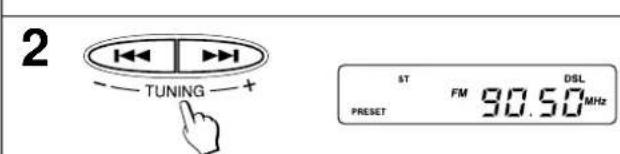
text_image
2 TUNING ST FM DSL PRESET 30.50MHz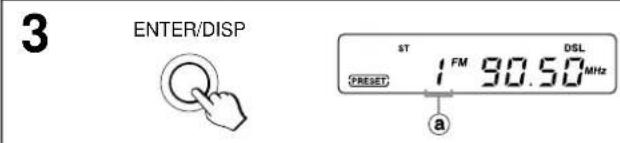
text_image
3 ENTER/DISP ST 1 FM 90.50 DSL (PRESET) MHz a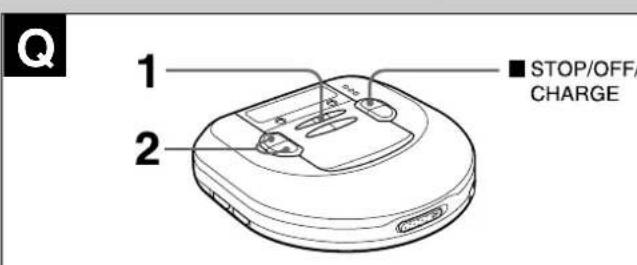
text_image
Q 1 2 ■ STOP/OFF/ CHARGERECEPCION DE LA RADIO
text_image
R PHONES/ LINE OUT LINE IN CD IN AUX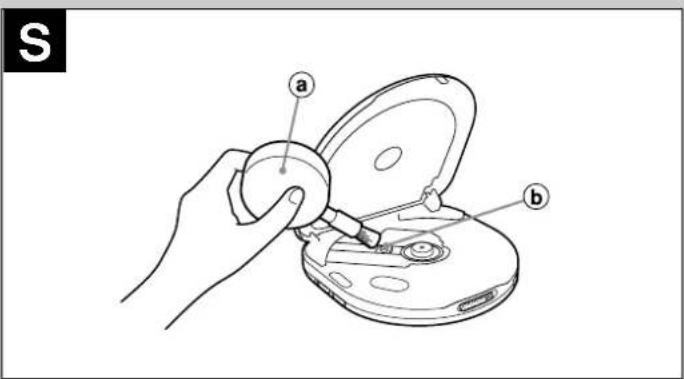
text_image
S a b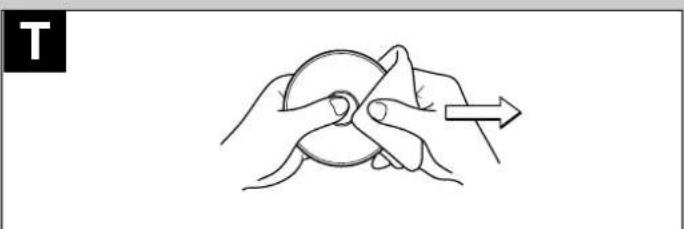
natural_image
Line drawing of a hand holding a circular object with an arrow indicating direction (no text or symbols)Printed in Hong Kong
text_image
A AA (LR6) · 2
natural_image
Line drawing of a device casing with internal components and a stand (no text or symbols)natural_image
Technical line drawing of a device casing with internal components (no text or symbols)12 Env. 19 heures
OFF Env. 15 heures
flowchart
graph LR
    A["HOLD RESUME OFF"] --> B["Device with buttons a and b"]
    B --> C["STOP/OFF CHARGE"]
    C --> D["PLAY/PAUSE"]
text_image
DSL PLAY MODE PLAY/PAUSE VOL 2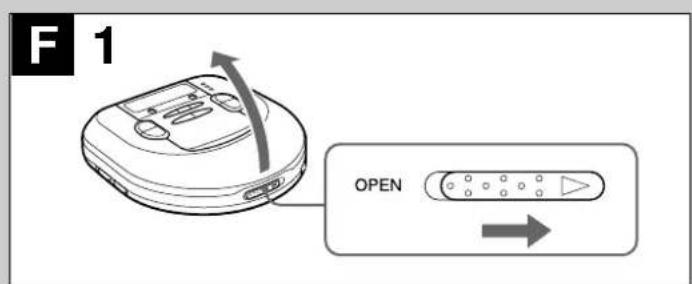
text_image
F 1 OPEN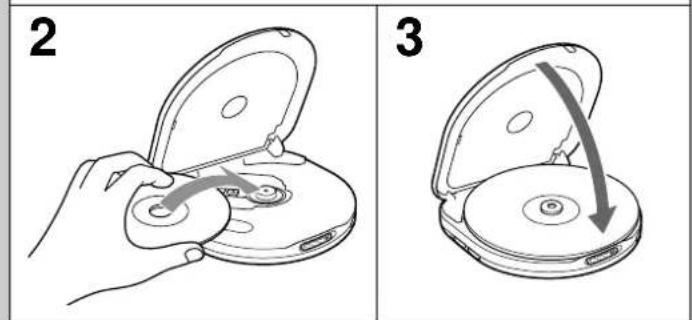
text_image
2 3
natural_image
Simple line drawing of a computer mouse (no text or symbols)FONCTIONNEMENT SUR PILES RECHARGEABLES → C
natural_image
Line drawing of a hand holding an open CD or DVD device with a handle, no text or symbols present3
1
text_image
ENTER/DISP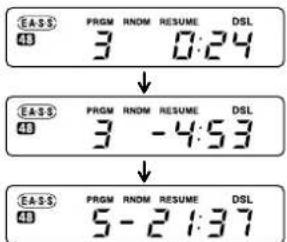
text_image
EASS 48 PRGM RNDM RESUME DSL 3 0:24 ↓ EASS 48 PRGM RNDM RESUME DSL 3 -4:53 ↓ EASS 48 PRGM RNDM RESUME DSL 5 -2:137J
text_image
E·A·S·S 48 12 OFF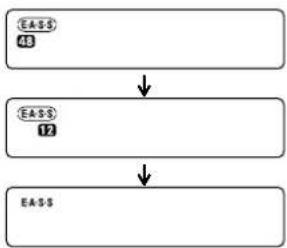
flowchart
graph TD
    A["EASS\n48"] --> B["EASS\n12"]
    B --> C["EASS"]
K
text_image
HOLD RESUME OFF PLAY MODELECTURE → H
LECTURE PROGRAMMEE → L
text_image
AM STEP 9kHz 10kHz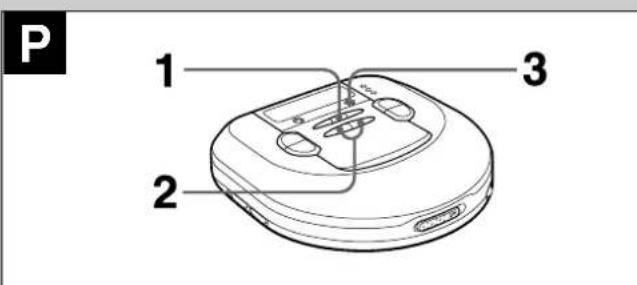
text_image
P 1 2 3
text_image
1 BAND TUNER ST FM DSL PRESET 87.50MHz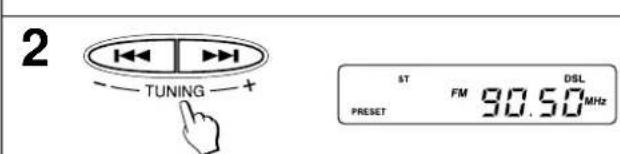
text_image
2 TUNING + ST FM DSL PRESET 30.50MHz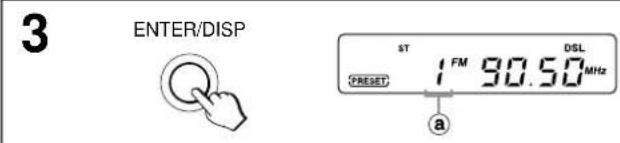
text_image
3 ENTER/DISP ST 1 FM 90.50 DSL RESET a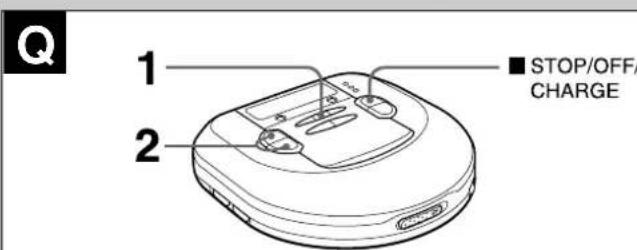
text_image
Q 1 2 ■ STOP/OFF/ CHARGERECEPTION RADIO
text_image
PHONES/ LINE OUT R L LINE IN CD IN AUXS
text_image
Diagram showing a hand using a tool to adjust or install a CD or DVD disc, labeled with parts a and b.T
natural_image
Illustration of hands performing a circular massage or tennis maneuver (no text or symbols)The Ground Truth image displays a single, solid horizontal line. According to Rule 2 (UNDERSCORE & LINE RULES), this is a stylistic or background line, not a placeholder underscore. Therefore, the OCR result must ignore it. The provided OCR content is "____", which consists of four underscores. This is an incorrect interpretation of the line as a placeholder, violating the rule that stylistic lines must be ignored. The OCR has hallucinated underscores where none should exist in the GT. Therefore, the OCR result is inconsistent with the Ground Truth.