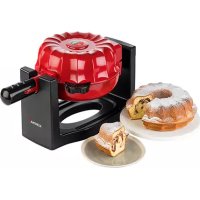
41060 - Waffle Maker KORONA - Free user manual and instructions
Find the device manual for free 41060 KORONA in PDF.



| Brand | Korona |
| Model | 41060 |
| Category | Waffle Maker / Cake Maker |
| Product Type | Waffle Maker with Rotation Function |
| Power Supply | 1200 W, protection class I |
| Plate Material | Non-stick coating |
| Main Functions | Homogeneous cooking by 180° rotation, integrated thermostat |
| Mold Capacity | One pound cake type |
| Cooking Time | Approximately 15 to 20 minutes |
| Indicator Lights | Red light (heating), green light (ready) |
| Removable Plate | Yes, removable cake plate |
| Foldable Handle | Yes, for easy storage |
| Care and Cleaning | Clean with a damp cloth; plate washable with hot water and detergent |
| Safety | Turn off and unplug before cleaning; hot surfaces; do not immerse in water |
| Spare Parts | Removable cake plate (reference not specified) |
| Warranty | 2 years against material and manufacturing defects |
| Included Accessories | Instruction manual |
| General Information | Household use only, not commercial |
Frequently Asked Questions - 41060 KORONA
User questions about 41060 KORONA
0 question about this device. Answer the ones you know or ask your own.
Ask a new question about this device
Download the instructions for your Waffle Maker in PDF format for free! Find your manual 41060 - KORONA and take your electronic device back in hand. On this page are published all the documents necessary for the use of your device. 41060 by KORONA.
USER MANUAL 41060 KORONA
Before use, please read these instructions carefully and keep them in a safe place for future reference. When passing on the appliance to a third party, make sure to include these instructions for use.
This appliance is only intended and suitable for baking cakes. All other use or modification of the appliance is not intended by the manufacturer and might entail a risk of damage or injury. This appliance is not intended for commercial use!
Safety:

This symbol identifies hazards which may cause injuries!

This symbol warns of hot surfaces. Risk of burns!
This symbol identifies electric shock hazards!

General Safety Instructions
caused by incorrect use.
cause injuries to the user.
sure your local voltage matches the technical data of the appliance. Otherwise the appliance may overheat and get damaged.
Caution! Danger of electric shock!
other liquid.
An electric appliance is not a toy!
and above and persons with reduced physical, sensory or mental capabilities or lack of experience and knowledge if they have been given supervision or instruction concerning the use of the appliance in a safe way and understand the hazards involved. Children shall not play with the appliance. Cleaning and user maintenance shall
supervised.
before cleaning.
surfaces to avoid any damage to the appliance.
cause anyone to trip when in use. Do not allow the cord to hang over sharp edges.
Do not use the appliance,
Have it checked and, if necessary, repaired by a qualified modifications to or repair the appliance yourself.
Special Safety Instructions

Warning! To avoid the possibility of injury/damage to the appliance, electric shock, risk of fire and burns!
described in this manual.
be high during operation. Therefore, do not touch the
use the handle. Danger of serious burns!
operated empty. Be careful to ensure that the device does not become overheated.
of the plates.
baking plates and housing. Always adhere to the max. quantity.
objects, e.g. curtains, wall cabinets
cool down before cleaning.
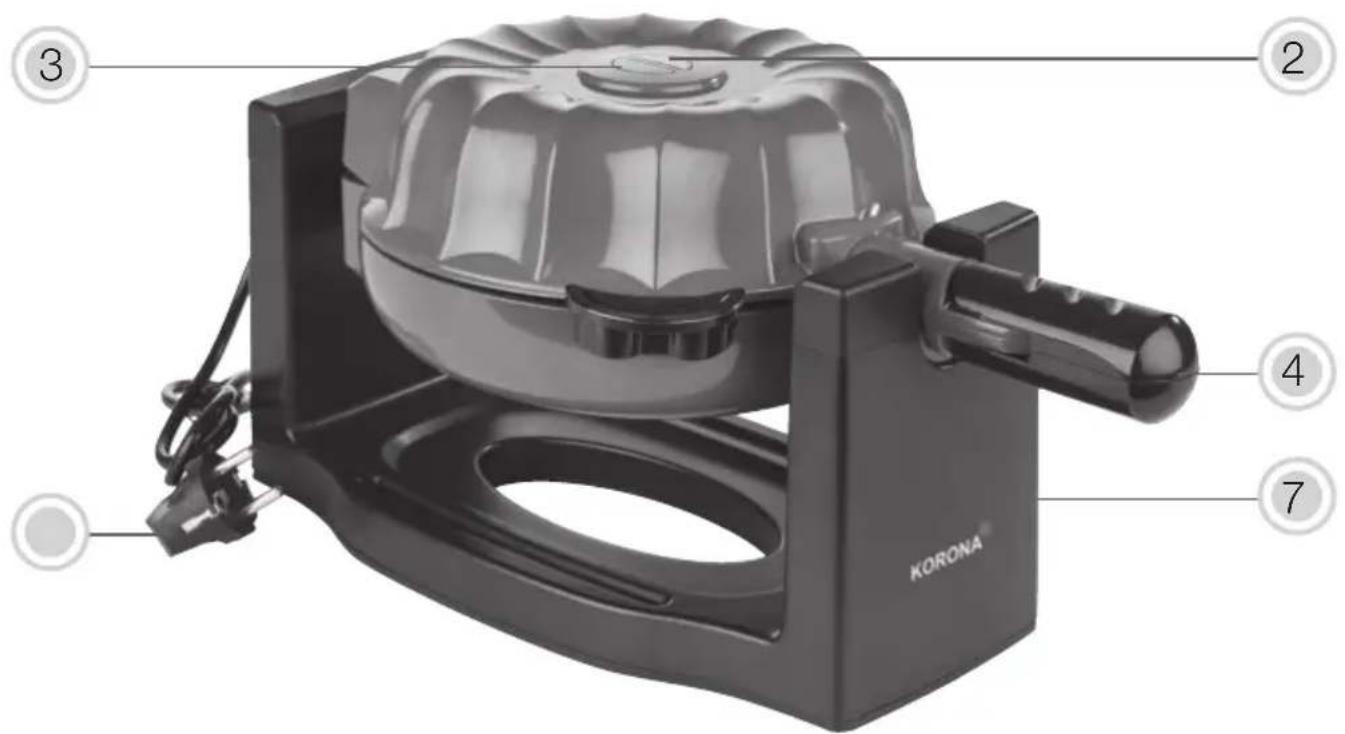
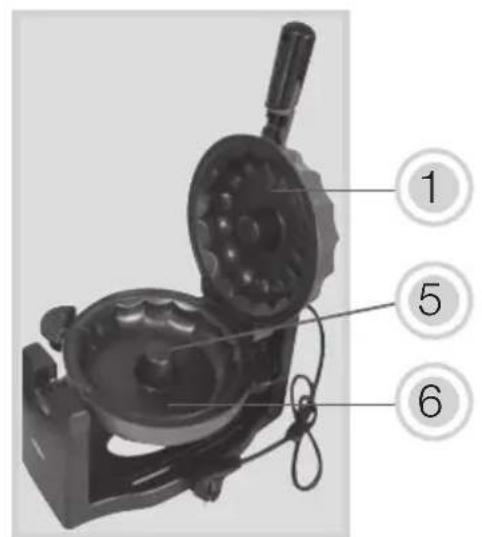
Product Description
- Upper baking form
- Red indicator light
- Green indicator light
- Handle (foldable)
- Lower baking form
- Removable cake tray
Before First Use
appliance is complete.
resistant surface.
to a properly installed wall socket.
The baking plates (5) of the cake maker have a protective coating. To remove the protective layers on the heating elements, heat up the appliance (without batter) for approx. 10 minutes.
Slightly grease the baking plates (5) with some cooking oil before using the device for the first time. This helps to seal the baking plates (5) and must only be carried out once.
This doesn't cause any harm nor does it mean that your appliance does not work properly. Make sure that the room is well ventilated!
After this preheating process, your cake maker is ready for operation. Let it completely cool down and clean it as described under Cleaning and Care.

Warning: Plastic bags are a danger to toddlers and babies, therefore keep them away to avoid suffocation.
Operation
This appliance allows you to create a perfect and evenly baked cake, by simply rotating your cake maker at 180^ during the baking process.

Always insert the cake tray before filling in the r.

The temperature of accessible surfaces may be high or low operation. Therefore, do not touch the appliance and/or immediately after operation.

Prepare the cake batter in advance before switching the appliance.
resistant surface.
-
Open the appliance and make sure that the upper part
-
Properly insert the cake tray (7) into the indentions of the appliance.
-
Slightly grease the baking plates (5) with some heat resistant cooking oil using a brush or some paper towel. Do not use too much oil!

Only use refined cooking oil and no cold pressed one!
- Connect the appliance to a properly installed wall socket.
heating process starts.

up.
- As soon as the necessary temperature is reached the green indicator light (3) will go off. Your cake maker is now ready for operation.
- Open the appliance by using the handle (4).
(6) by using a ladle. Only fill in the batter up to the edge (max.) of the lower baking form (6). Otherwise the batter may overflow. Make sure that no batter drips onto the pin in the middle of the lower baking dish. If it should happen, carefully remove it before closing the appliance – Danger of burns.

baking plates and housing.
-
Close the appliance properly and fold the handle (4) to the the batter evenly.
-
Open the appliance and check if the cake is done. This can be done by using a wooden skewer.

① The appliance can only be opened when in original position.
- Once the cake is done, remove the cake tray (7) by its handle.
- Place the cake onto a cake rack to let it cool down.
- If you wish to prepare more than one cake clean the cake tray (7) and the appliance and repeat a. m. steps.
- After use, disconnect the appliance from the mains.
- Let it completely cool down while opened to full extend.
Note: During operation, an integrated thermostat switches the appliance on and off to ensure a constant temperature.
For a better result, fill batter into the cake maker quickly to produce an evenly brown cake.
Recipe suggestion
Pound cake (one cake)
Ingredients:
Preparation:
Mix eggs, sugar and butter until the batter is smooth. Slowly add the the other ingredients. To obtain a light and fluffy texture put your mixer for a few seconds on the highest speed setting. Immediately pour the batter into the baking form and bake the cake following the above instructions. Dust with icing sugar before serving.
You can also use your favorite cake recipe or a cake mix.
Note: The amount of batter of your original recipe or the cake might be sufficient for more than one cake. Therefore, please adjust your recipe accordingly.
If you wish to bake even a smaller cake, only fill up the lower baking form (6) by half.
Cleaning and Care
Before cleaning, always switch off the appliance, let it from the mains and let it completely cool down.
Never immerse the appliance in water. Danger! Electric Shock!
Clean the appliance and baking plates with a moistened soft cloth.
Dry the entire appliance and all parts well after cleaning.
hard objects to clean the appliance.
Do not allow stains to dry. To remove food residues apply some cooking oil on the baking plates (5) and leave it on for some time. Afterwards, wipe the baking plates (5) with a moistened soft cloth.
The cake tray (7) can be cleaned in warm water using some dishwashing detergent. The cake tray (7) is not dishwasher safe.
Storage
Disconnect the appliance from the mains after each use and let it completely cool down.
For proper storage fold the handle (4).
Keep the appliance away from children and store it in a clean and dry place.
Disposal Instructions
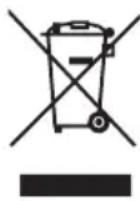
Waste electrical devices marked with this sign must not be disposed of with your household waste, but are to be collected separately. Therefore, please return this device at the end of its life cycle to special collection points for disposal or your local dealer.
Your Cake Maker 41060 is packed in a retail box. Such boxes are recyclable waste, i.e. they are reusable or recyclable.
Technical Data:
Rated Power: 1200 W
Protection Class: I
Subject to change without notice.
CE
Guarantee:
This product is guaranteed against defects in materials and workmanship for a period of 2 years.
This guarantee is not valid:
instructions
This guarantee does not affect your statutory right, nor any legal right you may have as a costumer under applicable national legislation governing the purchase of goods.
guaranteed period, the customer must provide evidence of the date of purchase (receipt).
The guarantee is to be asserted against
KORONA electric GmbH, Sundern/Germany.
Service Address:
KORONA Service, Am Steinbach 9, 59872 Meschede, Germany
Telephone Hotline: 02933 90284-80
Mail: service@korona-electric.de
web: www.korona-electric.de
within 2 years after the date of purchase. In case of guarantee the customer is given the right to get the appliance repaired at our own or at an authorized shop. Further rights (due to guarantee case) are not given to the customer.
Beoogd gebruik
Productbeschrijving

- Safety:
- Caution! Danger of electric shock!
- Special Safety Instructions
- Product Description
- Before First Use
- Operation
- ① The appliance can only be opened when in original position.
- Recipe suggestion
- Pound cake (one cake)
- Preparation:
- Cleaning and Care
- Storage
- Disconnect the appliance from the mains after each use and let it completely cool down.
- Disposal Instructions
- Guarantee:
- Beoogd gebruik
- Productbeschrijving
Brand : KORONA
Model : 41060
Category : Waffle Maker