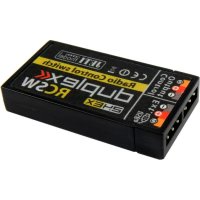
JDEXRCSW - Remote control toy JETI - Free user manual and instructions
Find the device manual for free JDEXRCSW JETI in PDF.


| Product Type | Radio Control Switch (RCSW) / RC Power Switch (RCPS5/10) |
| Brand | JETI |
| Models | RCSW, RCPS5, RCPS10 |
| Recommended Input Voltage (RCSW) | 3.3 – 51V |
| Recommended Input Voltage (RCPS5/10) | 3.3 – 24V |
| Switching Current (RCPS5) | 5A |
| Switching Current (RCPS10) | 10A |
| Power Consumption (On) | Typ. 20mA |
| Power Consumption (Standby) | Typ. 80µA |
| Operating Temperature | -20°C to 85°C |
| Weight | 8 g |
| Dimensions | 38 x 7 x 20 mm |
| Frequency Band | 2400.0 – 2483.5 MHz |
| Modulation | FHSS |
| Max Power | 100 mW e.i.r.p. |
| Transmission Speed | max. 2 Mbps |
| Country of Origin | Czech Republic |
| Warranty | 24 months |
| Pairing Method | Using Bind Plug connected to EXT output |
| Firmware Update | Via Jeti USB adapter connected to PC |
| LED Indicator | Red LED visible through side opening for switching status |
| Connectors (RCPS) | JR and MPX |
| Compatible JETI Devices | SBEC 40, DPS 40, SPS 20, DSM 10, Central Box 200/400, Main Switch |
| Maintenance | Keep dry and dust-free; clean with soft dry cloth |
| Safety | Do not exceed max switching current; observe polarity when connecting |
Frequently Asked Questions - JDEXRCSW JETI
User questions about JDEXRCSW JETI
0 question about this device. Answer the ones you know or ask your own.
Ask a new question about this device
Download the instructions for your Remote control toy in PDF format for free! Find your manual JDEXRCSW - JETI and take your electronic device back in hand. On this page are published all the documents necessary for the use of your device. JDEXRCSW by JETI.
USER MANUAL JDEXRCSW JETI
- Description and functions 13
1.1 Pairing 14 - Connection 15
2.1 Update 16
2.2 Connection examples 17 - Technical data 18
- Diagram menu displayed by JETIBOX 19
- Connecting the RC Switch to JETI model products 19
- Warranty, service and technical support 20
6.1 Warranty and service 20
6.2 Technical support 20
7.Declaration of Conformity 40
Deutsch
- RC Power Switch (RCPS 5, RCPS 10)
Description and functions
English ver.1.00
RC Switch is a wireless switch designed especially for JETI model products (BEC stabilizers, Central Box and other accessories) that increase the comfort of model control.
RC Switch operation and setting is done using a JETI Model DC/DS transmitter only.
1.1 Pairing
Pairing is done similarly to the pairing of receivers using the Bind Plug.
Procedure for pairing:
- Connect the Bind Plug to the EXT output.
- Connect the power supply to the Control Output.
- Select "pairing" in the RC Switch menu in the JETI transmitter.
- Select a control for the RC Switch in the transmitter, select the polarity of the switch, then also assign the audio sequence.
Input voltage
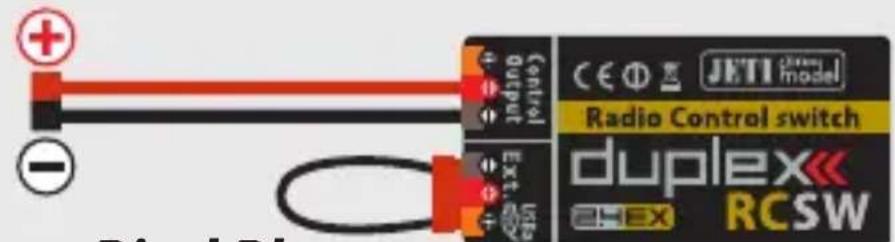
Bind Plug
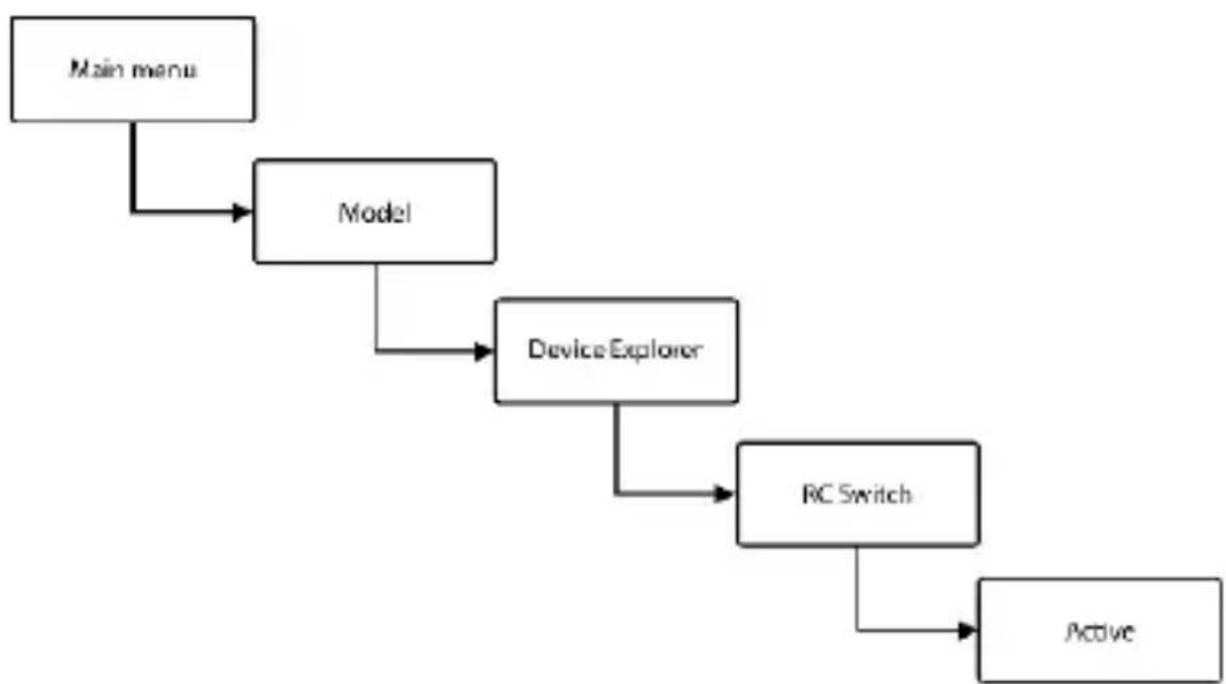
Fig. 1: Pairing
Fig. 2: Setting the RC Switch in the JETI transmitter
Switching is indicated by a red LED that is visible through the opening on the side of the RC Switch.
Setting the polarity of the switch is specific for each JETI model product, in the chart below there is a list of several supported devices and their RC Switch settings for DC and DS transmitters.
| DEVICE | Inverted polarity of the switch |
| SBEC 40 | ✓ |
| DPS 40 | × |
| SPS 20 | × |
| DSM 10 | × |
| Central Box 200 | × |
| Central Box 400 | × |
| Main Switch | × |
2 Connection
In normal mode the Ext slot is not used for output. It is used for pairing, for software updates and for connecting the JETIBOX terminal. However it is possible to supply power to both the RC Switch and the RC Power Switch through the Ext. or Control Output slots.
- RC Switch
Switched output is a signal line.
- RC Power Switch (RCPS 5, RCPS 10)
The power supply is connected via a two-wire cable. The positive pole is switched, the negative pole is common.
For switching on constant currents lower than 5A, use the RC Power Switch 5.
For switching on constant currents lower than 10A be sure to use the RC Power Switch 10.
The maximum switching current must not be exceeded, see chapter „3. Technical data".
2.1 Update
The RC Switch allows updating the firmware via PC. Updating is done using the Jeti USB adapter.
Procedure:
- Find the program to update to the latest firmware on the manufacturer's website under "Downloads". Save it to your computer.
- Connect the USB adapter to your computer. The procedure of installing the drivers for the USB adapter is included in the USB adapter manual.
- Run the firmware update on your PC.
- Connect the USB adapter to the RC Switch (Ext. output) using a three-wire cable.
- Přehodit pořádek slov: After connecting the device the update will begin.
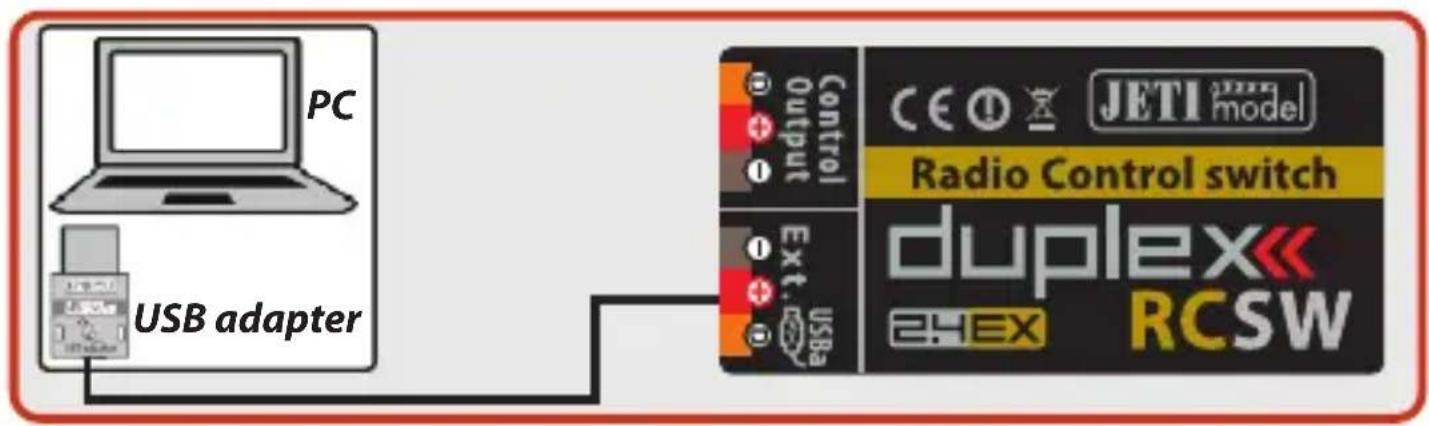
Fig. 3: Update
2.2 Connection examples
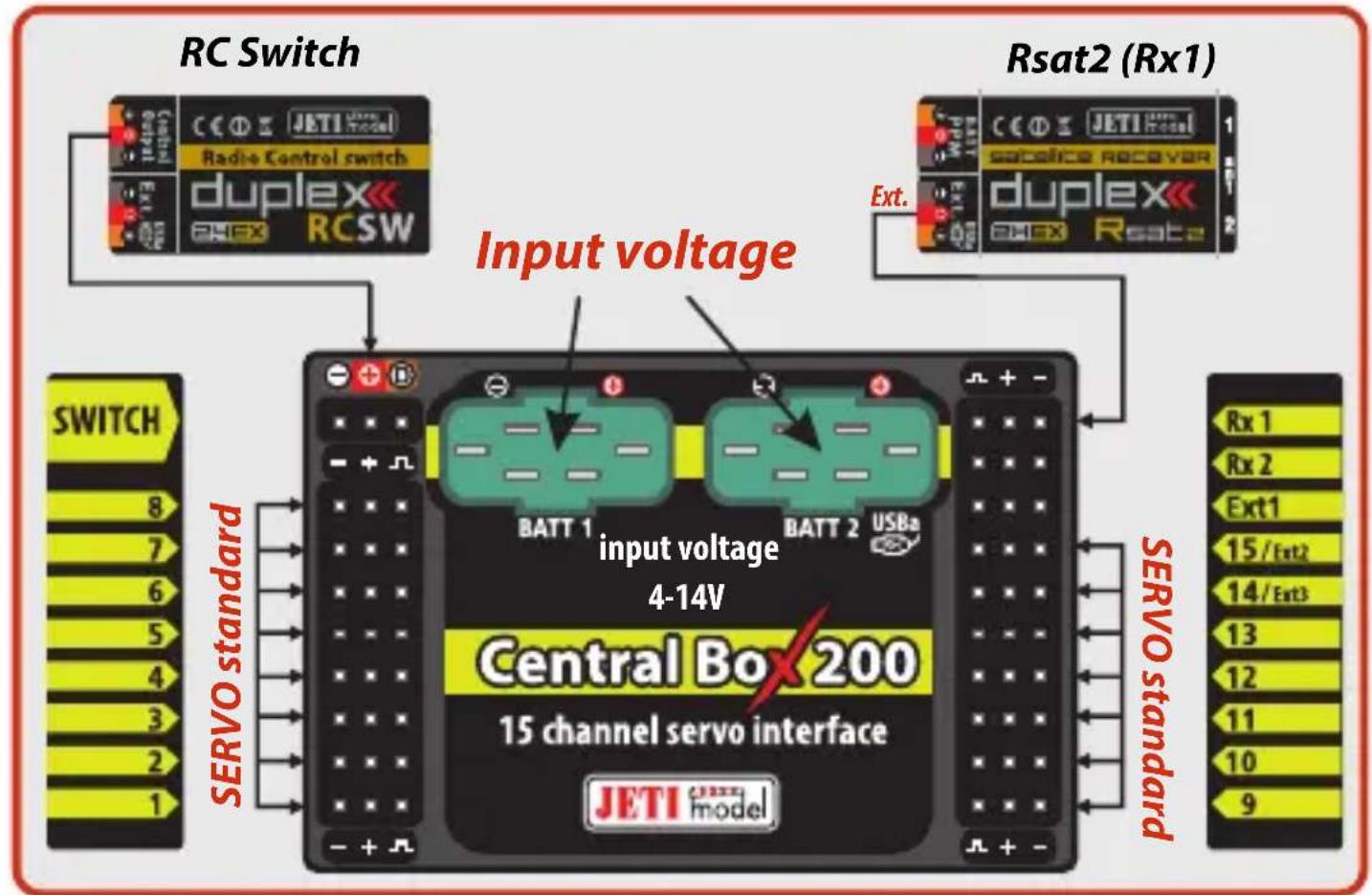
Fig. 4: Application connection with RC Switch
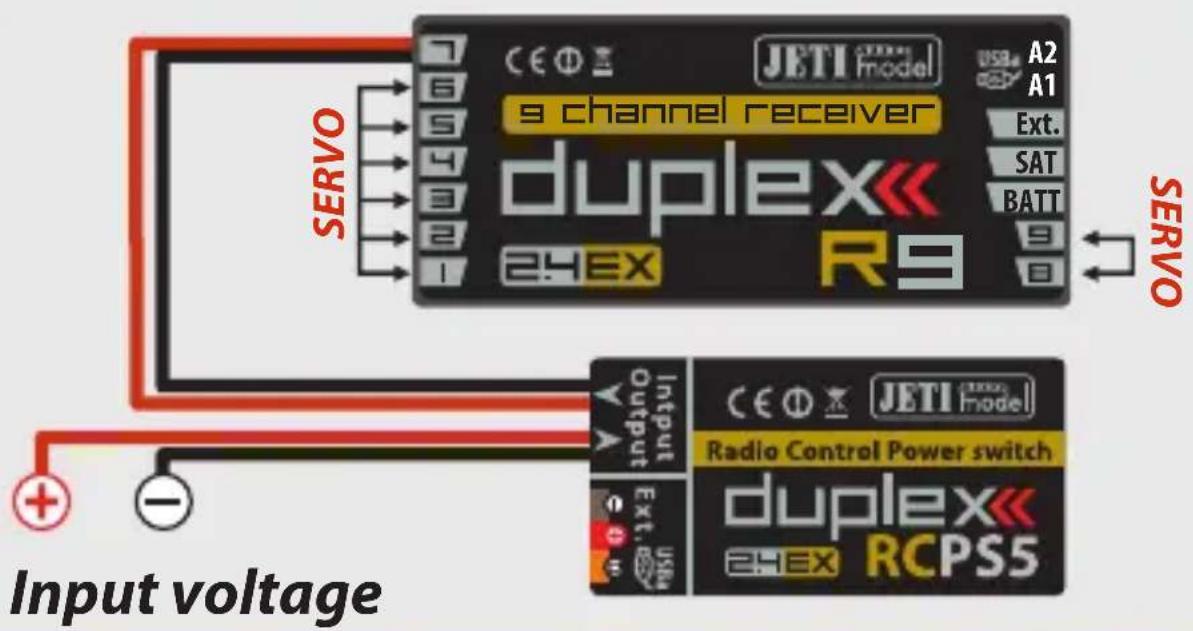
Fig. 5: Application connection with RC Power Switch
3 Technical data
| Typ | RCSW | RCPS 5 | RCPS 10 |
| Recommended input voltage | 3.3 – 51V | 3.3 – 24V | 3.3 – 24V |
| Switching current | - | 5A | 10A |
| Input/Output connectors | - | JR | MPX |
| Power consumption in on-mode | Typ. 20mA |
| Power consumption in standbymode | Typ. 80uA |
| Operating temperature | -20°C up to 85°C (-4°F up to 185°F) |
| Weight | 8 g |
| Dimensions | 38 x 7 x 20 mm |
4 Diagram menu displayed by Jetibox
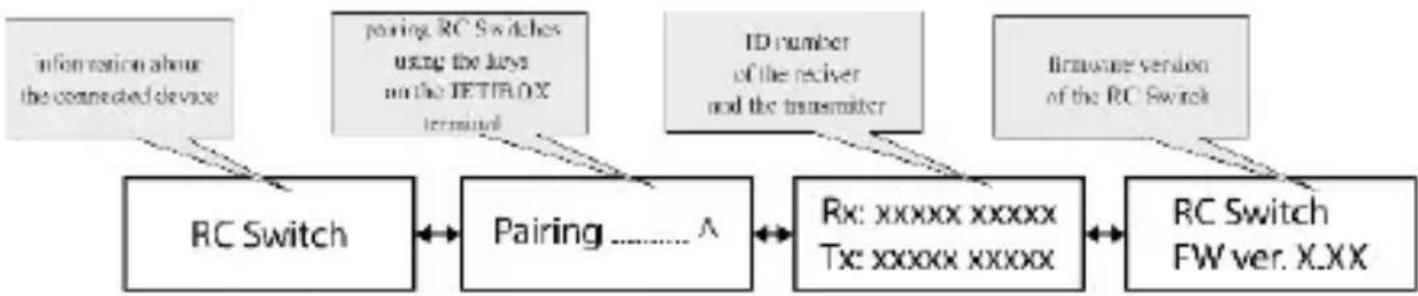
Fig. 6: Diagram menu
5 Connecting the RC Switch
to JETI model products
For a device that allows connecting the switch via JR type connector, you can connect the RC Switch directly. For others that come with a standard magnetic switch without JR connector, you must interrupt the threewire magnetic switch cable and solder in an RC Switch. To connect devices that do not allow direct connection of the RC Switch, we recommend installation in a professional workshop.
When connecting wires it is necessary to keep their color code (brown wire connected to the brown wire, etc.)!
6 Warranty, service and technical support
6.1 Warranty and service
This product is covered by warranty for 24 months after the day of purchase provided that it has been operated in accordance with these instructions at the specified voltage and is not mechanically damaged. When claiming warranty repairs for the product, always attach a proof of purchase. Warranty and post-warranty service is provided by your dealer or the manufacturer.
6.2 Technical support
In case you are not sure about the setup or some functions of the product, do not hesitate to contact our technical support.
You can contact either your dealer, or directly the manufacturer JETI model s.r.o..
For further information see our webpages www-jetimodel.cz.
ENGLISH
Information on Disposal for Users of Waste Electrical & Electronic Equipment (private households)


This symbol on the products and/or accompanying documents means that used electrical and electronic products should not be mixed with general household waste.
For proper treatment, recovery and recycling, please take these products to designated collection points, where they will be accepted on a free of charge basis. Alternatively, in some countries you may be able to return your products to your local retailer upon the purchase of an equivalent new product.
Disposing of this product correctly will help to save valuable resources and prevent any potential negative effects on human health and the environment which could otherwise arise from inappropriate waste handling. Please contact your local authority for further details of your nearest designated collection point.
Penalties may be applicable for incorrect disposal of this waste, in accordance with national legislation.
For business users in the European Union
If you wish to discard electrical and electronic equipment, please contact your dealer or supplier for further information.
Information on Disposal in other Countries outside the European Union
This symbol is only valid in the European Union. If you wish to discard this product, please contact your local authorities or dealer and ask for the correct method of disposal.
duplex
Deutsch

extended series
RCSW - RC switch
RCPS5 - RC Power Switch 5A
RCPS10 - RC Power Switch 10A
- RC Power Switch (RCPS 5, RCPS 10)
- RC Power Switch (RCPS 5, RCPS 10)
6.2 Support technique
Declaration of Conformity
Issues name & addres:
JETI model s.r.o.
Lomena 1530, 742 58 Pribor
Object of the declaration:
Products: SWITCH
Trade name: RC Switch, RC Power Switch
Model: RCSW, RCP55, RCP510
Country of origin: Czech Republic
Frequency band: 2400,0 - 2483,5 MHz
Channel range: 5 MHz
Max power: 100 mW e.i.r.p.
Type of modulation: FHSS
Transmission speed: max. 2 Mbps
Complies with essential requirements and other relevant provisions of the Statutory rules n. 426/2000 Sb. (and the R&TTE Directive)
Harmonised standards applies:
Measures for the efficient use of the radio frequency spectrum EN 300 328 V 1.7.1.
Protection requirements concerning electromagnetic compatibility:
EN301489-1V1.6.1.,EN301489-17V1.2.1.
Health and safety requirements pursuant EN 60950

Signed for and on behalf of:
Tomáš Klesnil
production Manager
JETI model s.r.o.