SCCB9373P - Soundbar SAMSUNG - Free user manual and instructions
Find the device manual for free SCCB9373P SAMSUNG in PDF.

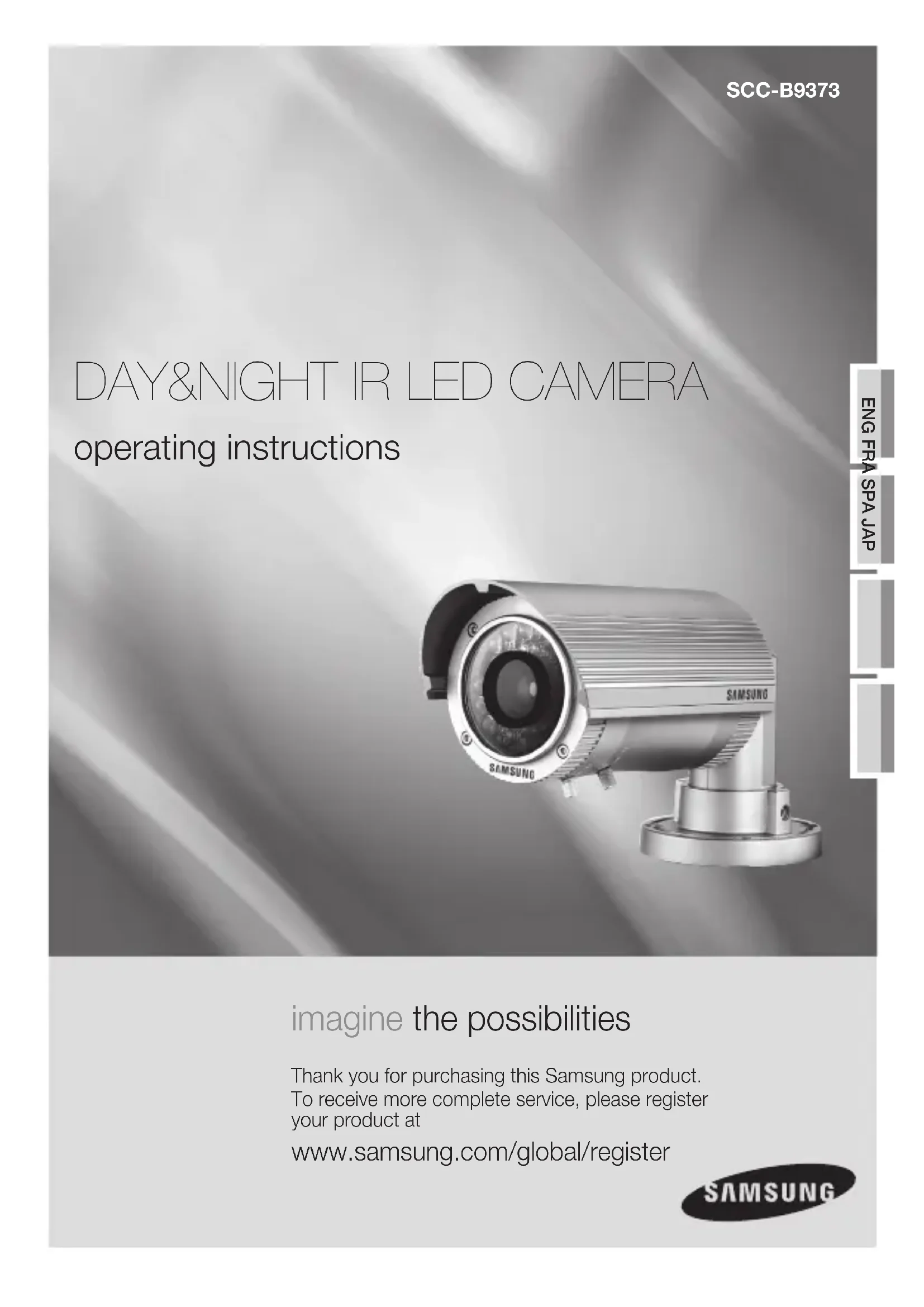


| Product Type | Day/Night IR LED Surveillance Camera |
| Brand | Samsung |
| Model | SCCB9373P |
| Sensor | 1/3 inch Super HAD Color CCD (SONY) |
| Resolution | 540 TVL (color), 570 TVL (B/W) |
| Minimum Illumination | 0 lux (with IR LED on) |
| Maximum IR Distance | 70 m |
| Number of IR LEDs | 42 IR LEDs |
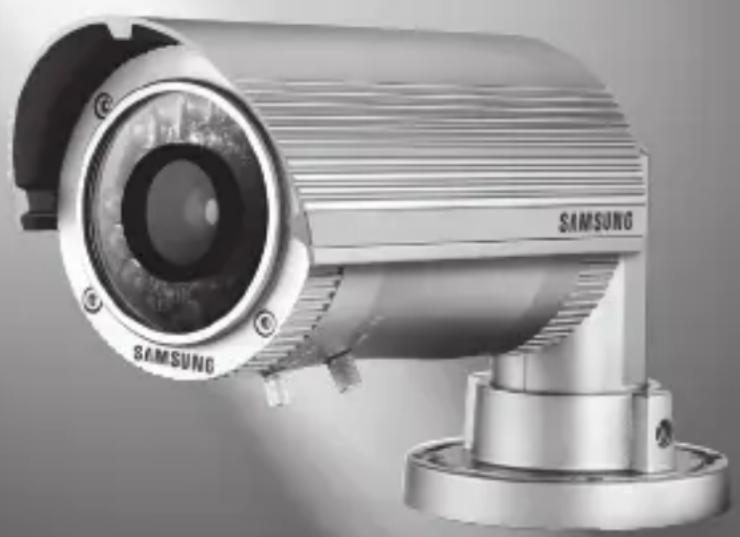
| Lens | 6~50 mm, F1.6, day/night, auto iris (DC), varifocal |
| External Adjustments | Zoom and focus via lever |
| Video Output | 1.0 Vp-p on 75 Ω (BNC) |
| Protection Rating | IP66 (water resistant) |
| Power Supply | 24 V AC / 12 V DC ±10% |
| Power Consumption | 2.5 W (LED off), 14.4 W (LED on) |
| Operating Temperature | -10°C to 50°C |
| Operating Humidity | 90% RH max |
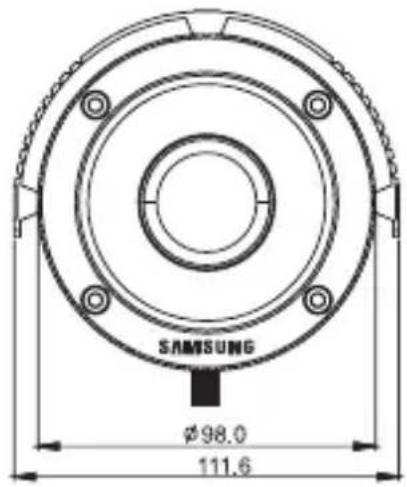
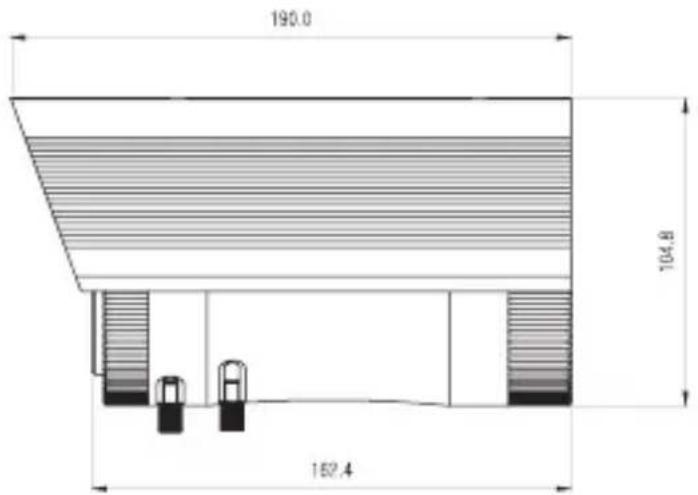
| Dimensions | 98 mm (diameter) x 162.4 mm (length) |
| Synchronization System | Internal |
| Signal-to-Noise Ratio | More than 48 dB (AGC off) |
| Shutter Speed | 1/60 s (NTSC) / 1/50 s (PAL) |
| Main Functions | Auto day/night switching, auto IR LED, external zoom and focus adjustment, swivel bracket |
| Safety | Use only specified adapter; avoid exposure to rain or moisture; secure installation |
| Maintenance and Cleaning | Clean with a dry cloth; do not use abrasive paper |
Frequently Asked Questions - SCCB9373P SAMSUNG
User questions about SCCB9373P SAMSUNG
0 question about this device. Answer the ones you know or ask your own.
Ask a new question about this device
Download the instructions for your Soundbar in PDF format for free! Find your manual SCCB9373P - SAMSUNG and take your electronic device back in hand. On this page are published all the documents necessary for the use of your device. SCCB9373P by SAMSUNG.
USER MANUAL SCCB9373P SAMSUNG
operating instructions
imagine the possibilities
Thank you for purchasing this Samsung product.
To receive more complete service, please register your product at
www.samsung.com/global/register
CAUTION
RISK OF ELECTRIC SHOCK.
DO NOT OPEN

CAUTION: TO REDUCE THE RISK OF ELECTRIC SHOCK, DO NOT REMOVE COVER (OR BACK) NO USER-SERVICEABLE PARTS INSIDE REFER SERVICING TO QUALIFIED SERVICE PERSONNEL

This symbol indicates that dangerous voltage consisting a risk of electric shock is present within this unit.

This symbol indicates that there are important operating and maintenance instructions in the literature accompanying this unit.
WARNING
- To reduce the risk of fire or electric shock, do not expose this appliance to rain or moisture.
- To prevent injury, this apparatus must be securely attached to the floor/wall in accordance with the installation instructions.
- If this power supply is used at 240V ac, a suitable plug adapter should be used.
WARNING
- Be sure to use only the standard adapter that is specified in the specification sheet. Using any other adapter could cause fire, electrical shock, or damage to the product.
- Incorrectly connecting the power supply or replacing battery may cause explosion, fire, electric shock, or damage to the product.
- Do not connect multiple cameras to a single adapter. Exceeding the capacity may cause abnormal heat generation or fire.
- Securely plug the power cord into the power receptacle. Insecure connection may cause fire.
- When installing the camera, fasten it securely and firmly. A falling camera may cause personal injury.
- Do not place conductive objects (e.g. screwdrivers, coins, metal things, etc.) or containers filled with water on top of the camera.
Doing so may cause personal injury due to fire, electric shock, or falling objects.
- Do not install the unit in humid, dusty, or sooty locations.
Doing so may cause fire or electric shock.
- If any unusual smells or smoke come from the unit, stop using the product.
In such case, immediately disconnect the power source and contact the service center. Continued use in such a condition may cause fire or electric shock.
- If this product fails to operate normally, contact the nearest service center.
Never disassemble or modify this product in any way. (SAMSUNG is not liable for problems caused by unauthorized modifications or attempted repair.)
- When cleaning, do not spray water directly onto parts of the product.
Doing so may cause fire or electric shock.
- Do not drop objects on the product or apply strong shock to it.
Keep away from a location subject to excessive vibration or magnetic interference. - Do not install in a location subject to high temperature (over 122^ ), low temperature (below 14^ ), or high humidity. Doing so may cause fire or electric shock.
- If you want to relocate the already installed product, be sure to turn off the power and then move or reinstall it.
- Remove the power plug from the outlet when then there is a lightning. Neglecting to do so may cause fire or damage to the product.
- Keep out of direct sunlight and heat radiation sources. It may cause fire.
- Install it in a place with good ventilation.
- Avoid aiming the camera directly towards extremely bright objects such as sun, as this may damage the CCD image sensor.
- Apparatus shall not be exposed to dripping or splashing and no objects filled with liquids, such as vases, shall be placed on the apparatus.
- The mains plug is used as a disconnect device and shall stay readily operable at any time.
FCC STATEMENT
This device complies with part 15 of the FCC Rules. Operation is subject to the following two conditions:
1) This device may not cause harmful interference, and
2) This device must accept any interference received including interference that may cause undesired operation.

This equipment has been tested and found to comply with the limits for a Class A digital device, pursuant to part 15 of FCC Rules. These limits are designed to provide reasonable protection against harmful interference when the equipment is operated in a commercial environment.
This equipment generates, uses, and can radiate radio frequency energy and, if not installed and used in accordance with the instruction manual, may cause harmful interference to radio communications. Operation of this equipment in a residential area is likely to cause harmful interference in which case the user will be required to correct the interference at his own expense.

IC Compliance Notice
This Class A digital apparatus meets all requirements of the Canadian interference-Causing Equipment Regulations of ICES-003.
- Read these instructions.
- Keep these instructions.
- Heed all warnings.
- Follow all instructions.
- Do not use this apparatus near water.
- Clean only with dry cloth.
- Do not block any ventilation openings. Install in accordance with the manufacturer's instructions.
- Do not install near any heat sources such as radiators, heat registers, or other apparatus (including amplifiers) that produce heat.
- Do not defeat the safety purpose of the polarized or grounding-type plug.
A polarized plug has two blades with one wider than the other.
A grounding type plug has two blades and a third grounding prong.
The wide blade or the third prong is provided for your safety.
If the provided plug does not fit into your outlet, consult an electrician for replacement of the obsolete outlet. - Protect the power cord from being walked on or pinched particularly at plugs, convenience receptacles, and the point where they exit from the apparatus.
- Only use attachments/accessories specified by the manufacturer.
- Use only with cart, stand, tripod, bracket, or table specified by the manufacturer, or sold with the apparatus.

- Unplug this apparatus. When a cart is used, use caution when moving the cart/ apparatus combination to avoid injury from tip-over.
- Refer all servicing to qualified service personnel. Servicing is required when the apparatus has been damaged in any way, such as power-supply cord or plug is damaged, liquid has been spilled or objects have fallen into the apparatus, the apparatus has been exposed to rain or moisture, does not operate normally, or been dropped.

Apparatus shall not be exposed to dripping or splashing and no objects filled with liquids, such as vases, shall be placed on the apparatus
FEATURES
02
02 Features
THINGS TO KEEP IN MIND DURING INSTALLATION AND USE
02 Things to keep in mind during installation and use
02
NAME OF EACH PART
03 Name of each part
03
04 Camera Installation
INSTALLATION
04
TROUBLESHOOTING
05 Troubleshooting
05
SPECIFICATIONS
06 Specifications
06
DIMENSION
07 Dimension
07
1/3" Sony super HAD CCD
Resolution: 540TVL (Color), 570TVL (B/W)
- Minimum Scene Illumination 0 Lux (with LED On)
IR range Distance up to 70m
Color & B/W Auto switchable by Photocell and Sensitivity
Built-in 6~50mm / F1.6 Day & Night Vary-focal DC Auto Iris Lens
- Externally Adjustable Focal Length & Focus with Lever
- Externally Adjustable DC Iris Level
CDS Photocell Auto Switching IR-LED Control 42 LEDs
- Cable Managed Bracket
Service Monitor Output
- Waterproof Outdoor Installation (IP-66)
AC24V/DC12V
things to keep in mind duringinstallation and use
- Do not disassemble the camera on your own.
- Always be careful when handling the camera. Do not strike the camera by your fists or shake it. Please be careful not to be careless when storing and operating it.
- Do not place or operate the camera in any wet environment such as rain or wet surfaces.
- Do not clean the camera with rough sandpaper. Please always use a dry cloth when cleaning it.
- Put the camera in a cool area free from direct sunlight. Otherwise, the camera may be damaged.
name of each part
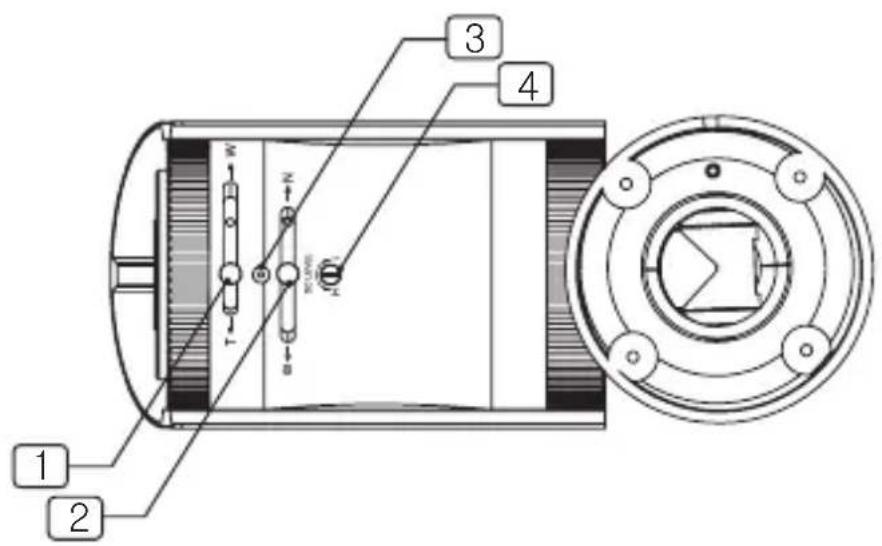
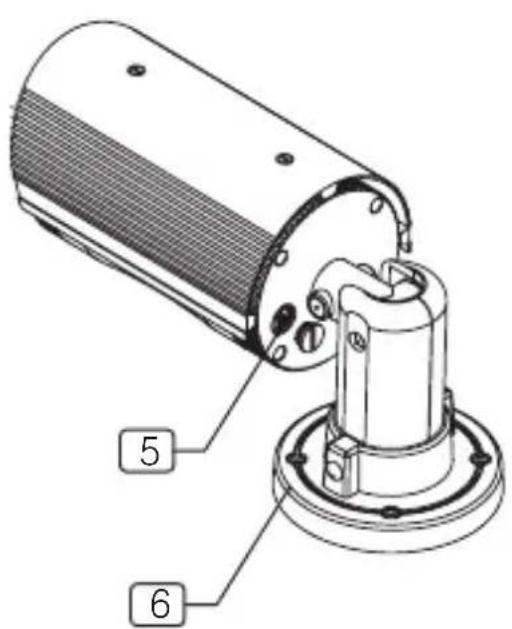
1 ZOOM LEVER
2 FOCUS LEVER
3 RINGGUIDEBOLT
4 DC LEVEL VOLUME SCREW CAP
5 SERVICEVIDEOPORT
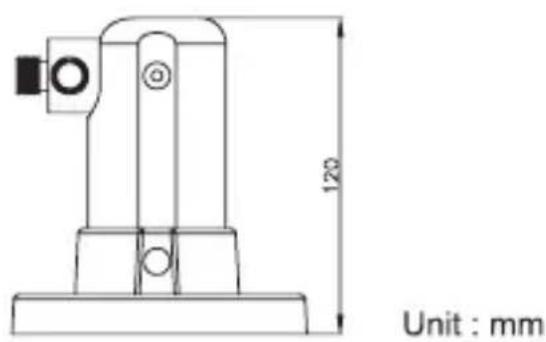
6 BRACKET
CAMERA INSTALLATION
- Zoom and Focus Lever
- Loosen the Levers and adjust Zoom/Focus
After controlling, tighten each lever.
1. Zoom Lever
- To widen the viewing angle, turn the "Zoom Lever" to "W"(Wide)
- To obtain a closer view, turn this Lever to "T" (Tele).
2. Focus Lever
- To adjust the Focus between "N" (Near) or "∞" (Far) until the sharpest focus is achieved.
3. Ring Guide Bolt
- Be careful not to lose these small bolts (3pcs) which should not be touched in normal use.
4. DC Level Volume Screw Cap
- Remove this screw Cap carefully. Retain it in a safe place,
as it must be replaced to protect from water entering the camera body.
-
The DC level volume for the adjustment in the screw hole.
-
For a bright screen, turn the DC Level Volume slowly towards "H" (counter-clockwise) with the driver provided.
-
For a dark screen, turn it towards "L" (clockwise).
-
Then tighten the screw Cap to protect water entering
5. Service Video Port Description
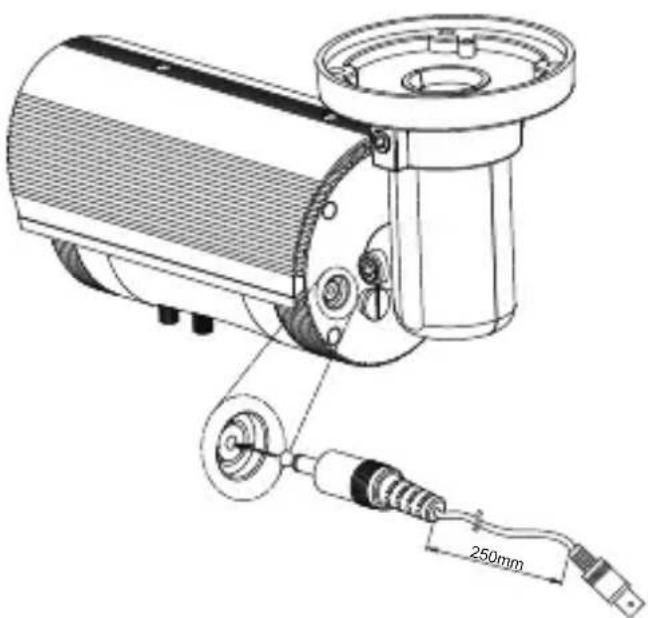
6. Bracket
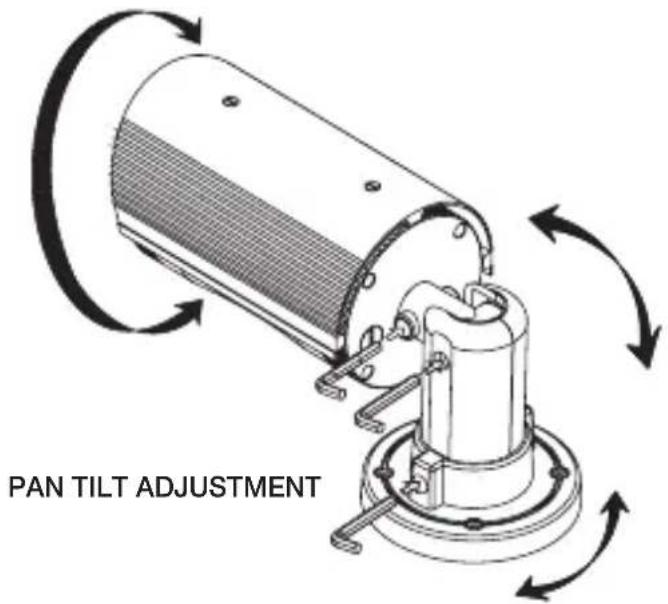
Loosen the Pan/Tilt bolts of the bracket to adjust the camera direction.
In reference to page 3.
7. Connecting to Monitor and Power
- Set the impedance switch to the 75 Ω standard position unless other equipment is looped out of the monitor.
- Adaptor: AC24V / 1.5A or DC12V / 1.5A (AC24V / DC12V Model)

- Be sure to connect power after all the installation is done.
- Do not use power sources other than that specified.
troubleshooting
If you have trouble operating the camera, check the following guides for the possible problem.
-
Nothing appears on the screen.
-
Check the power connection and video signal line connection.
- Check the brightness level of DC Auto Iris volume of the camera.
The video image is not clear.
- Check if the camera glass has dust on the surface.
Clean the camera glass with a clean cloth or brush.
- Make sure that the screen is not exposed directly to a bright light.
Adjust the position of the camera if necessary. -
Check if protective film of camera glass is removed.
-
The screen is dark
-
Adjust the brightness feature of the monitor.
-
Check the brightness level of DC Auto Iris volume of the camera.
-
The screen does not properly display when IR LEDs work.
-
Check if the camera glass has dust.
- Clean the camera glass with a clean cloth or brush.
If you cannot solve the problem with above guidelines, please contact an authorized technician.
| ITEM NTSC PAL | ||
| Image Sensor 1/3" Interline transfer type color CCD (SONY) | ||
| Effective Pixels 768H x 494V (380K pixels) 752H x 582V (440K pixels) | ||
| Scanning System 525 Lines 2:1 Interlace 625 Lines 2:1 Interlace | ||
| Scanning Frequency 15.734KHz (H), 59.94Hz (V) 15.625KHz (H), 50Hz (V) | ||
| Resolution 540TVL (Color), 570TVL (B/W) | ||
| Shutter Speed 1/60 sec. | 1/50 sec. | |
| S/N Ratio More than 48dB (AGC Off) | ||
| Sync. System Internal | ||
| Min. Illumination 0 Lux with IR-LED (42pcs) | ||
| Video Output VBS 1.0 Vp-p (75 ohm Load) | ||
| Lens | 6~50mm Day&Night Vary-Focal DC Auto Iris Lens (F1.6) | |
| Power Supply(*) | AC24V / DC12V ± 10% | |
| Power Consumption | 2.5W (LED Off)/ 14.4W (LED On) | |
| Operating Temp. | 14°F~122°F (-10°C~50°C) | |
| Operational Humidity | Max. 90% RH | |
| Dimensions | 98mm(Ø) x 162.4mm(L) | |
(*) Must use regulated & specified power supply.
SAMSUNG
CAMÉRA IR LED JOUR & NUIT directives d'utilisation
Apparatus shall not be exposed to dripping or splashing and no objects filled with liquids, such as vases, shall be placed on the apparatus
PROPRIÉTÉS

02 Propriétés