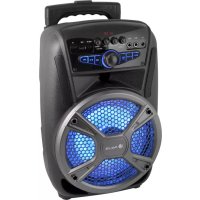
Wild Mambo - Sound system NGS - Free user manual and instructions
Find the device manual for free Wild Mambo NGS in PDF.



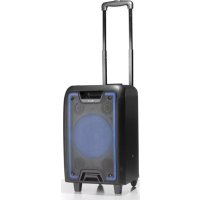
| Brand | NGS |
| Model | Wild Mambo |
| Product type | Portable sound system with wheels |
| Output power | 35 W |
| Battery | 1800 mAh / 3.7 V |
| Bluetooth | Version 3.0 |
| Bluetooth range | 10 m |
| Frequency response | 90 Hz – 20 kHz |
| Audio inputs | AUX, microphone (2 ports), USB, TF card |
| FM radio | Yes, with automatic search |
| Card reader | Micro SD |
| USB port | Yes, for MP3 playback |
| Display | LED display |
| LED lights | 4 modes (including off) |
| Bass control | Adjustment knob |
| Treble control | Adjustment knob |
| Microphone echo control | Adjustment knob |
| Karaoke function (VIP Mic) | Automatically lowers music volume |
| Power supply | Mains (charger included) |
| Charging time | Approximately 4 to 5 hours |
Frequently Asked Questions - Wild Mambo NGS
User questions about Wild Mambo NGS
0 question about this device. Answer the ones you know or ask your own.
Ask a new question about this device
Download the instructions for your Sound system in PDF format for free! Find your manual Wild Mambo - NGS and take your electronic device back in hand. On this page are published all the documents necessary for the use of your device. Wild Mambo by NGS.
USER MANUAL Wild Mambo NGS
When the audio cable is connected, you can connect the device with the external multimedia audio sources through the port "AUX". After connection, just set the mode to LINE by pressing the "Mode" button on the device. At this time, de indicator LINE is illuminated, suggesting the device can play the audio files from multimedia sources like PC, mobile phone, MP3 and MP4, etc.
USB CARD/MICROSD/ BLUETOOTH/FMRADIO
USB CARD PLAYING
When power ON the product, if USB card inserted, it can play the MP3 format music from the USB. Press Skip-/Skip+ buttons to select the song you want. Press the play / pause button to pause / resume the music.
MICRO USD CARD PLAYING
When the device is turned on it can play music in MP3 format from a Micro SD card.
Press the Next / Previous button to select the sng you want. Press the play / pause button to pause / resume the music.
Note: In the USB / Micro SD modes you can choose to repeat one or all songs by pressing the REPEAT button.
BLUETOOTH MODE
A. Press the MODE button until the screen displays the word BLUE. In Bluetooth mode the device goes into searching / paring / reconnect mode for pair.
B. Now, turn ON the Bluetooth function on your mobile phone.
C. Search for "NGS WILDMAMBO" and select it to pair (for first time pairing or pairing a new mobile device).
D. The Bluetooth speaker will be reconnecting automatically if your mobile phone has been paired (Depend on the of mobile phone's type and configuration, manual reconnection may require on some devices).
RADIO MODE
- Press the MODE button to enter the FM Radio mode.
- Then press and hold the PLAY/PAUSE button for 2 seconds to carry out an automatic channel search.
- Once the automatic search is completed, you can switch between the saved stations by pressing the FORWARD or BACK button.
PANEL SWITCHES AND KNOBS FUNCTION
MIC ECHO KNOB
Receiver reverberation depth adjustment.
MIC VOLUME KNOB
Microphone Volume adjustment.
BASS ADJUSTMENT CONTROL
Adjust the basses of your music.
TREBLE ADJUSTMENT KNOB
Adjusts the music treble.
VOLUME ADJUSTMENT KNOB
Adjusts the music volume.
MIC VIP BUTTON (karaoke function)
Give priority to the micro versus the music, lowering its volume.
USER'S MANUAL
HOW TO CHARGE?
AC POWER SUPPLY
Connect the AC power cable to the mains. The charging LED stays ON while charging, and turns OFF once the battery reaches 100% .
Although it doesn't matter it is ON or OFF while charging, it is better to protect your battery if you can power off the unit. Charging time would be 4-5 hours.
LED LIGHTS
To change the lights mode, press and hold REPEAT button for 2 seconds.
There are 4 lights modes available, including OFF mode.
TECHNICAL SPECIFICATIONS
Output power: 35W To ch
Battery:1800mAh/3.7V for 2s
Bluetooth V3.0 There
Working range: 10m
Frequency response: 90Hz-20kHz
USB port
Aux input
Micro input x2
FM Radio
MICRO SD card reader
LED screen
Battery level indicator
LED lights
ENGLISH

To change the lights mode, press and hold REPEAT button for 2 seconds.
There are 4 lights modes available, including OFF mode.
Battery warranty: The battery is a consumer product, and as such it is under warranty for 12 months.
If at any time in the future you should need to dispose of this product please note that:
Waste electrical products should not be disposed of with household waste. Please recycle where facilities exist.
Check with your Local Authority or retailer for recycling advice.
(Waste Electrical and Electronic Equipment Directive)
MANUEL DE L'UTILISATEUR
WILDMAMBO
HAUT-PARLEUR PORTABLE
AVEC ROULETTES
BOUTONS DE COMMANDE
OVLADANI HLASITOSTIBASU
Upravje basy hedby.
VIP TLACITKO MIKROFONU (funkce karaoke)
Dáva prédnost mikrofonu préd Hudbou, kterou zároven ztišuje.
UZIVATELSKYMANUAL
JAK NABIJET?
ZDROJ NAPAJENI
Pripojte sifovy kabel do zasuvky. Indikator nabijeni bude svtit po celou dobu nabijeni a vypne se, jakmile je baterie na 100% .
Ackoli neni relevantni, je-li pristroj zapnuty nebo vypnuty behem nabijeni, je vchodne jej vypnout, aby se setril akumulator. Doba nabijeni je pak 4 až 5 hodin.
LED SVETLA
Chcete-li zmenit rezim svetla, podrzte tlačitka REPEAT pod dobu 2 sekund.
Eupoc, epyaftac; 10m
Anokpion ouyovotntac 90Hz-20kHz
Oupa USB
BongtntkEoo0oC
EiooocmuKporpwovoux2
Paδióφwvo FM
AvaywootkaptovMICRO SD
ObovLED
EvseIgntaogmucnataapiac
Dutáka LED
EAAHNIKA

NGS
Eyyunon mntatapia; H mntatapia evai avalawuun, kai w, teota, npapexouevn eyunon eivao yia 12 prvec.
AvoMieAovnapaote n avaykn anoppioc tou npoiovoc,lambdae unoyn:
Piuc ta anoBnTa nKektpovikuV npoiovuv SEv EITnPENETa va anoppittovTal maIe Ta oikiaKa onoppmuata. Avakukwote To otic diaheqiec Eykataotaeic.
AnotaBeite otic apoBiec Tonikc Apxcn oToV eTnopiK ovitnpoawto yia npopopoe c oxetik a Tnv avakkawon.
(Obnyia πeipantoppiHc HektpovikwKau HektpikwZUOKeWv)
WE, AUTHORIZED REPRESENTATIVE, LURBE GRUP S.A, ERRENTERIA, SPAIN, DECLARE UNDER OUR SOLE RESPONSIBILITY THAT THE FOLLOWING PRODUCT:
EN ES
LURBE GRUP S.A, ERRENTERIA, ESPANA, DECLARA BAJO SU EXCLUSIVA RESPONSABILIDAD LA CONFORMIDAD DEL PRODUCTO:
NGS: BLUETOOTH SPEAKER NGS / MODEL: WILDMAMBO
NGS:ALTAVOZ BLUETOOTH NGS / MODELO: WILDMAMBO
HAS BEEN TESTED AND FOUND IN CONFORMITY WITH THE FOLLOWING HARMONIZED EUROPEAN STANDARDS:
HA SIDO TESTADO EN CONFORMIDAD CON LAS SIGUIENTES NORMAS STANDARD EUROPEAS ARMONIZADAS:
ETSIEN301489-1V1.9.2(2011-09) EN62479:2010
ETSIEN301489-17V2.2.1(2012-09) EN60065:2014
ETSIEN300328V1.8.1(2012-06)
AND THEREFORE COMPLY WITH THE ESSENTIAL REQUIREMENTS AND PROVISIONS OF THE FOLLOWING DIRECTIVES OF THE EUROPEAN PARLIAMENT AND EUROPEAN COUNCIL:
Y,POR LO TANTO, CUMPLE CON LOS REQUERIMIENTOS Y PROVISIONES DE LAS SIGUIENTES DIRECTIVAS DEL PARLAMENTO EUROPEO:
ELECTROMAGNETIC COMPATIBILITY DIRECTIVE (EMC) 2014/30/EU
RADIO EQUIPMENT DIRECTIVE 2014/53/EU
LOW VOLTAGE DIRECTIVE (LVD) 2014/35/EU
ROHS DIRECTIVE 2011/65/EU
DIRECTIVA DE COMPATIBILIDAD ELECTROMAGNETICA (EMC) 2014/30/EU
- USB CARD/MICROSD/ BLUETOOTH/FMRADIO
- USB CARD PLAYING
- MICRO USD CARD PLAYING
- BLUETOOTH MODE
- RADIO MODE
- PANEL SWITCHES AND KNOBS FUNCTION
- MIC ECHO KNOB
- MIC VOLUME KNOB
- BASS ADJUSTMENT CONTROL
- TREBLE ADJUSTMENT KNOB
- VOLUME ADJUSTMENT KNOB
- MIC VIP BUTTON (karaoke function)
- HOW TO CHARGE?
- AC POWER SUPPLY
- LED LIGHTS
- TECHNICAL SPECIFICATIONS
- WILDMAMBO
- BOUTONS DE COMMANDE
- UZIVATELSKYMANUAL
- JAK NABIJET?
- ZDROJ NAPAJENI
- LED SVETLA
Brand : NGS
Model : Wild Mambo
Category : Sound system