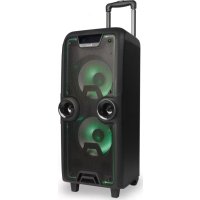
Wildrock - Sound system NGS - Free user manual and instructions
Find the device manual for free Wildrock NGS in PDF.



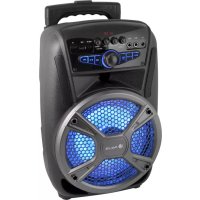
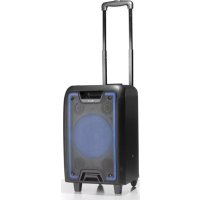
| Product type | Amplified portable speaker with microphone |
| Brand | NGS |
| Model | Wildrock |
| Output power | 200 W |
| Power supply | Rechargeable battery 12V/4.5A (AC adapter 15V/3A) |
| Battery life | Approximately 4 hours |
| Charging time | 4 to 8 hours |
| Frequency response | 80 Hz - 18 kHz |
| Wireless connectivity | Bluetooth (range 10 m) |
| Wired connectivity | USB, micro SD, AUX input (3.5 mm), microphone input (x2) |
| FM Radio | Yes, with automatic search |
| Display | LED screen |
| Lighting | Integrated LED (switchable) |
| Microphone | Wired (6.35 mm input), microphone priority function (karaoke) |
| Equalizer | Adjustments for treble, bass and echo |
| Controls | Main volume, mode, LED on/off, mute, previous/next, play/pause, repeat |
| Indicators | Low battery, charging (red when charging, green when charged) |
| Care and cleaning | Clean with a soft, dry cloth. Avoid humidity. |
| Safety | Use the recommended adapter. Do not expose to water. Recycle according to WEEE regulations. |
Frequently Asked Questions - Wildrock NGS
User questions about Wildrock NGS
0 question about this device. Answer the ones you know or ask your own.
Ask a new question about this device
Download the instructions for your Sound system in PDF format for free! Find your manual Wildrock - NGS and take your electronic device back in hand. On this page are published all the documents necessary for the use of your device. Wildrock by NGS.
USER MANUAL Wildrock NGS
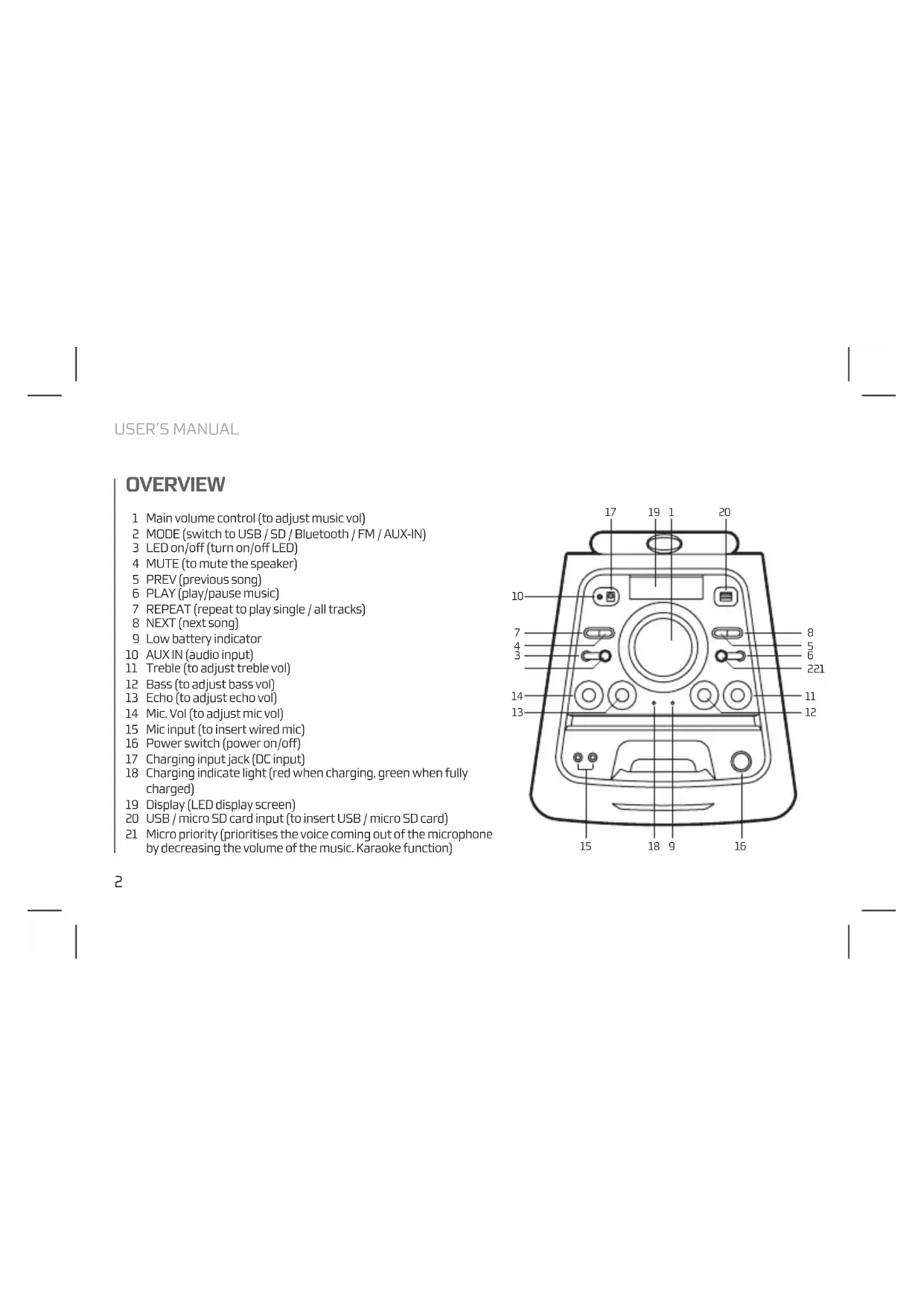
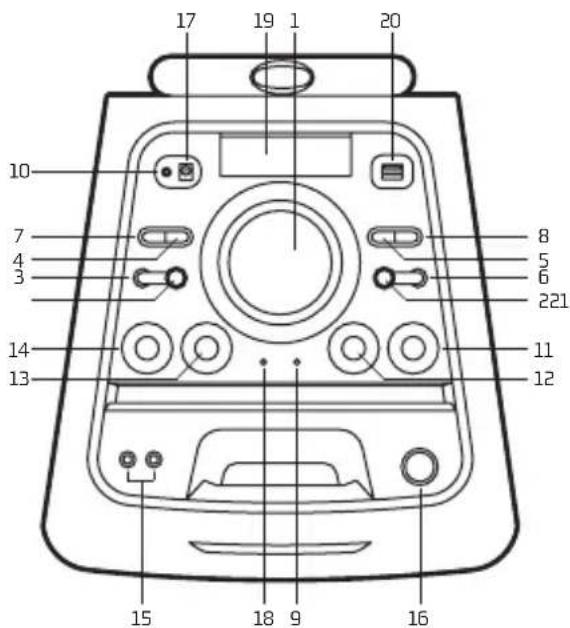
1 Main volume control (to adjust music vol)
2 MODE (switch to USB/SD/Bluetooth/FM/AUX-IN)
3 LED on/off (turn on/off LED)
4 MUTE (to mute the speaker)
5 PREV (previous song)
5 PLAY (play/pause music)
7 REPEAT (repeat to play single / all tracks)
8 NEXT (next song)
9 Low battery indicator
10 AUXIN (audio input)
11 Treble (to adjust treble vol)
12 Bass (to adjust bass vol)
13 Echo (to adjust echo vol)
14 Mic. Vol (to adjust mic vol)
15 Mic input (to insert wired mic)
16 Power switch (power on/off)
17 Charging input jack (DC input)
18 Charging indicate light (red when charging, green when fully charged)
19 Display (LED display screen)
20 USB/micro SD card input (to insert USB/micro SD card)
21 Micro priority (prioritises the voice coming out of the microphone by decreasing the volume of the music. Karaoke function)
AUX IN
You can connect the device with the external multimedia audio sources through the port "AUX". After connection, just set the mode to AUX by pressing the "Mode" button on the device. The device can play the audio files from multimedia sources like PC, mobile phone, MP3 and MP4, etc.
USB CARD/MICRO SD CARD/ BLUETOOTH/FMRADIO
USB CARD PLAYING
When power ON the product, if USB card inserted, it can play the MP3 format music from the USB. Press PREV/NEXT buttons to select the song you want. Press the play/pause button to pause / resume the music.
MICROSD CARD PLAYING
When the device is turned on it can play music in MP3 format from a micro SD card.
Press the PREV/NEXT buttons to select the song you want. Press the play/pause button to pause / resume the music.
NOTE: In the USB / SD modes you can choose to repeat one or all songs by pressing the REP button.
BLUETOOTH MODE
A. Press the MODE button until the screen displays the word BLUE. In Bluetooth mode the device goes into searching / paring / reconnect mode for pair.
B. Now, turn ON the Bluetooth function on your mobile phone.
C. Search for "NGS WILDROCK" and select it to pair (for first time pairing or pairing a new mobile device).
D. The Bluetooth speaker will be reconnecting automatically if your mobile phone has been paired (depend on the mobile phone's type and configuration, manual reconnection may require on some devices).
USER'S MANUAL
FM RADIO MODE
- Press the MODE button to enter the FM radio mode.
- Then press the play/pause button to carry out an automatic channel search.
- Once the automatic search is completed, you can switch between the saved stations by pressing the PREV/NEXT buttons.
CHARGING INSTRUCTIONS
This speaker has a high capacity 12V/4.5A battery. Please use a 15V/3A power adapter for charging. The charging indicator light will turn red to indicate that it is charging. It takes 4-8 hours for the battery to reach full charge. Disconnect the adaptor as soon as battery is fully charged (green charge light). Battery run time: 4 hours.
TECHNICAL SPECIFICATIONS
Output power: 200W
Battery:12V/4.5A
Bluetooth
Working range: 10m
Frequency response: 80Hz-18kHz
USB port
Aux input
Micro input x2
FM Radio
Micro SD card reader
LED screen
Battery level indicator
LED lights
ENGLISH

NGS
If at any time in the future you should need to dispose of this product please note that:
Waste electrical products should not be disposed of with household waste. Please recycle where facilities exist.
Check with your Local Authority or retailer for recycling advice.
(Waste Electrical and Electronic Equipment Directive)
VUE D'ENSEMBLE
Frequency response: 80Hz-18kHz
USB port
Aux input
Micro inputx2
FM Radio
Micro SD card reader
LED screen
Battery level indicator
LED lights
Akumulator: 12V/4,5A
Bluetooth
Zasieg pracy: 10m
KAPTA USB / KAPTA MICROSD/ BLUETOOTH / PAIOQNO FM
ANAPIAPATGHTAITO USB
Otrovo unoloyoiTc evai evepytoinmuoc, kai exeTe Eioayei USB otn ouakeur, tote autm avatapayei Tnu mouokni Tou utapxei ot npkta oe npnp MP3. Pntote to koumi PREV/NEXT ia va eIaEETe to tpayoudi nou thale. Patote to koumi avatapaywn / naon yia tn naow / enavekkivnon tnc muoikic.
KAPTA MICROSD
'Otav o UtoLoyoiOriC eivai evEpyoToinmuVoc, kai exeTe EIOaYei OTn OuaKeun mia Kapta micro SD, toTe autH avanapayei Tnu Mouokn Tou unApexi ot KAPTA OE uOpPn MP3.
Plntote to mNktpo PREV/NEXT ia va eniEETe to tpayoudi tro 0EeTe. Plntote to koumi avanapaywn / naon yia tm naon / etavekkivnon nnc houiknC.
EHMEIOH: Ttouc TpOiouc, Aenoupyiac USB/SD mIopeite va eIeEte TnV enavAynn Evoc n Oawv Tov Tpaoyoudiw NAtovrtac to nnKtpo REP.
AEIOTOYP1A BLUETOOTH
A. Pntote To nKtoPO MODE [eitoupyia] expi va eapaviotei otyn oovn n leyblue [mne]Tn aeitoupyia Bluetooth tnc oukeun civai evepyooinv nekai etai avqtnonc / taixviidi / enavaaovdeon yia va enavapepeote ouvdeao.
B. Everpyonoiotne Tn Ieitoupyia Bluetooth Tou Kivntou oac tnIepwovu.
C. Kávte avačtnon yia to “NGS WILDROCK” kai επλέτε to yia va πρayuatoonθe iouxpvioμος (yia πρωtn φρα ἡ yia va to ouxpvioεte με μia vεa σουkeι).
D.To nxEio Bluetooth 8a enavaouvdeei autouata vT ov KInrto oac, mEepuvo exei ouyxpovitei (avaloy a eTov TTO kai Tc puHIOeIC TOU KInrTO uMepuovou, mOpel ae opievec OuaKEuec va npTei VA EKTEAeETe Xelpokivta TnV enavaouvSeon).
O△HΓIEΣXPH∑H∑
AEITOYPNA PADIQONOY
AND THEREFORE COMPLY WITH THE ESSENTIAL REQUIREMENTS AND PROVISIONS OF THE FOLLOWING DIRECTIVES OF THE EUROPEAN PARLIAMENT AND EUROPEAN COUNCIL:
Y,PORLO TANTO,CUMPLE CON LOS REQUERIMIENTOS Y PROVISIONES DE LAS SIGUIENTES DIRECTIVAS DEL PARLAMENTO EUROPEQ:
ELECTROMAGNETIC COMPATIBILITY DIRECTIVE (EMC) 2014/30/EU
RADIO EQUIPMENT DIRECTIVE 2014/53/EU
LOW VOLTAGE DIRECTIVE (LVD) 2014/35/EU
ROHS DIRECTIVE 2011/65/EU
DIRECTIVA DE COMPATIBILIDAD ELECTROMAGNETICA (EMC) 2014/30/EU
DIRECTVA DE EQUIPOS DE RADIO 2014/53/EU
DIRECTVA DE BAJA TENSION (LVD) 2014/35/EU
DIRECTVA ROHS 2011/65/EU
AUTHORIZED REPRESENTATIVE:
REPRESENTANTEAUTORIZADO:
LURBE GRUP S.A.
POL.IND.EGUBURUBERRI
C/EGUBURUBERRI,5
20100ERRENTERIA(GUIPUZCOA)
SPAIN
ERRENTERIA, NOVEMBER 15TH, 2
ERRENTERIA,15 DE NOVIEMBRE DE 2017
SIGNED FIRMAD

RAUL MARTIN
PRODUCT MANAGER
LURBE GRUP S.A, ERRENTERIA, ESPAGNE, SOUS SA RESPONSABILITE EXCLUSIVE, CERTIFIE LA CONFORMITE DU PRODUIT:
FR
LURBE GRUP S.A, ERRENTERIA, ESPAN, DECLARA SOB A SUA EXCLUSIVA RESPONSABILIDA E CONFORMIDADE DO PRODUTO:
PT
NGS:HAUT-PARLEUR BLUETOOTH NGS / MODELE: WILDROCK
NGS:ALTO-FALENTE BLUETOOTHNGS /MODELO.WILDROCK
A ETÉ TESTÉ CONFORMÉMENT AUX NORMES STANDARD EUROPEENNES HARMONISEES SUIVANTES:
FOITESTADO EM CONFORMIDADE COM AS SEGUINTES NORMAS STANDARDE EUROPEIAS HARMONIZADAS:
ETSIEN301489-1V1.9.2(2011-09)
EN62479:2010
ETSIEN301489-17V2.2.1(2012-09)
EN60065:2014
ETSIEN300328V1.8.1(2012-06)
ET RESPECTE DONC LES EXIGENCES ET LES DISPOSITIONS DES DIRECTIVES SUIVANTES DU PARLEMENT EUROPEEN:
E,POR CONSEGUINT, CUMPRE COM OS REQUISITOS E PROVISOES DAS SEGUIENTES DIRECTIVAS DO PARLAMENTO EUROPEU:
DIRECTIVE DE COMPATIBILITE ELECTROMAGNETIQUE (EMC) 2014/30/EU
DIRECTIVE SUR LES EQUIPEMENTS RADIO 2014/53/EU
DIRECTIVE BASSE TENSION (LVD) 2014/35/EU
DIRECTIVE ROHS 2011/65/EU
DIRECTIVA DE COMPATIBILIDADE ELECTROMAGNETICA (EMC) 2014/30/EU
DIRECTVA RELATIVA AOS EQUIPAMENTOS DE RADIO 2014/53/EU
DIRECTVA DE BAIXA TENSAO (LVD) 2014/35/EU
DIRECTVA ROHS 2011/65/EU
REPRESENTANTAUTORISE:
REPRESENTANTEAUTORIZADO:
LURBE GRUP S.A.
POL IND. EGUIBURUBERRI
C/EGUIBURUBERRI.S
20100ERRENTERIA(GUIPUZCOA)
SPAIN
ERRENTERIA,LE 15 NOVEMBER 2017
ERRENTERIA,15 DE NOVEMBER 2017
SIGNE
ASSINADO

RAUL MARTIN
PRODUCT MANAGER

NGS
TECHNICAL SUPPORT: WWW.NGS.EU/SUPPORT
WWW.NGS.EU
- AUX IN
- USB CARD/MICRO SD CARD/ BLUETOOTH/FMRADIO
- USB CARD PLAYING
- MICROSD CARD PLAYING
- BLUETOOTH MODE
- USER'S MANUAL
- FM RADIO MODE
- CHARGING INSTRUCTIONS
- TECHNICAL SPECIFICATIONS
- VUE D'ENSEMBLE
- KAPTA USB / KAPTA MICROSD/ BLUETOOTH / PAIOQNO FM
- ANAPIAPATGHTAITO USB
- KAPTA MICROSD
- AEIOTOYP1A BLUETOOTH
- O△HΓIEΣXPH∑H∑
- AEITOYPNA PADIQONOY
Brand : NGS
Model : Wildrock
Category : Sound system