
BEPB09C - Air conditioner BEKO - Free user manual and instructions
Find the device manual for free BEPB09C BEKO in PDF.
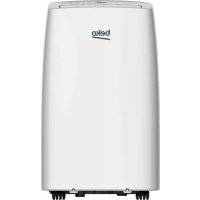



| Product type | Monoblock mobile air conditioner |
| Model | Beko BEPB09C |
| Brand | Beko |
| Cooling capacity | 8871 Btu/h (2600 W) |
| Heating capacity | 8871 Btu/h (2600 W) - heat pump model |
| Energy class cooling | A |
| Energy class heating | A+ |
| Electrical supply | 220-240 V ~ 50 Hz |
| Refrigerant gas | R410A (350 g) |
| Noise level (sound power) | 64 / 59 / 52 dBA (depending on speed) |
| Noise level (sound pressure) | 53 / 48 / 43 dBA |
| Airflow | 410 m³/h |
| Dehumidification | 0.9 l/h |
| Operating modes | Cooling, Heating, Dehumidification, Ventilation |
| Special functions | Timer (1-24 h), Sleep mode, Oscillation (remote control) |
| Remote control | Yes, with CR2032 battery |
| Dimensions (approx.) | 43 x 35 x 70 cm (L x D x H) |
| Weight (approx.) | 30 kg |
| Installation | Requires hose venting (window or wall) |
| Maintenance | Regular cleaning of air filters (vacuum cleaner or lukewarm water) |
| Safety | Mandatory grounding, residual current circuit breaker, do not use in humid environment |
| Supplied accessories | Exhaust hose, adapters, sliding window kit, drain hose, remote control |
Frequently Asked Questions - BEPB09C BEKO
User questions about BEPB09C BEKO
0 question about this device. Answer the ones you know or ask your own.
Ask a new question about this device
Download the instructions for your Air conditioner in PDF format for free! Find your manual BEPB09C - BEKO and take your electronic device back in hand. On this page are published all the documents necessary for the use of your device. BEPB09C by BEKO.
USER MANUAL BEPB09C BEKO
Mobile room air conditioner
User Manual
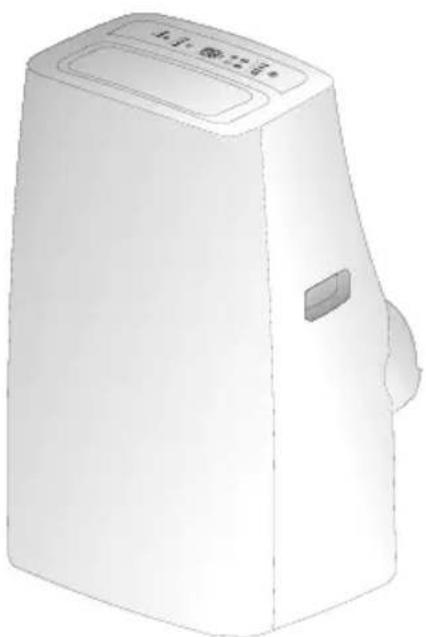
BEPB 09C BEPB 09H BEPB 12C BEPB 12H
EN FR RO|NL
Please read this user manual first!
Dear Customer,
Thank you for preferring a Beko product. We hope that you get the best results from your product which has been manufactured with high quality and state-of-the-art technology. Therefore, please read this entire user manual and all other accompanying documents carefully before using the product and keep it as a reference for future use. If you handover the product to someone else, give the user manual as well. Follow all warnings and information in the user manual.
Meanings of the symbols
Following symbols are used in the various section of this manual:

Important information or useful hints about usage.
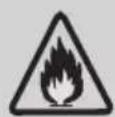
Warning for danger of fire.

Warning for hazardous situations with regard to life and property.
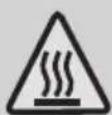
Warning for hot surfaces.

Warning to actions that must never perform.
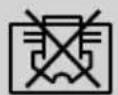
Do not cover it.
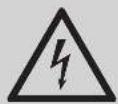
Warning for electric shock.

This product has been produced in environmentally friendly, modern facilities.
CONTENTS
1 Safety instructions 4
2 Parts description 9
2.1 Front view 9 2.2 Rear view 9
3 Control panel 11
3.1 Temp.indicator 11 3.2 Function buttons 11
4 Operation 13
5 Accessories 14
6 Installation 15
6.1 Guide of customer 15 6.2 Select a best location 15 6.3 Duct mount instruction 15 6.4 Install the exhaust duct into the window 16 6.5 Install the exhaust duct into the wall 17 6.6 Water drainage 18
7 Maintenance 20
7.1 Clean the unit 20
7.2 Clean the air filter 20
8 Troubleshooting 22
9 Specifications 24
10 Installation instructions 25
10.1 F-Gas instruction 25
11 Buttons description 26
12 Usage 28
12.1 Fix batteries 28
12.2 Attention 29
1 Safety instructions
Incorrect installation or operation by not following these instructions may cause harm or damage to people, properties, etc.
Warning
This appliance can be used by children aged from 8 years and above and persons with reduced physical, sensory or mental capabilities or lack of experience and knowledge if they have been given supervision or instruction concerning use of the appliance in a safe way and understand the hazards involved. Children shall not play with the appliance.
Cleaning and user maintenance shall not be made by children without supervision.
(Only for the AC with CE-Marking)
This appliance is not intended for use by persons (including children) with reduced physical, sensory or mental capabilities, or lack of experience and knowledge, unless they have been given supervision or instruction concerning use of the appliance by a person responsible for their safety.
Children should be supervised to ensure that they do not play with the appliance.
(Except for the AC with CE-Marking)
The air conditioner must be grounded. Incomplete grounding may result in electric shocks.
Do not connect the earth wire to the gas pipeline, water pipeline, lightning rod, or telephone earth wire.
1 Safety instructions
After installation, an earth leakage examination must be carried out by electrifying. Do not move the unit unless the power has been cut off and the power cord is tied to the bending and winding column. An earth leakage breaker with rated capacity must be installed to avoid possible electric shocks. Do not install the air conditioner in a place where there is flammable gas or liquid. It may cause fire. If the power supply cord is damaged, it must be replaced by the manufacturer or its service agent or a similar qualified person. The specification of the fuse is AC250V T3.15AL. Do not put hands or any objects into the air inlets or outlets.
This may cause personal injury or damage to the unit.
Do not touch the swinging wind vanes.
It may clamp your finger and damage the driving parts of the wind vanes.
Do not attempt to repair the air conditioner by yourself.
You may be hurt or cause further malfunctions.
During lightning storms, please cut off the primary power supply switch to prevent the machine from damage. Do not use liquid or corrosive detergent to clean the appliance and do not splash water or other liquid onto it; otherwise, it may damage the plastic components, even cause electric shock. Do not operate the unit in a wet room such as the bathroom or laundry room.
1 Safety instructions
Do not touch the unit with wet or damp hands or when barefoot. If your air conditioner is not fitted with a supply cord and a plug, an all-pole switch must be installed in the fixed wiring and the distance between contacts should be no less than 3.0 mm.

Warning
Do not apply cold air to the body for a long time. It will deteriorate your physical condition and cause health problems. Do not block the air inlet or air outlet; otherwise, the cooling capacity will be weakened, and the system may even stop operating. Close the windows and doors; otherwise, the cooling capacity will be weakened. If the air filter is very dirty, the cooling capacity will be weakened. Please clean the air filter regularly.
1 Safety instructions

Notices for R410A models
Refrigerant leakage contributes to climate change. Refrigerant with lower global warming potential (GWP) would contribute less to global warming than a refrigerant with higher GWP, if leaked to the atmosphere. This appliance contains a refrigerant fluid with a GWP equal to [2088]. This means that if 1 kg of this refrigerant fluid would be leaked to the atmosphere, the impact on global warming would be [2088] times higher than 1 kg of CO2, over a period of 10 years. Never try to interfere with the refrigerant circuit yourself or disassemble the product yourself; always ask a professional.
1 Safety instructions
WEEE Warning

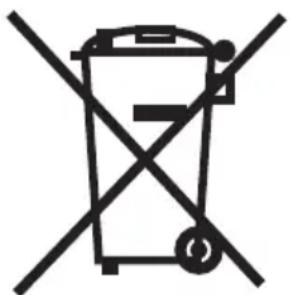
Meaning of crossed out wheeled dustbin:
Do not dispose of electrical appliances as unsorted municipal waste; use separate collection facilities.
Contact your local government for information regarding the collection systems available.
If electrical appliances are disposed of in landfills or dumps, hazardous substances can leak into the groundwater and get into the food chain, damaging your health and well-being.
When replacing old appliances with new ones, the retailer is legally obligated to take back your old appliance for disposal at least free of charge.
The oil of compressor used as per the table below:
| Compressor manufacturer or trade mark | Refrigerant The name of oil | |
| Highly R410A α68H | ES-H or equivalent | |
| R22 DIAMOND MS-56 or NM56EP or equivalent | ||
| Meizhi R410A ESTER | OIL Vg68 | |
| R22 SUNISO | 4GSD or NM56EP or equivalent | |
| Rechi R410A NMOC | Ze-Gles RB68EP | or equivalent |
2 Parts description
2.1 Front view
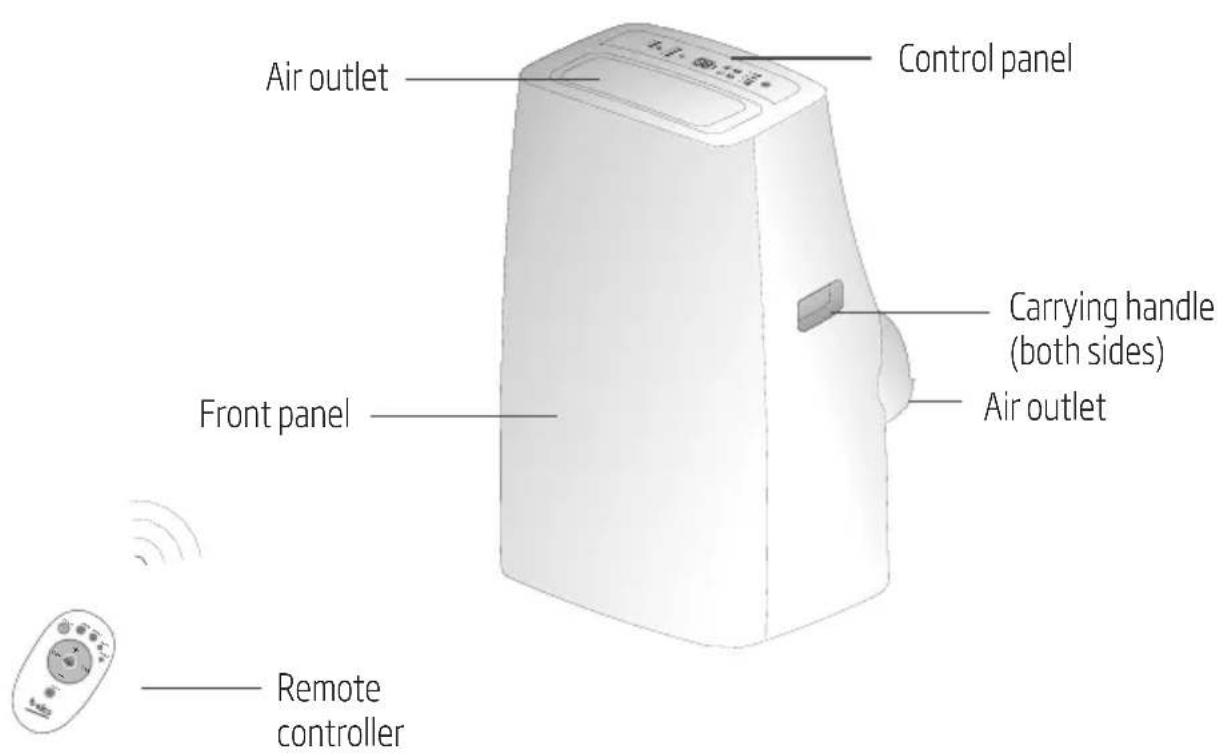
2.2 Rear view
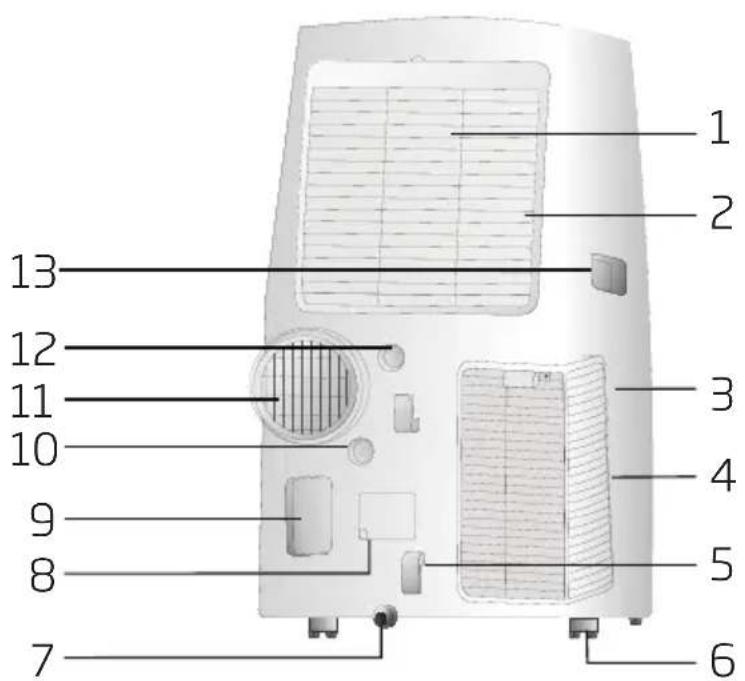
2 Parts description
- Upper air filter (behind the grille)
- Upper air intake
- Lower air filter (behind the grille)
- Lower air intake
- Power cord buckle
- Caster
- Bottom tray drain outlet
- Power cord outlet
- Power plug socket
- Pump drain outlet
- Air outlet
- Drain outlet
- Carrying handle (both sides)

Note:
The descriptions in this user manual are text and figures may have slight differences from the promotion information and actual appliance. Please refer to the real appliance purchased. Thank you. The working temperature range of the air conditioner is 16~35°C (60~95°F) under cooling mode; 5~27°C (41~80°F) under heating mode.
3 Control panel
There are two kinds of control panels, Fig A and Fig B, the actual shape shall prevail.
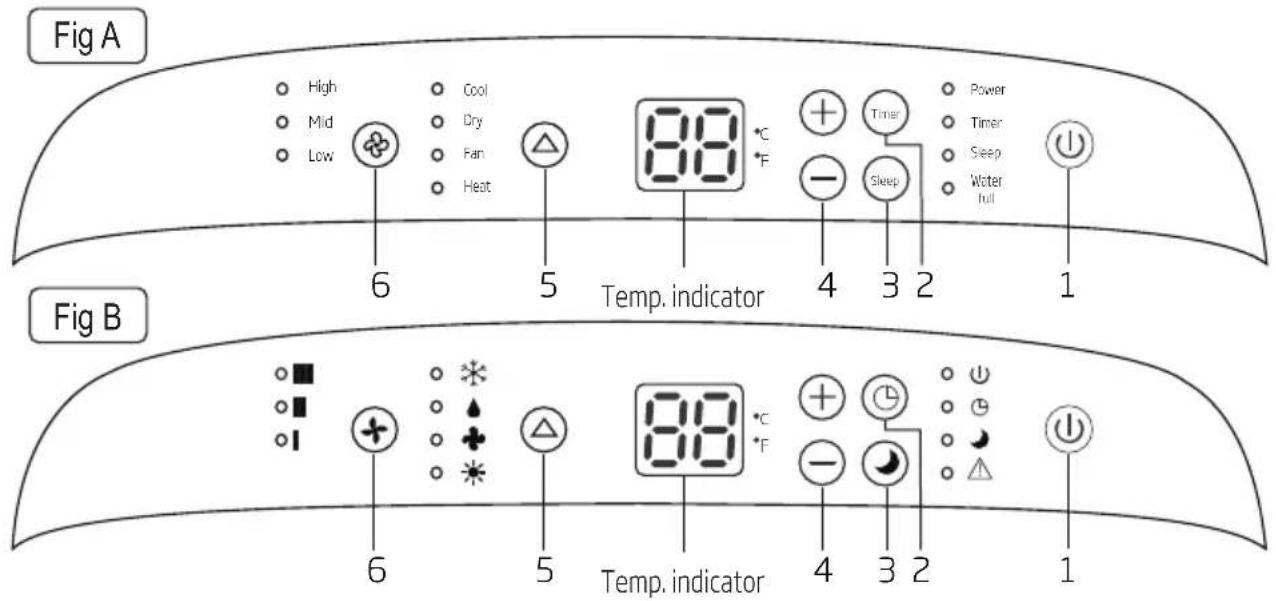
3.1 Temp. indicator
- In cooling or heating mode, when the + or - button is pressed, the setting temperature is displayed and adjusted.
- There are two kinds of types about Temp. indicator default display, the actual shape shall prevail.
- The default display is setting temperature.
- The default display is room temperature. After flashing 5 seconds when adjusting setting temperature, the display will revert back to room temperature.
3.2 Function buttons
- button - Press this button to make the unit run or stop.
- / button - Press this button, the Timer/ indicator light will illuminate, then press the + or - button to set the desired time.

Note:
With the unit on, press this button to set the timer. With the unit off, press this button to set the timer.
- Press this button to enter Sleep mode, which the unit will exit after 10 hours of continuous operation and restore to the previous status.

Note:
The Sleep function cannot be activated in Fan mode.
3 Control panel
4. + or - button
a. Each time the + or - button is pressed, the setting temperature will increase or decrease by 1°C (1°F). The setting temperature ranges from 16°C (60°F) to 32°C (90°F). b. By pressing both the + and - buttons at the same time, the display will toggle between Celsius and Fahrenheit.
- Button - Press this button to select the running mode as follows:

The mode indicator light illuminates under the different modes.

Note:
Heat mode is not available for cool-only units.
- Button - Press this button to select the fan speed as follows:

The fan speed indicator light illuminates under the different fan speeds.

Note:
- Swing function can be selected by remote controller not by control panel.
- Other functions on control panel are as remote controller's.
4 Operation

Warning:
Failure to follow the below precaution could result in electrical shock, fire or personal injury.
- The plug must be plugged into an outlet that is properly installed and grounded.
- Do not use an extension cord or plug adaptor with this unit.
Before starting the unit
- Select a suitable location, make sure the unit is near to an electrical outlet.
- Install the flexible exhaust hose and the adjustable window slider kit.
- Plug the unit into a right outlet.
Heating operation mode (Cold wind type has no heating function)
- Press the Mode button in a sequence until the heat indicator is lighted.
- Press the "+" and "-" button to setting your desired setting temperature.
- Press Fan button to select the fan speed.
Cooling operation mode
- Press the Mode button in a sequence until the cool indicator is lighted.
- Press the "+" and "-" button to set your desired setting temperature.
- Press Fan button to select the fan speed.
Drying operation mode
- Press the Mode button in a sequence until the dry indicator is lighted.
- The fan will run at a fixed speed at this operation mode.
- Close windows and doors for the best dehumidifying effect.

Note: The setting temperature and fan speed can not be adjusted. The setting temperature is 25°C (77°F) and the fan speed is low.
Fan operation mode
- Press Mode button in a sequence until the fan indicator is lighted.
- Press the Fan button to select the fan speed.

Note: The setting temperature can not be adjusted.
5 Accessories
| Parts Parts name Quantity | |
| Adaptor A, Exhaust duct, Adaptor B (flat mouth), Window slider kit and Plastic Pin | 1 set |
| Adaptor B (round mouth) (#), Wall exhaust Adaptor (#) | 1 set |
| Drain hose 1 pc | |
| Remote controller and Battery 1 pc |

Note: Optional parts (#), some models without.

Note: All the illustrations in this manual are for explanation purposes only. Your air conditioner may be slightly different; the actual shape shall prevail.

Q models mobile air-conditioner air louver notes:
- For models with automatic wind sweep function, the air louver cannot be less than the automatically wind smallest outlet angle when in use.
- For models without automatic sweep function, the air louver minimum opening angle: from the air louver closed state, breaking up 5 grids, the air louver cannot be less than the minimum open angle when in use.
6.1 Guide for the customer
- The customer should have a qualified power supply that coincides with that printed on the tag of the air conditioner.
- Must use a special circuit and an efficient grounding outlet that matches the plug of the air conditioner.
- The appliance should be installed in accordance with national wiring regulations.
- The plug should be easily accessible after installation.
6.2 Select the best location
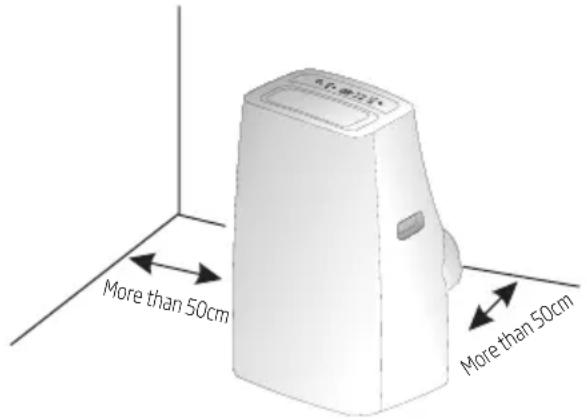
- Install the mobile air conditioner in a flat and spacious location where the air outlets will not be obstructed.
- A minimum clearance of 50 cm from walls or other obstacles should be kept.
- The gradient cannot be more than 10 degrees with the horizontal plane when placing and using the utensil.

Note:
- The air conditioner shall not be used in the laundry.
- The plug shall be accessible after the unit is positioned.
6.3 Duct mount instruction
- In cooling, heating and drying mode, the exhaust duct needs to be installed while in fan mode, the exhaust duct is not needed.
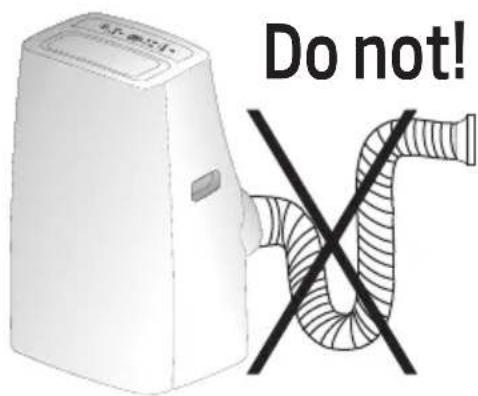
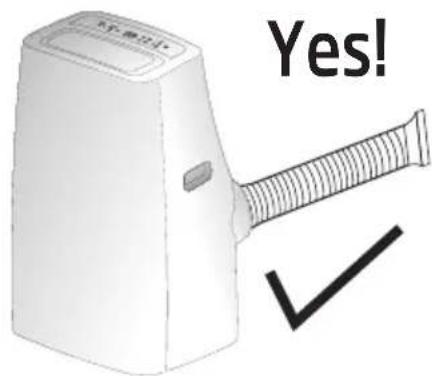
- According to the actual needs, the exhaust duct can be moderately compressed and tensed, but cannot be arbitrarily stretched and bent.
- The exhaust duct can be connected with Windows or installed into the wall.
Based on accessories of the unit you buy and the actual needs, you can make the installation.
6 Installation
- Install the adaptor A and adaptor B (flat mouth or round mouth) onto the exhaust duct as shown in Fig. A or Fig.B.
Fig.A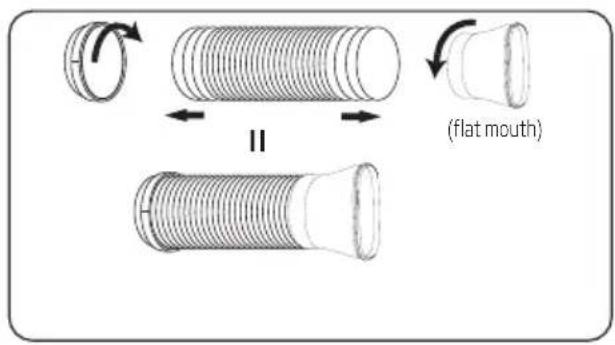
or
Fig. B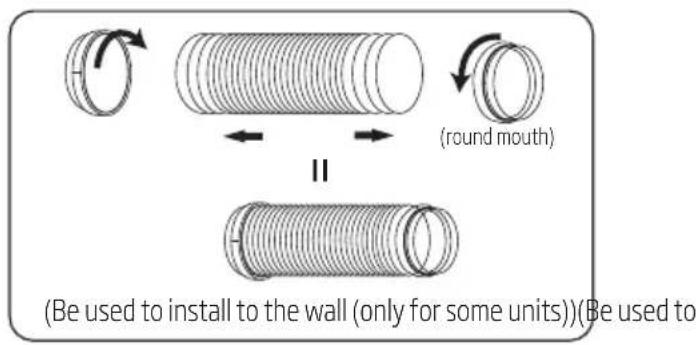
- Connect the exhaust duct to the Air outlet connector on back of the unit. Slide-in the adaptor A downwards until it is locked in place. (Fig.C)
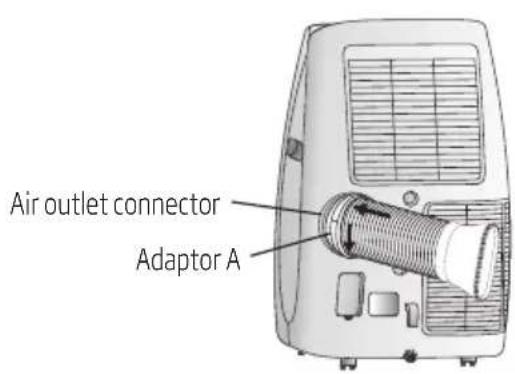
or Fig. C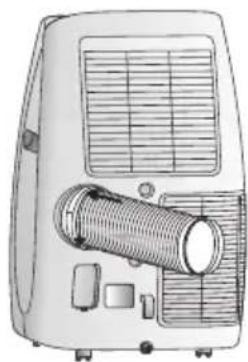
6.4 Install the exhaust duct into the window
- Adjust the window bracket as per width or height of your window and insert the plastic pin to fix at the desired position.
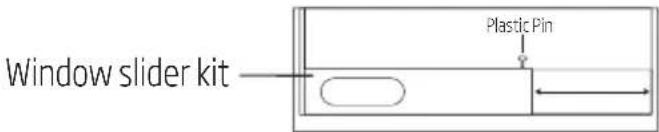
- Install the Window slider kit into the window.
Your window kit has been designed to fit most standard vertical and horizontal window applications. However, it may be necessary for you to improve or modify some aspects of the installation procedure for certain types of window. Please refer to Fig. D & Fig. E for minimum and maximum window openings.
6 Installation
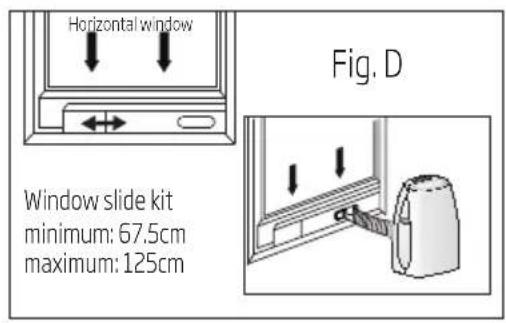
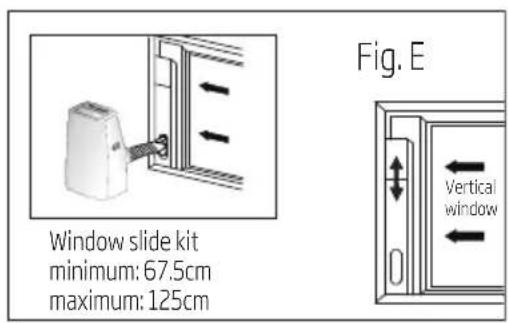
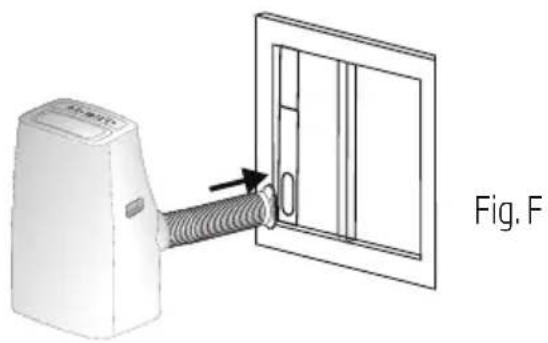
- Remove the unit with the packed exhaust duct next to the window, and then connect the adaptor B (flat mouth) of the exhaust duct with the window. (Fig. F)
6.5 Install the exhaust duct into the wall
- Prepare a hole in the wall. Install the wall exhaust adaptor onto the wall, be sure to fix thoroughly.
- Attach the exhaust duct to wall exhaust adaptor. (Fig. G)
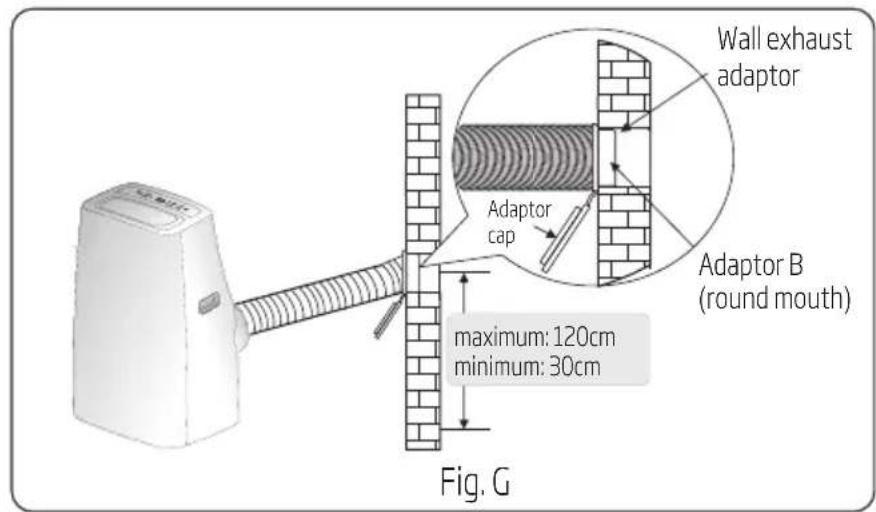

Note: Cover the hole using the adaptor cap when not in use.
6 Installation

Note:
- The duct can be compressed to 270mm minimum and extended to 1500mm maximum. It is better to keep the duct length to a minimum.
- Stretching or bending the duct excessively will affect the cooling efficiency. (As the following fig. Shows)
6.6 Water drainage
- During dehumidifying mode, remove the upper drain plug from the back of the unit. Attach the drain hose to the hole. Place the other end of the hose in the drainage way or other drain areas.
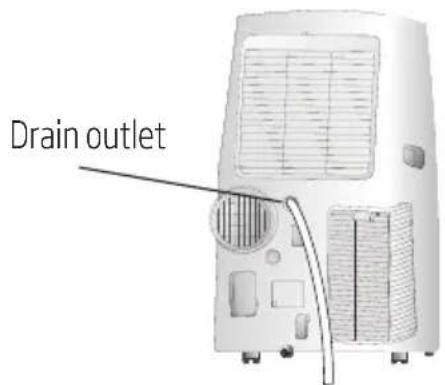

- If the unit you bought has the pump drain outlet, as shown below, please drain in this way: Remove the pump drain plug from the back of the unit, attach the drain hose to the hole. Place the other end of the hose in the drainage way or other drain areas.
6 Installation
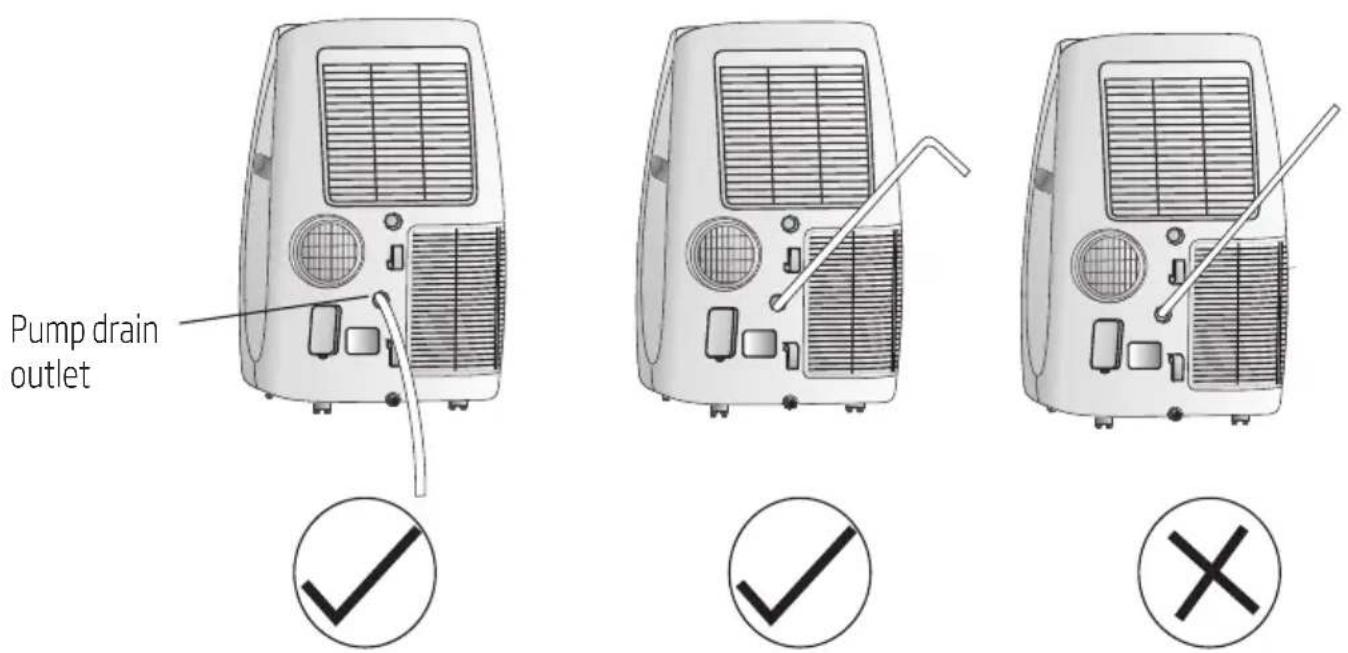

Note: Make sure the hose is secure and there are no leaks. Direct the hose toward the drain, making sure that there are no kinks that will stop the water flowing. Place the end of the hose into the drain and make sure the end of the hose is down to let the water flow smoothly. Do never let it up.
- When the water level of the bottom tray reaches predetermined level, the digital display area shows "P1" and the Water full indicator light illuminates. Carefully move the unit to a drain location, remove the bottom drain plug and let the water drain away. Reinstall the bottom drain plug and restart the machine until the P1 symbol disappears. If the error repeats, call for service.
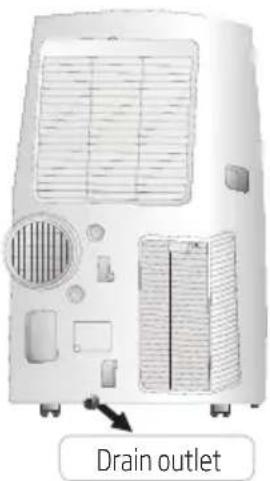

Note: Be sure to reinstall the bottom drain plug before using the unit.
7 Maintenance

Warning:
- Before the cleaning of the air conditioner, it must be shut down and the electricity must be cut off for more than 5 minutes, otherwise there might be the risk of electric shocks.
- Do not use gasoline, benzene, thinner or any other chemicals, or any liquid insecticide on the air conditioner, as these substances may cause flaking off of the paint, cracking or deformation of plastic parts.
- Never attempt to clean the unit by pouring water directly over any of the surface areas, as this will cause deterioration of electrical components and wiring insulation.
7.1 Clean the unit
When the unit is contaminated, clean it gently with a wrung towel using tepid water below 40°C (104°F).
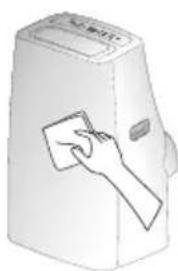
7.2 Clean the air filter
1. Remove the air filter
Respectively draw back the upper air intake grille and the lower air intake grille, take out the upper air filter 1 and the lower air filter 2.
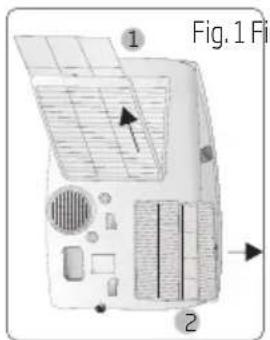
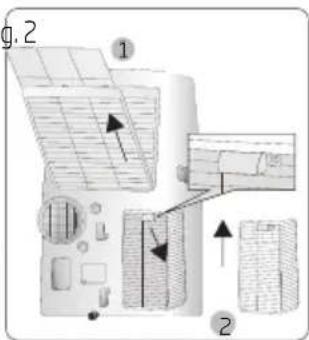

Note: There are two types about the low air intake grille, please refer to Fig. 1 or Fig. 2. If the low air intake with a screw, please remove the screw at first.
7 Maintenance
2. Clean the air filter
Use a vacuum cleaner or water to rinse the filter. If the filter is very dirty (for example, with greasy dirt), clean it with warm water (below 40°C / 104°F) with mild detergent dissolved in it, and then put the filter in the shade to dry in the air.
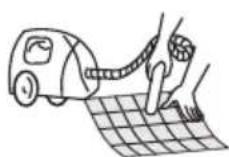

- Reinstall the dried filter in reverse order of removal. Put the filter cover back in its place.
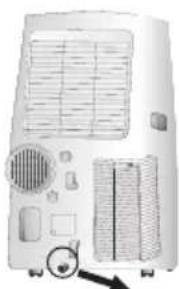

Note:
If you don't use the unit for a long time, please pull out the rubber plug to drain the inside water out, referring to the right figure.
8 Troubleshooting
To save the cost of a service call, please try the suggestions below to see if you can solve your problem without outside help.
| Air condition will not operate | |
| Causes Solutions | |
| • The power switch is released. • Power supply failure. • The fuse is burnt. • It doesn’t reach the setting time for starting up. | • Switch on the power. •Wait for the recovery of power supply. •Replace the fuse. •Wait or eliminate the original setting. |
| Unit doesn’t start when pressing On/Off button | |
| Causes Solutions | |
| • It is not four minutes after switch off. • Room temperature is lower than the setting temperature under cooling mode or higher than setting temperature under heating mode. | • Wait four minutes. • Reset the setting temperature. |
| The wind bowing out, but the cooling effect is bad | |
| Causes Solutions | |
| • Mistakes in temperature setting. • The air filter is blocked by dust. • The air inlet or outlet of machine is blocked. • Turn the air conditioner on in very hot room. • Cooling capacity is insufficient. • The doors or windows are open. | • Set a proper temperature, setting temperature should be lower than ambient temperature. • Clean the air filter. • Remove the obstruction. • Allow additional time to remove stored heat from walls, ceiling, floor and furniture. • Reconfirm the required cooling capacity with your dealer. • Close the doors and windows. |
8 Troubleshooting
| Noise or vibration | |
| Causes Solutions | |
| • The ground is not level or not flat enough. | • Place the unit on a flat, level ground if possible. |
9 Specifications
| Beko Model Name BEPB 09 C BEPB 09 H BEPB 12 C BEPB 12 H | ||||
| Cooling Capacity (Btu/h) 8871 8871 11942 11942 | ||||
| Cooling Capacity (W) 2600 2600 | 3500 3500 | |||
| Heating Capacity (Btu/h) - 8871 | -11260 | |||
| Heating Capacity (W) | 2600 - | 3300 | ||
| Energy Efficiency Cooling (W/W) | 2.61 2.61 2.61 2 | 61 | ||
| Energy Efficiency Heating (W/W) | - | 3.0 | 3.0 | |
| Energy Level-Cooling A | A | A | A | |
| Energy Level-Heating | - | A+ | A+ | |
| Power of Electric Heater (W) | - | - | - | |
| Voltage/Frequency (V/Hz) | 220~240V-1-50Hz | 220~240V-1-50Hz | 220~240V-1-50Hz | |
| Noise Power Level (dBA) (Sound Power) | 64/59/52 | 64/59/52 | 64/59/52 | |
| Noise Pressure Level (dBA) (Sound Pressure) | 53/48/43 | 53/48/43 | 53/48/43 | |
| Air flow volume (m³/h) | 410 | 410 | 410 | |
| Moisture removal (lt/h) 0.9 | 0.9 1.0 | 1.0 | ||
| Working Temperature Range at Cooling (°C) | 16°C ~ 43°C | 16°C ~ 43°C | 16°C ~ 43°C | |
| Working Temperature Range at Heating (°C) | -5°C ~ 30°C - 5°C ~ 30°C | |||
| Refrigerant | R410A | R410A | R410A | |
| Total Refrigerant Amount (g) | 350 | 350 | 460 | |
| Climate Class | T1 | T1 | T1 | |
| Heating Type | - | Heating Pump | Heating Pump | |
| Control Type | Remote Control | Remote Control | Remote Control | |
10 Installation instructions
10.1 F-Gas instruction
This product contains fluorinated greenhouse gases covered by the Kyoto protocol.
The fluorinated greenhouse gases are contained in hermetically sealed equipment.
Installation, service, maintenance, repair, leak checks, decommissioning of equipment, and product recycling should be carried out by natural persons who hold relevant certificates.
If the system has a leakage detection system installed, leakage checks should be performed at least every 12 months to ensure the system operates properly.
If the product requires leakage checks, the inspection cycle should be specified, and records of leakage checks should be established and saved.

Note: For hermetically sealed equipment, portable air conditioners, window air conditioners, and dehumidifiers, if the CO2 equivalent of fluorinated greenhouse gases is less than 10 tonnes, leakage checks are not required.
11 Button descriptions
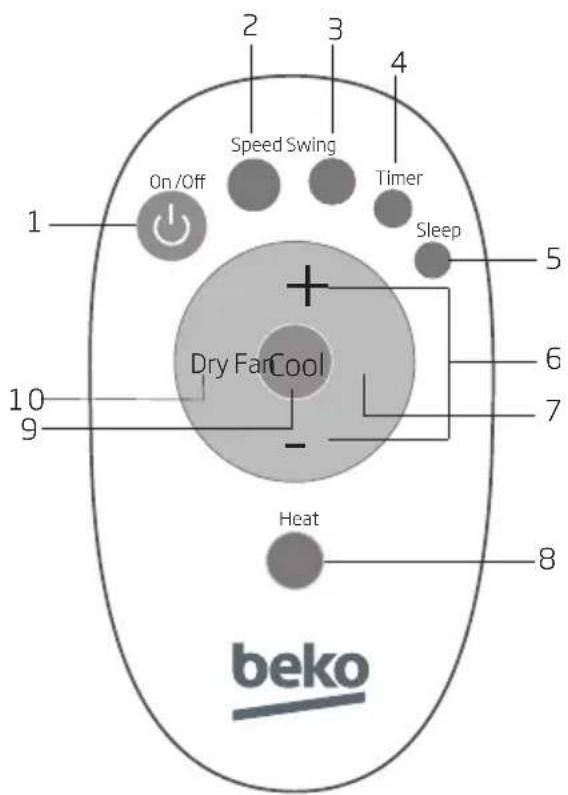
- "On/Off" button
Press "On/Off" to turn the air conditioner on or off.
- "Speed" button
Press "Speed" to set the wind speed (Low, Mid, or High).
3. "Swing" button (optional)
Press "Swing" to turn the swing function on or off.
- "Timer" button
a. When the air conditioner is off, press "Timer" to set a time to turn it on. Press "+" or "-" to set the time, and press "Timer" again to confirm. b. When the air conditioner is on, press "Timer" to set a time to turn it off. Press "+" or "-" to set the time, and press "Timer" again to confirm. c. After setting the time, press "Timer" again to cancel the set time.

Note: After setting the time, press "Timer" again to confirm it within 5 seconds. If no operation is performed within 5 seconds, the air conditioner will confirm the time automatically. Pressing "Timer" after confirmation will cancel the set time.
11 Button descriptions
5. "Sleep" button
a. In operating mode, press "Sleep" to enter the 10-hour intelligent sleep mode. After 10 hours, the air conditioner will exit the sleep mode and restore its previous mode. b. In sleep mode, press "Sleep" again, or press "Mode" or "On/Off" to exit the sleep mode.

Note: The sleep mode cannot be started in ventilation mode.
6. "+" and "-" button
Press "+" and "-" to regulate the temperature (the unit is 1°C) and set the time (the unit is 1h). The temperature ranges from 16°C to 32°C, and the time ranges from 1h to 24h.
7. "Fan" button
Press "Fan" to start the Ventilation mode.
8. "Heat" button
Press "Heat" to start the heating mode.
9. "Cool" button
Press "Cool" to start the refrigeration mode.
10. "Dry" button
Press "Dry" to start the dehumidification mode.

Note: Only when temperature reaches 16°C can we turn on the dehumidification mode, besides, the drain pipe must be installed.
12.1 Fix batteries
- Slide to open the cover according to the direction indicated by the arrowhead.
- Install the button battery (CR2032/3V). Make sure the positive pole faces up.
- Put back the cover.
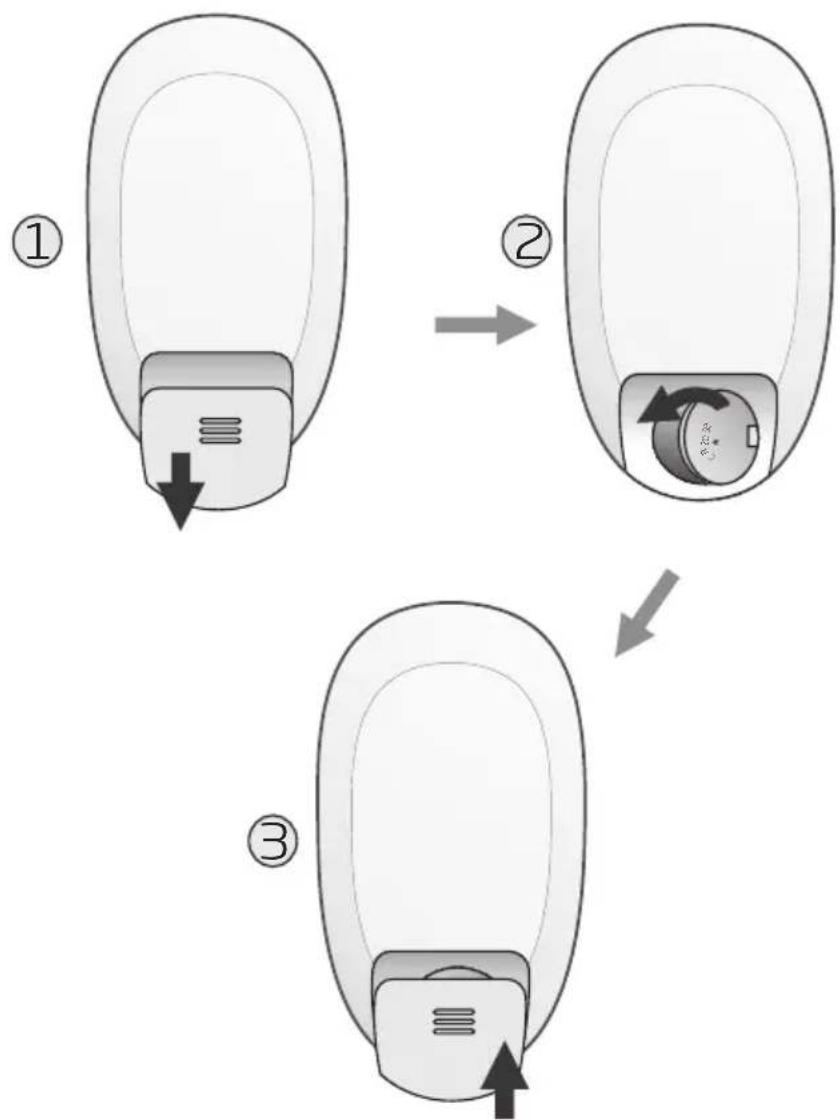
12.2 Attention
- Aim the remote control towards the receiver on the air conditioner.
- The remote control should be within 8 meters away from the receiver.
- No obstacles between the remote control and the receiver.
- Do not drop or throw the remote control.
- Do not put the remote control under strong sunlight or near heating devices and other heat sources.
- Use the button battery (CR2032/3V).
- Take the battery out of the remote controller when you don't use it for a long time.
- When the operation sound cannot be heard from the indoor unit or the transmission symbol on the display screen does not flash, the battery needs to be replaced.
- If the reset phenomenon occurs when pressing the button of the remote control, the electrical quantity is deficient and the battery needs to be replaced.
- Waste batteries should be disposed of properly.

Note:
- The picture is a general remote controller, containing almost all of the function buttons. They may be slightly different from the actual object (depending on the model).
Manufactured by Arcelik A.S. Karaagac Cd. No:2-6 34445 Sultuce, Beyoglu, Istanbul, Turkey.
Attention! Hot surfaces!

- "On/Off" button
5. "Sleep" button
- MOBILE ROOM AIR CONDITIONER
- PLEASE READ THIS USER MANUAL FIRST
- MEANINGS OF THE SYMBOLS
- CONTENTS
- SAFETY INSTRUCTIONS
- PARTS DESCRIPTION
- CONTROL PANEL
- OPERATION
- ACCESSORIES
- INSTALLATION
- MAINTENANCE
- TROUBLESHOOTING
- SPECIFICATIONS
- INSTALLATION INSTRUCTIONS
- BUTTONS DESCRIPTION
- USAGE
- WARNING
- NOTICES FOR R410A MODELS
- WEEE WARNING
- FRONT VIEW
- REAR VIEW
- NOTE
- TEMP. INDICATOR
- FUNCTION BUTTONS
- OR - BUTTON
- BEFORE STARTING THE UNIT
- HEATING OPERATION MODE (COLD WIND TYPE HAS NO HEATING FUNCTION)
- COOLING OPERATION MODE
- DRYING OPERATION MODE
- FAN OPERATION MODE
- Q MODELS MOBILE AIR-CONDITIONER AIR LOUVER NOTES
- GUIDE FOR THE CUSTOMER
- SELECT THE BEST LOCATION
- DUCT MOUNT INSTRUCTION
- INSTALL THE EXHAUST DUCT INTO THE WINDOW
- INSTALL THE EXHAUST DUCT INTO THE WALL
- WATER DRAINAGE
- CLEAN THE UNIT
- CLEAN THE AIR FILTER
- REMOVE THE AIR FILTER
- F-GAS INSTRUCTION
- BUTTON DESCRIPTIONS
- SLEEP" BUTTON
- AND "-" BUTTON
- FAN" BUTTON
- HEAT" BUTTON
- COOL" BUTTON
- DRY" BUTTON
- FIX BATTERIES
- ATTENTION
Brand : BEKO
Model : BEPB09C
Category : Air conditioner