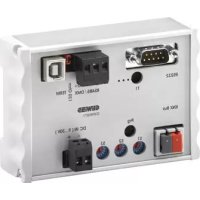
GW90871 - Smart home gateway Gewiss - Free user manual and instructions
Find the device manual for free GW90871 Gewiss in PDF.



| Product type | KNX/DMX home automation gateway |
| Brand | Gewiss |
| Model | GW90871 |
| Dimensions (L x H x P) | 107 x 75 x 31 mm |
| Weight | Approx. 200 g (estimated) |
| Protection rating | IP20 |
| Mounting | Modular device (width 92 mm) |
| Ambient temperature | -5 °C to 45 °C |
| Power supply | 9-30 V DC, 100 mA, galvanically isolated |
| Connections | KNX bus (terminals + and -), DMX512 bus (RS485, 3-pole), USB, RS-232 |
| Supported protocols | KNX (TP), DMX512-A |
| Number of KNX objects | 1556 objects (DPT 1.001, 3.007, 5.001) |
| DMX channels | 512 channels |
| Sequence memory | 8 sequences (512 channels each) |
| Main functions | Switching, dimming, scene recall, centralized control |
| Configuration | Via rotary switch (group address) or ETS software |
| Firmware update | Via USB port |
| Safety | Galvanic isolation between KNX, DMX and power supply |
| Installation | By qualified personnel, according to applicable electrical standards |
| Maintenance and cleaning | Clean with a dry cloth; avoid dust |
| Spare parts and repairability | No spare parts available; repair by the manufacturer |
Frequently Asked Questions - GW90871 Gewiss
User questions about GW90871 Gewiss
0 question about this device. Answer the ones you know or ask your own.
Ask a new question about this device
Download the instructions for your Smart home gateway in PDF format for free! Find your manual GW90871 - Gewiss and take your electronic device back in hand. On this page are published all the documents necessary for the use of your device. GW90871 by Gewiss.
USER MANUAL GW90871 Gewiss
Imposta dimming fi no a 100% (down).
5.1 Physical address programming 18
5.2 Functions 18
6 TECHNICAL DATA 24
1 GENERAL INFORMATION
Warning!
The safety of this appliance is only guaranteed if all the instructions given here are followed scrupulously. These should be read thoroughly and kept in a safe place.
Chorus products can be installed in environments which are dust-free and where no special protection against the penetration of water is required.
They shall be installed in compliance with the requirements for household devices set out by the national standards and rules applicable to low-voltage electrical installations which are in force in the country where the products are installed, or, when there are none, following the international standard for low-voltage electrical installations IEC 60364, or the European harmonization document HD 60364.
Gewiss sales organization is ready to provide full explanations and technical data on request.
Gewiss SpA reserves the right to make changes to the product described in this manual at any time and without giving any notice.
2 PACK CONTENT
The delivery package of the Gateway KNX/DMX contains the following components:
N.1 Device Gateway KNX/DMX
N.1 Installation instructions
3 GENERAL DESCRIPTION
The KNX-DMX Gateway is an Interface between the KNX bus and the DMX512 bus.
It combines elements of building automation with a multitude of lighting and special effects devices for every need.
The KNX-DMX Gateway is unidirectional, receives data telegrams on the KNX bus and transmits the data onto the DMX512 bus.
The interface allows the DMX512 actuators to communicate via the KNX bus using the full range of the channel.
The KNX-DMX Gateway contains 8 adjustable sequence positions within the whole channel range.
Individual scenes with all 512 channels can be saved and retrieved using KNX group addresses.
This function allows all channels to be connected simultaneously to one single object without causing any undo load on the KNX bus.
The sequences are saved internally and can be retrieved even after a power outage.
(A sequence can only be saved 10000 times during the lifetime of the device.
The automatic save function should not be set for short intervals.)
The set value in sequence 8 is also "on" for all channels when using 1bit objects.
The KNX-DMX Gateway is ready to use and can be positioned to the main group addresses with an S1 rotary switch.
It is not necessary to project via the ETS.
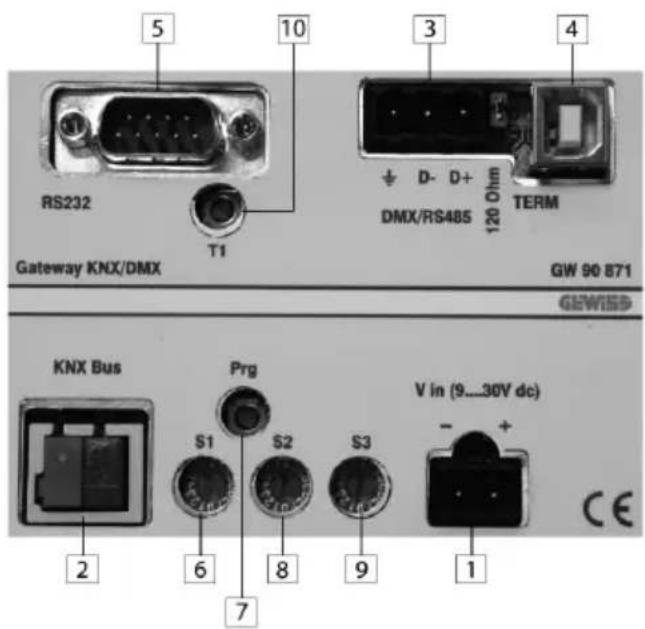
- Clamp DC IN (9...30V)
- Clamp KNX BUS
- Clamp DMX/RS485
- USB Connector
- RS-232 Connector
- Rotary switch Main Group ETS
- Push button programming KNX Physical address
- Rotary switch for Function Soft Start
- Rotary switch for Function Dimming
- Reset
4 INSTALLATION

WARNING: the installation of the device must be exclusively done by qualified personnel, following the regulations in force and the guidelines for KNX/EIB installations.
Warnings for KNX/EIB installations
- The length of the bus line between the KNX/DMX Gateway and the power supply unit must not exceed 350 metres.
- The length of the bus line between the KNX/DMX Gateway and the most distant KNX/EIB device must not exceed 700 metres.
- If possible do not create ring circuits so as to prevent undesirable signals and overloads.
- Keep a distance of at least 4mm between the individually insulated cables of the bus line and those of the electric line.
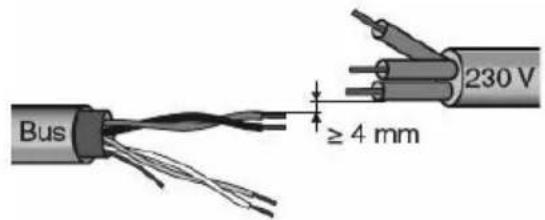
- Do not damage the electrical continuity conductor of the shielding.
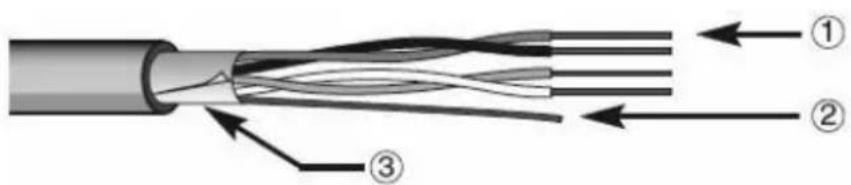
- Bus cable
- Electrical continuity conductor
- Shield

WARNING: the unused bus signal cables and the electric continuity cable must never touch powered elements or the grounding cable!
Warnings for installation phase
Switch on the voltage supply.
The group addresses are coded by S1 when the DC voltage in KNX-DMX Gateway is switched on. Soft-start (slow start-up to protect lights) can be adjusted using S2 and S3 sets the dimming function. If turning the rotary switch afterwards has no effect, it can be reset using T1. The Prg button on device inputs the physical addresses via a dummy application into the ETS. The Jumper J1 (120R TERM) times the RS485 Bus with 120 Ohm load resistance in its initial state. The KNX bus is galvanically separated from the DMX 512 bus! The power supply is galvanically separated from the DMX 512 bus and the KNX bus!
ELECTRICAL CONNECTIONS

WARNING: disconnect the network voltage before connecting the device to the power network!
For electrical connection diagrams, see the following examples.
- Connect the bus cable's red wire to the terminal's red connector (+) and the black wire to the black connector (-).
Up to 4 bus lines (wires of the same colour in the same connector) can be connected to the bus terminal.
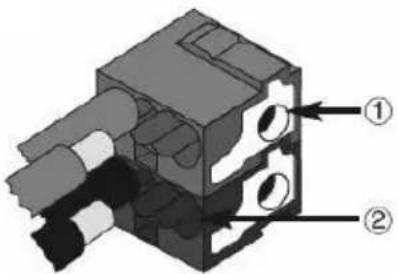
- Bus device connection
-
Bus cable connection
-
Insulate the screen, the electrical continuity conductor and the remaining white and yellow wires of the bus cable (should a bus
cable with 4 conductors be used), which are not needed.
5 PROGRAMMING
5.1 Physical address programming
Physical address programming
-
Power up the device using the bus.
-
Press the programming button to set the Gateway KNX/DMX to load the physical address from ETS. Both Main Supply and bus power are requie to set the device via ETS.
5.2 Functions
The KNX-DMX Gateway has 1556 objects with three types of telegrams available:
DPT 1.001 (1bit; switch) single channel
DPT 1.001 (1bit; switch) save sequence and retrieve
DPT 3.007 (4bit; relative dimming) single channel
DPT 5.001 (1byte; show value) single channel
The S2 rotary switch adjusts the transition period from one preset brightness to the next, 15 (F) being immediate, 0 a time period of 1 second from 0% to 100% .
The S3 rotary switch automatically sets the dimming function parameters, 0 is no automatic dimming, otherwise dimming time = 1.5 sec * switch value (S3 = 1.. 15 (F)) in increments of 1% (dimming value 0111b or 1111b).
The rotary switch settings will be prompted when starting and can be readjusted during operation by using the T1 button.
Necessary requirements are a KNX bus, DMX 512 bus and a power supply.
The KNX-DMX Gateway in REG casing IP20 is available in sizes of 6 DIN units.
Firmware upgrades can be done via USB port.
Automatic Dimming Function:
Automatic dimming function can be switched on or off for all channels using an object, or can be parameterized by S3 when booting up.
Thereby the properties are controlled when a dimming telegram (DPT 3.007) appears.
Automatic function Off ( S3 = 0 )
A dimming object (4 bit) value range +7 ..-7 singularly reduces or increases the DMX value percentagewise.
Automatic function On ( S3 <> 0 )
A uniquely transmitted dimming setting is repeated during a time period (dimmer repetition) until it reaches a value of 0 or 100% or until it is manually stopped.
When 100% is transmitted, the preset value in "dimming curve" is used (basic setting 1% ).
This function allows the integration of the KNX-Gateway for an installation with standard key buttons.
A standard key button transmits a 100% upward or downward command in dimming function when pushed and held and a stop command when let go.
A dimming setting can thus be set.
The dimming time period can be adjusted separately using either the parameter repetition or the dimmer curve.
The basic setting after booting up is 1% dimming.
The repetition rate is controlled by the rotary switch S3 and gives a dimming time result of circa 1.5 sec * switching value (S3 = 1.. 15 (F).
Address Diagram
The KNX-DMX Gateway is a master device in the DMX bus.
It possesses an internal data memory and constantly transmits the data at a DMX rate of 250k baud to all 512 DMX channels.
When receiving valid DMX telegrams the values in the memory are changed.
The transfer of the KNX telegram is preconfigured so that individual programming is not necessary.
The KNX data points are managed in 3 address rooms.
That means that switching or dimming can be accessed on every channel.
The group addresses diagram must be set up using the S1 rotary switch before initial operation (voltage supply).
Changes become effective after a reset.
The main group addresses from 0 - 15 are set up with the 16 stage rotary switch.
The middle and lower group addresses are set by the predetermined address rooms (see table 1).
The DPT 5.001 allocates the first 512 address on the KNX bus. After that the DPT 1.001 and DPT 3.007.
Finally, the sequence commands, a test function and dimming parameters are coded.
Group Address Allocation Lower Group (bi-level KNX Address Room):
Set Channel Value:
with DPT 5.001 1 byte value ( 0 .. 100%
Addresses 0 - 511
To set a 1 byte value, use the lower group addresses 0-511 which correspond to the channels 1-512 on the DMX bus.
Switch Channel Value: with DPT 1.001 1 bit Value (Switching)
Addresses 512 - 1023
Using a switch, this function can be used to switch every channel separately.
When the value is 0 the channel is switched off (0), when it is 1 the saved value in sequence 8 is accessed and transmitted to the DMX512 bus.
Every DMX channel can be independently switched.
Group Address Allocation Lower Group (bi-level KNX Address Room):
Before the values are transmitted, there must be defined values saved in Sequence 8.
This is the case for default settings at the time of delivery (255 for all channels).
To reset the default settings use either the defined value with DPT 5.001 (group address x/0-511) or the function „Central On" (group address x/1552) all values to 255.
Then save this to Sequence 8 (group address x/1551).
This establishes a maximum value for every channel.
Dimming
Channel:
with DPT 3.007: 4 bit Value (Dimming)
Addresses 1024 - 1535
Table 1: Possible Dimming Value as 4 bit Object:
| 0 = | Stop |
| 1 = | 100% down |
| 2 = | 50% down |
| 3 = | 25% down |
| 4 = | 12% down |
| 5 = | 6% down |
| 6 = | 3% down |
| 7 = | 1% down |
| 8 = | Stop |
| 9 = | 100% up |
| 10 = | 50% up |
| 11 = | 25% up |
| 12 = | 12% up |
| 13 = | 6% up |
| 14 = | 3% su |
| 15 = | 1% up |
Using the automatic dimming function affects the performance when a dimming telegram is received.
Choose Sequence: with DPT 1.001 1 bit Value (Switching)
Addresses 1536 - 1543
A complete sequence with 512 channels can be output via the DMX bus.
All previously saved values are displayed on channels 1-512.
There is a choice of 8 sequences at the addresses 1536-1543.
The default value at the time of delivery is 255 for sequence 8 and 0 for sequences 1-7.
Save Sequence:
with DPT 1.001 1 bit Value (Switching)
Addresses 1544-1551
Here the current DMX values can be saved in one of the 8 sequences.
The current brightness will be saved. There is a choice of 8 sequences at the addresses 1544-1551.
Central On:
with DPT 1.001 1 bit Value (Switching)
Address: 1552
All 512 channels display 100% when a 1 is transmitted and 0% when a 0 is transmitted.
Dimmer Repetition Rate: with DPT 5.001 1 byte Value (0..250)
Address: 1553
Set repetition rate parameters
The repetition rate affects the dimming time.
At increments of 1% , a dimming time of 1.5 sec * is achieved.
Standard settings can be set using S3 (1.. 15 (F)).
Suggested values are 2-40.
Downwards Dimming Curve: with DPT 3.007 4 bit Value (Dimming)
Address: 1554
Set dimming down to 100% .
When the automatic dimming function is chosen, the command "0001b" (100% dim down) is received and the programmed dimming setting will be repeated (see Repetition Rate Object 1553) until 0 has been reached or until it is manually stopped.
Standard setting,0111b"=-1%
Possible dimming values as 4 bit object, see table 1
Upwards
Dimming
Curve:
with DPT 3.007 4 bit Value (Dim)
Address: 1555
Set dimming up to 100% .
When the automatic dimming function is chosen, the command "1001h" (100% dim up)is received and the programmed dimming setting will be repeated (see Repetition Rate Object 1553) until 255 has been reached, or until it is manually stopped.
Standard setting 1111bn = +1%
Possible dimming values as 4 bit object, see table 1
Activate Automatic Dimming:
with DPT 1.001 1 bit Value (Switching)
Address: 1556
Automatic Dimming
Standard setting 0 if S3 = 0 , otherwise 1
0 = automatic dimming switches off, no repetition of dimming.
1= automatic dimming switches on, repetition of dimming.
Group address Table on three levels:
| KNX 3 Level Structure | Value | DMX512 Chan- nel Nr. | Se- quence Nr. | KNX-DMX Gate- way Function | Detail | ||
| Main Groups | MG | UG | |||||
| 0-15 (S1) | 0 | 0-255 | 0..255 | 001-256 | - | DPT 5.001 transmits 1byte value (Absolute value) | 1 Byte value is stored into the corresponding DMX-Channel directly |
| 0-15 (S1) | 1 | 0-255 | 0..255 | 257-512 | - | DPT 5.001 transmits 1byte value (Absolute value) | |
| 0-15 (S1) | 2 | 0-255 | 0/1 | 001-256 | - | DPT 1.001 value transmission | When a 1 is received the value stored in sequence Nr. 8 is sent to the corresponding DMX-Channel When a 0 is received the DMX-Channel is turned off. |
| 0-15 (S1) | 3 | 0-255 | 0/1 | 257-512 | - | DPT 1.001 value transmission | |
| 0-15 (S1) | 4 | 0-255 | -7..+7 | 001-256 | - | DPT 3.007 value transmission | Relatively lighter or darker dimming than the current level |
| 0-15 (S1) | 5 | 0-255 | -7..+7 | 257-512 | - | DPT 3.007 value transmission | |
| 0-15 (S1) | 6 | 0-7 | 0/1 | ALL | 0-7 | DPT 1.001 value transmission Access saved sequences | The selected sequence values of all 512 channels are transmitted on the DMX512 bus |
| 0-15 (S1) | 6 | 8-15 | 0/1 | ALL | 0-7 | DPT 1.001 value transmission Save the new sequence | All current DMX values in channels 1-512 are stored in the selected sequence position |
| 0-15 (S1) | 6 | 16 | 0/1 | ALL | - | DPT 1.001 value transmission All channels central on | All 512 channels display 100% when 1 is transmitted, 0% when 0 is transmitted |
| 0-15 (S1) | 6 | 17 | 0..255 | ALL | - | DPT 5.001 value transmission Repetition rate parameters | Repetition rate of 10msec Value default 3 |
| 0-15 (S1) | 6 | 18 | 0..7 | ALL | - | DPT 3.007 value transmission Set downward dimming curve | Dim repetition value Value Default 15=1% |
| 0-15 (S1) | 6 | 19 | 0..7 | ALL | - | DPT 3.007 value transmission Set upward dimming curve | Dim repetition value Value Default 15=1% |
| 0-15 (S1) | 6 | 20 | 0/1 | ALL | - | DPT 1.001 value transmission Deactivate automatic dimming | Disables automatic dimming when value = 0 |
Group address Table on two levels:
| KNX 2 Level Structure Value | DM | X512 Chan- nel Nr. | Sequence Nr. | KNX-DMX Gate- way Function | Detail | |
| Main Groups | UG | |||||
| 0-15 (S1) | 0-511 | 0..255 | 001-512 | - | DPT 5.001 trans- mits 1byte value (Absolute value) | 1 Byte value is stored into the corresponding DMX-Channel directly |
| 0-15 (S1) | 511-1023 | 0..255 | 001-512 | - | DPT 1.001 value transmission | When a 1 is received the value stored in sequence Nr. 8 is sent to the corresponding DMX-Channel . When a 0 is received the DMX-Channel is turned off. |
| 0-15 (S1) | 1024-1535 | -7..+7 | 001-512 | - | DPT 3.007 value transmission | Relatively lighter or darker dimming than the current level |
| 0-15 (S1) | 1536-1543 | 0/1 | ALL | 0/7 | DPT 1.001 value transmission Access saved sequences | The selected sequence values of all 512 chan- nels are transmitted on the DMX512 bus |
| 0-15 (S1) | 1544-1551 | 0/1 | ALL | 0/7 | DPT 1.001 value transmission Save the new sequence | All current DMX values in channels 1-512 are stored in the selected sequence position |
| 0-15 (S1) | 1552 | 0/1 | ALL | - | DPT 1.001 value transmission All channels central on | All 512 channels display 100% when 1 is transmitted, 0% when 0 is transmitted |
| 0-15 (S1) | 1553 | 0..255 | ALL | - | DPT 5.001 value transmission Repetition rate parameters | Repetition rate of 10msec Value default 3 |
| 0-15 (S1) | 1554 | 0..7 | ALL | - | DPT 3.007 value transmission Set downward dimming curve | Dim repetition value Value Default 15=1% |
| 0-15 (S1) | 1555 | 0..7 | ALL | - | DPT 3.007 value transmission Set upward dimming curve | Dim repetition value Value Default 15=1% |
| 0-15 (S1) | 1556 | 0/1 | ALL | - | DPT 1.001 value transmission Deactivate auto- matic dimming | Disables auto- matic dimming when value = 0 |
6 TECHNICAL DATA
Measurements: 107x75x31mm
Degree of Protection: IP20
Mounting: modular device with 92mm
Surrounding Temperature: -5 °C to 45 °C
Control Element: N°3 for 16 staged rotary switch
N°1 for Push Button (User)
N°2 for LED (User)
N°1 for EIB-Push Button+LED
KNX Connection: KNX clam block
KNX Power Supply: 20 - 32V DC, approx. 150 mW
DMX Connection: 3 screw clamps 0.8mm2 KL1 GND, KL2 Data - (B),
KL3 Data+ (A)
Load ResistanceDMX512: 120 Ohm via jumper
Power Supply: 9-30V DC, 100mA, internal galvanically separated 2
screw clamps
KL1 - GND
KL2 - +V
DMX512 Bus: RS485 - 250Kbaud, incl. galvanic separation
DMX512 log
Please note the DMB512 specific connecting
c o n fi gurations (bus connection, number of r
slaves, bus topology)
Francais
1 AVENTISSEMENTS GENÉRAUX 27
2 CONTENU DE LA CONFECTION 27
3 DESCRIPTION GENERALE 28
4 INSTALLATION 29
5 PROGRAMMATION 30
Réglage standard "0111b" = -1%
Réglage standard "1111b" =+1%
Raccordement KNX: Bloc pince KNX
Alimentation KNX: 20 - 32V CC, approx. 150 mW
According to article 9 paragraph 2 of the European Directive 2004/108/EC, the responsible for placing the apparatus on the Community market is:
GEWISS S.p.A Via A. Volta, 1 - 24069 Cenate Sotto (BG) Italy Tel: +39 035 946 111 Fax: +39 035 945 270 E-mail: qualitymarks@gewiss.com


+39 035 946 111
8.30-12.30/14.00-18.00
lunedi ÷ venerdi - monday ÷ friday
+39 035 946 260

sat@gewiss.com
www.gewiss.com
- GENERAL INFORMATION
- Warning!
- PACK CONTENT
- GENERAL DESCRIPTION
- INSTALLATION
- Warnings for KNX/EIB installations
- Warnings for installation phase
- ELECTRICAL CONNECTIONS
- WARNING: disconnect the network voltage before connecting the device to the power network!
- PROGRAMMING
- Physical address programming
- Physical address programming
- Functions
- Automatic Dimming Function:
- Address Diagram
- Group Address Allocation Lower Group (bi-level KNX Address Room):
- Switch Channel Value: with DPT 1.001 1 bit Value (Switching)
- Choose Sequence: with DPT 1.001 1 bit Value (Switching)
- Save Sequence:
- Central On:
- Dimmer Repetition Rate: with DPT 5.001 1 byte Value (0..250)
- Downwards Dimming Curve: with DPT 3.007 4 bit Value (Dimming)
- Upwards
- Dimming
- Curve:
- with DPT 3.007 4 bit Value (Dim)
- Address: 1555
- Activate Automatic Dimming:
- with DPT 1.001 1 bit Value (Switching)
- TECHNICAL DATA
- Francais
Brand : Gewiss
Model : GW90871
Category : Smart home gateway