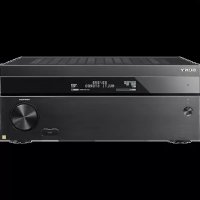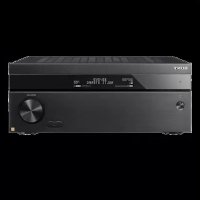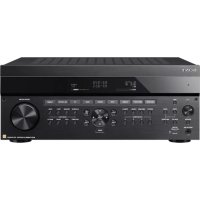
STJX661 - AV receiver SONY - Free user manual and instructions
Find the device manual for free STJX661 SONY in PDF.



Frequently Asked Questions - STJX661 SONY
User questions about STJX661 SONY
0 question about this device. Answer the ones you know or ask your own.
Ask a new question about this device
Download the instructions for your AV receiver in PDF format for free! Find your manual STJX661 - SONY and take your electronic device back in hand. On this page are published all the documents necessary for the use of your device. STJX661 by SONY.
USER MANUAL STJX661 SONY
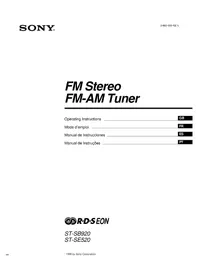
FM Stereo FM-AM Tuner
Operating Instructions EN
Mode d'emploi F
To avoid electrical shock, do not open the cabinet. Refer servicing to qualified personnel only.
- For ST-JX661 -
IMPORTANT: Never connect two mains leads into a single mains plug.
If the power switch is kept depressed, you can turn on and off the components by only pressing the SYSTEM POWER switch on TA-AV561 or TA-AV661.
Precautions
On safety
- Should any liquid or solid object fall into the unit, unplug the unit and have the unit checked by qualified personnel before operating it any further.
On power sources
- Before operating the unit, be sure that the operating voltage of your unit is identical with that of your local power supply.
- Unplug the unit from the wall outlet if it is not to be used for an extended period of time. To disconnect the cord, pull it out by grasping the plug. Never pull the cord itself.
- The unit is not disconnected from the AC power source (mains) as long as it is connected to the wall outlet, even if the unit itself has been turned off.
- AC power cord must be changed only at the qualified service shop.
On placement
- Place the unit in a location with adequate ventilation to prevent heat buildup and prolong the life of its components.
- Do not place the unit near heat sources, or in a place subject to direct sunlight, excessive dust or mechanical shock.
- Do not place anything on top of the cabinet which might block the ventilation holes and cause malfunctions.
On cleaning the cabinet
- Clean the cabinet, panels and controls with a soft cloth lightly moistened with a mild detergent solution. Do not use any type of abrasive pad, scouring powder or solvent such as alcohol or benzine.
On repacking
- Do not throw away the carton and the packing material. This makes an ideal container when transporting the unit. When shipping the unit, repack it as it was packed at the factory.
If you have any question or problem concerning your unit that is not covered in this manual, please consult your nearest Sony dealer.
Welcome!
Thank you for purchasing the Sony FM Stereo FM/AM Tuner. Before operating the unit, please read this manual thoroughly and retain it for future reference.
Convention
The following icon is used in this manual:

Indicates hints and tips for making the task easier.
TABLE OF CONTENTS
Getting Started
Unpacking 4
Hooking up the System 4
Tuner Operations
Receiving Broadcasts 6
Presetting Radio Stations 6
Recalling Preset Radio Stations 7
Additional Information
Troubleshooting 8
Specifications 8
Index 8
Getting Started
Unpacking
Check that you received the following items with the timer:
Audio cord (1)
AM loop aerial (1)
FM wire aerial (1)
Hooking up the System
Before you get started
- Turn off the power to all components before making any connections.
- Do not connect the mains lead until all of the connections are completed.
- Be sure to make connections firmly to avoid hum and noise.
- When connecting an audio cord, be sure to match the color-coded pins to the appropriate jacks: White (left) to White; and Red (right) to Red.
AM aerial hookups
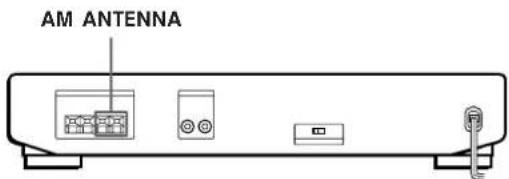
This section describes how to connect the supplied AM loop aerial. For the specific location of the AM ANTENNA terminals, see the illustration below.
What will I need?
AM loop aerial (supplied) (1)
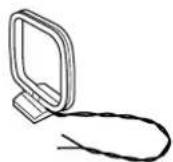
1 Before assembling the supplied aerial, pull the lead wire out from the slot in the aerial frame.
2 Unwrap 3 lengths of the braided lead wire from around the frame of the aerial. Be careful to unwrap only the braided section of the lead wire. Do not unwrap more than 3 lengths of the lead wire. Also, be careful not to unbraid the lead wire.
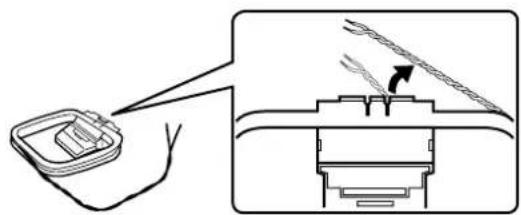
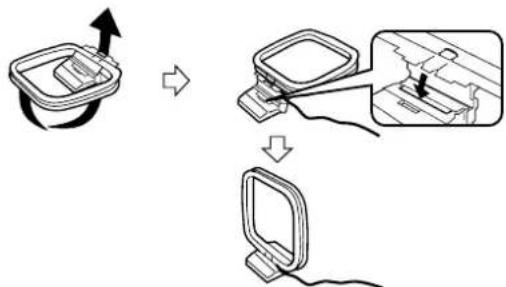
3 Assemble the supplied aerial as shown below.
4 Connect the AM loop aerial to the AM terminals on the back of this unit.
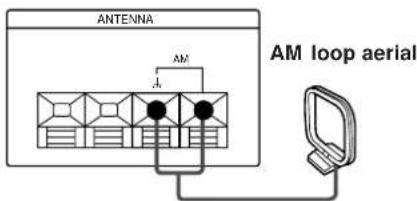
5 Adjust the aerial direction for the best reception. The AM loop aerial has a directivity which detc the signal from some angles more strongly than others. Set the aerial to the orientation which provides the best receiving condition.
If a high pitched noise (beat noise) occurs when recording AM broadcasts, adjust the position of the AM loop aerial so that the noise disappears. If you live in a building constructed of reinforced concrete, or with a steel frame, you may not be able to achieve good reception since the radio waves become weaker indoors. In this case, we recommend connecting an optional aerial such as the Sony AN-1.

For stations that are difficult to receive
Try repositioning the loop aerial while tuning. Placing the supplied AM loop aerial near a window will help improve reception quality.
FM aerial hookups
With an FM outdoor aerial, you can obtain a higher FM broadcast sound quality. We recommend that you use the supplied FM wire aerial only temporarily until you install an FM outdoor aerial. For the specific location of the FM ANTENNA terminals, see the illustration below.
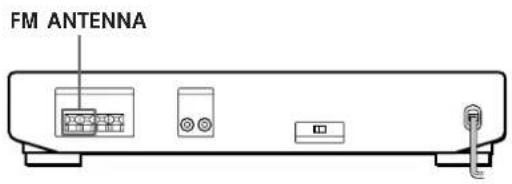
What will I need?
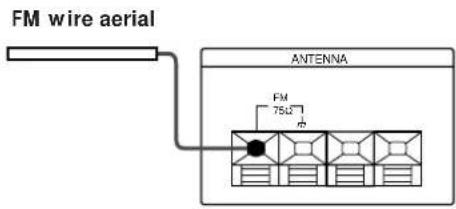
FM wire aerial (supplied) (1)
FM outdoor aerial (not supplied) (1) and 75-ohm coaxial cable (not supplied) (1)
Connect the supplied FM wire aerial or an FM outdoor aerial (not supplied) to the FM terminals on the back of this unit.
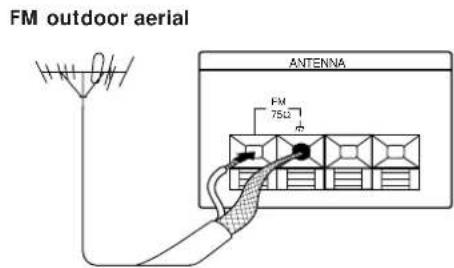
Connecting a ground wire
If you connect an outdoor aerial, be sure to connect a ground wire (not supplied) to the AM ANTENNA terminal (in addition to the AM loop aerial) for lightning protection.
Amplifier hookups
Connect the tuner to an amplifier. Be sure to turn off the power to both components before connection. For the specific location of the terminals, see the illustration below.
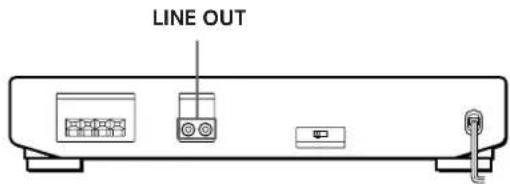
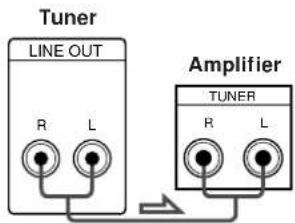
What cables will I need?
Audio cord (supplied) (1)

Connect the white plugs to the white (L) jacks and the red plugs to the red (R) jacks. Insert the plugs completely into the jacks; incomplete connections may cause noise.
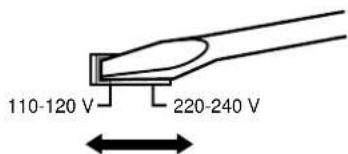
Setting the voltage selector
Check that the voltage selector on the rear panel of the tuner is set to the local power line voltage. If not, set the selector to the correct position using a screwdriver before connecting the mains lead.
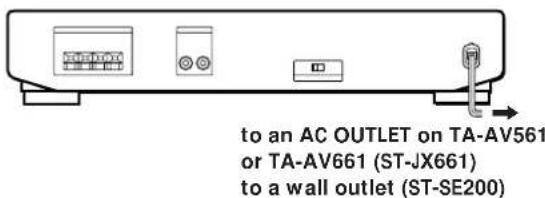
Mains lead hookups
ST-JX661:
Connect the mains lead to an AC OUTLET on the rear panel of TA-AV561 or TA-AV661 after completing all of the previous connections.
ST-SE200:
Connect the mains lead to a wall outlet after completing all of the previous connections.
Receiving Broadcasts
This section describes various ways to tune in AM and FM broadcasts. Before tuning, be sure to connect the supplied AM and FM aerials.
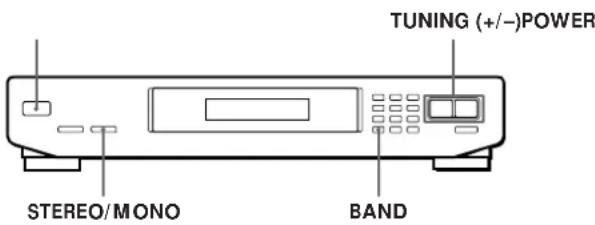
1 Turn on the amplifier and select the TUNER mode.
2 Press POWER to turn on the tuner.
3 Press BAND to select FM or AM.
4 Press TUNING + or -. Press ^+ for a higher frequency Press-for a lower frequency
For automatic tuning
Hold down TUNING + or - for about 1 second and release it when the frequency numbers start changing. When the tuner locates a station, it stops automatically and "TUNED" appears in the display.
To stop automatic tuning before a station is located Press TUNING ^+ or-
For manual tuning
Press TUNING + or - repeatedly to select the frequency you desire. "TUNED" appears when a station is tuned in.
5 Repeat step 4 until the desired station is received.

When an FM stereo program is noisy
When the tuner receives an FM stereo program, the STEREO indicator lights in the display window. If the stereo program is noisy, press STEREO/MONO to change the tuning mode over to MONO. This eliminates the stereo effect, but the noise will be greatly reduced.

When you tune in AM stations
Adjust the direction of the AM loop aerial for optimum reception.
Presetting Radio Stations
You can store up to 20 FM and 10 AM stations.
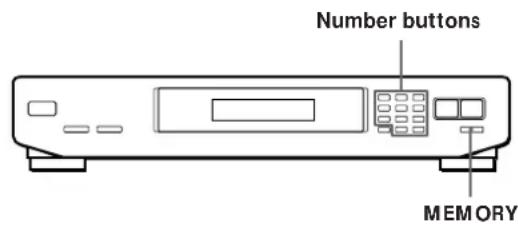
1 Tune in the FM or AM station you wish to store.
2 Press MEMORY.
"MEMORY" and the last memorized number appear in the display.
3 Use the number buttons (1-9, 0/10 and >10 ) to select a preset number.
The tuner stores the station at the preset number you specified.
4 Repeat steps 1 through 3 to store other stations.

If "MEMORY" goes out from the display before you select the preset number
Press MEMORY again.
Recalling Preset Radio Stations
This tuner lets you recall preset stations directly, by entering the number of the preset you desire, or by scanning the preset memory.
Recalling a preset station directly
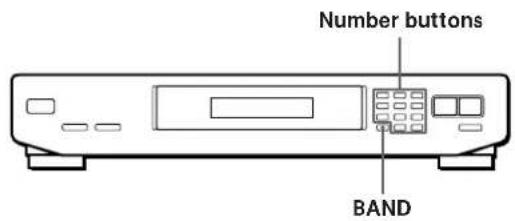
1 Press BAND to select either FM or AM.
2 Use the number buttons (1-9, 0/10 and >10) to select the preset number you desire.
| To select press | |
| 5 | 5 |
| 10 0/10 | |
| 15 >10 → 1 → 5 | |
| 20 >10 → 2 → 0/10 | |
3 Repeat steps 1 and 2 to recall other stations.
Scanning the preset memory
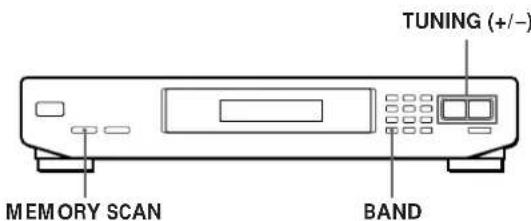
1 Press BAND to select FM or AM.
2 Press MEMORY SCAN.
A preset number flashes in the display.
3 Press TUNING + or -.
Press + to scan higher preset numbers.
Press - to scan lower preset numbers.
Each station received will be heard for about four seconds.
4 Press MEMORY SCAN again as soon as the station you desire is tuned in. This stops the memory scan.

If a certain preset station cannot be tuned by scanning
Preset stations with weak signals may be skipped.
Tune in the station manually.
Additional Information
| Troubleshooting | Intermediate frequency | 10.7 MHz | Design and specifications are subject to change without notice. | |
| Sensitivity | at 50 dB quieting (mono) 22.1 dBf, 7 μV/75Ω (stereo) 42.1 dBf, 70 μV/75Ω | You can change the AM tuning interval to 10 kHz. After tuning in any AM station, turn off the timer once. While holding down the MEMORY button, press the POWER button. All preset stations will be erased when you change the interval. To reset the interval to 9 kHz, repeat the same procedure. | ||
| If you experience any of the following difficulties while using thetuner, use this troubleshooting guide to help you remedy theproblem. Should any problempersist, consult your nearest Sony dealer. | Usable sensitivity (IHF) | 19.5 dBf, 5 μV/75Ω | You cannot tune in a frequency. Adjust the position of theaerial. Connect an external aerialfor FM broadcasts. Preset the stations again ifyou've moved. | |
| S/N | at 75 kHz deviation80 dB (mono),75 dB (stereo) | |||
| Harmonic distortion | at 1 kHz0.3% (mono),0.5% (stereo) | Index | ||
| There's no sound. → Connect the aerials. → Set the source setting onthe amplifier to TUNER. | Frequency response | 30 Hz - 15 kHz(+0.5/-2.0 dB) | A, B Aerial hookups AM 4 FM 5 Amplifier hookups 5 Automatic tuning 6 | |
| You cannot tune in a frequency. → Adjust the position of theaerial. → Connect an external aerialfor FM broadcasts. → Preset the stations again ifyou've moved. | Separation | 35 dB at 1 kHz | ||
| Selectivity | 55 dB at 400 kHz | |||
| Output | at 75 kHz deviation775 mV, 4.7 kilohms | |||
| AM tuner section | C, D, E, F, G Connecting. See Hookups | |||
| Frequency range | 531 - 1,602kHz(9 kHz step)530 - 1,710 kHz(10 kHz step)* | H, I, J, K, L Hookups AM aerial 4 amplifier 5 FM aerial 5 Mains lead 5 | ||
| There is severe hum and/orbackground noise. → Adjust the position ordirection of the aerial. → Tune to a correctfrequency. → Connect an external aerialfor FM broadcasts. → Move the tuner away fromthe source of the noise. | Intermediate frequency | 450 kHz | ||
| Usable Sensitivity | (with AM loopaerial)500 μV/m | |||
| S/N | 54 dB (50 mV/m,999 kHz) | M, N, O Manual tuning 6 Memory 6,7 | ||
| Harmonic distortion | 0.5% (50 mV/m,400 Hz) | |||
| The appropriate display orinformation does not appear. → Turn the power off. Afterturning the power back on,press MEMORY SCAN and>10 simultaneously. Thisempties any frequenciesstored in the presetmemory. | Selectivity | 50 dB | P, Q Presetting 6 Preset tuning 7 | |
| General | ||||
| Power requirements | Australian model:240 V AC,50 HzOther models:110-120 V or220-240 V AC,50/60 HzAdjustable with thevoltage selector | R Receiving broadcasts 6 Receiving preset stations 7 | ||
| S Storing radio stations 6 | ||||
| Power consumption | 7 W | |||
| Specifications | Dimensions | 430 x 82 x 295 mm(w/h/d) | T, U Troubleshooting 8 Tuning. See Receivingbroadcasts | |
| FM tuner section | Mass | Approx.2.3 kg | ||
| Frequency range | 87.5 - 108 MHz | Supplied accessories | Audio cord (1)AM loop aerial (1)FM wire aerial (1) | V, W, X, Y, Z Voltage selector 5 |
| Aerial terminals | 75 ohms,unbalanced | |||