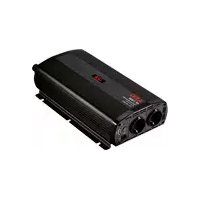
ST 1200 - Voltage converter AEG - Free user manual and instructions
Find the device manual for free ST 1200 AEG in PDF.



| Brand | AEG |
| Model | ST 1200 |
| Product type | Voltage converter (DC-AC) |
| Model number | 97117 |
| Nominal input voltage | 12 V DC |
| Output voltage | 230 V AC ~ |
| Output frequency | 50 Hz |
| Continuous output power | 1200 VA (1350 VA +/- 100 VA) |
| Peak output power | 2400 VA (for 0.1 s) |
| USB output | 5.0 V = / 1 A |
| Energy efficiency | >80% |
| Protection class | I |
| Fuse | 15 A |
| Ambient temperature | 0 °C to 30 °C |
| Dimensions (L x W x H) | 348 x 180 x 87 mm |
| Weight | 2.42 kg |
| Recommended power supply | 12 V DC battery, minimum capacity 160 Ah |
| Integrated protections | Under-voltage, over-voltage, overheat, short-circuit, overload |
| Features | LED display, cooling fan, remote control, soft start |
| Output socket type | 230 V socket with protective pin (type E/F) |
| Grounding | Mandatory (ground terminal with wing nut) |
| Maintenance | Clean with a dry cloth; no further maintenance |
| Repairability | By a qualified electrician only |
| User manual | Free PDF, 63 pages, multilingual (FR, DE, EN, IT, etc.) |
| Warranty | According to general terms (manufacturing and material defects) |
Frequently Asked Questions - ST 1200 AEG
User questions about ST 1200 AEG
0 question about this device. Answer the ones you know or ask your own.
Ask a new question about this device
Download the instructions for your Voltage converter in PDF format for free! Find your manual ST 1200 - AEG and take your electronic device back in hand. On this page are published all the documents necessary for the use of your device. ST 1200 by AEG.
USER MANUAL ST 1200 AEG
Operation and Safety
Notes

Pokyny pre obsluhu a
bezpečnostnépokyny
D
Before reading, unfold the page containing the illustrations and familiarise yourself with all functions of the device.
FR
Intended use Page 16
Scope of delivery.. 17
Part description.. 17
Technical Data Page 17
Technical characteristics.. 18
Security
General safety guidelines.. 19
Before start-up.. Page 20
Operation
Connect the remote control . 21
Attach external devices.. 21
Switch on/off the voltage converter, change mode. Page 22
Error tracing.. Page 22
Maintenance and care.. Page 22
Service.. 23
Warranty.. Page 23
Disposal.. Page 23
Declaration of Conformity.
| In this operating manual / this device the following pictogram's are used: | |||
| i | Read operating manual! | Indoor use only | |
| ! | Observe warning- and safety guidelines! | Dispose the packaging environmen- tally friendly! | |
| Danger to life and danger of accident for children! | |||
Voltage converter
Introduction

Make yourself familiar with all functions before first start-up of the equipment and gain inform you about correct
handling the device. Read for this the following operating manual carefully. Store this manual carefully. Pass on all documents also when passing on the device to third parties.
Intended use
The voltage converter is meant for the conversion of DC current with a voltage of 12V into AC with a voltage of 230V and a frequency of 50Hz and / or 5V DC and amperage of 500mA . Always check for a continuous maximum output capacity (see also chapter "Error tracing". It is exclusively certified for the private use. All other use or change to the device is considered as not intended and bears substantial dangers. The manufacturer does not take over any liability for damages arising from unintended use.
This device can be used for the following kind of external electrical appliances when connected to a 12V power supply with at least 1 A:
Common electrical appliances such as laptop, table calculator, TV, MP3-player, PDA or battery charger for mobile phones, computer.
- 97115 (Model ST 500) = Total capacity< 500 W
- 97116 (Model ST 800) = Total capacity < 800 W
- 97117 (Model ST 1200) = Total capacity< 1200 W
97120 (Model SW 600) = Total capacity < 600 W - 97121 (Model SW 1000) = Total capacity < 1000W
97122 (Model SW 1500) = Total capacity < 1500W
Not permitted is the use of the device under the following circumstances and with the following kind of external electrical appliances:
- Connection to a power supply with a voltage of 6, 24 or 230V
- External appliances, which exceed the maximum capacity of the voltage converter.
- 97115 (Model ST 500) = Total capacity >500W
- 97116 (Model ST 800) = Total capacity>800 W
- 97117 (Model ST 1200) = Total capacity>1200 W
- 97120 (Model SW 600) = Total capacity>600 W
- 97121 (Model SW 1000) = Total capacity>1000 W
- 97122 (Model SW 1500) = Total capacity >1500W
Use of heat producing appliances
Take utmost care of the capacity indicated by the manufacturer when using heat producing appliances. Ensure that the required capacity does not exceed the maximum output capacity of the voltage converter.
Be aware, that the continuous capacity consumption such as with a hairdryer can lead to a fast discharge of the battery and the duration of use should therefore be limited.
Scope of delivery
After unpacking immediately check the scope of delivery. Examine the device and all parts for damages. Do not take a defective device or part into operation.
1 Voltage converter
1 Connection cable positive (+, red) with ring connector or pole terminal
1 Connection cable negative (-, black) with ring connector or pole terminal
1 Remote control module
1 Operating Manual
Part description
1 LED-Display "Error"
2 LED-Display "On" (POWER)
3 Button ON/OFF/MODE
4 USB-Output 0,5V
5 Connection remote control
6 Connection cable positive (+, red) with ring connector
7 Connection cable negative (-, black) with ring connector
8 Output socket
9 LED Display
Remote control module
11 Connection cable positive (+, red) with ring connector
12 Connection cable negative (-, black) with ring connector
13Cooling fan
14 Earth connection with wing nut
Technical Data
Nominal input voltage: 12V
Output voltage: 230V
Efficiency: >80%
Output frequency: 50Hz
USB-Output: 5,0V
Protection class: I
Fuse: 15A
Ambient temperature: 0^ - 30^
Undervoltage protection: 10V + / - 0.5V
Overvoltage protection: 15,5V = - + / - 0,5V
Overheating protection: >68^
| Output capacity | Peak output capacity (for 0,1 seconds.) | Overload protection | Dimensions (L x W x D) | Weight | |
| ST 500 | 500 VA | 1000 VA | 550 VA +/- 40 VA | 246 x 179 x 87 mm | 1,52 kg |
| ST 800 | 800 VA | 1600 VA | 860 VA +/- 40 VA | 278 x 179 x 87 mm | 1,92 kg |
| ST 1200 | 1200 VA | 2400 VA | 1350 VA +/- 100 VA | 348 x 180 x 87 mm | 2,42 kg |
| SW 600 | 600 VA | 1200 VA | 600 VA +/- 40 VA | 348 x 180 x 87 mm | 1,52 kg |
| SW 1000 | 1000 VA | 2000 VA | 1150 VA +/- 100 VA | 410 x 180 x 87 mm | 2,42 kg |
| SW 1500 | 1500 VA | 3000 VA | 1500 VA +/- 150 VA | 400 x 258 x 87 mm | 4,4 kg |
Technical characteristics
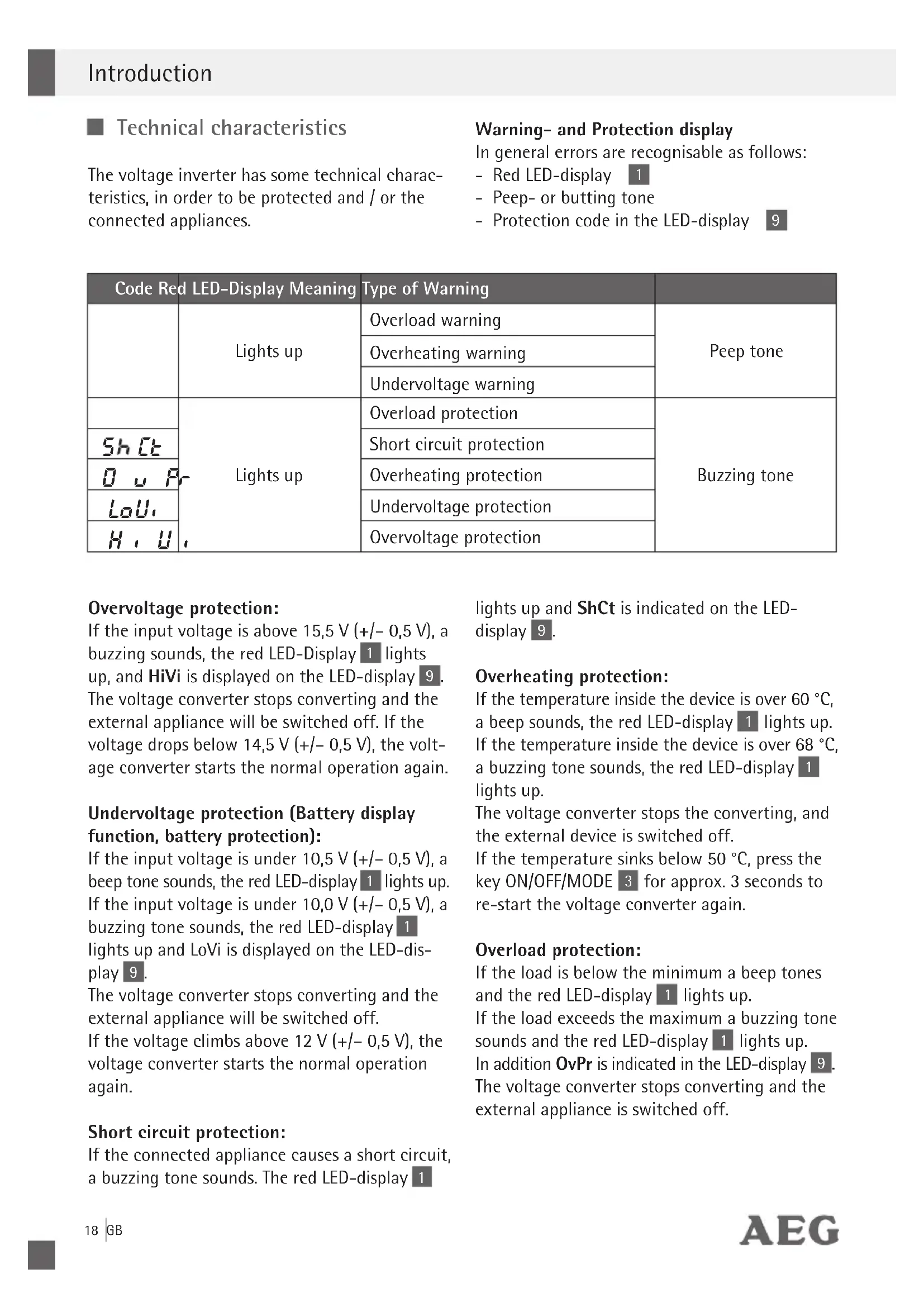
The voltage inverter has some technical characteristics, in order to be protected and / or the connected appliances.
Warning- and Protection display
In general errors are recognisable as follows:
- Red LED-display 1
- Peep- or butting tone
- Protection code in the LED-display
| Code Red LED-Display Meaning | Type of Warning | ||
| Lights up | Overload warning | Peep tone | |
| Overheating warning | |||
| Undervoltage warning | |||
| Lights up | Overload protection | Buzzing tone | |
| Shct | Short circuit protection | ||
| Ou Fr | Overheating protection | ||
| LoU, | Undervoltage protection | ||
| H, U, | Overvoltage protection | ||
Overvoltage protection:
If the input voltage is above 15,5V(+ / - 0,5V) a buzzing sounds, the red LED-Display lights up, and HiVi is displayed on the LED-display 9. The voltage converter stops converting and the external appliance will be switched off. If the voltage drops below 14,5V(+ / - 0,5V) ,the voltage converter starts the normal operation again.
Undervoltage protection (Battery display function, battery protection):
If the input voltage is under 10,5V(+ / - 0,5V) a beep tone sounds, the red LED-display lights up. If the input voltage is under 10,0V(+ / - 0,5V) a buzzing tone sounds, the red LED-display lights up and LoVi is displayed on the LED-display 9.
The voltage converter stops converting and the external appliance will be switched off.
If the voltage climbs above 12V(+ / - 0,5V) the voltage converter starts the normal operation again.
Short circuit protection:
If the connected appliance causes a short circuit, a buzzing tone sounds. The red LED-display 1
lights up and ShCt is indicated on the LEDdisplay 9.
Overheating protection:
If the temperature inside the device is over 60^ , a beep sounds, the red LED-display 1 lights up. If the temperature inside the device is over 68^ , a buzzing tone sounds, the red LED-display 1 lights up.
The voltage converter stops the converting, and the external device is switched off.
If the temperature sinks below 50^ , press the key ON/OFF/MODE 3 for approx. 3 seconds to re-start the voltage converter again.
Overload protection:
If the load is below the minimum a beep tones and the red LED-display 1 lights up.
If the load exceeds the maximum a buzzing tone sounds and the red LED-display 1 lights up.
In addition OvPr is indicated in the LED-display 9.
The voltage converter stops converting and the external appliance is switched off.
Technology
The transformation of the 12VDC into 230VAC follows in two stages.
Stage 1:
The device increases the incoming DC voltage to 300V.
Stage 2:
This voltage is then converted into alternating current with a voltage of 230V and a frequency of 50Hz per second.
For this process a kind of transistor is used, which consists of a highly integrated chip named MOSFET (metal oxide semiconductor field-effect transistor).
Output voltage, wave shape ST devices:
The output voltage in this device is reproduced as a modified sine wave. This has a gradated form, which shows nearly exactly the same characteristics like a pure sine wave. This modified sine wave is recognized by most modern external devices with a voltage of 230V . Power supply systems in electronic components belong to it, transformers and / or small motors. The modified sine wave produced by this voltage inverter uses an effective voltage of 230V . Most digital and similar voltmeters cannot read the effective voltage and show a value, which is around 20 to 30V below the actual value of the output voltage. In order to obtain an exact measurement result, please use a measuring instrument suitable for the measurement of the effective voltage.
Output voltage, wave shape SW devices:
The output voltage of the voltage converter SW is reproduced as a pure sine wave and the output voltage reaches the same quality like your home socket.
This pure sine wave is suitable for all sensitive appliances which require a pure sine wave. These include appliances which have internal electronic controls, like for example coffee pad machines, automated coffee machines or electrical razors. In television, stripes can occur in the picture
with the modified sine wave, with a pure sine converter you can get an absolute stripe free.
WARNING!
Some external devices, particularly radios and / or other audio and rechargeable appliances can damage the voltage inverter and / or the attached appliances.
Examine whether the external equipment attached to the voltage converter "hums", warms up strongly or heats up excessively during the first few minutes. In this case separate the external devices and all cables immediately.
This means in fact that the devices are not compatible and cannot be used together. Should something be unclear you, refer to the specialist dealers of your external device.
This problem does not arise with modern and / or high-quality devices, since these are able to recognise and process modified sine waves.
Soft starting technology.
The voltage inverter is equipped with soft starting technology, which contributes to the fact that the voltage conversion takes place in stages. In this way appliances can be used, which need a higher starter current. By increase of the output voltage in stages, a damage of the voltage converter, the 12-V-input socket and the attached appliances is prevented.
Security

General safety guidelines
AWARNING! Read all safety guidelines and instructions. Omissions regarding the compliance to safety guidelines and instructions can cause electrical shock, fire and / or serious injuries. Keep all safety guidelines and instructions for future reference.

DANGER OF ACCIDENT AND LIFE FOR INFANTS AND CHILDREN!
Never leave children unsupervised
with the packing material. There is danger of suffocation.
This device is not intended for use by persons (including children) with reduced physical, sensory or mental abilities or lack of experience and / or lack of knowledge unless they are supervised by a person responsible for their security or received instructions from this person, how the equipment is to be used. Children should be supervised, in order to guarantee that they do not play with the device.
- Keep the device away from children. Children are not able to understand and recognise the possible risks during the handling of electrical devices.
- Keep the device away from rain and dampness. Water penetrated into electrical appliances means mortal danger by electrical shock.
Pay attentions that all plugs and power cables are free of dampness. Never switch on the device with damp or wet hands.
Only use the device when power cable and housing a free of damage.
Pay attention that the power cables are secured.
Do not use a power cable to carry the device or pull it. Damaged power cable means mortal danger by electrical shock.
Always pull the plug; never pull the power cable to separate the device from the voltage source.
If cables are routed through walls with sharp edges, for example metal walls, use empty pipes or piping to avoid damaging the cable.
Never route the main cables with 230V together with direct current cables of 12V in the same pipe Rohr (one piping).
Route the power cable in such a way that no one trips and no one can damage the cables.
Do not route the cables next to conductive materials. Do not fold the cables and protect them against damages.
Damaged cables must be exchanged immediately.
Avoid short circuits and bridges with foreign objects between in- and outputs of the voltage
inverter. Use only bonding pins or fork wall pins to connect devices to the output sockets. Even if the build in fuse is released, some parts remain under load.
Pay attention that the device is always used in a safe place.
Choose the set-up place for the device with care.
The maintenance work must be accomplished by a qualified electrician.
Do not operate the device if it is damaged.
Do not expose the device to
- extreme temperatures,
-strong vibrations, - strong mechanical load
direct sunlight,
-dampness.
Otherwise damage to the device is likely.
Note that damages caused by improper handling, ignorance to the operating manual or interference by unauthorised persons are excluded from the warranty.
Never dismantle the device. Inappropriate paers can cause considerable dangers for the user.
Only let specialists do repairs.
Before start-up
WARNING!
Check the battery connections before switching on the voltage converter.
Make sure that a 12V battery is connected in order to prevent damage or malfunction of the unit. User contact with the built-in electronics is excluded.
Disconnect the connection1s and 12.
Connect the ring connector + 6 with the connection 11 and the ring connector - black 7 with the connection 12
Tighten the connections and 12 again firmly.
Attach the red terminal c6 to the positive terminal and the black terminal clip 7 to the battery's negative terminal.
WARNING! Take care for the correct polarity. Take care the terminals do not touch each other.
To disconnect, execute the process in reverse order - first of all remove the black terminal clip 7 and then the red terminal clip 6 from the battery.
The earth connection with butterfly 14 should be connected to an earth spike which is fixed into the ground at a minimum depth of at least 1.2m or connect it directly with the earth connection of the mains. If the on-board power supply does not have an earth connection, it is preferable to connect the negative pole of the supply battery with the earth spike. Use a yellow/green jacketed cable with a cross section of >0.75mm^2
WARNING! You must earth the voltage converter before you start to use it.
The maximum operation period of the converter is defined by the available battery capacity. Recommended battery minimum capacity during stationary use:
- 97115 (Model ST 500): 60 Ah, 97116 (Model ST 800): 95 Ah, 97117 (Model ST 1200): 160 Ah
97120 (Model SW 600): 74 Ah, 97121 (Model SW 1000): 120 Ah, 97122 (Model SW 1500): 190 Ah
Operation
Connect the remote control
- Completely unwind the cable of the remote control module 10 and place the plug of the cable into the connection remote control 5 on the voltage converter.
- Attach external devices
Place the plug of the external appliance intodata communication cables to the USB exit! the output socket 8 on the voltage converter and / or connect the external USB appliance to the USB output 4.
Switch on the voltage inverter by pressing the key ON/OFF/MODE 3 for approx. 3 seconds. The voltage converter is ready for operation when the green LED-display 2 lights up. Please read the chapter „error tracing“if the red LED-display 1 lights up.
Now switch on the (external) devices connected with the voltage converter.
Information: You can use all outputs at the same time. The total nominal capacity for all external appliances may not be exceeded as mentioned under "Technical Data".
The nominal capacity of external appliance is shown on the identification plate, which is in a certain place on this external appliance. External appliances like electric motors, drills, electrical saws, refrigerators and music systems, normally require a larger nominal capacity when starting than indicated on the identification plate. If the nominal capacity is indicated in ampere only, multiply the value in ampere by a factor of 230, in order to receive the capacity in Watts.
For example: 0.4A× 230 = 92 Watts
Output socket/Output 230V 8
Use only external devices, which are either equipped with bonding contact pins or European fork wall plugs.
USB output 4
Connect the external USB-device with the USB output 4 and switch it on. The USB output of this voltage converter supplies a direct current of 5V for external USB devices (e.g. Lamps, fans, radios).
The USB output is always switched on, if the voltage converter is connected to the 12 V-input socket.
A WARNING!
The USB output on the voltage converter is not intended for the data communication. Do not attach a memory stick, MP3-Player or similar external data memory devices. Do not connect
Switch on / off the voltage converter, change mode
- Keep the key ON/OFF/MO3 pressed for 3 seconds to switch the voltage inverter on or off.
Press the key ON/OFF/M03Eonly short to change between the LED-displays 1 and 2.
Error tracing
Separate the voltage converter from the 12V- power supply and the external devices from the outputs in one of the cases listed.
= Error
= Possible cause
= Remedy
No LED-display lights up.
The pole terminals 6 and 7 are not connected correctly with the power supply.
Examine all connections.
No input voltage.
Examine all connections.
LED-display1 lights up red.
The temperature is above 68^
Switch of the voltage inverter immediately. Examine if the voltage converter is sufficiently cooled and the cooling grids and the cooling fan 13 are free.
Let the device cool down and provide sufficient ventilation.
Wait for 10 minutes before you switch on the voltage converter again.
The input voltage is too high; over-voltage protection.
- Switch of the voltage inverter immediately.
Examine the input voltage.
The input voltage is too low; Under-voltage protection.
Switch of the voltage converter immediately.
Examine the connection and charge the battery.
If the voltage is above 12V restart the voltage inverter.
Wrong connection of the poles; Short circuit protection.
Switch of the voltage converter immediately.
Examine all connections, cables and appliances.
Connect the connections correctly.
The nominal capacity was exceeded (see technical data); Current-overload protection.
Use appliances which do not exceed the nominal capacity according to the "technical data".
Short circuit in the device.
Examine the connected appliances. Do not use the concerned appliances.
=Error
= Remedy
In TV-operation and/or sound systems and/or devices:
Snow picture, wobbly picture, hum, knock or buzzing.
Place the voltage converter as far as possible from the TV.
Examine the antenna connection und setting. Move the antenna cable further from the voltage inverter. Use a shielded antenna cable. The modified sin wave of the voltage converter could be filtered not sufficiently by the connected external device. Separate all cables immediately.
The only available solution is the use of a modern external device respectively a device with a higher capacity and sufficient filtering capacity.
■ Maintenance and care
The device is maintenance-free.
WARNING! Always separate electrical devices from the power supply, before you carry out service etc.
Switch off the device. Keep the key ON/OFF/ MODE 3 pressed for approximately 3 seconds.
Remove the terminal cli7s 6 from the battery as described above.
Clean the device with a dry cloth. Do not useFor disposal possibilities for retired electrical solvents or other aggressive detergents. appliances please inform yourself at your community or city administration.
Service
WARNING! Leave the repair of the device
to qualified technical personnel to repair
Thus the safety of the device is guaranteed and maintained.
WARNING! Leave the exchange of the
plug or the connecting cable always to qualified technical personnel. Thus the security of the equipment is guaranteed and maintained.
Declaration of Conformity C
This product fulfils the requirements of the applicable European and national directives (Electromagnetic Compatibility 2004/108/EC, Low Voltage Directive 2006/95/EC). Conformity has been demonstrated. The relevant declarations and documents are held by the manufacturer.
Warranty
The general guarantee conditions refer to production and material defects.
If the device is faulty, bring it to your specialist dealer respectively back to the sales office. In order to accelerate the warranty and repair work on the device, you need the following:
- A copy of the receipt (delivery note, bill) with the acquisition date.
- Reason for the complaint or description of the error.
Disposal
The packing consists of pollution free materials, which can dispose of you over the local recycling stations.
Do not throw electrical appliances into the domestic waste!
In accordance with European guideline
2002/96/EC for electrical and old electronic devices and conversion to national law, used electrical appliances must be collected separately and brought to a environmental fair recycling.
Illustrations may vary slightly from the product itself. We reserve the right to administer changes due to technical progress. Decoration not included.
Introduction
www.aeg-automotive.com
AEG is a registered trademark used under license from AB Electrolux (publ)
- D
- FR
- Security
- Before start-up.. Page 20
- Operation
- Error tracing.. Page 22
- Maintenance and care.. Page 22
- Service.. 23
- Warranty.. Page 23
- Disposal.. Page 23
- Declaration of Conformity.
- Voltage converter
- Introduction
- Intended use
- Use of heat producing appliances
- Scope of delivery
- Part description
- Technical Data
- Technical characteristics
- Warning- and Protection display
- Overvoltage protection:
- Undervoltage protection (Battery display function, battery protection):
- Short circuit protection:
- Overheating protection:
- Overload protection:
- Technology
- Stage 1:
- Stage 2:
- Output voltage, wave shape ST devices:
- Output voltage, wave shape SW devices:
- WARNING!
- Soft starting technology.
- General safety guidelines
- DANGER OF ACCIDENT AND LIFE FOR INFANTS AND CHILDREN!
- Before start-up
- Connect the remote control
- - Attach external devices
- Output socket/Output 230V 8
- USB output 4
- A WARNING!
- Error tracing
- In TV-operation and/or sound systems and/or devices:
- ■ Maintenance and care
- Service
- WARNING! Leave the repair of the device
- WARNING! Leave the exchange of the
- Declaration of Conformity C
- Warranty
- Disposal
- Do not throw electrical appliances into the domestic waste!
Brand : AEG
Model : ST 1200
Category : Voltage converter