Active Glasses 3D - LOEWE - Free user manual and instructions
Find the device manual for free Active Glasses 3D LOEWE in PDF.


Frequently Asked Questions - Active Glasses 3D LOEWE
User questions about Active Glasses 3D LOEWE
0 question about this device. Answer the ones you know or ask your own.
Ask a new question about this device
Download the instructions for your in PDF format for free! Find your manual Active Glasses 3D - LOEWE and take your electronic device back in hand. On this page are published all the documents necessary for the use of your device. Active Glasses 3D by LOEWE.
USER MANUAL Active Glasses 3D LOEWE
Loewe Active Glasses 3D
Bedienungsanleitung
Operation instructions
Mode d'emploi
Active Glasses 3D
USB cable
These operating instructions
for choosing a Loewe product. We are happy to welcome you as our customer. Loewe offers you the highest technological standards, the best design and optimum user-friendliness.
Charging the in-built battery
A battery is fitted in the glasses in the factory (not replaceable). Before first use, the 3D glasses must be charged for about 2h A full charge lasts for approx. 30h of use.
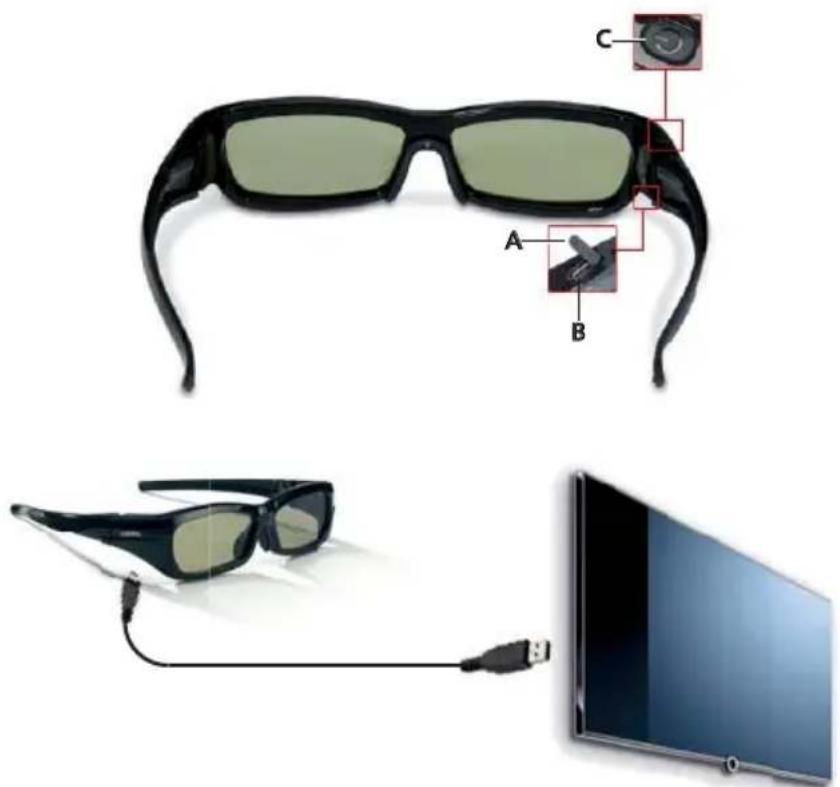
Open the rubber cover (A) over the Micro-USB socket (B) on the right hand side under the frame of the glasses.
Insert the (small) Micro-USB plug on the delivered USB cable in this socket. Insert the (large) plug at the other end of the USB cable in the corresponding USB socket (type A) on a unit which supplies peripheral equipment with power, e.g. your Loewe TV set (not in standby mode) or a computer or USB mains power unit (obtainable as an accessory from your specialist dealer).
During the charging process the display in the on button lights up (C) continuous orange at the top right of the glasses frame. The display goes out as soon as the charging process is finished. If the display flashes several times (or if it does not light up at all after pushing the on button) repeat the charging process.
As soon as the glasses are fully charged, remove the USB cable and replace the rubber cover (A) to seal the Micro-USB socket (B), and protect it from contamination.
Micro USB cable
Start-up
Switching the 3D glasses on/off
In order to switch the glasses on, press the on button (C) at the top right of the glasses briefly. This is confirmed by the LED display in the button lighting up green for approx. 3 seconds.
In order to switch the 3D glasses off, depress the on button and hold for at least 1.5 seconds. This confirmed by the LED display lighting up red for approx. 3 seconds.
If you are not using the glasses, please switch them off. This will lengthen the service life of the integrated battery.
English
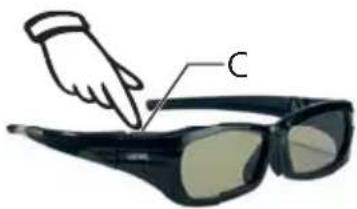
press briefly: LED: green = on
1.5 sec. pressing: LED: red = off
Use of the 3D glasses
Put the glasses on after switching them on.
If you normally wear glasses, you can wear the 3D glasses over your normal glasses.
Sit as centrally as possible (up to an angle of max. 50^ to the central axis) and at a suitable distance (see the operating instructions for your TV set) in front of your 3D ready Loewe TV set to experience the optimum spatial effects.
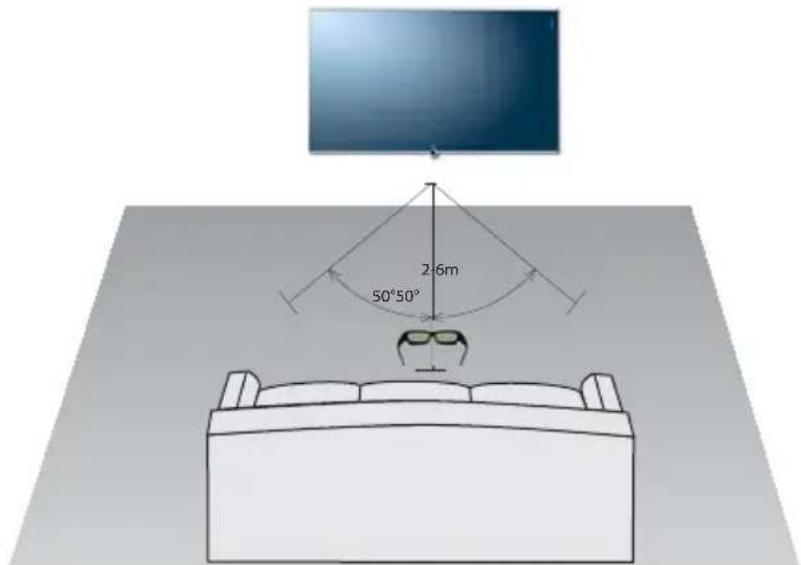
When 3D content is being shown, the 3D glasses receive an infrared signal from the Loewe 3D TV set. The IR sensor is mounted centrally at the front of the 3D glasses. For this reason, perfect functioning of the 3D glasses is only possible when looking at the 3D TV set.
If the 3D glasses do not receive an infrared signal from the 3D TV set for a period of 30 seconds, they will switch off automatically.
The operating and safety instructions in these instructions are limited to the Loewe Active Glasses 3D product (Item.No. 71133080).
It is imperative to comply with the operating and safety instructions of the specific 3D TV set.
For your own safety, and to prevent damage, protect the 3D glasses from:
- dripping or sprayed water, steam and other fluids
Cold, heat and wide temperature variations
knocks and mechanical stresses - direct sun light, open flames and ignition plugs
- reaching into the inside of the appliances
Intended use: These 3D glasses have been made for exclusive use in a domestic environment and are to be used in combination with Loewe 3D TV sets having the Chassis SL151. The terms of the warranty only cover this normal use.
Persons who have weak sight may possibly not be able to experience the 3D effects, or may see them only to a limited extent.
Persons who react sensitively to flashing images (e.g. with epilepsy), should only use this product after consulting their doctor.
It can take a certain time to get used to wearing the 3D glasses and to experience the 3D effects perfectly.
If you experience nausea, dizziness or if you feel unwell when watching 3D content, you should stop using the 3D equipment immediately.
Keep an eye on children while they are watching 3D content because they react particularly sensitively.
After watching a 3D film, take an extended break to relax. Otherwise you could experience headaches, tiredness, dizziness or you could feel unwell.
Sit comfortably in front of the 3D TV set and make sure you are held securely. This will prevent injury caused by reaction to extreme 3D content.
Do not use any artificial light source (e.g. an energy-saving lamp) between the 3D TV set and the 3D glasses. The reception of the infrared signal may be influenced negatively or the TV picture may flicker.
Clean the 3D glasses only with a glasses cleaning cloth, specifically for the purpose, e.g. the microfibre glasses pouch supplied. Do not use sharp or scouring cleaners under any circumstances.
If the lenses get damaged, do not continue to use the 3D glasses.
Environmental protection
The unit
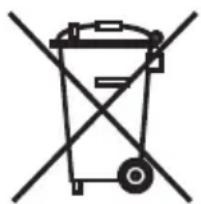
Attention: The EU Directive 2002/96 /EC governs the proper return, handling and recycling of used electronic appliances. Old electronic appliances must therefore be disposed of separately. Never dispose of this unit in the normal domestic waste! You can hand in your old unit free of charge at identified collection points or to your dealer if you buy a similar new unit.
Other details about re-acceptance (also for non-EU countries) are available from your local authorities.
Company and editorial details
Loewe Opta GmbH is a public company incorporated under German law with its Head Office in Kronach.
Industriestrasse 11, 96317 Kronach
Telephone: +49 (0)9261 / 99-0
Fax: +49 (0)9261 / 99-500
Email: ccc@loewe.de
Commercial Registry: District Court Coburg, No. HRB 42243
VAT identification number: DE 193216550
Editorial date 09.2011
© Loewe Opta GmbH, Kronach
All rights reserved including translation.
Subject to change.
Audio Products Group Pty Ltd 67 O'Riordan St
Alexandria NSW 2015,Austral
Tel +61-296693477
Fax +61 -295780140
E-mail: help@audioproducts. com.au
B NL
Loewe Opta Benelux NV/SA Uilenbaan 84
Century Court, Riverside Way Riverside Business Park, Irvine Ayrshire
KA11 5DJ,UK
Tel +44 -1294315000
Fax +44-1294315001
E-mail: enquiries@loewe-uk.com
GR Issagogiki Emboriki
Ellados S.A.
321 Mesogion Av.
152 31 Chalandri-Athens, Hellas
Tel +30 - 210 672 12 00
Fax +30-2106740204
E-mail: christina_argyropoulou@isembel.gr
H Basys Magyarorszagi KFT
To park u.9.
2045 Torokbalint, Magyar
Tel +36-23415637 (121)
Fax +36-23415182
Clear electronic entertainment
Ltd
13 Noah Mozes St.
Agish Ravad Building
Tel Aviv 67442, Israel
Tel +972-3-6091100
Fax +972-3-6092200
E-mail: info@loewe.co.il
SA Salem Agencies &
Services Co.
Hamad Al Haqueel Street,
Rawdah, Jeddah 21413
Kingdom of Saudi Arabia
Tel +966 (2) 665 4616
Fax +966 (2) 660 7864
E-mail: hkurkjian@aol.com
Service
A Cappella Ltd.
Auros Vartu 5, Pasazo skg.
01129 Vilnius, Lithuania
Tel +370-52 12 22 96
Fax +370 - 52626681
Hamrun, HMR1514, Malta
Tel +356 - 21 - 22 53 81
Fax +356-21-23 07 35
E-mail: service@doneo.com.mt
MA Somara S.A.
377, Rue Mustapha El Maani
20000 Casablanca, Morocco
Tel +212-22 22 03 08
Fax +212-22 26 00 06
E-mail: somara@somara.ma
Pce. Premium Consumer Electronics as
Ostre Kullerod 5
105005 Moscow, Russia
Tel +7-495 730 78 00
Fax+7-4957307801
E-mail: service@loewe-cis.ru
S Kjaerulff 1 AB
Ridbanegatan 4, Box 9076
UAE Dubai Audio Center
P.O. Box 32836, Sheikh Zayed Road
Dubai, UAE
Tel +971-4343 1441
Fax +971-4343 77 48
E-mail: service@dubaiaudio.com
ZA The Soundlab (Pty) Ltd
P.O.Box 31952, Kyalami 1684
Gauteng, Republic of South Africa
Te+27-114664700
Fax+27-114664285
E-mail: loewe@mad.co.za
233-34875.001