
PDS 290 B2 - Sander PARKSIDE - Free user manual and instructions
Find the device manual for free PDS 290 B2 PARKSIDE in PDF.



| Product type | Triangle sander (delta sander) |
| Brand | Parkside |
| Model | PDS 290 B2 |
| Rated power | 290 W |
| Rated voltage | 230 V ~ 50 Hz |
| No-load speed | 6 000 - 11 000 min⁻¹ |
| No-load vibration frequency | 12 000 - 22 000 min⁻¹ |
| Sanding pad | Rotatable 360° (in 60° increments) |
| Abrasive fixation | Hook-and-loop (Velcro) |
| Sound pressure level (LpA) | 82 dB(A) (uncertainty KpA=3 dB) |
| Sound power level (LwA) | 93 dB(A) |
| Vibration emission value (ah) | 8.2 m/s² (uncertainty K=1.5 m/s²) |
| Material types | Wood, plastic, metal, painted surfaces, plaster |
| Variable speed | Yes (adjustment wheel) |
| Dust extraction | Adapter for external vacuum (reducer included) |
| Package contents | 1 sander, 3 abrasive sheets, 1 vacuum adapter, 1 reducer, 1 manual |
| Care and cleaning | Clean with a dry cloth; do not use solvents or liquids |
| Warranty | 3 years (subject to conditions) |
| Approvals | CE, standards EN 60745, EN 55014, etc. |
Frequently Asked Questions - PDS 290 B2 PARKSIDE
User questions about PDS 290 B2 PARKSIDE
0 question about this device. Answer the ones you know or ask your own.
Ask a new question about this device
Download the instructions for your Sander in PDF format for free! Find your manual PDS 290 B2 - PARKSIDE and take your electronic device back in hand. On this page are published all the documents necessary for the use of your device. PDS 290 B2 by PARKSIDE.
USER MANUAL PDS 290 B2 PARKSIDE
Translation of the original instructions
IAN 280678
DE AT CH
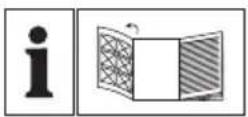
Before reading, unfold the page containing the illustrations and familiarise yourself with all functions of the device.
GB Translation of the original instructions Page 31
Inhaltsverzeichnis
Einleitung 2
KOMPERNASS HANDELS GMBH
BURGSTRASSE 21
44867 BOCHUM
GERMANY
www.kompernass.com
(Courant alternative)
Plage nominale de
Classe de protection: II / [double isolation]
Chere cliente, cher client,
KOMPERNASS HANDELS GMBH
BURGSTRASSE 21
44867 BOCHUM
GERMANY
www.kompernass.com
Directive relative aux machines (2006/42/CE)
Directive RoHS (2011/65/EU)*
KOMPERNASS HANDELS GMBH
BURGSTRASSE 21
44867 BOCHUM
GERMANY
www.kompernass.com
General Power Tool SafetyWarnings 33
1.Work area safety. 33
2. Electrical safety 3 3
3. Personal safety 34
4. Power tool use and care 3 4
5. Service 35
Appliance-specific safety instructions for grinders 35
Original accessories/auxiliary equipment 35
Before use 35
Selecting a sanding sheet 35
Changing sanding sheets 35
Turning the sanding plate in 60^ increments 36
Working procedures 36
Dust extraction 36
Adapter for external dust extraction systems (with reducer) 36
Use 37
Maintenance and cleaning 37
Disposal 37
Translation of the original Conformity Declaration 39
DELTA SANDER PDS 290 B2 Introduction
Congratulations on the purchase of your new appliance. You have chosen a high-quality product. The operating instructions are part of this product. They contain important information about safety, usage and disposal. Before using the product, please familiarise yourself with all operating and safety instructions. Use the product only as described and for the range of applications specified. Please also pass these operating instructions on to any future owner.
Intended use
Depending on the sandpaper being used, this appliance is suitable for the dry sanding of wood, plastic, metal, filler and also painted surfaces. The appliance is particularly suitable for corners, edges and hard-to-reach areas. Any other usage of or modification to the appliance is deemed to be improper and carries a significant risk of accidents. The manufacturer accepts no responsibility for damage(s) resulting from improper usage. This appliance is not intended for commercial use.
Features
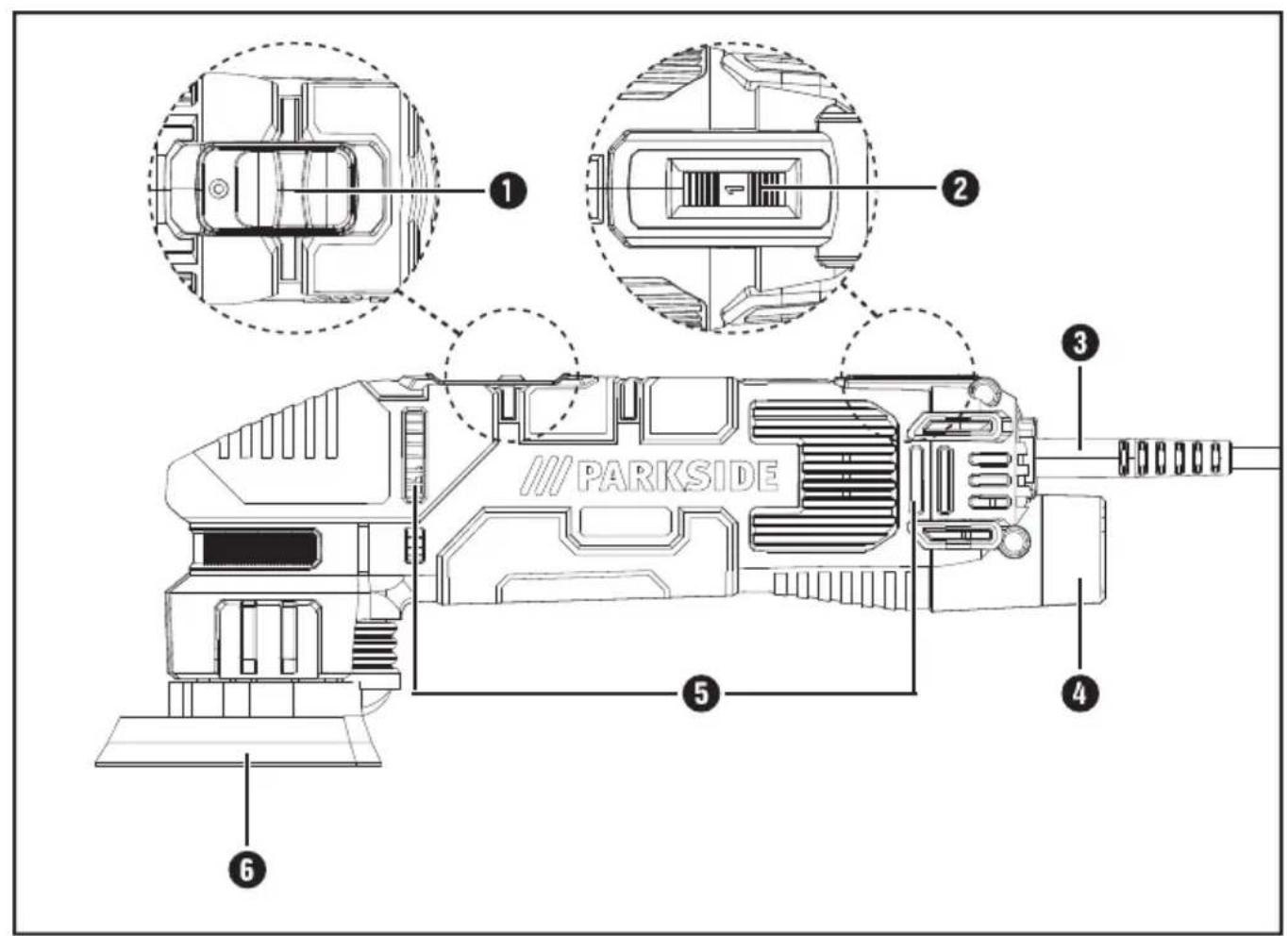
ON/OFF switch
Speed adjustment wheel
3 Power cord
4 Extraction nozzle
5 Air vents
6 Sanding plate (360^ rotation)
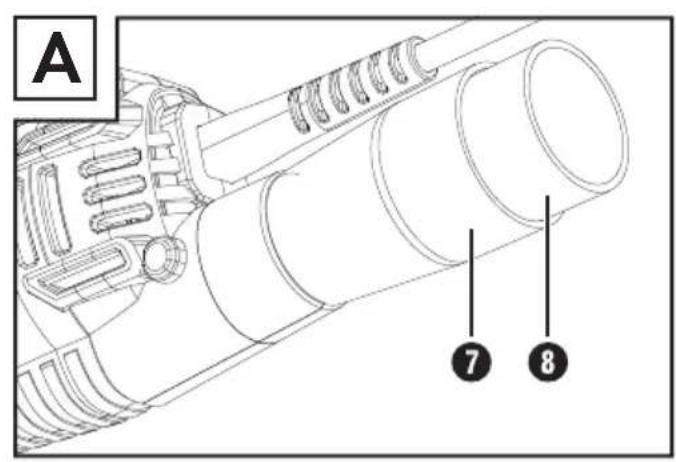
Adapter for dust extraction
8 Reducer
Sanding sheet
Package contents
1 delta sander PDS 290 B2
3 sanding sheets
1 adapter for dust extraction
reducer
1 set of operating instructions
Technical data
Rated power
consumption: 290 W
Rated voltage: 230V 50Hz (AC)
Rated idle speed: n 6000-11000 rpm
Rated no-load
oscillation speed: n 12000-22000 rpm
Sanding plate: 360^ rotation
Protection class: II / (double insulation)
Noise emission value:
Noise measurement value determined in accordance with EN 60745. The A-rated noise level of the power tool is typically as follows:
Sound pressure level L_PA 82 dB (A)
Uncertainty K_PA
Sound power level L WA: 93 dB (A)
Uncertainty K_WA 3 dB
Wear hearing protection!
Vibration emission value:
Vibration values (vector total of three directions) determined in accordance with EN 60745:
Vibration emission value a_n = 8.2m / s^2
Uncertainty K = 1.5m / s^2
NOTE
The vibration level specified in these instructions has been measured in accordance with a standardised measuring procedure and can be used for equipment comparisons. The specified vibration emission value can also be used to make an initial exposure estimate.
WARNING!
The vibration level will vary according to the use of the power tool and may sometimes be higher than the value specified in these instructions. Regular use of the power tool in this way may cause the user to underestimate the vibration. Try to keep the vibration loads as low as possible. Measures to reduce the vibration load are, e.g. wearing gloves and limiting the working time. Wherein all states of operation must be included (e.g. times when the power tool is switched off and times where the power tool is switched on but running without load).

General Power Tool SafetyWarnings
WARNING!
Read all safety warnings and all instructions. Failure to follow the warnings and instructions may result in electric shock, fire and/or serious injury.
Save all warnings and instructions for future reference.
The term "power tool" in the warnings refers to your mains-operated (corded) power tool or battery-operated (cordless) power tool.
1. Work area safety
a) Keep work area clean and well lit. Cluttered or dark areas invite accidents.
b) Do not operate power tools in explosive atmospheres, such as in the presence of flammable liquids, gases or dust. Power tools create sparks which may ignite the dust or fumes.
c) Keep children and bystanders away while operating a power tool. Distractions can cause you to lose control.
2. Electrical safety
a) Power tool plugs must match the outlet. Never modify the plug in any way. Do not use any adapter plugs with earthed (grounded) power tools. Unmodified plugs and matching outlets will reduce risk of electric shock.
b) Avoid body contact with earthed or ground- ed surfaces, such as pipes, radiators, ranges and refrigerators. There is an increased risk of electric shock if your body is earthed or grounded.
c) Do not expose power tools to rain or wet conditions. Water entering a power tool will increase the risk of electric shock.
d) Do not abuse the cord. Never use the cord for carrying, pulling or unplugging the power tool. Keep cord away from heat, oil, sharp edges or moving parts. Damaged or entangled cords increase the risk of electric shock.
e) When operating a power tool outdoors, use an extension cord suitable for outdoor use. Use of a cord suitable for outdoor use reduces the risk of electric shock.
f) If operating a power tool in a damp location is unavoidable, use a residual current device (RCD) protected supply. Use of an RCD reduces the risk of electric shock.
3. Personal safety
a) Stay alert, watch what you are doing and use common sense when operating a power tool. Do not use a power tool while you are tired or under the influence of drugs, alcohol or medication. A moment of inattention while operating power tools may result in serious personal injury.
b) Use personal protective equipment. Always wear eye protection. Protective equipment such as dust mask, non-skid safety shoes, hard hat, or hearing protection used for appropriate conditions will reduce personal injuries.
c) Prevent unintentional starting. Ensure the switch is in the off-position before connecting to power source and/or battery pack, picking up or carrying the tool. Carrying power tools with your finger on the switch or energising power tools that have the switch on invites accidents.
d) Remove any adjusting key or wrench before turning the power tool on. A wrench or a key left attached to a rotating part of the power tool may result in personal injury.
e) Do not overreach. Keep proper footing and balance at all times. This enables better control of the power tool in unexpected situations.
f) Dress properly. Do not wear loose clothing or jewellery. Keep your hair, clothing and gloves away from moving parts. Loose clothes, jewellery or long hair can be caught in moving parts.
g) If devices are provided for the connection of dust extraction and collection facilities, ensure these are connected and properly used. Use of dust collection can reduce dust-related hazards.
4. Power tool use and care
a) Do not force the power tool. Use the correct power tool for your application. The correct power tool will do the job better and safer at the rate for which it was designed.
b) Do not use the power tool if the switch does not turn it on and off. Any power tool that cannot be controlled with the switch is dangerous and must be repaired.
c) Disconnect the plug from the power source and/or the battery pack from the power tool before making any adjustments, changing accessories, or storing power tools. Such preventive safety measures reduce the risk of starting the power tool accidentally.
d) Store idle power tools out of the reach of children. Do not allow persons unfamiliar with the power tool or these instructions to operate the power tool. Power tools are dangerous in the hands of untrained users.
e) Maintain power tools. Check for misalignment or binding of moving parts, breakage of parts and any other condition that may affect the power tools operation. If damaged, have the power tool repaired before use. Many accidents are caused by poorly maintained power tools.
f) Keep cutting tools sharp and clean. Properly maintained cutting tools with sharp cutting edges are less likely to bind and are easier to control.
g) Use the power tool, accessories and tool bits, etc. in accordance with these instructions, taking into account the working conditions and the work to be performed. Use of the power tool for operations different from those intended could result in a hazardous situation.
5. Service
a) Have your power tool serviced by a qualified repair person using only identical replacement parts. This will ensure that the safety of the power tool is maintained.
Appliance-specific safety instructions for grinders

WARNING!
Dusts from materials such as leaded paint, some types of wood and metal can be harmful to your health.
- Contact with or inhalation of these dusts can represent a health hazard for the person operating the appliance and other people in the vicinity.
Wear safety goggles and a protective dust mask!
Original accessories/auxiliary equipment
Use only the additional equipment and accessories specified in the operating instructions. Using attachments or accessory tools other than those recommended in the operating instructions can lead to a risk of injury.
Before use
Selecting a sanding sheet
Removal and surface:
The material removal rate and surface quality are determined by the grain strength of the sandpaper.
Please note that you need to use appropriate sandpapers with different grains for working different materials.
Materials:
Wood (sanding sheets included in the delivery), paints, stone
*Depending on the sanding sheet
Changing sanding sheets
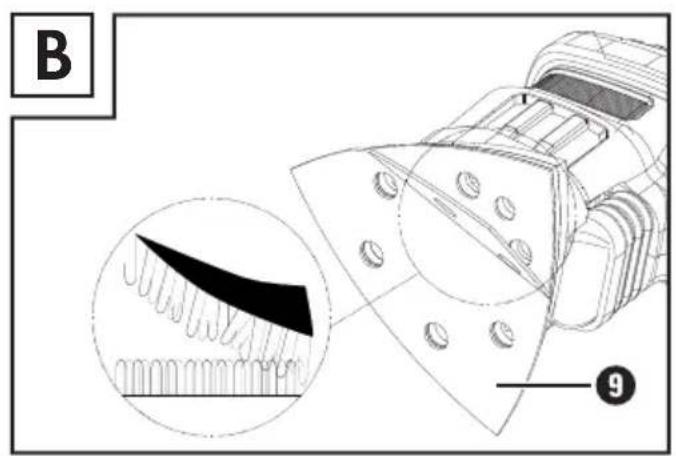
The appliance has a Velcro sheet that enables fast and simple changing of the sanding sheets.

WARNING!
Always remove the plug from the mains power socket before carrying out any work on the appliance.
Attachment:
You can attach the sanding shee to the sanding plate 6 sing the Velcro.
Make sure that the holes on the sanding sheet 9 match up with the holes on the sanding plate 6
Removal:
Lift the sanding shee on one side and pull it off the sanding plate to remove it (see fig. b).
NOTE
Before fitting a new sanding shee, remove any dust and dirt from the sanding plate
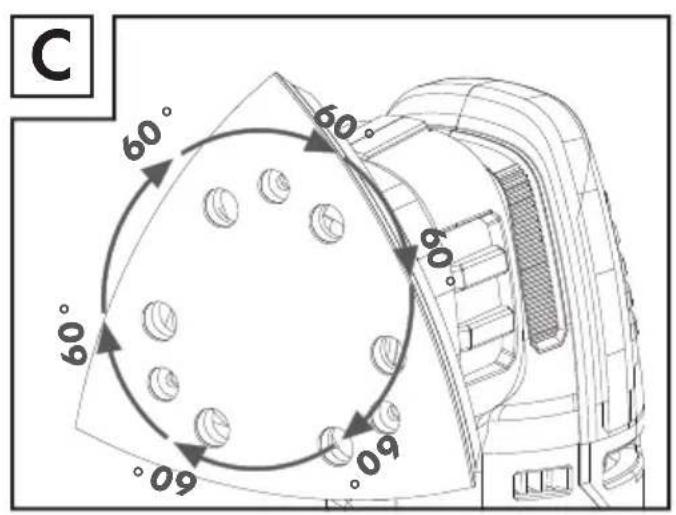
Turning the sanding plate in 60^ increments

WARNING!
Always remove the plug from the mains power socket before carrying out any work on the appliance.
Turn the sanding plat on the delta sander in 60^ increments until it clicks into the desired position (see fig. C).
Removal and surface:
The shape of the delta sander makes it easier to sand in hard-to-reach places, corners and edges.
The material removal rate and surface quality are determined by the grain strength of the sandpaper and the set oscillation speed.
Please note that you need to use appropriate sandpapers with different grains for working different materials. Also adjust the speed depending on the material.
Working procedures
Switch the appliance on before applying it to the workpiece.
Apply minimal pressure when working.
Work at a constant speed.
Change the sanding sheets regularly.
Never sand different materials (such as wood and then metal) using the same sanding sheet Optimum sanding results can only be achieved by using clean sanding sheets.
Clean the sanding shee9 every once in a while using a vacuum cleaner.
Dust extraction

WARNING! RISK OF FIRE!
When working with electrical appliances which can be connected to a vacuum cleaner via a vacuum cleaner adapter, there is a risk of fire! Under unfavourable conditions, wood dust in the bag of the vacuum cleaner can spontaneously ignite. This can occur due to flying sparks or when sanding over residual metals in wood. This is particularly likely if the wood dust is mixed with paint residues or other chemicals and the workpiece has become hot after being used for a long time. Therefore, do not allow the material being sanded and the appliance to overheat. Always empty the vacuum cleaner dust bag before taking work breaks.
Wear a dust mask!

WARNING!
Always remove the plug from the mains power socket before carrying out any work on the appliance.
Adapter for external dust extraction systems (with reducer)
Connection:
Push the adapte for dust extraction into the connection 4 When doing so, note the guidance aids on the appliance and on the adapter.
To lock, turn the extraction nozzle clockwise.
If necessary, use the reduce by pushing it onto the adapter
Push the hose of a suitable dust extraction appliance (e.g. a workshop vacuum cleaner) onto the adapter 7 for vacuum extraction or the reducer 8
Removal:
Pull the hose of the vacuum cleaner off the adapter for vacuum extraction 7. To unlock, turn the extraction nozzle anti-clockwise.
Pull the adapte for vacuum extraction (including the reducer fitted) off.
Use

CAUTION!
Ensure that the appliance is switched off before connecting it to the mains.
NOTE
Always switch on the delta sander before making contact with the material, then apply it to the workpiece.
Switching the appliance on:
Push the ON/OFF switch 1 forwards to position "I".
Switching the appliance off:
Push the ON/OFF switch ① backwards to position "0".
Selecting oscillation speed:
You can set the desired oscillation speed using the speed adjustment wheel 2 as required.
The setting can also be changed while working.
Work out the optimum oscillation for your work by carrying out a practice run.
Setting 1 = lowest oscillation speed/Setting max. = highest oscillation speed
Maintenance and cleaning

WARNING!
Always remove the plug from the mains power socket before carrying out any work on the appliance.
The delta sander is maintenance-free.
Clean the appliance regularly, directly after completion of work.
Use a dry cloth to clean the housing.
Remove any sanding dust stuck to the appliance with a brush.
Never use sharp objects, petrol, solvents or cleaning agents which can damage plastic. Do not allow any liquids to get into the interior of the appliance.
Always keep the air vents free of obstructions.
Disposal

Packaging is made from environmentally friendly material and can be disposed of at your local recycling plant.

Dispose of power tools in your normal household waste!
In accordance with European Directive 2012/19/EU on Waste Electrical and Electronic Equipment and its integration into national law, used power tools must be disposed of separately and recycled in an environmentally friendly manner.
Your local community or municipal authorities can provide information on how to dispose of the appliance.
This appliance has a 3-year warranty valid from the date of purchase. If this product has any faults, you, the buyer, have certain statutory rights. Your statutory rights are not restricted in any way by the warranty described below.
Warranty conditions
The validity period of the warranty starts from the date of purchase. Please keep your original receipt in a safe place. This document will be required as proof of purchase.
If any material or production fault occurs within three years of the date of purchase of the product, we will either repair or replace the product for you at our discretion. This warranty service is dependent on you presenting the defective appliance and the proof of purchase (receipt) and a short written description of the fault and its time of occurrence.
If the defect is covered by the warranty, your product will either be repaired or replaced by us. The repair or replacement of a product does not signify the beginning of a new warranty period.
Warranty period and statutory claims for defects
The warranty period is not prolonged by repairs effected under the warranty. This also applies to replaced and repaired components. Any damage and defects present at the time of purchase must be reported immediately after unpacking. Repairs carried out after expiry of the warranty period shall be subject to a fee.
Scope of the warranty
This appliance has been manufactured in accordance with strict quality guidelines and inspected meticulously prior to delivery.
The warranty covers material faults or production faults. The warranty does not extend to product parts subject to normal wear and tear or fragile parts such as switches, batteries, baking moulds or parts made of glass.
The warranty does not apply if the product has been damaged, improperly used or improperly maintained. The directions in the operating instructions for the product regarding proper use of the product are to be strictly followed. Uses and actions that are discouraged in the operating instructions or which are warned against must be avoided.
This product is intended solely for private use and not for commercial purposes. The warranty shall be deemed void in cases of misuse or improper handling, use of force and modifications/repairs which have not been carried out by one of our authorised Service centres.
Warranty claim procedure
To ensure quick processing of your case, please observe the following instructions:
Please have the till receipt and the item number (e.g. IAN 12345) available as proof of purchase.
You will find the item number on the type plate, an engraving on the front page of the instructions (bottom left), or as a sticker on the rear or bottom of the appliance.
If functional or other defects occur, please contact the service department listed either by telephone or by e-mail.
You can return a defective product to us free of charge to the service address that will be provided to you. Ensure that you enclose the proof of purchase (till receipt) and information about what the defect is and when it occurred.
NOTE
For Parkside and Florabest tools, please send us only the defective item without the accessories (e.g. battery, storage case, assembly tools, etc.).

You can download these instructions along with many other manuals, product videos and software on www.lidl-service.com.
Service
WARNING!
Have the power tool repaired by the service centre or a qualified electrician and only using genuine replacement parts. This will ensure that the safety of the appliance is maintained.
Always ensure that the power plug or the mains cable is replaced only by the manufacturer of the appliance or by an approved customer service provider. This will ensure that the safety of the appliance is maintained.
NOTE
- Replacement parts not listed (such as carbon brushes, switches) can be ordered via our service hotline.
GB Service Great Britain
Tel.: 0871 5000 720 (£ 0.10/Min.) E-Mail: kompernass@lidl.co.uk
IAN 280678
Importer
Please note that the following address is not the service address. Please use the service address provided in the operating instructions.
KOMPERNASS HANDELS GMBH
BURGSTRASSE 21
44867 BOCHUM
GERMANY
www.kompernass.com
Translation of the original Conformity Declaration
We, KOMPERNASS HANDELS GMBH, document officer: Mr. Semi Uguzlu, BURGSTR. 21, 44867 BOCHUM, GERMANY, hereby declare that this product complies with the following standards, normative documents and EC directives:
Machinery Directive (2006/42/EC)
EMC (Electromagnetic Compatibility) (2014/30/EU)
RoHS Directive (2011/65/EU)*
- The manufacturer bears the full responsibility for compliance with this conformity declaration. The object of the declaration described above complies with the requirements of the Directive 2011/65/EU of the European Parliament and Council of 8 June 2011 on the limitations of use of certain dangerous substances in electrical and electronic appliances.
Applied harmonised standards:
EN 60745-1:2009/A11:2010
EN 60745-2-4:2009/A11:2011
EN 62233:2008
EN 55014-1:2006/A2:2011
EN 55014-2:2015
EN 61000-3-2:2014, EN 61000-3-3:2013
Type/appliance designation:
Delta sander PDS 290 B2
Year of manufacture: 10 - 2016
Serial number: IAN 280678
Bochum, 24/10/2016

Semi Uguzlu
- Quality Manager -
We reserve the right to make technical changes in the context of further product development.
KOMPERNASS HANDELS GMBH
BURGSTRASSE 21
44867 BOCHUM
DEUTSCHLAND/GERMANY
www.kompernass.com

- DE AT CH
- Inhaltsverzeichnis
- Einleitung 2
- General Power Tool SafetyWarnings 33
- Before use 35
- Use 37
- Maintenance and cleaning 37
- Disposal 37
- Translation of the original Conformity Declaration 39
- DELTA SANDER PDS 290 B2 Introduction
- Intended use
- Features
- Package contents
- Technical data
- Noise emission value:
- Wear hearing protection!
- Vibration emission value:
- NOTE
- WARNING!
- General Power Tool SafetyWarnings
- Save all warnings and instructions for future reference.
- Work area safety
- Electrical safety
- Personal safety
- Power tool use and care
- Service
- Appliance-specific safety instructions for grinders
- Original accessories/auxiliary equipment
- Before use
- Selecting a sanding sheet
- Removal and surface:
- Materials:
- Changing sanding sheets
- Attachment:
- Removal:
- Turning the sanding plate in 60° increments
- Working procedures
- Dust extraction
- WARNING! RISK OF FIRE!
- Wear a dust mask!
- Adapter for external dust extraction systems (with reducer)
- Connection:
- Use
- CAUTION!
- Switching the appliance on:
- Switching the appliance off:
- Selecting oscillation speed:
- Maintenance and cleaning
- Disposal
- Dispose of power tools in your normal household waste!
- Warranty conditions
- Warranty period and statutory claims for defects
- Scope of the warranty
- Warranty claim procedure
- Service
- GB Service Great Britain
- Importer
- KOMPERNASS HANDELS GMBH
- Translation of the original Conformity Declaration
- Machinery Directive (2006/42/EC)
- EMC (Electromagnetic Compatibility) (2014/30/EU)
- RoHS Directive (2011/65/EU)*
- Applied harmonised standards:
- Type/appliance designation:
- Year of manufacture: 10 - 2016
- Serial number: IAN 280678
Brand : PARKSIDE
Model : PDS 290 B2
Category : Sander