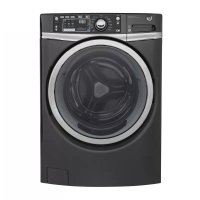
GFW480SPKDG - Washing machine GE - Free user manual and instructions
Find the device manual for free GFW480SPKDG GE in PDF.


Frequently Asked Questions - GFW480SPKDG GE
User questions about GFW480SPKDG GE
0 question about this device. Answer the ones you know or ask your own.
Ask a new question about this device
Download the instructions for your Washing machine in PDF format for free! Find your manual GFW480SPKDG - GE and take your electronic device back in hand. On this page are published all the documents necessary for the use of your device. GFW480SPKDG by GE.
USER MANUAL GFW480SPKDG GE
SAFETY INSTRUCTIONS .... 3
USING THE WASHER
Getting Started 5
Controls 6
Features....13
Loading 15
CARE AND CLEANING....16
INSTALLATION
INSTRUCTIONS 19
TROUBLESHOOTING TIPS ..... 25
CONSUMER SUPPORT
Warranty (United States) 30
Warranty (Canada) 31
Consumer Support 32
OWNER'S MANUAL & INSTALLATION INSTRUCTIONS
GFW490
GFW480
GFWR4805
GFWR4800
GHWS3605
GHWS3600
GFWR2705
GFWR2700
GFWS2605
GFWS2600
ENGLISH/FRANÇAIS/ ESPAÑOL
Write the model and serial numbers here:
Model # ____
Serial # ____
You can find them on a label on the side of the washer.
THANK YOU FOR MAKING GE APPLIANCES A PART OF YOUR HOME.
Whether you grew up with GE Appliances, or this is your first, we're happy to have you in the family.
We take pride in the craftsmanship, innovation and design that goes into every GE Appliances product, and we think you will too. Among other things, registration of your appliance ensures that we can deliver important product information and warranty details when you need them.
Register your GE appliance now online. Helpful websites and phone numbers are available in the Consumer Support section of this Owner's Manual. You may also mail in the pre-printed registration card included in the packing material.

GE APPLIANCES
IMPORTANT SAFETY INSTRUCTIONS

WARNING
To reduce the risk of death, fire, explosion, electric shock, or injury to persons when using your appliance, follow basic precautions, including the following:
- Read all instructions before using the appliance.
■ DO NOT wash or dry articles that have been previously cleaned in, washed in, soaked in or spotted with gasoline, dry-cleaning solvents, or other flammable or explosive substances, as they give off vapors that could ignite or explode.
■ DO NOT add gasoline, dry-cleaning solvents, or other flammable or explosive substances to the wash water. These substances give off vapors that could ignite or explode.
■ Under certain conditions, hydrogen gas may be produced in a hot-water system that has not been used for 2 weeks or more. HYDROGEN GAS IS EXPLOSIVE. If the hot water system has not been used for such a period, before using a washing machine, turn on all hot-water faucets and let the water flow from each for several minutes. This will release any accumulated hydrogen gas. As the gas is flammable, DO NOT smoke or use an open flame during this time.
■ DO NOT allow children to play on or in this appliance. Close supervision of children is necessary when this appliance is used near children. Before the washer is removed from service or discarded, remove the door or lid. Failure to follow these instructions may result in death or injury to persons.
■ DO NOT reach into the appliance if the basket or agitator is moving to prevent accidental entanglement.
■ DO NOT install or store this appliance where it will be exposed to the weather.
■ DO NOT tamper with controls, repair or replace any part of this appliance or attempt any servicing unless specifically recommended in the user maintenance instructions or in published user repair instructions that you understand and have the skills to carry out. - Keep the area around your appliance clean and dry to reduce the possibility of slipping.
■ DO NOT operate this appliance if it is damaged, malfunctioning, partially disassembled, or has missing or broken parts including a damaged cord or plug.
■ Unplug the appliance or turn off the circuit breaker before servicing. Pressing the Power button DOES NOT disconnect power.
■ See "ELECTRICAL REQUIREMENTS" located in the Installation Instructions for grounding instructions.
SAVE THESE INSTRUCTIONS
PROPER INSTALLATION
This washer must be properly installed and located in accordance with the Installation Instructions before it is used. If you did not receive an Installation Instructions, you can receive one by visiting GEAppliances.com or by calling GE Appliances at 800.GE.CARES (800.432.2737).
■ Ensure that the hot water hose is connected to the "H" (internal red screened) valve and the cold water hose is connected to the "C" (internal blue screened) valve.
■ Install or store where it will not be exposed to temperatures below freezing or exposed to the weather, which could cause permanent damage and invalidate the warranty.
■ Properly ground washer to conform with all governing codes and ordinances. Follow details in Installation Instructions.
WARNING

- Electrical Shock Hazard
Plug into a grounded 3 prong outlet.
DO NOT remove ground prong.
DO NOT use an adapter.
DO NOT use an extension cord.
Failure to follow these instructions can result in death, fire or electrical shock.
■ This washer does not include water supply hoses.
GE Appliances strongly recommends the use of factory specified parts. A list of factory hoses available for purchase are listed below. These hoses are manufactured and tested to meet GE Appliances specifications.
GE Appliances strongly recommends the use of new water supply hoses. Hoses degrade over time and need to be replaced every 5 years to reduce the risk of hose failures and water damage.
Parts and Accessories
Order on-line at GEApplianceparts.com today, 24 hours a day or by phone at 800.626.2002 during normal business hours.
Part Number Accessory
PM14X10002 4 ft Rubber Water Supply Hoses Or
PM14X10005 4 ft Braided Metal Water Supply Hoses
WX10X10011 Tide® Washing Machine Cleaner*
PM7X1 Washer Floor Tray
PM7X3 Low Profile Universal Washer Floor Tray (for use with pedestal models)
GFP1328PK GE Appliances 28" pedestal (available color GFP1328SK matched to your washer or dryer)
NOTE: The GE Appliances RightHeight™ Design frontload washer equipped with a Built-In Pedestal™ cannot be mounted on a pedestal.
WHEN NOT IN USE
■ Turn off water faucets to minimize leakage if a break or rupture should occur. Check the condition of the fill hoses; GE Appliances recommends changing the hoses every 5 years.
SAVE THESE INSTRUCTIONS

WARNING
To reduce the risk of fire, electric shock, or injury to persons, read the IMPORTANT SAFETYINSTRUCTIONS before operating this appliance.
Throughout this manual, features and appearance may vary from your model.
Controls - You can locate your model number on a label on the side of the washer or inside the washer door.
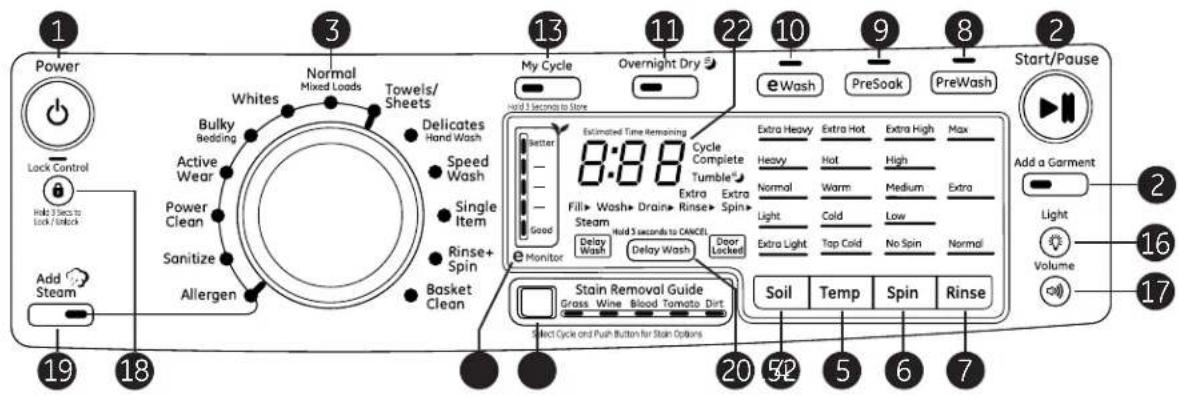
Models: GFWR4805, GFWR4800, GHWS3605, GHWS3600 - GE Appliances RightHeight™ Design Steam Washer with Built-In Pedestal™
text_image
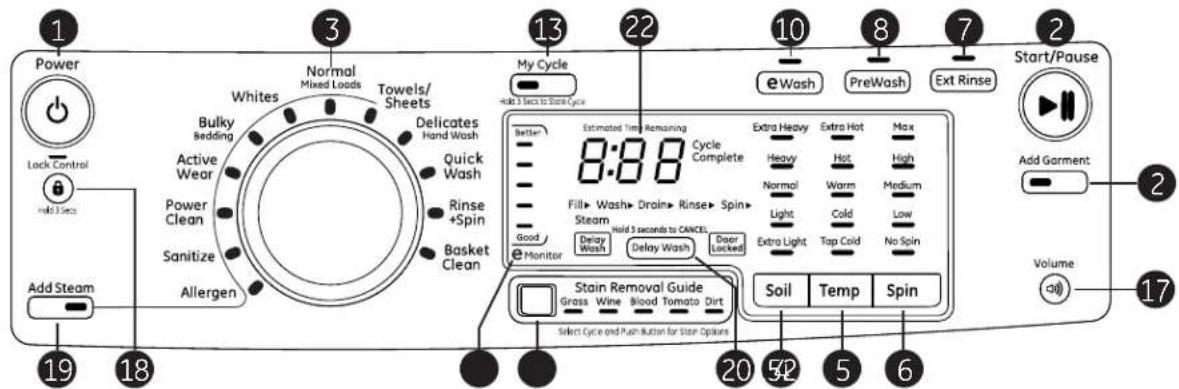
1 Power Lock Control Hold 3 secs to Lock /-lock Add Steam 19 18 3 Normal Mixed Loads Towels/ Sheets Whites Bulky Bedding Active Wear Power Clean Sanitize Allergen Delicates Hand Wash Speed Wash Single Item Rinse+ Spin Basket Clean 13 My Cycle Overnight Dry 22 10 eWash PreSoak PreWash 2 Start/Pause Add a Garment Light Volume 16 17 20 52 5 6 7 Extra Heavy Extra Hot Extra High Max Heavy Hot High Normal Warm Medium Extra Light Cold Low Extra Light Top Cold No Spin Normal Delay Wash Delay Wash Delay Wash Delay Wash Delay Wash Delay Wash Delay Wash Delay Wash Delay Wash Delay Wash Delay Wash Delay Wash Delay Wash Delay Wash Delay Wash Delay Wash Delay Wash Delay Wash Delay Wash Delay Wash Delay Wash Delay Wash Delay Wash Delay Wash Delay Wash Delay Wash Delay Wash Delay Wash Delay Wash Delay Wash Delay Wash Delay Wash Delay Wash Delay Wash Delay Wash Delay Wash Delay Wash Delay Wash Delay Wash Delay Wash Delay Wash Delay Wash Delay Wash Delay Wash Delay Wash Delay Wash Delay Wash Delay Wash Delay Wash Delay Wash Delay Wash Delays Wash Delays Wash Delays Wash Delays Wash Delays Wash Delays Wash Delays Wash Delays Wash Delays Wash Delays Wash Delays Wash Delays Wash Delays Wash Delays Wash Delays Wash Delays Wash Delays Wash Delays Wash Delays Wash Delays Wash Delays Wash Delays Wash Delays Wash Delays Wash Delays Wash Delays Wash Delays Wash Delays Wash Delays Wash Delays Wash Delays Wash Delays Wash Delays Wash Delays wash Delays wash Delays wash Delays wash Delays wash Delays wash Delays wash Delays wash Delays wash Delays wash Delays wash Delays wash Delays wash Delays wash Delays wash Delays wash Delays wash Delays wash Delays wash Delays wash Delays wash Delays wash Delays wash Delays wash Delays wash Delays wash Delays wash Delays wash Delays wash Delays wash Delays wash Delays wash Delays wash Delays wash Elongue Estimated Time Remaining 8:88 Cycle Complete Tumble Extra Extra Spin Extra Extra Extra Extra Extra Extra Extra Extra Extra Extra Extra Extra Extra Extra Extra Extra Extra Extra Extra Extra Extra Extra Extra Extra Extra Extra Extra Extra Extra Extra Extra Extra Extra Extra Extra Extra Extra Extra Extra Extra Extra Extra Extra Extra Extra Extra Extra Extra Extra Extra Extra Extra Extra Extra Extra Extra Extra Extra Extra Extra Extra Extra Extra Extra Extra Extra Extra Extra Extra Extra Extra Extra Extra Extra Extra Extra Extra Extra Extra Extra Extra Extra Extra Extra Extra Extra Extra Extra Extra Extra Extra Extra Extra Extra Extra Extra Extra Extra Extra Extra Super Super Super Super Super Super Super Super Super Super Super Super Super Super Super Super Super Super Super Super Super Super Super Super Super Super Super Super Super Super Super Super Super Super Super Super Super Super Super Super Super Super Super Super Super Super Super Super Super Super Super Super Super Super Super Super Super Super Super Super Super Super Super Super Super Super Super Super Super Super Super Super Super Super Super Super Super Super Super Super Super Super Super Super Super Super Super Super Super Super Super Super Super Super Super Super Super Super Super Super MicroModels: GFWR2705, GFWR2700, GFWS2605, GFWS2600 - GE Appliances RightHeight™ Design Steam Washer with Built-In Pedestal™
text_image
1 Power Lock Control Add Steam 19 18 3 Normal Mixed Loads Towels/ Sheets Whites Bulky Bedding Active Wear Power Clean Sanitize Allergen Delicates Hand Wash Quick Wash Rinse +Spin Basket Clean 13 My Cycle Hold 3 Sets to Store Cycle 22 10 e Wash PreWash Ext Rinse Start/Pause 2 Add Garment Volume 17 20 52 5 6 Soil Temp Spin Estimated Time Remaining Cycle Complete 8:88 Extra Heavy Extra Hot Max Heavy Hot High Normal Warm Medium Light Cold Low Extra Light Tap Cold No Spin Monitor Delay Wash Delay Wash Door (Locked) Stain Removal Guide Grass Wine Blood Tomato Dirt Select Cycle and Push Button for Stain OptionsModels: GFW490, GFW480 - Steam Washer with Built-In Pedestal™
text_image
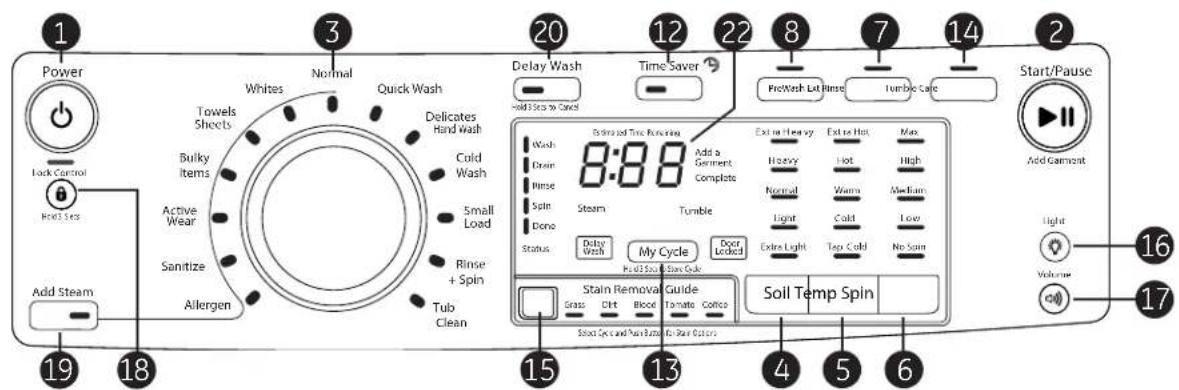
1 Power Lock Control Hold 3 Sets Add Steam 19 18 3 Normal Towels Sheets Bulky Items Active Wear Sanitize Allergen 20 Delay Wash Hold 3 Sets to Cancel Time Saver PreWash Let Rinse Turnbo Cure 22 8 7 14 2 Start/Pause Add Gambleat Light Volume 16 17 15 13 4 5 6 Stain Removal Guide Grass Dirt Blood Tomato Coffee Soil Temp Spin Slow Cycle and Pull Sizes for Pure ColorsGetting Started
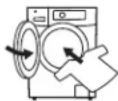

1 Load clothes into your washer and close the door.
2 Press Power to turn on the washer.
If the screen is dark, a press of the Power button will "wake up" the display.
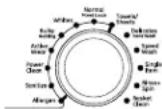
3 Turn the knob to the desired cycle or use My Cycle (on some models) to program or recall your favorite cycle.
(cycle options vary by model)
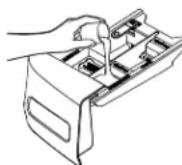
4 Open the dispenser and add detergent, bleach and fabric softener, as desired.
5 Press Start to begin the wash cycle. The machine will weigh your clothes and add the proper amount of water. When the wash cycle is finished, the door will unlock.

Power
Press to "wake up" the display. If the display is active, press to put the washer into standby mode.
NOTE: Pressing Power does not disconnect the appliance from the power supply.

Start/Pause
Press to start a wash cycle. If the washer is running, pressing it once will pause the washer and unlock the door. It will take a few seconds for the door to unlock after pressing Pause. Press again to restart the wash cycle.
NOTE: If the washer is paused and the cycle is not restarted within 15 minutes, the current wash cycle will be cancelled. NOTE: The washer performs automatic system checks after pressing the Start button. Water will flow in 45 seconds or less. You may hear the door lock and unlock before water flows; this is normal.
Add Garment (on some models)
If you need to add a garment after the cycle has started, press the Add Garment button and the unit will unlock the door, allowing additional garments. The Add Garment feature is only available when the LED is lit on the button. After a certain point in the cycle, the LED will not be lit any longer and adding a garment is not allowed.

Wash Cycles
The wash cycles are optimized for specific types of wash loads.
The chart below will help you match the items to be washed with the best wash cycle settings.
For optimal performance, select the cycle that most closely matches the items being washed.
Selections and options shown in bold are the suggested settings for that cycle.
*Some cycles and options may not be available on some models.
| Items to Wash Cycle Soil | Level | Wash Temp Spin Selection Options Available Cycle Details | ||||
| Cycle for normal, regular, or typical use for washing up to a full load of normally soiled cotton clothing. | Normal Ex. | Heavy Heavy Normal Light Ex. Light | Extra Hot Hot Warm Cold Tap Cold | Extra High High Medium Low No Spin | Stain Removal Guide Prewash or Presoak Add Steam Time Saver Extra Rinse Delay Wash Tumble Care Overnight Dry | Cycle for normal, regular, or typical use for washing up to a full load of normally soiled cotton clothing.Choose the Heavy or Extra Heavy soil level selection and Warm or Hot water temperature selection as appropriate for your clothes load for a higher degree of cleaning. |
| Whites and household linens. | Whites Ex. | Heavy Heavy Normal Light Ex. Light | Extra Hot Hot Warm Cold Tap Cold | Extra High High Medium Low No Spin | Stain Removal Guide Prewash or Presoak Add Steam Time Saver Extra Rinse Delay Wash Tumble Care Overnight Dry | Cycle tailored to clean and brighten your whites. |

Wash Cycles - Continued
| Items to Wash Cycle Soil | Level | Wash Temp Spin Selection Options Available Cycle Details | ||||
| Towels, sheets,pillowcases anddish rags. | Towels Sheets | Ex. HeavyHeavyNormalLightEx. Light | HotWarmColdTap Cold | Extra HighHighMediumLowNo Spin | Stain Removal GuidePrewash or PresoakAdd SteamTime SaverExtra RinseDelay WashTumble Care | Cycle designed for washing towels,sheets, pillowcases and dish rags. It isrecommended that towels and sheetsbe washed separately for best careand washing performance. |
| Lingerie andspecial carefabrics withlight soil. | Delicates/HandWash | Ex. HeavyHeavyNormalLightEx. Light | WarmColdTap Cold | HighMediumLowNo Spin | Stain Removal GuidePrewash or PresoakTime SaverExtra RinseDelay WashTumble Care | For lightly soiled items labeled hand-washable. Provides gentle tumblingand soak during wash and rinse. |
| Small loads oflightly soiled itemsthat are needed ina hurry. | QuickWash orSpeedWash | Ex. HeavyHeavyNormalLightEx. Light | HotWarmColdTap Cold | Extra HighHighMediumLowNo Spin | Stain Removal GuidePrewash or PresoakExtra RinseDelay WashTumble Care | For cleaning lightly soiled loads in thefastest time possible. Cycle time isapproximately 30 minutes, dependingon selected options. |
| Medium to lightlysoiled athleticwear items oftechnical orsynthetic fabrics. | ActiveWear | Ex. HeavyHeavyNormalLightEx. Light | HotWarmColdTap Cold | Extra HighHighMediumLowNo Spin | Stain Removal GuidePrewash or PresoakAdd SteamTime SaverExtra RinseDelay WashTumble CareOvernight Dry | Cycle designed for care of mediumto lightly soiled active wear, athleticwear and technical fabrics. |
| Cycle for normal,regular, or typicaluse for washingup to a full loadof normally soiledcotton clothingusing only coldwater. | ColdWash* | Ex. HeavyHeavyNormalLightEx. Light | ColdTap Cold | Extra HighHighMediumLowNo Spin | Prewash or PresoakExtra RinseDelay WashTumble Care | Cycle for normal, regular, or typicaluse for washing up to a full load ofnormally soiled cotton clothing. This isan energy saving cycle that uses coldwater only to provide comparablewash performance to a warm waterwash. |
| For heavily soileditems whichrequire extracleaning power. | PowerClean* | Ex. HeavyHeavyNormalLightEx. Light | HotWarmColdTap Cold | Extra HighHighMediumLowNo Spin | Stain Removal GuidePrewash or PresoakAdd SteamExtra RinseDelay WashTumble Care | Effectively clean heavily soiled fabricswith this cycle that uses a built-insoak time, extended wash times andmore vigorous wash action. |
| Large coats, bedspreads, mattresscovers, sleepingbags, and similarlarge bulky items. | BulkyItems orBulky/Bedding | Ex. HeavyHeavyNormalLightEx. Light | HotWarmColdTap Cold | Extra HighHighMediumLowNo Spin | Stain Removal GuidePrewash or PresoakAdd SteamTime SaverExtra RinseDelay WashTumble Care | Cycle for care of large bulky items.Incorporates intermittent soakperiods in main wash to effectivelytreat soils and odors. |

Wash Cycles - Continued
| Items to Wash Cycle Soil | Level | Wash Temp Spin Selection Options Available Cycle Details | ||||
| Heavily soiled colorfast items with the need for sanitization. | Sanitize Ex. Heavy Heavy Normal Light Ex. Light | Extra Hot Extra High High Medium Low No Spin | Extra High High Medium Low No Spin | Prewash or Presoak Add Steam Extra Rinse Delay Wash Tumble Care | Use this cycle to eliminate 99.9% of bacteria from fabrics. Cycle uses an increased water temperature and a longer wash cycle to provide the sanitization benefit. A longer rinse is incorporated to remove contaminants. For best results, select the Extra Heavy soil selection if available. SeeNOTEbelow. | |
| Heavily soiled colorfast items with the need for allergen removal. | Allergen Ex. Heavy Heavy Normal Light Ex. Light | Extra Hot Extra High High Medium Low No Spin | Extra High High Medium Low No Spin | Prewash or Presoak Add Steam Extra Rinse Delay Wash Tumble Care | Use this cycle to remove common allergens such as dust mites and pet dander. Cycle uses an increased water temperature and a longer wash cycle to provide the sanitization benefit. A pump purge and longer rinse is incorporated to remove contaminants. For best results, select the Extra Heavy soil selection if available. SeeNOTEbelow. | |
| For single item or small loads of normally soiled items. | Single Item or Small Load | Ex. Heavy Heavy Normal Light Ex. Light | Hot Warm Cold Tap Cold | Extra High High Medium Low No Spin | Stain Removal Guide Prewash or Presoak Extra Rinse Delay Wash Tumble Care Overnight Dry | To wash a small load or bulky blanket, use this cycle that manages out-of-balance loads and saves water, energy and time compared to any other cycle. |
| For items that need only to be rinsed, use this cycle. | Rinse + Spin* | Extra High High Medium Low No Spin Extra Rinse Delay Wash Tumble Care | To quickly rinse and spin out any items at any time. Utilizes a high speed spin to extract water from wet items. To achieve a drain and spin, deselect the Extra Rinse option. | |||
| Wet load of items. For items that need only to be spun out use this cycle. | Drain + Spin* | Extra High High Medium Low No Spin | Extra Rinse Delay Wash | Utilizes a high speed spin to extract water from wet items. For items that need to be rinsed, select the Extra Rinse option. | ||
| Cleaning the basket of residue and odor. No clothes to be washed using this cycle. | Tub Clean or Basket Clean | Delay Wash | Recommended use of at least once per month to clean the basket of residue and odor. Never load laundry when using this cycle; laundry may become damaged. Cycle incorporates a hot extended wash, intense agitation action and a flush out of the pump. | |||
NOTE: The Sanitize and Allergen cycle water temperatures CANNOT be changed. The Sanitize and Allergen cycles are certified by NSF International, an independent third party testing and certification organization.
The Sanitize certification verifies that the cycle reduced 99.9% of bacteria typically found in residential laundry and that no significant contamination is transferred to subsequent washer loads. Only the Sanitize cycle has been designed to meet the requirements of NSF Protocol P172 for sanitizing effectiveness.

NSF Protocol P172
Sanitization Performance of Residential and
Commercial, Family-Sized Clothes Washers
The Allergen certification verifies that the cycle reduced at least 95% of dust mites and pet dander. Only the Allergen cycle has been designed to meet the requirements of NSF Protocol P351 for allergen reducing effectiveness.

NSF Protocol P351
Allergen Reduction Performance of Residential
and Commercial, Family-Sized Clothes Washers
GEAppliances.com
| 4 | Soil | SoilChanging theSoillevel increases or decreases the wash time to remove different amounts of soil. | To change theSoillevel, press theSoillevel button until you have reached the desired setting. You can choose between Extra Light, Light, Normal, Heavy or Extra Heavy soil levels. |
| 5 | Temp | TempAdjust to select the proper water temperature for the wash cycle. ThePreSoakandPreWashrinse water is always cold to help reduce energy usage and reduce setting of stains and wrinkles. Follow the fabric manufacturer's care label when selecting the wash temperature. | To change the wash temperature, press the washTempbutton until you have reached the desired setting. You can choose between Tap Cold, Cold, Warm, Hot or Extra Hot. By design, to protect fabrics, not all wash temperatures are available for certain wash cycles.NOTE:The first 10 seconds of the wash fill is always cold. This feature assists in conditioning the fabric and preventing stains from setting on garments. |
| 6 | Spin | SpinChanging theSpinspeed changes the final spin speed of the cycles. Always follow the garment manufacturer's care label when changing theSpinspeed. | To change theSpinspeed, press theSpinspeed button until you have reached the desired setting. You can choose between No Spin, Low, Medium, High or Extra High Spin. Higher spin speeds are not available on certain cycles, such asDelicates.Higher spin speeds remove more water from the clothes and will help reduce dry time, but may also increase the possibility of setting wrinkles on some fabrics. |
| 7 | RinseExt Rinse(Depending on model) | RinseChangingRinsewill change the number of rinses the cycle will use. To change the rinse option, pressRinseuntil you have reached the desired setting. On some models you can choose between Normal, Extra, Max (a third rinse), and no rinse. In order to select no rinse, press theRinsebutton until no lights are lit in the rinse window. | On models withRinse+Spincycle, a drain and spin cycle can be achieved by pressing theRinseorExt Rinsebutton until the LED is no longer illuminated. On models withDrain+Spincycle, a rinse and spin cycle can be achieved by selectingExt Rinseoption.NOTE:Some models have only anExtra Rinseoption. This option allows for an extra rinse during a cycle to remove excess dirt and detergent from soiled loads. Press theExt Rinsebutton to select. |
| 8 | PreWash | PreWashPrewash is an extra wash before the main wash. Use it for heavily soiled clothes or for clothes with a care label that recommends prewashing before washing. Be sure to add liquid or powder high-efficiency detergent, or the proper wash additive to the prewash dispenser. | PreWashmust be selected prior to pressingStart.ThePreWashfeature will fill the washer (adding the prewash detergent), tumble the clothes, drain and spin. Then the washer will run the selected wash cycle.NOTE:In some special cycles, the prewash is selected automatically as the default. You can modify this selection at any time. |
Control settings.
| 9 | PreSoak | PreSoak (on some models)For soaking your garments prior to the PreWash (if selected) and/or wash cycle. This option begins with a brief tumble and then proceeds to soak the clothes for a specified period of time.Once complete, the cycle will begin automatically. | PreSoak must be selected prior to pressing Start.The PreSoak time is set in 1⁄2 hour increments, with the maximum presoak set option of 8 hours.If desired, add high-efficiency detergent or the proper wash additive to the prewash dispenser. |
| 10 | eWash | eWash (Energy Savings Wash) (on some models)Use eWash to save energy on specified wash cycles. | eWash cannot be used with Allergen, Sanitize, Power Clean and Tub Clean. |
| 11 | Overnight Dry | Overnight DryTM(on some models)Overnight Dry is available on the following cycles: Active Wear, Whites, Normal and Single Item.Overnight Dry is intended for smaller loads only. This feature is intended for use when clothes need to be washed, dried and ready to wear or finished the next morning. This feature will tumble clothes and introduce a constant stream of air into the machine compartment upon completion of select wash cycles. Clothes can be removed at any time by pressing Pause. | To use the feature, press the Overnight Dry button any time before the end of the wash cycle. The display will change to add the default 8 hours max dry time.High wear or delicate articles are not recommended for this cycle.The table below describes example loads that can be used with this feature:2-3 athletic uniforms2 sets of scrubs2 sets of baby's crib sheets1 dress shirt, 1 pair of dress pants3 dress shirts |
| 12 | Time Saver | Time Saver (on some models)This option reduces the overall washer cycle time by optimizing the wash, rinse and spin actions and/or gently raising the wash temperature to get clothes cleaned faster. Option is available on Normal, Whites, Towels/ Sheets, Delicates, Bulky Items and Active Wear cycles. Total wash time will vary based on cycle chosen and options selected. | To use:1. Turn power on and select a wash cycle which has Time Saver as an option.2. Make any adjustments to Soil, Temp and Spin as desired.3. Press the Time Saver button to reduce the overall wash time.4. Press the Start/Pause button. |
13 | My CycleHold 3 Seconds to StoreMy CycleHold 3 Secs to Store Cycle(Depending on model) | My CycleTo save a favorite cycle, set the desired settings for wash cycle, soil level, spin speed and wash temp settings and hold down the My Cycle button for 3 seconds. A beep will sound to indicate the cycle has been saved. To use your custom cycle, press the My Cycle button before washing a load. To change the saved cycle, set the desired settings and hold down the My Cycle button for 3 seconds.Tumble Care (on some models)Freshly tumbles your garments periodically for up to 8 hours after the wash cycle is complete to lessen the setting of wrinkles and creases when you are not able to move clothing to the dryer right away. | NOTE: When using My Cycle, wash options cannot be modified after the cycle has been started.NOTE: If you change wash options with My Cycle before starting the cycle, the My Cycle light will turn off and you will be returned to the base cycle.At the end of the cycle, the display will scroll “END” and after ten minutes the Tumble Care will begin. It can be stopped at any time by pressing the Power button.Note: The Tumble Care option cannot be added to the My Cycle feature. |
 | 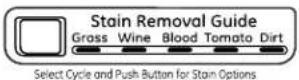 (Depending on model) (Depending on model)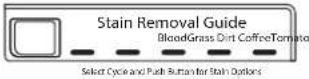 | Stain Removal GuideThe Stain Removal Guide is pre-programmed with the ideal wash and rinse settings to tackle five common stains: grass, dirt, blood, tomato, and coffee or wine. To use this feature, select the desired wash cycle and then press the Stain Removal Guide button until the stain you want to remove is highlighted. Once selected, press the Start button to start the cycle. | For some stains, a prewash will be selected automatically. Be sure to add liquid or powder high-efficiency detergent, or the proper wash additive to the prewash dispenser. |
| [XXDZ] |   | Basket Light (on some models)The basket light will turn on and remain on for 5 minutes when the door opens, Start/Pause button is pressed, or by pressing the Light button. | The basket light can be turned off by pressing and holding the Light button. |
| [22KC] |   | VolumeThis button has two functions:■ To change the loudness of the end of cycle signal, press the button as many times as needed to reach the desired volume. There are four sound levels including OFF. | ■ To turn the button sounds ON/OFF, press and hold the button for 3 seconds. |
 |   Hold 3 Secs to Lock / Unlock Hold 3 Secs to Lock / Unlock | Lock ControlYou can lock the controls to prevent any selections from being made. Or you can lock or unlock the controls after you have started a cycle.Children cannot accidentally start the washer by touching buttons with this option selected.To lock the washer, press and hold the Lock Control button for 3 seconds. | To unlock the washer controls, press and hold the Lock Control button for 3 seconds.A sound is made to indicate the lock/unlock status.The indicator light above the button will illuminate when the controls are locked.NOTE: The Power button can still be used when the machine is locked. |
Hold 3 Secs to Lock / Unlock
Control settings.
| 19 |  | Add SteamAdd Steam adds steam into the washer early in the cycle to assist with loosening stains on the Towels/Sheets, Normal, Whites, Bulky, Active Wear, Power Clean, Sanitize or Allergen cycles. | To use:1. Turn power ON and select a wash cycle. The Add Steam option is only available on Towels/Sheets, Normal, Whites, Bulky, Active Wear, Power Clean, Sanitize or Allergen cycles.2. Select the Add Steam button to activate steam.3. Press the Start/Pause button. |
 | [dyxt] | Delay WashYou can delay the start of a wash cycle for up to 24 hours. Press the Delay Wash button to choose the amount of time you want to delay the start of the wash cycle. Once the desired time is reached, press the Start button. The machine will count down and start automatically at the correct time. | NOTE: If you forget to fully close the door, a reminder signal will beep reminding you to do so.NOTE: If you open the door when the delay is counting down, the machine will enter the pause state. You must close the door and press Start again in order to restart the countdown. |
| 21 |  | eMonitor (on some models)The eMonitor lights display the relative energy use of your selected cycle and options. They are provided as an energy guide and range from Good (1 light) to Better (5 lights). Some special cycles will not provide a display. | |
 | 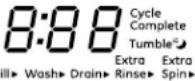 | DisplayDisplays the approximate time remaining until the end of the cycle.NOTE: The cycle time is affected by how long it takes the washer to fill. This depends on the water pressure in your home. The "smart" timer "learns" the amount of time it takes to fill your washer and adjusts the total time accordingly.Cycle status is also displayed and certain features such as Delay Wash or Steam are shown indicating they have been selected. If an out-of-balance condition is detected by the washer, the Spin light will blink during the remaining portion of the cycle and will stay illuminated for a short time after cycle completion. When this occurs, the washer is taking actions to correct the out-of-balance condition and complete the cycle normally. In some cases, the washer may not be able to balance the load and spin up to full speed. If you notice the load is more wet than usual at the end of the cycle, redistribute the load evenly in the wash tub and run a Drain + Spin cycle. | In addition, the display will, "scroll" the washer status:dOOr The washer door is open, causing the machine to be in PAUSE mode until the door is properly closed.LOAD SenSE Sensing load size prior to fill (normal operation). Cycles that do not perform LOAD SENSE are Active Wear, Delicates, Speed Wash, Single Item, Rinse & Spin and Tub Clean.PAUSE Cycle paused because the Start/Pause or Add Garment button was pressed and the washer was set to Pause. Press Start button again to restart the cycle.End End of current cycle.OFF Washer is shutting down. The washer may need to drain the water prior to unlocking the door and shutting down. |
natural_image
Line drawing of a hand pressing down on a washing machine control panel (no text or symbols visible)The Dispenser Drawer
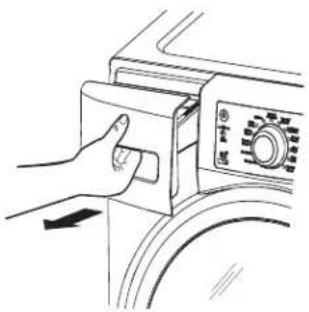
Slowly open the dispenser drawer by pulling it out until it stops.
After adding laundry products, slowly close the dispenser drawer. Closing the drawer too quickly could result in early dispensing of the bleach, fabric softener or detergent.
NOTE: You may see water in the detergent, bleach and fabric softener compartments at the end of the cycle. This is a result of the flushing/siphoning action and is part of the normal operation of the washer.
Use only HE High-Efficiency detergent.

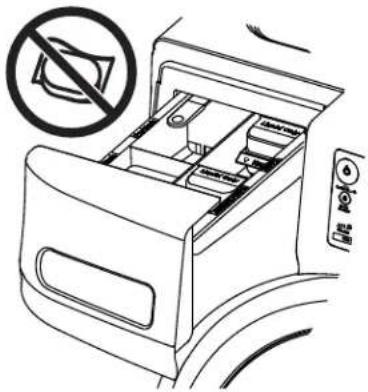
NOTE: Use only liquid or powder HE detergents and additives in the dispenser drawer. Laundry detergent packets should only be added directly to the wash basket following the manufacturer's directions.
DO NOT put detergent packets in the dispenser drawer.
text_image
Diagram showing a device with a no-smoking symbol and a control panel, indicating no smoking or no smoking.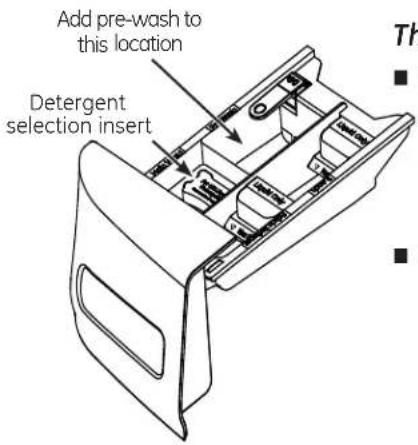
text_image
Add pre-wash to this location Detergent selection insertThe Prewash Compartment
■ Only use the prewash compartment if you are selecting the PreWash or PreSoak cycle for heavily soiled clothes. Add measured detergent or prewash additive to the back left prewash compartment of the dispenser drawer.
■ Detergent or prewash additive is flushed from the dispenser in the PreWash or PreSoak cycle (if selected).
NOTE: Liquid detergent will drain into the washer basket as it is added.
Detergent usage may need to be adjusted for water temperature, water hardness, size and soil level of the load. Avoid using too much detergent in your washer as it can lead to over sudsing and detergent residue being left on the clothes.
About the washer features.
text_image
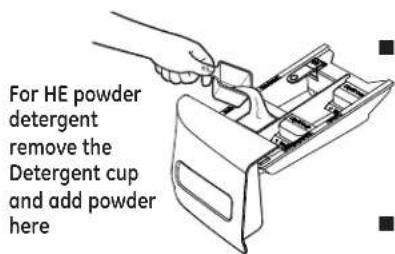
For HE powder detergent remove the Detergent cup and add powder hereNOTE: The Detergent cup has an easy grip handle to allow removal for convenient measuring and filling of the unit.
The Detergent Compartment
■ Only use high-efficiency detergent in this washer. DO NOT fill high-efficiency detergent over the MAX line. Use detergent manufacturer's recommended amount.
Powder Detergent – Remove the Liquid Detergent cup and place it in a safe location outside of the washer. Follow the detergent manufacturer's instructions when measuring the amount of powder to use.
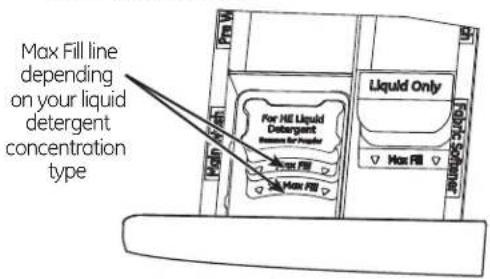
■ Liquid Detergent - Locate the concentration of your detergent on the bottle. Do not fill above the Max Fill line in the Detergent cup for your detergent concentration type.
text_image
Max Fill line depending on your liquid detergent concentration type For HE Liquid Detergent Concentration for fuel Liquid Only Max Fill Max Fill■ Detergent usage may need to be adjusted for water temperature, water hardness, size and soil level of the load. Avoid using too much detergent in your washer as it can lead to oversuding, detergent residue being left on the clothes, and could extend wash times.
■ Do not put clumped detergent in the dispenser. Clumped detergent can cause a leak.

natural_image
Line drawing of a hand pouring liquid into a container with a handle (no text or symbols)The Liquid Bleach Compartment
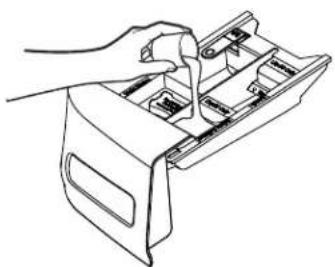
If desired, measure out the recommended amount of liquid bleach, not to exceed 1/3 cup (80 ml) and pour into the center compartment labeled "LIQUID BLEACH" marked with this symbol CL.
It is recommended to use High-Efficiency (HE) bleach in this front-load washer.
Do not exceed the maximum fill line. Overfilling can cause early dispensing of the bleach which could result in damaged clothes.
NOTE: Do not use powdered bleach or laundry detergent/additive packets in the dispenser.
natural_image
Line drawing of a hand using a tool to adjust internal compartments (no text or symbols)The Fabric Softener Compartment
If desired, pour the recommended amount of liquid fabric softener into the compartment labeled "FABRIC SOFTENER."
Use only liquid fabric softener in the dispenser. Dilute with water to the maximum fill line.
Do not exceed the maximum fill line. Overfilling can cause early dispensing of the fabric softener, which could stain clothes.
NOTE: Do not pour fabric softener directly on the wash load.
WARNING

- Fire Hazard
DO NOT wash fabrics soiled with flammable liquids or cleaning solvents.
No washer can completely remove oil.
DO NOT wash or dry anything that has been soaked in or spotted with any type of oil (including cooking oils).
DO NOT reach into the washer until all moving parts have stopped.
Doing so can result in death, explosion, fire or amputation.
The wash drum may be fully loaded with loosely added items.
Loading Examples
| WORKWEAR | LINENS | MIXED LOAD | DELICATES* | SPEED WASH(2-4 GARMENTS) |
| 4 Jeans5 Work Wear Shirts5 Work Wear Pants | 2 Bath Sheets10 Bath Towels/12 Washcloths7 Hand Towels/2 Terrycloth Bath MatsOR2 Flat Queen-Sized Sheets2 Fitted Queen-Sized Sheets4 Pillowcases | 4 Pillowcases2 Hand Towels2 Flat Sheets/2 Fitted Sheets2 Bath Towels/4 WashclothsOR6 Shirts (Men's or Women's)4 Pair Pants (Khakis or Twills)5 T-shirts7 Pairs of Boxers4 Pairs of ShortsOR6 T-shirts4 Pairs of Sweatpants4 Sweatshirts2 Hoodies7 Pairs of Socks | 7 Bras7 Panties3 Slips2 Camisoles4 Nightgowns* Using a nylon mesh bag for small items is recommended. | 2 Casual Wear Work Shirts1 Pair Casual Wear Work PantsOR3 Soccer Uniforms |
natural_image
Line drawing of a hand cleaning a car wheel rim (no text or symbols)Video

Scan this code to watch a video on this topic.
Cleaning the Interior of the Washer
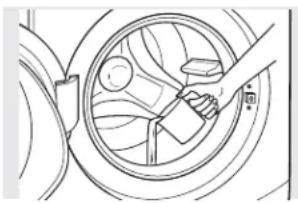
To clean the interior of the washer, select the Tub Clean feature on the control panel. This Tub Clean cycle should be performed, at a minimum, once per month. This cycle will use more water, in addition to bleach, to control the rate at which soils and detergents may accumulate in your washer.
NOTE: Read the instructions below completely before starting the Tub Clean cycle.
- Remove any garments or objects from the washer and ensure the washer basket is empty.
- Open the washer door and pour one cup or 250 ml of liquid bleach or other washing machine cleaner into the basket.
- Close the door and select the Tub Clean cycle. Push the Start pad.
- When the Tub Clean cycle is working, the display will show the estimated cycle time remaining. The cycle will complete in about 90 minutes. Do not interrupt the cycle.
- After the cycle is complete, leave the door open slightly for better ventilation.
If for any reason the cycle needs to be interrupted, the door will not open immediately. Forcing open the door at this stage may cause water to flood. The door will open after the water is drained to a level where it would not flood the floor.
Tub Clean may be interrupted by pressing the Start pad in between cycles. A power outage in the house might also interrupt the cycle. When the power supply is back, the Tub Clean cycle resumes where it had stopped. When interrupted, be sure to run a complete Tub Clean cycle before using the washer. If the Power pad is pressed during BasketClean, the cycle will be lost.
IMPORTANT:
■ Run Tub Clean with 1 Cup (250 ml) of bleach once a month.
■ After the completion of a Tub Clean cycle, the interior of your washer may have a bleach smell.
■ It is recommended to run a light color load after the Tub Clean cycle.
Video
Scan this code to watch a video on this topic.
Cleaning the Pump Filter
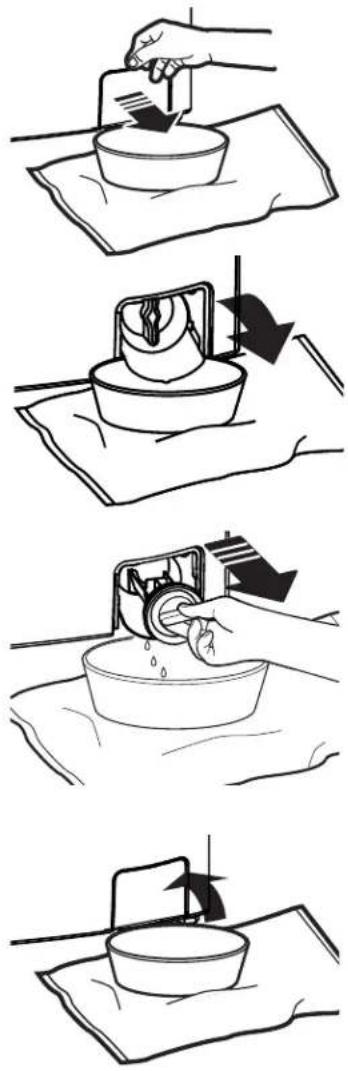
Due to the nature of the front-load washer, it is sometimes possible for small articles to pass to the pump. The washer has a filter to capture lost items so they are not dumped to the drain. To retrieve lost items, clean out the pump filter.
- Using a small flathead screwdriver or coin, open the access door.
-
Place a shallow pan or dish under the pump access door and towels on the floor in front of the washer to protect the floor. It is normal to catch about a cup of water when the filter is removed.
-
Pull down the pour spout.
-
Turn the pump filter counterclockwise and remove the filter slowly, controlling the flow of the draining water.
- Remove the filter and clean the debris from the filter.
-
Replace the filter and turn clockwise. Tighten securely.
-
Flip up the pour spout.
-
Close the access door by hooking the bottom tabs first, then rotating the access door shut.
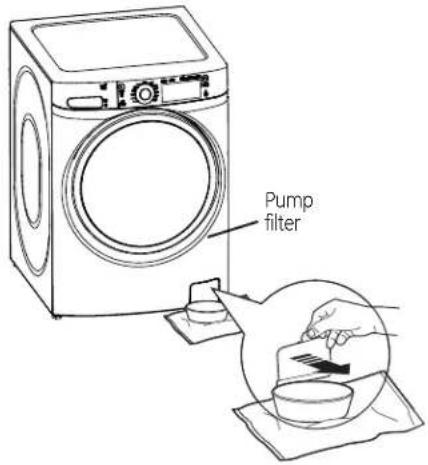
text_image
Pump filter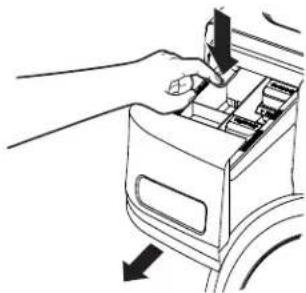
natural_image
Line drawing of a hand inserting a device into a box, with arrows indicating direction (no text or symbols)Lock tab is visible only after drawer has been pulled out
Dispenser Drawer Area: Detergent and fabric softener may build up in the dispenser drawer. Residue should be removed once or twice a month.
■ Remove the drawer by first pulling it out until it stops. Then reach back into the left rear corner of the drawer cavity and press down firmly on the lock tab, pulling out the drawer.
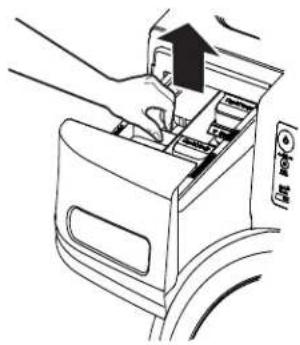
natural_image
Line drawing of hands inserting a device into a car interior (no text or symbols)■ Remove the insert from the bleach and fabric softener compartments and the detergent cup. Rinse the inserts and the drawer with hot water to remove traces of accumulated laundry products.
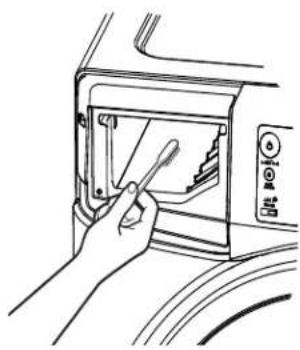
natural_image
Line drawing of a hand inserting a screwdriver into a microwave oven (no text or symbols)■ To clean the drawer opening, use a small brush to clean the recess. Remove all residue from the upper and lower parts of the recess.
■ Return inserts to the proper compartments. Replace the dispenser drawer.
■ To reduce buildup in the Dispenser Drawer area:
Use only HE High-Efficiency detergent.

natural_image
Illustration of hands cleaning a curved pipe with granular material (no text or symbols)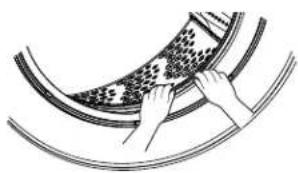
natural_image
Illustration of hands cleaning a circular object with patterned texture (no text or symbols)Cleaning the Door Gasket
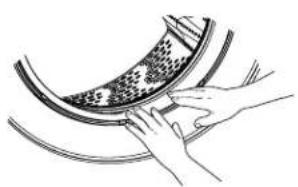
Open the washer door. Using both hands, press down the door gasket. Remove any foreign objects if found trapped inside the gasket. Make sure there is nothing blocking the holes behind the gasket.
While holding down the door gasket, inspect the interior gasket by pulling it down with your fingers. Remove any foreign objects if found trapped inside this gasket. Make sure there is nothing blocking the holes behind the gasket.
When you are finished cleaning the door gasket, remove your hands and the gaskets will return to the operating position.
Video
Scan this code to watch a video on this topic.
Installation Instructions
Washer
If you have any questions, call GE Appliances at 800.GE.CARES (800.432.2737)
or visit our Website at: GEAppliances.com
In Canada, call 1.800.561.3344 or visit www.GEAppliances.ca
BEFORE YOU BEGIN
Read these instructions completely and carefully.
- IMPORTANT – Save these instructions for local inspector's use.
- IMPORTANT – Observe all governing codes and ordinances.
- Note to Installer – Be sure to leave these instructions with the Consumer.
- Note to Consumer – Keep these instructions for future reference.
- Skill level – Installation of this appliance requires basic mechanical and electrical skills.
• Completion time - 1-3 hours - Proper installation is the responsibility of the installer.
- Product failure due to improper installation is not covered under the Warranty.
PARTS SUPPLIED
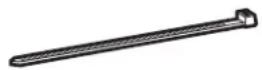

Cable Tie
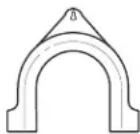

Hose Guide
TOOLS REQUIRED FOR WASHER INSTALLATION
☐ 1/2" socket with ratchet
☐ Adjustable wrench or 14mm and 16mm open-end wrenches
□ Channel-lock adjustable pliers
□ Carpenter's level
PARTS REQUIRED (Sold separately)
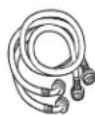

Water Hoses (2)
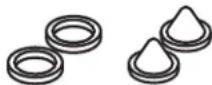

Rubber Washers (2)
and Strainer Screens (2)
GE Appliances Parts and Accessories
Order on-line at GEApplianceparts.com today, 24 hours a day or by phone at 800.626.2002 during normal business hours.
Part Number Accessory
PM14X10002 4 ft Rubber Water Supply Hoses Or
PM14X10005 4 ft Braided Metal Water Supply Hoses
WH1X2267 Rubber Washer (1) and Screen (1)
- In an area exposed to dripping water or outside weather conditions. The ambient temperature should never be below 60^ F ( 15.6^ C) for proper washer operation.
- In an area where it will come in contact with curtains or drapes.
- On carpet. The floor MUST be a hard surface with a maximum slope of 1/2" per foot (1.27 cm per 30 cm). To make sure the washer does not vibrate or move, you may have to reinforce the floor.
NOTE: If floor is in poor condition, use 3/4" impregnated plywood sheet solidly attached to existing floor covering.
IMPORTANT:
Minimum Installation Clearances
- When installed in alcove: Sides, Rear, Top = 0" (0 cm)
- When installed in closet: Sides, Rear, Top = 0" (0 cm), Front = 1" (2.54 cm)
- Consideration must be given to provide adequate clearance for installation and service.
- Closet doors must be louvered or otherwise ventilated and have at least 60 square inches of open area. If the closet contains both a washer and a dryer, doors must contain a minimum of 120 square inches of open area.
ROUGH-IN DIMENSIONS
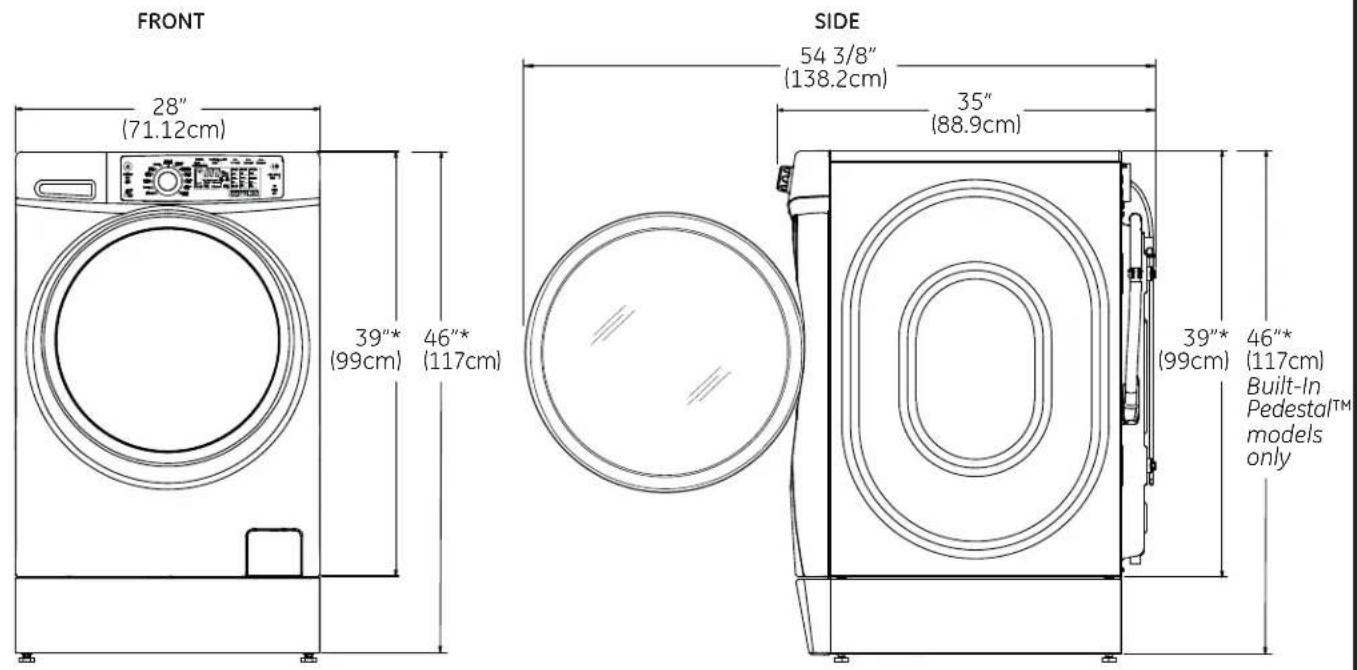
text_image
FRONT 28" (71.12cm) 39"* (99cm) 46"* (117cm) SIDE 54 3/8" (138.2cm) 35" (88.9cm) 39"* (99cm) 46"* (117cm) Built-In Pedestal™ models only*NOTE:
With Legs: 40 1/2" (102.5 cm) - (3/4" (1.9 cm) adjustability)
With Built-In Pedestal™: 46" (117 cm) - (3/4" (1.9 cm) adjustability)
With Optional Pedestal (GFXP1308): 52" (132.1 cm) - (3/4" (1.9 cm) adjustability)
Stacked: 78 1/4" (198.8 cm)
UNPACKING THE WASHER
- After removing the washer from its carton, remove all base packaging, including the cardboard, styrofoam base and styrofoam basket support (inserted in center of base).
NOTE: If you are installing a pedestal, proceed to the installation instructions that come with the pedestal. - Carefully move the washer to within 4 feet (122 cm) of the final location.
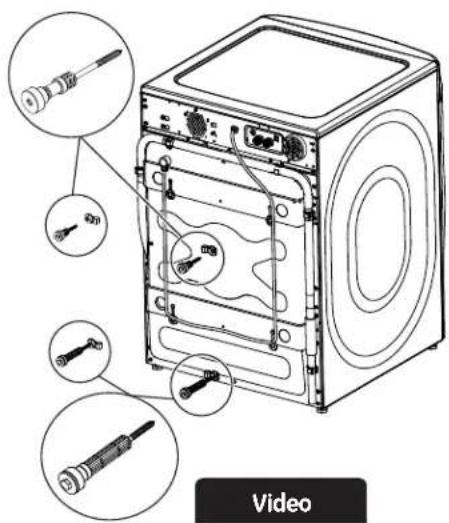
- Remove the following from the back side of the washer: 4 bolts 4 plastic spacers (including rubber grommets) 4 power cord retainers
- Remove the shipping bolt. Insert plug into shipping bolt hole.
NOTE: Failure to remove the shipping bolts can cause the washer to become severely unbalanced.
Save all bolts for future use.
NOTE: If you must transport the washer at a later date, you must reinstall the shipping support hardware to prevent shipping damage. Keep the hardware in the plastic bag provided.
text_image
Video
text_image
Video Scan this code to watch a video on Step 3.ELECTRICAL REQUIREMENTS

WARNING

- Electrical Shock Hazard
Plug into a grounded 3-prong outlet.
DO NOT remove ground prong.
DO NOT use an adapter.
DO NOT use an extension cord.
Failure to follow these instructions can result in death, fire or electrical shock.
CIRCUIT – Individual, properly polarized and grounded 15 or 20 amp circuit breaker or time-delay fuse.
POWER SUPPLY - 2 wire plus ground, 120 Volt, single phase, 60 Hz, alternating current.
Outlet Receptacle - Properly grounded 3-prong
receptacle to be located so the power cord is accessible when the washer is in an installed position. If a 2-prong receptacle is present, it is the owner's responsibility to have a licensed electrician replace it with a properly grounded 3-prong grounding type receptacle.
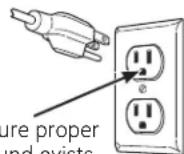
Washer must be electrically grounded in accordance with local codes and ordinances, or in the absence of local codes, with latest edition of the NATIONAL ELECTRICAL CODE, ANSI/NFPA NO. 70 or CANADIAN ELECTRICAL CODE, CSA C22.1. Check with a licensed electrician if you are not sure that the washer is properly grounded.
GROUNDING INSTRUCTIONS
This appliance must be grounded. In the event of malfunction or breakdown, grounding will reduce the risk of electric shock by providing a path of least resistance for electric current. This appliance is equipped with a cord having an equipment- grounding conductor and a grounding plug. The plug must be plugged into an appropriate outlet that is properly installed and grounded in accordance with all local codes and ordinances.

WARNING
Improper connection of the equipment-grounding conductor can result in a risk
of electrical shock. Check with a qualified electrician, or service representative or personnel, if you are in doubt as to whether the appliance is properly grounded. DO NOT modify the plug on the power supply cord. If it will not fit the outlet, have a proper outlet installed by a qualified electrician.
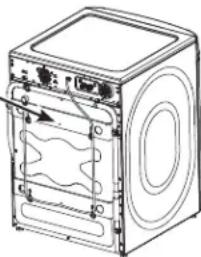
If required by local codes, an external 18 gauge or larger copper ground wire (not provided) may be added. Attach to washer cabinet with a #8-18 x 12 " sheet metal screw (available at any hardware store) to rear of washer.
Attach ground wire and ground screw (obtain locally)
natural_image
Line drawing of a washing machine casing with internal compartments and mounting holes (no text or symbols)Mobile Home Installation:
Installation must conform to Standard for Mobile Homes, ANSI A119.1 and National Mobile Home Construction and Safety Standards Act of 1974 (PL93-383).
WATER SUPPLY REQUIREMENTS
Hot and cold water faucets MUST be installed within 42 inches (107 cm) of your washers water inlet. The faucets MUST be 3/4" (1.9 cm) garden hose-type so inlet hoses can be connected. Water pressure MUST be between 10 and 120 pounds per square inch. Your water department can advise you of your water pressure. The hot water temperature should be set to deliver water at 120° to 140°F (48°–60°C) to provide proper Automatic Temperature Control (ATC) performance.
NOTE: A water softener is recommended to reduce buildup of scale inside the steam generator if the home water supply is very hard.
DRAIN REQUIREMENTS
- Drain capable of eliminating 17 gals (64.3 L) per minute.
- A standpipe diameter of 1 1/4" (3.18 cm) minimum.
- The standpipe height above the floor should be:
Minimum height: 24" (61 cm) Maximum height: 96" (244 cm)
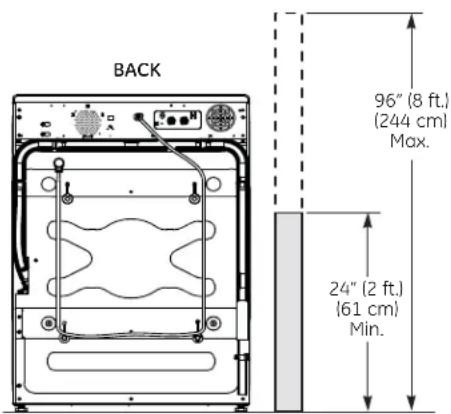
text_image
BACK 96" (8 ft.) (244 cm) Max. 24" (2 ft.) (61 cm) Min.NOTE: The drain hose attached to the washer can reach a 58" (147 cm) high standpipe. For a higher standpipe, contact an authorized parts distributor.
INSTALLING THE WASHER
- Run some water from the hot and cold faucets to flush the water lines and remove particles that might clog the inlet hose and water valve screens.
-
Remove the inlet hoses from the packaging.
-
(90° elbow end) Ensure there is a rubber washer in the
90° elbow end of the HOT and COLD hoses. Reinstall the rubber washer into the hose fitting if it has fallen out during shipment. Carefully connect the inlet hose marked HOT to the outside "H" outlet of the water valve. Tighten by hand, then tighten another 2/3 turn with pliers.
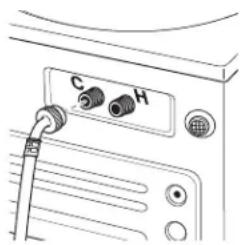
natural_image
Line drawing of a CD-ROM drive with labeled ports (no text or symbols beyond labels)Carefully connect the other inlet hose to the inside "C" outlet of the water valve. Tighten by hand; then tighten another 2/3 turn with pliers. Do not crossthread or over-tighten these connections.
- If inlet hose screen washers are not already inserted into the inlet hoses, install them by inserting into the free ends of the HOT and COLD inlet hoses with protruded side facing the faucet.
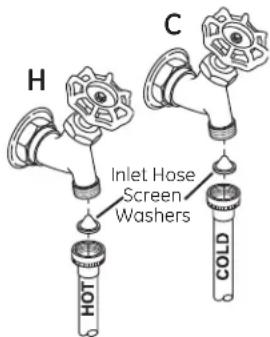
text_image
H C Inlet Hose Screen Washers HOT COLD- Connect the inlet hose ends to the HOT and COLD water faucets tightly by hand, then tighten another 2/3 turn with pliers. Turn the water on and check for leaks.
- Carefully move the washer to its final location. Gently rock the washer into position. It is important not to damage the rubber leveling legs when moving your washer to its final location. Damaged legs can increase washer vibration. It may be helpful to spray window cleaner on the floor to help move your washer into its final position.
NOTE: To reduce vibration, ensure that all four rubber leveling legs are firmly touching the floor. Push and pull on the back right and then back left of your washer.
NOTE: Do not use the dispenser drawer or door to lift the washer.
NOTE: If you are installing into a drain pan, you can use a 24-inch long 2x4 to lever the washer into place.
INSTALLING THE WASHER (cont.)
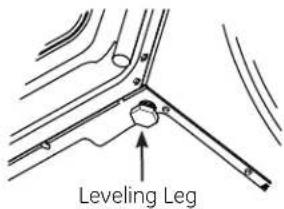
- With the washer in its final position, place a level on top of the washer (if the washer is installed under a counter, the washer should not be able to rock). Adjust the front leveling legs up or down to ensure the washer is resting solidly. Turn the lock nuts on e up toward the base of the wo and snug with a wrench.
text_image
Leveling LegNOTE: Keep the leg extension at a minimum to prevent excessive vibration. The farther out the legs are extended, the more the washer will vibrate.
If the floor is not level or is damaged, you may have to extend the rear leveling legs.
text_image
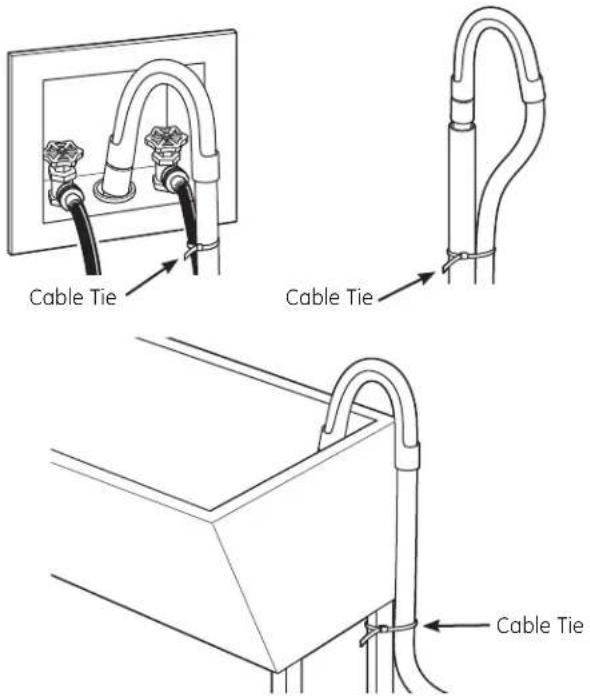
Video Scan this code to watch a video on Step 7.- Attach U-shaped hose guide to the end of the drain hose. Place the hose in a laundry tub or standpipe and secure it with the cable tie provided in the enclosure package.
NOTE: Placing the drain hose too far down the drain pipe can cause a siphoning action. No more than 7 inches of hose should be in the drain pipe. There must be an air gap around the drain hose. A snug fit can cause a siphoning action.
text_image
Cable Tie Cable Tie Cable Tie- Plug the power cord into a grounded outlet.
NOTE: Check to be sure the power is off at the circuit breaker/fuse box before plugging the power cord into an outlet.
- Turn on the power at the circuit breaker/fuse box.
- Read the rest of this Owner's Manual. It contains valuable and helpful information that will save you time and money.
- Before starting the washer, check to make sure:
□ Main power is turned on.
☐ The washer is plugged in.
☐ The water faucets are turned on.
☐ The unit is level and all four leveling legs are firmly on the floor.
☐ The shipping support hardware is removed and saved.
☐ The drain hose is properly tied up.
☐ There are no leaks at the faucet, drain line or washer.
- Run the washer through a complete cycle. Check for water leaks and proper operation.
- If your washer does not operate, please review the Before You Call For Service section before calling for service.
- Place these instructions in a location near the washer for future reference.
REPLACEMENT PARTS
If replacement parts are needed for your washer, they can be ordered in the United States by visiting our Website at GEApplianceparts.com or by calling GE Appliances at 800.GE.CARES. In Canada, visit geappliances.ca or call 1.800.561.3344.
Truth or myth?
| Below is a list of truths and myths to help you better understand your frontload washer | ||
| Truth or Myth? Answer Explanation | ||
| There is not enough water to properly wash my clothes | MYTH | Since frontload washers do not require the basket to fill with water like topload washers, significantly less water is required to thoroughly wash and rinse each load. Except for certain cycles like Handwash and Tub Clean that use more water, you will not see a visible water line on the door glass. |
| My frontload washer may add time or run longer than the original displayed time. | TRUE | Occasionally, the washer may need to add more time to the cycle. This is mainly due to automatic load redistributions to better balance the load and reduce vibration. It is normal operation for the washer to add time to the cycle to rebalance the load. Common causes of out-of-balance loads or longer cycle times are a clogged pump filter (see the Care and Cleaning section), un-level washer, or exceeding the recommended maximum load sizes. |
| I should see suds/foam during a wash cycle in the frontload washer. | MYTH | HE detergents, which should be the only detergents used in your GE Appliances frontload washer, have been formulated to clean effectively without causing a build-up of suds. If you add detergent until a visible suds/foam level is reached, you may be using too much detergent and negatively impacting washer performance. Remember, more suds/foam does not equal more cleaning power. Follow the manufacturer's directions for HE detergent.  |
| It is best to wash full loads and like fabrics together. | TRUE | Wash multiple similar garments at one time for best results. Washing single items can cause an out-of-balance condition. |
| I need to keep the washer level for proper operation and to reduce vibration. | TRUE | If the washer is uneven, adjust the leveling legs so that they are firmly touching the floor and the lock nuts are securely tightened. This is especially important if the washer is installed on a pedestal. Leveling the legs on the washer or the pedestal require the same steps. |
| It is impossible to overload a frontload washer. | MYTH | Although the capacity of the frontload washer allows for larger loads than a traditional topload washer, care must be taken to not overload the wash basket. See the Loading the Washer section for recommended maximum load sizes. Overloading the washer can lead to reduced wash performance and clothes becoming trapped between the door glass and the gasket, possibly causing damage to your gasket or your clothes. |
| If not periodically cleaned, my wash basket and gasket may not maintain a fresh smell. | TRUE | This is true for all washers, not just frontload. Regularly run a Tub Clean cycle and clean around the rubber door gasket. When not in use, you may leave the door slightly open for the inside of the washer to air dry. Close supervision is necessary if this appliance is used by or near children. |
| Frontload washers have a "pump filter" that needs to be cleaned periodically. | TRUE | Due to the nature of the frontload washer, it is sometimes possible for small articles to pass to the drain pump. The washer has a filter to capture lost items so they do not damage the drain pump. To retrieve lost items, clean out the pump filter (see the Care and Cleaning section). Indicators of a clogged pump are long drain and cycle times, wet clothes at the end of a cycle, incomplete cycles or washer pausing in the middle of a cycle. |
| I cannot add items to a wash cycle once it has started. | MYTH | To add items after the washer has started, press Start/Pause or the Add Garment button and wait until the door is unlocked. The drain pump may run briefly before door is unlocked. Do not try to force open the door when it is locked. After the door unlocks, open gently. Add items, close the door and press Start/Pause to restart. |
| Items left in pockets can cause damage to the rubber door gasket | TRUE | This is true for all frontload washers. Remove all loose items from your clothes. |

Troubleshooting Tips
Save time and money! Review the charts on the
following pages first and you may not need to call for
service.
| Problem Possible Cause What To Do | ||
| Not drainingNot spinningNot agitating | Load is out of balancePump cloggedDrain hose is kinked or improperly connectedHousehold drain may be cloggedDrain hose siphoning; drain hose pushed too far down the drain | · Redistribute clothes and run drain & spin or rinse & spin.· Increase load size if washing small load containing heavy and light items.· See page 17 on how to clean the Pump Filter.· Straighten drain hose and make sure washer is not sitting on it.· Check household plumbing. You may need to call a plumber.· Ensure there is an air gap between hose and drain. |
| Leaking water Door | or gasket is damagedCheck back left of washer for waterFill hoses or drain hose is improperly connectedHousehold drain may be cloggedDispenser cloggedIncorrect use of detergentDispenser box cracked | · Check to see if gasket is seated and not torn. Objects left in pockets may cause damage to the washer (nails, screws, pens, pencils)· Water may drip from the door when the door is opened. This is a normal operation.· Carefully wipe off rubber door seal. Sometimes dirt or clothing is left in this seal and can cause a small leak· If this area is wet, you have oversuding condition. Use less detergent.· Make sure hose connections are tight at washer and faucets and make sure end of drain hose is correctly inserted in and secured to drain facility.· Check household plumbing. You may need to call a plumber.· Powder soap may cause clogs inside the dispenser and cause water to leak out the front of the dispenser. Remove drawer and clean both drawer and inside of dispenser box. Please refer to Cleaning the Washer section.· Use only HE and correct amount of detergent.· If new installation, check for crack on inside of dispenser box. |
| Clothes too wet Load | is out of balancePump cloggedOverloadingDrain hose is kinked or improperly connectedHousehold drain may be cloggedDrain hose siphoning; drain hose pushed too far down the drain | · Redistribute clothes and run drain & spin or rinse & spin.· Increase load size if washing small load containing heavy and light items.· The machine will slow the spin speed down to 410 rpm if it has a hard time balancing the load. This speed is normal.· See page 17 on how to clean the Pump Filter.· The dry weight of the load should be less then 16 lbs.· Straighten drain hose and make sure washer is not sitting on it.· Check household plumbing. You may need to call a plumber.· Ensure there is an air gap between hose and drain. |
| Incomplete cycle or timer not advancing | Automatic load redistributionPump cloggedDrain hose is kinked or improperly connectedHousehold drain may be cloggedDrain hose siphoning; drain hose pushed too far down the drain | Timer adds 3 minutes to cycle for each rebalance. 11 or 15 rebalances may be done. This is normal operation.Do nothing; the machine will finish the wash cycle.See page 17 on how to clean the Pump Filter.Straighten drain hose and make sure washer is not sitting on it.Check household plumbing. You may need to call a plumber.Ensure there is an air gap between hose and drain. |
| Loud or unusual noise; vibration or shaking | Cabinet movingAll rubber leveling legs are not firmly touching the floorUnbalanced loadPump clogged | Washer is designed to move 1/4" to reduce forces transmitted to the floor. This movement is normal.Push and pull on the back right and then back left of your washer to check if it is level. If the washer is uneven, adjust the rubber leveling legs so they are all firmly touching the floor and locked in place. Your installer should correct this problem.Pause unit, open door and manually redistribute load. To check machine, run rinse and spin with no load. If normal, unbalance was caused by load.See page 17 on how to clean the Pump Filter. |
| No power/washer not working or dead | Washer is unpluggedWater supply is turned offCircuit breaker/fuse is tripped/blownAutomatic self system checks | Make sure cord is plugged securely into a working outlet.Turn both hot and cold faucets fully on.Check house circuit breakers/fuses. Replace fuses or reset breaker.Washer should have separate outlet.First time the washer is plugged in, automatic checks occur. It may take up to 20 seconds before you can use your washer. This is normal operation. |
| Snags, holes, tears, rips or excessive wear | OverloadedPens, pencils, nails, screws or other objects left in pocketsPins, snaps, hooks, sharp buttons, belt buckles, zippers and sharp objects left in pockets | Do not exceed maximum recommended load sizes. See recommended maximum load sizes on page 15.Remove loose items from pockets.Fasten snaps, hooks, buttons and zippers. |
| Control time wrong or changes | This is normal • | During spin the washer may need to rebalance the load sometimes to reduce vibrations. When this happens, the estimated time is increased causing time left to increase or jump. |
| Not enough water | This is normal • | Horizontal washers do not require the basket to fill with water like top-load washers. |
| Washer pauses or has to be restarted, or washer door is locked and will not open | Pump clogged | See page 17 on how to clean the Pump Filter. |
| Door unlocks or press Start and machine doesn't operate | This is normalIncorrect operation | Front-load washers start up differently than top-load washers, and it takes 30 seconds to check the system. The door will lock and unlock.Simply open and close the door firmly; then pressStart. |
Before you call for service...
| Problem Possible Cause What To Do | ||
| Water does not enter washer or enters slowly | Automatic self system checksWater supply is turned offWater valve screens are stopped up | After Start is pressed, the washer does several system checks. Water will flow 60 seconds after Start is pressed.Turn on both hot and cold faucets fully.Turn off the water source and remove the water connection hoses from the upper back of the washer. Use a brush or toothpick to clean the screens in the machine. Reconnect the hoses and turn the water back on. |
| Wrinkling Improper sortingOverloadingIncorrect wash cycleRepeated washing in water that is too hot | Avoid mixing heavy items (like work clothes) with light items (like blouses).Load your washer so clothes have enough room to move freely.Match cycle selection to the type of fabric you arewashing (especially for easy care loads).Wash in warm or cold water. | |
| Grayed or yellowed clothes | Not enough detergentNot using HE (high efficiency) detergentHard waterWater is not hot enoughDetergent is not dissolvingDye transfer | Use correct amount of detergent.Use only HE detergent.Use hottest water safe for fabric.Use a water conditioner like Calgon brand or install a water softener.Make sure water heater is delivering water at 120°-140°F (48°-60°C).Try a liquid HE detergent.Sort clothes by color. If fabric label states wash separately, unstable dyes may be indicated. |
| Colored spots Incorrect use of fabric softenerDye transfer | Check fabric softener package for instructions and follow directions for using dispenser.Sort whites or lightly colored items from dark colors.Promptly remove wash load from washer. | |
| Water temperature is incorrect | Water supply is improperly connectedHouse water heater is not set properly | Make sure hoses are connected to correct faucets.Make sure house water heater is delivering water at 120°-140°F (48°-60°C). |
| Bad odor inside your Washer | Washer unused for a long time, not using recommended quality of HE detergent or used too much detergent | Run a Tub Clean cycle.In case of strong odor, you may need to run the Tub Clean cycle more than once.Use only the amount of detergent recommended on the detergent container.Use only HE (high efficiency) detergent.Always remove wet items from the washer promptly after machine stops running.Leave the door slightly open for the water to air dry. Close supervision is necessary if this appliance is used by or near children. Do not allow children to play on or in this or any other appliance. |
| Detergent leak Inc | correct placement of detergent insertThis is normal | Make sure detergent insert is properly located and fully seated. Never put detergent above max line.It is normal operation to see detergent leak on door gasket about 20 seconds after filling the dispenser. |
| Improper dispensing of softener or bleach | Dispenser cloggedSoftener or bleach is filled above the max lineSoftener or bleach cap issue | Monthly clean the dispenser drawer to remove buildup of chemicals.Make sure to have the correct amount of softener or bleach.Make sure softener and bleach cap for dispenser are seated or they will not work. |
| Dispenser drawer not dispensing properly | Laundry detergent packet placed in dispenser drawer | Laundry detergent packets should not be used in the dispenser. They should only be added directly to the wash basket following the manufacturer's directions. |
| Pump running while washer is not in use | Clog in sump drain | This is normal. Drain sump is detecting an undesired water fill level from a potential open faucet. Shut off water valve and inspect water valve for blockage. |
All warranty service provided by our Factory Service Centers, or an authorized Customer Care® technician. To schedule service, on-line, visit us at GEAppliances.com, or call GE Appliances at 800.GE.CARES (800.432.2737). Please have serial number and model number available when calling for service.
Staple your receipt here. Proof of the original purchase date is needed to obtain service under the warranty.
Servicing your appliance may require the use of the onboard data port for diagnostics. This gives a GE Appliances Factory Service technician the ability to quickly diagnose any issues with your appliance and helps GE Appliances improve its products by providing GE Appliances with information on your appliance. If you do not want your appliance data to be sent to GE Appliances, please advise your technician NOT to submit the data to GE Appliances at the time of service.
| For The Period Of: We Will Replace: | |
| One YearFrom the date of the original purchase related | Any part of the washer which fails due to a defect in materials or workmanship. During this limited one-year warranty, GE Appliances will also provide, free of charge, all labor and service costs to replace the defective part. |
| Ten YearsFrom the date of the original purchase | The motor, if it should fail due to a defect in materials or workmanship. During this additional nine-year limited warranty, you will be responsible for any labor and related service costs. |
What Is Not Covered (in the United States):
■ Service trips to your home to teach you how to use the product.
■ Improper installation, delivery or maintenance.
■ Failure of the product if it is abused, misused, or used for other than the intended purpose or used commercially.
■ Replacement of house fuses or resetting of circuit breakers.
■ Products which are not defective or broken, or which are working as described in the Owner's Manual.
■ Damage to the product caused by accident, fire, floods or acts of God.
■ Incidental or consequential damage caused by possible defects with this appliance.
■ Defects or damage due to operation in freezing temperatures.
■ Damage after delivery.
■ Product not accessible to provide required service.
EXCLUSION OF IMPLIED WARRANTIES—Your sole and exclusive remedy is product repair as provided in this Limited Warranty. Any implied warranties, including the implied warranties of merchantability or fitness for a particular purpose, are limited to one year or the shortest period allowed by law.
This warranty is extended to the original purchaser and any succeeding owner for products purchased for home use within the USA. If the product is located in an area where service by a GE Appliances Authorized Servicer is not available, you may be responsible for a trip charge or you may be required to bring the product to an Authorized GE Appliances Service location for service. In Alaska, the warranty excludes the cost of shipping or service calls to your home.
Some states do not allow the exclusion or limitation of incidental or consequential damages. This warranty gives you specific legal rights, and you may also have other rights which vary from state to state. To know what your legal rights are, consult your local or state consumer affairs office or your state's Attorney General.
Warrantor: GE Appliances
All warranty service provided by our Factory Service Centres or an authorized technician. For service, call 1.800.561.3344.
Please have serial number and model number available when calling for service.
Servicing your appliance may require the use of the onboard data port for diagnostics. This gives a GE Appliances Factory Service technician the ability to quickly diagnose any issues with your appliance and helps GE Appliances improve its products by providing GE Appliances with information on your appliance. If you do not want your appliance data to be sent to GE Appliances, please advise your technician NOT to submit the data to GE Appliances at the time of service.
For The Period Of: We Will Replace:
| One YearFrom the date of theoriginal purchase related service costs to replace the defective part. | Any part of the washer which fails due to a defect in materials or workmanship. During this limited one-year warranty, GE Appliances will also provide, free of charge, all labour and |
| Ten YearsFrom the date of the original purchase | The motor, if it should fail due to a defect in materials or workmanship. During this additional nine-year limited warranty, you will be responsible for any labor and related service costs. |
What Is Not Covered (in Canada):
■ Service trips to your home to teach you how to use the product.
■ Improper installation, delivery or maintenance.
■ Failure of the product if it is abused, misused, or used for other than the intended purpose or used commercially.
■ Replacement of house fuses or resetting of circuit breakers.
■ Products which are not defective or broken, or which are working as described in the Owner's Manual.
■ Damage to the product caused by accident, fire, floods or acts of God.
■ Incidental or consequential damage caused by possible defects with this appliance.
■ Defects or damage due to operation in freezing temperatures.
■ Damage after delivery.
■ Product not accessible to provide required service.
EXCLUSION OF IMPLIED WARRANTIES—Your sole and exclusive remedy is product repair as provided in this Limited Warranty. Any implied warranties, including the implied warranties of merchantability or fitness for a particular purpose, are limited to one year or the shortest period allowed by law.
This warranty is extended to the original purchaser and any succeeding owner for products purchased in Canada for home use within Canada. In-home warranty service will be provided in areas where it is available and deemed reasonable by Mabe to provide.
WARRANTOR IS NOT RESPONSIBLE FOR CONSEQUENTIAL DAMAGES.
Warrantor: MABE CANADA INC.
GE Appliances Website
GEAppliances.com
Have a question or need assistance with your appliance? Try the GE Appliances Website, 24 hours a day, any day of the year! For greater convenience and faster service, you can now download Owner's Manuals, order parts or even schedule service on-line.
Schedule Service GEAppliances.com
Expert GE Appliances repair service is only one step away from your door. Get on-line and schedule your service at your convenience any day of the year! Or call GE Appliances at 800.GE.CARES (800.432.2737) during normal business hours.
Real Life Design Studio GEAppliances.com
GE Appliances supports the Universal Design concept—products, services and environments that can be used by people of all ages, sizes and capabilities. We recognize the need to design for a wide range of physical and mental abilities and impairments. For details of GE Appliances Universal Design applications, including kitchen design ideas for people with disabilities, check out our Website today. For the hearing impaired, please call 800.TDD.GEAC (800.833.4322).
Extended Warranties GEAppliances.com
Purchase a GE Appliances extended warranty and learn about special discounts that are available while your warranty is still in effect. You can purchase it on-line anytime, or call 800.626.2224 during normal business hours. GE Appliances Consumer Home Services will still be there after your warranty expires.
Parts and Accessories GEAppliances.com
Individuals qualified to service their own appliances can have parts or accessories sent directly to their homes (VISA, MasterCard and Discover cards are accepted). Order on-line today, 24 hours every day or by phone at 800.626.2002 during normal business hours.
Instructions contained in this manual cover procedures to be performed by any user. Other servicing generally should be referred to qualified service personnel. Caution must be exercised, since improper servicing may cause unsafe operation.

Contact Us GEAppliances.com
If you are not satisfied with the service you receive from GE Appliances, contact us on our Website with all the details including your phone number, or write to: General Manager, Customer Relations
GE Appliances, Appliance Park
Louisville, KY 40225
Register Your Appliance GEAppliances.com
Register your new appliance on-line—at your convenience! Timely product registration will allow for enhanced communication and prompt service under the terms of your warranty, should the need arise. You may also mail in the pre-printed registration card included in the packing material.
LAVEUSES
MESURES DE SÉCURITÉ....3
FONCTIONNEMENT
INSTALLATION APPROPRIÉE

text_image
1 Power Lock Control HUNT Save to Lock Unlock Add Steam 19 18 3 Normal Mixed Loads Whites Bulky Bedding Active Wear Power Clean Sanitize Allergen Towels/ Sheets Delicates Hand Wash Speed Wash Single Item Rinse+ Spin Basket Clean 13 My Cycle Overnight Dry Hold 3 seconds to store 22 10 eWash PreSack PreWash Start/Pause 2 Extra Heavy Extra Hot Extra High Max Heavy Hot High Normal Warm Medium Extra Light Cold Low Extra Light Tap Cold No Spin Normal Monitor Delay Wash Delay Wash Door Locked Stain Removal Guide Grass Wine Blood Tomato Dirt Soil Temp Spin Rinse Select Cycle and Push Button for Stain Options. 20 52 5 6 7 16 17 Add a Garment Light Volumetext_image
1 Power Lack Control Hold 3 Sets Add Steam 19 18 3 Normal Mixed Loads Towels/ Sheets Whites Bulky Bedding Active Wear Power Clean Sanitize Allergen 13 My Cycle Hold 3 Sets to Stain Cycle 22 10 e Wash PreWash Ext Rinse Start/Pause 2 Extra Heavy Extra Hot Max 8:88 Cycle Complete Extra Light Hot High Normal Warm Medium Light Cold Low Extra Light Top Cold No Spin Monitor Delay Wash Delay Wash Door Locked Stain Removal Guide Grass Wine Blood Tomato Dirt Soil Temp Spin Select Cycle and Push Button for Stain Options 20 52 5 6 Add Garment Volumetext_image
1 Power Lock Control Hold 3 sec Add Steam 19 18 3 Normal Whites Towels Sheets Bulky Items Active Wear Sanitize Allergen Quick Wash Delicates Hard Wash Cold Wash Small Load Rinse I Spin Tub Clean 20 Delay Wash Hold 3 sec to Good Time Saver 8:88 Add a Garment Complete Steam Turnible Status Delay Wash My Cycle Clear Lacked Stain Removal Guide Grass Dirt Blood Tomato Coffee Select Care and Push Runt for Salt Options 15 13 4 5 6 7 8 7 14 2 PreWash Exit Rinse Turnable Care Start/Pause Add Garment Light Volume 16 171 Power (Alimentation)
NSF Protocol P172 Sanitization Performance of Residential and Commercial, Family-Sized Clothes Washers
NSF Protocol P351 Allergen Reduction Performance of Residential and Commercial, Family-Sized Clothes Washers
Hold 3 Secs to Lock / Unlock
natural_image
Line drawing of a hand pressing down on a washing machine (no text or symbols visible)natural_image
Line drawing of a car interior with a no-smoking symbol and control panel (no text or labels)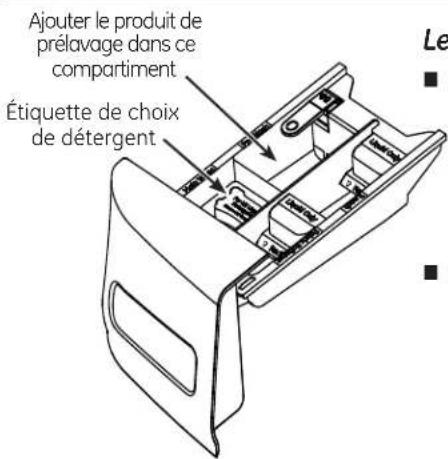
natural_image
Line drawing of a hand pouring liquid into a drawer with a label 'No. 10' (no text or symbols on the diagram itself)natural_image
Line drawing of a hand inserting or adjusting a device into a drawer (no text or symbols)natural_image
Line drawing of a hand cleaning a circular object with a handle (no text or symbols)Video

Scan this code to watch a video on this topic.
text_image
Pump filter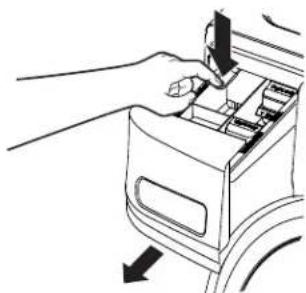
natural_image
Line drawing of a hand inserting a device into a box, with arrows indicating direction (no text or symbols)natural_image
Line drawing of hands inserting a device into a device casing (no text or symbols)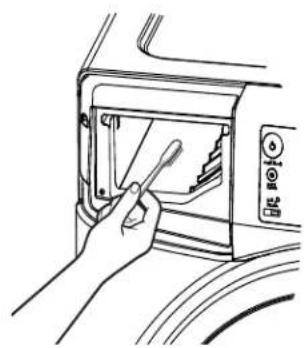
natural_image
Line drawing of a hand inserting a screwdriver into a microwave oven (no text or symbols)natural_image
Illustration of hands holding a curved object with granular material inside, no text or symbols present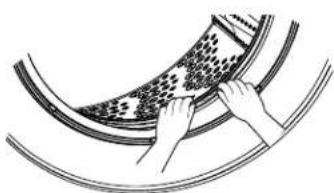
natural_image
Diagram of hands operating a wheel rim with a patterned disc (no text or symbols)Video

Scan this code to watch a video on this topic.
text_image
Technical diagram of a washing machine with labeled components and exploded viewnatural_image
Technical line drawing of a front-loading washing machine (no text or labels)natural_image
Line drawing of a device rear panel with labeled ports (no text or symbols beyond labels)Garant : MC Commercial, Burlington, ON
Site Web GE Appliances www.electromenagersge.ca
text_image
1 Power Lock Control Hold Steps to Lock Turnbox Add Steam 19 18 3 Normal Mixed Loads Towels/ Sheets Whites Bulky Bedding Active Wear Power Clean Sanitize Allergen Delicates Hand Wash Speed Wash Single Item Rinse+ Spin Basket Clean 13 My Cycle Overnight Dry 22 10 e Wash PreSoak PreWash 8 Estimated Time Remaining 8:88 Cycle Complete Tumble Extra Extra Extra Spin Extra Heavy Extra Hot Extra High Max Heavy Hot High Normal Warm Medium Extra Light Cold Low Extra Light Tap Cold No Spin Normal Monitor Hold 3 seconds to CANCEL Door Delay Wash Delay Wash Door Locked Stain Removal Guide Grass Wine Blood Tomato Dirt Select Cycle and Push Button for Stain Options 20 52 5 6 7 Soil Temp Spin Rinse Start/Pause Add a Garment Light Volume 16 17Modelos: GFWR2705, GFWR2700, GFWS2605, GFWS2600 - GE Appliances RightHeight™ Design lavadora con vapor y Built-In Pedestal™ (Elevator Incorporado)
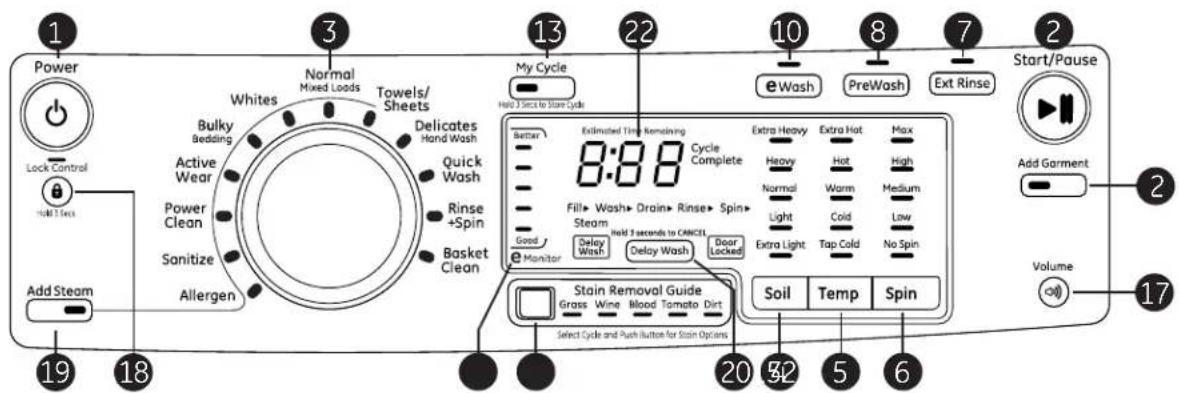
text_image
1 Power Lock Control Hold 3 Sets Add Steam 19 18 3 Normal Mixed Loads Towels/ Sheets Whites Bulky Bedding Active Wear Power Clean Sanitize Allergen Delicates Hand Wash Quick Wash Rinse +Spin Basket Clean My Cycle Held 3 Sets to Start Cycle 22 10 eWash PreWash Ext Rinse 2 Start/Pause Add Garment Volume 17 20 52 5 6 Soil Temp Spin Better Estimated Time Remaining Cycle Complete Extra Heavy Extra Hot Max Heavy Hot High Normal Warm Medium Light Cold Low Extra Light Tap Cold No Spin Monitor Delay Wash Delay Wash Door Locked Stain Removal Guide Grass Wine Blood Tomato Dirt Select Cycle and Push Button for Stain Optionstext_image
1 Power Lock Control Heat Strip Add Steam 19 18 3 Normal Whites Towels Sheets Bulky Items Active Wear Sanitize Allergen Quick Wash Delicates Hand Wash Cold Wash Small Load Rinse I Spin Tub Clean 20 Delay Wash Take Back to Cancel Time Saver PreWash Let Wins Tumble Care 12 8 7 14 2 Start/Pause Add Garment Light Volume 16 17 15 13 4 5 6 Extra Heavy Heavy Normal Light Extra Light Top Cold Soil Temp Spin Stain Removal Guide Grass Off Blood Tomato Coffee Select Cycle and Naia Baze for Sun ColorsPuesta en Marcha


NSF Protocol P172 Sanitization Performance of Residential and Commercial, Family-Sized Clothes Washers
NSF Protocol P351 Allergen Reduction Performance of Residential and Commercial. Family-Sized Clothes Washers
natural_image
Line drawing of a hand pressing down on a kitchen appliance panel (no text or symbols)text_image
Diagram showing a car interior with a no-smoking symbol and a control panel, indicating no smoking or no smoking.natural_image
Line drawing of a hand inserting a cup into a drawer (no text or symbols)natural_image
Line drawing of a hand using a tool to adjust or install a mechanical component (no text or symbols present)Compartimento para el suavizante
natural_image
Line drawing of a car wheel with hand holding steering wheel (no text or symbols)Video

Scan this code to watch a video on this topic.
flowchart
graph TD
    A["Hand washing cup"] --> B["Step 1: Insert into cup"]
    B --> C["Step 2: Insert in cup with liquid"]
    C --> D["Step 3: Wash inside bowl"]
    D --> E["Step 4: Wash in bowl with liquid and drop"]
    E --> F["Step 5: Wash in bowl with liquid and drop"]
natural_image
Line drawing of a hand inserting a component into a device (no text or symbols)natural_image
Line drawing of a hand inserting a device into a device casing (no text or symbols)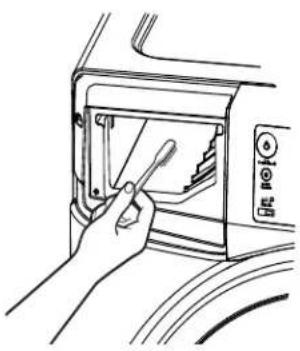
natural_image
Line drawing of a hand using a screwdriver to clean or install a microwave oven (no text or symbols visible)natural_image
Illustration of hands cleaning a curved pipe with granular material (no text or symbols)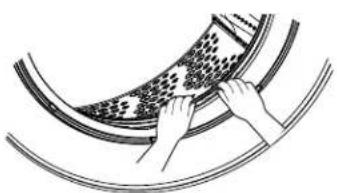
natural_image
Illustration of hands operating a curved mechanical component with a textured surface (no text or symbols)Video

Scan this code to watch a video on this topic.
text_image
Technical diagram of a washing machine with labeled components and exploded viewnatural_image
Line drawing of a washing machine casing with internal compartments and mounting brackets (no text or symbols)General Manager, Customer Relations
GE Appliances, Appliance Park
Louisville, KY 40225