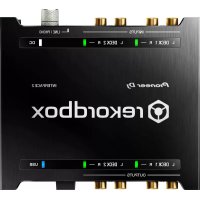
Interface 2 - Audio/video converter PIONEER - Free user manual and instructions
Find the device manual for free Interface 2 PIONEER in PDF.


| Product type | 2-channel audio interface for DVS |
| Brand | Pioneer (Pioneer DJ) |
| Model | Interface 2 |
| Category | Audio/video converter (audio interface) |
| Dimensions (L × H × D) | 141 mm × 32.5 mm × 127.8 mm |
| Weight | 0.6 kg |
| Power supply | DC power adaptor 100-240 V, 50/60 Hz, output 5 V / 2 A; or USB (5 V) |
| Power consumption | 5 V, 600 mA |
| Main functions | Audio interface for rekordbox DVS, 32-bit D/A converter, 24-bit A/D converter, RCA inputs/outputs, USB type B port, level LED indicators |
| Sampling frequency | 44.1 kHz / 48 kHz / 96 kHz |
| Signal-to-noise ratio (USB) | 112 dB |
| Signal-to-noise ratio (LINE) | 103 dB |
| Total harmonic distortion (USB) | 0.002 % |
| Max input level (LINE) | +12 dBu, 3.2 Vrms |
| Nominal output level | +11 dBu, 2.8 Vrms |
| Input impedance | 42 kΩ |
| Output impedance | 550 Ω |
| PHONO gain | +33 dB (1 kHz) |
| Operating temperature | +5 °C to +35 °C |
| Operating humidity | 5 % to 85 % (without condensation) |
| Box contents | Power cord, power adaptor, USB cable, audio cables × 4, rubber feet × 4, manual (quick start guide), warranty, license key card |
| Safety | Do not expose to water or moisture; do not obstruct ventilation; do not open the casing |
| Maintenance | Refer servicing to qualified personnel; clean with a dry cloth |
| Warranty | Warranty included for the European region |
Frequently Asked Questions - Interface 2 PIONEER
User questions about Interface 2 PIONEER
0 question about this device. Answer the ones you know or ask your own.
Ask a new question about this device
Download the instructions for your Audio/video converter in PDF format for free! Find your manual Interface 2 - PIONEER and take your electronic device back in hand. On this page are published all the documents necessary for the use of your device. Interface 2 by PIONEER.
USER MANUAL Interface 2 PIONEER
The Pioneer DJ site shown above offers FAQs, information on software, and various other types of information and services to allow you to use your product in greater comfort.
Thank you for buying this Pioneer DJ product. Please read through these operating instructions so you will know how to operate your model properly. After you have finished reading the instructions, put them away in a safe place for future reference.
In some countries or regions, the shape of the power plug and power outlet may sometimes differ from that shown in the explanatory drawings.
However the method of connecting and operating the unit is the same.
CAUTION
TO PREVENT THE RISK OF ELECTRIC SHOCK, DO NOT REMOVE COVER (OR BACK). NO USER-SERVICEABLE PARTS INSIDE. REFER SERVICING TO QUALIFIED SERVICE PERSONNEL.
D3-4-2-1-B1_En
WARNING
This equipment is not waterproof. To prevent a fire or shock hazard, do not place any container filled with liquid near this equipment (such as a vase or flower pot) or expose it to dripping, splashing, rain or moisture.
D3-4-2-1-3_A1_En
WARNING
To prevent a fire hazard, do not place any naked flame sources (such as a lighted candle) on the equipment.
D3-4-2-1-7a_A1_En
Operating Environment
Operating environment temperature and humidity: +5^ to +35^ (+41^ to +95^) less than 85% RH (cooling vents not blocked)
Do not install this unit in a poorly ventilated area, or in locations exposed to high humidity or direct sunlight (or strong artificial light).
D3-4-2-1-7c*A2En
CAUTION
This product is evaluated in moderate and tropical climate condition.
D3-8-2-1-7a_A1_En
VENTILATION CAUTION
When installing this unit, make sure to leave space around the unit for ventilation to improve heat radiation (at least 5cm at rear, and 3cm at each side).
D3-4-2-1-7d*A1_En
The graphical symbol placed on the product means alternating current.
The graphical symbol placed on the product means direct current.
The graphical symbol l placed on the product means Class II equipment.
When using this product, confirm the safety information shown on the bottom of the unit.
D3-4-2-2-4_B1_En
WARNING
Store small parts out of the reach of children and infants. If accidentally swallowed, contact a doctor immediately.
D41-6-4_A1_En
POWER-CORD CAUTION
Handle the power cord by the plug. Do not pull out the plug by tugging the cord and never touch the power cord when your hands are wet as this could cause a short circuit or electric shock. Do not place the unit, a piece of furniture, etc., on the power cord, or pinch the cord. Never make a knot in the cord or tie it with other cords. The power cords should be routed such that they are not likely to be stepped on. A damaged power cord can cause a fire or give you an electrical shock. Check the power cord once in a while. When you find it damaged, ask your nearest service center or your dealer for a replacement.
S002*A1En
This product is for general household purposes. Any failure due to use for other than household purposes (such as long-term use for business purposes in a restaurant or use in a car or ship) and which requires repair will be charged for even during the warranty period.
CAUTION
Since the power cord serves as the main disconnect device for the unit, you will need to unplug it from the AC outlet to shut down all power. Therefore, make sure the unit has been installed so that the power cord can be easily unplugged from the AC outlet in case of an accident. To avoid fire hazard, the power cord should also be unplugged from the AC outlet when left unused for a long period of time (for example, when on vacation).
If you want to dispose this product, do not mix it with general household waste. There is a separate collection system for used electronic products in accordance with legislation that requires proper treatment, recovery and recycling.
Private households in the member states of the EU, in Switzerland and Norway may return their used electronic products free of charge to designated collection facilities or to a retailer (if you purchase a similar new one).
For countries not mentioned above, please contact your local authorities for the correct method of disposal.
By doing so you will ensure that your disposed product undergoes the necessary treatment, recovery and recycling and thus prevent potential negative effects on the environment and human health.
K058b_A1_En
Contents
How to read this manual
Thank you for buying this Pioneer DJ product.
Be sure to read this manual and the Operating Instructions that is available on the Pioneer DJ site. Both documents include important information that you should understand before using this product.
In particular, be sure to read "IMPORTANT SAFETY INSTRUCTIONS."
Furthermore, be sure to keep this manual together with "Warranty".
For the operation of the rekordbox software, refer to the software manual of the rekordbox.
- Please note that the screens and specifications of the software described in this manual as well as the external appearance and specifications of the hardware are currently under development and may differ from the final specifications.
- Please note that depending on the operating system version, web browser settings, etc., operation may differ from the procedures described in this manual.
- Please note that the language on the screens of the software describes in this guide may differ from the language on your screen.
This manual provides brief descriptions regarding the names of parts of this unit and the connections between this unit and peripherals. For more detailed instructions on using this unit, see the Operating Instructions for this unit.
For how to obtain the Operating Instructions for this unit, see Viewing the manuals on page 4.
Before start
Features 4
What's in the box 4
Viewing the manuals. 4
Aboutrekordbox 4
Installingrekordbox. 5
Part names
Rear panel 6
Front panel 7
Connections
Connecting input/output terminals 8
Additional information
Troubleshooting 11
About trademarks and registered trademarks 11
Cautions on copyrights 11
Specifications 11
Before start
Features
This unit is a 2-channel audio interface that lets you userekordbox dvs when combined with an existing mixer. Thanks to professional sound quality ready for on-site use and a portable compact and rugged chassis, DJ performances using DVS will become possible anytime and anywhere. LED indicators on the top panel show sound flow and make it easy to correctly connect on site.
What's in the box
Power cord
- AC adaptor
USB cable
Audio cable × 4
Rubberfeet × 4
- Operating Instructions (Quick Start Guide) (This document)
Warranty (for some regions)*
License key card (rekordbox dj,rekordbox dvs)
* The included warranty is for the European region.
Note
Please keep the license key because it cannot be provided again.
Viewing the manuals
Viewing this unit's Operating Instructions
1 Launch a web browser on the computer and access the Pioneer DJ site below.
pioneerdj.com/
To change the language, scroll down the screen, click the flag or GLOBAL icon on the bottom right of the screen and select the language from the pull-down menu.
2 Click [Support].
3 Click the [FIND TUTORIALS & MANUALS].
4 Type [INTERFACE 2] into the search bar and click the link that appears.
5 Click on the desired language from the list.
Download as necessary.
Viewing the Operating Instructions ofrekordbox
1 Launch a web browser on the computer and access the rekordbox.com site below.
rekordbox.com/
2 Click [Support].
3 Click [Manual].
4 Click the required language of the manual.
Aboutrekordbox
-rekordbox
-rekordbox is a composite software that enables track management and DJ performances.
-rekordboxdj
The DJ performance function of rekordbox is called rekordbox dj. Enter the license key shown on the rekordbox dj license key card included with this product to use rekordbox dj.
-rekordbox dvs
The DVS function, which is a function that can be added to rekordbox dj to perform deck operations using control signals played with CDJ or a turntable, is called rekordbox dvs. Entering the license key shown on the license key card included with this product allows this function to be added to rekordbox dj.
Minimum operating environment
Supported operating systems CPU and required memory
macOS Sierra 10.12 (latest updated)
OS X: 10.11/10.10/10.9
(latest updated)
Intel® processor Core™ i3/i5/i7. Intel® processor Core™ 2 Duo
4GB or more of RAM
Windows: Windows 10/Windows 8.1/Windows 7 (latest service pack)
Intel processor CoreTM 13/15/17, Intel processor CoreTM 2 Duo
4GB or more of RAM
Others
USB port
A USB 2.0 port is required to connect the computer with this unit.
Display resolution Resolution of 1280 × 768 or greater
Internet connection
An Internet connection is required for registering therekordbox user account and downloading the software.
- For information on the latest system requirements, compatibility, and supported operating systems of rekordbox, see [System Requirements] on the rekordbox.com site below.
rekordbox.com/ - Operation is not guaranteed on all computers, even if all the required operating environment conditions indicated here are fulfilled.
- Depending on the computer's power-saving settings, etc., the CPU and hard disk may not provide sufficient processing capabilities. For notebook computers in particular, make sure the computer is in the proper conditions to provide constant high performance (for example by keeping the AC power connected) when using rekordbox.
- Use of the Internet requires a separate contract with a provider offering Internet services and payment of provider fees.
- Use the latest version/service pack of the operating system.
Installingrekordbox
1 Accessrekordbox.com.
rekordbox.com/en/store/
The page content is subject to change without notice.
2 Check the Get Started guide and then click [Free To Download].
3 Carefully read the Software End User License Agreement and select the [Agree] check box if you agree.
When you select the checkbox, [Download] becomes clickable.
4 Click [Download].
Downloading of rekardbox starts.
5 Double-click the downloaded file to unzip it.
6 Double-click the unzipped file to launch the installer.
7 Carefully read the Software End User License Agreement, and continue with the installation according to the instructions on the screen if you agree.
If you do not agree to the contents of the Software End User License Agreement, cancel the installation.
8 When the installation completion screen appears, follow the instructions on the screen to close the installer.
The installation is now complete.
To use rekordbox dj and rekordbox dvs, activation (license authentication) is required. For details, see the rekordbox Operating Instructions.
rekordbox.com/en/support/manual.php
Enter the license key to activaterekordbox dj.
-
Setrekordboxto[PERFORMANCE].
-
Click [Activate] under [Preferences] > [License] > [rekordbox dj]. Enter the license keys which are shown on the license key card included with this unit, then follow the screen instructions to activaterekordbox dj andrekordbox dvs.
-
For the procedure to activaterekordbox dj, access "rekordbox.com", and read therekordbox Manual on the [Support] > [Manual] page.
Setting DVS withrekordbox
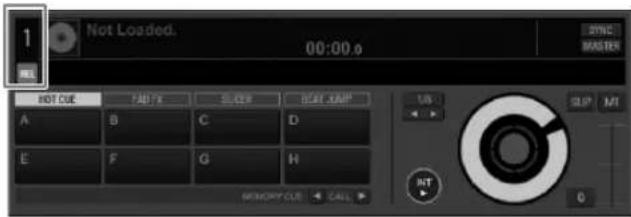
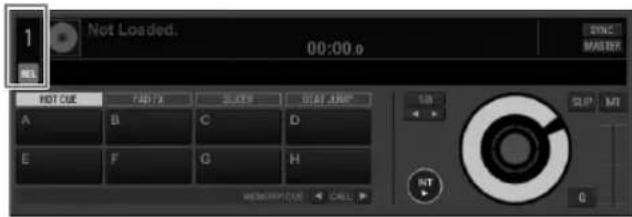
There are four kinds of DVS modes ABSOLUTE, RELATIVE, INTERNAL, THROUGH.
Click the DECK number to select the mode from the menu. When selecting the mode, the selected mode name ABS REL INT THR appears under the DECK number.
The mode name lights up when receiving the control signal from the turn table (or CDJ, XDJ).
When receiving the control signal:
When receiving no control signal: an
ABS:ABSOLUTE mode
- Location of the needle on the turn table is linked with the playback position of rekordbox DECK.
REL:RELATIVEmode
- Location of the needle on the turn table is not linked with the playback position of rekordbox DECK.
INT:INTERNAL mode
- Location of the needle, playback direction, tempo, and Vinyl operation on the turn table are not linked to the playback of DECK.
THROUGH mode
The playback sound of the turn table is output as it is.
Part names
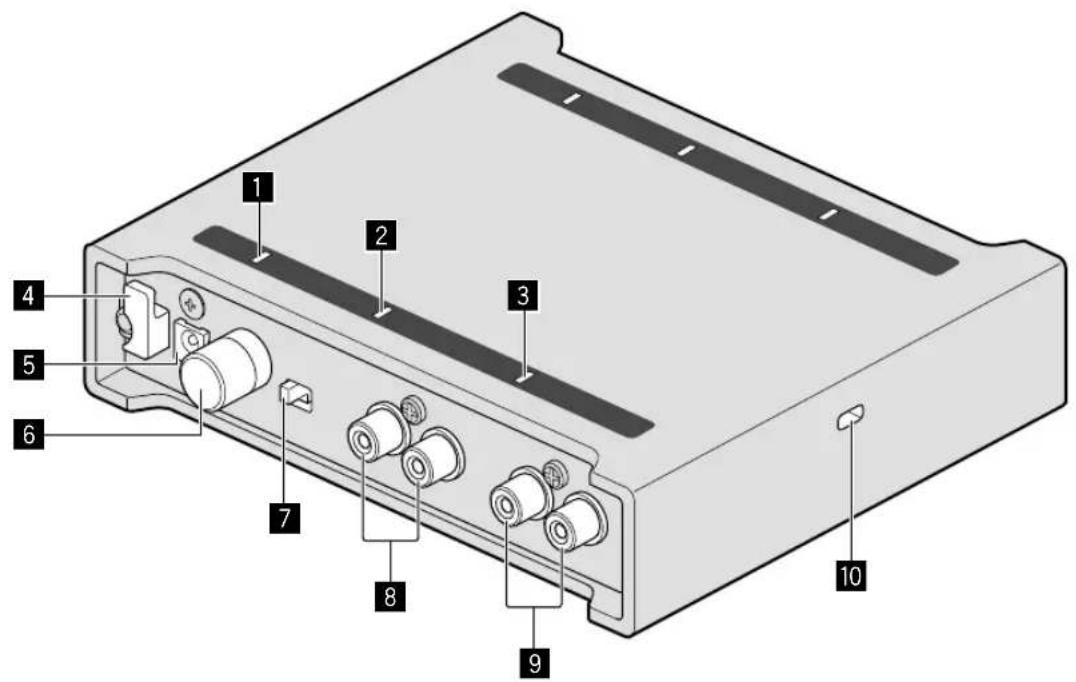
Rear panel
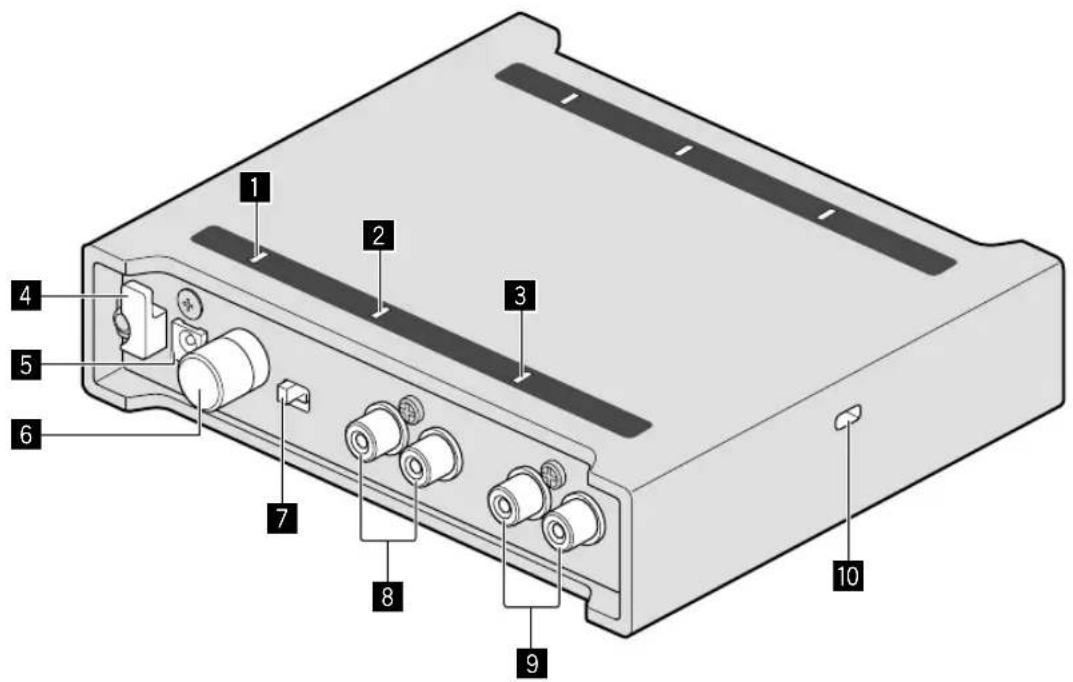
DCindicator
2 DECK2 input indicator
3 DECK1 input indicator
4 Cord hook
DCIN terminal
6 SIGNAL GND terminal
7 Input selector switch
8 DECK2 input terminals
9 DECK1 input terminals
10 Kensington security slot
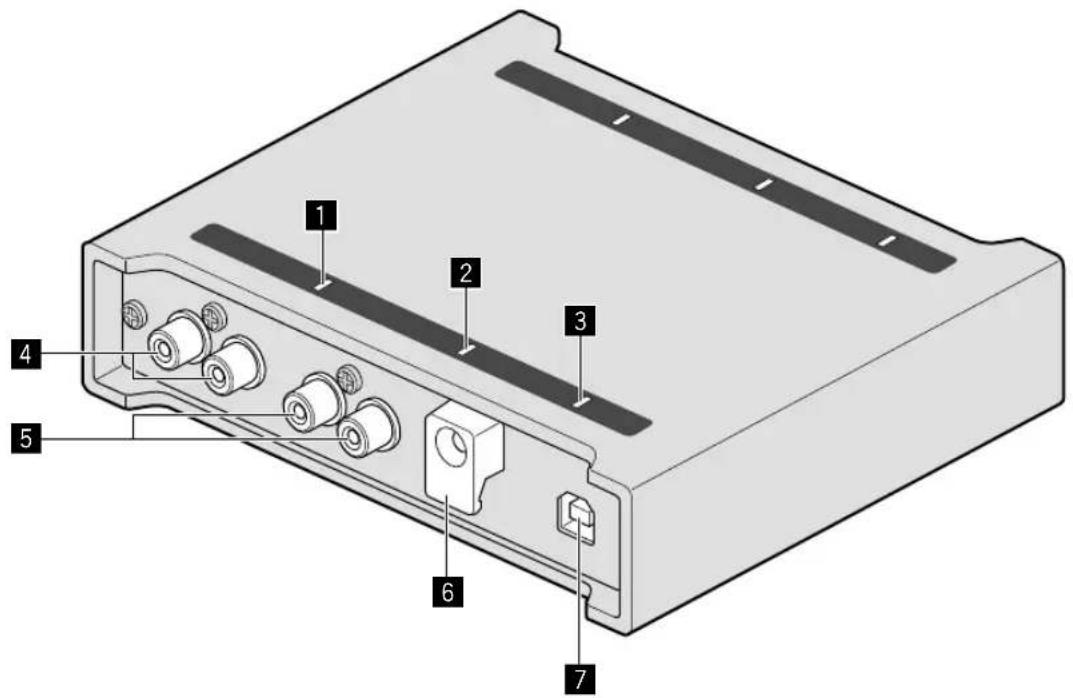
Front panel
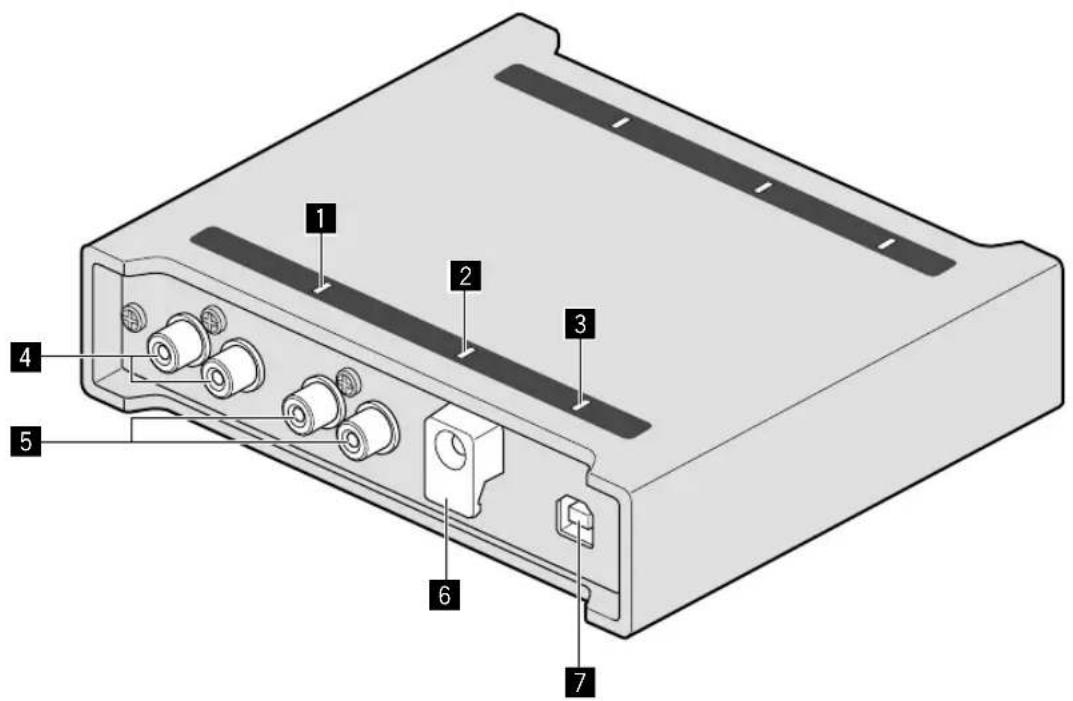
1 DECK1 output indicator
2 DECK2 output indicator
3 USBindicator
4 DECK1 output terminals
5 DECK2 output terminals
USB cable hook
7 USB port (Type B)
Connections
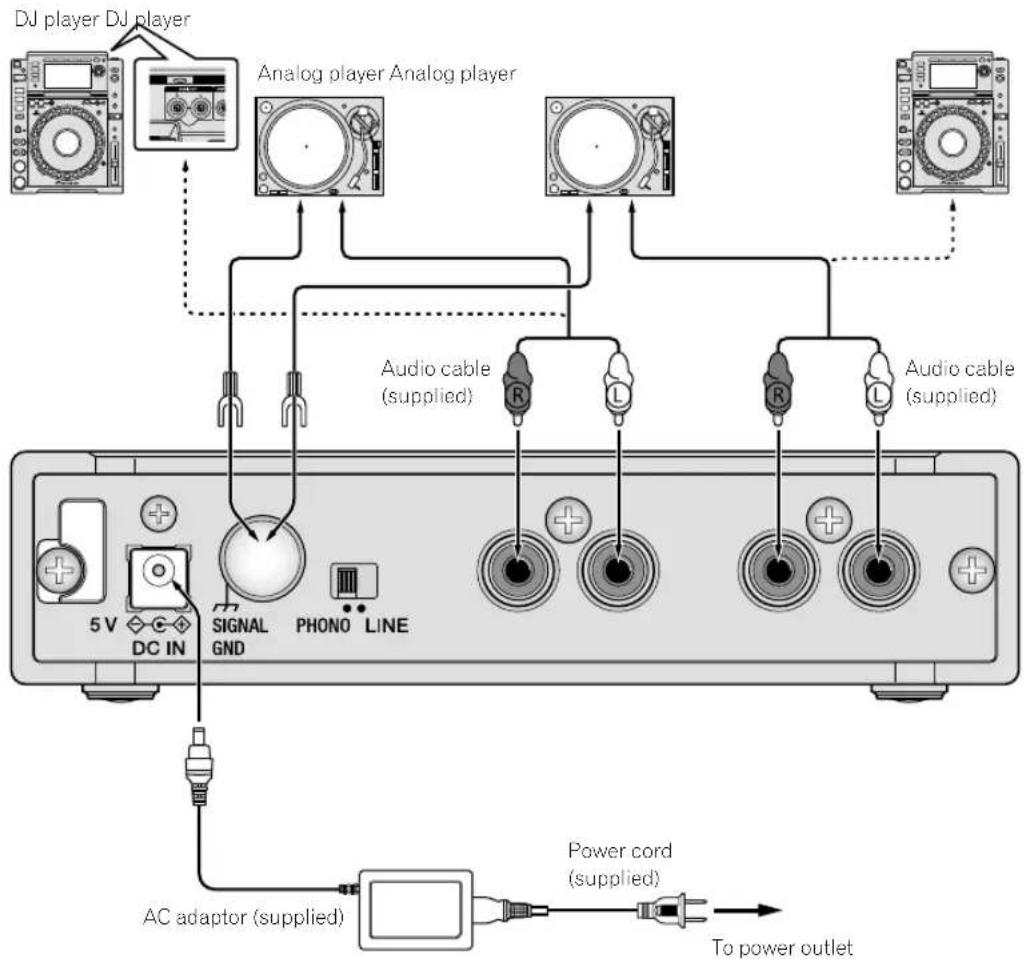
- Connect the power cord after all connections between devices have been completed.
Be sure to remove the USB cable and unplug the power cord from the power outlet whenever making or changing connections. - Be sure to use the supplied power cord and AC adaptor.
- Power is supplied by the AC adaptor or USB bus power.
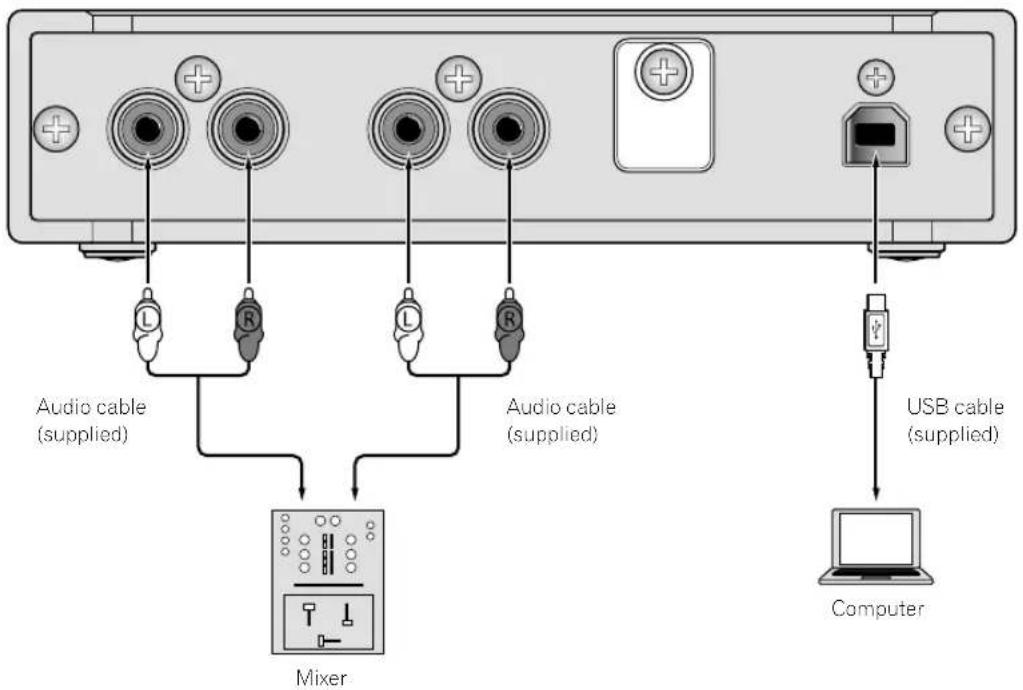
- Connect this unit and the computer directly using the supplied USB cable.
- Use USB cables that conform to USB 2.0.
- USB hubs cannot be used.
Refer to the operating instructions for the device to be connected.
Notes on using the USB bus power
This unit may not be used with the USB bus power in the following situation.
Power supply capacity of the USB port on your computer is too low.
- Your computer is connected with other USB devices.
If the USB bus power cannot be used, use the supplied AC adaptor.
- When using the USB bus power, the brightness of the LEDs decreases.
To use without restriction, use the supplied AC adaptor.
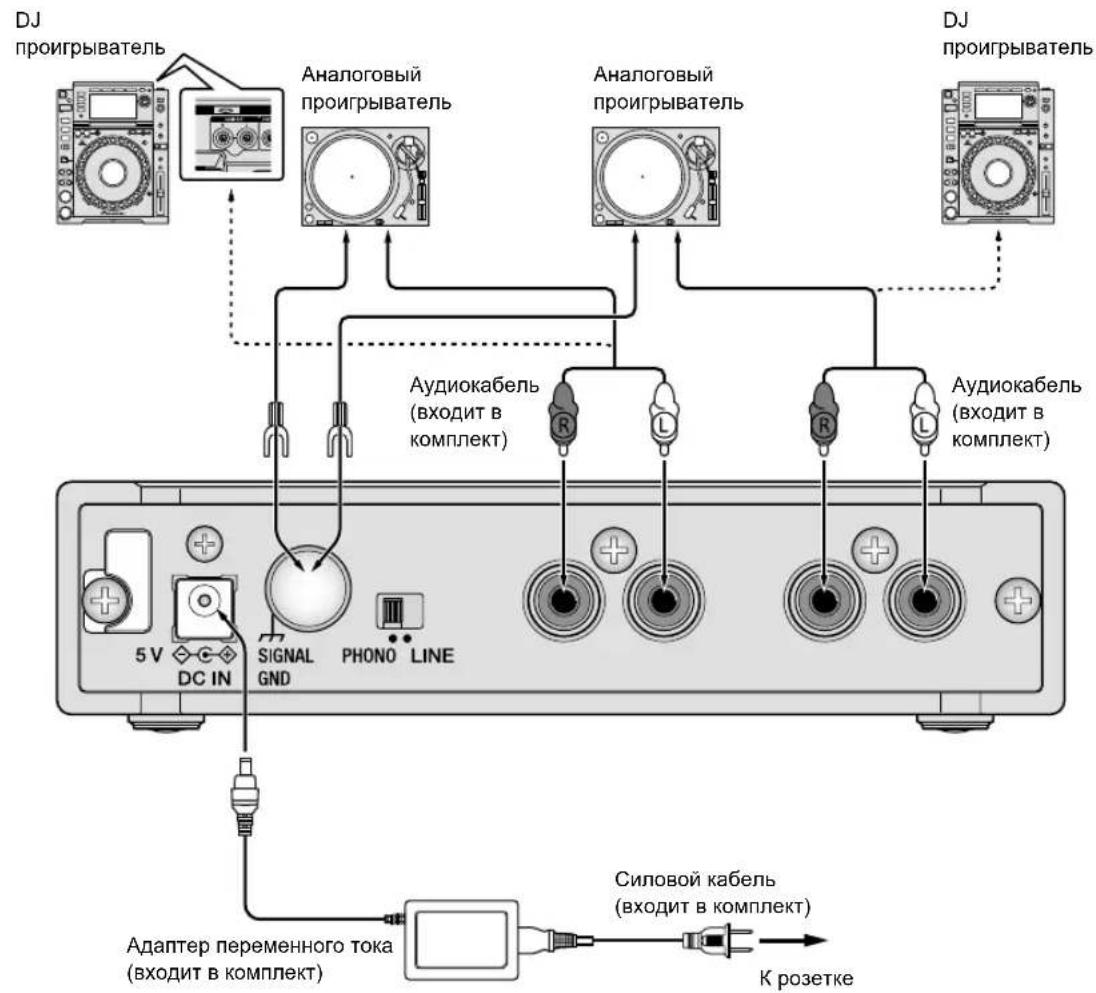
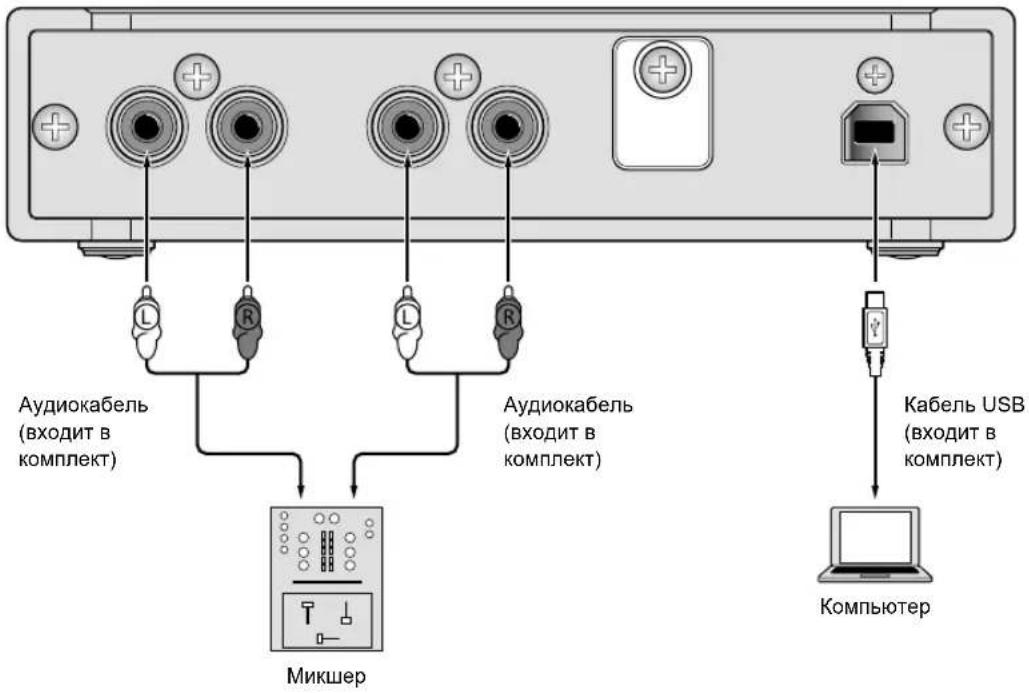
Connecting input/output terminals
Rear panel
Front panel
Audio will output at line level.
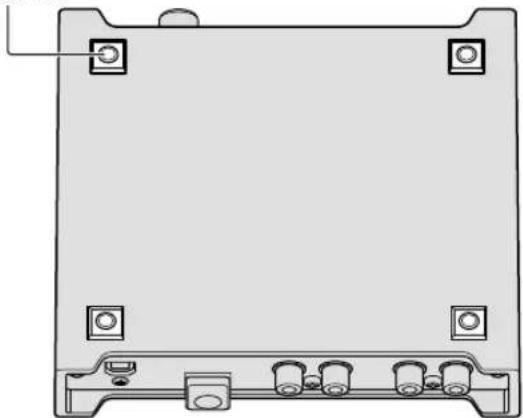
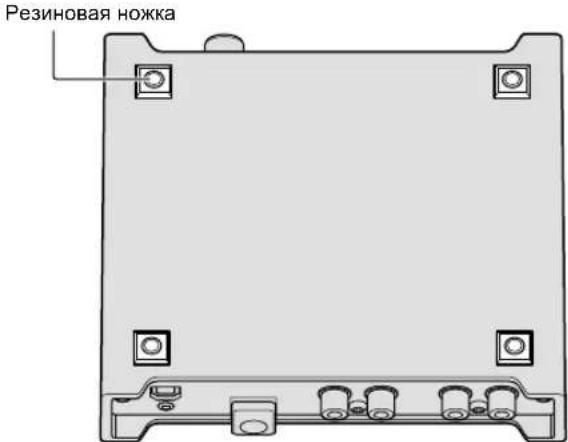
How to attach the rubber feet
Attach the rubber feet to the unit if needed. Depending on where placing the unit, attach the rubber feet accordingly.
Rubber foot
How to use the cord hook/USB cable hook
The power cord of the AC adaptor/USB cable is fixed by hooking to the
cord hook/USB cable hook.
Hook the power cord of the AC adaptor/USB cable to avoid accidentally
disconnecting them from the unit.
For the position to hook the power cord of the AC adaptor/USB cable,
use the width of the unit as a guide.
The power cord of the AC adaptor The USB cable
1 Connect the power cord of the AC adaptor to the [DC IN] terminal.
2 Fix the position to hook the power cord of the AC adaptor.
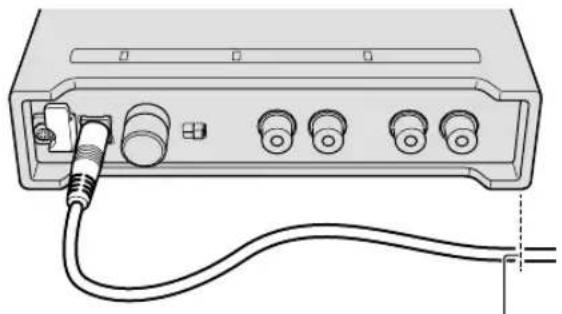
The position to hook the power cord of the AC adaptor
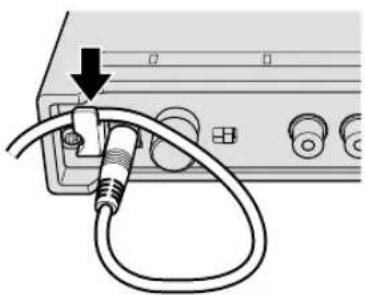
3 Hook the power cord of the AC adaptor from above.
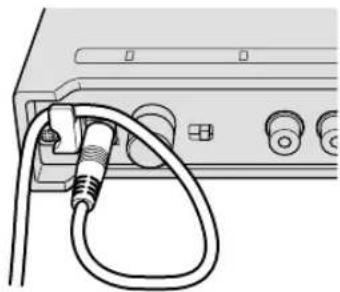
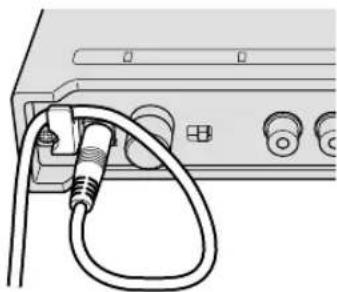
4 Make sure to hook the power cord of the AC adaptor securely.
1 Connect the USB cable to the [USB] port.
2 Fix the position to hook the USB cable.
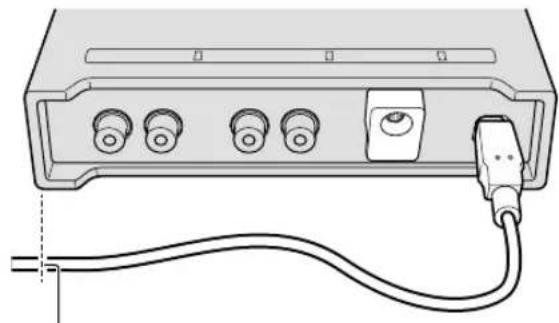
The position to hook the USB cable
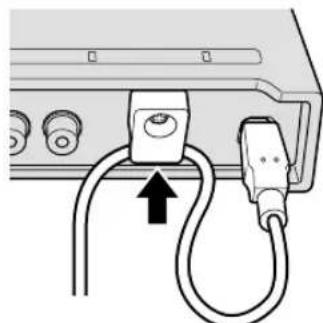
3 Hook the USB cable from below.
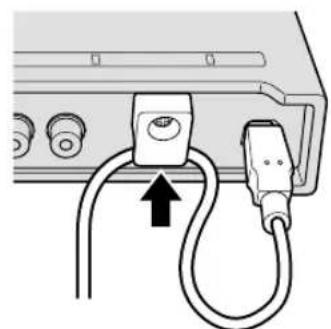
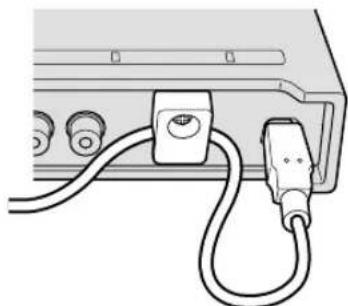
4 Make sure to hook the USB cable securely.
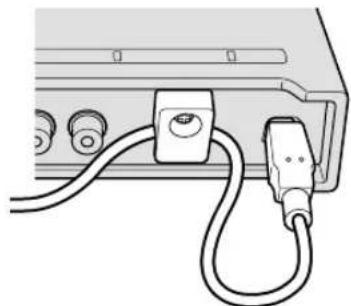
Additional information
Troubleshooting
- If you think that there is something wrong with this unit, check the items of "Troubleshooting" in the Operating Instructions, and check [FAQ] for [INTERFACE 2] on the Pioneer DJ site. pioneerdj.com/support/
Also, check the connected devices. If the problem cannot be resolved, ask your nearest Pioneer authorized service center or your dealer to carry out repair work. - This unit may not operate properly due to static electricity or other external influences. In such cases, normal operation may be restored by unplugging the power cord then plugging it back in.
About trademarks and registered trademarks
Pioneer DJ is a trademark of PIONEER CORPORATION, and is used under license.
-rekordbox is a trademark or registered trademark of the Pioneer DJ Corporation.
Windows is a registered trademark of Microsoft Corporation in the United States and other countries.
Adobe and Reader are trademarks of Adobe Systems Incorporated in the U.S. and other countries.
- macOS, OS X and Finder are trademarks of Apple Inc., registered in the U.S. and other countries.
Intel and Intel Core are trademarks of Intel Corporation in the U.S. and/or other countries.
ASIO is a trademark of Steinberg Media Technologies GmbH.
The names of companies and products mentioned herein are trademarks or registered trademarks of their respective owners.
Cautions on copyrights
rekordbox restricts playback and duplication of copyright-protected music contents.
- When coded data, etc., for protecting the copyright is embedded in the music contents, it may not be possible to operate the program normally.
- When rekordbox detects that coded data, etc., for protecting the copyright is embedded in the music contents, processing (playback, reading, etc.) may stop.
Recordings you have made are for your personal enjoyment and according to copyright laws may not be used without the consent of the copyright holder.
- Music recorded from CDs, etc., is protected by the copyright laws of individual countries and by international treaties. It is the full responsibility of the person who has recorded the music to ensure that it is used legally.
- When handling music downloaded from the Internet, etc., it is the full responsibility of the person who has downloaded the music to ensure that it is used in accordance with the contract concluded with the download site.
Specifications
AC adaptor
Power.. AC 100 V to 240 V, 50 Hz/60 Hz
Rated current 0.4A
Rated output. DC 5V,2A
General - Main Unit
Power consumption. DC 5V,600mA
Main unit weight 0.6 kg
Max. dimensions 141 mm (width) × 32.5 mm (height) × 127.8 mm (depth)
Tolerable operating temperature +5^ to +35^
Tolerable operating humidity. 5% to 85% (no condensation)
Audio Section
Sampling rate 44.1 kHz/48 kHz/96 kHz
D/A converter. 32 bits
A/D converters 24 bits
Frequency characteristic LINE 20 Hz to 20 kHz
S/N ratio (rated output)*1
USB 112 dB
LINE 103 dB
PHONO 100 dB
Total harmonic distortion*1
USB 0.002%
LINE 0.005%
PHONO 0.007%
Max. input level*
LINE +12 dBu, 3.2 Vrms
PHONO. -22 dBu, 60 mVrms (1 kHz)
Input impedance 42 kΩ
Rated output level / Load impedance. +11 dBu, 2.8Vrms/10 kΩ
Output impedance 550Ω
Gain PHONO +33 dB (1 kHz)
*1 Sampling rate: at 96 kHz
Input / Output terminals
Input terminal
RCA pin jack. 2 sets
Output terminal
RCA pin jack. 2 sets
USB port B type. 1 set
- The specifications and design of this product are subject to change without notice.
© 2017 Pioneer DJ Corporation. All rights reserved.
USB 0.002%
LINE 0.005%
PHONO. 0.007%
LINE. +12 dBu,3,2 Vrms
PHONO. -22 dBu, 60 mVrms (1 kHz)
+11 dBu, 2.8 Vrms/10 kΩ
WAARSCHUWING NETSNOER
USB 0.002%
LINE 0.005%
PHONO. 0.007%
Max. ingangsniveau*
LINE +12 dBu, 3,2 Vrms
PHONO. -22 dBu, 60 mVrms (1 kHz)
Ingangs-impedantie 42 kΩ
Nominaaluitgangsnavau/Belastingsimpedantie
+11 dBu, 2,8 Vrms/10 kΩ
USB 0.002%
LINE 0.005%
PHONO 0.007%
XpaHnte He6oBwne DeTann BHe DoCTyna DeTei. PnClyuayaHOM 3aINaTbIBaHIn, HEmeJeHHO 6bpaaaiTecb K BpaCy.
D41-6-4_A1_Ru
MEPbI INPEIOCTOPOXHOCTN IPNOBPAUHEHNC CETEBBIM UHNYPOM
Depxnte ceTeBOH uHyp 3a BnIKy. He BbITACKBaIte BnIKy, B3Bwncb 3a uHyp, u HNKoRda He KacaTecb CeTeBOrO uHpya, ecn Baun pyKn BnaXhBiTE, TAK KaK 3TO MOKeT npBecTN K KOPOTKOMy 3AmkAHHIO nIN nopaxHeNIO 3NeKTPnueckm TOKOM. He CTabTe annapaT, npEdMeTb Me6en N T.D. Ha cTeBOI uHyp, He 3axnMaIte erO. He 3aBra3bBAIte y3NoB Ha uHype n He CBra3bBAIte erO C npYnM uHypamn. CeTeBle WhypbdoJXhBi JExKaTb TaK, YTObi Ha HIX HeNb38 6blno hactyntB. NobpeXdEHHbI cTeBOI uHyp MoKeT cTaTb npuHOB BO3HNKHOBeHHa NOkapa nIN npa3ntb Bac 3neKTPnueckm TOKOM. Bpemr O T BpemeHnpOBepraIte cTeBOI uHyp. B cnuyae 0bHapyKeHHa NOBpeXdEHn o6paTNTecb 3a 3aMeHoB B 6bnKaWm cepBnChbI ueHtp nIN K Baewemy dInepy.
S002*A1Ru
BHIMAHNE
JaHHoe 3dEJIne HcNbITbIbAIOCb B YcNOBnX yMepeHHoro N TpONuHeCKOrO KJIMMaTa.
D3-8-2-1-7a_A1_Ru
JaHHoe n3dJIeNe IpeHa3HaeHo dIe HcNoIb3OBaHnB 06xXo3JcTBeHbIX cIeJx.B Clyuae BO3HKnHOBeHnIIO6OHe HcnpaBHOCTN, CB3aHHoC HCNOJIb3OBaHHeM B DpyHX, HeKeJIH Xo3JcTBeHbIX cIeJx (TaKHX, KaK dIHTeJIbHOe HcNoJIb3OBaHHe B KOMMepuecknX cIeJX B pectopane HnB aBTOMo6Hne, HnHa Kopa6Ne) N Tpe6yIoSeI peMOHTa, TaKOH pEMONT OcyUeCTBJIeTcR 3a IIaTy, DaKe B TeeHHe rapaHTnHoro CPOKa.
K041 A1 Ru
BHIMAHNE
YTO6bI NOJHOCTBIO OTKJIOUHTb NITAHNE yCTPOINCTBA, BbITAUNTE BUNKY KABEJI NITAHN IN3 3JIeKTPPOP03ETKN. IOnTOMy yCTPOINCTBO CNeDyET YCTAHABINBAbT bK, YTO6bI BUNKY KABEJI NITAHN MOXHO 6bIIO JERKO BbITAUNTB IN3 PO3ETKN B ue3BbUaHbIX OcSToRTeNbCTBax. BO n36ExKaHne NOXAPA cNeDyET IN3BnEKAtB BUNKY KABEJI NITAHN IN3 PO3ETKN, ecNN yCTPOINCTBO He 6yDeT NCNOB3OBAbCBa TteEHNE DOJrTO BpMeHN (HaNPIMep, ecNN bbl ye3Kaete B OTnyck).
AacthIe KInHeNTbI-B CTpaHax-NeHax EC, B WBeuapnn HOpBernn MOryt 6ecnnaTHo BO3BpaaaTb NcNoB3OBAHHbIe 3neKtpoHHbIe n3dennr B COOTBeTCTByIOUne nyHkTb C6opa nn Dnepy (pnp noKynpe cxOHO HorO HOBO rN3dennr).
B ctpaHax, He nepeuicneHHbIX Bblwe, dIy nonyuey HnΦopMaun O npabnlbHbIX cnocobax yTnIn3aun o6paauTecb B COOTBeTCTByUHueyUpeKdEHH.
TAKIM 6bIb yBepHb TOM, YTO yTNIN3npyEmbl npOyKt 6ydt COOTBeTCTByIOUm 6pa30M 6pa6oTaH, npeDah B COOTBeTCTByIOUm NHT INepep6oTah 63 BO3MOxHbIX HeratNBbIX NOcneCTBm Dn OKpykaIOUe CpeDb I 3doPobBry IOde.
K058b A1 Ru
CodelpkaHne
Kak cneJeT uHaTaB daHHe pykoBoCTBO
BnaOapnBac3aNOKyK3TOroN3DeJINKOMNaHINPioneerDJ. O3NaKOBtEcBcDAnHbIMpyKOBOCTBOMNHCtpyKJMaMNO 3KnIyatau,KOTOpBIEocTyNbHaCaIePioneerDJ.B3nx DOKMeHTaxCOnepKHTcBAxHNAHΦopMaU,KOTopyHeo6XoIMNo 3yHTbpeNdHauAionpa60TBcycTroiCBom. Oco6eHHO BHMaTeJIbHO O3NaKOBtEcBc pa3dJeON“BAxHbIE CBEDEHNOBE3OPACHOCTN”。TaKe BcerdaXpaHNT daHHoe pyKOBoCTBO BmteC“TapaHTne”.
CbeHn o paOte nporpaMMHOro oecneuehen reKordbox cm. B pykoBocTe K nporpaMMHomy oecneueHIO reKordbox.
- IoxaanyIcTa, NOMHInTe, YTO 3KpaHbI IN TexHnueckne XapaKTepNCIKI pOrrpAMMHorO oBecneueHnE, ONICbIBaemOrOB DaHHOM pyKOBOIDCTBe, a TAKKe BHeUHN BnD IN TexHnueckne XapaKTepNCIKI O6OpYDoBaHnR B DaHHbIM MOMHT HaxoJrTcB CTaIN pa3BNTnI IN KOHeHbIe TexHnueckne XapaKTepNCIKI MOryT pa3JIuHaTbcra.
- PtoKanyuCTa, NOMHTe, YTO B 3aBcHmOCTn OT BepCnONepaunHOHcNCTeMbI, HAcTpoE K6bPay3epa nDp. CnOCo6blynpabJIeHnMOrTy OTIIuHaTbcraOT IpOueDyp, OINCAHHbIX B DaHHOMpyKOBOdCTBe.
- 06paTHTe BHMMaHHe, YTO Ra3bIK 3KpaHOB nporpAMMHorO o6ecneueHn, OINCAHHOrO B DaHHOM pyKOBoDCTBe, MoKeT OTJNUaTbCt OT Ra3bIka BaUHX 3KpaHOB.
B 3TOM pyKOBODCTBE COePKNTCK PkATKOE ONCAHHe HA3BaHn3JIeMeHTOB DAHHORO yCTPOINCTBA INCOCOB NOKIIIOUeHnK Hemy nepiFepnHbIX yCTPOINCTB. NOpDpOBHbIE INHCTpyKcNnNO IcNoIb3OBaHnIO DAHHORO yCTPOINCTBA CM. B INHCTpyKcNnX NO 3KcNlNyatauny yCTPOINCTBA.
- INHΦopMaIIO O TOM, KAK NOJyUHTb INHCTpyKUIN No EKcnnyaTauIN, cm. B pa3dene IpoCmomp pykoedcmE ha ctp. 5.
10No hauana
CboBCTBa 5
KoMnJIeKT noCTaBKn 5
IpocMOTpykoBODTB. 5
O nporpammerekordbox 5
YcTaHOBkarekordbox 6
Ha3BaHnI deTaJIeN
3aHnaHb 7
ΦpoHTaIbHa naneB 8
10 NpoknoueHn
IopKIOUeHne TepMNHaOB BxOda/BbIXoDa 9
0 DononHHTeJIbHaI HΦopMaun
Bo3MOxHbIe HnCpA BHOCTn n CNOcObI IN yCTpaHEnH 12
O Toprobix Mapkax 3aperncptpnpoBaHHbIX Toprobix Mapkax ....12
PpeDynpexdEHHnoaBTopcknmpaBaM 12
TexHueckne xapaKtepcntk. 12
До начана
CBOICTBa
DaHHoe yCTPOBCTBO IMeET 2-KaHaIbHbI INHTeppeC ayDIO, KOtOpbl N03BOJnE INCIOJIb3OBAITb REkordbox dvs COBMeCTHO C IMeIOUIMcM MKNIEpOM. BnaOJapra IPOPeCCNOHaJIbHOMy KaueCTBy 3BuYAHN, rTOBOMY K INCIOJIb3OBAHNIHO Ha IIOUaIDKe, I NOPTaTINBHOMY KOMNAKTHOMY N 3aUNIeHNHOMY KOPnycy DJ BbICTyIIeHnC DVS CTaHT BO3MOXHBIMN B JIO6OE BpEmr N B JIO6OM MeCTe. CBeToIOIbHbIe INIINKaTOPbI Ha BepXHeN NaHEN NOKa3bIBaHOT TeueHne 3Byka N ObecneuHbAOT npABInbHOe NOKIIouHeHne.
KOMnJIeKT NOCTaBKn
CunobOaKa6eNb
- AanTep nepemehHoro ToKa
Ka6eNB USB
Aynoka6enb × 4
- Pe3HOBbIe HOxKn × 4
- INHCTpyKuIN No 3KcNlNyataaUN (KpaTKee pyKOBOCTBO NOIb3OBATEJ) (3OT DOKyMENT)
- TapaHTnA (dIa HeKoTOpbIX pEroHOB)
- KapTa c KIIOUOM IINueH3nn (rekordbox dj,rekordbox dvs)
- Пилагоця rapан'tяnpedha3haeHa ДгЕБрпскогorpernoHa.
PpimeyaHne
CoxpaHnte JInueH3nOHbI KInOu, NocKoNbKy OH He npeDocTabIeTcra NOBTOPOHO.
PpocMToP pyKOBoCTB
2 O3HaKOMbTecb c pyKOBOdCTBOM nO Haaypa60tbl HaxMnTe [Free To Download].
![PIONEER Interface 2 - O3HaKOMbTecb c pyKOBOdCTBOM nO Haaypa60tbl HaxMnTe [Free To Download]. - 1](/content/2026/02/426097/images/1b188cbf9d697981c0e79bbb465ca5ed100396385e3415fba179b6a8cd0e9a4f.jpg)
3 BHIMATEJbHO npoHTaTe JnueH3NOHHoe corlaweHne C KOHeuHbIM Nolb3OBaTeJIem n yCTaHOBNTe fIaxK [Agree], eCIN Bbl CORlaCHbI cero ycIOBnMn.
Ecn yCTaHOBnEH 3TOT fnaKOK, [Download] cTaHOBnTCaKTMBHbIM.
4 HaxmTe [Download].
Haehetca 3arpy3ka rekordbox.
5 DbaKdbI ueJKNHnTe no cKaaHaHOMy faInLy, 4TO6bI pa3apXHBnPoBaTb erO.
6Двжды ueKNHITe no pa3apxHBnpoBaHHOMy файу,чTO6bl 3anyCTNtB nporpaMMy yCTaHOBKn.
7 BHHMaTeIbHo npOHTHe IInceH3nOHHe corlaWeHne C KOHeuHbIM NOlb3OBaTeJeM H,ecN Bbl CorlaChbI C Hm, npOdoJXnte yCTaHOBky, cIeDy NHCTpyKunm Ha 3kpaHe.
- Ecnn Bbl He cornacbI cycIOBnMn IuueH3NOHHORo cornaaehn,OTMeHnTe yCTaHOky.
8 KOrda otKpoetcra OKHO C COo6uHem O 3aBepseHn yCTaHOBKn, 3aKpOte nporpaMMy yCTaHOBKn, cIeDy NHCTpyKUmaH Na 3kpaHe.
YcTaHOBka 3aBepUeHa.
-Дяинольоваяrekordbox djиrekordbox dvs tpe6yetca akTBAUЯ (npOBepka noДПИHOCТи ПИUEH3N).Дя nOLyEHERIДОПONHITeNBHOINФOPMaUN CM.ИНСТPyKUN NO ЗКСПУATAUIMrekordbox. rekordbox.com/en/support/manual.php
BVeHTe IInueH3nOHbI KJIou, YTO6bl aKTHBnPoBaTbrekordbox dj.
- Bыберпгдяrekordbox napametp [PERFORMANCE].
- Haxmnte [Activate] B nyHKeTe [PpeNoUteHnra] > [License] > [rekordbox dj].
BBeHTE NueH3NOHbIe KIOU, NOka3aHbIe Ha KapTe c NueH3IOHHbIM KIOUOM, PpInaraiOuieC K DaHHOMy ycTpoiCTBy, a 3aTEM CneNyTe INcTpKcIaM Ha 3kpaHe dNn AKTNBaunrrekordbox dj nrekordbox dvs.
-Дя npocmoTpa npoueDpybI no akTbaunrekordbox dj otKpoTe "rekordbox.com"и O3HaKOMbTecb C PykoBoCTBOM rekordbox Ha ctpaHnce [Support] >[Manual].rekordbox.com/
Hacrtpoika DVS harekordbox
Доступно чьт Bipe ржma DVS: ABSOLUTE, RELATIVE, INTERNAL, THROUGH.
HaxmTe Homep DECK 1IyBbOpa peKMa B MeHO.
PnBb6pepexmaeroHa3BaHne ABs REL NT-tpaxaetcno HomepOM DECK.
Ha3BaHne pexkma noCbeuBaeTc npn noyehnn cnHa na ynpabneHH nBepTuK (nnn CDJ, XDJ).
PnnoJyueHn ciHana ynpabJIeHn: REL
PnOTCyTCTBn CnHnaja ynpabJIeHn:
ABS: pexim ABSOLUTE
- MectonoIOxKeHHe INIbI Ha BepTuXke CB3aHO C NOIOxKeHnEM Bocnpoun3BeDeHnREkordbox DECK.
REL: pexm RELATIVE
- MectonoNoxKeHneIrNbHaBepTyUkeHeCB3aHoC noNoXKeHmBOcPon3BeDeHnreKDordboxDECK.
NET:pexim INTERNAL
- MectonoJoxHe MeIbI, HappaBHeMe BocpOn3BeDeHn, TEMn n pa6ota Vinyl Ha BepTuKe He CBraHb C BocpOn3BeDeHnEM DECK.
PPEKIM THROUGH
3ByK BOCnpon3BeDHeHn BeTpUkN BOCnpOn3BODnTcKaK eCTb.
Ha3BaHnJaTeTaJe
3aHnaHeIb
1 NnkaTop DC
2 INdkaTop BXoDa DECK2
3 INdNKaTop BXoJa DECK1
Kpok npoBokn
5 TepmunhaI DC IN
6 TepmunhaI SIGNAL GND
7 NepekeIIOuateJIb ceJIeKTopa BXOda
8 TepmnaJIbI BxoJa DECK2
9 TepminhaIbI BxOda DECK1
10 CLOT 3amka KeHCHHTOHa
Фронтайся поны
I INHnKaTOp BbIXoJa DECK1
2 INHnKaTOp BbIXoJa DECK2
3 HdkaTop USB
4 INHdkaTopbl BbIXOda DECK1
3 INHnKaTOpbl BbIXOda DECK2
Kpok Ka6eJRA USB
7 Nopr USB (TnB)
Повкlioочners
- Nocne 3aBepseHnBceN NOKJIIOUeHm MEXy yCtpoiCTBaMn NOKJIIOUHTe CINIOBOI Ka6eJIb.
PnBbIOnHeHHn HIn N3MeHEnn NoKIOeHnn O6a3aTeJbHO OTKnOHTe Ka6eJb USB nOTcoEHNHTe CINNOBo Ka6eJb ot po3eKm. - IcnoB3yIte npnlaeMbI CNIOBOI Ka6eIb I aadantep nepemehHoro TOKa.
-ПитанеocушecTBнгетсачetадanTepa nepemehHoroToKa nIu IINHbI USB. - IopknIOHTe DaHHbI annapaT n KOMnbTeP hAnpMyIO uepe3 nocTaBnReMbI Ka6JIb USB.
- Ncnonb3yTe Ka6eIu USB, COOTBeTCTByIOUne CNEUΦKaUu USB 2.0.
KoHHTpaTopb USB He Moryr HcNoB30BaTbcra.
CMOTPHTe HNCTpyKUIN N O3KcnNyatauIN K NOKnHouaEMOMy ycTpoiCTBY.
PpmeaHnno nCNoJIb3OBAHnIO uHHb USB
- DAnHHO yCTPOINCTBO He MOKeT HcNOJIb3OBaTbC R cNITaHHeM OT UINHb USB B cJeDyUOxN CnyaR.
-EMKOCbI NOaH NHTAHN NOPTa USB Ha BaWem KOMNbIOTepe CINUKOM Hn3Ka.
K BaWemy KOMnbIOTepy NoKnIOueHb IpyrYe yCTpoIcTba USB.
Ecni uHy USB Heo3MoXHO nCnOlb3OBaTb, nCNoIb3yTe npJIraeMbI aADANTep nepemehoro TOKa.
- Ppi nCNoJIb3OBAHn nnHb USB npKocTb HndKaTOPOB yMeHbJaaeTcA.
TTo6bI nCnOJIb3OBAbT 6e3 orpAHueHm, IcNoJIb3yIte npJlraeMbI aADanTepeMeHHoro TOka.
Подкlio ueHne TepMHaJIOB BXOda/BbIXOda
3aHnaHnB
ΦpoHTaJIbHaŋ nHaHeIb
Aydno 6ydt BbIbOuNTbcra Ha NInHeHOM ypoBHe.
KpenIeHne pe3HHOBbIX HOKeK
Pn Heo6xOIMOCn npKpENTe K yCTpoiCTBy pe3HOBbIe HOXKn. B 3aBNCMOCTOn OT MeCTa pa3MeUeHHy yCTpoiCTBa npKpENTe pe3HOBbIe HOXKn COOTBeTCTBYIOUM O6pa3OM.
IcnoJb3ObaHne KpIOKa npoBODKn/ KpIOKa Ka6eJa USB
Ka6eNb nHaHnA aAnTepe npEpeMeHHoro ToKa/ka6eJy USB
fNkCpyetc nMOuBIO KpOka Ka6eJy/KpOka Ka6eJy USB.
3aФKcpyte cNoBOI Ka6eJIb aAnTepe npEpeMeHHoro ToKa/ka6eJy USB Bo n36eKaHne cnyauHoro oTcoeDInHeHry ot ycToPoiCTBa.
IIpaonoloxEnra KpenEnra CnIOBOro Ka6eJy aAnTepe
pepeMeHHoro ToKa/ka6eJy USB pykoBoDCTByTEcB uipnHOy ycToPoiCTBa.
CnnoBoi Ka6eIb aanTepa nepemEnHoro ToKa Ka6eIb USB
1 PoiKJIIOUHTe CINOBO Ka6eIb aIaNTepa nepemehHOro ToKa K TepMnHaIy [DC IN].
2 Bb6epHTe noIOxKeHne InKpEnJIeHn CInIOBOrO Ka6eIaAnTepa nepemEHHoro TOka.
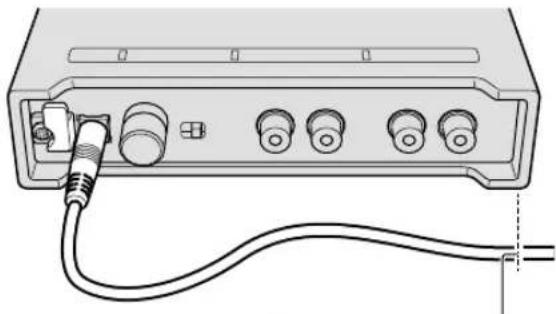
IIOXKeHnE nIa KpeIIeHnCnIOBOrKa6JIa aanTepa nepeMeHHoro Toka
3 3aKpEnNTe KpHOKOM cHNoBOI Ka6eIb aAnTepa nepemEHHO NHTAHN CBepxy.
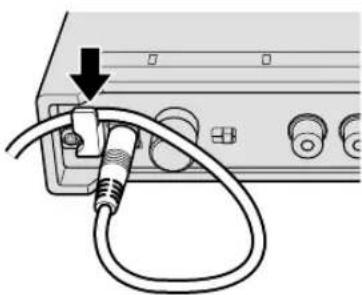
4 HadeKHO 3aKpeNITe cHIOBOI Ka6elb aadantepa nepemehoro Toka.
1 PoiKniouHte Ka6eJb USB K nopTy [USB].
2 Bb6epnte nooKeHne nKpenIeHHn Ka6eJr USB.
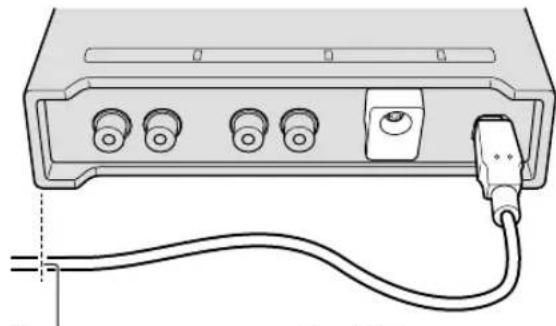
PonokxeHne dnnkpennene Ka6eNB USB
3 3aKpEnIte KpIokom Ka6eIb USB cHn3y.
4 Haedxho 3akpenTe Ka6eIb USB.
Дононтульна иформача
B03MOXHbIe HeNCnPaBHOCTN n cnOc6bl nx yCTpaHeHna
- EcIN Bbl CnITaeTe, YTO C DaHbIM ycTpoNCTBOM YTO-To He TaK, PPOHTe NHyKTBb B pa3DeNe "Bo3MOKhble HcNpPaBHocTN n cnocobix yctpaHeHn" B INCTpykunx no 3KcNpyatauin daHHoro ycTpoNCTBa, a TaKe pa3dEn [FAQ] dIn [INTERFACE 2] Ha caIte Pioneer DJ. pioneerdj.com/support/
Kpome Toro, npOBepbTe COCTOARHe NOkKnIOUeHHbIX ycTpoiCTB. Ecnn npo6nemy HeBO3MOxHO ycTpaHHTb, 6opatntecb B 6nkaun ABTopu3OBAHHb CepBCHb YcHTp Pioneer nn K dInJepy nI npoBeHnpeMOHTa.
JaHbI annapa MoKet He cpa6aTbIBaTb COOTBcTcByOuIM 6pa30m no npnHHe cTaUeCKoro 3neKtpueCtBa nIN NO dpYHM BHeuHm npuHnAm. B TaKnx CUYaX HopMaJIbHyo paBoTy MOxHO BOCCTaHOBnTb, OTCoeDHHB UHP NITaHnO T PO3eTKn, a 3aTeM NOdkNIOHNB ERO CHOBA.
O TopROBbIX MapKax N 3apeRnCTpNpOBaHHbIX TopROBbIX MapKax
Pioneer DJЯВЯETc3apeHCTpnpOBaHHbIMTOBAPHBIM3HaKOM KOpnpaun PIONEERCORPORATION INICNoIb3yETcnoJIuCEH3n.
-rekordbox - Toprobay Mapka ININ 3apeInctpnpobAHNA Toprobay Mapka KomnaHNI Pioneer DJ Corporation.
Windows ABnEeTc 3apernctpnpoBaHHoT ToproBoM MapKo Microsoft Corporation B CoeHHeHHbIX IToTaX AmeuKn IB npyrnx cTpaHax.
- Adobe Reader ABJIOITc TopROBIMn MapKAMn Adobe Systems Incorporated, 3aperncTpnpoBaHHbIMn B CUSA n dpynx cTpaHax.
- macOS, OS X ∩ Finder Альперсары Маркамп Apple Inc., зергострпороваимь в ССА и другх страх.
Intel Intel Core ABnTc ToproBIM MapKam Intel Corporation B CUSA nnn npynx ctpaHax.
- ASIOЯвлгетс TopROВ Марков Steinberg Media Technologies GmbH.
Yka3aHHbIe 3decb Ha3BaHnKOMNaHm N3deJIIM RaBJIOTcT ToproBbIMM MapKaMn IIN 3apeHCTpnpoBaHHbIMN ToproBbIMM MapKaMn COOTBeTCTByUOxN BnaDeJIbUeB.
IpeynpeKdHnno aBTOpCKn m npaBaM
rekordbox orpaHnBaeT Bocpon3BeHe n KOnnpoBaHne My3bkaJbHOrO coOpKIMOrO, 3aUuEHHoro ABTopCKMn npaBaMn.
- Ecnn My3bkaIbHOM MaTePnAne CoDepKxATc3aKoInpoBaHHbIe daHHbIe I np.ДЯ 3aunTbI aBTOpCKNx npab,MOKeT bItb HeBO3MOXHO ynpaBnTb nporpaMMo KAK obiuHO.
Kordarekordbox6hApyKnaeTakne3aKaOnpOBAHHbe MY3bIkaJIbHOM MaTePnaJIe DaHHBe I np.ДЯ 3aUITbI ABTopCKNX npab,6pa6oTKa (Bocpon3BeDeHHe, YTeHne N dp.) MoXeT npIOCTaHOBtCBc.
BbINHHeHBe BAMn 3aIncn npedHa3HaueHbI nI BAeero IInHoro yIOBOJIbCTBnI N O 3aKOHAm O 3aUnte aBTOpCKnx npAB He MOyT nCNOJb3OBaTbcra6e3 corlaacn BlaJeNbua aBTOpCKnx npab.
My3bka, 3aIncahna Ha KOMnakT-DnCKax n dp., 3aunuaeTcra KOHAMO 3aunite ABTOPCKNX npabax OTDeIbHbIX cTpaHm MekdynapOnbIMn corlaueHnAIM. OTBeCTBeHHocTb 3aIeranbHOe IcNoJIb3OBAHHe 3aNCAHHo My3bIK NOnHOCbIO JENKTHa YeJIOBeKe, BblONIHNBWeM 3aINCb.
- PnO6paueHm C My3bIKo, 3aRpyKeHHoC INHTepHeTa n dp. 3aRpy3NBIIM My3bIky yeIOBek HecET NOnHyO OTBETCTBEHHOCt b 3aNCIOJIb3OBAHHe My3bIK B COOTBeTCTBUN C KOHTpaKTOM, 3aKNIUHeHHbIM C caITOM 3aRpy3KN.
TexHHueckne xapaKTepeNCTnKN
AanTep nepemehHoro ToKa
PntaHne .0T 100Bdo240B nepemehnHoro ToKa,50 T/60 T
HOMHaJIbHbI ToK 0,4A
HomHaJIbHbI BbIXoJ 5BnoCT.1oka,2A
06üee-OCHOBHoi 6JIOK
IoppebnemmaoHoctb.5Bnoct.Toka,600MA
Bec ochoBHoro 6noka 0,6 Kr
MaKc.ra6apntbI 141 MM (WupnHa) X 32,5 MM (Blicota) X 127,8 MM (Tnybna)
Donyckaemar paoboua TemnepaTpa .0T +5^ do +35^
Донуckaemая рабочая Влжность .0T 5%do85%(6e3KoHdEHaCauu)
Aynopa3den
Yactota dnckpntaun 44,1 K/48 K/96 K
Lunpoo-aHaIorOBbI npeo6pa3ObaTeB 32 6nta
AnanorOBO-UNPPOBOnIpeo6pa3OBaTeNb 246nTa
YactoTHaXapakTepeNCTnKa LINE 20Tdo20K
COOTHOSEHNE CnHAn/7yM (HomHaJIbHbIy BbIXoD)
USB 112
LINE 103
PHONO 100
Obuee HeJIInHeHoe IckaKeHne*
USB 0.002%
LINE 0.005%
PHONO 0.007%
Makc. ypObeHb BXoJa*
LINE +12dH,3,2Vrms
PHONO -22d5H,60mVrms(1K4U)
UmmpeDAnc BxoJa .42 KΩ
HOMINAHbHbIyPOBeHbBbIXOa/IMnpeHaHC Harpy3Kn +11Dh,2,8Vrms/10KΩ
IMpeHaHc BbIXOa 550Ω
YcHneHne
PHONO +33D5(1KU)
* YacToTa DnckPepn3aunn: npn 96 K
TepMHaJIbI BXOJa/BbIXOJa
TePMnHaBxOda ⅢbipkOBoe rHe3do RCA .2 ha6opa
TePMnHaJI BbIXOJa ⅢIbIpbKOBoe rHe3do RCA .2 ha6opa
ПорТ USB TnB 1 ha6op
TexHueckne XapakTepeNCTKUN KOHcTpkyUN DaHHORo n3dENn MOyT N3MeHrTBcR 6e3 yBeDOMHeHn.
© 2017 Pioneer DJ Corporation. Bce npaba 3aunueHbI.
Примейанne:
Kopnpaun PAnOHnP DnJKe yCtAHnBaet CneDyUOyU npoOnXntbHocTb cPoka cnxkbI OpncnabHO nocTabnembx Ha Pocnnckn pbIHOK TObapOB.
Ayno n BndeooobopyoBaHne:7 let
Ipehenochoe aydnoobopyoBaHne: 6 neT
Dpyroe obopydoBaHne (HayuHnK, MmKpOoH n T.D.): 5 neT
D3-7-10-6b_B1_Ru
Hhopmaunn nokynatene B EA3C:
YIIOJIHOMOHeHHo OprAHn3aUeN B COOTBeTCTBm C Tpe6OBaHnA MTP TC 004/2011, 020/2011, 017/2011
YBJIaTeC OOO "IIOHEP PYC", Pocn, 105064, r. MockBa, HxHn CyaIbHbI nepeyIOK, dom 5, cTpoEHne 19, T. (495) 9568901
D3-7-10-8b_A1_Ru
IaTy n3roTOBnEHHN O6OpUoBaHn MOxHO ONpeJeNTb NO cepuHOMy HOMepy, KOToPbI COepeKHT INHΦopMaunO MeCaeI rOe npOn3BODCTBa.

CepinHbIn Homep
P1 P2
Data n3roTOBLeHnObOpyIOBaHn
P1 - Гд n3roTOBNeHn
| Год 200 | 2002 | 2003 | 2004 | 2005 | 2006 | 2007 | 2008 | 2009 | 2010 | |
| Символ | A | B | C | D | E | F | G | H | I | J |
| Год 201 | 2012 | 2013 | 2014 | 2015 | 2016 | 2017 | 2018 | 2019 | 2020 | |
| Символ | К | L | M | N | O | P | Q | R | S | T |
P2-Mecu n3roTOBJIeHHa
| Мессяц 1 | 2 | 3 | 4 | 5 | 6 | 7 | 8 | 9 | 10 | 11 | 12 | |
| Символ | A | B | C | D | E | F | G | H | I | J | K | L |
D3-7-10-7 A1Ru
© 2017 Pioneer DJ Corporation. All rights reserved.
Pioneer DJ Corporation
6F, Yokohama i-Mark Place, 4-4-5 Minatomirai, Nishi-ku, Yokohama, Kanagawa 220-0012 JAPAN
Pioneer DJ 株式会社
Pioneer DJ Europe Limited
Anteros Building, Odyssey Business Park, West End Road, South Ruislip, Middlesex, HA4
6QQ, U.K. TEL: +44-203-7617-220
Pioneer DJ Americas, Inc.
2050 W. 190th Street, Suite 109, Torrance, CA 90504, U.S.A. TEL: +1 (424) 488-0480
PIONEER ELECTRONICS ASIACENTRE PTE. LTD.
2 Jalan Kilang Barat, #07-01, Singapore 159346 TEL: +65-6378-7888
PIONEER ELECTRONICS AUSTRALIA PTY. LTD.
5 Arco Lane, Heatherton, Victoria, 3202, Australia, TEL: +61-3-9586-6300
PIONEER ELECTRONICS (THAILAND) CO., LTD.
17thFl.KPNTower,719Rama9Road,Bangkapi,Huaykwang,Bangkok 10310
TEL: +66-2-717-0777
PIONEER TECHNOLOGY (MALAYSIA) SDN. BHD
16th Floor, Menara Uni. Asia 1008 Jalan Sultan Ismail 50250 Kuala Lumpur
TEL: +60-3-2697-2920
先锋股份有限公司
PIONEER INDIA ELECTRONICS PRIVATE LTD.
- Second Floor, Time Tower, M.G. Road, Sector 28, Gurgaon 122001,
Haryana, India TEL: +91-124-463-6100
CdeNaHO B Maiaa3nn
PDJ 001 all
- CAUTION
- WARNING
- Operating Environment
- VENTILATION CAUTION
- POWER-CORD CAUTION
- Contents
- How to read this manual
- Before start
- Part names
- Connections
- Additional information
- Features
- What's in the box
- Note
- Viewing the manuals
- Viewing this unit's Operating Instructions
- Viewing the Operating Instructions ofrekordbox
- Aboutrekordbox
- Minimum operating environment
- Supported operating systems CPU and required memory
- Others
- Installingrekordbox
- Enter the license key to activaterekordbox dj.
- Setting DVS withrekordbox
- Rear panel
- Front panel
- Notes on using the USB bus power
- Connecting input/output terminals
- How to attach the rubber feet
- How to use the cord hook/USB cable hook
- Troubleshooting
- About trademarks and registered trademarks
- Cautions on copyrights
- Specifications
- AC adaptor
- General - Main Unit
- Audio Section
- Input / Output terminals
- WAARSCHUWING NETSNOER
- MEPbI INPEIOCTOPOXHOCTN IPNOBPAUHEHNC CETEBBIM UHNYPOM
- BHIMAHNE
- CodelpkaHne
- Kak cneJeT uHaTaB daHHe pykoBoCTBO
- 10No hauana
- Ha3BaHnI deTaJIeN
- NpoknoueHn
- DononHHTeJIbHaI HΦopMaun
- До начана
- CBOICTBa
- KOMnJIeKT NOCTaBKn
- PpimeyaHne
- PpocMToP pyKOBoCTB
- O3HaKOMbTecb c pyKOBOdCTBOM nO Haaypa60tbl HaxMnTe [Free To Download].
- BHIMATEJbHO npoHTaTe JnueH3NOHHoe corlaweHne C KOHeuHbIM Nolb3OBaTeJIem n yCTaHOBNTe fIaxK [Agree], eCIN Bbl CORlaCHbI cero ycIOBnMn.
- HaxmTe [Download].
- DbaKdbI ueJKNHnTe no cKaaHaHOMy faInLy, 4TO6bI pa3apXHBnPoBaTb erO.
- 6Двжды ueKNHITe no pa3apxHBnpoBaHHOMy файу,чTO6bl 3anyCTNtB nporpaMMy yCTaHOBKn.
- BHHMaTeIbHo npOHTHe IInceH3nOHHe corlaWeHne C KOHeuHbIM NOlb3OBaTeJeM H,ecN Bbl CorlaChbI C Hm, npOdoJXnte yCTaHOBky, cIeDy NHCTpyKunm Ha 3kpaHe.
- KOrda otKpoetcra OKHO C COo6uHem O 3aBepseHn yCTaHOBKn, 3aKpOte nporpaMMy yCTaHOBKn, cIeDy NHCTpyKUmaH Na 3kpaHe.
- BVeHTe IInueH3nOHbI KJIou, YTO6bl aKTHBnPoBaTbrekordbox dj.
- Hacrtpoika DVS harekordbox
- ABS: pexim ABSOLUTE
- REL: pexm RELATIVE
- NET:pexim INTERNAL
- PPEKIM THROUGH
- Ha3BaHnJaTeTaJe
- 3aHnaHeIb
- Фронтайся поны
- Повкlioочners
- PpmeaHnno nCNoJIb3OBAHnIO uHHb USB
- Подкlio ueHne TepMHaJIOB BXOda/BbIXOda
- 3aHnaHnB
- ΦpoHTaJIbHaŋ nHaHeIb
- KpenIeHne pe3HHOBbIX HOKeK
- IcnoJb3ObaHne KpIOKa npoBODKn/ KpIOKa Ka6eJa USB
- CnnoBoi Ka6eIb aanTepa nepemEnHoro ToKa Ka6eIb USB
- Дононтульна иформача
- B03MOXHbIe HeNCnPaBHOCTN n cnOc6bl nx yCTpaHeHna
- O TopROBbIX MapKax N 3apeRnCTpNpOBaHHbIX TopROBbIX MapKax
- IpeynpeKdHnno aBTOpCKn m npaBaM
- TexHHueckne xapaKTepeNCTnKN
- AanTep nepemehHoro ToKa
- 06üee-OCHOBHoi 6JIOK
- Aynopa3den
- TepMHaJIbI BXOJa/BbIXOJa
- Примейанne:
- Hhopmaunn nokynatene B EA3C:
- Pioneer DJ Corporation
- Pioneer DJ 株式会社
- Pioneer DJ Europe Limited
- Pioneer DJ Americas, Inc.
- PIONEER ELECTRONICS ASIACENTRE PTE. LTD.
- PIONEER ELECTRONICS AUSTRALIA PTY. LTD.
- PIONEER ELECTRONICS (THAILAND) CO., LTD.
- PIONEER TECHNOLOGY (MALAYSIA) SDN. BHD
- 先锋股份有限公司
- PIONEER INDIA ELECTRONICS PRIVATE LTD.
Brand : PIONEER
Model : Interface 2
Category : Audio/video converter