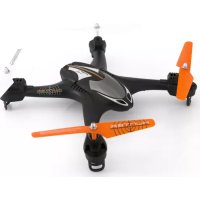
zoopa Q400 HUNTER - Drone Acme Made - Free user manual and instructions
Find the device manual for free zoopa Q400 HUNTER Acme Made in PDF.



| Product Type | Ready-to-Fly (RTF) Quadcopter Drone |
| Brand | Acme Made |
| Model | zoopa Q400 HUNTER |
| Dimensions | 320 × 320 × 88 mm |
| Weight | Approximately 103 g (without battery) |
| Minimum Recommended Age | 10 years and up |
| Usage | Indoor and outdoor (in dry weather) |
| Battery | LiPo 3.7 V, 600 mAh |
| Remote Control | 2.4 GHz, requires 2 AA batteries (not included) |
| Range | Approximately 100 meters |
| Charging Time | Approximately 60 minutes |
| Built-in Camera | Optional (camera mount with recording and FPV WiFi) |
| Flight Functions | Up/down, turn, forward/backward, lateral, 360° flip |
| Camera Power | Via the drone's dedicated connector |
| File Storage | Micro SD card (not included) |
| FPV Connectivity | WiFi, compatible with SJ W1003 FPV app (iOS/Android) |
| Box Contents | Quadcopter, remote control, LiPo battery, micro USB charger, 2 landing gears, screwdriver |
| Spare Parts | Battery (ZQ0400-B), propellers (ZQ0400-C), rotor guard (ZQ0400-D), landing gear (ZQ0400-G), WiFi camera pack (ZQ0400-I) |
Frequently Asked Questions - zoopa Q400 HUNTER Acme Made
User questions about zoopa Q400 HUNTER Acme Made
0 question about this device. Answer the ones you know or ask your own.
Ask a new question about this device
Download the instructions for your Drone in PDF format for free! Find your manual zoopa Q400 HUNTER - Acme Made and take your electronic device back in hand. On this page are published all the documents necessary for the use of your device. zoopa Q400 HUNTER by Acme Made.
USER MANUAL zoopa Q400 HUNTER Acme Made
Copyright 2015 ACME the game company GmbH
Sicherheitshinweise
WARNING:
ACME the game company GmbH
Boikweg 24
33129 Delbruck
Germany
Manual Please read carefully before use!
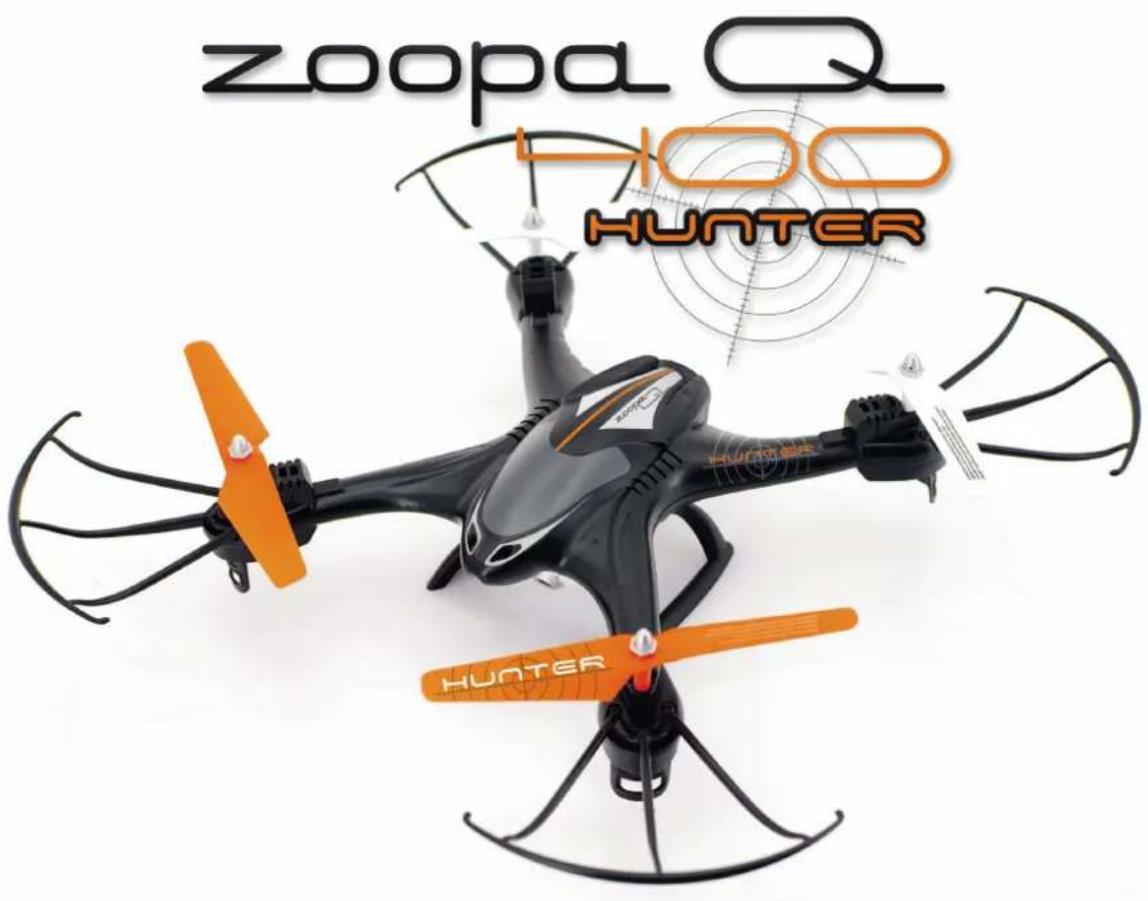
Technical Data
Size:
Weight:
Recommended Age:
Field of use:
Battery:
C o n t r o l e r
Range:
320× 320× 88mm
approx. 103
10+ years
Indoor and Outdoor
3.7V LiPo;
approx. 100m
Vers.: 1.0
Copyright 2015 ACME the game company GmbH
Safety Advice
WARNING:
NOTE THE FOLLOWING ADVICE,
TO AVOID DAMAGES AND SHORTCUTS:
ONLY USE RECOMMENDED SPARE PARTS
DO NOT DISSAMBLE THE PRODUCT
INNER PARTS CAN BE REPAIRED BY THE USER.
PLEASE CONTACT QUALIFIED STAFF IF YOU ARE NOT
FAMILIAR WITH RC-MODELS.
SERVICE & SUPPORT
ACME the game company GmbH
Boikweg 24
33129 Delbruck
Germany
Tel: +49 2944 973830
service@ACME-online.de
or
http://www.ACME-online.de
SAFETY ADVICE
Danger of fire and explosion occurs if a battery is not connected properly.
Always charge LiPo batteries under supervision.
Please stop charging if you notice a deformation or if the battery is blowing up!
Store LiPo batteries at 10 - 25^
Avoid heating of over 50^ at discharge.
Do not shortcut, never throw into fire!
Only use original batteries.
-Always use the original LiPo-battery
-Do not use if the battery deforms, discolors or softens
-Store the battery at temperatures between 15^ and 25^ at dry and dark places. The charging capacity shall be at min. 75%
-Store away from children and pets
-Keep away from fire, water, heating sources and foreign matters that can cause a shortcut
- Always use the original charger which is placed on a fireproof surface
-Avoid mechanical exposure and do not open
-Do not touch the battery if gas or liquid leaks out of the battery
-Improper handling may result into health problems
-Dispose wasted batteries properly
- Never exhaust the battery
CE Declaration
Herewith we declare that this item is in accordance with the essential requirements and other relevant regulations of the directive 1999/5/EC. A copy of the original declaration of conformity can be obtained at the address above.

This product uses LiPo batteries. LiPo batteries are recyclable, and a valuable resource. To dispose of the battery, remove it and take it to a resource recovery facility.

WEEE Reg. Nr.: DE64989527
This symbol is marked on a product or packaging, it means that the product including the batteries must not be disposed of with your general household waste. Only discard electrical/electronic items in separate collection schemes, which cater for the recovery and recycling of materials contained within. Your co-operation is vital to ensure the success of these schemes and for the protection of the environment.
ATTENTION!
Choking hazard - Not for children under 3 years!!!
Please check the content before using the product!
1x Quadrocopter
1x 2.4GHz controller
(optional Smartphone mount)
1x LiPo Battery 600 mAh / 3.7V
1x Micro USB-Charger
1x Manual
1x Screw driver
4x Rotor protection
2x Propeller A
2x Landing gear
2x Propeller B
You additionally require 2pcs. AA batteries.
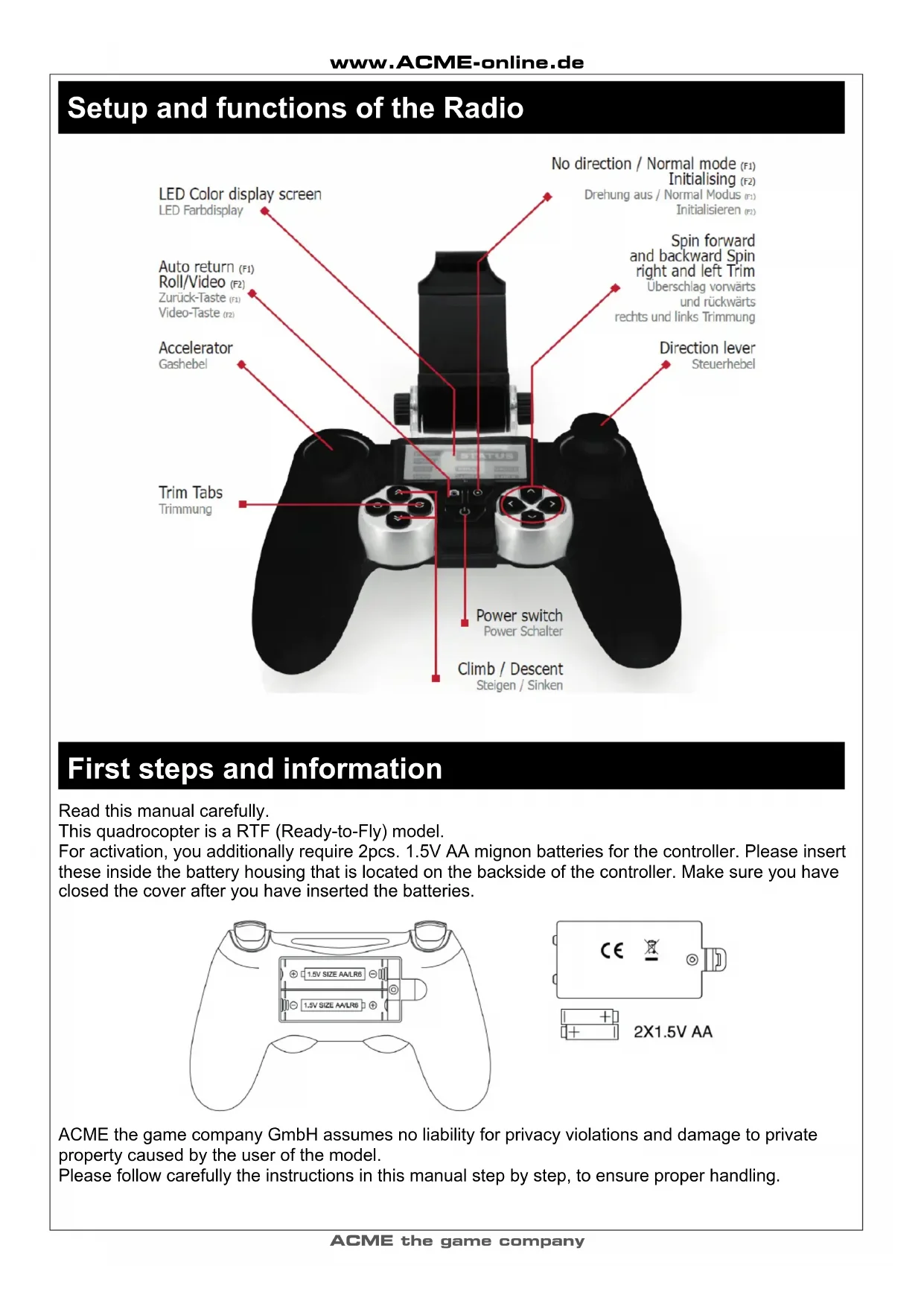
Setup and functions of the Radio
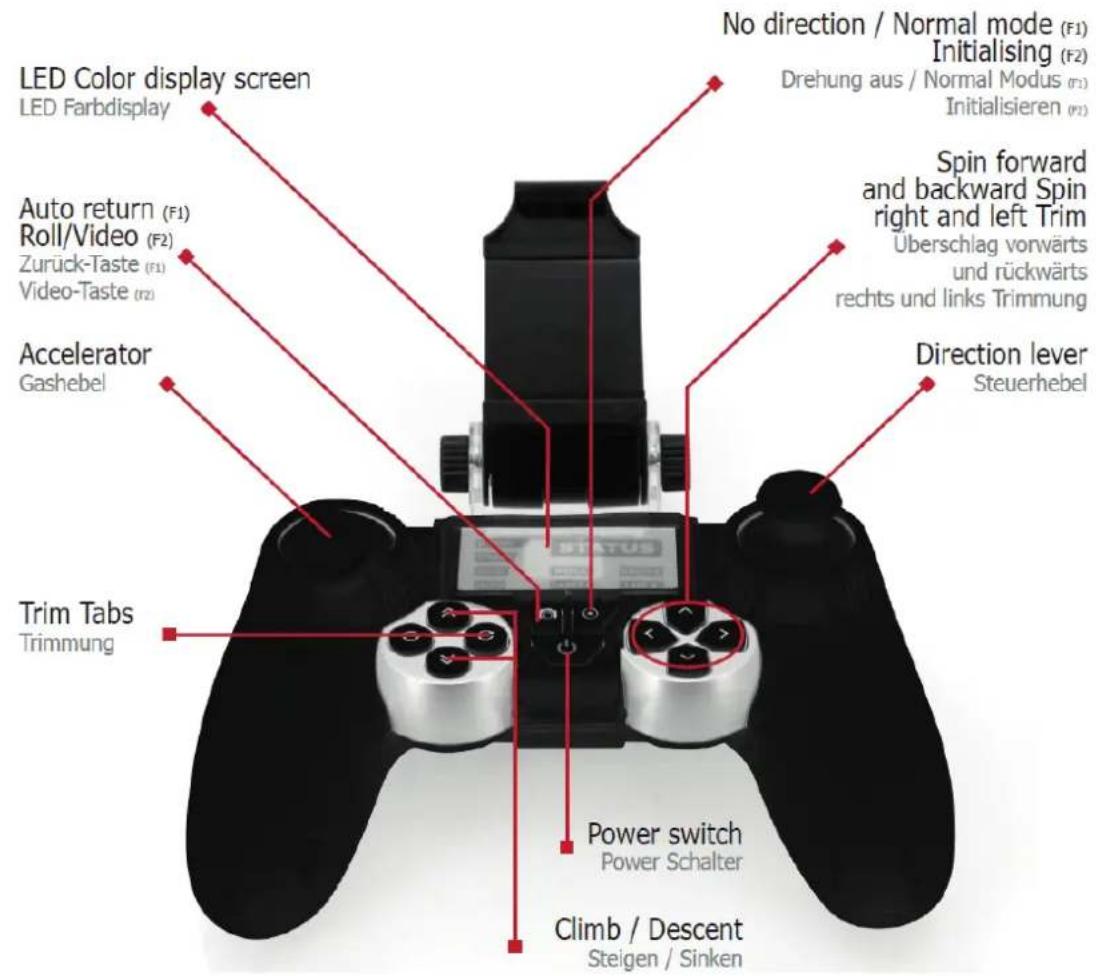
First steps and information
Read this manual carefully.
This quadrocopter is a RTF (Ready-to-Fly) model.
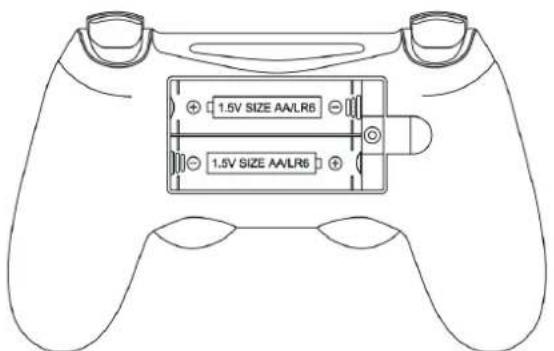
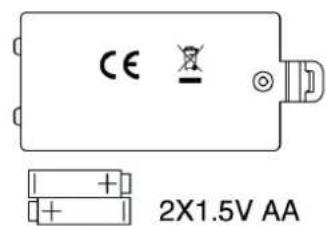
For activation, you additionally require 2pcs. 1.5V AA mignon batteries for the controller. Please insert these inside the battery housing that is located on the backside of the controller. Make sure you have closed the cover after you have inserted the batteries.
ACME the game company GmbH assumes no liability for privacy violations and damage to private property caused by the user of the model.
Please follow carefully the instructions in this manual step by step, to ensure proper handling.
Charging the Battery
The supplied LiPo battery (already inserted) will be charged through the USB-Cable.
Connect the cable to an USB- source, e.g. your computer.
You may alternately connect it to an USB power adaptor.
(Art. No. FCHD43).
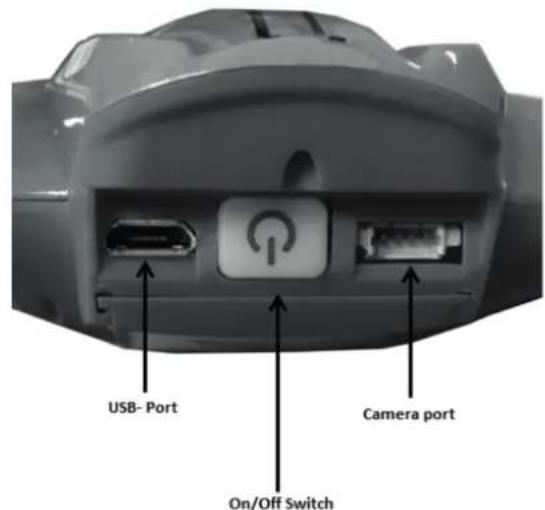
Plug the Micro-USB cable to the matching port on the quadrocopter. Make sure that it has a steady connection. The LEDs on the quadrocopter shine up in red.
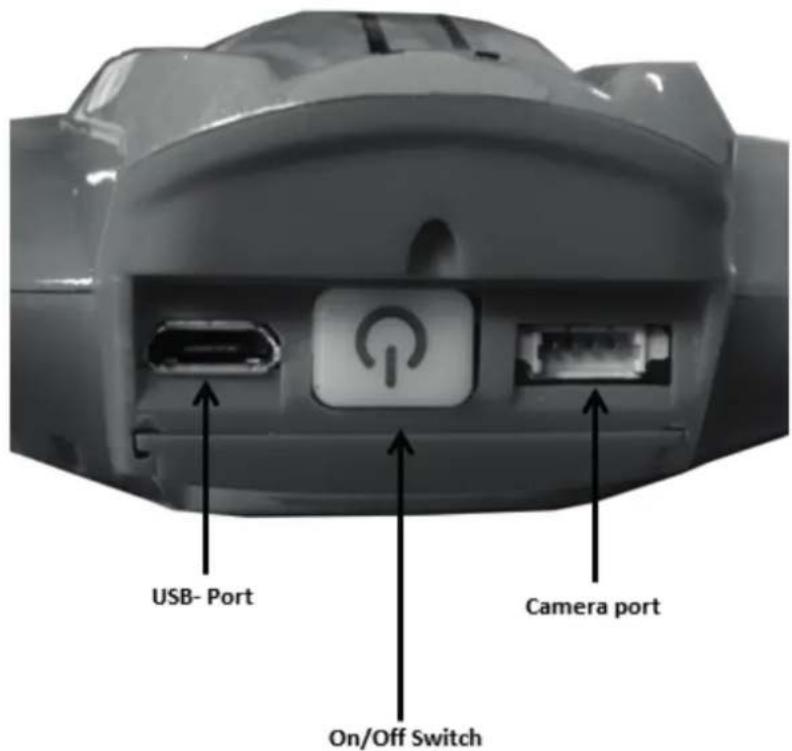
Charging can take up to 60 minutes. The LED will switch off as soon as the battery is fully charged. Please only use original batteries Third brand producers may have a wrong polarity as well as lower capacities which will have influence on the flight characteristics. Wrong polarity will lead into damage of the model.
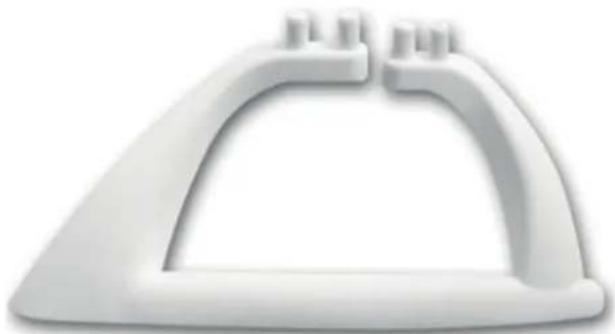
Mounting the landing gears
Only a few steps are required to start the first flight.
Plug both landing skids into the provided holes on the bottom of the model.
Inserting the battery
Slide the battery cover towards the backside of the quadrocopter and open it.
Check the polarity before connecting the battery to the model!
When reinserting the battery into the housing, make sure that the cables don't fold. Connect the battery to the plug and follow the lead, do not forget the polarity. Then close the battery cover again.
Always switch on the controller and then the model!
Switch off: First the model, then the controller!
Controller and model are already paired out of the box, which means that both are ready for flight.
First fly
Before you perform your first flights, make sure that there are no persons or animals nearby. Keep a free area of 3x3 meters!
Place the quadrocopter on an even surface.
The orange rotor blades mark the front of the model, where as the white rotor blades mark the tail of the qadrocopter. The different colors will assist your orientation during flight. Stay away for around 2 meters behind the model and carefully test the functions that are described in the following steps.
Start at low gas and speed.
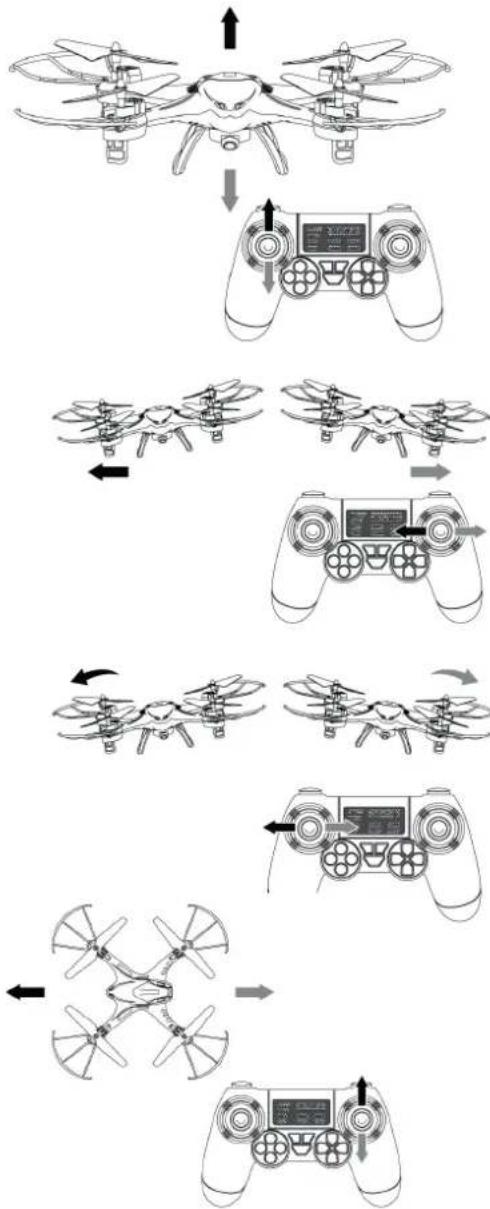
Rise / Descend
Move up the gas stick (left) to let the model rise and down to descend it.
Right / Left
Move the control stick (right) to left or right, to let the model hover into these directions.
Turn
Move the left stick to the left or right to turn the Model around it it's own axis.
Forwards/Backwards
Move the control stick (right) up or down to fly for- and backwards.
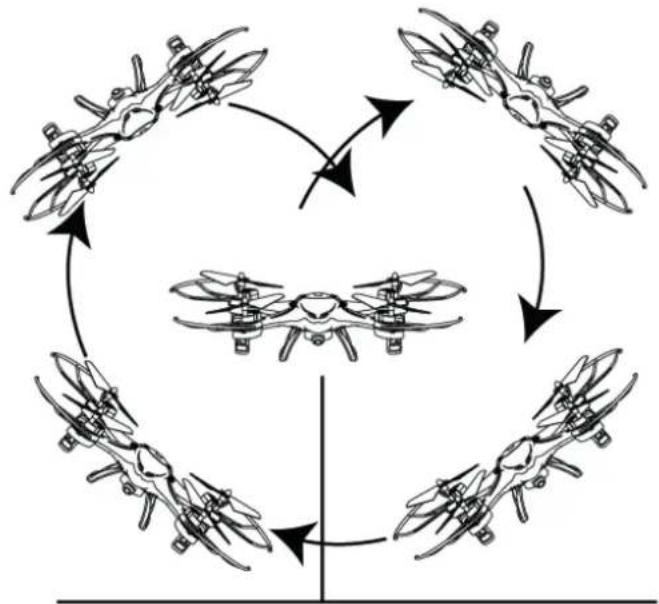
360^ Flip Mode
As soon as you are familiar with the control, you can perform a flip. Make sure that the model has reached sufficient height (minimum 3 meters). Now press the flip- button on the controller and then move the right stick in your favorized direction to perform a flip.
Camera (optional)
Video- and Photo recording
The model is equipped with a mount to attach a camera optionally. This can be mounted underneath the battery cover.
Additionally, the camera has to be connected to the provided port on the model.
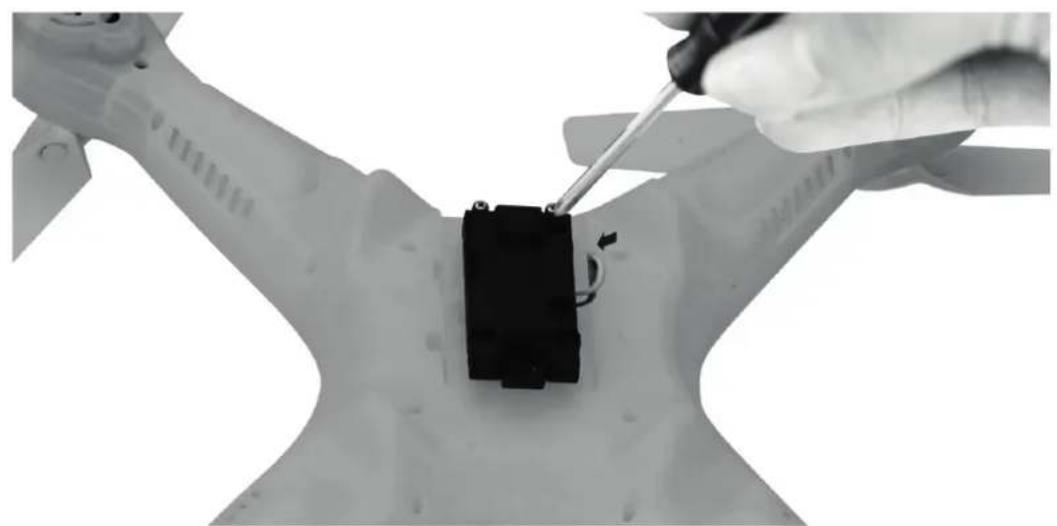
The camera will be released through the controller.
Carefully insert the micro SD- Card into the camera. Switch on the model. The LED on the camera module is permanently blue. If it is flashing red, it indicates that either the card is full or not inserted.
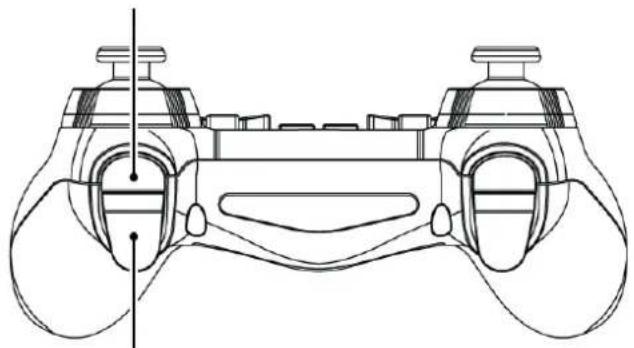
To take a photo, press the photo- button (rear right). The red LED will flash shortly. To start a video, press the video- button (front right). The LED will be constantly red during recording. To stop the recording, press the video- button again. The LED will then switch off.
Readout the recordings (MS Windows)

Festplatten
Videos can be quickly stored and played on the computer. We recommend the "VLC Player" (Freeware, no charges)
You can download it at www.vlc-player.org.
Connect the USB reader to your computer and insert the memory card.
Confirm the connection. The device will be recognized as a regular hardware.
Camera control / FPV WiFi
Besides the camera control through the models remote, the camera module is equipped with a WiFi FPV video transmission system.
This allows a liveview on your end device (smartphone or tablet).
The App can be used free of charge on iOS and Android systems.
SJW1003FPV
Please proceed as described:
-Enter your App Store
-Search ,SJ W1003 FPV
-Download the App
-Switch on the quadrocopter (and the camera)
-Enter the WiFi settings on your device
-Choose ,SJ W1003 FPV...
-Launch the App and press PLAY to start the liveview
The App does not support quadrocopter control.
Battery care
To ensure a long battery life, please follow these steps:
- Never store the model in activated mode, make sure it is switched off.
- Only store with charged battery (min. 85% capacity)
- Disconnect the battery from the model
-Store at room temperature - When not using, make sure the battery will be charged every 3 months
If these steps are not being followed, the battery might get damaged.
Rotor replacement
You can replace the rotors in a few steps.
Remove the screw by using the supplied screw driver. Pull off the rotor from the axis.
Make sure you are mounting the right propeller (direction A or B) and that the drive shaft is connected to the gears. Remount the cap of the rotor and righten it firmly.
Direction of rotation clockwise (Rotor A): left front and right rear
Direction of rotation counter-clockwise (Rotor B): right front and left rear
Troubleshooting
| Error | Source | Solution |
| The model does not react on the commands | Controller batteries are not inserted correctly. | Check the battery |
| Batteries are empty | Replace the batteries | |
| Model battery is empty | Charge the battery | |
| The model makes strange sounds | Blades/ Gears are damaged | Check these and replace them if needed |
| The controller has no connection to the model | Weak battery | Charge the battery |
| Controller batteries are empty | Replace the batteries | |
| Battery damaged | Replace the battery | |
| The model is out of range | ||
| The model shows a weak performance | The motor is worn out | Check all motors and replace it if needed |
You can contact us anytime if you have further problems!
Please find our details at the "Service & Support" section.
Accessories and Spares
| Art. No. Item | |
| ZQ0400-B zoopa Q400 Race-Quadro Battery | |
| ZQ0400-C zoopa Q400 Race-Quadro Rotor Set | |
| ZQ0400-D zoopa Q400 Race-Quadro Rotorprotection | |
| ZQ0400-G zoopa Q400 Race-Quadro Landing gears | |
| FCHD43 Power adaptor 110-230V 5V | 500mA | USB | |
| ZQ0400-I Wifi Pack- Camera and Smartphone mount |
Warranty
The consumer is without prejudice to any claim against the seller granted a guarantee to the following conditions:
» New devices and their components exhibiting defects within 24 months from the purchase due to manufacturing and / or material faults, are ACME the game company at its option, reflecting the current state of the art exchanged or repaired free device. For wear parts (eg batteries, motors, etc.), this warranty is valid or 3 months from purchase.
This warranty does not apply if the device defect is due to improper treatment and / or failure to comply with these instructions.
This warranty does not extend to self- paid by the customer services.
Warranty claims are to make immediate payment of the Guarantee case.
» Ownership of devices or components that are returned to ACME the game company as part of the exchange, shall become the property of ACME the game company.
» By services rendered under warranty, the warranty period is not extended.
» So far there is no warranty case to ACME the game company reserves the right to charge the customer for replacement, repair, or shipping costs. The customer will be informed in advance.
Damages resulting from mechanical influences are not covered under warranty.
Service & Support
ACME the game company GmbH
Boikweg 24
33129 Delbruck
Germany
ACME the game company GmbH
Boikweg 24
33129 Delbruck
Germany