
STi - Controller Acme Made - Free user manual and instructions
Find the device manual for free STi Acme Made in PDF.


| Product type | Wireless controller |
| Brand | Acme Made |
| Model | STi |
| Dimensions (L x W x H) | 160 x 105 x 60 mm |
| Weight | 280 g |
| Power supply | Rechargeable Li-ion 1000 mAh battery, micro-USB port |
| Battery life | Approximately 20 hours |
| Connectivity | Bluetooth 5.0, 2.4 GHz wireless |
| Wireless range | Up to 10 meters |
| Main buttons | 2 analog sticks, 1 D-pad, 4 action buttons (A, B, X, Y), 2 triggers, 2 grip buttons |
| Additional features | Built-in vibration, accelerometer, gyroscope |
| Compatibility | PC, PlayStation 4, PlayStation 5, Nintendo Switch, Android, iOS |
| Care and cleaning | Clean with a slightly damp soft cloth. Do not use abrasive products. |
| Safety | Avoid exposure to water and extreme temperatures. Do not disassemble. |
| Spare parts and repairability | Analog sticks and battery replaceable. Repairability index: 7/10. |
| Warranty | 2 years |
Frequently Asked Questions - STi Acme Made
User questions about STi Acme Made
0 question about this device. Answer the ones you know or ask your own.
Ask a new question about this device
Download the instructions for your Controller in PDF format for free! Find your manual STi - Acme Made and take your electronic device back in hand. On this page are published all the documents necessary for the use of your device. STi by Acme Made.
USER MANUAL STi Acme Made
STi racing wheel

4 GB User's manual 173 Warranty card
17 LT Vartotojo gidas 174 Garantinis lapas
Thank you for purchasing ACME gaming wheel. Please read this manual carefully FIRST, before using the device.
For your convenience, record the complete model number and the date you received the product together with your purchase receipt and attach it to the warranty and service information. Retain them in the event warranty service is required. If you found this product faulty or damaged due to quality problems, please return it to our repair department or the agency where you bought it.
Package contents
• STi racing wheel
- Foot pedals
- Drivers CD
- User's manual + warranty pages inside
Features and specification
• 2 axes, a D-Pad and 12 separate action buttons
• Built-in motors let you feel every inch of the road for maximum control
• Digital mode and Analog mode are interchangeable
• Works with Windows-based PC: Windows2000/XP/Vista/7™
• Auto-calibration function(DRIVER installation is required)
• 180° wheel rotation
• Powerful function for driver settings
• Auto cruise lets you enjoy driving with hands-free and comfort
• Spring-loaded pedals for acceleration and brakes create a driving experience
- 5 big and durable suction cups make the wheel fixed in place and easy to operate
• 2.0 m wheel cable and 1.6 m pedal cable
• Working current is lower than 170mA
Buttons layout
Front Buttons

GB Ports

Port for Pedal Cable
USB cable
Driver installation and settings
Driver Installation
- Connect the wheel to the PC. Put the CD into the CD-ROM drive. Your PC will detect the driver automatically. Follow on- screen prompts to complete the installation. A shortcut will be created on the desktop when installation is done (see Picture 2 as below). Users can simply click this icon
to test and set up
Picture 2
ACME STi Racing Wheel
GB
- Double click the shortcut "ACME Sti Racing Wheel" to enter game controllers (see picture 3 as below)

Picture 3
GB
Product Test
- Test Interface
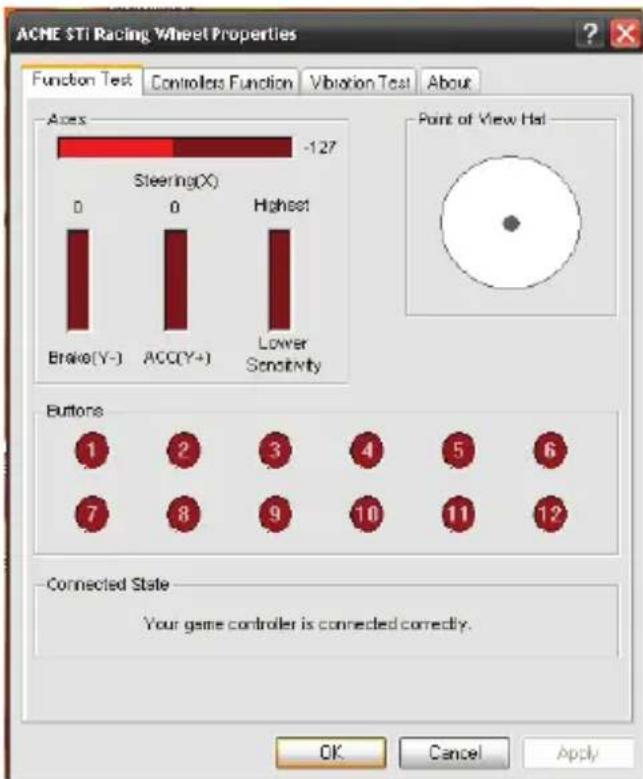
Click the "Test" button as seen in the above Picture 3. Enter the wheel test interface as below (see Picture 4) to test axis and buttons.
Picture 4
Driver Function Test
- You can set the original dead zone for wheel direction (X axis), gas (Y+ axis), brake (Y-axis) as below. (see picture 5 "Dead Zone setup")
- Wheel sensitivity can be adjusted from low to high in different degrees as below. (see Picture 5 "sensitivity setup")
- Wheel acceleration, brake and key 1 to key 12 is interchangeable (key mapping). (See Picture 5 "KeyMap setup" as below.)
- When driver is installed, default is set the first time you press the MODE button. There is no need for a manual calibration.
Note: The first time you press the wheel MODE button, please do not press any other buttons
• Auto Cruise Setup and Cancel
Depress the gas pedal to any position. Press the CRUISE button. Then release the pedal. The gas volume will be recorded and functioning for auto cruise. When brake or gas control is out of the volume, auto cruise function will be cancelled and normal operation will be active

GB
Vibration Test
- Vibration strength can be adjusted to different degrees as below. (See Picture 6 "vibration strength")
• Motor test methods (See Picture 6)

GB
Driver Uninstall
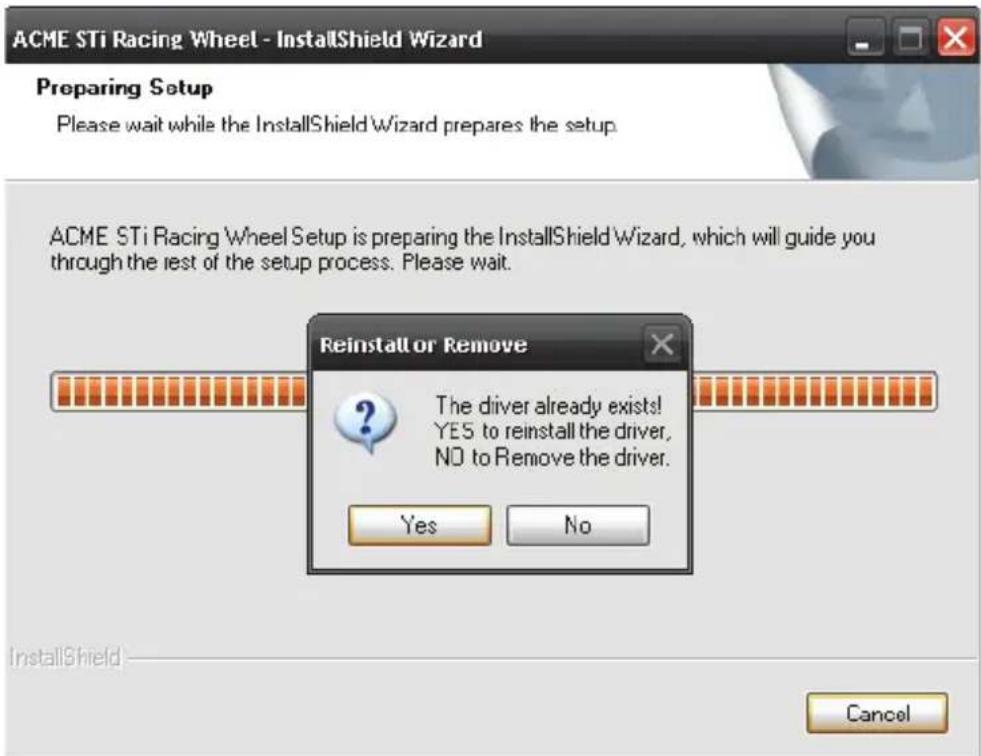
- Rerun the driver. Click NO to remove the driver. Click YES to reinstall the driver. (See Picture 7 as below)
Picture 7
- Click "Finish" to save and quit. (See picture 8 as below)
GB

Picture 8
GB
Troubleshooting
- The wheel is not working when software and hardware installation is completed on the PC. Please check whether the wheel cable is properly connected to your PC. If the problem still exists, please restart your PC
- The motors do not vibrate in PC racing games (e.g. Need for Speed 5). Quit the game and restart it. Do not insert or pull the wheel cable when gaming. If the problem still exists, please restart your PC.
- Certain axis will be automatically functioning when the game starts (e.g. Need for Speed 5). Please check whether the wheel is calibrated or set after calibration.
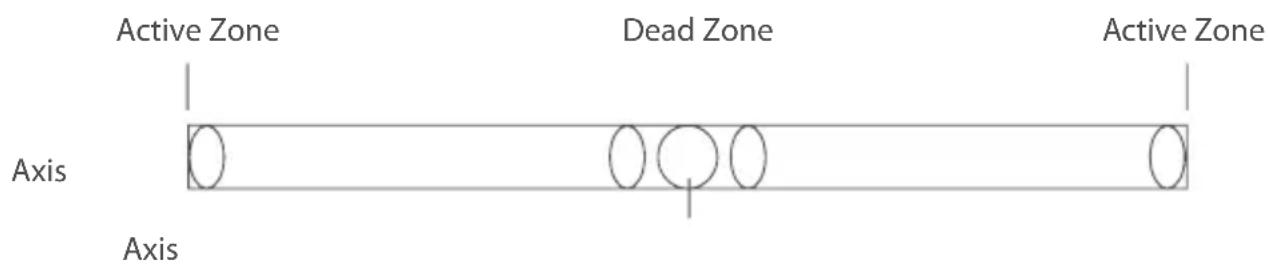
Enter Option > Controllers > Dead Zone.
Adjust the range of Dead Zone and keep the axis within the range
- Settings for Driver "Controller Function" are not functioning You probably have forgotten to confirm the settings. Click "Apply" when settings are selected
Precautions
• Please carefully read this manual before using the wheel
• Do not hit, drop or otherwise abuse it.
• Do not disassemble, modify or try to repair it by yourself
• Do not store it in places that are moist, hot or greasy.
Pedals appendix
Preset: Small Pedals
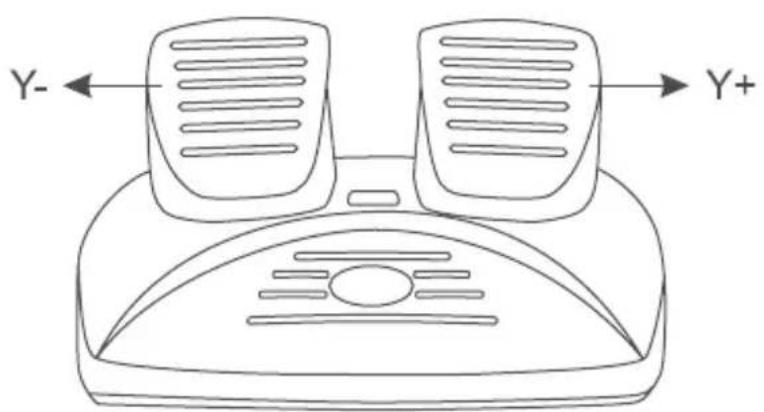
GB
Caution!
- Do not expose the gaming wheel to direct sunlight, moisture or extremely hot environment. Use the device in temperature of 5 \~ 35°C.
- Do not allow liquids to penetrate inside the device.
• Do not put heavy objects on the device. - Do not disassemble.
- Do not pull or twist the USB cable of the device.
- Avoid dropping or breaking.
Waste Electrical and Electronic Equipment (WEEE) Symbol

The use of the WEEE symbol indicates that this product may not be treated as household waste. By ensuring this product is disposed of correctly, you will help protect the environment. For more detailed information about the recycling of this product, please contact your local authority, your household waste disposal service provider or the shop where you purchased the product.
lvadas
ACME STi Racing Wheel
LT
3 pav.
4 pav.
LT
LT
Vairavimo funkciju patikrinimas
6 pav.
7 pav.
LT
LT
8 pav.
Trikčių šalinimas
ACME STi Racing Wheel
- attêls
LV
Pärbaude
- attêls
LV
LV
LV
- attêls
- attêls
LV
Problēmu novēršana
ACME STi Racing Wheel
EE
Joonis 3
Tootetest
- Testiliides
Joonis 4
EE
EE
Draiveri desinstallimine
Joonis 7
EE
EE
Joonis 8
Törkeotsing
ACME STi Racing Wheel
RU
Рисунок 3
RU
Проверка продукта
Рисунок 4
Рисунок 7
Рисунок 8
RU
Diagram 3
Testowanie produktu
Diagram 4
PL
PL
Diagram 7
PL
PL
Diagram 8
ACME STi Racing Wheel
DE
Bild 3
DE
Produkttest
- Testschnittstelle
Bild 4
DE
SE
Bild 7
Bild 8
DE
Fehlerbehebung
Порт для кабелю
USB кабель
Малюнок 3
Тестування продукту
Малюнок 4
UA
UA
Малюнок 7
UA
Малюнок 8
Пошук несправностей
ACME STi Racing Wheel
RO
Figura 3
RO
Testarea produsului
• Testarea interfetei
Figura 4
RO
Figura 7
Figura 8
RO
Depanare
ACME STi Racing Wheel
BG
Фигура 3
Фигура 4
BG
BG
Фигура 7
BG
BG
Фигура 8
ACME STi Racing Wheel
ES
Imagen 3
ES
Prueba del producto
Imagen 4
Imagen 7
Imagen 8
ES

ES
FR
Ports
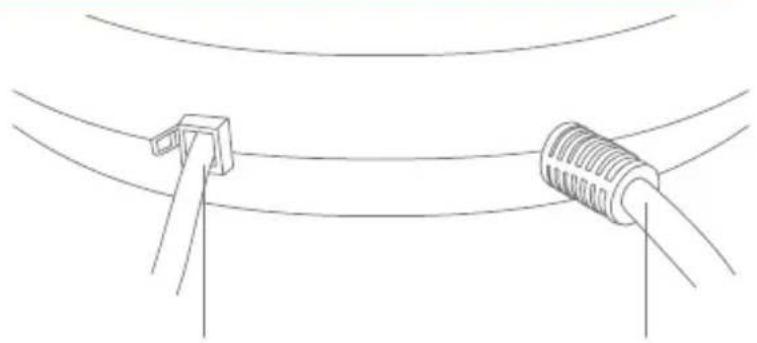
ACME STi Racing Wheel
FR
Image 3
Essai de l'appareil
- Interface d'essai
Image 4
FR
FR
Image 7
FR
FR
Image 8
Dépannage
ACME STi Racing Wheel
PT
Figura 3
PT
Teste do Produto
Figura 4
Teste de Funcionamento do Driver
PT
PT
Desinstalar o Driver
Figura 7

PT
Figura 8
PT
| Product Product model | |
| Product purchase date Seller name, address | |
| Failures (date, description, position of the person who accepts the product, first name, last name and signature) | |
1. Warranty period
Warranty enters into force starting with the day when the buyer acquires the product from the seller. Warranty period is indicated on the package of the product.
2. Warranty conditions
The warranty is valid only by providing an original document of the product acquisition and this warranty sheet, which includes name of the product model, product purchase date, name and address of the seller.
If it is noticed during the warranty period that the product has faults and these faults where not caused by any of the reasons when the warranty is not applied as indicated in the paragraphs below, manufacturer undertakes to replace the product.
The warranty is not applied to regular testing, maintenance and repair or replacement of the parts which are worn out naturally.
The warranty is not applied if damage or failures occurred due to the following reasons:
- Inappropriate installation of the product, inappropriate if no failures are detected in the product, all the expenses in relation to the service are covered by the buyer.
usage and/or operating the product without following the manual, technical requirements and safety standards as provided by the manufacturer, and additionally, inappropriate warehousing, falling from heights as well as hard strikes.
• Corrosion, mud, water and sand.
- Repair works, modifications or cleaning, which were performed by a service not authorised by the manufacturer.
- Usage of the spare parts, software or consumptive materials which do not apply to the product.
- Accidents or events or any other reasons which depend on the manufacturer, which includes lightning, water, fire, magnetic field and inappropriate ventilation.
- If the product does not meet standards and specifications of a particular country, in which it was not bought. Any attempt to adjust the product in order to meet technical and safety requirements such as those in the other countries withdraws all the rights to the warranty service.
If no failures are detected in the product, all the expenses in relation to the service are covered by the buyer.
LT
Garantinis lapas www.acme.eu/warranty


- STI RACING WHEEL
- PACKAGE CONTENTS
- FEATURES AND SPECIFICATION
- BUTTONS LAYOUT
- GB PORTS
- DRIVER INSTALLATION AND SETTINGS
- DRIVER INSTALLATION
- GB
- PRODUCT TEST
- DRIVER FUNCTION TEST
- VIBRATION TEST
- DRIVER UNINSTALL
- TROUBLESHOOTING
- PRECAUTIONS
- PEDALS APPENDIX
- CAUTION
- WASTE ELECTRICAL AND ELECTRONIC EQUIPMENT (WEEE) SYMBOL
- LVADAS
- LT
- VAIRAVIMO FUNKCIJU PATIKRINIMAS
- TRIKČIŲ ŠALINIMAS
- LV
- PÄRBAUDE
- PROBLĒMU NOVĒRŠANA
- EE
- TOOTETEST
- TESTILIIDES
- DRAIVERI DESINSTALLIMINE
- TÖRKEOTSING
- RU
- ПРОВЕРКА ПРОДУКТА
- TESTOWANIE PRODUKTU
- PL
- DE
- PRODUKTTEST
- SE
- FEHLERBEHEBUNG
- ТЕСТУВАННЯ ПРОДУКТУ
- UA
- ПОШУК НЕСПРАВНОСТЕЙ
- RO
- TESTAREA PRODUSULUI
- DEPANARE
- BG
- ES
- PRUEBA DEL PRODUCTO
- PORTS
- FR
- ESSAI DE L'APPAREIL
- DÉPANNAGE
- PT
- TESTE DO PRODUTO
- TESTE DE FUNCIONAMENTO DO DRIVER
- DESINSTALAR O DRIVER
- WARRANTY PERIOD
- WARRANTY CONDITIONS
- GARANTINIS LAPAS WWW.ACME.EU/WARRANTY
Brand : Acme Made
Model : STi
Category : Controller