RGR380 - Thermometer Cresta - Free user manual and instructions
Find the device manual for free RGR380 Cresta in PDF.



| Product Type | Weather station with indoor/outdoor thermometer and rain gauge |
| Brand | Cresta |
| Model | RGR380 |
| Main unit power | 2 AA batteries (included) |
| Rain gauge/outdoor sensor power | 2 AA batteries (included) |
| Indoor temperature measurement range | 0 °C to 50 °C (32 °F to 122 °F) |
| Outdoor temperature measurement range | -20 °C to 60 °C (-4 °F to 140 °F) |
| Transmission range | Up to 30 m (in open space) |
| Transmission frequency | 433 MHz |
| Display | LCD with time, date, temperatures, precipitation, graphs |
| Main functions | Indoor/outdoor temperature, precipitation measurement, history (hourly, 24h, daily, weekly, monthly), min/max memory, temperature alarms, trend |
| Time display | 12 or 24-hour format, calendar with day |
| Temperature units | °C or °F |
| Rain gauge technology | Tipping bucket with decreasing rain detection |
| Precipitation memory | Daily (7 days), weekly (7 weeks), monthly (7 months) |
| Alarms | Programmable for indoor and outdoor min/max temperatures |
| Installation | Tabletop or wall-mounted for main unit, ground or flat surface mounting for rain gauge |
| Dimensions | Main unit: approx. 14 x 10 x 5 cm (estimated) |
| Weight | Approx. 300 g (estimated) |
| Maintenance | Clean with a soft, dry cloth; protect from frost; replace worn batteries |
| Safety | Do not mix new and old batteries; use quality alkaline batteries; do not expose to excessive moisture |
| Repairability | Battery replacement possible; spare parts not specified |
Frequently Asked Questions - RGR380 Cresta
User questions about RGR380 Cresta
0 question about this device. Answer the ones you know or ask your own.
Ask a new question about this device
Download the instructions for your Thermometer in PDF format for free! Find your manual RGR380 - Cresta and take your electronic device back in hand. On this page are published all the documents necessary for the use of your device. RGR380 by Cresta.
USER MANUAL RGR380 Cresta
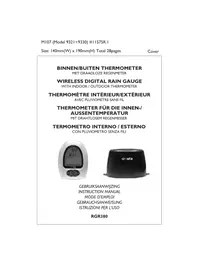
BINNEN/BUITEN THERMOMETER
MET DRAADLOZE REGENMETER
WIRELESS DIGITAL RAIN GAUGE
WITH INDOOR / OUTDOOR THERMOMETER
THERMOMÉTURE INTÉRIEUR/EXTÉRIEUR
AVEC PLUVIOMÉTRE SANS FIL
THERMOMETER FÜR DIE INNEN-/ AUSSENTEMPERATUR
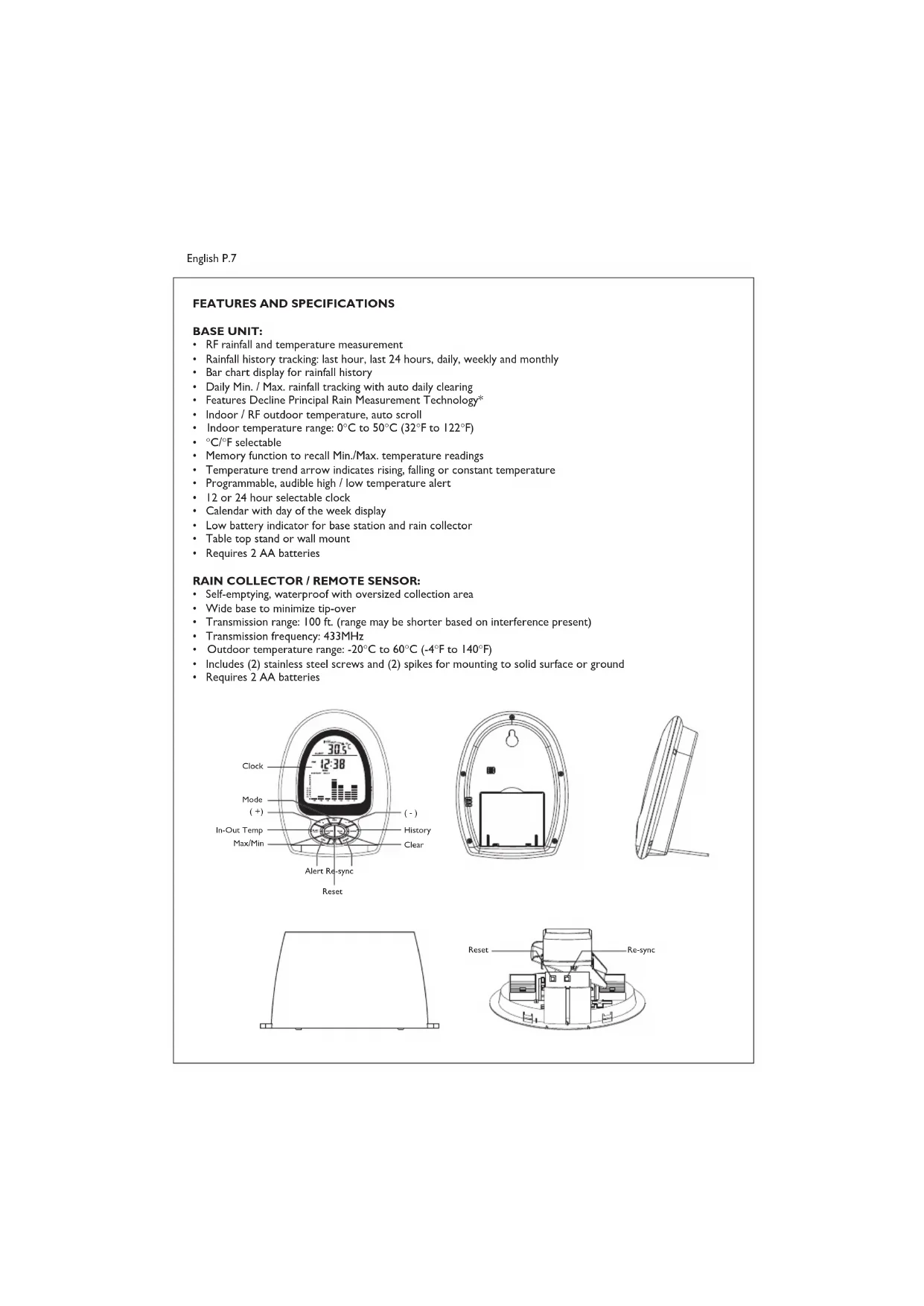
RF rainfall and temperature measurement
Rainfall history tracking: last hour, last 24 hours, daily, weekly and monthly
- Bar chart display for rainfall history
Daily Min. / Max. rainfall tracking with auto daily clearing
- Features Decline Principal Rain Measurement Technology*
- Indoor / RF outdoor temperature, auto scroll
- Indoor temperature range: 0^ C to 50^ C (32°F to 122°F)
- 0^ / 0^ selectable
Memory function to recall Min./Max. temperature readings
- Temperature trend arrow indicates rising, falling or constant temperature
Programmable, audible high / low temperature alert
12 or 24 hour selectable clock
Calendar with day of the week display
- Low battery indicator for base station and rain collector
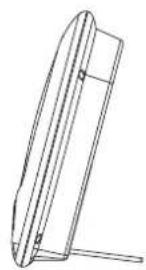
Table top stand or wall mount
- Requires 2 AA batteries
RAIN COLLECTOR / REMOTE SENSOR:
Self-emptying, waterproof with oversized collection area
- Wide base to minimize tip-over
Transmission range: 100 ft. (range may be shorter based on interference present)
Transmission frequency: 433MHz
- Outdoor temperature range: -20^ to 60^ (-4°F to 140°F)
- Includes (2) stainless steel screws and (2) spikes for mounting to solid surface or ground
- Requires 2 AA batteries
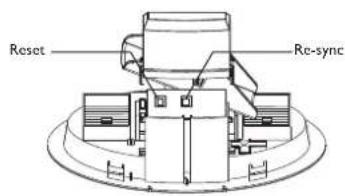
Reset
BATTERY INSTALLATION AND ACTIVATION
Warning:
- Do not mix old and new batteries.
- Do not mix alkaline, standard (carbon zinc), or rechargeable (nickel cadmium) batteries.
- For maximum performance in normal conditions we recommend using good quality alkaline batteries. When temperatures are below 0^ , alkaline batteries can lose power resulting in a loss of remote transmission. If you reside in an area that experiences frequent temperatures below freezing, we recommend using lithium batteries to minimize the loss of transmission.
Battery installation of Base Unit
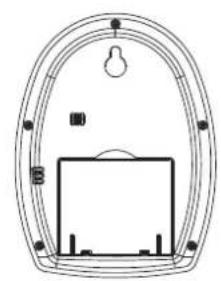
- Open the battery door at the back of the base unit and insert (2) AA batteries according to the polarity markings. Replace the battery door.
- Insert the end of a paper clip into the hole in RESET and push the button.
- Set the clock and calendar as follows.
Setting the Calendar, Clock, ^ / ^
- When either the clock or calendar is being displayed, press and hold the MODE button for 3-4 seconds until the year display is flashing
- Press + or - to set the year
- Press MODE to display the date
- Press + or - to set the month and day
- Press MODE to display time
- Press + or - to set the time
- Press MODE and the display will show 12 hr
- Press + or - to set your clock to 12 hr or 24 hr time format
- Press MODE and the temperature field will be flashing
- Press + or - to select °F or °C format
- Press MODE to lock in the settings
Note: If you set the time and date after initial activation, the accuracy of the rainfall history data may be affected. Reset the unit to clear the history by pressing the RESET button then set your desired time and date.
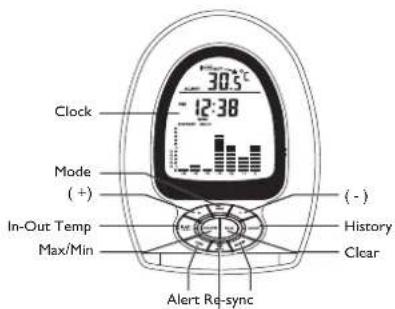
- Press the RE-SYNC button.
- Position the Rain Collector/Remote Sensor close to the base unit.
Battery installation of Rain collector
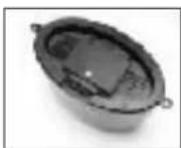
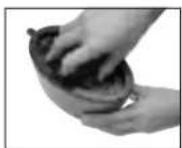
- Press the hook and open the rain collector unit outer case and remove the inner cover to access RESET/RE-SYNC buttons.
- Using a coin, unscrew the battery door at the bottom of the rain collector and insert (2) AA batteries according to the polarity markings.
- Press the RESET button.
- Replace the battery door.
- Remove the tape from the pendulum inside to allow it to move freely.
- Close the outer case.
Note:Make sure the battery door is closed securely to prevent water leakage.
- When the OUT temperature is shown on the display of the base unit, synchronization between the base unit and the remote sensor is complete.
POWER UP SYNCHRONIZATION
The base unit will search for the RF signal from the rain collector for 6 minutes after reset or after batteries are inserted. When the temperature display on the main unit shows the OUT temperature, synchronization between the base unit and remote unit is complete.
The top, left of the base unit display will show the icon to indicate signal transmission. If the OUT temperature does not show on the display within 6 minutes after reset, press the RE-SYNC button and the main unit will search for the RF signal for another 6 minutes. If the base unit still fails to show the out temperature, refer to the LOSING SYNCHRONIZATION section.
Locating the Base Unit and Remote Sensor
- Choose a suitable place for the base unit and remote outdoor sensor, within the transmission distance.
- Place the base unit near a window, but away from direct sunlight or sources of heat or air conditioning to ensure accurate temperature readings.
- The location you choose is critical for maximizing the transmission range. The remote sensor is designed to transmit unimpeded 80 to 100 ft. Transmitting through walls, metal doors and metal framed windows may reduce the transmission range. To optimize the transmission distance, the remote unit should be positioned in a location that minimizes these obstructions. Other interference from electrical sources such as home security systems, wireless doorbells and wireless home entertainment equipment may interrupt the transmission signal temporarily.
Notes:
- The outdoor rain collector must be placed on a level, horizontal surface for accurate rainfall measurement.
- Warning: Ice will affect the accuracy of rainfall readings and will damage the internal mechanism of the rain collector. In temperatures below freezing the collector can remain outdoors for temperature data transmission, but the unit must be placed in a protected area to prevent ice damage.
INDOOR AND OUTDOOR TEMPERATURE
- The indoor temperature is shown after activation until the first outdoor temperature signal is received. The display will then change to the outdoor temperature reading.
- Press the IN-OUT TEMP button to toggle between indoor and outdoor temperature.
- To activate Auto Scroll mode, press and hold the IN-OUT TEMP button for 3-4 seconds. Double curved arrows will show at the top of the LCD display and the unit will automatically toggle between indoor and outdoor temperature. Press and hold the IN-OUT TEMP button for 3-4 seconds to de-activate Auto-Scroll mode.
- The temperature trend arrow which is located directly above the temperature reading will indicate the trend of indoor and outdoor temperatures during the last three minutes.
TEMPERATURE ALERT
When either the indoor or outdoor temperature exceeds the upper or lower pre-set limits, the alarm will sound for five seconds. It will be accompanied by a flashing alert icon and flashing arrow to show that the temperature has reached the upper or lower limit. The audible alert will sound for five seconds every minute.
Setting the Temperature Alert:
- When setting the alert temperatures, the display will change in increments of 1.8^ or 1.0^ .
- Press and hold the ALERT button until the alert icon, up arrow and IN icon are shown on the display and the alert temperature is flashing
- Press + or - to set the desired indoor alert temperature upper limit
-
Press ALERT and the down arrow will be displayed. Press + or - to set the desired indoor alert temperature lower limit
-
Press ALERT and the up arrow and OUT icon will be displayed. Press + or - to set the desired outdoor alert temperature upper limit
- Press ALERT and the down arrow will be displayed. Press + or - to set the desired outdoor alert temperature lower limit
- Press ALERT to confirm the settings and exit the alert temperature setting mode.
Activating the Temperature Alert:
After you have entered all your temperature alert limits press ALERT and the system will be activated. The alert icon will show on the display.
De-activating the Temperature Alert:
- Press the ALERT button when either the indoor or outdoor temperature has exceeded the limit. The audible alert will stop and the alert icon will stop flashing. The arrow icon will continue to flash to indicate the out of range condition.
- The alert will sound again if the indoor or outdoor temperature falls back within the upper or lower limit and then exceeds the upper or lower limit again.
To turn off the alert permanently, press ALERT until the alert icon is no longer displayed.
VIEWING CLOCK,CALENDAR, RAINFALL RATE AND TOTAL RAINFALL
- Press the MODE button to toggle the main display between time, date, rainfall rate and total rainfall.
- The rainfall reading is accumulative data since the last press of either the RESET or CLEAR button. To clear the rainfall reading, press the CLEAR button when the rainfall reading is shown on the display.
RAIN FALL HISTORY
This unit has a large capacity memory that can store and display:
- Last hour rain fall
- Last 24 hours total rain fall
- Daily rain fall (Up to last six days as well as current day)
Weekly rain fall (Up to last six weeks as well as current week)
Monthly rain fall (Up to last six months as well as current month)
The Daily Rainfall history bar chart is set as the default display after activation.
To view the rainfall history for other time periods:
Press HISTORY once to display the weekly rainfall
Press again to display monthly
- Press again to display last hour (will display for 5 seconds only)
- Press again to display last 24 hours (will display for 5 seconds only)
- Press again to return to daily
More detailed daily, weekly and monthly history data are available. Press and hold the HISTORY button when your desire corresponding history data are shown. The "0" (Current) bar will show up and the precise data will be shown on the time display. Press + or - and you can scroll through the daily, weekly or monthly prior data.
Note: On the bar chart display, the "0" represents the current period. -1, -2, etc. indicate the prior periods.
Temperature Maximum and Minimum
The highest and lowest record of indoor temperature, outdoor temperature and rainfall are stored automatically after you activate the base unit. You can recall the records at any time by pressing the MAX/MIN button. With each press of the button, in sequence the display will show; indoor maximum reached, indoor minimum reached, outdoor maximum, outdoor minimum, rainfall maximum and rainfall minimum. The corresponding MAX or MIN icon will be displayed each time. To clear any maximum or minimum record, press the CLEAR button when the appropriate record is shown on the display.
Rainfall Maximum and Minimum
The rainfall maximum and minimum record is a daily record which counts from 12:00am to 11:59pm every day. Aside from the automatic daily clear, the rainfall maximum or minimum record can be cleared by pressing the CLEAR button when the appropriate record is shown on the display.
LOSING SYNCHRONIZATION
If the main unit displayed a proper OUT temperature and rainfall rate, but now displays blanks "--C" or "--mm", the unit may have lost synchronization. If this occurs, press the RE-SYNC button of the main unit and the RE-SYNC button on the rain collector. The base unit will search for the RF signal for 6 minutes and will reinitialize synchronization with the remote unit.
*DECLINE PRINCIPAL RAIN MEASUREMENT TECHNOLOGY
One of the features that defines our wireless rain gauge as superior to competition is Decline Principle Rainfall Technology.
Inside the collector housing there is a teeter bar that has a spoon shaped collector on each end. When it rains, the rain drains into one of the spoons until the weight of the rain causes the teeter bar to tip to one side. When the opposing spoon collects enough rain it will cause the teeter bar to tip the other way. The rate of the rocking back and forth of the teeter bar is translated into a measurement of rainfall and this data is transmitted to the base station. The software of competitive units also measures the rocking back and forth of this teeter motion but has a flaw. When rain is falling steadily and then slows to a trickle it will give a reading based on the last tip of the teeter bar. It will assume the same continued rate of rainfall from the last tip and does not recognize the sudden change. Your rain gauge with Decline Principal Rainfall Technology is superior in that it is programmed to account for this sudden difference in rainfall rate. This translates to more accurate readings.