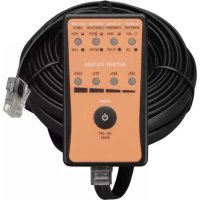
APSRMSW - Controller Tripp Lite - Free user manual and instructions
Find the device manual for free APSRMSW Tripp Lite in PDF.


| Product Type | Remote for sine wave inverter/charger |
| Brand | Tripp Lite |
| Model | APSRMSW |
| Intended Use | Remote control and monitoring of APS1012SW, APS2012SW, APSX1012SW, APSX2012SW inverters/chargers |
| Maximum operating distance | 9.75 meters (32 feet) |
| Communication Port | RJ45 |
| Communication Cable | 9.75 meter (32 foot) RJ45 cable included |
| Depth | 21.3 mm (0.84 inch) |
| Weight (estimated) | 200 g |
| Material | Plastic |
| Mounting | On fixed, flat surface, mounting holes |
| Included Accessories | Mounting screws, plastic conical anchors |
| LED Indicators | LED: inverter mode (steady/flashing in search), charger mode (flashing/full charge), thermal condition, battery limits, battery voltage bar |
| Control Button | ON/OFF |
| Power | Powered by the inverter/charger via RJ45 cable |
Frequently Asked Questions - APSRMSW Tripp Lite
User questions about APSRMSW Tripp Lite
0 question about this device. Answer the ones you know or ask your own.
Ask a new question about this device
Download the instructions for your Controller in PDF format for free! Find your manual APSRMSW - Tripp Lite and take your electronic device back in hand. On this page are published all the documents necessary for the use of your device. APSRMSW by Tripp Lite.
USER MANUAL APSRMSW Tripp Lite
Warranty: Registration: register online today for a chance to win a FREE Tripp Lite product—www.triplite.com/warranty
Owner's Manual
Remote Control for Sine Wave Inverter/Charger
Model: APSRMSW
Español 5
Français 9
Русский 13

1111 W. 35th Street, Chicago, IL 60609 USA
www.tripplite.com/support
Copyright © 2010 Tripp Lite. All rights reserved.
Overview
The APSRMSW Remote Control is designed for use with Tripp Lite Sine Wave DC-to-AC Inverter/Chargers (APS1012SW / APS2012SW / APSX1012SW / APSX2012SW). It allows the user to power the Inverter/Charger ON and OFF and monitor inverter and battery status from up to 32 ft. away.
Note: This manual serves as a quick reference guide to the remote and its functions. The remote acts as a mirror of the LEDs on the Inverter/Charger, and you should therefore reference the manual provided with your Inverter/Charger for a more detailed description of the LEDs.
Product Features
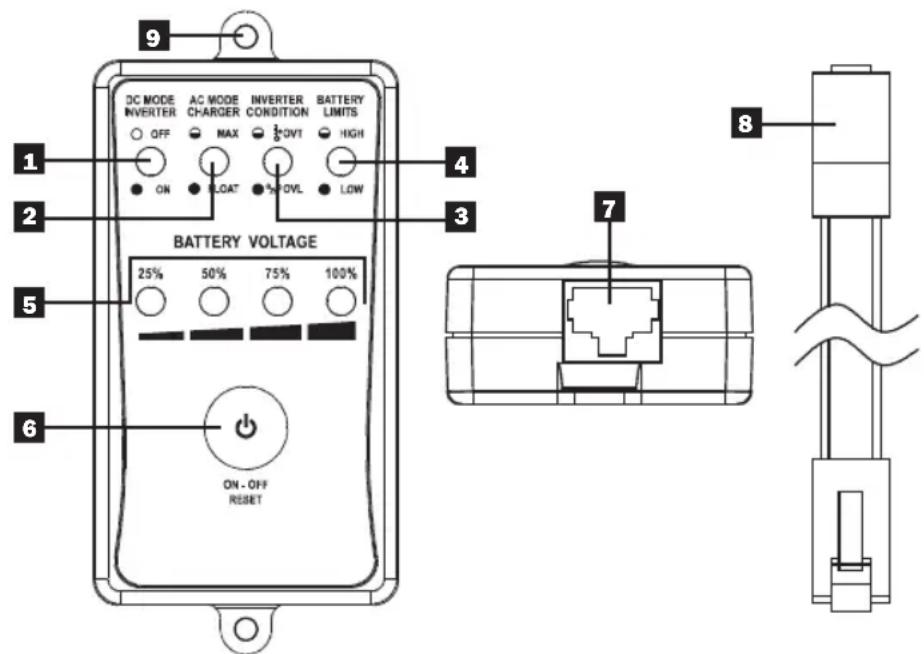
1 DC Mode Inverter: This LED illuminates to indicate that the system is working in inverter mode (supplying power from battery).
Note: The LED will flash when inverter is in search mode.
2 AC Mode Charger: The LED flashes during the charging process and remains illuminated once the battery is fully charged.
3 Inverter Condition: When the inverter temperature exceeds the default setting, this LED will illuminate and the inverter will shut down automatically. After the temperature returns to normal, depress the Power ON/OFF button to restart.
4 Battery Limits: This LED illuminates when the battery charge is too low or too high.
5 Battery Voltage LED Bar: These LEDs show the remaining battery capacity.
6 Power ON/OFF Button: Press to power the Inverter/Charger ON or OFF.
7 Communication Port (RJ45): Receives data from Inverter/Charger via Communication Cable.
Product Features continued
8 Communication Cable (32 ft.): Connects APSRMSW to Inverter/Charger via an RJ45 connection.
9 Mounting Holes: Allow APSRMSW to be mounted on a fixed, flat surface.
Accessories
- Mounting Screws
- Plastic Conical Anchors
Installation Dimensions
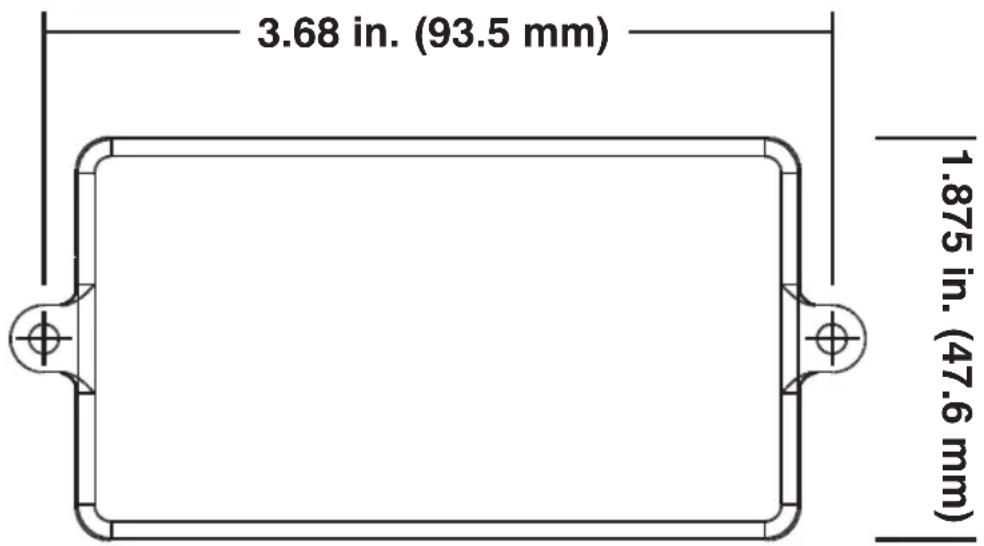
Note: The APSRMSW has a depth of .84 in. (21.3 mm). Please consider before installation.
Warranty & Warranty Registration
1-Year Limited Warranty
TRIPP LITE warrants its products to be free from defects in materials and workmanship for a period of one (1) year from the date of initial purchase. TRIPP LITE's obligation under this warranty is limited to repairing or replacing (at its sole option) any such defective products. To obtain service under this warranty, you must obtain a Returned Material Authorization (RMA) number from TRIPP LITE or an authorized TRIPP LITE service center. Products must be returned to TRIPP LITE or an authorized TRIPP LITE service center with transportation charges prepaid and must be accompanied by a brief description of the problem encountered and proof of date and place of purchase. This warranty does not apply to equipment which has been damaged by accident, negligence or misapplication or has been altered or modified in any way.
EXCEPT AS PROVIDED HEREIN, TRIPP LITE MAKES NO WARRANTIES, EXPRESS OR IMPLIED, INCLUDING WARRANTIES OF MERCHANTABILITY AND FITNESS FOR A PARTICULAR PURPOSE. Some states do not permit limitation or exclusion of implied warranties; therefore, the aforesaid limitation(s) or exclusion(s) may not apply to the purchaser.
EXCEPT AS PROVIDED ABOVE, IN NO EVENT WILL TRIPP LITE BE LIABLE FOR DIRECT, INDIRECT, SPECIAL, INCIDENTAL OR CONSEQUENTIAL DAMAGES ARISING OUT OF THE USE OF THIS PRODUCT, EVEN IF ADVISED OF THE POSSIBILITY OF SUCH DAMAGE. Specifically, TRIPP LITE is not liable for any costs, such as lost profits or revenue, loss of equipment, loss of use of equipment, loss of software, loss of data, costs of substitutes, claims by third parties, or otherwise.
WARRANTY REGISTRATION
Visit www.triplite.com/warranty today to register the warranty for your new Tripp Lite product. You'll be automatically entered into a drawing for a chance to win a FREE Tripp Lite product!*
* No purchase necessary. Void where prohibited. Some restrictions apply. See website for details.
Regulatory Compliance Identification Numbers
For the purpose of regulatory compliance certifications and identification, your Tripp Lite product has been assigned a unique series number. The series number can be found on the product nameplate label, along with all required approval markings and information. When requesting compliance information for this product, always refer to the series number. The series number should not be confused with the marking name or model number of the product.
WARNING!
Use of this equipment in life support applications where failure of this equipment can reasonably be expected to cause the failure of the life support equipment or to significantly affect its safety or effectiveness is not recommended. Do not use this equipment in the presence of a flammable anesthetic mixture with air, oxygen or nitrous oxide.
WEEE Compliance Information for Tripp Lite Customers and Recyclers (European Union)
Under the Waste Electrical and Electronic Equipment (WEEE) Directive and implementing regulations, when customers buy new electrical and electronic equipment from Tripp Lite they are entitled to:
- Send old equipment for recycling on a one-for-one, like-for-like basis (this varies depending on the country)
- Send the new equipment back for recycling when this ultimately becomes waste
Tripp Lite follows a policy of continuous improvement. Product specifications are subject to change without notice.

1111 W. 35th Street, Chicago, IL 60609 USA
www.tripplite.com/support
201009089 • 933055-EN
1111 W. 35th Street, Chicago, IL 60609 USA
www.tripplite.com/support
1111 W. 35th Street, Chicago, IL 60609 USA
www.tripplite.com/support
1111 W. 35th Street, Chicago, IL 60609 USA
www.tripplite.com/support
1111 W. 35th Street, Chicago, IL 60609 USA www.tripplite.com/support
1111 W. 35th Street, Chicago, IL 60609 USA
www.tripplite.com/support
1111 W. 35th Street, Chicago, IL 60609 USA www.tripplite.com/support

- Owner's Manual
- Remote Control for Sine Wave Inverter/Charger
- Overview
- Product Features
- Product Features continued
- Accessories
- Installation Dimensions
- Warranty & Warranty Registration
- 1-Year Limited Warranty
- WARRANTY REGISTRATION
- Regulatory Compliance Identification Numbers
- WARNING!
- WEEE Compliance Information for Tripp Lite Customers and Recyclers (European Union)
Brand : Tripp Lite
Model : APSRMSW
Category : Controller